Renko Chart Custom

"Renko Chart Custom"

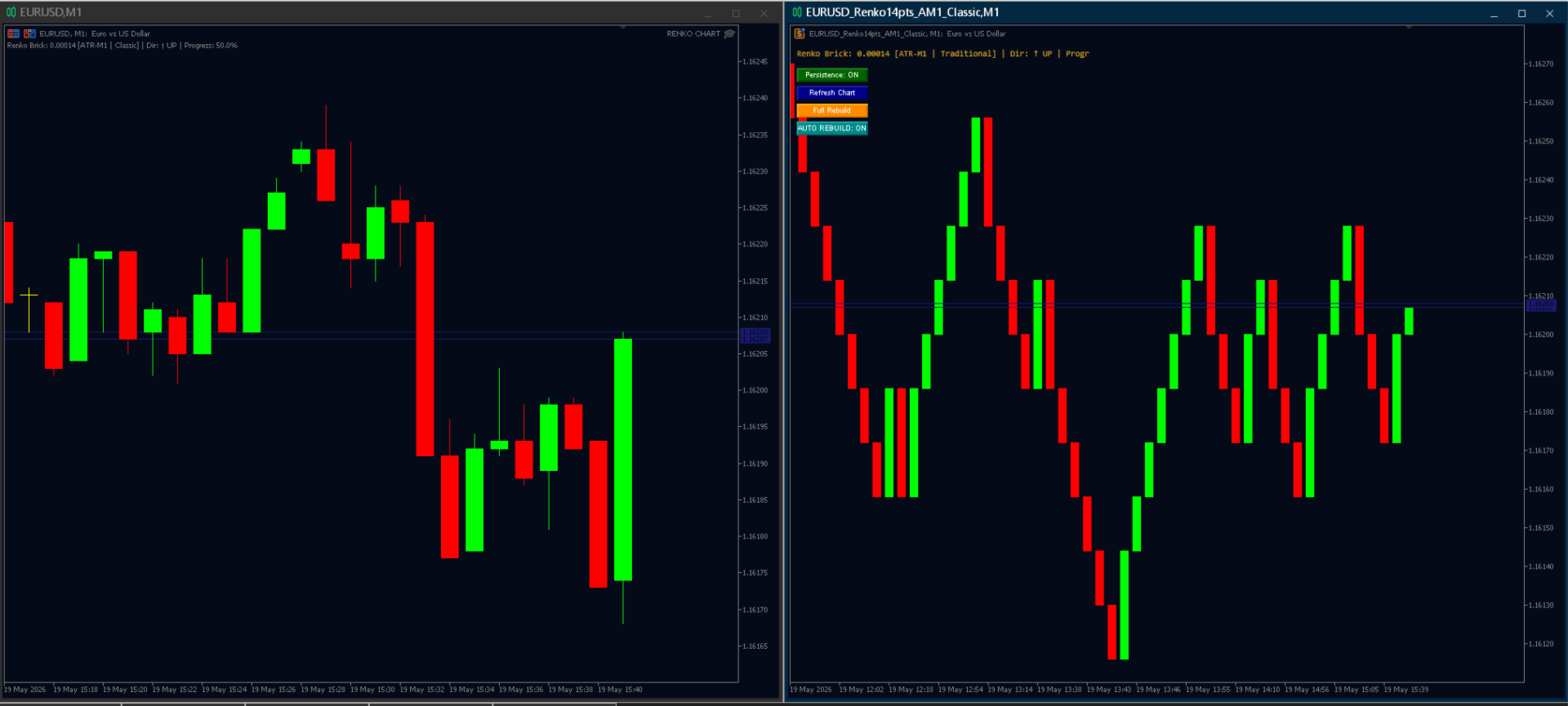
This Expert Advisor creates a custom offline Renko chart in real time with high precision and stability. Perfect for traders looking for a clean market view, eliminating noise and focusing on the true price direction.

Main Features
6 Advanced Brick Size Methods

"Fixed" — Fixed size in points
"ATR M1" — Based on ATR from the M1 timeframe
"ATR Daily" — Daily ATR divided by a divisor (great for real daily volatility)
"% of Price" — Percentage of the current price (ideal for XAUUSD, indices, and high-value assets)
"Historical Volatility" — Historical volatility based on standard deviation of log returns
"Pips" — Fixed size in pips (compatible with any broker)

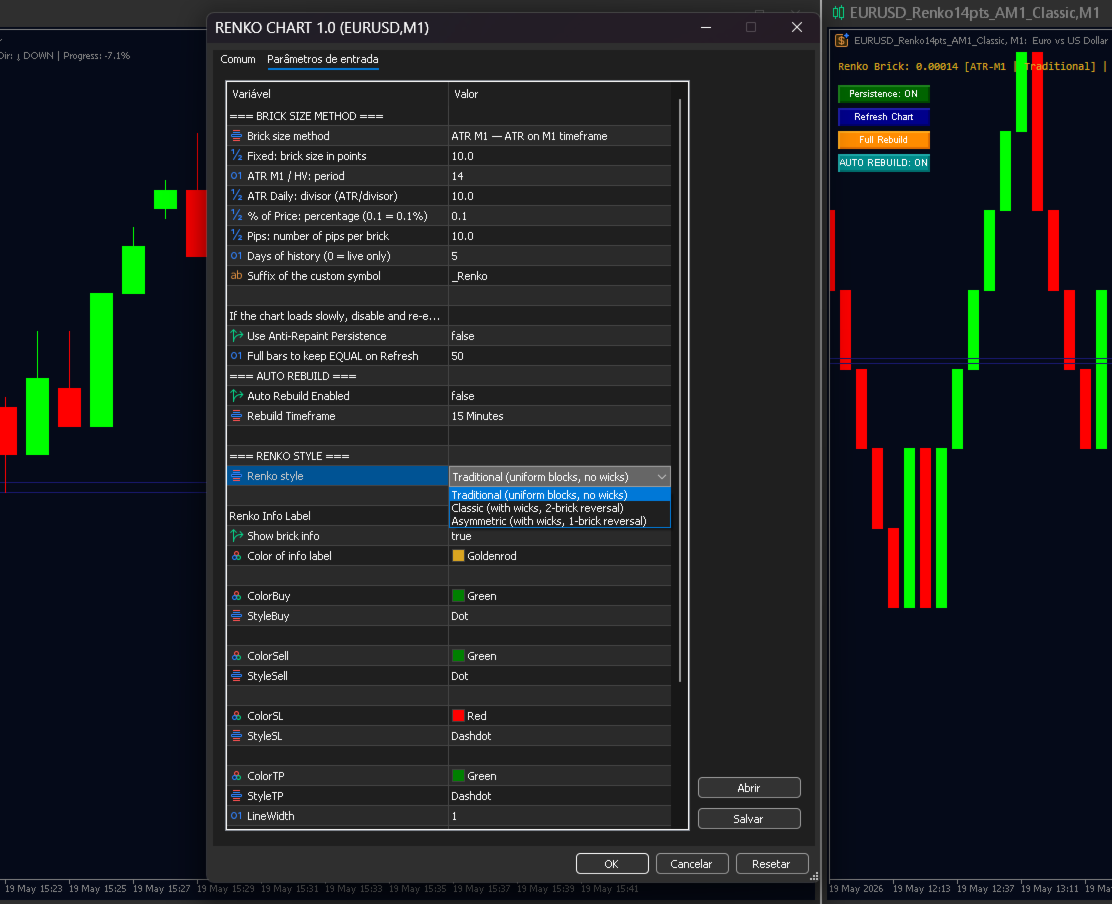
3 Renko Styles (Main Difference)

"Traditional" — Classic wickless Renko. Uniform and very clean blocks. Ideal for traders who prefer clear trend and support/resistance reading.
"Classic" — Renko with wicks and 2-brick reversal. Follows the traditional Renko concept, showing price rejection through wicks.
"Asymmetric" — Renko with wicks and only 1-brick reversal. More sensitive and responsive to direction changes. Excellent for scalping, day trading, and swing trading.

"Anti-Repaint Persistence" — Keeps the chart exactly the same even after restarting MT5
"Preserve Last Bars" — Preserves the latest candles during Refresh/Rebuild
"Auto Rebuild" — Automatic rebuild when a new candle is formed on the selected timeframe
"Full Trade Visualization" — Displays open orders, Stop Loss, Take Profit, pending orders, BID, and ASK directly on the Renko chart
"Real-Time Info Label" — Shows brick size, method, style, direction, and current brick progress

Input Parameters

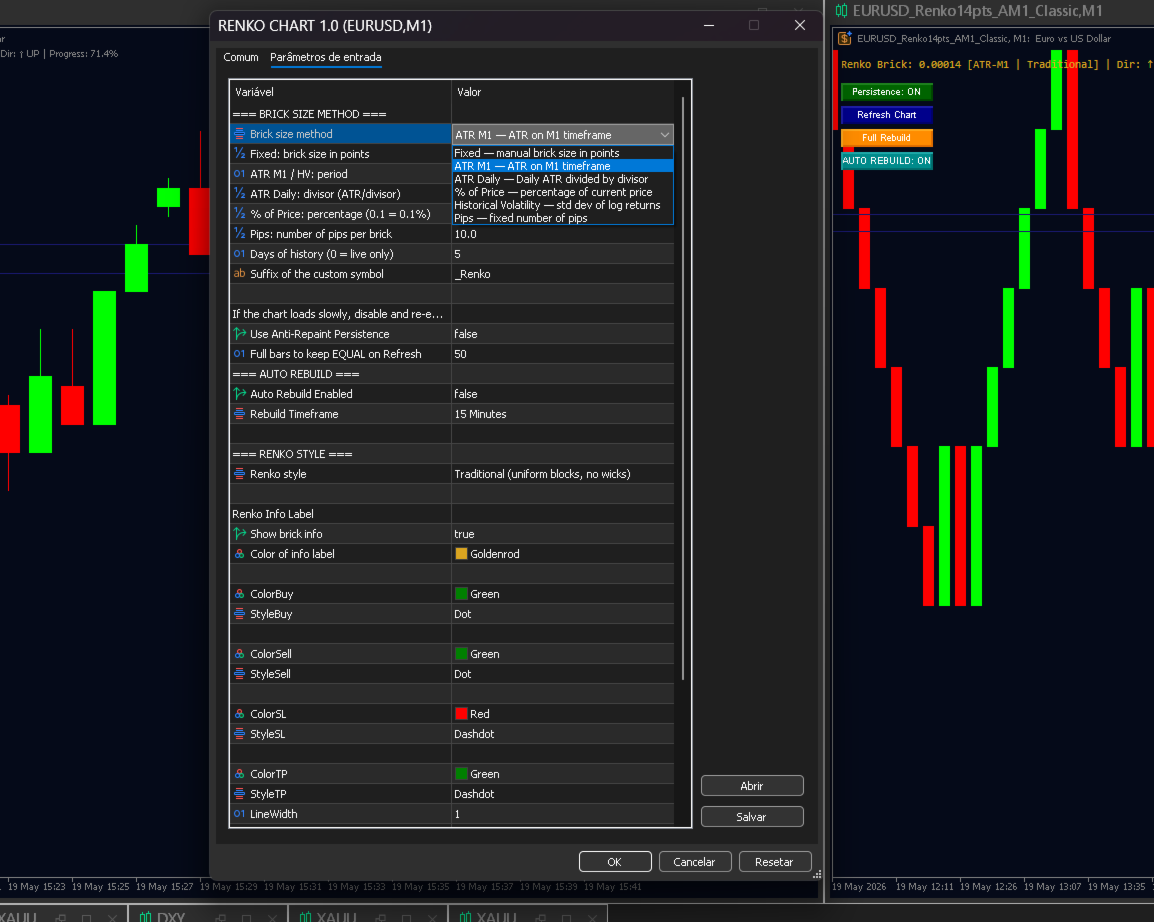
"=== BRICK SIZE METHOD ==="
"Brick size method" — Brick size calculation method
"Fixed: brick size in points" — Fixed size in points
"ATR M1 / HV: period" — ATR / HV period
"ATR Daily: divisor (ATR/divisor)" — Daily ATR divisor
"% of Price: percentage (0.1 = 0.1%)" — Percentage of the current price
"Pips: number of pips per brick" — Number of pips per brick
"Days of history (0 = live only)" — Number of historical days to load

"=== RENKO STYLE ==="

"Renko style" — Renko style (Traditional / Classic / Asymmetric)

Other Parameters
"Use Anti-Repaint Persistence" — Enable/disable anti-repaint persistence
"Full bars to keep EQUAL on Refresh" — Number of bars preserved during refresh
"Auto Rebuild Enabled" — Enable automatic rebuild
"Rebuild Timeframe" — Timeframe used for Auto Rebuild
"Show brick info" — Enable Renko information label

Usage Tips

If the chart takes too long to load with a large amount of history, temporarily disable "Use Anti-Repaint Persistence", load the chart, and enable it again afterward.
The Renko chart is generated as a custom symbol (ends with "_Renko").
Works with any instrument: Forex, Gold, Indices, Cryptocurrencies, Stocks, etc.

Recommended products
World Session Zone Clock for MetaTrader 5 (MT5) *NO DEMO VERSION AVAILABLE* World Session Clock is a professional market session clock for MetaTrader 5 that visually displays global trading sessions in real time . It helps traders quickly identify market opens, closes, and session overlaps without manual time calculations or time-zone adjustments. The product combines a 24-hour analog clock , digital time display , session arcs , and optional chart session zones into a clean, lightweight interf
GDS Renko Ghost Free Renko Market Memory Visualization Indicator for MetaTrader 5 GDS Renko Ghost is a free MetaTrader 5 indicator for traders who use Renko charts and want to study how similar Renko structures behaved in the past. The indicator visualizes historical Renko memory: similar past structures, continuation paths, consensus behavior and uncertainty zones. It does not give buy or sell signals. It does not predict price movement. It is a visual research and context tool for manual Renko
FREE
Renko Maker
Aleksandr Slavskii
5 (1)
Это DEMO версия Renko Maker PRO  к сожалению правила маркета не позволили указать это в названии. Почему то проверка маркета запрещает в названии слово DEMO. Демо версия строит ренко бары только на основе EURUSD из 1000 последних минутных баров. Revolution Renko Maker PRO — Инновационный Конструктор Ренко Графиков для MetaTrader 5   Создавайте идеальные ренко-бары с сохранением тиковых данных и реальных объемов — теперь с полной поддержкой индикаторов, советников и тестера стратегий!  
FREE
Short Description: Prop Firm Protector EZ MT5 is an EA designed to protect your funded account by managing risk and ensuring compliance with the Prop Firm's trading rules. This EA automatically monitors equity levels, closes trades when profit targets or drawdown limits are reached, and provides a visual display of key account metrics. The EA features a Super Easy setup, is simple to use, and works with all different Prop Firm service providers. Overview: Prop Firm Protector EZ MT5 is an Draw
GDS Renko Pip ST Chart - Pip-Based Renko Chart Indicator for MetaTrader 5 GDS Renko Pip ST Chart is a pip-based Renko chart indicator for MetaTrader 5. It helps traders build and study cleaner Renko price movement using a practical fixed pip or point-based brick structure. This tool is designed as a Renko chart foundation for manual analysis. It does not predict the market, does not generate buy or sell signals and does not decide whether a trade should be opened. What Pip ST Chart Does Renko ch
FREE
Professional Renko Chart MT5 Professional Renko Chart MT5 is a clean MetaTrader 5 Renko chart indicator designed to display Renko bricks in a separate indicator window, with optional Renko box visualization directly on the main price chart. The indicator is built for traders who want a familiar Renko chart style inside MetaTrader 5, similar to the Renko chart visualization available on popular modern charting platforms such as TradingView. It converts normal time-based candles into Renko bricks
See exactly how close your account is to your prop firm's daily-loss and max-drawdown floors - live, on the chart, with the real rule math of each firm. Most traders track their daily limit with mental math, and the daily-loss breach is the most common way evaluations end. Breach Radar draws the actual floors: - Daily-loss bar: the exact floor level, the dollar distance remaining, and the percent of today's budget already used - Max-drawdown bar: static or trailing (including trailing that loc
FREE
BoletaMiniPanel
PATRICK ANTONIO MORELO A.
5 (4)
Simple panel with  Stop loss (Loss), Stop gain (Gain) , Trailing stop (TS) and Breakeven (BE-P). Lot is the number of contracts to be traded. Gain is the number, in points, that the stop gain will be positioned. If you don't want to put stop gain, just put 0 (zero) in place and when you open the order it won't have this stop. Loss is the number, in points, that the stop loss will be placed. If you don't want to put stop loss, just put 0 (zero) in place and when you open the order it won't ha
FREE
CosmiCLab SMC FIBO CosmiCLab SMC FIBO is a professional trading indicator designed for traders who use Smart Money Concepts (SMC), market structure analysis and Fibonacci retracement levels. The indicator automatically detects market swings and builds Fibonacci levels based on the latest impulse movement. It also identifies market structure changes such as BOS (Break of Structure) and CHOCH (Change of Character), helping traders understand the current market direction. CosmiCLab SMC FIBO also pr
GDS Renko Matrix - Free Multi-Scale Renko Overview Indicator for MetaTrader 5 GDS Renko Matrix is a free multi-scale Renko overview indicator for MetaTrader 5. It helps traders monitor Renko structure, direction and chart context in a compact matrix-style view. The purpose of this tool is to provide a faster visual overview of Renko behavior without turning the chart into a signal system. It does not predict the market and does not generate buy or sell signals. What Renko Matrix Shows Renko char
FREE
GDS Renko Adaptive - Adaptive Renko Chart Indicator for MetaTrader 5 GDS Renko Adaptive is a free adaptive Renko chart indicator for MetaTrader 5. It helps traders observe price movement through a more flexible Renko structure instead of relying only on one fixed brick-size view. The purpose of this tool is to support manual Renko analysis by making structure, movement rhythm and changing market conditions easier to observe. It does not predict the market and does not generate buy or sell signal
FREE
Renko Builder GLX1
Eranga Thilina Dhanushka Gallage
GLX1 Renko Builder   Expert Advisor (EA) can create the Renko bar charts on any symbol. The Renko charts are generated as real-time custom symbol charts which can be further used for technical analysis with any MT5 compatible indicator.  Find the free   GLX1 Renko Euro   Expert Advisor from here.  https://www.mql5.com/en/market/product/115074 Included Features: Truly responsive Renko Charting on a custom symbol chart Accurate automatic live chart update Ability to attach any MT5 indicator Abi
Precision Instant
Jerson Daryl Herrera Arroyo
FREE TRY P.I.P.S FREE FOR 10 DAYS PRUEBA P.I.P.S GRATIS POR 10 DIAS EN: Download now and get a free 10-day trial license . Full features, demo account, no credit card needed. ES: Descarga ahora y obtén una licencia de prueba gratis por 10 días . Todas las funciones, cuenta demo, sin tarjeta de crédito. 10 DAYS 10 DIAS DEMO ONLY SOLO DEMO FULL ACCESS ACCESO COMPLETO NO CARD SIN TARJETA SEND A MESSAGE TO REQUEST YOUR FREE TRIAL ENVIA UN MENSAJE PARA SOLICITAR TU PRUEBA GRATIS P.I
The Expert Advisor is used to create Renko chart, realtime updates, easy for technical analysis. Backtest your strategy with all indicators with Renko chart in MetaTrader 5. Parameters Box Size : input the number of box size. Show Wicks : if true , draw a candle with high/low. History Start: input the date to creat first candle. Maximum Bars: limit number of bars on renko chart How to use Attach the Expert Advisor to a chart (timeframe M1), for which you want to create a renko. Input box size a
Pulse Trade Dashboard is an interactive trade management panel for MetaTrader 5, built for traders who want full control of their account without leaving the chart. Attach it to any chart and get a real-time overview of your balance, equity, open positions, and floating P&L — all updating live. Place market orders instantly with the one-click BUY and SELL buttons, adjusting your lot size, stop loss, and take profit directly on the dashboard without opening a single settings menu. What's included
FREE
Gino Renko
Stephane, Andr Valette
1 (1)
Another renko-based indicator. It returns different usable values ​​for an EA, and is directly displayed on the main chart. Its setting is very simple: The size of the renko The number of bars taken into account The falling color The color on the rise Returned values: Buffer 0 : Value of the middle Buffer 1 : Value of the Top Buffer 2 : Value of the Bottom Buffer 3 : Direction of renko (0.0 for top ; 1.0 for bottom) Buffer 4 : Ratio of the renko, for example, if it is twice, 3 times, ro more of
This utility EA will display simple renko, hence the name essential renko. The renko will be shown in a new tab and using custom symbol. Please do note (especially for those who new to Renko), that Renko does not follow timeline as it will follow price movement. That's why it has a lot of potential where you can attach any EA that you want and use any custom indicator in this new custom symbol for renko. Always use M1 timeframe. Most of the time you don't need to change anything. But if you d
FREE
TrendbySignal
Zong Quan Zhang
一 運作方式(如下圖) 在一個單邊向上的行情中,   自動交易工具做以下動作: 當價格來到高點,等待突破訊號在進場。 當價格回調,等待回調結束要往上時在進場。 當進場下單後, 如果一直漲就持續持單,等待價格漲不上去準備下來時,在獲利離場。 但如果一直跌,就等待要上漲時在進場,進場時加倍下單,    一個做底單,動作同上等待獲利離場,    另一個單用做倉位修正,此單和第一張單在盈虧為0時會各自平倉,不造成損失。 Ps: 在一個單邊向下的行情中,動作則相反  二 設定方法(如下圖) Step1   一開始要自己指定工具的方向. 如果認為會往上走,設定i_tradeup=true, i_tradedown=false,  如果認為會往下走,設定i_tradeup=false, i_tradedown=true,   Step2   指定目標位置和止損位置 如果認為會往上走,i_top輸入目標位置,i_bottom輸入止損位置 如果認為會往下走,i_top輸入止損位置,i_bottom輸入止盈位置 當價格到達目標位置會強制平倉獲利並暫停工具運作 當價格到達止損位置會反向開單鎖倉
FREE
ChartPan
Leandro Rodrigo Giron
Hey Trader! Boring with the Meta chart? Do you want to move it as you do in Profit? Your problems are over! Now available   Chart Panoramic   or   ChartPan   for closer friends, a utility that allows you to move the chart to better visualize the most relevant points for your trade. Recommend you to add a keyboard shortcut for quick access (Ctrl + Q - for example), because you will need to run   ChartPan   after symbol changing to "release" the chart again. To add a hotkey: after downloading
FREE
Account and Market Dashboard
Ezekiel Bronal Nyangweso
Advanced Account Dashboard & Risk Monitor (MT5) This script provides a real-time on-chart dashboard for monitoring account performance, risk exposure, and execution conditions in MetaTrader 5. It is designed for traders who want clear visibility of account health and risk awareness during live trading or VPS operation. The script does not open trades and does not interfere with any strategy logic . Key Features Account Metrics Live equity, balance, and floating profit/loss Open position count an
FREE
Notificador de Telegram
Thalys Dos Reis Bratifich
Powering Your Operations with Desk Trading - Telegram Notifier In financial markets, timely information is often the difference between success and loss. This is why the Desk Trading Indicator stands out as an essential tool for traders looking for a competitive advantage. This smart notifier is designed to notify, via Telegram, about critical regions on charts of different time frames, making it a valuable ally in your trading journey. Desk Trading Indicator Notifier works as a dedicated vir
I see that many tools in the market deal with Position and Order in the form of operation panels. Which is loaded into a Chart in the form of an EA. However, once the operator panel EA is loaded, no other EAs can be loaded. So, I wrote the one-click operation of Position and Order as a script, so you can load other EAs and easily complete one-click operation of Trade. 1. What is this: This is a one-click script to delete the pending order . Now you can delete pending tickets at high speed, for
Renko Chart
Marcin Konieczny
3.56 (9)
This indicator allows to display Renko charts in the indicator window. Renko charts show only price movements that are bigger than the specified box size. It helps to eliminate noise and allows to focus on main trends. Time is not a factor here. Only price movements are taken into account. That's why Renko chart is not synchronized with the main chart it is attached to. Indicator works in two modes: CLOSE - only close prices are taken into account while building the chart HIGH_LOW - only high/l
FREE
Renko Chartt
George Njau Ngugi
Smart Adaptive Renko Pro – Dynamic ATR & Fixed Box Renko Indicator Smart Adaptive Renko Pro is a powerful non-time-based Renko indicator designed to eliminate market noise and reveal true price momentum with precision. Unlike standard chart candles, this indicator builds Renko bricks based purely on price movement — helping traders focus on trend strength, reversals, and clean breakout structures. Key Features Adaptive ATR-Based Box Size (Auto-adjusts to market volatility) Fixed Pip Box M
GDS Renko Pip ST - Fixed Brick Renko Chart Tool for MetaTrader 5 GDS Renko Pip ST is a Renko chart tool for MetaTrader 5 designed for traders who want to build and study fixed brick Renko movement using a practical pip or point-based setup. The purpose of this tool is simple: create a cleaner Renko structure so the trader can observe direction, brick runs, pullbacks, support and resistance behavior without normal candle noise. This is not a signal indicator and it does not predict the market. It
FREE
GOM Trade Manager
Wannapach Chinnaprapa
GOM Trade Manager helps you execute trades the way you want it. Works on all instruments Forex, Commodities, & Crypto. It helps you with lot calculations, spread addition and balance calculations so you can just focus on actual trading. For full automatic planned management, stackable triggers and spread widening protection >> check out GOM Trade Manager Pro . ------------------------------------------NOTABLE FEATURES------------------------------------------ You set everything based on bid
FREE
VWAP Fibo Bands RSJ
JETINVEST
4.83 (12)
VWAP Fibo Bands RSJ is an indicator that traces the lines of the daily VWAP and from it creates bands using Fibonacci proportions. This spectacular indicator creates 10 band levels through the selected VWAP period using Fibonacci ratios. It is fantastic how the prices respect each level of the bands, where it is possible to realize that almost every time the price closes above / below a level of the bands he will seek the next one. If close above will seek to reach the level above and if close
FREE
GDS Renko Anatomy Free Renko Structure and Movement Anatomy Indicator for MetaTrader 5 GDS Renko Anatomy is a free MetaTrader 5 indicator for traders who use Renko charts and want a clearer way to understand how brick-based movement is built. The indicator helps visualize Renko movement anatomy: structure, legs, pullbacks, pauses, continuation areas and weakening movement phases. It does not give buy or sell signals. It does not predict price movement. It is a visual context tool for manual Renk
FREE
LT Rainbow Trend
Thiago Duarte
5 (1)
== LT RAINBOW TREND - THE TREND INDICATOR WITH 36 MOVING AVERAGES == OVERVIEW LT Rainbow Trend is an advanced technical trend analysis indicator that utilizes 36 simultaneous Moving Averages with a smart color system (Rainbow). Developed for traders who want to trade in the direction of the main trend with maximum visual clarity, the indicator transforms the complexity of multi-timeframe analysis into a simple, colorful, and highly intuitive visualization. Ideal for traders who understand that
The CandleStick Factory is a tool that allow you to perform a market scan and search any candlestick pattern that you already created. The lite version  can be downloaded here :  https://www.mql5.com/en/market/product/75568 You can perform a quick search in the current chart (500 bars will be scanned), or save your custom candlestick patterns, and search in different Symbols/Timeframes that you can select in the settings tab, the scan can be scheduled every 1, 5 or 10 minutes by updating the Ref
FREE
Buyers of this product also purchase
Trade Assistant MT5
Evgeniy Kravchenko
4.41 (215)
It helps to calculate the risk per trade, the easy installation of a new order, order management with partial closing functions, trailing stop of 7 types and other useful functions. Additional materials and instructions Installation instructions - Application instructions - Trial version of the application for a demo account Line function -   shows on the chart the Opening line, Stop Loss, Take Profit. With this function it is easy to set a new order and see its additional characteristics bef
Forex Trade Manager MT5
InvestSoft
4.98 (671)
Trade Manager MT5 is an advanced position size calculator and trade management tool for MetaTrader 5, designed to help traders plan trades faster, control risk more precisely, and manage open positions directly from the chart. It combines order placement, risk based lot calculation, Stop Loss and Take Profit management, Break Even, Trailing Stop, Partial Close, Equity Protection, and external trade management in one panel. Whether you trade forex, indices, metals, commodities, crypto, or future
TradePanel MT5
Alfiya Fazylova
4.88 (166)
Trade Panel is a multi-functional trading assistant. The app contains over 50 trading functions for manual trading and allows you to automate most trading tasks. Before making a purchase, you can test the demo version on a demo account. Download the trial version of the application for a demonstration account: https://www.mql5.com/en/blogs/post/750865 . Full instructions here . Trade. Allows you to perform trading operations in one click: Open pending orders and positions with automatic risk cal
Local Trade Copier EA MT5
Juvenille Emperor Limited
4.97 (146)
Experience exceptionally fast trade copying with the   Local Trade Copier EA MT5 . With its easy 1-minute setup, this trade copier allows you to copy trades between multiple MetaTrader terminals on the same Windows computer or Windows VPS with lightning-fast copying speeds of under 0.5 seconds. Whether you're a beginner or a professional trader, the   Local Trade Copier EA MT5   offers a wide range of options to customize it to your specific needs. It's the ultimate solution for anyone looking t
Astro Trade MT5
Indra Maulana
5 (2)
AstroTrade Trading Assistant AstroTrade is a comprehensive multi-functional trading utility developed for the MetaTrader 5 platform. It integrates essential tools for trade execution, risk management, and technical monitoring into a single unified interface. The application is designed to assist traders in managing their daily operations through a visual and structured environment. Visual Trade Execution and Risk Management The application includes a specialized trading panel that assists in c
================================================================================ POC BREAKOUT - V20.72. Full Professional Grade Toolkit ================================================================================ POC Breakout is a full MetaTrader 5 trading dashboard for discretionary traders who want breakout signals, Point of Control (POC) context, volume profiles, order flow, market structure, news, alerts, and advanced trade planning in one professional workspace. Attached directly to you
Beta Release The Telegram to MT5 Signal Trader is nearly at the official alpha release. Some features are still under development and you may encounter minor bugs. If you experience issues, please report them, your feedback helps improve the software for everyone. Telegram to MT5 Signal Trader is a powerful tool that automatically copies trading signals from Telegram channels or groups directly to your MetaTrader 5 account. It supports both public and private Telegram channels, and you can conn
Telegram to MT5 Multi-Channel Copier automatically copies trading signals from your Telegram channels directly into MetaTrader 5. No bots, no browser extensions, no manual copying. You receive a signal on Telegram and the EA opens the trade on your terminal in a few seconds. The product includes two components: a Windows application that listens to your Telegram channels, and this Expert Advisor that executes the signals on your MT5 terminal. An MT4 version is also available. Setup guide and app
Power Candles Strategy Scanner - Self-Optimizing Multi-Symbol Setup Finder Power Candles Strategy Scanner runs the same self-optimizing engine that powers the Power Candles indicator - on every symbol in your Market Watch, side by side. One panel tells you which symbols are statistically tradable right now, which strategy wins on each, the optimal Stop Loss / Take Profit pair, and pings you the moment a fresh signal fires. This tool is part of the Stein Investments ecosystem - 18+ tools plus Max
Trade copier MT5
Alfiya Fazylova
4.58 (52)
Trade Copier is a professional utility designed to copy and synchronize trades between trading accounts. Copying occurs from the account / terminal of the supplier to the account / terminal of the recipient, which are installed on the same computer or VPS . PROMOTION - If you have already purchased the "Trade Copier MT5," you can receive the "Trade Copier MT4" for free (for copying MT4 > MT5 and MT4 < MT5). For more detailed information about the conditions, please contact us via private message
Exp COPYLOT CLIENT for MT5
Vladislav Andruschenko
3.97 (35)
Professional Trade Copier for MetaTrader 5 Fast, professional, and reliable trade copier for MetaTrader . COPYLOT allows you to copy Forex trades between MT4 and MT5 terminals with support for Hedge and Netting accounts. COPYLOT MT5 version supports: - MT5 Hedge to MT5 Hedge - MT5 Hedge to MT5 Netting - MT5 Netting to MT5 Hedge - MT5 Netting to MT5 Netting - MT4 to MT5 Hedge - MT4 to MT5 Netting MT4 version Full Description +DEMO +PDF How To Buy How To Install How to get Log Files H
Telegram To MT5 Ultra
Mirel Daniel Gheonu
5 (4)
Telegram To MT5 — Signal Copier Turn the trading calls from your Telegram channels into real MT5 orders — automatically, on as many accounts as you like, with risk and rules fully under your control. Telegram To MT5 connects the VIP / signal channels you already follow on Telegram to your MetaTrader 5 terminal. A free companion desktop app reads the messages (even from channels that block bots), and this Expert Advisor executes them on your account — applying your own risk settings, symbol mappi
Premium Trade Manager - The Trade Panel With a Coach Built In Premium Trade Manager puts a trading coach inside your chart, with a full execution engine underneath it. Set the trade up the way you always do, then let Max, your AI trading coach, read that exact setup against your live account and give you a straight verdict before you commit: is the stop disciplined, is the risk sane, is a high-impact release minutes away, are you near a prop-firm limit. Below sits the engine that runs everything
Grid Manual MT5
Alfiya Fazylova
4.73 (22)
Grid Manual is a trading panel for working with grid strategies. The utility is universal, has flexible settings and an intuitive interface. It works with a grid of orders not only in the direction of averaging losses, but also in the direction of increasing profits. The trader does not need to create and maintain a grid of orders, the utility will do it. It is enough to open an order and the "Grid manual" will automatically create a grid of orders for it and will accompany it until the close. F
VirtualTradePad PRO SE MT5 — professional trading control center for MetaTrader 5 VirtualTradePad PRO SE is a premium chart-based trading panel and trade-management workspace for MetaTrader 5 . It is designed for traders who want faster execution, clearer position control, structured trade management, visual level planning and a professional workflow directly from the chart. This is not only a BUY / SELL panel. PRO SE combines manual trading, pending orders, position management, partial exits, b
Trade Manager DaneTrades
Levi Dane Benjamin
4.23 (30)
DaneTrades Trade Manager is a professional trade panel for MetaTrader 5, designed for fast, accurate execution with built‑in risk control. Place market or pending orders directly from the chart while the panel automatically calculates position size from your chosen risk, helping you stay consistent and avoid emotional decision‑making. The Trade Manager is built for manual traders who want structure: clear risk/reward planning, automation for repeatable management, and safeguards that help reduc
FarmedHedge Pair Trading Dashboard
Tanapisit Tepawarapruek
5 (3)
Farmed Hedge Yield Farming | All Markets (Manual - Hybrid - Semi/Automated EA) MULTI-ASSET SUPPORT Trade any asset available on your broker - Forex: Major, Minor, Exotic pairs - Crypto: BTC, ETH, XRP, SOL, BNB - Stocks: Apple, Tesla, Amazon, Google, etc. - Commodities: Gold, Silver, Oil, Gas - Indices: US30, NAS100, SPX500, DAX40 - Any CFD your broker offers VERIFIED TRADING RESULTS - Farmed Hedge Yield Axi Copy:  https://www.mql5.com/en/signals/2356376 - Farmed Hedge Yield Exn Copy:   https:/
Timeless Charts
Samuel Manoel De Souza
5 (8)
Timeless Charts is an all-in-one trading utility for professional traders. It combines custom chart types such as Seconds Charts and Renko with advanced order flow analysis using Footprints , Clusters , Volume Profiles , VWAP studies, and anchored analysis tools for deeper market insight. Trading and position management are handled directly from the chart through an integrated trade management panel , while Market Replay and Virtual Accounts provide environments for practicing trading skills and
Trade Dashboard MT5
Fatemeh Ameri
4.95 (132)
Trade Dashboard simplifies how you open, manage, and control your trades, with built-in lot size calculation. It allows you to execute trades, manage risk, and control positions directly on the chart, with tools such as partial close, breakeven, and trailing stop. Designed to reduce manual work and help you stay focused on your trading decisions. A demo version is available for testing. Detailed explanations of features are provided within the MQL5 platform. Installation instructions are include
Custom Alerts AIO: All-in-One Market Scanner – No Setup Required Overview Custom Alerts AIO is the fastest and easiest way to monitor multiple markets for real-time trading signals—without any setup or extra licenses. It comes with all required Stein Investments indicators already embedded, making it the perfect plug-and-play solution for traders who value simplicity and performance. Just load it to any chart and start receiving alerts across Forex, Metals, Crypto, and Indices. Shares can be a
Seconds Chart MT5
Boris Sedov
4.61 (18)
Seconds Chart is a unique tool for creating second-based charts in MetaTrader 5 . With Seconds Chart , you can construct charts with timeframes set in seconds, providing unparalleled flexibility and precision in analysis that is unavailable with standard minute or hourly charts. For example, the S15 timeframe indicates a chart with candles lasting 15 seconds. You can use any indicators and Expert Advisors that support custom symbols. Working with them is just as convenient as on standard charts.
Anchor Trade Manager
Kalinskie Gilliam
5 (7)
Anchor: The EA Manager Your EAs manage their own trades. Anchor manages the account around them. Anchor gives you one place to control your EAs, manage risk and decide when trading is allowed. Any EA, any vendor, any broker or symbol. No source-code changes required. The Problem Most EAs only know what they are doing. They cannot see when another EA is already trading, when several EAs open and are stacking risk or when the account has reached your loss limit. Even using just one EA, it may not
YuClusters
Yury Kulikov
4.93 (43)
Attention: You can view the program operation in the free version  YuClusters DEMO .  YuClusters is a professional market analysis system. The trader has unique opportunities to analyze the flow of orders, trade volumes, price movements using various charts, profiles, indicators, and graphical objects. YuClusters operates on data based on Time&Sales or ticks information, depending on what is available in the quotes of a financial instrument. YuClusters allows you to build graphs by combining da
Footprint Chart Pro — Professional OrderFlow EA for MetaTrader 5 Version 6.34 | Professional tool for real traders | Institutional-Grade Visualization DEMO USERS - PLEASE SELECT EVERY TICK / REAL TICK WHEN TESTING AND YOU HAVE DOWNLOADED HISTORICAL DATA. IF YOU SEE A WAITING SCREEN AND IT IS NOT DOWNLOADING, IT MEANS YOU HAVE LOW HISTORICAL DATA. TRY 1 MIN AND 5 MIN FIRST ON 1 DAY DATA. ONE DAY DATA SHOULD BE THE NEWEST AND MOST CURRENT DATE. PLEASE WAIT UNTIL THE MARKET HAS ROLLED OVER PERIOD.
Quant AI Agents
Ho Tuan Thang
5 (1)
Quant AI Agents are independent trading Expert Advisors. Instead of trading using a fixed strategy like other conventional EAs, Quant AI Agents   is a   multi-agent AI trading framework   that turns natural-language strategy prompts into live.  WANT THE SAME RESULTS AS MY LIVE SIGNAL?   Use the exact same brokers I do:   IC MARKETS , IC TRADING   .  Unlike the centralized stock market, Forex has no single, unified price feed.  Every broker sources liquidity from different providers, creating un
Exp5 Duplicator
Vladislav Andruschenko
4.78 (9)
Duplicator for MetaTrader 5 — professional position duplicator inside one terminal A reliable Expert Advisor for traders who want to automatically duplicate already opened positions in MetaTrader 5, increase volume, apply custom lot settings, and manage duplicates with precise rules. It is a practical tool for manual trading, algorithmic systems, and flexible management of existing positions inside one terminal. Duplicator for MT5 does not open positions by its own trading strategy. Its role is
Welcome to ENTRY IN THE ZONE WITH SMC MULTI TIMEFRAME Entry In The Zone and SMC Multi Timeframe is a real-time market analysis tool based on Smart Money Concepts (SMC), designed to analyze market structure, price direction, and key trading zones. It supports both Single-Timeframe Analysis and Multi-Timeframe Analysis, providing a clearer view of the overall market structure across multiple timeframes, with real-time BUY / SELL signals that do not repaint. It is designed to help filter trading op
MT5 to Telegram Signal Provider turns your trading account into a signal provider. Every trade action, whether manual, by EA or from your phone, is instantly sent as a message to Telegram. You can fully customize the format or use a ready-made template for quick setup. [ Demo ] [ Manual ] [ MT4 Version ] [ Discord Version ]     New: [ Telegram To MT5 ] Setup A step by step user guide is available. Key Features Ability to customize order details sent to subscribers You can create a tiered subs
EA Auditor
Stephen J Martret
5 (4)
EA Auditor is an independent analysis tool for traders evaluating Expert Advisors and trading signals on MetaTrader 5. It audits backtest reports, reviews posted developer signals, and cross-verifies the two against each other to help traders assess strategies before committing capital. The MQL5 market offers a wide range of Expert Advisors from many developers, with varying approaches, quality, and transparency. EA Auditor provides a consistent, data-driven framework for reviewing them, answer
The product will copy all telegram signal to MT5 ( which you are member) , also it can work as remote copier.  Easy to set up, copy order instant, can work with almost signal formats, image signal,  s upport to translate other language to English Work with all type of channel or group, even channel have "Restrict Saving Content", work with  multi channel, multi MT5 Work as remote copier: with signal have ticket number, it will copy exactly via ticket number. Support to backtest signal. How to s
More from author
Shortcuts MT5 Hotkeys Scalping
Pablo Filipe Soares De Almeida
5 (2)
https://www.mql5.com/en/blogs/post/768319 Key Commands i - EA Control Panel . E - Trade Assistant. G - Performance Panel B - Buy. S - Sell. 1-2-3 - Buy (customizable lots) 4-5-6 - Sell (customizable lots) L - Buy Limit. M - Sell Limit. U - Buy Stop. N - Sell Stop. Q - Remove Stop Loss. W - Remove Take Profit C - Closes all open positions. X - Closes a specific position. Z - Cancels all pending orders. T - Trailing stop. P - Partial. K - Breakeven. O - Positions 7-8-9 - Custom Timeframes A - Dr
Tick Chart Custom
Pablo Filipe Soares De Almeida
Tick Chart Custom Anti-Repaint Persistence & Smart Refresh System One of the most powerful features of this indicator is the "Use Anti-Repaint Persistence" . This function was created so that even if you close MetaTrader 5 or reopen the chart after hours or days, the tick chart will be restored exactly as it was, preserving the exact same visual appearance and all calculated data. This ensures that your indicators (especially those sensitive to bar history) continue working with the same parame
MA Alerts
Pablo Filipe Soares De Almeida
5 (1)
Moving Average Alerts is a simple and efficient indicator that contains 4 fully configurable moving averages, allowing the trader to choose periods, methods, and settings according to their strategy. Each moving average has two independent alerts, which can be enabled or disabled separately: Alert when the price closes above the moving average Alert when the price closes below the moving average The alerts are triggered only at candle close, avoiding repeated or false signals during price forma
FREE
Stochastic Color Alerts
Pablo Filipe Soares De Almeida
5 (1)
Stochastic Color Alerts Stochastic Color is a custom Stochastic oscillator with dynamic color changes and an integrated alert system to identify momentum direction and crossover signals. The main line (%K) changes color automatically: Green: upward momentum Red: downward momentum Orange: current forming candle The indicator is based on classic %K, %D and Slowing parameters, with configurable periods and standard levels at 20 and 80. Alert types included: Buy/Sell alerts on %K and %D cross in o
FREE
RSI Color Alerts
Pablo Filipe Soares De Almeida
RSI Color Alerts RSI Color Alerts is a custom indicator based on the classic Relative Strength Index (RSI), developed by J. Welles Wilder. The RSI is a momentum oscillator that measures the speed and strength of recent price movements. It oscillates between 0 and 100 and helps traders identify overbought (above 70) and oversold (below 30) conditions, signaling potential reversal or correction points in the market. Key Indicator Highlights: RSI Line with Dynamic Coloring The RSI line changes co
FREE
Trading Report
Pablo Filipe Soares De Almeida
TRADING REPORT Mini-dashboard for MetaTrader 5 Main features Updates on every tick (open position and floating P/L in real time) Current position details (BUY/SELL + volume + entry price + floating P/L with green/red color) Daily P/L and today’s balance change  Full statistics: Balance, Equity, Total trades, Wins/Losses, Winrate (%), Profit Factor, Best trade, Worst trade Clickable “Report” button: one click to show, one click to completely hide the panel (perfect for cleaning the screen) Fully
FREE
Shortcuts MT4 Hotkeys Scalping
Pablo Filipe Soares De Almeida
MT4 Hotkeys – Order and Position Management Tool This tool enables users to manage orders and positions on the MetaTrader 4 platform using keyboard shortcuts. It supports order execution, position closure, trailing stop adjustments, and risk management through customizable settings. Key Commands "B": Places a buy order. "S": Places a sell order. "C": Closes all open positions. "X": Closes a specific position (oldest or most recent, based on configuration). "T": Activates a trailing stop, adjust
Scale Fixed
Pablo Filipe Soares De Almeida
5 (1)
Fixed Scale Indicator for MetaTrader 5 Just click three times to enable or disable the centered price scale. The scale automatically adjusts according to market movement. Functionality Toggle Fixed Scale: Enable or disable the fixed scale by clicking three times on the price axis (right side of the chart). Price Centering: Maintains the price centered on the chart during market movements. Scale Adjustment: Automatically adjusts the chart scale based on price changes.
ClassicMACD
Pablo Filipe Soares De Almeida
5 (1)
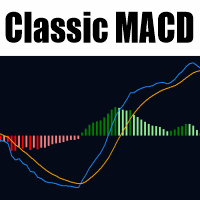
Classic MACD for MetaTrader 5 This indicator delivers a faithful implementation of the classic Moving Average Convergence Divergence (MACD) as originally designed by Gerald Appel, tailored specifically for MetaTrader 5. It empowers traders to identify market trends, momentum shifts, and potential reversal points through its core components: the MACD line, signal line, and histogram. The MACD line is calculated as the difference between two exponential moving averages (typically 12-period and 26
MultiChart Pro
Pablo Filipe Soares De Almeida
MultiChart Pro – Chart Management Tool for MetaTrader 5 This Expert Advisor (EA) enables users to automate the opening and configuration of charts in MetaTrader 5. It supports the setup of up to four charts with specified timeframes and templates, including offline charts. Functionality Chart Opening: Opens up to three additional charts (e.g., D1, M1, M15) and one offline chart (e.g., 10 seconds), while configuring the current chart (e.g., M5). Template Application: Applies user-defined templat
Time and Sales Tick
Pablo Filipe Soares De Almeida
Time & Sales Tick Indicator for MetaTrader 5 This indicator displays real-time trading tick information on MetaTrader 5 charts. It presents price, tick volume, and time. Functionality Displays tick data, including price, volume, and time, in a panel on the chart. Groups ticks into user-defined intervals, with color-coded price movements (green for upward, red for downward). Allows panel positioning in any chart corner.
Partial
Pablo Filipe Soares De Almeida
Partial Close Manager – Trade Volume Adjustment Tool This tool enables users to perform partial closes on open trades in MetaTrader 5. Functionality Partial Close: Close a portion of open trades with one action. Volume Calculation: Automatically calculates the volume to be closed, eliminating manual input. Multi-Order Support: Applies partial closes to all open orders on the same symbol simultaneously. Draggable Table: Click and hold the header to move the table anywhere on the chart.
Volume Candle Indicator
Pablo Filipe Soares De Almeida
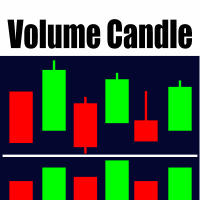
Volume Color Histogram for MetaTrader 5. This indicator displays volume as a histogram in a separate window. The bars are colored based on the direction of the price candle: green for bullish (close > open) and red for bearish (close < open). Key Features Volume source: Tick volume or real volume (user-selectable). Optional moving average line over the volume histogram, which can be enabled via input. Supported average types: SMA, EMA, SMMA, LWMA. Average period is configurable. Compatible with
Day Of Week SMA
Pablo Filipe Soares De Almeida
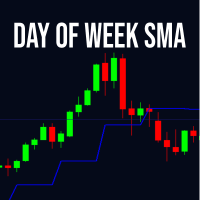
The Day Of Week SMA indicator calculates a moving average based on the closing prices of a specific day of the week chosen by the user. It supports various types of moving averages including Simple (SMA), Exponential (EMA), Smoothed (SMMA), and Linear Weighted (LWMA). The period defines how many instances of the selected day to include in the calculation. This tool is useful for analyzing weekly patterns in financial markets, helping traders identify trends specific to certain days. By focusing
High Low MTF
Pablo Filipe Soares De Almeida
High Low MTF – Multi-Timeframe High & Low Levels High Low MTF is a professional indicator designed for traders who want to visualize powerful support and resistance zones based on highs and lows from any timeframe. It allows you to display maximum and minimum levels from smaller or higher periods directly on your current chart, providing a complete multi-timeframe market view. It works for day traders, scalpers, swing traders and even algorithmic systems using iCustom. The indicator automatical
Seasonal Cycle
Pablo Filipe Soares De Almeida
Seasonal MT5 Indicator  Discover the power of market seasonality with the Seasonal MT5 indicator, designed for the daily timeframe to identify and visualize recurring price patterns based on historical data. Perfect for traders seeking a data-driven edge in forex, stocks, or commodities. Key Functionalities: - Plots a seasonal trend line based on historical daily price data, highlighting predictable market cycles. - Displays a straight line connecting seasonal extremes for trend reference. - D
GSV Williams
Pablo Filipe Soares De Almeida
GSV – Guided Swing Value Levels The GSV – Guided Swing Value Levels is a unique indicator developed for traders who want to find price regions where the market tends to react with greater statistical accuracy. Its calculation is inspired by concepts presented by Larry Williams in his book “Long-Term Secrets to Short-Term Trading” , which highlights the importance of the statistical average of market swings to forecast areas where price will likely stop, correct, or reverse. This indicator uses t
Pivot Price Round
Pablo Filipe Soares De Almeida
Pivot Round Price is an indicator based on the classic Pivot Points formulas (Classic Pivots), maintaining exactly the original calculations of support, resistance, and central pivot, without changing any part of the standard mathematics used. The difference and main advantage of this indicator is that the levels are automatically adjusted to rounded prices, making visualization easier on assets with multiple decimal places and making the levels much more relevant on the actual asset chart. With
LBR Oscillator
Pablo Filipe Soares De Almeida
LBR Oscillator – 3/10 Oscillator The LBR Oscillator is an enhanced version of the classic 3/10 Oscillator, widely used and popularized by professional trader Linda Raschke. This indicator was developed following the original standard configuration used by Linda Raschke, with 3- and 10-period moving averages and a 16-period signal line, focused on reading momentum and changes in market rhythm. Conceptual Basis – How Linda Raschke Uses the 3/10 Oscillator Linda Raschke uses the 3/10 Oscillator as
Keltner Channel Color
Pablo Filipe Soares De Almeida
The Keltner Channel Color is a custom indicator for MetaTrader 5 (MQL5) designed to enhance the visualization of trends and volatility on the chart. It colors the bars or candles based on their relative position to the Keltner Channel, helping traders quickly identify high, low, and breakout zones. Ideal for trend following, scalping, or volatility analysis strategies, this indicator simplifies market reading by highlighting bars above or below the Keltner bands, as well as bars that close above
ROC Color
Pablo Filipe Soares De Almeida
Colored ROC with Moving Average and Alerts - Advanced Momentum Indicator Enhanced Rate of Change (ROC)! This custom indicator for MetaTrader 5 offers a clear and intuitive view of market momentum, ideal for traders seeking precise signals of trend acceleration or deceleration. What is ROC and its advantages? The Rate of Change (ROC) is a pure momentum oscillator that measures the percentage change in price relative to a previous period. It highlights the speed and strength of price movements: Po
Taylor Pivot
Pablo Filipe Soares De Almeida
Note: This indicator plots only the Taylor Pivot . The ROC indicator is not included and is not displayed separately. The Taylor Pivot is an indicator based on a classic short-term trading technique originally developed by Taylor and later popularized by professional trader Linda Raschke in her book. Raschke highlights this approach as a simple way to identify the market’s likely short-term direction, focusing on a single positioning decision per day (buy or sell), which reduces psychological s
Bollinger Alerts
Pablo Filipe Soares De Almeida
Bollinger Alerts is a classic Bollinger Bands indicator enhanced with an intelligent alert system, designed to help traders clearly identify overbought and oversold conditions. The indicator plots the three traditional bands: Upper Band Middle Band (Moving Average) Lower Band In addition, it features configurable alerts, allowing traders to be automatically notified whenever price reaches statistically extreme regions. Integrated Alert System Alerts are generated only at candle close, ensuring g
Scanner Market
Pablo Filipe Soares De Almeida
Scanner Market Scanner Market lets you open any asset with a single click directly in the same chart window. No need to open new charts or scroll through Market Watch — one click and the selected symbol is loaded instantly. Designed for traders who need speed, such as scalpers and tape readers. The scanner uses a fully customizable floating panel that can be dragged to any area of the chart and hidden with one click using the Screener button. Available filters and sorting: Daily % (High → Low)
MA Distance Histogram
Pablo Filipe Soares De Almeida
MA Distance Histogram The MA Distance Histogram is an indicator that displays, in histogram form, the distance between the closing price (Close) and a Moving Average, providing a clear visualization of market strength and momentum. Positive values indicate that the price is above the moving average, representing buying pressure (bulls). Negative values indicate that the price is below the moving average, representing selling pressure (bears). The indicator uses ATR (Average True Range) to normal
Fractal Zones Decision
Pablo Filipe Soares De Almeida
FRACTAL ZONES DECISION – The Indicator That Turns Fractals into Real Decision Zones It identifies Double Fractals (when a candle forms both a bullish and bearish fractal at the same time), creating real zones of market indecision. These zones act as true institutional support and resistance, much stronger than traditional fractals. What the indicator does for you: Draws classic fractals with arrows (can be turned off if desired) Draws special dotted lines highlighting indecision zones (with se
Time Boxes
Pablo Filipe Soares De Almeida
Time Boxes – Precision and Detailed Market Reading If you've ever tried trading with tick charts, Renko, or even multiple timeframes, you know how difficult it is to understand exactly what's happening inside each candle. That's exactly why I developed Time Boxes . I mainly use this indicator to calibrate my offline tick chart with the current chart , allowing me to visualize the exact number of candles that form each tick bar. This makes it much clearer to identify when the market is accelerati
XAU vs USD
Pablo Filipe Soares De Almeida
XAU vs USD — AUTOMATED EXPERT ADVISOR FOR GOLD (XAUUSD) - 24H XAU vs USD is an Expert Advisor developed exclusively to trade the XAUUSD pair, focused on ease of use and built-in risk management. SIMPLE SETUP, NO HASSLE. The EA comes ready to use, with a conservative configuration and minimum lot size (0.01), ideal for those who want to test safely or trade with low risk from the start. There's no need to adjust dozens of parameters — just attach it to the chart. AUTOMATIC BROKER COMPATIBILITY
Filter:
No reviews
Reply to review