Ferramentas de trading em MQL5 (Parte 9): Assistente de configuração inicial para EAs com guia de instruções e rolagem
 6
 0

Introdução
No artigo anterior (Parte 8), desenvolvemos um painel informativo em MetaQuotes Language 5 (MQL5) para monitorar posições em vários símbolos e métricas da conta. Na Parte 9, criamos um assistente dinâmico de primeira execução para familiarizar os novos usuários com o programa ao executá-lo pela primeira vez. Os assistentes "https://en.wikipedia.org/wiki/Wizard_(software)") de configuração inicial são ferramentas essenciais para simplificar a configuração de sistemas complexos, como os EAs no MetaTrader 5, pois auxiliam os novos usuários nas configurações iniciais e os orientam para obter os melhores resultados. Neste artigo, desenvolvemos um assistente de configuração inicial em MQL5 para EAs, que inclui um painel com rolagem de conteúdo e texto dinâmico, botões interativos e uma caixa de seleção para simplificar a configuração. O assistente é exibido na primeira execução do programa e pode ser dispensado nas próximas execuções. Abordaremos os seguintes tópicos:
- Compreensão da função e da importância do guia de configuração inicial para programas de trading
- Implementação em MQL5
- Testes do assistente de configuração inicial
- Conclusão
Ao final, você terá um assistente interativo desenvolvido em MQL5 para aprimorar a inicialização do EA, que poderá adaptar às suas necessidades de trading. Vamos começar!
Compreensão da função e da importância do guia de configuração inicial para programas de trading
O guia de configuração na primeira execução é um recurso importante para programas de trading, como os EAs no MetaTrader 5. Ele apresenta instruções passo a passo para configurar os principais parâmetros, como tamanhos de lote, níveis de risco e filtros de trading, ajudando os traders a evitar erros que possam resultar em perdas, como definir um tamanho de lote excessivo, o que pode provocar um drawdown elevado. Podemos considerá-lo um fluxo de orientação inicial que apresenta aos novos usuários a estrutura e as funcionalidades do programa. Sua importância está em facilitar a integração inicial de traders com qualquer nível de experiência, garantir que o programa seja configurado corretamente desde o início e utilizar um mecanismo que registra a preferência do usuário quanto à exibição do guia nas próximas execuções. Isso evita a exibição de orientações desnecessárias em inicializações posteriores, aprimorando a experiência do usuário, especialmente para os traders que anexam programas aos gráficos com frequência.
Nossa abordagem consiste em criar um painel intuitivo com rolagem de conteúdo, que apresenta instruções claras de configuração, com elementos de texto visualmente diferenciados (como títulos destacados e links clicáveis para obter suporte), botões interativos para executar ações e uma caixa de seleção que permite aos traders escolher se desejam dispensar a exibição do guia nas próximas execuções. Utilizaremos variáveis globais persistentes do terminal para armazenar a escolha do usuário em uma variável cujo nome incorpora o número da build do terminal de trading (versão do software) e o sistema operacional (OS) em que o programa é executado pela primeira vez. Criaremos uma interface centralizada, composta por cabeçalho, corpo e rodapé, com formatação dinâmica de texto para facilitar a leitura, conteúdo com rolagem para apresentar instruções detalhadas e dimensões adaptáveis a diferentes resoluções de tela. Isso permitirá que os traders executem facilmente ações como configurar os parâmetros de risco ou habilitar o trading automatizado, tornando o processo de configuração simples e eficiente. Adotaremos como referência a estrutura do guia de configuração integrado do recurso "Negociação com um clique" (One Click Trading), conforme mostrado a seguir.
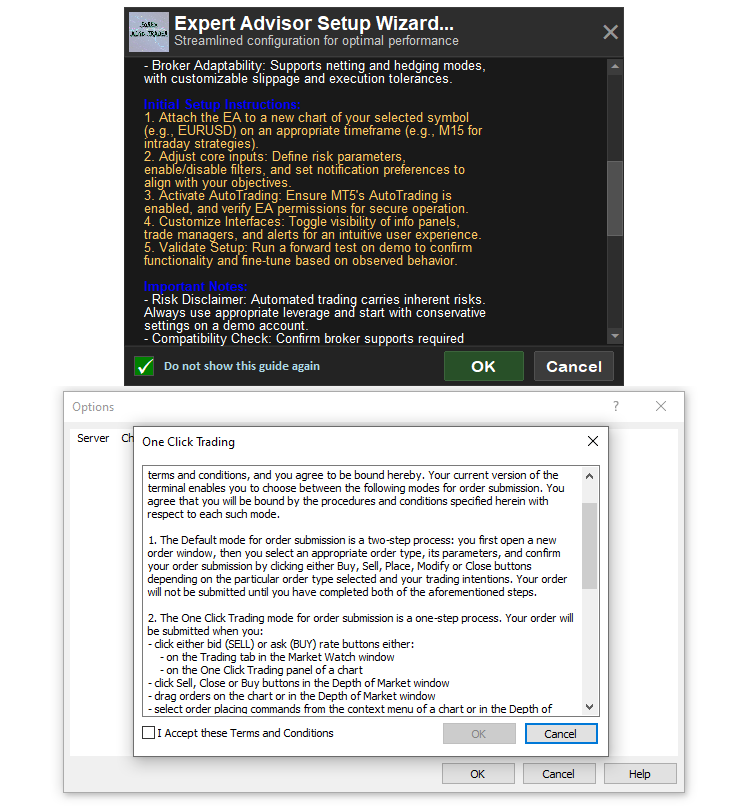
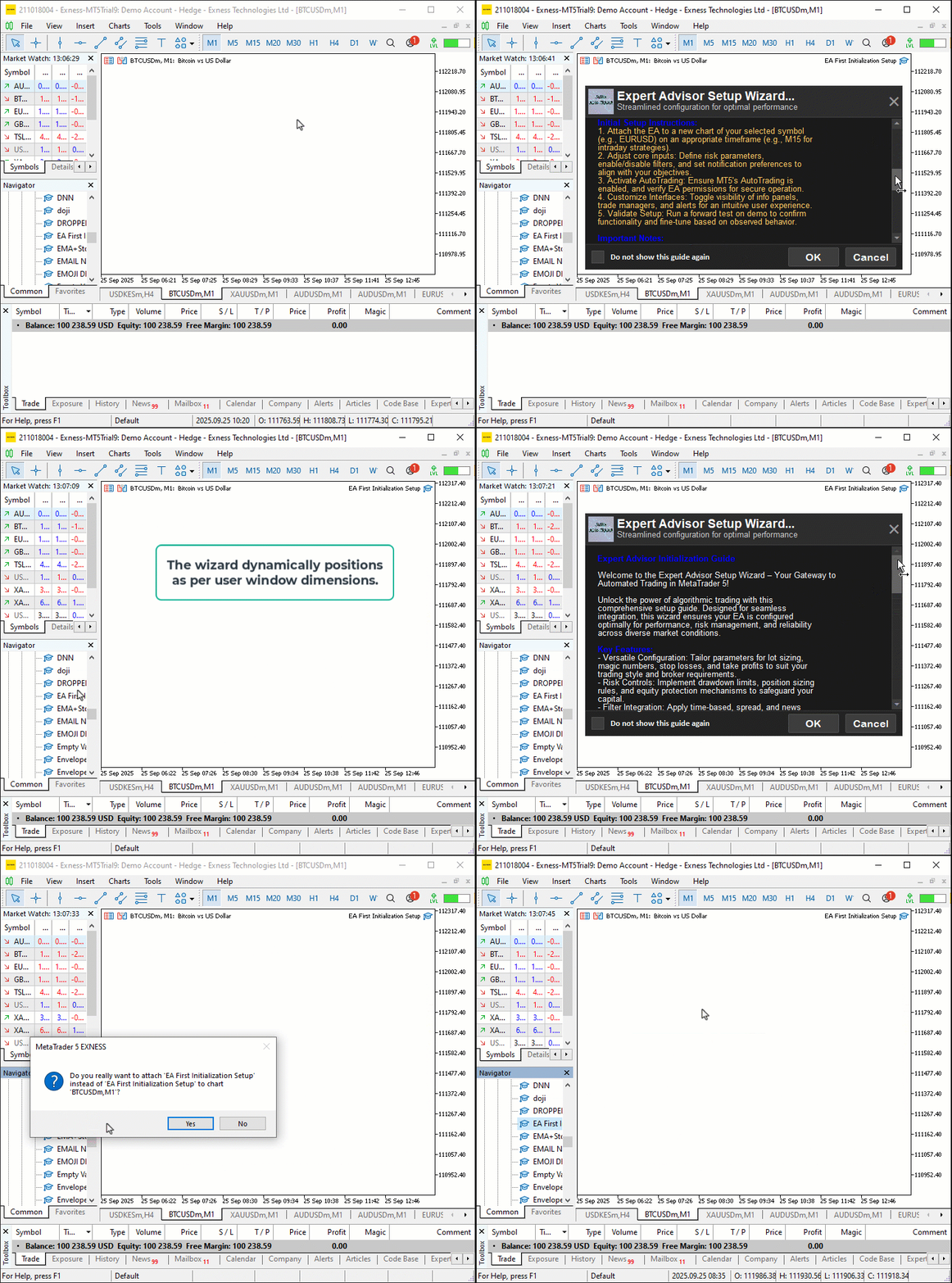
A imagem mostra a abordagem que utilizaremos. Adicionaremos uma imagem redimensionada do programa para diferenciá-lo dos demais programas. Em resumo, a ilustração abaixo mostra o resultado que pretendemos alcançar.
Implementação em MQL5
Para criar um programa em MQL5, abra o MetaEditor, acesse o Navegador, localize a pasta "Experts" (EAs), clique na opção "New" (Novo) e siga as instruções para criar o arquivo. Depois disso, no ambiente de desenvolvimento, declararemos algumas variáveis globais que serão utilizadas em todo o programa.
//+------------------------------------------------------------------+
//|                                      EA Initialization Setup.mq5 |
//|                           Copyright 2025, Allan Munene Mutiiria. |
//|                                   https://t.me/Forex_Algo_Trader |
//+------------------------------------------------------------------+
#property copyright "Copyright 2025, Allan Munene Mutiiria."
#property link "https://t.me/Forex_Algo_Trader"
#property version "1.00"
#property strict
#property icon "1. Forex Algo-Trader.ico"

//+------------------------------------------------------------------+
//| Global variables for setup                                       |
//+------------------------------------------------------------------+
string GV_SETUP = "";                             //--- Store global variable name with build and OS
string g_scaled_image_resource = "";              //--- Store name of scaled image resource
int g_mainX = 0;                                  //--- Store calculated x-coordinate of main container
int g_mainY = 50;                                 //--- Set starting y-coordinate 50px below chart top
int g_mainWidth = 500;                            //--- Set main container width
int g_headerHeight = 50;                          //--- Set header height
int g_footerHeight = 40;                          //--- Set footer height
int g_padding = 10;                               //--- Set general padding
int g_textPadding = 10;                           //--- Set text padding
int g_spacing = 0;                                //--- Set spacing between header/body/footer
int g_lineSpacing = 3;                            //--- Set spacing between text lines
int g_minBodyHeight = 200;                        //--- Set minimum body height
int g_maxBodyHeight = 400;                        //--- Set maximum body height
int g_bottomMargin = 50;                          //--- Set bottom margin
int g_displayHeight = 0;                          //--- Store calculated display height
int g_mainHeight = 0;                             //--- Store calculated main container height
int g_adjustedLineHeight = 0;                     //--- Store adjusted line height for scrolling
int g_max_scroll = 0;                             //--- Store maximum scroll to prevent overflow
bool scroll_visible = false;                      //--- Track scrollbar visibility
bool mouse_in_body = false;                       //--- Track if mouse is in body
int scroll_pos = 0;                               //--- Store current scroll position
int prev_scroll_pos = -1;                         //--- Store previous scroll position
int slider_height = 20;                           //--- Set default slider height
bool movingStateSlider = false;                   //--- Track slider drag state
int mlbDownX_Slider = 0;                          //--- Store mouse x on slider click
int mlbDownY_Slider = 0;                          //--- Store mouse y on slider click
int mlbDown_YD_Slider = 0;                        //--- Store slider y on click
int g_total_height = 0;                           //--- Store total text height
int g_visible_height = 0;                         //--- Store visible text height
bool checkbox_checked = false;                    //--- Track checkbox state
bool ok_button_hovered = false;                   //--- Track OK button hover
bool cancel_button_hovered = false;               //--- Track Cancel button hover
bool checkbox_hovered = false;                    //--- Track checkbox hover
bool header_cancel_hovered = false;               //--- Track header cancel hover
bool scroll_up_hovered = false;                   //--- Track scroll up button hover
bool scroll_down_hovered = false;                 //--- Track scroll down button hover
bool scroll_slider_hovered = false;               //--- Track scroll slider hover
string ea_name = "Expert Advisor Setup Wizard";   //--- Set EA name
const int MAX_LINES = 100;                        //--- Set maximum text lines

//+------------------------------------------------------------------+
//| Enum for scrollbar mode                                          |
//+------------------------------------------------------------------+
enum ENUM_SCROLLBAR_MODE {                         // Define scrollbar visibility modes
   SCROLL_ALWAYS,                                  // Show scrollbar if needed
   SCROLL_ON_HOVER,                                // Show scrollbar on hover if needed
   SCROLL_NEVER                                    // Never show scrollbar, wheel only
};
ENUM_SCROLLBAR_MODE ScrollbarMode = SCROLL_ALWAYS; // Scrollbar shows when needed and remains

//+------------------------------------------------------------------+
//| Scrollbar object names                                           |
//+------------------------------------------------------------------+
#define SCROLL_LEADER "Setup_Scroll_Leader"        //--- Define scroll leader name
#define SCROLL_UP_REC "Setup_Scroll_Up_Rec"        //--- Define scroll up rectangle name
#define SCROLL_UP_LABEL "Setup_Scroll_Up_Label"    //--- Define scroll up label name
#define SCROLL_DOWN_REC "Setup_Scroll_Down_Rec"    //--- Define scroll down rectangle name
#define SCROLL_DOWN_LABEL "Setup_Scroll_Down_Label" //--- Define scroll down label name
#define SCROLL_SLIDER "Setup_Scroll_Slider"        //--- Define scroll slider name

//+------------------------------------------------------------------+
//| Dashboard object names                                           |
//+------------------------------------------------------------------+
#define SETUP_MAIN "Setup_MainContainer"           //--- Define main container name
#define SETUP_HEADER_BG "Setup_HeaderBg"           //--- Define header background name
#define SETUP_HEADER_IMAGE "Setup_HeaderImage"     //--- Define header image name
#define SETUP_HEADER_TITLE "Setup_HeaderTitle"     //--- Define header title name
#define SETUP_HEADER_SUBTITLE "Setup_HeaderSubtitle" //--- Define header subtitle name
#define SETUP_HEADER_CANCEL "Setup_HeaderCancel"   //--- Define header cancel button name
#define SETUP_BODY_BG "Setup_BodyBg"               //--- Define body background name
#define SETUP_FOOTER_BG "Setup_FooterBg"           //--- Define footer background name
#define SETUP_CHECKBOX_BG "Setup_CheckboxBg"       //--- Define checkbox background name
#define SETUP_CHECKBOX_LABEL "Setup_CheckboxLabel" //--- Define checkbox label name
#define SETUP_CHECKBOX_TEXT "Setup_CheckboxText"   //--- Define checkbox text name
#define SETUP_OK_BUTTON "Setup_OkButton"           //--- Define OK button name
#define SETUP_CANCEL_BUTTON "Setup_CancelButton"   //--- Define Cancel button name

//+------------------------------------------------------------------+
//| Enhanced setup text                                              |
//+------------------------------------------------------------------+
string setup_text =                                //--- Define setup guide text
"\nExpert Advisor Initialization Guide\n\n"
"Welcome to the Expert Advisor Setup Wizard – Your Gateway to Automated Trading in MetaTrader 5!\n\n"
"Unlock the power of algorithmic trading with this comprehensive setup guide. Designed for seamless integration, this wizard ensures your EA is configured optimally for performance, risk management, and reliability across diverse market conditions.\n\n"
"Key Features:\n"
"- Versatile Configuration: Tailor parameters for lot sizing, magic numbers, stop losses, and take profits to suit your trading style and broker requirements.\n"
"- Risk Controls: Implement drawdown limits, position sizing rules, and equity protection mechanisms to safeguard your capital.\n"
"- Filter Integration: Apply time-based, spread, and news filters to avoid unfavorable trading environments and enhance entry precision.\n"
"- Monitoring Tools: Access real-time panels for trade tracking, performance metrics, and alert notifications.\n"
"- Backtesting Support: Optimize settings with historical data, ensuring robust strategies before live deployment.\n"
"- Broker Adaptability: Supports netting and hedging modes, with customizable slippage and execution tolerances.\n\n"
"Initial Setup Instructions:\n"
"1. Attach the EA to a new chart of your selected symbol (e.g., EURUSD) on an appropriate timeframe (e.g., M15 for intraday strategies).\n"
"2. Adjust core inputs: Define risk parameters, enable/disable filters, and set notification preferences to align with your objectives.\n"
"3. Activate AutoTrading: Ensure MT5's AutoTrading is enabled, and verify EA permissions for secure operation.\n"
"4. Customize Interfaces: Toggle visibility of info panels, trade managers, and alerts for an intuitive user experience.\n"
"5. Validate Setup: Run a forward test on demo to confirm functionality and fine-tune based on observed behavior.\n\n"
"Important Notes:\n"
"- Risk Disclaimer: Automated trading carries inherent risks. Always use appropriate leverage and start with conservative settings on a demo account.\n"
"- Compatibility Check: Confirm broker supports required features like hedging; monitor spreads during volatile periods.\n"
"- Optimization Tips: Regularly review performance logs and adjust filters to adapt to evolving market dynamics.\n"
"- Security Measures: Use unique magic numbers and enable two-factor authentication for account protection.\n"
"- Legal Notice: No guarantees of profitability. Trade responsibly and consult professionals as needed.\n\n"
"Contact Methods:\n"
"NB:\n"
"********************************************\n"
" >*** FOR SUPPORT, QUERIES, OR CUSTOMIZATIONS, REACH OUT IMMEDIATELY: ***<\n"
" __________________________________________\n\n"
" 1. Email: mutiiriallan.forex@gmail.com (Primary Support Channel)\n"
" 2. Telegram Channel: @ForexAlgo-Trader (Updates & Community)\n"
" 3. Telegram Group: https://t.me/Forex_Algo_Trader (Direct Assistance & Discussions)\n\n"
"********************************************\n\n"
"Thank you for choosing our Expert Advisor solutions. Configure wisely, trade confidently, and elevate your trading journey! 🚀\n";
Para definir a estrutura básica do assistente de configuração, utilizamos variáveis globais para controlar o layout do painel. Definimos as coordenadas ("g_mainX" e "g_mainY" com valor 50), as dimensões ("g_mainWidth" com valor 500, "g_headerHeight" com valor 50 e "g_footerHeight" com valor 40) e os espaçamentos internos ("g_padding" e "g_textPadding" com valor 10). Também definimos os espaçamentos ("g_spacing" com valor 0 e "g_lineSpacing" com valor 3), os limites de altura do corpo do painel ("g_minBodyHeight" com valor 200 e "g_maxBodyHeight" com valor 400) e a margem inferior ("g_bottomMargin" com valor 50). Para controlar a rolagem, atribuímos o valor 20 às variáveis "scroll_visible", "scroll_pos" e "slider_height". As variáveis de estado relacionadas às interações com o mouse incluem "movingStateSlider" e "mlbDownX_Slider". Adicionamos flags para indicar quando o cursor do mouse está sobre os botões e as caixas de seleção. Atribuímos à variável "ea_name" o valor "Expert Advisor Setup Wizard" (assistente de configuração do EA) e definimos "MAX_LINES" como 100.
A enumeração "ENUM_SCROLLBAR_MODE" define o comportamento da barra de rolagem ("SCROLL_ALWAYS", "SCROLL_ON_HOVER", "SCROLL_NEVER"), com "SCROLL_ALWAYS" como valor padrão. Definimos constantes para os nomes dos objetos, como "SETUP_MAIN", "SETUP_HEADER_BG", "SCROLL_LEADER", entre outras, para padronizar a nomenclatura dos elementos do painel e da barra de rolagem. Por fim, criamos a string "setup_text", que contém o guia completo, com seções dedicadas às funcionalidades, instruções de configuração, observações e meios de contato, estruturadas em títulos e etapas numeradas. Dessa forma, estruturamos a interface e o conteúdo do assistente para facilitar a interação com o usuário. Você pode alterar o layout ou o conteúdo, pois utilizamos valores arbitrários. Em seguida, configuraremos a imagem que será utilizada como ícone do cabeçalho. Você pode pular essa etapa se preferir. Precisaremos converter nosso arquivo de imagem para o formato bitmap (BMP). Após a conversão, a imagem deverá apresentar as seguintes propriedades.
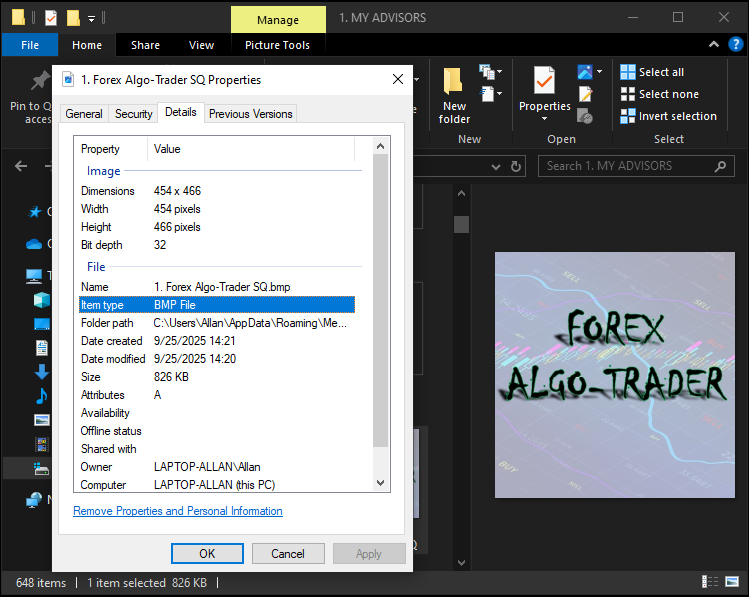
Como podemos observar na imagem, o arquivo está no formato bitmap. Não é necessário se preocupar com as dimensões originais da imagem, pois poderemos ajustar sua largura e altura posteriormente, conforme necessário. Lembre-se de colocar o arquivo na mesma pasta que o arquivo do programa. Agora, precisamos incorporar esse arquivo ao programa como um recurso.
#resource "1. Forex Algo-Trader SQ.bmp"
#define resourceImg "::1. Forex Algo-Trader SQ.bmp"
Utilizamos a diretiva "#resource" para incorporar o arquivo de imagem denominado "1. Forex Algo-Trader SQ.bmp" e definimos a constante "resourceImg" como "::1. Forex Algo-Trader SQ.bmp" para referenciar a imagem no programa. Isso conferirá ao painel do assistente uma aparência profissional e uma identidade visual própria. Agora, começaremos a criar a interface e, para isso, precisaremos de algumas funções auxiliares. Vamos definir as funções necessárias para criar rótulos retangulares, textos, imagens e botões.
//+------------------------------------------------------------------+
//| Create rectangle label                                           |
//+------------------------------------------------------------------+
bool createRecLabel(string objName, int xD, int yD, int xS, int yS,
                    color clrBg, int widthBorder, color clrBorder = clrNONE,
                    ENUM_BORDER_TYPE borderType = BORDER_FLAT,
                    ENUM_LINE_STYLE borderStyle = STYLE_SOLID,
                    ENUM_BASE_CORNER corner = CORNER_LEFT_UPPER) {
   ResetLastError();                                              //--- Reset error code
   if (!ObjectCreate(0, objName, OBJ_RECTANGLE_LABEL, 0, 0, 0)) { //--- Create rectangle label
      Print(__FUNCTION__, ": failed to create rec label! Error code = ", GetLastError()); //--- Log failure
      return false;                                               //--- Return failure
   }
   ObjectSetInteger(0, objName, OBJPROP_XDISTANCE, xD);           //--- Set x distance
   ObjectSetInteger(0, objName, OBJPROP_YDISTANCE, yD);           //--- Set y distance
   ObjectSetInteger(0, objName, OBJPROP_XSIZE, xS);               //--- Set width
   ObjectSetInteger(0, objName, OBJPROP_YSIZE, yS);               //--- Set height
   ObjectSetInteger(0, objName, OBJPROP_CORNER, corner);          //--- Set corner
   ObjectSetInteger(0, objName, OBJPROP_BGCOLOR, clrBg);          //--- Set background color
   ObjectSetInteger(0, objName, OBJPROP_BORDER_TYPE, borderType); //--- Set border type
   ObjectSetInteger(0, objName, OBJPROP_STYLE, borderStyle);      //--- Set border style
   ObjectSetInteger(0, objName, OBJPROP_WIDTH, widthBorder);      //--- Set border width
   ObjectSetInteger(0, objName, OBJPROP_COLOR, clrBorder);        //--- Set border color
   ObjectSetInteger(0, objName, OBJPROP_BACK, false);             //--- Set to foreground
   ObjectSetInteger(0, objName, OBJPROP_STATE, false);            //--- Disable state
   ObjectSetInteger(0, objName, OBJPROP_SELECTABLE, false);       //--- Disable selectability
   ObjectSetInteger(0, objName, OBJPROP_SELECTED, false);         //--- Disable selection
   return true;                                                   //--- Return success
}

//+------------------------------------------------------------------+
//| Create button                                                    |
//+------------------------------------------------------------------+
bool createButton(string objName, int xD, int yD, int xS, int yS,
                  string txt = "", color clrTxt = clrBlack, int fontSize = 12,
                  color clrBg = clrNONE, color clrBorder = clrNONE,
                  string font = "Arial",
                  ENUM_BASE_CORNER corner = CORNER_LEFT_UPPER, bool isBack = false) {
   ResetLastError();                                              //--- Reset error code
   if (!ObjectCreate(0, objName, OBJ_BUTTON, 0, 0, 0)) {          //--- Create button
      Print(__FUNCTION__, ": failed to create the button! Error code = ", GetLastError()); //--- Log failure
      return false;                                               //--- Return failure
   }
   ObjectSetInteger(0, objName, OBJPROP_XDISTANCE, xD);           //--- Set x distance
   ObjectSetInteger(0, objName, OBJPROP_YDISTANCE, yD);           //--- Set y distance
   ObjectSetInteger(0, objName, OBJPROP_XSIZE, xS);               //--- Set width
   ObjectSetInteger(0, objName, OBJPROP_YSIZE, yS);               //--- Set height
   ObjectSetInteger(0, objName, OBJPROP_CORNER, corner);          //--- Set corner
   ObjectSetString(0, objName, OBJPROP_TEXT, txt);                //--- Set button text
   ObjectSetInteger(0, objName, OBJPROP_COLOR, clrTxt);           //--- Set text color
   ObjectSetInteger(0, objName, OBJPROP_FONTSIZE, fontSize);      //--- Set font size
   ObjectSetString(0, objName, OBJPROP_FONT, font);               //--- Set font
   ObjectSetInteger(0, objName, OBJPROP_BGCOLOR, clrBg);          //--- Set background color
   ObjectSetInteger(0, objName, OBJPROP_BORDER_COLOR, clrBorder); //--- Set border color
   ObjectSetInteger(0, objName, OBJPROP_BACK, isBack);            //--- Set background/foreground
   ObjectSetInteger(0, objName, OBJPROP_STATE, false);            //--- Disable state
   ObjectSetInteger(0, objName, OBJPROP_SELECTABLE, false);       //--- Disable selectability
   ObjectSetInteger(0, objName, OBJPROP_SELECTED, false);         //--- Disable selection
   return true;                                                   //--- Return success
}

//+------------------------------------------------------------------+
//| Create text label                                                |
//+------------------------------------------------------------------+
bool createLabel(string objName, int xD, int yD,
                 string txt, color clrTxt = clrBlack, int fontSize = 12,
                 string font = "Arial",
                 ENUM_BASE_CORNER corner = CORNER_LEFT_UPPER, ENUM_ANCHOR_POINT anchor = ANCHOR_LEFT_UPPER) {
   ResetLastError();                                              //--- Reset error code
   if (!ObjectCreate(0, objName, OBJ_LABEL, 0, 0, 0)) {           //--- Create label
      Print(__FUNCTION__, ": failed to create the label! Error code = ", GetLastError()); //--- Log failure
      return false;                                               //--- Return failure
   }
   ObjectSetInteger(0, objName, OBJPROP_XDISTANCE, xD);           //--- Set x distance
   ObjectSetInteger(0, objName, OBJPROP_YDISTANCE, yD);           //--- Set y distance
   ObjectSetInteger(0, objName, OBJPROP_CORNER, corner);          //--- Set corner
   ObjectSetString(0, objName, OBJPROP_TEXT, txt);                //--- Set label text
   ObjectSetInteger(0, objName, OBJPROP_COLOR, clrTxt);           //--- Set text color
   ObjectSetInteger(0, objName, OBJPROP_FONTSIZE, fontSize);      //--- Set font size
   ObjectSetString(0, objName, OBJPROP_FONT, font);               //--- Set font
   ObjectSetInteger(0, objName, OBJPROP_ANCHOR, anchor);          //--- Set anchor
   ObjectSetInteger(0, objName, OBJPROP_BACK, false);             //--- Set to foreground
   ObjectSetInteger(0, objName, OBJPROP_STATE, false);            //--- Disable state
   ObjectSetInteger(0, objName, OBJPROP_SELECTABLE, false);       //--- Disable selectability
   ObjectSetInteger(0, objName, OBJPROP_SELECTED, false);         //--- Disable selection
   return true;                                                   //--- Return success
}

//+------------------------------------------------------------------+
//| Create bitmap label                                              |
//+------------------------------------------------------------------+
bool createBitmapLabel(string objName, int xD, int yD, int xS, int yS,
                       string bitmapPath, color clr, ENUM_BASE_CORNER corner = CORNER_LEFT_UPPER) {
   ResetLastError();                                              //--- Reset error code
   if (!ObjectCreate(0, objName, OBJ_BITMAP_LABEL, 0, 0, 0)) {    //--- Create bitmap label
      Print(__FUNCTION__, ": failed to create bitmap label! Error code = ", GetLastError()); //--- Log failure
      return false;                                               //--- Return failure
   }
   ObjectSetInteger(0, objName, OBJPROP_XDISTANCE, xD);           //--- Set x distance
   ObjectSetInteger(0, objName, OBJPROP_YDISTANCE, yD);           //--- Set y distance
   ObjectSetInteger(0, objName, OBJPROP_XSIZE, xS);               //--- Set width
   ObjectSetInteger(0, objName, OBJPROP_YSIZE, yS);               //--- Set height
   ObjectSetInteger(0, objName, OBJPROP_CORNER, corner);          //--- Set corner
   ObjectSetString(0, objName, OBJPROP_BMPFILE, bitmapPath);      //--- Set bitmap path
   ObjectSetInteger(0, objName, OBJPROP_COLOR, clr);              //--- Set color
   ObjectSetInteger(0, objName, OBJPROP_BACK, false);             //--- Set to foreground
   ObjectSetInteger(0, objName, OBJPROP_STATE, false);            //--- Disable state
   ObjectSetInteger(0, objName, OBJPROP_SELECTABLE, false);       //--- Disable selectability
   ObjectSetInteger(0, objName, OBJPROP_SELECTED, false);         //--- Disable selection
   return true;                                                   //--- Return success
}
Nesta etapa, implementamos os principais componentes gráficos do painel interativo. Primeiro, desenvolvemos a função "createRecLabel", que cria um rótulo retangular (OBJ_RECTANGLE_LABEL) com coordenadas, dimensões, cor de fundo, largura da borda, tipo de borda (BORDER_FLAT), estilo (STYLE_SOLID) e canto de referência (CORNER_LEFT_UPPER) especificados, utilizando as funções ObjectCreate e ObjectSetInteger. Em caso de falha na criação do objeto, registramos mensagens de erro no log por meio de Print. Também configuramos o objeto para ser exibido em primeiro plano, sem permitir sua seleção. Em seguida, implementamos a função "createButton", que cria um botão (OBJ_BUTTON) com texto, cor, tamanho da fonte, fonte ("Arial" por padrão), fundo, borda e canto de referência, seguindo o mesmo padrão de implementação.
Depois, criamos a função "createLabel", que gera um rótulo de texto (OBJ_LABEL) com texto, cor, tamanho da fonte, fonte, canto de referência e ponto de ancoragem (ANCHOR_LEFT_UPPER), utilizando chamadas semelhantes para criar o objeto e configurar suas propriedades, com exibição de mensagens de erro quando necessário. Por fim, criamos a função "createBitmapLabel", que gera um rótulo de imagem (OBJ_BITMAP_LABEL) com coordenadas, dimensões, caminho da imagem bitmap, cor e canto de referência. Utilizamos "ObjectCreate" e configuramos as propriedades do objeto para exibi-lo em primeiro plano, sem permitir sua seleção, exibindo mensagens de erro caso ocorram falhas. Essas funções fornecem a base para exibir os elementos visuais do assistente, como contêineres, botões, textos e imagens.
Podemos começar criando algumas funções auxiliares para calcular a altura do painel, pois precisamos centralizar dinamicamente o texto, ajustar dinamicamente o tamanho das fontes de acordo com o DPI da tela, evitando que determinados textos pareçam pequenos ou grandes demais em diferentes dispositivos, e truncar textos excessivamente longos para evitar que ultrapassem os limites da área de exibição.
//+------------------------------------------------------------------+
//| Calculate font size based on screen DPI                          |
//+------------------------------------------------------------------+
int getFontSizeByDPI(int baseFontSize, int baseDPI = 96) {
   int currentDPI = (int)TerminalInfoInteger(TERMINAL_SCREEN_DPI); //--- Retrieve current screen DPI
   int scaledFontSize = (int)(baseFontSize * (double)baseDPI / currentDPI); //--- Calculate scaled font size
   return scaledFontSize;                                          //--- Return scaled font size
}

//+------------------------------------------------------------------+
//| Calculate dashboard dimensions                                   |
//+------------------------------------------------------------------+
void CalculateDashboardDimensions() {
   long chart_width = ChartGetInteger(0, CHART_WIDTH_IN_PIXELS);   //--- Get chart width
   long chart_height = ChartGetInteger(0, CHART_HEIGHT_IN_PIXELS); //--- Get chart height
   g_mainX = (int)((chart_width - g_mainWidth) / 2); //--- Center main container horizontally
   int available_height = (int)(chart_height - g_mainY - g_bottomMargin - g_headerHeight - g_footerHeight - 2 * g_spacing); //--- Calculate available height
   g_displayHeight = MathMin(g_maxBodyHeight, MathMax(g_minBodyHeight, available_height)); //--- Set display height
   g_mainHeight = g_headerHeight + g_displayHeight + g_footerHeight + 2 * g_spacing; //--- Calculate main container height
}

//+------------------------------------------------------------------+
//| Truncate string                                                  |
//+------------------------------------------------------------------+
string truncateString(string valueStr, int startPos, int lengthStr = -1, int threshHold = 0, bool isEllipsis = false) {
   string result = valueStr;                                        //--- Initialize result
   if (StringLen(valueStr) > threshHold && threshHold > 0) {        //--- Check if truncation needed
      result = StringSubstr(valueStr, startPos, lengthStr);         //--- Extract substring
      if (isEllipsis) result += "...";                              //--- Add ellipsis if needed
   }
   return result;                                                   //--- Return truncated string
}
Nesta etapa, implementamos funções auxiliares para o redimensionamento adaptativo e a formatação do texto. Desenvolvemos a função "getFontSizeByDPI", que obtém o valor de DPI da tela (pontos por polegada) utilizando TerminalInfoInteger com TERMINAL_SCREEN_DPI, calcula o tamanho ajustado da fonte aplicando uma proporção simples entre o DPI da tela e o valor padrão de DPI (96) ao tamanho base da fonte e retorna o resultado para manter a consistência da apresentação do texto em diferentes dispositivos.
Em seguida, criamos a função "CalculateDashboardDimensions", que obtém a largura e a altura do gráfico por meio de ChartGetInteger com CHART_WIDTH_IN_PIXELS e "CHART_HEIGHT_IN_PIXELS", centraliza horizontalmente o contêiner principal atribuindo a "g_mainX" a metade da diferença entre a largura do gráfico e "g_mainWidth", calcula a altura disponível subtraindo "g_mainY", "g_bottomMargin", "g_headerHeight", "g_footerHeight" e duas vezes "g_spacing" da altura do gráfico, limita o valor de "g_displayHeight" ao intervalo entre "g_minBodyHeight" e "g_maxBodyHeight" utilizando MathMin e MathMax e calcula "g_mainHeight" somando as alturas do cabeçalho, do corpo e do rodapé, além do espaçamento.
Por fim, implementamos a função "truncateString", que retorna a string de entrada sem alterações quando seu comprimento é inferior ao limiar ou igual a zero. Caso contrário, utiliza StringSubstr para extrair uma substring de "lengthStr" caracteres a partir da posição "startPos", acrescentando reticências quando solicitado para evitar que o texto ultrapasse os limites da área de exibição. Com essas funções, podemos iniciar a implementação do painel principal. Para manter a modularidade do código, encapsularemos a lógica de criação do painel em uma função específica.
//+------------------------------------------------------------------+
//| Show the setup dashboard                                         |
//+------------------------------------------------------------------+
void ShowDashboard() {
   checkbox_checked = false;                         //--- Reset checkbox state
   createRecLabel(SETUP_MAIN, g_mainX, g_mainY, g_mainWidth, g_mainHeight, C'20,20,20', 1, C'40,40,40', BORDER_FLAT, STYLE_SOLID, CORNER_LEFT_UPPER); //--- Create main container
   createRecLabel(SETUP_HEADER_BG, g_mainX, g_mainY, g_mainWidth, g_headerHeight, C'45,45,45', 1, C'60,60,60', BORDER_FLAT, STYLE_SOLID, CORNER_LEFT_UPPER); //--- Create header background

}
Implementamos a função "ShowDashboard" e, inicialmente, definimos o estado da caixa de seleção como false, garantindo que ela esteja desmarcada no início da interação com o usuário. Em seguida, chamamos a função "createRecLabel" para desenhar o contêiner principal ("SETUP_MAIN") nas coordenadas "g_mainX" e "g_mainY", com as dimensões "g_mainWidth" e "g_mainHeight", utilizando um fundo cinza-escuro (C'20,20,20'), uma borda plana de 1 pixel de espessura, na cor C'40,40,40' e com estilo de linha contínua e o canto superior esquerdo como referência.
Depois, utilizamos "createRecLabel" para criar o fundo do cabeçalho ("SETUP_HEADER_BG"), mantendo a mesma coordenada horizontal e utilizando "g_mainY" como coordenada vertical, com largura "g_mainWidth" e altura "g_headerHeight". Aplicamos um fundo cinza ligeiramente mais claro (C'45,45,45') e uma borda (C'60,60,60'), mantendo a consistência visual do conjunto e construindo a estrutura gráfica básica do painel do assistente. Agora, precisamos chamar essa função no manipulador de eventos OnInit.
//+------------------------------------------------------------------+
//| Expert initialization function                                   |
//+------------------------------------------------------------------+
int OnInit() {
   int build = (int)TerminalInfoInteger(TERMINAL_BUILD); //--- Get terminal build number
   string os = TerminalInfoString(TERMINAL_OS_VERSION);  //--- Get operating system version
   StringReplace(os, " ", "_");                          //--- Replace spaces with underscores
   StringReplace(os, ".", "_");                          //--- Replace dots with underscores
   StringReplace(os, ",", "_");                          //--- Replace commas with underscores
   GV_SETUP = "EA_Setup_" + IntegerToString(build) + "_" + os; //--- Set global variable name
   CalculateDashboardDimensions();                       //--- Calculate dashboard dimensions
   if (!GlobalVariableCheck(GV_SETUP)) {                 //--- Check if global variable exists
      Print("Global variable '" + GV_SETUP + "' not found. Creating new one with value FALSE (0.0)."); //--- Log variable creation
      GlobalVariableSet(GV_SETUP, 0.0);                  //--- Set variable to false
      ShowDashboard();                                   //--- Display dashboard
   } else {                                              //--- Variable exists
      double val = GlobalVariableGet(GV_SETUP);          //--- Get variable value
      if (val == 1.0) {                                  //--- Check if set to never show
         // No dashboard
      } else {                                           //--- Show dashboard
         ShowDashboard();                                //--- Display dashboard
      }
   }
   ChartSetInteger(0, CHART_EVENT_MOUSE_MOVE, true);     //--- Enable mouse move events
   ChartSetInteger(0, CHART_EVENT_MOUSE_WHEEL, true);    //--- Enable mouse wheel events
   ChartSetInteger(0, CHART_MOUSE_SCROLL, true);         //--- Enable chart scrolling
   return(INIT_SUCCEEDED);                               //--- Return initialization success
}
Passamos à implementação da lógica de inicialização que controla a exibição do painel na função OnInit. Obtemos o número da build do terminal MetaTrader 5 utilizando TerminalInfoInteger com TERMINAL_BUILD e a versão do sistema operacional utilizando TerminalInfoString com o parâmetro TERMINAL_OS_VERSION. Em seguida, substituímos os espaços, pontos e vírgulas da string do sistema operacional por underscores utilizando StringReplace, para gerar um nome padronizado para a variável global do terminal ("GV_SETUP"), no formato "EA_Setup_<build>_<OS>". É possível utilizar qualquer outro nome, como o número mágico ou uma combinação do nome do programa com seu número de versão, mas essa combinação nos pareceu engenhosa por identificar o ambiente de execução do programa. Chamamos "CalculateDashboardDimensions" para ajustar o layout do painel às dimensões do gráfico.
Depois, utilizamos GlobalVariableCheck para verificar se a variável global do terminal existe. Caso não exista, registramos uma mensagem sobre sua criação no log por meio de "Print", atribuímos a ela o valor 0.0 (false) utilizando GlobalVariableSet e exibimos o painel por meio de "ShowDashboard". Se a variável existir, recuperamos seu valor utilizando GlobalVariableGet e exibimos o painel somente se o valor for diferente de 1.0 (valor que indica que o usuário optou por não exibir novamente o painel). Por fim, utilizamos ChartSetInteger com CHART_EVENT_MOUSE_MOVE e "CHART_EVENT_MOUSE_WHEEL" para habilitar os eventos de movimento do mouse e de rolagem com a roda do mouse, e com "CHART_MOUSE_SCROLL" para configurar o deslocamento do gráfico com o mouse, dando suporte às funcionalidades interativas que serão utilizadas no manipulador de eventos OnChartEvent. Retornamos INIT_SUCCEEDED para indicar que a inicialização foi concluída com sucesso. Após a compilação, obtemos o seguinte resultado.

Agora que temos o cabeçalho, vamos adicionar a imagem. Como precisaremos redimensioná-la, definiremos funções responsáveis pelos cálculos necessários, que posteriormente utilizaremos para ajustar as dimensões da imagem.
//+------------------------------------------------------------------+
//| Scale image using bicubic interpolation                          |
//+------------------------------------------------------------------+
void ScaleImage(uint &pixels[], int original_width, int original_height, int new_width, int new_height) {
   uint scaled_pixels[];                                               //--- Declare scaled pixel array
   ArrayResize(scaled_pixels, new_width * new_height);                 //--- Resize scaled pixel array
   for (int y = 0; y < new_height; y++) {                              //--- Iterate through new height
      for (int x = 0; x < new_width; x++) {                            //--- Iterate through new width
         double original_x = (double)x * original_width / new_width;   //--- Calculate original x
         double original_y = (double)y * original_height / new_height; //--- Calculate original y
         uint pixel = BicubicInterpolate(pixels, original_width, original_height, original_x, original_y); //--- Interpolate pixel
         scaled_pixels[y * new_width + x] = pixel;                     //--- Store scaled pixel
      }
   }
   ArrayResize(pixels, new_width * new_height);                        //--- Resize original pixel array
   ArrayCopy(pixels, scaled_pixels);                                   //--- Copy scaled pixels
}

//+------------------------------------------------------------------+
//| Perform bicubic interpolation for a single pixel                 |
//+------------------------------------------------------------------+
uint BicubicInterpolate(uint &pixels[], int width, int height, double x, double y) {
   int x0 = (int)x;                                                    //--- Get integer x coordinate
   int y0 = (int)y;                                                    //--- Get integer y coordinate
   double fractional_x = x - x0;                                       //--- Calculate fractional x
   double fractional_y = y - y0;                                       //--- Calculate fractional y
   int x_indices[4], y_indices[4];                                     //--- Declare index arrays
   for (int i = -1; i <= 2; i++) {                                     //--- Calculate indices
      x_indices[i + 1] = MathMin(MathMax(x0 + i, 0), width - 1);       //--- Clamp x indices
      y_indices[i + 1] = MathMin(MathMax(y0 + i, 0), height - 1);      //--- Clamp y indices
   }
   uint neighborhood_pixels[16];                                       //--- Declare neighborhood pixels
   for (int j = 0; j < 4; j++) {                                       //--- Iterate y indices
      for (int i = 0; i < 4; i++) {                                    //--- Iterate x indices
         neighborhood_pixels[j * 4 + i] = pixels[y_indices[j] * width + x_indices[i]]; //--- Store pixel
      }
   }
   uchar alpha_components[16], red_components[16], green_components[16], blue_components[16]; //--- Declare color components
   for (int i = 0; i < 16; i++) {                                      //--- Extract components
      GetArgb(neighborhood_pixels[i], alpha_components[i], red_components[i], green_components[i], blue_components[i]); //--- Get ARGB components
   }
   uchar alpha_out = (uchar)BicubicInterpolateComponent(alpha_components, fractional_x, fractional_y); //--- Interpolate alpha
   uchar red_out = (uchar)BicubicInterpolateComponent(red_components, fractional_x, fractional_y); //--- Interpolate red
   uchar green_out = (uchar)BicubicInterpolateComponent(green_components, fractional_x, fractional_y); //--- Interpolate green
   uchar blue_out = (uchar)BicubicInterpolateComponent(blue_components, fractional_x, fractional_y); //--- Interpolate blue
   return (alpha_out << 24) | (red_out << 16) | (green_out << 8) | blue_out; //--- Combine components
}

//+------------------------------------------------------------------+
//| Perform bicubic interpolation for a single color component       |
//+------------------------------------------------------------------+
double BicubicInterpolateComponent(uchar &components[], double fractional_x, double fractional_y) {
   double weights_x[4];                                                 //--- Declare x weights
   double t = fractional_x;                                             //--- Set x fraction
   weights_x[0] = (-0.5 * t * t * t + t * t - 0.5 * t);                 //--- Calculate x weight 0
   weights_x[1] = (1.5 * t * t * t - 2.5 * t * t + 1);                  //--- Calculate x weight 1
   weights_x[2] = (-1.5 * t * t * t + 2 * t * t + 0.5 * t);             //--- Calculate x weight 2
   weights_x[3] = (0.5 * t * t * t - 0.5 * t * t);                      //--- Calculate x weight 3
   double y_values[4];                                                  //--- Declare y values
   for (int j = 0; j < 4; j++) {                                        //--- Iterate y indices
      y_values[j] = weights_x[0] * components[j * 4 + 0] + weights_x[1] * components[j * 4 + 1] +
                    weights_x[2] * components[j * 4 + 2] + weights_x[3] * components[j * 4 + 3]; //--- Calculate y value
   }
   double weights_y[4];                                                 //--- Declare y weights
   t = fractional_y;                                                    //--- Set y fraction
   weights_y[0] = (-0.5 * t * t * t + t * t - 0.5 * t);                 //--- Calculate y weight 0
   weights_y[1] = (1.5 * t * t * t - 2.5 * t * t + 1);                  //--- Calculate y weight 1
   weights_y[2] = (-1.5 * t * t * t + 2 * t * t + 0.5 * t);             //--- Calculate y weight 2
   weights_y[3] = (0.5 * t * t * t - 0.5 * t * t);                      //--- Calculate y weight 3
   double result = weights_y[0] * y_values[0] + weights_y[1] * y_values[1] +
                   weights_y[2] * y_values[2] + weights_y[3] * y_values[3]; //--- Calculate final value
   return MathMax(0, MathMin(255, result));        //--- Clamp result to valid range
}

//+------------------------------------------------------------------+
//| Extract ARGB components from a pixel                             |
//+------------------------------------------------------------------+
void GetArgb(uint pixel, uchar &alpha, uchar &red, uchar &green, uchar &blue) {
   alpha = (uchar)((pixel >> 24) & 0xFF);                               //--- Extract alpha component
   red = (uchar)((pixel >> 16) & 0xFF);                                 //--- Extract red component
   green = (uchar)((pixel >> 8) & 0xFF);                                //--- Extract green component
   blue = (uchar)(pixel & 0xFF);                                        //--- Extract blue component
}
Nesta etapa, implementamos funções de processamento de imagens para melhorar a qualidade visual. Primeiro, criamos a função "ScaleImage", que redimensiona a imagem criando um novo array de pixels por meio de ArrayResize, de acordo com as dimensões desejadas ("new_width" x "new_height"). Percorremos cada pixel da imagem de destino, mapeamos suas coordenadas para as coordenadas correspondentes na imagem original por meio de um ajuste proporcional de escala e chamamos "BicubicInterpolate" para calcular o valor interpolado do pixel. Armazenamos esse valor no array de pixels da imagem redimensionada e, ao final, copiamos o conteúdo desse array de volta para o array original utilizando ArrayCopy.
Em seguida, criamos a função "BicubicInterpolate", que calcula a cor do pixel em coordenadas não inteiras ("x", "y"), selecionando uma vizinhança de 4x4 pixels. Utilizamos MathMin e MathMax para manter os índices dentro dos limites válidos da imagem, extraímos os componentes ARGB por meio de "GetArgb", interpolamos cada componente utilizando "BicubicInterpolateComponent" e os combinamos no valor final do pixel por meio de operações bit a bit. Depois, implementamos a função "BicubicInterpolateComponent", que aplica a interpolação bicúbica a um único componente de cor, calcula os pesos cúbicos para as partes fracionárias das coordenadas x e y, obtém os valores intermediários de y a partir da grade de 4x4 pixels e os combina com os pesos de y, limitando o resultado ao intervalo de 0 a 255. Por fim, a função "GetArgb" extrai os componentes alfa, vermelho, verde e azul do pixel utilizando deslocamentos e máscaras de bits. Essa abordagem permite redimensionar as imagens com transições suaves entre os pixels, ajustando-as ao painel ou à área de exibição selecionada. Agora, podemos chamar essa função para redimensionar e exibir a imagem original.
uint img_pixels[];                                       //--- Declare pixel array for image
uint orig_width = 0, orig_height = 0;                    //--- Initialize image dimensions
bool image_loaded = ResourceReadImage(resourceImg, img_pixels, orig_width, orig_height); //--- Load image resource
if (image_loaded && orig_width > 0 && orig_height > 0) { //--- Check image load success
   ScaleImage(img_pixels, (int)orig_width, (int)orig_height, 40, 40); //--- Scale image to 40x40
   g_scaled_image_resource = "::SetupHeaderImageScaled"; //--- Set scaled image resource name
   if (ResourceCreate(g_scaled_image_resource, img_pixels, 40, 40, 0, 0, 40, COLOR_FORMAT_ARGB_NORMALIZE)) { //--- Create scaled resource
      createBitmapLabel(SETUP_HEADER_IMAGE, g_mainX + 5, g_mainY + (g_headerHeight - 40)/2, 40, 40, g_scaled_image_resource, clrWhite, CORNER_LEFT_UPPER); //--- Create scaled image label
   } else {                                              //--- Handle resource creation failure
      Print("Failed to create scaled image resource");   //--- Log failure
      createBitmapLabel(SETUP_HEADER_IMAGE, g_mainX + 5, g_mainY + (g_headerHeight - 40)/2, 40, 40, resourceImg, clrWhite, CORNER_LEFT_UPPER); //--- Use original image
   }
} else {                                                 //--- Handle image load failure
   Print("Failed to load original image resource");      //--- Log failure
   createBitmapLabel(SETUP_HEADER_IMAGE, g_mainX + 5, g_mainY + (g_headerHeight - 40)/2, 40, 40, resourceImg, clrWhite, CORNER_LEFT_UPPER); //--- Use original image
}
Para implementar a lógica de carregamento e redimensionamento da imagem, declaramos o array de pixels "img_pixels" e inicializamos as dimensões "orig_width" e "orig_height" com zero. Em seguida, carregamos a imagem original por meio de "ResourceReadImage", utilizando "resourceImg", e verificamos se o carregamento foi bem-sucedido ("image_loaded" igual a true e ambas as dimensões maiores que zero). Se essas condições forem atendidas, chamamos "ScaleImage" para redimensionar a imagem para 40x40 pixels, dimensões que você pode alterar. Atribuímos a "g_scaled_image_resource" o valor "::SetupHeaderImageScaled" e criamos um novo recurso no formato ARGB utilizando ResourceCreate. Depois, chamamos "createBitmapLabel" para exibir a imagem redimensionada na posição definida no cabeçalho, utilizando a cor branca. Se a criação do recurso falhar, registramos uma mensagem sobre a ocorrência e voltamos a utilizar a imagem original. Se o carregamento falhar, registramos uma mensagem no log e utilizamos diretamente o recurso original "resourceImg" por meio da função "createBitmapLabel". Após a compilação, obtemos o seguinte resultado.
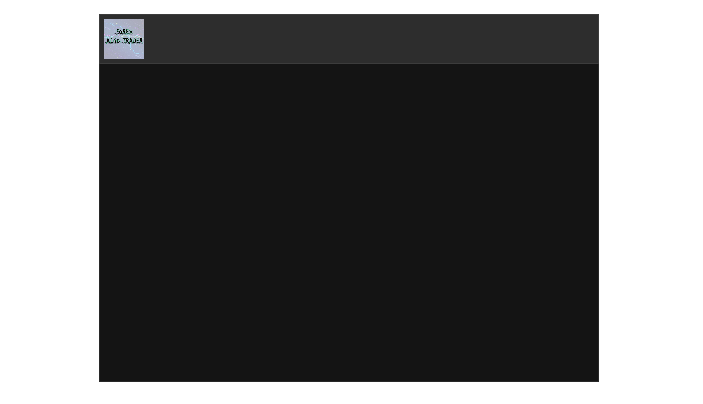
Agora que o arquivo de imagem está pronto, passamos à implementação dos demais elementos principais, conforme descrito a seguir.
string truncated_name = truncateString(ea_name, 0, -1, 20, true); //--- Truncate EA name
int titleFontSize = getFontSizeByDPI(14);           //--- Calculate title font size
createLabel(SETUP_HEADER_TITLE, g_mainX + 5 + 40 + 5, g_mainY + 5, truncated_name, clrWhite, titleFontSize, "Arial Bold", CORNER_LEFT_UPPER, ANCHOR_LEFT_UPPER); //--- Create title label
int subtitleFontSize = getFontSizeByDPI(10);        //--- Calculate subtitle font size
createLabel(SETUP_HEADER_SUBTITLE, g_mainX + 5 + 40 + 5, g_mainY + 25, "Streamlined configuration for optimal performance", C'200,200,200', subtitleFontSize, "Arial", CORNER_LEFT_UPPER, ANCHOR_LEFT_UPPER); //--- Create subtitle label
int headerCancelFontSize = getFontSizeByDPI(16);    //--- Calculate cancel button font size
createLabel(SETUP_HEADER_CANCEL, g_mainX + g_mainWidth - 25, g_mainY + 10, ShortToString(0x274C), C'150,150,150', headerCancelFontSize, "Arial Rounded MT Bold", CORNER_LEFT_UPPER, ANCHOR_LEFT_UPPER); //--- Create header cancel button
int bodyY = g_mainY + g_headerHeight + g_spacing;   //--- Calculate body y position
createRecLabel(SETUP_BODY_BG, g_mainX, bodyY, g_mainWidth, g_displayHeight, C'25,25,25', 1, C'40,40,40', BORDER_FLAT, STYLE_SOLID, CORNER_LEFT_UPPER); //--- Create body background
int footerY = bodyY + g_displayHeight + g_spacing;  //--- Calculate footer y position
createRecLabel(SETUP_FOOTER_BG, g_mainX, footerY, g_mainWidth, g_footerHeight, C'35,35,35', 1, C'50,50,50', BORDER_FLAT, STYLE_SOLID, CORNER_LEFT_UPPER); //--- Create footer background
createRecLabel(SETUP_CHECKBOX_BG, g_mainX + 10, footerY + (g_footerHeight - 20)/2, 20, 20, C'60,60,60', 1, C'80,80,80', BORDER_FLAT, STYLE_SOLID, CORNER_LEFT_UPPER); //--- Create checkbox background
int checkboxLabelFontSize = getFontSizeByDPI(17);   //--- Calculate checkbox label font size
createLabel(SETUP_CHECKBOX_LABEL, g_mainX + 10 + 2, footerY + (g_footerHeight - 20)/2, " ", clrWhite, checkboxLabelFontSize, "Wingdings", CORNER_LEFT_UPPER, ANCHOR_LEFT_UPPER); //--- Create checkbox label
int checkboxTextFontSize = getFontSizeByDPI(10);    //--- Calculate checkbox text font size
createLabel(SETUP_CHECKBOX_TEXT, g_mainX + 40, footerY + (g_footerHeight - 20)/2 + 2, "Do not show this guide again", clrWhite, checkboxTextFontSize, "Calibri Bold", CORNER_LEFT_UPPER, ANCHOR_LEFT_UPPER); //--- Create checkbox text
int buttonFontSize = getFontSizeByDPI(12);          //--- Calculate button font size
color buttonBg = C'60,60,60';                       //--- Set button background color
color buttonBorder = C'80,80,80';                   //--- Set button border color
createButton(SETUP_OK_BUTTON, g_mainX + g_mainWidth - 170 - 10, footerY + 5, 80, 30, "OK", clrWhite, buttonFontSize, buttonBg, buttonBorder, "Arial Rounded MT Bold", CORNER_LEFT_UPPER, false); //--- Create OK button
createButton(SETUP_CANCEL_BUTTON, g_mainX + g_mainWidth - 80 - 10, footerY + 5, 80, 30, "Cancel", clrWhite, buttonFontSize, buttonBg, buttonBorder, "Arial Rounded MT Bold", CORNER_LEFT_UPPER, false); //--- Create Cancel button
int textFontSize = getFontSizeByDPI(10);            //--- Calculate text font size
for (int i = 0; i < MAX_LINES; i++) {               //--- Create text line labels
   string lineName = "Setup_ResponseLine_" + IntegerToString(i); //--- Generate line name
   createLabel(lineName, 0, -100, " ", clrWhite, textFontSize, "Arial", CORNER_LEFT_UPPER, ANCHOR_LEFT_UPPER); //--- Create line label
}
Nesta etapa, implementamos os demais componentes do painel para completar a interface do usuário do assistente. Para melhorar a legibilidade, limitamos o nome do programa a 20 caracteres utilizando a função "truncateString" e criamos o rótulo do título ("SETUP_HEADER_TITLE") por meio da função "createLabel", nas coordenadas calculadas, utilizando o tamanho de fonte ajustado ao DPI pela função "getFontSizeByDPI" (tamanho base de 14) e a fonte "Arial Bold". Em seguida, adicionamos o rótulo do subtítulo ("SETUP_HEADER_SUBTITLE"), com texto fixo e tamanho de fonte menor, também ajustado ao DPI (tamanho base de 10). Depois, criamos o botão de cancelamento no cabeçalho ("SETUP_HEADER_CANCEL"), utilizando o símbolo Unicode em forma de X (0x274C) com a fonte "Arial Rounded MT Bold". Veja os detalhes a seguir.
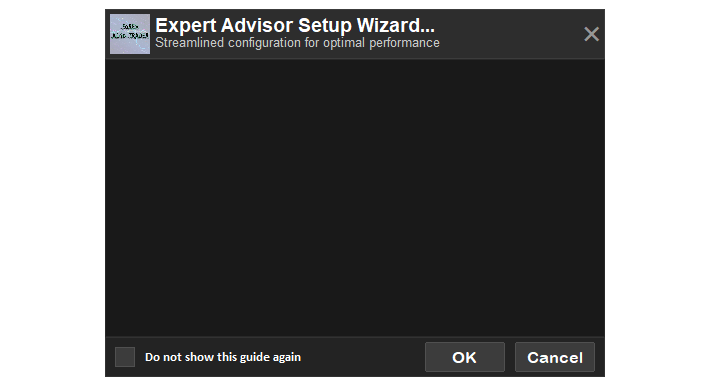
Calculamos a coordenada Y do corpo do painel ("bodyY") e criamos seu fundo ("SETUP_BODY_BG") por meio da função "createRecLabel", utilizando um fundo cinza-escuro (C'25,25,25') e uma borda, com largura "g_mainWidth" e altura "g_displayHeight". Em seguida, calculamos a coordenada Y do rodapé ("footerY") e criamos seu fundo ("SETUP_FOOTER_BG") em cinza-claro. Depois, criamos o fundo da caixa de seleção ("SETUP_CHECKBOX_BG") como um quadrado de 20x20, o rótulo da caixa de seleção ("SETUP_CHECKBOX_LABEL") com um espaço na fonte Wingdings e o texto ("SETUP_CHECKBOX_TEXT") com a mensagem "Não mostrar este guia novamente" na fonte Calibri Bold. Adicionamos os botões "OK" e "Cancelar" ("SETUP_OK_BUTTON", "SETUP_CANCEL_BUTTON") por meio da função "createButton", com tamanho de fonte ajustado ao DPI (tamanho base de 12) e tons de cinza harmonizados com a interface. Por fim, utilizamos um laço para criar até "MAX_LINES" rótulos de texto ("Setup_ResponseLine_") por meio da função "createLabel", inicialmente posicionados fora da área visível da tela, para a exibição dinâmica do texto. Dessa forma, estabelecemos a estrutura necessária para exibir um painel interativo e visualmente consistente. Ao executar o programa, obtemos o seguinte resultado.
Agora que o painel contém os principais elementos, precisamos atualizar a área de exibição para apresentar os rótulos de texto definidos no assistente. Como o MQL5 não oferece um mecanismo direto para criar rótulos de texto com várias linhas, precisaremos implementar uma lógica de quebra automática de linha.
//+------------------------------------------------------------------+
//| Get line color based on content                                  |
//+------------------------------------------------------------------+
color GetLineColor(string lineText) {
   if (StringLen(lineText) == 0 || lineText == " ") return C'25,25,25'; //--- Set invisible for empty lines
   if (StringFind(lineText, "mutiiriallan.forex@gmail.com") >= 0) return C'255,100,100'; //--- Set light red for email
   if (StringFind(lineText, "https://t.me/Forex_Algo_Trader") >= 0) return C'150,100,200'; //--- Set light purple for group link
   if (StringFind(lineText, "@ForexAlgo-Trader") >= 0) return C'100,150,255'; //--- Set light blue for channel link
   if (StringFind(lineText, "http") >= 0 || StringFind(lineText, "t.me") >= 0) return C'100,150,255'; //--- Set light blue for general links
   string start3 = StringSubstr(lineText, 0, 3);    //--- Get first three characters
   if ((start3 == "1. " || start3 == "2. " || start3 == "3. " || start3 == "4. " || start3 == "5. ") &&
       StringFind(lineText, "Initial Setup Instructions") < 0) { //--- Check instruction lines
      return C'255,200,100';                        //--- Set light yellow for instructions
   }
   return clrWhite;                                 //--- Default to white
}

//+------------------------------------------------------------------+
//| Wrap text with colors                                            |
//+------------------------------------------------------------------+
void WrapText(const string inputText, const string font, const int fontSize, const int maxWidth, string &wrappedLines[], color &wrappedColors[], int offset = 0) {
   const int maxChars = 60;                         //--- Set maximum characters per line
   ArrayResize(wrappedLines, 0);                    //--- Clear wrapped lines array
   ArrayResize(wrappedColors, 0);                   //--- Clear wrapped colors array
   TextSetFont(font, fontSize);                     //--- Set font
   string paragraphs[];                             //--- Declare paragraphs array
   int numParagraphs = StringSplit(inputText, '\n', paragraphs); //--- Split text into paragraphs
   for (int p = 0; p < numParagraphs; p++) {        //--- Iterate through paragraphs
      string para = paragraphs[p];                  //--- Get current paragraph
      color paraColor = GetLineColor(para);         //--- Get paragraph color
      if (StringLen(para) == 0) {                   //--- Check empty paragraph
         int size = ArraySize(wrappedLines);        //--- Get current size
         ArrayResize(wrappedLines, size + 1);       //--- Resize lines array
         wrappedLines[size] = " ";                  //--- Add empty line
         ArrayResize(wrappedColors, size + 1);      //--- Resize colors array
         wrappedColors[size] = C'25,25,25';         //--- Set invisible color
         continue;                                  //--- Skip to next
      }
      string words[];                               //--- Declare words array
      int numWords = StringSplit(para, ' ', words); //--- Split paragraph into words
      string currentLine = "";                      //--- Initialize current line
      for (int w = 0; w < numWords; w++) {          //--- Iterate through words
         string testLine = currentLine + (StringLen(currentLine) > 0 ? " " : "") + words[w]; //--- Build test line
         uint wid, hei;                             //--- Declare width and height
         TextGetSize(testLine, wid, hei);           //--- Get test line size
         int textWidth = (int)wid;                  //--- Get text width
         if (textWidth + offset <= maxWidth && StringLen(testLine) <= maxChars) { //--- Check line fits
            currentLine = testLine;                 //--- Update current line
         } else {                                   //--- Line exceeds limits
            if (StringLen(currentLine) > 0) {       //--- Check non-empty line
               int size = ArraySize(wrappedLines);  //--- Get current size
               ArrayResize(wrappedLines, size + 1); //--- Resize lines array
               wrappedLines[size] = currentLine;    //--- Add line
               ArrayResize(wrappedColors, size + 1); //--- Resize colors array
               wrappedColors[size] = paraColor;     //--- Add color
            }
            currentLine = words[w];                 //--- Start new line
            TextGetSize(currentLine, wid, hei);     //--- Get new line size
            textWidth = (int)wid;                   //--- Update text width
            if (textWidth + offset > maxWidth || StringLen(currentLine) > maxChars) { //--- Check word too long
               string wrappedWord = "";             //--- Initialize wrapped word
               for (int c = 0; c < StringLen(words[w]); c++) { //--- Iterate through characters
                  string testWord = wrappedWord + StringSubstr(words[w], c, 1); //--- Build test word
                  TextGetSize(testWord, wid, hei);  //--- Get test word size
                  int wordWidth = (int)wid;         //--- Get word width
                  if (wordWidth + offset > maxWidth || StringLen(testWord) > maxChars) { //--- Check word fits
                     if (StringLen(wrappedWord) > 0) { //--- Check non-empty word
                        int size = ArraySize(wrappedLines); //--- Get current size
                        ArrayResize(wrappedLines, size + 1); //--- Resize lines array
                        wrappedLines[size] = wrappedWord; //--- Add wrapped word
                        ArrayResize(wrappedColors, size + 1); //--- Resize colors array
                        wrappedColors[size] = paraColor; //--- Add color
                     }
                     wrappedWord = StringSubstr(words[w], c, 1); //--- Start new word
                  } else {                          //--- Word fits
                     wrappedWord = testWord;        //--- Update wrapped word
                  }
               }
               currentLine = wrappedWord;          //--- Set current line to wrapped word
               if (StringLen(currentLine) > 0) {   //--- Check non-empty line
                  int size = ArraySize(wrappedLines); //--- Get current size
                  ArrayResize(wrappedLines, size + 1); //--- Resize lines array
                  wrappedLines[size] = currentLine; //--- Add line
                  ArrayResize(wrappedColors, size + 1); //--- Resize colors array
                  wrappedColors[size] = paraColor; //--- Add color
               }
               currentLine = "";                   //--- Reset current line
            }
         }
      }
      if (StringLen(currentLine) > 0) {            //--- Check remaining line
         int size = ArraySize(wrappedLines);       //--- Get current size
         ArrayResize(wrappedLines, size + 1);      //--- Resize lines array
         wrappedLines[size] = currentLine;         //--- Add line
         ArrayResize(wrappedColors, size + 1);     //--- Resize colors array
         wrappedColors[size] = paraColor;          //--- Add color
      }
   }
}
Nesta etapa, aplicamos a lógica de formatação e codificação por cores do texto para melhorar a legibilidade do guia. Na função "GetLineColor", atribuímos cores de acordo com o conteúdo: as linhas vazias recebem a mesma cor cinza-escuro do fundo (C'25,25,25'), tornando-se invisíveis; os endereços de e-mail recebem a cor vermelho-claro (C'255,100,100'); os links para grupos, roxo-claro (C'150,100,200'); os links para os autores e outros localizadores uniformes de recursos (URLs), azul-claro (C'100,150,255'); as linhas de instruções iniciadas por um dos prefixos numéricos de "1." a "5." (exceto o título), amarelo-claro (C'255,200,100'); e todas as demais recebem a cor branca por padrão. Você pode configurar esses parâmetros conforme suas preferências. Incluímos esse recurso apenas para demonstrar como implementar uma formatação de texto mais avançada por meio de cores.
Na função "WrapText", dividimos o texto de entrada em parágrafos utilizando StringSplit com a quebra de linha como separador, definimos a fonte por meio de TextSetFont e obtemos a cor de cada parágrafo utilizando "GetLineColor", representando os parágrafos vazios por espaços com uma cor que os torna invisíveis. Dividimos os parágrafos em palavras utilizando "StringSplit" e compomos as linhas adicionando palavras enquanto a largura do texto, medida por TextGetSize, não ultrapassar "maxWidth" e o comprimento da linha respeitar o limite de 60 caracteres, embora o limite máximo seja de 63. Caso contrário, iniciamos uma nova linha. Quando uma palavra é excessivamente longa, dividimos a palavra caractere por caractere e distribuímos seus segmentos em novas linhas conforme os limites estabelecidos. Utilizamos ArrayResize para redimensionar os arrays, armazenando cada linha em "wrappedLines" e sua respectiva cor em "wrappedColors". Com essa função, podemos atualizar o conteúdo da área de exibição. Para isso, implementaremos a lógica de atualização em uma função separada.
//+------------------------------------------------------------------+
//| Get text height                                                  |
//+------------------------------------------------------------------+
int TextGetHeight(string text, string font, int fontSize) {
   uint wid, hei;                                   //--- Declare width and height
   TextSetFont(font, fontSize);                     //--- Set font
   TextGetSize(text, wid, hei);                     //--- Get text size
   return (int)hei;                                 //--- Return height
}

//+------------------------------------------------------------------+
//| Check if line is a heading                                       |
//+------------------------------------------------------------------+
bool IsHeading(string lineText) {
   if (StringLen(lineText) == 0) return false;      //--- Return false for empty lines
   if (StringGetCharacter(lineText, StringLen(lineText) - 1) == ':') return true; //--- Check for colon
   if (StringFind(lineText, "Expert Advisor Initialization Guide") >= 0) return true; //--- Check main heading
   if (StringFind(lineText, "Key Features") >= 0) return true; //--- Check features heading
   if (StringFind(lineText, "Initial Setup Instructions") >= 0) return true; //--- Check instructions heading
   if (StringFind(lineText, "Important Notes") >= 0) return true; //--- Check notes heading
   if (StringFind(lineText, "Contact Methods") >= 0) return true; //--- Check contact heading
   if (StringFind(lineText, "NB:") >= 0) return true; //--- Check NB heading
   return false;                                    //--- Default to false
}

//+------------------------------------------------------------------+
//| Update body display with scrollable text                         |
//+------------------------------------------------------------------+
void UpdateBodyDisplay() {
   int textX = g_mainX + g_padding + g_textPadding; //--- Set text x position
   int textY = g_mainY + g_headerHeight + g_spacing; //--- Set text y position
   int fullMaxWidth = g_mainWidth - 2 * g_padding - 2 * g_textPadding; //--- Calculate max text width
   string font = "Arial";                           //--- Set font
   int fontSize = getFontSizeByDPI(10);             //--- Calculate font size
   int lineHeight = TextGetHeight("A", font, fontSize); //--- Get line height
   int adjustedLineHeight = lineHeight + g_lineSpacing; //--- Calculate adjusted line height
   g_adjustedLineHeight = adjustedLineHeight;       //--- Store adjusted line height
   int visibleHeight = g_displayHeight;             //--- Set visible height
   g_visible_height = visibleHeight;                //--- Store visible height
   static string wrappedLines[];                    //--- Store wrapped text lines
   static color wrappedColors[];                    //--- Store line colors
   static bool wrapped = false;                     //--- Track if text wrapped
   if (!wrapped) {                                  //--- Check if text needs wrapping
      WrapText(setup_text, font, fontSize, fullMaxWidth, wrappedLines, wrappedColors); //--- Wrap text
      wrapped = true;                               //--- Set wrapped flag
   }
   int numLines = ArraySize(wrappedLines);          //--- Get number of lines
   g_total_height = numLines * adjustedLineHeight;  //--- Calculate total text height
   bool need_scroll = g_total_height > visibleHeight; //--- Check if scrollbar needed
   bool should_show_scrollbar = false;              //--- Initialize scrollbar visibility
   int reserved_width = 0;                          //--- Initialize reserved width
   if (need_scroll && ScrollbarMode != SCROLL_NEVER) { //--- Check scrollbar mode
      should_show_scrollbar = true;                 //--- Enable scrollbar
      reserved_width = 16;                          //--- Reserve scrollbar width
   }
   if (reserved_width > 0 && fullMaxWidth - reserved_width != fullMaxWidth) { //--- Check width change
      WrapText(setup_text, font, fontSize, fullMaxWidth - reserved_width, wrappedLines, wrappedColors); //--- Rewrap text
      numLines = ArraySize(wrappedLines);           //--- Update line count
      g_total_height = numLines * adjustedLineHeight; //--- Update total height
   }

   int startLine = scroll_pos / adjustedLineHeight; //--- Calculate start line
   int currentY = textY;                            //--- Set current y position
   int labelIndex = 0;                              //--- Initialize label index
   for (int line = startLine; line < numLines; line++) { //--- Iterate visible lines
      string lineText = wrappedLines[line];         //--- Get line text
      if (StringLen(lineText) == 0) lineText = " "; //--- Set empty lines to space
      color lineColor = wrappedColors[line];        //--- Get line color
      if (IsHeading(lineText)) lineColor = clrBlue; //--- Set blue for headings
      if (currentY + adjustedLineHeight > textY + visibleHeight) break; //--- Prevent overflow
      string lineName = "Setup_ResponseLine_" + IntegerToString(labelIndex); //--- Generate line name
      if (ObjectFind(0, lineName) >= 0) {          //--- Check if label exists
         ObjectSetString(0, lineName, OBJPROP_TEXT, lineText); //--- Set line text
         ObjectSetInteger(0, lineName, OBJPROP_XDISTANCE, textX); //--- Set x position
         ObjectSetInteger(0, lineName, OBJPROP_YDISTANCE, currentY); //--- Set y position
         ObjectSetInteger(0, lineName, OBJPROP_COLOR, lineColor); //--- Set line color
         string lineFont = IsHeading(lineText) ? "Arial Bold" : "Arial"; //--- Set font
         ObjectSetString(0, lineName, OBJPROP_FONT, lineFont); //--- Set font type
         ObjectSetInteger(0, lineName, OBJPROP_FONTSIZE, fontSize); //--- Set font size
         ObjectSetInteger(0, lineName, OBJPROP_HIDDEN, false); //--- Show label
      }
      currentY += adjustedLineHeight;               //--- Increment y position
      labelIndex++;                                 //--- Increment label index
   }
   for (int i = labelIndex; i < MAX_LINES; i++) {   //--- Hide unused labels
      string lineName = "Setup_ResponseLine_" + IntegerToString(i); //--- Generate line name
      if (ObjectFind(0, lineName) >= 0) {           //--- Check if label exists
         ObjectSetInteger(0, lineName, OBJPROP_HIDDEN, true); //--- Hide label
      }
   }
   ChartRedraw();                                   //--- Redraw chart
}
Para implementar a lógica de renderização e rolagem do texto, permitindo a exibição dinâmica do guia, definimos a fonte e seu tamanho na função "TextGetHeight" por meio de TextSetFont e utilizamos TextGetSize para calcular a altura de um caractere de referência. Retornamos essa altura para manter um espaçamento uniforme entre as linhas. A função "IsHeading" retorna false para linhas vazias e identifica os títulos verificando se as linhas terminam com dois-pontos ou contêm nomes de determinadas seções do guia (por exemplo, "Principais funcionalidades"), retornando true nesses casos. Na função "UpdateBodyDisplay", calculamos a posição da área de texto ("textX", "textY") e sua largura disponível ("fullMaxWidth") com base nos espaçamentos internos e nas dimensões do contêiner. Definimos a fonte Arial com tamanho ajustado ao DPI por meio de "getFontSizeByDPI" e calculamos a altura da linha somando o valor retornado por "TextGetHeight" a "g_lineSpacing", armazenando o resultado em "g_adjustedLineHeight".
Caso ainda não tenha sido realizada, aplicamos a quebra automática de linha ao texto do guia utilizando a função "WrapText", calculamos a altura total do texto ("g_total_height") e determinamos a visibilidade da barra de rolagem com base no parâmetro "ScrollbarMode" e na existência de conteúdo que ultrapasse os limites da área de exibição. Quando necessário, reservamos 16 pixels para a barra de rolagem e recalculamos as quebras de linha considerando a largura disponível. Calculamos a primeira linha a ser exibida com base em "scroll_pos" e atualizamos os rótulos de texto visíveis utilizando ObjectSetString e ObjectSetInteger, definindo suas posições, cores (azul para os títulos identificados por "IsHeading") e fontes. Ocultamos os rótulos não utilizados e redesenhamos o gráfico. Ao chamar essa função dentro da função responsável pela exibição do painel, obtemos o seguinte resultado.
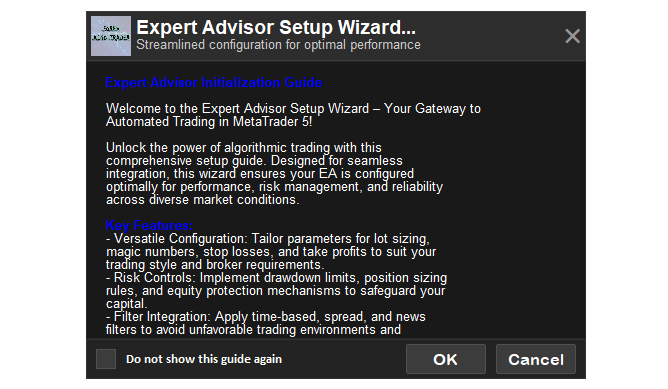
Como podemos observar, a área de exibição está pronta e o texto se ajusta perfeitamente ao espaço disponível. Agora, precisamos implementar a lógica para exibir a barra de rolagem quando necessário.
//+------------------------------------------------------------------+
//| Create scrollbar                                                 |
//+------------------------------------------------------------------+
void CreateScrollbar() {
   int bodyY = g_mainY + g_headerHeight + g_spacing; //--- Calculate body y position
   int textAreaY = bodyY;                            //--- Set text area y
   int textAreaHeight = g_displayHeight;             //--- Set text area height
   int scrollbar_x = g_mainX + g_mainWidth - 16 - 1; //--- Calculate scrollbar x
   int scrollbar_width = 16;                         //--- Set scrollbar width
   int button_size = 16;                             //--- Set button size
   int scrollbar_y = textAreaY + 2;                  //--- Calculate scrollbar y
   int scrollbar_height = textAreaHeight - 2 - 2;    //--- Calculate scrollbar height
   createRecLabel(SCROLL_LEADER, scrollbar_x, scrollbar_y, scrollbar_width, scrollbar_height, C'45,45,45', 1, C'60,60,60', BORDER_FLAT, STYLE_SOLID, CORNER_LEFT_UPPER); //--- Create scroll leader
   createRecLabel(SCROLL_UP_REC, scrollbar_x, scrollbar_y, scrollbar_width, button_size, C'60,60,60', 1, C'60,60,60', BORDER_FLAT, STYLE_SOLID, CORNER_LEFT_UPPER); //--- Create scroll up rectangle
   int scrollUpLabelFontSize = getFontSizeByDPI(10); //--- Calculate scroll up font size
   createLabel(SCROLL_UP_LABEL, scrollbar_x + 2, scrollbar_y - 2, CharToString(0x35), C'150,150,150', scrollUpLabelFontSize, "Webdings", CORNER_LEFT_UPPER, ANCHOR_LEFT_UPPER); //--- Create scroll up label
   int down_rec_y = scrollbar_y + scrollbar_height - button_size; //--- Calculate scroll down y
   createRecLabel(SCROLL_DOWN_REC, scrollbar_x, down_rec_y, scrollbar_width, button_size, C'60,60,60', 1, C'60,60,60', BORDER_FLAT, STYLE_SOLID, CORNER_LEFT_UPPER); //--- Create scroll down rectangle
   createLabel(SCROLL_DOWN_LABEL, scrollbar_x + 2, down_rec_y - 2, CharToString(0x36), C'150,150,150', scrollUpLabelFontSize, "Webdings", CORNER_LEFT_UPPER, ANCHOR_LEFT_UPPER); //--- Create scroll down label
   slider_height = CalculateSliderHeight();          //--- Calculate slider height
   createRecLabel(SCROLL_SLIDER, scrollbar_x, scrollbar_y + button_size, scrollbar_width, slider_height, C'80,80,80', 1, C'100,100,100', BORDER_FLAT, STYLE_SOLID, CORNER_LEFT_UPPER); //--- Create scroll slider
}

//+------------------------------------------------------------------+
//| Delete scrollbar                                                 |
//+------------------------------------------------------------------+
void DeleteScrollbar() {
   string scroll_objects[] = {SCROLL_LEADER, SCROLL_UP_REC, SCROLL_UP_LABEL, SCROLL_DOWN_REC, SCROLL_DOWN_LABEL, SCROLL_SLIDER}; //--- Define scroll objects
   for (int i = 0; i < ArraySize(scroll_objects); i++) { //--- Iterate through objects
      ObjectDelete(0, scroll_objects[i]);            //--- Delete object
   }
   ChartRedraw();                                    //--- Redraw chart
}

//+------------------------------------------------------------------+
//| Calculate slider height                                          |
//+------------------------------------------------------------------+
int CalculateSliderHeight() {
   int textAreaHeight = g_displayHeight;            //--- Get text area height
   int scroll_area_height = textAreaHeight - 32;    //--- Calculate scroll area height
   int slider_min_height = 20;                      //--- Set minimum slider height
   if (g_total_height <= g_visible_height) return scroll_area_height; //--- Return full height if no scroll
   double visible_ratio = (double)g_visible_height / g_total_height; //--- Calculate visible ratio
   int height = (int)MathFloor(scroll_area_height * visible_ratio); //--- Calculate slider height
   return MathMax(slider_min_height, height);       //--- Return minimum or calculated height
}

//+------------------------------------------------------------------+
//| Update slider position                                           |
//+------------------------------------------------------------------+
void UpdateSliderPosition() {
   int bodyY = g_mainY + g_headerHeight + g_spacing; //--- Calculate body y position
   int textAreaY = bodyY;                           //--- Set text area y
   int textAreaHeight = g_displayHeight;            //--- Set text area height
   int scroll_area_height = textAreaHeight - 32;    //--- Calculate scroll area height
   int slider_min_y = textAreaY + 16;               //--- Set minimum slider y
   if (g_max_scroll <= 0) return;                   //--- Exit if no scroll
   double scroll_ratio = (double)scroll_pos / g_max_scroll; //--- Calculate scroll ratio
   int slider_max_y = slider_min_y + scroll_area_height - slider_height; //--- Calculate max slider y
   int new_y = slider_min_y + (int)MathRound(scroll_ratio * (slider_max_y - slider_min_y)); //--- Calculate new y
   ObjectSetInteger(0, SCROLL_SLIDER, OBJPROP_YDISTANCE, new_y); //--- Set slider y position
}

//+------------------------------------------------------------------+
//| Update scrollbar button colors                                   |
//+------------------------------------------------------------------+
void UpdateButtonColors() {
   int max_scroll = g_max_scroll;                   //--- Get max scroll
   color up_color = (scroll_pos == 0) ? C'80,80,80' : (scroll_up_hovered ? C'100,100,100' : C'150,150,150'); //--- Set up button color
   color down_color = (scroll_pos >= max_scroll) ? C'80,80,80' : (scroll_down_hovered ? C'100,100,100' : C'150,150,150'); //--- Set down button color
   ObjectSetInteger(0, SCROLL_UP_LABEL, OBJPROP_COLOR, up_color); //--- Update up label color
   ObjectSetInteger(0, SCROLL_DOWN_LABEL, OBJPROP_COLOR, down_color); //--- Update down label color
   ObjectSetInteger(0, SCROLL_UP_REC, OBJPROP_BGCOLOR, scroll_up_hovered ? C'70,70,70' : C'60,60,60'); //--- Update up rectangle color
   ObjectSetInteger(0, SCROLL_DOWN_REC, OBJPROP_BGCOLOR, scroll_down_hovered ? C'70,70,70' : C'60,60,60'); //--- Update down rectangle color
}

//+------------------------------------------------------------------+
//| Scroll up                                                        |
//+------------------------------------------------------------------+
void ScrollUp() {
   if (g_adjustedLineHeight > 0 && scroll_pos > 0) { //--- Check scroll possible
      scroll_pos = MathMax(0, scroll_pos - g_adjustedLineHeight); //--- Decrease scroll position
      UpdateBodyDisplay();                           //--- Update body display
      if (scroll_visible) {                          //--- Check scrollbar visible
         UpdateSliderPosition();                     //--- Update slider position
         UpdateButtonColors();                       //--- Update button colors
      }
   }
}

//+------------------------------------------------------------------+
//| Scroll down                                                      |
//+------------------------------------------------------------------+
void ScrollDown() {
   int max_scroll = g_max_scroll;                    //--- Get max scroll
   if (g_adjustedLineHeight > 0 && scroll_pos < max_scroll) { //--- Check scroll possible
      scroll_pos = MathMin(max_scroll, scroll_pos + g_adjustedLineHeight); //--- Increase scroll position
      UpdateBodyDisplay();                           //--- Update body display
      if (scroll_visible) {                          //--- Check scrollbar visible
         UpdateSliderPosition();                     //--- Update slider position
         UpdateButtonColors();                       //--- Update button colors
      }
   }
}
Para implementar a barra de rolagem e permitir uma navegação fluida pelo guia de configuração, criamos a função "CreateScrollbar", na qual calculamos a posição e as dimensões da barra de rolagem com base na coordenada Y do corpo do painel ("bodyY"). Definimos "scrollbar_x" como a coordenada horizontal da barra de rolagem próxima à borda direita do contêiner principal e utilizamos uma largura de 16 pixels. Por meio da função "createRecLabel", criamos um retângulo ("SCROLL_LEADER") que representa a trilha da barra de rolagem, além dos botões de rolagem para cima e para baixo ("SCROLL_UP_REC", "SCROLL_DOWN_REC"), com os respectivos rótulos ("SCROLL_UP_LABEL", "SCROLL_DOWN_LABEL"), utilizando os símbolos de seta da fonte Webdings (0x35, 0x36). Chamamos a função "CalculateSliderHeight" para determinar a altura do controle deslizante com base na proporção do texto visível em relação ao conteúdo total e criamos esse controle ("SCROLL_SLIDER") por meio da função "createRecLabel". A função "DeleteScrollbar" exclui todos os objetos da barra de rolagem ("SCROLL_LEADER" etc.) utilizando ObjectDelete e redesenha o gráfico.
Na função "CalculateSliderHeight", calculamos a altura do controle deslizante com base na proporção entre a altura da área de exibição e a altura total do texto, estabelecendo um limite mínimo de 20 pixels. A função "UpdateSliderPosition" ajusta a posição do controle deslizante no eixo Y utilizando o fator de rolagem determinado pelos valores de "scroll_pos" e "g_max_scroll" e aplica a posição calculada por meio de "ObjectSetInteger". Na função "UpdateButtonColors", atualizamos as cores dos botões de rolagem para cima e para baixo de acordo com a posição atual da rolagem e a presença do cursor do mouse sobre os botões, proporcionando feedback visual dinâmico. As funções "ScrollUp" e "ScrollDown" ajustam "scroll_pos" em incrementos ou decrementos de "g_adjustedLineHeight", respeitando os limites de rolagem. Quando a barra de rolagem está visível, chamam as funções "UpdateBodyDisplay", "UpdateSliderPosition" e "UpdateButtonColors", permitindo uma rolagem fluida. Agora, podemos chamar essas funções dentro da função de atualização da área de exibição para adicionar a barra de rolagem. A seguir, apresentamos a abordagem utilizada para implementar esse recurso.
int num_visible_lines = g_visible_height / g_adjustedLineHeight; //--- Calculate visible lines
g_max_scroll = MathMax(0, (numLines - num_visible_lines) * g_adjustedLineHeight); //--- Calculate max scroll
bool prev_scroll_visible = scroll_visible;       //--- Store previous scrollbar state
scroll_visible = should_show_scrollbar;          //--- Update scrollbar visibility
if (scroll_visible != prev_scroll_visible) {     //--- Check scrollbar state change
   if (scroll_visible) {                         //--- Show scrollbar
      CreateScrollbar();                         //--- Create scrollbar
   } else {                                      //--- Hide scrollbar
      DeleteScrollbar();                         //--- Delete scrollbar
   }
}
scroll_pos = MathMax(0, MathMin(scroll_pos, g_max_scroll)); //--- Clamp scroll position
if (scroll_visible) {                            //--- Update scrollbar
   slider_height = CalculateSliderHeight();      //--- Calculate slider height
   ObjectSetInteger(0, SCROLL_SLIDER, OBJPROP_YSIZE, slider_height); //--- Set slider height
   UpdateSliderPosition();                       //--- Update slider position
   UpdateButtonColors();                         //--- Update button colors
}
Na função "UpdateBodyDisplay", calculamos o número de linhas visíveis dividindo "g_visible_height" por "g_adjustedLineHeight" e definimos a distância máxima de rolagem ("g_max_scroll") como a altura do texto que excede a área ocupada pelas linhas visíveis, utilizando MathMax para evitar valores negativos. Armazenamos o estado anterior de visibilidade da barra de rolagem na variável "prev_scroll_visible" e atualizamos "scroll_visible" de acordo com a necessidade de exibir a barra. Se esse estado mudar, chamamos "CreateScrollbar" para desenhar a barra de rolagem ou "DeleteScrollbar" para removê-la. Limitamos o valor de "scroll_pos" ao intervalo de 0 a "g_max_scroll" utilizando as funções "MathMax" e MathMin para evitar que a posição ultrapasse os limites de rolagem. Se a barra de rolagem estiver visível, atualizamos o valor de "slider_height" por meio de "CalculateSliderHeight", definimos a altura do controle deslizante ("SCROLL_SLIDER") utilizando ObjectSetInteger e chamamos as funções "UpdateSliderPosition" e "UpdateButtonColors" para atualizar a aparência e o posicionamento dos elementos da barra de rolagem. Após a compilação, obtemos o seguinte resultado.
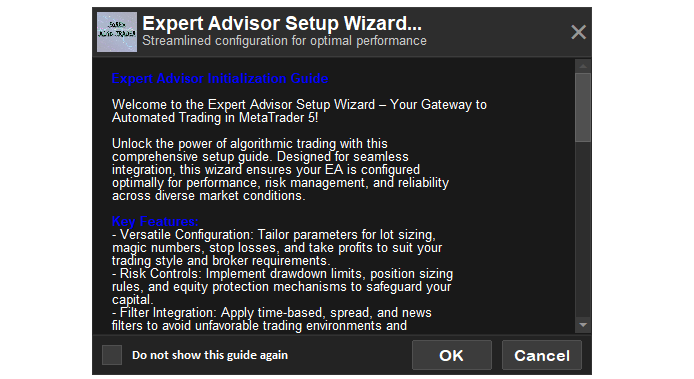
Como podemos observar na imagem, todos os elementos do painel estão prontos. Agora, precisamos garantir que o painel seja removido ao encerrar a execução ou desinicializar o programa.
//+------------------------------------------------------------------+
//| Delete the dashboard                                             |
//+------------------------------------------------------------------+
void DeleteDashboard() {
   string objects[] = {                             //--- Define dashboard objects
      SETUP_MAIN, SETUP_HEADER_BG, SETUP_HEADER_IMAGE, SETUP_HEADER_TITLE, SETUP_HEADER_SUBTITLE, SETUP_HEADER_CANCEL,
      SETUP_BODY_BG, SETUP_FOOTER_BG, SETUP_CHECKBOX_BG, SETUP_CHECKBOX_LABEL, SETUP_CHECKBOX_TEXT,
      SETUP_OK_BUTTON, SETUP_CANCEL_BUTTON, SCROLL_LEADER, SCROLL_UP_REC, SCROLL_UP_LABEL,
      SCROLL_DOWN_REC, SCROLL_DOWN_LABEL, SCROLL_SLIDER
   };
   for (int i = 0; i < ArraySize(objects); i++) {   //--- Iterate through objects
      ObjectDelete(0, objects[i]);                  //--- Delete object
   }
   int total = ObjectsTotal(0);                     //--- Get total objects
   for (int j = total - 1; j >= 0; j--) {           //--- Iterate through remaining objects
      string name = ObjectName(0, j);               //--- Get object name
      if (StringFind(name, "Setup_ResponseLine_") == 0) { //--- Check for text lines
         ObjectDelete(0, name);                     //--- Delete text line
      }
   }
   ChartRedraw();                                   //--- Redraw chart
}

//+------------------------------------------------------------------+
//| Expert deinitialization function                                 |
//+------------------------------------------------------------------+
void OnDeinit(const int reason) {
   DeleteDashboard();                                //--- Remove dashboard objects
   if (StringLen(g_scaled_image_resource) > 0) {     //--- Check if scaled image exists
      ResourceFree(g_scaled_image_resource);         //--- Free scaled image resource
   }
}
Nesta etapa, implementamos uma função de limpeza do assistente para garantir o gerenciamento adequado dos recursos. Na função "DeleteDashboard", definimos um array com os nomes dos objetos do painel, incluindo os componentes do contêiner principal, do cabeçalho, do corpo, do rodapé, dos botões, da caixa de seleção e da barra de rolagem. Percorremos esse array e utilizamos ObjectDelete para excluir cada objeto do gráfico. Em seguida, utilizamos um laço para percorrer todos os objetos gráficos restantes por meio de ObjectsTotal e ObjectName, excluímos com "ObjectDelete" todos os objetos de texto cujos nomes começam com "Setup_ResponseLine_" e redesenhamos o gráfico utilizando ChartRedraw, deixando-o livre dos elementos do assistente. No manipulador de eventos "OnDeinit", chamamos a função "DeleteDashboard" para remover todos os elementos do painel e verificamos se o nome do recurso da imagem redimensionada não está vazio ("StringLen(g_scaled_image_resource) > 0"). Se essa condição for atendida, utilizamos ResourceFree para liberar a memória ocupada pelo recurso. Agora, podemos implementar a interatividade do painel. Precisamos garantir que os botões acionem as funções correspondentes quando clicados e que os efeitos visuais indiquem quando o cursor do mouse estiver sobre eles. Para simplificar essa implementação, criaremos uma função auxiliar.
//+------------------------------------------------------------------+
//| Update hover effects                                             |
//+------------------------------------------------------------------+
void UpdateHoverEffects(int mouseX, int mouseY) {
   int ok_x = (int)ObjectGetInteger(0, SETUP_OK_BUTTON, OBJPROP_XDISTANCE);    //--- Get OK button x
   int ok_y = (int)ObjectGetInteger(0, SETUP_OK_BUTTON, OBJPROP_YDISTANCE);    //--- Get OK button y
   int ok_width = (int)ObjectGetInteger(0, SETUP_OK_BUTTON, OBJPROP_XSIZE);    //--- Get OK button width
   int ok_height = (int)ObjectGetInteger(0, SETUP_OK_BUTTON, OBJPROP_YSIZE);   //--- Get OK button height
   bool is_ok_hovered = (mouseX >= ok_x && mouseX <= ok_x + ok_width && mouseY >= ok_y && mouseY <= ok_y + ok_height); //--- Check OK button hover
   if (is_ok_hovered != ok_button_hovered) {                                   //--- Check hover state change
      ok_button_hovered = is_ok_hovered;                                       //--- Update hover state
      color hoverBg = is_ok_hovered ? C'40,80,40' : C'60,60,60';               //--- Set hover background
      color hoverBorder = is_ok_hovered ? C'60,100,60' : C'80,80,80';          //--- Set hover border
      ObjectSetInteger(0, SETUP_OK_BUTTON, OBJPROP_BGCOLOR, hoverBg);          //--- Update background
      ObjectSetInteger(0, SETUP_OK_BUTTON, OBJPROP_BORDER_COLOR, hoverBorder); //--- Update border
      ChartRedraw();                                                           //--- Redraw chart
   }
   int cancel_x = (int)ObjectGetInteger(0, SETUP_CANCEL_BUTTON, OBJPROP_XDISTANCE);  //--- Get Cancel button x
   int cancel_y = (int)ObjectGetInteger(0, SETUP_CANCEL_BUTTON, OBJPROP_YDISTANCE);  //--- Get Cancel button y
   int cancel_width = (int)ObjectGetInteger(0, SETUP_CANCEL_BUTTON, OBJPROP_XSIZE);  //--- Get Cancel button width
   int cancel_height = (int)ObjectGetInteger(0, SETUP_CANCEL_BUTTON, OBJPROP_YSIZE); //--- Get Cancel button height
   bool is_cancel_hovered = (mouseX >= cancel_x && mouseX <= cancel_x + cancel_width && mouseY >= cancel_y && mouseY <= cancel_y + cancel_height); //--- Check Cancel button hover
   if (is_cancel_hovered != cancel_button_hovered) {                                 //--- Check hover state change
      cancel_button_hovered = is_cancel_hovered;                                     //--- Update hover state
      color hoverBg = is_cancel_hovered ? C'80,40,40' : C'60,60,60';                 //--- Set hover background
      color hoverBorder = is_cancel_hovered ? C'100,60,60' : C'80,80,80';            //--- Set hover border
      ObjectSetInteger(0, SETUP_CANCEL_BUTTON, OBJPROP_BGCOLOR, hoverBg);            //--- Update background
      ObjectSetInteger(0, SETUP_CANCEL_BUTTON, OBJPROP_BORDER_COLOR, hoverBorder);   //--- Update border
      ChartRedraw();                               //--- Redraw chart
   }
   int checkbox_x = (int)ObjectGetInteger(0, SETUP_CHECKBOX_BG, OBJPROP_XDISTANCE);  //--- Get checkbox x
   int checkbox_y = (int)ObjectGetInteger(0, SETUP_CHECKBOX_BG, OBJPROP_YDISTANCE);  //--- Get checkbox y
   int checkbox_width = (int)ObjectGetInteger(0, SETUP_CHECKBOX_BG, OBJPROP_XSIZE);  //--- Get checkbox width
   int checkbox_height = (int)ObjectGetInteger(0, SETUP_CHECKBOX_BG, OBJPROP_YSIZE); //--- Get checkbox height
   bool is_checkbox_hovered = (mouseX >= checkbox_x && mouseX <= checkbox_x + checkbox_width && mouseY >= checkbox_y && mouseY <= checkbox_y + checkbox_height); //--- Check checkbox hover
   if (is_checkbox_hovered != checkbox_hovered) {   //--- Check hover state change
      checkbox_hovered = is_checkbox_hovered;       //--- Update hover state
      if (checkbox_checked) {                       //--- Check checkbox state
         ObjectSetInteger(0, SETUP_CHECKBOX_BG, OBJPROP_BGCOLOR, is_checkbox_hovered ? C'0,150,0' : C'0,128,0'); //--- Update background
      } else {                                      //--- Unchecked state
         ObjectSetInteger(0, SETUP_CHECKBOX_BG, OBJPROP_BGCOLOR, is_checkbox_hovered ? C'70,70,70' : C'60,60,60'); //--- Update background
      }
      ChartRedraw();                                //--- Redraw chart
   }
   int header_cancel_x = (int)ObjectGetInteger(0, SETUP_HEADER_CANCEL, OBJPROP_XDISTANCE); //--- Get header cancel x
   int header_cancel_y = (int)ObjectGetInteger(0, SETUP_HEADER_CANCEL, OBJPROP_YDISTANCE); //--- Get header cancel y
   int header_cancel_width = 20;                    //--- Set header cancel width
   int header_cancel_height = 20;                   //--- Set header cancel height
   bool is_header_cancel_hovered = (mouseX >= header_cancel_x && mouseX <= header_cancel_x + header_cancel_width &&
                                    mouseY >= header_cancel_y && mouseY <= header_cancel_y + header_cancel_height); //--- Check header cancel hover
   if (is_header_cancel_hovered != header_cancel_hovered) { //--- Check hover state change
      header_cancel_hovered = is_header_cancel_hovered; //--- Update hover state
      ObjectSetInteger(0, SETUP_HEADER_CANCEL, OBJPROP_COLOR, is_header_cancel_hovered ? C'255,100,100' : C'150,150,150'); //--- Update color
      ChartRedraw();                                //--- Redraw chart
   }
   if (scroll_visible) {                            //--- Check scrollbar visible
      int scroll_up_x = (int)ObjectGetInteger(0, SCROLL_UP_REC, OBJPROP_XDISTANCE);  //--- Get scroll up x
      int scroll_up_y = (int)ObjectGetInteger(0, SCROLL_UP_REC, OBJPROP_YDISTANCE);  //--- Get scroll up y
      int scroll_up_width = (int)ObjectGetInteger(0, SCROLL_UP_REC, OBJPROP_XSIZE);  //--- Get scroll up width
      int scroll_up_height = (int)ObjectGetInteger(0, SCROLL_UP_REC, OBJPROP_YSIZE); //--- Get scroll up height
      bool is_scroll_up_hovered = (mouseX >= scroll_up_x && mouseX <= scroll_up_x + scroll_up_width &&
                                   mouseY >= scroll_up_y && mouseY <= scroll_up_y + scroll_up_height); //--- Check scroll up hover
      if (is_scroll_up_hovered != scroll_up_hovered) {                               //--- Check hover state change
         scroll_up_hovered = is_scroll_up_hovered;                                   //--- Update hover state
         ObjectSetInteger(0, SCROLL_UP_REC, OBJPROP_BGCOLOR, is_scroll_up_hovered ? C'70,70,70' : C'60,60,60'); //--- Update background
         ObjectSetInteger(0, SCROLL_UP_LABEL, OBJPROP_COLOR, (scroll_pos == 0) ? C'80,80,80' : (is_scroll_up_hovered ? C'100,100,100' : C'150,150,150')); //--- Update label color
         ChartRedraw();                                                              //--- Redraw chart
      }
      int scroll_down_x = (int)ObjectGetInteger(0, SCROLL_DOWN_REC, OBJPROP_XDISTANCE);  //--- Get scroll down x
      int scroll_down_y = (int)ObjectGetInteger(0, SCROLL_DOWN_REC, OBJPROP_YDISTANCE);  //--- Get scroll down y
      int scroll_down_width = (int)ObjectGetInteger(0, SCROLL_DOWN_REC, OBJPROP_XSIZE);  //--- Get scroll down width
      int scroll_down_height = (int)ObjectGetInteger(0, SCROLL_DOWN_REC, OBJPROP_YSIZE); //--- Get scroll down height
      bool is_scroll_down_hovered = (mouseX >= scroll_down_x && mouseX <= scroll_down_x + scroll_down_width &&
                                     mouseY >= scroll_down_y && mouseY <= scroll_down_y + scroll_down_height); //--- Check scroll down hover
      if (is_scroll_down_hovered != scroll_down_hovered) {                               //--- Check hover state change
         scroll_down_hovered = is_scroll_down_hovered;                                   //--- Update hover state
         ObjectSetInteger(0, SCROLL_DOWN_REC, OBJPROP_BGCOLOR, is_scroll_down_hovered ? C'70,70,70' : C'60,60,60'); //--- Update background
         ObjectSetInteger(0, SCROLL_DOWN_LABEL, OBJPROP_COLOR, (scroll_pos >= g_max_scroll) ? C'80,80,80' : (is_scroll_down_hovered ? C'100,100,100' : C'150,150,150')); //--- Update label color
         ChartRedraw();                                                                  //--- Redraw chart
      }
      int scroll_slider_x = (int)ObjectGetInteger(0, SCROLL_SLIDER, OBJPROP_XDISTANCE);  //--- Get scroll slider x
      int scroll_slider_y = (int)ObjectGetInteger(0, SCROLL_SLIDER, OBJPROP_YDISTANCE);  //--- Get scroll slider y
      int scroll_slider_width = (int)ObjectGetInteger(0, SCROLL_SLIDER, OBJPROP_XSIZE);  //--- Get scroll slider width
      int scroll_slider_height = (int)ObjectGetInteger(0, SCROLL_SLIDER, OBJPROP_YSIZE); //--- Get scroll slider height
      bool is_scroll_slider_hovered = (mouseX >= scroll_slider_x && mouseX <= scroll_slider_x + scroll_slider_width &&
                                       mouseY >= scroll_slider_y && mouseY <= scroll_slider_y + scroll_slider_height); //--- Check scroll slider hover
      if (is_scroll_slider_hovered != scroll_slider_hovered) {                           //--- Check hover state change
         scroll_slider_hovered = is_scroll_slider_hovered;                               //--- Update hover state
         ObjectSetInteger(0, SCROLL_SLIDER, OBJPROP_BGCOLOR, is_scroll_slider_hovered ? C'100,100,100' : C'80,80,80'); //--- Update background
         ChartRedraw();                                                                  //--- Redraw chart
      }
   }
}
Nesta etapa, implementamos efeitos visuais ativados enquanto o cursor do mouse permanece sobre os elementos interativos que criamos, melhorando o feedback visual para o usuário. Criamos a função "UpdateHoverEffects", na qual verificamos as coordenadas do cursor do mouse ("mouseX", "mouseY") em relação à posição e às dimensões do botão OK ("SETUP_OK_BUTTON"), do botão Cancelar ("SETUP_CANCEL_BUTTON"), da caixa de seleção ("SETUP_CHECKBOX_BG"), do botão de cancelamento do cabeçalho ("SETUP_HEADER_CANCEL") e dos componentes da barra de rolagem ("SCROLL_UP_REC", "SCROLL_DOWN_REC", "SCROLL_SLIDER"), utilizando ObjectGetInteger para obter suas dimensões.
Para cada elemento, verificamos se o cursor está dentro de seus limites, atualizamos as respectivas variáveis de estado ("ok_button_hovered", "cancel_button_hovered" etc.) quando esse estado muda e ajustamos as cores utilizando ObjectSetInteger: o botão "OK" utiliza tons de verde (C'40,80,40'); o botão "Cancelar", tons de vermelho (C'80,40,40'); a caixa de seleção utiliza verde quando está marcada (C'0,150,0') ou cinza quando está desmarcada (C'70,70,70'); o botão de cancelamento do cabeçalho passa a exibir uma cor vermelho-vivo (C'255,100,100'); e os botões e o controle deslizante da barra de rolagem utilizam diferentes tons de cinza (C'70,70,70' ou C'100,100,100'), dependendo da presença do cursor sobre esses elementos e da posição de rolagem ("scroll_pos"). Todas essas cores podem ser alteradas conforme suas preferências. Mais uma vez, utilizamos valores arbitrários para demonstrar os benefícios do feedback visual. Redesenhamos o gráfico utilizando ChartRedraw após cada atualização. Agora, basta implementar essa lógica no manipulador de eventos OnChartEvent, que processa todos os eventos do gráfico. Neste caso, estamos interessados nos eventos de movimento e clique do mouse.
//+------------------------------------------------------------------+
//| Chart event handler                                              |
//+------------------------------------------------------------------+
void OnChartEvent(const int id, const long &lparam, const double &dparam, const string &sparam) {
   int mouseX = (int)lparam;                        //--- Get mouse x coordinate
   int mouseY = (int)dparam;                        //--- Get mouse y coordinate
   int body_inner_y = g_mainY + g_headerHeight + g_spacing; //--- Calculate body y position
   int textAreaEventY = body_inner_y;               //--- Set text area y position
   int textAreaEventH = g_displayHeight;            //--- Set text area height
   int bodyX = g_mainX + g_padding + g_textPadding; //--- Calculate body x position
   int bodyW = g_mainWidth - 2 * g_padding - 2 * g_textPadding - (scroll_visible ? 16 : 0); //--- Calculate body width
   if (id == CHARTEVENT_OBJECT_CLICK) {             //--- Handle object click events
      if (sparam == SETUP_HEADER_CANCEL || sparam == SETUP_CANCEL_BUTTON) { //--- Check cancel button click
         GlobalVariableSet(GV_SETUP, 0.0);          //--- Set global variable to false
         DeleteDashboard();                         //--- Remove dashboard from chart
      } else if (sparam == SETUP_OK_BUTTON) {       //--- Check OK button click
         double new_val = checkbox_checked ? 1.0 : 0.0; //--- Set global variable based on checkbox
         GlobalVariableSet(GV_SETUP, new_val);      //--- Update global variable
         DeleteDashboard();                         //--- Remove dashboard from chart
      } else if (sparam == SETUP_CHECKBOX_BG || sparam == SETUP_CHECKBOX_TEXT || sparam == SETUP_CHECKBOX_LABEL) { //--- Check checkbox click
         checkbox_checked = !checkbox_checked;      //--- Toggle checkbox state
         string check_text = checkbox_checked ? CharToString(252) : " ";         //--- Set checkbox symbol
         ObjectSetString(0, SETUP_CHECKBOX_LABEL, OBJPROP_TEXT, check_text);     //--- Update checkbox label text
         color text_color = checkbox_checked ? C'173,216,230' : clrWhite;        //--- Set text color based on state
         ObjectSetInteger(0, SETUP_CHECKBOX_TEXT, OBJPROP_COLOR, text_color);    //--- Update checkbox text color
         if (checkbox_checked) {                    //--- Check if checkbox is selected
            ObjectSetInteger(0, SETUP_CHECKBOX_BG, OBJPROP_BGCOLOR, C'0,128,0'); //--- Set checked background color
            ObjectSetInteger(0, SETUP_CHECKBOX_LABEL, OBJPROP_COLOR, clrWhite);  //--- Set checked label color
         } else {                                   //--- Handle unchecked state
            ObjectSetInteger(0, SETUP_CHECKBOX_BG, OBJPROP_BGCOLOR, C'60,60,60'); //--- Set unchecked background color
            ObjectSetInteger(0, SETUP_CHECKBOX_LABEL, OBJPROP_COLOR, clrWhite);  //--- Set unchecked label color
         }
         ChartRedraw();                            //--- Redraw chart to reflect changes
      } else if (sparam == SCROLL_UP_REC || sparam == SCROLL_UP_LABEL) {         //--- Check scroll up click
         ScrollUp();                               //--- Execute scroll up action
      } else if (sparam == SCROLL_DOWN_REC || sparam == SCROLL_DOWN_LABEL) {     //--- Check scroll down click
         ScrollDown();                             //--- Execute scroll down action
      }
   } else if (id == CHARTEVENT_MOUSE_MOVE) {       //--- Handle mouse move events
      int MouseState = (int)sparam;                //--- Get mouse state
      bool is_in = (mouseX >= bodyX && mouseX <= bodyX + bodyW && mouseY >= textAreaEventY && mouseY <= textAreaEventY + textAreaEventH); //--- Check if mouse is in body
      mouse_in_body = is_in;                       //--- Update mouse in body status
      UpdateHoverEffects(mouseX, mouseY);          //--- Update hover effects for elements
      static int prevMouseState = 0;               //--- Store previous mouse state
      if (prevMouseState == 0 && MouseState == 1 && scroll_visible) {                //--- Check for slider drag start
         int xd_slider = (int)ObjectGetInteger(0, SCROLL_SLIDER, OBJPROP_XDISTANCE); //--- Get slider x position
         int yd_slider = (int)ObjectGetInteger(0, SCROLL_SLIDER, OBJPROP_YDISTANCE); //--- Get slider y position
         int xs_slider = (int)ObjectGetInteger(0, SCROLL_SLIDER, OBJPROP_XSIZE);     //--- Get slider width
         int ys_slider = (int)ObjectGetInteger(0, SCROLL_SLIDER, OBJPROP_YSIZE);     //--- Get slider height
         if (mouseX >= xd_slider && mouseX <= xd_slider + xs_slider &&
             mouseY >= yd_slider && mouseY <= yd_slider + ys_slider) { //--- Check if mouse is over slider
            movingStateSlider = true;              //--- Set slider drag state
            mlbDownX_Slider = mouseX;              //--- Store mouse x position
            mlbDownY_Slider = mouseY;              //--- Store mouse y position
            mlbDown_YD_Slider = yd_slider;         //--- Store slider y position
            ObjectSetInteger(0, SCROLL_SLIDER, OBJPROP_BGCOLOR, C'100,100,100'); //--- Set drag color
            ChartSetInteger(0, CHART_MOUSE_SCROLL, false); //--- Disable chart scrolling
         }
      }
      if (movingStateSlider) {                     //--- Handle slider dragging
         int delta_y = mouseY - mlbDownY_Slider;   //--- Calculate y displacement
         int new_y = mlbDown_YD_Slider + delta_y;  //--- Calculate new slider y position
         int textAreaY_local = body_inner_y;       //--- Set text area y position
         int textAreaHeight_local = g_displayHeight;   //--- Set text area height
         int scroll_area_y_min = textAreaY_local + 16; //--- Set minimum slider y
         int scroll_area_y_max = textAreaY_local + textAreaHeight_local - 16 - slider_height; //--- Set maximum slider y
         new_y = MathMax(scroll_area_y_min, MathMin(new_y, scroll_area_y_max));               //--- Clamp new y position
         ObjectSetInteger(0, SCROLL_SLIDER, OBJPROP_YDISTANCE, new_y);                        //--- Update slider y position
         int max_scroll = g_max_scroll;            //--- Get maximum scroll
         double scroll_ratio = (double)(new_y - scroll_area_y_min) / (scroll_area_y_max - scroll_area_y_min); //--- Calculate scroll ratio
         int new_scroll_pos = (int)MathRound(scroll_ratio * max_scroll);                      //--- Calculate new scroll position
         if (new_scroll_pos != scroll_pos) {       //--- Check if scroll position changed
            scroll_pos = new_scroll_pos;           //--- Update scroll position
            UpdateBodyDisplay();                   //--- Update body text display
         }
         ChartRedraw();                            //--- Redraw chart
      }
      if (MouseState == 0) {                       //--- Handle mouse release
         if (movingStateSlider) {                  //--- Check if slider was being dragged
            movingStateSlider = false;             //--- Reset drag state
            int max_scroll = g_max_scroll;         //--- Get maximum scroll
            int textAreaY_local = body_inner_y;    //--- Set text area y position
            int textAreaHeight_local = g_displayHeight; //--- Set text area height
            int scroll_area_y_min_local = textAreaY_local + 16; //--- Set minimum slider y
            int scroll_area_y_max_local = textAreaY_local + textAreaHeight_local - 16 - slider_height; //--- Set maximum slider y
            int current_slider_y = (int)ObjectGetInteger(0, SCROLL_SLIDER, OBJPROP_YDISTANCE); //--- Get current slider y
            double scroll_ratio = (double)(current_slider_y - scroll_area_y_min_local) / (scroll_area_y_max_local - scroll_area_y_min_local); //--- Calculate scroll ratio
            int temp_scroll = (int)MathRound(scroll_ratio * max_scroll); //--- Calculate temporary scroll
            if (g_adjustedLineHeight > 0) {        //--- Check if line height valid
               int snapped_line = (int)MathRound((double)temp_scroll / g_adjustedLineHeight); //--- Calculate snapped line
               scroll_pos = MathMax(0, MathMin(snapped_line * g_adjustedLineHeight, max_scroll)); //--- Snap to nearest line
            } else {                               //--- No valid line height
               scroll_pos = temp_scroll;           //--- Use temporary scroll
            }
            UpdateBodyDisplay();                   //--- Update body text display
            UpdateSliderPosition();                //--- Update slider position
            ObjectSetInteger(0, SCROLL_SLIDER, OBJPROP_BGCOLOR, scroll_slider_hovered ? C'100,100,100' : C'80,80,80'); //--- Reset slider color
            ChartSetInteger(0, CHART_MOUSE_SCROLL, true); //--- Re-enable chart scrolling
         }
      }
      prevMouseState = MouseState;                 //--- Update previous mouse state
   } else if (id == CHARTEVENT_MOUSE_WHEEL) {      //--- Handle mouse wheel events
      int wheel_delta = (int)sparam;               //--- Get wheel delta
      bool in_body = (mouseX >= bodyX && mouseX <= bodyX + bodyW && mouseY >= textAreaEventY && mouseY <= textAreaEventY + textAreaEventH); //--- Check if mouse in body
      if (in_body && g_total_height > g_visible_height && g_adjustedLineHeight > 0) { //--- Check scroll conditions
         int direction = (wheel_delta > 0) ? -1 : 1; //--- Determine scroll direction
         int notches = MathAbs(wheel_delta) / 120; //--- Calculate scroll notches
         int scroll_amount = g_adjustedLineHeight * direction * notches; //--- Calculate scroll amount
         scroll_pos += scroll_amount;              //--- Update scroll position
         int max_scroll = g_max_scroll;            //--- Get maximum scroll
         scroll_pos = MathMax(0, MathMin(scroll_pos, max_scroll)); //--- Clamp scroll position
         UpdateBodyDisplay();                      //--- Update body text display
         if (scroll_visible) {                     //--- Check if scrollbar visible
            UpdateSliderPosition();                //--- Update slider position
            UpdateButtonColors();                  //--- Update button colors
         }
         ChartRedraw();                            //--- Redraw chart
      }
   }
}
Por fim, na função OnChartEvent, processamos os eventos de clique (CHARTEVENT_OBJECT_CLICK), identificando o objeto clicado por meio de "sparam". Se o usuário clicar no botão de cancelamento do cabeçalho ("SETUP_HEADER_CANCEL") ou no botão Cancelar ("SETUP_CANCEL_BUTTON"), atribuímos o valor 0.0 à variável global do terminal "GV_SETUP" utilizando GlobalVariableSet e removemos o painel por meio de "DeleteDashboard". Se clicar no botão OK ("SETUP_OK_BUTTON"), atribuímos a "GV_SETUP" o valor 1.0 quando a caixa de seleção estiver marcada ("checkbox_checked") ou 0.0 caso contrário, e então removemos o painel. Se o usuário clicar em um dos componentes da caixa de seleção ("SETUP_CHECKBOX_BG", "SETUP_CHECKBOX_TEXT", "SETUP_CHECKBOX_LABEL"), alternamos o estado de "checkbox_checked", atualizamos o rótulo da caixa de seleção utilizando ObjectSetString para inserir o caractere de código 252, exibido como uma marca de seleção na fonte Wingdings, ou um espaço, definimos a cor do texto como azul-claro (C'173,216,230') ou branco utilizando ObjectSetInteger e ajustamos a cor de fundo da caixa de seleção para verde (C'0,128,0') ou cinza (C'60,60,60'). O MQL5 disponibiliza uma lista detalhada dos símbolos da fonte Wingdings, que utilizamos nesta implementação. Você pode escolher qualquer uma das opções apresentadas ou adotar outra abordagem. A ilustração abaixo apresenta os símbolos da fonte Wingdings disponíveis para utilização em MQL5.
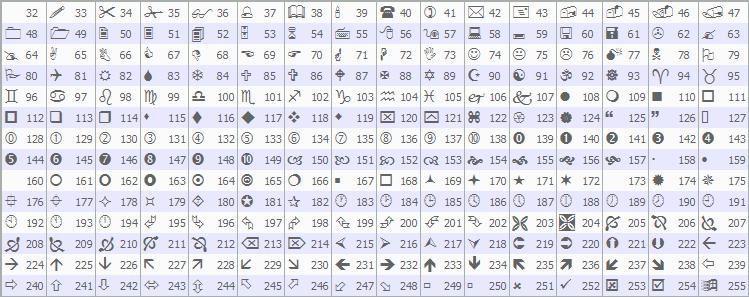
Quando o usuário clica nos elementos de rolagem para cima ("SCROLL_UP_REC", "SCROLL_UP_LABEL") ou para baixo ("SCROLL_DOWN_REC", "SCROLL_DOWN_LABEL"), chamamos "ScrollUp" ou "ScrollDown", respectivamente. Para os eventos de movimento do mouse (CHARTEVENT_MOUSE_MOVE), calculamos os limites da área do corpo do painel, atualizamos "mouse_in_body" e chamamos "UpdateHoverEffects", passando as coordenadas "mouseX" e "mouseY". Detectamos o início do arraste do controle deslizante ("MouseState" igual a 1) verificando se o cursor está sobre "SCROLL_SLIDER", atualizamos "movingStateSlider" e armazenamos as coordenadas do cursor. Durante o arraste, ajustamos a posição do controle deslizante no eixo Y utilizando ObjectSetInteger, atualizamos "scroll_pos" de acordo com o fator de rolagem e atualizamos a área de exibição por meio de "UpdateBodyDisplay". Quando o usuário solta o botão do mouse ("MouseState" igual a 0), ajustamos "scroll_pos" à posição da linha mais próxima, desativamos o estado de arraste do controle deslizante e reabilitamos a rolagem do gráfico utilizando ChartSetInteger. Para os eventos da roda do mouse (CHARTEVENT_MOUSE_WHEEL), ajustamos "scroll_pos" de acordo com a direção e o número de incrementos da roda, mantemos seu valor dentro dos limites definidos por "g_max_scroll" e atualizamos a área de exibição e a barra de rolagem. Após a compilação, obtemos o seguinte resultado.
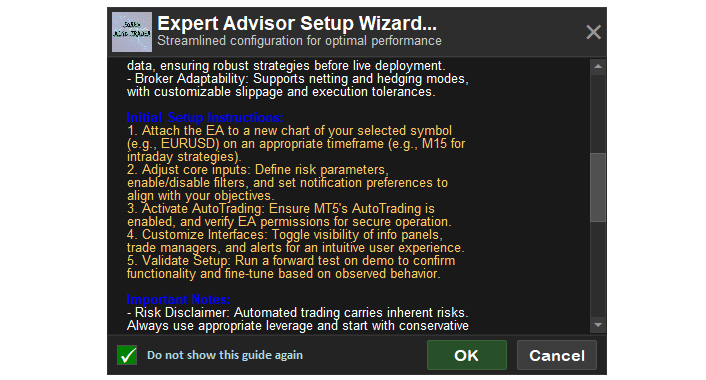
Como podemos observar na imagem, o painel está totalmente funcional e interativo. Ao clicar no botão "OK", os valores das variáveis globais do terminal deverão ser definidos conforme esperado. Para acessar a variável global, clique em "Tools" (Ferramentas) e, depois, em "Global Variables" (Variáveis globais), ou simplesmente pressione a tecla F3. A seguir, apresentamos a demonstração completa.
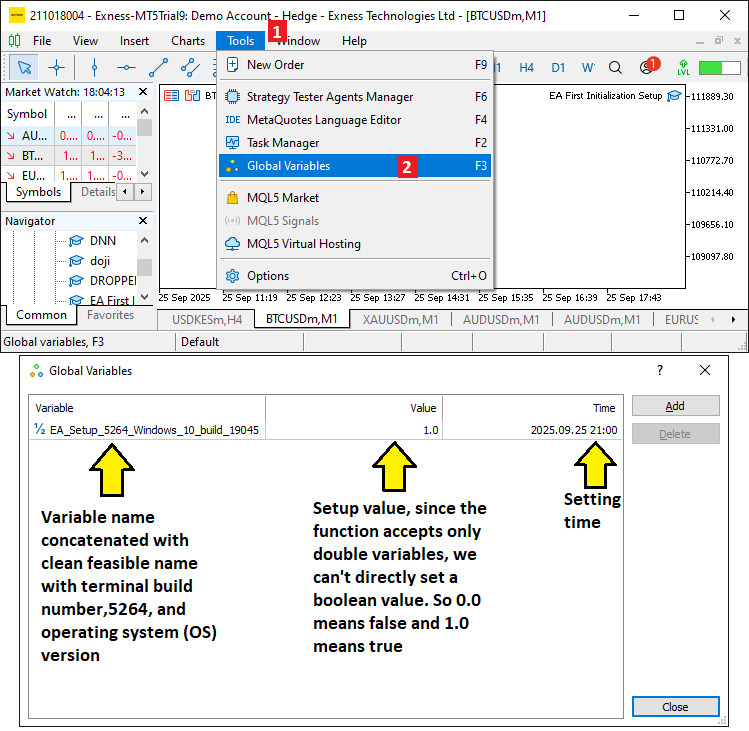
As imagens mostram que configuramos corretamente o assistente e alcançamos todos os objetivos estabelecidos. Agora, resta testar o funcionamento do projeto, conforme abordaremos na seção seguinte.
Testes do assistente de configuração inicial
Realizamos os testes e reunimos os resultados em uma única animação no formato Graphics Interchange Format (GIF), apresentada a seguir.
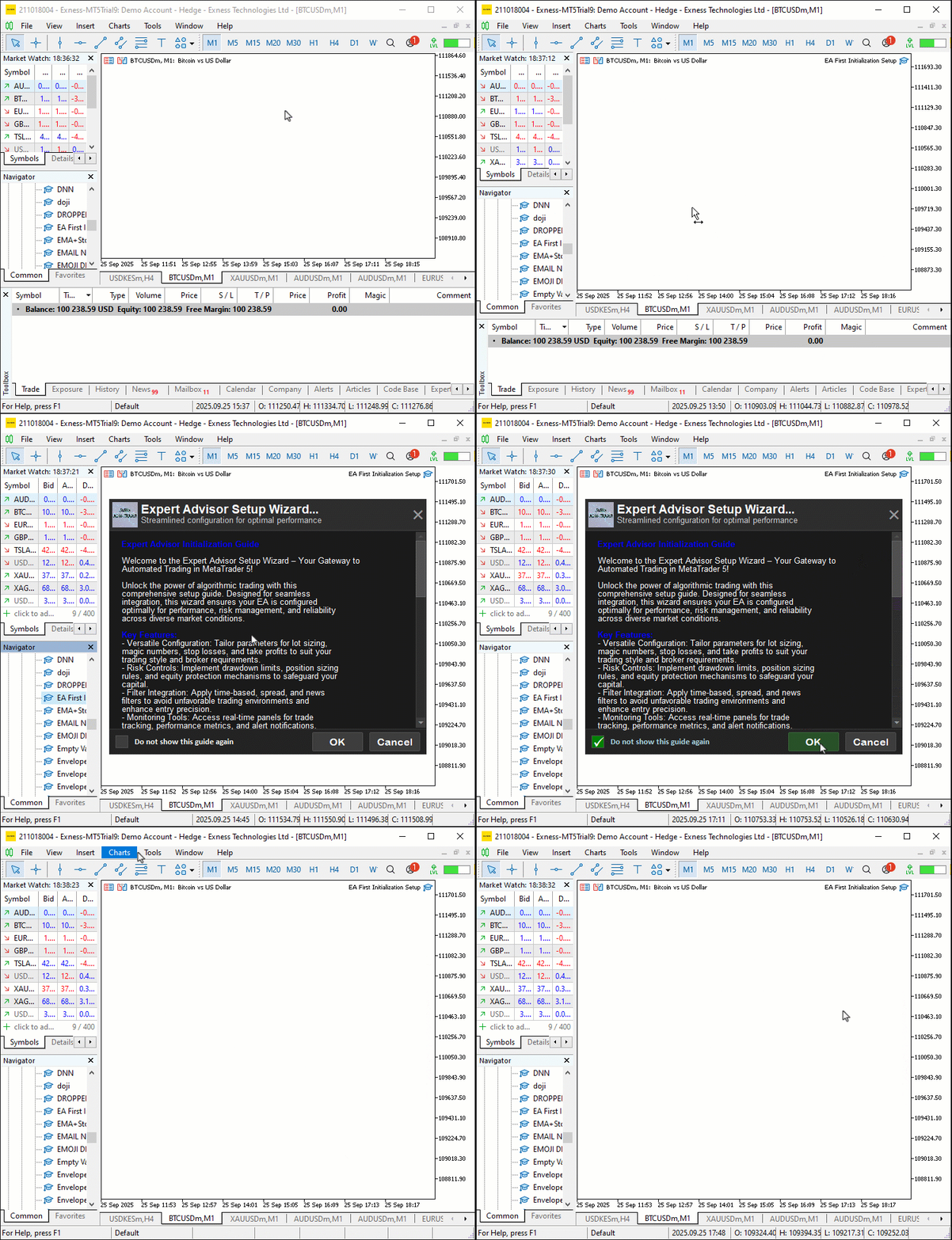
Conclusão
Desenvolvemos um assistente de configuração na primeira execução de EAs em MQL5, criando um painel interativo que apresenta um guia com rolagem de conteúdo, formatação dinâmica de texto e elementos de controle, como botões e uma caixa de seleção, para simplificar a configuração do programa no MetaTrader 5. Essa ferramenta facilita a integração inicial dos traders ao programa, oferecendo instruções claras e um mecanismo que permite dispensar a exibição do guia nas próximas execuções, além de proporcionar uma configuração eficiente e uma interface adaptável a diferentes configurações de tela. Isso simplifica a inicialização do programa ao apresentar informações personalizadas ao usuário na primeira execução, com a possibilidade de dispensar sua exibição nas execuções posteriores. O programa está pronto para ser adaptado às suas ferramentas de trading. Bons trades!
Traduzido do Inglês pela MetaQuotes Ltd.
Artigo original: https://www.mql5.com/en/articles/19714
Aviso: Todos os direitos sobre esses materiais pertencem à MetaQuotes Ltd. É proibida a reimpressão total ou parcial.
Esse artigo foi escrito por um usuário do site e reflete seu ponto de vista pessoal. A MetaQuotes Ltd. não se responsabiliza pela precisão das informações apresentadas nem pelas possíveis consequências decorrentes do uso das soluções, estratégias ou recomendações descritas.