

Herramientas de trading de MQL5 (Parte 9): Desarrollo de un asistente de configuración inicial del usuario para asesores expertos (EAs) con una guía desplazable
 40
40
 0
0

Introducción
En nuestro artículo anterior (Parte 8), desarrollamos un panel informativo en MetaQuotes Language 5 (MQL5) para supervisar las posiciones de varios símbolos y las métricas de la cuenta. En la parte 9, creamos un asistente dinámico de primera ejecución para orientar a los nuevos usuarios la primera vez que ejecutan un programa. Los asistentes de configuración inicial son herramientas esenciales para simplificar la configuración de sistemas complejos, como los asesores expertos (EAs) en MetaTrader 5, ya que guían a los nuevos usuarios durante la configuración inicial y les ofrecen orientación para garantizar un rendimiento óptimo. En este artículo, desarrollaremos en MQL5 un asistente de configuración inicial del usuario para asesores expertos (EAs), que incluye un panel de control desplazable con texto dinámico, botones interactivos y una casilla de verificación para agilizar la configuración; el asistente solo se ejecutará una vez, cuando se inicie el programa por primera vez. Hoy hablaremos de los siguientes temas:
- Comprendiendo la función y la importancia de una guía de configuración inicial para los programas de negociación
- Implementación en MQL5
- Prueba del asistente de configuración
- Conclusión
Al final, dispondrá de un asistente interactivo de MQL5 para mejorar la inicialización de los EAs, listo para personalizarlo según sus necesidades de trading. ¡Empecemos!
Comprendiendo la función y la importancia de una guía de configuración inicial para los programas de negociación
Una guía de configuración inicial es una función fundamental para los programas de trading como los asesores expertos (EAs) en MetaTrader 5, ya que ofrece instrucciones paso a paso para configurar parámetros esenciales, como el tamaño de los lotes, los niveles de riesgo y los filtros de trading, lo que ayuda a los traders a evitar errores que podrían provocar pérdidas, como establecer un tamaño de lote demasiado grande que conlleve el riesgo de una caída excesiva del capital. Digamos que se trata más bien de una sesión de orientación que presenta a los nuevos usuarios la estructura y las capacidades del programa. Su valor radica en simplificar el proceso de incorporación para los traders de todos los niveles de experiencia, garantizar una configuración adecuada del programa desde el principio y usar un mecanismo que recuerde si se ha mostrado la guía, evitando así mensajes innecesarios durante futuras inicializaciones para optimizar la experiencia del usuario, especialmente para aquellos traders que añaden programas a los gráficos de forma repetida.
Nuestro enfoque consiste en diseñar un panel de control intuitivo y desplazable que muestre una guía de configuración clara con texto visualmente diferenciado (como títulos resaltados y enlaces en los que se puede hacer clic para acceder a la ayuda), botones interactivos para las acciones del usuario y una casilla de verificación que permita a los traders elegir si desean omitir la guía en futuras ejecuciones. Aprovecharemos la capacidad de las variables globales de MQL5 para almacenar la elección del usuario en una variable que guarde y recupere el número de compilación de la plataforma de negociación (la versión del software) y el sistema operativo (SO) en el que se ejecute el programa por primera vez. Además, crearemos una interfaz centrada con encabezado, cuerpo y pie de página, que incorporará un formato de texto dinámico para facilitar la lectura, contenido desplazable para ofrecer instrucciones completas y un tamaño adaptable que se ajuste a diferentes resoluciones de pantalla. Esto garantiza que los traders puedan seguir fácilmente pasos como configurar los parámetros de riesgo o activar el AutoTrading, lo que hace que el proceso de configuración sea fluido y eficiente. Seguiremos la estructura integrada de la guía de configuración de «Trading con un clic», tal y como se indica a continuación.
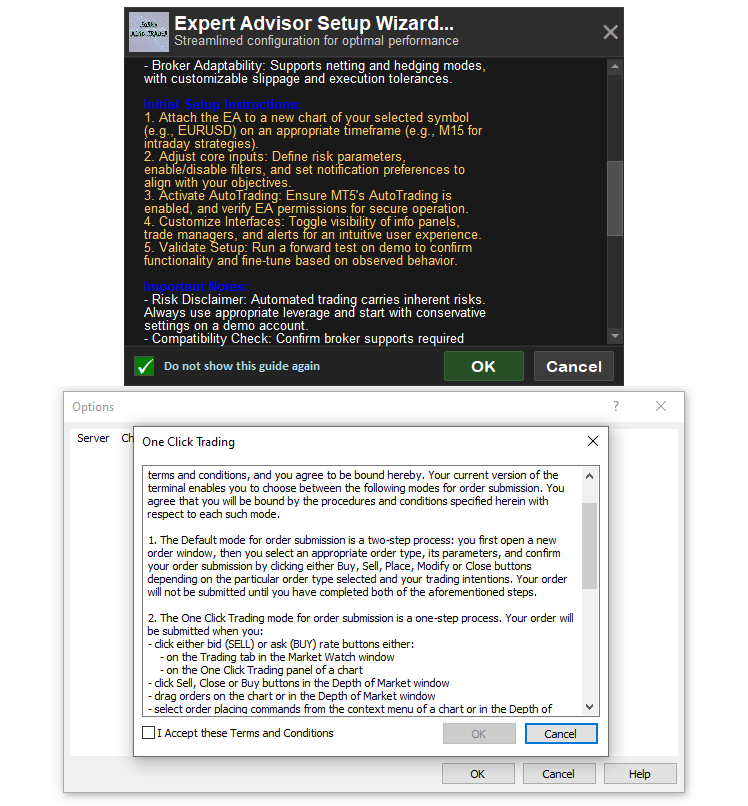
En la imagen puede ver el enfoque que vamos a adoptar. Añadiremos, de forma opcional, una imagen redimensionada del programa para distinguirlo de otros programas. En pocas palabras, aquí tiene una representación de lo que pretendemos conseguir.
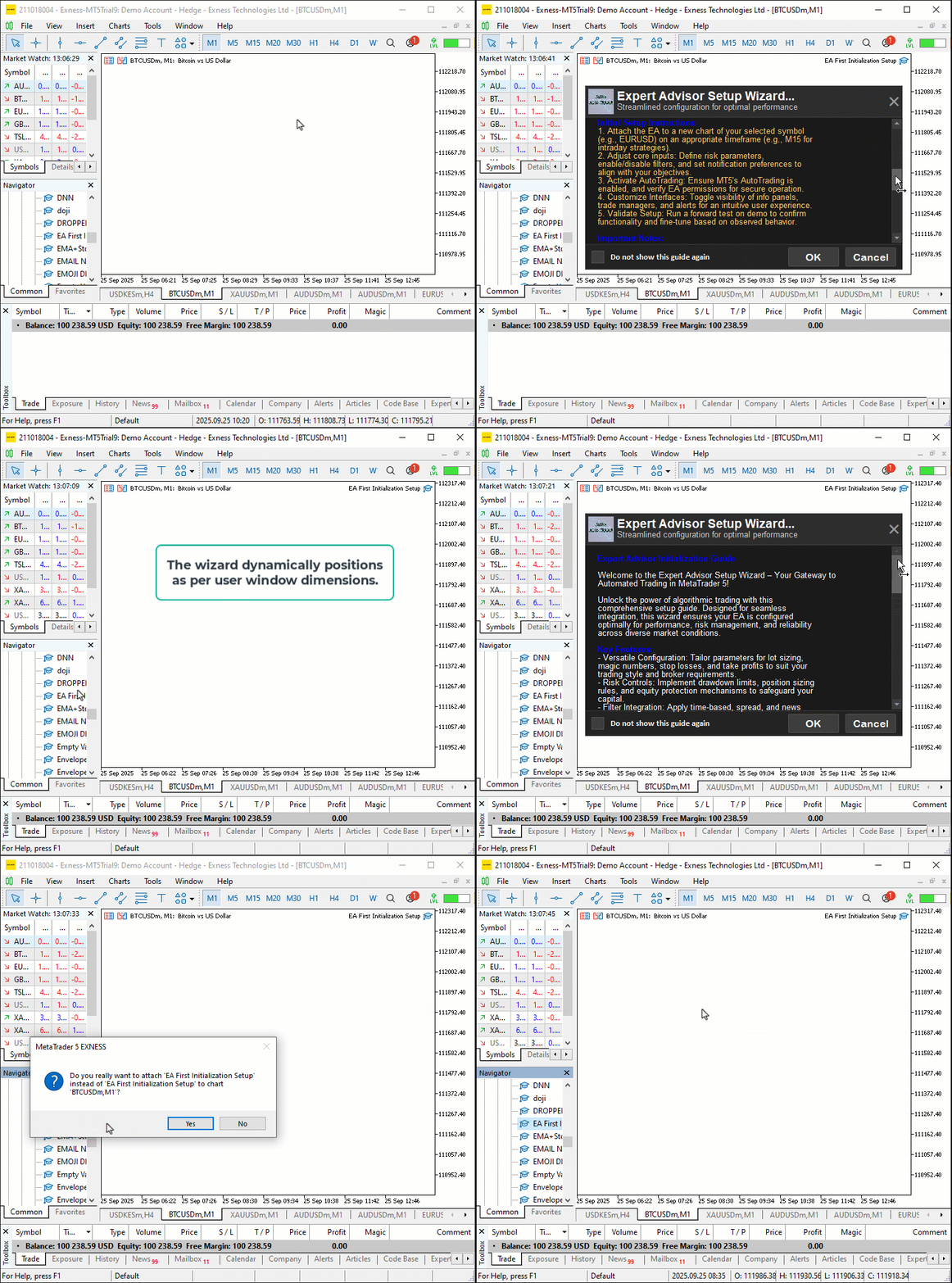
Implementación en MQL5
Para crear el programa en MQL5, abra MetaEditor, vaya al Navegador, busque la carpeta «Experts», haga clic en la pestaña «Nuevo» y siga las instrucciones para crear el archivo. Una vez creado, en el entorno de programación, deberemos declarar algunas variables globales que usaremos a lo largo de todo el programa.
//+------------------------------------------------------------------+
//|                                      EA Initialization Setup.mq5 |
//|                           Copyright 2025, Allan Munene Mutiiria. |
//|                                   https://t.me/Forex_Algo_Trader |
//+------------------------------------------------------------------+
#property copyright "Copyright 2025, Allan Munene Mutiiria."
#property link "https://t.me/Forex_Algo_Trader"
#property version "1.00"
#property strict
#property icon "1. Forex Algo-Trader.ico"

//+------------------------------------------------------------------+
//| Global variables for setup                                       |
//+------------------------------------------------------------------+
string GV_SETUP = "";                             //--- Store global variable name with build and OS
string g_scaled_image_resource = "";              //--- Store name of scaled image resource
int g_mainX = 0;                                  //--- Store calculated x-coordinate of main container
int g_mainY = 50;                                 //--- Set starting y-coordinate 50px below chart top
int g_mainWidth = 500;                            //--- Set main container width
int g_headerHeight = 50;                          //--- Set header height
int g_footerHeight = 40;                          //--- Set footer height
int g_padding = 10;                               //--- Set general padding
int g_textPadding = 10;                           //--- Set text padding
int g_spacing = 0;                                //--- Set spacing between header/body/footer
int g_lineSpacing = 3;                            //--- Set spacing between text lines
int g_minBodyHeight = 200;                        //--- Set minimum body height
int g_maxBodyHeight = 400;                        //--- Set maximum body height
int g_bottomMargin = 50;                          //--- Set bottom margin
int g_displayHeight = 0;                          //--- Store calculated display height
int g_mainHeight = 0;                             //--- Store calculated main container height
int g_adjustedLineHeight = 0;                     //--- Store adjusted line height for scrolling
int g_max_scroll = 0;                             //--- Store maximum scroll to prevent overflow
bool scroll_visible = false;                      //--- Track scrollbar visibility
bool mouse_in_body = false;                       //--- Track if mouse is in body
int scroll_pos = 0;                               //--- Store current scroll position
int prev_scroll_pos = -1;                         //--- Store previous scroll position
int slider_height = 20;                           //--- Set default slider height
bool movingStateSlider = false;                   //--- Track slider drag state
int mlbDownX_Slider = 0;                          //--- Store mouse x on slider click
int mlbDownY_Slider = 0;                          //--- Store mouse y on slider click
int mlbDown_YD_Slider = 0;                        //--- Store slider y on click
int g_total_height = 0;                           //--- Store total text height
int g_visible_height = 0;                         //--- Store visible text height
bool checkbox_checked = false;                    //--- Track checkbox state
bool ok_button_hovered = false;                   //--- Track OK button hover
bool cancel_button_hovered = false;               //--- Track Cancel button hover
bool checkbox_hovered = false;                    //--- Track checkbox hover
bool header_cancel_hovered = false;               //--- Track header cancel hover
bool scroll_up_hovered = false;                   //--- Track scroll up button hover
bool scroll_down_hovered = false;                 //--- Track scroll down button hover
bool scroll_slider_hovered = false;               //--- Track scroll slider hover
string ea_name = "Expert Advisor Setup Wizard";   //--- Set EA name
const int MAX_LINES = 100;                        //--- Set maximum text lines

//+------------------------------------------------------------------+
//| Enum for scrollbar mode                                          |
//+------------------------------------------------------------------+
enum ENUM_SCROLLBAR_MODE {                         // Define scrollbar visibility modes
   SCROLL_ALWAYS,                                  // Show scrollbar if needed
   SCROLL_ON_HOVER,                                // Show scrollbar on hover if needed
   SCROLL_NEVER                                    // Never show scrollbar, wheel only
};
ENUM_SCROLLBAR_MODE ScrollbarMode = SCROLL_ALWAYS; // Scrollbar shows when needed and remains

//+------------------------------------------------------------------+
//| Scrollbar object names                                           |
//+------------------------------------------------------------------+
#define SCROLL_LEADER "Setup_Scroll_Leader"        //--- Define scroll leader name
#define SCROLL_UP_REC "Setup_Scroll_Up_Rec"        //--- Define scroll up rectangle name
#define SCROLL_UP_LABEL "Setup_Scroll_Up_Label"    //--- Define scroll up label name
#define SCROLL_DOWN_REC "Setup_Scroll_Down_Rec"    //--- Define scroll down rectangle name
#define SCROLL_DOWN_LABEL "Setup_Scroll_Down_Label" //--- Define scroll down label name
#define SCROLL_SLIDER "Setup_Scroll_Slider"        //--- Define scroll slider name

//+------------------------------------------------------------------+
//| Dashboard object names                                           |
//+------------------------------------------------------------------+
#define SETUP_MAIN "Setup_MainContainer"           //--- Define main container name
#define SETUP_HEADER_BG "Setup_HeaderBg"           //--- Define header background name
#define SETUP_HEADER_IMAGE "Setup_HeaderImage"     //--- Define header image name
#define SETUP_HEADER_TITLE "Setup_HeaderTitle"     //--- Define header title name
#define SETUP_HEADER_SUBTITLE "Setup_HeaderSubtitle" //--- Define header subtitle name
#define SETUP_HEADER_CANCEL "Setup_HeaderCancel"   //--- Define header cancel button name
#define SETUP_BODY_BG "Setup_BodyBg"               //--- Define body background name
#define SETUP_FOOTER_BG "Setup_FooterBg"           //--- Define footer background name
#define SETUP_CHECKBOX_BG "Setup_CheckboxBg"       //--- Define checkbox background name
#define SETUP_CHECKBOX_LABEL "Setup_CheckboxLabel" //--- Define checkbox label name
#define SETUP_CHECKBOX_TEXT "Setup_CheckboxText"   //--- Define checkbox text name
#define SETUP_OK_BUTTON "Setup_OkButton"           //--- Define OK button name
#define SETUP_CANCEL_BUTTON "Setup_CancelButton"   //--- Define Cancel button name

//+------------------------------------------------------------------+
//| Enhanced setup text                                              |
//+------------------------------------------------------------------+
string setup_text =                                //--- Define setup guide text
"\nExpert Advisor Initialization Guide\n\n"
"Welcome to the Expert Advisor Setup Wizard – Your Gateway to Automated Trading in MetaTrader 5!\n\n"
"Unlock the power of algorithmic trading with this comprehensive setup guide. Designed for seamless integration, this wizard ensures your EA is configured optimally for performance, risk management, and reliability across diverse market conditions.\n\n"
"Key Features:\n"
"- Versatile Configuration: Tailor parameters for lot sizing, magic numbers, stop losses, and take profits to suit your trading style and broker requirements.\n"
"- Risk Controls: Implement drawdown limits, position sizing rules, and equity protection mechanisms to safeguard your capital.\n"
"- Filter Integration: Apply time-based, spread, and news filters to avoid unfavorable trading environments and enhance entry precision.\n"
"- Monitoring Tools: Access real-time panels for trade tracking, performance metrics, and alert notifications.\n"
"- Backtesting Support: Optimize settings with historical data, ensuring robust strategies before live deployment.\n"
"- Broker Adaptability: Supports netting and hedging modes, with customizable slippage and execution tolerances.\n\n"
"Initial Setup Instructions:\n"
"1. Attach the EA to a new chart of your selected symbol (e.g., EURUSD) on an appropriate timeframe (e.g., M15 for intraday strategies).\n"
"2. Adjust core inputs: Define risk parameters, enable/disable filters, and set notification preferences to align with your objectives.\n"
"3. Activate AutoTrading: Ensure MT5's AutoTrading is enabled, and verify EA permissions for secure operation.\n"
"4. Customize Interfaces: Toggle visibility of info panels, trade managers, and alerts for an intuitive user experience.\n"
"5. Validate Setup: Run a forward test on demo to confirm functionality and fine-tune based on observed behavior.\n\n"
"Important Notes:\n"
"- Risk Disclaimer: Automated trading carries inherent risks. Always use appropriate leverage and start with conservative settings on a demo account.\n"
"- Compatibility Check: Confirm broker supports required features like hedging; monitor spreads during volatile periods.\n"
"- Optimization Tips: Regularly review performance logs and adjust filters to adapt to evolving market dynamics.\n"
"- Security Measures: Use unique magic numbers and enable two-factor authentication for account protection.\n"
"- Legal Notice: No guarantees of profitability. Trade responsibly and consult professionals as needed.\n\n"
"Contact Methods:\n"
"NB:\n"
"********************************************\n"
" >*** FOR SUPPORT, QUERIES, OR CUSTOMIZATIONS, REACH OUT IMMEDIATELY: ***<\n"
" __________________________________________\n\n"
" 1. Email: mutiiriallan.forex@gmail.com (Primary Support Channel)\n"
" 2. Telegram Channel: @ForexAlgo-Trader (Updates & Community)\n"
" 3. Telegram Group: https://t.me/Forex_Algo_Trader (Direct Assistance & Discussions)\n\n"
"********************************************\n\n"
"Thank you for choosing our Expert Advisor solutions. Configure wisely, trade confidently, and elevate your trading journey! 🚀\n";
Para configurar la estructura básica del asistente, usamos variables globales para gestionar el diseño del panel de control. Configuramos las coordenadas («g_mainX», «g_mainY» en 50), las dimensiones («g_mainWidth» en 500, «g_headerHeight» en 50, «g_footerHeight» en 40) y el rellenado («g_padding», «g_textPadding» en 10). También definimos el espaciado («g_spacing» en 0, «g_lineSpacing» en 3), los límites de altura del cuerpo («g_minBodyHeight» en 200, «g_maxBodyHeight» en 400) y el margen («g_bottomMargin» en 50). Para el desplazamiento, establecemos variables como «scroll_visible», «scroll_pos» y «slider_height» en 20. Los estados de interacción del ratón incluyen «movingStateSlider» y «mlbDownX_Slider». Luego añadimos indicadores de estado para detectar si el cursor está sobre los botones y las casillas de verificación. Establecemos ea_name como “Expert Advisor Setup Wizard” (“Asistente de configuración del asesor experto”) y «MAX_LINES» en 100.
La enumeración «ENUM_SCROLLBAR_MODE» define el comportamiento de la barra de desplazamiento («SCROLL_ALWAYS», «SCROLL_ON_HOVER», «SCROLL_NEVER»), con «SCROLL_ALWAYS» como valor predeterminado. Definimos constantes para los nombres de los objetos, como «SETUP_MAIN», «SETUP_HEADER_BG», «SCROLL_LEADER» y otras, con el fin de garantizar una nomenclatura coherente de los elementos del panel de control y de la barra de desplazamiento. Por último, creamos la cadena «setup_text», una guía completa con secciones sobre funciones, instrucciones de configuración, notas y formas de contacto, maquetada con títulos y pasos numerados, lo que permite crear un sistema para organizar la interfaz y el contenido del asistente de cara a la interacción con el usuario. Puede modificar la posición o el contenido; nosotros solo hemos utilizado valores arbitrarios. Lo siguiente que tendremos que configurar es la imagen que se utilizará como icono de encabezado. Puede omitir este paso si no desea incluir el icono. Luego tendremos que convertir nuestro archivo de imagen en un archivo de mapa de bits (BMP). Tras la conversión, la imagen debería presentar las siguientes características.
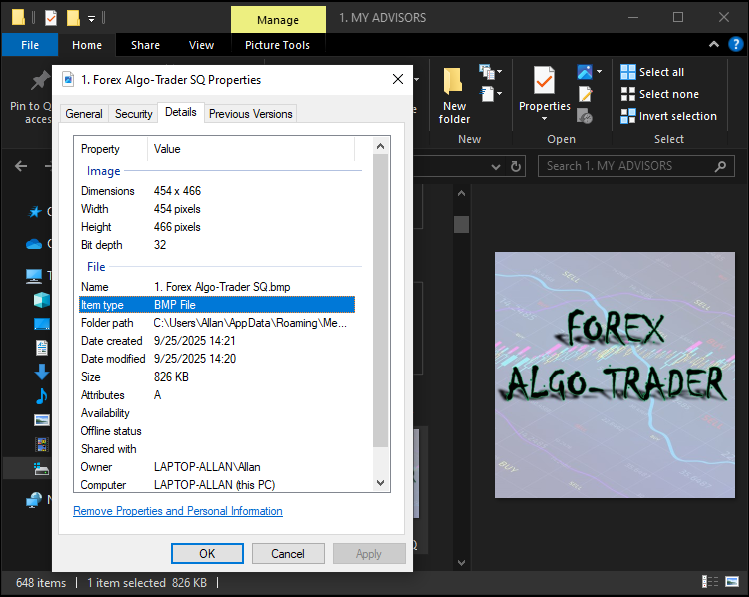
En la imagen puede ver que se trata de un archivo de mapa de bits. No tiene que preocuparse por el tamaño ni por las dimensiones, ya que más adelante podremos redimensionar la imagen en cualquier dirección cuando sea necesario. Recuerde guardar el archivo en la misma carpeta que el archivo del programa. Lo que debemos hacer ahora es añadir el archivo como recurso al programa.
#resource "1. Forex Algo-Trader SQ.bmp"
#define resourceImg "::1. Forex Algo-Trader SQ.bmp"
A continuación, utilizamos la directiva «#resource» para incluir el archivo de imagen denominado «1. Forex Algo-Trader SQ.bmp» y definimos una constante «resourceImg» como «::1. Forex Algo-Trader SQ.bmp» para hacer referencia a la imagen en el programa. Esto aportará al panel de control del asistente una experiencia de usuario profesional y acorde con la imagen de marca. Ahora vamos a crear la interfaz; para ello, necesitaremos algunas funciones auxiliares. Luego definimos las funciones para crear las etiquetas rectangulares, los textos, las imágenes y los botones necesarios.
//+------------------------------------------------------------------+
//| Create rectangle label                                           |
//+------------------------------------------------------------------+
bool createRecLabel(string objName, int xD, int yD, int xS, int yS,
                    color clrBg, int widthBorder, color clrBorder = clrNONE,
                    ENUM_BORDER_TYPE borderType = BORDER_FLAT,
                    ENUM_LINE_STYLE borderStyle = STYLE_SOLID,
                    ENUM_BASE_CORNER corner = CORNER_LEFT_UPPER) {
   ResetLastError();                                              //--- Reset error code
   if (!ObjectCreate(0, objName, OBJ_RECTANGLE_LABEL, 0, 0, 0)) { //--- Create rectangle label
      Print(__FUNCTION__, ": failed to create rec label! Error code = ", GetLastError()); //--- Log failure
      return false;                                               //--- Return failure
   }
   ObjectSetInteger(0, objName, OBJPROP_XDISTANCE, xD);           //--- Set x distance
   ObjectSetInteger(0, objName, OBJPROP_YDISTANCE, yD);           //--- Set y distance
   ObjectSetInteger(0, objName, OBJPROP_XSIZE, xS);               //--- Set width
   ObjectSetInteger(0, objName, OBJPROP_YSIZE, yS);               //--- Set height
   ObjectSetInteger(0, objName, OBJPROP_CORNER, corner);          //--- Set corner
   ObjectSetInteger(0, objName, OBJPROP_BGCOLOR, clrBg);          //--- Set background color
   ObjectSetInteger(0, objName, OBJPROP_BORDER_TYPE, borderType); //--- Set border type
   ObjectSetInteger(0, objName, OBJPROP_STYLE, borderStyle);      //--- Set border style
   ObjectSetInteger(0, objName, OBJPROP_WIDTH, widthBorder);      //--- Set border width
   ObjectSetInteger(0, objName, OBJPROP_COLOR, clrBorder);        //--- Set border color
   ObjectSetInteger(0, objName, OBJPROP_BACK, false);             //--- Set to foreground
   ObjectSetInteger(0, objName, OBJPROP_STATE, false);            //--- Disable state
   ObjectSetInteger(0, objName, OBJPROP_SELECTABLE, false);       //--- Disable selectability
   ObjectSetInteger(0, objName, OBJPROP_SELECTED, false);         //--- Disable selection
   return true;                                                   //--- Return success
}

//+------------------------------------------------------------------+
//| Create button                                                    |
//+------------------------------------------------------------------+
bool createButton(string objName, int xD, int yD, int xS, int yS,
                  string txt = "", color clrTxt = clrBlack, int fontSize = 12,
                  color clrBg = clrNONE, color clrBorder = clrNONE,
                  string font = "Arial",
                  ENUM_BASE_CORNER corner = CORNER_LEFT_UPPER, bool isBack = false) {
   ResetLastError();                                              //--- Reset error code
   if (!ObjectCreate(0, objName, OBJ_BUTTON, 0, 0, 0)) {          //--- Create button
      Print(__FUNCTION__, ": failed to create the button! Error code = ", GetLastError()); //--- Log failure
      return false;                                               //--- Return failure
   }
   ObjectSetInteger(0, objName, OBJPROP_XDISTANCE, xD);           //--- Set x distance
   ObjectSetInteger(0, objName, OBJPROP_YDISTANCE, yD);           //--- Set y distance
   ObjectSetInteger(0, objName, OBJPROP_XSIZE, xS);               //--- Set width
   ObjectSetInteger(0, objName, OBJPROP_YSIZE, yS);               //--- Set height
   ObjectSetInteger(0, objName, OBJPROP_CORNER, corner);          //--- Set corner
   ObjectSetString(0, objName, OBJPROP_TEXT, txt);                //--- Set button text
   ObjectSetInteger(0, objName, OBJPROP_COLOR, clrTxt);           //--- Set text color
   ObjectSetInteger(0, objName, OBJPROP_FONTSIZE, fontSize);      //--- Set font size
   ObjectSetString(0, objName, OBJPROP_FONT, font);               //--- Set font
   ObjectSetInteger(0, objName, OBJPROP_BGCOLOR, clrBg);          //--- Set background color
   ObjectSetInteger(0, objName, OBJPROP_BORDER_COLOR, clrBorder); //--- Set border color
   ObjectSetInteger(0, objName, OBJPROP_BACK, isBack);            //--- Set background/foreground
   ObjectSetInteger(0, objName, OBJPROP_STATE, false);            //--- Disable state
   ObjectSetInteger(0, objName, OBJPROP_SELECTABLE, false);       //--- Disable selectability
   ObjectSetInteger(0, objName, OBJPROP_SELECTED, false);         //--- Disable selection
   return true;                                                   //--- Return success
}

//+------------------------------------------------------------------+
//| Create text label                                                |
//+------------------------------------------------------------------+
bool createLabel(string objName, int xD, int yD,
                 string txt, color clrTxt = clrBlack, int fontSize = 12,
                 string font = "Arial",
                 ENUM_BASE_CORNER corner = CORNER_LEFT_UPPER, ENUM_ANCHOR_POINT anchor = ANCHOR_LEFT_UPPER) {
   ResetLastError();                                              //--- Reset error code
   if (!ObjectCreate(0, objName, OBJ_LABEL, 0, 0, 0)) {           //--- Create label
      Print(__FUNCTION__, ": failed to create the label! Error code = ", GetLastError()); //--- Log failure
      return false;                                               //--- Return failure
   }
   ObjectSetInteger(0, objName, OBJPROP_XDISTANCE, xD);           //--- Set x distance
   ObjectSetInteger(0, objName, OBJPROP_YDISTANCE, yD);           //--- Set y distance
   ObjectSetInteger(0, objName, OBJPROP_CORNER, corner);          //--- Set corner
   ObjectSetString(0, objName, OBJPROP_TEXT, txt);                //--- Set label text
   ObjectSetInteger(0, objName, OBJPROP_COLOR, clrTxt);           //--- Set text color
   ObjectSetInteger(0, objName, OBJPROP_FONTSIZE, fontSize);      //--- Set font size
   ObjectSetString(0, objName, OBJPROP_FONT, font);               //--- Set font
   ObjectSetInteger(0, objName, OBJPROP_ANCHOR, anchor);          //--- Set anchor
   ObjectSetInteger(0, objName, OBJPROP_BACK, false);             //--- Set to foreground
   ObjectSetInteger(0, objName, OBJPROP_STATE, false);            //--- Disable state
   ObjectSetInteger(0, objName, OBJPROP_SELECTABLE, false);       //--- Disable selectability
   ObjectSetInteger(0, objName, OBJPROP_SELECTED, false);         //--- Disable selection
   return true;                                                   //--- Return success
}

//+------------------------------------------------------------------+
//| Create bitmap label                                              |
//+------------------------------------------------------------------+
bool createBitmapLabel(string objName, int xD, int yD, int xS, int yS,
                       string bitmapPath, color clr, ENUM_BASE_CORNER corner = CORNER_LEFT_UPPER) {
   ResetLastError();                                              //--- Reset error code
   if (!ObjectCreate(0, objName, OBJ_BITMAP_LABEL, 0, 0, 0)) {    //--- Create bitmap label
      Print(__FUNCTION__, ": failed to create bitmap label! Error code = ", GetLastError()); //--- Log failure
      return false;                                               //--- Return failure
   }
   ObjectSetInteger(0, objName, OBJPROP_XDISTANCE, xD);           //--- Set x distance
   ObjectSetInteger(0, objName, OBJPROP_YDISTANCE, yD);           //--- Set y distance
   ObjectSetInteger(0, objName, OBJPROP_XSIZE, xS);               //--- Set width
   ObjectSetInteger(0, objName, OBJPROP_YSIZE, yS);               //--- Set height
   ObjectSetInteger(0, objName, OBJPROP_CORNER, corner);          //--- Set corner
   ObjectSetString(0, objName, OBJPROP_BMPFILE, bitmapPath);      //--- Set bitmap path
   ObjectSetInteger(0, objName, OBJPROP_COLOR, clr);              //--- Set color
   ObjectSetInteger(0, objName, OBJPROP_BACK, false);             //--- Set to foreground
   ObjectSetInteger(0, objName, OBJPROP_STATE, false);            //--- Disable state
   ObjectSetInteger(0, objName, OBJPROP_SELECTABLE, false);       //--- Disable selectability
   ObjectSetInteger(0, objName, OBJPROP_SELECTED, false);         //--- Disable selection
   return true;                                                   //--- Return success
}
Aquí implementamos los componentes gráficos principales del panel de control interactivo. En primer lugar, desarrollamos la función «createRecLabel», que crea una etiqueta rectangular (OBJ_RECTANGLE_LABEL) con las coordenadas, el tamaño, el color de fondo, el grosor del borde, el tipo de borde (BORDER_FLAT), el estilo (STYLE_SOLID) y la esquina de referencia (CORNER_LEFT_UPPER) especificados mediante las funciones ObjectCreate y ObjectSetInteger; además, registra los errores con Print si la creación falla y configura la etiqueta para que aparezca en primer plano y no se pueda seleccionar. A continuación, implementamos la función «createButton», que crea un botón (OBJ_BUTTON) con texto, color, tamaño de fuente, tipo de fuente (por defecto «Arial»), fondo, borde y esquina, utilizando el mismo formato.
Después creamos la función «createLabel», que genera una etiqueta de texto (OBJ_LABEL) con texto, color, tamaño de fuente, tipo de fuente, esquina y anclaje (ANCHOR_LEFT_UPPER) mediante llamadas similares para la creación de objetos y la configuración de propiedades, registrando los errores si es necesario. Por último, creamos la función «createBitmapLabel», que genera una etiqueta de mapa de bits (OBJ_BITMAP_LABEL) para imágenes con coordenadas, tamaño, ruta del mapa de bits, color y esquina, utilizando «ObjectCreate» y configurando las propiedades para garantizar que se muestre en primer plano y no se pueda seleccionar, además de registrar cualquier error. De esta forma, nos aseguraremos de crear un sistema para mostrar los elementos visuales del asistente, como contenedores, botones, texto e imágenes.
Así, podemos crear algunas funciones de utilidad que nos ayuden a calcular la altura del panel de control, ya que queremos centrarlo dinámicamente, ajustar el tamaño de las fuentes en función de la resolución de la pantalla —para que los textos no aparezcan demasiado pequeños ni demasiado grandes en los distintos dispositivos— y recortar el texto si es demasiado largo para evitar posibles desbordamientos.
//+------------------------------------------------------------------+
//| Calculate font size based on screen DPI                          |
//+------------------------------------------------------------------+
int getFontSizeByDPI(int baseFontSize, int baseDPI = 96) {
   int currentDPI = (int)TerminalInfoInteger(TERMINAL_SCREEN_DPI); //--- Retrieve current screen DPI
   int scaledFontSize = (int)(baseFontSize * (double)baseDPI / currentDPI); //--- Calculate scaled font size
   return scaledFontSize;                                          //--- Return scaled font size
}

//+------------------------------------------------------------------+
//| Calculate dashboard dimensions                                   |
//+------------------------------------------------------------------+
void CalculateDashboardDimensions() {
   long chart_width = ChartGetInteger(0, CHART_WIDTH_IN_PIXELS);   //--- Get chart width
   long chart_height = ChartGetInteger(0, CHART_HEIGHT_IN_PIXELS); //--- Get chart height
   g_mainX = (int)((chart_width - g_mainWidth) / 2); //--- Center main container horizontally
   int available_height = (int)(chart_height - g_mainY - g_bottomMargin - g_headerHeight - g_footerHeight - 2 * g_spacing); //--- Calculate available height
   g_displayHeight = MathMin(g_maxBodyHeight, MathMax(g_minBodyHeight, available_height)); //--- Set display height
   g_mainHeight = g_headerHeight + g_displayHeight + g_footerHeight + 2 * g_spacing; //--- Calculate main container height
}

//+------------------------------------------------------------------+
//| Truncate string                                                  |
//+------------------------------------------------------------------+
string truncateString(string valueStr, int startPos, int lengthStr = -1, int threshHold = 0, bool isEllipsis = false) {
   string result = valueStr;                                        //--- Initialize result
   if (StringLen(valueStr) > threshHold && threshHold > 0) {        //--- Check if truncation needed
      result = StringSubstr(valueStr, startPos, lengthStr);         //--- Extract substring
      if (isEllipsis) result += "...";                              //--- Add ellipsis if needed
   }
   return result;                                                   //--- Return truncated string
}
Aquí implementamos funciones de utilidad para garantizar un ajuste adaptativo del tamaño y el formato del texto. Luego desarrollamos la función «getFontSizeByDPI», que obtiene los DPI (puntos por pulgada) de la pantalla mediante TerminalInfoInteger con TERMINAL_SCREEN_DPI, calcula un tamaño de fuente redimensionado ajustando el tamaño de fuente base en función de unos DPI estándar (96) mediante una sencilla proporción, y devuelve el resultado para garantizar una visualización coherente del texto en todos los dispositivos.
A continuación, creamos la función «CalculateDashboardDimensions», que obtiene el ancho y la altura del gráfico mediante ChartGetInteger con CHART_WIDTH_IN_PIXELS y «CHART_HEIGHT_IN_PIXELS», centra el contenedor principal horizontalmente estableciendo «g_mainX» en la mitad de la diferencia entre el ancho del gráfico y «g_mainWidth», calcula la altura disponible restando «g_mainY», «g_bottomMargin», «g_headerHeight», «g_footerHeight» y el doble de «g_spacing» de la altura del gráfico, establece «g_displayHeight» dentro de los límites de «g_minBodyHeight» y «g_maxBodyHeight» utilizando MathMin y MathMax, y calcula «g_mainHeight» como la suma de las alturas del encabezado, el cuerpo y el pie de página, y el espaciado.
Por último, implementamos la función «truncateString», que devuelve la cadena de entrada sin modificaciones si su longitud es inferior a un umbral o es cero; en caso contrario, extrae con StringSubstr una subcadena de «lengthStr» caracteres a partir de «startPos» y añade puntos suspensivos si así se especifica, para gestionar el desbordamiento del texto. Con estas funciones, podemos comenzar la implementación creando el panel de control principal. Incorporaremos su lógica en una función para facilitar la modularización.
//+------------------------------------------------------------------+
//| Show the setup dashboard                                         |
//+------------------------------------------------------------------+
void ShowDashboard() {
   checkbox_checked = false;                         //--- Reset checkbox state
   createRecLabel(SETUP_MAIN, g_mainX, g_mainY, g_mainWidth, g_mainHeight, C'20,20,20', 1, C'40,40,40', BORDER_FLAT, STYLE_SOLID, CORNER_LEFT_UPPER); //--- Create main container
   createRecLabel(SETUP_HEADER_BG, g_mainX, g_mainY, g_mainWidth, g_headerHeight, C'45,45,45', 1, C'60,60,60', BORDER_FLAT, STYLE_SOLID, CORNER_LEFT_UPPER); //--- Create header background

}
Así, implementamos la función «ShowDashboard» y, en primer lugar, restablecemos el estado de la casilla de selección a «false», lo que garantiza un inicio limpio para la interacción del usuario. A continuación, llamamos a «createRecLabel» para dibujar el contenedor principal («SETUP_MAIN») en las coordenadas «g_mainX» y «g_mainY» con las dimensiones «g_mainWidth» y «g_mainHeight», utilizando un fondo gris oscuro (C'20,20,20'), un borde de 1 píxel (C'40,40,40'), tipo de borde plano, estilo sólido y alineación en la esquina superior izquierda.
Luego utilizamos «createRecLabel» para crear el fondo del encabezado («SETUP_HEADER_BG») en la misma coordenada x y en «g_mainY», con un ancho de «g_mainWidth» y una altura de «g_headerHeight», un fondo gris ligeramente más claro (C'45,45,45') y un borde también algo más claro (C'60,60,60'). Así mantenemos un estilo coherente y damos forma a la estructura visual básica del panel de control del asistente. Ahora tenemos que llamar a esta función en el controlador de eventos OnInit.
//+------------------------------------------------------------------+
//| Expert initialization function                                   |
//+------------------------------------------------------------------+
int OnInit() {
   int build = (int)TerminalInfoInteger(TERMINAL_BUILD); //--- Get terminal build number
   string os = TerminalInfoString(TERMINAL_OS_VERSION);  //--- Get operating system version
   StringReplace(os, " ", "_");                          //--- Replace spaces with underscores
   StringReplace(os, ".", "_");                          //--- Replace dots with underscores
   StringReplace(os, ",", "_");                          //--- Replace commas with underscores
   GV_SETUP = "EA_Setup_" + IntegerToString(build) + "_" + os; //--- Set global variable name
   CalculateDashboardDimensions();                       //--- Calculate dashboard dimensions
   if (!GlobalVariableCheck(GV_SETUP)) {                 //--- Check if global variable exists
      Print("Global variable '" + GV_SETUP + "' not found. Creating new one with value FALSE (0.0)."); //--- Log variable creation
      GlobalVariableSet(GV_SETUP, 0.0);                  //--- Set variable to false
      ShowDashboard();                                   //--- Display dashboard
   } else {                                              //--- Variable exists
      double val = GlobalVariableGet(GV_SETUP);          //--- Get variable value
      if (val == 1.0) {                                  //--- Check if set to never show
         // No dashboard
      } else {                                           //--- Show dashboard
         ShowDashboard();                                //--- Display dashboard
      }
   }
   ChartSetInteger(0, CHART_EVENT_MOUSE_MOVE, true);     //--- Enable mouse move events
   ChartSetInteger(0, CHART_EVENT_MOUSE_WHEEL, true);    //--- Enable mouse wheel events
   ChartSetInteger(0, CHART_MOUSE_SCROLL, true);         //--- Enable chart scrolling
   return(INIT_SUCCEEDED);                               //--- Return initialization success
}
Después procedemos a implementar la lógica de inicialización para gestionar el comportamiento de la visualización en la función OnInit, donde obtenemos el número de compilación del terminal MetaTrader 5 mediante TerminalInfoInteger con TERMINAL_BUILD y la versión del sistema operativo con TerminalInfoString utilizando TERMINAL_OS_VERSION. Sustituimos los espacios, los puntos y las comas de la cadena del sistema operativo por guiones bajos mediante StringReplace para crear un nombre de variable global limpio («GV_SETUP») con el formato «EA_Setup_<build>_<OS>». Podría utilizar otros datos, como el número mágico o el nombre y el número de versión del programa; simplemente me pareció ingenioso y original utilizar esta combinación. Llamamos a la función «CalculateDashboardDimensions» para configurar el diseño del panel de control en función de las dimensiones del gráfico.
A continuación, comprobamos si la variable global existe mediante GlobalVariableCheck; si no es así, registramos su creación con «Print», le asignamos el valor 0,0 (falso) mediante GlobalVariableSet y mostramos el panel de control con «ShowDashboard». Si la variable existe, recuperamos su valor con GlobalVariableGet y mostramos el panel de control solo si el valor es distinto de 1,0 (valor que indica que el usuario ha elegido no volver a mostrarlo). Por último, habilitamos los eventos de movimiento del ratón y de la rueda mediante ChartSetInteger, utilizando CHART_EVENT_MOUSE_MOVE, «CHART_EVENT_MOUSE_WHEEL» y «CHART_MOUSE_SCROLL» para admitir funciones interactivas, lo que resultará útil en el controlador de eventos OnChartEvent, y devolvemos INIT_SUCCEEDED si la inicialización se ha realizado correctamente. Tras la compilación, obtenemos el siguiente resultado.

Ahora que ya tenemos una sección de encabezado, vamos a añadirle el archivo de imagen. Tendremos que redimensionar la imagen, así que definamos las funciones que se encargarán del trabajo pesado; después, podremos llamarlas para redimensionar nuestro archivo de imagen.
//+------------------------------------------------------------------+
//| Scale image using bicubic interpolation                          |
//+------------------------------------------------------------------+
void ScaleImage(uint &pixels[], int original_width, int original_height, int new_width, int new_height) {
   uint scaled_pixels[];                                               //--- Declare scaled pixel array
   ArrayResize(scaled_pixels, new_width * new_height);                 //--- Resize scaled pixel array
   for (int y = 0; y < new_height; y++) {                              //--- Iterate through new height
      for (int x = 0; x < new_width; x++) {                            //--- Iterate through new width
         double original_x = (double)x * original_width / new_width;   //--- Calculate original x
         double original_y = (double)y * original_height / new_height; //--- Calculate original y
         uint pixel = BicubicInterpolate(pixels, original_width, original_height, original_x, original_y); //--- Interpolate pixel
         scaled_pixels[y * new_width + x] = pixel;                     //--- Store scaled pixel
      }
   }
   ArrayResize(pixels, new_width * new_height);                        //--- Resize original pixel array
   ArrayCopy(pixels, scaled_pixels);                                   //--- Copy scaled pixels
}

//+------------------------------------------------------------------+
//| Perform bicubic interpolation for a single pixel                 |
//+------------------------------------------------------------------+
uint BicubicInterpolate(uint &pixels[], int width, int height, double x, double y) {
   int x0 = (int)x;                                                    //--- Get integer x coordinate
   int y0 = (int)y;                                                    //--- Get integer y coordinate
   double fractional_x = x - x0;                                       //--- Calculate fractional x
   double fractional_y = y - y0;                                       //--- Calculate fractional y
   int x_indices[4], y_indices[4];                                     //--- Declare index arrays
   for (int i = -1; i <= 2; i++) {                                     //--- Calculate indices
      x_indices[i + 1] = MathMin(MathMax(x0 + i, 0), width - 1);       //--- Clamp x indices
      y_indices[i + 1] = MathMin(MathMax(y0 + i, 0), height - 1);      //--- Clamp y indices
   }
   uint neighborhood_pixels[16];                                       //--- Declare neighborhood pixels
   for (int j = 0; j < 4; j++) {                                       //--- Iterate y indices
      for (int i = 0; i < 4; i++) {                                    //--- Iterate x indices
         neighborhood_pixels[j * 4 + i] = pixels[y_indices[j] * width + x_indices[i]]; //--- Store pixel
      }
   }
   uchar alpha_components[16], red_components[16], green_components[16], blue_components[16]; //--- Declare color components
   for (int i = 0; i < 16; i++) {                                      //--- Extract components
      GetArgb(neighborhood_pixels[i], alpha_components[i], red_components[i], green_components[i], blue_components[i]); //--- Get ARGB components
   }
   uchar alpha_out = (uchar)BicubicInterpolateComponent(alpha_components, fractional_x, fractional_y); //--- Interpolate alpha
   uchar red_out = (uchar)BicubicInterpolateComponent(red_components, fractional_x, fractional_y); //--- Interpolate red
   uchar green_out = (uchar)BicubicInterpolateComponent(green_components, fractional_x, fractional_y); //--- Interpolate green
   uchar blue_out = (uchar)BicubicInterpolateComponent(blue_components, fractional_x, fractional_y); //--- Interpolate blue
   return (alpha_out << 24) | (red_out << 16) | (green_out << 8) | blue_out; //--- Combine components
}

//+------------------------------------------------------------------+
//| Perform bicubic interpolation for a single color component       |
//+------------------------------------------------------------------+
double BicubicInterpolateComponent(uchar &components[], double fractional_x, double fractional_y) {
   double weights_x[4];                                                 //--- Declare x weights
   double t = fractional_x;                                             //--- Set x fraction
   weights_x[0] = (-0.5 * t * t * t + t * t - 0.5 * t);                 //--- Calculate x weight 0
   weights_x[1] = (1.5 * t * t * t - 2.5 * t * t + 1);                  //--- Calculate x weight 1
   weights_x[2] = (-1.5 * t * t * t + 2 * t * t + 0.5 * t);             //--- Calculate x weight 2
   weights_x[3] = (0.5 * t * t * t - 0.5 * t * t);                      //--- Calculate x weight 3
   double y_values[4];                                                  //--- Declare y values
   for (int j = 0; j < 4; j++) {                                        //--- Iterate y indices
      y_values[j] = weights_x[0] * components[j * 4 + 0] + weights_x[1] * components[j * 4 + 1] +
                    weights_x[2] * components[j * 4 + 2] + weights_x[3] * components[j * 4 + 3]; //--- Calculate y value
   }
   double weights_y[4];                                                 //--- Declare y weights
   t = fractional_y;                                                    //--- Set y fraction
   weights_y[0] = (-0.5 * t * t * t + t * t - 0.5 * t);                 //--- Calculate y weight 0
   weights_y[1] = (1.5 * t * t * t - 2.5 * t * t + 1);                  //--- Calculate y weight 1
   weights_y[2] = (-1.5 * t * t * t + 2 * t * t + 0.5 * t);             //--- Calculate y weight 2
   weights_y[3] = (0.5 * t * t * t - 0.5 * t * t);                      //--- Calculate y weight 3
   double result = weights_y[0] * y_values[0] + weights_y[1] * y_values[1] +
                   weights_y[2] * y_values[2] + weights_y[3] * y_values[3]; //--- Calculate final value
   return MathMax(0, MathMin(255, result));        //--- Clamp result to valid range
}

//+------------------------------------------------------------------+
//| Extract ARGB components from a pixel                             |
//+------------------------------------------------------------------+
void GetArgb(uint pixel, uchar &alpha, uchar &red, uchar &green, uchar &blue) {
   alpha = (uchar)((pixel >> 24) & 0xFF);                               //--- Extract alpha component
   red = (uchar)((pixel >> 16) & 0xFF);                                 //--- Extract red component
   green = (uchar)((pixel >> 8) & 0xFF);                                //--- Extract green component
   blue = (uchar)(pixel & 0xFF);                                        //--- Extract blue component
}
En este apartado, implementamos funciones de procesamiento de imágenes para mejorar la calidad visual. En primer lugar, desarrollamos la función «ScaleImage», que redimensiona una imagen creando una nueva matriz de píxeles con ArrayResize para las dimensiones deseadas («new_width» × «new_height»). La función recorre cada píxel, determina las coordenadas correspondientes en la imagen original mediante un redimensionamiento proporcional y llama a «BicubicInterpolate» para calcular el valor interpolado del píxel. Almacena este valor en la matriz redimensionada y, finalmente, copia dicha matriz en la original con la función ArrayCopy.
A continuación, creamos la función «BicubicInterpolate», que calcula el color de un píxel en coordenadas no enteras («x», «y») seleccionando un vecindario de píxeles de 4x4, limitando los índices con MathMin y MathMax para que no salgan de los límites de la imagen, extrayendo los componentes ARGB con «GetArgb», interpolando cada componente mediante «BicubicInterpolateComponent» y combinándolos en un valor de píxel final mediante operaciones bit a bit. Luego implementamos «BicubicInterpolateComponent», que aplica la interpolación bicúbica a un único componente de color. Para ello, calcula los pesos cúbicos de las coordenadas fraccionarias x e y, obtiene los valores intermedios de y a partir de una cuadrícula de 4x4 y los combina con los pesos de y, limitando el resultado al intervalo de 0 a 255. Por último, la función «GetArgb» extrae los componentes alfa, rojo, verde y azul de un píxel mediante desplazamientos bit a bit y máscaras. De este modo, se aplicará un método de redimensionamiento suave a nuestras imágenes para que se ajusten al panel de control o al área designada. Ahora podemos llamar a esta función para redimensionar nuestra imagen de recurso y mostrarla.
uint img_pixels[];                                       //--- Declare pixel array for image
uint orig_width = 0, orig_height = 0;                    //--- Initialize image dimensions
bool image_loaded = ResourceReadImage(resourceImg, img_pixels, orig_width, orig_height); //--- Load image resource
if (image_loaded && orig_width > 0 && orig_height > 0) { //--- Check image load success
   ScaleImage(img_pixels, (int)orig_width, (int)orig_height, 40, 40); //--- Scale image to 40x40
   g_scaled_image_resource = "::SetupHeaderImageScaled"; //--- Set scaled image resource name
   if (ResourceCreate(g_scaled_image_resource, img_pixels, 40, 40, 0, 0, 40, COLOR_FORMAT_ARGB_NORMALIZE)) { //--- Create scaled resource
      createBitmapLabel(SETUP_HEADER_IMAGE, g_mainX + 5, g_mainY + (g_headerHeight - 40)/2, 40, 40, g_scaled_image_resource, clrWhite, CORNER_LEFT_UPPER); //--- Create scaled image label
   } else {                                              //--- Handle resource creation failure
      Print("Failed to create scaled image resource");   //--- Log failure
      createBitmapLabel(SETUP_HEADER_IMAGE, g_mainX + 5, g_mainY + (g_headerHeight - 40)/2, 40, 40, resourceImg, clrWhite, CORNER_LEFT_UPPER); //--- Use original image
   }
} else {                                                 //--- Handle image load failure
   Print("Failed to load original image resource");      //--- Log failure
   createBitmapLabel(SETUP_HEADER_IMAGE, g_mainX + 5, g_mainY + (g_headerHeight - 40)/2, 40, 40, resourceImg, clrWhite, CORNER_LEFT_UPPER); //--- Use original image
}
Para implementar la lógica de carga y redimensionamiento de imágenes, declaramos una matriz de píxeles «img_pixels» e inicializamos las dimensiones «orig_width» y «orig_height» a cero. A continuación, cargamos la imagen de recurso con «ResourceReadImage» utilizando «resourceImg» y comprobamos que la carga se haya realizado correctamente («image_loaded» y dimensiones > 0). Si es así, llamamos a «ScaleImage» para redimensionarla a 40x40 píxeles —dimensiones que usted puede modificar—, establecemos «g_scaled_image_resource» en «::SetupHeaderImageScaled» y creamos un nuevo recurso con ResourceCreate en formato ARGB. Por último, llamamos a «createBitmapLabel» para mostrar la imagen redimensionada en la posición del encabezado con color blanco. Si falla la creación del recurso, registramos la incidencia y recurrimos a la imagen original; si falla la carga, lo registramos y utilizamos directamente «resourceImg» con la función «createBitmapLabel». Tras la compilación, obtenemos el siguiente resultado.
Ahora que ya tenemos listo el archivo de imagen, pasamos a implementar los demás elementos fundamentales de la siguiente manera.
string truncated_name = truncateString(ea_name, 0, -1, 20, true); //--- Truncate EA name
int titleFontSize = getFontSizeByDPI(14);           //--- Calculate title font size
createLabel(SETUP_HEADER_TITLE, g_mainX + 5 + 40 + 5, g_mainY + 5, truncated_name, clrWhite, titleFontSize, "Arial Bold", CORNER_LEFT_UPPER, ANCHOR_LEFT_UPPER); //--- Create title label
int subtitleFontSize = getFontSizeByDPI(10);        //--- Calculate subtitle font size
createLabel(SETUP_HEADER_SUBTITLE, g_mainX + 5 + 40 + 5, g_mainY + 25, "Streamlined configuration for optimal performance", C'200,200,200', subtitleFontSize, "Arial", CORNER_LEFT_UPPER, ANCHOR_LEFT_UPPER); //--- Create subtitle label
int headerCancelFontSize = getFontSizeByDPI(16);    //--- Calculate cancel button font size
createLabel(SETUP_HEADER_CANCEL, g_mainX + g_mainWidth - 25, g_mainY + 10, ShortToString(0x274C), C'150,150,150', headerCancelFontSize, "Arial Rounded MT Bold", CORNER_LEFT_UPPER, ANCHOR_LEFT_UPPER); //--- Create header cancel button
int bodyY = g_mainY + g_headerHeight + g_spacing;   //--- Calculate body y position
createRecLabel(SETUP_BODY_BG, g_mainX, bodyY, g_mainWidth, g_displayHeight, C'25,25,25', 1, C'40,40,40', BORDER_FLAT, STYLE_SOLID, CORNER_LEFT_UPPER); //--- Create body background
int footerY = bodyY + g_displayHeight + g_spacing;  //--- Calculate footer y position
createRecLabel(SETUP_FOOTER_BG, g_mainX, footerY, g_mainWidth, g_footerHeight, C'35,35,35', 1, C'50,50,50', BORDER_FLAT, STYLE_SOLID, CORNER_LEFT_UPPER); //--- Create footer background
createRecLabel(SETUP_CHECKBOX_BG, g_mainX + 10, footerY + (g_footerHeight - 20)/2, 20, 20, C'60,60,60', 1, C'80,80,80', BORDER_FLAT, STYLE_SOLID, CORNER_LEFT_UPPER); //--- Create checkbox background
int checkboxLabelFontSize = getFontSizeByDPI(17);   //--- Calculate checkbox label font size
createLabel(SETUP_CHECKBOX_LABEL, g_mainX + 10 + 2, footerY + (g_footerHeight - 20)/2, " ", clrWhite, checkboxLabelFontSize, "Wingdings", CORNER_LEFT_UPPER, ANCHOR_LEFT_UPPER); //--- Create checkbox label
int checkboxTextFontSize = getFontSizeByDPI(10);    //--- Calculate checkbox text font size
createLabel(SETUP_CHECKBOX_TEXT, g_mainX + 40, footerY + (g_footerHeight - 20)/2 + 2, "Do not show this guide again", clrWhite, checkboxTextFontSize, "Calibri Bold", CORNER_LEFT_UPPER, ANCHOR_LEFT_UPPER); //--- Create checkbox text
int buttonFontSize = getFontSizeByDPI(12);          //--- Calculate button font size
color buttonBg = C'60,60,60';                       //--- Set button background color
color buttonBorder = C'80,80,80';                   //--- Set button border color
createButton(SETUP_OK_BUTTON, g_mainX + g_mainWidth - 170 - 10, footerY + 5, 80, 30, "OK", clrWhite, buttonFontSize, buttonBg, buttonBorder, "Arial Rounded MT Bold", CORNER_LEFT_UPPER, false); //--- Create OK button
createButton(SETUP_CANCEL_BUTTON, g_mainX + g_mainWidth - 80 - 10, footerY + 5, 80, 30, "Cancel", clrWhite, buttonFontSize, buttonBg, buttonBorder, "Arial Rounded MT Bold", CORNER_LEFT_UPPER, false); //--- Create Cancel button
int textFontSize = getFontSizeByDPI(10);            //--- Calculate text font size
for (int i = 0; i < MAX_LINES; i++) {               //--- Create text line labels
   string lineName = "Setup_ResponseLine_" + IntegerToString(i); //--- Generate line name
   createLabel(lineName, 0, -100, " ", clrWhite, textFontSize, "Arial", CORNER_LEFT_UPPER, ANCHOR_LEFT_UPPER); //--- Create line label
}
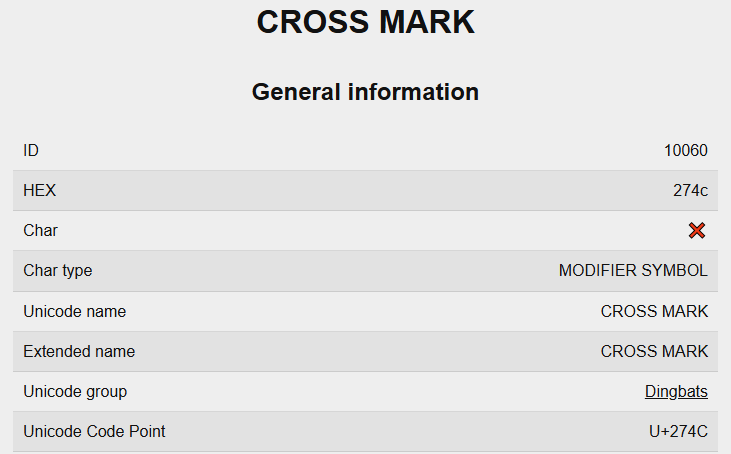
Aquí implementamos los componentes restantes del panel de control del asistente para completar su interfaz de usuario. Recortamos el nombre del programa a 20 caracteres con «truncateString» para facilitar la lectura y creamos una etiqueta de título («SETUP_HEADER_TITLE») con «createLabel» en las coordenadas calculadas, utilizando un tamaño de fuente ajustado al DPI obtenido con «getFontSizeByDPI» (base 14) y «Arial Bold». Luego añadimos una etiqueta de subtítulo («SETUP_HEADER_SUBTITLE») con texto fijo y un tamaño de fuente más pequeño ajustado al DPI (base 10), seguida de un botón de cancelación en el encabezado («SETUP_HEADER_CANCEL») que utiliza una cruz Unicode (0x274C) en la fuente «Arial Rounded MT Bold». Aquí tiene su descripción.
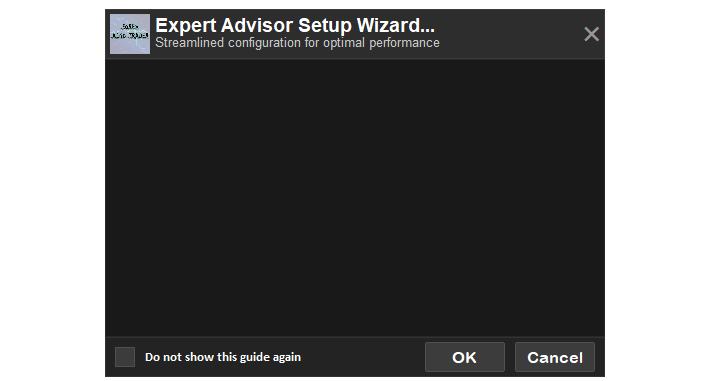
Calculamos la posición en el eje Y del cuerpo («bodyY») y creamos su fondo («SETUP_BODY_BG») con «createRecLabel», utilizando un fondo gris oscuro (C'25,25,25'), un borde de color C'40,40,40', con una anchura de «g_mainWidth» y una altura de «g_displayHeight». A continuación, calculamos la posición en el eje Y del pie de página («footerY») y creamos su fondo («SETUP_FOOTER_BG») con un gris más claro. Después, creamos el fondo de la casilla de verificación («SETUP_CHECKBOX_BG») como un cuadrado de 20 × 20, la etiqueta de la casilla de verificación («SETUP_CHECKBOX_LABEL») con un carácter vacío de Wingdings y su texto («SETUP_CHECKBOX_TEXT»), que dice «Do not show this guide again» («No volver a mostrar esta guía»), en «Calibri Bold». Después añadimos los botones «Aceptar» y «Cancelar» («SETUP_OK_BUTTON», «SETUP_CANCEL_BUTTON») con la función «createButton», con un tamaño de fuente ajustado al DPI (base 12) y utilizando tonos de gris uniformes. Por último, usamos un bucle para crear hasta «MAX_LINES» etiquetas de texto («Setup_ResponseLine_») con la función «createLabel», que inicialmente permanecen ocultas fuera de la pantalla, con el fin de mostrar texto de forma dinámica. Esto crea un sistema para generar el panel de control interactivo y visualmente coherente del asistente. Al ejecutar el programa, obtenemos el siguiente resultado.
Ahora que ya tenemos el panel de control con los elementos básicos, tenemos que actualizar la visualización para que muestre las etiquetas previstas para el asistente. Como crear etiquetas de texto enriquecido con varias líneas en MQL5 no es sencillo, pues no existe una forma directa de hacerlo, tendremos que recurrir al ajuste de línea del texto.
//+------------------------------------------------------------------+
//| Get line color based on content                                  |
//+------------------------------------------------------------------+
color GetLineColor(string lineText) {
   if (StringLen(lineText) == 0 || lineText == " ") return C'25,25,25'; //--- Set invisible for empty lines
   if (StringFind(lineText, "mutiiriallan.forex@gmail.com") >= 0) return C'255,100,100'; //--- Set light red for email
   if (StringFind(lineText, "https://t.me/Forex_Algo_Trader") >= 0) return C'150,100,200'; //--- Set light purple for group link
   if (StringFind(lineText, "@ForexAlgo-Trader") >= 0) return C'100,150,255'; //--- Set light blue for channel link
   if (StringFind(lineText, "http") >= 0 || StringFind(lineText, "t.me") >= 0) return C'100,150,255'; //--- Set light blue for general links
   string start3 = StringSubstr(lineText, 0, 3);    //--- Get first three characters
   if ((start3 == "1. " || start3 == "2. " || start3 == "3. " || start3 == "4. " || start3 == "5. ") &&
       StringFind(lineText, "Initial Setup Instructions") < 0) { //--- Check instruction lines
      return C'255,200,100';                        //--- Set light yellow for instructions
   }
   return clrWhite;                                 //--- Default to white
}

//+------------------------------------------------------------------+
//| Wrap text with colors                                            |
//+------------------------------------------------------------------+
void WrapText(const string inputText, const string font, const int fontSize, const int maxWidth, string &wrappedLines[], color &wrappedColors[], int offset = 0) {
   const int maxChars = 60;                         //--- Set maximum characters per line
   ArrayResize(wrappedLines, 0);                    //--- Clear wrapped lines array
   ArrayResize(wrappedColors, 0);                   //--- Clear wrapped colors array
   TextSetFont(font, fontSize);                     //--- Set font
   string paragraphs[];                             //--- Declare paragraphs array
   int numParagraphs = StringSplit(inputText, '\n', paragraphs); //--- Split text into paragraphs
   for (int p = 0; p < numParagraphs; p++) {        //--- Iterate through paragraphs
      string para = paragraphs[p];                  //--- Get current paragraph
      color paraColor = GetLineColor(para);         //--- Get paragraph color
      if (StringLen(para) == 0) {                   //--- Check empty paragraph
         int size = ArraySize(wrappedLines);        //--- Get current size
         ArrayResize(wrappedLines, size + 1);       //--- Resize lines array
         wrappedLines[size] = " ";                  //--- Add empty line
         ArrayResize(wrappedColors, size + 1);      //--- Resize colors array
         wrappedColors[size] = C'25,25,25';         //--- Set invisible color
         continue;                                  //--- Skip to next
      }
      string words[];                               //--- Declare words array
      int numWords = StringSplit(para, ' ', words); //--- Split paragraph into words
      string currentLine = "";                      //--- Initialize current line
      for (int w = 0; w < numWords; w++) {          //--- Iterate through words
         string testLine = currentLine + (StringLen(currentLine) > 0 ? " " : "") + words[w]; //--- Build test line
         uint wid, hei;                             //--- Declare width and height
         TextGetSize(testLine, wid, hei);           //--- Get test line size
         int textWidth = (int)wid;                  //--- Get text width
         if (textWidth + offset <= maxWidth && StringLen(testLine) <= maxChars) { //--- Check line fits
            currentLine = testLine;                 //--- Update current line
         } else {                                   //--- Line exceeds limits
            if (StringLen(currentLine) > 0) {       //--- Check non-empty line
               int size = ArraySize(wrappedLines);  //--- Get current size
               ArrayResize(wrappedLines, size + 1); //--- Resize lines array
               wrappedLines[size] = currentLine;    //--- Add line
               ArrayResize(wrappedColors, size + 1); //--- Resize colors array
               wrappedColors[size] = paraColor;     //--- Add color
            }
            currentLine = words[w];                 //--- Start new line
            TextGetSize(currentLine, wid, hei);     //--- Get new line size
            textWidth = (int)wid;                   //--- Update text width
            if (textWidth + offset > maxWidth || StringLen(currentLine) > maxChars) { //--- Check word too long
               string wrappedWord = "";             //--- Initialize wrapped word
               for (int c = 0; c < StringLen(words[w]); c++) { //--- Iterate through characters
                  string testWord = wrappedWord + StringSubstr(words[w], c, 1); //--- Build test word
                  TextGetSize(testWord, wid, hei);  //--- Get test word size
                  int wordWidth = (int)wid;         //--- Get word width
                  if (wordWidth + offset > maxWidth || StringLen(testWord) > maxChars) { //--- Check word fits
                     if (StringLen(wrappedWord) > 0) { //--- Check non-empty word
                        int size = ArraySize(wrappedLines); //--- Get current size
                        ArrayResize(wrappedLines, size + 1); //--- Resize lines array
                        wrappedLines[size] = wrappedWord; //--- Add wrapped word
                        ArrayResize(wrappedColors, size + 1); //--- Resize colors array
                        wrappedColors[size] = paraColor; //--- Add color
                     }
                     wrappedWord = StringSubstr(words[w], c, 1); //--- Start new word
                  } else {                          //--- Word fits
                     wrappedWord = testWord;        //--- Update wrapped word
                  }
               }
               currentLine = wrappedWord;          //--- Set current line to wrapped word
               if (StringLen(currentLine) > 0) {   //--- Check non-empty line
                  int size = ArraySize(wrappedLines); //--- Get current size
                  ArrayResize(wrappedLines, size + 1); //--- Resize lines array
                  wrappedLines[size] = currentLine; //--- Add line
                  ArrayResize(wrappedColors, size + 1); //--- Resize colors array
                  wrappedColors[size] = paraColor; //--- Add color
               }
               currentLine = "";                   //--- Reset current line
            }
         }
      }
      if (StringLen(currentLine) > 0) {            //--- Check remaining line
         int size = ArraySize(wrappedLines);       //--- Get current size
         ArrayResize(wrappedLines, size + 1);      //--- Resize lines array
         wrappedLines[size] = currentLine;         //--- Add line
         ArrayResize(wrappedColors, size + 1);     //--- Resize colors array
         wrappedColors[size] = paraColor;          //--- Add color
      }
   }
}
En este apartado, implementamos la lógica de formato del texto y de codificación por colores para mejorar la legibilidad de la guía. En la función «GetLineColor», asignamos colores en función del contenido: las líneas vacías usan un gris oscuro invisible (C'25,25,25'), las direcciones de correo electrónico usan rojo claro (C'255,100,100'), los enlaces a grupos usan morado claro (C'150,100,200'), los enlaces del autor y otros localizadores uniformes de recursos (URL) usan azul claro (C'100,150,255'), las líneas de instrucciones que empiezan por «1. » a «5. » (excepto el título) usan amarillo claro (C'255,200,100') y todas las demás usan blanco por defecto. Puede definir los colores que prefiera; solo hemos incluido este ejemplo para que se haga una idea de cómo se puede lograr la codificación de texto enriquecido.
En la función «WrapText», dividimos el texto de entrada en párrafos utilizando StringSplit con los saltos de línea como separadores, configuramos la fuente con TextSetFont y obtenemos el color de cada párrafo con «GetLineColor», representando los párrafos vacíos mediante un espacio de color invisible. Luego dividimos los párrafos en palabras con «StringSplit» y construimos las líneas añadiendo palabras siempre que quepan dentro de «maxWidth» y no superen un límite de 60 caracteres, aunque el máximo es de 63. Para comprobar el tamaño, utilizamos TextGetSize; si se superan los límites, iniciamos una nueva línea. En el caso de las palabras demasiado largas, las dividimos carácter por carácter y pasamos los fragmentos a nuevas líneas cuando superan los límites. Mediante la función ArrayResize, nos aseguramos de almacenar cada línea en «wrappedLines» y su color en «wrappedColors». Con esta función, podemos actualizar la pantalla. Ahora nos aseguraremos de encapsular la lógica en una función.
//+------------------------------------------------------------------+
//| Get text height                                                  |
//+------------------------------------------------------------------+
int TextGetHeight(string text, string font, int fontSize) {
   uint wid, hei;                                   //--- Declare width and height
   TextSetFont(font, fontSize);                     //--- Set font
   TextGetSize(text, wid, hei);                     //--- Get text size
   return (int)hei;                                 //--- Return height
}

//+------------------------------------------------------------------+
//| Check if line is a heading                                       |
//+------------------------------------------------------------------+
bool IsHeading(string lineText) {
   if (StringLen(lineText) == 0) return false;      //--- Return false for empty lines
   if (StringGetCharacter(lineText, StringLen(lineText) - 1) == ':') return true; //--- Check for colon
   if (StringFind(lineText, "Expert Advisor Initialization Guide") >= 0) return true; //--- Check main heading
   if (StringFind(lineText, "Key Features") >= 0) return true; //--- Check features heading
   if (StringFind(lineText, "Initial Setup Instructions") >= 0) return true; //--- Check instructions heading
   if (StringFind(lineText, "Important Notes") >= 0) return true; //--- Check notes heading
   if (StringFind(lineText, "Contact Methods") >= 0) return true; //--- Check contact heading
   if (StringFind(lineText, "NB:") >= 0) return true; //--- Check NB heading
   return false;                                    //--- Default to false
}

//+------------------------------------------------------------------+
//| Update body display with scrollable text                         |
//+------------------------------------------------------------------+
void UpdateBodyDisplay() {
   int textX = g_mainX + g_padding + g_textPadding; //--- Set text x position
   int textY = g_mainY + g_headerHeight + g_spacing; //--- Set text y position
   int fullMaxWidth = g_mainWidth - 2 * g_padding - 2 * g_textPadding; //--- Calculate max text width
   string font = "Arial";                           //--- Set font
   int fontSize = getFontSizeByDPI(10);             //--- Calculate font size
   int lineHeight = TextGetHeight("A", font, fontSize); //--- Get line height
   int adjustedLineHeight = lineHeight + g_lineSpacing; //--- Calculate adjusted line height
   g_adjustedLineHeight = adjustedLineHeight;       //--- Store adjusted line height
   int visibleHeight = g_displayHeight;             //--- Set visible height
   g_visible_height = visibleHeight;                //--- Store visible height
   static string wrappedLines[];                    //--- Store wrapped text lines
   static color wrappedColors[];                    //--- Store line colors
   static bool wrapped = false;                     //--- Track if text wrapped
   if (!wrapped) {                                  //--- Check if text needs wrapping
      WrapText(setup_text, font, fontSize, fullMaxWidth, wrappedLines, wrappedColors); //--- Wrap text
      wrapped = true;                               //--- Set wrapped flag
   }
   int numLines = ArraySize(wrappedLines);          //--- Get number of lines
   g_total_height = numLines * adjustedLineHeight;  //--- Calculate total text height
   bool need_scroll = g_total_height > visibleHeight; //--- Check if scrollbar needed
   bool should_show_scrollbar = false;              //--- Initialize scrollbar visibility
   int reserved_width = 0;                          //--- Initialize reserved width
   if (need_scroll && ScrollbarMode != SCROLL_NEVER) { //--- Check scrollbar mode
      should_show_scrollbar = true;                 //--- Enable scrollbar
      reserved_width = 16;                          //--- Reserve scrollbar width
   }
   if (reserved_width > 0 && fullMaxWidth - reserved_width != fullMaxWidth) { //--- Check width change
      WrapText(setup_text, font, fontSize, fullMaxWidth - reserved_width, wrappedLines, wrappedColors); //--- Rewrap text
      numLines = ArraySize(wrappedLines);           //--- Update line count
      g_total_height = numLines * adjustedLineHeight; //--- Update total height
   }

   int startLine = scroll_pos / adjustedLineHeight; //--- Calculate start line
   int currentY = textY;                            //--- Set current y position
   int labelIndex = 0;                              //--- Initialize label index
   for (int line = startLine; line < numLines; line++) { //--- Iterate visible lines
      string lineText = wrappedLines[line];         //--- Get line text
      if (StringLen(lineText) == 0) lineText = " "; //--- Set empty lines to space
      color lineColor = wrappedColors[line];        //--- Get line color
      if (IsHeading(lineText)) lineColor = clrBlue; //--- Set blue for headings
      if (currentY + adjustedLineHeight > textY + visibleHeight) break; //--- Prevent overflow
      string lineName = "Setup_ResponseLine_" + IntegerToString(labelIndex); //--- Generate line name
      if (ObjectFind(0, lineName) >= 0) {          //--- Check if label exists
         ObjectSetString(0, lineName, OBJPROP_TEXT, lineText); //--- Set line text
         ObjectSetInteger(0, lineName, OBJPROP_XDISTANCE, textX); //--- Set x position
         ObjectSetInteger(0, lineName, OBJPROP_YDISTANCE, currentY); //--- Set y position
         ObjectSetInteger(0, lineName, OBJPROP_COLOR, lineColor); //--- Set line color
         string lineFont = IsHeading(lineText) ? "Arial Bold" : "Arial"; //--- Set font
         ObjectSetString(0, lineName, OBJPROP_FONT, lineFont); //--- Set font type
         ObjectSetInteger(0, lineName, OBJPROP_FONTSIZE, fontSize); //--- Set font size
         ObjectSetInteger(0, lineName, OBJPROP_HIDDEN, false); //--- Show label
      }
      currentY += adjustedLineHeight;               //--- Increment y position
      labelIndex++;                                 //--- Increment label index
   }
   for (int i = labelIndex; i < MAX_LINES; i++) {   //--- Hide unused labels
      string lineName = "Setup_ResponseLine_" + IntegerToString(i); //--- Generate line name
      if (ObjectFind(0, lineName) >= 0) {           //--- Check if label exists
         ObjectSetInteger(0, lineName, OBJPROP_HIDDEN, true); //--- Hide label
      }
   }
   ChartRedraw();                                   //--- Redraw chart
}
Para implementar la lógica de representación y desplazamiento del texto con el fin de mostrar la guía de forma dinámica, en la función «TextGetHeight» configuramos la fuente y el tamaño con TextSetFont y utilizamos TextGetSize para calcular la altura de un carácter de muestra, devolviendo dicho valor para garantizar un interlineado uniforme. La función «IsHeading» identifica los encabezados comprobando si hay líneas en blanco, dos puntos al final o títulos específicos de secciones de la guía por ejemplo “Key Features” (“Características principales”), y devuelve «true» si encuentra alguna coincidencia. En la función «UpdateBodyDisplay», calculamos la posición del área de texto («textX», «textY») y su anchura («fullMaxWidth») utilizando el rellenado y las dimensiones del contenedor, establecemos la fuente en Arial con un tamaño ajustado al DPI mediante «getFontSizeByDPI», y calculamos la altura de línea con «TextGetHeight» más «g_lineSpacing», almacenándola en «g_adjustedLineHeight».
Aplicamos el ajuste de línea del texto de la guía con «WrapText» si aún no se ha hecho, calculamos la altura total del texto («g_total_height») y determinamos la visibilidad de la barra de desplazamiento en función de «ScrollbarMode» y del desbordamiento del texto. Si es necesario, reservamos 16 píxeles para la barra de desplazamiento y volvemos a aplicar el ajuste de línea del texto según el espacio disponible. Después calculamos la línea de inicio a partir de «scroll_pos», actualizamos las etiquetas de texto visibles con ObjectSetString y ObjectSetInteger para la posición, el color (azul para los encabezados mediante «IsHeading») y la fuente, ocultamos las etiquetas que no se utilizan y volvemos a dibujar el gráfico. Cuando llamamos a esta función dentro de la función que muestra el panel de control, obtenemos el siguiente resultado.
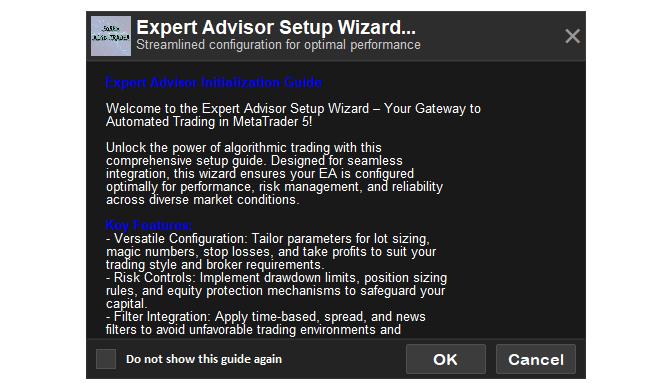
Podemos ver que la pantalla está lista y que el texto se ajusta perfectamente al área de visualización. Lo que tenemos que hacer es implementar la lógica para mostrar la barra de desplazamiento cuando sea necesario.
//+------------------------------------------------------------------+
//| Create scrollbar                                                 |
//+------------------------------------------------------------------+
void CreateScrollbar() {
   int bodyY = g_mainY + g_headerHeight + g_spacing; //--- Calculate body y position
   int textAreaY = bodyY;                            //--- Set text area y
   int textAreaHeight = g_displayHeight;             //--- Set text area height
   int scrollbar_x = g_mainX + g_mainWidth - 16 - 1; //--- Calculate scrollbar x
   int scrollbar_width = 16;                         //--- Set scrollbar width
   int button_size = 16;                             //--- Set button size
   int scrollbar_y = textAreaY + 2;                  //--- Calculate scrollbar y
   int scrollbar_height = textAreaHeight - 2 - 2;    //--- Calculate scrollbar height
   createRecLabel(SCROLL_LEADER, scrollbar_x, scrollbar_y, scrollbar_width, scrollbar_height, C'45,45,45', 1, C'60,60,60', BORDER_FLAT, STYLE_SOLID, CORNER_LEFT_UPPER); //--- Create scroll leader
   createRecLabel(SCROLL_UP_REC, scrollbar_x, scrollbar_y, scrollbar_width, button_size, C'60,60,60', 1, C'60,60,60', BORDER_FLAT, STYLE_SOLID, CORNER_LEFT_UPPER); //--- Create scroll up rectangle
   int scrollUpLabelFontSize = getFontSizeByDPI(10); //--- Calculate scroll up font size
   createLabel(SCROLL_UP_LABEL, scrollbar_x + 2, scrollbar_y - 2, CharToString(0x35), C'150,150,150', scrollUpLabelFontSize, "Webdings", CORNER_LEFT_UPPER, ANCHOR_LEFT_UPPER); //--- Create scroll up label
   int down_rec_y = scrollbar_y + scrollbar_height - button_size; //--- Calculate scroll down y
   createRecLabel(SCROLL_DOWN_REC, scrollbar_x, down_rec_y, scrollbar_width, button_size, C'60,60,60', 1, C'60,60,60', BORDER_FLAT, STYLE_SOLID, CORNER_LEFT_UPPER); //--- Create scroll down rectangle
   createLabel(SCROLL_DOWN_LABEL, scrollbar_x + 2, down_rec_y - 2, CharToString(0x36), C'150,150,150', scrollUpLabelFontSize, "Webdings", CORNER_LEFT_UPPER, ANCHOR_LEFT_UPPER); //--- Create scroll down label
   slider_height = CalculateSliderHeight();          //--- Calculate slider height
   createRecLabel(SCROLL_SLIDER, scrollbar_x, scrollbar_y + button_size, scrollbar_width, slider_height, C'80,80,80', 1, C'100,100,100', BORDER_FLAT, STYLE_SOLID, CORNER_LEFT_UPPER); //--- Create scroll slider
}

//+------------------------------------------------------------------+
//| Delete scrollbar                                                 |
//+------------------------------------------------------------------+
void DeleteScrollbar() {
   string scroll_objects[] = {SCROLL_LEADER, SCROLL_UP_REC, SCROLL_UP_LABEL, SCROLL_DOWN_REC, SCROLL_DOWN_LABEL, SCROLL_SLIDER}; //--- Define scroll objects
   for (int i = 0; i < ArraySize(scroll_objects); i++) { //--- Iterate through objects
      ObjectDelete(0, scroll_objects[i]);            //--- Delete object
   }
   ChartRedraw();                                    //--- Redraw chart
}

//+------------------------------------------------------------------+
//| Calculate slider height                                          |
//+------------------------------------------------------------------+
int CalculateSliderHeight() {
   int textAreaHeight = g_displayHeight;            //--- Get text area height
   int scroll_area_height = textAreaHeight - 32;    //--- Calculate scroll area height
   int slider_min_height = 20;                      //--- Set minimum slider height
   if (g_total_height <= g_visible_height) return scroll_area_height; //--- Return full height if no scroll
   double visible_ratio = (double)g_visible_height / g_total_height; //--- Calculate visible ratio
   int height = (int)MathFloor(scroll_area_height * visible_ratio); //--- Calculate slider height
   return MathMax(slider_min_height, height);       //--- Return minimum or calculated height
}

//+------------------------------------------------------------------+
//| Update slider position                                           |
//+------------------------------------------------------------------+
void UpdateSliderPosition() {
   int bodyY = g_mainY + g_headerHeight + g_spacing; //--- Calculate body y position
   int textAreaY = bodyY;                           //--- Set text area y
   int textAreaHeight = g_displayHeight;            //--- Set text area height
   int scroll_area_height = textAreaHeight - 32;    //--- Calculate scroll area height
   int slider_min_y = textAreaY + 16;               //--- Set minimum slider y
   if (g_max_scroll <= 0) return;                   //--- Exit if no scroll
   double scroll_ratio = (double)scroll_pos / g_max_scroll; //--- Calculate scroll ratio
   int slider_max_y = slider_min_y + scroll_area_height - slider_height; //--- Calculate max slider y
   int new_y = slider_min_y + (int)MathRound(scroll_ratio * (slider_max_y - slider_min_y)); //--- Calculate new y
   ObjectSetInteger(0, SCROLL_SLIDER, OBJPROP_YDISTANCE, new_y); //--- Set slider y position
}

//+------------------------------------------------------------------+
//| Update scrollbar button colors                                   |
//+------------------------------------------------------------------+
void UpdateButtonColors() {
   int max_scroll = g_max_scroll;                   //--- Get max scroll
   color up_color = (scroll_pos == 0) ? C'80,80,80' : (scroll_up_hovered ? C'100,100,100' : C'150,150,150'); //--- Set up button color
   color down_color = (scroll_pos >= max_scroll) ? C'80,80,80' : (scroll_down_hovered ? C'100,100,100' : C'150,150,150'); //--- Set down button color
   ObjectSetInteger(0, SCROLL_UP_LABEL, OBJPROP_COLOR, up_color); //--- Update up label color
   ObjectSetInteger(0, SCROLL_DOWN_LABEL, OBJPROP_COLOR, down_color); //--- Update down label color
   ObjectSetInteger(0, SCROLL_UP_REC, OBJPROP_BGCOLOR, scroll_up_hovered ? C'70,70,70' : C'60,60,60'); //--- Update up rectangle color
   ObjectSetInteger(0, SCROLL_DOWN_REC, OBJPROP_BGCOLOR, scroll_down_hovered ? C'70,70,70' : C'60,60,60'); //--- Update down rectangle color
}

//+------------------------------------------------------------------+
//| Scroll up                                                        |
//+------------------------------------------------------------------+
void ScrollUp() {
   if (g_adjustedLineHeight > 0 && scroll_pos > 0) { //--- Check scroll possible
      scroll_pos = MathMax(0, scroll_pos - g_adjustedLineHeight); //--- Decrease scroll position
      UpdateBodyDisplay();                           //--- Update body display
      if (scroll_visible) {                          //--- Check scrollbar visible
         UpdateSliderPosition();                     //--- Update slider position
         UpdateButtonColors();                       //--- Update button colors
      }
   }
}

//+------------------------------------------------------------------+
//| Scroll down                                                      |
//+------------------------------------------------------------------+
void ScrollDown() {
   int max_scroll = g_max_scroll;                    //--- Get max scroll
   if (g_adjustedLineHeight > 0 && scroll_pos < max_scroll) { //--- Check scroll possible
      scroll_pos = MathMin(max_scroll, scroll_pos + g_adjustedLineHeight); //--- Increase scroll position
      UpdateBodyDisplay();                           //--- Update body display
      if (scroll_visible) {                          //--- Check scrollbar visible
         UpdateSliderPosition();                     //--- Update slider position
         UpdateButtonColors();                       //--- Update button colors
      }
   }
}
Para implementar la funcionalidad de la barra de desplazamiento y permitir una navegación fluida por la guía de configuración, creamos la función «CreateScrollbar». En ella calculamos la posición y las dimensiones de la barra de desplazamiento a partir de la coordenada Y del cuerpo («bodyY»), situamos «scrollbar_x» en el borde derecho del contenedor principal y utilizamos una anchura de 16 píxeles. Creamos un rectángulo guía («SCROLL_LEADER») con «createRecLabel» para la pista de la barra de desplazamiento, así como botones para subir y bajar («SCROLL_UP_REC», «SCROLL_DOWN_REC») con etiquetas («SCROLL_UP_LABEL», «SCROLL_DOWN_LABEL») que utilizan las flechas de Webdings (0x35, 0x36). Luego llamamos a «CalculateSliderHeight» para determinar la altura del control deslizante en función de la proporción de texto visible, y creamos el control deslizante («SCROLL_SLIDER») con «createRecLabel». La función «DeleteScrollbar» elimina todos los objetos de la barra de desplazamiento («SCROLL_LEADER», etc.) mediante ObjectDelete y vuelve a dibujar el gráfico.
En «CalculateSliderHeight», calculamos la altura del control deslizante como una proporción entre la altura de la pantalla y la altura total del texto, asegurándonos de que sea de al menos 20 píxeles. La función «UpdateSliderPosition» ajusta la posición en el eje Y del control deslizante usando una relación de desplazamiento calculada a partir de «scroll_pos» y «g_max_scroll», y la establece mediante «ObjectSetInteger». En «UpdateButtonColors», actualizamos los colores de los botones de subir y bajar en función de la posición de desplazamiento y del estado al pasar el cursor por encima, con el fin de proporcionar una respuesta visual dinámica. Las funciones «ScrollUp» y «ScrollDown» modifican «scroll_pos» en incrementos o decrementos de «g_adjustedLineHeight», manteniendo el valor dentro de los límites permitidos, y llaman a «UpdateBodyDisplay», «UpdateSliderPosition» y «UpdateButtonColors» si la barra de desplazamiento está visible, lo que garantiza un desplazamiento fluido. Ahora podemos llamar a estas funciones dentro de la función de actualización de la pantalla para añadir la barra de desplazamiento. Este es el método que usamos para lograrlo.
int num_visible_lines = g_visible_height / g_adjustedLineHeight; //--- Calculate visible lines
g_max_scroll = MathMax(0, (numLines - num_visible_lines) * g_adjustedLineHeight); //--- Calculate max scroll
bool prev_scroll_visible = scroll_visible;       //--- Store previous scrollbar state
scroll_visible = should_show_scrollbar;          //--- Update scrollbar visibility
if (scroll_visible != prev_scroll_visible) {     //--- Check scrollbar state change
   if (scroll_visible) {                         //--- Show scrollbar
      CreateScrollbar();                         //--- Create scrollbar
   } else {                                      //--- Hide scrollbar
      DeleteScrollbar();                         //--- Delete scrollbar
   }
}
scroll_pos = MathMax(0, MathMin(scroll_pos, g_max_scroll)); //--- Clamp scroll position
if (scroll_visible) {                            //--- Update scrollbar
   slider_height = CalculateSliderHeight();      //--- Calculate slider height
   ObjectSetInteger(0, SCROLL_SLIDER, OBJPROP_YSIZE, slider_height); //--- Set slider height
   UpdateSliderPosition();                       //--- Update slider position
   UpdateButtonColors();                         //--- Update button colors
}
Dentro de la función «UpdateBodyDisplay», calculamos el número de líneas visibles dividiendo «g_visible_height» entre «g_adjustedLineHeight» y determinamos la distancia máxima de desplazamiento («g_max_scroll») como la altura del texto que excede el área de las líneas visibles, utilizando MathMax para evitar valores negativos. A continuación, almacenamos el estado anterior de visibilidad de la barra de desplazamiento en «prev_scroll_visible», actualizamos «scroll_visible» en función de si se necesita una barra de desplazamiento y, si el estado cambia, llamamos a «CreateScrollbar» para dibujar la barra de desplazamiento o a «DeleteScrollbar» para eliminarla. Luego limitamos el valor de «scroll_pos» entre 0 y «g_max_scroll» utilizando «MathMax» y «MathMin» para evitar desbordamientos. Si la barra de desplazamiento está visible, actualizamos «slider_height» con «CalculateSliderHeight», establecemos la altura del control deslizante con ObjectSetInteger para «SCROLL_SLIDER» y llamamos a «UpdateSliderPosition» y «UpdateButtonColors» para actualizar el aspecto y la posición de la barra de desplazamiento. Al compilar, obtenemos el siguiente resultado.
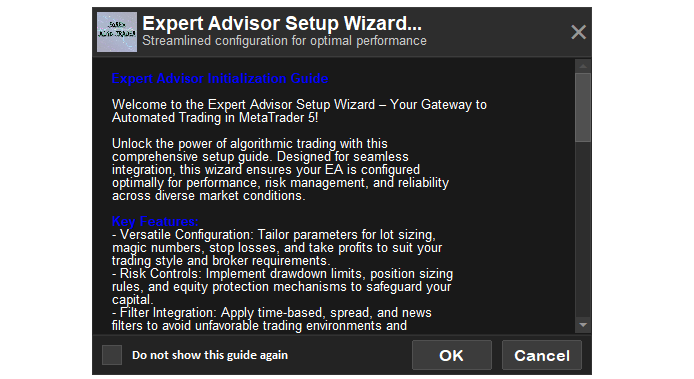
En la imagen se puede observar que los elementos del panel de control están completamente creados. Ahora tenemos que asegurarnos de eliminar el panel de control cuando cerremos la sesión o desinicialicemos el programa.
//+------------------------------------------------------------------+
//| Delete the dashboard                                             |
//+------------------------------------------------------------------+
void DeleteDashboard() {
   string objects[] = {                             //--- Define dashboard objects
      SETUP_MAIN, SETUP_HEADER_BG, SETUP_HEADER_IMAGE, SETUP_HEADER_TITLE, SETUP_HEADER_SUBTITLE, SETUP_HEADER_CANCEL,
      SETUP_BODY_BG, SETUP_FOOTER_BG, SETUP_CHECKBOX_BG, SETUP_CHECKBOX_LABEL, SETUP_CHECKBOX_TEXT,
      SETUP_OK_BUTTON, SETUP_CANCEL_BUTTON, SCROLL_LEADER, SCROLL_UP_REC, SCROLL_UP_LABEL,
      SCROLL_DOWN_REC, SCROLL_DOWN_LABEL, SCROLL_SLIDER
   };
   for (int i = 0; i < ArraySize(objects); i++) {   //--- Iterate through objects
      ObjectDelete(0, objects[i]);                  //--- Delete object
   }
   int total = ObjectsTotal(0);                     //--- Get total objects
   for (int j = total - 1; j >= 0; j--) {           //--- Iterate through remaining objects
      string name = ObjectName(0, j);               //--- Get object name
      if (StringFind(name, "Setup_ResponseLine_") == 0) { //--- Check for text lines
         ObjectDelete(0, name);                     //--- Delete text line
      }
   }
   ChartRedraw();                                   //--- Redraw chart
}

//+------------------------------------------------------------------+
//| Expert deinitialization function                                 |
//+------------------------------------------------------------------+
void OnDeinit(const int reason) {
   DeleteDashboard();                                //--- Remove dashboard objects
   if (StringLen(g_scaled_image_resource) > 0) {     //--- Check if scaled image exists
      ResourceFree(g_scaled_image_resource);         //--- Free scaled image resource
   }
}
Aquí implementamos la funcionalidad de limpieza del asistente para garantizar una gestión adecuada de los recursos. En la función «DeleteDashboard», definimos una matriz con los nombres de los objetos del panel de control —entre los que se incluyen el contenedor principal, el encabezado, el cuerpo, el pie de página, los botones, la casilla de verificación y los componentes de la barra de desplazamiento— y la iteramos utilizando ObjectDelete para eliminar cada objeto del gráfico. A continuación, recorremos todos los objetos restantes del gráfico con ObjectsTotal y ObjectName, eliminamos mediante «ObjectDelete» los objetos de línea de texto cuyo nombre comience por «Setup_ResponseLine_» y volvemos a dibujar el gráfico con ChartRedraw para obtener una visualización limpia. En la función «OnDeinit», llamamos a «DeleteDashboard» para eliminar todos los elementos del panel de control y comprobamos si existe un recurso de imagen redimensionada («StringLen(g_scaled_image_resource) > 0»); si existe, lo liberamos con ResourceFree para liberar memoria. Ahora podemos dar vida al panel de control. Queremos que, al hacer clic en los botones, estos realicen las llamadas correspondientes y que los efectos al pasar el cursor por encima indiquen si este se encuentra sobre un elemento. Para simplificar, necesitaremos una función que haga eso.
//+------------------------------------------------------------------+
//| Update hover effects                                             |
//+------------------------------------------------------------------+
void UpdateHoverEffects(int mouseX, int mouseY) {
   int ok_x = (int)ObjectGetInteger(0, SETUP_OK_BUTTON, OBJPROP_XDISTANCE);    //--- Get OK button x
   int ok_y = (int)ObjectGetInteger(0, SETUP_OK_BUTTON, OBJPROP_YDISTANCE);    //--- Get OK button y
   int ok_width = (int)ObjectGetInteger(0, SETUP_OK_BUTTON, OBJPROP_XSIZE);    //--- Get OK button width
   int ok_height = (int)ObjectGetInteger(0, SETUP_OK_BUTTON, OBJPROP_YSIZE);   //--- Get OK button height
   bool is_ok_hovered = (mouseX >= ok_x && mouseX <= ok_x + ok_width && mouseY >= ok_y && mouseY <= ok_y + ok_height); //--- Check OK button hover
   if (is_ok_hovered != ok_button_hovered) {                                   //--- Check hover state change
      ok_button_hovered = is_ok_hovered;                                       //--- Update hover state
      color hoverBg = is_ok_hovered ? C'40,80,40' : C'60,60,60';               //--- Set hover background
      color hoverBorder = is_ok_hovered ? C'60,100,60' : C'80,80,80';          //--- Set hover border
      ObjectSetInteger(0, SETUP_OK_BUTTON, OBJPROP_BGCOLOR, hoverBg);          //--- Update background
      ObjectSetInteger(0, SETUP_OK_BUTTON, OBJPROP_BORDER_COLOR, hoverBorder); //--- Update border
      ChartRedraw();                                                           //--- Redraw chart
   }
   int cancel_x = (int)ObjectGetInteger(0, SETUP_CANCEL_BUTTON, OBJPROP_XDISTANCE);  //--- Get Cancel button x
   int cancel_y = (int)ObjectGetInteger(0, SETUP_CANCEL_BUTTON, OBJPROP_YDISTANCE);  //--- Get Cancel button y
   int cancel_width = (int)ObjectGetInteger(0, SETUP_CANCEL_BUTTON, OBJPROP_XSIZE);  //--- Get Cancel button width
   int cancel_height = (int)ObjectGetInteger(0, SETUP_CANCEL_BUTTON, OBJPROP_YSIZE); //--- Get Cancel button height
   bool is_cancel_hovered = (mouseX >= cancel_x && mouseX <= cancel_x + cancel_width && mouseY >= cancel_y && mouseY <= cancel_y + cancel_height); //--- Check Cancel button hover
   if (is_cancel_hovered != cancel_button_hovered) {                                 //--- Check hover state change
      cancel_button_hovered = is_cancel_hovered;                                     //--- Update hover state
      color hoverBg = is_cancel_hovered ? C'80,40,40' : C'60,60,60';                 //--- Set hover background
      color hoverBorder = is_cancel_hovered ? C'100,60,60' : C'80,80,80';            //--- Set hover border
      ObjectSetInteger(0, SETUP_CANCEL_BUTTON, OBJPROP_BGCOLOR, hoverBg);            //--- Update background
      ObjectSetInteger(0, SETUP_CANCEL_BUTTON, OBJPROP_BORDER_COLOR, hoverBorder);   //--- Update border
      ChartRedraw();                               //--- Redraw chart
   }
   int checkbox_x = (int)ObjectGetInteger(0, SETUP_CHECKBOX_BG, OBJPROP_XDISTANCE);  //--- Get checkbox x
   int checkbox_y = (int)ObjectGetInteger(0, SETUP_CHECKBOX_BG, OBJPROP_YDISTANCE);  //--- Get checkbox y
   int checkbox_width = (int)ObjectGetInteger(0, SETUP_CHECKBOX_BG, OBJPROP_XSIZE);  //--- Get checkbox width
   int checkbox_height = (int)ObjectGetInteger(0, SETUP_CHECKBOX_BG, OBJPROP_YSIZE); //--- Get checkbox height
   bool is_checkbox_hovered = (mouseX >= checkbox_x && mouseX <= checkbox_x + checkbox_width && mouseY >= checkbox_y && mouseY <= checkbox_y + checkbox_height); //--- Check checkbox hover
   if (is_checkbox_hovered != checkbox_hovered) {   //--- Check hover state change
      checkbox_hovered = is_checkbox_hovered;       //--- Update hover state
      if (checkbox_checked) {                       //--- Check checkbox state
         ObjectSetInteger(0, SETUP_CHECKBOX_BG, OBJPROP_BGCOLOR, is_checkbox_hovered ? C'0,150,0' : C'0,128,0'); //--- Update background
      } else {                                      //--- Unchecked state
         ObjectSetInteger(0, SETUP_CHECKBOX_BG, OBJPROP_BGCOLOR, is_checkbox_hovered ? C'70,70,70' : C'60,60,60'); //--- Update background
      }
      ChartRedraw();                                //--- Redraw chart
   }
   int header_cancel_x = (int)ObjectGetInteger(0, SETUP_HEADER_CANCEL, OBJPROP_XDISTANCE); //--- Get header cancel x
   int header_cancel_y = (int)ObjectGetInteger(0, SETUP_HEADER_CANCEL, OBJPROP_YDISTANCE); //--- Get header cancel y
   int header_cancel_width = 20;                    //--- Set header cancel width
   int header_cancel_height = 20;                   //--- Set header cancel height
   bool is_header_cancel_hovered = (mouseX >= header_cancel_x && mouseX <= header_cancel_x + header_cancel_width &&
                                    mouseY >= header_cancel_y && mouseY <= header_cancel_y + header_cancel_height); //--- Check header cancel hover
   if (is_header_cancel_hovered != header_cancel_hovered) { //--- Check hover state change
      header_cancel_hovered = is_header_cancel_hovered; //--- Update hover state
      ObjectSetInteger(0, SETUP_HEADER_CANCEL, OBJPROP_COLOR, is_header_cancel_hovered ? C'255,100,100' : C'150,150,150'); //--- Update color
      ChartRedraw();                                //--- Redraw chart
   }
   if (scroll_visible) {                            //--- Check scrollbar visible
      int scroll_up_x = (int)ObjectGetInteger(0, SCROLL_UP_REC, OBJPROP_XDISTANCE);  //--- Get scroll up x
      int scroll_up_y = (int)ObjectGetInteger(0, SCROLL_UP_REC, OBJPROP_YDISTANCE);  //--- Get scroll up y
      int scroll_up_width = (int)ObjectGetInteger(0, SCROLL_UP_REC, OBJPROP_XSIZE);  //--- Get scroll up width
      int scroll_up_height = (int)ObjectGetInteger(0, SCROLL_UP_REC, OBJPROP_YSIZE); //--- Get scroll up height
      bool is_scroll_up_hovered = (mouseX >= scroll_up_x && mouseX <= scroll_up_x + scroll_up_width &&
                                   mouseY >= scroll_up_y && mouseY <= scroll_up_y + scroll_up_height); //--- Check scroll up hover
      if (is_scroll_up_hovered != scroll_up_hovered) {                               //--- Check hover state change
         scroll_up_hovered = is_scroll_up_hovered;                                   //--- Update hover state
         ObjectSetInteger(0, SCROLL_UP_REC, OBJPROP_BGCOLOR, is_scroll_up_hovered ? C'70,70,70' : C'60,60,60'); //--- Update background
         ObjectSetInteger(0, SCROLL_UP_LABEL, OBJPROP_COLOR, (scroll_pos == 0) ? C'80,80,80' : (is_scroll_up_hovered ? C'100,100,100' : C'150,150,150')); //--- Update label color
         ChartRedraw();                                                              //--- Redraw chart
      }
      int scroll_down_x = (int)ObjectGetInteger(0, SCROLL_DOWN_REC, OBJPROP_XDISTANCE);  //--- Get scroll down x
      int scroll_down_y = (int)ObjectGetInteger(0, SCROLL_DOWN_REC, OBJPROP_YDISTANCE);  //--- Get scroll down y
      int scroll_down_width = (int)ObjectGetInteger(0, SCROLL_DOWN_REC, OBJPROP_XSIZE);  //--- Get scroll down width
      int scroll_down_height = (int)ObjectGetInteger(0, SCROLL_DOWN_REC, OBJPROP_YSIZE); //--- Get scroll down height
      bool is_scroll_down_hovered = (mouseX >= scroll_down_x && mouseX <= scroll_down_x + scroll_down_width &&
                                     mouseY >= scroll_down_y && mouseY <= scroll_down_y + scroll_down_height); //--- Check scroll down hover
      if (is_scroll_down_hovered != scroll_down_hovered) {                               //--- Check hover state change
         scroll_down_hovered = is_scroll_down_hovered;                                   //--- Update hover state
         ObjectSetInteger(0, SCROLL_DOWN_REC, OBJPROP_BGCOLOR, is_scroll_down_hovered ? C'70,70,70' : C'60,60,60'); //--- Update background
         ObjectSetInteger(0, SCROLL_DOWN_LABEL, OBJPROP_COLOR, (scroll_pos >= g_max_scroll) ? C'80,80,80' : (is_scroll_down_hovered ? C'100,100,100' : C'150,150,150')); //--- Update label color
         ChartRedraw();                                                                  //--- Redraw chart
      }
      int scroll_slider_x = (int)ObjectGetInteger(0, SCROLL_SLIDER, OBJPROP_XDISTANCE);  //--- Get scroll slider x
      int scroll_slider_y = (int)ObjectGetInteger(0, SCROLL_SLIDER, OBJPROP_YDISTANCE);  //--- Get scroll slider y
      int scroll_slider_width = (int)ObjectGetInteger(0, SCROLL_SLIDER, OBJPROP_XSIZE);  //--- Get scroll slider width
      int scroll_slider_height = (int)ObjectGetInteger(0, SCROLL_SLIDER, OBJPROP_YSIZE); //--- Get scroll slider height
      bool is_scroll_slider_hovered = (mouseX >= scroll_slider_x && mouseX <= scroll_slider_x + scroll_slider_width &&
                                       mouseY >= scroll_slider_y && mouseY <= scroll_slider_y + scroll_slider_height); //--- Check scroll slider hover
      if (is_scroll_slider_hovered != scroll_slider_hovered) {                           //--- Check hover state change
         scroll_slider_hovered = is_scroll_slider_hovered;                               //--- Update hover state
         ObjectSetInteger(0, SCROLL_SLIDER, OBJPROP_BGCOLOR, is_scroll_slider_hovered ? C'100,100,100' : C'80,80,80'); //--- Update background
         ChartRedraw();                                                                  //--- Redraw chart
      }
   }
}
Aquí implementamos efectos al pasar el cursor por encima de los elementos interactivos que hemos creado para mejorar la respuesta visual que recibe el usuario. Luego creamos la función «UpdateHoverEffects» y, en ella, comparamos las coordenadas del ratón («mouseX», «mouseY») con las posiciones y los tamaños del botón «Aceptar» («SETUP_OK_BUTTON»), el botón «Cancelar» («SETUP_CANCEL_BUTTON»), la casilla de verificación («SETUP_CHECKBOX_BG»), el botón «Cancelar» del encabezado («SETUP_HEADER_CANCEL») y los componentes de la barra de desplazamiento («SCROLL_UP_REC», «SCROLL_DOWN_REC», «SCROLL_SLIDER») utilizando ObjectGetInteger para obtener sus dimensiones.
Para cada elemento, detectamos si el cursor se encuentra dentro de sus límites, actualizamos los estados correspondientes («ok_button_hovered», «cancel_button_hovered», etc.) si han cambiado y ajustamos los colores con ObjectSetInteger: el botón «Aceptar» utiliza tonos verdes (C'40,80,40'), el botón «Cancelar» utiliza tonos rojos (C'80,40,40'), la casilla de verificación utiliza verde cuando está marcada (C'0,150,0') o gris (C'70,70,70'), el botón «Cancelar» del encabezado cambia a rojo brillante (C'255,100,100') y los botones y el control deslizante de la barra de desplazamiento utilizan distintos tonos de gris (C'70,70,70' o C'100,100,100') en función de si el cursor está sobre ellos y de la posición de desplazamiento («scroll_pos»). Todos estos colores se pueden modificar a nuestro gusto. Hemos vuelto a utilizar valores arbitrarios para proporcionar una respuesta visual más clara. Así, volvemos a dibujar el gráfico con ChartRedraw después de cada actualización. Ahora solo tenemos que implementar esto en el controlador de eventos OnChartEvent, que se encarga de todos los eventos del gráfico, aunque en nuestro caso nos interesan los eventos de movimiento y clic del ratón.
//+------------------------------------------------------------------+
//| Chart event handler                                              |
//+------------------------------------------------------------------+
void OnChartEvent(const int id, const long &lparam, const double &dparam, const string &sparam) {
   int mouseX = (int)lparam;                        //--- Get mouse x coordinate
   int mouseY = (int)dparam;                        //--- Get mouse y coordinate
   int body_inner_y = g_mainY + g_headerHeight + g_spacing; //--- Calculate body y position
   int textAreaEventY = body_inner_y;               //--- Set text area y position
   int textAreaEventH = g_displayHeight;            //--- Set text area height
   int bodyX = g_mainX + g_padding + g_textPadding; //--- Calculate body x position
   int bodyW = g_mainWidth - 2 * g_padding - 2 * g_textPadding - (scroll_visible ? 16 : 0); //--- Calculate body width
   if (id == CHARTEVENT_OBJECT_CLICK) {             //--- Handle object click events
      if (sparam == SETUP_HEADER_CANCEL || sparam == SETUP_CANCEL_BUTTON) { //--- Check cancel button click
         GlobalVariableSet(GV_SETUP, 0.0);          //--- Set global variable to false
         DeleteDashboard();                         //--- Remove dashboard from chart
      } else if (sparam == SETUP_OK_BUTTON) {       //--- Check OK button click
         double new_val = checkbox_checked ? 1.0 : 0.0; //--- Set global variable based on checkbox
         GlobalVariableSet(GV_SETUP, new_val);      //--- Update global variable
         DeleteDashboard();                         //--- Remove dashboard from chart
      } else if (sparam == SETUP_CHECKBOX_BG || sparam == SETUP_CHECKBOX_TEXT || sparam == SETUP_CHECKBOX_LABEL) { //--- Check checkbox click
         checkbox_checked = !checkbox_checked;      //--- Toggle checkbox state
         string check_text = checkbox_checked ? CharToString(252) : " ";         //--- Set checkbox symbol
         ObjectSetString(0, SETUP_CHECKBOX_LABEL, OBJPROP_TEXT, check_text);     //--- Update checkbox label text
         color text_color = checkbox_checked ? C'173,216,230' : clrWhite;        //--- Set text color based on state
         ObjectSetInteger(0, SETUP_CHECKBOX_TEXT, OBJPROP_COLOR, text_color);    //--- Update checkbox text color
         if (checkbox_checked) {                    //--- Check if checkbox is selected
            ObjectSetInteger(0, SETUP_CHECKBOX_BG, OBJPROP_BGCOLOR, C'0,128,0'); //--- Set checked background color
            ObjectSetInteger(0, SETUP_CHECKBOX_LABEL, OBJPROP_COLOR, clrWhite);  //--- Set checked label color
         } else {                                   //--- Handle unchecked state
            ObjectSetInteger(0, SETUP_CHECKBOX_BG, OBJPROP_BGCOLOR, C'60,60,60'); //--- Set unchecked background color
            ObjectSetInteger(0, SETUP_CHECKBOX_LABEL, OBJPROP_COLOR, clrWhite);  //--- Set unchecked label color
         }
         ChartRedraw();                            //--- Redraw chart to reflect changes
      } else if (sparam == SCROLL_UP_REC || sparam == SCROLL_UP_LABEL) {         //--- Check scroll up click
         ScrollUp();                               //--- Execute scroll up action
      } else if (sparam == SCROLL_DOWN_REC || sparam == SCROLL_DOWN_LABEL) {     //--- Check scroll down click
         ScrollDown();                             //--- Execute scroll down action
      }
   } else if (id == CHARTEVENT_MOUSE_MOVE) {       //--- Handle mouse move events
      int MouseState = (int)sparam;                //--- Get mouse state
      bool is_in = (mouseX >= bodyX && mouseX <= bodyX + bodyW && mouseY >= textAreaEventY && mouseY <= textAreaEventY + textAreaEventH); //--- Check if mouse is in body
      mouse_in_body = is_in;                       //--- Update mouse in body status
      UpdateHoverEffects(mouseX, mouseY);          //--- Update hover effects for elements
      static int prevMouseState = 0;               //--- Store previous mouse state
      if (prevMouseState == 0 && MouseState == 1 && scroll_visible) {                //--- Check for slider drag start
         int xd_slider = (int)ObjectGetInteger(0, SCROLL_SLIDER, OBJPROP_XDISTANCE); //--- Get slider x position
         int yd_slider = (int)ObjectGetInteger(0, SCROLL_SLIDER, OBJPROP_YDISTANCE); //--- Get slider y position
         int xs_slider = (int)ObjectGetInteger(0, SCROLL_SLIDER, OBJPROP_XSIZE);     //--- Get slider width
         int ys_slider = (int)ObjectGetInteger(0, SCROLL_SLIDER, OBJPROP_YSIZE);     //--- Get slider height
         if (mouseX >= xd_slider && mouseX <= xd_slider + xs_slider &&
             mouseY >= yd_slider && mouseY <= yd_slider + ys_slider) { //--- Check if mouse is over slider
            movingStateSlider = true;              //--- Set slider drag state
            mlbDownX_Slider = mouseX;              //--- Store mouse x position
            mlbDownY_Slider = mouseY;              //--- Store mouse y position
            mlbDown_YD_Slider = yd_slider;         //--- Store slider y position
            ObjectSetInteger(0, SCROLL_SLIDER, OBJPROP_BGCOLOR, C'100,100,100'); //--- Set drag color
            ChartSetInteger(0, CHART_MOUSE_SCROLL, false); //--- Disable chart scrolling
         }
      }
      if (movingStateSlider) {                     //--- Handle slider dragging
         int delta_y = mouseY - mlbDownY_Slider;   //--- Calculate y displacement
         int new_y = mlbDown_YD_Slider + delta_y;  //--- Calculate new slider y position
         int textAreaY_local = body_inner_y;       //--- Set text area y position
         int textAreaHeight_local = g_displayHeight;   //--- Set text area height
         int scroll_area_y_min = textAreaY_local + 16; //--- Set minimum slider y
         int scroll_area_y_max = textAreaY_local + textAreaHeight_local - 16 - slider_height; //--- Set maximum slider y
         new_y = MathMax(scroll_area_y_min, MathMin(new_y, scroll_area_y_max));               //--- Clamp new y position
         ObjectSetInteger(0, SCROLL_SLIDER, OBJPROP_YDISTANCE, new_y);                        //--- Update slider y position
         int max_scroll = g_max_scroll;            //--- Get maximum scroll
         double scroll_ratio = (double)(new_y - scroll_area_y_min) / (scroll_area_y_max - scroll_area_y_min); //--- Calculate scroll ratio
         int new_scroll_pos = (int)MathRound(scroll_ratio * max_scroll);                      //--- Calculate new scroll position
         if (new_scroll_pos != scroll_pos) {       //--- Check if scroll position changed
            scroll_pos = new_scroll_pos;           //--- Update scroll position
            UpdateBodyDisplay();                   //--- Update body text display
         }
         ChartRedraw();                            //--- Redraw chart
      }
      if (MouseState == 0) {                       //--- Handle mouse release
         if (movingStateSlider) {                  //--- Check if slider was being dragged
            movingStateSlider = false;             //--- Reset drag state
            int max_scroll = g_max_scroll;         //--- Get maximum scroll
            int textAreaY_local = body_inner_y;    //--- Set text area y position
            int textAreaHeight_local = g_displayHeight; //--- Set text area height
            int scroll_area_y_min_local = textAreaY_local + 16; //--- Set minimum slider y
            int scroll_area_y_max_local = textAreaY_local + textAreaHeight_local - 16 - slider_height; //--- Set maximum slider y
            int current_slider_y = (int)ObjectGetInteger(0, SCROLL_SLIDER, OBJPROP_YDISTANCE); //--- Get current slider y
            double scroll_ratio = (double)(current_slider_y - scroll_area_y_min_local) / (scroll_area_y_max_local - scroll_area_y_min_local); //--- Calculate scroll ratio
            int temp_scroll = (int)MathRound(scroll_ratio * max_scroll); //--- Calculate temporary scroll
            if (g_adjustedLineHeight > 0) {        //--- Check if line height valid
               int snapped_line = (int)MathRound((double)temp_scroll / g_adjustedLineHeight); //--- Calculate snapped line
               scroll_pos = MathMax(0, MathMin(snapped_line * g_adjustedLineHeight, max_scroll)); //--- Snap to nearest line
            } else {                               //--- No valid line height
               scroll_pos = temp_scroll;           //--- Use temporary scroll
            }
            UpdateBodyDisplay();                   //--- Update body text display
            UpdateSliderPosition();                //--- Update slider position
            ObjectSetInteger(0, SCROLL_SLIDER, OBJPROP_BGCOLOR, scroll_slider_hovered ? C'100,100,100' : C'80,80,80'); //--- Reset slider color
            ChartSetInteger(0, CHART_MOUSE_SCROLL, true); //--- Re-enable chart scrolling
         }
      }
      prevMouseState = MouseState;                 //--- Update previous mouse state
   } else if (id == CHARTEVENT_MOUSE_WHEEL) {      //--- Handle mouse wheel events
      int wheel_delta = (int)sparam;               //--- Get wheel delta
      bool in_body = (mouseX >= bodyX && mouseX <= bodyX + bodyW && mouseY >= textAreaEventY && mouseY <= textAreaEventY + textAreaEventH); //--- Check if mouse in body
      if (in_body && g_total_height > g_visible_height && g_adjustedLineHeight > 0) { //--- Check scroll conditions
         int direction = (wheel_delta > 0) ? -1 : 1; //--- Determine scroll direction
         int notches = MathAbs(wheel_delta) / 120; //--- Calculate scroll notches
         int scroll_amount = g_adjustedLineHeight * direction * notches; //--- Calculate scroll amount
         scroll_pos += scroll_amount;              //--- Update scroll position
         int max_scroll = g_max_scroll;            //--- Get maximum scroll
         scroll_pos = MathMax(0, MathMin(scroll_pos, max_scroll)); //--- Clamp scroll position
         UpdateBodyDisplay();                      //--- Update body text display
         if (scroll_visible) {                     //--- Check if scrollbar visible
            UpdateSliderPosition();                //--- Update slider position
            UpdateButtonColors();                  //--- Update button colors
         }
         ChartRedraw();                            //--- Redraw chart
      }
   }
}
Por último, en la función OnChartEvent, gestionamos los eventos de clic (CHARTEVENT_OBJECT_CLICK) comprobando el objeto sobre el que se ha hecho clic («sparam»): si se trata del botón de cancelación del encabezado («SETUP_HEADER_CANCEL») o del botón «Cancelar» («SETUP_CANCEL_BUTTON»), establecemos la variable global «GV_SETUP» en 0.0 con GlobalVariableSet y eliminamos el panel de control con «DeleteDashboard»; si se trata del botón «Aceptar» («SETUP_OK_BUTTON»), establecemos «GV_SETUP» en 1.0 si la casilla de verificación está marcada («checkbox_checked») o en 0.0 en caso contrario, y a continuación eliminamos el panel de control; si se trata de los componentes de la casilla de verificación («SETUP_CHECKBOX_BG», «SETUP_CHECKBOX_TEXT», «SETUP_CHECKBOX_LABEL»), alternamos el estado de «checkbox_checked», actualizamos la etiqueta de la casilla de verificación para que muestre una marca de verificación (Unicode 252) o un espacio con ObjectSetString, establecemos el color del texto en azul claro (C'173,216,230') o blanco con ObjectSetInteger y ajustamos el fondo de la casilla de verificación a verde (C'0,128,0') o gris (C'60,60,60'). MQL5 ofrece una lista detallada de los caracteres de la fuente Wingdings, y esa es la que hemos utilizado. Puede usar el carácter que prefiera o un enfoque diferente. Aquí tiene una visualización de los caracteres Wingdings de MQL5 que puede utilizar.
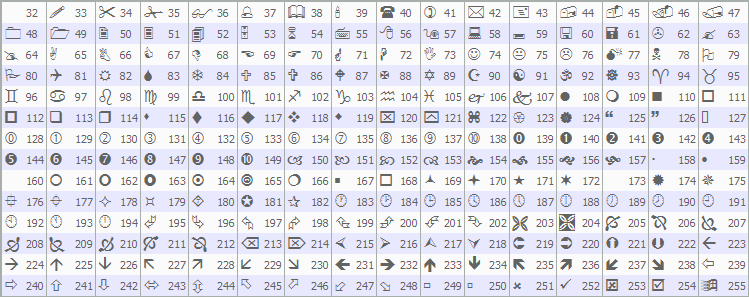
Cuando se hace clic para desplazarse hacia arriba («SCROLL_UP_REC», «SCROLL_UP_LABEL») o hacia abajo («SCROLL_DOWN_REC», «SCROLL_DOWN_LABEL»), llamamos a «ScrollUp» o «ScrollDown». Para los eventos de movimiento del ratón (CHARTEVENT_MOUSE_MOVE), calculamos el área del cuerpo, actualizamos «mouse_in_body» y llamamos a «UpdateHoverEffects» con «mouseX» y «mouseY»; detectamos el inicio del arrastre del control deslizante («MouseState» 1) comprobando si el ratón se encuentra sobre «SCROLL_SLIDER», establecemos «movingStateSlider» y almacenamos las posiciones del ratón; durante el arrastre, ajustamos la coordenada y del control deslizante con ObjectSetInteger, actualizamos «scroll_pos» en función de la relación de desplazamiento y actualizamos la visualización con «UpdateBodyDisplay». Al soltar el ratón («MouseState» 0), ajustamos «scroll_pos» a la línea más cercana, restablecemos el estado del control deslizante y volvemos a habilitar el desplazamiento del gráfico mediante la función ChartSetInteger. En el caso de los eventos de la rueda del ratón (CHARTEVENT_MOUSE_WHEEL), ajustamos «scroll_pos» en función del sentido de giro y del número de pasos de la rueda, lo mantenemos dentro de los límites definidos por «g_max_scroll» y actualizamos la visualización y la barra de desplazamiento. Al compilar, obtenemos el siguiente resultado.
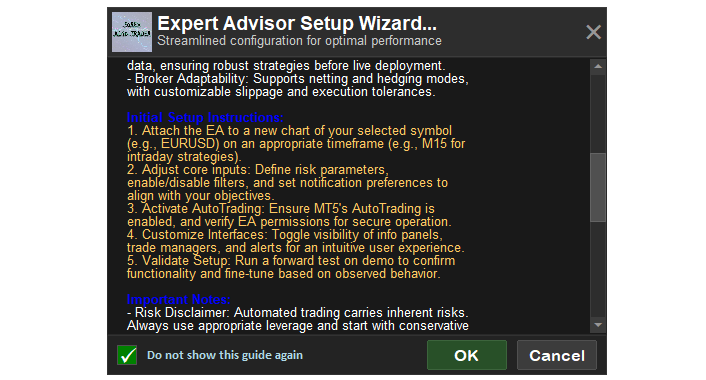
En la imagen podemos ver que el panel de control ya es totalmente funcional e interactivo. Al hacer clic en el botón «Aceptar», debería establecerse una variable global. Para acceder a la variable global, debe hacer clic en «Herramientas» y, a continuación, en «Variables globales», o simplemente pulsar la tecla F3 del teclado. Aquí tiene una visualización completa.
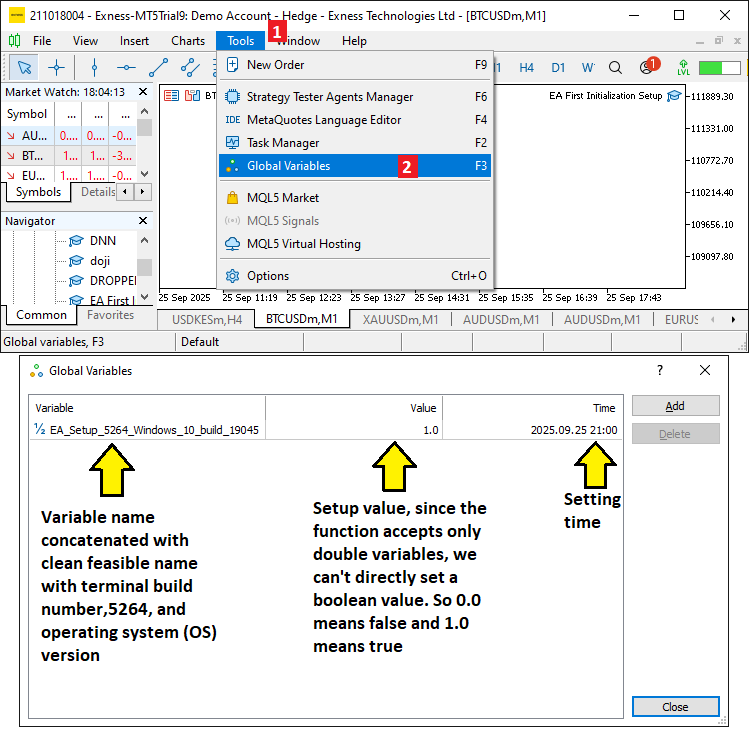
Por las imágenes, podemos ver que hemos configurado correctamente el asistente y que se han cumplido todos los objetivos. Ahora solo queda comprobar el funcionamiento del proyecto, lo que se aborda en la sección anterior.
Prueba del asistente de configuración
Ya hemos realizado las pruebas y, a continuación, presentamos la visualización recopilada en una única imagen de mapa de bits en formato Graphics Interchange Format (GIF).
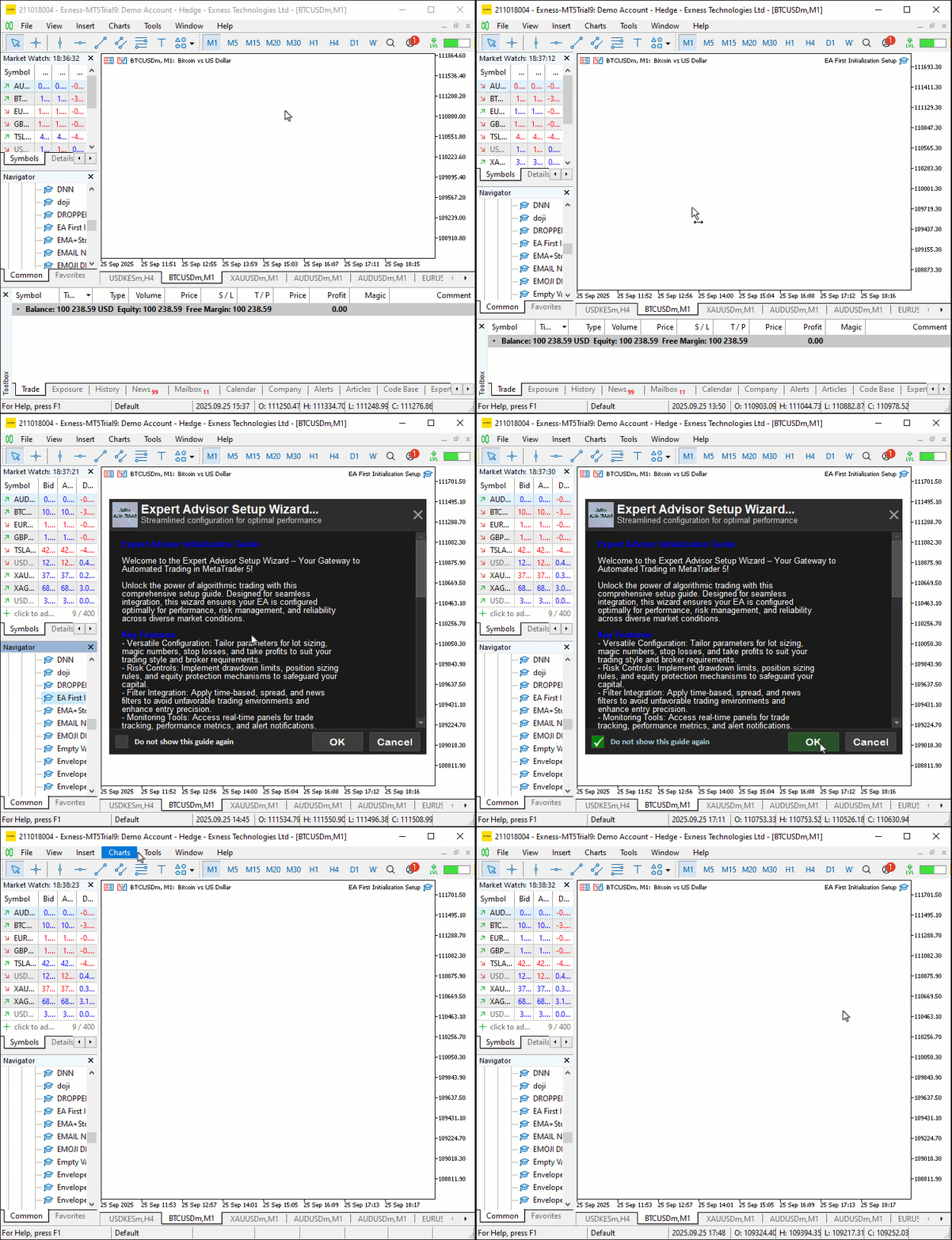
Conclusión
En conclusión, hemos desarrollado un asistente de configuración inicial del usuario para asesores expertos (EAs) en MQL5 y hemos creado un panel interactivo con una guía desplazable, formato de texto dinámico y controles de usuario, como botones y una casilla de verificación, para agilizar la configuración del programa en MetaTrader 5. La herramienta facilita la incorporación de los traders al proporcionar instrucciones claras y un mecanismo para evitar que el asistente vuelva a mostrarse, lo que garantiza una configuración eficiente y la adaptabilidad a distintos ajustes de pantalla. Esta herramienta le permite simplificar la inicialización del programa mediante orientaciones personalizadas para el usuario que se muestran una sola vez y puede adaptarse aún más a su conjunto de herramientas de trading. ¡Le deseo un buen trading!
Traducción del inglés realizada por MetaQuotes Ltd.
Artículo original: https://www.mql5.com/en/articles/19714
Advertencia: todos los derechos de estos materiales pertenecen a MetaQuotes Ltd. Queda totalmente prohibido el copiado total o parcial.
Este artículo ha sido escrito por un usuario del sitio web y refleja su punto de vista personal. MetaQuotes Ltd. no se responsabiliza de la exactitud de la información ofrecida, ni de las posibles consecuencias del uso de las soluciones, estrategias o recomendaciones descritas.

 Utilizando redes neuronales en MetaTrader
 Integración de una plataforma de intercambio de criptomonedas con MQL5 (Parte 1): Conexión a MEXC Futures
 Particularidades del trabajo con números del tipo double en MQL4
 Automatización de estrategias de trading en MQL5 (Parte 33): Creación de un sistema basado en el patrón armónico Shark y la acción del precio

- Aplicaciones de trading gratuitas
- 8 000+ señales para copiar
- Noticias económicas para analizar los mercados financieros
Usted acepta la política del sitio web y las condiciones de uso