

Ferramentas de trading em MQL5 (Parte 6): Painel holográfico dinâmico com animação pulsante e controles
 16
16
 2
2

Introdução
No artigo anterior (Parte 5), criamos uma faixa de cotações em movimento utilizando MetaQuotes Language 5 (MQL5), permitindo monitorar ativos em tempo real com a rolagem contínua de preços, spreads e variações, mantendo os traders informados de maneira prática. Nesta Parte 6, vamos desenvolver um painel holográfico dinâmico que apresenta indicadores de diferentes ativos e períodos gráficos, como o Índice de Força Relativa (RSI) e a volatilidade, medida com base na Amplitude Verdadeira Média (ATR). O painel também contará com animações pulsantes, recursos de ordenação e controles interativos, oferecendo uma ferramenta de análise visualmente atraente. Ao longo do artigo, abordaremos os seguintes tópicos:
Ao final, você terá um painel holográfico personalizável, pronto para integrar ao seu ambiente de negociação. Vamos começar!
Arquitetura do painel holográfico
O painel holográfico que vamos criar é uma ferramenta visual para acompanhar diferentes ativos e períodos gráficos, exibindo indicadores como RSI e volatilidade. Ele também oferece recursos de ordenação e alertas que nos ajudam a identificar oportunidades de negociação rapidamente. Essa arquitetura é importante porque combina dados em tempo real com controles interativos e animações, tornando a análise mais envolvente e eficiente em um ambiente gráfico com muitas informações.
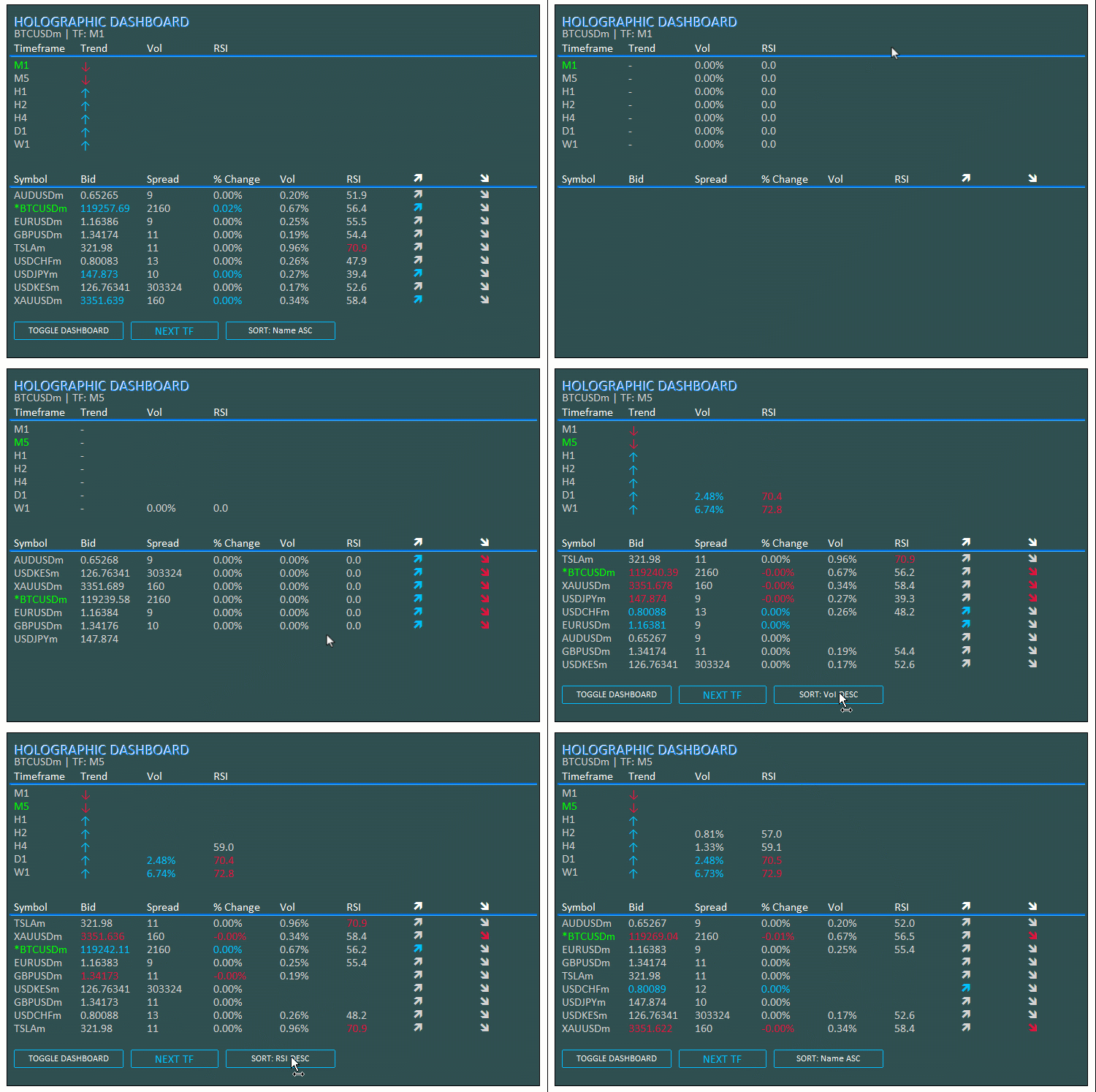
Para isso, utilizaremos arrays para gerenciar os dados, handles para indicadores como o ATR e o RSI, funções para implementar a ordenação e os efeitos pulsantes, além de botões para alternar entre os modos de exibição. Pretendemos centralizar as atualizações em um loop que atualizará dinamicamente a interface do usuário (UI), garantindo que o painel seja adaptável e responsivo para apoiar as decisões de negociação. Antes de começarmos a implementação, observe a representação visual abaixo para compreender o que pretendemos desenvolver.
Implementação em MQL5
Para criar o programa em MQL5, primeiro precisamos definir seus metadados e, em seguida, os parâmetros de entrada que permitirão ajustar seu funcionamento sem modificar diretamente o código.
//+------------------------------------------------------------------+
//|                                  Holographic Dashboard EA.mq5    |
//|                           Copyright 2025, Allan Munene Mutiiria. |
//|                                   https://t.me/Forex_Algo_Trader |
//+------------------------------------------------------------------+
#property copyright "Copyright 2025, Allan Munene Mutiiria."
#property link      "https://t.me/Forex_Algo_Trader"
#property version   "1.00"

#include <Arrays\ArrayString.mqh> //--- Include ArrayString library for string array operations
#include <Files\FileTxt.mqh>      //--- Include FileTxt library for text file operations

// Input Parameters
input int BaseFontSize = 9;           // Base Font Size
input string FontType = "Calibri";    // Font Type (Professional)
input int X_Offset = 30;              // X Offset
input int Y_Offset = 30;              // Y Offset
input color PanelColor = clrDarkSlateGray; // Panel Background Color
input color TitleColor = clrWhite;    // Title/Symbol Color
input color DataColor = clrLightGray; // Bid/Neutral Color
input color ActiveColor = clrLime;    // Active Timeframe/Symbol Color
input color UpColor = clrDeepSkyBlue; // Uptrend Color
input color DownColor = clrCrimson;   // Downtrend Color
input color LineColor = clrSilver;    // Grid Line Color
input bool EnableAnimations = true;   // Enable Pulse Animations
input int PanelWidth = 730;           // Panel Width (px)
input int ATR_Period = 14;            // ATR Period for Volatility
input int RSI_Period = 14;            // RSI Period
input double Vol_Alert_Threshold = 2.0; // Volatility Alert Threshold (%)
input color GlowColor = clrDodgerBlue; // Glow Color for holographic effect
input int AnimationSpeed = 30; // Animation delay in ms for pulse
input int PulseCycles = 3; // Number of pulse cycles for animations
Começamos incluindo as bibliotecas necessárias para manipular arrays de strings e registrar logs em arquivos de texto, além de definir os parâmetros de entrada para configurar a interface e os indicadores. Incluímos "<Arrays\ArrayString.mqh>" para gerenciar as listas de ativos e "<Files\FileTxt.mqh>" para registrar erros em arquivo. Os parâmetros de entrada permitirão definir o tamanho base da fonte como 9, escolher uma fonte profissional, como Calibri, estabelecer deslocamentos horizontal e vertical de 30 pixels para posicionar o painel e configurar sua paleta de cores: cinza-escuro para o fundo, branco para os cabeçalhos, cinza-claro para os dados, verde-vivo para os elementos ativos, azul-celeste intenso para as tendências de alta, vermelho-framboesa para as tendências de baixa e prateado para as linhas da grade.
Ativamos a animação pulsante por padrão, definimos a largura do painel em 730 pixels e configuramos os períodos do ATR e do RSI em 14 para calcular a volatilidade e o momentum. Também estabelecemos um limiar de 2,0% para acionar os alertas de volatilidade, escolhemos a cor Dodger Blue para o brilho holográfico e configuramos a velocidade da animação em 30 ms, com 3 ciclos de pulsação. Esses parâmetros permitem adaptar facilmente o painel às suas preferências. Em seguida, precisamos definir algumas variáveis globais que serão utilizadas ao longo do programa.
// Global Variables
double prices_PrevArray[];            //--- Array for previous prices
double volatility_Array[];            //--- Array for volatility values
double bid_array[];                   //--- Array for bid prices
long spread_array[];                  //--- Array for spreads
double change_array[];                //--- Array for percentage changes
double vol_array[];                   //--- Array for volumes
double rsi_array[];                   //--- Array for RSI values
int indices[];                        //--- Array for sorted indices
ENUM_TIMEFRAMES periods[] = {PERIOD_M1, PERIOD_M5, PERIOD_H1, PERIOD_H2, PERIOD_H4, PERIOD_D1, PERIOD_W1}; //--- Array of timeframes
string logFileName = "Holographic_Dashboard_Log.txt"; //--- Log file name
int sortMode = 0;                     //--- Current sort mode
string sortNames[] = {"Name ASC", "Vol DESC", "Change ABS DESC", "RSI DESC"}; //--- Sort mode names
int atr_handles_sym[];                //--- ATR handles for symbols
int rsi_handles_sym[];                //--- RSI handles for symbols
int atr_handles_tf[];                 //--- ATR handles for timeframes
int rsi_handles_tf[];                 //--- RSI handles for timeframes
int totalSymbols;                     //--- Total number of symbols
bool dashboardVisible = true;         //--- Dashboard visibility flag
Definimos variáveis globais para gerenciar os dados e indicadores do programa, permitindo o monitoramento, a ordenação e as animações em tempo real. Criamos os arrays "prices_PrevArray", para armazenar os preços anteriores usados no cálculo das variações; "volatility_Array", para os valores de volatilidade; "bid_array", para os preços Bid atuais; "spread_array", para armazenar os spreads como valores do tipo long; "change_array", para as variações percentuais; "vol_array", para armazenar os valores de volatilidade; "rsi_array", para os valores do RSI; e "indices", para os índices utilizados na ordenação. Definimos "periods" como um array de períodos gráficos de PERIOD_M1 a PERIOD_W1, "logFileName" como "Holographic_Dashboard_Log.txt" para registrar erros, "sortMode" com valor inicial 0 para controlar a ordenação e "sortNames" como um array de strings com opções de ordenação, como "Name ASC" e "Vol DESC". Também criamos os arrays de handles dos indicadores ATR e RSI: "atr_handles_sym" e "rsi_handles_sym" para os ativos, e "atr_handles_tf" e "rsi_handles_tf" para os períodos gráficos.
A variável inteira "totalSymbols" armazena a quantidade de ativos, enquanto "dashboardVisible" é inicializada com true para controlar a visibilidade do painel. Para gerenciar os objetos com mais eficiência, vamos criar uma classe.
// Object Manager Class
class CObjectManager : public CArrayString {
public:
   void AddObject(string name) {      //--- Add object name to manager
      if (!Add(name)) {               //--- Check if add failed
         LogError(__FUNCTION__ + ": Failed to add object name: " + name); //--- Log error
      }
   }

   void DeleteAllObjects() {          //--- Delete all managed objects
      for (int i = Total() - 1; i >= 0; i--) { //--- Iterate through objects
         string name = At(i);         //--- Get object name
         if (ObjectFind(0, name) >= 0) { //--- Check if object exists
            if (!ObjectDelete(0, name)) { //--- Delete object
               LogError(__FUNCTION__ + ": Failed to delete object: " + name + ", Error: " + IntegerToString(GetLastError())); //--- Log deletion failure
            }
         }
         Delete(i);                   //--- Remove from array
      }
      ChartRedraw(0);                 //--- Redraw chart
   }
};
Para gerenciar os objetos do painel, criamos a classe "CObjectManager", derivada de CArrayString. No método "AddObject", adicionamos o nome do objeto, "name", ao array por meio de "Add" e, caso a operação falhe, registramos o erro com "LogError". O método "DeleteAllObjects" percorre o array em ordem inversa, utilizando "Total" para determinar a quantidade de elementos e "At" para obter cada "name". Em seguida, verifica se o objeto existe com "ObjectFind", remove-o com "ObjectDelete" e registra eventuais erros no log. Também remove a entrada correspondente do array com "Delete" e redesenha o gráfico com "ChartRedraw". Essa extensão nos permite criar métodos auxiliares reutilizáveis, que serão chamados em diferentes pontos do programa.
CObjectManager objManager;            //--- Object manager instance

//+------------------------------------------------------------------+
//| Utility Functions                                                |
//+------------------------------------------------------------------+
void LogError(string message) {
   CFileTxt file;                     //--- Create file object
   if (file.Open(logFileName, FILE_WRITE | FILE_TXT | FILE_COMMON, true) >= 0) { //--- Open log file
      file.WriteString(message + "\n"); //--- Write message
      file.Close();                   //--- Close file
   }
   Print(message);                    //--- Print message
}

string Ask(string symbol) {
   double value;                      //--- Variable for ask price
   if (SymbolInfoDouble(symbol, SYMBOL_ASK, value)) { //--- Get ask price
      return DoubleToString(value, (int)SymbolInfoInteger(symbol, SYMBOL_DIGITS)); //--- Return formatted ask
   }
   LogError(__FUNCTION__ + ": Failed to get ask price for " + symbol + ", Error: " + IntegerToString(GetLastError())); //--- Log error
   return "N/A";                      //--- Return N/A on failure
}

string Bid(string symbol) {
   double value;                      //--- Variable for bid price
   if (SymbolInfoDouble(symbol, SYMBOL_BID, value)) { //--- Get bid price
      return DoubleToString(value, (int)SymbolInfoInteger(symbol, SYMBOL_DIGITS)); //--- Return formatted bid
   }
   LogError(__FUNCTION__ + ": Failed to get bid price for " + symbol + ", Error: " + IntegerToString(GetLastError())); //--- Log error
   return "N/A";                      //--- Return N/A on failure
}

string Spread(string symbol) {
   long value;                        //--- Variable for spread
   if (SymbolInfoInteger(symbol, SYMBOL_SPREAD, value)) { //--- Get spread
      return IntegerToString(value);  //--- Return spread as string
   }
   LogError(__FUNCTION__ + ": Failed to get spread for " + symbol + ", Error: " + IntegerToString(GetLastError())); //--- Log error
   return "N/A";                      //--- Return N/A on failure
}

string PercentChange(double current, double previous) {
   if (previous == 0) return "0.00%"; //--- Handle zero previous value
   return StringFormat("%.2f%%", ((current - previous) / previous) * 100); //--- Calculate and format percentage
}

string TruncPeriod(ENUM_TIMEFRAMES period) {
   return StringSubstr(EnumToString(period), 7); //--- Truncate timeframe string
}
Para gerenciar os objetos e os dados, criamos "objManager" como uma instância da classe "CObjectManager", responsável por acompanhar os elementos da interface do usuário. Implementamos a função "LogError" para registrar erros. Ela abre o arquivo "LogFileName" por meio de "CFileTxt", utilizando as flags FILE_WRITE, FILE_TXT e FILE_COMMON, grava a mensagem "message" com "WriteString", fecha o arquivo e exibe a mensagem. A função "Ask" obtém o preço Ask do ativo "symbol" por meio de "SymbolInfoDouble" e o formata com "DoubleToString", utilizando "SymbolInfoInteger" para determinar o número de casas decimais. Se ocorrer algum erro, registra-o com "LogError" e retorna "N/A". Da mesma forma, a função "Bid" obtém e formata o preço Bid, além de tratar possíveis erros.
A função "Spread" obtém o spread por meio de "SymbolInfoInteger" e o retorna como uma string utilizando "IntegerToString", ou "N/A" em caso de falha. A função "PercentChange" calcula a variação percentual entre os preços "atual" e "anterior", utilizando "StringFormat" para formatar o resultado. Se o preço "anterior" for igual a zero, retorna "0,00%". Já a função "TruncPeriod" utiliza "StringSubstr" para abreviar as representações textuais dos valores de ENUM_TIMEFRAMES, permitindo exibir os períodos gráficos de forma compacta e legível. Com essas funções prontas, podemos implementar o efeito de pulsação holográfica.
//+------------------------------------------------------------------+
//| Holographic Animation Function                                   |
//+------------------------------------------------------------------+
void HolographicPulse(string objName, color mainClr, color glowClr) {
   if (!EnableAnimations) return;     //--- Exit if animations disabled
   int cycles = PulseCycles;          //--- Set pulse cycles
   int delay = AnimationSpeed;        //--- Set animation delay
   for (int i = 0; i < cycles; i++) { //--- Iterate through cycles
      ObjectSetInteger(0, objName, OBJPROP_COLOR, glowClr); //--- Set glow color
      ChartRedraw(0);                 //--- Redraw chart
      Sleep(delay);                   //--- Delay
      ObjectSetInteger(0, objName, OBJPROP_COLOR, mainClr); //--- Set main color
      ChartRedraw(0);                 //--- Redraw chart
      Sleep(delay / 2);               //--- Shorter delay
   }
}
Implementamos a função "HolographicPulse" para criar a animação pulsante dos elementos do painel. Se "EnableAnimations" for false, a função retorna imediatamente, sem executar a animação. Definimos "cycles" com o valor de "PulseCycles" e "delay" com o valor de "AnimationSpeed". Em seguida, usamos um laço for para executar a quantidade de ciclos definida em "cycles". A cada iteração, alteramos a propriedade OBJPROP_COLOR do objeto para "glowClr" por meio de "ObjectSetInteger", redesenhamos o gráfico com "ChartRedraw" e fazemos uma pausa de "delay" usando "Sleep". Depois, restauramos a cor "mainClr", redesenhamos novamente o gráfico e fazemos outra pausa, desta vez de "delay / 2", para encurtar essa etapa da animação. Assim, criamos um efeito de pulsação holográfica que destaca visualmente os elementos ativos ou associados a alertas. Com essas funções implementadas, podemos avançar para a inicialização do painel principal. Para manter o código modular, precisaremos de algumas funções auxiliares.
//+------------------------------------------------------------------+
//| Create Text Label Function                                       |
//+------------------------------------------------------------------+
bool createText(string objName, string text, int x, int y, color clrTxt, int fontsize, string font, bool animate = false, double opacity = 1.0) {
   ResetLastError();                  //--- Reset error code
   if (ObjectFind(0, objName) < 0) {  //--- Check if object exists
      if (!ObjectCreate(0, objName, OBJ_LABEL, 0, 0, 0)) { //--- Create label
         LogError(__FUNCTION__ + ": Failed to create label: " + objName + ", Error: " + IntegerToString(GetLastError())); //--- Log error
         return false;                //--- Return failure
      }
      objManager.AddObject(objName);  //--- Add to manager
   }
   ObjectSetInteger(0, objName, OBJPROP_XDISTANCE, x); //--- Set x-coordinate
   ObjectSetInteger(0, objName, OBJPROP_YDISTANCE, y); //--- Set y-coordinate
   ObjectSetInteger(0, objName, OBJPROP_CORNER, CORNER_LEFT_UPPER); //--- Set corner
   ObjectSetString(0, objName, OBJPROP_TEXT, text); //--- Set text
   ObjectSetInteger(0, objName, OBJPROP_COLOR, clrTxt); //--- Set color
   ObjectSetInteger(0, objName, OBJPROP_FONTSIZE, fontsize); //--- Set font size
   ObjectSetString(0, objName, OBJPROP_FONT, font); //--- Set font
   ObjectSetInteger(0, objName, OBJPROP_BACK, false); //--- Set foreground
   ObjectSetInteger(0, objName, OBJPROP_SELECTABLE, false); //--- Disable selection
   ObjectSetInteger(0, objName, OBJPROP_ZORDER, StringFind(objName, "Glow") >= 0 ? -1 : 0); //--- Set z-order

   if (animate && EnableAnimations) { //--- Check for animation
      ObjectSetInteger(0, objName, OBJPROP_COLOR, DataColor); //--- Set temporary color
      ChartRedraw(0);                 //--- Redraw chart
      Sleep(50);                      //--- Delay
      ObjectSetInteger(0, objName, OBJPROP_COLOR, clrTxt); //--- Set final color
   }

   ChartRedraw(0);                    //--- Redraw chart
   return true;                       //--- Return success
}

//+------------------------------------------------------------------+
//| Create Button Function                                           |
//+------------------------------------------------------------------+
bool createButton(string objName, string text, int x, int y, int width, int height, color textColor, color bgColor, color borderColor, bool animate = false) {
   ResetLastError();                  //--- Reset error code
   if (ObjectFind(0, objName) < 0) {  //--- Check if object exists
      if (!ObjectCreate(0, objName, OBJ_BUTTON, 0, 0, 0)) { //--- Create button
         LogError(__FUNCTION__ + ": Failed to create button: " + objName + ", Error: " + IntegerToString(GetLastError())); //--- Log error
         return false;                //--- Return failure
      }
      objManager.AddObject(objName);  //--- Add to manager
   }
   ObjectSetInteger(0, objName, OBJPROP_XDISTANCE, x); //--- Set x-coordinate
   ObjectSetInteger(0, objName, OBJPROP_YDISTANCE, y); //--- Set y-coordinate
   ObjectSetInteger(0, objName, OBJPROP_XSIZE, width); //--- Set width
   ObjectSetInteger(0, objName, OBJPROP_YSIZE, height); //--- Set height
   ObjectSetString(0, objName, OBJPROP_TEXT, text); //--- Set text
   ObjectSetInteger(0, objName, OBJPROP_COLOR, textColor); //--- Set text color
   ObjectSetInteger(0, objName, OBJPROP_BGCOLOR, bgColor); //--- Set background color
   ObjectSetInteger(0, objName, OBJPROP_BORDER_COLOR, borderColor); //--- Set border color
   ObjectSetInteger(0, objName, OBJPROP_FONTSIZE, BaseFontSize + (StringFind(objName, "SwitchTFBtn") >= 0 ? 3 : 0)); //--- Set font size
   ObjectSetString(0, objName, OBJPROP_FONT, FontType); //--- Set font
   ObjectSetInteger(0, objName, OBJPROP_ZORDER, 1); //--- Set z-order
   ObjectSetInteger(0, objName, OBJPROP_STATE, false); //--- Reset state

   if (animate && EnableAnimations) { //--- Check for animation
      ObjectSetInteger(0, objName, OBJPROP_BGCOLOR, clrLightGray); //--- Set temporary background
      ChartRedraw(0);                 //--- Redraw chart
      Sleep(50);                      //--- Delay
      ObjectSetInteger(0, objName, OBJPROP_BGCOLOR, bgColor); //--- Set final background
   }

   ChartRedraw(0);                    //--- Redraw chart
   return true;                       //--- Return success
}

//+------------------------------------------------------------------+
//| Create Panel Function                                            |
//+------------------------------------------------------------------+
bool createPanel(string objName, int x, int y, int width, int height, color clr, double opacity = 1.0) {
   ResetLastError();                  //--- Reset error code
   if (ObjectFind(0, objName) < 0) {  //--- Check if object exists
      if (!ObjectCreate(0, objName, OBJ_RECTANGLE_LABEL, 0, 0, 0)) { //--- Create panel
         LogError(__FUNCTION__ + ": Failed to create panel: " + objName + ", Error: " + IntegerToString(GetLastError())); //--- Log error
         return false;                //--- Return failure
      }
      objManager.AddObject(objName);  //--- Add to manager
   }
   ObjectSetInteger(0, objName, OBJPROP_XDISTANCE, x); //--- Set x-coordinate
   ObjectSetInteger(0, objName, OBJPROP_YDISTANCE, y); //--- Set y-coordinate
   ObjectSetInteger(0, objName, OBJPROP_XSIZE, width); //--- Set width
   ObjectSetInteger(0, objName, OBJPROP_YSIZE, height); //--- Set height
   ObjectSetInteger(0, objName, OBJPROP_BGCOLOR, clr); //--- Set background color
   ObjectSetInteger(0, objName, OBJPROP_BORDER_TYPE, BORDER_FLAT); //--- Set border type
   ObjectSetInteger(0, objName, OBJPROP_ZORDER, -1); //--- Set z-order
   ChartRedraw(0);                    //--- Redraw chart
   return true;                       //--- Return success
}

//+------------------------------------------------------------------+
//| Create Line Function                                             |
//+------------------------------------------------------------------+
bool createLine(string objName, int x1, int y1, int x2, int y2, color clrLine, double opacity = 1.0) {
   ResetLastError();                  //--- Reset error code
   if (ObjectFind(0, objName) < 0) {  //--- Check if object exists
      if (!ObjectCreate(0, objName, OBJ_RECTANGLE_LABEL, 0, 0, 0)) { //--- Create line as rectangle
         LogError(__FUNCTION__ + ": Failed to create line: " + objName + ", Error: " + IntegerToString(GetLastError())); //--- Log error
         return false;                //--- Return failure
      }
      objManager.AddObject(objName);  //--- Add to manager
   }
   ObjectSetInteger(0, objName, OBJPROP_XDISTANCE, x1); //--- Set x1
   ObjectSetInteger(0, objName, OBJPROP_YDISTANCE, y1); //--- Set y1
   ObjectSetInteger(0, objName, OBJPROP_XSIZE, x2 - x1); //--- Set width
   ObjectSetInteger(0, objName, OBJPROP_YSIZE, StringFind(objName, "Glow") >= 0 ? 3 : 1); //--- Set height
   ObjectSetInteger(0, objName, OBJPROP_BGCOLOR, clrLine); //--- Set color
   ObjectSetInteger(0, objName, OBJPROP_ZORDER, StringFind(objName, "Glow") >= 0 ? -1 : 0); //--- Set z-order
   ChartRedraw(0);                    //--- Redraw chart
   return true;                       //--- Return success
}
Definimos a função "createText" para criar um rótulo de texto. Primeiro, chamamos "ResetLastError" para redefinir o código do último erro. Se o objeto ainda não existir, condição verificada por "ObjectFind(0, objName) < 0", criamos um objeto do tipo OBJ_LABEL usando "ObjectCreate". Se a criação falhar, registramos uma mensagem de erro e retornamos false. Em seguida, registramos o objeto em "objManager" por meio de "AddObject". Configuramos suas propriedades, incluindo OBJPROP_XDISTANCE com o valor de "x", OBJPROP_YDISTANCE com o valor de "y", além das demais propriedades necessárias. Se "animate" e "EnableAnimations" forem true, definimos temporariamente OBJPROP_COLOR como "DataColor", redesenhamos o gráfico, introduzimos uma pausa com "Sleep(50)" e, em seguida, aplicamos a cor definida para o texto. Por fim, redesenhamos novamente o gráfico e retornamos true.
Em seguida, definimos a função "createButton" seguindo a mesma lógica: redefinimos o código do último erro, verificamos se o objeto já existe e, se necessário, criamos um objeto do tipo OBJ_BUTTON. Caso a criação falhe, registramos uma mensagem de erro; caso contrário, adicionamos o objeto ao gerenciador. Depois, configuramos suas propriedades e, se a animação estiver ativada, definimos temporariamente OBJPROP_BGCOLOR como "clrLightGray", redesenhamos o gráfico, fazemos uma pausa de 50 ms com "Sleep" e restauramos a cor "bgColor". Por fim, redesenhamos o gráfico e retornamos true. Para a função "createPanel", adotamos uma abordagem semelhante.
A função "createLine" segue a mesma lógica: redefinimos o código do último erro, verificamos se o objeto existe e, caso seja necessário, criamos um objeto do tipo OBJ_RECTANGLE_LABEL para simular uma linha. Se ocorrer algum erro durante a criação, registramos uma mensagem; caso contrário, adicionamos o objeto ao gerenciador. Configuramos OBJPROP_XDISTANCE com o valor de "x1", OBJPROP_YDISTANCE com "y1" e OBJPROP_XSIZE com "x2-x1". Para OBJPROP_YSIZE, definimos o valor 3 quando o nome do objeto contiver "Glow" e 1 caso contrário. Também configuramos OBJPROP_BGCOLOR como "clrLine" e OBJPROP_ZORDER como -1 quando o nome do objeto não contiver "Glow". Por fim, redesenhamos o gráfico e retornamos true. Com essas funções auxiliares, podemos implementar a rotina principal responsável pela criação do painel.
//+------------------------------------------------------------------+
//| Dashboard Creation Function with Holographic Effects             |
//+------------------------------------------------------------------+
void InitDashboard() {
   // Get chart dimensions
   long chartWidth, chartHeight;      //--- Variables for chart dimensions
   if (!ChartGetInteger(0, CHART_WIDTH_IN_PIXELS, 0, chartWidth) || !ChartGetInteger(0, CHART_HEIGHT_IN_PIXELS, 0, chartHeight)) { //--- Get chart size
      LogError(__FUNCTION__ + ": Failed to get chart dimensions, Error: " + IntegerToString(GetLastError())); //--- Log error
      return;                         //--- Exit on failure
   }
   int fontSize = (int)(BaseFontSize * (chartWidth / 800.0)); //--- Calculate font size
   int cellWidth = PanelWidth / 8;    //--- Calculate cell width
   int cellHeight = 18;               //--- Set cell height
   int panelHeight = 70 + (ArraySize(periods) + 1) * cellHeight + 40 + (totalSymbols + 1) * cellHeight + 50; //--- Calculate panel height

   // Create Dark Panel
   createPanel("DashboardPanel", X_Offset, Y_Offset, PanelWidth, panelHeight, PanelColor); //--- Create dashboard panel

   // Create Header with Glow
   createText("Header", "HOLOGRAPHIC DASHBOARD", X_Offset + 10, Y_Offset + 10, TitleColor, fontSize + 4, FontType); //--- Create header text
   createText("HeaderGlow", "HOLOGRAPHIC DASHBOARD", X_Offset + 11, Y_Offset + 11, GlowColor, fontSize + 4, FontType, true); //--- Create header glow
   createText("SubHeader", StringFormat("%s | TF: %s", _Symbol, TruncPeriod(_Period)), X_Offset + 10, Y_Offset + 30, DataColor, fontSize, FontType); //--- Create subheader

   // Timeframe Grid
   int y = Y_Offset + 50;             //--- Set y-coordinate for timeframe grid
   createText("TF_Label", "Timeframe", X_Offset + 10, y, TitleColor, fontSize, FontType); //--- Create timeframe label
   createText("Trend_Label", "Trend", X_Offset + 10 + cellWidth, y, TitleColor, fontSize, FontType); //--- Create trend label
   createText("Vol_Label", "Vol", X_Offset + 10 + cellWidth * 2, y, TitleColor, fontSize, FontType); //--- Create vol label
   createText("RSI_Label", "RSI", X_Offset + 10 + cellWidth * 3, y, TitleColor, fontSize, FontType); //--- Create RSI label
   createLine("TF_Separator", X_Offset + 5, y + cellHeight + 2, X_Offset + PanelWidth - 5, y + cellHeight + 2, LineColor, 0.6); //--- Create separator line
   createLine("TF_Separator_Glow", X_Offset + 4, y + cellHeight + 1, X_Offset + PanelWidth - 4, y + cellHeight + 3, GlowColor, 0.3); //--- Create glow separator
   if (EnableAnimations) HolographicPulse("TF_Separator", LineColor, GlowColor); //--- Animate separator if enabled

   y += cellHeight + 5;               //--- Update y-coordinate
   for (int i = 0; i < ArraySize(periods); i++) { //--- Iterate through timeframes
      color periodColor = (periods[i] == _Period) ? ActiveColor : DataColor; //--- Set period color
      createText("Period_" + IntegerToString(i), TruncPeriod(periods[i]), X_Offset + 10, y, periodColor, fontSize, FontType); //--- Create period text
      createText("Trend_" + IntegerToString(i), "-", X_Offset + 10 + cellWidth, y, DataColor, fontSize, FontType); //--- Create trend text
      createText("Vol_" + IntegerToString(i), "0.00%", X_Offset + 10 + cellWidth * 2, y, DataColor, fontSize, FontType); //--- Create vol text
      createText("RSI_" + IntegerToString(i), "0.0", X_Offset + 10 + cellWidth * 3, y, DataColor, fontSize, FontType); //--- Create RSI text
      y += cellHeight;                //--- Update y-coordinate
   }

   // Symbol Grid
   y += 30;                           //--- Update y-coordinate for symbol grid
   createText("Symbol_Label", "Symbol", X_Offset + 10, y, TitleColor, fontSize, FontType); //--- Create symbol label
   createText("Bid_Label", "Bid", X_Offset + 10 + cellWidth, y, TitleColor, fontSize, FontType); //--- Create bid label
   createText("Spread_Label", "Spread", X_Offset + 10 + cellWidth * 2, y, TitleColor, fontSize, FontType); //--- Create spread label
   createText("Change_Label", "% Change", X_Offset + 10 + cellWidth * 3, y, TitleColor, fontSize, FontType); //--- Create change label
   createText("Vol_Label_Symbol", "Vol", X_Offset + 10 + cellWidth * 4, y, TitleColor, fontSize, FontType); //--- Create vol label
   createText("RSI_Label_Symbol", "RSI", X_Offset + 10 + cellWidth * 5, y, TitleColor, fontSize, FontType); //--- Create RSI label
   createText("UpArrow_Label", CharToString(236), X_Offset + 10 + cellWidth * 6, y, TitleColor, fontSize, "Wingdings"); //--- Create up arrow label
   createText("DownArrow_Label", CharToString(238), X_Offset + 10 + cellWidth * 7, y, TitleColor, fontSize, "Wingdings"); //--- Create down arrow label
   createLine("Symbol_Separator", X_Offset + 5, y + cellHeight + 2, X_Offset + PanelWidth - 5, y + cellHeight + 2, LineColor, 0.6); //--- Create separator line
   createLine("Symbol_Separator_Glow", X_Offset + 4, y + cellHeight + 1, X_Offset + PanelWidth - 4, y + cellHeight + 3, GlowColor, 0.3); //--- Create glow separator
   if (EnableAnimations) HolographicPulse("Symbol_Separator", LineColor, GlowColor); //--- Animate separator if enabled

   y += cellHeight + 5;               //--- Update y-coordinate
   for (int i = 0; i < totalSymbols; i++) { //--- Iterate through symbols
      string symbol = SymbolName(i, true); //--- Get symbol name
      string displaySymbol = (symbol == _Symbol) ? "*" + symbol : symbol; //--- Format display symbol
      color symbolColor = (symbol == _Symbol) ? ActiveColor : DataColor; //--- Set symbol color
      createText("Symbol_" + IntegerToString(i), displaySymbol, X_Offset + 10, y, symbolColor, fontSize, FontType); //--- Create symbol text
      createText("Bid_" + IntegerToString(i), Bid(symbol), X_Offset + 10 + cellWidth, y, DataColor, fontSize, FontType); //--- Create bid text
      createText("Spread_" + IntegerToString(i), Spread(symbol), X_Offset + 10 + cellWidth * 2, y, DataColor, fontSize, FontType); //--- Create spread text
      createText("Change_" + IntegerToString(i), "0.00%", X_Offset + 10 + cellWidth * 3, y, DataColor, fontSize, FontType); //--- Create change text
      createText("Vol_" + IntegerToString(i), "0.00%", X_Offset + 10 + cellWidth * 4, y, DataColor, fontSize, FontType); //--- Create vol text
      createText("RSI_" + IntegerToString(i), "0.0", X_Offset + 10 + cellWidth * 5, y, DataColor, fontSize, FontType); //--- Create RSI text
      createText("ArrowUp_" + IntegerToString(i), CharToString(236), X_Offset + 10 + cellWidth * 6, y, UpColor, fontSize, "Wingdings"); //--- Create up arrow
      createText("ArrowDown_" + IntegerToString(i), CharToString(238), X_Offset + 10 + cellWidth * 7, y, DownColor, fontSize, "Wingdings"); //--- Create down arrow
      y += cellHeight;                //--- Update y-coordinate
   }

   // Interactive Buttons with Pulse Animation
   createButton("ToggleBtn", "TOGGLE DASHBOARD", X_Offset + 10, y + 20, 150, 25, TitleColor, PanelColor, UpColor); //--- Create toggle button
   createButton("SwitchTFBtn", "NEXT TF", X_Offset + 170, y + 20, 120, 25, UpColor, PanelColor, UpColor); //--- Create switch TF button
   createButton("SortBtn", "SORT: " + sortNames[sortMode], X_Offset + 300, y + 20, 150, 25, TitleColor, PanelColor, UpColor); //--- Create sort button

   ChartRedraw(0);                    //--- Redraw chart
}
Começamos a inicialização do painel obtendo as dimensões do gráfico, armazenadas nas variáveis "chartWidth" e "chartHeight". Para isso, chamamos "ChartGetInteger" duas vezes: primeiro com CHART_WIDTH_IN_PIXELS, para obter a largura, e depois com CHART_HEIGHT_IN_PIXELS, para obter a altura. Em seguida, calculamos "fontSize" ajustando "BaseFontSize" proporcionalmente à largura do gráfico em relação a 800 pixels e convertendo o resultado em um número inteiro. Definimos "cellWidth" dividindo "PanelWidth" por 8 e estabelecemos um valor fixo de 18 para "cellHeight". A altura total do painel, armazenada em "panelHeight", é calculada pela soma de 70 + ("ArraySize(periods)" + 1) * "cellHeight" + 40 + ("totalSymbols" + 1) * "cellHeight" + 50. Esse cálculo considera a disposição geral dos elementos, incluindo as seções de períodos gráficos e ativos.
Em seguida, criamos o fundo escuro do painel chamando "createPanel" com o nome "DashboardPanel". Posicionamos o objeto nas coordenadas "X_Offset" e "Y_Offset", definimos suas dimensões com "PanelWidth" e "panelHeight" e aplicamos a cor "PanelColor". Para o cabeçalho, criamos o rótulo de texto "Header" com o conteúdo "HOLOGRAPHIC DASHBOARD", utilizando "createText" nas coordenadas "X_Offset" + 10 e "Y_Offset" + 10, com a cor "TitleColor", o tamanho de fonte "fontSize" + 4 e a fonte "FontType". Para produzir o efeito de brilho holográfico, adicionamos outro rótulo, chamado "HeaderGlow", com o mesmo texto, mas deslocado em 1 pixel nos eixos x e y. Utilizamos "GlowColor", mantemos o mesmo tamanho e tipo de fonte e definimos o parâmetro "opacity" como true.
Depois, adicionamos o rótulo do subtítulo "SubHeader", cujo texto é formatado com "StringFormat" a partir do ativo atual, identificado por _Symbol, e do período gráfico abreviado retornado por "TruncPeriod(_Period)". Posicionamos esse rótulo nas coordenadas "X_Offset" + 10 e "Y_Offset" + 30 e configuramos sua aparência com a cor "DataColor", o tamanho de fonte "fontSize" e a fonte "FontType".
Passando à seção da grade de períodos gráficos, definimos "y" como "Y_Offset" + 50. Criamos os rótulos "Timeframe", "Trend", "Vol" e "RSI" com a função "createText", posicionando-os horizontalmente com espaçamentos baseados em "cellWidth". Todos utilizam a cor "TitleColor", o tamanho de fonte "fontSize" e a fonte "FontType". Logo abaixo, desenhamos a linha divisória "TF_Separator" com "createLine", começando em "X_Offset" + 5 e terminando em "X_Offset" + "PanelWidth" - 5, na posição vertical "y" + "cellHeight" + 2, com a cor "LineColor" e transparência de 0,6. Para criar o efeito de brilho, adicionamos "TF_Separator_Glow" como uma segunda linha, ligeiramente deslocada e mais larga, utilizando "GlowColor" e transparência de 0,3. Se "EnableAnimations" for true, aplicamos a animação "HolographicPulse" com as cores "LineColor" e "GlowColor". Seguimos uma lógica semelhante para os demais rótulos.
Por fim, criamos os botões interativos. O botão "ToggleBtn", com o texto "TOGGLE DASHBOARD", é posicionado em "X_Offset" + 10 e "y" + 20, com dimensões de 150 x 25 pixels e as cores "TitleColor", "PanelColor" e "UpColor". O botão "SwitchTFBtn", com o texto "NEXT TF", fica em "X_Offset" + 170, mantendo a mesma coordenada y, com dimensões de 120 x 25 pixels e as cores "UpColor", "PanelColor" e "UpColor". Já o botão "SortBtn" exibe o texto formado pela expressão "SORT: " + sortNames[sortMode], é posicionado em "X_Offset" + 300, na mesma altura, com dimensões de 150 x 25 pixels e as cores "TitleColor", "PanelColor" e "UpColor". Para finalizar, redesenhamos o gráfico com "ChartRedraw(0)". Com essa função pronta, basta chamá-la no manipulador do evento de inicialização para que a estrutura principal do painel seja criada automaticamente.
//+------------------------------------------------------------------+
//| Expert Initialization Function                                   |
//+------------------------------------------------------------------+
int OnInit() {
   // Clear existing objects
   if (ObjectsDeleteAll(0, -1, -1) < 0) { //--- Delete all objects
      LogError(__FUNCTION__ + ": Failed to delete objects, Error: " + IntegerToString(GetLastError())); //--- Log error
   }
   objManager.DeleteAllObjects();     //--- Delete managed objects

   // Initialize arrays
   totalSymbols = SymbolsTotal(true); //--- Get total symbols
   if (totalSymbols == 0) {           //--- Check for symbols
      LogError(__FUNCTION__ + ": No symbols available"); //--- Log error
      return INIT_FAILED;             //--- Return failure
   }
   ArrayResize(prices_PrevArray, totalSymbols); //--- Resize previous prices array
   ArrayResize(volatility_Array, totalSymbols); //--- Resize volatility array
   ArrayResize(bid_array, totalSymbols); //--- Resize bid array
   ArrayResize(spread_array, totalSymbols); //--- Resize spread array
   ArrayResize(change_array, totalSymbols); //--- Resize change array
   ArrayResize(vol_array, totalSymbols); //--- Resize vol array
   ArrayResize(rsi_array, totalSymbols); //--- Resize RSI array
   ArrayResize(indices, totalSymbols);   //--- Resize indices array
   ArrayResize(atr_handles_sym, totalSymbols); //--- Resize ATR symbol handles
   ArrayResize(rsi_handles_sym, totalSymbols); //--- Resize RSI symbol handles
   ArrayResize(atr_handles_tf, ArraySize(periods)); //--- Resize ATR timeframe handles
   ArrayResize(rsi_handles_tf, ArraySize(periods)); //--- Resize RSI timeframe handles
   ArrayInitialize(prices_PrevArray, 0); //--- Initialize previous prices
   ArrayInitialize(volatility_Array, 0); //--- Initialize volatility

   // Create indicator handles for timeframes
   for (int i = 0; i < ArraySize(periods); i++) { //--- Iterate through timeframes
      atr_handles_tf[i] = iATR(_Symbol, periods[i], ATR_Period); //--- Create ATR handle
      if (atr_handles_tf[i] == INVALID_HANDLE) { //--- Check for invalid handle
         LogError(__FUNCTION__ + ": Failed to create ATR handle for TF " + EnumToString(periods[i])); //--- Log error
         return INIT_FAILED;          //--- Return failure
      }
      rsi_handles_tf[i] = iRSI(_Symbol, periods[i], RSI_Period, PRICE_CLOSE); //--- Create RSI handle
      if (rsi_handles_tf[i] == INVALID_HANDLE) { //--- Check for invalid handle
         LogError(__FUNCTION__ + ": Failed to create RSI handle for TF " + EnumToString(periods[i])); //--- Log error
         return INIT_FAILED;          //--- Return failure
      }
   }

   // Create indicator handles for symbols on H1
   for (int i = 0; i < totalSymbols; i++) { //--- Iterate through symbols
      string symbol = SymbolName(i, true); //--- Get symbol name
      atr_handles_sym[i] = iATR(symbol, PERIOD_H1, ATR_Period); //--- Create ATR handle
      if (atr_handles_sym[i] == INVALID_HANDLE) { //--- Check for invalid handle
         LogError(__FUNCTION__ + ": Failed to create ATR handle for symbol " + symbol); //--- Log error
         return INIT_FAILED;          //--- Return failure
      }
      rsi_handles_sym[i] = iRSI(symbol, PERIOD_H1, RSI_Period, PRICE_CLOSE); //--- Create RSI handle
      if (rsi_handles_sym[i] == INVALID_HANDLE) { //--- Check for invalid handle
         LogError(__FUNCTION__ + ": Failed to create RSI handle for symbol " + symbol); //--- Log error
         return INIT_FAILED;          //--- Return failure
      }
   }

   InitDashboard();                   //--- Initialize dashboard
   dashboardVisible = true;           //--- Set dashboard visible

   return INIT_SUCCEEDED;             //--- Return success
}
Na função "OnInit", começamos removendo os objetos existentes com "ObjectsDeleteAll", abrangendo as janelas do gráfico e os tipos de objeto, e registramos eventuais erros com "LogError". Também chamamos "objManager.DeleteAllObjects" para remover os elementos gerenciados pela classe. Em seguida, obtemos "totalSymbols" por meio de "SymbolsTotal", passando true para considerar os ativos selecionados na Observação do Mercado. Se o resultado for zero, registramos uma mensagem de erro com "LogError" e retornamos INIT_FAILED. Depois, utilizamos "ArrayResize" para dimensionar os arrays "prices_PrevArray", "volatility_Array", "bid_array", "spread_array", "change_array", "vol_array", "rsi_array", "indices", "atr_handles_sym", "rsi_handles_sym", "atr_handles_tf" e "rsi_handles_tf", conforme "totalSymbols" ou "ArraySize(periods)". Também inicializamos "prices_PrevArray" e "volatility_Array" com zeros, utilizando "ArrayInitialize".
Para os períodos gráficos, percorremos o array "periods" e criamos o handle "atr_handles_tf[i]" com "iATR", utilizando "_Symbol", "periods[i]" e "ATR_Period". Da mesma forma, criamos "rsi_handles_tf[i]" com "iRSI", passando "_Symbol", "periods[i]", "RSI_Period" e PRICE_CLOSE. Se algum handle for igual a INVALID_HANDLE, registramos o erro e retornamos INIT_FAILED. Aplicamos a mesma lógica aos ativos: percorremos "totalSymbols", obtemos cada "symbol" com "SymbolName", passando true, e criamos "atr_handles_sym[i]" por meio de "iATR", utilizando "symbol", PERIOD_H1 e "ATR_Period". Também criamos "rsi_handles_sym[i]" com "iRSI", passando "symbol", PERIOD_H1, "RSI_Period" e PRICE_CLOSE. Caso algum handle seja inválido, registramos o erro e retornamos INIT_FAILED. Por fim, chamamos "InitDashboard" para criar a interface do usuário, definimos "dashboardVisible" como true e retornamos o código de sucesso da inicialização. Ao executar o programa, obtemos o seguinte resultado.
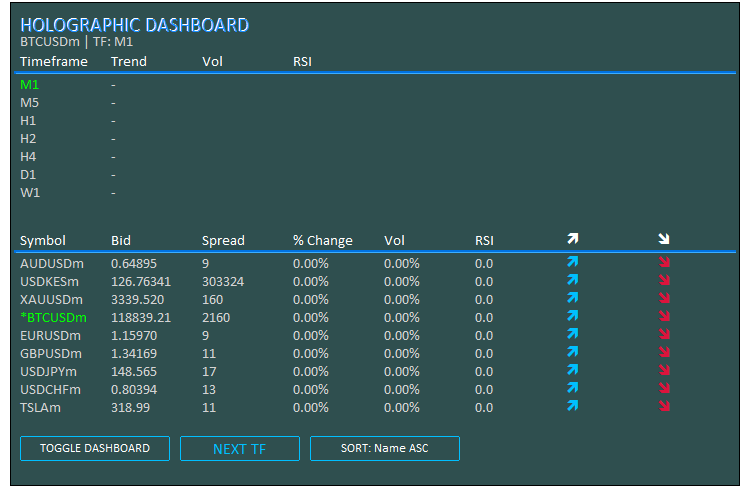
A imagem mostra que conseguimos inicializar o programa com sucesso. Agora, precisamos implementar a desinicialização, responsável por remover os objetos criados e liberar os handles dos indicadores.
//+------------------------------------------------------------------+
//| Expert Deinitialization Function                                 |
//+------------------------------------------------------------------+
void OnDeinit(const int reason) {
   if (ObjectsDeleteAll(0, -1, -1) < 0) { //--- Delete all objects
      LogError(__FUNCTION__ + ": Failed to delete objects, Error: " + IntegerToString(GetLastError())); //--- Log error
   }
   objManager.DeleteAllObjects();     //--- Delete managed objects

   // Release indicator handles
   for (int i = 0; i < ArraySize(atr_handles_tf); i++) { //--- Iterate through timeframe ATR handles
      if (atr_handles_tf[i] != INVALID_HANDLE) IndicatorRelease(atr_handles_tf[i]); //--- Release handle
      if (rsi_handles_tf[i] != INVALID_HANDLE) IndicatorRelease(rsi_handles_tf[i]); //--- Release handle
   }
   for (int i = 0; i < ArraySize(atr_handles_sym); i++) { //--- Iterate through symbol ATR handles
      if (atr_handles_sym[i] != INVALID_HANDLE) IndicatorRelease(atr_handles_sym[i]); //--- Release handle
      if (rsi_handles_sym[i] != INVALID_HANDLE) IndicatorRelease(rsi_handles_sym[i]); //--- Release handle
   }
}
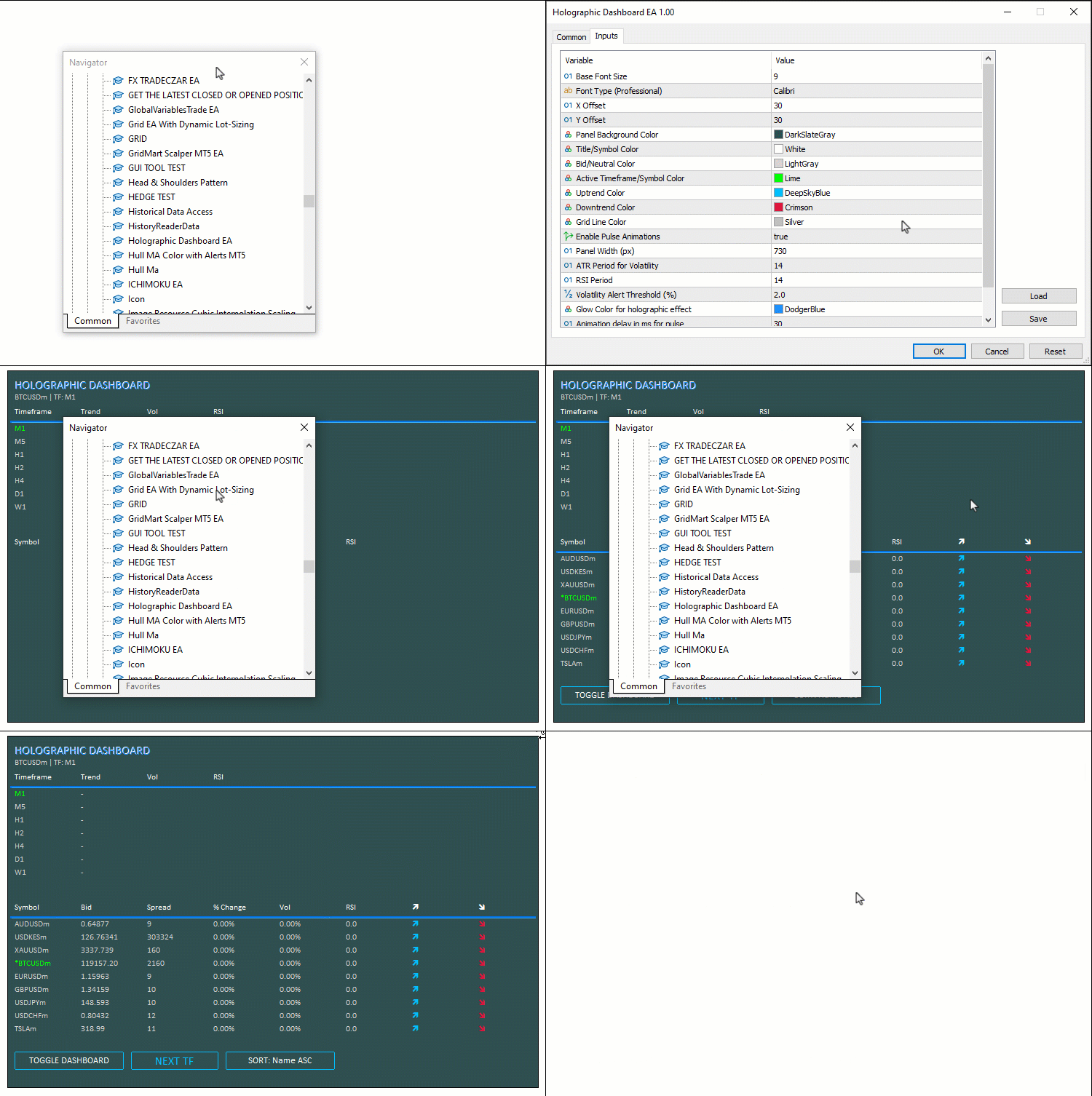
No manipulador "OnDeinit", liberamos os recursos quando o EA é removido. Excluímos todos os objetos do gráfico com "ObjectsDeleteAll", utilizando -1 para abranger todas as sub-janelas e todos os tipos de objeto. Se o resultado for negativo, registramos o erro com "LogError". Também chamamos "objManager.DeleteAllObjects" para remover os elementos gerenciados pela classe. Para os handles dos períodos gráficos, percorremos os arrays "atr_handles_tf" e "rsi_handles_tf", utilizando "ArraySize", e liberamos os handles válidos com "IndicatorRelease", desde que sejam diferentes de INVALID_HANDLE. Aplicamos o mesmo procedimento aos handles dos ativos armazenados em "atr_handles_sym" e "rsi_handles_sym". Dessa forma, garantimos a remoção dos objetos e a liberação dos recursos associados aos indicadores. Veja a animação abaixo.
Com a criação e a remoção dos objetos implementadas, podemos avançar para a atualização dos dados. Para simplificar a implementação, vamos realizar essas atualizações no manipulador "OnTick", embora também seja possível utilizar "OnTimer". Começaremos pela seção de períodos gráficos.
//+------------------------------------------------------------------+
//| Expert Tick Function with Holographic Updates                    |
//+------------------------------------------------------------------+
void OnTick() {
   if (!dashboardVisible) return;     //--- Exit if dashboard hidden

   long chartWidth;                   //--- Variable for chart width
   ChartGetInteger(0, CHART_WIDTH_IN_PIXELS, 0, chartWidth); //--- Get chart width
   int fontSize = (int)(BaseFontSize * (chartWidth / 800.0)); //--- Calculate font size
   int cellWidth = PanelWidth / 8;    //--- Calculate cell width
   int cellHeight = 18;               //--- Set cell height
   int y = Y_Offset + 75;             //--- Set y-coordinate for timeframe data

   // Update Timeframe Data with Pulse
   for (int i = 0; i < ArraySize(periods); i++) { //--- Iterate through timeframes
      double open = iOpen(_Symbol, periods[i], 0); //--- Get open price
      double close = iClose(_Symbol, periods[i], 0); //--- Get close price
      double atr_buf[1];              //--- Buffer for ATR
      if (CopyBuffer(atr_handles_tf[i], 0, 0, 1, atr_buf) != 1) { //--- Copy ATR data
         LogError(__FUNCTION__ + ": Failed to copy ATR buffer for TF " + EnumToString(periods[i])); //--- Log error
         continue;                    //--- Skip on failure
      }
      double vol = (close > 0) ? (atr_buf[0] / close) * 100 : 0.0; //--- Calculate volatility
      double rsi_buf[1];              //--- Buffer for RSI
      if (CopyBuffer(rsi_handles_tf[i], 0, 0, 1, rsi_buf) != 1) { //--- Copy RSI data
         LogError(__FUNCTION__ + ": Failed to copy RSI buffer for TF " + EnumToString(periods[i])); //--- Log error
         continue;                    //--- Skip on failure
      }
      double rsi = rsi_buf[0];        //--- Get RSI value
      color clr = DataColor;          //--- Set default color
      string trend = "-";             //--- Set default trend
      if (rsi > 50) { clr = UpColor; trend = "↑"; } //--- Set up trend
      else if (rsi < 50) { clr = DownColor; trend = "↓"; } //--- Set down trend
      createText("Trend_" + IntegerToString(i), trend, X_Offset + 10 + cellWidth, y, clr, fontSize, FontType, EnableAnimations); //--- Update trend text
      createText("Vol_" + IntegerToString(i), StringFormat("%.2f%%", vol), X_Offset + 10 + cellWidth * 2, y, vol > Vol_Alert_Threshold ? UpColor : DataColor, fontSize, FontType, vol > Vol_Alert_Threshold && EnableAnimations); //--- Update vol text
      color rsi_clr = (rsi > 70 ? DownColor : (rsi < 30 ? UpColor : DataColor)); //--- Set RSI color
      createText("RSI_" + IntegerToString(i), StringFormat("%.1f", rsi), X_Offset + 10 + cellWidth * 3, y, rsi_clr, fontSize, FontType, (rsi > 70 || rsi < 30) && EnableAnimations); //--- Update RSI text
      HolographicPulse("Period_" + IntegerToString(i), (periods[i] == _Period) ? ActiveColor : DataColor, GlowColor); //--- Pulse period text
      y += cellHeight;                //--- Update y-coordinate
   }

   // Update Symbol Data with Advanced Glow
   y += 50;                           //--- Update y-coordinate for symbol data
   for (int i = 0; i < totalSymbols; i++) { //--- Iterate through symbols
      string symbol = SymbolName(i, true); //--- Get symbol name
      double bidPrice;                //--- Variable for bid price
      if (!SymbolInfoDouble(symbol, SYMBOL_BID, bidPrice)) { //--- Get bid price
         LogError(__FUNCTION__ + ": Failed to get bid for " + symbol + ", Error: " + IntegerToString(GetLastError())); //--- Log error
         continue;                    //--- Skip on failure
      }
      long spread;                    //--- Variable for spread
      if (!SymbolInfoInteger(symbol, SYMBOL_SPREAD, spread)) { //--- Get spread
         LogError(__FUNCTION__ + ": Failed to get spread for " + symbol + ", Error: " + IntegerToString(GetLastError())); //--- Log error
         continue;                    //--- Skip on failure
      }
      double change = (prices_PrevArray[i] == 0 ? 0 : (bidPrice - prices_PrevArray[i]) / prices_PrevArray[i] * 100); //--- Calculate change
      double close = iClose(symbol, PERIOD_H1, 0); //--- Get close price
      double atr_buf[1];              //--- Buffer for ATR
      if (CopyBuffer(atr_handles_sym[i], 0, 0, 1, atr_buf) != 1) { //--- Copy ATR data
         LogError(__FUNCTION__ + ": Failed to copy ATR buffer for symbol " + symbol); //--- Log error
         continue;                    //--- Skip on failure
      }
      double vol = (close > 0) ? (atr_buf[0] / close) * 100 : 0.0; //--- Calculate volatility
      double rsi_buf[1];              //--- Buffer for RSI
      if (CopyBuffer(rsi_handles_sym[i], 0, 0, 1, rsi_buf) != 1) { //--- Copy RSI data
         LogError(__FUNCTION__ + ": Failed to copy RSI buffer for symbol " + symbol); //--- Log error
         continue;                    //--- Skip on failure
      }
      double rsi = rsi_buf[0];        //--- Get RSI value
      bid_array[i] = bidPrice;        //--- Store bid
      spread_array[i] = spread;       //--- Store spread
      change_array[i] = change;       //--- Store change
      vol_array[i] = vol;             //--- Store vol
      rsi_array[i] = rsi;             //--- Store RSI
      volatility_Array[i] = vol;      //--- Store volatility
      prices_PrevArray[i] = bidPrice; //--- Update previous price
   }
}
Na função "OnTick", processamos as atualizações a cada tick, mantendo os dados dos períodos gráficos e dos ativos atualizados em tempo real. Se "dashboardVisible" for false, retornamos imediatamente da função "OnTick" para evitar processamento desnecessário. Obtemos "chartWidth" com "ChartGetInteger", utilizando CHART_WIDTH_IN_PIXELS, e calculamos "fontSize" ajustando o tamanho da fonte proporcionalmente a "chartWidth / 800.0". Também definimos "cellWidth" como "PanelWidth / 8" e "cellHeight" como 18. Para a grade de períodos gráficos, estabelecemos "y" como "Y_Offset + 75" e percorremos o array "periods" com base em "ArraySize". Para cada período gráfico, obtemos o preço de abertura "open" com "iOpen" e o preço de fechamento "close" com "iClose", ambos com deslocamento zero. Em seguida, copiamos os valores do ATR para "atr_buf" utilizando "CopyBuffer" e o handle "atr_handles_tf[i]". Calculamos "vol" como a razão percentual entre o ATR e "close", desde que o preço de fechamento seja positivo.
Depois, copiamos os valores do RSI para "rsi_buf" a partir de "rsi_handles_tf[i]" e obtemos "rsi". Com base nesse valor, definimos "clr" e "trend": quando o RSI é maior que 50, indicamos uma tendência de alta com a seta "↑" e a cor "UpColor"; quando é menor que 50, indicamos uma tendência de baixa com a seta "↓" e a cor "DownColor". Poderíamos utilizar símbolos de seta disponíveis nas fontes, mas essas setas inseridas diretamente no texto se integram melhor à interface e reforçam o efeito holográfico. Atualizamos os rótulos com "createText", exibindo a tendência, o valor de volatilidade e o RSI. Para a volatilidade, utilizamos "UpColor" e ativamos a animação quando o valor ultrapassa "Vol_Alert_Threshold". Para o RSI, definimos a cor conforme as condições de sobrecompra ou sobrevenda, também com animação. Além disso, chamamos "HolographicPulse" para destacar o texto do período gráfico com "ActiveColor" quando ele corresponder a _Period. Por fim, incrementamos "y" em "cellHeight".
Acrescentamos 50 à coordenada "y" para posicionar a grade de ativos e percorremos "totalSymbols" em um laço. Para cada ativo obtido com "SymbolName", passando true, consultamos o preço Bid, armazenado em "bidPrice", por meio de "SymbolInfoDouble" com SYMBOL_BID, e o spread com "SymbolInfoInteger", utilizando SYMBOL_SPREAD. Se ocorrer algum erro, registramos uma mensagem e passamos para o próximo ativo. Calculamos a variação percentual "change" com base no preço anterior armazenado em "prices_PrevArray[i]" e obtemos "close" com "iClose", utilizando PERIOD_H1 e deslocamento zero. Em seguida, copiamos os valores do ATR para "atr_buf" a partir de "atr_handles_sym[i]" para calcular a volatilidade "vol", e os valores do RSI para "rsi_buf" a partir de "rsi_handles_sym[i]" para obter "rsi". Armazenamos os resultados nos arrays "bid_array", "spread_array", "change_array", "vol_array", "rsi_array" e "volatility_array" e atualizamos "prices_PrevArray[i]" com o valor de "bidPrice". Agora, podemos avançar para a seção de ativos, onde vamos ordená-los e exibi-los com os efeitos visuais.
// Sort indices
for (int i = 0; i < totalSymbols; i++) indices[i] = i; //--- Initialize indices
bool swapped = true;               //--- Swap flag
while (swapped) {                  //--- Loop until no swaps
   swapped = false;                //--- Reset flag
   for (int j = 0; j < totalSymbols - 1; j++) { //--- Iterate through indices
      bool do_swap = false;        //--- Swap decision
      int a = indices[j], b = indices[j + 1]; //--- Get indices
      if (sortMode == 0) {         //--- Sort by name ASC
         string na = SymbolName(a, true), nb = SymbolName(b, true); //--- Get names
         if (na > nb) do_swap = true; //--- Swap if needed
      } else if (sortMode == 1) {  //--- Sort by vol DESC
         if (vol_array[a] < vol_array[b]) do_swap = true; //--- Swap if needed
      } else if (sortMode == 2) {  //--- Sort by change ABS DESC
         if (MathAbs(change_array[a]) < MathAbs(change_array[b])) do_swap = true; //--- Swap if needed
      } else if (sortMode == 3) {  //--- Sort by RSI DESC
         if (rsi_array[a] < rsi_array[b]) do_swap = true; //--- Swap if needed
      }
      if (do_swap) {               //--- Perform swap
         int temp = indices[j];    //--- Temporary store
         indices[j] = indices[j + 1]; //--- Swap
         indices[j + 1] = temp;    //--- Complete swap
         swapped = true;           //--- Set flag
      }
   }
}

// Display sorted symbols with pulse on high vol
for (int j = 0; j < totalSymbols; j++) { //--- Iterate through sorted indices
   int i = indices[j];                   //--- Get index
   string symbol = SymbolName(i, true);  //--- Get symbol
   double bidPrice = bid_array[i];       //--- Get bid
   long spread = spread_array[i];        //--- Get spread
   double change = change_array[i];      //--- Get change
   double vol = vol_array[i];            //--- Get vol
   double rsi = rsi_array[i];            //--- Get RSI
   color clr_s = (symbol == _Symbol) ? ActiveColor : DataColor; //--- Set symbol color
   color clr_p = DataColor, clr_sp = DataColor, clr_ch = DataColor, clr_vol = DataColor, clr_rsi = DataColor; //--- Set default colors
   color clr_a1 = DataColor, clr_a2 = DataColor; //--- Set arrow colors

   // Price Change
   if (change > 0) {               //--- Check positive change
      clr_p = UpColor; clr_ch = UpColor; clr_a1 = UpColor; clr_a2 = DataColor; //--- Set up colors
   } else if (change < 0) {        //--- Check negative change
      clr_p = DownColor; clr_ch = DownColor; clr_a1 = DataColor; clr_a2 = DownColor; //--- Set down colors
   }

   // Volatility Alert
   if (vol > Vol_Alert_Threshold) { //--- Check high volatility
      clr_vol = UpColor;            //--- Set vol color
      clr_s = (symbol == _Symbol) ? ActiveColor : UpColor; //--- Set symbol color
   }

   // RSI Color
   clr_rsi = (rsi > 70 ? DownColor : (rsi < 30 ? UpColor : DataColor)); //--- Set RSI color

   // Update Texts
   string displaySymbol = (symbol == _Symbol) ? "*" + symbol : symbol; //--- Format display symbol
   createText("Symbol_" + IntegerToString(j), displaySymbol, X_Offset + 10, y, clr_s, fontSize, FontType, vol > Vol_Alert_Threshold && EnableAnimations); //--- Update symbol text
   createText("Bid_" + IntegerToString(j), Bid(symbol), X_Offset + 10 + cellWidth, y, clr_p, fontSize, FontType, EnableAnimations); //--- Update bid text
   createText("Spread_" + IntegerToString(j), Spread(symbol), X_Offset + 10 + cellWidth * 2, y, clr_sp, fontSize, FontType); //--- Update spread text
   createText("Change_" + IntegerToString(j), StringFormat("%.2f%%", change), X_Offset + 10 + cellWidth * 3, y, clr_ch, fontSize, FontType); //--- Update change text
   createText("Vol_" + IntegerToString(j), StringFormat("%.2f%%", vol), X_Offset + 10 + cellWidth * 4, y, clr_vol, fontSize, FontType, vol > Vol_Alert_Threshold && EnableAnimations); //--- Update vol text
   createText("RSI_" + IntegerToString(j), StringFormat("%.1f", rsi), X_Offset + 10 + cellWidth * 5, y, clr_rsi, fontSize, FontType, (rsi > 70 || rsi < 30) && EnableAnimations); //--- Update RSI text
   createText("ArrowUp_" + IntegerToString(j), CharToString(236), X_Offset + 10 + cellWidth * 6, y, clr_a1, fontSize, "Wingdings"); //--- Update up arrow
   createText("ArrowDown_" + IntegerToString(j), CharToString(238), X_Offset + 10 + cellWidth * 7, y, clr_a2, fontSize, "Wingdings"); //--- Update down arrow

   // Pulse on high volatility
   if (vol > Vol_Alert_Threshold) { //--- Check high volatility
      HolographicPulse("Symbol_" + IntegerToString(j), clr_s, GlowColor); //--- Pulse symbol text
   }

   y += cellHeight;                //--- Update y-coordinate
}

ChartRedraw(0);                    //--- Redraw chart
}
Começamos a ordenação inicializando o array "indexes" com os índices de 0 a "totalSymbols" - 1 por meio de um laço. Utilizamos o algoritmo de ordenação por bolha (Bubble Sort), definindo inicialmente "swapped" como true e executando um laço while até que não ocorram mais trocas. A cada passagem, redefinimos "swapped" como false e percorremos os índices de 0 a "totalSymbols" - 2. Para cada comparação, inicializamos "do_swap" como false e obtemos "a" e "b" a partir de "indices[j]" e "indices[j+1]". O critério de comparação depende de "sortMode": no modo 0 (Name ASC), obtemos os nomes dos ativos com "SymbolName(a, true)" e "SymbolName(b, true)" e realizamos a troca se "na > nb", mantendo a ordem alfabética crescente; no modo 1 (Vol DESC), trocamos as posições se "vol_array[a] < vol_array[b]", ordenando por volatilidade decrescente; no modo 2 (Change ABS DESC), comparamos os valores absolutos das variações percentuais e realizamos a troca se "MathAbs(change_array[a]) < MathAbs(change_array[b])"; no modo 3 (RSI DESC), a troca ocorre se "rsi_array[a] < rsi_array[b]". Quando "do_swap" indica que a troca é necessária, usamos a variável temporária "temp" para inverter as posições de "indices[j]" e "indices[j+1]" e definimos "swapped" como true.
Em seguida, exibimos os ativos na ordem definida, percorrendo "totalSymbols" e obtendo "i" a partir de "indices[j]". Para cada posição, recuperamos "symbol" com "SymbolName(i, true)", "bidPrice" de "bid_array[i]", "spread" de "spread_array[i]", "change" de "change_array[i]", "vol" de "vol_array[i]" e "rsi" de "rsi_array[i]". Definimos "clr_s" como "ActiveColor" quando o ativo corresponder a "_Symbol"; caso contrário, utilizamos "_DataColor". As demais cores são inicialmente definidas como "DataColor". Para indicar a variação do preço, se "change > 0", configuramos "clr_p", "clr_ch" e "clr_a1" com "UpColor", mantendo "clr_a2" como "DataColor". Se "change < 0", definimos "clr_p", "clr_ch" e "clr_a2" como "DownColor", mantendo "clr_a1" como "DataColor". Para os alertas de volatilidade, quando "vol > Vol_Alert_Threshold", definimos "clr_vol" como "UpColor" e também ajustamos "clr_s" se o ativo não for o símbolo atual. Por fim, configuramos "clr_rsi" de acordo com o RSI: "DownColor" para valores acima de 70, indicando sobrecompra; "UpColor" para valores abaixo de 30, indicando sobrevenda; e "DataColor" nos demais casos.
Formatamos "displaySymbol" acrescentando "*" quando o ativo corresponder a "_Symbol". Em seguida, atualizamos os rótulos com "createText": o ativo ("Symbol_j") exibe "displaySymbol" com a cor "clr_s" e recebe animação quando a volatilidade está elevada e as animações estão ativadas; o preço Bid ("Bid_j") utiliza "Bid(symbol)" e "clr_p", com animação quando habilitada; o spread ("Spread_j") utiliza "Spread(symbol)" e "clr_sp"; a variação percentual ("Change_j") é formatada com "StringFormat" usando "%.2f%%" e a cor "clr_ch"; a volatilidade ("Vol_j") também é formatada com "%.2f%%", utiliza "clr_vol" e recebe animação quando ultrapassa o limiar de alerta e as animações estão ativadas; o RSI ("RSI_j") é formatado com "%.1f", utiliza "clr_rsi" e recebe animação quando há condições de sobrecompra ou sobrevenda e as animações estão ativadas. Para representar os movimentos de preço, adicionamos uma seta para cima ("ArrowUp_j") com "CharToString(236)", "clr_a1" e a fonte "Wingdings", além de uma seta para baixo ("ArrowDown_j") com "CharToString(238)", "clr_a2" e a mesma fonte. Quando a volatilidade está elevada, aplicamos "HolographicPulse" ao rótulo do ativo, utilizando "clr_s" e "GlowColor". A cada iteração, incrementamos "y" em "cellHeight" e, ao final, redesenhamos o gráfico. Após a compilação, obtemos o seguinte resultado.
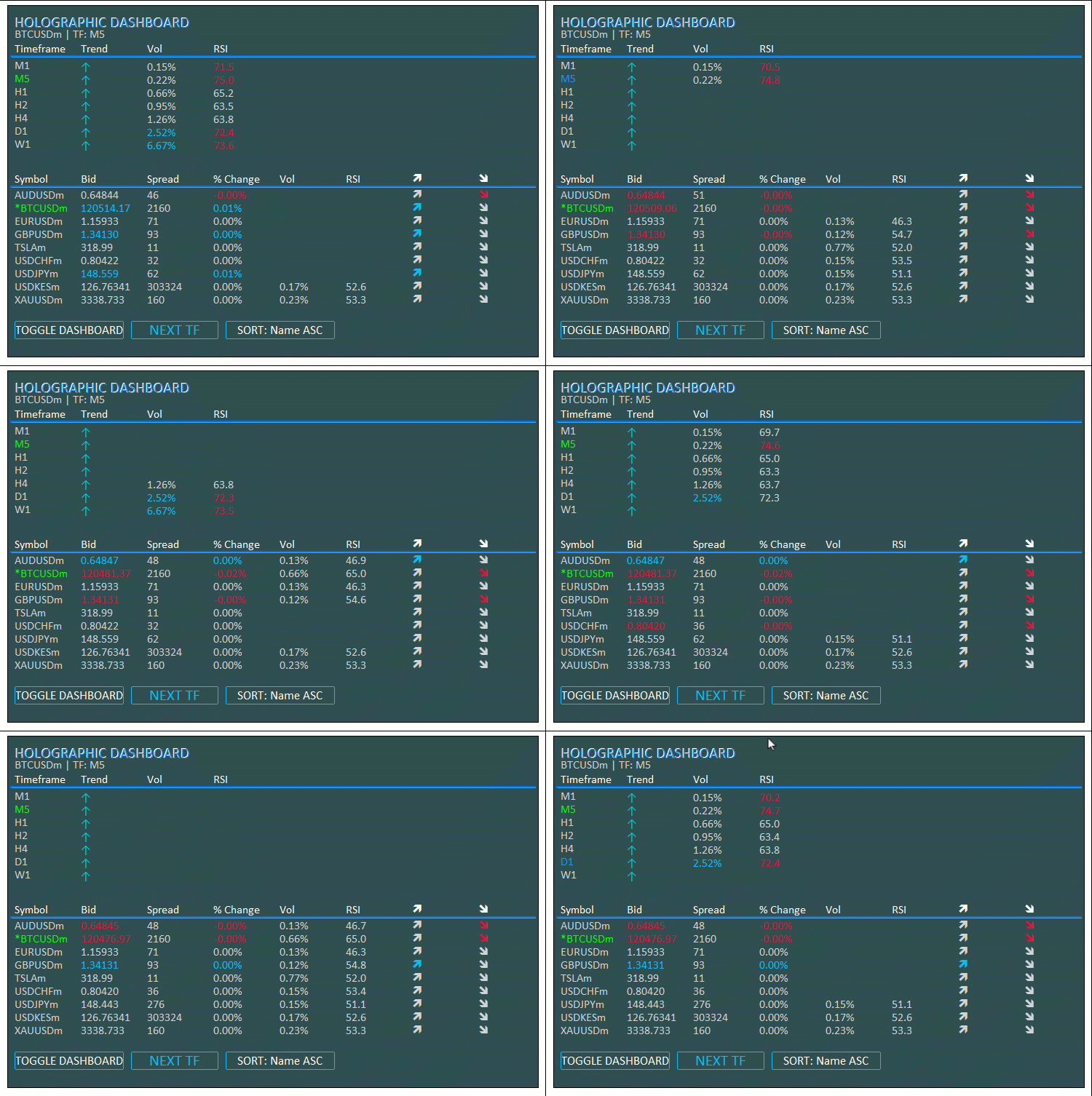
Como podemos observar na visualização, as atualizações ocorrem a cada tick. Agora, podemos tornar os botões que criamos interativos. Para isso, utilizaremos o manipulador de eventos "OnChartEvent".
//+------------------------------------------------------------------+
//| Chart Event Handler                                              |
//+------------------------------------------------------------------+
void OnChartEvent(const int id, const long &lparam, const double &dparam, const string &sparam) {
   if (id == CHARTEVENT_OBJECT_CLICK) { //--- Handle click event
      if (sparam == "ToggleBtn") {    //--- Check toggle button
         dashboardVisible = !dashboardVisible; //--- Toggle visibility
         objManager.DeleteAllObjects(); //--- Delete objects
         if (dashboardVisible) {      //--- Check if visible
            InitDashboard();          //--- Reinitialize dashboard
         } else {
            createButton("ToggleBtn", "TOGGLE DASHBOARD", X_Offset + 10, Y_Offset + 10, 150, 25, TitleColor, PanelColor, UpColor); //--- Create toggle button
         }
      }
      else if (sparam == "SwitchTFBtn") { //--- Check switch TF button
         int currentIdx = -1;         //--- Initialize current index
         for (int i = 0; i < ArraySize(periods); i++) { //--- Find current timeframe
            if (periods[i] == _Period) { //--- Match found
               currentIdx = i;        //--- Set index
               break;                 //--- Exit loop
            }
         }
         int nextIdx = (currentIdx + 1) % ArraySize(periods); //--- Calculate next index
         if (!ChartSetSymbolPeriod(0, _Symbol, periods[nextIdx])) { //--- Switch timeframe
            LogError(__FUNCTION__ + ": Failed to switch timeframe, Error: " + IntegerToString(GetLastError())); //--- Log error
         }
         createButton("SwitchTFBtn", "NEXT TF", X_Offset + 170, (int)ObjectGetInteger(0, "SwitchTFBtn", OBJPROP_YDISTANCE), 120, 25, UpColor, PanelColor, UpColor, EnableAnimations); //--- Update button
      }
      else if (sparam == "SortBtn") { //--- Check sort button
         sortMode = (sortMode + 1) % 4; //--- Cycle sort mode
         createButton("SortBtn", "SORT: " + sortNames[sortMode], X_Offset + 300, (int)ObjectGetInteger(0, "SortBtn", OBJPROP_YDISTANCE), 150, 25, TitleColor, PanelColor, UpColor, EnableAnimations); //--- Update button
      }
      ObjectSetInteger(0, sparam, OBJPROP_STATE, false); //--- Reset button state
      ChartRedraw(0);                 //--- Redraw chart
   }
}
Implementamos o manipulador "OnChartEvent" para responder às interações do usuário, permitindo mostrar ou ocultar o painel, alternar entre períodos gráficos e percorrer os modos de ordenação por meio dos botões. Ao receber um evento CHARTEVENT_OBJECT_CLICK, verificamos o valor de "sparam". Se corresponder a "ToggleBtn", alternamos o estado de "dashboardVisible" e removemos os objetos existentes com "objManager.DeleteAllObjects". Se o painel estiver visível após a alteração, chamamos "InitDashboard" para recriá-lo; caso esteja oculto, utilizamos "createButton" para criar novamente apenas o botão "ToggleBtn". Se "sparam" corresponder a "SwitchTFBtn", percorremos o array "periods" para localizar o índice do período gráfico atual. Em seguida, calculamos "nextIdx" como "(currentIdx + 1) % ArraySize(periods)" e alteramos o período gráfico com "ChartSetSymbolPeriod", utilizando "periods[nextIdx]". Caso ocorra algum erro, registramos a mensagem com "LogError". Também atualizamos o botão por meio de "createButton", aplicando a animação quando "EnableAnimations" estiver ativado.
Para o botão "SortBtn", alternamos ciclicamente entre os modos de ordenação, calculando "sortMode" como "(sortMode + 1) % 4". Atualizamos o texto do botão concatenando "SORT: " com "sortNames[sortMode]" e utilizamos "createButton" para aplicar a alteração com animação. Depois, redefinimos o estado do botão com "ObjectSetInteger", atribuindo false à propriedade OBJPROP_STATE, e redesenhamos o gráfico com "ChartRedraw". Dessa forma, podemos controlar a visibilidade do painel, alternar entre períodos gráficos e modificar a ordenação dos dados. Após a compilação, obtemos o seguinte resultado.
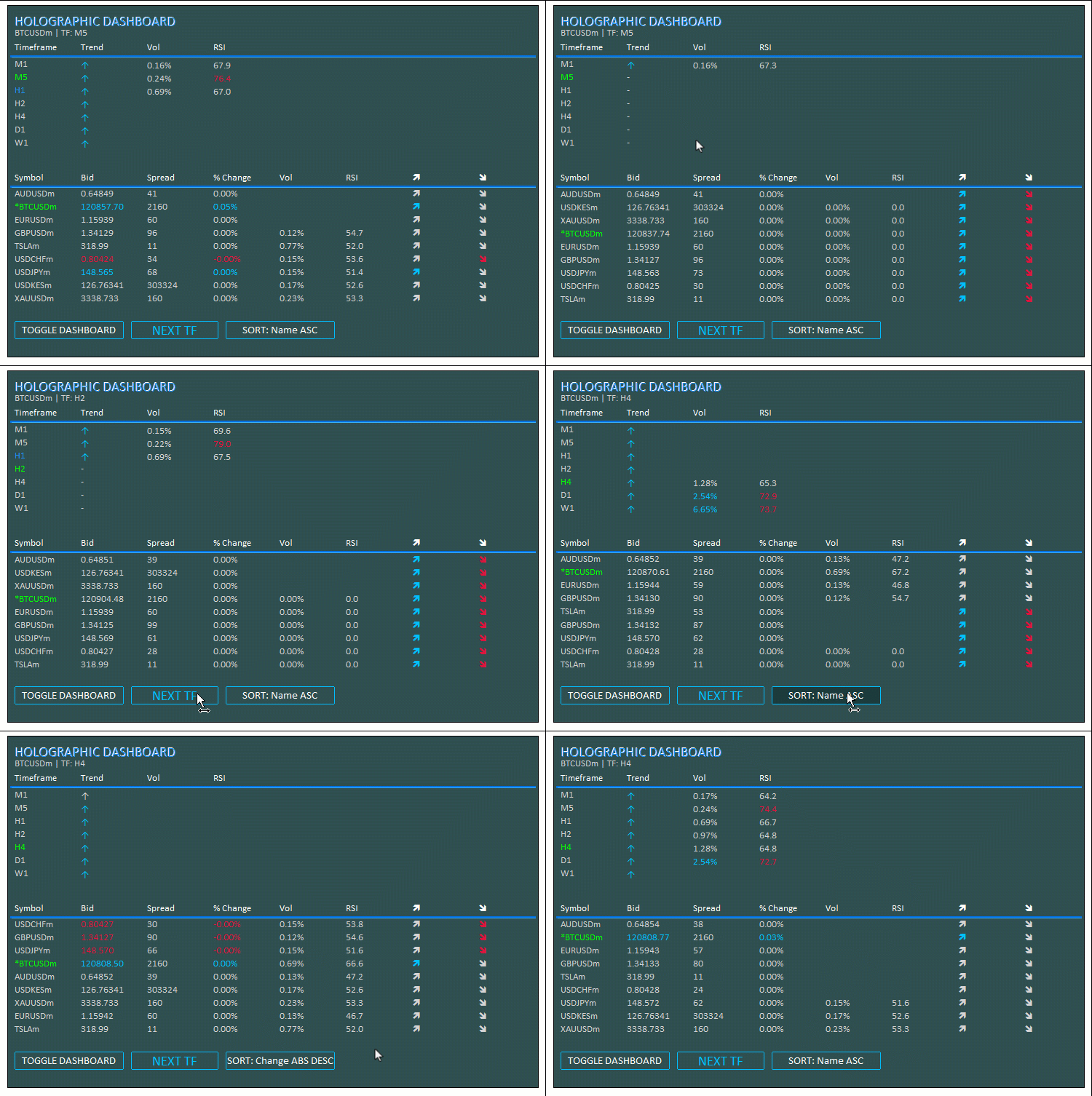
Podemos observar que o painel é atualizado a cada tick e responde aos cliques nos botões para mostrar ou ocultar a interface, alternar entre períodos gráficos e ordenar os índices com base nas métricas dos ativos. Com isso, alcançamos os objetivos definidos para a ferramenta. Agora, resta testar o funcionamento do projeto, conforme abordado na seção anterior.
Testes com dados históricos
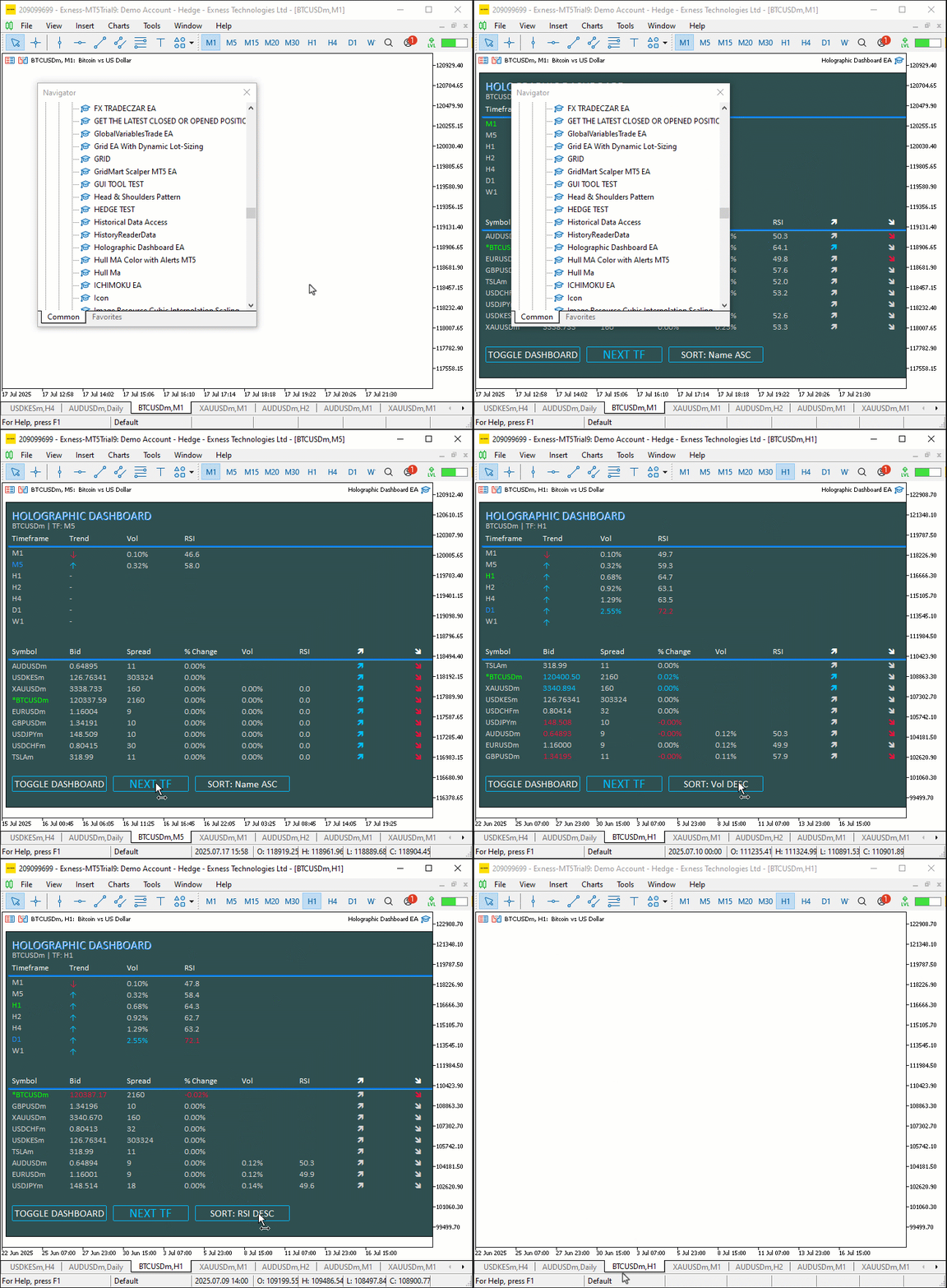
Realizamos os testes, e a visualização dos resultados é apresentada abaixo no formato GIF (Graphics Interchange Format).
Conclusão
Concluímos a criação de um painel holográfico dinâmico em MQL5, capaz de monitorar ativos e períodos gráficos por meio do RSI, de alertas de volatilidade e de recursos de ordenação. Também incorporamos animações pulsantes e botões interativos para tornar a experiência de trading mais envolvente. Apresentamos detalhadamente a arquitetura e a implementação, utilizando classes como "CObjectManager" e funções como "HolographicPulse" para exibir informações em tempo real de forma visualmente atraente. Você pode personalizar o painel conforme suas necessidades de negociação, aprimorando suas análises com efeitos holográficos e controles interativos.
Traduzido do Inglês pela MetaQuotes Ltd.
Artigo original: https://www.mql5.com/en/articles/18880
Aviso: Todos os direitos sobre esses materiais pertencem à MetaQuotes Ltd. É proibida a reimpressão total ou parcial.
Esse artigo foi escrito por um usuário do site e reflete seu ponto de vista pessoal. A MetaQuotes Ltd. não se responsabiliza pela precisão das informações apresentadas nem pelas possíveis consequências decorrentes do uso das soluções, estratégias ou recomendações descritas.

 Desenvolvimento de ferramentas para análise de Price Action (Parte 33): Ferramenta baseada na Teoria da Amplitude das Velas
 Introdução ao MQL5 (Parte 19): Automação da detecção de ondas de Wolfe
 Está chegando o novo MetaTrader 5 e MQL5
 Automatização de estratégias de negociação em MQL5 (Parte 24): Sistema de negociação por rompimento da sessão de Londres com gerenciamento de risco e trailing stops

- Aplicativos de negociação gratuitos
- 8 000+ sinais para cópia
- Notícias econômicas para análise dos mercados financeiros
Você concorda com a política do site e com os termos de uso
Tentei instalá-lo, mas não consegui porque parece que faltam dois arquivos; a única coisa que há na pasta ZIP é um documento chamado “5 holographic_dashboard_EA”, e quando tento compilá-lo, recebo uma mensagem de erro. De acordo com a IA, faltam dois arquivos, e como não sei programar, isso só piora as coisas, mas obrigado mesmo assim.
O arquivo ArrayString.mqh deve ser colocado na pasta MT5 ==> Arquivo ==> Abrir pasta de dados ==> MQL5 ==> Include ==> Arrays [pasta]. Em seguida, compile no MetaEditor.
O FileTxt.mqh vai na sua pasta MT5 ==> Arquivo ==> Abrir pasta de dados ==> MQL5 ==> Include ==> Files [pasta]. Depois, compile no MetaEditor.
Em seguida, compile o arquivo mq5.