

Criando sistemas de trading com IA em MQL5 (Parte 3): Evoluindo para uma interface rolável voltada para um único chat
 202
202
 0
0

Introdução
No artigo anterior (Parte 2), desenvolvemos um programa interativo integrado ao ChatGPT, com uma Interface de Usuário (UI) em MetaQuotes Language 5 (MQL5). A ferramenta permitia enviar prompts para a API da OpenAI e visualizar imediatamente as respostas diretamente no gráfico. Agora, na Parte 3, vamos aprimorar ainda mais o programa: criaremos um painel rolável em estilo de chat, com marcas de tempo, rolagem dinâmica suave e um histórico detalhado das conversas para permitir diálogos interativos com múltiplos turnos. Veremos os seguintes tópicos:
- Entendendo a estrutura aprimorada do programa ChatGPT
- Implementação em MQL5
- Teste do programa ChatGPT
- Conclusão
Ao final, teremos um programa MQL5 aprimorado para consultas interativas à IA e pronto para personalizações. Vamos começar!
Entendendo a estrutura aprimorada do programa ChatGPT
A estrutura aprimorada do programa ChatGPT amplia nossa interface de trading com IA ao incorporar uma UI rolável em formato de chat, com suporte a conversas de múltiplos turnos, marcas de tempo e gerenciamento dinâmico das mensagens. Isso permite preservar o contexto das consultas entre sessões. O objetivo é proporcionar uma experiência de conversa fluida e melhorar a usabilidade, permitindo consultar o histórico e continuar a partir de respostas anteriores da IA. Isso é especialmente importante para refinar estratégias de trading sem perder informações relevantes de interações anteriores. Partimos da ideia de que, mantendo uma única conversa à qual a IA possa recorrer, podemos retornar a prompts anteriores, refiná-los e fazer correções sempre que necessário.
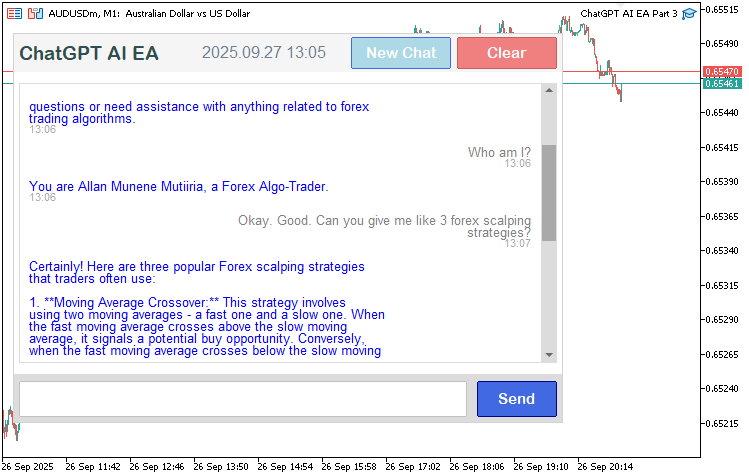
Nossa abordagem consiste em criar um painel focado em um único chat, com texto rolável, efeitos ao passar o mouse e montagem das mensagens para as requisições à API. Dessa forma, a interface se adapta ao tamanho da conversa e às preferências do usuário quanto à visibilidade da barra de rolagem. Implementaremos a lógica necessária para fazer o parsing do histórico para consultas de múltiplos turnos, adicionar marcas de tempo para facilitar o acompanhamento e disponibilizar recursos como limpar a conversa ou iniciar um novo chat. Assim, teremos uma ferramenta capaz de oferecer assistência contínua da IA na tomada de decisões de trading por meio de uma interface aprimorada. Veja a seguir o que vamos desenvolver.
Implementação em MQL5
Para implementar o programa aprimorado em MQL5, primeiro modificaremos a seção de parâmetros de entrada para adicionar um novo parâmetro de entrada para o modo da barra de rolagem. Assim, poderemos escolher entre exibi-la apenas quando passarmos o mouse sobre a área correspondente ou mantê-la permanentemente visível. Para isso, adicionaremos uma enumeração. Também aumentaremos o limite de tokens da resposta para 3000, já que agora podemos manter uma conversa mais extensa, e esse valor parece suficiente para nosso objetivo. No entanto, ele pode ser aumentado, se necessário.
//+------------------------------------------------------------------+
//|                                         ChatGPT AI EA Part 3.mq5 |
//|                           Copyright 2025, Allan Munene Mutiiria. |
//|                                   https://t.me/Forex_Algo_Trader |
//+------------------------------------------------------------------+
#property copyright "Copyright 2025, Allan Munene Mutiiria."
#property link "https://t.me/Forex_Algo_Trader"
#property version "1.00"
#property strict

//--- Input parameters
enum ENUM_SCROLLBAR_MODE
{
   SCROLL_DYNAMIC_ALWAYS, // Show when needed
   SCROLL_DYNAMIC_HOVER,  // Show on hover when needed
   SCROLL_WHEEL_ONLY      // No scrollbar, wheel scroll only
};
input ENUM_SCROLLBAR_MODE ScrollbarMode = SCROLL_DYNAMIC_HOVER;            // Scrollbar Behavior
//--- Scrollbar object names
#define SCROLL_LEADER "ChatGPT_Scroll_Leader"
#define SCROLL_UP_REC "ChatGPT_Scroll_Up_Rec"
#define SCROLL_UP_LABEL "ChatGPT_Scroll_Up_Label"
#define SCROLL_DOWN_REC "ChatGPT_Scroll_Down_Rec"
#define SCROLL_DOWN_LABEL "ChatGPT_Scroll_Down_Label"
#define SCROLL_SLIDER "ChatGPT_Scroll_Slider"

//--- Input parameters
input string OpenAI_Model = "gpt-3.5-turbo";                                 // OpenAI Model
input string OpenAI_Endpoint = "https://api.openai.com/v1/chat/completions"; // OpenAI API Endpoint
input int MaxResponseLength = 3000;                                          // Max length of ChatGPT response to display
input string LogFileName = "ChatGPT_EA_Log.txt";                             // Log file name
Iniciamos a implementação das melhorias definindo os parâmetros de configuração e as constantes que controlarão o comportamento da rolagem e as configurações da API. Primeiro, criamos a enumeração "ENUM_SCROLLBAR_MODE" com as opções "SCROLL_DYNAMIC_ALWAYS" (exibir a barra de rolagem quando necessário), "SCROLL_DYNAMIC_HOVER" (exibir ao passar o mouse, quando necessário) e "SCROLL_WHEEL_ONLY" (sem barra de rolagem, apenas rolagem pela roda do mouse). Como configuração padrão para o usuário, definimos o parâmetro de entrada "ScrollbarMode" como "SCROLL_DYNAMIC_HOVER".
Em seguida, definimos constantes para os nomes dos objetos da barra de rolagem, como "SCROLL_LEADER", "SCROLL_UP_REC", "SCROLL_UP_LABEL", "SCROLL_DOWN_REC", "SCROLL_DOWN_LABEL" e "SCROLL_SLIDER", garantindo referências consistentes a esses elementos na UI. Depois, definimos o parâmetro de entrada "MaxResponseLength" como 3000 para limitar o tamanho do texto de resposta exibido e, ao mesmo tempo, permitir conversas mais extensas. A próxima etapa é modificar a classe JSON para que ela também seja capaz de processar valores do tipo double. Trata-se apenas de um pequeno aprimoramento.
bool DeserializeFromArray(char &jsonCharacterArray[], int arrayLength, int ¤tIndex) { //--- Deserialize from array string validNumericCharacters = "0123456789+-.eE"; //--- Valid number chars int startPosition = currentIndex; //--- Start position for(; currentIndex < arrayLength; currentIndex++) { //--- Loop array char currentCharacter = jsonCharacterArray[currentIndex]; //--- Current char if(currentCharacter == 0) break; //--- Break on null switch(currentCharacter) { //--- Switch on char case '\t': case '\r': case '\n': case ' ': startPosition = currentIndex + 1; break; //--- Skip whitespace case '[': { //--- Array start startPosition = currentIndex + 1; //--- Update start if(m_type != JsonUndefined) return false; //--- Type check m_type = JsonArray; //--- Set array currentIndex++; //--- Increment JsonValue childValue(GetPointer(this), JsonUndefined); //--- Child value while(childValue.DeserializeFromArray(jsonCharacterArray, arrayLength, currentIndex)) { //--- Loop children if(childValue.m_type != JsonUndefined) AddChild(childValue); //--- Add if defined if(childValue.m_type == JsonInteger || childValue.m_type == JsonDouble || childValue.m_type == JsonArray) currentIndex++; //--- Adjust index childValue.Reset(); //--- Reset child childValue.m_parent = GetPointer(this); //--- Set parent if(jsonCharacterArray[currentIndex] == ']') break; //--- End array currentIndex++; //--- Increment if(currentIndex >= arrayLength) return false; //--- Bounds check } return (jsonCharacterArray[currentIndex] == ']' || jsonCharacterArray[currentIndex] == 0); //--- Valid end } //--- End array case case ']': return (m_parent && m_parent.m_type == JsonArray); //--- Array end case ':': { //--- Key separator if(m_temporaryKey == "") return false; //--- Key check JsonValue childValue(GetPointer(this), JsonUndefined); //--- New child JsonValue *addedChild = AddChild(childValue); //--- Add addedChild.m_key = m_temporaryKey; //--- Set key m_temporaryKey = ""; //--- Clear temp currentIndex++; //--- Increment if(!addedChild.DeserializeFromArray(jsonCharacterArray, arrayLength, currentIndex)) return false; //--- Recurse } break; //--- End key case case ',': { //--- Value separator startPosition = currentIndex + 1; //--- Update start if(!m_parent && m_type != JsonObject) return false; //--- Check context if(m_parent && m_parent.m_type != JsonArray && m_parent.m_type != JsonObject) return false; //--- Parent type if(m_parent && m_parent.m_type == JsonArray && m_type == JsonUndefined) return true; //--- Undefined in array } break; //--- End separator case '{': { //--- Object start startPosition = currentIndex + 1; //--- Update start if(m_type != JsonUndefined) return false; //--- Type check m_type = JsonObject; //--- Set object currentIndex++; //--- Increment if(!DeserializeFromArray(jsonCharacterArray, arrayLength, currentIndex)) return false; //--- Recurse return (jsonCharacterArray[currentIndex] == '}' || jsonCharacterArray[currentIndex] == 0); //--- Valid end } break; //--- End object case case '}': return (m_type == JsonObject); //--- Object end case 't': case 'T': case 'f': case 'F': { //--- Boolean start if(m_type != JsonUndefined) return false; //--- Type check m_type = JsonBoolean; //--- Set boolean if(currentIndex + 3 < arrayLength && StringCompare(GetSubstringFromArray(jsonCharacterArray, currentIndex, 4), "true", false) == 0) { //--- True check m_booleanValue = true; currentIndex += 3; return true; //--- Set true } if(currentIndex + 4 < arrayLength && StringCompare(GetSubstringFromArray(jsonCharacterArray, currentIndex, 5), "false", false) == 0) { //--- False check m_booleanValue = false; currentIndex += 4; return true; //--- Set false } return false; //--- Invalid boolean } break; //--- End boolean case 'n': case 'N': { //--- Null start if(m_type != JsonUndefined) return false; //--- Type check m_type = JsonNull; //--- Set null if(currentIndex + 3 < arrayLength && StringCompare(GetSubstringFromArray(jsonCharacterArray, currentIndex, 4), "null", false) == 0) { //--- Null check currentIndex += 3; return true; //--- Valid null } return false; //--- Invalid null } break; //--- End null case '0': case '1': case '2': case '3': case '4': case '5': case '6': case '7': case '8': case '9': case '-': case '+': case '.': { //--- Number start if(m_type != JsonUndefined) return false; //--- Type check bool isDouble = false; //--- Double flag int startOfNumber = currentIndex; //--- Number start while(jsonCharacterArray[currentIndex] != 0 && currentIndex < arrayLength) { //--- Parse number currentIndex++; //--- Increment if(StringFind(validNumericCharacters, GetSubstringFromArray(jsonCharacterArray, currentIndex, 1)) < 0) break; //--- Invalid char if(!isDouble) isDouble = (jsonCharacterArray[currentIndex] == '.' || jsonCharacterArray[currentIndex] == 'e' || jsonCharacterArray[currentIndex] == 'E'); //--- Set double } m_stringValue = GetSubstringFromArray(jsonCharacterArray, startOfNumber, currentIndex - startOfNumber); //--- Get string if(isDouble) { //--- Double handling m_type = JsonDouble; //--- Set type m_doubleValue = StringToDouble(m_stringValue); //--- Convert double m_integerValue = (long)m_doubleValue; //--- Set integer m_booleanValue = m_integerValue != 0; //--- Set boolean } else { //--- Integer handling m_type = JsonInteger; //--- Set type m_integerValue = StringToInteger(m_stringValue); //--- Convert integer m_doubleValue = (double)m_integerValue; //--- Set double m_booleanValue = m_integerValue != 0; //--- Set boolean } currentIndex--; //--- Adjust index return true; //--- Success } break; //--- End number case '\"': { //--- String or key start if(m_type == JsonObject) { //--- Key in object currentIndex++; //--- Increment int startOfString = currentIndex; //--- String start if(!ExtractStringFromArray(jsonCharacterArray, arrayLength, currentIndex)) return false; //--- Extract m_temporaryKey = GetSubstringFromArray(jsonCharacterArray, startOfString, currentIndex - startOfString); //--- Set temp key } else { //--- Value string if(m_type != JsonUndefined) return false; //--- Type check m_type = JsonString; //--- Set string currentIndex++; //--- Increment int startOfString = currentIndex; //--- String start if(!ExtractStringFromArray(jsonCharacterArray, arrayLength, currentIndex)) return false; //--- Extract SetFromString(JsonString, GetSubstringFromArray(jsonCharacterArray, startOfString, currentIndex - startOfString)); //--- Set value return true; //--- Success } } break; //--- End string } } return true; //--- Default success }
Na função de desserialização, passamos a tratar os valores do tipo double, que não haviam sido considerados nas versões anteriores. Destacamos especificamente esse trecho para facilitar sua identificação. Agora precisamos adicionar novas variáveis globais para o layout da UI, a rolagem, os estados de hover e as cores, dando suporte a um painel mais complexo com cabeçalho, rodapé, botões e barra de rolagem.
bool clear_hover = false;
bool new_chat_hover = false;

color clear_original_bg = clrLightCoral;
color clear_darker_bg;
color new_chat_original_bg = clrLightBlue;
color new_chat_darker_bg;
int g_mainX = 10;
int g_mainY = 30;
int g_mainWidth = 550;
int g_mainHeight = 0;
int g_padding = 10;
int g_sidePadding = 6;
int g_textPadding = 10;
int g_headerHeight = 40;
int g_displayHeight = 280;
int g_footerHeight = 50;
int g_lineSpacing = 2;
bool scroll_visible = false;
bool mouse_in_display = false;
int scroll_pos = 0;
int prev_scroll_pos = -1;
int slider_height = 20;
bool movingStateSlider = false;
int mlbDownX_Slider = 0;
int mlbDownY_Slider = 0;
int mlbDown_YD_Slider = 0;
int g_total_height = 0;
int g_visible_height = 0;
Aqui, inicializamos outras variáveis globais e esquemas de cores necessários para os efeitos dinâmicos de hover e para o gerenciamento do layout do programa aprimorado. Definimos as flags de hover "clear_hover" e "new_chat_hover" como false para os botões de limpar e de novo chat. Também definimos as cores de fundo originais "clear_original_bg" como "clrLightCoral" e "new_chat_original_bg" como "clrLightBlue", além das versões mais escuras "clear_darker_bg" e "new_chat_darker_bg" para os estados de hover. Em seguida, configuramos as dimensões do painel: "g_mainX" como 10, "g_mainY" como 30, "g_mainWidth" como 550 e "g_mainHeight" como 0, pois sua altura será calculada posteriormente. Também definimos valores de padding, como "g_padding" igual a 10, "g_sidePadding" igual a 6 e "g_textPadding" igual a 10, além das alturas do cabeçalho ("g_headerHeight" igual a 40), da área de exibição ("g_displayHeight" igual a 280), do rodapé ("g_footerHeight" igual a 50) e do espaçamento entre linhas ("g_lineSpacing" igual a 2).
Por fim, inicializamos as flags "scroll_visible" e "mouse_in_display" como false, as variáveis de posição de rolagem "scroll_pos" e "prev_scroll_pos" como 0 e -1, respectivamente, e "slider_height" como 20. Também definimos a flag de arraste "movingStateSlider" como false, as posições "mlbDownX_Slider", "mlbDownY_Slider" e "mlbDown_YD_Slider" como 0 e os trackers de altura "g_total_height" e "g_visible_height" como 0. Em seguida, precisamos definir a barra de rolagem antes de atualizar a área de exibição, pois seu comportamento será dinâmico. Portanto, vamos implementar as funções responsáveis pela barra de rolagem.
//+------------------------------------------------------------------+
//| Calculate font size based on screen DPI                          |
//+------------------------------------------------------------------+
int getFontSizeByDPI(int baseFontSize, int baseDPI = 96) {
   int currentDPI = (int)TerminalInfoInteger(TERMINAL_SCREEN_DPI);          //--- Retrieve current screen DPI
   int scaledFontSize = (int)(baseFontSize * (double)baseDPI / currentDPI); //--- Calculate scaled font size
   return MathMax(scaledFontSize, 8);                                       //--- Ensure minimum font size of 8
}

//+------------------------------------------------------------------+
//| Create scrollbar elements                                        |
//+------------------------------------------------------------------+
void CreateScrollbar() {
   int displayX = g_mainX + g_sidePadding;          //--- Calculate display x position
   int displayY = g_mainY + g_headerHeight + g_padding; //--- Calculate display y position
   int displayW = g_mainWidth - 2 * g_sidePadding;  //--- Calculate display width
   int scrollbar_x = displayX + displayW - 16;      //--- Set scrollbar x position
   int scrollbar_y = displayY + 16;                 //--- Set scrollbar y position
   int scrollbar_width = 16;                        //--- Set scrollbar width
   int scrollbar_height = g_displayHeight - 2 * 16; //--- Calculate scrollbar height
   int button_size = 16;                            //--- Set button size
   if (!createRecLabel(SCROLL_LEADER, scrollbar_x, scrollbar_y, scrollbar_width, scrollbar_height, C'220,220,220', 1, clrGainsboro, BORDER_FLAT, STYLE_SOLID, CORNER_LEFT_UPPER)) { //--- Create scrollbar leader
      FileWriteString(logFileHandle, "Failed to create scrollbar leader\n"); //--- Log failure
   }
   if (!createRecLabel(SCROLL_UP_REC, scrollbar_x, displayY, scrollbar_width, button_size, clrGainsboro, 1, clrGainsboro, BORDER_FLAT, STYLE_SOLID, CORNER_LEFT_UPPER)) { //--- Create scroll up button
      FileWriteString(logFileHandle, "Failed to create scrollbar up button\n"); //--- Log failure
   }
   if (!createLabel(SCROLL_UP_LABEL, scrollbar_x + 2, displayY + -2, CharToString(0x35), clrDimGray, getFontSizeByDPI(10), "Webdings", CORNER_LEFT_UPPER)) { //--- Create scroll up label
      FileWriteString(logFileHandle, "Failed to create scrollbar up label\n"); //--- Log failure
   }
   if (!createRecLabel(SCROLL_DOWN_REC, scrollbar_x, displayY + g_displayHeight - button_size, scrollbar_width, button_size, clrGainsboro, 1, clrGainsboro, BORDER_FLAT, STYLE_SOLID, CORNER_LEFT_UPPER)) { //--- Create scroll down button
      FileWriteString(logFileHandle, "Failed to create scrollbar down button\n"); //--- Log failure
   }
   if (!createLabel(SCROLL_DOWN_LABEL, scrollbar_x + 2, displayY + g_displayHeight - button_size + -2, CharToString(0x36), clrDimGray, getFontSizeByDPI(10), "Webdings", CORNER_LEFT_UPPER)) { //--- Create scroll down label
      FileWriteString(logFileHandle, "Failed to create scrollbar down label\n"); //--- Log failure
   }
   slider_height = CalculateSliderHeight();         //--- Calculate slider height
   if (!createRecLabel(SCROLL_SLIDER, scrollbar_x, displayY + g_displayHeight - button_size - slider_height, scrollbar_width, slider_height, clrSilver, 1, clrGainsboro, BORDER_FLAT, STYLE_SOLID, CORNER_LEFT_UPPER)) { //--- Create scrollbar slider
      FileWriteString(logFileHandle, "Failed to create scrollbar slider\n"); //--- Log failure
   }
   FileWriteString(logFileHandle, "Scrollbar created: x=" + IntegerToString(scrollbar_x) + ", y=" + IntegerToString(scrollbar_y) + ", height=" + IntegerToString(scrollbar_height) + ", slider_height=" + IntegerToString(slider_height) + "\n"); //--- Log scrollbar creation
}

//+------------------------------------------------------------------+
//| Delete scrollbar elements                                        |
//+------------------------------------------------------------------+
void DeleteScrollbar() {
   ObjectDelete(0, SCROLL_LEADER);                  //--- Remove scrollbar leader
   ObjectDelete(0, SCROLL_UP_REC);                  //--- Remove scroll up rectangle
   ObjectDelete(0, SCROLL_UP_LABEL);                //--- Remove scroll up label
   ObjectDelete(0, SCROLL_DOWN_REC);                //--- Remove scroll down rectangle
   ObjectDelete(0, SCROLL_DOWN_LABEL);              //--- Remove scroll down label
   ObjectDelete(0, SCROLL_SLIDER);                  //--- Remove scrollbar slider
}

//+------------------------------------------------------------------+
//| Calculate scrollbar slider height                                |
//+------------------------------------------------------------------+
int CalculateSliderHeight() {
   int scroll_area_height = g_displayHeight - 2 * 16;                 //--- Calculate scroll area height
   int slider_min_height = 20;                                        //--- Set minimum slider height
   if (g_total_height <= g_visible_height) return scroll_area_height; //--- Return full height if no scroll
   double visible_ratio = (double)g_visible_height / g_total_height;  //--- Calculate visible ratio
   int height = (int)MathFloor(scroll_area_height * visible_ratio);   //--- Calculate slider height
   return MathMax(slider_min_height, height);                         //--- Return minimum or calculated height
}

//+------------------------------------------------------------------+
//| Update scrollbar slider position                                 |
//+------------------------------------------------------------------+
void UpdateSliderPosition() {
   int displayX = g_mainX + g_sidePadding;                              //--- Calculate display x position
   int displayY = g_mainY + g_headerHeight + g_padding;                 //--- Calculate display y position
   int scrollbar_x = displayX + (g_mainWidth - 2 * g_sidePadding) - 16; //--- Set scrollbar x position
   int scrollbar_y = displayY + 16;                                     //--- Set scrollbar y position
   int scroll_area_height = g_displayHeight - 2 * 16;                   //--- Calculate scroll area height
   int max_scroll = MathMax(0, g_total_height - g_visible_height);      //--- Calculate maximum scroll
   if (max_scroll <= 0) return;                                         //--- Exit if no scroll needed
   double scroll_ratio = (double)scroll_pos / max_scroll;               //--- Calculate scroll ratio
   int scroll_area_y_max = scrollbar_y + scroll_area_height - slider_height; //--- Calculate max slider y
   int scroll_area_y_min = scrollbar_y;                                 //--- Set min slider y
   int new_y = scroll_area_y_min + (int)(scroll_ratio * (scroll_area_y_max - scroll_area_y_min)); //--- Calculate new y position
   new_y = MathMax(scroll_area_y_min, MathMin(new_y, scroll_area_y_max)); //--- Clamp y position
   ObjectSetInteger(0, SCROLL_SLIDER, OBJPROP_YDISTANCE, new_y);        //--- Update slider y position
   FileWriteString(logFileHandle, "Slider position updated: scroll_pos=" + IntegerToString(scroll_pos) + ", max_scroll=" + IntegerToString(max_scroll) + ", new_y=" + IntegerToString(new_y) + "\n"); //--- Log slider update
}

//+------------------------------------------------------------------+
//| Update scrollbar button colors                                   |
//+------------------------------------------------------------------+
void UpdateButtonColors() {
   int max_scroll = MathMax(0, g_total_height - g_visible_height);      //--- Calculate maximum scroll
   if (scroll_pos == 0) {                                               //--- Check if at top
      ObjectSetInteger(0, SCROLL_UP_LABEL, OBJPROP_COLOR, clrSilver);   //--- Set scroll up label to disabled color
   } else {                                                             //--- Not at top
      ObjectSetInteger(0, SCROLL_UP_LABEL, OBJPROP_COLOR, clrDimGray);  //--- Set scroll up label to active color
   }
   if (scroll_pos == max_scroll) {                                      //--- Check if at bottom
      ObjectSetInteger(0, SCROLL_DOWN_LABEL, OBJPROP_COLOR, clrSilver); //--- Set scroll down label to disabled color
   } else {                                                             //--- Not at bottom
      ObjectSetInteger(0, SCROLL_DOWN_LABEL, OBJPROP_COLOR, clrDimGray); //--- Set scroll down label to active color
   }
   FileWriteString(logFileHandle, "Button colors updated: scroll_pos=" + IntegerToString(scroll_pos) + ", max_scroll=" + IntegerToString(max_scroll) + "\n"); //--- Log button color update
}

//+------------------------------------------------------------------+
//| Scroll up (show earlier messages)                                |
//+------------------------------------------------------------------+
void ScrollUp() {
   if (scroll_pos > 0) {                            //--- Check if scroll possible
      scroll_pos = MathMax(0, scroll_pos - 30);     //--- Decrease scroll position
      UpdateResponseDisplay();                      //--- Update response display
      if (scroll_visible) {                         //--- Check if scrollbar visible
         UpdateSliderPosition();                    //--- Update slider position
         UpdateButtonColors();                      //--- Update button colors
      }
      FileWriteString(logFileHandle, "Scrolled up: scroll_pos=" + IntegerToString(scroll_pos) + "\n"); //--- Log scroll up
   }
}

//+------------------------------------------------------------------+
//| Scroll down (show later messages)                                |
//+------------------------------------------------------------------+
void ScrollDown() {
   int max_scroll = MathMax(0, g_total_height - g_visible_height); //--- Calculate maximum scroll
   if (scroll_pos < max_scroll) {                   //--- Check if scroll possible
      scroll_pos = MathMin(max_scroll, scroll_pos + 30); //--- Increase scroll position
      UpdateResponseDisplay();                      //--- Update response display
      if (scroll_visible) {                         //--- Check if scrollbar visible
         UpdateSliderPosition();                    //--- Update slider position
         UpdateButtonColors();                      //--- Update button colors
      }
      FileWriteString(logFileHandle, "Scrolled down: scroll_pos=" + IntegerToString(scroll_pos) + "\n"); //--- Log scroll down
   }
}
Para garantir uma interface de chat responsiva e adaptável, na função "getFontSizeByDPI" obtemos o DPI (Dots Per Inch) da tela por meio de TerminalInfoInteger usando TERMINAL_SCREEN_DPI. Em seguida, ajustamos o tamanho-base da fonte proporcionalmente ao DPI padrão de 96 e, com MathMax, estabelecemos um tamanho mínimo de 8, garantindo boa legibilidade do texto em diferentes telas. Na função "CreateScrollbar", calculamos as posições ("displayX", "displayY") e as dimensões da barra de rolagem. Criamos um retângulo de fundo ("SCROLL_LEADER") com a cor cinza-claro (C'220,220,220'), os botões para cima e para baixo ("SCROLL_UP_REC", "SCROLL_DOWN_REC") com clrGainsboro e seus respectivos rótulos ("SCROLL_UP_LABEL", "SCROLL_DOWN_LABEL"), usando as setas da fonte Webdings (0x35, 0x36) e tamanhos de fonte ajustados ao DPI por meio de "createLabel" e "createRecLabel". Em caso de falha, registramos o erro em nosso arquivo usando FileWriteString.
A função "DeleteScrollbar" remove todos os objetos da barra de rolagem usando ObjectDelete, garantindo a limpeza desses elementos. Em "CalculateSliderHeight", calculamos a altura do controle deslizante da barra de rolagem com base na proporção de texto visível, estabelecendo um mínimo de 20 pixels. Isso evita que o controle fique pequeno demais para ser utilizado à medida que a conversa se torna mais longa. A função "UpdateSliderPosition" ajusta a posição vertical do controle deslizante usando uma proporção de rolagem calculada a partir de "scroll_pos" e "max_scroll", mantendo-o dentro dos limites permitidos e registrando as atualizações. Em "UpdateButtonColors", definimos a cor dos botões de rolagem como "clrSilver" quando estão desativados, no início ou no final da área rolável, e como "clrDimGray" quando estão ativos, também registrando essas alterações. As funções "ScrollUp" e "ScrollDown" ajustam "scroll_pos" em 30 pixels, chamam "UpdateResponseDisplay", atualizam a barra de rolagem quando ela está visível e registram as ações. Com isso, criamos a base de uma UI dinâmica e rolável, com dimensionamento adaptável do texto e registro das operações da interface de chat.
Agora, como passaremos a lidar com conversas mais complexas e parágrafos mais longos, usando quebra automática de linha, precisaremos tratar linhas vazias para melhorar a legibilidade. A seguir está a lógica usada para aprimorar a função "WrapText" com esse comportamento.
//+------------------------------------------------------------------+
//| Wrap text respecting newlines and max width                      |
//+------------------------------------------------------------------+
void WrapText(const string inputText, const string font, const int fontSize, const int maxWidth, string &wrappedLines[], int offset = 0) {
   const int maxChars = 60;                         //--- Set maximum characters per line
   ArrayResize(wrappedLines, 0);                    //--- Clear wrapped lines array
   TextSetFont(font, fontSize);                     //--- Set font
   string paragraphs[];                             //--- Declare paragraphs array
   int numParagraphs = StringSplit(inputText, '\n', paragraphs); //--- Split text into paragraphs
   for (int p = 0; p < numParagraphs; p++) {        //--- Iterate through paragraphs
      string para = paragraphs[p];                  //--- Get current paragraph
      if (StringLen(para) == 0) {                   //--- Check empty paragraph
         int size = ArraySize(wrappedLines);        //--- Get current size
         ArrayResize(wrappedLines, size + 1);       //--- Resize lines array
         wrappedLines[size] = " ";                  //--- Add empty line
         continue;                                  //--- Skip to next
      }
      string words[];                               //--- Declare words array
      int numWords = StringSplit(para, ' ', words); //--- Split paragraph into words
      string currentLine = "";                      //--- Initialize current line
      for (int w = 0; w < numWords; w++) {          //--- Iterate through words
         string testLine = currentLine + (StringLen(currentLine) > 0 ? " " : "") + words[w]; //--- Build test line
         uint wid, hei;                             //--- Declare width and height
         TextGetSize(testLine, wid, hei);           //--- Get test line size
         int textWidth = (int)wid;                  //--- Get text width
         if (textWidth + offset <= maxWidth && StringLen(testLine) <= maxChars) { //--- Check line fits
            currentLine = testLine;                 //--- Update current line
         } else {                                   //--- Line exceeds limits
            if (StringLen(currentLine) > 0) {       //--- Check non-empty line
               int size = ArraySize(wrappedLines);  //--- Get current size
               ArrayResize(wrappedLines, size + 1); //--- Resize lines array
               wrappedLines[size] = currentLine;    //--- Add line
            }
            currentLine = words[w];                 //--- Start new line
            TextGetSize(currentLine, wid, hei);     //--- Get new line size
            textWidth = (int)wid;                   //--- Update text width
            if (textWidth + offset > maxWidth || StringLen(currentLine) > maxChars) { //--- Check word too long
               string wrappedWord = "";             //--- Initialize wrapped word
               for (int c = 0; c < StringLen(words[w]); c++) { //--- Iterate through characters
                  string testWord = wrappedWord + StringSubstr(words[w], c, 1); //--- Build test word
                  TextGetSize(testWord, wid, hei);  //--- Get test word size
                  int wordWidth = (int)wid;         //--- Get word width
                  if (wordWidth + offset > maxWidth || StringLen(testWord) > maxChars) { //--- Check word fits
                     if (StringLen(wrappedWord) > 0) {       //--- Check non-empty word
                        int size = ArraySize(wrappedLines);  //--- Get current size
                        ArrayResize(wrappedLines, size + 1); //--- Resize lines array
                        wrappedLines[size] = wrappedWord;    //--- Add wrapped word
                     }
                     wrappedWord = StringSubstr(words[w], c, 1); //--- Start new word
                  } else {                          //--- Word fits
                     wrappedWord = testWord;        //--- Update wrapped word
                  }
               }
               currentLine = wrappedWord;           //--- Set current line to wrapped word
            }
         }
      }
      if (StringLen(currentLine) > 0) {             //--- Check remaining line
         int size = ArraySize(wrappedLines);        //--- Get current size
         ArrayResize(wrappedLines, size + 1);       //--- Resize lines array
         wrappedLines[size] = currentLine;          //--- Add line
      }
   }
}
Esta não é a primeira vez que trabalhamos com essa função, portanto vamos apenas revisá-la, destacando as principais melhorias. Na função "WrapText", definimos um máximo de 60 caracteres por linha ("maxChars") e limpamos o array de saída "wrappedLines" com ArrayResize, assim como fizemos na função anterior. Configuramos a fonte e seu tamanho com TextSetFont e dividimos o texto de entrada em parágrafos usando StringSplit com as quebras de linha. Para cada parágrafo, tratamos os parágrafos vazios adicionando um espaço a "wrappedLines" e passando para o próximo.
Os parágrafos não vazios são divididos em palavras com "StringSplit", e montamos cada linha adicionando palavras enquanto elas couberem em "maxWidth", ajustado por "offset", e também respeitarem o limite de caracteres. Para conferir a largura, usamos TextGetSize. Quando uma linha ultrapassa esses limites, adicionamos a linha atual a "wrappedLines" e iniciamos uma nova com a palavra corrente. No caso de palavras muito longas, dividimos essas palavras caractere por caractere, formando segmentos e adicionando-os a novas linhas sempre que atingirem a largura ou o limite de caracteres, garantindo que cada segmento seja armazenado em "wrappedLines". Se ainda restar uma linha em construção, ela é adicionada ao array de saída. Durante a inicialização, também precisaremos definir as cores dos elementos e remover os novos componentes quando o programa for encerrado.
//+------------------------------------------------------------------+
//| Expert initialization function                                   |
//+------------------------------------------------------------------+
int OnInit() {
   button_darker_bg = DarkenColor(button_original_bg);     //--- Set darker button background
   clear_darker_bg = DarkenColor(clear_original_bg);       //--- Set darker clear button background
   new_chat_darker_bg = DarkenColor(new_chat_original_bg); //--- Set darker new chat button background
   logFileHandle = FileOpen(LogFileName, FILE_READ | FILE_WRITE | FILE_TXT); //--- Open log file
   if (logFileHandle == INVALID_HANDLE) {                  //--- Check file open failure
      Print("Failed to open log file: ", GetLastError());  //--- Log failure
      return(INIT_FAILED);                                 //--- Return initialization failure
   }
   FileSeek(logFileHandle, 0, SEEK_END);                   //--- Move to end of log file
   FileWriteString(logFileHandle, "EA Initialized at " + TimeToString(TimeCurrent()) + "\n"); //--- Log initialization
   CreateDashboard();                                      //--- Create dashboard UI
   UpdateResponseDisplay();                                //--- Update response display
   ChartSetInteger(0, CHART_EVENT_MOUSE_MOVE, true);       //--- Enable mouse move events
   ChartSetInteger(0, CHART_EVENT_MOUSE_WHEEL, true);      //--- Enable mouse wheel events
   ChartSetInteger(0, CHART_MOUSE_SCROLL, true);           //--- Enable chart scrolling
   return(INIT_SUCCEEDED);                                 //--- Return initialization success
}

//+------------------------------------------------------------------+
//| Expert deinitialization function                                 |
//+------------------------------------------------------------------+
void OnDeinit(const int reason) {
   ObjectsDeleteAll(0, "ChatGPT_");                        //--- Remove all ChatGPT objects
   DeleteScrollbar();                                      //--- Delete scrollbar elements
   if (logFileHandle != INVALID_HANDLE) {                  //--- Check if log file open
      FileClose(logFileHandle);                            //--- Close log file
   }
}
Com a inicialização concluída, vamos definir os novos elementos e adicioná-los à área de exibição para avaliarmos até onde chegamos.
//+------------------------------------------------------------------+
//| Create dashboard UI                                              |
//+------------------------------------------------------------------+
void CreateDashboard() {
   g_mainHeight = g_headerHeight + 2 * g_padding + g_displayHeight + g_footerHeight; //--- Calculate main height
   int displayX = g_mainX + g_sidePadding;          //--- Calculate display x
   int displayY = g_mainY + g_headerHeight + g_padding; //--- Calculate display y
   int displayW = g_mainWidth - 2 * g_sidePadding;  //--- Calculate display width
   int footerY = displayY + g_displayHeight + g_padding; //--- Calculate footer y
   int inputWidth = 448;                            //--- Set input field width
   int sendWidth = 80;                              //--- Set send button width
   int gap = 10;                                    //--- Set gap between elements
   int totalW = inputWidth + gap + sendWidth;       //--- Calculate total width
   int centerX = g_mainX + (g_mainWidth - totalW) / 2; //--- Calculate center x
   int inputX = centerX;                            //--- Set input field x
   int sendX = inputX + inputWidth + gap;           //--- Calculate send button x
   int elemHeight = 36;                             //--- Set element height
   int elemY = footerY + 8;                         //--- Calculate element y
   createRecLabel("ChatGPT_MainContainer", g_mainX, g_mainY, g_mainWidth, g_mainHeight, clrWhite, 1, clrLightGray); //--- Create main container
   createRecLabel("ChatGPT_HeaderBg", g_mainX, g_mainY, g_mainWidth, g_headerHeight, clrWhiteSmoke, 0, clrNONE); //--- Create header background
   string title = "ChatGPT AI EA";                  //--- Set title
   string titleFont = "Arial Rounded MT Bold";      //--- Set title font
   int titleSize = 14;                              //--- Set title font size
   TextSetFont(titleFont, titleSize);               //--- Set title font
   uint titleWid, titleHei;                         //--- Declare title dimensions
   TextGetSize(title, titleWid, titleHei);          //--- Get title size
   int titleY = g_mainY + (g_headerHeight - (int)titleHei) / 2 - 4; //--- Calculate title y
   int titleX = g_mainX + g_sidePadding;            //--- Set title x
   createLabel("ChatGPT_TitleLabel", titleX, titleY, title, clrDarkSlateGray, titleSize, titleFont, CORNER_LEFT_UPPER, ANCHOR_LEFT_UPPER); //--- Create title label
   string dateStr = TimeToString(TimeTradeServer(), TIME_DATE|TIME_MINUTES); //--- Get current date
   string dateFont = "Arial";                       //--- Set date font
   int dateSize = 12;                               //--- Set date font size
   TextSetFont(dateFont, dateSize);                 //--- Set date font
   uint dateWid, dateHei;                           //--- Declare date dimensions
   TextGetSize(dateStr, dateWid, dateHei);          //--- Get date size
   int dateX = g_mainX + g_mainWidth / 2 - (int)(dateWid / 2) - 50; //--- Calculate date x
   int dateY = g_mainY + (g_headerHeight - (int)dateHei) / 2 - 4; //--- Calculate date y
   createLabel("ChatGPT_DateLabel", dateX, dateY, dateStr, clrSlateGray, dateSize, dateFont, CORNER_LEFT_UPPER, ANCHOR_LEFT_UPPER); //--- Create date label
   int clearWidth = 100;                            //--- Set clear button width
   int clearX = g_mainX + g_mainWidth - clearWidth - g_sidePadding; //--- Calculate clear button x
   int clearY = g_mainY + 4;                        //--- Set clear button y
   createButton("ChatGPT_ClearButton", clearX, clearY, clearWidth, g_headerHeight - 8, "Clear", clrWhite, 11, clear_original_bg, clrIndianRed); //--- Create clear button
   int new_chat_width = 100;                        //--- Set new chat button width
   int new_chat_x = clearX - new_chat_width - g_sidePadding; //--- Calculate new chat button x
   createButton("ChatGPT_NewChatButton", new_chat_x, clearY, new_chat_width, g_headerHeight - 8, "New Chat", clrWhite, 11, new_chat_original_bg, clrRoyalBlue); //--- Create new chat button
   createRecLabel("ChatGPT_ResponseBg", displayX, displayY, displayW, g_displayHeight, clrWhite, 1, clrGainsboro, BORDER_FLAT, STYLE_SOLID); //--- Create response background
   createRecLabel("ChatGPT_FooterBg", g_mainX, footerY, g_mainWidth, g_footerHeight, clrGainsboro, 0, clrNONE); //--- Create footer background
   createEdit("ChatGPT_InputEdit", inputX, elemY, inputWidth, elemHeight, "", clrBlack, 11, clrWhite, clrSilver); //--- Create input field
   createButton("ChatGPT_SubmitButton", sendX, elemY, sendWidth, elemHeight, "Send", clrWhite, 11, button_original_bg, clrDarkBlue); //--- Create send button
   ChartRedraw();                                   //--- Redraw chart
}
Na função principal responsável pelo layout do painel, calculamos a altura do contêiner principal ("g_mainHeight") como a soma de "g_headerHeight", "g_displayHeight", "g_footerHeight" e duas vezes "g_padding". Também determinamos as posições da área de exibição ("displayX", "displayY") e do rodapé ("footerY") com base nos valores de padding, já que queremos que o painel seja dinâmico, e não estático como na versão anterior. Criamos o contêiner principal ("ChatGPT_MainContainer") e o fundo do cabeçalho ("ChatGPT_HeaderBg") com "createRecLabel", utilizando as cores branca e cinza-claro, e adicionamos um rótulo de título ("ChatGPT_TitleLabel") com o texto "ChatGPT AI EA", usando a fonte "Arial Rounded MT Bold" no tamanho 14 e posicionando-o com TextGetSize para obter o alinhamento adequado. Também criamos um rótulo de data ("ChatGPT_DateLabel") com o horário atual do servidor obtido por TimeTradeServer, usando a fonte "Arial" no tamanho 12 e centralizando-o horizontalmente.
Adicionamos ao cabeçalho os botões "Clear" ("ChatGPT_ClearButton") e "New Chat" ("ChatGPT_NewChatButton") com "createButton", utilizando cores distintas ("clrLightCoral" e "clrLightBlue") e um tamanho de fonte menor, igual a 11. A área de resposta ("ChatGPT_ResponseBg") e o rodapé ("ChatGPT_FooterBg") são criados com "createRecLabel" para compor, respectivamente, a área de exibição do chat e a seção de entrada. Um campo de entrada ("ChatGPT_InputEdit"), com largura de 448, e um botão "Send" ("ChatGPT_SubmitButton"), com largura de 80, são centralizados no rodapé por meio de "createEdit" e "createButton", mantendo um espaçamento de 10 pixels entre eles. Por fim, redesenhamos o gráfico com a função ChartRedraw. Após a compilação, obtemos o seguinte resultado.
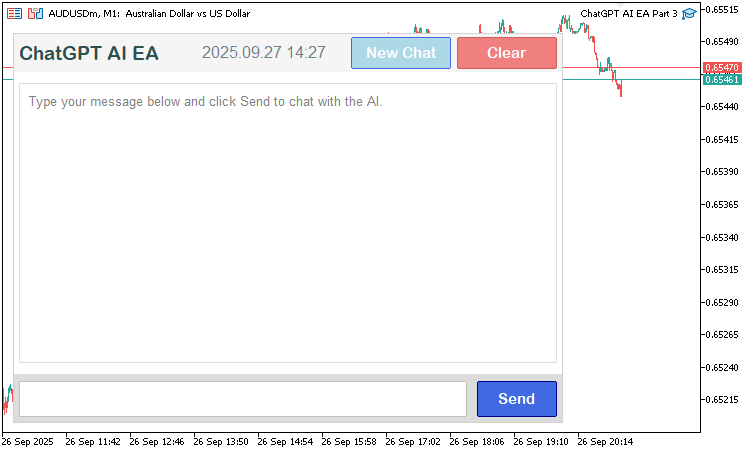
Agora que a interface já contém todos os elementos, podemos passar à atualização da área de exibição com o novo histórico da conversa. Antes disso, porém, precisaremos de algumas funções auxiliares para obter as linhas das mensagens e suas respectivas alturas, garantindo que a conversa permaneça dentro da área de exibição sem ultrapassar seus limites. Também precisaremos tratar as linhas das marcas de tempo que serão incorporadas.
//+------------------------------------------------------------------+
//| Check if string is a timestamp in HH:MM format                   |
//+------------------------------------------------------------------+
bool IsTimestamp(string line) {
   StringTrimLeft(line);                                 //--- Trim left whitespace
   StringTrimRight(line);                                //--- Trim right whitespace
   if (StringLen(line) != 5) return false;               //--- Check length
   if (StringGetCharacter(line, 2) != ':') return false; //--- Check colon
   string hh = StringSubstr(line, 0, 2);                 //--- Extract hours
   string mm = StringSubstr(line, 3, 2);                 //--- Extract minutes
   int h = (int)StringToInteger(hh);                     //--- Convert hours to integer
   int m = (int)StringToInteger(mm);                     //--- Convert minutes to integer
   if (h < 0 || h > 23 || m < 0 || m > 59) return false; //--- Validate time
   return true;                                          //--- Confirm valid timestamp
}

//+------------------------------------------------------------------+
//| Compute lines and height for messages                            |
//+------------------------------------------------------------------+
void ComputeLinesAndHeight(const string &font, const int fontSize, const int timestampFontSize,
                           const int adjustedLineHeight, const int adjustedTimestampHeight,
                           const int messageMargin, const int maxTextWidth,
                           const string &msgRoles[], const string &msgContents[], const string &msgTimestamps[],
                           const int numMessages, int &totalHeight_out, int &totalLines_out,
                           string &allLines_out[], string &lineRoles_out[], int &lineHeights_out[]) {
   ArrayResize(allLines_out, 0);                    //--- Clear lines array
   ArrayResize(lineRoles_out, 0);                   //--- Clear roles array
   ArrayResize(lineHeights_out, 0);                 //--- Clear heights array
   totalLines_out = 0;                              //--- Initialize total lines
   totalHeight_out = 0;                             //--- Initialize total height
   for (int m = 0; m < numMessages; m++) {          //--- Iterate through messages
      string wrappedLines[];                        //--- Declare wrapped lines
      WrapText(msgContents[m], font, fontSize, maxTextWidth, wrappedLines); //--- Wrap message content
      int numLines = ArraySize(wrappedLines);       //--- Get number of lines
      int currSize = ArraySize(allLines_out);       //--- Get current size
      ArrayResize(allLines_out, currSize + numLines + 1); //--- Resize lines array
      ArrayResize(lineRoles_out, currSize + numLines + 1); //--- Resize roles array
      ArrayResize(lineHeights_out, currSize + numLines + 1); //--- Resize heights array
      for (int l = 0; l < numLines; l++) {          //--- Iterate through wrapped lines
         allLines_out[currSize + l] = wrappedLines[l]; //--- Add line
         lineRoles_out[currSize + l] = msgRoles[m]; //--- Add role
         lineHeights_out[currSize + l] = adjustedLineHeight; //--- Set line height
         totalHeight_out += adjustedLineHeight;     //--- Update total height
      }
      allLines_out[currSize + numLines] = msgTimestamps[m]; //--- Add timestamp
      lineRoles_out[currSize + numLines] = msgRoles[m] + "_timestamp"; //--- Add timestamp role
      lineHeights_out[currSize + numLines] = adjustedTimestampHeight; //--- Set timestamp height
      totalHeight_out += adjustedTimestampHeight;   //--- Update total height
      totalLines_out += numLines + 1;               //--- Update total lines
      if (m < numMessages - 1) {                    //--- Check for margin
         totalHeight_out += messageMargin;          //--- Add message margin
      }
   }
}
Aqui, implementamos funções auxiliares para validar marcas de tempo e calcular as propriedades de exibição das mensagens. Na função "IsTimestamp", removemos os espaços em branco das extremidades da string de entrada usando StringTrimLeft e StringTrimRight, verificamos se seu comprimento é exatamente igual a 5 caracteres, confirmamos se há dois-pontos na posição 2 com StringGetCharacter, extraímos as horas e os minutos com StringSubstr, convertemos esses valores em inteiros com StringToInteger e retornamos true se as horas estiverem entre 0 e 23 e os minutos entre 0 e 59. Assim, garantimos uma identificação correta das marcas de tempo no histórico da conversa. Caso você adote outra abordagem, precisará definir suas próprias regras de validação.
Na função "ComputeLinesAndHeight", limpamos os arrays de saída ("allLines_out", "lineRoles_out", "lineHeights_out") com ArrayResize e inicializamos "totalLines_out" e "totalHeight_out" com zero. Para cada mensagem, aplicamos a quebra automática de linha ao conteúdo usando "WrapText", com a fonte, o tamanho de fonte e a largura máxima especificados. Em seguida, redimensionamos os arrays de saída para acomodar as linhas resultantes, além da marca de tempo, atribuindo a cada linha seu texto, seu papel na conversa ("User" ou "AI") e sua altura ("adjustedLineHeight" para o conteúdo e "adjustedTimestampHeight" para as marcas de tempo) em "allLines_out", "lineRoles_out" e "lineHeights_out", respectivamente. Também atualizamos "totalHeight_out" e "totalLines_out". Entre as mensagens, adicionamos uma margem ("messageMargin"), exceto após a última, garantindo uma separação visual adequada. Dessa forma, validamos as marcas de tempo e estruturamos o texto das mensagens para exibição na interface rolável do chat.
Com essas funções, agora podemos atualizar a função responsável pela exibição para analisar o histórico em papéis, conteúdos e marcas de tempo, alinhar as mensagens conforme seu papel na conversa, adicionar margens, tratar a rolagem e o recorte do conteúdo e exibir dinamicamente a barra de rolagem.
//+------------------------------------------------------------------+
//| Update response display with scrolling                           |
//+------------------------------------------------------------------+
void UpdateResponseDisplay() {
   int total = ObjectsTotal(0, 0, -1);              //--- Get total objects
   for (int j = total - 1; j >= 0; j--) {           //--- Iterate through objects
      string name = ObjectName(0, j, 0, -1);        //--- Get object name
      if (StringFind(name, "ChatGPT_ResponseLine_") == 0 ||
          StringFind(name, "ChatGPT_MessageBg_") == 0 ||
          StringFind(name, "ChatGPT_MessageText_") == 0 ||
          StringFind(name, "ChatGPT_Timestamp_") == 0) { //--- Check for message objects
         ObjectDelete(0, name);                     //--- Delete object
      }
   }
   string displayText = conversationHistory;        //--- Get conversation history
   int textX = g_mainX + g_sidePadding + g_textPadding; //--- Calculate text x position
   int textY = g_mainY + g_headerHeight + g_padding + g_textPadding; //--- Calculate text y position
   int fullMaxWidth = g_mainWidth - 2 * g_sidePadding - 2 * g_textPadding; //--- Calculate max text width
   if (displayText == "") {                         //--- Check empty history
      string objName = "ChatGPT_ResponseLine_0";    //--- Set default label name
      createLabel(objName, textX, textY, "Type your message below and click Send to chat with the AI.", clrGray, 10, "Arial", CORNER_LEFT_UPPER, ANCHOR_LEFT_UPPER); //--- Create default label
      g_total_height = 0;                           //--- Reset total height
      g_visible_height = g_displayHeight - 2 * g_textPadding; //--- Set visible height
      if (scroll_visible) {                         //--- Check scrollbar visible
         DeleteScrollbar();                         //--- Delete scrollbar
         scroll_visible = false;                    //--- Reset scrollbar visibility
      }
      ChartRedraw();                                //--- Redraw chart
      return;                                       //--- Exit function
   }
   string parts[];                                  //--- Declare parts array
   int numParts = StringSplit(displayText, '\n', parts); //--- Split history into parts
   string msgRoles[];                               //--- Declare roles array
   string msgContents[];                            //--- Declare contents array
   string msgTimestamps[];                          //--- Declare timestamps array
   string currentRole = "";                         //--- Initialize current role
   string currentContent = "";                      //--- Initialize current content
   string currentTimestamp = "";                    //--- Initialize current timestamp
   for (int p = 0; p < numParts; p++) {             //--- Iterate through parts
      string line = parts[p];                       //--- Get current line
      StringTrimLeft(line);                         //--- Trim left whitespace
      StringTrimRight(line);                        //--- Trim right whitespace
      if (StringLen(line) == 0) {                   //--- Check empty line
         if (currentRole != "") currentContent += "\n"; //--- Append newline
         continue;                                  //--- Skip to next
      }
      if (StringFind(line, "You: ") == 0) {         //--- Check user message
         if (currentRole != "") {                   //--- Check existing message
            int size = ArraySize(msgRoles);         //--- Get current size
            ArrayResize(msgRoles, size + 1);        //--- Resize roles array
            ArrayResize(msgContents, size + 1);     //--- Resize contents array
            ArrayResize(msgTimestamps, size + 1);   //--- Resize timestamps array
            msgRoles[size] = currentRole;           //--- Add role
            msgContents[size] = currentContent;     //--- Add content
            msgTimestamps[size] = currentTimestamp; //--- Add timestamp
         }
         currentRole = "User";                      //--- Set role to User
         currentContent = StringSubstr(line, 5);    //--- Extract user content
         currentTimestamp = "";                     //--- Reset timestamp
         continue;                                  //--- Skip to next
      } else if (StringFind(line, "AI: ") == 0) {   //--- Check AI message
         if (currentRole != "") {                   //--- Check existing message
            int size = ArraySize(msgRoles);         //--- Get current size
            ArrayResize(msgRoles, size + 1);        //--- Resize roles array
            ArrayResize(msgContents, size + 1);     //--- Resize contents array
            ArrayResize(msgTimestamps, size + 1);   //--- Resize timestamps array
            msgRoles[size] = currentRole;           //--- Add role
            msgContents[size] = currentContent;     //--- Add content
            msgTimestamps[size] = currentTimestamp; //--- Add timestamp
         }
         currentRole = "AI";                        //--- Set role to AI
         currentContent = StringSubstr(line, 4);    //--- Extract AI content
         currentTimestamp = "";                     //--- Reset timestamp
         continue;                                  //--- Skip to next
      } else if (IsTimestamp(line)) {               //--- Check timestamp
         if (currentRole != "") {                   //--- Check existing message
            currentTimestamp = line;                //--- Set timestamp
            int size = ArraySize(msgRoles);         //--- Get current size
            ArrayResize(msgRoles, size + 1);        //--- Resize roles array
            ArrayResize(msgContents, size + 1);     //--- Resize contents array
            ArrayResize(msgTimestamps, size + 1);   //--- Resize timestamps array
            msgRoles[size] = currentRole;           //--- Add role
            msgContents[size] = currentContent;     //--- Add content
            msgTimestamps[size] = currentTimestamp; //--- Add timestamp
            currentRole = "";                       //--- Reset role
         }
      } else {                                      //--- Append to content
         if (currentRole != "") {                   //--- Check active message
            currentContent += "\n" + line;          //--- Append line
         }
      }
   }
   if (currentRole != "") {                         //--- Check final message
      int size = ArraySize(msgRoles);               //--- Get current size
      ArrayResize(msgRoles, size + 1);              //--- Resize roles array
      ArrayResize(msgContents, size + 1);           //--- Resize contents array
      ArrayResize(msgTimestamps, size + 1);         //--- Resize timestamps array
      msgRoles[size] = currentRole;                 //--- Add role
      msgContents[size] = currentContent;           //--- Add content
      msgTimestamps[size] = currentTimestamp;       //--- Add timestamp
   }
   int numMessages = ArraySize(msgRoles);           //--- Get number of messages
   if (numMessages == 0) {                          //--- Check no messages
      string objName = "ChatGPT_ResponseLine_0";    //--- Set default label name
      createLabel(objName, textX, textY, "Type your message below and click Send to chat with the AI.", clrGray, 10, "Arial", CORNER_LEFT_UPPER, ANCHOR_LEFT_UPPER); //--- Create default label
      g_total_height = 0;                           //--- Reset total height
      g_visible_height = g_displayHeight - 2 * g_textPadding; //--- Set visible height
      if (scroll_visible) {                         //--- Check scrollbar visible
         DeleteScrollbar();                         //--- Delete scrollbar
         scroll_visible = false;                    //--- Reset scrollbar visibility
      }
      ChartRedraw();                                //--- Redraw chart
      return;                                       //--- Exit function
   }
   string font = "Arial";                           //--- Set font
   int fontSize = 10;                               //--- Set font size
   int timestampFontSize = 8;                       //--- Set timestamp font size
   int lineHeight = TextGetHeight("A", font, fontSize); //--- Get line height
   int timestampHeight = TextGetHeight("A", font, timestampFontSize); //--- Get timestamp height
   int adjustedLineHeight = lineHeight + g_lineSpacing; //--- Calculate adjusted line height
   int adjustedTimestampHeight = timestampHeight + g_lineSpacing; //--- Calculate adjusted timestamp height
   int messageMargin = 12;                          //--- Set message margin
   int visibleHeight = g_displayHeight - 2 * g_textPadding; //--- Calculate visible height
   g_visible_height = visibleHeight;                //--- Set visible height
   string tentativeAllLines[];                      //--- Declare tentative lines
   string tentativeLineRoles[];                     //--- Declare tentative roles
   int tentativeLineHeights[];                      //--- Declare tentative heights
   int tentativeTotalHeight, tentativeTotalLines;   //--- Declare tentative totals
   ComputeLinesAndHeight(font, fontSize, timestampFontSize, adjustedLineHeight, adjustedTimestampHeight,
                         messageMargin, fullMaxWidth, msgRoles, msgContents, msgTimestamps, numMessages,
                         tentativeTotalHeight, tentativeTotalLines, tentativeAllLines, tentativeLineRoles, tentativeLineHeights); //--- Compute tentative lines
   bool need_scroll = tentativeTotalHeight > visibleHeight; //--- Check if scrolling needed
   bool should_show_scrollbar = false;              //--- Initialize scrollbar visibility
   int reserved_width = 0;                          //--- Initialize reserved width
   if (ScrollbarMode != SCROLL_WHEEL_ONLY) {        //--- Check scrollbar mode
      should_show_scrollbar = need_scroll && (ScrollbarMode == SCROLL_DYNAMIC_ALWAYS || (ScrollbarMode == SCROLL_DYNAMIC_HOVER && mouse_in_display)); //--- Determine scrollbar visibility
      if (should_show_scrollbar) {                  //--- Check if scrollbar needed
         reserved_width = 16;                       //--- Reserve scrollbar width
      }
   }
   string allLines[];                               //--- Declare final lines
   string lineRoles[];                              //--- Declare final roles
   int lineHeights[];                               //--- Declare final heights
   int totalHeight, totalLines;                     //--- Declare final totals
   int maxTextWidth = fullMaxWidth - reserved_width; //--- Calculate max text width
   if (reserved_width > 0) {                        //--- Check if scrollbar reserved
      ComputeLinesAndHeight(font, fontSize, timestampFontSize, adjustedLineHeight, adjustedTimestampHeight,
                            messageMargin, maxTextWidth, msgRoles, msgContents, msgTimestamps, numMessages,
                            totalHeight, totalLines, allLines, lineRoles, lineHeights); //--- Compute lines with reduced width
   } else {                                         //--- Use tentative values
      totalHeight = tentativeTotalHeight;           //--- Set total height
      totalLines = tentativeTotalLines;             //--- Set total lines
      ArrayCopy(allLines, tentativeAllLines);       //--- Copy lines
      ArrayCopy(lineRoles, tentativeLineRoles);     //--- Copy roles
      ArrayCopy(lineHeights, tentativeLineHeights); //--- Copy heights
   }
   FileWriteString(logFileHandle, "UpdateResponseDisplay: totalHeight=" + IntegerToString(totalHeight) + ", visibleHeight=" + IntegerToString(visibleHeight) + ", totalLines=" + IntegerToString(totalLines) + ", reserved_width=" + IntegerToString(reserved_width) + "\n"); //--- Log display update
   g_total_height = totalHeight;                    //--- Set total height
   bool prev_scroll_visible = scroll_visible;       //--- Store previous scrollbar state
   scroll_visible = should_show_scrollbar;          //--- Update scrollbar visibility
   if (scroll_visible != prev_scroll_visible) {     //--- Check scrollbar state change
      if (scroll_visible) {                         //--- Show scrollbar
         CreateScrollbar();                         //--- Create scrollbar
      } else {                                      //--- Hide scrollbar
         DeleteScrollbar();                         //--- Delete scrollbar
      }
   }
   int max_scroll = MathMax(0, totalHeight - visibleHeight); //--- Calculate max scroll
   if (scroll_pos > max_scroll) scroll_pos = max_scroll; //--- Clamp scroll position
   if (scroll_pos < 0) scroll_pos = 0;              //--- Ensure non-negative scroll
   if (totalHeight > visibleHeight && scroll_pos == prev_scroll_pos && prev_scroll_pos == -1) { //--- Check initial scroll
      scroll_pos = max_scroll;                      //--- Set to bottom
   }
   if (scroll_visible) {                            //--- Update scrollbar
      slider_height = CalculateSliderHeight();      //--- Calculate slider height
      ObjectSetInteger(0, SCROLL_SLIDER, OBJPROP_YSIZE, slider_height); //--- Set slider height
      UpdateSliderPosition();                       //--- Update slider position
      UpdateButtonColors();                         //--- Update button colors
   }
   int currentY = textY - scroll_pos;               //--- Calculate current y position
   int endY = textY + visibleHeight;                //--- Calculate end y position
   int startLineIndex = 0;                          //--- Initialize start line index
   int currentHeight = 0;                           //--- Initialize current height
   for (int line = 0; line < totalLines; line++) {  //--- Find start line
      if (currentHeight >= scroll_pos) {            //--- Check if at scroll position
         startLineIndex = line;                     //--- Set start line
         currentY = textY + (currentHeight - scroll_pos); //--- Set current y
         break;                                     //--- Exit loop
      }
      currentHeight += lineHeights[line];           //--- Add line height
      if (line < totalLines - 1 && StringFind(lineRoles[line], "_timestamp") >= 0 && StringFind(lineRoles[line + 1], "_timestamp") < 0) { //--- Check message gap
         currentHeight += messageMargin;            //--- Add message margin
      }
   }
   int numVisibleLines = 0;                         //--- Initialize visible lines
   int visibleHeightUsed = 0;                       //--- Initialize used height
   for (int line = startLineIndex; line < totalLines; line++) { //--- Count visible lines
      int lineHeight = lineHeights[line];           //--- Get line height
      if (visibleHeightUsed + lineHeight > visibleHeight) break; //--- Check height limit
      visibleHeightUsed += lineHeight;              //--- Add line height
      numVisibleLines++;                            //--- Increment visible lines
      if (line < totalLines - 1 && StringFind(lineRoles[line], "_timestamp") >= 0 && StringFind(lineRoles[line + 1], "_timestamp") < 0) { //--- Check message gap
         if (visibleHeightUsed + messageMargin > visibleHeight) break; //--- Check margin limit
         visibleHeightUsed += messageMargin;        //--- Add message margin
      }
   }
   FileWriteString(logFileHandle, "Visible lines: startLineIndex=" + IntegerToString(startLineIndex) + ", numVisibleLines=" + IntegerToString(numVisibleLines) + ", scroll_pos=" + IntegerToString(scroll_pos) + ", currentY=" + IntegerToString(currentY) + "\n"); //--- Log visible lines
   int leftX = g_mainX + g_sidePadding + g_textPadding; //--- Set left text x
   int rightX = g_mainX + g_mainWidth - g_sidePadding - g_textPadding - reserved_width; //--- Set right text x
   color userColor = clrGray;                       //--- Set user text color
   color aiColor = clrBlue;                         //--- Set AI text color
   color timestampColor = clrDarkGray;              //--- Set timestamp color
   for (int li = 0; li < numVisibleLines; li++) {   //--- Display visible lines
      int lineIndex = startLineIndex + li;          //--- Calculate line index
      if (lineIndex >= totalLines) break;           //--- Check valid index
      string line = allLines[lineIndex];            //--- Get line text
      string role = lineRoles[lineIndex];           //--- Get line role
      bool isTimestamp = StringFind(role, "_timestamp") >= 0; //--- Check if timestamp
      int currFontSize = isTimestamp ? timestampFontSize : fontSize; //--- Set font size
      color textCol = isTimestamp ? timestampColor : (StringFind(role, "User") >= 0 ? userColor : aiColor); //--- Set text color
      string display_line = line;                   //--- Set display line
      if (line == " ") {                            //--- Check empty line
         display_line = " ";                        //--- Set to space
         textCol = clrWhite;                        //--- Set to white
      }
      int textX_pos = (StringFind(role, "User") >= 0) ? rightX : leftX; //--- Set text x position
      ENUM_ANCHOR_POINT textAnchor = (StringFind(role, "User") >= 0) ? ANCHOR_RIGHT_UPPER : ANCHOR_LEFT_UPPER; //--- Set text anchor
      string lineName = "ChatGPT_MessageText_" + IntegerToString(lineIndex); //--- Generate line name
      if (currentY >= textY && currentY < endY) {   //--- Check if visible
         createLabel(lineName, textX_pos, currentY, display_line, textCol, currFontSize, font, CORNER_LEFT_UPPER, textAnchor); //--- Create label
      }
      currentY += lineHeights[lineIndex];           //--- Increment y position
      if (lineIndex < totalLines - 1 && StringFind(lineRoles[lineIndex], "_timestamp") >= 0 && StringFind(lineRoles[lineIndex + 1], "_timestamp") < 0) { //--- Check message gap
         currentY += messageMargin;                 //--- Add message margin
      }
   }
   ChartRedraw();                                   //--- Redraw chart
}
Na função "UpdateResponseDisplay", primeiro removemos os objetos existentes relacionados às mensagens ("ChatGPT_ResponseLine_", "ChatGPT_MessageBg_", "ChatGPT_MessageText_", "ChatGPT_Timestamp_") usando ObjectsTotal e ObjectDelete, atualizando assim a área de exibição. Se o histórico da conversa ("conversationHistory") estiver vazio, criamos um rótulo padrão com "createLabel", solicitando que o usuário digite uma mensagem, redefinimos "g_total_height" para 0, definimos "g_visible_height" como a altura da área de exibição menos o padding, removemos a barra de rolagem com "DeleteScrollbar" caso ela esteja visível e redesenhamos o gráfico com a função ChartRedraw. Caso contrário, dividimos o histórico em partes usando StringSplit com as quebras de linha e fazemos o parsing das linhas para preencher "msgRoles", "msgContents" e "msgTimestamps", identificando "You: ", "AI: " e as marcas de tempo com "IsTimestamp", acumulando o conteúdo ao longo das linhas e armazenando as mensagens concluídas.
Calculamos o posicionamento do texto ("textX", "textY") e a largura máxima ("fullMaxWidth"), definimos os tamanhos de fonte, 10 para as mensagens e 8 para as marcas de tempo, e calculamos a altura das linhas com "TextGetHeight" somada a "g_lineSpacing". Usando "ComputeLinesAndHeight", geramos arrays preliminares de linhas e alturas, verificamos se a rolagem é necessária e determinamos a visibilidade da barra de rolagem com base em "ScrollbarMode" e "mouse_in_display", reservando 16 pixels para a barra quando ela estiver visível. Se necessário, recalculamos as linhas com a largura ajustada, atualizamos "g_total_height", controlamos a exibição da barra com "CreateScrollbar" ou "DeleteScrollbar", limitamos "scroll_pos" ao intervalo permitido por "max_scroll" e o posicionamos na parte inferior quando chegam novas mensagens.
Em seguida, calculamos a linha inicial e a posição vertical com base em "scroll_pos", determinamos quais linhas cabem dentro de "g_visible_height" e renderizamos cada uma com "createLabel". As mensagens da IA são alinhadas à esquerda e exibidas em "clrBlue", enquanto as mensagens do usuário são alinhadas à direita e exibidas em "clrGray"; as marcas de tempo usam "clrDarkGray". Também aplicamos uma margem de 12 pixels entre as mensagens. Por fim, registramos os detalhes da exibição com FileWriteString e redesenhamos o gráfico. Isso garante que a área de exibição seja preenchida com todo o histórico da conversa disponível. Agora precisamos garantir que, ao pressionar o botão de envio, o prompt seja realmente enviado. Para facilitar o gerenciamento nas próximas versões, vamos dividir a função existente em várias funções menores.
//+------------------------------------------------------------------+
//| Build messages array from history                                |
//+------------------------------------------------------------------+
string BuildMessagesFromHistory(string newPrompt) {
   string messages = "[";                          //--- Start JSON array
   string temp = conversationHistory;              //--- Copy conversation history
   while (StringLen(temp) > 0) {                   //--- Process history
      int you_pos = StringFind(temp, "You: ");     //--- Find user message
      if (you_pos != 0) break;                     //--- Exit if no user message
      temp = StringSubstr(temp, 5);                //--- Extract after "You: "
      int end_user = StringFind(temp, "\n");       //--- Find end of user message
      string user_content = StringSubstr(temp, 0, end_user); //--- Get user content
      temp = StringSubstr(temp, end_user + 1);     //--- Move past user message
      int end_ts1 = StringFind(temp, "\n");        //--- Find end of timestamp
      temp = StringSubstr(temp, end_ts1 + 1);      //--- Move past timestamp
      int ai_pos = StringFind(temp, "AI: ");       //--- Find AI message
      if (ai_pos != 0) break;                      //--- Exit if no AI message
      temp = StringSubstr(temp, 4);                //--- Extract after "AI: "
      int end_ai = StringFind(temp, "\n");         //--- Find end of AI message
      string ai_content = StringSubstr(temp, 0, end_ai); //--- Get AI content
      temp = StringSubstr(temp, end_ai + 1);       //--- Move past AI message
      int end_ts2 = StringFind(temp, "\n\n");      //--- Find end of conversation block
      temp = StringSubstr(temp, end_ts2 + 2);      //--- Move past block
      messages += "{\"role\":\"user\",\"content\":\"" + JsonEscape(user_content) + "\"},"; //--- Add user message
      messages += "{\"role\":\"assistant\",\"content\":\"" + JsonEscape(ai_content) + "\"},"; //--- Add AI message
   }
   messages += "{\"role\":\"user\",\"content\":\"" + JsonEscape(newPrompt) + "\"}]"; //--- Add new prompt
   return messages;                                //--- Return JSON messages
}

//+------------------------------------------------------------------+
//| Get ChatGPT response via API                                     |
//+------------------------------------------------------------------+
string GetChatGPTResponse(string prompt) {
   string messages = BuildMessagesFromHistory(prompt); //--- Build JSON messages
   string requestData = "{\"model\":\"" + OpenAI_Model + "\",\"messages\":" + messages + ",\"max_tokens\":" + IntegerToString(MaxResponseLength) + "}"; //--- Create request JSON
   FileWriteString(logFileHandle, "Request Data: " + requestData + "\n"); //--- Log request data
   char postData[];                                    //--- Declare post data array
   int dataLen = StringToCharArray(requestData, postData, 0, WHOLE_ARRAY, CP_UTF8); //--- Convert request to char array
   ArrayResize(postData, dataLen - 1);                 //--- Remove null terminator
   FileWriteString(logFileHandle, "Raw Post Data (Hex): " + LogCharArray(postData) + "\n"); //--- Log raw data
   string headers = "Authorization: Bearer " + OpenAI_API_Key + "\r\n" +
                    "Content-Type: application/json; charset=UTF-8\r\n" +
                    "Content-Length: " + IntegerToString(dataLen - 1) + "\r\n\r\n"; //--- Set request headers
   FileWriteString(logFileHandle, "Request Headers: " + headers + "\n"); //--- Log headers
   char result[];                                     //--- Declare result array
   string resultHeaders;                              //--- Declare result headers
   int res = WebRequest("POST", OpenAI_Endpoint, headers, 10000, postData, result, resultHeaders); //--- Send API request
   if (res != 200) {                                  //--- Check request failure
      string response = CharArrayToString(result, 0, WHOLE_ARRAY, CP_UTF8); //--- Convert result to string
      string errMsg = "API request failed: HTTP Code " + IntegerToString(res) + ", Error: " + IntegerToString(GetLastError()) + ", Response: " + response; //--- Create error message
      Print(errMsg);                                  //--- Print error
      FileWriteString(logFileHandle, errMsg + "\n");  //--- Log error
      FileWriteString(logFileHandle, "Raw Response Data (Hex): " + LogCharArray(result) + "\n"); //--- Log raw response
      return errMsg;                                  //--- Return error message
   }
   string response = CharArrayToString(result, 0, WHOLE_ARRAY, CP_UTF8); //--- Convert response to string
   FileWriteString(logFileHandle, "API Response: " + response + "\n"); //--- Log response
   JsonValue jsonObject;                              //--- Declare JSON object
   int index = 0;                                     //--- Initialize parse index
   char charArray[];                                  //--- Declare char array
   int arrayLength = StringToCharArray(response, charArray, 0, WHOLE_ARRAY, CP_UTF8); //--- Convert response to char array
   if (!jsonObject.DeserializeFromArray(charArray, arrayLength, index)) { //--- Parse JSON
      string errMsg = "Error: Failed to parse API response JSON: " + response; //--- Create error message
      Print(errMsg);                                  //--- Print error
      FileWriteString(logFileHandle, errMsg + "\n");  //--- Log error
      return errMsg;                                  //--- Return error message
   }
   JsonValue *error = jsonObject.FindChildByKey("error"); //--- Check for error
   if (error != NULL) {                               //--- Check error exists
      string errMsg = "API Error: " + error["message"].ToString(); //--- Get error message
      Print(errMsg);                                  //--- Print error
      FileWriteString(logFileHandle, errMsg + "\n");  //--- Log error
      return errMsg;                                  //--- Return error message
   }
   string content = jsonObject["choices"][0]["message"]["content"].ToString(); //--- Extract response content
   if (StringLen(content) > 0) {                      //--- Check non-empty content
      StringReplace(content, "\\n", "\n");            //--- Replace escaped newlines
      StringTrimLeft(content);                        //--- Trim left whitespace
      StringTrimRight(content);                       //--- Trim right whitespace
      return content;                                 //--- Return content
   }
   string errMsg = "Error: No content in API response: " + response; //--- Create error message
   Print(errMsg);                                     //--- Print error
   FileWriteString(logFileHandle, errMsg + "\n");     //--- Log error
   return errMsg;                                     //--- Return error message
}

//+------------------------------------------------------------------+
//| Submit user message to ChatGPT                                   |
//+------------------------------------------------------------------+
void SubmitMessage() {
   string prompt = (string)ObjectGetString(0, "ChatGPT_InputEdit", OBJPROP_TEXT); //--- Get user input
   if (StringLen(prompt) > 0) {                      //--- Check non-empty input
      string response = GetChatGPTResponse(prompt);  //--- Get AI response
      Print("User: " + prompt);                      //--- Log user prompt
      Print("AI: " + response);                      //--- Log AI response
      string timestamp = TimeToString(TimeCurrent(), TIME_MINUTES); //--- Get current timestamp
      conversationHistory += "You: " + prompt + "\n" + timestamp + "\nAI: " + response + "\n" + timestamp + "\n\n"; //--- Append to history
      ObjectSetString(0, "ChatGPT_InputEdit", OBJPROP_TEXT, ""); //--- Clear input field
      UpdateResponseDisplay();                       //--- Update display with new content
      scroll_pos = MathMax(0, g_total_height - g_visible_height); //--- Scroll to bottom
      UpdateResponseDisplay();                       //--- Redraw display
      if (scroll_visible) {                          //--- Check scrollbar visible
         UpdateSliderPosition();                     //--- Update slider position
         UpdateButtonColors();                       //--- Update button colors
      }
      FileWriteString(logFileHandle, "Prompt: " + prompt + " | Response: " + response + " | Time: " + timestamp + "\n"); //--- Log interaction
      ChartRedraw();                                 //--- Redraw chart
   }
}
Aqui, implementamos as principais funções responsáveis pela interação com a API e pelo tratamento das mensagens. Primeiro, definimos a função "BuildMessagesFromHistory", na qual construímos um array JSON para as requisições à API analisando "conversationHistory". Percorremos o histórico para extrair as mensagens do usuário ("You: ") e da IA ("AI: ") com StringFind e StringSubstr, ignorando marcas de tempo e linhas vazias. Em seguida, usamos "JsonEscape" para formatar o conteúdo em objetos JSON com os papéis correspondentes ("user" ou "assistant") e adicionamos o novo prompt do usuário como a última mensagem. Como resultado, obtemos um array corretamente estruturado para conversas de múltiplos turnos.
Na função "GetChatGPTResponse", criamos uma requisição JSON usando "BuildMessagesFromHistory", "OpenAI_Model" e "MaxResponseLength". Em seguida, convertemos a requisição em um array de char com StringToCharArray, configuramos os cabeçalhos com "OpenAI_API_Key" e enviamos uma requisição POST para "OpenAI_Endpoint" usando a função WebRequest. Tratamos a resposta verificando erros HTTP, ou seja, códigos de status diferentes de 200, registramos os dados brutos e os erros em "logFileHandle" com FileWriteString, fazemos o parsing da resposta JSON com "JsonValue::DeserializeFromArray", verificamos possíveis erros retornados pela API e extraímos o conteúdo de "choices[0][message][content]". Por fim, restauramos as quebras de linha escapadas e removemos os espaços em branco das extremidades antes de retornar o conteúdo, da mesma forma que fizemos na versão anterior.
Na função "SubmitMessage", obtemos a entrada do usuário em "ChatGPT_InputEdit" com ObjectGetString e, caso ela não esteja vazia, chamamos "GetChatGPTResponse". Registramos o prompt e a resposta com Print, adicionamos ambos a "conversationHistory" com marcas de tempo obtidas por TimeCurrent, limpamos o campo de entrada com ObjectSetString e atualizamos a área de exibição com "UpdateResponseDisplay". Em seguida, rolamos a área de exibição até a parte inferior ajustando "scroll_pos" e, se necessário, atualizamos os elementos visuais da barra de rolagem, além de registrar a interação. Com isso, temos um sistema capaz de gerenciar conversas com a IA, realizar a comunicação com a API e atualizar dinamicamente a UI do chat. Podemos chamar essa função ao clicar no botão de envio da mensagem, como mostrado a seguir.
//+------------------------------------------------------------------+
//| Chart event handler for ChatGPT UI                               |
//+------------------------------------------------------------------+
void OnChartEvent(const int id, const long &lparam, const double &dparam, const string &sparam) {
   if (id == CHARTEVENT_OBJECT_CLICK && sparam == "ChatGPT_SubmitButton") { //--- Handle submit button click
      SubmitMessage();                              //--- Submit user message
   }
}
Para tratar as interações com o gráfico, usamos o manipulador de eventos OnChartEvent para tratar os eventos da interface. Quando ocorre um clique em nosso botão, chamamos a função responsável pelo envio do prompt. Veja a seguir o resultado.
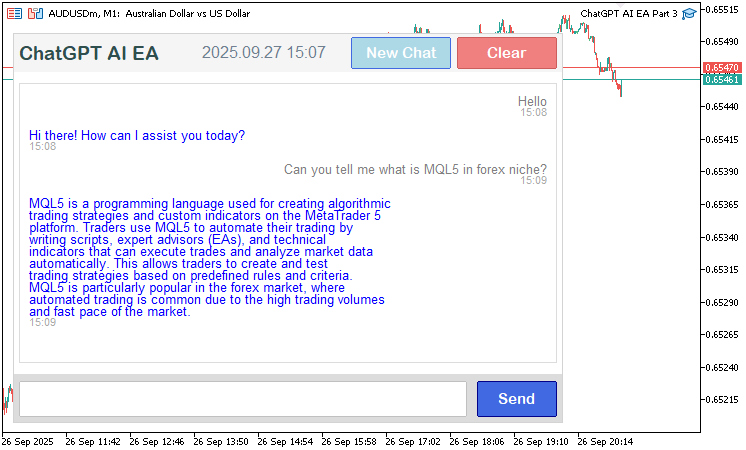
Na imagem, podemos observar que a conversa agora pode se estender por mais mensagens e apresenta uma disposição mais intuitiva: as mensagens do usuário aparecem à direita e as da IA à esquerda, todas acompanhadas de marcas de tempo. Agora falta garantir a interatividade da área de exibição, permitindo arrastar o controle da barra de rolagem e tratar os estados de hover dos botões adicionados. A seguir está a lógica completa utilizada para implementar esse comportamento.
//+------------------------------------------------------------------+
//| Chart event handler for ChatGPT UI                               |
//+------------------------------------------------------------------+
void OnChartEvent(const int id, const long &lparam, const double &dparam, const string &sparam) {
   int displayX = g_mainX + g_sidePadding;          //--- Calculate display x position
   int displayY = g_mainY + g_headerHeight + g_padding; //--- Calculate display y position
   int displayW = g_mainWidth - 2 * g_sidePadding;  //--- Calculate display width
   int displayH = g_displayHeight;                  //--- Set display height
   int clearX = g_mainX + g_mainWidth - 100 - g_sidePadding; //--- Calculate clear button x
   int clearY = g_mainY + 4;                        //--- Set clear button y
   int clearW = 100;                                //--- Set clear button width
   int clearH = g_headerHeight - 8;                 //--- Calculate clear button height
   int new_chat_x = clearX - 100 - g_sidePadding;   //--- Calculate new chat button x
   int new_chat_w = 100;                            //--- Set new chat button width
   int new_chat_h = clearH;                         //--- Set new chat button height
   int sendX = g_mainX + (g_mainWidth - 448 - 10 - 80) / 2 + 448 + 10; //--- Calculate send button x
   int sendY = g_mainY + g_headerHeight + g_padding + g_displayHeight + g_padding; //--- Calculate send button y
   int sendW = 80;                                  //--- Set send button width
   int sendH = g_footerHeight;                      //--- Set send button height
   bool need_scroll = g_total_height > g_visible_height; //--- Check if scrolling needed
   if (id == CHARTEVENT_OBJECT_CLICK && sparam == "ChatGPT_SubmitButton") { //--- Handle submit button click
      SubmitMessage();                              //--- Submit user message
   } else if (id == CHARTEVENT_OBJECT_CLICK && sparam == "ChatGPT_ClearButton") { //--- Handle clear button click
      conversationHistory = "";                     //--- Clear conversation history
      scroll_pos = 0;                               //--- Reset scroll position
      prev_scroll_pos = -1;                         //--- Reset previous scroll position
      UpdateResponseDisplay();                      //--- Update response display
      ObjectSetString(0, "ChatGPT_InputEdit", OBJPROP_TEXT, ""); //--- Clear input field
      ChartRedraw();                                //--- Redraw chart
   } else if (id == CHARTEVENT_OBJECT_CLICK && sparam == "ChatGPT_NewChatButton") { //--- Handle new chat button click
      conversationHistory = "";                     //--- Clear conversation history
      scroll_pos = 0;                               //--- Reset scroll position
      prev_scroll_pos = -1;                         //--- Reset previous scroll position
      UpdateResponseDisplay();                      //--- Update response display
      ObjectSetString(0, "ChatGPT_InputEdit", OBJPROP_TEXT, ""); //--- Clear input field
      ChartRedraw();                                //--- Redraw chart
   } else if (id == CHARTEVENT_OBJECT_CLICK && (sparam == SCROLL_UP_REC || sparam == SCROLL_UP_LABEL)) { //--- Handle scroll up click
      ScrollUp();                                   //--- Scroll up
   } else if (id == CHARTEVENT_OBJECT_CLICK && (sparam == SCROLL_DOWN_REC || sparam == SCROLL_DOWN_LABEL)) { //--- Handle scroll down click
      ScrollDown();                                 //--- Scroll down
   } else if (id == CHARTEVENT_MOUSE_MOVE) {        //--- Handle mouse move events
      int mouseX = (int)lparam;                     //--- Get mouse x coordinate
      int mouseY = (int)dparam;                     //--- Get mouse y coordinate
      bool isOverSend = (mouseX >= sendX && mouseX <= sendX + sendW && mouseY >= sendY && mouseY <= sendY + sendH); //--- Check send button hover
      if (isOverSend && !button_hover) {            //--- Check send button hover start
         ObjectSetInteger(0, "ChatGPT_SubmitButton", OBJPROP_BGCOLOR, button_darker_bg); //--- Set hover background
         button_hover = true;                       //--- Set hover flag
         ChartRedraw();                             //--- Redraw chart
      } else if (!isOverSend && button_hover) {     //--- Check send button hover end
         ObjectSetInteger(0, "ChatGPT_SubmitButton", OBJPROP_BGCOLOR, button_original_bg); //--- Reset background
         button_hover = false;                      //--- Reset hover flag
         ChartRedraw();                             //--- Redraw chart
      }
      bool isOverClear = (mouseX >= clearX && mouseX <= clearX + clearW && mouseY >= clearY && mouseY <= clearY + clearH); //--- Check clear button hover
      if (isOverClear && !clear_hover) {            //--- Check clear button hover start
         ObjectSetInteger(0, "ChatGPT_ClearButton", OBJPROP_BGCOLOR, clear_darker_bg); //--- Set hover background
         clear_hover = true;                        //--- Set hover flag
         ChartRedraw();                             //--- Redraw chart
      } else if (!isOverClear && clear_hover) {     //--- Check clear button hover end
         ObjectSetInteger(0, "ChatGPT_ClearButton", OBJPROP_BGCOLOR, clear_original_bg); //--- Reset background
         clear_hover = false;                       //--- Reset hover flag
         ChartRedraw();                             //--- Redraw chart
      }
      bool isOverNewChat = (mouseX >= new_chat_x && mouseX <= new_chat_x + new_chat_w && mouseY >= clearY && mouseY <= clearY + new_chat_h); //--- Check new chat button hover
      if (isOverNewChat && !new_chat_hover) {       //--- Check new chat button hover start
         ObjectSetInteger(0, "ChatGPT_NewChatButton", OBJPROP_BGCOLOR, new_chat_darker_bg); //--- Set hover background
         new_chat_hover = true;                     //--- Set hover flag
         ChartRedraw();                             //--- Redraw chart
      } else if (!isOverNewChat && new_chat_hover) { //--- Check new chat button hover end
         ObjectSetInteger(0, "ChatGPT_NewChatButton", OBJPROP_BGCOLOR, new_chat_original_bg); //--- Reset background
         new_chat_hover = false;                    //--- Reset hover flag
         ChartRedraw();                             //--- Redraw chart
      }
      bool is_in = (mouseX >= displayX && mouseX <= displayX + displayW &&
                    mouseY >= displayY && mouseY <= displayY + displayH); //--- Check if mouse in display
      if (is_in != mouse_in_display) {              //--- Check display hover change
         mouse_in_display = is_in;                  //--- Update display hover status
         ChartSetInteger(0, CHART_MOUSE_SCROLL, !(mouse_in_display && need_scroll)); //--- Update chart scroll
         if (ScrollbarMode == SCROLL_DYNAMIC_HOVER) { //--- Check dynamic hover mode
            UpdateResponseDisplay();                //--- Update response display
         }
      }
      static int prevMouseState = 0;                //--- Store previous mouse state
      int MouseState = (int)sparam;                 //--- Get current mouse state
      if (prevMouseState == 0 && MouseState == 1 && scroll_visible) { //--- Check slider drag start
         int scrollbar_x = displayX + displayW - 16; //--- Calculate scrollbar x
         int xd_slider = (int)ObjectGetInteger(0, SCROLL_SLIDER, OBJPROP_XDISTANCE); //--- Get slider x
         int yd_slider = (int)ObjectGetInteger(0, SCROLL_SLIDER, OBJPROP_YDISTANCE); //--- Get slider y
         int xs_slider = (int)ObjectGetInteger(0, SCROLL_SLIDER, OBJPROP_XSIZE); //--- Get slider width
         int ys_slider = (int)ObjectGetInteger(0, SCROLL_SLIDER, OBJPROP_YSIZE); //--- Get slider height
         if (mouseX >= xd_slider && mouseX <= xd_slider + xs_slider &&
             mouseY >= yd_slider && mouseY <= yd_slider + ys_slider) { //--- Check slider click
            movingStateSlider = true;              //--- Set drag state
            mlbDownX_Slider = mouseX;              //--- Store mouse x
            mlbDownY_Slider = mouseY;              //--- Store mouse y
            mlbDown_YD_Slider = yd_slider;         //--- Store slider y
            ObjectSetInteger(0, SCROLL_SLIDER, OBJPROP_BGCOLOR, clrDimGray); //--- Set drag color
            ObjectSetInteger(0, SCROLL_SLIDER, OBJPROP_YSIZE, slider_height); //--- Set slider height
            ChartSetInteger(0, CHART_MOUSE_SCROLL, false); //--- Disable chart scroll
            FileWriteString(logFileHandle, "Slider drag started: x=" + IntegerToString(mouseX) + ", y=" + IntegerToString(mouseY) + "\n"); //--- Log drag start
         }
      }
      if (movingStateSlider) {                     //--- Handle slider drag
         int delta_y = mouseY - mlbDownY_Slider;   //--- Calculate y displacement
         int new_y = mlbDown_YD_Slider + delta_y;  //--- Calculate new y position
         int scroll_area_y_min = (g_mainY + g_headerHeight + g_padding) + 16; //--- Set min slider y
         int scroll_area_y_max = (g_mainY + g_headerHeight + g_padding + g_displayHeight - 16 - slider_height); //--- Set max slider y
         new_y = MathMax(scroll_area_y_min, MathMin(new_y, scroll_area_y_max)); //--- Clamp y position
         ObjectSetInteger(0, SCROLL_SLIDER, OBJPROP_YDISTANCE, new_y); //--- Update slider y
         int max_scroll = MathMax(0, g_total_height - g_visible_height); //--- Calculate max scroll
         double scroll_ratio = (double)(new_y - scroll_area_y_min) / (scroll_area_y_max - scroll_area_y_min); //--- Calculate scroll ratio
         int new_scroll_pos = (int)MathRound(scroll_ratio * max_scroll); //--- Calculate new scroll position
         if (new_scroll_pos != scroll_pos) {       //--- Check if scroll changed
            scroll_pos = new_scroll_pos;           //--- Update scroll position
            UpdateResponseDisplay();               //--- Update response display
            if (scroll_visible) {                  //--- Check scrollbar visible
               UpdateSliderPosition();             //--- Update slider position
               UpdateButtonColors();               //--- Update button colors
            }
            FileWriteString(logFileHandle, "Slider dragged: new_scroll_pos=" + IntegerToString(new_scroll_pos) + "\n"); //--- Log drag
         }
         ChartRedraw();                            //--- Redraw chart
      }
      if (MouseState == 0) {                       //--- Handle mouse release
         if (movingStateSlider) {                  //--- Check if dragging
            movingStateSlider = false;             //--- Reset drag state
            if (scroll_visible) {                  //--- Check scrollbar visible
               ObjectSetInteger(0, SCROLL_SLIDER, OBJPROP_BGCOLOR, clrGray); //--- Reset slider color
            }
            ChartSetInteger(0, CHART_MOUSE_SCROLL, !(mouse_in_display && need_scroll)); //--- Restore chart scroll
            FileWriteString(logFileHandle, "Slider drag ended\n"); //--- Log drag end
         }
      }
      prevMouseState = MouseState;                   //--- Update previous mouse state
      static bool prevMouseInsideScrollUp = false;   //--- Track previous scroll up hover
      static bool prevMouseInsideScrollDown = false; //--- Track previous scroll down hover
      static bool prevMouseInsideSlider = false;     //--- Track previous slider hover
      if (scroll_visible) {                          //--- Check scrollbar visible
         int scrollbar_x = displayX + displayW - 16; //--- Calculate scrollbar x
         int button_size = 16;                       //--- Set button size
         int xd_slider = (int)ObjectGetInteger(0, SCROLL_SLIDER, OBJPROP_XDISTANCE); //--- Get slider x
         int yd_slider = (int)ObjectGetInteger(0, SCROLL_SLIDER, OBJPROP_YDISTANCE); //--- Get slider y
         int xs_slider = (int)ObjectGetInteger(0, SCROLL_SLIDER, OBJPROP_XSIZE); //--- Get slider width
         int ys_slider = (int)ObjectGetInteger(0, SCROLL_SLIDER, OBJPROP_YSIZE); //--- Get slider height
         bool isMouseInsideUp = (mouseX >= scrollbar_x && mouseX <= scrollbar_x + 16 &&
                                 mouseY >= displayY &&
                                 mouseY <= displayY + button_size); //--- Check scroll up hover
         bool isMouseInsideDown = (mouseX >= scrollbar_x && mouseX <= scrollbar_x + 16 &&
                                   mouseY >= displayY + g_displayHeight - button_size &&
                                   mouseY <= displayY + g_displayHeight); //--- Check scroll down hover
         bool isMouseInsideSlider = (mouseX >= xd_slider && mouseX <= xd_slider + xs_slider &&
                                     mouseY >= yd_slider && mouseY <= yd_slider + ys_slider); //--- Check slider hover
         if (isMouseInsideUp != prevMouseInsideScrollUp) { //--- Check scroll up hover change
            ObjectSetInteger(0, SCROLL_UP_REC, OBJPROP_BGCOLOR, isMouseInsideUp ? clrSilver : clrGainsboro); //--- Update scroll up color
            prevMouseInsideScrollUp = isMouseInsideUp; //--- Update hover state
            ChartRedraw();                         //--- Redraw chart
         }
         if (isMouseInsideDown != prevMouseInsideScrollDown) { //--- Check scroll down hover change
            ObjectSetInteger(0, SCROLL_DOWN_REC, OBJPROP_BGCOLOR, isMouseInsideDown ? clrSilver : clrGainsboro); //--- Update scroll down color
            prevMouseInsideScrollDown = isMouseInsideDown; //--- Update hover state
            ChartRedraw();                         //--- Redraw chart
         }
         if (isMouseInsideSlider != prevMouseInsideSlider && !movingStateSlider) { //--- Check slider hover change
            ObjectSetInteger(0, SCROLL_SLIDER, OBJPROP_BGCOLOR, isMouseInsideSlider ? clrDarkGray : clrSilver); //--- Update slider color
            prevMouseInsideSlider = isMouseInsideSlider; //--- Update hover state
            ChartRedraw();                         //--- Redraw chart
         }
      }
   } else if (id == CHARTEVENT_MOUSE_WHEEL) {      //--- Handle mouse wheel events
      int mouseX = (int)lparam;                    //--- Get mouse x coordinate
      int mouseY = (int)dparam;                    //--- Get mouse y coordinate
      int delta = (int)sparam;                     //--- Get wheel delta
      bool in_display = (mouseX >= displayX && mouseX <= displayX + displayW &&
                         mouseY >= displayY && mouseY <= displayY + displayH); //--- Check if mouse in display
      if (in_display != mouse_in_display) {        //--- Check display hover change
         mouse_in_display = in_display;            //--- Update display hover
         ChartSetInteger(0, CHART_MOUSE_SCROLL, !(mouse_in_display && need_scroll)); //--- Update chart scroll
         if (ScrollbarMode == SCROLL_DYNAMIC_HOVER) { //--- Check dynamic hover mode
            UpdateResponseDisplay();               //--- Update response display
         }
      }
      if (in_display && need_scroll) {             //--- Check scroll conditions
         int scroll_amount = 30 * (delta > 0 ? -1 : 1); //--- Calculate scroll amount
         scroll_pos = MathMax(0, MathMin(MathMax(0, g_total_height - g_visible_height), scroll_pos + scroll_amount)); //--- Update scroll position
         UpdateResponseDisplay();                  //--- Update response display
         if (scroll_visible) {                     //--- Check scrollbar visible
            UpdateSliderPosition();                //--- Update slider position
            UpdateButtonColors();                  //--- Update button colors
         }
         ChartRedraw();                            //--- Redraw chart
      }
   }
}
Para tornar a interface totalmente interativa, na função OnChartEvent calculamos as posições da área de exibição ("displayX", "displayY", "displayW", "displayH"), do botão de limpeza ("clearX", "clearY", "clearW", "clearH"), do botão de novo chat ("new_chat_x", "new_chat_w", "new_chat_h") e do botão de envio ("sendX", "sendY", "sendW", "sendH") com base nas variáveis globais de layout. Para eventos de clique (CHARTEVENT_OBJECT_CLICK), tratamos "ChatGPT_ClearButton" e "ChatGPT_NewChatButton" limpando "conversationHistory", redefinindo "scroll_pos" e "prev_scroll_pos", limpando o campo de entrada com ObjectSetString e atualizando a área de exibição com "UpdateResponseDisplay". Já para os botões da barra de rolagem ("SCROLL_UP_REC", "SCROLL_UP_LABEL", "SCROLL_DOWN_REC", "SCROLL_DOWN_LABEL"), chamamos as funções "ScrollUp" ou "ScrollDown", conforme o caso, conforme o caso.
Para eventos de movimento do mouse (CHARTEVENT_MOUSE_MOVE), detectamos quando o cursor passa sobre os botões de envio, limpeza e novo chat e atualizamos suas cores de fundo ("button_darker_bg", "clear_darker_bg", "new_chat_darker_bg") com "ObjectSetInteger". Também verificamos se o cursor está dentro da área de exibição para alternar a flag "mouse_in_display" e ajustar a rolagem do gráfico com "ChartSetInteger", atualizando a área de exibição no modo "SCROLL_DYNAMIC_HOVER".
Para tratar o arraste do controle deslizante, detectamos cliques em "SCROLL_SLIDER", ativamos a flag "movingStateSlider" e atualizamos sua posição vertical com ObjectSetInteger de acordo com o movimento do mouse. Em seguida, calculamos "scroll_pos" com base na proporção de rolagem e registramos as ações usando FileWriteString. Quando o botão do mouse é liberado, desativamos essa flag e restauramos a cor do controle deslizante. Para eventos da roda do mouse (CHARTEVENT_MOUSE_WHEEL), ajustamos "scroll_pos" em 30 pixels conforme a direção da rolagem, atualizamos a área de exibição e, se a barra de rolagem estiver visível, atualizamos seus elementos visuais. Também tratamos os efeitos de hover da barra de rolagem, alterando as cores dos botões para cima e para baixo e do controle deslizante. Cada ação chama ChartRedraw para refletir visualmente as alterações. Com isso, nosso programa passa a oferecer suporte a cliques, hover, arraste e rolagem. Veja o resultado final.
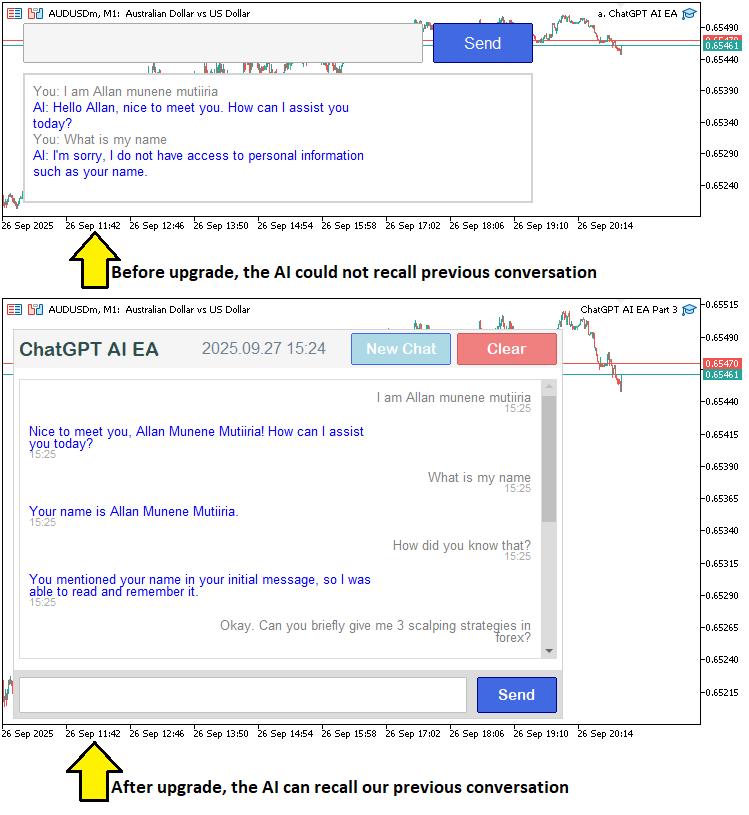
Na imagem, podemos ver que conseguimos aprimorar o programa adicionando novos elementos, exibindo um histórico de conversa rolável e tornando a interface interativa, cumprindo assim nossos objetivos. Agora resta testar o programa, o que será feito na próxima seção.
Teste do programa ChatGPT
Realizamos os testes e, abaixo, apresentamos o resultado compilado em uma única imagem animada no formato Graphics Interchange Format (GIF).
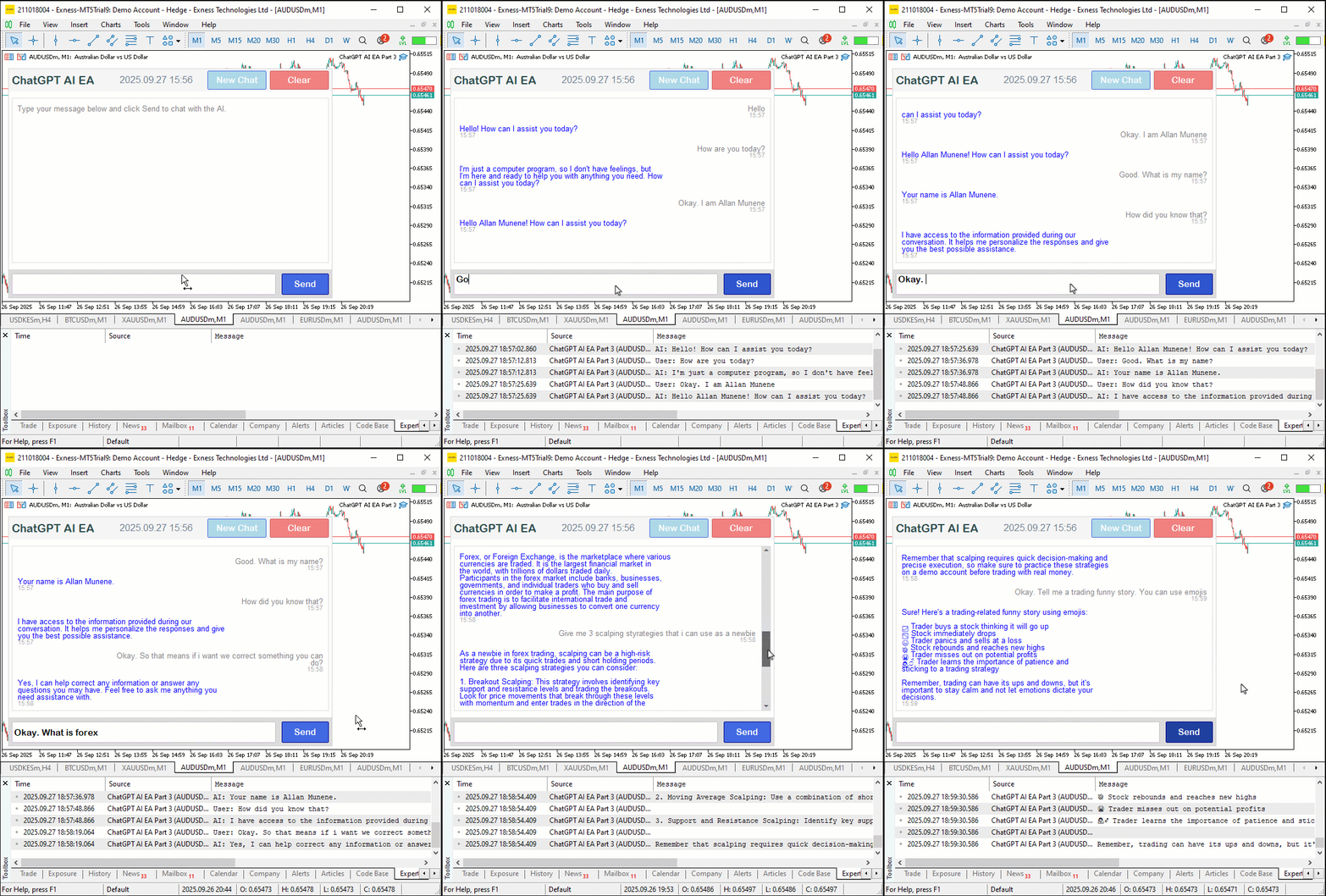
Conclusão
Em conclusão, aprimoramos nosso programa integrado ao ChatGPT em MQL5, adotando uma interface rolável orientada a um único chat, com parsing dinâmico de JSON, histórico de conversas com marcas de tempo e controles interativos, como os botões de envio, limpeza e novo chat. Esse sistema permite interagir de forma contínua com insights gerados por IA para análise de mercado, preservando o contexto em conversas de múltiplos turnos e melhorando a usabilidade por meio de rolagem adaptável e efeitos de hover. Nas próximas versões, atualizaremos a área de exibição para lidar melhor com trocas contínuas de mensagens e compartilhar dados em tempo real para obter insights de trading. Acompanhe os próximos artigos.
Traduzido do Inglês pela MetaQuotes Ltd.
Artigo original: https://www.mql5.com/en/articles/19741
Aviso: Todos os direitos sobre esses materiais pertencem à MetaQuotes Ltd. É proibida a reimpressão total ou parcial.
Esse artigo foi escrito por um usuário do site e reflete seu ponto de vista pessoal. A MetaQuotes Ltd. não se responsabiliza pela precisão das informações apresentadas nem pelas possíveis consequências decorrentes do uso das soluções, estratégias ou recomendações descritas.

 Redes neurais em trading: Dos transformers aos neurônios spiking (Conclusão)
 Negociando opções sem opções (Parte 3): Estratégias complexas com opções
 Criação de um robô market-neutral probabilístico com base na distribuição dos retornos
 Redes neurais em trading: Dos transformers aos neurônios spiking (Componentes principais)

- Aplicativos de negociação gratuitos
- 8 000+ sinais para cópia
- Notícias econômicas para análise dos mercados financeiros
Você concorda com a política do site e com os termos de uso