PnlVision
- Utilities
- Version: 1.0

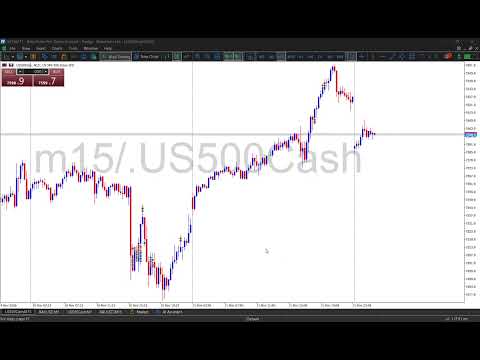
PnLVision is a chart overlay for MetaTrader 5 that complements the built-in crosshair. The native crosshair shows the price and the time under the cursor.
PnLVision adds the measurements that are usually calculated by hand. How it works Move the mouse over the chart. A compact text block follows the cursor and shows: - the symbol and the lot size used for the calculation; - the number of bars between the reference point and the cursor; - the distance in ticks and in pips; - the profit or loss that a buy and a sell of the selected lot would produce over that distance.
The reference point is either the current Bid, in live mode, or a fixed point that is set with a click. A dashed horizontal line marks the fixed point. Press Esc to return to live mode.
The values are calculated from the broker contract specifications: tick size, tick value, volume step and account currency. Profit and loss are obtained with OrderCalcProfit.
When a contract specification is not available, the value is derived from the tick size and the tick value. Commission and swap are not included. Inputs InpLot - lot size used for the calculation. InpUsePosLot - use the volume of an open position on the same symbol instead of InpLot. InpShowBuy, InpShowSell - show the buy line, the sell line, or both. InpShowLine - draw the dashed line at the fixed reference point.
InpFontSize - font size of the text block. InpDecMoney - number of decimals for the money values. InpColText, InpColGain, InpColLoss - text colours. InpShowBg, InpColBg, InpColBorder - optional background plate. It is disabled by default, the text is drawn directly on the chart. InpAutoText - choose a readable text colour from the chart background. InpColLine - colour of the reference line. InpOffX, InpOffY - offset of the text block from the cursor, in pixels. InpDebug - write diagnostic lines to the Experts journal. Notes The indicator draws only its own objects and removes them when it is removed from the chart. It does not trade and does not modify orders.
The amounts are estimates based on the contract specifications.
The terminal may show a slightly different value because of spread, commission and swap. Installation Open MetaTrader 5 and press F4 to start MetaEditor.
Copy the ex5 file to the MQL5 Indicators folder and refresh the Navigator, or download the product from the Market tab of the Terminal window. Then double-click PnLVision or drag it onto a chart.