

| 📉 Exp – Partial Close and Trailing for MetaTrader 4 & MetaTrader 5 Smart MetaTrader assistant for partial closing of profitable positions during rollbacks, with Trailing Stop and Breakeven protection for the remaining volume. Exp Trail Partial Close helps traders secure part of the floating profit when the price first moves in the profitable direction and then makes a rollback. The remaining position can continue working in the market under controlled protection. |
[Русский] - [English] - [Español] - [Português] - [Deutsch] - [Français] - [한국어] - [日本語] - [中文] - [Türkçe] - [Italiano]
| ✅ Exp TralPartionClose MT4 | 💎 Exp5 Trail Partial Close PRO MT5 |
| ⬇ Free MT4 Version | 🛒 Buy / Download MT5 PRO |
| 📘 Full Instruction | ▶ Watch Video |
| 🛒 All Expforex Products | 🎓 How to Install from Market |
| 🏠 Main | 🎓 Documentation | ⚙ Settings |
| ❓ FAQ | ⭐ Reviews | 💬 Comments |
🎬 Watch How Partial Close on Rollback WorksThe video shows the main idea: the Expert Advisor monitors profitable positions, fixes rollback levels, closes part of the volume during a rollback, and can protect the remaining position with Breakeven and Trailing Stop. |
🚀 What is Exp – Partial Close and Trailing?
Exp – Partial Close and Trailing is a MetaTrader assistant Expert Advisor created for traders who want to manage open positions more intelligently during trend movements and rollbacks.
The utility does not try to predict the market. It works with positions that are already open. When a position moves into profit, the EA starts tracking the profitable movement. If the market later makes a rollback by the number of points specified in the settings, the EA closes a part of the position volume.
After the partial close, the remaining part of the trade can continue to work. The EA can also move the position to Breakeven and use Trailing Stop logic, depending on your configuration.
📈 Follows Profit MovementThe EA starts working only after the position reaches the configured profit distance. | ↩ Detects RollbackThe utility waits for a price retracement from the fixed profit level. |
✂ Closes Part of the LotWhen rollback conditions are met, the EA closes only the configured part of the position. | 🛡 Protects the RemainderThe remaining volume can continue working with Breakeven and Trailing Stop logic. |
📊 Product Interface and Work Example The utility works directly on the MetaTrader chart and uses the EAPADPRO dashboard for comfortable visual control, testing and trade management. |

⭐ Why Traders Use Partial Close on Rollback
- Secure part of floating profit without closing the entire position.
- Keep part of the trade in the market if the main trend continues.
- Reduce dependence on one fixed Take Profit when the market does not reach the final target.
- Protect the remaining volume with Breakeven and Trailing Stop functions.
- Use several partial closing steps during repeated rollbacks.
- Work with BUY and SELL positions according to your filters.
- Control the percent or fixed lot for each partial close.
- Test the logic visually in the MetaTrader Strategy Tester.
- Use the utility as an assistant for manual trading or other trading systems.
| ⚠ Important: Partial Close and Trailing is a trade management assistant. It does not remove trading risk and does not guarantee profit. The result depends on market movement, broker execution, spread, commission and your settings. |
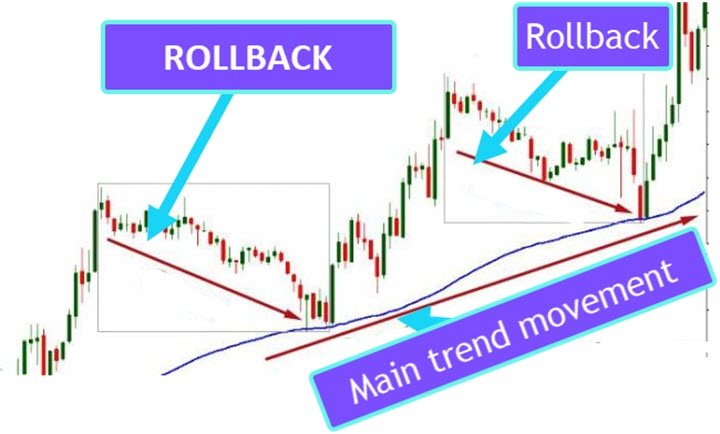
📌 What Is a Rollback?
A rollback is a temporary price movement against the current profitable direction. For example, a BUY position may move strongly upward, then price may pull back downward for some distance before the trend continues or reverses.
Classic Trailing Stop can protect profit, but it may also close the entire position too early. Partial Close on Rollback offers another approach: close only a part of the volume during the rollback, while the remaining part can continue to follow the market.
📉 Rollback and Main Trend Concept The main trend may continue, but intermediate rollbacks can be used to secure part of the profit step by step. |
⚙ How the Algorithm Works
The algorithm is based on a clear sequence. First, the position must reach the minimum profit distance. Then the EA fixes the control level. If price continues moving in profit, this level can be moved forward. If price rolls back from the fixed level by the configured distance, the EA partially closes the position.
1️⃣ Position MonitoringThe EA monitors open positions according to symbol, direction and Magic number filters. | 2️⃣ Activation in ProfitWhen the position reaches StartPointToTral points in profit, the partial close logic becomes active. |
3️⃣ Rollback Level ControlThe EA fixes the rollback reference level and follows the profitable movement step by step. | 4️⃣ Partial CloseIf the price rolls back by RollbackPoint points, the EA closes the configured part of the position. |
5️⃣ Next LevelAfter a partial close, the next fixation level is calculated using StepPointToFixLevel. | 6️⃣ ProtectionThe EA can move Stop Loss to Breakeven and continue trailing the remaining volume. |
🧮 Simple Example
Suppose you opened a BUY position with a volume of 2.00 lots. The price moves into profit. You do not want to close the whole position immediately, because the trend may continue. At the same time, you want to secure part of the result if the market pulls back.
Example configuration:
| Setting | Example Value | Meaning |
| StartPointToTral | 200 points | The EA starts tracking partial close after 200 points of profit. |
| RollbackPoint | 100 points | If price rolls back 100 points from the fixed level, part of the trade is closed. |
| StepPointToFixLevel | 150 points | The next fixation level is moved by 150 points after the previous level. |
| PercentLotToClose | 20% | For a 2.00 lot position, the EA closes 0.40 lots at each partial close step. |
| Practical meaning: instead of closing the full position or waiting for one final Take Profit, the trader can secure part of the profit during rollbacks and leave the remaining volume to follow the trend. |
📊 Live Chart Example
Algorithm Activated and Partial Close Executed The price rollback triggered the algorithm, and the utility closed part of the position while keeping the remaining volume in the market. |
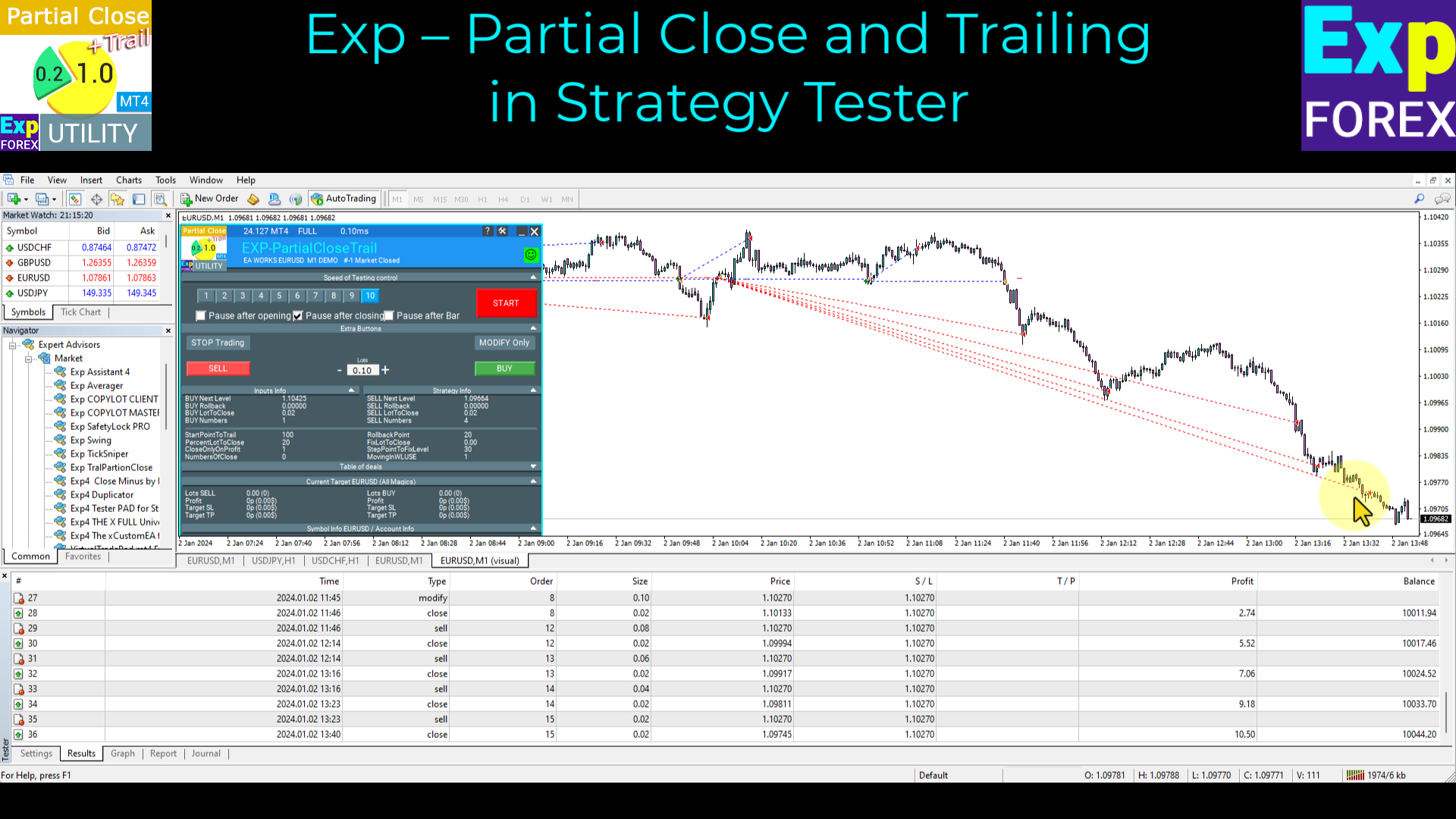
Strategy Tester Example You can test the utility in the MetaTrader Strategy Tester and visually check how levels, rollbacks and partial closes work. |

🧩 Typical Use Cases
| Scenario | How Partial Close and Trailing Helps |
| Trend trading | Close part of the position during corrections while keeping part of the trade in the trend. |
| Swing trading | Secure part of the profit during natural pullbacks between market waves. |
| Manual trading | Use the EA as an assistant that manages partial exits automatically. |
| Large position management | Split the exit into several partial close steps instead of closing everything at once. |
| Strategy Tester research | Test different rollback, step and partial lot settings before real trading. |
| Breakeven protection | After the first partial close, move Stop Loss to the opening price if this mode is enabled. |
⚙ Main Settings You Should Understand
The utility has flexible settings for activation distance, rollback distance, partial lot size, number of closing steps, Breakeven and Trailing Stop behavior. Below are the key parameters that define the logic.
| Setting | Why it matters |
| StartPointToTral | Profit distance in points required to activate the partial close function. |
| RollbackPoint | Number of points the price must retrace from the fixed profit level to trigger partial closing. |
| StepPointToFixLevel | Distance used to set the next fixation level after a partial close. |
| PercentLotToClose | Percentage of the initial position volume to close at each partial close step. |
| FixLotToClose | Fixed lot value for each partial close. If set to 0, the percent-based calculation is used. |
| CloseOnlyOnProfitZone | Allows partial closing only when the position remains in a profitable zone. |
| NumbersOfClose | Maximum number of partial close operations for one position. |
| MovingInWLUSETRAL | Enables Breakeven after the first partial close. |
| FixTrailingStopLevel | Defines how the Stop Loss can be moved when new fixation levels appear. |
| OrderToTrailPartionClose | Defines which position types are managed: BUY, SELL or all positions. |
| MagicToTrailPartionClose | Defines which Magic numbers are monitored by the EA. |
| 📘 Want the full parameter list? Open the complete Partial Close and Trailing Settings documentation before using the utility on a real account. |
🛡 Breakeven and Trailing Stop Logic
Partial closing is only one part of the utility. The remaining volume should also be protected correctly. That is why the EA can use Breakeven and Trailing Stop logic after the first partial close.
✅ BreakevenAfter the first partial close, the EA can move Stop Loss to the opening price. If the market returns, the remaining position can be closed without a trading loss on the rest of the volume, depending on broker conditions. | 📍 Trailing StopThe EA can continue moving the Stop Loss according to new levels, helping protect the remaining part of the position while the market continues moving in profit. |
📋 Partial Close vs Classic Trailing Stop
A classic Trailing Stop usually closes the whole remaining position when the Stop Loss is triggered. Partial Close on Rollback gives the trader a more flexible exit model: secure part of the profit now, then continue managing the rest.
| Classic Trailing Stop | Partial Close and Trailing |
| Usually protects profit by moving Stop Loss for the entire position. | Can close only part of the position when a rollback appears. |
| The full remaining position may be closed on one retracement. | The trader can keep part of the position for further trend continuation. |
| Less flexible for multi-step profit fixation. | Supports several partial close steps according to the settings. |
| Useful, but sometimes closes too early during normal corrections. | Allows more gradual profit protection during rollbacks. |
🧪 Testing in MetaTrader Strategy Tester
Before using any position management utility on a real account, test it in the Strategy Tester. Visual testing helps you understand when the algorithm becomes active, where rollback levels are placed and how much volume is closed at every step.
Strategy Tester Control Panel The EAPADPRO interface makes the utility more convenient during visual testing and during real chart monitoring. |

✅ Recommended Workflow Before Real Trading
- Start with a demo account or Strategy Tester.
- Open several test BUY and SELL positions with different lot sizes.
- Set StartPointToTral high enough so the algorithm does not activate too early.
- Choose RollbackPoint according to the volatility of your symbol and timeframe.
- Use PercentLotToClose or FixLotToClose carefully so the EA does not close more volume than expected.
- Limit NumbersOfClose if you want only a few partial close operations.
- Check Breakeven and Trailing Stop behavior after the first partial close.
- Use Magic number filters if other Expert Advisors trade on the same account.
- Review the Experts and Journal tabs after each test.
- Use a stable VPS if the utility must monitor positions continuously.
⚠ When You Must Be Careful
|
🌐 Broker, Account and VPS Recommendations
The utility performs position monitoring and trade operations. For reliable work, broker execution quality and terminal stability are important.
✅ Recommended
| ⚠ Check Carefully
|
🛠 How to Install Exp – Partial Close and Trailing
Installation is standard for MQL5 Market products. The most important part is correct configuration and testing of rollback logic before real trading.
| Step | Action |
| 1 | Open MetaTrader 4 or MetaTrader 5 and log in to your MQL5 account. |
| 2 | Install the product from the Market section of the terminal. |
| 3 | Attach the Expert Advisor to the required chart. |
| 4 | Enable Algo Trading / Auto Trading in the terminal. |
| 5 | Allow automated trading in the EA settings window. |
| 6 | Set StartPointToTral, RollbackPoint and StepPointToFixLevel. |
| 7 | Configure PercentLotToClose or FixLotToClose. |
| 8 | Configure Breakeven, Trailing Stop, order type and Magic number filters. |
| 9 | Run visual tests and check how the levels behave during rollbacks. |
| 10 | Only after testing, decide whether the configuration is suitable for your real account. |
🔗 Useful Links🔹 Exp TralPartionClose MT4 — Free Utility 🔹 Exp5 Trail Partial Close PRO MT5 🔹 Full Description and Documentation 🔹 Read FAQ |
⚠ Risk Warning
| Trading Forex and CFDs involves risk. Exp – Partial Close and Trailing can help automate partial closing and profit protection logic, but it cannot guarantee profit, prevent losses or replace risk management. Market execution, spread, slippage and incorrect settings can affect the result. Always test your settings on demo before using real funds. |
🏁 Final Thoughts
Exp – Partial Close and Trailing is useful for traders who want more flexible position management than a single Take Profit or a classic Trailing Stop. The EA can close part of the position during rollbacks, protect the remaining volume and continue following the market if the trend develops further.
This approach is especially interesting for trend trading, swing trading and traders who prefer staged exits. Instead of choosing between “close everything now” and “wait until the full target,” you can secure part of the profit and keep the rest of the trade under control.
🚀 Start with Exp – Partial Close and TrailingWatch the video, read the full documentation, test rollback scenarios in the Strategy Tester, and decide whether this partial closing assistant fits your trading workflow. |
| ▶ Watch Video | 📘 Full Instruction |
| ✅ Download MT4 Free | 💎 Download MT5 PRO |
| ⚙ Open Settings | 🛒 All Expforex Products |
SEO Tags
Exp Partial Close and Trailing, Exp TralPartionClose, Exp5 Trail Partial Close PRO MT5, Partial Close MT4, Partial Close MT5, MetaTrader partial close, partial close on rollback, close part of position, Forex rollback strategy, trailing stop assistant, breakeven EA, EAPADPRO dashboard, MetaTrader trade management, MT4 utility, MT5 utility, Forex position management, staged exit trading, partial lot close, PercentLotToClose, FixLotToClose, RollbackPoint, StartPointToTral, StepPointToFixLevel, MovingInWLUSETRAL, FixTrailingStopLevel, MagicToTrailPartionClose, MQL5 Market utility, Expforex partial close




