Focus Time Line
- Utilities
-
Masamitsu Takahashi
 Creating only what is truly necessary.
My mission is to develop high-quality, high-performance tools that eliminate complexity, allowing you to focus entirely on the market. - Version: 4.1
- Updated: 4 January 2026
- Activations: 6
To increase market visibility, I am offering this discount for the first 10 buyers.
Easily capture the "target time" in an instant. Ultimate synchronization for multi-timeframe analysis.
Where exactly is that time point from the higher timeframe on your lower timeframe?
No more wasting time scrolling back and forth to find it.
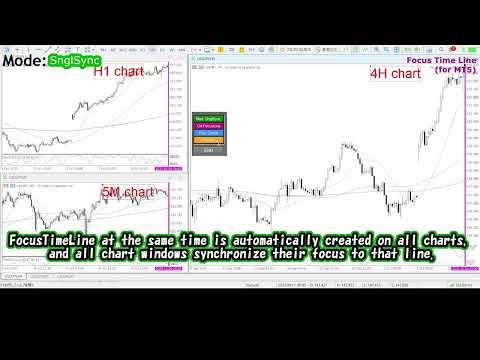
Focus on targeted time points with high precision all at once, not only on a single chart but by synchronizing multiple charts.
Eliminate "scrolling stress" and maximize your analysis precision.
A focus-specialized tool that will dramatically change your chart analysis.
Product Overview
[3 Selectable Focus Modes]
- Single Line: Focus-move to one specific time point with a single click.
- Multi Lines: Set multiple time points and focus-move through them in order.
- SnglSync: Synchronize multiple charts and focus-move to one specific time point all at once.
[Key Benefits]
- Instant Return: No matter how far you scroll or change the zoom/timeframe, you can focus-move back to your target point instantly with one click.
- Enhanced Validation: Smoothly focus-move between multiple set points to dramatically speed up your backtesting and comparative analysis.
- Multi-dimensional Analysis: Sync different timeframes or correlated pairs to focus all at once, strongly supporting comprehensive market awareness and training.
Main Button Functions
| Button Name | Function | Description |
| FocusMode | Switch FocusMode | Set to SingleLine / MultiLines / SnglSync |
| Crt FocusLine | Set target time point | Creates a FocusTimeLine (vertical line) at any time |
| Position | Toggle display position | Switch between screen Right, Center, or Left |
| Focus | Focus-move | Moves the chart to the target time point |
Setup
Log in to MT5, search the product in the Market, and click “Download” — it will automatically install on your terminal.
It will appear under Navigator → Expert Advisors (EA) → Market.
Then drag‑&‑drop it to the chart, or double‑click to add.
Recommended Environment
OS: Windows 11
MT5: Build 5430
CPU: Intel 11th Gen Core i5‑1135G7 (4 cores / 8 threads)
Memory: 8 GB
※Although it should work in other environments such as Mac, operation has not been verified. Please use at your own discretion.
Risk Notice
No trading functions are included, so there is no capital risk.
My mission is to develop high-quality, high-performance tools that eliminate complexity, allowing you to focus entirely on the market.
I am dedicated to building practical, high-standard software that functions perfectly in real-world trading conditions, ensuring you can use them effectively and stress-free.