Focus Time Line Player
- Utilities
-
Masamitsu Takahashi
 Creating only what is truly necessary.
My mission is to develop high-quality, high-performance tools that eliminate complexity, allowing you to focus entirely on the market. - Version: 1.0
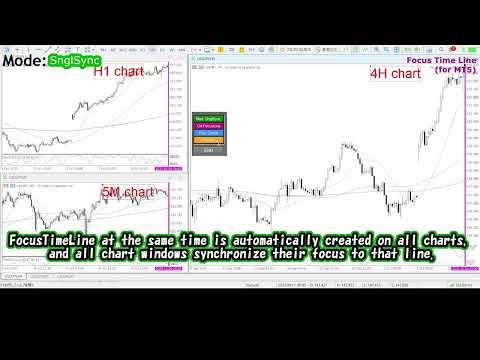
Instantly focus on the selected time point no matter how you move the chart.
If you like it, please consider "Focus Time Line" as well: https://www.mql5.com/en/market/product/154363
In addition to this feature, it allows synchronization of multiple charts at the exact same MTF time, making multi-timeframe analysis effortless.
【Features】
・Focus Mode: SingleLine (default display)
・Crt FocusLine: Create one focus line at any desired time
・Position: Switch display position
・Focus: Move the chart view to the created focus line
・X button: Exit the program
【Instructions】
・Use Focus Mode as the default SingleLine
・Press Crt FocusLine to create one FocusTimeLine
・Use Position button to select the display position
・Press Focus to move the chart to the selected focus point
・Press X button to exit the program
Edition Comparison The following table shows the differences between this product (Player Edition) and the high-end model (Full Version). While the UI layout is identical, the available modes and setting ranges vary.| Feature Category | Player Edition (This Version) | Full Version (Advanced) |
|---|---|---|
| Focus Basic | SingleLine | SingleLine |
| Focus Extended | — | MultiLines |
| Focus Sync | — | MTF Multi-Chart Sync |
This product is an edition whose title includes “Player”.
There are product titles that include “Player” and those that do not.
⇩
Focus Time Line
https://www.mql5.com/en/market/product/154363