One Click MA Cross Auto Close
- Utilities
-
Masamitsu Takahashi
 Creating only what is truly necessary.
My mission is to develop high-quality, high-performance tools that eliminate complexity, allowing you to focus entirely on the market. - Version: 1.1
- Updated: 30 July 2026
- Activations: 5
This product is an MA monitoring and closing support EA for discretionary traders that monitors MA crosses or price approaching an MA, and performs automatic closing or alert notifications. It monitors multiple timeframes at the same time, and lets you freely set the MAs to monitor, such as the 20MA, 75MA, and 200MA.
It is not a product that automates trading decisions or entries. It helps you carry out the MA conditions you have already decided, from monitoring to notification and closing.
What It Does
- Automatic closing on a specified MA cross
- In addition to the MA cross itself, automatic closing or alert notification when price approaches within a specified distance of the MA
- Monitors multiple timeframes at the same time and executes when any of them meets the condition
- Freely set the MA periods to monitor, such as the 20MA, 75MA, and 200MA
- Can also be set to alert-only, without automatic closing
- Can also be used as an MA monitoring tool that notifies you of entry timing
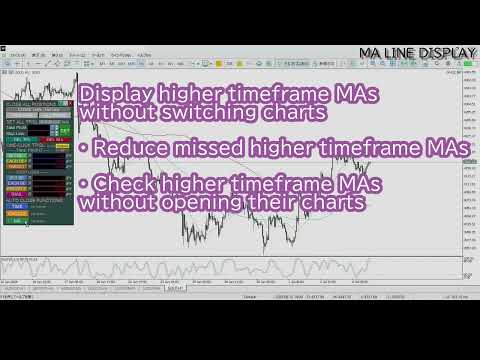
- Displays 1H, 4H, Daily, Weekly, and Monthly MAs on the current chart
- Supports an AUTO mode that displays lines only when price approaches
- MA values can be selected from real-time LIVE values or CONFIRMED values based on the most recently confirmed candle
When This Product Helps
Even with an MA cross as your closing condition, the condition may occur while you cannot check the chart, or when the cross actually happens you may hesitate, thinking price could still reverse, and put off closing. This product does not make decisions for you — it monitors the MA condition you have already decided and executes a notification or a close.
Using MA as a Closing ConditionUse this when you want to execute a closing rule based on an MA, such as 'close if price breaks below the 20MA' or 'close if the 4-hour MA crosses.'
- Automatic closing on a specified MA cross
- Monitors multiple timeframes at the same time
- Freely set the MA period to monitor
- Conditions are monitored even while at work, asleep, or away from home
Without waiting for the cross to be confirmed, you can be notified or close once the distance to the MA reaches a specified value.
- Automatic closing once price approaches within a specified distance
- Can be used for alert-only, for your own discretionary judgment
- Can also be used to monitor potential entries
Display the higher-timeframe MAs you are monitoring on the current chart, so you can set conditions and analyze the chart on the same screen.
- Displays 1H, 4H, Daily, Weekly, and Monthly MAs as horizontal lines
- AUTO mode: displays lines only when price approaches
- LIVE display of real-time values
- CONFIRMED display based on the most recently confirmed candle
- Also supports blinking mode, reducing the chance of missing a line
Product Comparison
| Product | SL/TP Batch | Line-Drag Order | Key Close | Break-even (BE) | Estimated P/L | MA Cross | Candle Confirm | Specified Time | MA Line Display | Price |
|---|---|---|---|---|---|---|---|---|---|---|
| One Click Pro SL TP Batch Auto Close | ✓ | ✓ | ✓ | ✓ | ✓ | ✓ | ✓ | ✓ | ✓ | $86 |
| One Click Plus SL TP Batch and MA Line | ✓ | ✓ | ✓ | ✓ | ✓ | ✓ | $55 | |||
| One Click Core SL TP Batch | ✓ | ✓ | ✓ | ✓ | ✓ | $46 | ||||
| One Click Auto Close Suite | ✓ | ✓ | ✓ | ✓ | $43 | |||||
| One Click MA Cross Auto Close (this product) | ✓ | ✓ | $30 |
Click a product name to open its product page.
Additional Features
- Panel display, built-in guide, and alerts support 9 languages (English, Japanese, Russian, Chinese, Korean, Portuguese, Spanish, Indonesian, and Thai)
- Built-in user guide (can also be exported as a text file)
- Panel size adjustable (1.0x to 2.0x)
- Unneeded panel items can be collapsed for a compact display
- Settings are saved and automatically restored after restart
- Reset function to return to default settings
- Line color, style, and thickness, plus label font size and position, can all be customized (settings are saved)
This product does not guarantee trading decisions or profits. It is a support tool that helps you monitor, notify, and close based on the MA conditions you have already decided.
For questions or requests, please contact us through MQL5's messaging feature.