SMC Trade Pilot MT5

5

Order block, BOS and ChoCH expert advisor for MetaTrader 5, with Telegram alerts

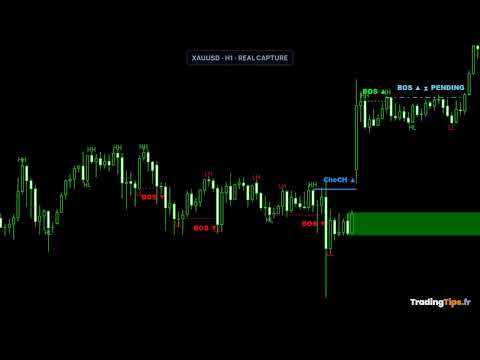
SMC Trade Pilot MT5 reads market structure on your chart and sends the signal to Telegram. It marks break of structure (BOS) and change of character (ChoCH), draws order blocks with a strength score, tracks fair value gaps (FVG) and liquidity sweeps, displays a volume profile with point of control, value area high and low, and sums everything up in a compact dashboard with a multi-timeframe panel, a confluence score and kill zone sessions.

Marked at the close, then confirmed

A break is labelled PENDING as soon as the candle closes, before any confirmation. It becomes confirmed when a new high or a new low validates it, and it expires on its own after a configurable number of bars, or disappears if price invalidates it. One setting chooses which alerts are sent: pending only, confirmed only, or both.

The order block counter

The dashboard keeps score of the zones it drew: how many were detected, how many are still active, how many were mitigated, the average strength, and the share of mitigated zones that produced a reaction before being broken. It is a measurement of what the tool found on your chart, not a forecast.

Alerts on Telegram

When a signal appears, the alert reaches Telegram with the chart screenshot attached and the context of the setup:

  • symbol, timeframe, signal type and status
  • the price level of the break
  • trend, confluence score and multi-timeframe alignment
  • active order blocks and fair value gaps, current session
  • point of control, value area high and low
  • a quality grade from A plus to D

Three buttons sit under each alert: EXECUTE, SKIP and MODIFY. Execution is disabled by default in the settings.

Execution and risk

  • lot size computed from a percentage of the account
  • stop loss and take profit built from the structure
  • break even and ATR trailing stop
  • daily drawdown shield
  • spread filter and session filter

Getting started

Attach the expert advisor to a chart, allow the Telegram API URL in the terminal settings, and paste your bot token and your chat identifier. The first alert usually arrives within fifteen minutes. Preset files are included for alerts only, or alerts with execution.

User guide provided: ask for it by message in the MQL5 chat.

Trading involves a risk of capital loss. The past behaviour of a tool guarantees no future result. This product is a decision support tool, not investment advice.
Reviews 1
Xto971
29
Xto971 2026.06.05 22:26 
 

Exactement ce que je recherchais. L'indicateur mache le travail. Plus qu'a valider l'ordre (ou pas, au choix) via telegram. D'une simplicité incroyable et d'une efficacité bluffante. Je suis a une semaine d'essai en réel et j'ai deja fait mieux que si je tradais seul. Il me faudrait un peu plus de recul pour juger de la pertinence des signaux mais dans tous les cas, cet indicateur est un veritable compagnon. Aussi et c'est tres important pour moi, Sylvain est tres reactif et disponible en cas de probleme ou de question. Vraiment 100% satisfait de mon achat. Je recommande vivement.

Recommended products
Introduction: The RosMaFin Trading Panel is not just a standard order execution tool. It is a comprehensive, professional assistant designed for manual and price-action traders who want to save time, manage risk with mathematical precision, and maintain full market awareness. Say goodbye to manual lot size calculations and tedious Stop Loss adjustments. This panel streamlines your entire trading workflow from analysis to trade exit. KEY FEATURES & BENEFITS: Advanced Risk Management & Exec
FREE
SwiftDraw Starter is a streamlined charting utility designed to make technical analysis faster, cleaner and more efficient. Built for traders who rely on manual chart analysis, SwiftDraw Starter provides a selection of essential charting tools through intuitive keyboard shortcuts, helping you create and manage the objects you use most with minimal clicks. Designed for scalpers, intraday traders and discretionary traders , SwiftDraw Starter helps simplify chart preparation and improve the efficie
FREE
This product is an automatic-close support EA that helps discretionary traders carry out the closing rules they have set for themselves. You can set closing conditions based on a specified time, candle confirmation, or MA cross/approach, and use TIME, CANDLE, and MA CROSS individually or at the same time. It can also display 1H, 4H, Daily, Weekly, and Monthly MAs on the current chart. It is not a product that automates trading decisions or entries. It helps you carry out the closing rules you ha
Atlas Trade Desk
Bernhard Wurzlbauer
Atlas Trade Desk MT5 Atlas Trade Desk MT5 is a visual trade panel, risk manager and lot calculator for manual MetaTrader 5 traders. Plan market and pending orders directly on the chart, calculate position size from your selected risk, adjust Entry, Stop Loss and Take Profit visually, and manage open positions from one clean dashboard. The tool is built for discretionary traders who want faster order preparation, clearer risk control and safer position management without switching between multipl
Metrics Pro for Discord - MT5 Metrics Pro for Discord is a reporting utility for MetaTrader 5 that automatically sends your account performance data to a Discord server via a Webhook. It is designed for signal providers, prop firm traders, and community managers who want to share structured trading results without manual effort. The utility runs in the background on a chart and posts formatted reports at a scheduled server time. Reports include account-level data as well as a breakdown per strat
Strategy Health Monitor compares a saved baseline snapshot with a later trade history and reports statistical difference signals under the selected settings. This is a manual, point-in-time MT5 utility. It reads one user-supplied Strategy Tester HTML or HTM report, or a comma-separated trade CSV with a recognizable profit column. It does not monitor accounts continuously or fetch account history by itself. HOW IT WORKS 1. On the first run, the utility creates a baseline snapshot from the suppli
Welcome to Smart Algo Trade Panel Manager MT5 - the ultimate   risk management tool designed to make trading more effective based on user needs.  It is a comprehensive solution for seamless trade planning, position management, and enhanced control over risk. It does not matter weather you a beginner or an advanced trader, or a scalper needing rapid executions, SmartAlgo Trade Panel  adapts to your needs offering flexibility across all markets of your choice. You can put SL, Lot and TP of choice
Product Name MT5 Gold & Silver Multi-Language Trading Panel V17.00 Introduction This is a professional trading panel designed specifically for manual gold and silver traders. It supports five languages: English, Chinese, Spanish, Arabic, and German. The panel automatically detects gold and silver symbols, so users do not need to enter symbol codes manually. It is compatible with most brokers worldwide, including standard accounts, zero spread accounts, and raw spread accounts. Users only need t
Support Or Resistance Alert Broken
Jhojan Alberto Tobon Monsalve
"Support or Resistance Alert Broken" is a simple and very intuitive tool that allows you to create or eliminate horizontal and trend supports and / or resistances with a simple click. When the support or resistance line is broken by the closing price at the end of the current candle, the "Support or Resistance Alert Broken" tool will send an alert with sound, as well as a notification to the MT4 or MT5 mobile application. This tool can send alerts from multiple pairs at the same time. Utility
Draw Agent MT5
Omar Alkassar
5 (1)
Draw Agent is designed as beautiful and innovative way to create and manage all your chart analysis, scribbles, notes and more. This tool provides a freehand drawing method, to treat the chart space as a blackboard and draw by-hand. This Freehand Drawing tool lets you draw onto MT4/MT5 charts, in order to mark or highlight events on the chart.  Its helpful tool if you like to  to draft Elliott waves by hand, draw lines on chart, or to illustrate ideas on your chart, and  It is particularly usef
TradePulseMonitor for MetaTrader 4 & 5 Overview: TradePulseMonitor is a comprehensive, real-time dashboard indicator designed for MetaTrader 4 and MetaTrader 5. It provides traders with an at-a-glance overview of their account's financial health, risk exposure, position metrics, and historical performance. By consolidating critical data into a single, customizable on-chart dashboard, it eliminates the need to constantly check the Terminal window, allowing for faster and more informed trading de

FREE
ProTrading Panel - Ultimate Manual Trading Assistant Upgrade your manual trading experience with the ProTrading Panel . Designed for fast execution, this EA provides an elegant, soothing vertical interface that perfectly fits your charts without cluttering your workspace. Whether you prefer clicking on the screen or executing trades at lightning speed using keyboard shortcuts, this tool is built for you. Key Features: Precision Risk Management: Set your Stop Loss in points and automatically calc

Telegram to mt5 pro
Janet Abu Khalil
4 (4)
Telegram to MT5 Pro — Advanced Telegram Signal Copier with Auto-Fix, Multi-TP, Risk Control and Full Trade Management Telegram to MT5 Pro — Professional Telegram Signal Copier Telegram to MT5 Pro is a high-performance trade copier that automatically executes signals from Telegram directly into your MetaTrader 5 account, with full control over risk, execution, and trade management. The system consists of two components: • The Expert Advisor (EA) running inside MetaTrader 5 • A companion desktop
Phone Trade Manager
Krutik Piyushkumar Parekh
Smart Lot-Size Calculator And Trade Assistant for Mobile Trading Overview: This is the tool every trader in the market must have no matter if you are scalper, swing traders, day trader, or long term trader. This On-The-Go trading tool will help you stay disciplined and also stay free from daily trade management chores, Most traders face common problems like   1. Calculation of proper lot-size of a position to take controlled risk  2. Managing every trade and trailing stop-loss if trades goes in
FREE
News Risk Guard protects the positions you already hold when a scheduled economic release is about to hit. It is a risk tool. It does not predict direction, it does not look for entries of its own, and it makes no claim about profit. The calendar is built into the product: 4,101 releases covering 15 recurring events. No internet permission, no DLL, no file to install, and it behaves the same in the Strategy Tester as it does on a live chart. WHAT IT DOES 1. Event protection window    A confi
EasyOrder Risk Manager
Kristina Kurnitskaya
EasyOrder Risk Manager EasyOrder Risk Manager is a professional Risk-Based Entry panel for MetaTrader 5 designed for traders who prioritize structured execution and strict risk control. This tool allows you to define your risk as a percentage of account balance and automatically calculates the correct lot size based on your Stop Loss distance. No manual calculations. No emotional lot sizing. No risk mistakes. Key Features Risk-based position sizing (% of balance) Real-time lot calcu
MT5toTLGRM
Fernando Morales
4.2 (5)
Do not use Windows 7 with this EA MT5toTLGRM EA only sends text messages to a Telegram group or channel of your choice. The messages are customizable to show information about any trading activity in the account. Also it shows a daily PnL report. Several instances of this EA can be used simultaneously in the same MT5 terminal for sending messages to different Telegram group/channel but ensure that each one has a different number in [B13] setting. Following are the features of MT5toTLGRM EA send
FREE
Effortlessly take control of your trading routine with the revolutionary Trades Time Manager. This potent tool automates order execution at designated times, transforming your trading approach. Craft personalized task lists for diverse trading actions, from buying to setting orders, all without manual intervention. Trades Time Manager Installation & Inputs Guide If you want to get notifications about the EA add our URL to MT4/MT5 terminal (see screenshot). MT4 Version   https://www.mql5.com/en/m
Deriv Trade Manager MT5
Emilio Jose Quintero Ramos
It has never been so easy to manage the risk of your account until now, this tool will allow you to have full control of your capital and manage your entries in the synthetic index derivative markets, in an easy, practical and safe way. The available input and configuration parameters are as follows :  RISK MANAGEMENT 1. Value of your account:   Here as its name says you will place the value corresponding to the size of your account, for example if your account is 150 dollars the corresponding
TELEGRAM_NOTIFICATION is a utility that forwards real-time trade events from your MetaTrader 5 terminal to any Telegram chat, group, or channel. It tracks every order event (open, close, modify, cancel) and sends a formatted message within seconds. It can also generate a daily profit and loss report for a user-defined time window. Main Features Open alerts for market and pending orders (BUY, SELL, BUY LIMIT, SELL LIMIT, BUY STOP, SELL STOP) Close alerts with net profit, balance, equity, and dail
The utility draws pivot levels based on a selection from day week month The previous candlestick of the selected timeframe is taken and the values for the levels are calculated using the following formulas: Pivot = (high + close + low) / 3 R1 = ( 2 * Pivot) - low S1 = ( 2 * Pivot) - high R2 = Pivot + (R1 -S1) R3 = high + ( 2 * (Pivot - low)) S2 = Pivot - (R1 - S1) S3 = low - ( 2 * (high - Pivot)); The style and thickness for all lines are adjusted. The colors for the R, Pivot and S lines ar
FREE
Equitypanel
Timo Mario Hoffmann
5 (1)
Equity Panel for MT5 Equity Panel is a free MT5 indicator that gives you a fast and convenient live overview of your account directly from the chart. Monitor balance, equity, floating P/L, drawdown, daily performance, margin data, and warning levels in one compact dashboard. Built for traders who want better control, faster risk awareness, and clearer account monitoring in live market conditions. Equity Panel is a lightweight and practical account monitoring indicator for MetaTrader 5 that helps
FREE
Binance History Loader
Andrey Khatimlianskii
This script is designed to download a long history of cryptocurrency quotes from the Binance exchange. You will find it perfectly suitable if you want once to download the history of cryptocurrencies for charts analyzing, collecting statistics or testing trading robots in the MetaTrader 5 strategy tester, or if you need to update the history not very frequently (for example, once a day or once a week). After running the script, you will have fully featured (but not automatically updated) cryptoc
Clock Et Mt5
Andrew Tsujiguchi
Simple Eastern Time (ET) clock displayed on your chart, auto-synced with US market hours. Updates every second. Full description: ClockET — Lightweight indicator that displays the current date and time in US Eastern Time (ET) directly on your chart, so you always know exactly where the US session stands — no manual timezone math needed. What You See • Live Clock — Day, month, date and time in ET, updated every second (e.g. "Thu Jul 24  07:36:45 ET") • Centered Label — Displayed at the bottom
FREE
OnlyPlusCloser
Oleksandr Kashyrnyi
OnlyPlusCloser — Close Only Profitable Trades. Fast. Smart. What it does: OnlyPlusCloser is an intelligent script for MetaTrader 5 that automatically closes only profitable positions for the current symbol. No manual filtering. No risk. Just positive trades — in one click. Trader Benefits: Maximum control — losing trades remain untouched Instant speed — all profitable positions are closed immediately Routine automation — perfect for scalpers and day traders ️ Execution reliability
FREE
This Small tool allows you to define a time counter in minutes for the closing of your positions according to the number of minutes you have set. For example if you set it to 30 Min, the tool will close each open position after 30 minutes from its opening. The settings ACTIVE: It is to activate the tool and use it to close your positions after the number of minutes defined. MANAGE: you to choose with the symbols managed by the tool. Choose "ALL CURENCY" if you want the system to apply to
FREE
DeepTrade SessionIntel
Yasir Mohammed Sachit Sachit
Most session tools try to cover everything. DeepTrade Session Intel does the opposite — it focuses on what actually moves the market: the London and New York sessions, tuned for Gold (XAUUSD) and US30. It maps the liquidity and the real activity window so you trade when the market is alive, not when it's dead.   WHAT IT SHOWS - London and New York session boxes drawn at their real server hours - Session HIGH and LOW lines — the liquidity that price hunts - Pre-session breakout range — the conso
Binance Quotes Updater
Andrey Khatimlianskii
5 (1)
This service is designed to stream online cryptocurrency quotes   from the Binance exchange to your MetaTrader 5 terminal. You will find it perfectly suitable if you want to see the quotes of cryptocurrencies in real time — in the Market watch window and on the MetaTrader 5 charts. After running the service, you will have fully featured and automatically updated  cryptocurrency charts in your MetaTrader 5. You can apply templates, color schemes, technical indicators and any non-trading tools to
VENIQOR Smart Trade Copier PRO is more than a simple MT5 trade copier. It combines fast local trade synchronization with flexible risk management, Account Protection and optional News Protection for every Receiver account. As with our other VENIQOR products, we welcome useful customer feedback and are happy to implement meaningful improvements and new features whenever possible. The same EA works as both Master and Receiver . One Master can copy trades to multiple Receivers running on the same
Basket EA MT5
Juvenille Emperor Limited
5 (7)
Basket EA MT5   is a powerful profit-harvesting tool and a comprehensive account protection system, all combined into a simple and easy-to-use solution. Its core purpose is to give you complete control over your trading account’s overall profit and loss by managing all open positions at the basket level, rather than individually. The EA offers a full range of basket-level features, including take profit, stop loss, break even, and trailing stop loss. These can be configured as a percentage of yo
Buyers of this product also purchase
Trade Assistant MT5
Evgeniy Kravchenko
4.41 (216)
It helps to calculate the risk per trade, the easy installation of a new order, order management with partial closing functions, trailing stop of 7 types and other useful functions. Additional materials and instructions Installation instructions - Application instructions - Trial version of the application for a demo account Line function -   shows on the chart the Opening line, Stop Loss, Take Profit. With this function it is easy to set a new order and see its additional characteristics bef
Forex Trade Manager MT5
InvestSoft
4.98 (675)
Trade Manager MT5 is an advanced position size calculator and trade management tool for MetaTrader 5, designed to help traders plan trades faster, control risk more precisely, and manage open positions directly from the chart. It combines order placement, risk based lot calculation, Stop Loss and Take Profit management, Break Even, Trailing Stop, Partial Close, Equity Protection, and external trade management in one panel. Whether you trade forex, indices, metals, commodities, crypto, or future
FarmedHedge Pair Trading Dashboard
Tanapisit Tepawarapruek
5 (4)
Farmed Hedge Yield Farming | All Markets (Manual - Hybrid - Semi/Automated EA) VERIFIED TRADING RESULTS - Farmed Hedge Yield Axi Copy:  https://www.mql5.com/en/signals/2356376 - Farmed Hedge Yield Exn Copy:   https://www.mql5.com/en/signals/2356404 - Farmed Hedge Yield V Copy:  https://www.mql5.com/en/signals/2357156 * Before purchasing, please feel free to send me a message if you have any questions about the product or setup. - You can test the system using Strategy Tester: Visual Mode , a
Beta Release The Telegram to MT5 Signal Trader is nearly at the official alpha release. Some features are still under development and you may encounter minor bugs. If you experience issues, please report them, your feedback helps improve the software for everyone. Telegram to MT5 Signal Trader is a powerful tool that automatically copies trading signals from Telegram channels or groups directly to your MetaTrader 5 account. It supports both public and private Telegram channels, and you can conn
TradePanel MT5
Alfiya Fazylova
4.88 (167)
Trade Panel is a multi-functional trading assistant. The app contains over 50 trading functions for manual trading and allows you to automate most trading tasks. Application instructions + video instructions: https://www.mql5.com/en/blogs/post/772292 Trial version of the application for a demo account: https://www.mql5.com/en/blogs/post/750865 How to install the application: https://www.mql5.com/en/blogs/post/756239 How to test the application in visual mode: https://www.mql5.com/en/blogs/post/7
================================================================================ POC BREAKOUT - V20.72. Full Professional Grade Toolkit ================================================================================ POC Breakout is a full MetaTrader 5 trading dashboard for discretionary traders who want breakout signals, Point of Control (POC) context, volume profiles, order flow, market structure, news, alerts, and advanced trade planning in one professional workspace. Attached directly to you
EA Overfitter
Stephen J Martret
That backtest looks great. But will it still be making money tomorrow, next week, next month? EA Overfitter re-runs your EA on 100 price histories it has never seen. One score tells you if the edge is real. A backtest tells you what an EA did on one price history — the one that happened to occur. What you cannot tell from it is how much of that result was the strategy and how much was the particular path. EA Overfitter answers that. It builds up to 100 synthetic price histories your EA has n
Telegram to MT5 MultiChannel Copier
Sergio Marquez Uroz
4.46 (13)
Telegram to MT5 Multi-Channel Copier   automatically copies trading signals from your Telegram channels straight to MetaTrader 5. No bots, no browser extensions, no manual copying. A signal arrives in Telegram and the EA opens the trade in your terminal within seconds. The product has two components: a Windows application that listens to your Telegram channels, and this Expert Advisor that executes the signals in your MT5 terminal. An MT4 version is also available   here . Setup guide and appli
Premium Trade Manager - The Trade Panel With a Coach Built In Series price: 89 USD until Sunday, 13 September 2026, then 111 USD again. The setup was the easy part. By the third order of the morning the lot size gets worked out in your head, the stop lands where the hand stops, and the numbers due in forty minutes sit in a tab you closed at breakfast. Premium Trade Manager takes that off you: one click sends the order at the size your risk allows, entry, stop and target as draggable lines and th
Anchor Trade Manager
Kalinskie Gilliam
5 (9)
Your EAs cannot see each other, but Anchor can. Anchor gives you one place to coordinate your EAs, manage risk, and decide when trading is allowed. It works alongside the trading bots you already use without any changes to them. The Problem One EA opens a trade. Then another starts trading. The next thing you know, you wake up to multiple grids built across your account. Each EA may be doing exactly what it was designed to do, but together they can place far more risk on your account than you in
Power Candles Strategy Scanner - Self-Optimizing Multi-Symbol Setup Finder Power Candles Strategy Scanner runs the same self-optimizing engine that powers the Power Candles indicator - on every symbol in your Market Watch, side by side. One panel tells you which symbols are statistically tradable right now, which strategy wins on each, the optimal Stop Loss / Take Profit pair, and pings you the moment a fresh signal fires. This tool is part of the Stein Investments ecosystem - 18+ tools plus Max
Grid Manual MT5
Alfiya Fazylova
4.73 (22)
Grid Manual is a trading panel for working with grid strategies. The utility is universal, has flexible settings and an intuitive interface. It works with a grid of orders not only in the direction of averaging losses, but also in the direction of increasing profits. The trader does not need to create and maintain a grid of orders, the utility will do it. It is enough to open an order and the "Grid manual" will automatically create a grid of orders for it and will accompany it until the close. F
FUTURES ORDERFLOW FOOTPRINT CHART Professional OrderFlow EA for MetaTrader 5 Version 1.01| Professional tool for real traders | Institutional-Grade Visualization STRATEGY TESTER USERS - PLEASE SELECT EVERY REAL TICK WHEN TESTING AND YOU HAVE DOWNLOADED HISTORICAL DATA. IF YOU SEE A WAITING SCREEN AND IT IS NOT DOWNLOADING, IT MEANS YOU HAVE LOW HISTORICAL DATA. TRY 1 MIN AND 5 MIN FIRST ON 1 DAY DATA. ONE DAY DATA SHOULD BE THE NEWEST AND MOST CURRENT DATE. PLEASE WAIT UNTIL THE MARKET HAS ROL
Ultimate Extractor
Clifton Creath
5 (8)
Ultimate Extractor - Professional Trading Analytics for MT5 *****this is the local HTML version of Ultimate Extractor. !!!!!it is not compatible with Cloud!!!! For the online version please reach out to me directly****** Ultimate EA manager also now available when you use cloud pro and above for free!! Ultimate Extractor transforms your MetaTrader 5 trading history into actionable insights with comprehensive analytics, interactive charts, and real-time performance tracking. What It Does Automa
Telegram To MT5 Receiver
Levi Dane Benjamin
4.53 (15)
Copy trade signals from Telegram channels you already belong to (including private and restricted channels) directly into MetaTrader 5. Set your risk rules once, monitor execution, and manage positions with built-in protections designed to reduce mistakes and overtrading. Fast setup : configure your channels, select what to copy, and start within minutes using a clean on-chart interface. User Guide + Demo | MT4 Version Who this is for Traders who follow one or more signal providers and want cons
Welcome to ENTRY IN THE ZONE WITH SMC MULTI TIMEFRAME Entry In The Zone and SMC Multi Timeframe is a real-time market analysis tool based on Smart Money Concepts (SMC), designed to analyze market structure, price direction, and key trading zones. It supports both Single-Timeframe Analysis and Multi-Timeframe Analysis, providing a clearer view of the overall market structure across multiple timeframes, with real-time BUY / SELL signals that do not repaint. It is designed to help filter trading op
The product will copy all telegram signal to MT5 ( which you are member) , also it can work as remote copier.  Easy to set up, copy order instant, can work with almost signal formats, image signal,  s upport to translate other language to English Work with all type of channel or group, even channel have "Restrict Saving Content", work with  multi channel, multi MT5 Work as remote copier: with signal have ticket number, it will copy exactly via ticket number. Support to backtest signal. How to s
Prop Firm Os
Gayathiri Gopalakrishnan
5 (1)
PROP FIRM OS Structured Trading Assistant for MetaTrader 5 PROP FIRM OS is a structured trading assistant designed for MetaTrader 5 users who prefer rule-based market analysis and organized trading workflows. The Expert Advisor combines market analysis tools, scanner functions, dashboard monitoring, alerts, risk-control settings, and trade management features inside one system. PROP FIRM OS is designed to help traders follow selected rules, filters, and monitoring conditions during trading activ
MT5 to Telegram Signal Provider turns your trading account into a signal provider. Every trade action, whether manual, by EA or from your phone, is instantly sent as a message to Telegram. You can fully customize the format or use a ready-made template for quick setup. [ Demo ] [ Manual ] [ MT4 Version ] [ Discord Version ]     New: [ Telegram To MT5 ] Setup A step by step user guide is available. Key Features Ability to customize order details sent to subscribers You can create a tiered subs
Trade Manager DashPlus
Henry Lyubomir Wallace
4.85 (13)
DashPlus is an advanced trade management tool designed to enhance your trading efficiency and effectiveness on the MetaTrader 5 platform. It offers a comprehensive suite of features, including risk calculation, order management, advanced grid systems, chart-based tools, and performance analytics. Key Features 1. Recovery Grid Implements an averaging and flexible grid system to manage trades during adverse market conditions. Allows for strategic entry and exit points to optimize trade recovery
EA Auditor
Stephen J Martret
5 (5)
EA Auditor is an independent analysis tool for traders evaluating Expert Advisors and trading signals on MetaTrader 5. It audits backtest reports, reviews posted developer signals, and cross-verifies the two against each other to help traders assess strategies before committing capital. The MQL5 market offers a wide range of Expert Advisors from many developers, with varying approaches, quality, and transparency. EA Auditor provides a consistent, data-driven framework for reviewing them, answer
YuClusters
Yury Kulikov
4.93 (43)
Attention: You can view the program operation in the free version  YuClusters DEMO .  YuClusters is a professional market analysis system. The trader has unique opportunities to analyze the flow of orders, trade volumes, price movements using various charts, profiles, indicators, and graphical objects. YuClusters operates on data based on Time&Sales or ticks information, depending on what is available in the quotes of a financial instrument. YuClusters allows you to build graphs by combining da
Footprint Chart Pro — Professional OrderFlow EA for MetaTrader 5 Version 6.34 | Professional tool for real traders | Institutional-Grade Visualization DEMO USERS - PLEASE SELECT EVERY TICK / REAL TICK WHEN TESTING AND YOU HAVE DOWNLOADED HISTORICAL DATA. IF YOU SEE A WAITING SCREEN AND IT IS NOT DOWNLOADING, IT MEANS YOU HAVE LOW HISTORICAL DATA. TRY 1 MIN AND 5 MIN FIRST ON 1 DAY DATA. ONE DAY DATA SHOULD BE THE NEWEST AND MOST CURRENT DATE. PLEASE WAIT UNTIL THE MARKET HAS ROLLED OVER PERIOD.
Timeless Charts
Samuel Manoel De Souza
5 (8)
Timeless Charts is an all-in-one trading utility for professional traders. It combines custom chart types such as Seconds Charts and Renko with advanced order flow analysis using Footprints , Clusters , Volume Profiles , VWAP studies, and anchored analysis tools for deeper market insight. Trading and position management are handled directly from the chart through an integrated trade management panel , while Market Replay and Virtual Accounts provide environments for practicing trading skills and
Trade Manager DaneTrades
Levi Dane Benjamin
4.23 (30)
DaneTrades Trade Manager is a professional trade panel for MetaTrader 5, designed for fast, accurate execution with built‑in risk control. Place market or pending orders directly from the chart while the panel automatically calculates position size from your chosen risk, helping you stay consistent and avoid emotional decision‑making. The Trade Manager is built for manual traders who want structure: clear risk/reward planning, automation for repeatable management, and safeguards that help reduc
Effortlessly manage multiple trading accounts The Local Trade Copier EA is a solution for individual traders or account managers who need to execute trade signals from external sources or who need to manage several accounts at the same time, without the need for a MAM or a PAMM account. It copies from up to 8 master accounts to unlimited slave accounts . [ Installation Guide | Update Guide | Troubleshooting | FAQ | All Products  ] 100% self hosted Easy to install and use It can copy from MT4 t
The real‑time view of what is happening inside the market. Footprint Secrets brings detailed analysis directly into MetaTrader 5. It shows where volume is trading, how buyers and sellers are interacting, and how liquidity shifts as the market evolves. Designed for traders who want a precise, real‑time understanding of market behavior. Check out the free preview version here:  https://www.mql5.com/en/market/product/172398 Benefits for the Trader See the real activity behind price . Footprint ch
Trump Shock Guard
Thomas Christoph Lipka
TRUMP SHOCK – Real-Time Market Protection for MT5 TRUMP SHOCK is a MetaTrader 5 risk-management utility designed to react to sudden market-moving news and unexpected volatility. Markets such as Gold, Oil and USD-related instruments can move within seconds following major political statements or breaking news. TRUMP SHOCK monitors important Truth Social posts and general breaking news and can automatically trigger predefined protective actions in MetaTrader 5 — helping you reduce unwanted exposur
Quant AI Agents
Ho Tuan Thang
5 (1)
Quant AI Agents are independent trading Expert Advisors. Instead of trading using a fixed strategy like other conventional EAs, Quant AI Agents   is a   multi-agent AI trading framework   that turns natural-language strategy prompts into live.  WANT THE SAME RESULTS AS MY LIVE SIGNAL?   Use the exact same brokers I do:   IC MARKETS , IC TRADING   .  Unlike the centralized stock market, Forex has no single, unified price feed.  Every broker sources liquidity from different providers, creating un
VirtualTradePad PRO SE MT5 — professional trading control center for MetaTrader 5 VirtualTradePad PRO SE is a premium chart-based trading panel and trade-management workspace for MetaTrader 5 . It is designed for traders who want faster execution, clearer position control, structured trade management, visual level planning and a professional workflow directly from the chart. This is not only a BUY / SELL panel. PRO SE combines manual trading, pending orders, position management, partial exits, b
More from author
Market Structure Order Block Dashboard MT5 is an MT5 indicator designed for traders who want to read market structure and the main price reaction zones directly on the chart. It combines BOS, ChoCH, Order Blocks, Fair Value Gaps (FVG), Liquidity, Kill Zones, Volume Profile, and a compact dashboard for quick analysis. This indicator targets traders who use market structure, ICT and Smart Money concepts as a decision framework. It can help spot trend continuations, possible reversals, price imbala
Currency strength meter for MetaTrader 4 This currency strength indicator reads up to 28 major pairs and turns them into one number per currency, for the 8 majors: USD, EUR, GBP, JPY, CHF, CAD, AUD and NZD. Instead of opening chart after chart to work out who is leading, you read one panel on your MetaTrader 4 chart and you know which currency is being bought and which one is being sold. What you see on the chart A ranked strength bar for each of the 8 currencies, with its percentage A multi-tim
SMC Signal Matrix is a multi-symbol Smart Money Concepts scanner. It analyzes many symbols at once and shows, on a single dashboard, the market-structure trend, an entry signal, a confluence quality score, the nearest order block and the latest liquidity sweep for each pair. Instead of loading one chart at a time, you read the market structure of your whole watchlist in one panel. The scanner runs the same Smart Money Concepts engine on every symbol: market structure (Break of Structure and Chan
Position Size Calculator Lite MT5 - Free Risk Management Indicator (v2.0) Free Lite version of the Position Size Calculator. If you need interactive drag and drop of SL/TP lines, Fixed Lot mode and adjustable Risk/R:R/ATR from the panel, see the PRO version on the Market: Position Size Calculator PRO MT5 . Overview Position Size Calculator Lite MT5 is a free indicator that calculates the recommended lot size for a trade based on a risk percentage, an ATR-based Stop Loss and a target risk/reward
FREE
Trade Panel PRO MT5 Trade Panel PRO MT5 is a manual trading panel for MetaTrader 5 designed to prepare, execute and manage positions directly from the chart, with visual risk control at every step. The tool combines order preparation, automatic position sizing based on risk, interactive Entry, Stop Loss and Take Profit zones, and several trade management functions into a single interface. Version 2.0 updates Version 2.0 introduces several improvements to streamline the execution workflow: Automa
Currency strength meter and dashboard for MetaTrader 5 This currency strength indicator reads up to 28 forex pairs and turns them into one number per currency, for the 8 majors: USD, EUR, GBP, JPY, CHF, CAD, AUD and NZD. It combines a currency strength meter, a multi-timeframe agreement matrix, a strength history sparkline per currency, a best and worst pair finder, a 28 pairs differential panel, CSV export, one-click chart switching and configurable alerts, in a single dashboard on your MetaTra
Session Volume Profile Value Area shows you where the market actually traded during the current session - not just where price went. It builds a horizontal volume profile directly on your chart and marks the three levels traders watch: the POC, the VAH and the VAL. Most charts only show price. Volume Profile adds the missing dimension: how much was traded at each price . Prices where a lot of volume changed hands are areas the market accepted; prices it moved through quickly are areas it reject
FREE
Trailing Stop Manager Basic — Free Trailing Stop EA (MT5) Trailing Stop Manager Basic is the free version of Trailing Stop Manager PRO. This MetaTrader 5 Expert Advisor automates fixed-pip trailing stop management, break-even, and 1-level partial close across all open positions on your account. It works with manual orders and orders generated by any other EA. The tool includes a professional visual dashboard identical to the PRO version — daily statistics, real-time P&L, position status, and int
FREE
Lot & Risk Calculator PRO MT5 (v2.30) Position Size Calculator PRO is an advanced risk management tool for MetaTrader 5 that calculates the recommended lot volume based on your risk per trade, your Stop Loss distance, and the symbol specifications (tick value, tick size, volume min/max/step, margin). No trading operations: this indicator does not open or close orders and does not manage positions. It is a decision-support tool to standardize your money management and reduce sizing errors before
Liquidity Sweeps Detector PRO MT5 — Version 1.5 Multi-Timeframe Liquidity Sweeps Detector PRO MT5 is a technical analysis indicator for MetaTrader 5 that detects liquidity sweeps with Market Structure Shift (MSS) confirmation. Based on Smart Money Concepts / ICT methodology, it identifies Buy Side Liquidity (BSL) and Sell Side Liquidity (SSL) levels, and signals stop hunts followed by structure shift. The indicator provides native multi-timeframe analysis with A+ / A / B / C confluence scoring.
Market Structure Order Block Dashboard MT4 is a MetaTrader 4 indicator designed for traders who want to read market structure and the main price reaction zones directly on the chart. It combines BOS, ChoCH, Order Blocks, Fair Value Gaps (FVG), Liquidity, Kill Zones, Volume Profile, and a compact dashboard for quick analysis. This indicator is intended for traders who use market structure, ICT and Smart Money concepts as a decision framework. It can help spot trend continuations, possible reversa
SuperTrend indicator MT5: multiple take profits, stop loss and lot size Trendline Targets Dashboard is a trend-following indicator for MetaTrader 5. It combines an adaptive SuperTrend trend line, an optional Heikin Ashi reading, a Triple SuperTrend confluence mode, an automatic stop loss and up to three take profit targets (TP1, TP2, TP3), partial exits, move to breakeven, a risk reward model in R multiples, a lot size calculator, an ADX trend-strength filter, an ATR volatility filter, a higher-
Liquidity Sweeps Detector PRO MT4 A Smart Money Concepts (SMC / ICT) indicator that maps buy-side and sell-side liquidity, detects when price sweeps a liquidity level, and confirms the following Market Structure Shift (MSS). Each valid sweep + MSS is marked with an arrow and graded by multi-timeframe confluence, with an automatic risk-reward projection and a live on-chart dashboard. WHAT IT DOES Maps buy-side (BSL) and sell-side (SSL) liquidity from confirmed swing highs and lows. Detects a li
Session Volume Profile SMC shows you where the market actually traded - not just where price went. For every session (Day, Week or Month) it builds a horizontal volume profile directly on your chart, revealing the price levels that attracted the most activity and that price tends to respect later. Most charts only show price. Volume Profile adds the missing dimension: how much was traded at each price . This indicator turns that into a clean, session-based read and layers a Smart Money Concepts
Multi Currency Strength Dashboard Mini (FREE) – Currency Strength Meter for MetaTrader 5 Multi Currency Strength Dashboard Mini is a free indicator for MetaTrader 5 that displays the relative strength of the 8 major currencies (USD, EUR, GBP, JPY, CHF, CAD, AUD, NZD) in real time, in a clear and quick-to-read dashboard. Goal: identify in seconds which currencies are strong and which are weak, so you can build a focused watchlist (for example, pick pairs where a strong currency faces a weak one).
FREE
Trailing Stop Manager PRO: trailing stop, break-even and partial close EA for MetaTrader 5 Trailing Stop Manager PRO is a trade manager for MetaTrader 5. It applies a trailing stop, a break-even, partial closes and drawdown protection to every open position on the account, whether the position was opened by hand or by another Expert Advisor. The stop is the part of a trade most often left unmanaged. This utility moves it for you, on a rule you choose, and it never moves a stop against the positi
Position Size Calculator PRO MT4 V2.0 – Lot Size + Visual SL/TP Zones (Drag & Drop) for Faster, Safer Risk Management Position Size Calculator PRO MT4 V2.0 is a position sizing (money management) indicator for MetaTrader 4. It automatically calculates the optimal lot size based on your risk per trade , your Stop Loss distance, and symbol specifications (tick value, tick size, margin, leverage, etc.). Version 2.0 is a major upgrade: instead of only reading a panel, you can manage the trade direct
SMC Trade Pilot MT4 Semi-automatic trading assistant for Smart Money Concepts traders. Receive signals directly on Telegram with a chart screenshot, then place the trade with a single tap. Manage your positions from your phone, even when you are away from your computer. The problem it solves Smart Money setups do not wait. Order Blocks and Liquidity Sweeps form during the London open, the New York open or in the middle of the Asian session, often while you are at work, in a meeting or simply awa
Session Volume Profile SMC shows you where the market actually traded - not just where price went. For every session (Day, Week or Month) it builds a horizontal volume profile directly on your chart, revealing the price levels that attracted the most activity and that price tends to respect later. Most charts only show price. Volume Profile adds the missing dimension: how much was traded at each price . This indicator turns that into a clean, session-based read and layers a Smart Money Concepts
Trade Copier and Telegram Signals MT4 Trade Copier and Telegram Signals is a utility for MetaTrader 4 that copies trades between accounts running on the same computer or VPS, and executes text signals received through your own Telegram bot. One tool covers three roles: you choose the role of each chart with a single input. The local copier works in both directions between MetaTrader 4 and MetaTrader 5, because both terminals share the same common folder (the MT5 build is published as a separate
Trade Copier and Telegram Signals MT5 Trade Copier and Telegram Signals is a utility for MetaTrader 5 that copies trades between accounts running on the same computer or VPS, and executes text signals received through your own Telegram bot. One tool covers three roles: you choose the role of each chart with a single input. The local copier works in both directions between MetaTrader 4 and MetaTrader 5, because both terminals share the same common folder (the MT4 build is published as a separate
Filter:
Xto971
29
Xto971 2026.06.05 22:26 
 

Exactement ce que je recherchais. L'indicateur mache le travail. Plus qu'a valider l'ordre (ou pas, au choix) via telegram. D'une simplicité incroyable et d'une efficacité bluffante. Je suis a une semaine d'essai en réel et j'ai deja fait mieux que si je tradais seul. Il me faudrait un peu plus de recul pour juger de la pertinence des signaux mais dans tous les cas, cet indicateur est un veritable compagnon. Aussi et c'est tres important pour moi, Sylvain est tres reactif et disponible en cas de probleme ou de question. Vraiment 100% satisfait de mon achat. Je recommande vivement.

Prime Horizon
7120
Reply from developer Sylvain Christian Mercier 2026.06.06 00:40
Merci beaucoup Christopher pour ce retour, ça me touche vraiment. C'est exactement l'esprit de l'outil : faire le travail d'analyse en amont et te laisser la décision finale, exécuter ou non d'un simple clic. Content qu'il te serve de vrai compagnon au quotidien. Et merci pour ta remarque sur le support : rester réactif et disponible est une priorité pour moi. D'ailleurs, ton signalement précis sur l'usage multi-graphiques a directement conduit à la version 1.05 (un seul bot pour piloter plusieurs graphiques). C'est grâce à des utilisateurs comme toi que l'outil s'améliore. Continue à bien gérer ton risque, et n'hésite jamais à me contacter pour la moindre question. Bon trading,
Sylvain
Reply to review