Trade Journal Box

Trade Journal Box puts your trading journal on the chart, where the trade happens. With one click you tag your emotion, type why you entered, and the indicator saves your notes and a chart screenshot when each trade opens and closes. Later, the report lets you compare your results by emotion, symbol and date.

It is a non-trading utility indicator that watches your positions and journals them for you:

Automatic chart screenshots. The moment a position opens, and the moment it closes, Trade Journal Box captures the chart -- optionally with entry and exit arrows drawn on the shot. Weeks later you do not just read that you went long, you SEE the exact chart you traded.

Click-and-type notes, right there. The on-chart panel has two fields that matter: Reason (why you entered) -- filled while the trade is live, when you still remember; and Lesson (after close) -- filled when the result is in. Click the field, type, hit Save note to attach it to the trade. No dialogs, no other windows.

Idea log. A separate note box in the panel for ideas and rules that belong to no single trade; they appear in their own Ideas section of the report.

Emotion tags -- the discipline layer. Five one-click buttons: Calm, Confident, Fear, Greed, Revenge. Tag the state you traded in and it is stored with the trade. After a few weeks, pick an emotion in the report filter and the summary bar and charts recalculate for just those trades, so you can compare your Calm trades with your Revenge trades side by side -- something a manual spreadsheet only gives you if you build and maintain it yourself.

Reports you can read. One button generates an HTML report (open in any browser, print to PDF with Ctrl+P) and a CSV export -- entries, exits, profit, emotion, reason/lesson and the screenshots, in one table. The Extra settings panel filters the report: This chart only or All symbols, plus date-range spinners.

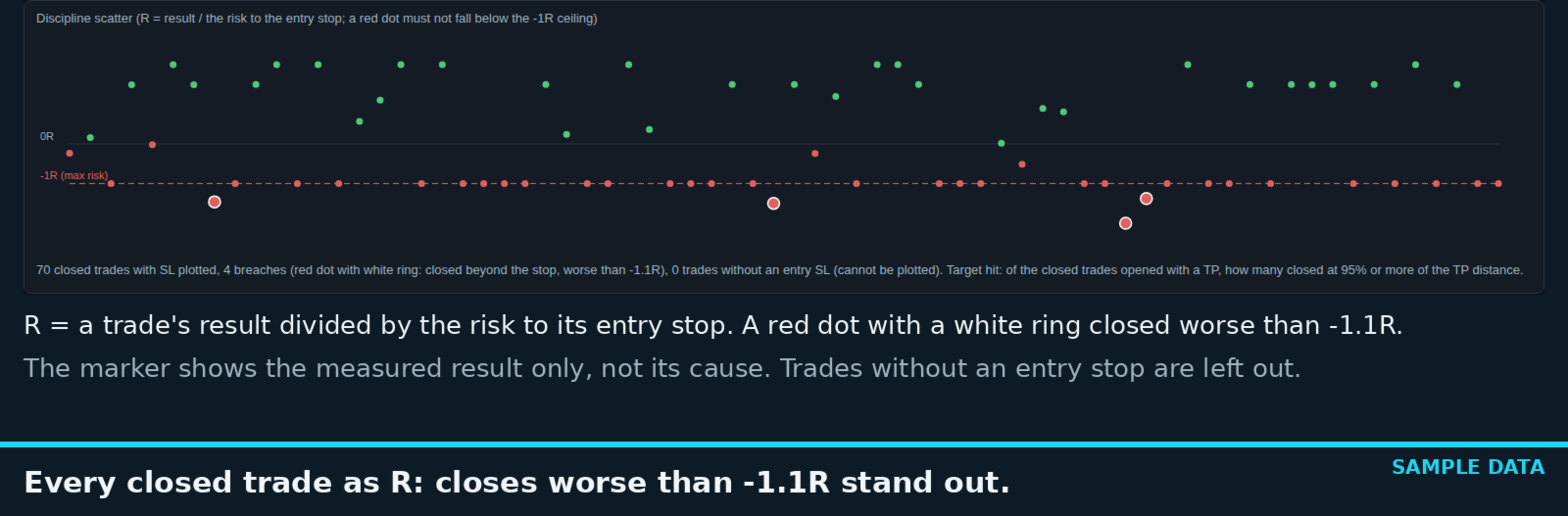
Report metrics that show discipline, not only profit. The summary adds the payoff ratio (average win / average loss), the longest losing streak, how many trades reached their target (TP), and a discipline scatter plot: every closed trade as R, its result divided by the risk to your entry stop. A close worse than -1.1R is marked with a white-ringed red dot; the marker shows the measured result only, not its cause (gaps, slippage, costs or a moved stop can also push a close past -1.1R). Entry SL and TP are recorded when a position opens, trades without a stop are left out of the scatter, and every figure recalculates with the symbol and date filters.

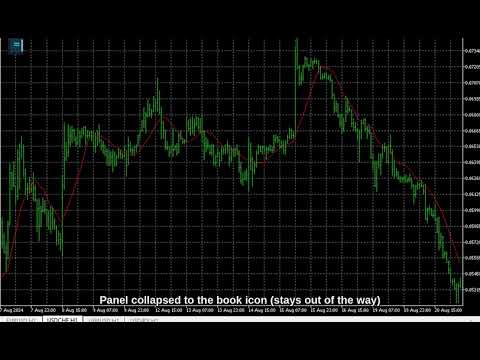
Stays out of your way. The panel collapses to a small book icon when you do not need it. It never trades, never touches your orders, and coexists with any EA running on the same account. Journal data is stored locally in an SQLite database via MetaTrader 5's built-in database engine -- pure MQL5, zero DLLs, zero external dependencies, nothing leaves your terminal.

Three themes (Night Cyan, Graphite Gold, Clean Light), draggable panel, configurable corner and width.

Why you will like it

  • You will actually use it. The journal is one click away, on the chart, at the moment of the trade -- not a spreadsheet you open "later".
  • Auto screenshots on open and close, with optional entry/exit arrows -- visual memory of every trade.
  • Reason and Lesson fields -- capture the why before you forget it and the takeaway after the close.
  • Idea log for rules and ideas that are not tied to one trade.
  • Five emotion tags including Revenge -- see your discipline in the data, not in your memory of it.
  • HTML + CSV reports with symbol scope and date filters -- browser-readable, PDF-printable, spreadsheet-importable.
  • Discipline in numbers: payoff ratio, longest losing streak, TP hit rate and an R-scatter that marks closes worse than -1.1R of the entry risk.
  • Safe by design. Does not trade, coexists with your EAs, all data stays local, no DLLs.

How to use

  • Attach Trade Journal Box to the chart you trade from (one instance journals the whole account if you enable All symbols).
  • Trade as usual -- screenshots happen automatically on open and close.
  • While the position is live, click Reason and type why you entered; tag the emotion with one click.
  • After the close, add the Lesson and hit Save note.
  • Any time: press the HTML or CSV button for the full report; use Extra settings for scope and date filters.

From the makers of the free Live Tuning family (CCI, RSI, Bollinger and more classic indicators with on-chart live sliders) -- same brand, same rule: transparent tools that respect your workflow.

Tip: If the panel ever looks transparent, your chart has "Chart on foreground" enabled (F8 -> Common) and the candles are drawn over it; untick the option and the panel renders solid. While the panel is on a chart, keyboard chart shortcuts and Quick Navigation are switched off so that your typing goes into the note box; removing the panel switches them back on.

Self-contained, no DLLs. Works on any symbol and timeframe. It does not trade for you -- it is a journaling tool; keeping a journal supports discipline but does not by itself guarantee any trading result.
Recommended products
Capitalrecover2
Mr Nisit Noijeam
HFT  ZONE MOMENTUM RECOVERY EA_Name ค่า: HFT MTRADER ใช้สำหรับระบุชื่อของ EA เพื่อให้ง่ายต่อการจัดการหรือตรวจสอบในประวัติการเทรด (History) Lot_fix ค่า: 0.02 ใช้กำหนดขนาดของล็อตคงที่ (Fixed Lot Size) ที่ EA จะเปิดในแต่ละคำสั่งเทรด โดยไม่ขึ้นอยู่กับเงื่อนไขอื่น ๆ Lots_X ค่า: 1.5 ตัวคูณล็อต (Lot Multiplier) ซึ่งมักใช้ในการเพิ่มขนาดล็อตในลักษณะการ Martingale หรือ Hedging โดยเมื่อขาดทุนหรือเปิดคำสั่งถัดไป ระบบจะเพิ่มล็อตตามค่าที่กำหนดไว้ High_Low_end_candle ค่า: 10 จำนวนแท่งเทียนที่ใช้ในการคำนวณระ
Equity Pulse MT5 Real-time equity, drawdown, and portfolio performance tracking in one clean trading panel. Equity Pulse MT5 is a practical account-monitoring indicator for MetaTrader 5. It helps traders see exactly where they stand across today, yesterday, recent days, the current week, month, and year. Instead of checking account history manually or relying only on the terminal’s floating profit number, Equity Pulse gives you a clear performance snapshot directly on the chart. It is designed

Aureum ORB Pro: Institutional-Grade Momentum Trading Aureum ORB Pro is a meticulously engineered algorithmic trading system designed to capitalize on the explosive momentum of the daily Opening Range Breakout (ORB). Specifically tailored for the high-liquidity volume shifts of the USDJPY currency pair, this Expert Advisor maps structural boundaries during the late Asian session and executes precise breakout entries as institutional order flow floods the market. Built for professional traders and
Market Markers EA
Tshepo Michael Motaung
This EA is sessions trading robot that allows you to trade the trading session of yours choice as it waits for market markers to make decision for the direction of the day before taking any trades. It has 3 entry signals that uses candle stick patterns, Moving Averages and Range Break to maximize profits and to take advantage of the trending market. The EA practices risk management and has the ability to grow account by risking certain percentage of your account(risk percentage) each time there
Scalper Investor
Ihor Otkydach
4.26 (19)
Hey traders, If you're looking for an EA that doesn't just fire off trades for the sake of activity, but actually follows a smart, battle-tested strategy — meet Scalper Investor EA. This is a multi-currency expert advisor already armed with a solid reversal strategy, and soon to be upgraded with a trend-following module. Ready to trade: The Reversal Strategy At launch, Scalper Investor EA comes fully loaded with a reversal system designed to catch pullbacks inside the Keltner Channel. This isn’
Coral Wick NZDUSD H2 Historical statistics Period: 2023-04-26–2026-09-25 Data split: 70% in-sample / 30% out-of-sample (OOS) Cumulative return over the full period: 40.29% Maximum drawdown: 3.35% Trades: 189 Win rate: 61.38% Profit factor: 1.86 Reference-test risk: 1.00% per trade Broker data: Blueberry Markets Pty Ltd Longest losing streak in the reference test: 5 trades Historical reference backtest of the source strategy; these are not live results. This version defaults to 2.00% risk per
Advanced Momentum Candles: Designed by an experienced trader and web performance engineer. Developed and built with performance, speed and optimization in mind. Uses unique clean outline of events, even when there are multiple events. Signals structure breaks to the Expert Advisor through a readable signal buffer. Tunes swings, filters and momentum from an on-chart panel, with no reload. Shades every candle in seven steps, from strong bullish to strong bearish. Holds a separate settings line for
Strategy Overview The GembalaCandle EA is a trend-following system that uses the ADX (Average Directional Index) indicator to determine the strength of a trend and the direction (using +DI and -DI). It uses multiple timeframes (from M1 to D1, but typically the lower timeframes are used) and combines their signals according to a selected mode (like consensus, strict, etc.). The EA also uses several filters (Bollinger Bands, MA29, Parabolic SAR, ADX exhaustion, MA50, and others) to avoid entering
Var moment pulse robot
Ekaterina Saltykova
VarMomentPulse is a unique trading algorithm developed with precision and flexibility in mind, based on an extensive historical data cluster. Its operation is grounded in the principles of analyzing crossovers between normalized moving averages and dispersions across various time intervals, enabling it to uncover new opportunities in evaluating market trends. Key Features of the VarMomentPulse Robot: Adaptability to Volatility:The use of price dispersion analysis allows VarMomentPulse to accou
RazorQuant AI
Steffen Schmidt
RAZORQUANT AI v3.7 (MT5 EA)  Purpose: Automated trading EA that combines classic technical filters with machine-learning signals and optional external AI (LLM) advice to decide BUY/SELL/HOLD and manage trades. Core trading + risk rules: Runs on a chosen timeframe (default M1 ), with MagicNumber , max trades per symbol/day , minimum minutes between trades , max spread , and daily loss limit (% of balance) . Position sizing supports fixed lot or risk-% . Technical filters (rule-based): Trend/MA s
MultiWay EA
PAVEL UDOVICHENKO
4.89 (19)
MultiWay EA is a smart and efficient automated trading system built on a powerful mean-reversion strategy. Thanks to broad diversification across nine correlated (and even some typically “trending”) currency pairs — AUDNZD, NZDCAD, AUDCAD, USDCAD, EURUSD, GBPUSD, EURCAD, EURGBP and GBPCAD — it captures price moves back to the average after strong directional impulses. After purchase, please send a private message to receive full setup instructions. Live Signal:  CLICK HERE Current price — only
BlackBox XAU
Enrique Van Rooyen
BlackBox XAU — Advanced Expert Advisor for Gold Overview BlackBox XAU is a carefully engineered trading system built to capture profit in the Gold market while keeping drawdown firmly under control. Instead of chasing every move, it applies a disciplined, rules-based approach that adapts to volatility and isolates only high-probability opportunities . The EA continuously evaluates market conditions in real time, filtering out weak or low-quality signals and waiting patiently until the balance be
Chart Navigator Pro
ELITE FOREX TRADERS LLC
Introducing the   Elite Chart Navigator   — your ultimate MetaTrader 5 Expert Advisor designed to revolutionize multi-symbol trading with seamless chart navigation and superior usability. Product Overview The   Elite Chart Navigator EA   is a sophisticated trading utility enabling rapid switching between multiple trading pairs through an intuitive on-chart button interface. Built for professional traders managing numerous instruments, this EA dramatically improves workflow efficiency, ensuring
Multi Symbol ATR Breakout PRO
Patrick Jean Francois Marianne Dit Gerard
Multi-Symbol ATR Breakout Dashboard Multi-Symbol ATR Breakout Dashboard is an Expert Advisor for MetaTrader 5 designed to monitor and trade multiple instruments directly from a compact dashboard. The EA works with symbols available in Market Watch and combines automatic breakout trading, ATR-based risk management, pending orders, manual trading controls and multi-symbol position management in a single interface. It can be used with Forex pairs, indices, metals and other instruments supported by
Odin Golden Matrix
Napat Puangjunkum
Odin Golden Matrix Advanced Trend-Following Grid & High-Frequency Scalping Engine Odin Golden Matrix is a premium, institutional-grade automated trading system explicitly engineered for the Gold (XAUUSD) market. Designed for both high-net-worth investors and everyday traders, Odin now fully supports both Standard and Cent Accounts, delivering scalable performance across different capital sizes. Powered by a dynamic trend-following matrix and an active overlap recovery engine, Odin systematical
LazyTrader Market Intelligence Multi-Market Trend & Level Analysis See the Bigger Picture. Understand the Market Context. Discover a more structured approach to chart analysis with LazyTrader Market Intelligence — a visual trading indicator designed to bring trend direction, technical conditions, key price levels, market structure and economic-calendar information together in one organized dashboard. Built for traders who want a broader view of market conditions, LazyTrader Market Intelligence h
XAU Portfolio Pro 3 TimeFrames
Fernando Medina Villanueva
XAU Portfolio Pro 3 Time Frames Strategy Overview XAU Portfolio Pro 3 Time Frames is a fully automated Expert Advisor portfolio designed exclusively for trading Gold on the M15, H1 and H4 timeframes. This portfolio combines three proven strategies to provide consistent returns across different market conditions. Development & Robustness Testing This portfolio has been developed using over 20 years of historical tick data, providing a solid statistical foundation for strategy validation. Ext
One Man Army
Ihor Otkydach
4.67 (27)
BONUS FOR EVERY CUSTOMER: Every customer who purchases this bot will receive a free GRABBER BOT : This offer is available for a limited time only. So hurry! No hype, No reckless risk. Trading with minimal drawdown: One Man Army is a multi-currency trading system built for both personal and prop-firm trading. It follows a strategy of scalping short- and medium-term corrections and market reversals, trading through pending limit orders. This trading bot doesn’t guess the direction — it enters the
Trillion Pips Pro MT5
Sivaramakrishnan Natarajan
TRILLION PIPS ELITE PRO INDICATOR Advanced Wave-Based Auto Trend System Built with 12+ Years of Real Market Experience, this is not just an indicator — it is a complete market intelligence system designed to help traders identify key levels, understand auto trend direction, and read market movement with confidence. UNIQUE POWER OF THIS INDICATOR Proprietary Strategy – Only from Trillion Pips Advanced Wave-Based Market Structure Engine Auto Trend Detection System Built-in Trend Decider Log
OnlyTime
Nguyen Quoc Viet
Strategy of entering orders according to the time period of taking the top and bottom and entering orders according to the trend. Maximum of 2 orders per day. Depending on the purpose and trading plan, it can be edited at will. Can set the stop loss and profit levels as desired. Can trade any forex currency pair but prioritize USDJPY. Note: I am using Exness which has server time GMT+0. You need to change accordingly if your server time is different. Welcome everyone to experience. A test with o
VANGUARD SENTINEL PRIME  God-Tier OneChart Triad Recovery Engine Vanguard Sentinel Prime  is a unique Triad Grid Recovery Engine- designed to trade three highly-correlated, low-volatility currency pairs simultaneously (EURCHF, CADCHF, EURCAD) from a single chart. By spreading risk across three pairs that naturally hedge against each other's extremes, the Vanguard engine absorbs market fluctuations smoothly and utilizes a sophisticated Basket Take-Profit Engine- to close multiple pairs in profi
Start with the loss, not the profit. First decide how deep a drawdown you are willing to sit through — 5-10%, 20-30%, or more — and then let the system go after returns inside that limit. That is the order Veteran Army Nasdaq works in. And because no one knows when the index will make its next real move — or in which direction — it stands ready on both sides of one market, with many independent systems instead of one confident bet. At a glance Market: US Tech 100 index, long and short, on the H1
Pips Architect EA
Carl Marvin Fajardo
Pips Architect EA for MT5 Pips Architect EA is a disciplined XAUUSD trading system designed for traders who want structured entries, controlled execution, and stronger protection features. This Expert Advisor is built specifically for XAUUSD and uses an internal Custom Trend Validator Bias together with pending order execution to follow market direction with more control. Instead of blindly chasing price, it waits for alignment, validates conditions, and places trades using a more calculated app
Scipio Ea Mt5
Stefano Frisetti
SCIPIO AI is my Automatic trading BOT created after over 20 years of experience in the financial markets, it automates 100% of the TRADING activity, entry, management, stop loss, day after day the TRADER does not have to do anything. This EA opens only 1 TRADE at a time and immediately sets the STOP LOSS very close, it does not use grid or martingale, one trade at a time so it avoids large DRAW DONW. It uses artificial intelligence to identify the best moment to open the TRADE (LONG + SHORT)
CV QuantMarketScreener Pro CV QuantMarketScreener Pro   is a professional multi-asset market screener for MetaTrader 5, developed for institutional-grade market analysis, rapid signal detection, and efficient multi-symbol trading. The screener combines modern market structure analysis, trend filters, volatility evaluation, and advanced visual signal technology in one powerful dashboard system. The integrated screener allows simultaneous monitoring of multiple markets such as: Forex Indices Metal
Trend Strength Visualizer
Alexander Denisovich Jegorov
Trend Strength Visualizer A Simple Tool for Trend Analysis This indicator helps you quickly assess the strength of market trends using fast and slow moving averages. It’s designed to give you a clear visual representation of the trend, so you can make better trading decisions. ~Displays: Green Line : Strong uptrend (potential buying opportunities). Red Line : Strong downtrend (potential selling opportunities). ~Values That Can Be Changed: Fast MA period. Slow MA period. Line color for uptrend an
Pound Pulse
Simen Staaby Knudsen
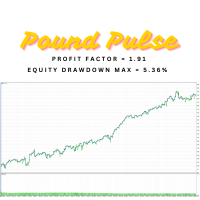
The "Pound Pulse" is a robot I have developed that is trading the gbd/usd pair on a 30min chart. This is "real" strategy that actually got an edge in the market. The strategy is a combination of pure price action, and signals from the RSI and MACD indicator. This robot is perfect for traders who want to make steady gains without taking big risks that may blow the account. NO martingale NO adding to losers Pure robust trading The profit factor is 1.91 and the Sharpe ratio is 6.25, showing strong
Quantum Breakout XAU is not your typical high-risk grid or martingale system. It is a highly disciplined, quantitative trading algorithm exclusively engineered for capitalizing on XAUUSD (Gold) breakouts. At its core, the EA merges Smart Money Concepts (SMC) for precise pullback entries with an advanced Kalman Filter Predictive Algorithm and a robust multi-timeframe Ichimoku structure. By mathematically filtering out market noise and identifying the "true" price action, the system strictly open
USE IT ONLY WITH THE SET FILES I POSTED TO THE COMMENT SECTION.  Youtube video: https://www.youtube.com/watch?v=kQN5LTd91rk&amp ;t=2s This is the biggest update in the life of the Imperium Pattern EA, it got new features and engine. ---It got the official TheNomadTrader Dynamic engine system alongisde with good risk:reward ratio ---New feature that allows traders to tell the EA after how much time(X value in minutes) the EA can close trades by dynamic exit. This feature boosts the EA perfoe
Quantum Forge
Kgotlaetsile R Mabote
# Quantum Forge EA - Channel Breakout Strategy ## Product Overview Quantum Forge is a professional-grade automated trading system built for MetaTrader 5. It implements a sophisticated channel breakout strategy that identifies high-probability trade entries when price breaks above or below a dynamic price range. The EA is designed with institutional-grade risk management and universal broker compatibility. ## Core Strategy Logic The EA calculates the highest high and lowest low over a config
Buyers of this product also purchase
Trade Assistant MT5
Evgeniy Kravchenko
4.43 (216)
It helps to calculate the risk per trade, the easy installation of a new order, order management with partial closing functions, trailing stop of 7 types and other useful functions. Additional materials and instructions Installation instructions - Application instructions Line function -   shows on the chart the Opening line, Stop Loss, Take Profit. With this function it is easy to set a new order and see its additional characteristics before opening.   Risk management  - The risk calculation
FarmedHedge Pair Trading Dashboard
Tanapisit Tepawarapruek
5 (7)
Farmed Hedge Yield Farming | All Markets (Manual - Hybrid - Semi/Automated EA) VERIFIED TRADING RESULTS - Farmed Hedge Yield Axi Copy:  https://www.mql5.com/en/signals/2356376 - Farmed Hedge Yield Exn Copy:   https://www.mql5.com/en/signals/2356404 - Farmed Hedge Yield V Copy:  https://www.mql5.com/en/signals/2357156 IMPORTANT NOTICE: FarmedHedge is a MANUAL-FOCUSED TRADING UTILITY ,not a fully automated EA. Results shown on this Signal include manual trades and overall strategic management.
Forex Trade Manager MT5
InvestSoft
4.98 (689)
Trade Manager MT5 is an advanced position size calculator and trade management tool for MetaTrader 5, designed to help traders plan trades faster, control risk more precisely, and manage open positions directly from the chart. It combines order placement, risk based lot calculation, Stop Loss and Take Profit management, Break Even, Trailing Stop, Partial Close, Equity Protection, and external trade management in one panel. Whether you trade forex, indices, metals, commodities, crypto, or future
Telegram to MT5 MultiChannel Copier
Sergio Marquez Uroz
4.68 (22)
Telegram to MT5 Multi-Channel Copier   automatically copies trading signals from your Telegram and Discord channels straight to MetaTrader 5. No bots, no browser extensions, no manual copying. A signal arrives in Telegram or Discord and the EA opens the trade in your terminal within seconds. And before you copy a channel, the built-in backtester shows you what that channel would have done in your account. The product has two components: a Windows application that listens to your Telegram channel
Local Trade Copier EA MT5
Juvenille Emperor Limited
4.94 (150)
Local Trade Copier EA MT5 is a fast and flexible trade copier for copying and managing trades between multiple MetaTrader 5 accounts on the same Windows computer or Windows VPS. It combines local trade synchronization with Receiver-side controls for lot sizing, risk management, trade filtering, symbol mapping, trade management and account protection. Set up your Transmitter and Receiver terminals in about 1 minute and copy manual or EA trades between accounts at the same or different brokers. U
TradePanel MT5
Alfiya Fazylova
4.88 (172)
Trade Panel is a multi-functional trading assistant. The app contains over 50 trading functions for manual trading and allows you to automate most trading tasks. Application instructions: https://www.mql5.com/en/blogs/post/756482 Trial version of the application for a demo account: https://www.mql5.com/en/blogs/post/750865 How to install the application: https://www.mql5.com/en/blogs/post/756239 How to test the application in visual mode: https://www.mql5.com/en/blogs/post/770277 How to install
News Trade EA MT5
Konstantin Kulikov
4.55 (11)
Present to you the useful robot that I have been using for several years. It can be used in both semi-automatic mode and fully automatic mode. >>> Chat <<< The program contains flexible settings for trading on the news of the economic calendar. It cannot be checked in the strategy tester. Only real work. Download the latest archive of settings: https://www.mql5.com/en/blogs/post/747929 Signals monitoring: https://www.mql5.com/en/signals/author/test-standart When creating your own sets of setti
Copy Telegram signals with your own trading rules Telegram to MT5 Signal Trader automatically copies text-based trading signals from public and private Telegram channels and groups into MetaTrader 5. Manage multiple providers and MT5 accounts from one desktop app, with individual risk and trade settings for each provider . No Telegram bot or API setup needed for copying. Simply sign in with your own Telegram account by phone or QR code and select the channels or groups you have already joined. Y
================================================================================ POC BREAKOUT - V20.72. Full Professional Grade Toolkit ================================================================================ POC Breakout is a full MetaTrader 5 trading dashboard for discretionary traders who want breakout signals, Point of Control (POC) context, volume profiles, order flow, market structure, news, alerts, and advanced trade planning in one professional workspace. Attached directly to you
Exp COPYLOT CLIENT for MT5
Vladislav Andruschenko
3.97 (35)
Professional Trade Copier for MetaTrader 5 Fast, professional, and reliable trade copier for MetaTrader . COPYLOT allows you to copy Forex trades between MT4 and MT5 terminals with support for Hedge and Netting accounts. COPYLOT MT5 version supports: - MT5 Hedge to MT5 Hedge - MT5 Hedge to MT5 Netting - MT5 Netting to MT5 Hedge - MT5 Netting to MT5 Netting - MT4 to MT5 Hedge - MT4 to MT5 Netting MT4 version Full Description +DEMO +PDF How To Buy How To Install How to get Log Files H
The product will copy all telegram signal to MT5 ( which you are member) , also it can work as remote copier.  Easy to set up, copy order instant, can work with almost signal formats, image signal,  s upport to translate other language to English Work with all type of channel or group, even channel have "Restrict Saving Content", work with  multi channel, multi MT5 Work as remote copier: with signal have ticket number, it will copy exactly via ticket number. Support to backtest signal. How to s
EA Overfitter
Stephen J Martret
5 (3)
That backtest looks great. But will it still be making money tomorrow, next week, next month? EA Overfitter re-runs your EA on 100 price histories it has never seen. One score tells you if the edge is real. A backtest tells you what an EA did on one price history — the one that happened to occur. What you cannot tell from it is how much of that result was the strategy and how much was the particular path. EA Overfitter answers that. It builds up to 100 synthetic price histories your EA has n
Power Candles Strategy Scanner - Self-Optimizing Multi-Symbol Setup Finder Self-optimizing settings work one chart at a time, and finding where they pay off right now means opening chart after chart. Power Candles Strategy Scanner runs the same self-optimizing engine as the Power Candles indicator on every symbol in your Market Watch, side by side. One panel ranks where it pays off: the winning strategy per symbol, its optimized Stop Loss and Take Profit. An alert fires the moment a fresh signal
Telegram To MT5 Ultra
Mirel Daniel Gheonu
5 (5)
Telegram To MT5 — Signal Copier Turn the trading calls from your Telegram channels into real MT5 orders — automatically, on as many accounts as you like, with risk and rules fully under your control. Telegram To MT5 connects the VIP / signal channels you already follow on Telegram to your MetaTrader 5 terminal. A free companion desktop app reads the messages (even from channels that block bots), and this Expert Advisor executes them on your account — applying your own risk settings, symbol mappi
Timeless Charts
Samuel Manoel De Souza
5 (9)
Timeless Charts is an all-in-one trading utility for professional traders. It combines custom chart types such as Seconds Charts and Renko with advanced order flow analysis using Footprints , Clusters , Volume Profiles , VWAP studies, and anchored analysis tools for deeper market insight. Trading and position management are handled directly from the chart through an integrated trade management panel , while Market Replay and Virtual Accounts provide environments for practicing trading skills and
Telegram to MT5 Coppy
Sergey Batudayev
5 (10)
Telegram to MT5: The Ultimate Signal Copying Solution Simplify your trading with Telegram to MT5, the modern tool that copies trading signals directly from Telegram channels and chats to your MetaTrader 5 platform, without the need for DLLs. This powerful solution ensures precise signal execution, extensive customization options, saves time, and boosts your efficiency. [ Instructions and DEMO ] [ FAQ ] [ How atach logs properly ] [ Settings descrition ] Key Features Direct Telegram API Integrati
VirtualTradePad One Click Trading Panel
Vladislav Andruschenko
4.59 (74)
Trading Panel for MetaTrader 5 — professional one-click trading from chart and keyboard A powerful trading panel for active manual trading, designed to open, manage, and close trades far faster and more efficiently than the standard MetaTrader interface. This panel is built for traders who want full control over positions, pending orders, profit management, and trading execution inside one professional workspace. This is not just another utility. It is a complete trading cockpit for MetaTrader
Anchor Trade Manager
Kalinskie Gilliam
5 (8)
Your EAs cannot see each other, but Anchor can. Anchor gives you one place to coordinate your EAs, manage risk, and decide when trading is allowed. It works alongside the trading bots you already use without any changes to them. The Problem One EA opens a trade. Then another starts trading. The next thing you know, you wake up to multiple grids built across your account. Each EA may be doing exactly what it was designed to do, but together they can place far more risk on your account than you in
Welcome to Entry In The Zone with SMC Multi Timeframe  —  COMPLETE SMC ANALYSIS SYSTEM — ALL IN ONE INDICATOR  Entry In The Zone with SMC Multi Timeframe  An indicator designed for market analysis based on Smart Money Concepts (SMC), displaying Market Structure, Key Zones (Order Blocks, Supply & Demand Zones, and Fair Value Gaps), Liquidity, and real-time BUY / SELL signals. It supports both Single-Timeframe and Multi-Timeframe analysis, along with the Confluence at Zone feature, which helps you
VirtualTradePad PRO SE MT5 — professional trading control center for MetaTrader 5 VirtualTradePad PRO SE is a premium chart-based trading panel and trade-management workspace for MetaTrader 5 . It is designed for traders who want faster execution, clearer position control, structured trade management, visual level planning and a professional workflow directly from the chart. This is not only a BUY / SELL panel. PRO SE combines manual trading, pending orders, position management, partial exits, b
Trade Indicator Assistant   is a powerful MT5 utility designed to turn indicators into automated trading systems. Its main feature is the ability to automatically detect an indicator’s   BUY and SELL signal buffers , without requiring you to know the buffer numbers, search through indicator settings, or modify the indicator source code. Bonus Indicator:   After purchasing Trade Indicator Assistant, contact me to receive   Trade Signal Pro   completely free as a bonus indicator. [Download Demo V
EA Auditor
Stephen J Martret
5 (7)
EA Auditor is an independent analysis tool for traders evaluating Expert Advisors and trading signals on MetaTrader 5. It audits backtest reports, reviews posted developer signals, and cross-verifies the two against each other to help traders assess strategies before committing capital. The MQL5 market offers a wide range of Expert Advisors from many developers, with varying approaches, quality, and transparency. EA Auditor provides a consistent, data-driven framework for reviewing them, answer
Trade Manager DaneTrades
Levi Dane Benjamin
4.13 (31)
DaneTrades Trade Manager is a professional trade panel for MetaTrader 5, designed for fast, accurate execution with built‑in risk control. Place market or pending orders directly from the chart while the panel automatically calculates position size from your chosen risk, helping you stay consistent and avoid emotional decision‑making. The Trade Manager is built for manual traders who want structure: clear risk/reward planning, automation for repeatable management, and safeguards that help reduc
MT5 to Telegram Signal Provider turns your trading account into a signal provider. Every trade action, whether manual, by EA or from your phone, is instantly sent as a message to Telegram. You can fully customize the format or use a ready-made template for quick setup. [ Demo ] [ Manual ] [ MT4 Version ] [ Discord Version ]     New: [ Telegram To MT5 ] Setup A step by step user guide is available. Key Features Ability to customize order details sent to subscribers You can create a tiered subs
RETAILBERG FOOTPRINT CHART PRO — Order-Flow Workspace for MetaTrader 5 Version 7.00  |  Professional System  |  31 tools  |  One chart A full 150-page illustrated User Manual is included. Please read the full manual to understand this feature packed footprint chart elements and ui. https://www.mql5.com/en/blogs/post/777982 DEMO / STRATEGY TESTER — PLEASE READ FIRST
Trader Evolution
Siarhei Vashchylka
5 (7)
" Trader Evolution " - A utility designed for traders who use wave and technical analysis in their work. One tab of the utility is capable of money management and opening orders, and the other can help in making Elliott wave and technical analysis. Manual (Be sure to read before purchasing) | Version for MT4 Advantages 1. Trading in a few clicks. Immediate and pending orders are available in the panel 2. Money management. The program automatically selects the appropriate lot size 3. Simplifies
DrawDown Limiter
Haidar Lionel Haj Ali
5 (23)
DrawDown Limiter v5.0 — Advanced Account Protection Controller DrawDown Limiter v5.0 is a client-side account protection controller designed to supervise your trading account and automatically react when configured risk, profit, news, schedule, rollover, or position limits are reached. It can monitor manual trades, automated strategies, multiple Expert Advisors, pending orders and floating positions from one dedicated chart. It can protect the complete account or be configured to supervise a spe
RS Trade Copier - the ultra-fast local trade copier with a real graphical interface. Stop typing account numbers manually. No more 200+ cryptic inputs. A reliable and flexible tool for copying trading operations between multiple MT5 and MT4 terminals. It suits experienced traders, signal providers, and individual investors. It enables trade synchronization from one or multiple Providers to one or multiple Clients with high precision and minimal latency. It supports simple automatic configuration
Trade Dashboard MT5
Fatemeh Ameri
4.94 (135)
Trade Dashboard simplifies how you open, manage, and control your trades, with built-in lot size calculation. It allows you to execute trades, manage risk, and control positions directly on the chart, with tools such as partial close, breakeven, and trailing stop. Designed to reduce manual work and help you stay focused on your trading decisions. A demo version is available for testing. Detailed explanations of features are provided within the MQL5 platform. Installation instructions are include
On-Chart Trade Assistant & Risk Management Panel Ergotick Trade Manager gives you a complete set of trading tools directly on your MetaTrader 5 chart: a trade panel with lot size calculator, visual R:R tool, and daily loss limit protection; a separate statistics panel that tracks your performance and past trades; and an economic calendar you can toggle with one click. Built for scalpers, day traders, and prop firm traders. Ergotick Trade Manager is fast , light on resources , and stable , so it
More from author
Every trader knows the ritual: open the indicator settings, change a number, click OK, squint at the chart, decide it is wrong, open settings again. OsMA -- the Moving Average of Oscillator, the MACD histogram on its own -- carries the same three numbers as the MACD, so it costs you the same three dialog trips every time you want to test a different combination. OsMA Live Tuner ends that. It is the OsMA histogram (MACD line minus its signal line) that you tune directly on the chart, live . A sma
FREE
Description tab. Másold be ezt a teljes szöveget (angol, ember-hangvétel, nincs AI-klisé): --- The Fractal Alligator Scanner combines two classic tools that traders have used for years: swing fractals and Bill Williams' Alligator. It does the watching for you and keeps the chart clean. What it draws: - An up arrow above every confirmed swing high and a down arrow below every confirmed swing low. A fractal is only marked once the bars to its right have closed, so the arrows do not repaint. - Th
FREE
Every trader knows the ritual: open the indicator settings, change a number, click OK, squint at the chart, decide it is wrong, open settings again. The Envelopes have a special version of this problem: the deviation percent is the most symbol-dependent number in the classic toolbox. The 0.10% default that looks reasonable on one pair is invisible on gold and absurd on an index -- yet most traders set it once and never touch it again, because every attempt costs a dialog roundtrip. Envelopes Liv
FREE
Every trader knows the ritual: open the indicator settings, change a number, click OK, squint at the chart, decide it is wrong, open settings again. The MACD gives you three numbers to argue about at once -- Fast, Slow and Signal -- and the standard 12/26/9 is a convention, not a law. MACD Live Tuner ends the ritual. It is a MACD that you tune directly on the chart, live , in its own window. A small panel sits on your chart with sliders for the Fast EMA period, the Slow EMA period and the Signal
FREE
Every trader knows the ritual: open the indicator settings, change a number, click OK, squint at the chart, decide it is wrong, open settings again. The Money Flow Index has only one number to set -- the period -- but that single trip through the dialog still costs you the same squint-and-guess cycle every time you want to compare 14 against a shorter or longer read on your own symbol. MFI Live Tuner ends that. It is a Money Flow Index that you tune directly on the chart, live . A small panel si
FREE
Every trader knows the ritual: open the indicator settings, change a number, click OK, squint at the chart, decide it is wrong, open settings again. The Alligator is the most expensive indicator in the classic toolbox to tune this way: three lines, each with a period AND a forward shift -- six numbers, and the settings dialog makes you commit to all six blind. Alligator Live Tuner ends that. It is the full Bill Williams Alligator -- Jaw, Teeth and Lips as three smoothed moving averages of the me
FREE
Every trader knows the ritual: open the indicator settings, change a number, click OK, squint at the chart, decide it is wrong, open settings again, change it back. CCI Live Tuner ends that. It is a Commodity Channel Index that you tune directly on the chart, live . A small panel sits on your chart with sliders for the CCI period and both level lines. Drag a slider and the indicator recalculates and redraws instantly, in the background, while you watch. When it looks right, you are done — no dia
FREE
Every trader knows the ritual: open the indicator settings, change a number, click OK, squint at the chart, decide it is wrong, open settings again. If you trade on MetaTrader 4, you have done it for years — and no indicator collects more dialog roundtrips than the RSI. Period 14 or 9? Levels at 70/30 or 80/20? RSI Live Tuner ends the ritual. It is a Relative Strength Index that you tune directly on the chart, live . A small panel sits on your chart with sliders for the RSI period and both level
FREE
Every trader knows the ritual: open the indicator settings, change a number, click OK, squint at the chart, decide it is wrong, open settings again. The Money Flow Index has only one number to set -- the period -- but that single trip through the dialog still costs you the same squint-and-guess cycle every time you want to compare 14 against a shorter or longer read on your own symbol. MFI Live Tuner ends that. It is a Money Flow Index that you tune directly on the chart, live . A small panel si
FREE
Have you ever noticed that the ADX on your chart does not match the numbers in the books? There is a reason. The standard built-in ADX uses exponential smoothing -- the true Wilder-smoothed version, the one Welles Wilder actually published, ships only as a separate indicator that most traders never load. ADX Live Tuner gives you the textbook Wilder ADX by default, and adds the Live Tuning workflow on top. It is a full three-line ADX (+DI, -DI and the ADX line) that you tune directly on the chart
FREE
Every trader knows the ritual: open the indicator settings, change a number, click OK, squint at the chart, decide it is wrong, open settings again. The Relative Vigor Index has only one number to set -- the period -- but that single trip through the dialog still costs you the same squint-and-guess cycle every time you want to compare 10 against 14 on your own symbol. RVI Live Tuner ends that. It is the classic two-line RVI (RVI and its Signal) that you tune directly on the chart, live . A small
FREE
Have you ever compared your MetaTrader 4 ADX against the values in a book or another platform and wondered why they disagree? There is a reason. MT4's built-in ADX uses exponential smoothing -- it is not the formula Welles Wilder published, and unlike MetaTrader 5, MT4 has no separate "ADX Wilder" to fall back on. ADX Live Tuner fixes that: it is the textbook Wilder ADX, on MetaTrader 4, with the Live Tuning workflow on top. It is a full three-line ADX (+DI, -DI and the ADX line) that you tune d
FREE
Every trader knows the ritual: open the indicator settings, change a number, click OK, squint at the chart, decide it is wrong, open settings again. Standard Deviation has only one number to set -- the period -- but that single trip through the dialog still costs you the same squint-and-guess cycle every time you want to compare 20 against a shorter or longer read of volatility on your own symbol. StdDev Live Tuner ends that. It is a Standard Deviation that you tune directly on the chart, live ,
FREE
Every trader knows the ritual: open the indicator settings, change a number, click OK, squint at the chart, decide it is wrong, open settings again. OsMA -- the Moving Average of Oscillator, the MACD histogram on its own -- carries the same three numbers as the MACD, so it costs you the same three dialog trips every time you want to test a different combination. OsMA Live Tuner ends that. It is the OsMA histogram (MACD line minus its signal line) that you tune directly on the chart, live . A sma
FREE
Every trader knows the ritual: open the indicator settings, change a number, click OK, squint at the chart, decide it is wrong, open settings again. With Bollinger Bands the number that matters most -- the deviation multiplier -- is exactly the one nobody experiments with, because every attempt costs a dialog roundtrip. Bollinger Live Tuner ends that. It is a full Bollinger Bands indicator that you tune directly on the chart, live -- and this time the tuning happens right on the candles, because
FREE
Every trader knows the ritual: open the indicator settings, change a number, click OK, squint at the chart, decide it is wrong, open settings again. And no indicator suffers more dialog roundtrips than the RSI — period 14 or 9? Levels at 70/30 or 80/20? RSI Live Tuner ends the ritual. It is a Relative Strength Index that you tune directly on the chart, live . A small panel sits on your chart with sliders for the RSI period and both levels. Drag a slider and the indicator recalculates and redraws
FREE
Every trader knows the ritual: open the indicator settings, change a number, click OK, squint at the chart, decide it is wrong, open settings again. The Stochastic makes it worse than any other oscillator -- three periods and two levels means five numbers to get right, and every combination costs you another trip through the dialog. Stochastic Live Tuner ends that. It is the classic two-line slow Stochastic (%K and %D) that you tune directly on the chart, live . A small panel sits on your chart
FREE
Every trader knows the ritual: open the indicator settings, change a number, click OK, squint at the chart, decide it is wrong, open settings again. WPR Live Tuner ends that. It is a Williams %R that you tune directly on the chart, live . A small panel sits on your chart with sliders for the %R period and the two levels. Drag a slider and the indicator recalculates and redraws instantly, while you watch. When it looks right, you are done -- no dialog, no OK button. Optional MA signal line. Switc
FREE
Every trader knows the ritual: open the indicator settings, change a number, click OK, squint at the chart, decide it is wrong, open settings again. The DeMarker is the quiet overbought/oversold gauge that most traders never touch -- it sits on the default 0.30/0.70 forever, because testing anything else costs a dialog roundtrip per attempt. DeMarker Live Tuner ends that. It is a DeMarker that you tune directly on the chart, live . A small panel sits on your chart with sliders for the DeM period
FREE
Every trader knows the ritual: open the indicator settings, change a number, click OK, squint at the chart, decide it is wrong, open settings again. If you trade on MetaTrader 4, you have done it for years -- and the MACD gives you three numbers to argue about at once, Fast, Slow and Signal, with the standard 12/26/9 as a convention, not a law. MACD Live Tuner ends the ritual. It is a MACD that you tune directly on the chart, live , in its own window. A small panel sits on your chart with slider
FREE
Every trader knows the ritual: open the indicator settings, change a number, click OK, squint at the chart, decide it is wrong, open settings again. If you trade on MetaTrader 4, you have done it a thousand times. WPR Live Tuner ends that. It is a Williams %R that you tune directly on the chart, live . A small panel sits on your chart with sliders for the %R period and the two levels. Drag a slider and the indicator recalculates and redraws instantly, while you watch. When it looks right, you ar
FREE
Every trader knows the ritual: open the indicator settings, change a number, click OK, squint at the chart, decide it is wrong, open settings again. The Momentum has an extra problem on top: it ships with no meaningful levels at all. The 100 line is the only anchor, and everyone just eyeballs how far above or below is "far enough". Momentum Live Tuner ends both problems. It is a Momentum that you tune directly on the chart, live . A small panel sits on your chart with sliders for the period and
FREE
Every trader knows the ritual: open the indicator settings, change a number, click OK, squint at the chart, decide it is wrong, open settings again. The Force Index has only one number to set -- the period -- but that single trip through the dialog still costs you the same squint-and-guess cycle every time you want to compare 13 against 2 or 100 on your own symbol. Force Index Live Tuner ends that. It is a Force Index that you tune directly on the chart, live , in its own window. A small panel s
FREE
Every trader knows the ritual: open the indicator settings, change a number, click OK, squint at the chart, decide it is wrong, open settings again. If you trade on MetaTrader 4, you have done it for years -- and the Stochastic makes it worse than any other oscillator: three periods and two levels means five numbers to get right, and every combination costs you another trip through the dialog. Stochastic Live Tuner ends that. It is the classic two-line slow Stochastic (%K and %D) that you tune d
FREE
Every trader knows the ritual: open the indicator settings, change a number, click OK, squint at the chart, decide it is wrong, open settings again. If you trade on MetaTrader 4, you have done it for years -- and with Bollinger Bands the number that matters most, the deviation multiplier, is exactly the one nobody experiments with, because every attempt costs a dialog roundtrip. Bollinger Live Tuner ends that. It is a full Bollinger Bands indicator that you tune directly on the chart, live -- an
FREE
Every trader knows the ritual: open the indicator settings, change a number, click OK, squint at the chart, decide it is wrong, open settings again. If you trade on MetaTrader 4, you have done it for years -- and the Alligator is the most expensive indicator in the classic toolbox to tune this way: three lines, each with a period AND a forward shift -- six numbers, and the settings dialog makes you commit to all six blind. Alligator Live Tuner ends that. It is the full Bill Williams Alligator --
FREE
Every trader knows the ritual: open the indicator settings, change a number, click OK, squint at the chart, decide it is wrong, open settings again, change it back. If you trade on MetaTrader 4, you have done this ritual for years. CCI Live Tuner ends it. It is a Commodity Channel Index that you tune directly on the chart, live . A small panel sits on your chart with sliders for the CCI period and both level lines. Drag a slider and the indicator recalculates and redraws instantly, in the backgr
FREE
Every trader knows the ritual: open the indicator settings, change a number, click OK, squint at the chart, decide it is wrong, open settings again. The Relative Vigor Index has only one number to set -- the period -- but that single trip through the dialog still costs you the same squint-and-guess cycle every time you want to compare 10 against 14 on your own symbol. RVI Live Tuner ends that. It is the classic two-line RVI (RVI and its Signal) that you tune directly on the chart, live . A small
FREE
Every trader knows the ritual: open the indicator settings, change a number, click OK, squint at the chart, decide it is wrong, open settings again. If you trade on MetaTrader 4, you have done it for years -- and the DeMarker is the quiet overbought/oversold gauge that most traders never touch: it sits on the default 0.30/0.70 forever, because testing anything else costs a dialog roundtrip per attempt. DeMarker Live Tuner ends that. It is a DeMarker that you tune directly on the chart, live . A
FREE
Every trader knows the ritual: open the indicator settings, change a number, click OK, squint at the chart, decide it is wrong, open settings again. The Force Index has only one number to set -- the period -- but that single trip through the dialog still costs you the same squint-and-guess cycle every time you want to compare 13 against 2 or 100 on your own symbol. Force Index Live Tuner ends that. It is a Force Index that you tune directly on the chart, live , in its own window. A small panel s
FREE
Filter:
No reviews
Reply to review