CCI Live Tuner
- Indicators
- Version: 1.1
- Updated: 5 August 2026

Every trader knows the ritual: open the indicator settings, change a number, click OK, squint at the chart, decide it is wrong, open settings again, change it back. If you trade on MetaTrader 4, you have done this ritual for years. CCI Live Tuner ends it.
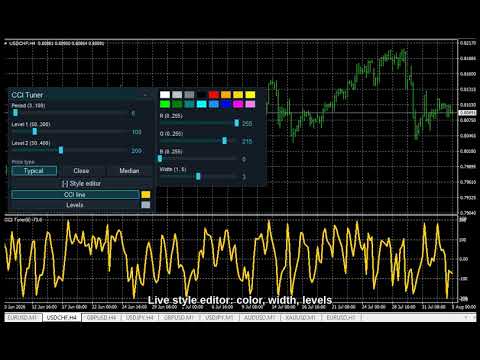
It is a Commodity Channel Index that you tune directly on the chart, live. A small panel sits on your chart with sliders for the CCI period and both level lines. Drag a slider and the indicator recalculates and redraws instantly, in the background, while you watch. When it looks right, you are done -- no dialog, no OK button, nothing to save and reopen.
Live style editor, too. Open the built-in editor and change the CCI line and level colors and thickness with a 16-color palette and RGB sliders. The change lands on the chart the moment you make it. Pick from three built-in themes (Night Cyan, Graphite Gold, Clean Light) so the panel matches your chart.
Your setup is remembered per chart -- periods, levels, price type, colors and widths all come back exactly as you left them after a restart.
Built for MT4, not ported down to it. This is the same Live Tuning panel our MetaTrader 5 users get -- same sliders, same style editor, same themes -- compiled natively for MetaTrader 4. One platform note, stated openly: MT4 draws all indicator level lines in a single shared style, so the style editor here has one Levels element that colors both levels together. The CCI line itself is fully independent, exactly as on MT5.
Why you will like it
- Instant feedback. Drag, see the result now. Find the right period in seconds, not in a dozen dialog roundtrips.
- Style it live. Line/level color and width change on the chart as you edit -- no reopening.
- Three themes, one click, dark or light to match your chart.
- Per-chart memory. Your tuning survives restarts, chart by chart.
- Your own CCI. Clean, standard Typical-Price CCI implementation. Non-repaint. It does not trade for you -- it is a decision-support tool.
How to use
- Drag CCI Live Tuner onto any chart.
- Use the panel sliders to set the period and the two levels -- watch the CCI update live.
- Open Style editor to recolor / resize the line and levels.
- Pick a theme in the inputs (Night Cyan by default).
CCI Live Tuner is part of the Live Tuning family: free classics first, with more indicators and a multi-timeframe dashboard built on the same live-tuning workflow to follow. If the workflow saves you dialog roundtrips, a short review tells us what to bring to MT4 next.
Tip: If the panel ever looks transparent, your chart has "Chart on foreground" enabled (F8 -> Common) and the candles are drawn over it. The indicator deliberately respects your chart settings and never changes them -- untick the option and the panel renders solid.
Free, self-contained, no DLLs. Works on any symbol and timeframe.