Alligator Live Tuner

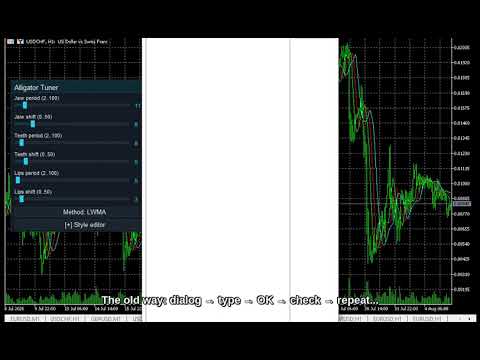
Every trader knows the ritual: open the indicator settings, change a number, click OK, squint at the chart, decide it is wrong, open settings again. The Alligator is the most expensive indicator in the classic toolbox to tune this way: three lines, each with a period AND a forward shift -- six numbers, and the settings dialog makes you commit to all six blind. Alligator Live Tuner ends that.

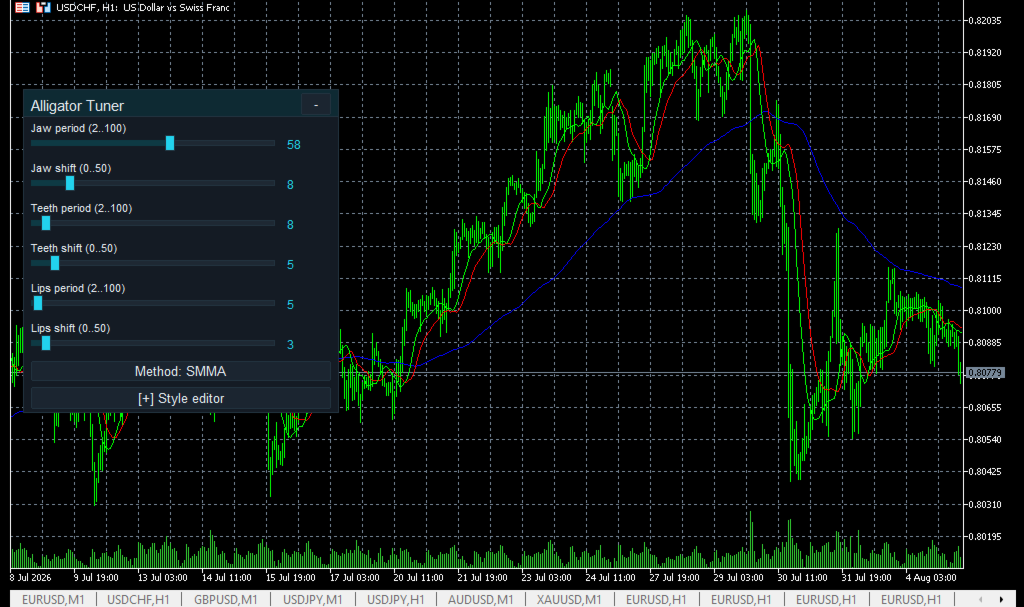
It is the full Bill Williams Alligator -- Jaw, Teeth and Lips as three smoothed moving averages of the median price, in the classic colors (blue 13/+8, red 8/+5, green 5/+3) -- that you tune directly on the chart, live. A small panel sits on your chart with six sliders: a period and a forward shift for each line. Drag a period and the line recalculates instantly. Drag a shift and the line slides forward or back in real time, with zero recalculation -- shifting only moves the plot, so it is instant by construction, the most immediate control in the whole Live Tuning family.

Here is why that matters. Bill Williams traders treat 13/8/5 with 8/5/3 as scripture -- but the moment that actually pays, the "awakening" where the three lines fan apart out of a sleeping tangle, comes earlier or later depending on your timeframe and your instrument. With six live sliders you watch the awakening move as you drag, and you see in seconds which settings wake up on time on YOUR chart -- instead of arguing defaults in a forum thread.

Classic by default, flexible by choice. The smoothing is SMMA on median price ((High+Low)/2), exactly as Williams published it. If you want to experiment, cycle the method -- SMA, EMA, SMMA, LWMA -- with one button on the panel.

The real Alligator, not a wrapper. The indicator runs its own textbook implementation -- SMMA seeded as the simple average of the first period's median prices and continued recursively, no hidden handle in between. What you tune is exactly what you see. Non-repaint.

Live style editor, too. Recolor and resize the Jaw, Teeth and Lips lines with a 16-color palette and RGB sliders -- keep the classic blue/red/green or match your own chart scheme. Three built-in themes (Night Cyan, Graphite Gold, Clean Light) for the panel.

Your setup is remembered per chart -- all six numbers, the method, colors and widths come back exactly as you left them after a restart.

Why you will like it

  • Six sliders for the six numbers that the settings dialog makes you set blind.
  • Instant shift-drag. Forward shifts move the lines in real time with zero recompute -- watch the Alligator's mouth open and close under your hand.
  • Find your awakening. See in seconds which period/shift set fans apart on time on your symbol and timeframe.
  • Classic as published. SMMA on median price, 13/8/5 with 8/5/3 defaults, classic colors -- the textbook Alligator is the starting point, not an approximation of it.
  • Style it live, three themes, per-chart memory.
  • Own Alligator math. Non-repaint. It does not trade for you -- it is a decision-support tool.

How to use

  • Drag Alligator Live Tuner onto any chart -- the three lines draw on the candles, the panel floats on top.
  • Drag the period sliders to change how each line smooths; drag the shift sliders and watch the lines slide instantly.
  • Cycle the smoothing method if you want a non-classic variant.
  • Open Style editor to recolor / resize the three lines.

Alligator Live Tuner is an on-chart member of the Live Tuning family, alongside CCI, WPR, RSI, Stochastic, DeMarker, Momentum, ADX, Bollinger and Envelopes Live Tuner: free classics first, with more indicators and a multi-timeframe dashboard built on the same live-tuning workflow to follow. And if you trade the Alligator with fractal breakouts, our free Fractal Alligator Breakout Scanner runs this exact trend logic with a live decision panel. If the workflow saves you dialog roundtrips, a short review tells us what to build next.

Tip: If the panel ever looks transparent, your chart has "Chart on foreground" enabled (F8 -> Common) and the candles are drawn over it. The indicator deliberately respects your chart settings and never changes them -- untick the option and the panel renders solid.

Free, self-contained, no DLLs. Works on any symbol and timeframe.
More from author
Every trader knows the ritual: open the indicator settings, change a number, click OK, squint at the chart, decide it is wrong, open settings again. And no indicator suffers more dialog roundtrips than the RSI — period 14 or 9? Levels at 70/30 or 80/20? RSI Live Tuner ends the ritual. It is a Relative Strength Index that you tune directly on the chart, live . A small panel sits on your chart with sliders for the RSI period and both levels. Drag a slider and the indicator recalculates and redraws
FREE
Every trader knows the ritual: open the indicator settings, change a number, click OK, squint at the chart, decide it is wrong, open settings again. If you trade on MetaTrader 4, you have done it for years — and no indicator collects more dialog roundtrips than the RSI. Period 14 or 9? Levels at 70/30 or 80/20? RSI Live Tuner ends the ritual. It is a Relative Strength Index that you tune directly on the chart, live . A small panel sits on your chart with sliders for the RSI period and both level
FREE
Every trader knows the ritual: open the indicator settings, change a number, click OK, squint at the chart, decide it is wrong, open settings again, change it back. CCI Live Tuner ends that. It is a Commodity Channel Index that you tune directly on the chart, live . A small panel sits on your chart with sliders for the CCI period and both level lines. Drag a slider and the indicator recalculates and redraws instantly, in the background, while you watch. When it looks right, you are done — no dia
FREE
Every trader knows the ritual: open the indicator settings, change a number, click OK, squint at the chart, decide it is wrong, open settings again. With Bollinger Bands the number that matters most -- the deviation multiplier -- is exactly the one nobody experiments with, because every attempt costs a dialog roundtrip. Bollinger Live Tuner ends that. It is a full Bollinger Bands indicator that you tune directly on the chart, live -- and this time the tuning happens right on the candles, because
FREE
Every trader knows the ritual: open the indicator settings, change a number, click OK, squint at the chart, decide it is wrong, open settings again. WPR Live Tuner ends that. It is a Williams %R that you tune directly on the chart, live . A small panel sits on your chart with sliders for the %R period and the two levels. Drag a slider and the indicator recalculates and redraws instantly, while you watch. When it looks right, you are done -- no dialog, no OK button. Optional MA signal line. Switc
FREE
Have you ever noticed that the ADX on your chart does not match the numbers in the books? There is a reason. The standard built-in ADX uses exponential smoothing -- the true Wilder-smoothed version, the one Welles Wilder actually published, ships only as a separate indicator that most traders never load. ADX Live Tuner gives you the textbook Wilder ADX by default, and adds the Live Tuning workflow on top. It is a full three-line ADX (+DI, -DI and the ADX line) that you tune directly on the chart
FREE
Description tab. Másold be ezt a teljes szöveget (angol, ember-hangvétel, nincs AI-klisé): --- The Fractal Alligator Scanner combines two classic tools that traders have used for years: swing fractals and Bill Williams' Alligator. It does the watching for you and keeps the chart clean. What it draws: - An up arrow above every confirmed swing high and a down arrow below every confirmed swing low. A fractal is only marked once the bars to its right have closed, so the arrows do not repaint. - Th
FREE
Every trader knows the ritual: open the indicator settings, change a number, click OK, squint at the chart, decide it is wrong, open settings again, change it back. If you trade on MetaTrader 4, you have done this ritual for years. CCI Live Tuner ends it. It is a Commodity Channel Index that you tune directly on the chart, live . A small panel sits on your chart with sliders for the CCI period and both level lines. Drag a slider and the indicator recalculates and redraws instantly, in the backgr
FREE
Have you ever compared your MetaTrader 4 ADX against the values in a book or another platform and wondered why they disagree? There is a reason. MT4's built-in ADX uses exponential smoothing -- it is not the formula Welles Wilder published, and unlike MetaTrader 5, MT4 has no separate "ADX Wilder" to fall back on. ADX Live Tuner fixes that: it is the textbook Wilder ADX, on MetaTrader 4, with the Live Tuning workflow on top. It is a full three-line ADX (+DI, -DI and the ADX line) that you tune d
FREE
Every trader knows the ritual: open the indicator settings, change a number, click OK, squint at the chart, decide it is wrong, open settings again. If you trade on MetaTrader 4, you have done it a thousand times. WPR Live Tuner ends that. It is a Williams %R that you tune directly on the chart, live . A small panel sits on your chart with sliders for the %R period and the two levels. Drag a slider and the indicator recalculates and redraws instantly, while you watch. When it looks right, you ar
FREE
Every trader knows the ritual: open the indicator settings, change a number, click OK, squint at the chart, decide it is wrong, open settings again. If you trade on MetaTrader 4, you have done it for years -- and with Bollinger Bands the number that matters most, the deviation multiplier, is exactly the one nobody experiments with, because every attempt costs a dialog roundtrip. Bollinger Live Tuner ends that. It is a full Bollinger Bands indicator that you tune directly on the chart, live -- an
FREE
Every trader knows the ritual: open the indicator settings, change a number, click OK, squint at the chart, decide it is wrong, open settings again. If you trade on MetaTrader 4, you have done it for years -- and the DeMarker is the quiet overbought/oversold gauge that most traders never touch: it sits on the default 0.30/0.70 forever, because testing anything else costs a dialog roundtrip per attempt. DeMarker Live Tuner ends that. It is a DeMarker that you tune directly on the chart, live . A
FREE
Every trader knows the ritual: open the indicator settings, change a number, click OK, squint at the chart, decide it is wrong, open settings again. The Force Index has only one number to set -- the period -- but that single trip through the dialog still costs you the same squint-and-guess cycle every time you want to compare 13 against 2 or 100 on your own symbol. Force Index Live Tuner ends that. It is a Force Index that you tune directly on the chart, live , in its own window. A small panel s
FREE
Every trader knows the ritual: open the indicator settings, change a number, click OK, squint at the chart, decide it is wrong, open settings again. If you trade on MetaTrader 4, you have done it for years -- and the Envelopes have a special version of the problem: the deviation percent is the most symbol-dependent number in the classic toolbox. The 0.10% default that looks reasonable on one pair is invisible on gold and absurd on an index -- yet most traders set it once and never touch it again
FREE
Every trader knows the ritual: open the indicator settings, change a number, click OK, squint at the chart, decide it is wrong, open settings again. If you trade on MetaTrader 4, you have done it for years -- and the MACD gives you three numbers to argue about at once, Fast, Slow and Signal, with the standard 12/26/9 as a convention, not a law. MACD Live Tuner ends the ritual. It is a MACD that you tune directly on the chart, live , in its own window. A small panel sits on your chart with slider
FREE
Every trader knows the ritual: open the indicator settings, change a number, click OK, squint at the chart, decide it is wrong, open settings again. If you trade on MetaTrader 4, you have done it for years -- and the Alligator is the most expensive indicator in the classic toolbox to tune this way: three lines, each with a period AND a forward shift -- six numbers, and the settings dialog makes you commit to all six blind. Alligator Live Tuner ends that. It is the full Bill Williams Alligator --
FREE
Every trader knows the ritual: open the indicator settings, change a number, click OK, squint at the chart, decide it is wrong, open settings again. The Money Flow Index has only one number to set -- the period -- but that single trip through the dialog still costs you the same squint-and-guess cycle every time you want to compare 14 against a shorter or longer read on your own symbol. MFI Live Tuner ends that. It is a Money Flow Index that you tune directly on the chart, live . A small panel si
FREE
Every trader knows the ritual: open the indicator settings, change a number, click OK, squint at the chart, decide it is wrong, open settings again. If you trade on MetaTrader 4, you have done it for years -- and the Momentum has an extra problem on top: it ships with no meaningful levels at all. The 100 line is the only anchor, and everyone just eyeballs how far above or below is "far enough". Momentum Live Tuner ends both problems. It is a Momentum that you tune directly on the chart, live . A
FREE
Every trader knows the ritual: open the indicator settings, change a number, click OK, squint at the chart, decide it is wrong, open settings again. OsMA -- the Moving Average of Oscillator, the MACD histogram on its own -- carries the same three numbers as the MACD, so it costs you the same three dialog trips every time you want to test a different combination. OsMA Live Tuner ends that. It is the OsMA histogram (MACD line minus its signal line) that you tune directly on the chart, live . A sma
FREE
Every trader knows the ritual: open the indicator settings, change a number, click OK, squint at the chart, decide it is wrong, open settings again. The Relative Vigor Index has only one number to set -- the period -- but that single trip through the dialog still costs you the same squint-and-guess cycle every time you want to compare 10 against 14 on your own symbol. RVI Live Tuner ends that. It is the classic two-line RVI (RVI and its Signal) that you tune directly on the chart, live . A small
FREE
Every trader knows the ritual: open the indicator settings, change a number, click OK, squint at the chart, decide it is wrong, open settings again. Standard Deviation has only one number to set -- the period -- but that single trip through the dialog still costs you the same squint-and-guess cycle every time you want to compare 20 against a shorter or longer read of volatility on your own symbol. StdDev Live Tuner ends that. It is a Standard Deviation that you tune directly on the chart, live ,
FREE
Every trader knows the ritual: open the indicator settings, change a number, click OK, squint at the chart, decide it is wrong, open settings again. If you trade on MetaTrader 4, you have done it for years -- and the Stochastic makes it worse than any other oscillator: three periods and two levels means five numbers to get right, and every combination costs you another trip through the dialog. Stochastic Live Tuner ends that. It is the classic two-line slow Stochastic (%K and %D) that you tune d
FREE
Every trader knows the ritual: open the indicator settings, change a number, click OK, squint at the chart, decide it is wrong, open settings again. The DeMarker is the quiet overbought/oversold gauge that most traders never touch -- it sits on the default 0.30/0.70 forever, because testing anything else costs a dialog roundtrip per attempt. DeMarker Live Tuner ends that. It is a DeMarker that you tune directly on the chart, live . A small panel sits on your chart with sliders for the DeM period
FREE
Every trader knows the ritual: open the indicator settings, change a number, click OK, squint at the chart, decide it is wrong, open settings again. The Envelopes have a special version of this problem: the deviation percent is the most symbol-dependent number in the classic toolbox. The 0.10% default that looks reasonable on one pair is invisible on gold and absurd on an index -- yet most traders set it once and never touch it again, because every attempt costs a dialog roundtrip. Envelopes Liv
FREE
Every trader knows the ritual: open the indicator settings, change a number, click OK, squint at the chart, decide it is wrong, open settings again. The Force Index has only one number to set -- the period -- but that single trip through the dialog still costs you the same squint-and-guess cycle every time you want to compare 13 against 2 or 100 on your own symbol. Force Index Live Tuner ends that. It is a Force Index that you tune directly on the chart, live , in its own window. A small panel s
FREE
Every trader knows the ritual: open the indicator settings, change a number, click OK, squint at the chart, decide it is wrong, open settings again. The MACD gives you three numbers to argue about at once -- Fast, Slow and Signal -- and the standard 12/26/9 is a convention, not a law. MACD Live Tuner ends the ritual. It is a MACD that you tune directly on the chart, live , in its own window. A small panel sits on your chart with sliders for the Fast EMA period, the Slow EMA period and the Signal
FREE
Every trader knows the ritual: open the indicator settings, change a number, click OK, squint at the chart, decide it is wrong, open settings again. The Money Flow Index has only one number to set -- the period -- but that single trip through the dialog still costs you the same squint-and-guess cycle every time you want to compare 14 against a shorter or longer read on your own symbol. MFI Live Tuner ends that. It is a Money Flow Index that you tune directly on the chart, live . A small panel si
FREE
Every trader knows the ritual: open the indicator settings, change a number, click OK, squint at the chart, decide it is wrong, open settings again. The Momentum has an extra problem on top: it ships with no meaningful levels at all. The 100 line is the only anchor, and everyone just eyeballs how far above or below is "far enough". Momentum Live Tuner ends both problems. It is a Momentum that you tune directly on the chart, live . A small panel sits on your chart with sliders for the period and
FREE
Every trader knows the ritual: open the indicator settings, change a number, click OK, squint at the chart, decide it is wrong, open settings again. OsMA -- the Moving Average of Oscillator, the MACD histogram on its own -- carries the same three numbers as the MACD, so it costs you the same three dialog trips every time you want to test a different combination. OsMA Live Tuner ends that. It is the OsMA histogram (MACD line minus its signal line) that you tune directly on the chart, live . A sma
FREE
Every trader knows the ritual: open the indicator settings, change a number, click OK, squint at the chart, decide it is wrong, open settings again. The Relative Vigor Index has only one number to set -- the period -- but that single trip through the dialog still costs you the same squint-and-guess cycle every time you want to compare 10 against 14 on your own symbol. RVI Live Tuner ends that. It is the classic two-line RVI (RVI and its Signal) that you tune directly on the chart, live . A small
FREE
Filter:
No reviews
Reply to review