Bollinger Live Tuner MT4
- Indicators
- Version: 1.1

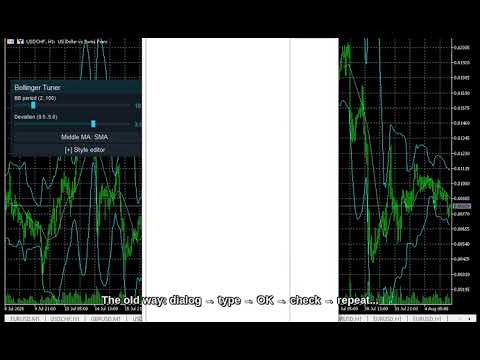
Every trader knows the ritual: open the indicator settings, change a number, click OK, squint at the chart, decide it is wrong, open settings again. If you trade on MetaTrader 4, you have done it for years -- and with Bollinger Bands the number that matters most, the deviation multiplier, is exactly the one nobody experiments with, because every attempt costs a dialog roundtrip. Bollinger Live Tuner ends that.
It is a full Bollinger Bands indicator that you tune directly on the chart, live -- and this time the tuning happens right on the candles, because the bands live there. A small panel sits on your chart with sliders for the period and the deviation multiplier (0.5 to 5.0, in 0.1 steps). Drag the deviation slider and you watch the envelope widen and tighten across your whole history in real time. Where the band edge starts catching real reversals instead of noise on your symbol and your timeframe -- you see it happen, in seconds, not in a dozen dialog roundtrips.
Middle-MA method on one button. Classic Bollinger Bands use an SMA middle -- that is the default, as published. If you want to experiment, cycle the middle line's method -- SMA, EMA, SMMA, LWMA -- straight from the panel; the standard deviation is always computed around the middle you chose, so the bands stay consistent with their own centerline.
The real Bollinger Bands, not a wrapper. The indicator runs its own textbook implementation: Middle = MA(Close, period), Upper/Lower = Middle +/- deviation x population standard deviation of the same window around the current middle value (the standard platform convention). All four middle-MA variants verified numerically -- no built-in handle in between. What you tune is exactly what you see. Non-repaint.
Live style editor, too. Recolor and resize the bands and the middle line with a 16-color palette and RGB sliders. Pick from three built-in themes (Night Cyan, Graphite Gold, Clean Light) so the panel matches your chart.
Your setup is remembered per chart -- period, deviation, middle method, colors and widths all come back exactly as you left them after a restart.
Built for MT4, not ported down to it. This is the same Live Tuning panel our MetaTrader 5 users get -- same sliders, same style editor, same themes -- compiled natively for MetaTrader 4.
Why you will like it
- Watch the bands breathe. The deviation slider is the most visual control in the whole Live Tuning family -- the envelope tightens and expands live on your own volatility.
- Fine-grained deviation: 0.5 to 5.0 in 0.1 steps, so 1.8 vs 2.0 vs 2.2 is a drag, not three dialog sessions.
- Classic by default, flexible by choice. SMA middle as Bollinger published it; EMA/SMMA/LWMA one button away.
- Style it live. Band and middle-line color and width change on the chart as you edit.
- Three themes, one click, dark or light to match your chart.
- Per-chart memory. Your tuning survives restarts, chart by chart.
- Own Bollinger math. Non-repaint. It does not trade for you -- it is a decision-support tool.
How to use
- Drag Bollinger Live Tuner onto any chart -- the bands draw on the candles, the panel floats on top.
- Use the sliders to set the period and the deviation -- watch the envelope adapt live.
- Cycle the middle-MA method if you want a non-classic centerline.
- Open Style editor to recolor / resize the bands and the middle line.
Bollinger Live Tuner is the first on-chart member of the Live Tuning family, alongside CCI, WPR, RSI, Stochastic, DeMarker, Momentum and ADX Live Tuner: free classics first, with more indicators and a multi-timeframe dashboard built on the same live-tuning workflow to follow. If the workflow saves you dialog roundtrips, a short review tells us what to bring to MT4 next.
Tip: If the panel ever looks transparent, your chart has "Chart on foreground" enabled (F8 -> Common) and the candles are drawn over it. The indicator deliberately respects your chart settings and never changes them -- untick the option and the panel renders solid.
Free, self-contained, no DLLs. Works on any symbol and timeframe.