WPR Live Tuner MT4

Every trader knows the ritual: open the indicator settings, change a number, click OK, squint at the chart, decide it is wrong, open settings again. If you trade on MetaTrader 4, you have done it a thousand times. WPR Live Tuner ends that.

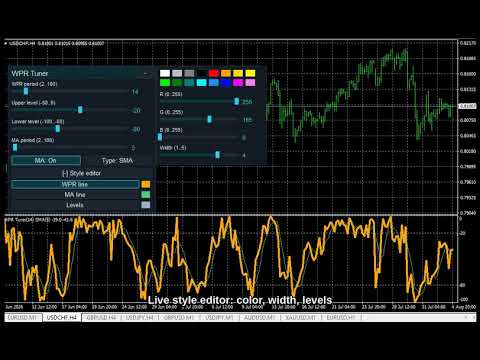
It is a Williams %R that you tune directly on the chart, live. A small panel sits on your chart with sliders for the %R period and the two levels. Drag a slider and the indicator recalculates and redraws instantly, while you watch. When it looks right, you are done -- no dialog, no OK button.

Optional MA signal line. Switch a moving average of the %R on or off straight from the panel, and cycle its method -- SMA, EMA, SMMA, LWMA -- with one button. Four methods, one click each, and the change lands on the chart the moment you make it. Finding out whether an EMA(5) or an SMMA(9) smooths your %R better takes seconds, not four trips through a dialog.

Live style editor, too. Recolor and resize the %R line, the MA line and the level lines with a 16-color palette and RGB sliders. Pick from three built-in themes (Night Cyan, Graphite Gold, Clean Light) so the panel matches your chart.

Your setup is remembered per chart -- period, levels, MA state and method, colors and widths all come back exactly as you left them after a restart.

Built for MT4, not ported down to it. Same Live Tuning panel as our MetaTrader 5 build -- same sliders, same style editor, same themes -- compiled natively for MetaTrader 4.

Why you will like it

  • Instant feedback. Drag, see the result now. Find the right period in seconds.
  • Optional MA signal line, four methods, toggled and switched live from the panel.
  • Style it live. %R / MA / level color and width change on the chart as you edit.
  • Three themes, one click, dark or light to match your chart.
  • Per-chart memory. Your tuning survives restarts, chart by chart.
  • Own %R and MA math. Non-repaint. It does not trade for you -- it is a decision-support tool.

How to use

  • Drag WPR Live Tuner onto any chart.
  • Use the sliders to set the %R period and the two levels -- watch it update live.
  • Toggle the MA on the panel and cycle its method until the smoothing fits your market.
  • Open Style editor to recolor / resize the lines and levels.

WPR Live Tuner is the second member of the Live Tuning family: free classics first, with more indicators and a multi-timeframe dashboard built on the same live-tuning workflow to follow. If the workflow saves you dialog roundtrips, a short review tells us what to bring to MT4 next.

Tip: If the panel ever looks transparent, your chart has "Chart on foreground" enabled (F8 -> Common) and the candles are drawn over it. The indicator deliberately respects your chart settings and never changes them -- untick the option and the panel renders solid.

Free, self-contained, no DLLs. Works on any symbol and timeframe.
More from author
Every trader knows the ritual: open the indicator settings, change a number, click OK, squint at the chart, decide it is wrong, open settings again. And no indicator suffers more dialog roundtrips than the RSI — period 14 or 9? Levels at 70/30 or 80/20? RSI Live Tuner ends the ritual. It is a Relative Strength Index that you tune directly on the chart, live . A small panel sits on your chart with sliders for the RSI period and both levels. Drag a slider and the indicator recalculates and redraws
FREE
Every trader knows the ritual: open the indicator settings, change a number, click OK, squint at the chart, decide it is wrong, open settings again. If you trade on MetaTrader 4, you have done it for years — and no indicator collects more dialog roundtrips than the RSI. Period 14 or 9? Levels at 70/30 or 80/20? RSI Live Tuner ends the ritual. It is a Relative Strength Index that you tune directly on the chart, live . A small panel sits on your chart with sliders for the RSI period and both level
FREE
Description tab. Másold be ezt a teljes szöveget (angol, ember-hangvétel, nincs AI-klisé): --- The Fractal Alligator Scanner combines two classic tools that traders have used for years: swing fractals and Bill Williams' Alligator. It does the watching for you and keeps the chart clean. What it draws: - An up arrow above every confirmed swing high and a down arrow below every confirmed swing low. A fractal is only marked once the bars to its right have closed, so the arrows do not repaint. - Th
FREE
Have you ever noticed that the ADX on your chart does not match the numbers in the books? There is a reason. The standard built-in ADX uses exponential smoothing -- the true Wilder-smoothed version, the one Welles Wilder actually published, ships only as a separate indicator that most traders never load. ADX Live Tuner gives you the textbook Wilder ADX by default, and adds the Live Tuning workflow on top. It is a full three-line ADX (+DI, -DI and the ADX line) that you tune directly on the chart
FREE
Every trader knows the ritual: open the indicator settings, change a number, click OK, squint at the chart, decide it is wrong, open settings again, change it back. If you trade on MetaTrader 4, you have done this ritual for years. CCI Live Tuner ends it. It is a Commodity Channel Index that you tune directly on the chart, live . A small panel sits on your chart with sliders for the CCI period and both level lines. Drag a slider and the indicator recalculates and redraws instantly, in the backgr
FREE
Every trader knows the ritual: open the indicator settings, change a number, click OK, squint at the chart, decide it is wrong, open settings again. WPR Live Tuner ends that. It is a Williams %R that you tune directly on the chart, live . A small panel sits on your chart with sliders for the %R period and the two levels. Drag a slider and the indicator recalculates and redraws instantly, while you watch. When it looks right, you are done -- no dialog, no OK button. Optional MA signal line. Switc
FREE
Have you ever compared your MetaTrader 4 ADX against the values in a book or another platform and wondered why they disagree? There is a reason. MT4's built-in ADX uses exponential smoothing -- it is not the formula Welles Wilder published, and unlike MetaTrader 5, MT4 has no separate "ADX Wilder" to fall back on. ADX Live Tuner fixes that: it is the textbook Wilder ADX, on MetaTrader 4, with the Live Tuning workflow on top. It is a full three-line ADX (+DI, -DI and the ADX line) that you tune d
FREE
Every trader knows the ritual: open the indicator settings, change a number, click OK, squint at the chart, decide it is wrong, open settings again. If you trade on MetaTrader 4, you have done it for years -- and with Bollinger Bands the number that matters most, the deviation multiplier, is exactly the one nobody experiments with, because every attempt costs a dialog roundtrip. Bollinger Live Tuner ends that. It is a full Bollinger Bands indicator that you tune directly on the chart, live -- an
FREE
Every trader knows the ritual: open the indicator settings, change a number, click OK, squint at the chart, decide it is wrong, open settings again. With Bollinger Bands the number that matters most -- the deviation multiplier -- is exactly the one nobody experiments with, because every attempt costs a dialog roundtrip. Bollinger Live Tuner ends that. It is a full Bollinger Bands indicator that you tune directly on the chart, live -- and this time the tuning happens right on the candles, because
FREE
Every trader knows the ritual: open the indicator settings, change a number, click OK, squint at the chart, decide it is wrong, open settings again, change it back. CCI Live Tuner ends that. It is a Commodity Channel Index that you tune directly on the chart, live . A small panel sits on your chart with sliders for the CCI period and both level lines. Drag a slider and the indicator recalculates and redraws instantly, in the background, while you watch. When it looks right, you are done — no dia
FREE
Filter:
No reviews
Reply to review