JET Trade Assistant PRO MT4
- Utilities
-
JETINVEST
 Roberto Junqueira, is Trader for over 20 years and has been developing indicators and trading experts for more than 10 years for the Forex, Cryptocurrencies and Stock Exchanges markets.
- Version: 1.0
- Activations: 10
JET Trade Assistant PRO is a complete trade panel and trade manager for MetaTrader 4. Choose your risk, draw the trade on the chart and send it in one click — the panel calculates the volume and manages the trade until the last exit. Same panel, inputs and texts as the MetaTrader 5 version 3.00.
HIGHLIGHTS
- Reverse: close the open side of the symbol and open the opposite one in one click (or Shift + V), confirmed by a second click; mirrored stop loss and take profit; same volume or recalculated from your risk.
- Daily profit target: % of the day start balance or money. When reached, new entries are blocked until the next server day (optional: close positions and delete pending orders).
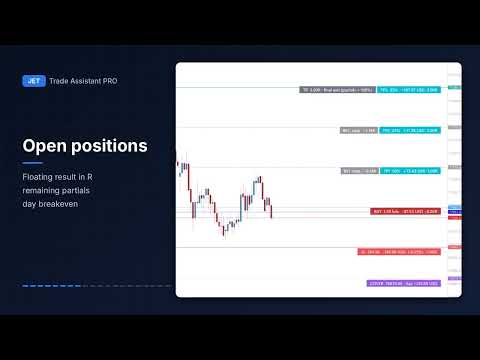
- Open breakeven line (BE OPEN): with 2 or more positions on the symbol, the price where their combined result is zero, swap and commission included, and a one-click "SL at open BE".
- Order comments "JTA#<number> <origin> <detail>": one number per trade, shown in the TRADES list and on the chart tags.
PLAN THE TRADE ON THE CHART
- Entry, stop loss and take profit lines you drag with the mouse (also in the visual Strategy Tester).
- Each line shows money, % of the balance and R; the order type follows the line and the order mode (market, limit, stop or stop-limit).
- Stop-limit: MetaTrader 4 has no stop-limit order, so the panel keeps the trigger and the limit price in the terminal and sends the order when the trigger is reached.
- Partial exits, partial stops and break-even levels are drawn on the chart before you send the order and can be dragged one by one.
- After sending, pending orders and positions keep the same look: drag the entry, SL, TP, partials and break-evens; cancel a pending order with the X on its line.
- Until the first exit, R follows the stop you move; after it, R is fixed.
POSITION SIZE FROM YOUR RISK
- Risk in % (of balance, equity, free margin or the balance at the start of the day, week or month), fixed money, fixed lots, Reward % at the take profit or lots per 1,000 of balance.
- Risk reduction: after a set day gain, new trades use only part of the size.
- Commission included in the risk, detected automatically from your account history.
- Stop by points, ATR or the high/low of N bars; take profit in R with a risk:reward lock.
- The preview shows volume, risk and the real reward of the plan — partial exits included.
TRADE MANAGEMENT
- Up to 4 partial exits (in R and % of the volume). With 100% in partials, the last one becomes the final exit.
- Up to 4 partial stops (in -R and % of the volume): part of the position leaves before the stop, lowering the loss.
- Up to 4 break-even levels (trigger in R, stop locks R), with offset = spread + commission.
- 8 trailing stops: fixed, ATR, moving average, Parabolic SAR, fractals, high/low of N bars, previous partial and custom indicator buffer.
- Partial closes follow the new ticket MetaTrader 4 gives to the rest of the position; the journal and the statistics count all parts as one trade.
- Hidden stop loss and take profit with a safety stop at the broker.
- Virtual pending orders kept by the panel.
- Manual trades (magic 0) on the symbol can be resized to your risk and managed; trades of other EAs can have their exits managed.
- Plans (partials, break-evens, hidden stops) are saved to a file and continue after a restart.
PROTECTION
- Prop-firm rules: daily loss, maximum drawdown (static or trailing), trades per day, maximum open risk, maximum spread and maximum lot per order. The panel checks every new trade against the limits.
- Daily profit target with the same block-and-close options.
- Basket protection: close everything at a profit or loss target, for the symbol or the whole account.
- Day breakeven line (cover point): the price where the day result of the symbol is zero, with alert/push when it is crossed and a one-click "SL at the cover point".
- Trading hours: new entries only inside your session and days.
MORE TOOLS
- OCO orders, bracket OCO on the high/low of N bars, ladder entries, pending order that follows the price, cancel level for pending orders, cancel if the TP comes first.
- Group actions: common break-even, one SL/TP line for all positions of a side.
- Time tasks: buy, sell, close or delete orders at a given time and day.
- Journal (CSV) with screenshots on entry and exit, and statistics: win rate, profit factor, average R, best/worst trade, losing run, equity curve.
- Notifications by pop-up, push and e-mail: entries, exits, break-even and limits.
- 5 presets, .set export, hotkeys, light/dark theme.
- Panel in English, Portuguese, Spanish and Russian.
- Hedging accounts of MetaTrader 4: Forex, indices, metals and crypto; offline/Renko charts through the "Trade symbol" input. Works in the Strategy Tester.
Not in the MetaTrader 4 edition: news filter (MetaTrader 4 has no economic calendar) and netting accounts.
Manual with images (same panel, MetaTrader 5 edition, with an appendix for MetaTrader 4): https://www.mql5.com/en/blogs/post/778857
MetaTrader 5 version: JET Trade Assistant PRO (https://www.mql5.com/en/market/product/205252).
Note: the panel executes and manages the orders you decide to place. It does not predict the market and does not guarantee results. Test on a demo account first.