Stats panel
- Indicators
- Version: 1.9
- Activations: 5

🎯 Purpose
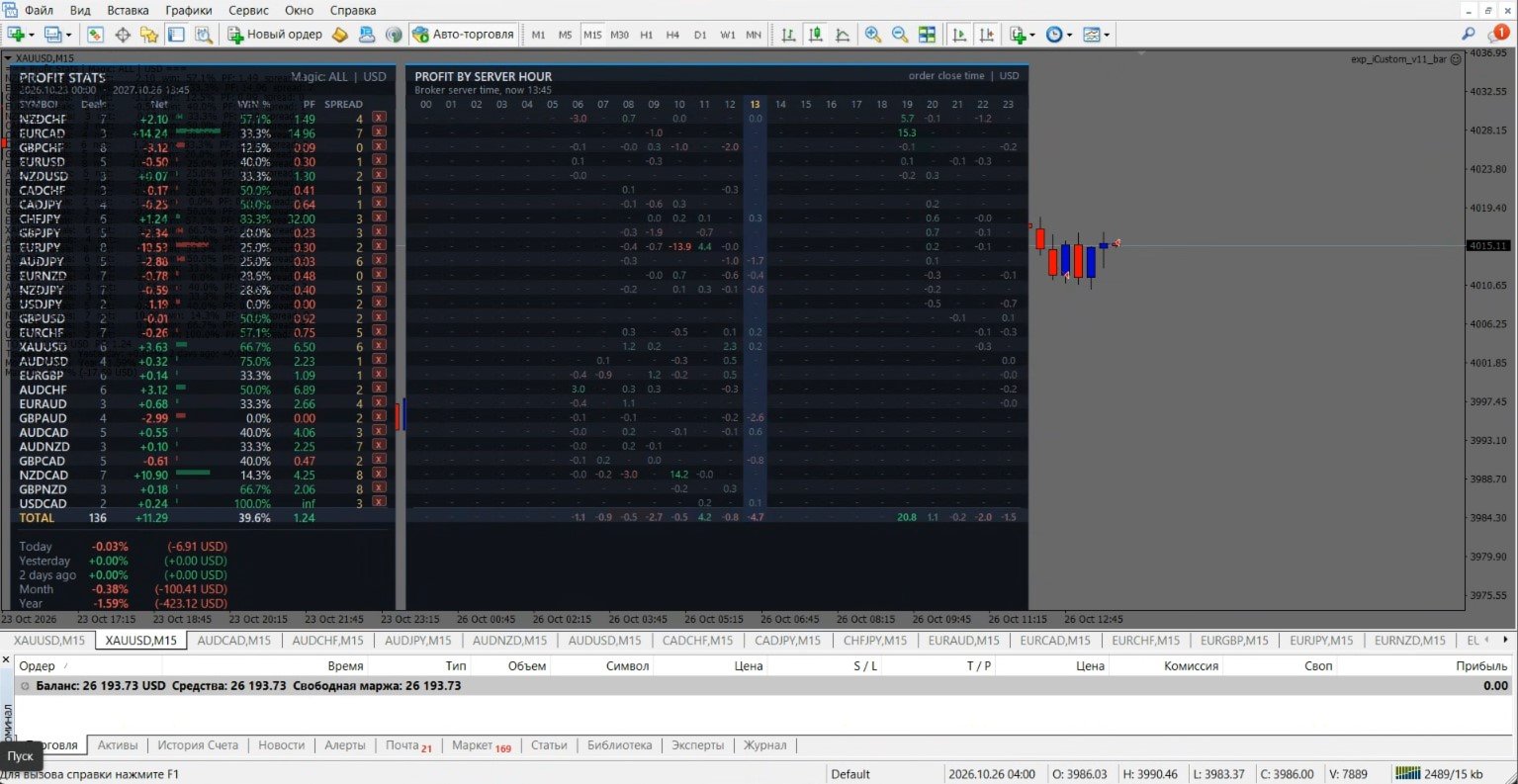
The indicator shows directly on the chart how your account or a specific expert advisor is trading. It takes the history of closed trades and assembles it into a panel: profit by each pair, percentage of profitable trades, Profit Factor, result for today, yesterday, month and year, maximum drawdown. Next to it, a table of profit by server hours is displayed. It shows at what time of day the expert advisor earns and at what time it loses. The indicator does not trade anything and does not interfere with the operation of expert advisors. It only calculates and displays.
👥 Who it suits
Those who trade multiple expert advisors or dozens of pairs on one account and want to quickly find weak pairs and unsuccessful hours. Also those who compare expert advisors by Magic Number.
📋 What the panel shows
💱 Table by pairs
-
Symbol – instrument;
-
Deals – number of trades;
-
Net – net result: profit + commission + swap;
-
Win % – share of profitable trades;
-
PF – Profit Factor, value inf means there are no losses;
-
Spread – current spread in points.
📊 Mini-bars next to Net show the contribution of each pair.
🧮 TOTAL row
Total by number of trades, Net, Win % and PF.
📅 Periods
Today, Yesterday, 2 days ago, Month and Year. For each period, the result is specified in % of the balance at the beginning of the period and in money.
📉 Max DD
Maximum drawdown on the balance curve of closed trades, in % and in money.
🕐 Table by server hours
Sum of the result for each hour 00–23 for each pair. This is a heat map: the larger the sum, the brighter the color. The current hour is highlighted.
🖱️ Mouse control
-
🖱️ Click on Deals or Net sorts the table, a repeated click changes the direction.
-
🖱️ Click on the pair name opens its chart.
-
❌ The x button next to a pair closes the chart of this pair and removes it from statistics. The Restore removed button returns all removed pairs.
-
🔘 The Spread and Hours buttons turn on and off the spread column and the table by hours.
💾 The selection of buttons and the list of removed pairs are saved in the terminal and survive a timeframe change and indicator restart.
⚙️ Parameters
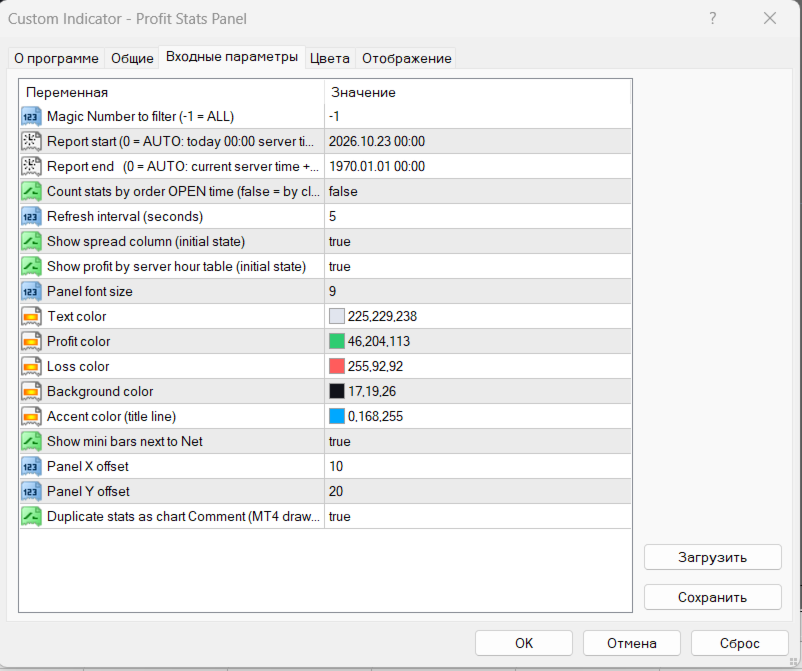
| ⚙️ Parameter | 📝 Purpose |
|---|---|
| Magic Number to filter | Magic Number for filtering. -1 means all account trades |
| Report start | Start of the report period. 0 means today 00:00 by server time |
| Report end | End of the report period. 0 means current server time + 1 year |
| Count stats by order OPEN time | true – statistics by trade opening time, false – by closing time. Affects the pairs table, the hourly table and the periods block |
| Refresh interval (seconds) | How often to update data |
| Show spread column | Show the spread column at startup (then toggled by button) |
| Show profit by server hour table | Show the table by hours at startup (then toggled by button) |
| Panel font size | Panel font size |
| Text / Profit / Loss / Background color | Colors of text, profit, loss and background |
| Accent color | Color of the top header line |
| Show mini bars next to Net | Show bars next to Net |
| Panel X / Y offset | Panel offset from the upper left corner of the chart |
| Duplicate stats as chart Comment | Duplicate statistics as text in the chart corner (disabled by default) |
⚠️ Important to know
-
🕐 Time is everywhere server time, that is, your broker's time.
-
📂 In MT4, open the "Account History" tab, right-click and select "All history". Otherwise, the terminal will not load old trades, and statistics will be incomplete.
-
🔄 If counting by opening time, the result of the day may differ from the total on the "Account History" tab, where trades are grouped by closing time. For matching, select calculation by closing time.