Smart Trade Panel Pro
- Utilities
- Version: 3.0
- Activations: 5

SMART TRADE PANEL PRO
Professional Manual Trading Utility for MT4
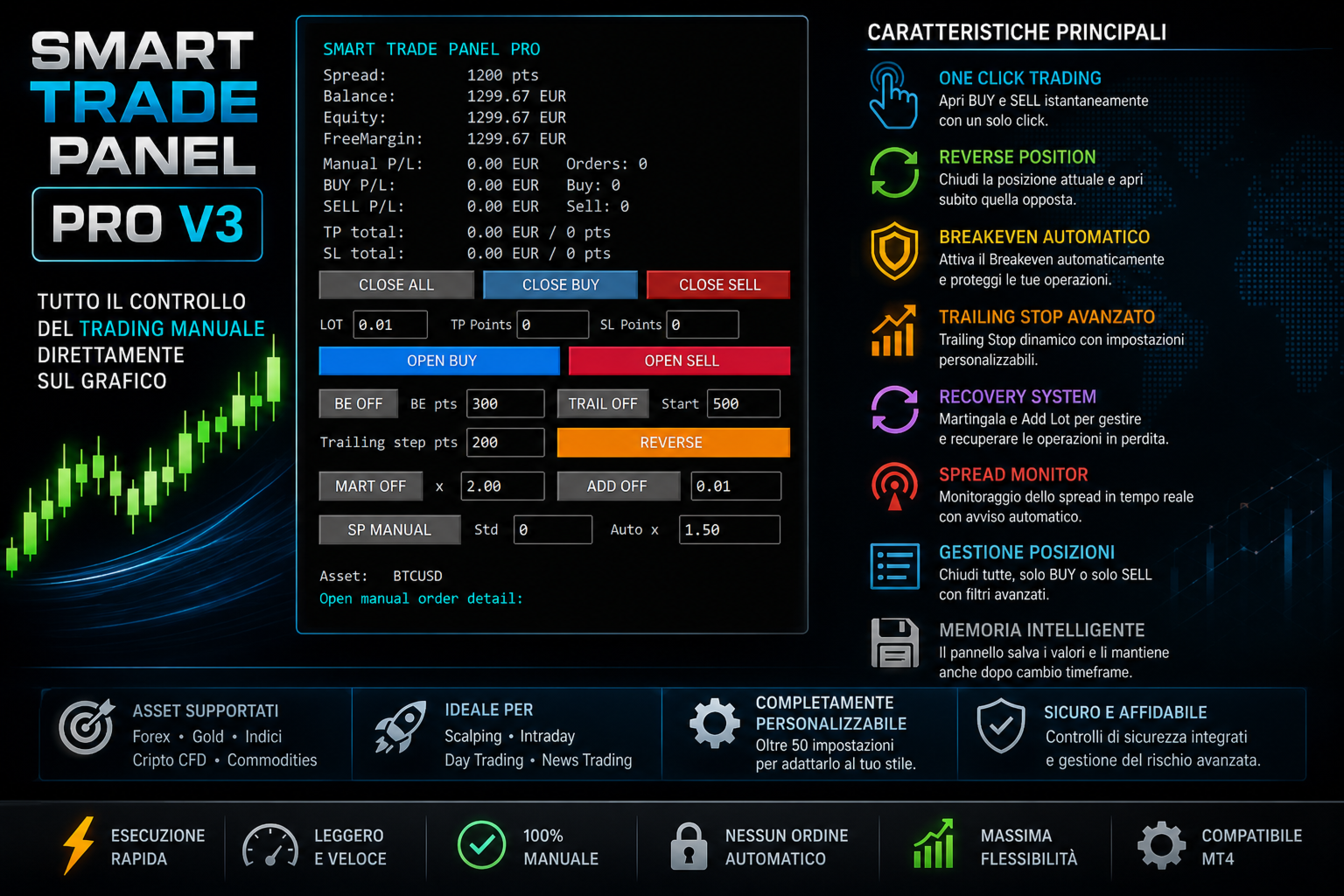
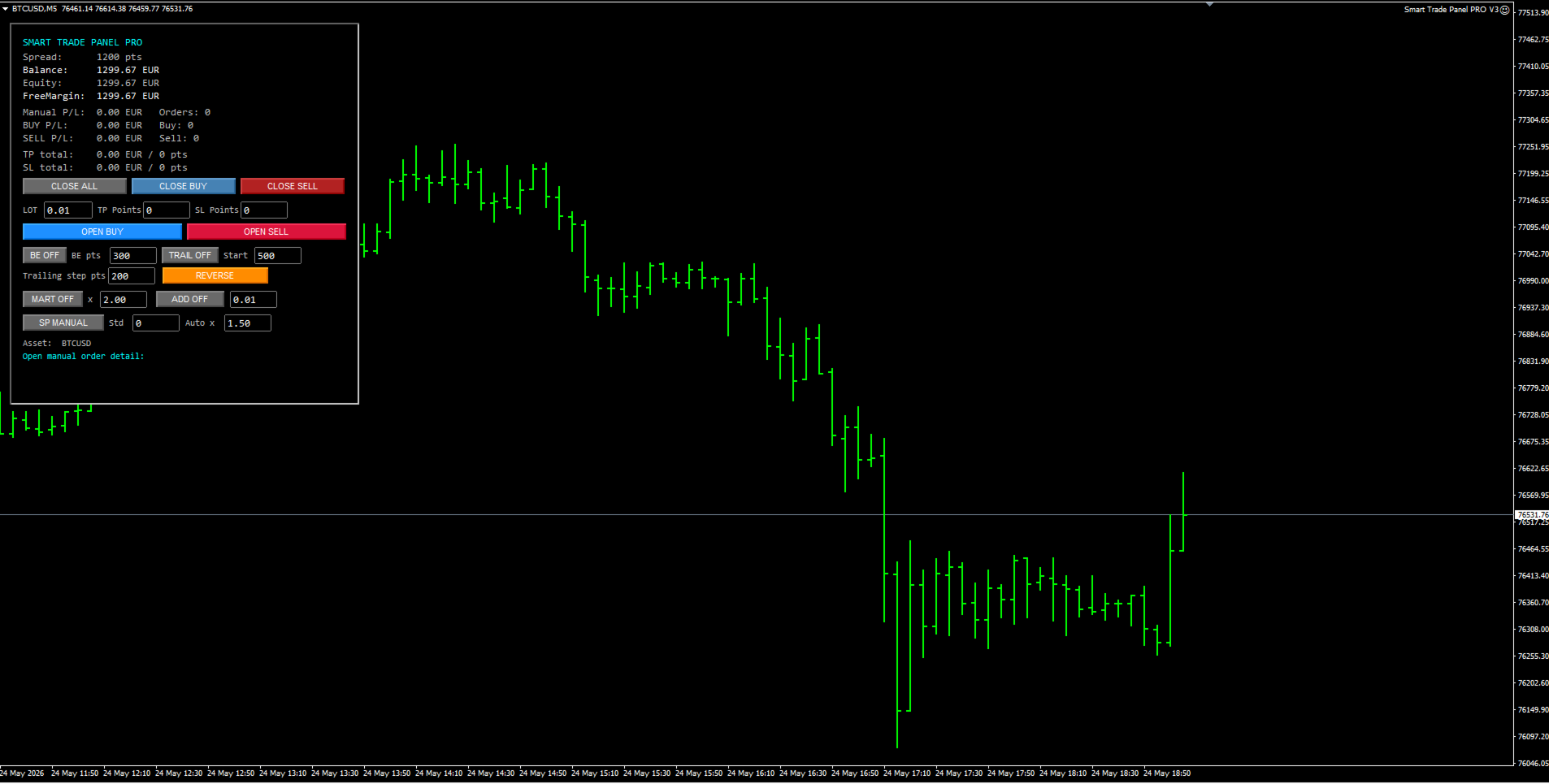
Smart Trade Panel PRO V3 is a professional trading panel for MetaTrader 4, designed for traders who want fast execution, advanced position management and professional tools integrated directly on the chart.
Smart Trade Panel PRO V3 has been designed for manual trading, scalping, forex trading, gold trading and crypto CFD trading.
The utility combines operational speed, professional position management and advanced tools such as Breakeven, Trailing Stop, Reverse Position and integrated Recovery systems.
The panel was developed to simplify manual trading while keeping the interface clean, lightweight and highly efficient.
Compatible with:
- Forex
- Gold (XAUUSD)
- Indices
- Crypto CFDs
- Scalping
- Intraday Trading
Optimized for:
- Fast execution
- Low CPU usage
- Professional risk management
- Multi-asset trading
==================== MAIN FEATURES ====================
- One Click BUY / SELL
- Fast Position Management
- Reverse Position System
- Automatic Breakeven
- Advanced Trailing Stop
- Martingale Recovery System
- Add Lot Recovery System
- Real-Time Spread Monitoring
- TP / SL Management
- Smart Panel Memory
- Compact Professional Interface
==================== ONE CLICK TRADING ====================
Instant opening of BUY and SELL positions directly from the chart.
Dedicated colored buttons:
- BUY (Blue)
- SELL (Red)
Designed for fast manual execution.
==================== POSITION MANAGEMENT ====================
Dedicated buttons for:
- Closing all positions
- Closing only BUY positions
- Closing only SELL positions
Optional filters:
- Current symbol only
- Manual trades only
==================== REVERSE POSITION SYSTEM ====================
The REVERSE function:
- closes the current position
- immediately opens the opposite position
Examples:
- BUY -> closes BUY -> opens SELL
- SELL -> closes SELL -> opens BUY
Integrated with:
- Martingale
- Add Lot Recovery
- TP / SL
- Spread Management
==================== BREAKEVEN SYSTEM ====================
Integrated automatic Breakeven management.
Features:
- ON/OFF activation
- Configurable activation points
- Automatic Stop Loss move to breakeven
Ideal for:
- Scalping
- Fast profit protection
- Dynamic risk management
==================== TRAILING STOP SYSTEM ====================
Advanced and fully configurable Trailing Stop.
Features:
- ON/OFF activation
- Configurable Trailing Start
- Configurable Trailing Step
- Option to activate Trailing only after Breakeven
The trailing system dynamically follows price movement while protecting profits.
==================== RECOVERY SYSTEM ====================
MARTINGALE
Optional progressive recovery system.
Features:
- ON/OFF activation
- Configurable multiplier
- Progressive lot increase only after losing trades
Example: 0.01 -> 0.02 -> 0.04 -> 0.08
Automatic reset after a profitable trade.
---------------------------------------------------------------------------------------------------------
ADD LOT RECOVERY
Alternative recovery system based on fixed lot increase.
Features:
- ON/OFF activation
- Fixed lot increase after a loss
Example: 0.01 -> 0.02 -> 0.03 -> 0.04
Can work:
- Alone
- Together with Martingale
==================== SPREAD MONITOR PRO ====================
Advanced real-time Spread monitoring system.
Features:
- Live spread display
- Automatic color change
- Manual spread threshold
- Automatic spread average
The spread value turns RED when it exceeds normal market conditions.
Particularly useful for:
- Scalping
- News Trading
- Crypto Trading
- High volatility sessions
==================== TP / SL MANAGEMENT ====================
Integrated Take Profit and Stop Loss management.
Features:
- Fast TP and SL configuration
- Default values
- Automatic application to new orders
Compatible with:
- 3/5 digit brokers
- Forex
- Metals
- Crypto CFDs
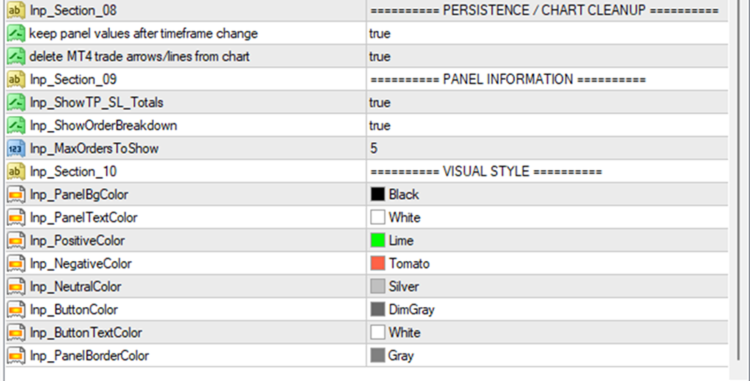
==================== SMART PANEL MEMORY ====================
The panel automatically keeps values during:
- Timeframe changes
- Chart refresh
Memory is automatically cleared when the EA is removed from the chart.
==================== GRAPHIC INTERFACE ====================
Professional interface designed for maximum readability.
Features:
- Organized blocks
- Colored buttons
- Compact design
- Low CPU usage
- Fast panel update
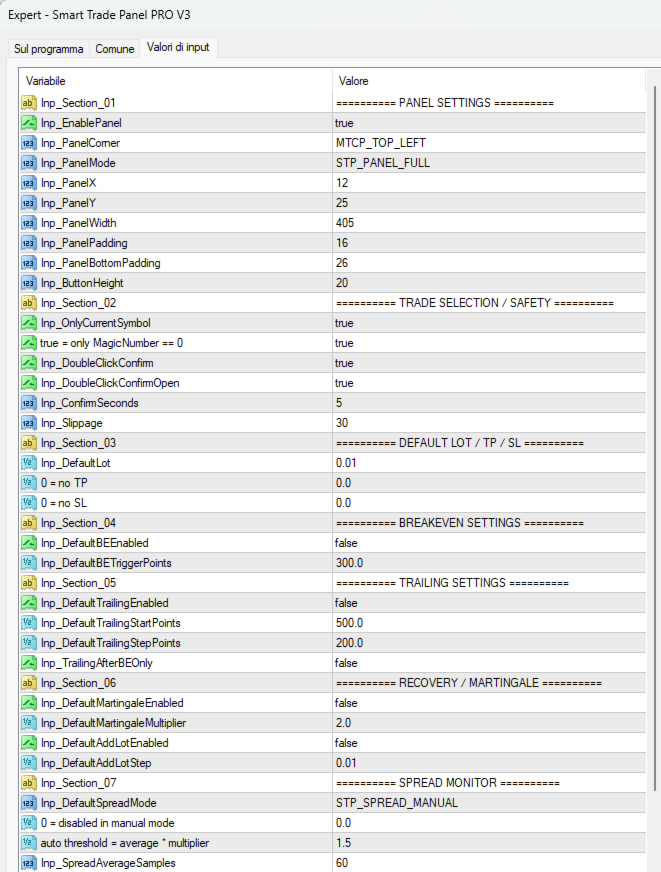
==================== INPUT PARAMETERS ====================
PANEL SETTINGS
Enable Panel
Enables or disables the panel.
Panel Corner
Panel position on the chart.
Panel Mode
FULL or SMART mode.
Panel X / Y
Custom panel coordinates.
Panel Width
Panel width.
Panel Padding
Internal panel spacing.
==================================================
TRADE SETTINGS
Only Current Symbol
Manages only the current symbol.
Only Manual Trades
Manages manual trades only.
Slippage
Maximum allowed slippage.
Default Lot
Default lot size.
Default TP Points
Default Take Profit in points.
Default SL Points
Default Stop Loss in points.
==================================================
BREAKEVEN SETTINGS
Default BE Enabled
Enables Breakeven by default.
Default BE Trigger Points
Points required to activate Breakeven.
==================================================
TRAILING SETTINGS
Default Trailing Enabled
Enables Trailing Stop by default.
Default Trailing Start Points
Minimum profit required to activate trailing.
Default Trailing Step Points
Trailing distance in points.
Trailing After BE Only
Activates trailing only after Breakeven.
==================================================
RECOVERY SETTINGS
Default Martingale Enabled
Enables Martingale.
Default Martingale Multiplier
Martingale multiplier.
Default Add Lot Enabled
Enables Add Lot.
Default Add Lot Step
Fixed lot increase after a loss.
==================================================
SPREAD MONITOR SETTINGS
Default Spread Mode
Manual or Automatic spread mode.
Default Spread Standard Points
Manual spread threshold.
Default Spread Average Multiplier
Automatic spread multiplier.
Spread Average Samples
Number of samples used to calculate the average spread.
==================================================
VISUAL SETTINGS
Panel Background Color
Panel background color.
Panel Text Color
Panel text color.
Positive Color
Positive values color.
Negative Color
Negative values color.
Neutral Color
Neutral values color.
Button Color
Button color.
Button Text Color
Button text color.
Panel Border Color
Panel border color.
==================== SAFETY FEATURES ====================
- Double click confirmation
- Spread monitoring
- Recovery reset after profit
- Symbol-separated recovery memory
- Automatic graphic object cleanup
==================== RECOMMENDED USE ====================
Ideal for:
- Scalpers
- Manual traders
- Gold traders
- Crypto traders
- Intraday traders
Works particularly well on:
- EURUSD
- GBPUSD
- XAUUSD
- BTCUSD
- NASDAQ
- US30
==================== FAQ ====================
Does the panel open automatic trades?
No. This utility is designed exclusively as a manual trading assistant.
Can I use Martingale and Add Lot together?
Yes. Both systems can work at the same time.
Does the panel support Crypto and Gold?
Yes. The panel supports Forex, Metals, Indices and Crypto CFDs.
Does the panel keep settings after a timeframe change?
Yes.
==================== CHANGELOG ====================
V3
- Improved Recovery Engine
- Improved panel memory system
- Added organized input sections
- Improved spread monitoring
- Improved reverse trading system
- Improved overall stability
==================== SEO KEYWORDS ====================
mt4 trading panel manual trading panel forex trading utility scalping panel mt4 breakeven manager mt4 trailing stop utility martingale recovery manual trade manager forex trading panel gold trading panel crypto trading utility xauusd trading panel btcusd trading utility manual scalping utility
==================== DISCLAIMER ====================
This utility is designed as a manual trading assistant and does not generate automatic trading signals.
Trading involves risk.
Always test the settings on a demo account before using them on a live account.