

Operando com o Calendário Econômico do MQL5 (Parte 7): Preparação para Testes de Estratégia com Análise de Eventos de Notícias por Recurso Incorporado
 109
109
 0
0

Introdução
Neste artigo, avançamos em nossa série sobre o Calendário Econômico do MQL5, preparando o sistema de trading para testes de estratégia em modo fora do tempo real, utilizando dados incorporados de eventos econômicos para realizar backtests confiáveis. Com base na automação das entradas de trades da Parte 6 com análise de notícias e temporizadores de contagem regressiva, agora nos concentramos no carregamento de eventos de notícias a partir de um arquivo de recursos e na aplicação de filtros definidos pelo usuário para simular condições em tempo real no Strategy Tester. Estruturamos o artigo com os seguintes tópicos:
Vamos nessa!
Importância da Integração de Dados Estáticos
A integração de dados estáticos é essencial para quem busca desenvolver e testar estratégias robustas, especialmente em ambientes como o MQL5, nos quais os dados históricos de eventos econômicos não são mantidos por longos períodos. Diferentemente do trading em ambiente real, em que a plataforma pode obter feeds de notícias em tempo real, o Strategy Tester não tem acesso a essas atualizações dinâmicas. Ele não mantém um histórico extenso de eventos passados, deixando-nos sem uma solução nativa para realizar backtests de abordagens orientadas por notícias. Ao baixar esses dados de fontes externas e organizá-los por conta própria — seja como arquivos, bancos de dados ou recursos incorporados —, obtemos controle sobre um conjunto de dados consistente que pode ser reutilizado em múltiplos testes, garantindo que nossas estratégias sejam submetidas às mesmas condições em cada execução.
Além de superar as limitações da plataforma, a integração de dados estáticos oferecerá uma flexibilidade que as confições em tempo real não conseguem proporcionar. O Calendário Econômico, como já vimos nas partes anteriores, geralmente inclui detalhes essenciais, como datas e horários dos eventos, moedas e níveis de impacto, mas essas informações nem sempre são preservadas em um formato adequado para análise algorítmica durante períodos prolongados. Ao estruturar essas informações manualmente, podemos adaptá-las às nossas necessidades — filtrando moedas específicas ou eventos de alto impacto, por exemplo —, permitindo uma análise mais aprofundada de como as notícias influenciam o comportamento do mercado sem depender da disponibilidade em tempo real.
Além disso, essa abordagem aumentará a eficiência e a independência. Coletar e armazenar previamente os dados estáticos significa que não ficaremos dependentes de conexão com a internet ou de serviços de terceiros durante os testes, reduzindo variáveis que poderiam distorcer os resultados. Isso também nos permite simular cenários raros ou específicos — como importantes anúncios econômicos — por meio da criação de conjuntos de dados que abrangem vários anos ou se concentram em momentos importantes, algo que sistemas em tempo real ou o armazenamento limitado da plataforma não conseguem reproduzir facilmente. Em última análise, a integração de dados estáticos preenche a lacuna entre os insights obtidos no trading em tempo real e a precisão dos backtests, estabelecendo uma base sólida para o desenvolvimento de estratégias.
O armazenamento de dados será uma consideração importante, e o MQL5 oferece uma ampla variedade de opções, desde formatos de Texto (txt), Valores Separados por Vírgulas (CSV), ANSI (padrão do American National Standards Institute), Binário (bin), Unicode e também estruturas de banco de dados, conforme apresentado abaixo.

Utilizaremos não o formato mais simples, mas o mais conveniente, que é o formato CSV. Dessa forma, teremos os dados disponíveis localmente e não precisaremos esperar horas para realizar o backtest de nossa estratégia, economizando muito tempo e esforço. Vamos começar.
Implementação em MQL5
Para começar, precisaremos estruturar a coleta e a organização dos dados de maneira semelhante à nossa estrutura anterior. Assim, precisaremos de alguns parâmetros de entrada que o usuário possa personalizar, assim como fizemos anteriormente, conforme apresentado abaixo.
//+------------------------------------------------------------------+
//|                                    MQL5 NEWS CALENDAR PART 7.mq5 |
//|                           Copyright 2025, Allan Munene Mutiiria. |
//|                                   https://t.me/Forex_Algo_Trader |
//+------------------------------------------------------------------+
#property copyright "Copyright 2025, Allan Munene Mutiiria."
#property link      "https://youtube.com/@ForexAlgo-Trader?"
#property version   "1.00"
#property strict

//---- Input parameter for start date of event filtering
input datetime StartDate = D'2025.03.01'; // Download Start Date
//---- Input parameter for end date of event filtering
input datetime EndDate = D'2025.03.21'; // Download End Date
//---- Input parameter to enable/disable time filtering
input bool ApplyTimeFilter = true;
//---- Input parameter for hours before event to consider
input int HoursBefore = 4;
//---- Input parameter for minutes before event to consider
input int MinutesBefore = 10;
//---- Input parameter for hours after event to consider
input int HoursAfter = 1;
//---- Input parameter for minutes after event to consider
input int MinutesAfter = 5;
//---- Input parameter to enable/disable currency filtering
input bool ApplyCurrencyFilter = true;
//---- Input parameter defining currencies to filter (comma-separated)
input string CurrencyFilter = "USD,EUR,GBP,JPY,AUD,NZD,CAD,CHF"; // All 8 major currencies
//---- Input parameter to enable/disable impact filtering
input bool ApplyImpactFilter = true;

//---- Enumeration for event importance filtering options
enum ENUM_IMPORTANCE {
   IMP_NONE = 0,                  // None
   IMP_LOW,                       // Low
   IMP_MEDIUM,                    // Medium
   IMP_HIGH,                      // High
   IMP_NONE_LOW,                  // None,Low
   IMP_NONE_MEDIUM,               // None,Medium
   IMP_NONE_HIGH,                 // None,High
   IMP_LOW_MEDIUM,                // Low,Medium
   IMP_LOW_HIGH,                  // Low,High
   IMP_MEDIUM_HIGH,               // Medium,High
   IMP_NONE_LOW_MEDIUM,           // None,Low,Medium
   IMP_NONE_LOW_HIGH,             // None,Low,High
   IMP_NONE_MEDIUM_HIGH,          // None,Medium,High
   IMP_LOW_MEDIUM_HIGH,           // Low,Medium,High
   IMP_ALL                        // None,Low,Medium,High (default)
};
//---- Input parameter for selecting importance filter
input ENUM_IMPORTANCE ImportanceFilter = IMP_ALL; // Impact Levels (Default to all)
Aqui, configuramos os parâmetros de entrada fundamentais e uma enumeração para personalizar a forma como nosso sistema de trading processa eventos econômicos durante os testes de estratégia. Definimos "StartDate" e "EndDate" como variáveis datetime, configuradas como 1º de março de 2025 e 21 de março de 2025, respectivamente, para especificar o intervalo para download e análise dos dados dos eventos. Para controlar a filtragem baseada em tempo em torno desses eventos, incluímos "ApplyTimeFilter" como um boolean definido como true por padrão, juntamente com "HoursBefore" (4 horas), "MinutesBefore" (10 minutos), "HoursAfter" (1 hora) e "MinutesAfter" (5 minutos), que determinam a janela de tempo para considerar os eventos em relação a uma determinada barra.
Para a análise específica por moeda, introduzimos "ApplyCurrencyFilter" (true por padrão) e "CurrencyFilter", uma string que lista as oito principais moedas — "USD, EUR, GBP, JPY, AUD, NZD, CAD, CHF" — para concentrar a análise nos mercados relevantes. Também habilitamos a filtragem baseada em impacto com "ApplyImpactFilter" definida como true, utilizando a enumeração "ENUM_IMPORTANCE", que oferece opções flexíveis como "IMP_NONE", "IMP_LOW", "IMP_MEDIUM", "IMP_HIGH" e combinações até "IMP_ALL", com "ImportanceFilter" definida como "IMP_ALL" por padrão para incluir todos os níveis de impacto. O resultado é apresentado abaixo.
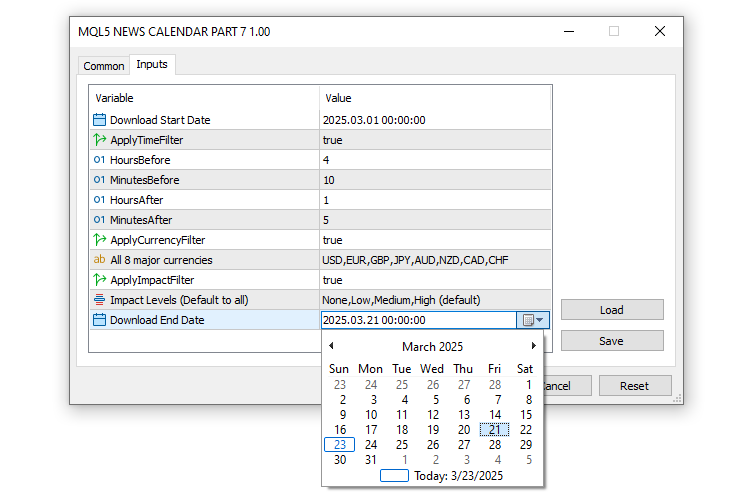
Com os parâmetros de entrada definidos, a próxima etapa é declarar uma estrutura com 8 campos, que reproduza a estrutura padrão do Calendário Econômico do MQL5, conforme apresentado abaixo.
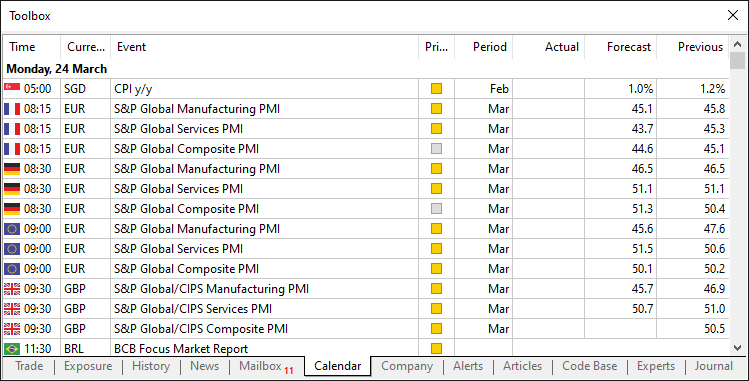
Obtemos esse formato por meio da lógica a seguir.
//---- Structure to hold economic event data
struct EconomicEvent {
   string eventDate;      //---- Date of the event
   string eventTime;      //---- Time of the event
   string currency;       //---- Currency affected by the event
   string event;          //---- Event description
   string importance;     //---- Importance level of the event
   double actual;         //---- Actual value of the event
   double forecast;       //---- Forecasted value of the event
   double previous;       //---- Previous value of the event
};

//---- Array to store all economic events
EconomicEvent allEvents[];
//---- Array for currency filter values
string curr_filter[];
//---- Array for importance filter values
string imp_filter[];
Primeiro, definimos a estrutura "EconomicEvent" (struct) para encapsular os principais detalhes do evento, incluindo "eventDate" e "eventTime" como strings para representar a data e o horário do evento, "currency" para identificar o mercado afetado, "event" para a descrição e "importance" para indicar seu nível de impacto, juntamente com "actual", "forecast" e "previous" como doubles para armazenar os resultados numéricos do evento.
Para armazenar e processar esses eventos, criamos três arrays: "allEvents", um array de estruturas "EconomicEvent" para armazenar todos os eventos carregados; "curr_filter", como um array de strings para armazenar as moedas especificadas no parâmetro de entrada "CurrencyFilter"; e "imp_filter", como um array de strings para gerenciar os níveis de importância selecionados por meio de "ImportanceFilter". Isso reproduz a estrutura padrão, com a única diferença de que deslocamos a seção "Period" para incluir as datas dos eventos no início da estrutura. Prosseguindo, precisamos obter os filtros a partir dos parâmetros de entrada do usuário, interpretá-los de uma maneira que o computador possa compreender e inicializá-los. Para manter o código modularizado, utilizaremos funções.
//---- Function to initialize currency and impact filters
void InitializeFilters() {
   //---- Currency Filter Section
   //---- Check if currency filter is enabled and has content
   if (ApplyCurrencyFilter && StringLen(CurrencyFilter) > 0) {
      //---- Split the currency filter string into array
      int count = StringSplit(CurrencyFilter, ',', curr_filter);
      //---- Loop through each currency filter entry
      for (int i = 0; i < ArraySize(curr_filter); i++) {
         //---- Temporary variable for trimming
         string temp = curr_filter[i];
         //---- Remove leading whitespace
         StringTrimLeft(temp);
         //---- Remove trailing whitespace
         StringTrimRight(temp);
         //---- Assign trimmed value back to array
         curr_filter[i] = temp;
         //---- Print currency filter for debugging
         Print("Currency filter [", i, "]: '", curr_filter[i], "'");
      }
   } else if (ApplyCurrencyFilter) {
      //---- Warn if currency filter is enabled but empty
      Print("Warning: CurrencyFilter is empty, no currency filtering applied");
      //---- Resize array to zero if no filter applied
      ArrayResize(curr_filter, 0);
   }
}
Aqui, configuramos a parte de filtragem por moeda da função "InitializeFilters" em nosso sistema para preparar uma análise eficaz dos eventos durante os testes de estratégia. Começamos verificando se a variável "ApplyCurrencyFilter" é true e se a string "CurrencyFilter" contém algum conteúdo utilizando a função StringLen; em caso afirmativo, dividimos a "CurrencyFilter", separada por vírgulas (como "USD, EUR, GBP"), no array "curr_filter" utilizando a função StringSplit, armazenando o número de elementos em "count".
Em seguida, percorremos cada elemento de "curr_filter" com um for-loop, atribuindo-o a uma string temporária "temp", limpando-a ao remover os espaços em branco no início e no final com as funções StringTrimLeft e StringTrimRight, depois atualizando "curr_filter" com o valor sem os espaços e exibindo-o por meio da função Print para fins de depuração (por exemplo, "Currency filter [0]: 'USD'"). No entanto, se "ApplyCurrencyFilter" estiver habilitado, mas "CurrencyFilter" estiver vazio, utilizamos a função "Print" para emitir um aviso — "Warning: CurrencyFilter is empty, no currency filtering applied" — e redimensionamos o array para zero com a função ArrayResize para desabilitar a filtragem. Essa inicialização cuidadosa garantirá que o filtro de moedas seja derivado de forma confiável dos parâmetros de entrada do usuário, possibilitando o processamento preciso dos eventos no Strategy Tester. Para o filtro de impacto, aplicamos uma lógica semelhante e cuidadosamente estruturada.
//---- Impact Filter Section (using enum)
//---- Check if impact filter is enabled
if (ApplyImpactFilter) {
   //---- Switch based on selected importance filter
   switch (ImportanceFilter) {
      case IMP_NONE:
         //---- Resize array for single importance level
         ArrayResize(imp_filter, 1);
         //---- Set importance to "None"
         imp_filter[0] = "None";
         break;
      case IMP_LOW:
         //---- Resize array for single importance level
         ArrayResize(imp_filter, 1);
         //---- Set importance to "Low"
         imp_filter[0] = "Low";
         break;
      case IMP_MEDIUM:
         //---- Resize array for single importance level
         ArrayResize(imp_filter, 1);
         //---- Set importance to "Medium"
         imp_filter[0] = "Medium";
         break;
      case IMP_HIGH:
         //---- Resize array for single importance level
         ArrayResize(imp_filter, 1);
         //---- Set importance to "High"
         imp_filter[0] = "High";
         break;
      case IMP_NONE_LOW:
         //---- Resize array for two importance levels
         ArrayResize(imp_filter, 2);
         //---- Set first importance level
         imp_filter[0] = "None";
         //---- Set second importance level
         imp_filter[1] = "Low";
         break;
      case IMP_NONE_MEDIUM:
         //---- Resize array for two importance levels
         ArrayResize(imp_filter, 2);
         //---- Set first importance level
         imp_filter[0] = "None";
         //---- Set second importance level
         imp_filter[1] = "Medium";
         break;
      case IMP_NONE_HIGH:
         //---- Resize array for two importance levels
         ArrayResize(imp_filter, 2);
         //---- Set first importance level
         imp_filter[0] = "None";
         //---- Set second importance level
         imp_filter[1] = "High";
         break;
      case IMP_LOW_MEDIUM:
         //---- Resize array for two importance levels
         ArrayResize(imp_filter, 2);
         //---- Set first importance level
         imp_filter[0] = "Low";
         //---- Set second importance level
         imp_filter[1] = "Medium";
         break;
      case IMP_LOW_HIGH:
         //---- Resize array for two importance levels
         ArrayResize(imp_filter, 2);
         //---- Set first importance level
         imp_filter[0] = "Low";
         //---- Set second importance level
         imp_filter[1] = "High";
         break;
      case IMP_MEDIUM_HIGH:
         //---- Resize array for two importance levels
         ArrayResize(imp_filter, 2);
         //---- Set first importance level
         imp_filter[0] = "Medium";
         //---- Set second importance level
         imp_filter[1] = "High";
         break;
      case IMP_NONE_LOW_MEDIUM:
         //---- Resize array for three importance levels
         ArrayResize(imp_filter, 3);
         //---- Set first importance level
         imp_filter[0] = "None";
         //---- Set second importance level
         imp_filter[1] = "Low";
         //---- Set third importance level
         imp_filter[2] = "Medium";
         break;
      case IMP_NONE_LOW_HIGH:
         //---- Resize array for three importance levels
         ArrayResize(imp_filter, 3);
         //---- Set first importance level
         imp_filter[0] = "None";
         //---- Set second importance level
         imp_filter[1] = "Low";
         //---- Set third importance level
         imp_filter[2] = "High";
         break;
      case IMP_NONE_MEDIUM_HIGH:
         //---- Resize array for three importance levels
         ArrayResize(imp_filter, 3);
         //---- Set first importance level
         imp_filter[0] = "None";
         //---- Set second importance level
         imp_filter[1] = "Medium";
         //---- Set third importance level
         imp_filter[2] = "High";
         break;
      case IMP_LOW_MEDIUM_HIGH:
         //---- Resize array for three importance levels
         ArrayResize(imp_filter, 3);
         //---- Set first importance level
         imp_filter[0] = "Low";
         //---- Set second importance level
         imp_filter[1] = "Medium";
         //---- Set third importance level
         imp_filter[2] = "High";
         break;
      case IMP_ALL:
         //---- Resize array for all importance levels
         ArrayResize(imp_filter, 4);
         //---- Set first importance level
         imp_filter[0] = "None";
         //---- Set second importance level
         imp_filter[1] = "Low";
         //---- Set third importance level
         imp_filter[2] = "Medium";
         //---- Set fourth importance level
         imp_filter[3] = "High";
         break;
   }
   //---- Loop through impact filter array to print values
   for (int i = 0; i < ArraySize(imp_filter); i++) {
      //---- Print each impact filter value
      Print("Impact filter [", i, "]: '", imp_filter[i], "'");
   }
} else {
   //---- Notify if impact filter is disabled
   Print("Impact filter disabled");
   //---- Resize impact filter array to zero
   ArrayResize(imp_filter, 0);
}
Para o processo de filtragem por impacto, começamos verificando se a variável "ApplyImpactFilter" é true; em caso afirmativo, utilizamos uma instrução switch baseada na enum "ImportanceFilter" para determinar quais níveis de impacto serão incluídos no array "imp_filter". Para opções de nível único, como "IMP_NONE", "IMP_LOW", "IMP_MEDIUM" ou "IMP_HIGH", redimensionamos "imp_filter" para 1 utilizando a função ArrayResize e atribuímos a string correspondente (por exemplo, "imp_filter[0] = 'None'"); para opções de dois níveis, como "IMP_NONE_LOW" ou "IMP_MEDIUM_HIGH", redimensionamos para 2 e definimos dois valores (por exemplo, "imp_filter[0] = 'None', imp_filter[1] = 'Low'"); para opções de três níveis, como "IMP_LOW_MEDIUM_HIGH", redimensionamos para 3; e, para "IMP_ALL", redimensionamos para 4, abrangendo "None", "Low", "Medium" e "High".
Após configurar o array, fazemos um loop por "imp_filter", utilizando a função ArraySize para determinar seu tamanho e exibindo cada valor com a função Print para fins de depuração (por exemplo, "Impact filter [0]: 'None'"). Se "ApplyImpactFilter" for false, notificamos o usuário com a função "Print" — "Impact filter disabled" — e redimensionamos "imp_filter" para zero.
Com isso, agora precisamos chamar a função no manipulador de eventos OnInit.
int OnInit() {
   //---- Initialize filters
   InitializeFilters();

   //---- Return successful initialization
   return(INIT_SUCCEEDED);
}

void OnDeinit(const int reason) {
   //---- Print termination reason
   Print("EA terminated, reason: ", reason);
}
Chamamos a função no manipulador de eventos OnInit e também exibimos o motivo do encerramento do programa no manipulador de eventos OnDeinit. Este é o resultado.
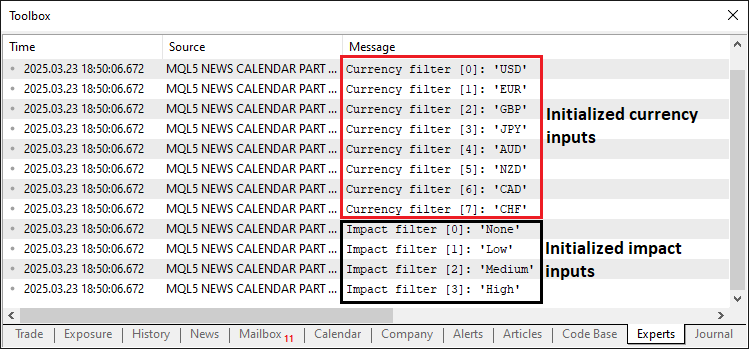
A partir da imagem, podemos ver que inicializamos e decodificamos corretamente os parâmetros de entrada dos filtros e os armazenamos. Tudo o que precisamos fazer agora é obter os dados do fluxo em tempo real e armazená-los. Aqui, a lógica consiste primeiro em executar o programa uma vez no modo de execução real, para que ele possa baixar os dados do banco de dados do Calendário Econômico do MQL5 e, em seguida, carregar e utilizar esses dados no modo de teste. Esta é a lógica de inicialização.
//---- Check if not running in tester mode
if (!MQLInfoInteger(MQL_TESTER)) {
   //---- Validate date range
   if (StartDate >= EndDate) {
      //---- Print error for invalid date range
      Print("Error: StartDate (", TimeToString(StartDate), ") must be earlier than EndDate (", TimeToString(EndDate), ")");
      //---- Return initialization failure
      return(INIT_PARAMETERS_INCORRECT);
   }

   //---- Array to hold calendar values
   MqlCalendarValue values[];
   //---- Fetch calendar data for date range
   if (!CalendarValueHistory(values, StartDate, EndDate)) {
      //---- Print error if calendar data fetch fails
      Print("Error fetching calendar data: ", GetLastError());
      //---- Return initialization failure
      return(INIT_FAILED);
   }

   //---- Array to hold economic events
   EconomicEvent events[];
   //---- Counter for events
   int eventCount = 0;

   //---- Loop through calendar values
   for (int i = 0; i < ArraySize(values); i++) {
      //---- Structure for event details
      MqlCalendarEvent eventDetails;
      //---- Fetch event details by ID
      if (!CalendarEventById(values[i].event_id, eventDetails)) continue;

      //---- Structure for country details
      MqlCalendarCountry countryDetails;
      //---- Fetch country details by ID
      if (!CalendarCountryById(eventDetails.country_id, countryDetails)) continue;

      //---- Structure for value details
      MqlCalendarValue value;
      //---- Fetch value details by ID
      if (!CalendarValueById(values[i].id, value)) continue;

      //---- Resize events array for new event
      ArrayResize(events, eventCount + 1);
      //---- Convert event time to string
      string dateTimeStr = TimeToString(values[i].time, TIME_DATE | TIME_MINUTES);
      //---- Extract date from datetime string
      events[eventCount].eventDate = StringSubstr(dateTimeStr, 0, 10);
      //---- Extract time from datetime string
      events[eventCount].eventTime = StringSubstr(dateTimeStr, 11, 5);
      //---- Assign currency from country details
      events[eventCount].currency = countryDetails.currency;
      //---- Assign event name
      events[eventCount].event = eventDetails.name;
      //---- Map importance level from enum to string
      events[eventCount].importance = (eventDetails.importance == 0) ? "None" :    // CALENDAR_IMPORTANCE_NONE
                                      (eventDetails.importance == 1) ? "Low" :     // CALENDAR_IMPORTANCE_LOW
                                      (eventDetails.importance == 2) ? "Medium" :  // CALENDAR_IMPORTANCE_MODERATE
                                      "High";                                      // CALENDAR_IMPORTANCE_HIGH
      //---- Assign actual value
      events[eventCount].actual = value.GetActualValue();
      //---- Assign forecast value
      events[eventCount].forecast = value.GetForecastValue();
      //---- Assign previous value
      events[eventCount].previous = value.GetPreviousValue();
      //---- Increment event count
      eventCount++;
   }

}
Aqui, tratamos a recuperação de dados no modo de execução real dentro da função OnInit do nosso programa, garantindo que os dados dos eventos econômicos sejam coletados para uso posterior nos testes de estratégia. Começamos verificando se o sistema não está no modo de teste utilizando a função MQLInfoInteger com MQL_TESTER; se essa condição for verdadeira, validamos se "StartDate" é anterior a "EndDate", exibindo um erro e retornando INIT_PARAMETERS_INCORRECT caso seja inválido. Em seguida, declaramos um array MqlCalendarValue denominado "values" e obtemos os dados do calendário entre "StartDate" e "EndDate" utilizando a função CalendarValueHistory, exibindo um erro com GetLastError e retornando "INIT_FAILED" em caso de falha.
Em seguida, inicializamos um array "EconomicEvent" denominado "events" e um inteiro "eventCount" para acompanhar os eventos, percorrendo "values" com a função ArraySize. A cada iteração, obtemos os detalhes do evento em uma estrutura MqlCalendarEvent denominada "eventDetails" utilizando a função CalendarEventById, os detalhes do país em uma estrutura MqlCalendarCountry denominada "countryDetails" com CalendarCountryById e os detalhes dos valores em uma estrutura "MqlCalendarValue" denominada "value" por meio de "CalendarValueById", ignorando a iteração caso alguma dessas operações falhe. Redimensionamos "events" com a função ArrayResize, convertemos o horário do evento em uma string "dateTimeStr" utilizando a função TimeToString e extraímos "eventDate" e "eventTime" com a função StringSubstr, atribuindo "currency" a partir de "countryDetails", "event" a partir de "eventDetails.name" e mapeando "importance" de valores numéricos para strings ("None", "Low", "Medium", "High"). Por fim, definimos "actual", "forecast" e "previous" utilizando os métodos de "value" e incrementamos "eventCount", construindo um conjunto abrangente de dados de eventos para processamento no modo de execução real. Agora, precisamos de uma função para gerenciar o armazenamento dessas informações em um arquivo de dados.
//---- Function to write events to a CSV file
void WriteToCSV(string fileName, EconomicEvent &events[]) {
   //---- Open file for writing in CSV format
   int handle = FileOpen(fileName, FILE_WRITE | FILE_CSV, ',');
   //---- Check if file opening failed
   if (handle == INVALID_HANDLE) {
      //---- Print error message with last error code
      Print("Error creating file: ", GetLastError());
      //---- Exit function on failure
      return;
   }

   //---- Write CSV header row
   FileWrite(handle, "Date", "Time", "Currency", "Event", "Importance", "Actual", "Forecast", "Previous");
   //---- Loop through all events to write to file
   for (int i = 0; i < ArraySize(events); i++) {
      //---- Write event data to CSV file
      FileWrite(handle, events[i].eventDate, events[i].eventTime, events[i].currency, events[i].event,
                events[i].importance, DoubleToString(events[i].actual, 2), DoubleToString(events[i].forecast, 2),
                DoubleToString(events[i].previous, 2));
      //---- Print event details for debugging
      Print("Writing event ", i, ": ", events[i].eventDate, ", ", events[i].eventTime, ", ", events[i].currency, ", ",
            events[i].event, ", ", events[i].importance, ", ", DoubleToString(events[i].actual, 2), ", ",
            DoubleToString(events[i].forecast, 2), ", ", DoubleToString(events[i].previous, 2));
   }

   //---- Flush data to file
   FileFlush(handle);
   //---- Close the file handle
   FileClose(handle);
   //---- Print confirmation of data written
   Print("Data written to ", fileName, " with ", ArraySize(events), " events.");

   //---- Verify written file by reading it back
   int verifyHandle = FileOpen(fileName, FILE_READ | FILE_TXT);
   //---- Check if verification file opening succeeded
   if (verifyHandle != INVALID_HANDLE) {
      //---- Read entire file content
      string content = FileReadString(verifyHandle, (int)FileSize(verifyHandle));
      //---- Print file content for verification
      Print("File content after writing (size: ", FileSize(verifyHandle), " bytes):\n", content);
      //---- Close verification file handle
      FileClose(verifyHandle);
   }
}
Aqui, desenvolvemos a função "WriteToCSV" para exportar sistematicamente os dados de eventos econômicos para um arquivo CSV. Começamos abrindo o arquivo especificado por "fileName" utilizando a função FileOpen no modo "FILE_WRITE | FILE_CSV" com uma vírgula como delimitador, armazenando o resultado em "handle"; se isso falhar e "handle" for igual a "INVALID_HANDLE", utilizamos a função "Print" para exibir uma mensagem de erro incluindo o código GetLastError e saímos da função com "return". Depois que o arquivo é aberto, gravamos uma linha de cabeçalho com a função FileWrite, definindo as colunas como "Date", "Time", "Currency", "Event", "Importance", "Actual", "Forecast" e "Previous" para organizar os dados.
Em seguida, percorremos o array "events", determinando seu tamanho com a função ArraySize e, para cada evento, chamamos "FileWrite" para registrar suas propriedades — "eventDate", "eventTime", "currency", "event", "importance" e os valores numéricos "actual", "forecast" e "previous" convertidos em strings com a função DoubleToString (formatados com 2 casas decimais) — enquanto, simultaneamente, registramos esses detalhes com a função "Print" para fins de depuração.
Após concluir o loop, garantimos que todos os dados sejam gravados no arquivo invocando a função FileFlush em "handle", depois fechamos o arquivo utilizando a função FileClose e confirmamos o sucesso da operação com uma mensagem.
Para verificar a saída, reabrimos o arquivo no modo de leitura utilizando "FILE_READ | FILE_TXT", armazenando esse handle em "verifyHandle"; se a operação for bem-sucedida, lemos todo o conteúdo em "content" com a função FileReadString com base no tamanho em bytes obtido por FileSize, exibimos o conteúdo para inspeção (por exemplo, "File content after writing (size: X bytes):\n"content"") e fechamos o arquivo. Esse processo detalhado garante que os dados dos eventos sejam salvos com precisão e possam ser verificados, tornando-os um recurso confiável para backtesting no Strategy Tester. Agora podemos utilizar a função no processo de salvamento dos dados.
//---- Define file path for CSV
string fileName = "Database\\EconomicCalendar.csv";

//---- Check if file exists and print appropriate message
if (!FileExists(fileName)) Print("Creating new file: ", fileName);
else Print("Overwriting existing file: ", fileName);

//---- Write events to CSV file
WriteToCSV(fileName, events);
//---- Print instructions for tester mode
Print("Live mode: Data written. To use in tester, manually add ", fileName, " as a resource and recompile.");
Para concluir o tratamento dos dados no modo de execução real, definimos "fileName" como "Database\EconomicCalendar.csv" e utilizamos a função personalizada "FileExists" para verificar seu status. Em seguida, chamamos a função "WriteToCSV" com os parâmetros "fileName" e "events" para salvar os dados e exibimos instruções com "Print" — "Live mode: Data written. To use in tester, add "fileName" as a resource and recompile." — para uso no ambiente de teste. O trecho de código da função personalizada utilizada para verificar a existência do arquivo é apresentado abaixo.
//---- Function to check if a file exists
bool FileExists(string fileName) {
   //---- Open file in read mode to check existence
   int handle = FileOpen(fileName, FILE_READ | FILE_CSV);
   //---- Check if file opened successfully
   if (handle != INVALID_HANDLE) {
      //---- Close the file handle
      FileClose(handle);
      //---- Return true if file exists
      return true;
   }
   //---- Return false if file doesn't exist
   return false;
}
Na função "FileExists", utilizada para verificar a presença do arquivo nos testes de estratégia, abrimos "fileName" com a função FileOpen no modo "FILE_READ | FILE_CSV" e, se "handle" não for "INVALID_HANDLE", fechamos o arquivo com FileClose e retornamos true; caso contrário, retornamos false. Isso confirma o status do arquivo para o tratamento dos dados. Ao executar no modo de execução real, este é o resultado.
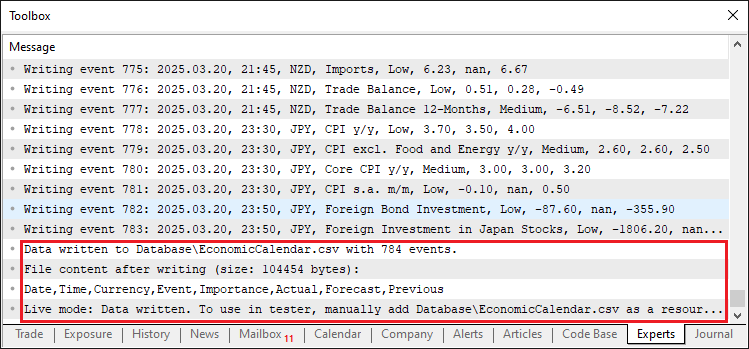
A partir da imagem, podemos ver que os dados foram salvos e que podemos acessá-los.
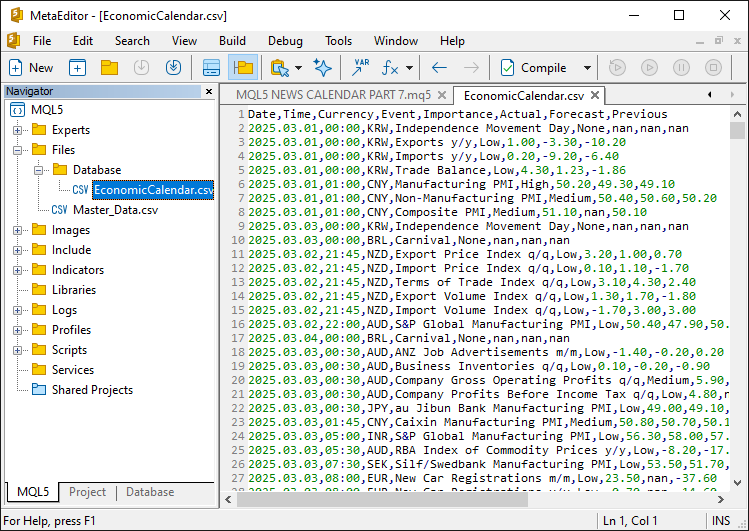
Para utilizar os dados no modo de teste, precisamos salvá-los no executável. Para isso, adicionamos o arquivo como um recurso.
//---- Define resource file for economic calendar data
#resource "\\Files\\Database\\EconomicCalendar.csv" as string EconomicCalendarData
Aqui, integramos o recurso de dados estáticos ao nosso programa para dar suporte aos testes de estratégia. Utilizando a diretiva #resource, incorporamos o arquivo localizado em "\Files\Database\EconomicCalendar.csv" e o atribuímos à variável string "EconomicCalendarData". Dessa forma, o arquivo fica localizado no executável, de modo que não precisamos nos preocupar mesmo que ele seja excluído. Agora podemos criar uma função para carregar o conteúdo do arquivo.
//---- Function to load events from resource file
bool LoadEventsFromResource() {
   //---- Get data from resource
   string fileData = EconomicCalendarData;
   //---- Print raw resource content for debugging
   Print("Raw resource content (size: ", StringLen(fileData), " bytes):\n", fileData);

   //---- Array to hold lines from resource
   string lines[];
   //---- Split resource data into lines
   int lineCount = StringSplit(fileData, '\n', lines);
   //---- Check if resource has valid data
   if (lineCount <= 1) {
      //---- Print error if no data lines found
      Print("Error: No data lines found in resource! Raw data: ", fileData);
      //---- Return false on failure
      return false;
   }

   //---- Reset events array
   ArrayResize(allEvents, 0);
   //---- Index for event array
   int eventIndex = 0;

   //---- Loop through each line (skip header at i=0)
   for (int i = 1; i < lineCount; i++) {
      //---- Check for empty lines
      if (StringLen(lines[i]) == 0) {
         //---- Print message for skipped empty line
         Print("Skipping empty line ", i);
         //---- Skip to next iteration
         continue;
      }

      //---- Array to hold fields from each line
      string fields[];
      //---- Split line into fields
      int fieldCount = StringSplit(lines[i], ',', fields);
      //---- Print line details for debugging
      Print("Line ", i, ": ", lines[i], " (field count: ", fieldCount, ")");

      //---- Check if line has minimum required fields
      if (fieldCount < 8) {
         //---- Print error for malformed line
         Print("Malformed line ", i, ": ", lines[i], " (field count: ", fieldCount, ")");
         //---- Skip to next iteration
         continue;
      }

      //---- Extract date from field
      string dateStr = fields[0];
      //---- Extract time from field
      string timeStr = fields[1];
      //---- Extract currency from field
      string currency = fields[2];
      //---- Extract event description (handle commas in event name)
      string event = fields[3];
      //---- Combine multiple fields if event name contains commas
      for (int j = 4; j < fieldCount - 4; j++) {
         event += "," + fields[j];
      }
      //---- Extract importance from field
      string importance = fields[fieldCount - 4];
      //---- Extract actual value from field
      string actualStr = fields[fieldCount - 3];
      //---- Extract forecast value from field
      string forecastStr = fields[fieldCount - 2];
      //---- Extract previous value from field
      string previousStr = fields[fieldCount - 1];

      //---- Convert date and time to datetime format
      datetime eventDateTime = StringToTime(dateStr + " " + timeStr);
      //---- Check if datetime conversion failed
      if (eventDateTime == 0) {
         //---- Print error for invalid datetime
         Print("Error: Invalid datetime conversion for line ", i, ": ", dateStr, " ", timeStr);
         //---- Skip to next iteration
         continue;
      }

      //---- Resize events array for new event
      ArrayResize(allEvents, eventIndex + 1);
      //---- Assign event date
      allEvents[eventIndex].eventDate = dateStr;
      //---- Assign event time
      allEvents[eventIndex].eventTime = timeStr;
      //---- Assign event currency
      allEvents[eventIndex].currency = currency;
      //---- Assign event description
      allEvents[eventIndex].event = event;
      //---- Assign event importance
      allEvents[eventIndex].importance = importance;
      //---- Convert and assign actual value
      allEvents[eventIndex].actual = StringToDouble(actualStr);
      //---- Convert and assign forecast value
      allEvents[eventIndex].forecast = StringToDouble(forecastStr);
      //---- Convert and assign previous value
      allEvents[eventIndex].previous = StringToDouble(previousStr);
      //---- Print loaded event details
      Print("Loaded event ", eventIndex, ": ", dateStr, " ", timeStr, ", ", currency, ", ", event);
      //---- Increment event index
      eventIndex++;
   }

   //---- Print total events loaded
   Print("Loaded ", eventIndex, " events from resource into array.");
   //---- Return success if events were loaded
   return eventIndex > 0;
}
Definimos a função "LoadEventsFromResource" para preencher os dados de eventos econômicos a partir do recurso incorporado para os testes de estratégia. Atribuímos o recurso "EconomicCalendarData" a "fileData" e exibimos seu conteúdo bruto com a função "Print", incluindo seu tamanho por meio da função StringLen, para fins de depuração. Dividimos "fileData" no array "lines" utilizando a função StringSplit com um delimitador de nova linha, armazenando a contagem em "lineCount" e, se "lineCount" for igual ou inferior a 1, exibimos um erro e retornamos false. Redefinimos o array "allEvents" para zero com a função ArrayResize e inicializamos "eventIndex" em 0; em seguida, percorremos "lines" começando no índice 1 (ignorando o cabeçalho). Para cada linha, verificamos se ela está vazia com StringLen, exibindo uma mensagem de que será ignorada e continuando caso esteja; caso contrário, dividimos a linha em "fields" utilizando vírgulas.
Se "fieldCount" for menor que 8, exibimos um erro e ignoramos a linha; caso contrário, extraímos "dateStr", "timeStr" e "currency" e construímos "event" concatenando os campos (tratando as vírgulas) em um loop; depois, obtemos "importance", "actualStr", "forecastStr" e "previousStr". Convertemos "dateStr" e "timeStr" em "eventDateTime" com a função StringToTime, ignorando o evento e exibindo um erro se a conversão falhar; em seguida, redimensionamos "allEvents" com "ArrayResize", atribuímos todos os valores — convertendo os números com StringToDouble —, exibimos o evento e incrementamos "eventIndex". Por fim, exibimos o total de "eventIndex" e retornamos true se os eventos tiverem sido carregados, garantindo que os dados estejam prontos para o Strategy Tester. Agora podemos chamar essa função durante a inicialização no modo de teste.
else {
   //---- Check if resource data is empty in tester mode
   if (StringLen(EconomicCalendarData) == 0) {
      //---- Print error for empty resource
      Print("Error: Resource EconomicCalendarData is empty. Please run in live mode, add the file as a resource, and recompile.");
      //---- Return initialization failure
      return(INIT_FAILED);
   }
   //---- Print message for tester mode
   Print("Running in Strategy Tester, using embedded resource: Database\\EconomicCalendar.csv");

   //---- Load events from resource
   if (!LoadEventsFromResource()) {
      //---- Print error if loading fails
      Print("Failed to load events from resource.");
      //---- Return initialization failure
      return(INIT_FAILED);
   }
}
Aqui, se "EconomicCalendarData" estiver vazio de acordo com StringLen, exibimos um erro e retornamos "INIT_FAILED"; caso contrário, exibimos uma mensagem do modo de teste com a função "Print" e chamamos "LoadEventsFromResource", retornando "INIT_FAILED" com um erro se a função falhar. Isso garantirá que nossos dados de eventos sejam carregados corretamente para o backtesting. Este é o resultado.
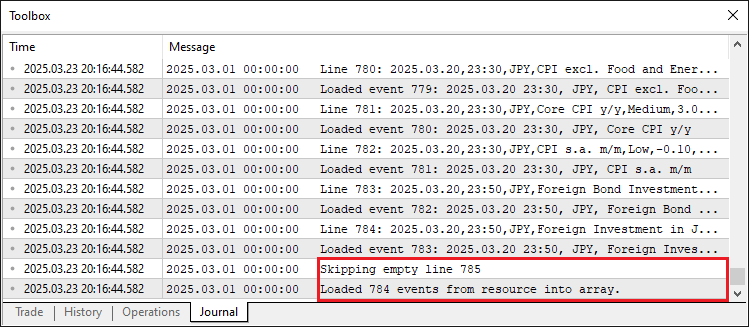
A partir da imagem, podemos confirmar que os dados foram carregados com sucesso. Dados malformados do saldo de linhas vazias também são tratadas corretamente. Agora podemos prosseguir para o manipulador de eventos OnTick e simular o processamento dos dados como se estivéssemos no modo de execução real. Para isso, queremos processar os dados por barra, e não a cada tick.
//---- Variable to track last bar time
datetime lastBarTime = 0;

//---- Tick event handler
void OnTick() {
   //---- Get current bar time
   datetime currentBarTime = iTime(_Symbol, _Period, 0);
   //---- Check if bar time has changed
   if (currentBarTime != lastBarTime) {
      //---- Update last bar time
      lastBarTime = currentBarTime;

      //----
   }
}
Definimos "lastBarTime" como uma variável "datetime" inicializada em 0 para acompanhar o horário da barra anterior. Na função OnTick, recuperamos o horário da barra atual com a função iTime utilizando _Symbol, _Period e o índice de barra 0, armazenando-o em "currentBarTime"; se "currentBarTime" for diferente de "lastBarTime", atualizamos "lastBarTime" para "currentBarTime", garantindo que o sistema reaja às novas barras para o processamento dos eventos. Podemos então definir uma função para tratar o processamento dos dados de simulação em tempo real em um formato semelhante ao utilizado na versão anterior, conforme apresentado abaixo=.
//---- Function to filter and print economic events
void FilterAndPrintEvents(datetime barTime) {
   //---- Get total number of events
   int totalEvents = ArraySize(allEvents);
   //---- Print total events considered
   Print("Total considered data size: ", totalEvents, " events");

   //---- Check if there are events to filter
   if (totalEvents == 0) {
      //---- Print message if no events loaded
      Print("No events loaded to filter.");
      //---- Exit function
      return;
   }

   //---- Array to store filtered events
   EconomicEvent filteredEvents[];
   //---- Counter for filtered events
   int filteredCount = 0;

   //---- Variables for time range
   datetime timeBefore, timeAfter;
   //---- Apply time filter if enabled
   if (ApplyTimeFilter) {
      //---- Structure for bar time
      MqlDateTime barStruct;
      //---- Convert bar time to structure
      TimeToStruct(barTime, barStruct);

      //---- Calculate time before event
      MqlDateTime timeBeforeStruct = barStruct;
      //---- Subtract hours before
      timeBeforeStruct.hour -= HoursBefore;
      //---- Subtract minutes before
      timeBeforeStruct.min -= MinutesBefore;
      //---- Adjust for negative minutes
      if (timeBeforeStruct.min < 0) {
         timeBeforeStruct.min += 60;
         timeBeforeStruct.hour -= 1;
      }
      //---- Adjust for negative hours
      if (timeBeforeStruct.hour < 0) {
         timeBeforeStruct.hour += 24;
         timeBeforeStruct.day -= 1;
      }
      //---- Convert structure to datetime
      timeBefore = StructToTime(timeBeforeStruct);

      //---- Calculate time after event
      MqlDateTime timeAfterStruct = barStruct;
      //---- Add hours after
      timeAfterStruct.hour += HoursAfter;
      //---- Add minutes after
      timeAfterStruct.min += MinutesAfter;
      //---- Adjust for minutes overflow
      if (timeAfterStruct.min >= 60) {
         timeAfterStruct.min -= 60;
         timeAfterStruct.hour += 1;
      }
      //---- Adjust for hours overflow
      if (timeAfterStruct.hour >= 24) {
         timeAfterStruct.hour -= 24;
         timeAfterStruct.day += 1;
      }
      //---- Convert structure to datetime
      timeAfter = StructToTime(timeAfterStruct);

      //---- Print time range for debugging
      Print("Bar time: ", TimeToString(barTime), ", Time range: ", TimeToString(timeBefore), " to ", TimeToString(timeAfter));
   } else {
      //---- Print message if no time filter applied
      Print("Bar time: ", TimeToString(barTime), ", No time filter applied, using StartDate to EndDate only.");
      //---- Set time range to date inputs
      timeBefore = StartDate;
      timeAfter = EndDate;
   }

   //---- Loop through all events for filtering
   for (int i = 0; i < totalEvents; i++) {
      //---- Convert event date and time to datetime
      datetime eventDateTime = StringToTime(allEvents[i].eventDate + " " + allEvents[i].eventTime);
      //---- Check if event is within date range
      bool inDateRange = (eventDateTime >= StartDate && eventDateTime <= EndDate);
      //---- Skip if not in date range
      if (!inDateRange) continue;

      //---- Time Filter Check
      //---- Check if event is within time range if filter applied
      bool timeMatch = !ApplyTimeFilter || (eventDateTime >= timeBefore && eventDateTime <= timeAfter);
      //---- Skip if time doesn't match
      if (!timeMatch) continue;
      //---- Print event details if time passes
      Print("Event ", i, ": Time passes (", allEvents[i].eventDate, " ", allEvents[i].eventTime, ") - ",
            "Currency: ", allEvents[i].currency, ", Event: ", allEvents[i].event, ", Importance: ", allEvents[i].importance,
            ", Actual: ", DoubleToString(allEvents[i].actual, 2), ", Forecast: ", DoubleToString(allEvents[i].forecast, 2),
            ", Previous: ", DoubleToString(allEvents[i].previous, 2));

      //---- Currency Filter Check
      //---- Default to match if filter disabled
      bool currencyMatch = !ApplyCurrencyFilter;
      //---- Apply currency filter if enabled
      if (ApplyCurrencyFilter && ArraySize(curr_filter) > 0) {
         //---- Initially set to no match
         currencyMatch = false;
         //---- Check each currency in filter
         for (int j = 0; j < ArraySize(curr_filter); j++) {
            //---- Check if event currency matches filter
            if (allEvents[i].currency == curr_filter[j]) {
               //---- Set match to true if found
               currencyMatch = true;
               //---- Exit loop on match
               break;
            }
         }
         //---- Skip if currency doesn't match
         if (!currencyMatch) continue;
      }
      //---- Print event details if currency passes
      Print("Event ", i, ": Currency passes (", allEvents[i].currency, ") - ",
            "Date: ", allEvents[i].eventDate, " ", allEvents[i].eventTime,
            ", Event: ", allEvents[i].event, ", Importance: ", allEvents[i].importance,
            ", Actual: ", DoubleToString(allEvents[i].actual, 2), ", Forecast: ", DoubleToString(allEvents[i].forecast, 2),
            ", Previous: ", DoubleToString(allEvents[i].previous, 2));

      //---- Impact Filter Check
      //---- Default to match if filter disabled
      bool impactMatch = !ApplyImpactFilter;
      //---- Apply impact filter if enabled
      if (ApplyImpactFilter && ArraySize(imp_filter) > 0) {
         //---- Initially set to no match
         impactMatch = false;
         //---- Check each importance in filter
         for (int k = 0; k < ArraySize(imp_filter); k++) {
            //---- Check if event importance matches filter
            if (allEvents[i].importance == imp_filter[k]) {
               //---- Set match to true if found
               impactMatch = true;
               //---- Exit loop on match
               break;
            }
         }
         //---- Skip if importance doesn't match
         if (!impactMatch) continue;
      }
      //---- Print event details if impact passes
      Print("Event ", i, ": Impact passes (", allEvents[i].importance, ") - ",
            "Date: ", allEvents[i].eventDate, " ", allEvents[i].eventTime,
            ", Currency: ", allEvents[i].currency, ", Event: ", allEvents[i].event,
            ", Actual: ", DoubleToString(allEvents[i].actual, 2), ", Forecast: ", DoubleToString(allEvents[i].forecast, 2),
            ", Previous: ", DoubleToString(allEvents[i].previous, 2));

      //---- Add event to filtered array
      ArrayResize(filteredEvents, filteredCount + 1);
      //---- Assign event to filtered array
      filteredEvents[filteredCount] = allEvents[i];
      //---- Increment filtered count
      filteredCount++;
   }

   //---- Print summary of filtered events
   Print("After ", (ApplyTimeFilter ? "time filter" : "date range filter"),
         ApplyCurrencyFilter ? " and currency filter" : "",
         ApplyImpactFilter ? " and impact filter" : "",
         ": ", filteredCount, " events remaining.");

   //---- Check if there are filtered events to print
   if (filteredCount > 0) {
      //---- Print header for filtered events
      Print("Filtered Events at Bar Time: ", TimeToString(barTime));
      //---- Print filtered events array
      ArrayPrint(filteredEvents, 2, " | ");
   } else {
      //---- Print message if no events found
      Print("No events found within the specified range.");
   }
}
Aqui, construímos a função "FilterAndPrintEvents" para filtrar e exibir eventos econômicos relevantes para uma determinada barra. Começamos calculando "totalEvents" com a função ArraySize em "allEvents" e o exibimos; se for zero, encerramos com "return". Inicializamos "filteredEvents" como um array de "EconomicEvent" e "filteredCount" em 0 e, em seguida, definimos "timeBefore" e "timeAfter" para a filtragem por tempo. Se "ApplyTimeFilter" for true, convertemos "barTime" em "barStruct" com a função TimeToStruct, ajustamos "timeBeforeStruct" subtraindo "HoursBefore" e "MinutesBefore" (corrigindo valores negativos) e "timeAfterStruct" adicionando "HoursAfter" e "MinutesAfter" (corrigindo estouros), convertendo ambos para "datetime" com a função StructToTime e exibindo o intervalo; caso contrário, definimos esses valores como "StartDate" e "EndDate" e exibimos uma mensagem indicando que não há filtragem.
Percorremos "allEvents" utilizando "totalEvents", convertendo "eventDate" e "eventTime" de cada evento em "eventDateTime" com StringToTime, verificando se está entre "StartDate" e "EndDate" para determinar "inDateRange" e ignorando-o caso não esteja. Para a filtragem por tempo, verificamos "timeMatch" com "ApplyTimeFilter" e o intervalo, exibindo os detalhes caso corresponda; para moeda, definimos "currencyMatch" com base em "ApplyCurrencyFilter" e "curr_filter" por meio da função ArraySize e de um loop, exibindo o resultado em caso de correspondência; e, para impacto, definimos "impactMatch" com "ApplyImpactFilter" e "imp_filter", exibindo-o caso haja correspondência. Os eventos correspondentes são adicionados a "filteredEvents" com a função ArrayResize, incrementando "filteredCount".
Por fim, exibimos um resumo e, se "filteredCount" for positivo, exibimos a lista filtrada com ArrayPrint; caso contrário, exibimos uma mensagem informando que não há eventos, garantindo uma análise completa dos eventos durante os testes. Em seguida, chamamos a função no manipulador de eventos de tick.
void OnTick() {
   //---- Get current bar time
   datetime currentBarTime = iTime(_Symbol, _Period, 0);
   //---- Check if bar time has changed
   if (currentBarTime != lastBarTime) {
      //---- Update last bar time
      lastBarTime = currentBarTime;
      //---- Filter and print events for current bar
      FilterAndPrintEvents(currentBarTime);
   }
}
Ao executar o programa, obtemos o seguinte resultado.
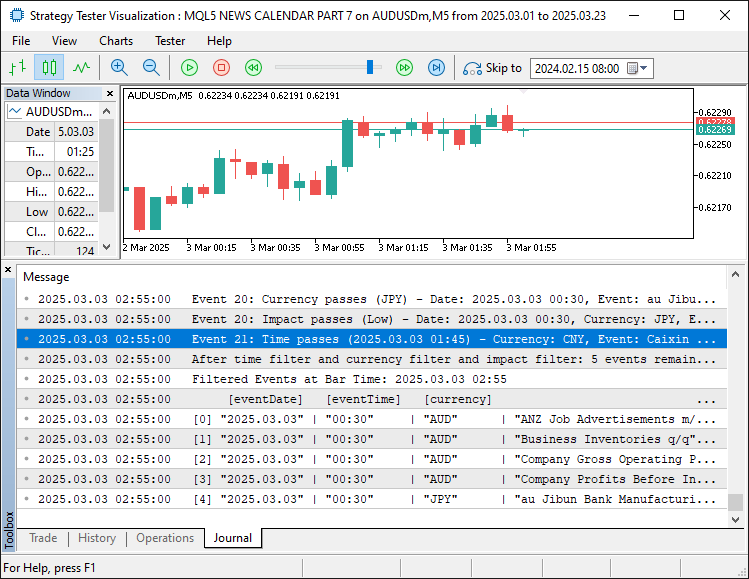
A partir da imagem, podemos ver que a filtragem está habilitada e funciona conforme o esperado. A única etapa restante é testar nossa lógica, e isso é tratado na próxima seção.
Testes
Para um teste detalhado, apresentamos tudo em um vídeo,que você pode assistir abaixo.
Conclusão
Em conclusão, aprimoramos nossa série sobre o Calendário Econômico do MQL5 ao preparar o sistema para testes de estratégia, utilizando dados estáticos em um arquivo salvo para permitir backtests confiáveis. Isso conecta a análise de eventos em tempo real ao Strategy Tester por meio de filtros flexíveis, superando as limitações de dados para uma validação precisa da estratégia. A seguir, exploraremos a otimização da execução de trades com base nesses resultados e sua integração ao dashboard. Acompanhe os próximos artigos!
Traduzido do Inglês pela MetaQuotes Ltd.
Artigo original: https://www.mql5.com/en/articles/17603
Aviso: Todos os direitos sobre esses materiais pertencem à MetaQuotes Ltd. É proibida a reimpressão total ou parcial.
Esse artigo foi escrito por um usuário do site e reflete seu ponto de vista pessoal. A MetaQuotes Ltd. não se responsabiliza pela precisão das informações apresentadas nem pelas possíveis consequências decorrentes do uso das soluções, estratégias ou recomendações descritas.

 Ferramentas personalizadas de depuração e profiling para desenvolvimento em MQL5 (Parte I): Logging avançado
 Recursos do Assistente MQL5 que você precisa conhecer (Parte 64): Uso de padrões dos canais DeMarker e Envelopes com kernel de ruído branco
 Machine Learning e Data Science (Parte 38): Aplicação de Transfer Learning nos mercados de câmbio
 Recursos do Assistente MQL5 que você precisa conhecer (Parte 63): Uso de padrões dos canais DeMarker e Envelopes

- Aplicativos de negociação gratuitos
- 8 000+ sinais para cópia
- Notícias econômicas para análise dos mercados financeiros
Você concorda com a política do site e com os termos de uso