

Operando con el Calendario Económico MQL5 (Parte 7): Preparación para la prueba de estrategias con análisis de eventos noticiosos basado en recursos
 354
354
 0
0

Introducción
En este artículo, continuamos con la serie Calendario Económico MQL5 preparando el sistema de trading para la prueba de estrategias fuera del entorno en tiempo real, utilizando datos de eventos económicos integrados para lograr un backtesting fiable. Partiendo de la automatización de las entradas de operaciones de la Parte 6, con análisis de noticias y temporizadores de cuenta atrás, ahora nos centramos en cargar eventos de noticias desde un archivo de recursos y aplicar filtros definidos por el usuario para simular condiciones reales en el Probador de estrategias. Estructuramos el artículo con los siguientes temas:
¡Manos a la obra!
Importancia de la integración de datos estáticos
La integración de datos estáticos es fundamental para quienes desean desarrollar y probar estrategias sólidas, especialmente en entornos como MQL5, donde los datos históricos de acontecimientos económicos no se conservan durante largos periodos de tiempo. A diferencia del trading en vivo, en el que la plataforma puede obtener noticias en tiempo real, el Probador de estrategias no tiene acceso a este tipo de actualizaciones dinámicas. No almacena archivos exhaustivos de acontecimientos pasados, lo que nos deja sin una solución nativa para realizar pruebas retrospectivas de estrategias basadas en noticias. Al descargar estos datos de fuentes externas y organizarlos nosotros mismos —ya sea en forma de archivos, bases de datos o recursos integrados—, obtenemos el control sobre un conjunto de datos coherente que puede reutilizarse en múltiples pruebas, lo que garantiza que nuestras estrategias se enfrenten a las mismas condiciones en cada ocasión.
Más allá de superar las limitaciones de la plataforma, la integración de datos estáticos ofrece una flexibilidad que los flujos de datos en tiempo real no pueden proporcionar. El Calendario económico, como ya hemos visto en versiones anteriores, suele incluir datos fundamentales como las fechas y horas de los eventos, las divisas y los niveles de impacto, pero estos datos no siempre se presentan en un formato adecuado para el análisis algorítmico en horizontes temporales largos. Al estructurar esta información manualmente, podemos adaptarla a nuestras necesidades —por ejemplo, filtrando por divisas específicas o eventos de alto impacto—, lo que nos permite obtener una comprensión más profunda de cómo las noticias influyen en el comportamiento del mercado sin depender de su disponibilidad en tiempo real.
Además, este enfoque mejorará la eficiencia y la independencia. Recopilar y almacenar los datos estáticos por adelantado nos permite no depender de la conexión a Internet ni de servicios de terceros durante las pruebas, lo que reduce las variables que podrían sesgar los resultados. También nos permite simular escenarios poco comunes o específicos, como anuncios económicos importantes, mediante la selección de conjuntos de datos que abarcan años o se centran en momentos clave, algo que los sistemas en tiempo real o el almacenamiento limitado de la plataforma no pueden replicar fácilmente. En definitiva, la integración de datos estáticos cierra la brecha entre la información obtenida en tiempo real durante las operaciones y la precisión de las pruebas retrospectivas, sentando una base sólida para el desarrollo de estrategias.
El almacenamiento de datos será un factor clave, y MQL5 ofrece una amplia variedad de opciones, desde formatos de texto (txt), valores separados por comas (CSV), ANSI (American National Standards Institute), binario (bin) y Unicode, hasta las estructuras de bases de datos que se indican a continuación.

Utilizaremos el formato CSV, que no es el más sencillo, pero sí el más conveniente. De esta forma, tendremos los datos a mano y no tendremos que esperar horas para realizar pruebas retrospectivas de nuestra estrategia, lo que nos ahorrará mucho tiempo y energía. Vamos.
Implementación en MQL5
Para empezar, necesitaremos estructurar la recopilación y organización de datos de manera que refleje nuestra estructura anterior. Por lo tanto, necesitaremos algunas entradas que el usuario pueda personalizar, tal como lo hicimos anteriormente, como se muestra a continuación.
//+------------------------------------------------------------------+
//|                                    MQL5 NEWS CALENDAR PART 7.mq5 |
//|                           Copyright 2025, Allan Munene Mutiiria. |
//|                                   https://t.me/Forex_Algo_Trader |
//+------------------------------------------------------------------+
#property copyright "Copyright 2025, Allan Munene Mutiiria."
#property link      "https://youtube.com/@ForexAlgo-Trader?"
#property version   "1.00"
#property strict

//---- Input parameter for start date of event filtering
input datetime StartDate = D'2025.03.01'; // Download Start Date
//---- Input parameter for end date of event filtering
input datetime EndDate = D'2025.03.21'; // Download End Date
//---- Input parameter to enable/disable time filtering
input bool ApplyTimeFilter = true;
//---- Input parameter for hours before event to consider
input int HoursBefore = 4;
//---- Input parameter for minutes before event to consider
input int MinutesBefore = 10;
//---- Input parameter for hours after event to consider
input int HoursAfter = 1;
//---- Input parameter for minutes after event to consider
input int MinutesAfter = 5;
//---- Input parameter to enable/disable currency filtering
input bool ApplyCurrencyFilter = true;
//---- Input parameter defining currencies to filter (comma-separated)
input string CurrencyFilter = "USD,EUR,GBP,JPY,AUD,NZD,CAD,CHF"; // All 8 major currencies
//---- Input parameter to enable/disable impact filtering
input bool ApplyImpactFilter = true;

//---- Enumeration for event importance filtering options
enum ENUM_IMPORTANCE {
   IMP_NONE = 0,                  // None
   IMP_LOW,                       // Low
   IMP_MEDIUM,                    // Medium
   IMP_HIGH,                      // High
   IMP_NONE_LOW,                  // None,Low
   IMP_NONE_MEDIUM,               // None,Medium
   IMP_NONE_HIGH,                 // None,High
   IMP_LOW_MEDIUM,                // Low,Medium
   IMP_LOW_HIGH,                  // Low,High
   IMP_MEDIUM_HIGH,               // Medium,High
   IMP_NONE_LOW_MEDIUM,           // None,Low,Medium
   IMP_NONE_LOW_HIGH,             // None,Low,High
   IMP_NONE_MEDIUM_HIGH,          // None,Medium,High
   IMP_LOW_MEDIUM_HIGH,           // Low,Medium,High
   IMP_ALL                        // None,Low,Medium,High (default)
};
//---- Input parameter for selecting importance filter
input ENUM_IMPORTANCE ImportanceFilter = IMP_ALL; // Impact Levels (Default to all)
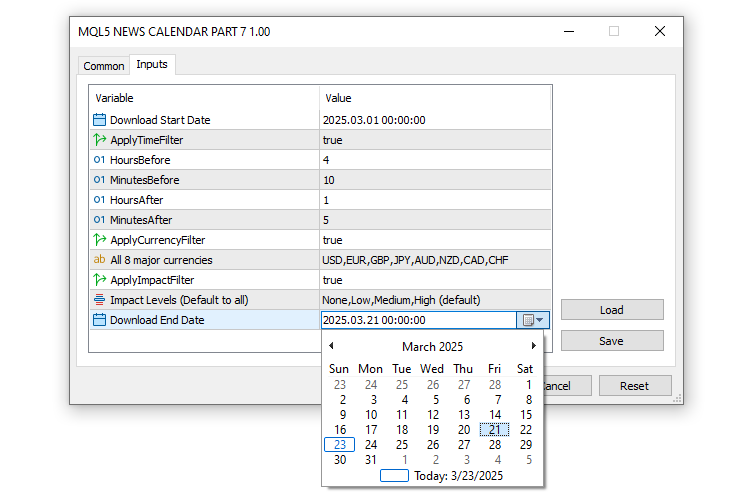
Aquí, configuramos los parámetros de entrada fundamentales y una enumeración para personalizar la forma en que nuestro sistema de trading gestiona los eventos económicos para la prueba de estrategias. Definimos "StartDate" y "EndDate" como variables datetime, con valores del 1 de marzo de 2025 y el 21 de marzo de 2025, respectivamente, para especificar el intervalo de tiempo para la descarga y el análisis de los datos de los eventos. Para controlar el filtrado temporal en torno a estos eventos, incluimos "ApplyTimeFilter" como un booleano cuyo valor predeterminado es "true", junto con "HoursBefore" (4 horas), "MinutesBefore" (10 minutos), "HoursAfter" (1 hora) y "MinutesAfter" (5 minutos), que determinan la ventana de tiempo para considerar los eventos respecto a una barra concreta.
Para realizar análisis específicos por divisa, introducimos "ApplyCurrencyFilter" (activado por defecto) y "CurrencyFilter", una cadena de caracteres que enumera las ocho divisas principales —"USD, EUR, GBP, JPY, AUD, NZD, CAD, CHF"— para centrarnos en los mercados relevantes. También permitimos el filtrado basado en el impacto con "ApplyImpactFilter" establecido en "true", gracias a la enumeración "ENUM_IMPORTANCE", que ofrece opciones flexibles como "IMP_NONE", "IMP_LOW", "IMP_MEDIUM", "IMP_HIGH" y combinaciones hasta "IMP_ALL", con "ImportanceFilter" establecido por defecto en "IMP_ALL" para incluir todos los niveles de impacto. El resultado es el siguiente.
Una vez introducidos los datos, lo siguiente que debemos hacer es declarar una estructura con ocho campos de entrada que imite la estructura habitual y predeterminada del Calendario Económico MQL5, tal y como se muestra a continuación.
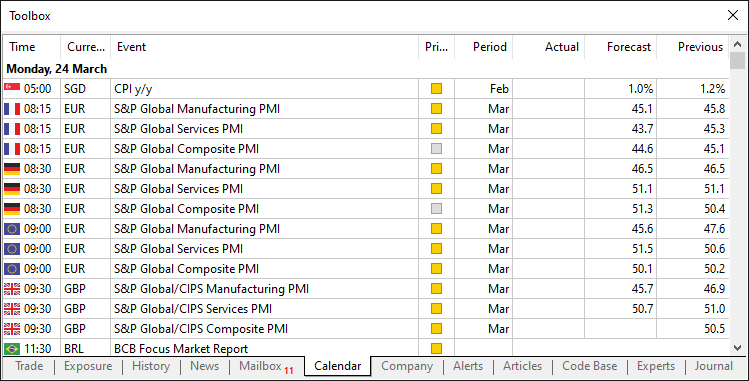
Conseguimos el formato siguiendo la siguiente lógica.
//---- Structure to hold economic event data
struct EconomicEvent {
   string eventDate;      //---- Date of the event
   string eventTime;      //---- Time of the event
   string currency;       //---- Currency affected by the event
   string event;          //---- Event description
   string importance;     //---- Importance level of the event
   double actual;         //---- Actual value of the event
   double forecast;       //---- Forecasted value of the event
   double previous;       //---- Previous value of the event
};

//---- Array to store all economic events
EconomicEvent allEvents[];
//---- Array for currency filter values
string curr_filter[];
//---- Array for importance filter values
string imp_filter[];
En primer lugar, definimos la estructura "EconomicEvent" (struct) para encapsular los detalles clave del evento, incluyendo "eventDate" y "eventTime" como cadenas de caracteres para indicar la fecha y la hora del evento, "currency" para identificar el mercado afectado, "event" para la descripción y "importance" para indicar su nivel de impacto, junto con "actual", "forecast" y "previous" como valores de tipo double para almacenar los datos numéricos del evento.
Para almacenar y gestionar estos eventos, creamos tres matrices: "allEvents", una array de estructuras "EconomicEvent" destinada a contener todos los eventos cargados; "curr_filter", una array de cadenas para almacenar las divisas especificadas en el campo de entrada "CurrencyFilter"; y "imp_filter", una array de cadenas para gestionar los niveles de impacto seleccionados a través de "ImportanceFilter". Esto reproduce la estructura predeterminada, con la única diferencia de que desplazamos la sección "Period" para que incluya las fechas de los eventos al principio de la estructura. A continuación, debemos obtener los filtros a partir de los datos introducidos por el usuario, interpretarlos de forma que el ordenador los entienda e inicializarlos. Para mantener el código modularizado, utilizaremos funciones.
//---- Function to initialize currency and impact filters
void InitializeFilters() {
   //---- Currency Filter Section
   //---- Check if currency filter is enabled and has content
   if (ApplyCurrencyFilter && StringLen(CurrencyFilter) > 0) {
      //---- Split the currency filter string into array
      int count = StringSplit(CurrencyFilter, ',', curr_filter);
      //---- Loop through each currency filter entry
      for (int i = 0; i < ArraySize(curr_filter); i++) {
         //---- Temporary variable for trimming
         string temp = curr_filter[i];
         //---- Remove leading whitespace
         StringTrimLeft(temp);
         //---- Remove trailing whitespace
         StringTrimRight(temp);
         //---- Assign trimmed value back to array
         curr_filter[i] = temp;
         //---- Print currency filter for debugging
         Print("Currency filter [", i, "]: '", curr_filter[i], "'");
      }
   } else if (ApplyCurrencyFilter) {
      //---- Warn if currency filter is enabled but empty
      Print("Warning: CurrencyFilter is empty, no currency filtering applied");
      //---- Resize array to zero if no filter applied
      ArrayResize(curr_filter, 0);
   }
}
Aquí configuramos la parte de filtrado por divisa de la función "InitializeFilters" de nuestro sistema para preparar un análisis eficaz de los eventos durante las pruebas de estrategias. Empezamos comprobando si la variable "ApplyCurrencyFilter" es verdadera y si la cadena "CurrencyFilter" tiene contenido mediante la función StringLen; si es así, dividimos "CurrencyFilter", separado por comas (como "USD, EUR, GBP"), en la array "curr_filter" utilizando la función StringSplit, capturando el número de elementos en "count".
A continuación, recorremos cada elemento de "curr_filter" con un bucle "for", asignándolo a una cadena temporal "temp" string, limpiándolo al eliminar los espacios en blanco iniciales y finales con las funciones StringTrimLeft y StringTrimRight, y luego actualizando "curr_filter" con el valor recortado y mostrándolo mediante la función Print con fines de depuración (por ejemplo, "Currency filter [0]: 'USD'"). Sin embargo, si "ApplyCurrencyFilter" está activado pero "CurrencyFilter" está vacío, utilizamos la función "Print" para emitir una advertencia —"Warning: CurrencyFilter is empty, no currency filtering applied"— y redimensionamos el array a cero mediante la función ArrayResize para desactivar el filtrado. Esta inicialización cuidadosa garantizará que el filtro de moneda se derive de forma fiable de las entradas del usuario, lo que permitirá una gestión precisa de los eventos en el Probador de estrategias. Para el filtro de impacto, aplicamos una lógica de selección similar.
//---- Impact Filter Section (using enum)
//---- Check if impact filter is enabled
if (ApplyImpactFilter) {
   //---- Switch based on selected importance filter
   switch (ImportanceFilter) {
      case IMP_NONE:
         //---- Resize array for single importance level
         ArrayResize(imp_filter, 1);
         //---- Set importance to "None"
         imp_filter[0] = "None";
         break;
      case IMP_LOW:
         //---- Resize array for single importance level
         ArrayResize(imp_filter, 1);
         //---- Set importance to "Low"
         imp_filter[0] = "Low";
         break;
      case IMP_MEDIUM:
         //---- Resize array for single importance level
         ArrayResize(imp_filter, 1);
         //---- Set importance to "Medium"
         imp_filter[0] = "Medium";
         break;
      case IMP_HIGH:
         //---- Resize array for single importance level
         ArrayResize(imp_filter, 1);
         //---- Set importance to "High"
         imp_filter[0] = "High";
         break;
      case IMP_NONE_LOW:
         //---- Resize array for two importance levels
         ArrayResize(imp_filter, 2);
         //---- Set first importance level
         imp_filter[0] = "None";
         //---- Set second importance level
         imp_filter[1] = "Low";
         break;
      case IMP_NONE_MEDIUM:
         //---- Resize array for two importance levels
         ArrayResize(imp_filter, 2);
         //---- Set first importance level
         imp_filter[0] = "None";
         //---- Set second importance level
         imp_filter[1] = "Medium";
         break;
      case IMP_NONE_HIGH:
         //---- Resize array for two importance levels
         ArrayResize(imp_filter, 2);
         //---- Set first importance level
         imp_filter[0] = "None";
         //---- Set second importance level
         imp_filter[1] = "High";
         break;
      case IMP_LOW_MEDIUM:
         //---- Resize array for two importance levels
         ArrayResize(imp_filter, 2);
         //---- Set first importance level
         imp_filter[0] = "Low";
         //---- Set second importance level
         imp_filter[1] = "Medium";
         break;
      case IMP_LOW_HIGH:
         //---- Resize array for two importance levels
         ArrayResize(imp_filter, 2);
         //---- Set first importance level
         imp_filter[0] = "Low";
         //---- Set second importance level
         imp_filter[1] = "High";
         break;
      case IMP_MEDIUM_HIGH:
         //---- Resize array for two importance levels
         ArrayResize(imp_filter, 2);
         //---- Set first importance level
         imp_filter[0] = "Medium";
         //---- Set second importance level
         imp_filter[1] = "High";
         break;
      case IMP_NONE_LOW_MEDIUM:
         //---- Resize array for three importance levels
         ArrayResize(imp_filter, 3);
         //---- Set first importance level
         imp_filter[0] = "None";
         //---- Set second importance level
         imp_filter[1] = "Low";
         //---- Set third importance level
         imp_filter[2] = "Medium";
         break;
      case IMP_NONE_LOW_HIGH:
         //---- Resize array for three importance levels
         ArrayResize(imp_filter, 3);
         //---- Set first importance level
         imp_filter[0] = "None";
         //---- Set second importance level
         imp_filter[1] = "Low";
         //---- Set third importance level
         imp_filter[2] = "High";
         break;
      case IMP_NONE_MEDIUM_HIGH:
         //---- Resize array for three importance levels
         ArrayResize(imp_filter, 3);
         //---- Set first importance level
         imp_filter[0] = "None";
         //---- Set second importance level
         imp_filter[1] = "Medium";
         //---- Set third importance level
         imp_filter[2] = "High";
         break;
      case IMP_LOW_MEDIUM_HIGH:
         //---- Resize array for three importance levels
         ArrayResize(imp_filter, 3);
         //---- Set first importance level
         imp_filter[0] = "Low";
         //---- Set second importance level
         imp_filter[1] = "Medium";
         //---- Set third importance level
         imp_filter[2] = "High";
         break;
      case IMP_ALL:
         //---- Resize array for all importance levels
         ArrayResize(imp_filter, 4);
         //---- Set first importance level
         imp_filter[0] = "None";
         //---- Set second importance level
         imp_filter[1] = "Low";
         //---- Set third importance level
         imp_filter[2] = "Medium";
         //---- Set fourth importance level
         imp_filter[3] = "High";
         break;
   }
   //---- Loop through impact filter array to print values
   for (int i = 0; i < ArraySize(imp_filter); i++) {
      //---- Print each impact filter value
      Print("Impact filter [", i, "]: '", imp_filter[i], "'");
   }
} else {
   //---- Notify if impact filter is disabled
   Print("Impact filter disabled");
   //---- Resize impact filter array to zero
   ArrayResize(imp_filter, 0);
}
Para el proceso de filtrado de impacto, comenzamos comprobando si la variable "ApplyImpactFilter" es verdadera; de ser así, utilizamos una instrucción switch basada en la enumeración "ImportanceFilter" para determinar qué niveles de impacto incluir en la array "imp_filter". Para opciones de un solo nivel como "IMP_NONE", "IMP_LOW", "IMP_MEDIUM" o "IMP_HIGH", redimensionamos "imp_filter" a 1 utilizando la función ArrayResize y le asignamos la cadena correspondiente (por ejemplo, "imp_filter[0] = “None”"); para opciones de dos niveles como "IMP_NONE_LOW" o "IMP_MEDIUM_HIGH", lo redimensionamos a 2 y establecemos dos valores (por ejemplo, "imp_filter[0] = “None”, imp_filter[1] = “Low”"); para opciones de tres niveles como "IMP_LOW_MEDIUM_HIGH", cambiamos el tamaño a 3; y para "IMP_ALL", cambiamos el tamaño a 4, cubriendo "None", "Low", "Medium" y "High".
Una vez definida la array, recorremos "imp_filter" utilizando la función ArraySize para determinar su tamaño, y mostramos cada valor con la función Print para facilitar la depuración (por ejemplo, "Impact filter [0]: 'None'"). Si "ApplyImpactFilter" es falso, avisamos al usuario mediante la función "Print" —"Impact filter disabled"— y redimensionamos "imp_filter" a cero.
Con esto, ahora tenemos que llamar a la función en el controlador de eventos OnInit.
int OnInit() {
   //---- Initialize filters
   InitializeFilters();

   //---- Return successful initialization
   return(INIT_SUCCEEDED);
}

void OnDeinit(const int reason) {
   //---- Print termination reason
   Print("EA terminated, reason: ", reason);
}
Llamamos a la función en el controlador de eventos OnInit y también mostramos el motivo de la finalización del programa en el controlador de eventos OnDeinit. Este es el resultado.
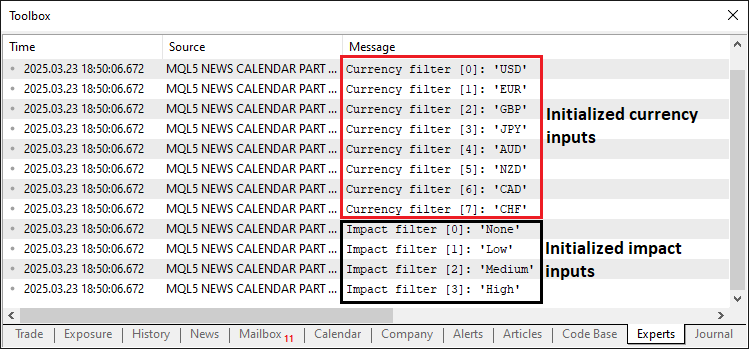
En la imagen podemos ver que hemos inicializado y parseado correctamente las entradas del filtro y las hemos almacenado. Ahora solo tenemos que obtener los datos en ejecución real y almacenarlos. En este caso, la lógica es que primero debemos ejecutar el programa una vez en modo real, para que pueda descargar los datos de la base de datos del Calendario Económico MQL5, y luego cargar y utilizar esos datos en modo de prueba. Aquí está la lógica de inicialización.
//---- Check if not running in tester mode
if (!MQLInfoInteger(MQL_TESTER)) {
   //---- Validate date range
   if (StartDate >= EndDate) {
      //---- Print error for invalid date range
      Print("Error: StartDate (", TimeToString(StartDate), ") must be earlier than EndDate (", TimeToString(EndDate), ")");
      //---- Return initialization failure
      return(INIT_PARAMETERS_INCORRECT);
   }

   //---- Array to hold calendar values
   MqlCalendarValue values[];
   //---- Fetch calendar data for date range
   if (!CalendarValueHistory(values, StartDate, EndDate)) {
      //---- Print error if calendar data fetch fails
      Print("Error fetching calendar data: ", GetLastError());
      //---- Return initialization failure
      return(INIT_FAILED);
   }

   //---- Array to hold economic events
   EconomicEvent events[];
   //---- Counter for events
   int eventCount = 0;

   //---- Loop through calendar values
   for (int i = 0; i < ArraySize(values); i++) {
      //---- Structure for event details
      MqlCalendarEvent eventDetails;
      //---- Fetch event details by ID
      if (!CalendarEventById(values[i].event_id, eventDetails)) continue;

      //---- Structure for country details
      MqlCalendarCountry countryDetails;
      //---- Fetch country details by ID
      if (!CalendarCountryById(eventDetails.country_id, countryDetails)) continue;

      //---- Structure for value details
      MqlCalendarValue value;
      //---- Fetch value details by ID
      if (!CalendarValueById(values[i].id, value)) continue;

      //---- Resize events array for new event
      ArrayResize(events, eventCount + 1);
      //---- Convert event time to string
      string dateTimeStr = TimeToString(values[i].time, TIME_DATE | TIME_MINUTES);
      //---- Extract date from datetime string
      events[eventCount].eventDate = StringSubstr(dateTimeStr, 0, 10);
      //---- Extract time from datetime string
      events[eventCount].eventTime = StringSubstr(dateTimeStr, 11, 5);
      //---- Assign currency from country details
      events[eventCount].currency = countryDetails.currency;
      //---- Assign event name
      events[eventCount].event = eventDetails.name;
      //---- Map importance level from enum to string
      events[eventCount].importance = (eventDetails.importance == 0) ? "None" :    // CALENDAR_IMPORTANCE_NONE
                                      (eventDetails.importance == 1) ? "Low" :     // CALENDAR_IMPORTANCE_LOW
                                      (eventDetails.importance == 2) ? "Medium" :  // CALENDAR_IMPORTANCE_MODERATE
                                      "High";                                      // CALENDAR_IMPORTANCE_HIGH
      //---- Assign actual value
      events[eventCount].actual = value.GetActualValue();
      //---- Assign forecast value
      events[eventCount].forecast = value.GetForecastValue();
      //---- Assign previous value
      events[eventCount].previous = value.GetPreviousValue();
      //---- Increment event count
      eventCount++;
   }

}
Aquí gestionamos la obtención de datos en tiempo real dentro de la función OnInit de nuestro programa, asegurándonos de que se recopilen datos sobre eventos económicos para su uso posterior en las pruebas de estrategias. Empezamos comprobando si el sistema no se encuentra en modo de prueba mediante la función MQLInfoInteger con MQL_TESTER; si es cierto, verificamos que "StartDate" sea anterior a "EndDate", mostrando un mensaje de error y devolviendo INIT_PARAMETERS_INCORRECT si no es válido. A continuación, declaramos una array MqlCalendarValue denominada "values" y recuperamos los datos del calendario comprendidos entre "StartDate" y "EndDate" mediante la función CalendarValueHistory, mostrando cualquier error con GetLastError y devolviendo "INIT_FAILED" si se produce un error.
A continuación, inicializamos una array "EconomicEvent" denominada "events" y una variable entera "eventCount" para llevar un recuento de los eventos, recorriendo "values" con la función ArraySize. En cada iteración, recuperamos los detalles del evento en una estructura MqlCalendarEvent denominada "eventDetails" mediante la función CalendarEventById, los detalles del país en una estructura MqlCalendarCountry denominada "countryDetails" mediante CalendarCountryById, y los detalles del valor en una estructura "MqlCalendarValue" denominada "value" mediante "CalendarValueById", omitiendo el proceso si falla alguna de las recuperaciones. Redimensionamos los "eventos" con la función ArrayResize, convertimos la hora del evento en una cadena "dateTimeStr" utilizando la función TimeToString y extraemos "eventDate" y "eventTime" con la función StringSubstr, asignando "currency" a partir de "countryDetails", "event" de "eventDetails.name" y asignando "importance" de valores numéricos a cadenas ("None", "Low", "Medium", "High"). Por último, establecemos los valores "actual", "forecast" y "previous" mediante los métodos "value" e incrementamos "eventCount", generando así un conjunto completo de eventos para la gestión en tiempo real. Ahora necesitamos una función que se encargue de almacenar esta información en un archivo de datos.
//---- Function to write events to a CSV file
void WriteToCSV(string fileName, EconomicEvent &events[]) {
   //---- Open file for writing in CSV format
   int handle = FileOpen(fileName, FILE_WRITE | FILE_CSV, ',');
   //---- Check if file opening failed
   if (handle == INVALID_HANDLE) {
      //---- Print error message with last error code
      Print("Error creating file: ", GetLastError());
      //---- Exit function on failure
      return;
   }

   //---- Write CSV header row
   FileWrite(handle, "Date", "Time", "Currency", "Event", "Importance", "Actual", "Forecast", "Previous");
   //---- Loop through all events to write to file
   for (int i = 0; i < ArraySize(events); i++) {
      //---- Write event data to CSV file
      FileWrite(handle, events[i].eventDate, events[i].eventTime, events[i].currency, events[i].event,
                events[i].importance, DoubleToString(events[i].actual, 2), DoubleToString(events[i].forecast, 2),
                DoubleToString(events[i].previous, 2));
      //---- Print event details for debugging
      Print("Writing event ", i, ": ", events[i].eventDate, ", ", events[i].eventTime, ", ", events[i].currency, ", ",
            events[i].event, ", ", events[i].importance, ", ", DoubleToString(events[i].actual, 2), ", ",
            DoubleToString(events[i].forecast, 2), ", ", DoubleToString(events[i].previous, 2));
   }

   //---- Flush data to file
   FileFlush(handle);
   //---- Close the file handle
   FileClose(handle);
   //---- Print confirmation of data written
   Print("Data written to ", fileName, " with ", ArraySize(events), " events.");

   //---- Verify written file by reading it back
   int verifyHandle = FileOpen(fileName, FILE_READ | FILE_TXT);
   //---- Check if verification file opening succeeded
   if (verifyHandle != INVALID_HANDLE) {
      //---- Read entire file content
      string content = FileReadString(verifyHandle, (int)FileSize(verifyHandle));
      //---- Print file content for verification
      Print("File content after writing (size: ", FileSize(verifyHandle), " bytes):\n", content);
      //---- Close verification file handle
      FileClose(verifyHandle);
   }
}
Aquí creamos la función "WriteToCSV" para exportar de forma sistemática los datos de eventos económicos a un archivo CSV. Comenzamos abriendo el archivo especificado por "fileName" mediante la función FileOpen en modo "FILE_WRITE | FILE_CSV" con delimitador de comas, y almacenamos el resultado en "handle"; si esto falla y "handle" es igual a "INVALID_HANDLE", utilizamos la función "Print" para mostrar un mensaje de error que incluye el código GetLastError y salimos de la función con "return". Una vez abierto el archivo, escribimos una fila de encabezado con la función FileWrite, definiendo las columnas como "Date", "Time", "Currency", "Event", "Importance", "Actual", "Forecast" y "Previous" para organizar los datos.
A continuación, recorremos la array "events", determinando su tamaño con la función ArraySize, y para cada evento llamamos a "FileWrite" para registrar sus propiedades —"eventDate", "eventTime", "currency", "event", "importance" y los valores numéricos "actual", "forecast" y "previous", convertidos a cadenas con la función DoubleToString (formateados con 2 decimales)—, al tiempo que registramos estos detalles con la función "Print" con fines de depuración.
Una vez completado el bucle, nos aseguramos de que todos los datos se hayan escrito en el archivo llamando a la función FileFlush sobre "handle"; a continuación, cerramos el archivo mediante la función FileClose y confirmamos que la operación se ha realizado correctamente con un mensaje.
Para verificar el resultado, volvemos a abrir el archivo en modo lectura utilizando "FILE_READ | FILE_TXT", y almacenamos este identificador en "verifyHandle"; si tiene éxito, leemos todo el contenido en "content" con la función FileReadString basándonos en el tamaño en bytes de FileSize, lo imprimimos para su inspección (por ejemplo, "File content after writing (size: X bytes):\n"content"") y cerramos. Este minucioso proceso garantiza que los datos del evento se guarden con precisión y puedan verificarse, lo que lo convierte en un recurso fiable para el backtesting en el Probador de estrategias. Ahora podemos utilizar la función para el proceso de guardado de datos.
//---- Define file path for CSV
string fileName = "Database\\EconomicCalendar.csv";

//---- Check if file exists and print appropriate message
if (!FileExists(fileName)) Print("Creating new file: ", fileName);
else Print("Overwriting existing file: ", fileName);

//---- Write events to CSV file
WriteToCSV(fileName, events);
//---- Print instructions for tester mode
Print("Live mode: Data written. To use in tester, manually add ", fileName, " as a resource and recompile.");
Para completar el manejo de datos en modo en vivo, hemos establecido "fileName" en "Database\EconomicCalendar.csv" y hemos utilizado la función personalizada "FileExists" para comprobar su estado. Luego llamamos a la función "WriteToCSV" con "fileName" y "events" para guardar los datos, y mostramos con "Print": "Live mode: Data written. To use in tester, add "fileName" as a resource and recompile.", para uso del probador. El fragmento de código de la función personalizada para comprobar la existencia del archivo es el siguiente.
//---- Function to check if a file exists
bool FileExists(string fileName) {
   //---- Open file in read mode to check existence
   int handle = FileOpen(fileName, FILE_READ | FILE_CSV);
   //---- Check if file opened successfully
   if (handle != INVALID_HANDLE) {
      //---- Close the file handle
      FileClose(handle);
      //---- Return true if file exists
      return true;
   }
   //---- Return false if file doesn't exist
   return false;
}
En la función "FileExists", que comprueba la existencia de un archivo para las pruebas de estrategias, abrimos "fileName" con la función FileOpen en modo "FILE_READ | FILE_CSV", y si "handle" no es "INVALID_HANDLE", lo cerramos con FileClose y devolvemos "true"; en caso contrario, devolvemos "false". Esto confirma el estado del archivo para el tratamiento de datos. Al ejecutarlo en modo de producción, este es el resultado.
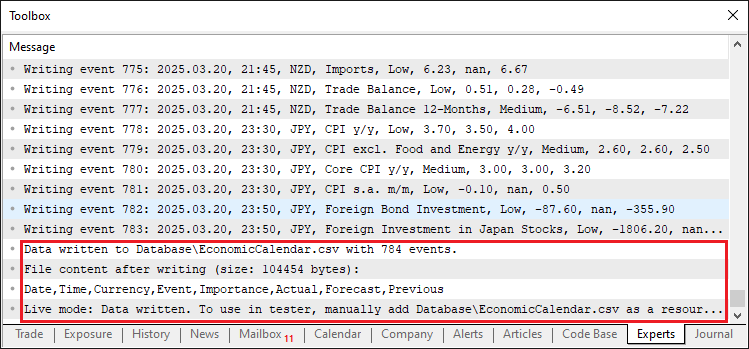
En la imagen podemos ver que los datos están guardados y que podemos acceder a ellos.
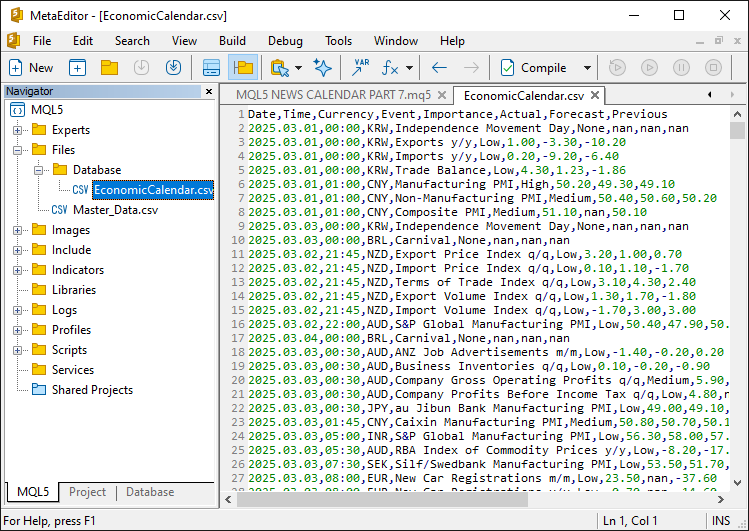
Para utilizar los datos en modo de prueba, necesitamos guardarlos en el archivo ejecutable. Para ello, lo añadimos como recurso.
//---- Define resource file for economic calendar data
#resource "\\Files\\Database\\EconomicCalendar.csv" as string EconomicCalendarData
Aquí integramos el recurso de datos estáticos en nuestro programa para respaldar las pruebas de estrategia. Mediante la directiva #resource, incorporamos el archivo ubicado en "\Files\Database\EconomicCalendar.csv" y lo asignamos a la variable de cadena "EconomicCalendarData". De esa forma, el archivo se encuentra en el directorio "executive", por lo que no hay que preocuparse aunque se borre. Ahora podemos tener una función para cargar el contenido del archivo.
//---- Function to load events from resource file
bool LoadEventsFromResource() {
   //---- Get data from resource
   string fileData = EconomicCalendarData;
   //---- Print raw resource content for debugging
   Print("Raw resource content (size: ", StringLen(fileData), " bytes):\n", fileData);

   //---- Array to hold lines from resource
   string lines[];
   //---- Split resource data into lines
   int lineCount = StringSplit(fileData, '\n', lines);
   //---- Check if resource has valid data
   if (lineCount <= 1) {
      //---- Print error if no data lines found
      Print("Error: No data lines found in resource! Raw data: ", fileData);
      //---- Return false on failure
      return false;
   }

   //---- Reset events array
   ArrayResize(allEvents, 0);
   //---- Index for event array
   int eventIndex = 0;

   //---- Loop through each line (skip header at i=0)
   for (int i = 1; i < lineCount; i++) {
      //---- Check for empty lines
      if (StringLen(lines[i]) == 0) {
         //---- Print message for skipped empty line
         Print("Skipping empty line ", i);
         //---- Skip to next iteration
         continue;
      }

      //---- Array to hold fields from each line
      string fields[];
      //---- Split line into fields
      int fieldCount = StringSplit(lines[i], ',', fields);
      //---- Print line details for debugging
      Print("Line ", i, ": ", lines[i], " (field count: ", fieldCount, ")");

      //---- Check if line has minimum required fields
      if (fieldCount < 8) {
         //---- Print error for malformed line
         Print("Malformed line ", i, ": ", lines[i], " (field count: ", fieldCount, ")");
         //---- Skip to next iteration
         continue;
      }

      //---- Extract date from field
      string dateStr = fields[0];
      //---- Extract time from field
      string timeStr = fields[1];
      //---- Extract currency from field
      string currency = fields[2];
      //---- Extract event description (handle commas in event name)
      string event = fields[3];
      //---- Combine multiple fields if event name contains commas
      for (int j = 4; j < fieldCount - 4; j++) {
         event += "," + fields[j];
      }
      //---- Extract importance from field
      string importance = fields[fieldCount - 4];
      //---- Extract actual value from field
      string actualStr = fields[fieldCount - 3];
      //---- Extract forecast value from field
      string forecastStr = fields[fieldCount - 2];
      //---- Extract previous value from field
      string previousStr = fields[fieldCount - 1];

      //---- Convert date and time to datetime format
      datetime eventDateTime = StringToTime(dateStr + " " + timeStr);
      //---- Check if datetime conversion failed
      if (eventDateTime == 0) {
         //---- Print error for invalid datetime
         Print("Error: Invalid datetime conversion for line ", i, ": ", dateStr, " ", timeStr);
         //---- Skip to next iteration
         continue;
      }

      //---- Resize events array for new event
      ArrayResize(allEvents, eventIndex + 1);
      //---- Assign event date
      allEvents[eventIndex].eventDate = dateStr;
      //---- Assign event time
      allEvents[eventIndex].eventTime = timeStr;
      //---- Assign event currency
      allEvents[eventIndex].currency = currency;
      //---- Assign event description
      allEvents[eventIndex].event = event;
      //---- Assign event importance
      allEvents[eventIndex].importance = importance;
      //---- Convert and assign actual value
      allEvents[eventIndex].actual = StringToDouble(actualStr);
      //---- Convert and assign forecast value
      allEvents[eventIndex].forecast = StringToDouble(forecastStr);
      //---- Convert and assign previous value
      allEvents[eventIndex].previous = StringToDouble(previousStr);
      //---- Print loaded event details
      Print("Loaded event ", eventIndex, ": ", dateStr, " ", timeStr, ", ", currency, ", ", event);
      //---- Increment event index
      eventIndex++;
   }

   //---- Print total events loaded
   Print("Loaded ", eventIndex, " events from resource into array.");
   //---- Return success if events were loaded
   return eventIndex > 0;
}
Definimos la función "LoadEventsFromResource" para cargar los datos de eventos económicos desde el recurso integrado para la prueba de estrategias. Asignamos el recurso "EconomicCalendarData" a "fileData" e imprimimos su contenido sin gestionar con la función "Print", incluyendo su tamaño mediante la función StringLen, con fines de depuración. Dividimos "fileData" en la array "lines" utilizando la función StringSplit con un delimitador de salto de línea, almacenamos el recuento en "lineCount" y, si "lineCount" es igual o inferior a 1, mostramos un mensaje de error y devolvemos "false". Restablecemos la array "allEvents" a cero con la función ArrayResize e inicializamos "eventIndex" en 0; a continuación, recorremos "lines" empezando por el índice 1 (omitiendo el encabezado). Para cada línea, comprobamos si está vacía con StringLen; si es así, mostramos un mensaje de omisión y continuamos; de lo contrario, la dividimos en "campos" utilizando comas.
Si "fieldCount" es menor que 8, mostramos un mensaje de error y pasamos al siguiente caso; de lo contrario, extraemos "dateStr", "timeStr" y "currency", y creamos "event" concatenando los campos (tratando las comas) en un bucle; a continuación, obtenemos "importance", "actualStr", "forecastStr" y "previousStr". Convertimos "dateStr" y "timeStr" en "eventDateTime" con la función StringToTime; si falla, se omite y se genera un error; a continuación, redimensionamos "allEvents" con "ArrayResize", asignamos todos los valores —convirtiendo los números con StringToDouble—, imprimimos el evento e incrementamos "eventIndex". Finalmente, imprimimos el "eventIndex" total y devolvemos verdadero si se cargaron eventos, lo que garantiza que los datos estén listos para el Probador de estrategias. Ahora podemos llamar a esta función durante la inicialización en el modo de prueba.
else {
   //---- Check if resource data is empty in tester mode
   if (StringLen(EconomicCalendarData) == 0) {
      //---- Print error for empty resource
      Print("Error: Resource EconomicCalendarData is empty. Please run in live mode, add the file as a resource, and recompile.");
      //---- Return initialization failure
      return(INIT_FAILED);
   }
   //---- Print message for tester mode
   Print("Running in Strategy Tester, using embedded resource: Database\\EconomicCalendar.csv");

   //---- Load events from resource
   if (!LoadEventsFromResource()) {
      //---- Print error if loading fails
      Print("Failed to load events from resource.");
      //---- Return initialization failure
      return(INIT_FAILED);
   }
}
Aquí, si "EconomicCalendarData" está vacío según StringLen, mostramos un mensaje de error y devolvemos "INIT_FAILED"; en caso contrario, mostramos un mensaje de modo de prueba con la función "Print" y llamamos a "LoadEventsFromResource", devolviendo "INIT_FAILED" junto con un error si falla. Esto garantizará que los datos de nuestro evento se carguen correctamente para el backtesting. Este es el resultado.
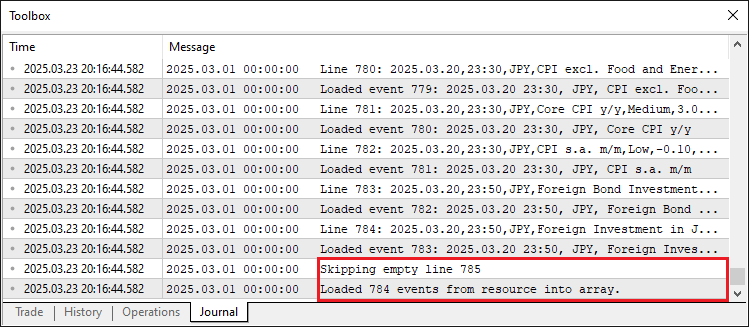
A partir de la imagen, podemos confirmar que los datos se han cargado correctamente. La manipulación incorrecta de los datos y la omisión de líneas vacías también se gestionan correctamente. Ahora podemos pasar al controlador de eventos OnTick y simular la gestión de datos como si estuviéramos en modo real. Para ello, queremos gestionar los datos por barra y no en cada tick.
//---- Variable to track last bar time
datetime lastBarTime = 0;

//---- Tick event handler
void OnTick() {
   //---- Get current bar time
   datetime currentBarTime = iTime(_Symbol, _Period, 0);
   //---- Check if bar time has changed
   if (currentBarTime != lastBarTime) {
      //---- Update last bar time
      lastBarTime = currentBarTime;

      //----
   }
}
Definimos "lastBarTime" como una variable "datetime" inicializada en 0 para registrar la hora de la barra anterior. En la función OnTick, recuperamos la hora de la barra actual con la función iTime utilizando _Symbol, _Period y el índice de barra 0, y la almacenamos en "currentBarTime"; si "currentBarTime" difiere de "lastBarTime", actualizamos "lastBarTime" a "currentBarTime", asegurándonos de que el sistema reaccione ante las nuevas barras para la gestión de eventos. A continuación, podemos definir una función para gestionar los datos de simulación en tiempo real siguiendo un formato similar al de la versión anterior, tal y como se muestra a continuación.
//---- Function to filter and print economic events
void FilterAndPrintEvents(datetime barTime) {
   //---- Get total number of events
   int totalEvents = ArraySize(allEvents);
   //---- Print total events considered
   Print("Total considered data size: ", totalEvents, " events");

   //---- Check if there are events to filter
   if (totalEvents == 0) {
      //---- Print message if no events loaded
      Print("No events loaded to filter.");
      //---- Exit function
      return;
   }

   //---- Array to store filtered events
   EconomicEvent filteredEvents[];
   //---- Counter for filtered events
   int filteredCount = 0;

   //---- Variables for time range
   datetime timeBefore, timeAfter;
   //---- Apply time filter if enabled
   if (ApplyTimeFilter) {
      //---- Structure for bar time
      MqlDateTime barStruct;
      //---- Convert bar time to structure
      TimeToStruct(barTime, barStruct);

      //---- Calculate time before event
      MqlDateTime timeBeforeStruct = barStruct;
      //---- Subtract hours before
      timeBeforeStruct.hour -= HoursBefore;
      //---- Subtract minutes before
      timeBeforeStruct.min -= MinutesBefore;
      //---- Adjust for negative minutes
      if (timeBeforeStruct.min < 0) {
         timeBeforeStruct.min += 60;
         timeBeforeStruct.hour -= 1;
      }
      //---- Adjust for negative hours
      if (timeBeforeStruct.hour < 0) {
         timeBeforeStruct.hour += 24;
         timeBeforeStruct.day -= 1;
      }
      //---- Convert structure to datetime
      timeBefore = StructToTime(timeBeforeStruct);

      //---- Calculate time after event
      MqlDateTime timeAfterStruct = barStruct;
      //---- Add hours after
      timeAfterStruct.hour += HoursAfter;
      //---- Add minutes after
      timeAfterStruct.min += MinutesAfter;
      //---- Adjust for minutes overflow
      if (timeAfterStruct.min >= 60) {
         timeAfterStruct.min -= 60;
         timeAfterStruct.hour += 1;
      }
      //---- Adjust for hours overflow
      if (timeAfterStruct.hour >= 24) {
         timeAfterStruct.hour -= 24;
         timeAfterStruct.day += 1;
      }
      //---- Convert structure to datetime
      timeAfter = StructToTime(timeAfterStruct);

      //---- Print time range for debugging
      Print("Bar time: ", TimeToString(barTime), ", Time range: ", TimeToString(timeBefore), " to ", TimeToString(timeAfter));
   } else {
      //---- Print message if no time filter applied
      Print("Bar time: ", TimeToString(barTime), ", No time filter applied, using StartDate to EndDate only.");
      //---- Set time range to date inputs
      timeBefore = StartDate;
      timeAfter = EndDate;
   }

   //---- Loop through all events for filtering
   for (int i = 0; i < totalEvents; i++) {
      //---- Convert event date and time to datetime
      datetime eventDateTime = StringToTime(allEvents[i].eventDate + " " + allEvents[i].eventTime);
      //---- Check if event is within date range
      bool inDateRange = (eventDateTime >= StartDate && eventDateTime <= EndDate);
      //---- Skip if not in date range
      if (!inDateRange) continue;

      //---- Time Filter Check
      //---- Check if event is within time range if filter applied
      bool timeMatch = !ApplyTimeFilter || (eventDateTime >= timeBefore && eventDateTime <= timeAfter);
      //---- Skip if time doesn't match
      if (!timeMatch) continue;
      //---- Print event details if time passes
      Print("Event ", i, ": Time passes (", allEvents[i].eventDate, " ", allEvents[i].eventTime, ") - ",
            "Currency: ", allEvents[i].currency, ", Event: ", allEvents[i].event, ", Importance: ", allEvents[i].importance,
            ", Actual: ", DoubleToString(allEvents[i].actual, 2), ", Forecast: ", DoubleToString(allEvents[i].forecast, 2),
            ", Previous: ", DoubleToString(allEvents[i].previous, 2));

      //---- Currency Filter Check
      //---- Default to match if filter disabled
      bool currencyMatch = !ApplyCurrencyFilter;
      //---- Apply currency filter if enabled
      if (ApplyCurrencyFilter && ArraySize(curr_filter) > 0) {
         //---- Initially set to no match
         currencyMatch = false;
         //---- Check each currency in filter
         for (int j = 0; j < ArraySize(curr_filter); j++) {
            //---- Check if event currency matches filter
            if (allEvents[i].currency == curr_filter[j]) {
               //---- Set match to true if found
               currencyMatch = true;
               //---- Exit loop on match
               break;
            }
         }
         //---- Skip if currency doesn't match
         if (!currencyMatch) continue;
      }
      //---- Print event details if currency passes
      Print("Event ", i, ": Currency passes (", allEvents[i].currency, ") - ",
            "Date: ", allEvents[i].eventDate, " ", allEvents[i].eventTime,
            ", Event: ", allEvents[i].event, ", Importance: ", allEvents[i].importance,
            ", Actual: ", DoubleToString(allEvents[i].actual, 2), ", Forecast: ", DoubleToString(allEvents[i].forecast, 2),
            ", Previous: ", DoubleToString(allEvents[i].previous, 2));

      //---- Impact Filter Check
      //---- Default to match if filter disabled
      bool impactMatch = !ApplyImpactFilter;
      //---- Apply impact filter if enabled
      if (ApplyImpactFilter && ArraySize(imp_filter) > 0) {
         //---- Initially set to no match
         impactMatch = false;
         //---- Check each importance in filter
         for (int k = 0; k < ArraySize(imp_filter); k++) {
            //---- Check if event importance matches filter
            if (allEvents[i].importance == imp_filter[k]) {
               //---- Set match to true if found
               impactMatch = true;
               //---- Exit loop on match
               break;
            }
         }
         //---- Skip if importance doesn't match
         if (!impactMatch) continue;
      }
      //---- Print event details if impact passes
      Print("Event ", i, ": Impact passes (", allEvents[i].importance, ") - ",
            "Date: ", allEvents[i].eventDate, " ", allEvents[i].eventTime,
            ", Currency: ", allEvents[i].currency, ", Event: ", allEvents[i].event,
            ", Actual: ", DoubleToString(allEvents[i].actual, 2), ", Forecast: ", DoubleToString(allEvents[i].forecast, 2),
            ", Previous: ", DoubleToString(allEvents[i].previous, 2));

      //---- Add event to filtered array
      ArrayResize(filteredEvents, filteredCount + 1);
      //---- Assign event to filtered array
      filteredEvents[filteredCount] = allEvents[i];
      //---- Increment filtered count
      filteredCount++;
   }

   //---- Print summary of filtered events
   Print("After ", (ApplyTimeFilter ? "time filter" : "date range filter"),
         ApplyCurrencyFilter ? " and currency filter" : "",
         ApplyImpactFilter ? " and impact filter" : "",
         ": ", filteredCount, " events remaining.");

   //---- Check if there are filtered events to print
   if (filteredCount > 0) {
      //---- Print header for filtered events
      Print("Filtered Events at Bar Time: ", TimeToString(barTime));
      //---- Print filtered events array
      ArrayPrint(filteredEvents, 2, " | ");
   } else {
      //---- Print message if no events found
      Print("No events found within the specified range.");
   }
}
Aquí, construimos la función "FilterAndPrintEvents" para filtrar y mostrar eventos económicos relevantes para una barra determinada. Comenzamos calculando "totalEvents" con la función ArraySize en "allEvents" y lo imprimimos; si es cero, salimos con "return". Inicializamos "filteredEvents" como una array "EconomicEvent" y "filteredCount" en 0, luego definimos "timeBefore" y "timeAfter" para el filtrado por tiempo. Si "ApplyTimeFilter" es verdadero, convertimos "barTime" a "barStruct" con la función TimeToStruct, ajustamos "timeBeforeStruct" restando "HoursBefore" y "MinutesBefore" (corrigiendo los valores negativos), y "timeAfterStruct" sumando "HoursAfter" y "MinutesAfter" (corrigiendo los desbordamientos), convertimos ambos a "datetime" con la función StructToTime e imprimimos el intervalo; de lo contrario, los establecemos como "StartDate" y "EndDate" e imprimimos un mensaje de ausencia de filtro.
Recorremos "allEvents" con "totalEvents", convirtiendo cada "eventDate" y "eventTime" en "eventDateTime" con StringToTime, comprobando si se encuentra dentro de "StartDate" y "EndDate" para "inDateRange", y omitiendo los que no cumplan este criterio. Para el filtrado por fecha, comprobamos "timeMatch" con "ApplyTimeFilter" y el intervalo, y mostramos los detalles si la comprobación es satisfactoria; para la divisa, establecemos "currencyMatch" basándonos en "ApplyCurrencyFilter" y "curr_filter" mediante la función ArraySize y un bucle, y mostramos el resultado si coincide; y para el impacto, establecemos "impactMatch" con "ApplyImpactFilter" y "imp_filter", y mostramos el resultado si coincide. Los eventos coincidentes se añaden a "filteredEvents" mediante la función ArrayResize, incrementando "filteredCount".
Por último, mostramos un resumen y, si "filteredCount" es positivo, mostramos la lista filtrada con ArrayPrint; en caso contrario, mostramos un mensaje indicando que no hay eventos, lo que garantiza un análisis exhaustivo de los eventos para las pruebas. A continuación, llamamos a la función en el controlador de eventos "tick".
void OnTick() {
   //---- Get current bar time
   datetime currentBarTime = iTime(_Symbol, _Period, 0);
   //---- Check if bar time has changed
   if (currentBarTime != lastBarTime) {
      //---- Update last bar time
      lastBarTime = currentBarTime;
      //---- Filter and print events for current bar
      FilterAndPrintEvents(currentBarTime);
   }
}
Al ejecutar el programa, obtenemos el siguiente resultado.
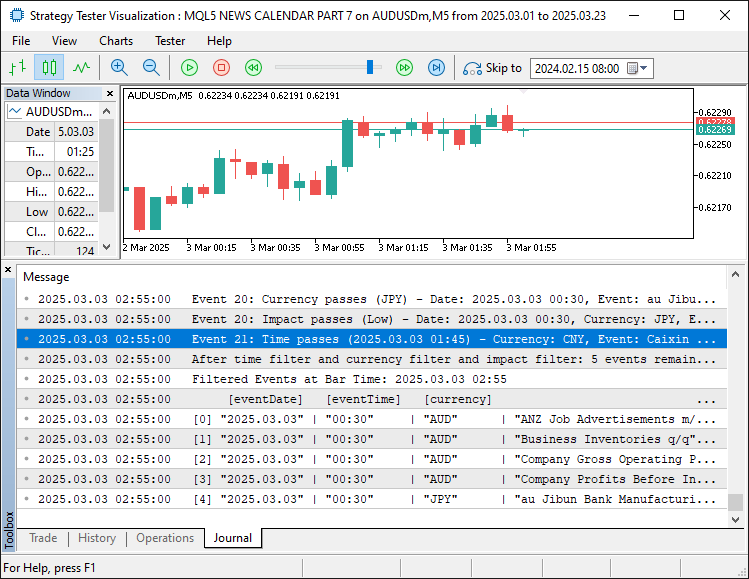
En la imagen podemos ver que el filtrado está activado y funciona según lo previsto. Lo único que queda por hacer es probar nuestra lógica, y eso se aborda en la siguiente sección.
Pruebas
Para realizar una prueba exhaustiva, lo hemos plasmado todo en un vídeo, que puedes ver a continuación.
Conclusión
En conclusión, hemos mejorado nuestra serie "Calendario Económico MQL5" preparando el sistema para la prueba de estrategias, utilizando datos estáticos de un archivo guardado para permitir una validación retrospectiva fiable. Esto conecta el análisis de eventos en vivo con el Probador de Estrategias mediante filtros flexibles, superando las limitaciones de datos para una validación precisa de la estrategia. A continuación, exploraremos cómo optimizar la ejecución de las operaciones a partir de estos resultados y su integración en el panel de control. ¡Manténganse atentos!
Traducción del inglés realizada por MetaQuotes Ltd.
Artículo original: https://www.mql5.com/en/articles/17603
Advertencia: todos los derechos de estos materiales pertenecen a MetaQuotes Ltd. Queda totalmente prohibido el copiado total o parcial.
Este artículo ha sido escrito por un usuario del sitio web y refleja su punto de vista personal. MetaQuotes Ltd. no se responsabiliza de la exactitud de la información ofrecida, ni de las posibles consecuencias del uso de las soluciones, estrategias o recomendaciones descritas.

 Negociamos con opciones sin opciones (Parte 1): Teoría básica y emulación a través de activos subyacentes
 Redes neuronales en el trading: Extracción eficiente de características para una clasificación precisa (Final)
 Reimaginando las estrategias clásicas (Parte 14): Configuraciones de alta probabilidad
 Integración de un modelo de IA en una estrategia de trading MQL5 ya existente

- Aplicaciones de trading gratuitas
- 8 000+ señales para copiar
- Noticias económicas para analizar los mercados financieros
Usted acepta la política del sitio web y las condiciones de uso