

Ferramentas de negociação em MQL5 (Parte 2): Aprimorando o assistente de negociação interativo com visualização dinâmican
 129
129
 2
2

Introdução
No artigo anterior, Parte 1, criamos a ferramenta Trade Assistant Tool em MetaQuotes Language 5 (MQL5) para MetaTrader 5, com o objetivo de simplificar o envio de ordens pendentes. Agora vamos avançar, tornando-a mais interativa por meio de feedback visual dinâmico. Implementaremos recursos como um painel de controle arrastável, efeitos ao passar o cursor para tornar a navegação mais intuitiva e validação das ordens em tempo real, garantindo que nossas configurações de negociação sejam precisas e estejam de acordo com as condições do mercado. Veremos essas melhorias nas seguintes seções:
- Aprimoramentos conceituais para aumentar a interatividade
- Implementação em MQL5
- Teste com dados históricos
- Conclusão
Essas seções nos ajudarão a criar uma ferramenta de negociação mais responsiva, intuitiva e fácil de usar.
Aprimoramentos conceituais para aumentar a interatividade
Nosso objetivo é aprimorar a ferramenta Trade Assistant, tornando-a mais intuitiva e adaptável. Começaremos com um painel de controle arrastável, que poderá ser posicionado livremente no gráfico. Essa flexibilidade permitirá ajustar a interface ao nosso fluxo de operação, tanto ao trabalhar com vários gráficos quanto ao nos concentrarmos na configuração de uma única operação. Além disso, implementaremos efeitos ao passar o cursor para destacar botões e elementos do gráfico quando o ponteiro estiver sobre eles, fornecendo feedback visual imediato, facilitando a navegação e reduzindo a possibilidade de erros.
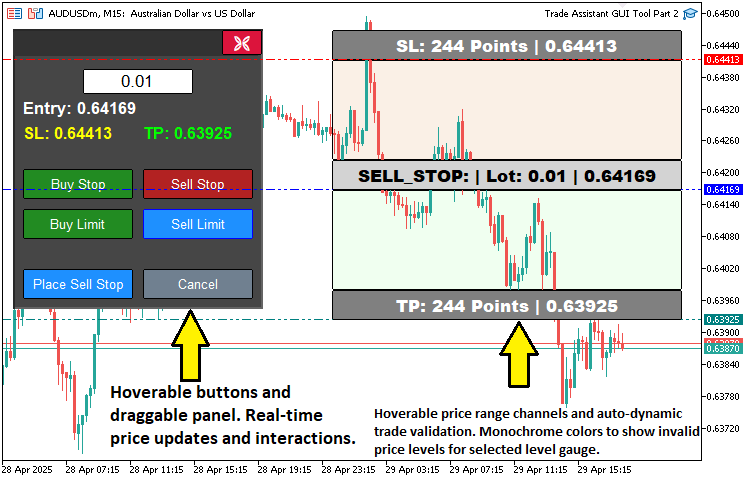
A validação das ordens em tempo real será outro aprimoramento importante, garantindo, antes da execução, que os níveis de entrada, Stop Loss e Take Profit estejam logicamente coerentes com os preços atuais de mercado. Esse recurso aumentará nossa confiança ao impedir configurações de negociação inválidas, sem comprometer a simplicidade da ferramenta e com maior precisão. Em conjunto, essas melhorias permitirão criar uma ferramenta adaptável e voltada ao usuário, capaz de auxiliar nossas decisões de negociação e estabelecer uma base para futuros aprimoramentos, como recursos de gestão de risco. Em resumo, a visualização abaixo mostra o que pretendemos alcançar.
Implementação em MQL5
Para atingir esses objetivos em MQL5, primeiro precisaremos definir alguns objetos adicionais do painel, além de variáveis de estado para o arraste e o hover do cursor do mouse. Esses elementos serão usados para monitorar a interação do usuário tanto com o painel quanto com a ferramenta de preço, conforme mostrado a seguir.
// Control panel object names
#define PANEL_BG        "PANEL_BG"        //--- Define constant for panel background object name
#define PANEL_HEADER    "PANEL_HEADER"    //--- Define constant for panel header object name
#define LOT_EDIT        "LOT_EDIT"        //--- Define constant for lot size edit field object name
#define PRICE_LABEL     "PRICE_LABEL"     //--- Define constant for price label object name
#define SL_LABEL        "SL_LABEL"        //--- Define constant for stop-loss label object name
#define TP_LABEL        "TP_LABEL"        //--- Define constant for take-profit label object name
#define BUY_STOP_BTN    "BUY_STOP_BTN"    //--- Define constant for buy stop button object name
#define SELL_STOP_BTN   "SELL_STOP_BTN"   //--- Define constant for sell stop button object name
#define BUY_LIMIT_BTN   "BUY_LIMIT_BTN"   //--- Define constant for buy limit button object name
#define SELL_LIMIT_BTN  "SELL_LIMIT_BTN"  //--- Define constant for sell limit button object name
#define PLACE_ORDER_BTN "PLACE_ORDER_BTN" //--- Define constant for place order button object name
#define CANCEL_BTN      "CANCEL_BTN"      //--- Define constant for cancel button object name
#define CLOSE_BTN       "CLOSE_BTN"       //--- Define constant for close button object name

// Variables for dragging panel
bool panel_dragging   = false;            //--- Flag to track if panel is being dragged
int  panel_drag_x     = 0,
     panel_drag_y     = 0;                //--- Mouse coordinates when drag starts
int  panel_start_x    = 0,
     panel_start_y    = 0;                //--- Panel coordinates when drag starts

// Button and rectangle hover states
bool buy_stop_hovered    = false;         //--- Buy Stop button hover state
bool sell_stop_hovered   = false;         //--- Sell Stop button hover state
bool buy_limit_hovered   = false;         //--- Buy Limit button hover state
bool sell_limit_hovered  = false;         //--- Sell Limit button hover state
bool place_order_hovered = false;         //--- Place Order button hover state
bool cancel_hovered      = false;         //--- Cancel button hover state
bool close_hovered       = false;         //--- Close button hover state
bool header_hovered      = false;         //--- Header hover state
bool rec1_hovered        = false;         //--- REC1 (TP) hover state
bool rec3_hovered        = false;         //--- REC3 (Entry) hover state
bool rec5_hovered        = false;         //--- REC5 (SL) hover state
Começamos a implementar recursos avançados de interatividade em nossa ferramenta, definindo as principais variáveis que permitirão usar o arraste do painel e os efeitos ao passar o cursor do mouse na interface do MetaTrader 5. Usamos a diretiva #define para criar a constante "PANEL_HEADER", correspondente ao objeto usado como cabeçalho do painel, que funcionará como a área arrastável do painel de controle. Para dar suporte ao arraste, declaramos "panel_dragging" como um sinalizador lógico que indica se o painel está sendo movido. Também usamos os inteiros "panel_drag_x" e "panel_drag_y" para armazenar as coordenadas do mouse no início do arraste, enquanto "panel_start_x" e "panel_start_y" registram a posição inicial do painel. Com esses valores, podemos calcular sua nova posição durante o deslocamento.
Também introduzimos variáveis lógicas para controlar o estado de passagem do cursor sobre os botões e retângulos do gráfico. Entre elas estão "buy_stop_hovered", "sell_stop_hovered", "buy_limit_hovered", "sell_limit_hovered", "place_order_hovered", "cancel_hovered", "close_hovered" e "header_hovered", referentes aos respectivos botões e ao cabeçalho do painel, além de "rec1_hovered", "rec3_hovered" e "rec5_hovered", associadas aos retângulos de Take Profit, entrada e Stop Loss. Essas variáveis nos permitirão detectar quando o cursor estiver sobre esses elementos e ativar feedback visual, como a mudança de cor. Isso facilita a navegação e a interação com a interface da ferramenta. Em seguida, precisamos obter os valores da ferramenta de preço e verificar se formam uma configuração válida para a ordem.
//+------------------------------------------------------------------+
//| Check if order setup is valid                                    |
//+------------------------------------------------------------------+
bool isOrderValid() {
   if(!tool_visible) return true;                                     //--- No validation needed if tool is not visible
   double current_price = SymbolInfoDouble(Symbol(), SYMBOL_BID);     //--- Get current bid price
   double entry_price   = Get_Price_d(PR_HL);                         //--- Get entry price
   double sl_price      = Get_Price_d(SL_HL);                         //--- Get stop-loss price
   double tp_price      = Get_Price_d(TP_HL);                         //--- Get take-profit price

   if(selected_order_type == "BUY_STOP") {
      //--- Buy Stop: Entry must be above current price, TP above entry, SL below entry
      if(entry_price <= current_price || tp_price <= entry_price || sl_price >= entry_price) {
         return false;
      }
   }
   else if(selected_order_type == "SELL_STOP") {
      //--- Sell Stop: Entry must be below current price, TP below entry, SL above entry
      if(entry_price >= current_price || tp_price >= entry_price || sl_price <= entry_price) {
         return false;
      }
   }
   else if(selected_order_type == "BUY_LIMIT") {
      //--- Buy Limit: Entry must be below current price, TP above entry, SL below entry
      if(entry_price >= current_price || tp_price <= entry_price || sl_price >= entry_price) {
         return false;
      }
   }
   else if(selected_order_type == "SELL_LIMIT") {
      //--- Sell Limit: Entry must be above current price, TP below entry, SL above entry
      if(entry_price <= current_price || tp_price >= entry_price || sl_price <= entry_price) {
         return false;
      }
   }
   return true;                                                       //--- Order setup is valid
}
Aqui implementamos a função "isOrderValid" para aprimorar a ferramenta. Ela valida as configurações das ordens em tempo real e verifica se as operações estão de acordo com as condições de mercado. Primeiro verificamos se "tool_visible" é false. Nesse caso, retornamos true para ignorar a validação quando a ferramenta não estiver ativa. Em seguida, obtemos o preço atual de mercado com a função SymbolInfoDouble e a propriedade SYMBOL_BID. Os preços de entrada ("entry_price"), Stop Loss ("sl_price") e Take Profit ("tp_price") são obtidos com a função "Get_Price_d" para "PR_HL", "SL_HL" e "TP_HL".
Para "BUY_STOP", verificamos se "entry_price" está acima de "current_price", se "tp_price" está acima de "entry_price" e se "sl_price" está abaixo de "entry_price". Para "SELL_STOP", "entry_price" deve estar abaixo de "current_price", "tp_price" abaixo de "entry_price" e "sl_price" acima de "entry_price". Para "BUY_LIMIT", "entry_price" deve estar abaixo de "current_price", "tp_price" acima de "entry_price" e "sl_price" abaixo de "entry_price". Já para "SELL_LIMIT", "entry_price" deve estar acima de "current_price", "tp_price" abaixo de "entry_price" e "sl_price" acima de "entry_price". Se qualquer uma dessas condições não for atendida, a função retorna false; caso contrário, retorna true. Depois disso, podemos atualizar as cores dos retângulos de acordo com a validade da configuração da ordem.
//+------------------------------------------------------------------+
//| Update rectangle colors based on order validity and hover        |
//+------------------------------------------------------------------+
void updateRectangleColors() {
   if(!tool_visible) return;                                                             //--- Skip if tool is not visible
   bool is_valid = isOrderValid();                                                       //--- Check order validity

   if(!is_valid) {
      //--- Gray out REC1 and REC5 if order is invalid, with hover effect
      ObjectSetInteger(0, REC1, OBJPROP_BGCOLOR, rec1_hovered ? C'100,100,100' : clrGray);
      ObjectSetInteger(0, REC5, OBJPROP_BGCOLOR, rec5_hovered ? C'100,100,100' : clrGray);
   }
   else {
      //--- Restore original colors based on order type and hover state
      if(selected_order_type == "BUY_STOP" || selected_order_type == "BUY_LIMIT") {
         ObjectSetInteger(0, REC1, OBJPROP_BGCOLOR, rec1_hovered ? C'0,100,0'   : clrGreen); //--- TP rectangle (dark green on hover)
         ObjectSetInteger(0, REC5, OBJPROP_BGCOLOR, rec5_hovered ? C'139,0,0'   : clrRed);   //--- SL rectangle (dark red on hover)
      }
      else {
         ObjectSetInteger(0, REC1, OBJPROP_BGCOLOR, rec1_hovered ? C'0,100,0'   : clrGreen); //--- TP rectangle (dark green on hover)
         ObjectSetInteger(0, REC5, OBJPROP_BGCOLOR, rec5_hovered ? C'139,0,0'   : clrRed);   //--- SL rectangle (dark red on hover)
      }
   }

   ObjectSetInteger(0, REC3, OBJPROP_BGCOLOR, rec3_hovered ? C'105,105,105' : clrLightGray); //--- Entry rectangle (darker gray on hover)
   ChartRedraw(0);                                                                          //--- Redraw chart
}
Implementamos a função "updateRectangleColors" para aprimorar o feedback visual da ferramenta, atualizando as cores dos retângulos do gráfico de acordo com a validade da configuração da ordem e com o estado de passagem do cursor do mouse. Se "tool_visible" for false, a função não faz nenhuma alteração. Caso contrário, verificamos a validade da configuração com "isOrderValid" e usamos ObjectSetInteger para definir as cores de "REC1" (TP) e "REC5" (SL). Quando a configuração da ordem não for válida, esses retângulos ficam em cinza ("clrGray" ou "C'100,100,100'" quando "rec1_hovered"/"rec5_hovered" estiver ativo). Se a configuração for válida, usamos verde para ordens "BUY_STOP"/"BUY_LIMIT" e vermelho para ordens de venda, com "clrGreen"/"clrRed" ou, ao passar o cursor, "C'0,100,0'"/"C'139,0,0'". Para "REC3" (entrada), usamos cinza-claro ("clrLightGray" ou "C'105,105,105'" quando "rec3_hovered" estiver ativo). Ao final, chamamos ChartRedraw para atualizar o gráfico.
Depois disso, precisamos obter os estados de passagem do cursor sobre os botões, conforme mostrado abaixo.
//+------------------------------------------------------------------+
//| Update button and header hover state                             |
//+------------------------------------------------------------------+
void updateButtonHoverState(int mouse_x, int mouse_y) {
   // Define button names and their properties
   string buttons[] = {BUY_STOP_BTN, SELL_STOP_BTN, BUY_LIMIT_BTN, SELL_LIMIT_BTN, PLACE_ORDER_BTN, CANCEL_BTN, CLOSE_BTN};
   bool hover_states[] = {buy_stop_hovered, sell_stop_hovered, buy_limit_hovered, sell_limit_hovered, place_order_hovered, cancel_hovered, close_hovered};
   color normal_colors[] = {clrForestGreen, clrFireBrick, clrForestGreen, clrFireBrick, clrDodgerBlue, clrSlateGray, clrCrimson};
   color hover_color = clrDodgerBlue;                      //--- Bluish color for hover
   color hover_border = clrBlue;                           //--- Bluish border for hover

   for(int i = 0; i < ArraySize(buttons); i++) {
      int x = (int)ObjectGetInteger(0, buttons[i], OBJPROP_XDISTANCE);
      int y = (int)ObjectGetInteger(0, buttons[i], OBJPROP_YDISTANCE);
      int width = (int)ObjectGetInteger(0, buttons[i], OBJPROP_XSIZE);
      int height = (int)ObjectGetInteger(0, buttons[i], OBJPROP_YSIZE);

      bool is_hovered = (mouse_x >= x && mouse_x <= x + width && mouse_y >= y && mouse_y <= y + height);

      if(is_hovered && !hover_states[i]) {
         // Mouse entered button
         ObjectSetInteger(0, buttons[i], OBJPROP_BGCOLOR, hover_color);
         ObjectSetInteger(0, buttons[i], OBJPROP_BORDER_COLOR, hover_border);
         hover_states[i] = true;
      }
      else if(!is_hovered && hover_states[i]) {
         // Mouse left button
         ObjectSetInteger(0, buttons[i], OBJPROP_BGCOLOR, normal_colors[i]);
         ObjectSetInteger(0, buttons[i], OBJPROP_BORDER_COLOR, clrBlack);
         hover_states[i] = false;
      }
   }

   // Update header hover state
   int header_x = (int)ObjectGetInteger(0, PANEL_HEADER, OBJPROP_XDISTANCE);
   int header_y = (int)ObjectGetInteger(0, PANEL_HEADER, OBJPROP_YDISTANCE);
   int header_width = (int)ObjectGetInteger(0, PANEL_HEADER, OBJPROP_XSIZE);
   int header_height = (int)ObjectGetInteger(0, PANEL_HEADER, OBJPROP_YSIZE);

   bool is_header_hovered = (mouse_x >= header_x && mouse_x <= header_x + header_width && mouse_y >= header_y && mouse_y <= header_y + header_height);

   if(is_header_hovered && !header_hovered) {
      ObjectSetInteger(0, PANEL_HEADER, OBJPROP_BGCOLOR, C'030,030,030'); //--- Darken header
      header_hovered = true;
   }
   else if(!is_header_hovered && header_hovered) {
      ObjectSetInteger(0, PANEL_HEADER, OBJPROP_BGCOLOR, C'050,050,050'); //--- Restore header color
      header_hovered = false;
   }

   // Update tool rectangle hover states
   if(tool_visible) {
      int x1 = (int)ObjectGetInteger(0, REC1, OBJPROP_XDISTANCE);
      int y1 = (int)ObjectGetInteger(0, REC1, OBJPROP_YDISTANCE);
      int width1 = (int)ObjectGetInteger(0, REC1, OBJPROP_XSIZE);
      int height1 = (int)ObjectGetInteger(0, REC1, OBJPROP_YSIZE);

      int x3 = (int)ObjectGetInteger(0, REC3, OBJPROP_XDISTANCE);
      int y3 = (int)ObjectGetInteger(0, REC3, OBJPROP_YDISTANCE);
      int width3 = (int)ObjectGetInteger(0, REC3, OBJPROP_XSIZE);
      int height3 = (int)ObjectGetInteger(0, REC3, OBJPROP_YSIZE);

      int x5 = (int)ObjectGetInteger(0, REC5, OBJPROP_XDISTANCE);
      int y5 = (int)ObjectGetInteger(0, REC5, OBJPROP_YDISTANCE);
      int width5 = (int)ObjectGetInteger(0, REC5, OBJPROP_XSIZE);
      int height5 = (int)ObjectGetInteger(0, REC5, OBJPROP_YSIZE);

      bool is_rec1_hovered = (mouse_x >= x1 && mouse_x <= x1 + width1 && mouse_y >= y1 && mouse_y <= y1 + height1);
      bool is_rec3_hovered = (mouse_x >= x3 && mouse_x <= x3 + width3 && mouse_y >= y3 && mouse_y <= y3 + height3);
      bool is_rec5_hovered = (mouse_x >= x5 && mouse_x <= x5 + width5 && mouse_y >= y5 && mouse_y <= y5 + height5);

      if(is_rec1_hovered != rec1_hovered || is_rec3_hovered != rec3_hovered || is_rec5_hovered != rec5_hovered) {
         rec1_hovered = is_rec1_hovered;
         rec3_hovered = is_rec3_hovered;
         rec5_hovered = is_rec5_hovered;
         updateRectangleColors();                            //--- Update colors based on hover state
      }
   }

   // Update hover state variables
   buy_stop_hovered = hover_states[0];
   sell_stop_hovered = hover_states[1];
   buy_limit_hovered = hover_states[2];
   sell_limit_hovered = hover_states[3];
   place_order_hovered = hover_states[4];
   cancel_hovered = hover_states[5];
   close_hovered = hover_states[6];

   ChartRedraw(0);                                           //--- Redraw chart
}
Para aumentar a interatividade da ferramenta por meio dos efeitos ao passar o cursor sobre os botões e elementos do gráfico, implementamos a função "updateButtonHoverState". Definimos o array "buttons" com os nomes dos botões, de "BUY_STOP_BTN" a "CLOSE_BTN"; o array "hover_states" com os respectivos sinalizadores de passagem do cursor, de "buy_stop_hovered" a "close_hovered"; e o array "normal_colors" com as cores padrão. Para o estado de passagem do cursor, usamos "hover_color" (clrDodgerBlue) e "hover_border" ("clrBlue").
Para cada botão, usamos ObjectGetInteger para obter sua posição e dimensões e verificamos se "mouse_x" e "mouse_y" estão dentro de seus limites. Em seguida, usamos ObjectSetInteger para atualizar "OBJPROP_BGCOLOR" e "OBJPROP_BORDER_COLOR" com "hover_color" ou com a cor padrão correspondente e ajustamos o respectivo valor em "hover_states".
Para "PANEL_HEADER", realizamos uma verificação semelhante, mediante ObjectSetInteger, e escurecemos o cabeçalho para "C'030,030,030'" quando o cursor estiver sobre ele, restaurando "C'050,050,050'" quando o cursor sair da área. Quando "tool_visible" estiver ativo, também verificamos os limites de "REC1", "REC3" e "REC5", atualizamos "rec1_hovered", "rec3_hovered" e "rec5_hovered" e chamamos "updateRectangleColors" sempre que algum desses estados mudar. Em seguida, atualizamos as variáveis de estado de passagem do cursor, de "buy_stop_hovered" a "close_hovered", com os valores armazenados em "hover_states" e chamamos ChartRedraw para redesenhar o gráfico. Com isso, podemos chamar essas funções no manipulador de eventos OnChartEvent e atualizar a interface em tempo real.
//+------------------------------------------------------------------+ //| Expert onchart event function | //+------------------------------------------------------------------+ void OnChartEvent( const int id, //--- Event ID const long& lparam, //--- Long parameter (e.g., x-coordinate for mouse) const double& dparam, //--- Double parameter (e.g., y-coordinate for mouse) const string& sparam //--- String parameter (e.g., object name) ) { if(id == CHARTEVENT_OBJECT_CLICK) { //--- Handle object click events // Handle order type buttons if(sparam == BUY_STOP_BTN) { //--- Check if Buy Stop button clicked selected_order_type = "BUY_STOP"; //--- Set order type to Buy Stop showTool(); //--- Show trading tool update_Text(PLACE_ORDER_BTN, "Place Buy Stop"); //--- Update place order button text updateRectangleColors(); //--- Update rectangle colors } else if(sparam == SELL_STOP_BTN) { //--- Check if Sell Stop button clicked selected_order_type = "SELL_STOP"; //--- Set order type to Sell Stop showTool(); //--- Show trading tool update_Text(PLACE_ORDER_BTN, "Place Sell Stop"); //--- Update place order button text updateRectangleColors(); //--- Update rectangle colors } else if(sparam == BUY_LIMIT_BTN) { //--- Check if Buy Limit button clicked selected_order_type = "BUY_LIMIT"; //--- Set order type to Buy Limit showTool(); //--- Show trading tool update_Text(PLACE_ORDER_BTN, "Place Buy Limit"); //--- Update place order button text updateRectangleColors(); //--- Update rectangle colors } else if(sparam == SELL_LIMIT_BTN) { //--- Check if Sell Limit button clicked selected_order_type = "SELL_LIMIT"; //--- Set order type to Sell Limit showTool(); //--- Show trading tool update_Text(PLACE_ORDER_BTN, "Place Sell Limit"); //--- Update place order button text updateRectangleColors(); //--- Update rectangle colors } else if(sparam == PLACE_ORDER_BTN) { //--- Check if Place Order button clicked if(isOrderValid()) { placeOrder(); //--- Execute order placement deleteObjects(); //--- Delete tool objects showPanel(); //--- Show control panel } else { Print("Cannot place order: Invalid price setup for ", selected_order_type); } } else if(sparam == CANCEL_BTN) { //--- Check if Cancel button clicked deleteObjects(); //--- Delete tool objects showPanel(); //--- Show control panel } else if(sparam == CLOSE_BTN) { //--- Check if Close button clicked deleteObjects(); //--- Delete tool objects deletePanel(); //--- Delete control panel ChartSetInteger(0, CHART_EVENT_MOUSE_MOVE, false); //--- Disable mouse move events } ObjectSetInteger(0, sparam, OBJPROP_STATE, false); //--- Reset button state click ChartRedraw(0); //--- Redraw chart } if(id == CHARTEVENT_MOUSE_MOVE) { //--- Handle mouse move events int MouseD_X = (int)lparam; //--- Get mouse x-coordinate int MouseD_Y = (int)dparam; //--- Get mouse y-coordinate int MouseState = (int)sparam; //--- Get mouse state // Update button and rectangle hover states updateButtonHoverState(MouseD_X, MouseD_Y); // Handle panel dragging int header_xd = (int)ObjectGetInteger(0, PANEL_HEADER, OBJPROP_XDISTANCE); int header_yd = (int)ObjectGetInteger(0, PANEL_HEADER, OBJPROP_YDISTANCE); int header_xs = (int)ObjectGetInteger(0, PANEL_HEADER, OBJPROP_XSIZE); int header_ys = (int)ObjectGetInteger(0, PANEL_HEADER, OBJPROP_YSIZE); if(prevMouseState == 0 && MouseState == 1) { //--- Mouse button down if(MouseD_X >= header_xd && MouseD_X <= header_xd + header_xs && MouseD_Y >= header_yd && MouseD_Y <= header_yd + header_ys) { panel_dragging = true; //--- Start dragging panel_drag_x = MouseD_X; //--- Store mouse x-coordinate panel_drag_y = MouseD_Y; //--- Store mouse y-coordinate panel_start_x = header_xd; //--- Store panel x-coordinate panel_start_y = header_yd; //--- Store panel y-coordinate ChartSetInteger(0, CHART_MOUSE_SCROLL, false); //--- Disable chart scrolling } } if(panel_dragging && MouseState == 1) { //--- Dragging panel int dx = MouseD_X - panel_drag_x; //--- Calculate x displacement int dy = MouseD_Y - panel_drag_y; //--- Calculate y displacement panel_x = panel_start_x + dx; //--- Update panel x-position panel_y = panel_start_y + dy; //--- Update panel y-position // Update all panel objects' positions ObjectSetInteger(0, PANEL_BG, OBJPROP_XDISTANCE, panel_x); ObjectSetInteger(0, PANEL_BG, OBJPROP_YDISTANCE, panel_y); ObjectSetInteger(0, PANEL_HEADER, OBJPROP_XDISTANCE, panel_x); ObjectSetInteger(0, PANEL_HEADER, OBJPROP_YDISTANCE, panel_y+2); ObjectSetInteger(0, CLOSE_BTN, OBJPROP_XDISTANCE, panel_x + 209); ObjectSetInteger(0, CLOSE_BTN, OBJPROP_YDISTANCE, panel_y + 1); ObjectSetInteger(0, LOT_EDIT, OBJPROP_XDISTANCE, panel_x + 70); ObjectSetInteger(0, LOT_EDIT, OBJPROP_YDISTANCE, panel_y + 40); ObjectSetInteger(0, PRICE_LABEL, OBJPROP_XDISTANCE, panel_x + 10); ObjectSetInteger(0, PRICE_LABEL, OBJPROP_YDISTANCE, panel_y + 70); ObjectSetInteger(0, SL_LABEL, OBJPROP_XDISTANCE, panel_x + 10); ObjectSetInteger(0, SL_LABEL, OBJPROP_YDISTANCE, panel_y + 95); ObjectSetInteger(0, TP_LABEL, OBJPROP_XDISTANCE, panel_x + 130); ObjectSetInteger(0, TP_LABEL, OBJPROP_YDISTANCE, panel_y + 95); ObjectSetInteger(0, BUY_STOP_BTN, OBJPROP_XDISTANCE, panel_x + 10); ObjectSetInteger(0, BUY_STOP_BTN, OBJPROP_YDISTANCE, panel_y + 140); ObjectSetInteger(0, SELL_STOP_BTN, OBJPROP_XDISTANCE, panel_x + 130); ObjectSetInteger(0, SELL_STOP_BTN, OBJPROP_YDISTANCE, panel_y + 140); ObjectSetInteger(0, BUY_LIMIT_BTN, OBJPROP_XDISTANCE, panel_x + 10); ObjectSetInteger(0, BUY_LIMIT_BTN, OBJPROP_YDISTANCE, panel_y + 180); ObjectSetInteger(0, SELL_LIMIT_BTN, OBJPROP_XDISTANCE, panel_x + 130); ObjectSetInteger(0, SELL_LIMIT_BTN, OBJPROP_YDISTANCE, panel_y + 180); ObjectSetInteger(0, PLACE_ORDER_BTN, OBJPROP_XDISTANCE, panel_x + 10); ObjectSetInteger(0, PLACE_ORDER_BTN, OBJPROP_YDISTANCE, panel_y + 240); ObjectSetInteger(0, CANCEL_BTN, OBJPROP_XDISTANCE, panel_x + 130); ObjectSetInteger(0, CANCEL_BTN, OBJPROP_YDISTANCE, panel_y + 240); ChartRedraw(0); //--- Redraw chart } if(MouseState == 0) { //--- Mouse button released if(panel_dragging) { panel_dragging = false; //--- Stop dragging ChartSetInteger(0, CHART_MOUSE_SCROLL, true); //--- Re-enable chart scrolling } } if(tool_visible) { //--- Handle tool movement int XD_R1 = (int)ObjectGetInteger(0, REC1, OBJPROP_XDISTANCE); //--- Get REC1 x-distance int YD_R1 = (int)ObjectGetInteger(0, REC1, OBJPROP_YDISTANCE); //--- Get REC1 y-distance int XS_R1 = (int)ObjectGetInteger(0, REC1, OBJPROP_XSIZE); //--- Get REC1 x-size int YS_R1 = (int)ObjectGetInteger(0, REC1, OBJPROP_YSIZE); //--- Get REC1 y-size int XD_R2 = (int)ObjectGetInteger(0, REC2, OBJPROP_XDISTANCE); //--- Get REC2 x-distance int YD_R2 = (int)ObjectGetInteger(0, REC2, OBJPROP_YDISTANCE); //--- Get REC2 y-distance int XS_R2 = (int)ObjectGetInteger(0, REC2, OBJPROP_XSIZE); //--- Get REC2 x-size int YS_R2 = (int)ObjectGetInteger(0, REC2, OBJPROP_YSIZE); //--- Get REC2 y-size int XD_R3 = (int)ObjectGetInteger(0, REC3, OBJPROP_XDISTANCE); //--- Get REC3 x-distance int YD_R3 = (int)ObjectGetInteger(0, REC3, OBJPROP_YDISTANCE); //--- Get REC3 y-distance int XS_R3 = (int)ObjectGetInteger(0, REC3, OBJPROP_XSIZE); //--- Get REC3 x-size int YS_R3 = (int)ObjectGetInteger(0, REC3, OBJPROP_YSIZE); //--- Get REC3 y-size int XD_R4 = (int)ObjectGetInteger(0, REC4, OBJPROP_XDISTANCE); //--- Get REC4 x-distance int YD_R4 = (int)ObjectGetInteger(0, REC4, OBJPROP_YDISTANCE); //--- Get REC4 y-distance int XS_R4 = (int)ObjectGetInteger(0, REC4, OBJPROP_XSIZE); //--- Get REC4 x-size int YS_R4 = (int)ObjectGetInteger(0, REC4, OBJPROP_YSIZE); //--- Get REC4 y-size int XD_R5 = (int)ObjectGetInteger(0, REC5, OBJPROP_XDISTANCE); //--- Get REC5 x-distance int YD_R5 = (int)ObjectGetInteger(0, REC5, OBJPROP_YDISTANCE); //--- Get REC5 y-distance int XS_R5 = (int)ObjectGetInteger(0, REC5, OBJPROP_XSIZE); //--- Get REC5 x-size int YS_R5 = (int)ObjectGetInteger(0, REC5, OBJPROP_YSIZE); //--- Get REC5 y-size if(prevMouseState == 0 && MouseState == 1 && !panel_dragging) { //--- Check for mouse button down, avoid dragging conflict mlbDownX1 = MouseD_X; //--- Store mouse x-coordinate for REC1 mlbDownY1 = MouseD_Y; //--- Store mouse y-coordinate for REC1 mlbDownXD_R1 = XD_R1; //--- Store REC1 x-distance mlbDownYD_R1 = YD_R1; //--- Store REC1 y-distance mlbDownX2 = MouseD_X; //--- Store mouse x-coordinate for REC2 mlbDownY2 = MouseD_Y; //--- Store mouse y-coordinate for REC2 mlbDownXD_R2 = XD_R2; //--- Store REC2 x-distance mlbDownYD_R2 = YD_R2; //--- Store REC2 y-distance mlbDownX3 = MouseD_X; //--- Store mouse x-coordinate for REC3 mlbDownY3 = MouseD_Y; //--- Store mouse y-coordinate for REC3 mlbDownXD_R3 = XD_R3; //--- Store REC3 x-distance mlbDownYD_R3 = YD_R3; //--- Store REC3 y-distance mlbDownX4 = MouseD_X; //--- Store mouse x-coordinate for REC4 mlbDownY4 = MouseD_Y; //--- Store mouse y-coordinate for REC4 mlbDownXD_R4 = XD_R4; //--- Store REC4 x-distance mlbDownYD_R4 = YD_R4; //--- Store REC4 y-distance mlbDownX5 = MouseD_X; //--- Store mouse x-coordinate for REC5 mlbDownY5 = MouseD_Y; //--- Store mouse y-coordinate for REC5 mlbDownXD_R5 = XD_R5; //--- Store REC5 x-distance mlbDownYD_R5 = YD_R5; //--- Store REC5 y-distance if(MouseD_X >= XD_R1 && MouseD_X <= XD_R1 + XS_R1 && //--- Check if mouse is within REC1 bounds MouseD_Y >= YD_R1 && MouseD_Y <= YD_R1 + YS_R1) { movingState_R1 = true; //--- Enable REC1 movement ChartSetInteger(0, CHART_MOUSE_SCROLL, false); //--- Disable chart scrolling } if(MouseD_X >= XD_R3 && MouseD_X <= XD_R3 + XS_R3 && //--- Check if mouse is within REC3 bounds MouseD_Y >= YD_R3 && MouseD_Y <= YD_R3 + YS_R3) { movingState_R3 = true; //--- Enable REC3 movement ChartSetInteger(0, CHART_MOUSE_SCROLL, false); //--- Disable chart scrolling } if(MouseD_X >= XD_R5 && MouseD_X <= XD_R5 + XS_R5 && //--- Check if mouse is within REC5 bounds MouseD_Y >= YD_R5 && MouseD_Y <= YD_R5 + YS_R5) { movingState_R5 = true; //--- Enable REC5 movement ChartSetInteger(0, CHART_MOUSE_SCROLL, false); //--- Disable chart scrolling } } if(movingState_R1) { //--- Handle REC1 (TP) movement bool canMove = false; //--- Flag to check if movement is valid if(selected_order_type == "BUY_STOP" || selected_order_type == "BUY_LIMIT") { //--- Check for buy orders if(YD_R1 + YS_R1 < YD_R3) { //--- Ensure TP is above entry for buy orders canMove = true; //--- Allow movement ObjectSetInteger(0, REC1, OBJPROP_YDISTANCE, mlbDownYD_R1 + MouseD_Y - mlbDownY1); //--- Update REC1 y-position ObjectSetInteger(0, REC2, OBJPROP_YDISTANCE, YD_R1 + YS_R1); //--- Update REC2 y-position ObjectSetInteger(0, REC2, OBJPROP_YSIZE, YD_R3 - (YD_R1 + YS_R1)); //--- Update REC2 y-size } } else { //--- Handle sell orders if(YD_R1 > YD_R3 + YS_R3) { //--- Ensure TP is below entry for sell orders canMove = true; //--- Allow movement ObjectSetInteger(0, REC1, OBJPROP_YDISTANCE, mlbDownYD_R1 + MouseD_Y - mlbDownY1); //--- Update REC1 y-position ObjectSetInteger(0, REC4, OBJPROP_YDISTANCE, YD_R3 + YS_R3); //--- Update REC4 y-position ObjectSetInteger(0, REC4, OBJPROP_YSIZE, YD_R1 - (YD_R3 + YS_R3)); //--- Update REC4 y-size } } if(canMove) { //--- If movement is valid datetime dt_TP = 0; //--- Variable for TP time double price_TP = 0; //--- Variable for TP price int window = 0; //--- Chart window ChartXYToTimePrice(0, XD_R1, YD_R1 + YS_R1, window, dt_TP, price_TP); //--- Convert chart coordinates to time and price ObjectSetInteger(0, TP_HL, OBJPROP_TIME, dt_TP); //--- Update TP horizontal line time ObjectSetDouble(0, TP_HL, OBJPROP_PRICE, price_TP); //--- Update TP horizontal line price update_Text(REC1, "TP: " + DoubleToString(MathAbs((Get_Price_d(TP_HL) - Get_Price_d(PR_HL)) / _Point), 0) + " Points | " + Get_Price_s(TP_HL)); //--- Update REC1 text update_Text(TP_LABEL, "TP: " + Get_Price_s(TP_HL)); //--- Update TP label text } updateRectangleColors(); //--- Update rectangle colors ChartRedraw(0); //--- Redraw chart } if(movingState_R5) { //--- Handle REC5 (SL) movement bool canMove = false; //--- Flag to check if movement is valid if(selected_order_type == "BUY_STOP" || selected_order_type == "BUY_LIMIT") { //--- Check for buy orders if(YD_R5 > YD_R4) { //--- Ensure SL is below entry for buy orders canMove = true; //--- Allow movement ObjectSetInteger(0, REC5, OBJPROP_YDISTANCE, mlbDownYD_R5 + MouseD_Y - mlbDownY5); //--- Update REC5 y-position ObjectSetInteger(0, REC4, OBJPROP_YDISTANCE, YD_R3 + YS_R3); //--- Update REC4 y-position ObjectSetInteger(0, REC4, OBJPROP_YSIZE, YD_R5 - (YD_R3 + YS_R3)); //--- Update REC4 y-size } } else { //--- Handle sell orders if(YD_R5 + YS_R5 < YD_R3) { //--- Ensure SL is above entry for sell orders canMove = true; //--- Allow movement ObjectSetInteger(0, REC5, OBJPROP_YDISTANCE, mlbDownYD_R5 + MouseD_Y - mlbDownY5); //--- Update REC5 y-position ObjectSetInteger(0, REC2, OBJPROP_YDISTANCE, YD_R5 + YS_R5); //--- Update REC2 y-position ObjectSetInteger(0, REC2, OBJPROP_YSIZE, YD_R3 - (YD_R5 + YS_R5)); //--- Update REC2 y-size } } if(canMove) { //--- If movement is valid datetime dt_SL = 0; //--- Variable for SL time double price_SL = 0; //--- Variable for SL price int window = 0; //--- Chart window ChartXYToTimePrice(0, XD_R5, YD_R5 + YS_R5, window, dt_SL, price_SL); //--- Convert chart coordinates to time and price ObjectSetInteger(0, SL_HL, OBJPROP_TIME, dt_SL); //--- Update SL horizontal line time ObjectSetDouble(0, SL_HL, OBJPROP_PRICE, price_SL); //--- Update SL horizontal line price update_Text(REC5, "SL: " + DoubleToString(MathAbs((Get_Price_d(PR_HL) - Get_Price_d(SL_HL)) / _Point), 0) + " Points | " + Get_Price_s(SL_HL)); //--- Update REC5 text update_Text(SL_LABEL, "SL: " + Get_Price_s(SL_HL)); //--- Update SL label text } updateRectangleColors(); //--- Update rectangle colors ChartRedraw(0); //--- Redraw chart } if(movingState_R3) { //--- Handle REC3 (Entry) movement ObjectSetInteger(0, REC3, OBJPROP_XDISTANCE, mlbDownXD_R3 + MouseD_X - mlbDownX3); //--- Update REC3 x-position ObjectSetInteger(0, REC3, OBJPROP_YDISTANCE, mlbDownYD_R3 + MouseD_Y - mlbDownY3); //--- Update REC3 y-position ObjectSetInteger(0, REC1, OBJPROP_XDISTANCE, mlbDownXD_R1 + MouseD_X - mlbDownX1); //--- Update REC1 x-position ObjectSetInteger(0, REC1, OBJPROP_YDISTANCE, mlbDownYD_R1 + MouseD_Y - mlbDownY1); //--- Update REC1 y-position ObjectSetInteger(0, REC2, OBJPROP_XDISTANCE, mlbDownXD_R2 + MouseD_X - mlbDownX2); //--- Update REC2 x-position ObjectSetInteger(0, REC2, OBJPROP_YDISTANCE, mlbDownYD_R2 + MouseD_Y - mlbDownY2); //--- Update REC2 y-position ObjectSetInteger(0, REC4, OBJPROP_XDISTANCE, mlbDownXD_R4 + MouseD_X - mlbDownX4); //--- Update REC4 x-position ObjectSetInteger(0, REC4, OBJPROP_YDISTANCE, mlbDownYD_R4 + MouseD_Y - mlbDownY4); //--- Update REC4 y-position ObjectSetInteger(0, REC5, OBJPROP_XDISTANCE, mlbDownXD_R5 + MouseD_X - mlbDownX5); //--- Update REC5 x-position ObjectSetInteger(0, REC5, OBJPROP_YDISTANCE, mlbDownYD_R5 + MouseD_Y - mlbDownY5); //--- Update REC5 y-position datetime dt_PRC = 0, dt_SL1 = 0, dt_TP1 = 0; //--- Variables for time double price_PRC = 0, price_SL1 = 0, price_TP1 = 0; //--- Variables for price int window = 0; //--- Chart window ChartXYToTimePrice(0, XD_R3, YD_R3 + YS_R3, window, dt_PRC, price_PRC); //--- Convert REC3 coordinates to time and price ChartXYToTimePrice(0, XD_R5, YD_R5 + YS_R5, window, dt_SL1, price_SL1); //--- Convert REC5 coordinates to time and price ChartXYToTimePrice(0, XD_R1, YD_R1 + YS_R1, window, dt_TP1, price_TP1); //--- Convert REC1 coordinates to time and price ObjectSetInteger(0, PR_HL, OBJPROP_TIME, dt_PRC); //--- Update entry horizontal line time ObjectSetDouble(0, PR_HL, OBJPROP_PRICE, price_PRC); //--- Update entry horizontal line price ObjectSetInteger(0, TP_HL, OBJPROP_TIME, dt_TP1); //--- Update TP horizontal line time ObjectSetDouble(0, TP_HL, OBJPROP_PRICE, price_TP1); //--- Update TP horizontal line price ObjectSetInteger(0, SL_HL, OBJPROP_TIME, dt_SL1); //--- Update SL horizontal line time ObjectSetDouble(0, SL_HL, OBJPROP_PRICE, price_SL1); //--- Update SL horizontal line price update_Text(REC1, "TP: " + DoubleToString(MathAbs((Get_Price_d(TP_HL) - Get_Price_d(PR_HL)) / _Point), 0) + " Points | " + Get_Price_s(TP_HL)); //--- Update REC1 text update_Text(REC3, selected_order_type + ": | Lot: " + DoubleToString(lot_size, 2) + " | " + Get_Price_s(PR_HL)); //--- Update REC3 text update_Text(REC5, "SL: " + DoubleToString(MathAbs((Get_Price_d(PR_HL) - Get_Price_d(SL_HL)) / _Point), 0) + " Points | " + Get_Price_s(SL_HL)); //--- Update REC5 text update_Text(PRICE_LABEL, "Entry: " + Get_Price_s(PR_HL)); //--- Update entry label text update_Text(SL_LABEL, "SL: " + Get_Price_s(SL_HL)); //--- Update SL label text update_Text(TP_LABEL, "TP: " + Get_Price_s(TP_HL)); //--- Update TP label text updateRectangleColors(); //--- Update rectangle colors ChartRedraw(0); //--- Redraw chart } if(MouseState == 0) { //--- Check if mouse button is released movingState_R1 = false; //--- Disable REC1 movement movingState_R3 = false; //--- Disable REC3 movement movingState_R5 = false; //--- Disable REC5 movement ChartSetInteger(0, CHART_MOUSE_SCROLL, true); //--- Enable chart scrolling } } prevMouseState = MouseState; //--- Update previous mouse state } }
Como a função OnChartEvent já foi definida, vamos nos concentrar apenas na lógica adicional que incorporamos para dar suporte aos novos recursos interativos, como o arraste do painel, a atualização dos estados de passagem do cursor e a validação das ordens. Para CHARTEVENT_OBJECT_CLICK, ampliamos o tratamento dos cliques nos botões "BUY_STOP_BTN", "SELL_STOP_BTN", "BUY_LIMIT_BTN" e "SELL_LIMIT_BTN", chamando "updateRectangleColors" para refletir visualmente a validade da configuração da ordem. Para "PLACE_ORDER_BTN", adicionamos uma validação com "isOrderValid"; se a configuração não for válida, registramos uma mensagem de erro com Print e impedimos o envio de uma ordem inválida, conforme mostrado abaixo.
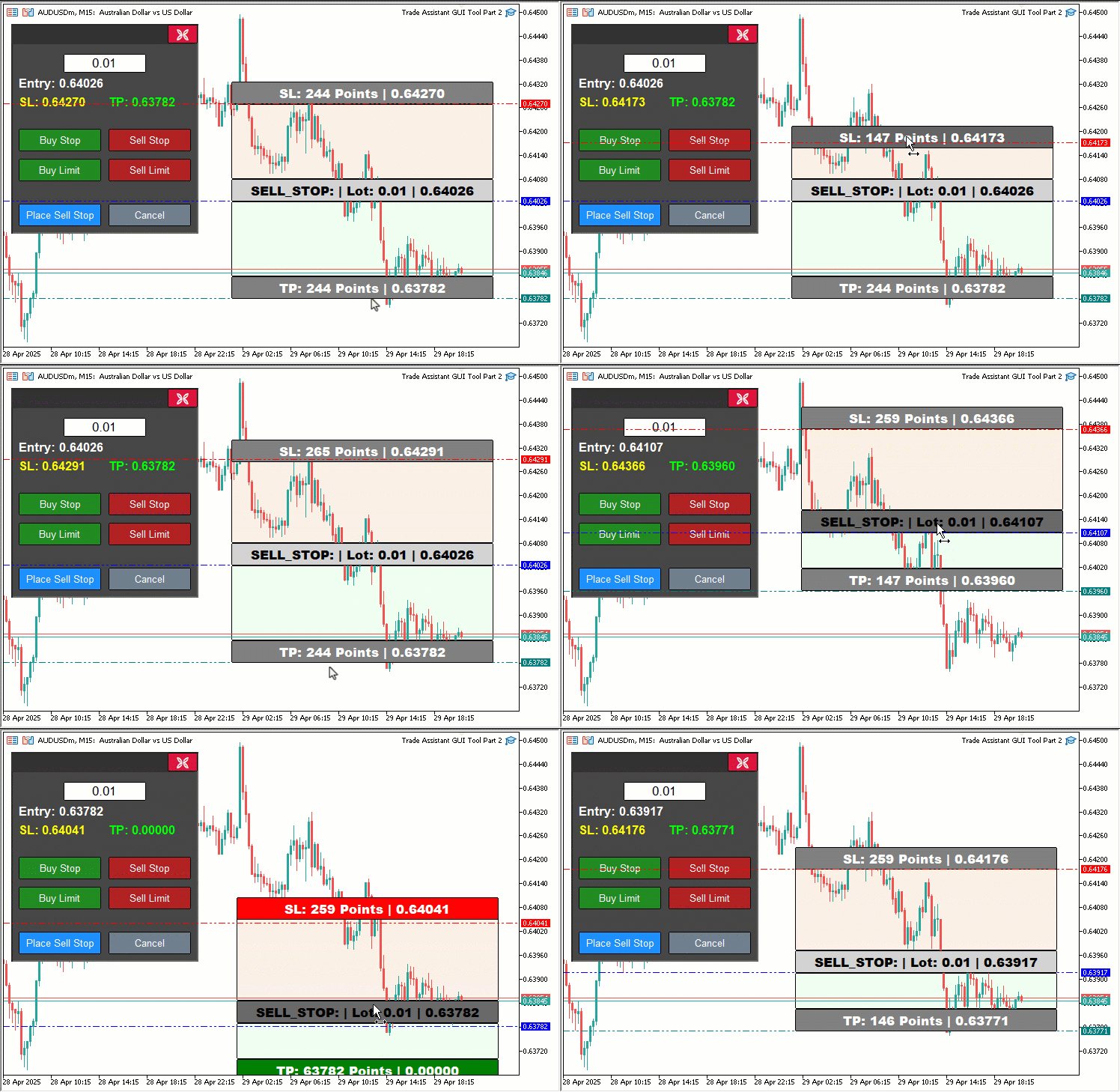
Também chamamos a função "updateButtonHoverState" após os cliques para atualizar os efeitos de passagem do cursor, usando "lparam" e "dparam" para obter as coordenadas do mouse. Para CHARTEVENT_MOUSE_MOVE, adicionamos o arraste do painel. Primeiro verificamos se o clique do mouse ocorreu dentro dos limites de "PANEL_HEADER", obtidos com ObjectGetInteger. Nesse caso, definimos "panel_dragging" como true, armazenamos as coordenadas em "panel_drag_x", "panel_drag_y", "panel_start_x" e "panel_start_y" e desativamos a rolagem do gráfico com ChartSetInteger.
Durante o arraste, quando "panel_dragging" estiver ativo e "MouseState" for igual a 1, calculamos o deslocamento ("dx", "dy") e atualizamos "panel_x" e "panel_y". Em seguida, reposicionamos todos os objetos do painel, como "PANEL_BG", "PANEL_HEADER", "CLOSE_BTN" e "LOT_EDIT", usando ObjectSetInteger. Em seguida, chamamos ChartRedraw para atualizar o gráfico. Quando o botão do mouse é liberado, definimos "panel_dragging" como false e reativamos a rolagem. Também evitamos conflitos entre o arraste dos retângulos ("REC1", "REC3", "REC5") e o arraste do painel usando a condição "!panel_dragging". Durante "movingState_R1", "movingState_R5" e "movingState_R3", chamamos "updateRectangleColors" para atualizar as cores de acordo com o estado de passagem do cursor e a validade da configuração da ordem.
Destacamos alguns trechos importantes que merecem atenção. A visualização abaixo mostra esses pontos.
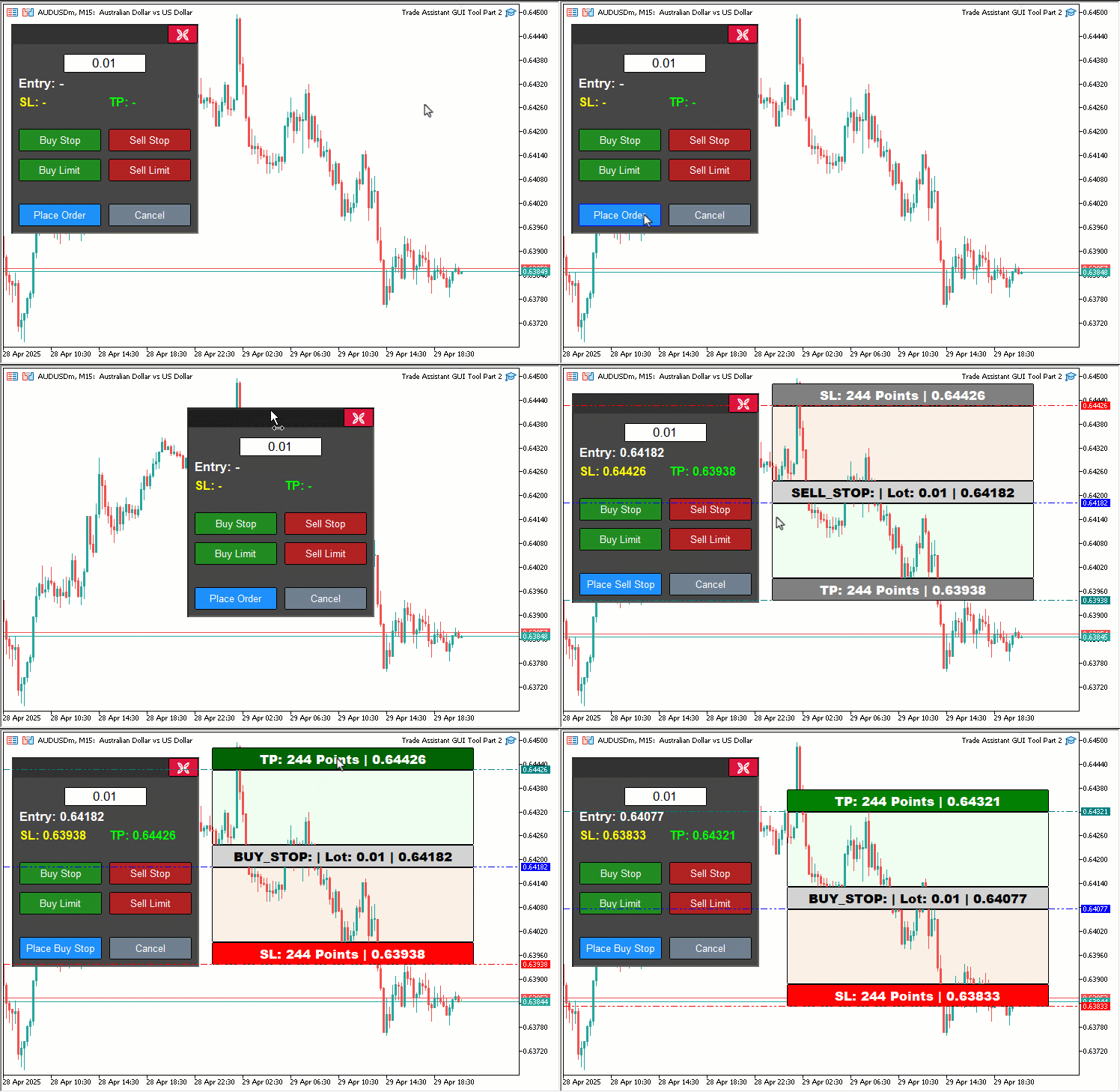
Além disso, como passamos a usar o objeto de cabeçalho do painel, vejamos como ele é criado.
//+------------------------------------------------------------------+
//| Create control panel                                             |
//+------------------------------------------------------------------+
void createControlPanel() {
   // Background rectangle
   ObjectCreate(0, PANEL_BG, OBJ_RECTANGLE_LABEL, 0, 0, 0);                   //--- Create panel background rectangle
   ObjectSetInteger(0, PANEL_BG, OBJPROP_XDISTANCE, panel_x);                 //--- Set background x-position
   ObjectSetInteger(0, PANEL_BG, OBJPROP_YDISTANCE, panel_y);                 //--- Set background y-position
   ObjectSetInteger(0, PANEL_BG, OBJPROP_XSIZE, 250);                         //--- Set background width
   ObjectSetInteger(0, PANEL_BG, OBJPROP_YSIZE, 280);                         //--- Set background height
   ObjectSetInteger(0, PANEL_BG, OBJPROP_BGCOLOR, C'070,070,070');            //--- Set background color
   ObjectSetInteger(0, PANEL_BG, OBJPROP_BORDER_COLOR, clrWhite);             //--- Set border color
   ObjectSetInteger(0, PANEL_BG, OBJPROP_BACK, false);                        //--- Set background to foreground

   // Header rectangle (inside panel)

   createButton(PANEL_HEADER,"",panel_x+2,panel_y+2,250-4,28-3,clrBlue,C'050,050,050',12,C'050,050,050',false);

   createButton(CLOSE_BTN, CharToString(203), panel_x + 209, panel_y + 1, 40, 25, clrWhite, clrCrimson, 12, clrBlack, false, "Wingdings"); //--- Create close button

//---

}
Na função "createControlPanel", adicionamos o botão "PANEL_HEADER" ao painel de controle da ferramenta por meio da função "createButton". Ele é posicionado em "panel_x+2", "panel_y+2", com dimensões de 246x25, texto azul (clrBlue), fundo e borda em cinza-escuro ("C'050,050,050'") e sem rótulo. Esse objeto funciona como a área usada para arrastar o painel em OnChartEvent. Também precisamos garantir que esse novo elemento seja removido corretamente quando o painel for excluído, conforme mostrado abaixo.
//+------------------------------------------------------------------+
//| Delete control panel objects |
//+------------------------------------------------------------------+
void deletePanel() {
   ObjectDelete(0, PANEL_BG);        //--- Delete panel background
   ObjectDelete(0, PANEL_HEADER);    //--- Delete panel header
   ObjectDelete(0, LOT_EDIT);        //--- Delete lot edit field
   ObjectDelete(0, PRICE_LABEL);     //--- Delete price label
   ObjectDelete(0, SL_LABEL);        //--- Delete SL label
   ObjectDelete(0, TP_LABEL);        //--- Delete TP label
   ObjectDelete(0, BUY_STOP_BTN);    //--- Delete Buy Stop button
   ObjectDelete(0, SELL_STOP_BTN);   //--- Delete Sell Stop button
   ObjectDelete(0, BUY_LIMIT_BTN);   //--- Delete Buy Limit button
   ObjectDelete(0, SELL_LIMIT_BTN);  //--- Delete Sell Limit button
   ObjectDelete(0, PLACE_ORDER_BTN); //--- Delete Place Order button
   ObjectDelete(0, CANCEL_BTN);      //--- Delete Cancel button
   ObjectDelete(0, CLOSE_BTN);       //--- Delete Close button
   ChartRedraw(0);                   //--- Redraw chart
}
Aqui atualizamos a função "deletePanel" para garantir a remoção completa do painel de controle da ferramenta, excluindo todos os objetos associados, inclusive o novo cabeçalho que acabamos de adicionar. Usamos ObjectDelete para remover do gráfico do MetaTrader 5 o fundo do painel ("PANEL_BG"), o cabeçalho ("PANEL_HEADER"), o campo de entrada do tamanho do lote ("LOT_EDIT"), os rótulos ("PRICE_LABEL", "SL_LABEL", "TP_LABEL") e os botões ("BUY_STOP_BTN", "SELL_STOP_BTN", "BUY_LIMIT_BTN", "SELL_LIMIT_BTN", "PLACE_ORDER_BTN", "CANCEL_BTN", "CLOSE_BTN").
Por fim, chamamos ChartRedraw para atualizar o gráfico e manter a interface limpa após a remoção dos objetos. Além disso, ao exibir a ferramenta, precisamos levar em conta os efeitos de passagem do cursor para garantir que continuem visíveis, conforme mostrado abaixo.
//+------------------------------------------------------------------+
//| Show control panel                                               |
//+------------------------------------------------------------------+
void showPanel() {
   // Ensure panel is in foreground
   ObjectSetInteger(0, PANEL_BG,        OBJPROP_BACK, false); //--- Show panel background
   ObjectSetInteger(0, PANEL_HEADER,    OBJPROP_BACK, false); //--- Show panel header
   ObjectSetInteger(0, LOT_EDIT,        OBJPROP_BACK, false); //--- Show lot edit field
   ObjectSetInteger(0, PRICE_LABEL,     OBJPROP_BACK, false); //--- Show price label
   ObjectSetInteger(0, SL_LABEL,        OBJPROP_BACK, false); //--- Show SL label
   ObjectSetInteger(0, TP_LABEL,        OBJPROP_BACK, false); //--- Show TP label
   ObjectSetInteger(0, BUY_STOP_BTN,    OBJPROP_BACK, false); //--- Show Buy Stop button
   ObjectSetInteger(0, SELL_STOP_BTN,   OBJPROP_BACK, false); //--- Show Sell Stop button
   ObjectSetInteger(0, BUY_LIMIT_BTN,   OBJPROP_BACK, false); //--- Show Buy Limit button
   ObjectSetInteger(0, SELL_LIMIT_BTN,  OBJPROP_BACK, false); //--- Show Sell Limit button
   ObjectSetInteger(0, PLACE_ORDER_BTN, OBJPROP_BACK, false); //--- Show Place Order button
   ObjectSetInteger(0, CANCEL_BTN,      OBJPROP_BACK, false); //--- Show Cancel button
   ObjectSetInteger(0, CLOSE_BTN,       OBJPROP_BACK, false); //--- Show Close button

   // Reset button hover states
   buy_stop_hovered     = false;
   sell_stop_hovered    = false;
   buy_limit_hovered    = false;
   sell_limit_hovered   = false;
   place_order_hovered  = false;
   cancel_hovered       = false;
   close_hovered        = false;
   header_hovered       = false;

   // Reset button colors
   ObjectSetInteger(0, BUY_STOP_BTN,    OBJPROP_BGCOLOR,       clrForestGreen);
   ObjectSetInteger(0, BUY_STOP_BTN,    OBJPROP_BORDER_COLOR,  clrBlack);
   ObjectSetInteger(0, SELL_STOP_BTN,   OBJPROP_BGCOLOR,       clrFireBrick);
   ObjectSetInteger(0, SELL_STOP_BTN,   OBJPROP_BORDER_COLOR,  clrBlack);
   ObjectSetInteger(0, BUY_LIMIT_BTN,   OBJPROP_BGCOLOR,       clrForestGreen);
   ObjectSetInteger(0, BUY_LIMIT_BTN,   OBJPROP_BORDER_COLOR,  clrBlack);
   ObjectSetInteger(0, SELL_LIMIT_BTN,  OBJPROP_BGCOLOR,       clrFireBrick);
   ObjectSetInteger(0, SELL_LIMIT_BTN,  OBJPROP_BORDER_COLOR,  clrBlack);
   ObjectSetInteger(0, PLACE_ORDER_BTN, OBJPROP_BGCOLOR,       clrDodgerBlue);
   ObjectSetInteger(0, PLACE_ORDER_BTN, OBJPROP_BORDER_COLOR,  clrBlack);
   ObjectSetInteger(0, CANCEL_BTN,      OBJPROP_BGCOLOR,       clrSlateGray);
   ObjectSetInteger(0, CANCEL_BTN,      OBJPROP_BORDER_COLOR,  clrBlack);
   ObjectSetInteger(0, CLOSE_BTN,       OBJPROP_BGCOLOR,       clrCrimson);
   ObjectSetInteger(0, CLOSE_BTN,       OBJPROP_BORDER_COLOR,  clrBlack);
   ObjectSetInteger(0, PANEL_HEADER,    OBJPROP_BGCOLOR,       C'050,050,050');

   // Reset panel state
   update_Text(PRICE_LABEL,     "Entry: -");        //--- Reset entry label text
   update_Text(SL_LABEL,        "SL: -");           //--- Reset SL label text
   update_Text(TP_LABEL,        "TP: -");           //--- Reset TP label text
   update_Text(PLACE_ORDER_BTN, "Place Order");     //--- Reset Place Order button text
   selected_order_type = "";                        //--- Clear selected order type
   tool_visible        = false;                     //--- Hide tool
   ChartSetInteger(0, CHART_EVENT_MOUSE_MOVE, true); //--- Ensure mouse move events are enabled
   ChartRedraw(0);                                   //--- Redraw chart
}
Aprimoramos a função "showPanel" para controlar a exibição e a redefinição do estado do painel de controle da ferramenta, incorporando o novo "PANEL_HEADER" e o gerenciamento dos estados de passagem do cursor do mouse, introduzidos para ampliar a interatividade. Primeiro, garantimos que todos os elementos do painel permaneçam visíveis usando ObjectSetInteger para definir a propriedade OBJPROP_BACK como false no fundo do painel ("PANEL_BG"), no cabeçalho recém-adicionado ("PANEL_HEADER"), no campo de entrada do tamanho do lote ("LOT_EDIT"), nos rótulos relacionados ao preço ("PRICE_LABEL", "SL_LABEL", "TP_LABEL") e em todos os botões ("BUY_STOP_BTN", "SELL_STOP_BTN", "BUY_LIMIT_BTN", "SELL_LIMIT_BTN", "PLACE_ORDER_BTN", "CANCEL_BTN", "CLOSE_BTN"), trazendo esses objetos para o primeiro plano do gráfico.
Para manter uma interface limpa e previsível, redefinimos os estados de passagem do cursor atribuindo false às variáveis lógicas "buy_stop_hovered", "sell_stop_hovered", "buy_limit_hovered", "sell_limit_hovered", "place_order_hovered", "cancel_hovered", "close_hovered" e "header_hovered". Assim, evitamos que efeitos visuais residuais permaneçam ativos quando o painel for exibido novamente.
Em seguida, restauramos a aparência padrão dos botões e do cabeçalho com "ObjectSetInteger", definindo OBJPROP_BGCOLOR com suas cores originais: "clrForestGreen" para "BUY_STOP_BTN" e "BUY_LIMIT_BTN", "clrFireBrick" para "SELL_STOP_BTN" e "SELL_LIMIT_BTN", "clrDodgerBlue" para "PLACE_ORDER_BTN", "clrSlateGray" para "CANCEL_BTN", "clrCrimson" para "CLOSE_BTN" e cinza-escuro ("C'050,050,050'") para "PANEL_HEADER".
Também definimos OBJPROP_BORDER_COLOR como "clrBlack" em todos os botões, mantendo uma aparência uniforme quando o cursor não estiver sobre eles.
Para redefinir o estado funcional do painel, chamamos a função "update_Text" e definimos "PRICE_LABEL" como "Entry: -", "SL_LABEL" como "SL: -", "TP_LABEL" como "TP: -" e "PLACE_ORDER_BTN" como "Place Order", eliminando qualquer informação anterior da configuração da operação. Também limpamos o valor de "selected_order_type" para garantir que nenhum tipo de ordem permaneça previamente selecionado, definimos "tool_visible" como false para ocultar a ferramenta de preço no gráfico e usamos ChartSetInteger para habilitar os eventos CHART_EVENT_MOUSE_MOVE, deixando o painel pronto para responder à passagem do cursor e ao arraste.
Por fim, chamamos ChartRedraw para atualizar o gráfico e devolver o painel ao estado padrão, totalmente preparado para a próxima interação. Após a compilação, obtemos o seguinte resultado.
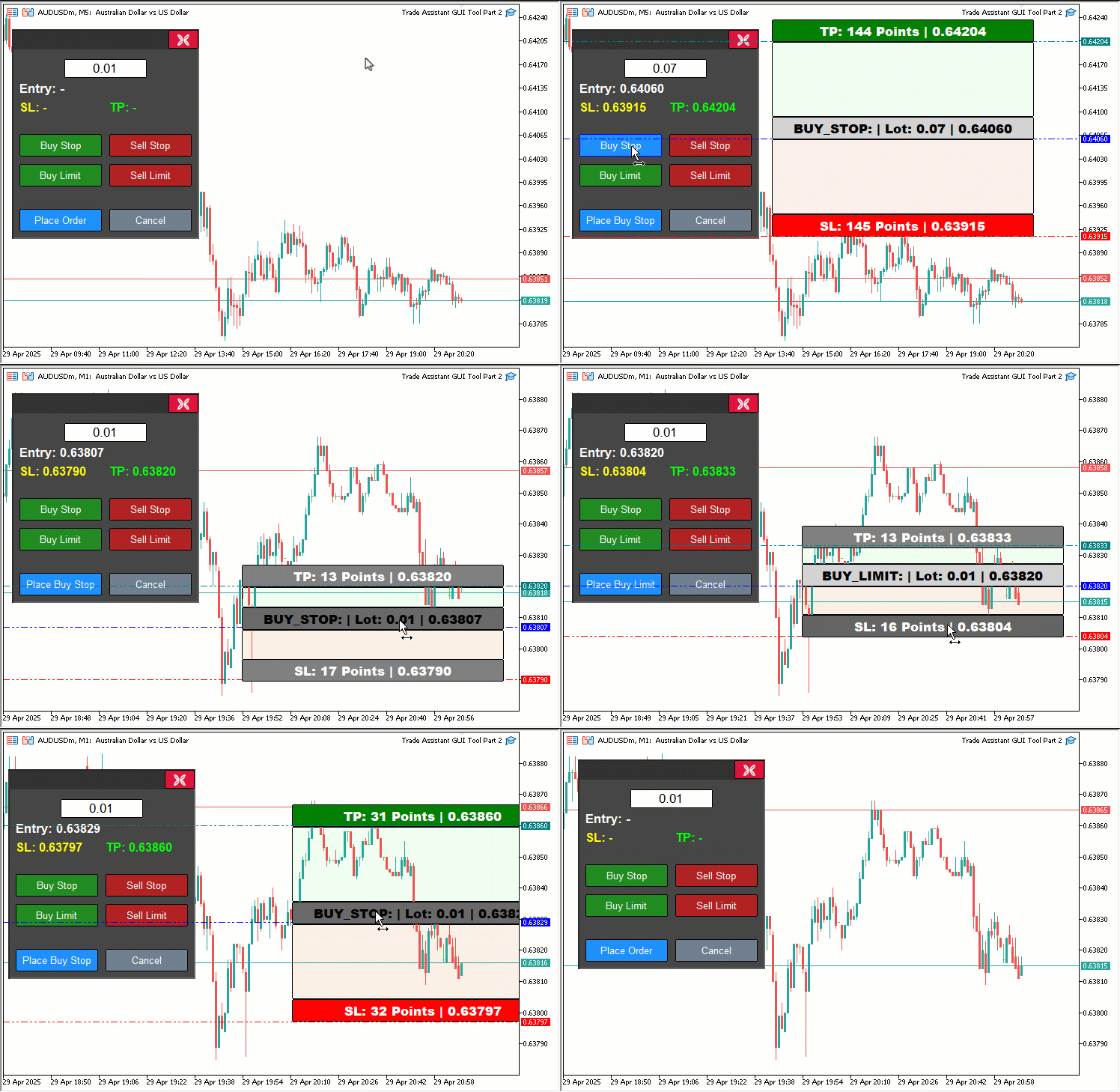
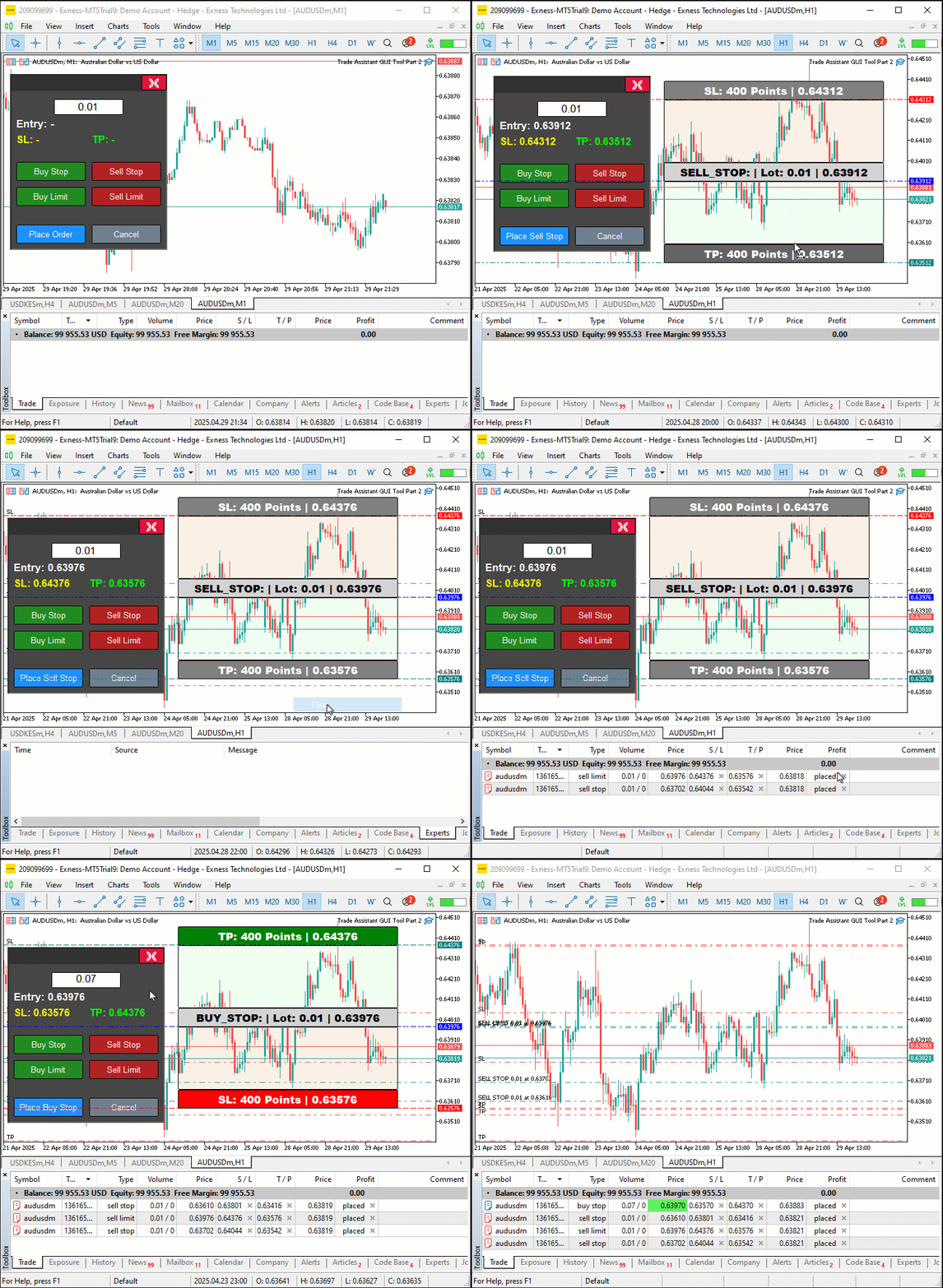
Como podemos ver na visualização, agora é possível validar dinamicamente as ordens por meio da ferramenta de preço e alterar suas cores para alertar o usuário quando os preços estiverem fora dos limites permitidos. Além disso, o painel e a ferramenta de preço podem ser arrastados dinamicamente. Ao passar o cursor sobre os botões, podemos identificar seus limites e alterar suas cores de acordo com a posição do ponteiro, alcançando assim o objetivo proposto. Agora resta testar a interatividade do projeto, como abordado na seção anterior.
Teste com dados históricos
Realizamos o teste e, abaixo, apresentamos o visualização compilada em um único arquivo de imagem raster no formato Graphics Interchange Format (GIF).
Conclusão
Em resumo, aprimoramos nossa ferramenta Trade Assistant Tool em MQL5 adicionando feedback visual dinâmico, um painel arrastável, efeitos ao passar o cursor e validação das ordens em tempo real, tornando o envio de ordens pendentes mais intuitivo e preciso. Demonstramos o desenvolvimento e a implementação dessas melhorias e confirmamos sua confiabilidade por meio de testes criteriosos com dados históricos, adaptados às nossas necessidades de negociação. Você pode ajustar a ferramenta ao seu próprio estilo de operação e aumentar significativamente a eficiência no envio de ordens diretamente pelos gráficos.
Traduzido do Inglês pela MetaQuotes Ltd.
Artigo original: https://www.mql5.com/en/articles/17972
Aviso: Todos os direitos sobre esses materiais pertencem à MetaQuotes Ltd. É proibida a reimpressão total ou parcial.
Esse artigo foi escrito por um usuário do site e reflete seu ponto de vista pessoal. A MetaQuotes Ltd. não se responsabiliza pela precisão das informações apresentadas nem pelas possíveis consequências decorrentes do uso das soluções, estratégias ou recomendações descritas.

 Recursos do Assistente MQL5 que você precisa conhecer (Parte 63): Uso de padrões dos canais DeMarker e Envelopes
 Ferramentas de negociação em MQL5 (Parte 1): Assistente visual interativo para ordens pendentes
 Recursos do Assistente MQL5 que você precisa conhecer (Parte 64): Uso de padrões dos canais DeMarker e Envelopes com kernel de ruído branco
 Desenvolvimento do Kit de Ferramentas de Análise de Price Action (Parte 20): Fluxo Externo (IV) — Correlation Pathfinder

- Aplicativos de negociação gratuitos
- 8 000+ sinais para cópia
- Notícias econômicas para análise dos mercados financeiros
Você concorda com a política do site e com os termos de uso
Descobri um bug: quando o TP ou o SL ficam bem colados à borda da entrada, eles não conseguem mais se mover. Esse é um grande bug. Será que o autor já percebeu esse problema?

Descobri um erro: quando o TP ou o SL se aproxima da borda de entrada, ele não consegue avançar mais. É um grande erro. Será que o autor já identificou esse problema?