

Ferramentas de negociação em MQL5 (Parte 1): Assistente visual interativo para ordens pendentes
 123
123
 1
1

Introdução
O desenvolvimento de ferramentas de negociação eficientes é essencial para simplificar tarefas complexas no mercado Forex, mas criar interfaces intuitivas que aprimorem a tomada de decisões continua sendo um desafio. E se pudéssemos desenvolver uma ferramenta visual e interativa que simplificasse o envio de ordens pendentes no MetaTrader 5? Neste artigo, apresentamos um EA desenvolvido em MetaQuotes Language 5 (MQL5) que auxilia o trader na negociação, combinando precisão gráfica e facilidade de uso para o envio eficiente de ordens Buy Stop, Sell Stop, Buy Limit e Sell Limit. Veremos seu desenvolvimento na seguinte ordem:
Ao final, você terá uma compreensão clara de como criar, testar e aprimorar essa ferramenta.
Concepção e objetivos da ferramenta
Nosso objetivo é desenvolver uma ferramenta que permita enviar ordens pendentes no mercado Forex de forma prática e eficiente. A ferramenta deverá contar com uma interface gráfica do usuário (graphical user interface, GUI) integrada diretamente ao MetaTrader 5, permitindo configurar ordens Buy Stop, Sell Stop, Buy Limit e Sell Limit por meio de um painel de controle intuitivo. Nosso projeto inclui botões para selecionar o tipo de ordem desejado e um campo de entrada para definir o tamanho do lote. Priorizamos a interação visual, permitindo definir o preço de entrada e os níveis de Stop Loss e Take Profit arrastando elementos interativos diretamente no gráfico. Dessa forma, obtemos feedback imediato sobre os níveis de preço e as diferenças entre eles.
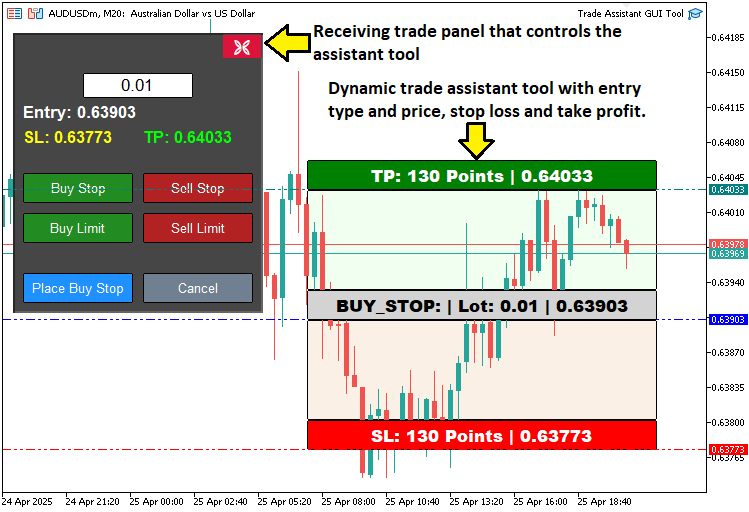
Nosso principal objetivo é tornar a ferramenta acessível e adaptável. Desenvolveremos uma interface adaptável que permita ajustar os níveis de preço com precisão e confirmar ordens com um único clique, reduzindo ao mínimo o tempo necessário para a configuração. Além disso, incluiremos opções para cancelar ou fechar a interface, proporcionando maior flexibilidade e permitindo uma adaptação rápida às mudanças nas condições de mercado. Ao criar uma ferramenta visualmente atraente e adaptável, buscamos aprimorar a tomada de decisões, reduzir erros no envio de ordens e estabelecer uma base para futuros aprimoramentos, como recursos avançados de gestão de risco, que abordaremos nos próximos artigos. Em resumo, a visualização abaixo mostra o que pretendemos criar.
Implementação em MQL5
Para criar o programa em MQL5, primeiro precisamos definir seus metadados, depois algumas constantes com os nomes dos objetos e, por fim, incluir algumas bibliotecas que nos permitirão executar operações de negociação.
//+------------------------------------------------------------------+
//|                                         TRADE ASSISTANT GUI TOOL |
//|      Copyright 2025, ALLAN MUNENE MUTIIRIA. #@Forex Algo-Trader. |
//|                           https://youtube.com/@ForexAlgo-Trader? |
//+------------------------------------------------------------------+
#property copyright "Copyright 2025, ALLAN MUNENE MUTIIRIA. #@Forex Algo-Trader"
#property link      "https://youtube.com/@ForexAlgo-Trader?"
#property version   "1.00"

#include <Trade/Trade.mqh> //--- Include the Trade library for trading operations

// Control panel object names
#define PANEL_BG       "PANEL_BG"         //--- Define constant for panel background object name
#define LOT_EDIT       "LOT_EDIT"         //--- Define constant for lot size edit field object name
#define PRICE_LABEL    "PRICE_LABEL"      //--- Define constant for price label object name
#define SL_LABEL       "SL_LABEL"         //--- Define constant for stop-loss label object name
#define TP_LABEL       "TP_LABEL"         //--- Define constant for take-profit label object name
#define BUY_STOP_BTN   "BUY_STOP_BTN"     //--- Define constant for buy stop button object name
#define SELL_STOP_BTN  "SELL_STOP_BTN"    //--- Define constant for sell stop button object name
#define BUY_LIMIT_BTN  "BUY_LIMIT_BTN"    //--- Define constant for buy limit button object name
#define SELL_LIMIT_BTN "SELL_LIMIT_BTN"   //--- Define constant for sell limit button object name
#define PLACE_ORDER_BTN "PLACE_ORDER_BTN" //--- Define constant for place order button object name
#define CANCEL_BTN     "CANCEL_BTN"       //--- Define constant for cancel button object name
#define CLOSE_BTN      "CLOSE_BTN"        //--- Define constant for close button object name

#define REC1 "REC1" //--- Define constant for rectangle 1 (TP) object name
#define REC2 "REC2" //--- Define constant for rectangle 2 object name
#define REC3 "REC3" //--- Define constant for rectangle 3 (Entry) object name
#define REC4 "REC4" //--- Define constant for rectangle 4 object name
#define REC5 "REC5" //--- Define constant for rectangle 5 (SL) object name

#define TP_HL "TP_HL" //--- Define constant for take-profit horizontal line object name
#define SL_HL "SL_HL" //--- Define constant for stop-loss horizontal line object name
#define PR_HL "PR_HL" //--- Define constant for price (entry) horizontal line object name

double Get_Price_d(string name) { return ObjectGetDouble(0, name, OBJPROP_PRICE); }                          //--- Function to get price as double for an object
string Get_Price_s(string name) { return DoubleToString(ObjectGetDouble(0, name, OBJPROP_PRICE), _Digits); } //--- Function to get price as string with proper digits
string update_Text(string name, string val) { return (string)ObjectSetString(0, name, OBJPROP_TEXT, val); }  //--- Function to update text of an object

int
   xd1, yd1, xs1, ys1, //--- Variables for rectangle 1 position and size
   xd2, yd2, xs2, ys2, //--- Variables for rectangle 2 position and size
   xd3, yd3, xs3, ys3, //--- Variables for rectangle 3 position and size
   xd4, yd4, xs4, ys4, //--- Variables for rectangle 4 position and size
   xd5, yd5, xs5, ys5; //--- Variables for rectangle 5 position and size

// Control panel variables
bool tool_visible = false;       //--- Flag to track if trading tool is visible
string selected_order_type = ""; //--- Variable to store selected order type
double lot_size = 0.01;          //--- Default lot size for trades
CTrade obj_Trade;                //--- Trade object for executing trading operations
int panel_x = 10, panel_y = 30;  //--- Panel position coordinates
Aqui estabelecemos a base da nossa ferramenta, definindo os principais componentes, variáveis e funções responsáveis pelo funcionamento da interface gráfica e das operações de negociação. Começamos incluindo a biblioteca Trade.mqh, que fornece a classe CTrade para executar operações de negociação, como o envio de ordens pendentes. Em seguida, definimos uma série de constantes com #define para atribuir nomes exclusivos aos elementos da interface gráfica, como PANEL_BG para o fundo do painel de controle, LOT_EDIT para o campo de entrada do tamanho do lote e botões como BUY_STOP_BTN e SELL_STOP_BTN para a seleção do tipo de ordem, entre outros.
Implementamos três funções auxiliares para manipular as propriedades dos objetos do gráfico: a função Get_Price_d obtém o preço de um objeto como um valor de ponto flutuante (double); a função Get_Price_s converte esse preço em uma string formatada com o número adequado de casas decimais por meio da função DoubleToString; e a função update_Text atualiza o texto do objeto com ObjectSetString para exibir as informações de preço em tempo real.
Para controlar a posição e as dimensões dos retângulos interativos, declaramos conjuntos de variáveis inteiras, como xd1, yd1, xs1 e ys1 para cada retângulo (REC1 a REC5), que representam, respectivamente, a distância no eixo x, a distância no eixo y, o tamanho no eixo x e o tamanho no eixo y no gráfico.
Por fim, definimos as principais variáveis do painel de controle: tool_visible, uma variável booleana que indica se a ferramenta está visível; selected_order_type, uma string que armazena o tipo de ordem selecionado; lot_size, um valor do tipo double inicializado em 0,01 para definir o volume das operações; obj_Trade, um objeto CTrade usado para executar as operações; e panel_x e panel_y, valores inteiros que definem a posição do painel de controle nas coordenadas (10, 30).
Em conjunto, esses elementos formam a base estrutural da interface interativa da ferramenta e de seus recursos de negociação. Agora podemos passar à criação do painel de controle, mas antes precisamos de uma função para criar botões personalizados.
//+------------------------------------------------------------------+
//| Create button                                                    |
//+------------------------------------------------------------------+
bool createButton(string objName, string text, int xD, int yD, int xS, int yS,
                  color clrTxt, color clrBG, int fontsize = 12,
                  color clrBorder = clrNONE, bool isBack = false, string font = "Calibri") {
   ResetLastError();                                                               //--- Reset last error code
   if(!ObjectCreate(0, objName, OBJ_BUTTON, 0, 0, 0)) {                            //--- Create button object
      Print(__FUNCTION__, ": Failed to create Btn: Error Code: ", GetLastError()); //--- Print error message
      return false;                                                                //--- Return failure
   }
   ObjectSetInteger(0, objName, OBJPROP_XDISTANCE, xD);             //--- Set button x-position
   ObjectSetInteger(0, objName, OBJPROP_YDISTANCE, yD);             //--- Set button y-position
   ObjectSetInteger(0, objName, OBJPROP_XSIZE, xS);                 //--- Set button width
   ObjectSetInteger(0, objName, OBJPROP_YSIZE, yS);                 //--- Set button height
   ObjectSetInteger(0, objName, OBJPROP_CORNER, CORNER_LEFT_UPPER); //--- Set button corner
   ObjectSetString(0, objName, OBJPROP_TEXT, text);                 //--- Set button text
   ObjectSetInteger(0, objName, OBJPROP_FONTSIZE, fontsize);        //--- Set font size
   ObjectSetString(0, objName, OBJPROP_FONT, font);                 //--- Set font
   ObjectSetInteger(0, objName, OBJPROP_COLOR, clrTxt);             //--- Set text color
   ObjectSetInteger(0, objName, OBJPROP_BGCOLOR, clrBG);            //--- Set background color
   ObjectSetInteger(0, objName, OBJPROP_BORDER_COLOR, clrBorder);   //--- Set border color
   ObjectSetInteger(0, objName, OBJPROP_BACK, isBack);              //--- Set background/foreground
   ObjectSetInteger(0, objName, OBJPROP_STATE, false);              //--- Reset button state
   ObjectSetInteger(0, objName, OBJPROP_SELECTABLE, false);         //--- Disable selection
   ObjectSetInteger(0, objName, OBJPROP_SELECTED, false);           //--- Disable selected state

   ChartRedraw(0); //--- Redraw chart
   return true;    //--- Return success
}
Definimos a função createButton para criar os botões personalizados da nossa ferramenta. Ela recebe parâmetros como objName para o nome do botão, text para seu rótulo, xD e yD para a posição, xS e yS para as dimensões, clrTxt e clrBG para as cores do texto e do fundo, fontsize (12 por padrão), clrBorder (clrNONE por padrão), isBack (false por padrão) e font (Calibri por padrão).
Usamos a função ResetLastError para limpar os códigos de erro e, em seguida, ObjectCreate para criar um objeto OBJ_BUTTON. Se a criação falhar, chamamos Print com FUNCTION e GetLastError para registrar o erro e retornamos false.
Quando a criação é bem-sucedida, definimos propriedades como posição, dimensões e cores com as funções ObjectSetInteger e ObjectSetString, desativamos as propriedades state e selection e chamamos ChartRedraw para atualizar o gráfico e retornamos true. Com isso, podemos criar botões interativos e usar essa função na construção do painel de controle.
//+------------------------------------------------------------------+
//| Create control panel                                             |
//+------------------------------------------------------------------+
void createControlPanel() {
   // Background rectangle
   ObjectCreate(0, PANEL_BG, OBJ_RECTANGLE_LABEL, 0, 0, 0);        //--- Create panel background rectangle
   ObjectSetInteger(0, PANEL_BG, OBJPROP_XDISTANCE, panel_x);      //--- Set background x-position
   ObjectSetInteger(0, PANEL_BG, OBJPROP_YDISTANCE, panel_y);      //--- Set background y-position
   ObjectSetInteger(0, PANEL_BG, OBJPROP_XSIZE, 250);              //--- Set background width
   ObjectSetInteger(0, PANEL_BG, OBJPROP_YSIZE, 280);              //--- Set background height
   ObjectSetInteger(0, PANEL_BG, OBJPROP_BGCOLOR, C'070,070,070'); //--- Set background color
   ObjectSetInteger(0, PANEL_BG, OBJPROP_BORDER_COLOR, clrWhite);  //--- Set border color
   ObjectSetInteger(0, PANEL_BG, OBJPROP_BACK, false);             //--- Set background to foreground

   createButton(CLOSE_BTN, CharToString(203), panel_x + 209, panel_y + 1, 40, 25, clrWhite, clrCrimson, 12, C'070,070,070', false, "Wingdings"); //--- Create close button

   // Lot size input
   ObjectCreate(0, LOT_EDIT, OBJ_EDIT, 0, 0, 0); //--- Create lot size edit field
   ObjectSetInteger(0, LOT_EDIT, OBJPROP_XDISTANCE, panel_x + 70); //--- Set edit field x-position
   ObjectSetInteger(0, LOT_EDIT, OBJPROP_YDISTANCE, panel_y + 40); //--- Set edit field y-position
   ObjectSetInteger(0, LOT_EDIT, OBJPROP_XSIZE, 110);              //--- Set edit field width
   ObjectSetInteger(0, LOT_EDIT, OBJPROP_YSIZE, 25);               //--- Set edit field height
   ObjectSetString(0, LOT_EDIT, OBJPROP_TEXT, "0.01");             //--- Set default lot size text
   ObjectSetInteger(0, LOT_EDIT, OBJPROP_COLOR, clrBlack);         //--- Set text color
   ObjectSetInteger(0, LOT_EDIT, OBJPROP_BGCOLOR, clrWhite);       //--- Set background color
   ObjectSetInteger(0, LOT_EDIT, OBJPROP_BORDER_COLOR, clrBlack);  //--- Set border color
   ObjectSetInteger(0, LOT_EDIT, OBJPROP_ALIGN, ALIGN_CENTER);     //--- Center text
   ObjectSetString(0, LOT_EDIT, OBJPROP_FONT, "Arial");            //--- Set font
   ObjectSetInteger(0, LOT_EDIT, OBJPROP_FONTSIZE, 13);            //--- Set font size
   ObjectSetInteger(0, LOT_EDIT, OBJPROP_BACK, false);             //--- Set to foreground

   // Entry price label
   ObjectCreate(0, PRICE_LABEL, OBJ_LABEL, 0, 0, 0);                  //--- Create entry price label
   ObjectSetInteger(0, PRICE_LABEL, OBJPROP_XDISTANCE, panel_x + 10); //--- Set label x-position
   ObjectSetInteger(0, PRICE_LABEL, OBJPROP_YDISTANCE, panel_y + 70); //--- Set label y-position
   ObjectSetInteger(0, PRICE_LABEL, OBJPROP_XSIZE, 230);              //--- Set label width
   ObjectSetString(0, PRICE_LABEL, OBJPROP_TEXT, "Entry: -");         //--- Set default text
   ObjectSetString(0, PRICE_LABEL, OBJPROP_FONT, "Arial Bold");       //--- Set font
   ObjectSetInteger(0, PRICE_LABEL, OBJPROP_FONTSIZE, 13);            //--- Set font size
   ObjectSetInteger(0, PRICE_LABEL, OBJPROP_COLOR, clrWhite);         //--- Set text color
   ObjectSetInteger(0, PRICE_LABEL, OBJPROP_ALIGN, ALIGN_CENTER);     //--- Center text
   ObjectSetInteger(0, PRICE_LABEL, OBJPROP_BACK, false); //--- Set to foreground

   // SL and TP labels
   ObjectCreate(0, SL_LABEL, OBJ_LABEL, 0, 0, 0);                  //--- Create stop-loss label
   ObjectSetInteger(0, SL_LABEL, OBJPROP_XDISTANCE, panel_x + 10); //--- Set label x-position
   ObjectSetInteger(0, SL_LABEL, OBJPROP_YDISTANCE, panel_y + 95); //--- Set label y-position
   ObjectSetInteger(0, SL_LABEL, OBJPROP_XSIZE, 110);              //--- Set label width
   ObjectSetString(0, SL_LABEL, OBJPROP_TEXT, "SL: -");            //--- Set default text
   ObjectSetString(0, SL_LABEL, OBJPROP_FONT, "Arial Bold");       //--- Set font
   ObjectSetInteger(0, SL_LABEL, OBJPROP_FONTSIZE, 12);            //--- Set font size
   ObjectSetInteger(0, SL_LABEL, OBJPROP_COLOR, clrYellow);        //--- Set text color
   ObjectSetInteger(0, SL_LABEL, OBJPROP_ALIGN, ALIGN_CENTER);     //--- Center text
   ObjectSetInteger(0, SL_LABEL, OBJPROP_BACK, false);             //--- Set to foreground

   ObjectCreate(0, TP_LABEL, OBJ_LABEL, 0, 0, 0);                   //--- Create take-profit label
   ObjectSetInteger(0, TP_LABEL, OBJPROP_XDISTANCE, panel_x + 130); //--- Set label x-position
   ObjectSetInteger(0, TP_LABEL, OBJPROP_YDISTANCE, panel_y + 95);  //--- Set label y-position
   ObjectSetInteger(0, TP_LABEL, OBJPROP_XSIZE, 110);               //--- Set label width
   ObjectSetString(0, TP_LABEL, OBJPROP_TEXT, "TP: -");             //--- Set default text
   ObjectSetString(0, TP_LABEL, OBJPROP_FONT, "Arial Bold");        //--- Set font
   ObjectSetInteger(0, TP_LABEL, OBJPROP_FONTSIZE, 12);             //--- Set font size
   ObjectSetInteger(0, TP_LABEL, OBJPROP_COLOR, clrLime);           //--- Set text color
   ObjectSetInteger(0, TP_LABEL, OBJPROP_ALIGN, ALIGN_CENTER);      //--- Center text
   ObjectSetInteger(0, TP_LABEL, OBJPROP_BACK, false);              //--- Set to foreground

   // Order type buttons
   createButton(BUY_STOP_BTN, "Buy Stop", panel_x + 10, panel_y + 140, 110, 30, clrWhite, clrForestGreen, 10, clrBlack, false, "Arial");    //--- Create Buy Stop button
   createButton(SELL_STOP_BTN, "Sell Stop", panel_x + 130, panel_y + 140, 110, 30, clrWhite, clrFireBrick, 10, clrBlack, false, "Arial");   //--- Create Sell Stop button
   createButton(BUY_LIMIT_BTN, "Buy Limit", panel_x + 10, panel_y + 180, 110, 30, clrWhite, clrForestGreen, 10, clrBlack, false, "Arial");  //--- Create Buy Limit button
   createButton(SELL_LIMIT_BTN, "Sell Limit", panel_x + 130, panel_y + 180, 110, 30, clrWhite, clrFireBrick, 10, clrBlack, false, "Arial"); //--- Create Sell Limit button

   // Place Order and Cancel buttons
   createButton(PLACE_ORDER_BTN, "Place Order", panel_x + 10, panel_y + 240, 110, 30, clrWhite, clrDodgerBlue, 10, clrBlack, false, "Arial"); //--- Create Place Order button
   createButton(CANCEL_BTN, "Cancel", panel_x + 130, panel_y + 240, 110, 30, clrWhite, clrSlateGray, 10, clrBlack, false, "Arial");           //--- Create Cancel button
}
Aqui definimos a função createControlPanel, responsável por criar o principal elemento da interface gráfica da nossa ferramenta. Começamos usando ObjectCreate para criar o retângulo de fundo PANEL_BG, do tipo OBJ_RECTANGLE_LABEL, posicionado em panel_x e panel_y (com valores 10 e 30), com dimensões de 250x280 pixels, fundo cinza-escuro (C'070,070,070'), borda branca (clrWhite) e exibido em primeiro plano (OBJPROP_BACK igual a false).
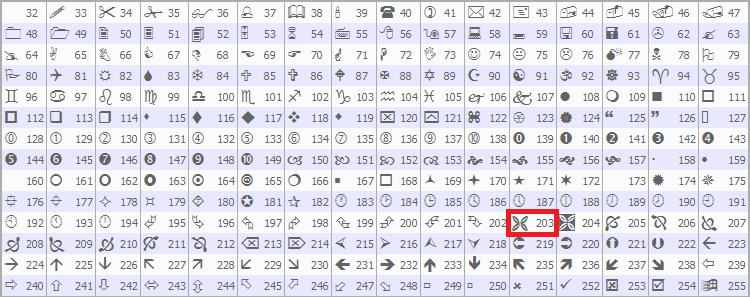
Em seguida, chamamos createButton para adicionar o botão de fechamento (CLOSE_BTN) no canto superior direito, exibindo um símbolo de cruz (caractere 203 da fonte Wingdings) na cor carmim. Os valores de entrada são definidos na documentação do MQL5 conforme mostrado a seguir, mas você pode usar qualquer outra opção que preferir.
Para inserir o tamanho do lote, usamos ObjectCreate para criar o campo de edição LOT_EDIT, do tipo OBJ_EDIT, em panel_x + 70, panel_y + 40, com dimensões de 110x25 pixels. O campo é inicializado com o valor 0.01 e configurado com texto preto, fundo branco, fonte Arial e alinhamento centralizado por meio das funções ObjectSetInteger e ObjectSetString.
Criamos três rótulos para exibir as informações da operação usando ObjectCreate: PRICE_LABEL para o preço de entrada, em panel_x + 10, panel_y + 70, com largura de 230 pixels e texto padrão "Entry: -"; SL_LABEL para o Stop Loss, em panel_x + 10, panel_y + 95, com texto amarelo padrão "SL: -"; e TP_LABEL para o Take Profit, em panel_x + 130, panel_y + 95, com texto verde-limão padrão "TP: -". Todos usam fonte Arial em negrito e alinhamento central.
Por fim, usamos createButton para adicionar os botões de tipo de ordem: BUY_STOP_BTN e SELL_STOP_BTN em panel_y + 140, e BUY_LIMIT_BTN e SELL_LIMIT_BTN em panel_y + 180, nas cores verde e vermelho, respectivamente. Também adicionamos os botões de ação PLACE_ORDER_BTN e CANCEL_BTN em panel_y + 240, nas cores azul e cinza. Todos têm dimensões de 110x30 pixels e usam a fonte Arial. Essa configuração forma o painel de controle interativo da nossa ferramenta. Agora podemos chamar essa função no manipulador de eventos OnInit para inicializar o painel.
//+------------------------------------------------------------------+
//| Expert initialization function                                   |
//+------------------------------------------------------------------+
int OnInit() {

// Create control panel
   createControlPanel();   //--- Call function to create the control panel
   ChartRedraw(0);         //--- Redraw chart to display panel
   return(INIT_SUCCEEDED); //--- Return successful initialization
}
No manipulador de eventos OnInit, chamamos createControlPanel para criar a interface gráfica, configurando o painel de controle com seus botões, rótulos e campos de entrada. Em seguida, usamos ChartRedraw para atualizar o gráfico e garantir que o painel seja exibido imediatamente. Por fim, retornamos INIT_SUCCEEDED para confirmar que a inicialização foi concluída com sucesso. Após a compilação, obtemos o seguinte resultado.
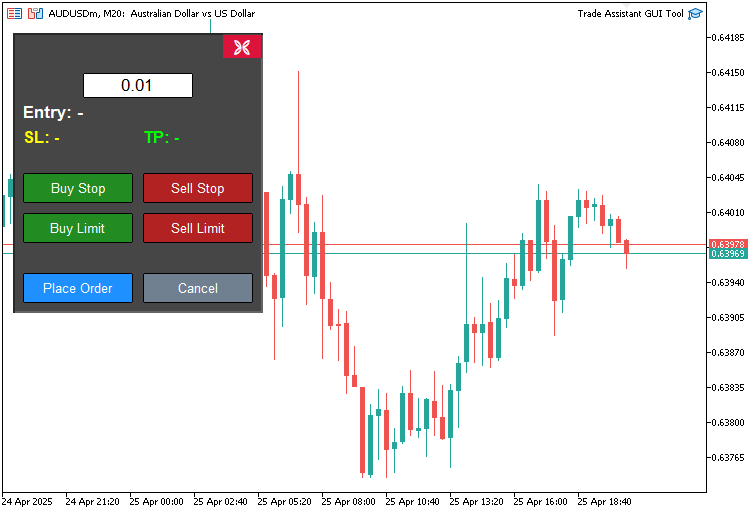
Criamos o painel de controle. Agora precisamos criar um painel auxiliar que possa obter dinamicamente os preços do gráfico, preencher automaticamente o painel de controle e executar operações com base nesses valores. Para isso, precisaremos integrar a escala do gráfico à escala da tela. Vamos reunir toda essa lógica em funções e, em seguida, adicionar manipuladores de eventos que chamarão as funções correspondentes conforme o usuário interagir com os botões do painel.
//+------------------------------------------------------------------+
//| Expert onchart event function                                    |
//+------------------------------------------------------------------+
void OnChartEvent(
   const int id,         //--- Event ID
   const long& lparam,   //--- Long parameter (e.g., x-coordinate for mouse)
   const double& dparam, //--- Double parameter (e.g., y-coordinate for mouse)
   const string& sparam  //--- String parameter (e.g., object name)
) {
   if(id == CHARTEVENT_OBJECT_CLICK) {     //--- Handle object click events
      // Handle order type buttons
      if(sparam == BUY_STOP_BTN) {         //--- Check if Buy Stop button clicked
         selected_order_type = "BUY_STOP"; //--- Set order type to Buy Stop
      }
   }
}
Aqui implementamos o manipulador de eventos OnChartEvent para tratar a interação do usuário com a ferramenta. A função recebe os parâmetros id, que identifica o tipo de evento; lparam, usado para dados como a coordenada x; dparam, para dados como a coordenada y; e sparam, para dados do tipo string, como nomes de objetos. Verificamos se id é igual a CHARTEVENT_OBJECT_CLICK para detectar cliques em objetos e, se sparam corresponder a BUY_STOP_BTN, definimos a variável selected_order_type como BUY_STOP, registrando a seleção de uma ordem Buy Stop pelo usuário. Nesse caso, precisamos de uma função para exibir a ferramenta de preço.
//+------------------------------------------------------------------+
//| Show main tool                                                   |
//+------------------------------------------------------------------+
void showTool() {
   // Hide panel
   ObjectSetInteger(0, PANEL_BG, OBJPROP_BACK, false);        //--- Hide panel background
   ObjectSetInteger(0, LOT_EDIT, OBJPROP_BACK, false);        //--- Hide lot edit field
   ObjectSetInteger(0, PRICE_LABEL, OBJPROP_BACK, false);     //--- Hide price label
   ObjectSetInteger(0, SL_LABEL, OBJPROP_BACK, false);        //--- Hide SL label
   ObjectSetInteger(0, TP_LABEL, OBJPROP_BACK, false);        //--- Hide TP label
   ObjectSetInteger(0, BUY_STOP_BTN, OBJPROP_BACK, false);    //--- Hide Buy Stop button
   ObjectSetInteger(0, SELL_STOP_BTN, OBJPROP_BACK, false);   //--- Hide Sell Stop button
   ObjectSetInteger(0, BUY_LIMIT_BTN, OBJPROP_BACK, false);   //--- Hide Buy Limit button
   ObjectSetInteger(0, SELL_LIMIT_BTN, OBJPROP_BACK, false);  //--- Hide Sell Limit button
   ObjectSetInteger(0, PLACE_ORDER_BTN, OBJPROP_BACK, false); //--- Hide Place Order button
   ObjectSetInteger(0, CANCEL_BTN, OBJPROP_BACK, false);      //--- Hide Cancel button
   ObjectSetInteger(0, CLOSE_BTN, OBJPROP_BACK, false);       //--- Hide Close button

   // Create main tool 150 pixels from the right edge
   int chart_width = (int)ChartGetInteger(0, CHART_WIDTH_IN_PIXELS); //--- Get chart width
   int tool_x = chart_width - 400 - 50;                              //--- Calculate tool x-position (400 is REC1 width, 50 is margin)

   if(selected_order_type == "BUY_STOP" || selected_order_type == "BUY_LIMIT") { //--- Check for buy orders
      // Buy orders: TP at top, entry in middle, SL at bottom
      createButton(REC1, "", tool_x, 20, 350, 30, clrWhite, clrGreen, 13, clrBlack, false, "Arial Black"); //--- Create TP rectangle

      xd1 = (int)ObjectGetInteger(0, REC1, OBJPROP_XDISTANCE); //--- Get REC1 x-distance
      yd1 = (int)ObjectGetInteger(0, REC1, OBJPROP_YDISTANCE); //--- Get REC1 y-distance
      xs1 = (int)ObjectGetInteger(0, REC1, OBJPROP_XSIZE);     //--- Get REC1 x-size
      ys1 = (int)ObjectGetInteger(0, REC1, OBJPROP_YSIZE);     //--- Get REC1 y-size

      xd2 = xd1;       //--- Set REC2 x-distance
      yd2 = yd1 + ys1; //--- Set REC2 y-distance
      xs2 = xs1;       //--- Set REC2 x-size
      ys2 = 100;       //--- Set REC2 y-size

      xd3 = xd2;       //--- Set REC3 x-distance
      yd3 = yd2 + ys2; //--- Set REC3 y-distance
      xs3 = xs2;       //--- Set REC3 x-size
      ys3 = 30;        //--- Set REC3 y-size

      xd4 = xd3;       //--- Set REC4 x-distance
      yd4 = yd3 + ys3; //--- Set REC4 y-distance
      xs4 = xs3;       //--- Set REC4 x-size
      ys4 = 100;       //--- Set REC4 y-size

      xd5 = xd4;       //--- Set REC5 x-distance
      yd5 = yd4 + ys4; //--- Set REC5 y-distance
      xs5 = xs4;       //--- Set REC5 x-size
      ys5 = 30;        //--- Set REC5 y-size
   }
   else { //--- Handle sell orders
      // Sell orders: SL at top, entry in middle, TP at bottom
      createButton(REC5, "", tool_x, 20, 350, 30, clrWhite, clrRed, 13, clrBlack, false, "Arial Black"); //--- Create SL rectangle

      xd5 = (int)ObjectGetInteger(0, REC5, OBJPROP_XDISTANCE); //--- Get REC5 x-distance
      yd5 = (int)ObjectGetInteger(0, REC5, OBJPROP_YDISTANCE); //--- Get REC5 y-distance
      xs5 = (int)ObjectGetInteger(0, REC5, OBJPROP_XSIZE);     //--- Get REC5 x-size
      ys5 = (int)ObjectGetInteger(0, REC5, OBJPROP_YSIZE);     //--- Get REC5 y-size

      xd2 = xd5;       //--- Set REC2 x-distance
      yd2 = yd5 + ys5; //--- Set REC2 y-distance
      xs2 = xs5;       //--- Set REC2 x-size
      ys2 = 100;       //--- Set REC2 y-size

      xd3 = xd2;       //--- Set REC3 x-distance
      yd3 = yd2 + ys2; //--- Set REC3 y-distance
      xs3 = xs2;       //--- Set REC3 x-size
      ys3 = 30;        //--- Set REC3 y-size

      xd4 = xd3;       //--- Set REC4 x-distance
      yd4 = yd3 + ys3; //--- Set REC4 y-distance
      xs4 = xs3;       //--- Set REC4 x-size
      ys4 = 100;       //--- Set REC4 y-size

      xd1 = xd4;       //--- Set REC1 x-distance
      yd1 = yd4 + ys4; //--- Set REC1 y-distance
      xs1 = xs4;       //--- Set REC1 x-size
      ys1 = 30;        //--- Set REC1 y-size
   }

   datetime dt_tp = 0, dt_sl = 0, dt_prc = 0;        //--- Variables for time
   double price_tp = 0, price_sl = 0, price_prc = 0; //--- Variables for price
   int window = 0;                                   //--- Chart window

   ChartXYToTimePrice(0, xd1, yd1 + ys1, window, dt_tp, price_tp);   //--- Convert REC1 coordinates to time and price
   ChartXYToTimePrice(0, xd3, yd3 + ys3, window, dt_prc, price_prc); //--- Convert REC3 coordinates to time and price
   ChartXYToTimePrice(0, xd5, yd5 + ys5, window, dt_sl, price_sl);   //--- Convert REC5 coordinates to time and price

   createHL(TP_HL, dt_tp, price_tp, clrTeal);   //--- Create TP horizontal line
   createHL(PR_HL, dt_prc, price_prc, clrBlue); //--- Create entry horizontal line
   createHL(SL_HL, dt_sl, price_sl, clrRed);    //--- Create SL horizontal line

   if(selected_order_type == "BUY_STOP" || selected_order_type == "BUY_LIMIT") {                              //--- Check for buy orders
      createButton(REC2, "", xd2, yd2, xs2, ys2, clrWhite, clrHoneydew, 12, clrBlack, true);                  //--- Create REC2
      createButton(REC3, "", xd3, yd3, xs3, ys3, clrBlack, clrLightGray, 13, clrBlack, false, "Arial Black"); //--- Create REC3
      createButton(REC4, "", xd4, yd4, xs4, ys4, clrWhite, clrLinen, 12, clrBlack, true);                     //--- Create REC4
      createButton(REC5, "", xd5, yd5, xs5, ys5, clrWhite, clrRed, 13, clrBlack, false, "Arial Black");       //--- Create REC5
   }
   else { //--- Handle sell orders
      createButton(REC2, "", xd2, yd2, xs2, ys2, clrWhite, clrHoneydew, 12, clrBlack, true);                  //--- Create REC2
      createButton(REC3, "", xd3, yd3, xs3, ys3, clrBlack, clrLightGray, 13, clrBlack, false, "Arial Black"); //--- Create REC3
      createButton(REC4, "", xd4, yd4, xs4, ys4, clrWhite, clrLinen, 12, clrBlack, true);                     //--- Create REC4
      createButton(REC1, "", xd1, yd1, xs1, ys1, clrWhite, clrGreen, 13, clrBlack, false, "Arial Black");     //--- Create REC1
   }

   update_Text(REC1, "TP: " + DoubleToString(MathAbs((Get_Price_d(TP_HL) - Get_Price_d(PR_HL)) / _Point), 0) + " Points | " + Get_Price_s(TP_HL)); //--- Update REC1 text
   update_Text(REC3, selected_order_type + ": | Lot: " + DoubleToString(lot_size, 2) + " | " + Get_Price_s(PR_HL));                                //--- Update REC3 text
   update_Text(REC5, "SL: " + DoubleToString(MathAbs((Get_Price_d(PR_HL) - Get_Price_d(SL_HL)) / _Point), 0) + " Points | " + Get_Price_s(SL_HL)); //--- Update REC5 text
   update_Text(PRICE_LABEL, "Entry: " + Get_Price_s(PR_HL)); //--- Update entry label text
   update_Text(SL_LABEL, "SL: " + Get_Price_s(SL_HL));       //--- Update SL label text
   update_Text(TP_LABEL, "TP: " + Get_Price_s(TP_HL));       //--- Update TP label text

   tool_visible = true;                              //--- Set tool visibility flag
   ChartSetInteger(0, CHART_EVENT_MOUSE_MOVE, true); //--- Enable mouse move events
   ChartRedraw(0);                                   //--- Redraw chart
}
Para exibir a ferramenta de preço no gráfico, implementamos a função "showTool". Começamos ocultando o painel de controle por meio de ObjectSetInteger, definindo OBJPROP_BACK como false para os objetos PANEL_BG, LOT_EDIT, PRICE_LABEL, SL_LABEL, TP_LABEL, BUY_STOP_BTN, SELL_STOP_BTN, BUY_LIMIT_BTN, SELL_LIMIT_BTN, PLACE_ORDER_BTN, CANCEL_BTN e CLOSE_BTN.
Calculamos a coordenada x da ferramenta usando ChartGetInteger para obter CHART_WIDTH_IN_PIXELS e posicionamos tool_x a 450 pixels da borda direita. Para ordens BUY_STOP ou BUY_LIMIT, usamos createButton para criar REC1 (TP) nas coordenadas tool_x, y=20, com dimensões de 350x30 e na cor verde. Em seguida, obtemos xd1, yd1, xs1 e ys1 com ObjectGetInteger e posicionamos verticalmente REC2 a REC5 para representar os níveis de TP, entrada e SL, usando os parâmetros xd2 a xd5, yd2 a yd5, xs2 a xs5 e ys2 a ys5.
Para ordens de venda, criamos REC5 (SL) na cor vermelha e organizamos os retângulos de REC2 a REC1 na sequência SL, entrada e TP.
Declaramos as variáveis dt_tp, dt_sl e dt_prc para armazenar os valores de tempo, price_tp, price_sl e price_prc para os preços, além da variável window para a janela do gráfico. Usamos ChartXYToTimePrice para converter as coordenadas de REC1, REC3 e REC5 em valores de tempo e preço. Em seguida, chamamos createHL para desenhar as linhas horizontais TP_HL, PR_HL e SL_HL nas cores turquesa, azul e vermelho.
De acordo com o valor de selected_order_type, usamos createButton para criar os demais retângulos: REC2, REC3, REC4 e REC5 para ordens de compra, ou REC2, REC3, REC4 e REC1 para ordens de venda, cada um com as cores correspondentes. Atualizamos os textos de REC1, REC3, REC5, PRICE_LABEL, SL_LABEL e TP_LABEL com update_Text e calculamos a diferença em pontos usando Get_Price_d, Get_Price_s, DoubleToString e MathAbs.
Por fim, definimos tool_visible como true, ativamos o tratamento dos eventos do mouse com ChartSetInteger e chamamos ChartRedraw para exibir a ferramenta. Para criar as linhas horizontais, usamos a função a seguir.
//+------------------------------------------------------------------+
//| Create horizontal line                                           |
//+------------------------------------------------------------------+
bool createHL(string objName, datetime time1, double price1, color clr) {
   ResetLastError();                                                              //--- Reset last error code
   if(!ObjectCreate(0, objName, OBJ_HLINE, 0, time1, price1)) {                   //--- Create horizontal line
      Print(__FUNCTION__, ": Failed to create HL: Error Code: ", GetLastError()); //--- Print error message
      return false; //--- Return failure
   }
   ObjectSetInteger(0, objName, OBJPROP_TIME, time1);             //--- Set line time
   ObjectSetDouble(0, objName, OBJPROP_PRICE, price1);            //--- Set line price
   ObjectSetInteger(0, objName, OBJPROP_COLOR, clr);              //--- Set line color
   ObjectSetInteger(0, objName, OBJPROP_BACK, false);             //--- Set to foreground
   ObjectSetInteger(0, objName, OBJPROP_STYLE, STYLE_DASHDOTDOT); //--- Set line style

   ChartRedraw(0); //--- Redraw chart
   return true;    //--- Return success
}
Aqui simplesmente criamos um objeto OBJ_HLINE e definimos as propriedades necessárias, da mesma forma que fizemos anteriormente na função de criação dos botões. Também precisamos de uma função para exibir o painel, conforme mostrado abaixo.
//+------------------------------------------------------------------+
//| Show control panel                                               |
//+------------------------------------------------------------------+
void showPanel() {
   // Show panel
   ObjectSetInteger(0, PANEL_BG, OBJPROP_BACK, false);        //--- Show panel background
   ObjectSetInteger(0, LOT_EDIT, OBJPROP_BACK, false);        //--- Show lot edit field
   ObjectSetInteger(0, PRICE_LABEL, OBJPROP_BACK, false);     //--- Show price label
   ObjectSetInteger(0, SL_LABEL, OBJPROP_BACK, false);        //--- Show SL label
   ObjectSetInteger(0, TP_LABEL, OBJPROP_BACK, false);        //--- Show TP label
   ObjectSetInteger(0, BUY_STOP_BTN, OBJPROP_BACK, false);    //--- Show Buy Stop button
   ObjectSetInteger(0, SELL_STOP_BTN, OBJPROP_BACK, false);   //--- Show Sell Stop button
   ObjectSetInteger(0, BUY_LIMIT_BTN, OBJPROP_BACK, false);   //--- Show Buy Limit button
   ObjectSetInteger(0, SELL_LIMIT_BTN, OBJPROP_BACK, false);  //--- Show Sell Limit button
   ObjectSetInteger(0, PLACE_ORDER_BTN, OBJPROP_BACK, false); //--- Show Place Order button
   ObjectSetInteger(0, CANCEL_BTN, OBJPROP_BACK, false);      //--- Show Cancel button
   ObjectSetInteger(0, CLOSE_BTN, OBJPROP_BACK, false);       //--- Show Close button

   // Reset panel state
   update_Text(PRICE_LABEL, "Entry: -");              //--- Reset entry label text
   update_Text(SL_LABEL, "SL: -");                    //--- Reset SL label text
   update_Text(TP_LABEL, "TP: -");                    //--- Reset TP label text
   update_Text(PLACE_ORDER_BTN, "Place Order");       //--- Reset Place Order button text
   selected_order_type = "";                          //--- Clear selected order type
   tool_visible = false;                              //--- Hide tool
   ChartSetInteger(0, CHART_EVENT_MOUSE_MOVE, false); //--- Disable mouse move events
   ChartRedraw(0);                                    //--- Redraw chart
}
Definimos a função showPanel para exibir nosso painel de controle. Usamos ObjectSetInteger para definir OBJPROP_BACK como false em PANEL_BG, LOT_EDIT, PRICE_LABEL, SL_LABEL, TP_LABEL, BUY_STOP_BTN, SELL_STOP_BTN, BUY_LIMIT_BTN, SELL_LIMIT_BTN, PLACE_ORDER_BTN, CANCEL_BTN e CLOSE_BTN, tornando esses objetos visíveis.
Redefinimos o estado do painel com update_Text, definindo PRICE_LABEL como "Entry: -", SL_LABEL como "SL: -", TP_LABEL como "TP: -" e PLACE_ORDER_BTN como "Place Order". Em seguida, limpamos selected_order_type, definimos tool_visible como false, desativamos os eventos do mouse com ChartSetInteger e chamamos ChartRedraw para atualizar o gráfico.
Para remover a ferramenta e o painel, usamos as funções a seguir, chamando ObjectDelete para os objetos correspondentes.
//+------------------------------------------------------------------+
//| Delete main tool objects                                         |
//+------------------------------------------------------------------+
void deleteObjects() {
   ObjectDelete(0, REC1);  //--- Delete REC1 object
   ObjectDelete(0, REC2);  //--- Delete REC2 object
   ObjectDelete(0, REC3);  //--- Delete REC3 object
   ObjectDelete(0, REC4);  //--- Delete REC4 object
   ObjectDelete(0, REC5);  //--- Delete REC5 object
   ObjectDelete(0, TP_HL); //--- Delete TP horizontal line
   ObjectDelete(0, SL_HL); //--- Delete SL horizontal line
   ObjectDelete(0, PR_HL); //--- Delete entry horizontal line
   ChartRedraw(0);         //--- Redraw chart
}

//+------------------------------------------------------------------+
//| Delete control panel objects                                     |
//+------------------------------------------------------------------+
void deletePanel() {
   ObjectDelete(0, PANEL_BG);        //--- Delete panel background
   ObjectDelete(0, LOT_EDIT);        //--- Delete lot edit field
   ObjectDelete(0, PRICE_LABEL);     //--- Delete price label
   ObjectDelete(0, SL_LABEL);        //--- Delete SL label
   ObjectDelete(0, TP_LABEL);        //--- Delete TP label
   ObjectDelete(0, BUY_STOP_BTN);    //--- Delete Buy Stop button
   ObjectDelete(0, SELL_STOP_BTN);   //--- Delete Sell Stop button
   ObjectDelete(0, BUY_LIMIT_BTN);   //--- Delete Buy Limit button
   ObjectDelete(0, SELL_LIMIT_BTN);  //--- Delete Sell Limit button
   ObjectDelete(0, PLACE_ORDER_BTN); //--- Delete Place Order button
   ObjectDelete(0, CANCEL_BTN);      //--- Delete Cancel button
   ObjectDelete(0, CLOSE_BTN);       //--- Delete Close button
   ChartRedraw(0);                   //--- Redraw chart
}
Para enviar as ordens ao clicar no botão correspondente, usamos a função a seguir.
//+------------------------------------------------------------------+
//| Place order based on selected type                               |
//+------------------------------------------------------------------+
void placeOrder() {
   double price = Get_Price_d(PR_HL);               //--- Get entry price
   double sl = Get_Price_d(SL_HL);                  //--- Get stop-loss price
   double tp = Get_Price_d(TP_HL);                  //--- Get take-profit price
   string symbol = Symbol();                        //--- Get current symbol
   datetime expiration = TimeCurrent() + 3600 * 24; //--- Set 24-hour order expiration

   // Validate lot size
   if(lot_size <= 0) {                       //--- Check if lot size is valid
      Print("Invalid lot size: ", lot_size); //--- Print error message
      return;                                //--- Exit function
   }

   // Validate prices
   if(price <= 0 || sl <= 0 || tp <= 0) {                                                          //--- Check if prices are valid
      Print("Invalid prices: Entry=", price, ", SL=", sl, ", TP=", tp, " (all must be positive)"); //--- Print error message
      return;                                                                                      //--- Exit function
   }

   // Validate price relationships based on order type
   if(selected_order_type == "BUY_STOP" || selected_order_type == "BUY_LIMIT") {                     //--- Check for buy orders
      if(sl >= price) {                                                                              //--- Check if SL is below entry
         Print("Invalid SL for ", selected_order_type, ": SL=", sl, " must be below Entry=", price); //--- Print error message
         return;                                                                                     //--- Exit function
      }
      if(tp <= price) {                                                                              //--- Check if TP is above entry
         Print("Invalid TP for ", selected_order_type, ": TP=", tp, " must be above Entry=", price); //--- Print error message
         return;                                                                                     //--- Exit function
      }
   }
   else if(selected_order_type == "SELL_STOP" || selected_order_type == "SELL_LIMIT") {              //--- Check for sell orders
      if(sl <= price) {                                                                              //--- Check if SL is above entry
         Print("Invalid SL for ", selected_order_type, ": SL=", sl, " must be above Entry=", price); //--- Print error message
         return;                                                                                     //--- Exit function
      }
      if(tp >= price) {                                                                              //--- Check if TP is below entry
         Print("Invalid TP for ", selected_order_type, ": TP=", tp, " must be below Entry=", price); // AMPK--- Print error message
         return;                                                                                     //--- Exit function
      }
   }
   else {                                                 //--- Handle invalid order type
      Print("Invalid order type: ", selected_order_type); //--- Print error message
      return;                                             //--- Exit function
   }

   // Place the order
   if(selected_order_type == "BUY_STOP") {                                                              //--- Handle Buy Stop order
      if(!obj_Trade.BuyStop(lot_size, price, symbol, sl, tp, ORDER_TIME_DAY, expiration)) {             //--- Attempt to place Buy Stop order
         Print("Buy Stop failed: Entry=", price, ", SL=", sl, ", TP=", tp, ", Error=", GetLastError()); //--- Print error message
      }
      else {                                                                //--- Order placed successfully
         Print("Buy Stop placed: Entry=", price, ", SL=", sl, ", TP=", tp); //--- Print success message
      }
   }
   else if(selected_order_type == "SELL_STOP") {                                                         //--- Handle Sell Stop order
      if(!obj_Trade.SellStop(lot_size, price, symbol, sl, tp, ORDER_TIME_DAY, expiration)) {             //--- Attempt to place Sell Stop order
         Print("Sell Stop failed: Entry=", price, ", SL=", sl, ", TP=", tp, ", Error=", GetLastError()); //--- Print error message
      }
      else {                                                                 //--- Order placed successfully
         Print("Sell Stop placed: Entry=", price, ", SL=", sl, ", TP=", tp); //--- Print success message
      }
   }
   else if(selected_order_type == "BUY_LIMIT") {                                                         //--- Handle Buy Limit order
      if(!obj_Trade.BuyLimit(lot_size, price, symbol, sl, tp, ORDER_TIME_DAY, expiration)) {             //--- Attempt to place Buy Limit order
         Print("Buy Limit failed: Entry=", price, ", SL=", sl, ", TP=", tp, ", Error=", GetLastError()); //--- Print error message
      }
      else {                                                                 //--- Order placed successfully
         Print("Buy Limit placed: Entry=", price, ", SL=", sl, ", TP=", tp); //--- Print success message
      }
   }
   else if(selected_order_type == "SELL_LIMIT") {                                                         //--- Handle Sell Limit order
      if(!obj_Trade.SellLimit(lot_size, price, symbol, sl, tp, ORDER_TIME_DAY, expiration)) {             //--- Attempt to place Sell Limit order
         Print("Sell Limit failed: Entry=", price, ", SL=", sl, ", TP=", tp, ", Error=", GetLastError()); //--- Print error message
      }
      else {                                                                  //--- Order placed successfully
         Print("Sell Limit placed: Entry=", price, ", SL=", sl, ", TP=", tp); //--- Print success message
      }
   }
}
Usamos a função placeOrder para enviar as ordens pendentes da nossa ferramenta. Primeiro, obtemos o preço de entrada (price), o Stop Loss (sl) e o Take Profit (tp) com Get_Price_d para PR_HL, SL_HL e TP_HL. Em seguida, obtemos o símbolo atual com Symbol e definimos um "prazo de validade" de 24 horas com TimeCurrent.
Verificamos se lot_size é maior que 0 e se price, sl e tp são positivos, encerrando a execução com Print caso alguma dessas condições não seja atendida. Para BUY_STOP ou BUY_LIMIT, verificamos se sl está abaixo de price e acima de tp; para SELL_STOP ou SELL_LIMIT, verificamos se sl está acima de price e abaixo de tp. Em ambos os casos, usamos Print para registrar o erro e encerramos a execução se as condições não forem atendidas. Se selected_order_type contiver um valor inválido, também encerramos a execução com uma mensagem via Print.
Em seguida, usamos os métodos BuyStop, SellStop, BuyLimit ou SellLimit do objeto obj_Trade para enviar a ordem. Registramos com Print se o envio da ordem foi concluído com sucesso ou, em caso de falha, usamos Print e GetLastError para registrar o erro. Com essas funções implementadas, podemos chamá-las por meio dos botões correspondentes, conforme mostrado abaixo.
if(id == CHARTEVENT_OBJECT_CLICK) {                    //--- Handle object click events
   // Handle order type buttons
   if(sparam == BUY_STOP_BTN) {                        //--- Check if Buy Stop button clicked
      selected_order_type = "BUY_STOP";                //--- Set order type to Buy Stop
      showTool();                                      //--- Show trading tool
      update_Text(PLACE_ORDER_BTN, "Place Buy Stop");  //--- Update place order button text
   }
   else if(sparam == SELL_STOP_BTN) {                  //--- Check if Sell Stop button clicked
      selected_order_type = "SELL_STOP";               //--- Set order type to Sell Stop
      showTool();                                      //--- Show trading tool
      update_Text(PLACE_ORDER_BTN, "Place Sell Stop"); //--- Update place order button text
   }
   else if(sparam == BUY_LIMIT_BTN) {                  //--- Check if Buy Limit button clicked
      selected_order_type = "BUY_LIMIT";               //--- Set order type to Buy Limit
      showTool();                                      //--- Show trading tool
      update_Text(PLACE_ORDER_BTN, "Place Buy Limit"); //--- Update place order button text
   }
   else if(sparam == SELL_LIMIT_BTN) {                 //--- Check if Sell Limit button clicked
      selected_order_type = "SELL_LIMIT";              //--- Set order type to Sell Limit
      showTool();                                      //--- Show trading tool
      update_Text(PLACE_ORDER_BTN, "Place Sell Limit");//--- Update place order button text
   }
   else if(sparam == PLACE_ORDER_BTN) {                //--- Check if Place Order button clicked
      placeOrder();                                    //--- Execute order placement
      deleteObjects();                                 //--- Delete tool objects
      showPanel();                                     //--- Show control panel
   }
   else if(sparam == CANCEL_BTN) {                     //--- Check if Cancel button clicked
      deleteObjects();                                 //--- Delete tool objects
      showPanel();                                     //--- Show control panel
   }
   else if(sparam == CLOSE_BTN) {                      //--- Check if Close button clicked
      deleteObjects();                                 //--- Delete tool objects
      deletePanel();                                   //--- Delete control panel
   }
   ObjectSetInteger(0, sparam, OBJPROP_STATE, false);  //--- Reset button state
   ChartRedraw(0);                                     //--- Redraw chart
}
Após a compilação, obtemos o seguinte resultado.
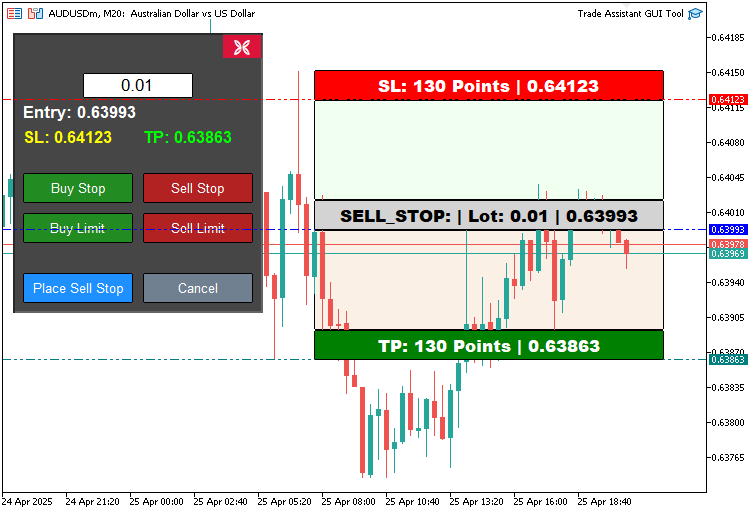
Assim, podemos criar dinamicamente a ferramenta de preço correspondente. O próximo passo é torná-la interativa, permitindo que seus elementos sejam deslocados pelo gráfico. Para isso, aplicamos a lógica a seguir no manipulador de eventos OnChartEvent.
//+------------------------------------------------------------------+
//| Chart event handler                                              |
//+------------------------------------------------------------------+
int prevMouseState = 0; //--- Variable to track previous mouse state

int mlbDownX1 = 0, mlbDownY1 = 0, mlbDownXD_R1 = 0, mlbDownYD_R1 = 0; //--- Variables for mouse down coordinates for REC1
int mlbDownX2 = 0, mlbDownY2 = 0, mlbDownXD_R2 = 0, mlbDownYD_R2 = 0; //--- Variables for mouse down coordinates for REC2
int mlbDownX3 = 0, mlbDownY3 = 0, mlbDownXD_R3 = 0, mlbDownYD_R3 = 0; //--- Variables for mouse down coordinates for REC3
int mlbDownX4 = 0, mlbDownY4 = 0, mlbDownXD_R4 = 0, mlbDownYD_R4 = 0; //--- Variables for mouse down coordinates for REC4
int mlbDownX5 = 0, mlbDownY5 = 0, mlbDownXD_R5 = 0, mlbDownYD_R5 = 0; //--- Variables for mouse down coordinates for REC5

bool movingState_R1 = false; //--- Flag for REC1 movement state
bool movingState_R3 = false; //--- Flag for REC3 movement state
bool movingState_R5 = false; //--- Flag for REC5 movement state
Primeiro, definimos as variáveis usadas por OnChartEvent para habilitar o arraste dos elementos da nossa Trade Assistant Tool. prevMouseState monitora as alterações no estado do mouse, enquanto mlbDownX1, mlbDownY1, mlbDownXD_R1 e mlbDownYD_R1, assim como as variáveis equivalentes para REC2 a REC5, armazenam as coordenadas do mouse e dos retângulos durante os cliques em REC1 (TP), REC3 (entrada) e REC5 (SL). Os sinalizadores lógicos movingState_R1, movingState_R3 e movingState_R5 indicam se esses retângulos estão sendo arrastados. Com essas variáveis de controle, podemos controlar o movimento dos elementos da ferramenta de preço.
if(id == CHARTEVENT_MOUSE_MOVE && tool_visible) { //--- Handle mouse move events when tool is visible
   int MouseD_X = (int)lparam; //--- Get mouse x-coordinate
   int MouseD_Y = (int)dparam; //--- Get mouse y-coordinate
   int MouseState = (int)sparam; //--- Get mouse state

   int XD_R1 = (int)ObjectGetInteger(0, REC1, OBJPROP_XDISTANCE); //--- Get REC1 x-distance
   int YD_R1 = (int)ObjectGetInteger(0, REC1, OBJPROP_YDISTANCE); //--- Get REC1 y-distance
   int XS_R1 = (int)ObjectGetInteger(0, REC1, OBJPROP_XSIZE);     //--- Get REC1 x-size
   int YS_R1 = (int)ObjectGetInteger(0, REC1, OBJPROP_YSIZE);     //--- Get REC1 y-size

   int XD_R2 = (int)ObjectGetInteger(0, REC2, OBJPROP_XDISTANCE); //--- Get REC2 x-distance
   int YD_R2 = (int)ObjectGetInteger(0, REC2, OBJPROP_YDISTANCE); //--- Get REC2 y-distance
   int XS_R2 = (int)ObjectGetInteger(0, REC2, OBJPROP_XSIZE);     //--- Get REC2 x-size
   int YS_R2 = (int)ObjectGetInteger(0, REC2, OBJPROP_YSIZE);     //--- Get REC2 y-size

   int XD_R3 = (int)ObjectGetInteger(0, REC3, OBJPROP_XDISTANCE); //--- Get REC3 x-distance
   int YD_R3 = (int)ObjectGetInteger(0, REC3, OBJPROP_YDISTANCE); //--- Get REC3 y-distance
   int XS_R3 = (int)ObjectGetInteger(0, REC3, OBJPROP_XSIZE);     //--- Get REC3 x-size
   int YS_R3 = (int)ObjectGetInteger(0, REC3, OBJPROP_YSIZE);     //--- Get REC3 y-size

   int XD_R4 = (int)ObjectGetInteger(0, REC4, OBJPROP_XDISTANCE); //--- Get REC4 x-distance
   int YD_R4 = (int)ObjectGetInteger(0, REC4, OBJPROP_YDISTANCE); //--- Get REC4 y-distance
   int XS_R4 = (int)ObjectGetInteger(0, REC4, OBJPROP_XSIZE);     //--- Get REC4 x-size
   int YS_R4 = (int)ObjectGetInteger(0, REC4, OBJPROP_YSIZE);     //--- Get REC4 y-size

   int XD_R5 = (int)ObjectGetInteger(0, REC5, OBJPROP_XDISTANCE); //--- Get REC5 x-distance
   int YD_R5 = (int)ObjectGetInteger(0, REC5, OBJPROP_YDISTANCE); //--- Get REC5 y-distance
   int XS_R5 = (int)ObjectGetInteger(0, REC5, OBJPROP_XSIZE);     //--- Get REC5 x-size
   int YS_R5 = (int)ObjectGetInteger(0, REC5, OBJPROP_YSIZE);     //--- Get REC5 y-size

   if(prevMouseState == 0 && MouseState == 1) { //--- Check for mouse button down
      mlbDownX1 = MouseD_X; //--- Store mouse x-coordinate for REC1
      mlbDownY1 = MouseD_Y; //--- Store mouse y-coordinate for REC1
      mlbDownXD_R1 = XD_R1; //--- Store REC1 x-distance
      mlbDownYD_R1 = YD_R1; //--- Store REC1 y-distance

      mlbDownX2 = MouseD_X; //--- Store mouse x-coordinate for REC2
      mlbDownY2 = MouseD_Y; //--- Store mouse y-coordinate for REC2
      mlbDownXD_R2 = XD_R2; //--- Store REC2 x-distance
      mlbDownYD_R2 = YD_R2; //--- Store REC2 y-distance

      mlbDownX3 = MouseD_X; //--- Store mouse x-coordinate for REC3
      mlbDownY3 = MouseD_Y; //--- Store mouse y-coordinate for REC3
      mlbDownXD_R3 = XD_R3; //--- Store REC3 x-distance
      mlbDownYD_R3 = YD_R3; //--- Store REC3 y-distance

      mlbDownX4 = MouseD_X; //--- Store mouse x-coordinate for REC4
      mlbDownY4 = MouseD_Y; //--- Store mouse y-coordinate for REC4
      mlbDownXD_R4 = XD_R4; //--- Store REC4 x-distance
      mlbDownYD_R4 = YD_R4; //--- Store REC4 y-distance

      mlbDownX5 = MouseD_X; //--- Store mouse x-coordinate for REC5
      mlbDownY5 = MouseD_Y; //--- Store mouse y-coordinate for REC5
      mlbDownXD_R5 = XD_R5; //--- Store REC5 x-distance
      mlbDownYD_R5 = YD_R5; //--- Store REC5 y-distance

      if(MouseD_X >= XD_R1 && MouseD_X <= XD_R1 + XS_R1 && //--- Check if mouse is within REC1 bounds
         MouseD_Y >= YD_R1 && MouseD_Y <= YD_R1 + YS_R1) {
         movingState_R1 = true;                            //--- Enable REC1 movement
      }
      if(MouseD_X >= XD_R3 && MouseD_X <= XD_R3 + XS_R3 && //--- Check if mouse is within REC3 bounds
         MouseD_Y >= YD_R3 && MouseD_Y <= YD_R3 + YS_R3) {
         movingState_R3 = true;                            //--- Enable REC3 movement
      }
      if(MouseD_X >= XD_R5 && MouseD_X <= XD_R5 + XS_R5 && //--- Check if mouse is within REC5 bounds
         MouseD_Y >= YD_R5 && MouseD_Y <= YD_R5 + YS_R5) {
         movingState_R5 = true;                            //--- Enable REC5 movement
      }
   }
   if(movingState_R1) {                                                                        //--- Handle REC1 (TP) movement
      ChartSetInteger(0, CHART_MOUSE_SCROLL, false);                                           //--- Disable chart scrolling
      bool canMove = false;                                                                    //--- Flag to check if movement is valid
      if(selected_order_type == "BUY_STOP" || selected_order_type == "BUY_LIMIT") {            //--- Check for buy orders
         if(YD_R1 + YS_R1 < YD_R3) {                                                           //--- Ensure TP is above entry for buy orders
            canMove = true;                                                                    //--- Allow movement
            ObjectSetInteger(0, REC1, OBJPROP_YDISTANCE, mlbDownYD_R1 + MouseD_Y - mlbDownY1); //--- Update REC1 y-position
            ObjectSetInteger(0, REC2, OBJPROP_YDISTANCE, YD_R1 + YS_R1);                       //--- Update REC2 y-position
            ObjectSetInteger(0, REC2, OBJPROP_YSIZE, YD_R3 - (YD_R1 + YS_R1));                 //--- Update REC2 y-size
         }
      }
      else {                                                                                   //--- Handle sell orders
         if(YD_R1 > YD_R3 + YS_R3) {                                                           //--- Ensure TP is below entry for sell orders
            canMove = true;                                                                    //--- Allow movement
            ObjectSetInteger(0, REC1, OBJPROP_YDISTANCE, mlbDownYD_R1 + MouseD_Y - mlbDownY1); //--- Update REC1 y-position
            ObjectSetInteger(0, REC4, OBJPROP_YDISTANCE, YD_R3 + YS_R3);                       //--- Update REC4 y-position
            ObjectSetInteger(0, REC4, OBJPROP_YSIZE, YD_R1 - (YD_R3 + YS_R3));                 //--- Update REC4 y-size
         }
      }

      if(canMove) {           //--- If movement is valid
         datetime dt_TP = 0;  //--- Variable for TP time
         double price_TP = 0; //--- Variable for TP price
         int window = 0;      //--- Chart window

         ChartXYToTimePrice(0, XD_R1, YD_R1 + YS_R1, window, dt_TP, price_TP); //--- Convert chart coordinates to time and price
         ObjectSetInteger(0, TP_HL, OBJPROP_TIME, dt_TP);                      //--- Update TP horizontal line time
         ObjectSetDouble(0, TP_HL, OBJPROP_PRICE, price_TP);                   //--- Update TP horizontal line price

         update_Text(REC1, "TP: " + DoubleToString(MathAbs((Get_Price_d(TP_HL) - Get_Price_d(PR_HL)) / _Point), 0) + " Points | " + Get_Price_s(TP_HL)); //--- Update REC1 text
         update_Text(TP_LABEL, "TP: " + Get_Price_s(TP_HL));                                                                                             //--- Update TP label text
      }

      ChartRedraw(0); //--- Redraw chart
   }

   if(movingState_R5) {                                                                        //--- Handle REC5 (SL) movement
      ChartSetInteger(0, CHART_MOUSE_SCROLL, false);                                           //--- Disable chart scrolling
      bool canMove = false;                                                                    //--- Flag to check if movement is valid
      if(selected_order_type == "BUY_STOP" || selected_order_type == "BUY_LIMIT") {            //--- Check for buy orders
         if(YD_R5 > YD_R4) {                                                                   //--- Ensure SL is below entry for buy orders
            canMove = true;                                                                    //--- Allow movement
            ObjectSetInteger(0, REC5, OBJPROP_YDISTANCE, mlbDownYD_R5 + MouseD_Y - mlbDownY5); //--- Update REC5 y-position
            ObjectSetInteger(0, REC4, OBJPROP_YDISTANCE, YD_R3 + YS_R3);                       //--- Update REC4 y-position
            ObjectSetInteger(0, REC4, OBJPROP_YSIZE, YD_R5 - (YD_R3 + YS_R3));                 //--- Update REC4 y-size
         }
      }
      else {                                                                                   //--- Handle sell orders
         if(YD_R5 + YS_R5 < YD_R3) {                                                           //--- Ensure SL is above entry for sell orders
            canMove = true;                                                                    //--- Allow movement
            ObjectSetInteger(0, REC5, OBJPROP_YDISTANCE, mlbDownYD_R5 + MouseD_Y - mlbDownY5); //--- Update REC5 y-position
            ObjectSetInteger(0, REC2, OBJPROP_YDISTANCE, YD_R5 + YS_R5);                       //--- Update REC2 y-position
            ObjectSetInteger(0, REC2, OBJPROP_YSIZE, YD_R3 - (YD_R5 + YS_R5));                 //--- Update REC2 y-size
         }
      }

      if(canMove) {           //--- If movement is valid
         datetime dt_SL = 0;  //--- Variable for SL time
         double price_SL = 0; //--- Variable for SL price
         int window = 0;      //--- Chart window

         ChartXYToTimePrice(0, XD_R5, YD_R5 + YS_R5, window, dt_SL, price_SL); //--- Convert chart coordinates to time and price
         ObjectSetInteger(0, SL_HL, OBJPROP_TIME, dt_SL);                      //--- Update SL horizontal line time
         ObjectSetDouble(0, SL_HL, OBJPROP_PRICE, price_SL);                   //--- Update SL horizontal line price

         update_Text(REC5, "SL: " + DoubleToString(MathAbs((Get_Price_d(PR_HL) - Get_Price_d(SL_HL)) / _Point), 0) + " Points | " + Get_Price_s(SL_HL)); //--- Update REC5 text
         update_Text(SL_LABEL, "SL: " + Get_Price_s(SL_HL));                                                                                             //--- Update SL label text
      }

      ChartRedraw(0); //--- Redraw chart
   }

   if(movingState_R3) {                                                                  //--- Handle REC3 (Entry) movement
      ChartSetInteger(0, CHART_MOUSE_SCROLL, false);                                     //--- Disable chart scrolling
      ObjectSetInteger(0, REC3, OBJPROP_XDISTANCE, mlbDownXD_R3 + MouseD_X - mlbDownX3); //--- Update REC3 x-position
      ObjectSetInteger(0, REC3, OBJPROP_YDISTANCE, mlbDownYD_R3 + MouseD_Y - mlbDownY3); //--- Update REC3 y-position

      ObjectSetInteger(0, REC1, OBJPROP_XDISTANCE, mlbDownXD_R1 + MouseD_X - mlbDownX1); //--- Update REC1 x-position
      ObjectSetInteger(0, REC1, OBJPROP_YDISTANCE, mlbDownYD_R1 + MouseD_Y - mlbDownY1); //--- Update REC1 y-position

      ObjectSetInteger(0, REC2, OBJPROP_XDISTANCE, mlbDownXD_R2 + MouseD_X - mlbDownX2); //--- Update REC2 x-position
      ObjectSetInteger(0, REC2, OBJPROP_YDISTANCE, mlbDownYD_R2 + MouseD_Y - mlbDownY2); //--- Update REC2 y-position

      ObjectSetInteger(0, REC4, OBJPROP_XDISTANCE, mlbDownXD_R4 + MouseD_X - mlbDownX4); //--- Update REC4 x-position
      ObjectSetInteger(0, REC4, OBJPROP_YDISTANCE, mlbDownYD_R4 + MouseD_Y - mlbDownY4); //--- Update REC4 y-position

      ObjectSetInteger(0, REC5, OBJPROP_XDISTANCE, mlbDownXD_R5 + MouseD_X - mlbDownX5); //--- Update REC5 x-position
      ObjectSetInteger(0, REC5, OBJPROP_YDISTANCE, mlbDownYD_R5 + MouseD_Y - mlbDownY5); //--- Update REC5 y-position

      datetime dt_PRC = 0, dt_SL1 = 0, dt_TP1 = 0;        //--- Variables for time
      double price_PRC = 0, price_SL1 = 0, price_TP1 = 0; //--- Variables for price
      int window = 0;                                     //--- Chart window

      ChartXYToTimePrice(0, XD_R3, YD_R3 + YS_R3, window, dt_PRC, price_PRC); //--- Convert REC3 coordinates to time and price
      ChartXYToTimePrice(0, XD_R5, YD_R5 + YS_R5, window, dt_SL1, price_SL1); //--- Convert REC5 coordinates to time and price
      ChartXYToTimePrice(0, XD_R1, YD_R1 + YS_R1, window, dt_TP1, price_TP1); //--- Convert REC1 coordinates to time and price

      ObjectSetInteger(0, PR_HL, OBJPROP_TIME, dt_PRC);    //--- Update entry horizontal line time
      ObjectSetDouble(0, PR_HL, OBJPROP_PRICE, price_PRC); //--- Update entry horizontal line price

      ObjectSetInteger(0, TP_HL, OBJPROP_TIME, dt_TP1);    //--- Update TP horizontal line time
      ObjectSetDouble(0, TP_HL, OBJPROP_PRICE, price_TP1); //--- Update TP horizontal line price

      ObjectSetInteger(0, SL_HL, OBJPROP_TIME, dt_SL1);    //--- Update SL horizontal line time
      ObjectSetDouble(0, SL_HL, OBJPROP_PRICE, price_SL1); //--- Update SL horizontal line price

      update_Text(REC1, "TP: " + DoubleToString(MathAbs((Get_Price_d(TP_HL) - Get_Price_d(PR_HL)) / _Point), 0) + " Points | " + Get_Price_s(TP_HL)); //--- Update REC1 text
      update_Text(REC3, selected_order_type + ": | Lot: " + DoubleToString(lot_size, 2) + " | " + Get_Price_s(PR_HL));                                //--- Update REC3 text
      update_Text(REC5, "SL: " + DoubleToString(MathAbs((Get_Price_d(PR_HL) - Get_Price_d(SL_HL)) / _Point), 0) + " Points | " + Get_Price_s(SL_HL)); //--- Update REC5 text
      update_Text(PRICE_LABEL, "Entry: " + Get_Price_s(PR_HL));                                                                                       //--- Update entry label text
      update_Text(SL_LABEL, "SL: " + Get_Price_s(SL_HL));                                                                                             //--- Update SL label text
      update_Text(TP_LABEL, "TP: " + Get_Price_s(TP_HL));                                                                                             //--- Update TP label text

      ChartRedraw(0); //--- Redraw chart
   }

   if(MouseState == 0) {                            //--- Check if mouse button is released
      movingState_R1 = false;                       //--- Disable REC1 movement
      movingState_R3 = false;                       //--- Disable REC3 movement
      movingState_R5 = false;                       //--- Disable REC5 movement
      ChartSetInteger(0, CHART_MOUSE_SCROLL, true); //--- Enable chart scrolling
   }
   prevMouseState = MouseState;                     //--- Update previous mouse state
}
Aqui ampliamos a função OnChartEvent para tratar os movimentos do mouse durante o arraste dos objetos do gráfico quando tool_visible é true e id é igual a CHARTEVENT_MOUSE_MOVE. Obtemos MouseD_X, MouseD_Y e MouseState a partir dos parâmetros lparam, dparam e sparam e usamos ObjectGetInteger para obter a posição e as dimensões de cada objeto (XD_R1, YD_R1, XS_R1 e YS_R1 para REC1, e de forma equivalente para REC2 a REC5).
Quando o botão do mouse é pressionado, isto é, quando prevMouseState é igual a 0 e MouseState passa a 1, armazenamos as coordenadas do mouse em mlbDownX1 e mlbDownY1 e as posições dos retângulos em mlbDownXD_R1 e mlbDownYD_R1, bem como nas variáveis correspondentes de REC2 a REC5. Se o clique ocorrer dentro dos limites de REC1, REC3 ou REC5, definimos movingState_R1, movingState_R3 ou movingState_R5 como true, respectivamente.
Quando movingState_R1 (TP) está ativo, desativamos a rolagem do gráfico com ChartSetInteger e verificamos a posição do Take Profit: acima da entrada para BUY_STOP e BUY_LIMIT e abaixo da entrada para ordens de venda. Em seguida, atualizamos as posições e dimensões de REC1 e REC2/REC4 com ObjectSetInteger, convertemos as coordenadas em preço com ChartXYToTimePrice, atualizamos TP_HL com ObjectSetDouble e também atualizamos os textos com update_Text, usando Get_Price_d, Get_Price_s, DoubleToString e MathAbs para obter, formatar e calcular os valores necessários.
De forma semelhante, quando movingState_R5 (SL) está ativo, ajustamos REC5 e REC4/REC2, atualizamos SL_HL e os textos correspondentes. Já em movingState_R3 (entrada), deslocamos todos os retângulos e atualizamos PR_HL, TP_HL, SL_HL e os respectivos textos.
Quando o botão do mouse é liberado, ou seja, quando MouseState é igual a 0, redefinimos os sinalizadores movingState, reativamos a rolagem do gráfico e atualizamos prevMouseState. Em seguida, chamamos ChartRedraw para refletir as alterações no gráfico. Por fim, precisamos garantir que todos os objetos sejam removidos quando o programa for encerrado e atualizar o tamanho do lote a cada tick para refletir as alterações feitas pelo usuário. Embora essa última etapa não seja crítica, ela mantém o tamanho do lote sincronizado com o valor informado pelo usuário.
//+------------------------------------------------------------------+
//| Expert deinitialization function                                 |
//+------------------------------------------------------------------+
void OnDeinit(const int reason) {
   deleteObjects(); //--- Delete tool objects
   deletePanel();   //--- Delete control panel objects
}

//+------------------------------------------------------------------+
//| Expert tick function                                             |
//+------------------------------------------------------------------+
void OnTick() {
   // Update lot size from edit field
   string lot_text = ObjectGetString(0, LOT_EDIT, OBJPROP_TEXT); //--- Get lot size text from edit field
   double new_lot = StringToDouble(lot_text);                    //--- Convert lot size text to double
   if(new_lot > 0) lot_size = new_lot;                           //--- Update lot size if valid
}
Aqui implementamos dois manipuladores de eventos importantes para nossa ferramenta: OnDeinit e OnTick. Na função OnDeinit, executada quando o EA é removido do gráfico, chamamos deleteObjects para excluir objetos como REC1 a REC5, TP_HL, SL_HL e PR_HL. Também chamamos deletePanel para remover os objetos do painel de controle, como PANEL_BG, LOT_EDIT e botões como BUY_STOP_BTN, garantindo o encerramento correto do programa.
Na função OnTick, executada a cada atualização de preço, usamos ObjectGetString para obter o texto do campo LOT_EDIT, convertemos esse valor para double com StringToDouble e atualizamos a variável lot_size quando new_lot for positivo. Dessa forma, o tamanho do lote usado pela ferramenta permanece sincronizado com o valor informado pelo usuário.
Após a compilação, obtemos o seguinte resultado.
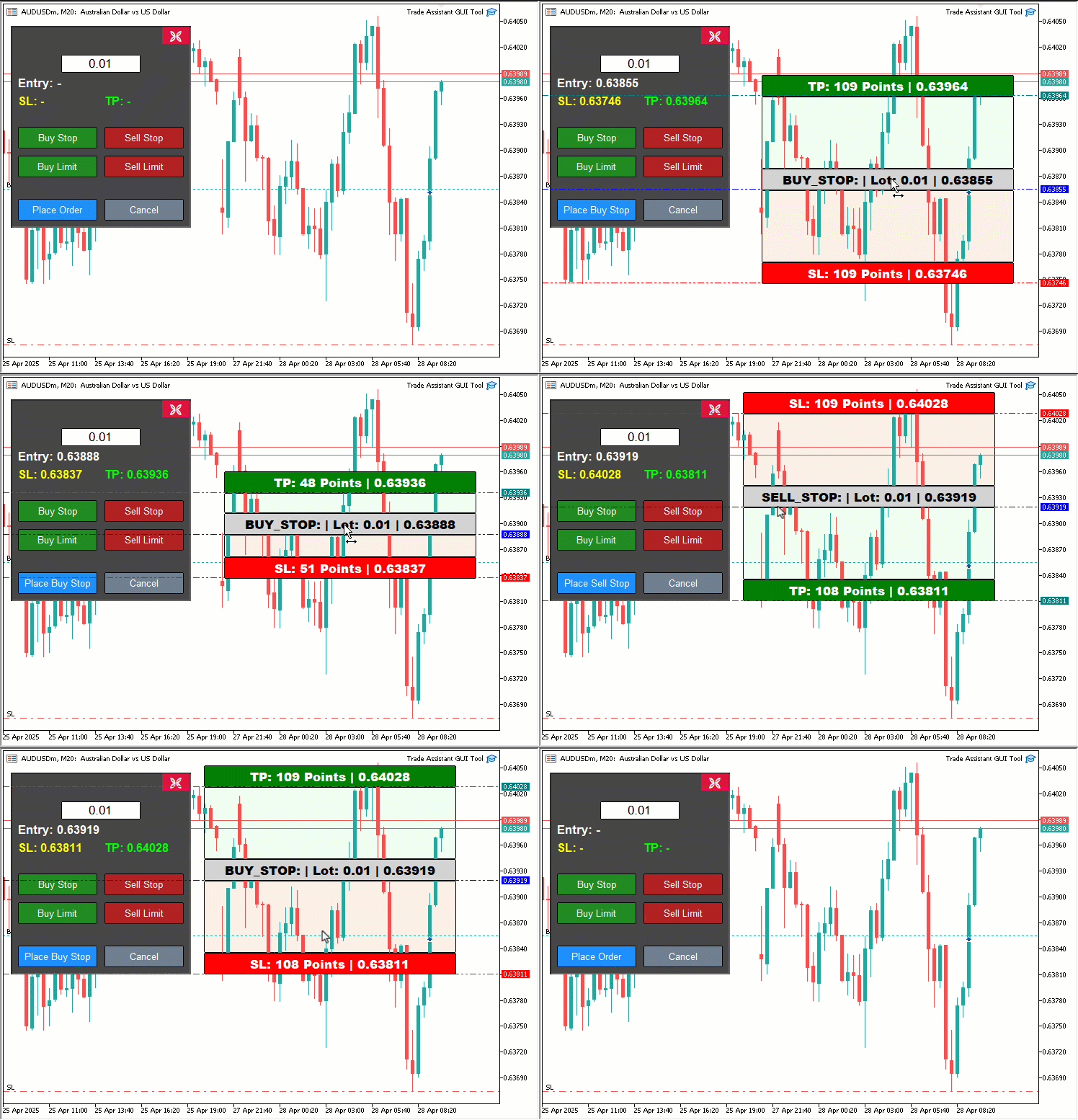
Como podemos ver na visualização, ao clicar em qualquer um dos botões de negociação, a ferramenta de preço correspondente ao tipo de ordem selecionado é criada. À medida que seus elementos são arrastados, os valores são atualizados em tempo real e os preços aparecem no painel de controle, prontos para serem usados. Ao clicar no botão de envio da ordem, a ordem correspondente é enviada dinamicamente. Agora só precisamos testar o painel para confirmar que tudo funciona corretamente.
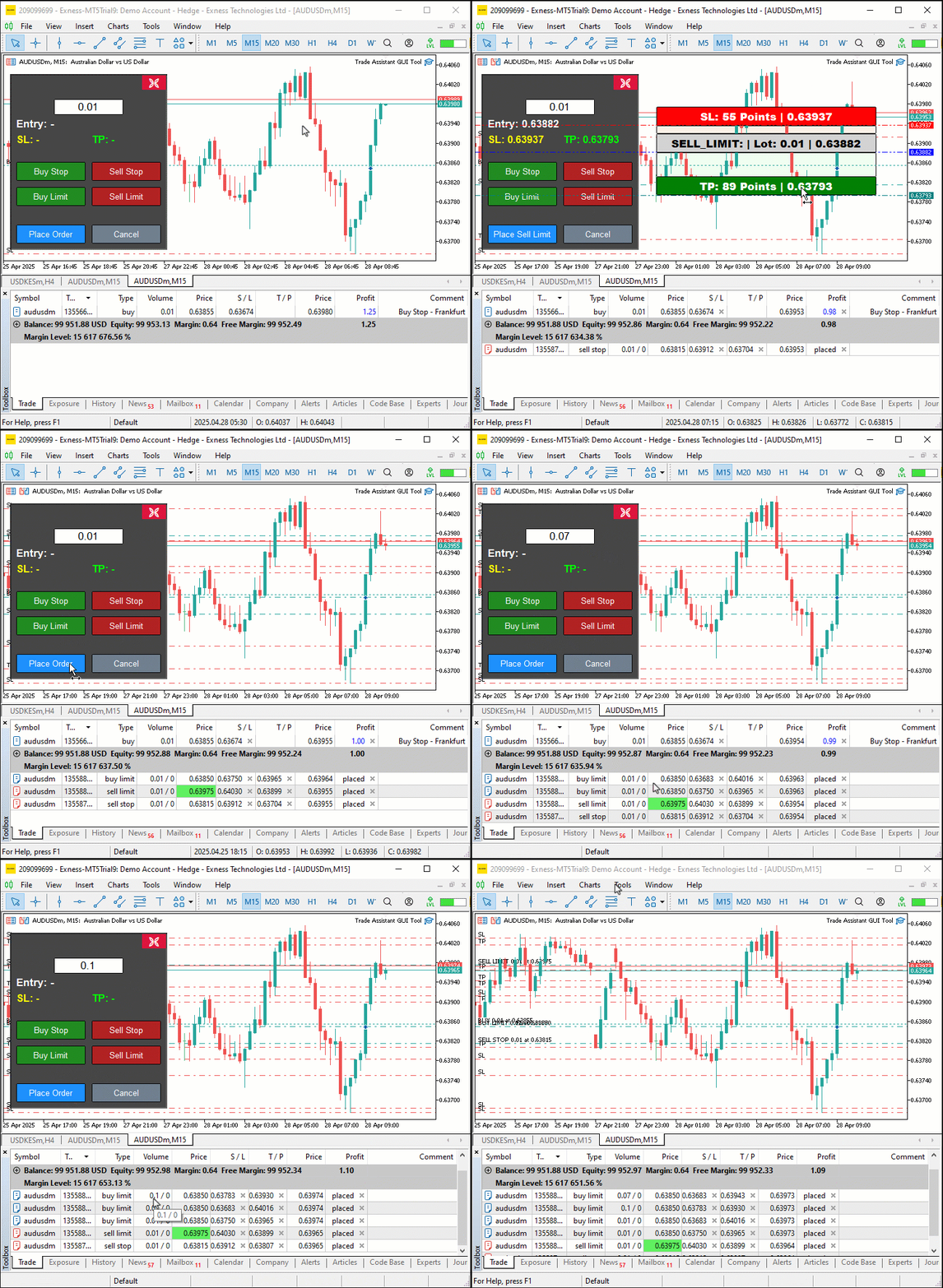
Teste com dados históricos
Realizamos o teste e, abaixo, apresentamos uma visualização resumida em um único arquivo no formato GIF.
Conclusão
Desenvolvemos a ferramenta interativa Trade Assistant Tool em MQL5, combinando precisão visual e controles intuitivos para tornar mais eficiente o envio de ordens pendentes. Demonstramos como criar uma interface gráfica do usuário (GUI) prática com funções como createControlPanel e placeOrder e como garantir sua confiabilidade por meio de uma implementação estruturada e de testes. Você pode adaptar essa ferramenta ao seu próprio estilo de negociação e aumentar a eficiência no envio de ordens. Nos próximos artigos, apresentaremos recursos mais avançados, como gestão de risco e painéis arrastáveis. Até a próxima!
Traduzido do Inglês pela MetaQuotes Ltd.
Artigo original: https://www.mql5.com/en/articles/17931
Aviso: Todos os direitos sobre esses materiais pertencem à MetaQuotes Ltd. É proibida a reimpressão total ou parcial.
Esse artigo foi escrito por um usuário do site e reflete seu ponto de vista pessoal. A MetaQuotes Ltd. não se responsabiliza pela precisão das informações apresentadas nem pelas possíveis consequências decorrentes do uso das soluções, estratégias ou recomendações descritas.

 Ferramentas de negociação em MQL5 (Parte 2): Aprimorando o assistente de negociação interativo com visualização dinâmican
 Desenvolvimento do Kit de Ferramentas de Análise de Price Action (Parte 20): Fluxo Externo (IV) — Correlation Pathfinder
 Recursos do Assistente MQL5 que você precisa conhecer (Parte 63): Uso de padrões dos canais DeMarker e Envelopes
 Redes neurais no trading: Integração da teoria do caos à previsão de séries temporais (Conclusão)

- Aplicativos de negociação gratuitos
- 8 000+ sinais para cópia
- Notícias econômicas para análise dos mercados financeiros
Você concorda com a política do site e com os termos de uso
Novo artigo “Ferramentas de negociação MQL5 (Parte 1): Criação de uma ferramenta interativa e visualizada de assistência à negociação com ordens pendentes ” já foi publicado:
Autor: Allan Munene Mutiiria