

Operando com o Calendário Econômico do MQL5 (Parte 6): Automatizando a Entrada de Trades com Análise de Eventos de Notícias e Temporizadores de Contagem Regressiva
 267
267
 3
3

Introdução
Neste artigo, damos o próximo passo em nossa série sobre o Calendário Econômico do MQL5 automatizando entradas de trade com base em análise de notícias em tempo real. Com base nas melhorias anteriores do dashboard (Parte 5), agora integramos uma lógica de negociação que examina eventos de notícias usando filtros definidos pelo usuário e deslocamentos de tempo, compara valores de previsão e valores anteriores e executa automaticamente ordens BUY ou SELL dependendo das expectativas do mercado. Também implementamos temporizadores dinâmicos de contagem regressiva que exibem o tempo restante até a divulgação da notícia e redefinem o sistema após a execução, garantindo que nossa estratégia de trading permaneça responsiva às mudanças nas condições do mercado. Estruturamos o artigo por meio dos seguintes tópicos:
- Compreendendo os Requisitos da Lógica de Trading
- Implementando a Lógica de Trading em MQL5
- Criando e Gerenciando Temporizadores de Contagem Regressiva
- Testando a Lógica de Trading
- Conclusão
Vamos mergulhar e explorar como esses componentes se unem para automatizar a entrada de trades com precisão e confiabilidade.
Compreendendo os Requisitos da Lógica de Trading
Para nosso sistema de negociação automatizado, o primeiro passo será identificar quais eventos de notícias são candidatos adequados para uma negociação. Definiremos um evento candidato como aquele que ocorre dentro de uma janela de tempo específica — determinada por entradas de deslocamento definidas pelo usuário — em relação ao horário programado de sua divulgação. Também incluiremos entradas para modos de negociação, como negociar antes da divulgação da notícia. No modo "trade before", por exemplo, um evento será qualificado somente se o horário atual estiver entre o horário programado da notícia menos o deslocamento (por exemplo, 5 minutos) e o horário real da divulgação do evento. Assim, negociaremos 5 minutos antes da divulgação real.
A filtragem é fundamental para garantir que consideremos apenas notícias relevantes. Nosso sistema utilizará vários filtros: um filtro de moeda para focar em pares de moedas selecionados, um filtro de impacto para limitar eventos a um nível de importância escolhido e um filtro de tempo que restringe eventos àqueles dentro de um intervalo geral predefinido. O usuário seleciona isso a partir do dashboard. Essa filtragem em camadas ajudará a minimizar o ruído e garantir que apenas os eventos de notícias mais pertinentes sejam processados.
Uma vez que um evento passe pelos critérios de filtragem, a lógica de negociação comparará os principais pontos de dados do evento de notícia — especificamente o valor de previsão em relação ao valor anterior. Se ambos os valores estiverem disponíveis e diferentes de zero, e se a previsão for maior que o valor anterior, o sistema abrirá uma ordem BUY; se a previsão for menor, abrirá uma ordem SELL. Se qualquer um dos valores estiver ausente ou se forem iguais, o evento será ignorado. Esse processo de decisão permitirá que o EA converta dados brutos de notícias em sinais claros de negociação, automatizando a entrada de trades com precisão. O processo de tomada de decisão aqui e a direção da negociação dependem inteiramente do usuário, mas para fins deste artigo e demonstração utilizaremos o blueprint acima.
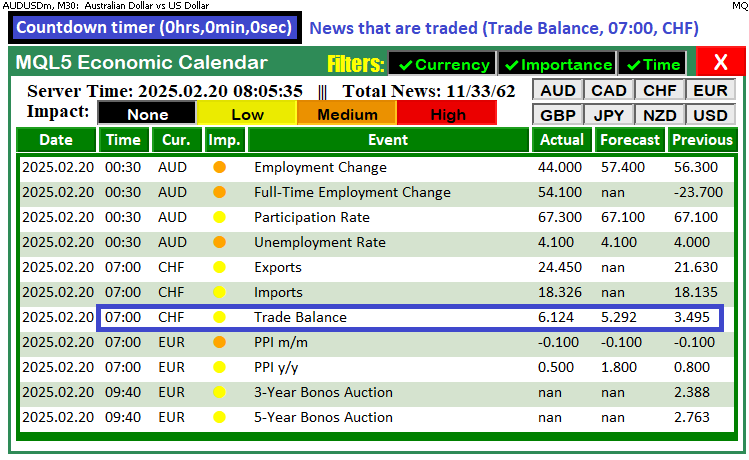
Para visualizar os processos, utilizaremos prints de depuração e também criaremos botões e rótulos no gráfico, logo acima do dashboard, para exibir as notícias negociadas e o tempo restante antes de sua divulgação. Aqui está o blueprint completo.
Implementando a Lógica de Trading em MQL5
Para implementar a lógica de trading em MQL5, teremos que incluir os arquivos de negociação que contêm os métodos de trading e definir algumas entradas que permitirão controle do usuário sobre o sistema, além de variáveis globais que reutilizaremos ao longo do programa. Para isso, no escopo global, definimos esses elementos.
#include <Trade\Trade.mqh> // Trading library for order execution
CTrade trade;             // Global trade object


//================== Trade Settings ==================//
// Trade mode options:
enum ETradeMode {
   TRADE_BEFORE,     // Trade before the news event occurs
   TRADE_AFTER,      // Trade after the news event occurs
   NO_TRADE,         // Do not trade
   PAUSE_TRADING     // Pause trading activity (no trades until resumed)
};
input ETradeMode tradeMode      = TRADE_BEFORE; // Choose the trade mode

// Trade offset inputs:
input int        tradeOffsetHours   = 12;         // Offset hours (e.g., 12 hours)
input int        tradeOffsetMinutes = 5;          // Offset minutes (e.g., 5 minutes before)
input int        tradeOffsetSeconds = 0;          // Offset seconds
input double     tradeLotSize       = 0.01;       // Lot size for the trade

//================== Global Trade Control ==================//
// Once a trade is executed for one news event, no further trades occur.
bool tradeExecuted = false;
// Store the traded event’s scheduled news time for the post–trade countdown.
datetime tradedNewsTime = 0;
// Global array to store event IDs that have already triggered a trade.
int triggeredNewsEvents[];
No escopo global, incluímos a biblioteca "Trade\Trade.mqh" utilizando #include para habilitar a execução de ordens e declaramos um objeto global "CTrade" chamado "trade" para processar operações. Definimos um tipo enumerado "ETradeMode" com as opções "TRADE_BEFORE", "TRADE_AFTER", "NO_TRADE" e "PAUSE_TRADING", e usamos a variável de entrada "tradeMode" (definida por padrão como "TRADE_BEFORE", que utilizaremos no programa) para determinar quando as negociações devem ser abertas em relação aos eventos de notícias. Além disso, configuramos variáveis input "tradeOffsetHours", "tradeOffsetMinutes", "tradeOffsetSeconds" e "tradeLotSize" para especificar o deslocamento de tempo e o tamanho do trade, enquanto as variáveis globais "tradeExecuted" (booleano), "tradedNewsTime" (do tipo <a4>datetime</a4>) e o array "triggeredNewsEvents" (array de inteiros) ajudam a controlar a execução das negociações e evitar que o mesmo evento de notícia seja negociado mais de uma vez. Podemos então incorporar a lógica de negociação em uma função.
//--- Function to scan for news events and execute trades based on selected criteria
//--- It handles both pre-trade candidate selection and post-trade countdown updates
void CheckForNewsTrade() {
   //--- Log the call to CheckForNewsTrade with the current server time
   Print("CheckForNewsTrade called at: ", TimeToString(TimeTradeServer(), TIME_SECONDS));

   //--- If trading is disabled (either NO_TRADE or PAUSE_TRADING), remove countdown objects and exit
   if(tradeMode == NO_TRADE || tradeMode == PAUSE_TRADING) {
      //--- Check if a countdown object exists on the chart
      if(ObjectFind(0, "NewsCountdown") >= 0) {
         //--- Delete the countdown object from the chart
         ObjectDelete(0, "NewsCountdown");
         //--- Log that the trading is disabled and the countdown has been removed
         Print("Trading disabled. Countdown removed.");
      }
      //--- Exit the function since trading is not allowed
      return;
   }
   //--- Begin pre-trade candidate selection section

   //--- Define the lower bound of the event time range based on the user-defined start time offset
   datetime lowerBound = currentTime - PeriodSeconds(start_time);
   //--- Define the upper bound of the event time range based on the user-defined end time offset
   datetime upperBound = currentTime + PeriodSeconds(end_time);
   //--- Log the overall event time range for debugging purposes
   Print("Event time range: ", TimeToString(lowerBound, TIME_SECONDS), " to ", TimeToString(upperBound, TIME_SECONDS));

   //--- Retrieve historical calendar values (news events) within the defined time range
   MqlCalendarValue values[];
   int totalValues = CalendarValueHistory(values, lowerBound, upperBound, NULL, NULL);
   //--- Log the total number of events found in the specified time range
   Print("Total events found: ", totalValues);
   //--- If no events are found, delete any existing countdown and exit the function
   if(totalValues <= 0) {
      if(ObjectFind(0, "NewsCountdown") >= 0)
         ObjectDelete(0, "NewsCountdown");
      return;
   }
}
Aqui definimos a função "CheckForNewsTrade", que examina eventos de notícias e executa trades com base nos critérios selecionados. Começamos registrando sua chamada com a função Print, exibindo o horário atual do servidor obtido por meio da função TimeTradeServer. Em seguida, verificamos se o trading está desativado comparando a variável "tradeMode" com os modos "NO_TRADE" ou "PAUSE_TRADING"; se estiver, utilizamos a função ObjectFind para verificar se existe um objeto de contagem regressiva chamado "NewsCountdown" e, caso exista, o excluímos usando ObjectDelete antes de sair da função.
Em seguida, a função calcula o intervalo geral de tempo dos eventos definindo "lowerBound" como o horário atual menos o número de segundos da entrada "start_time" (convertido via função PeriodSeconds) e "upperBound" como o horário atual mais os segundos da entrada "end_time". Esse intervalo geral de tempo é então registrado usando Print. Por fim, a função chama CalendarValueHistory para recuperar todos os eventos de notícias dentro do intervalo de tempo definido; se nenhum evento for encontrado, o sistema remove qualquer objeto de contagem regressiva existente e encerra a função, preparando o sistema para a próxima seleção de evento candidato e execução de trade.
//--- Initialize candidate event variables for trade selection
datetime candidateEventTime = 0;
string candidateEventName = "";
string candidateTradeSide = "";
int candidateEventID = -1;

//--- Loop through all retrieved events to evaluate each candidate for trading
for(int i = 0; i < totalValues; i++) {
   //--- Declare an event structure to hold event details
   MqlCalendarEvent event;
   //--- Attempt to populate the event structure by its ID; if it fails, skip to the next event
   if(!CalendarEventById(values[i].event_id, event))
      continue;

   //----- Apply Filters -----

   //--- If currency filtering is enabled, check if the event's currency matches the selected filters
   if(enableCurrencyFilter) {
      //--- Declare a country structure to hold country details
      MqlCalendarCountry country;
      //--- Populate the country structure based on the event's country ID
      CalendarCountryById(event.country_id, country);
      //--- Initialize a flag to determine if there is a matching currency
      bool currencyMatch = false;
      //--- Loop through each selected currency filter
      for(int k = 0; k < ArraySize(curr_filter_selected); k++) {
         //--- Check if the event's country currency matches the current filter selection
         if(country.currency == curr_filter_selected[k]) {
            //--- Set flag to true if a match is found and break out of the loop
            currencyMatch = true;
            break;
         }
      }
      //--- If no matching currency is found, log the skip and continue to the next event
      if(!currencyMatch) {
         Print("Event ", event.name, " skipped due to currency filter.");
         continue;
      }
   }

   //--- If importance filtering is enabled, check if the event's impact matches the selected filters
   if(enableImportanceFilter) {
      //--- Initialize a flag to determine if the event's impact matches any filter selection
      bool impactMatch = false;
      //--- Loop through each selected impact filter option
      for(int k = 0; k < ArraySize(imp_filter_selected); k++) {
         //--- Check if the event's importance matches the current filter selection
         if(event.importance == imp_filter_selected[k]) {
            //--- Set flag to true if a match is found and break out of the loop
            impactMatch = true;
            break;
         }
      }
      //--- If no matching impact is found, log the skip and continue to the next event
      if(!impactMatch) {
         Print("Event ", event.name, " skipped due to impact filter.");
         continue;
      }
   }

   //--- If time filtering is enabled and the event time exceeds the upper bound, skip the event
   if(enableTimeFilter && values[i].time > upperBound) {
      Print("Event ", event.name, " skipped due to time filter.");
      continue;
   }

   //--- Check if the event has already triggered a trade by comparing its ID to recorded events
   bool alreadyTriggered = false;
   //--- Loop through the list of already triggered news events
   for(int j = 0; j < ArraySize(triggeredNewsEvents); j++) {
      //--- If the event ID matches one that has been triggered, mark it and break out of the loop
      if(triggeredNewsEvents[j] == values[i].event_id) {
         alreadyTriggered = true;
         break;
      }
   }
   //--- If the event has already triggered a trade, log the skip and continue to the next event
   if(alreadyTriggered) {
      Print("Event ", event.name, " already triggered a trade. Skipping.");
      continue;
   }
Aqui inicializamos variáveis de evento candidato utilizando uma variável datetime ("candidateEventTime"), duas variáveis do tipo "string" ("candidateEventName" e "candidateTradeSide") e uma variável "int" ("candidateEventID") definida como -1. Em seguida, percorremos (loop) cada evento recuperado pela função CalendarValueHistory (armazenado em um array de estruturas MqlCalendarValue) e utilizamos a função CalendarEventById para preencher uma estrutura MqlCalendarEvent com os detalhes do evento.
Em seguida, aplicamos nossos filtros: se o filtro de moeda estiver habilitado, recuperamos a estrutura MqlCalendarCountry correspondente ao evento usando CalendarCountryById e verificamos se o campo "currency" corresponde a alguma entrada no array "curr_filter_selected"; caso contrário, registramos uma mensagem e ignoramos o evento. Da mesma forma, se o filtro de importância estiver habilitado, percorremos o array "imp_filter_selected" para garantir que a importância do evento corresponda a um dos níveis selecionados, registrando e ignorando o evento caso não corresponda.
Por fim, verificamos se o evento já acionou um trade comparando seu ID com aqueles armazenados no array "triggeredNewsEvents"; se já tiver sido utilizado, registramos e ignoramos o evento. Esse loop garante que apenas eventos que atendam a todos os critérios — moeda, impacto, intervalo de tempo e exclusividade — sejam considerados candidatos para execução de trades. Se todos os critérios forem atendidos e houver eventos disponíveis, podemos prosseguir para filtrar o evento pelo timeframe permitido pelo usuário.
//--- For TRADE_BEFORE mode, check if the current time is within the valid window (event time minus offset to event time)
if(tradeMode == TRADE_BEFORE) {
   if(currentTime >= (values[i].time - offsetSeconds) && currentTime < values[i].time) {
      //--- Retrieve the forecast and previous values for the event
      MqlCalendarValue calValue;
      //--- If unable to retrieve calendar values, log the error and skip this event
      if(!CalendarValueById(values[i].id, calValue)) {
         Print("Error retrieving calendar value for event: ", event.name);
         continue;
      }
      //--- Get the forecast value from the calendar data
      double forecast = calValue.GetForecastValue();
      //--- Get the previous value from the calendar data
      double previous = calValue.GetPreviousValue();
      //--- If either forecast or previous is zero, log the skip and continue to the next event
      if(forecast == 0.0 || previous == 0.0) {
         Print("Skipping event ", event.name, " because forecast or previous value is empty.");
         continue;
      }
      //--- If forecast equals previous, log the skip and continue to the next event
      if(forecast == previous) {
         Print("Skipping event ", event.name, " because forecast equals previous.");
         continue;
      }
      //--- If this candidate event is earlier than any previously found candidate, record its details
      if(candidateEventTime == 0 || values[i].time < candidateEventTime) {
         candidateEventTime = values[i].time;
         candidateEventName = event.name;
         candidateEventID = (int)values[i].event_id;
         candidateTradeSide = (forecast > previous) ? "BUY" : "SELL";
         //--- Log the candidate event details including its time and trade side
         Print("Candidate event: ", event.name, " with event time: ", TimeToString(values[i].time, TIME_SECONDS), " Side: ", candidateTradeSide);
      }
   }
}
Aqui avaliamos eventos candidatos quando operamos no modo "TRADE_BEFORE". Verificamos se o horário atual, obtido pela função TimeTradeServer, está dentro da janela válida de negociação, que se estende desde o horário programado do evento menos o deslocamento definido pelo usuário ("offsetSeconds") até o horário exato do evento.
//--- Get the current trading server time
datetime currentTime = TimeTradeServer();
//--- Calculate the offset in seconds based on trade offset hours, minutes, and seconds
int offsetSeconds = tradeOffsetHours * 3600 + tradeOffsetMinutes * 60 + tradeOffsetSeconds;
Se a condição for atendida, recuperamos os valores de previsão e anteriores do evento utilizando a função CalendarValueById para preencher uma estrutura MqlCalendarValue. Se a recuperação falhar, registramos uma mensagem de erro e ignoramos o evento. Em seguida, extraímos os valores de previsão e anteriores usando os métodos "GetForecastValue" e "GetPreviousValue", respectivamente. Se qualquer valor for zero ou se ambos forem iguais, registramos uma mensagem e passamos para o próximo evento para garantir que apenas eventos com dados significativos sejam processados.
Se o evento se qualificar e ocorrer antes de qualquer candidato previamente identificado, atualizamos nossas variáveis de candidato: "candidateEventTime" armazena o horário do evento, "candidateEventName" guarda o nome do evento, "candidateEventID" registra o ID do evento e "candidateTradeSide" determina se a negociação será "BUY" (se a previsão for maior que o valor anterior) ou "SELL" (se a previsão for menor). Por fim, registramos os detalhes do evento candidato selecionado, garantindo que rastreemos o evento válido mais próximo para execução da negociação. Podemos então selecionar o evento para execução do trade.
//--- If a candidate event has been selected and the trade mode is TRADE_BEFORE, attempt to execute the trade
if(tradeMode == TRADE_BEFORE && candidateEventTime > 0) {
   //--- Calculate the target time to start trading by subtracting the offset from the candidate event time
   datetime targetTime = candidateEventTime - offsetSeconds;
   //--- Log the candidate target time for debugging purposes
   Print("Candidate target time: ", TimeToString(targetTime, TIME_SECONDS));
   //--- Check if the current time falls within the trading window (target time to candidate event time)
   if(currentTime >= targetTime && currentTime < candidateEventTime) {
      //--- Loop through events again to get detailed information for the candidate event
      for(int i = 0; i < totalValues; i++) {
         //--- Identify the candidate event by matching its time
         if(values[i].time == candidateEventTime) {
            //--- Declare an event structure to store event details
            MqlCalendarEvent event;

         }
      }
   }
}
Verificamos se um evento candidato foi selecionado e se o modo de negociação é "TRADE_BEFORE" verificando se "candidateEventTime" é maior que zero. Em seguida, calculamos "targetTime" subtraindo o deslocamento definido pelo usuário ("offsetSeconds") do horário programado do evento candidato e registramos esse horário para depuração utilizando a função Print. Depois disso, determinamos se o horário atual está dentro da janela válida de negociação — entre "targetTime" e o horário do evento candidato — e, se estiver, percorremos o array de eventos para identificar o evento candidato comparando seu horário, para então recuperar mais detalhes e executar a negociação.
//--- Attempt to retrieve the event details; if it fails, skip to the next event
if(!CalendarEventById(values[i].event_id, event))
   continue;
//--- If the current time is past the event time, log the skip and continue
if(currentTime >= values[i].time) {
   Print("Skipping candidate ", event.name, " because current time is past event time.");
   continue;
}
//--- Retrieve detailed calendar values for the candidate event
MqlCalendarValue calValue;
//--- If retrieval fails, log the error and skip the candidate
if(!CalendarValueById(values[i].id, calValue)) {
   Print("Error retrieving calendar value for candidate event: ", event.name);
   continue;
}
//--- Get the forecast value for the candidate event
double forecast = calValue.GetForecastValue();
//--- Get the previous value for the candidate event
double previous = calValue.GetPreviousValue();
//--- If forecast or previous is zero, or if they are equal, log the skip and continue
if(forecast == 0.0 || previous == 0.0 || forecast == previous) {
   Print("Skipping candidate ", event.name, " due to invalid forecast/previous values.");
   continue;
}
//--- Construct a news information string for the candidate event
string newsInfo = "Trading on news: " + event.name +
                  " (Time: " + TimeToString(values[i].time, TIME_SECONDS)+")";
//--- Log the news trading information
Print(newsInfo);
//--- Create a label on the chart to display the news trading information
createLabel1("NewsTradeInfo", 355, 22, newsInfo, clrBlue, 11);
Antes de abrir as negociações, tentamos recuperar informações detalhadas do evento candidato usando a função CalendarEventById para preencher uma estrutura MqlCalendarEvent; se essa recuperação falhar, ignoramos imediatamente esse evento. Em seguida, verificamos se o horário atual (obtido por meio de TimeTradeServer) já ultrapassou o horário programado do evento candidato — se isso ocorrer, registramos uma mensagem e ignoramos o processamento desse evento.
Depois disso, recuperamos os valores detalhados do calendário para o evento usando CalendarValueById para preencher uma estrutura MqlCalendarValue, e então extraímos os valores "forecast" e "previous" usando os métodos "GetForecastValue" e "GetPreviousValue", respectivamente; se qualquer valor for zero ou se ambos forem iguais, registramos o motivo e ignoramos o evento candidato. Por fim, construímos uma string contendo informações principais da notícia e registramos essa informação, além de exibi-la no gráfico utilizando a função "createLabel1". O trecho de código da função é apresentado a seguir.
//--- Function to create a label on the chart with specified properties
bool createLabel1(string objName, int x, int y, string text, color txtColor, int fontSize) {
   //--- Attempt to create the label object; if it fails, log the error and return false
   if(!ObjectCreate(0, objName, OBJ_LABEL, 0, 0, 0)) {
      //--- Print error message with the label name and the error code
      Print("Error creating label ", objName, " : ", GetLastError());
      //--- Return false to indicate label creation failure
      return false;
   }
   //--- Set the horizontal distance (X coordinate) for the label
   ObjectSetInteger(0, objName, OBJPROP_XDISTANCE, x);
   //--- Set the vertical distance (Y coordinate) for the label
   ObjectSetInteger(0, objName, OBJPROP_YDISTANCE, y);
   //--- Set the text that will appear on the label
   ObjectSetString(0, objName, OBJPROP_TEXT, text);
   //--- Set the color of the label's text
   ObjectSetInteger(0, objName, OBJPROP_COLOR, txtColor);
   //--- Set the font size for the label text
   ObjectSetInteger(0, objName, OBJPROP_FONTSIZE, fontSize);
   //--- Set the font style to "Arial Bold" for the label text
   ObjectSetString(0, objName, OBJPROP_FONT, "Arial Bold");
   //--- Set the label's anchor corner to the top left of the chart
   ObjectSetInteger(0, objName, OBJPROP_CORNER, CORNER_LEFT_UPPER);
   //--- Redraw the chart to reflect the new label
   ChartRedraw();
   //--- Return true indicating that the label was created successfully
   return true;
}
A lógica dessa função não é nova e não precisamos explicá-la em detalhes, pois já fizemos isso ao criar o dashboard. Portanto, seguimos diretamente para a abertura de trades com base nos valores recebidos.
//--- Initialize a flag to store the result of the trade execution
bool tradeResult = false;
//--- If the candidate trade side is BUY, attempt to execute a buy order
if(candidateTradeSide == "BUY") {
   tradeResult = trade.Buy(tradeLotSize, _Symbol, 0, 0, 0, event.name);
}
//--- Otherwise, if the candidate trade side is SELL, attempt to execute a sell order
else if(candidateTradeSide == "SELL") {
   tradeResult = trade.Sell(tradeLotSize, _Symbol, 0, 0, 0, event.name);
}
//--- If the trade was executed successfully, update the triggered events and trade flags
if(tradeResult) {
   Print("Trade executed for candidate event: ", event.name, " Side: ", candidateTradeSide);
   int size = ArraySize(triggeredNewsEvents);
   ArrayResize(triggeredNewsEvents, size + 1);
   triggeredNewsEvents[size] = (int)values[i].event_id;
   tradeExecuted = true;
   tradedNewsTime = values[i].time;
} else {
   //--- If trade execution failed, log the error message with the error code
   Print("Trade execution failed for candidate event: ", event.name, " Error: ", GetLastError());
}
//--- Break out of the loop after processing the candidate event
break;
Primeiro, inicializamos uma flag booleana "tradeResult" para armazenar o resultado da tentativa de negociação. Em seguida, verificamos "candidateTradeSide" — se for "BUY", chamamos a função "trade.Buy" com o "tradeLotSize" especificado, o símbolo (_Symbol) e usamos o nome do evento como comentário para garantir unicidade e facilitar a identificação; se "candidateTradeSide" for "SELL", chamamos de forma semelhante "trade.Sell". Se o trade for executado com sucesso (ou seja, "tradeResult" for verdadeiro), registramos os detalhes da execução, atualizamos o array "triggeredNewsEvents" redimensionando-o com a função ArrayResize e adicionando o ID do evento, definimos "tradeExecuted" como true e registramos o horário programado do evento em "tradedNewsTime"; caso contrário, registramos uma mensagem de erro usando "GetLastError" e então interrompemos o loop para evitar o processamento de quaisquer outros eventos candidatos. Aqui está um exemplo de um trade aberto dentro do intervalo de eventos.
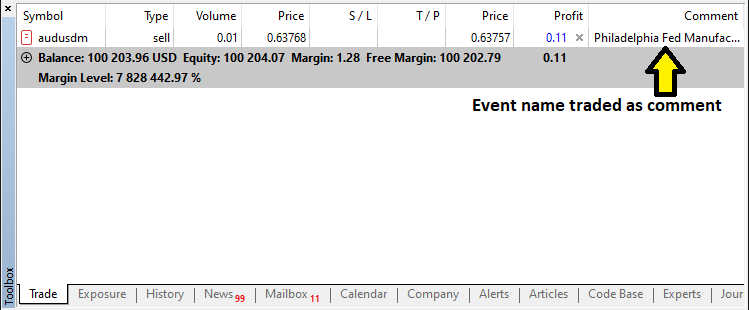
Após a abertura do trade, agora precisamos apenas inicializar a lógica de contagem regressiva do evento, e isso é tratado na próxima seção.
Criando e Gerenciando Temporizadores de Contagem Regressiva
Para criar e gerenciar os temporizadores de contagem regressiva, precisaremos de algumas funções auxiliares para criar o botão que exibirá o tempo, bem como atualizar o rótulo quando necessário.
//--- Function to create a button on the chart with specified properties
bool createButton1(string objName, int x, int y, int width, int height,
                   string text, color txtColor, int fontSize, color bgColor, color borderColor) {
   //--- Attempt to create the button object; if it fails, log the error and return false
   if(!ObjectCreate(0, objName, OBJ_BUTTON, 0, 0, 0)) {
      //--- Print error message with the button name and the error code
      Print("Error creating button ", objName, " : ", GetLastError());
      //--- Return false to indicate button creation failure
      return false;
   }
   //--- Set the horizontal distance (X coordinate) for the button
   ObjectSetInteger(0, objName, OBJPROP_XDISTANCE, x);
   //--- Set the vertical distance (Y coordinate) for the button
   ObjectSetInteger(0, objName, OBJPROP_YDISTANCE, y);
   //--- Set the width of the button
   ObjectSetInteger(0, objName, OBJPROP_XSIZE, width);
   //--- Set the height of the button
   ObjectSetInteger(0, objName, OBJPROP_YSIZE, height);
   //--- Set the text that will appear on the button
   ObjectSetString(0, objName, OBJPROP_TEXT, text);
   //--- Set the color of the button's text
   ObjectSetInteger(0, objName, OBJPROP_COLOR, txtColor);
   //--- Set the font size for the button text
   ObjectSetInteger(0, objName, OBJPROP_FONTSIZE, fontSize);
   //--- Set the font style to "Arial Bold" for the button text
   ObjectSetString(0, objName, OBJPROP_FONT, "Arial Bold");
   //--- Set the background color of the button
   ObjectSetInteger(0, objName, OBJPROP_BGCOLOR, bgColor);
   //--- Set the border color of the button
   ObjectSetInteger(0, objName, OBJPROP_BORDER_COLOR, borderColor);
   //--- Set the button's anchor corner to the top left of the chart
   ObjectSetInteger(0, objName, OBJPROP_CORNER, CORNER_LEFT_UPPER);
   //--- Enable the background display for the button
   ObjectSetInteger(0, objName, OBJPROP_BACK, true);
   //--- Redraw the chart to reflect the new button
   ChartRedraw();
   //--- Return true indicating that the button was created successfully
   return true;
}
//--- Function to update the text of an existing label
bool updateLabel1(string objName, string text) {
   //--- Check if the label exists on the chart; if not, log the error and return false
   if(ObjectFind(0, objName) < 0) {
      //--- Print error message indicating that the label was not found
      Print("updateLabel1: Object ", objName, " not found.");
      //--- Return false because the label does not exist
      return false;
   }
   //--- Update the label's text property with the new text
   ObjectSetString(0, objName, OBJPROP_TEXT, text);
   //--- Redraw the chart to update the label display
   ChartRedraw();
   //--- Return true indicating that the label was updated successfully
   return true;
}

//--- Function to update the text of an existing label
bool updateLabel1(string objName, string text) {
   //--- Check if the label exists on the chart; if not, log the error and return false
   if(ObjectFind(0, objName) < 0) {
      //--- Print error message indicating that the label was not found
      Print("updateLabel1: Object ", objName, " not found.");
      //--- Return false because the label does not exist
      return false;
   }
   //--- Update the label's text property with the new text
   ObjectSetString(0, objName, OBJPROP_TEXT, text);
   //--- Redraw the chart to update the label display
   ChartRedraw();
   //--- Return true indicating that the label was updated successfully
   return true;
}
Aqui apenas criamos as funções auxiliares que nos permitirão criar o botão do temporizador, bem como a função de atualização para atualizar o rótulo. Não precisamos explicar essas funções, pois já detalhamos sua lógica em funções semelhantes nas partes anteriores da série. Portanto, seguimos diretamente para a implementação.
//--- Begin handling the post-trade countdown scenario
if(tradeExecuted) {
   //--- If the current time is before the traded news time, display the countdown until news release
   if(currentTime < tradedNewsTime) {
      //--- Calculate the remaining seconds until the traded news time
      int remainingSeconds = (int)(tradedNewsTime - currentTime);
      //--- Calculate hours from the remaining seconds
      int hrs = remainingSeconds / 3600;
      //--- Calculate minutes from the remaining seconds
      int mins = (remainingSeconds % 3600) / 60;
      //--- Calculate seconds remainder
      int secs = remainingSeconds % 60;
      //--- Construct the countdown text string
      string countdownText = "News in: " + IntegerToString(hrs) + "h " +
                             IntegerToString(mins) + "m " +
                             IntegerToString(secs) + "s";
      //--- If the countdown object does not exist, create it with a blue background
      if(ObjectFind(0, "NewsCountdown") < 0) {
         createButton1("NewsCountdown", 50, 17, 300, 30, countdownText, clrWhite, 12, clrBlue, clrBlack);
         //--- Log that the post-trade countdown was created
         Print("Post-trade countdown created: ", countdownText);
      } else {
         //--- If the countdown object exists, update its text
         updateLabel1("NewsCountdown", countdownText);
         //--- Log that the post-trade countdown was updated
         Print("Post-trade countdown updated: ", countdownText);
      }
   } else {
      //--- If current time is past the traded news time, calculate elapsed time since trade
      int elapsed = (int)(currentTime - tradedNewsTime);
      //--- If less than 15 seconds have elapsed, show a reset countdown
      if(elapsed < 15) {
         //--- Calculate the remaining delay for reset
         int remainingDelay = 15 - elapsed;
         //--- Construct the reset countdown text
         string countdownText = "News Released, resetting in: " + IntegerToString(remainingDelay) + "s";
         //--- If the countdown object does not exist, create it with a red background
         if(ObjectFind(0, "NewsCountdown") < 0) {
            createButton1("NewsCountdown", 50, 17, 300, 30, countdownText, clrWhite, 12, clrRed, clrBlack);
            //--- Set the background color property explicitly to red
            ObjectSetInteger(0,"NewsCountdown",OBJPROP_BGCOLOR,clrRed);
            //--- Log that the post-trade reset countdown was created
            Print("Post-trade reset countdown created: ", countdownText);
         } else {
            //--- If the countdown object exists, update its text and background color
            updateLabel1("NewsCountdown", countdownText);
            ObjectSetInteger(0,"NewsCountdown",OBJPROP_BGCOLOR,clrRed);
            //--- Log that the post-trade reset countdown was updated
            Print("Post-trade reset countdown updated: ", countdownText);
         }
      } else {
         //--- If 15 seconds have elapsed since traded news time, log the reset action
         Print("News Released. Resetting trade status after 15 seconds.");

         //--- If the countdown object exists, delete it from the chart
         if(ObjectFind(0, "NewsCountdown") >= 0)
            ObjectDelete(0, "NewsCountdown");
         //--- Reset the tradeExecuted flag to allow new trades
         tradeExecuted = false;
      }
   }
   //--- Exit the function as post-trade processing is complete
   return;
}
Aqui tratamos em detalhes o cenário de contagem regressiva após a execução do trade. Assim que um trade é executado, primeiro usamos a função TimeTradeServer para obter o horário atual do servidor e compará-lo com "tradedNewsTime", que armazena o horário programado de divulgação do evento candidato. Se o horário atual ainda estiver antes de "tradedNewsTime", calculamos os segundos restantes e os convertemos em horas, minutos e segundos, construindo uma string de contagem regressiva formatada como "News in: __h __m __s" usando a função IntegerToString.
Em seguida, verificamos a existência do objeto "NewsCountdown" por meio de ObjectFind e, caso não exista, criamos esse objeto (usando nossa função personalizada "createButton1") na posição X=50, Y=17 com largura de 300 e altura de 30 e fundo azul; caso já exista, atualizamos seu conteúdo (usando "updateLabel1"). No entanto, se o horário atual já tiver ultrapassado "tradedNewsTime", calculamos o tempo decorrido; se esse tempo for inferior a 15 segundos, exibimos uma mensagem de reinicialização no objeto de contagem regressiva — "News Released, resetting in: XXs" — e definimos explicitamente sua cor de fundo como vermelha usando a função ObjectSetInteger.
Após o período de reinicialização de 15 segundos, excluímos o objeto "NewsCountdown" e redefinimos o sinalizador "tradeExecuted" para permitir novos trades, garantindo que nosso sistema responda dinamicamente às mudanças no tempo das notícias e mantenha a execução de trades sob controle. Também precisamos mostrar a contagem regressiva caso já tenhamos identificado o trade, mas a notícia ainda não tenha sido divulgada. Conseguimos isso por meio da seguinte lógica.
if(currentTime >= targetTime && currentTime < candidateEventTime) {

        //---

}
else {
   //--- If current time is before the candidate event window, show a pre-trade countdown
   int remainingSeconds = (int)(candidateEventTime - currentTime);
   int hrs = remainingSeconds / 3600;
   int mins = (remainingSeconds % 3600) / 60;
   int secs = remainingSeconds % 60;
   //--- Construct the pre-trade countdown text
   string countdownText = "News in: " + IntegerToString(hrs) + "h " +
                          IntegerToString(mins) + "m " +
                          IntegerToString(secs) + "s";
   //--- If the countdown object does not exist, create it with specified dimensions and blue background
   if(ObjectFind(0, "NewsCountdown") < 0) {
      createButton1("NewsCountdown", 50, 17, 300, 30, countdownText, clrWhite, 12, clrBlue, clrBlack);
      //--- Log that the pre-trade countdown was created
      Print("Pre-trade countdown created: ", countdownText);
   } else {
      //--- If the countdown object exists, update its text
      updateLabel1("NewsCountdown", countdownText);
      //--- Log that the pre-trade countdown was updated
      Print("Pre-trade countdown updated: ", countdownText);
   }
}
Se o horário atual não estiver dentro da janela de negociação do evento candidato — ou seja, se o horário atual não for maior ou igual a "targetTime" (calculado como o horário programado do evento menos o offset) e ainda não for menor que o horário programado do evento — assumimos que o horário atual ainda está antes da janela de negociação, então calculamos o tempo restante até o evento candidato subtraindo o horário atual do horário programado do evento e convertendo essa diferença em horas, minutos e segundos.
Usando IntegerToString, construímos uma string de texto de contagem regressiva no formato "News in: __h __m __s". Em seguida, usamos a função ObjectFind para verificar se o objeto "NewsCountdown" já existe; se não existir, criamos o objeto usando a função "createButton1" com as dimensões especificadas (X=50, Y=17, largura=300, altura=30) e fundo azul, registrando que a contagem regressiva pré-trade foi criada; caso contrário, atualizamos seu texto usando "updateLabel1" e registramos a atualização. Por fim, se nenhum evento for selecionado após a análise, simplesmente excluímos nossos objetos.
//--- If no candidate event is selected, delete any existing countdown and trade info objects
if(ObjectFind(0, "NewsCountdown") >= 0) {
   ObjectDelete(0, "NewsCountdown");
   ObjectDelete(0, "NewsTradeInfo");
   //--- Log that the pre-trade countdown was deleted
   Print("Pre-trade countdown deleted.");
}
Se nenhum evento candidato for selecionado — ou seja, se nenhum evento atender aos critérios para execução de trade — verificamos a existência do objeto "NewsCountdown" usando a função ObjectFind. Se encontrado, removemos tanto o objeto "NewsCountdown" quanto o objeto "NewsTradeInfo" do gráfico chamando a função ObjectDelete, garantindo que nenhuma contagem regressiva ou informação de trade desatualizada permaneça exibida.
No entanto, o usuário pode encerrar o programa explicitamente, o que significa que ainda precisamos limpar o gráfico nesse caso. Assim, podemos definir uma função para lidar facilmente com essa limpeza.
//--- Function to delete trade-related objects from the chart and redraw the chart
void deleteTradeObjects(){
   //--- Delete the countdown object from the chart
   ObjectDelete(0, "NewsCountdown");
   //--- Delete the news trade information label from the chart
   ObjectDelete(0, "NewsTradeInfo");
   //--- Redraw the chart to reflect the deletion of objects
   ChartRedraw();
}
Após definir a função, simplesmente a chamamos no manipulador de eventos OnDeinit, onde também destruímos o dashboard existente, garantindo a limpeza total, conforme destacado em amarelo abaixo.
//+------------------------------------------------------------------+
//| Expert deinitialization function                                 |
//+------------------------------------------------------------------+
void OnDeinit(const int reason){
//---

   destroy_Dashboard();
   deleteTradeObjects();
}
Uma última necessidade é manter o acompanhamento das informações atualizadas dos filtros quando o usuário interagir com o dashboard, para garantir que estejamos sempre trabalhando com dados atualizados. Isso significa que teremos que rastrear os eventos no manipulador de eventos OnChartEvent. Criamos uma função para implementar isso de forma mais simples.
//--- Function to log active filter selections in the Experts log
void UpdateFilterInfo() {
   //--- Initialize the filter information string with the prefix "Filters: "
   string filterInfo = "Filters: ";
   //--- Check if the currency filter is enabled
   if(enableCurrencyFilter) {
      //--- Append the currency filter label to the string
      filterInfo += "Currency: ";
      //--- Loop through each selected currency filter option
      for(int i = 0; i < ArraySize(curr_filter_selected); i++) {
         //--- Append the current currency filter value
         filterInfo += curr_filter_selected[i];
         //--- If not the last element, add a comma separator
         if(i < ArraySize(curr_filter_selected) - 1)
            filterInfo += ",";
      }
      //--- Append a semicolon to separate this filter's information
      filterInfo += "; ";
   } else {
      //--- Indicate that the currency filter is turned off
      filterInfo += "Currency: Off; ";
   }
   //--- Check if the importance filter is enabled
   if(enableImportanceFilter) {
      //--- Append the impact filter label to the string
      filterInfo += "Impact: ";
      //--- Loop through each selected impact filter option
      for(int i = 0; i < ArraySize(imp_filter_selected); i++) {
         //--- Append the string representation of the current importance filter value
         filterInfo += EnumToString(imp_filter_selected[i]);
         //--- If not the last element, add a comma separator
         if(i < ArraySize(imp_filter_selected) - 1)
            filterInfo += ",";
      }
      //--- Append a semicolon to separate this filter's information
      filterInfo += "; ";
   } else {
      //--- Indicate that the impact filter is turned off
      filterInfo += "Impact: Off; ";
   }
   //--- Check if the time filter is enabled
   if(enableTimeFilter) {
      //--- Append the time filter information with the upper limit
      filterInfo += "Time: Up to " + EnumToString(end_time);
   } else {
      //--- Indicate that the time filter is turned off
      filterInfo += "Time: Off";
   }
   //--- Print the complete filter information to the Experts log
   Print("Filter Info: ", filterInfo);
}
Criamos uma função void chamada "UpdateFilterInfo". Primeiro, inicializamos uma string com o prefixo "Filters: " e verificamos se o filtro de moeda está habilitado — se estiver, adicionamos "Currency: " e percorremos o array "curr_filter_selected" usando "ArraySize", adicionando cada moeda (separadas por vírgulas) e finalizando com ponto e vírgula; se estiver desabilitado, simplesmente indicamos "Currency: Off; ". Em seguida, realizamos um processo semelhante para o filtro de impacto: se estiver habilitado, adicionamos "Impact: " e percorremos "imp_filter_selected", convertendo cada nível de impacto selecionado em string com EnumToString antes de adicioná-los, ou indicamos "Impact: Off; " caso não esteja habilitado.
Finalmente, abordamos o filtro de tempo adicionando "Tempo: Até " junto com a representação de string da entrada "end_time" (novamente usando "EnumToString"), ou "Tempo: Desligado" se desativado. Após a concatenação de todos os segmentos, enviamos as informações completas do filtro para o log do Experts usando a função Imprimir, fornecendo assim uma visão geral clara e em tempo real dos filtros em vigor para solução de problemas e verificação. Em seguida, chamamos as funções no manipulador de eventos OnChartEvent, bem como no OnTick.
//+------------------------------------------------------------------+
//|    OnChartEvent handler function                                 |
//+------------------------------------------------------------------+
void  OnChartEvent(
   const int       id,       // event ID
   const long&     lparam,   // long type event parameter
   const double&   dparam,   // double type event parameter
   const string&   sparam    // string type event parameter
){

   if (id == CHARTEVENT_OBJECT_CLICK){ //--- Check if the event is a click on an object
      UpdateFilterInfo();
      CheckForNewsTrade();
   }
}

//+------------------------------------------------------------------+
//| Expert tick function                                             |
//+------------------------------------------------------------------+
void OnTick(){
//---
UpdateFilterInfo();
CheckForNewsTrade();
   if (isDashboardUpdate){
      update_dashboard_values(curr_filter_selected,imp_filter_selected);
   }

}
Ao executar o programa, temos o seguinte resultado.
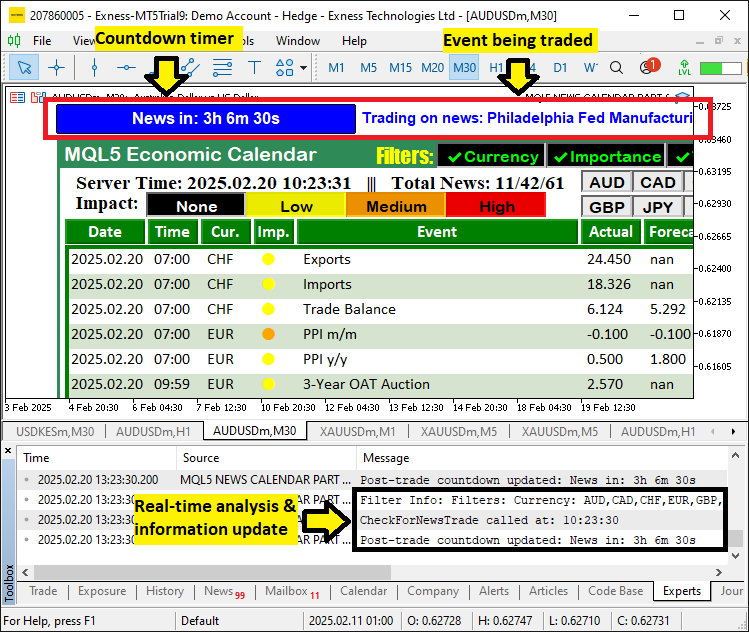
Pela imagem, podemos ver que conseguimos abrir trades com base nas configurações selecionadas pelo usuário e, quando a notícia é negociada, criamos o temporizador de contagem regressiva e o rótulo para exibir e atualizar as informações, além de registrar as atualizações, alcançando assim nosso objetivo. A única coisa que resta é testar nossa lógica, e isso é tratado na próxima seção.
Testando a Lógica de Trading
Quanto ao backtesting, aguardamos eventos de notícias em trading ao vivo e, durante os testes, o resultado foi conforme ilustrado no vídeo abaixo.
Conclusão
Em conclusão, integramos com sucesso a entrada automatizada de trades ao nosso sistema MQL5 Economic Calendar utilizando filtros definidos pelo usuário, offsets de tempo precisos e temporizadores dinâmicos de contagem regressiva. Nossa solução examina eventos de notícias, compara valores de previsão e valores anteriores e executa automaticamente ordens BUY ou SELL com base em sinais claros do calendário.
No entanto, avanços adicionais ainda são necessários para refinar o sistema para condições reais de mercado. Incentivamos o desenvolvimento e testes contínuos — especialmente no aprimoramento da gestão de risco e no ajuste fino dos critérios de filtragem — para garantir um desempenho ideal. Bons trades!
Traduzido do Inglês pela MetaQuotes Ltd.
Artigo original: https://www.mql5.com/en/articles/17271
Aviso: Todos os direitos sobre esses materiais pertencem à MetaQuotes Ltd. É proibida a reimpressão total ou parcial.
Esse artigo foi escrito por um usuário do site e reflete seu ponto de vista pessoal. A MetaQuotes Ltd. não se responsabiliza pela precisão das informações apresentadas nem pelas possíveis consequências decorrentes do uso das soluções, estratégias ou recomendações descritas.

 Indicador de sazonalidade por horas, dias da semana e meses
 Redes neurais em trading: Segmentação periódica adaptativa (Criação de tokens)
 Análise de lacunas temporais de preço em MQL5 (Parte II): Criamos um mapa de calor da distribuição de liquidez no tempo
 Algoritmo de Busca com Retrocesso — Backtracking Search Algorithm (BSA)

- Aplicativos de negociação gratuitos
- 8 000+ sinais para cópia
- Notícias econômicas para análise dos mercados financeiros
Você concorda com a política do site e com os termos de uso
Olá! Obrigado pelo trabalho realizado.
Estou tendo problemas com a exibição da tabela no monitor 2K.
Olá! Obrigado pelo trabalho realizado.
Estou tendo problemas com a exibição da tabela no monitor 2K.
Olá. Seja bem-vindo. Isso exigirá que você modifique o tamanho das fontes para que tudo se encaixe perfeitamente.