Universal Risk Manager Pro
- Indicators
-
Andres Felipe Carvajal Rodriguez
 I do not develop indicators to follow the market. I develop algorithms to understand it.
My goal is to transform price complexity into objective, robust, and efficient tools that help traders make decisions with greater precision, consistency, and risk control. - Version: 1.0
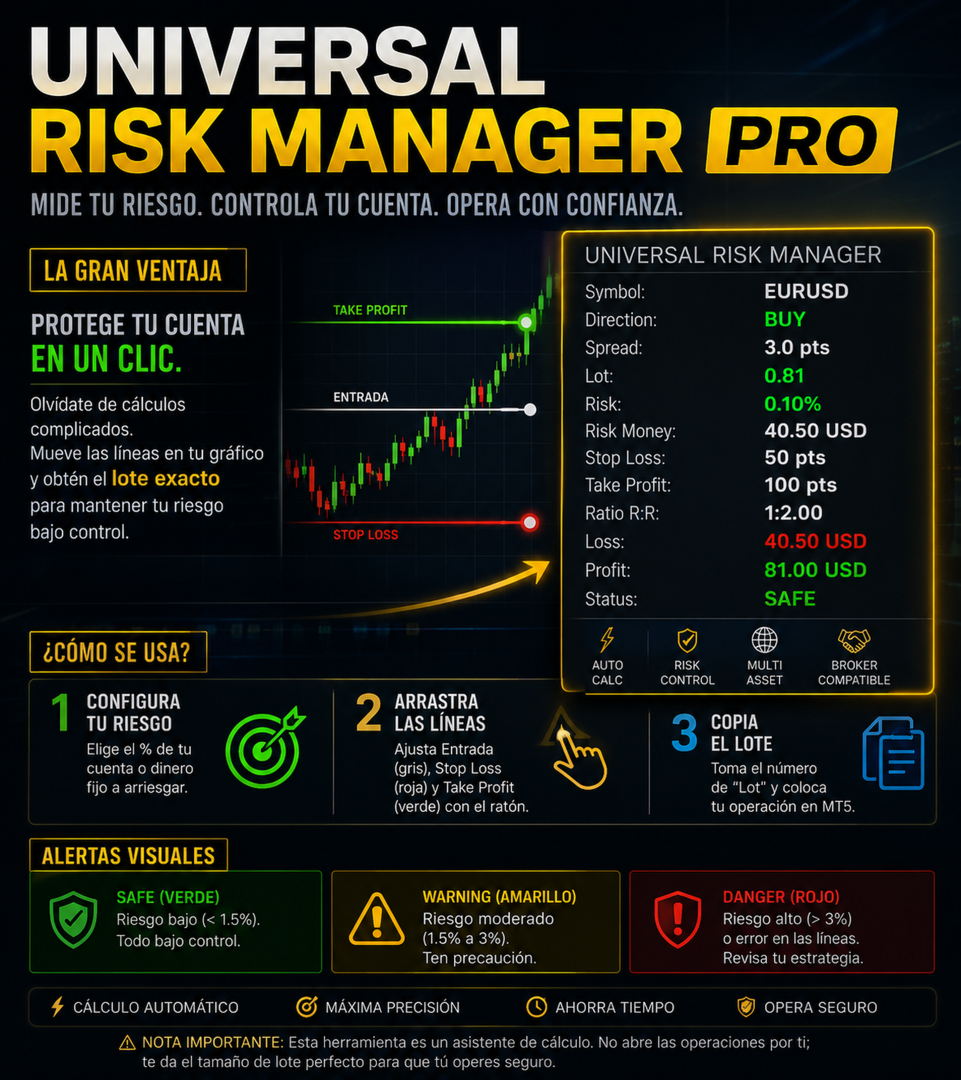
The Big Advantage: Protect your account in just one click. No more calculating lot sizes by hand or guessing how much you could lose. Simply move the lines on your chart, and the panel displays the exact lot size to keep your risk under control. (Move the Gray line)
How to Use It (In 3 Steps):
-
Set your risk: In the settings, choose whether you want to risk a percentage of your account (e.g., 1%) or a fixed amount of cash (e.g., $50).
-
Drag the lines: Three lines will appear on your chart. Move the gray line with your mouse to adjust your strategy:
-
Gray: Entry price.
-
Red: Stop Loss (Your loss limit).
-
Green: Take Profit (Your profit target).
-
-
Copy the Lot Size: Look at the panel, grab the "Lot" number, and open your trade manually in MT5.
What Do the Panel Alerts Mean?
The border of the panel changes color to warn you if you are being too aggressive:
-
SAFE (Green): Low risk (less than 1.5%). Everything is under control.
-
WARNING (Yellow): Moderate risk (1.5% to 3%). Use caution.
-
DANGER (Red): High risk (greater than 3%) or a line error (for example, placing your Stop Loss in the wrong spot).
Important Note: This tool is a calculation assistant. It does not execute trades for you; it provides the perfect lot size so you can trade safely.