
Entry In The Zone and SMC Multi Timeframe
- Indicators
- Version: 2.51
- Updated: 23 September 2026
- Activations: 10

Next Update — Version 2.52 Coming Soon! [NEW]
Get Ready for 4 Major New Features Designed to Enhance Your Market Analysis and Trading Workflow
We’re taking market analysis to the next level with 4 new features designed to meet your trading needs. Introducing:
- TRADE OVERVIEW DASHBOARD
- CONFLUENCE AT ZONE
- STRONG & WEAK HIGH/LOW
- OPTIMAL TRADE ENTRY — OTE
1. TADE OVERVIEW DASHBOARD
A dashboard that helps you understand the overall market picture more easily, providing guidance to support your trading decisions and helping you analyze the market and plan your trades systematically, all in one screen.
- Multi-Timeframe Market Overview
- Gain a clearer understanding of market direction and price structure
- Check market conditions quickly
- Guidance for systematic market analysis and entry planning.
2. CONFLUENCE AT ZONE
When Price Enters a Key Zone... You'll Know How Many Supporting Factors Align
Key zones are where trading decisions matter. But price entering a zone alone isn't enough. This feature helps you identify which factors align, including signals and other relevant factors, before entering a trade, allowing you to conduct a more thorough analysis with better-informed decision-making.
3. STRONG & WEAK HIGH/LOW
Identifies strong highs and lows (Strong High/Low) that are more likely to be protected by market structure, and weak highs and lows (Weak High/Low) that are more likely to be broken or swept for liquidity. Helps traders analyze market structure and systematically assess potential liquidity targets.
4. Optimal Trade Entry (OTE)
Highlights the optimal retracement zone (typically 61.8%–79% Fibonacci) within an impulse move to help identify potential entry opportunities aligned with market structure.
Analyze the Market Systematically. Trade with a Plan.
Entry In The Zone and SMC Multi Timeframe
Read Market Structure, Identify Key Zones, and Plan Trades Systematically on a Single Chart.
An indicator for market analysis based on Smart Money Concepts (SMC), displaying market structure, key zones, and real-time BUY / SELL signals. It supports both Single-Timeframe and Multi-Timeframe analysis.
Real-time BUY / SELL signals designed with a focus on the No-Repaint principle. These signals are designed to help filter out unclear trading situations and assess trading opportunities by considering Market Structure, Points of Interest (POIs), Liquidity, and Risk Management together, helping you plan entry points and make decisions more systematically.
This indicator helps you understand the market context, identify zones to watch, and recognize areas where you should wait for price reactions to support your trade entry planning and risk management before making a decision.
FABLE Pro Suite A supporting indicator suite for Entry In The Zone and SMC Multi-Timeframe No additional cost. Ready to use immediately after purchase with no approval required. Available for free.
Included Indicators : 1. Price Action Radar 2. Adaptive RSI Filter 3. Bar Count Down 4. Auto Volume Profile 5. Adapt Nadaraya MTF 6. Smart Strength 7. Auto Multi Trendlines Breakout Signal Alerts 8.Coming Soon*
Our indicator values every detail of market analysis. Entry In The Zone & SMC Multi Timeframe was developed to help make market analysis using Smart Money Concepts (SMC) systematic.
Key Features
1. Market Structure
Start by understanding which direction the price is moving. The indicator automatically detects and displays:
-
Trend: Major Trend and Minor Trend
-
Structure Breaks: BOS, CHoCH, mBOS, mCHoCH
-
Swing Structure: Swing High / Swing Low, HH, HL, LH, LL
-
Strong / Weak High & Low: Levels that may be defended or may be broken to sweep Liquidity
2. Points of Interest
Not all price levels are equally important. The indicator helps identify areas where price behavior should be monitored.
-
Order Blocks (OB) / Volume Order Blocks (VOB)
-
Supply & Demand Zones
-
Fair Value Gaps (FVG)
-
Premium & Discount Zones
-
Optimal Trade Entry (OTE)
-
Liquidity and Liquidity Sweeps (LQS)
3. Multi-Timeframe Analysis / Single-Timeframe Analysis
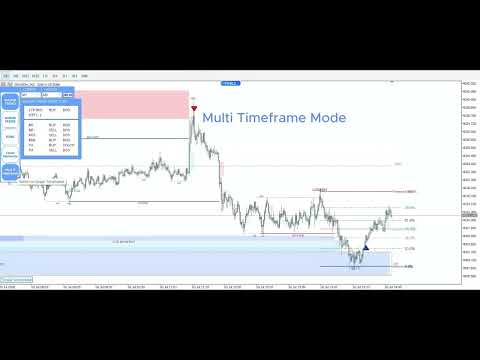
The Multi-Timeframe Analysis system displays SMC-based market structure and key zones from higher timeframes on the chart you are currently using. This allows you to assess trading opportunities on lower timeframes while considering the overall market context.
Additionally, you can select Single-Timeframe Analysis when you want to focus on analyzing market structure and zones based solely on the current timeframe.
4. No-Repaint BUY / SELL Signals
-
Signals are confirmed when the candle closes and do not change retrospectively.
-
Helps filter out unclear trading situations.
-
Provides real-time alerts.
5. Comprehensive Reference Information on a Single Chart
-
Equal Highs / Equal Lows
-
PDH / PDL (Previous Day High / Low)
-
PWH / PWL (Previous Week High / Low)
-
Auto Fibonacci
-
Trading Sessions
6. Alerts
Get notified when:
-
Price enters a key zone
-
A BUY / SELL signal appears
-
A BOS / CHoCH occurs
Alerts are also available as mobile push notifications.
7. Historical Zones Remain on the Chart
Older zones are not deleted, allowing you to review historical price behavior, revisit past trades, and continuously backtest strategies.
New Features
TRADE OVERVIEW DASHBOARD
When market data is spread across multiple timeframes, understanding the overall market picture can be challenging. The Trade Overview Dashboard brings key market information together on a single screen, helping you assess market conditions, understand price structure, and organize your analysis more systematically.
Instead of spending time gathering and connecting market information from different areas, you can gain a clearer view of the overall market picture.
CONFLUENCE AT ZONE
When Price Enters a Key Zone, Don't Consider the Zone Alone
When price enters an Order Block or another key zone, it does not always mean that a suitable trading opportunity is present. What matters is the surrounding market context and whether the relevant supporting factors are aligned.
Confluence at Zone helps you examine relevant signals and factors around key zones, allowing you to assess trading opportunities more systematically before making a decision.
You can consider the available information and supporting factors together to evaluate the situation more comprehensively.
How to Use It Systematically
-
Assess Market Direction: Examine the major structure on a higher timeframe.
-
Identify Points of Interest: Select relevant OB, Supply & Demand, or FVG zones.
-
Wait for Price Reaction: A zone is only an area for analysis, not confirmation of a trade entry.
-
Look for Confirmation on a Lower Timeframe: Examine mBOS / mCHoCH together with Price Action and Liquidity.
-
Plan the Trade: Determine the entry point, Stop Loss, target, and position size before opening an order.
Designed for Beginners and Experienced Traders
For beginners: Visualize market structure and key SMC concepts directly on the chart, reducing the need for repetitive manual drawing and helping you learn through practical chart analysis.
For experienced traders: Save time on repetitive market analysis and focus more on evaluating entry and exit opportunities, developing trading strategies, and managing risk.
If you experience any inconvenience or have any questions while using the product, please feel free to contact me through the MQL5 private messaging system at any time.
Thank you for your trust and support. We wish you continued success in your trading, and we will continue improving and enhancing our product to provide you with the best possible trading experience.

































Very supportive author,high quality product.