

MQL5 Trading Tools (Part 10): Building a Strategy Tracker System with Visual Levels and Success Metrics
 5 748
5 748
 0
0

Introduction
In our previous article (Part 9), we developed a First Run User Setup Wizard in MetaQuotes Language 5 (MQL5) for Expert Advisors, featuring a scrollable guide with interactive dashboard elements, dynamic text formatting, and user controls to streamline the initial configuration and orientation process. In Part 10, we develop a strategy tracker system with visual levels and success metrics. This system detects moving average crossover signals filtered by a long-term moving average, tracks virtual or live trades with multiple take-profit levels and stop-losses, visualizes entries, hits, and outcomes on the chart, and provides a dashboard for real-time performance statistics, including wins/losses, profit points, and success rate. We will cover the following topics:
- The Role and Benefits of a Strategy Tracker System in Trading
- Implementation in MQL5
- Testing the Strategy Tracker
- Conclusion
By the end, you’ll have a functional, customizable MQL5 tool for monitoring strategy performance. Let’s dive in!
The Role and Benefits of a Strategy Tracker System in Trading
The role and benefits of a strategy tracker system in trading lie in its ability to provide real-time monitoring and analysis of signal performance, helping us evaluate the effectiveness of our approaches without relying solely on backtesting or manual logs, which can be time-consuming and prone to errors. By visualizing entries, take profit hits, stop loss triggers, and cumulative statistics like win rates and profit points on the chart and dashboard, it offers immediate feedback on strategy viability, enabling quick adjustments to parameters such as moving average periods or risk levels to improve outcomes in live markets. Ultimately, such a tool enhances decision-making, builds confidence through transparent tracking, and supports iterative refinement.
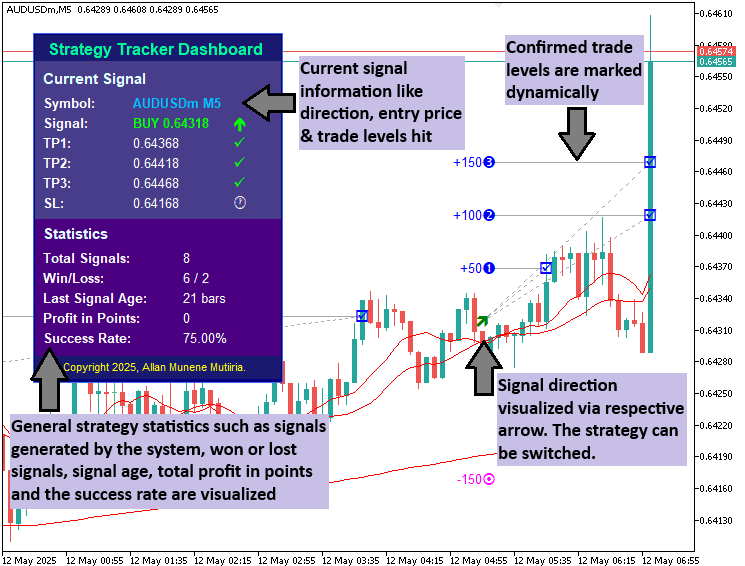
Our approach is to detect fast and slow moving average crossovers confirmed by a filter moving average above/below price for buys/sells - which is just an arbitrary strategy that we thought of to be simple, and can be switch with any strategy of your liking; simulate virtual positions or execute real trades with configurable take profit levels and stop loss in points, visualize entries with arrows, dotted lines to hits, and icons for outcomes on the chart, while updating an interactive dashboard with stats on signals, wins/losses, age, profit, and success rate, creating a comprehensive tool for strategy evaluation and refinement. In a nutshell, here is a visualization of what we want to achieve.
Implementation in MQL5
To create the program in MQL5, open the MetaEditor, go to the Navigator, locate the Experts folder, click on the "New" tab, and follow the prompts to create the file. Once it is made, in the coding environment, we will need to declare some input parameters and global variables that we will use throughout the program.
//+------------------------------------------------------------------+
//|                                       1. Strategy Tracker EA.mq5 |
//|                           Copyright 2025, Allan Munene Mutiiria. |
//|                                   https://t.me/Forex_Algo_Trader |
//+------------------------------------------------------------------+
#property copyright "Copyright 2025, Allan Munene Mutiiria."
#property link      "https://t.me/Forex_Algo_Trader"
#property version   "1.00"

//+------------------------------------------------------------------+
//| Enums                                                            |
//+------------------------------------------------------------------+
enum TradeMode {                                                  // Define trade mode enum
   Visual_Only,                                                   // Visual Only
   Open_Trades                                                    // Open Trades
};

enum TPLevel {                                                    // Define TP level enum
   Level_1,                                                       // TP1
   Level_2,                                                       // TP2
   Level_3                                                        // TP3
};

//+------------------------------------------------------------------+
//| Input Parameters                                                 |
//+------------------------------------------------------------------+
input TradeMode        trade_mode      = Visual_Only;             // Trading Mode
input int              fast_ma_period  = 10;                      // Fast MA Period
input int              slow_ma_period  = 20;                      // Slow MA Period
input int              filter_ma_period = 200;                    // Filter MA Period
input ENUM_MA_METHOD   ma_method       = MODE_SMA;                // MA Method
input ENUM_APPLIED_PRICE ma_price      = PRICE_CLOSE;             // MA Applied Price
input int              tp1_points      = 50;                      // TP1 Points
input int              tp2_points      = 100;                     // TP2 Points
input int              tp3_points      = 150;                     // TP3 Points
input TPLevel          tp_level        = Level_1;                 // Select TP Level
input int              sl_points       = 150;                     // SL Points
input int              dash_x          = 30;                      // Dashboard X Offset
input int              dash_y          = 30;                      // Dashboard Y Offset

//+------------------------------------------------------------------+
//| Global Variables                                                 |
//+------------------------------------------------------------------+
// Handles for indicators
int h_fast_ma, h_slow_ma, h_filter_ma;                            //--- MA handles
// Active signal structure
struct ActiveSignal {                                             // Define active signal structure
   bool     active;                                               //--- Signal active flag
   int      pos_type;                                             //--- Position type (1 buy, -1 sell)
   datetime entry_time;                                           //--- Entry time
   double   entry_price;                                          //--- Entry price
   double   tp1, tp2, tp3, sl;                                    //--- TP and SL levels
   bool     hit_tp1, hit_tp2, hit_tp3;                            //--- TP hit flags
   bool     hit_sl;                                               //--- SL hit flag
   datetime close_time;                                           //--- Close time
};
ActiveSignal current_signal;                                      //--- Current signal instance
// Stats
long   total_signals      = 0;                                    //--- Total signals count
long   wins               = 0;                                    //--- Wins count
long   losses             = 0;                                    //--- Losses count
double total_profit_points = 0.0;                                 //--- Total profit in points
// Dashboard prefix
string dash_prefix = "ProDashboard_";                             //--- Dashboard object prefix
// Last bar time
datetime last_bar_time = 0;                                       //--- Last processed bar time
// Position ticket for Open_Trades mode
ulong position_ticket = -1;                                       //--- Position ticket
First, we define two enumerations for configuration options: "TradeMode" with "Visual_Only" for simulation without real orders and "Open_Trades" to execute live positions, just in case you want to trade the strategy, and "TPLevel" offering "Level_1", "Level_2", or "Level_3" to select the take profit target.
Next, we set up input parameters for user customization, defaulting "trade_mode" to "Visual_Only", periods like "fast_ma_period" at 10 for the quick moving average, "slow_ma_period" at 20 for the slower one, "filter_ma_period" at 200 for the long-term filter, "ma_method" as MODE_SMA for simple moving average calculation, and "ma_price" to PRICE_CLOSE basing on closing prices. We include take profit distances "tp1_points" at 50, "tp2_points" at 100, "tp3_points" at 150, with "tp_level" selecting "Level_1" by default, "sl_points" at 150 for stop loss, and dashboard offsets "dash_x" and "dash_y" both at 30 for positioning.
We then declare global variables: handles "h_fast_ma", "h_slow_ma", "h_filter_ma" for the moving average indicators, a structure "ActiveSignal" to track ongoing trades with fields like "active" flag, "pos_type" for buy (1) or sell (-1), entry details, take profit and stop loss levels, hit flags, and close time, instantiated as "current_signal". Stats counters include "total_signals", "wins", "losses", and "total_profit_points" at 0.0 for performance metrics, "dash_prefix" as "ProDashboard_" for object naming, "last_bar_time" at 0 to detect new bars, and "position_ticket" as -1 for tracking open trades in live mode. We will then need helper functions to create the visualization objects.
//+------------------------------------------------------------------+
//| Function to create rectangle label                               |
//+------------------------------------------------------------------+
bool createRecLabel(string objName, int xD, int yD, int xS, int yS,
                    color clrBg, int widthBorder, color clrBorder = clrNONE,
                    ENUM_BORDER_TYPE borderType = BORDER_FLAT,
                    ENUM_LINE_STYLE borderStyle = STYLE_SOLID,
                    ENUM_BASE_CORNER corner = CORNER_LEFT_UPPER) {
   ResetLastError();                                              //--- Reset last error
   if (!ObjectCreate(0, objName, OBJ_RECTANGLE_LABEL, 0, 0, 0)) { //--- Create rectangle label
      Print(__FUNCTION__, ": failed to create rec label! Error code = ", _LastError); //--- Log error
      return (false);                                             //--- Return failure
   }
   ObjectSetInteger(0, objName, OBJPROP_XDISTANCE, xD);           //--- Set X distance
   ObjectSetInteger(0, objName, OBJPROP_YDISTANCE, yD);           //--- Set Y distance
   ObjectSetInteger(0, objName, OBJPROP_XSIZE, xS);               //--- Set X size
   ObjectSetInteger(0, objName, OBJPROP_YSIZE, yS);               //--- Set Y size
   ObjectSetInteger(0, objName, OBJPROP_CORNER, corner);          //--- Set corner
   ObjectSetInteger(0, objName, OBJPROP_BGCOLOR, clrBg);          //--- Set background color
   ObjectSetInteger(0, objName, OBJPROP_BORDER_TYPE, borderType); //--- Set border type
   ObjectSetInteger(0, objName, OBJPROP_STYLE, borderStyle);      //--- Set border style
   ObjectSetInteger(0, objName, OBJPROP_WIDTH, widthBorder);      //--- Set border width
   ObjectSetInteger(0, objName, OBJPROP_COLOR, clrBorder);        //--- Set border color
   ObjectSetInteger(0, objName, OBJPROP_BACK, false);             //--- Set to foreground
   ObjectSetInteger(0, objName, OBJPROP_STATE, false);            //--- Disable state
   ObjectSetInteger(0, objName, OBJPROP_SELECTABLE, false);       //--- Disable selectable
   ObjectSetInteger(0, objName, OBJPROP_SELECTED, false);         //--- Disable selected
   ChartRedraw(0);                                                //--- Redraw chart
   return (true);                                                 //--- Return success
}

//+------------------------------------------------------------------+
//| Function to create text label                                    |
//+------------------------------------------------------------------+
bool createLabel(string objName, int xD, int yD,
                 string txt, color clrTxt = clrBlack, int fontSize = 12,
                 string font = "Arial Rounded MT Bold",
                 ENUM_BASE_CORNER corner = CORNER_LEFT_UPPER) {
   ResetLastError();                                              //--- Reset last error
   if (!ObjectCreate(0, objName, OBJ_LABEL, 0, 0, 0)) {           //--- Create label
      Print(__FUNCTION__, ": failed to create the label! Error code = ", _LastError); //--- Log error
      return (false);                                             //--- Return failure
   }
   ObjectSetInteger(0, objName, OBJPROP_XDISTANCE, xD);           //--- Set X distance
   ObjectSetInteger(0, objName, OBJPROP_YDISTANCE, yD);           //--- Set Y distance
   ObjectSetInteger(0, objName, OBJPROP_CORNER, corner);          //--- Set corner
   ObjectSetString(0, objName, OBJPROP_TEXT, txt);                //--- Set text
   ObjectSetInteger(0, objName, OBJPROP_COLOR, clrTxt);           //--- Set color
   ObjectSetInteger(0, objName, OBJPROP_FONTSIZE, fontSize);      //--- Set font size
   ObjectSetString(0, objName, OBJPROP_FONT, font);               //--- Set font
   ObjectSetInteger(0, objName, OBJPROP_BACK, false);             //--- Set to foreground
   ObjectSetInteger(0, objName, OBJPROP_STATE, false);            //--- Disable state
   ObjectSetInteger(0, objName, OBJPROP_SELECTABLE, false);       //--- Disable selectable
   ObjectSetInteger(0, objName, OBJPROP_SELECTED, false);         //--- Disable selected
   ChartRedraw(0);                                                //--- Redraw chart
   return (true);                                                 //--- Return success
}

//+------------------------------------------------------------------+
//| Function to create trend line                                    |
//+------------------------------------------------------------------+
bool createTrendline(string objName, datetime time1, double price1, datetime time2, double price2, color clr, ENUM_LINE_STYLE line_style = STYLE_SOLID, bool isBack = false, bool ray_right = false) {
   ResetLastError();                                              //--- Reset last error
   if (!ObjectCreate(0, objName, OBJ_TREND, 0, time1, price1, time2, price2)) { //--- Create trendline
      Print(__FUNCTION__, ": Failed to create trendline: Error Code: ", GetLastError()); //--- Log error
      return (false);                                             //--- Return failure
   }
   ObjectSetInteger(0, objName, OBJPROP_COLOR, clr);              //--- Set color
   ObjectSetInteger(0, objName, OBJPROP_STYLE, line_style);       //--- Set style
   ObjectSetInteger(0, objName, OBJPROP_BACK, isBack);            //--- Set back
   ObjectSetInteger(0, objName, OBJPROP_RAY_RIGHT, ray_right);    //--- Set ray right
   ChartRedraw(0);                                                //--- Redraw chart
   return (true);                                                 //--- Return success
}
We define the "createRecLabel" function to generate rectangle labels for dashboard panels, taking parameters like name, position ("xD", "yD"), size ("xS", "yS"), background color "clrBg", border width, and optional border color "clrBorder" defaulting to clrNONE, type as BORDER_FLAT, style STYLE_SOLID, and corner CORNER_LEFT_UPPER. We reset errors with ResetLastError, create the object as OBJ_RECTANGLE_LABEL, set properties via ObjectSetInteger for distances, sizes, corner, colors, border details, and foreground non-selectable state, redraw with ChartRedraw, logging failures if any.
Similarly, "createLabel" crafts text labels with name, position, text "txt", color "clrTxt", default black, size 12, font "Arial Rounded MT Bold", and corner "CORNER_LEFT_UPPER", creating as OBJ_LABEL, setting text and font properties, ensuring foreground and non-selectable, redrawing, and handling errors. For "createTrendline", we build trend lines with name, times/prices for endpoints, color "clr", style default "STYLE_SOLID", back flag false, and ray right false, creating as OBJ_TREND, setting color/style/back/ray, redrawing, and logging creation failures. With these functions, we can create the initial dashboard now. We'll modularize the logic in a function too.
//+------------------------------------------------------------------+
//| Create dashboard                                                 |
//+------------------------------------------------------------------+
void CreateDashboard() {
   int panel_x = dash_x;                                          //--- Panel X
   int panel_y = dash_y;                                          //--- Panel Y
   int panel_w = 250;                                             //--- Panel width
   int panel_h = 350;                                             //--- Panel height
   color bg_color = clrNavy;                                      //--- BG color
   color border_color = clrRoyalBlue;                             //--- Border color
   string space = " ";                                            //--- Space string
   createRecLabel(dash_prefix + "Panel", panel_x, panel_y, panel_w, panel_h, bg_color, 1, border_color, BORDER_FLAT); //--- Create panel
   color header_bg = clrMidnightBlue;                             //--- Header BG
   createRecLabel(dash_prefix + "HeaderPanel", panel_x + 1, panel_y + 1, panel_w - 2, 40, header_bg, 0, clrNONE, BORDER_FLAT); //--- Create header
   int rel_y = 7;                                                 //--- Relative Y
   createLabel(dash_prefix + "Header", panel_x + 15, panel_y + rel_y, "Strategy Tracker Dashboard", clrMediumSpringGreen, 12, "Arial Bold"); //--- Create header label
   rel_y += 30;                                                   //--- Increment Y
   color signal_bg = clrDarkSlateBlue;                            //--- Signal BG
   int signal_height = 160;                                       //--- Signal height
   createRecLabel(dash_prefix + "SignalPanel", panel_x + 1, panel_y + rel_y - 10, panel_w - 2, signal_height, signal_bg, 0, clrNONE, BORDER_FLAT); //--- Create signal panel
   createLabel(dash_prefix + "SignalHeader", panel_x + 10, panel_y + rel_y, "Current Signal", clrLightCyan, 11, "Arial Bold"); //--- Create signal header
   rel_y += 25;                                                   //--- Increment Y
   createLabel(dash_prefix + "SymbolLabel", panel_x + 10, panel_y + rel_y, "Symbol:", clrWhite, 10, "Arial Bold"); //--- Create symbol label
   createLabel(dash_prefix + "SymbolValue", panel_x + 100, panel_y + rel_y, _Symbol+" "+StringSubstr(EnumToString(_Period),7), clrDeepSkyBlue, 10, "Arial Bold"); //--- Create symbol value
   rel_y += 20;                                                   //--- Increment Y
   createLabel(dash_prefix + "DirectionLabel", panel_x + 10, panel_y + rel_y, "Signal:", clrWhite, 10, "Arial Bold"); //--- Create direction label
   createLabel(dash_prefix + "EntryPrice", panel_x + 100, panel_y + rel_y, space, clrWhite, 10, "Arial Bold"); //--- Create entry price
   createLabel(dash_prefix + "DirectionValue", panel_x + 200, panel_y + rel_y, space, clrWhite, 12, "Wingdings"); //--- Create direction value
   rel_y += 20;                                                   //--- Increment Y
   createLabel(dash_prefix + "TP1Label", panel_x + 10, panel_y + rel_y, "TP1:", clrWhite, 10, "Arial Bold"); //--- Create TP1 label
   createLabel(dash_prefix + "TP1Value", panel_x + 100, panel_y + rel_y, space, clrWhite, 10, "Arial"); //--- Create TP1 value
   createLabel(dash_prefix + "TP1Icon", panel_x + 200, panel_y + rel_y, space, clrWhite, 12, "Wingdings"); //--- Create TP1 icon
   rel_y += 20;                                                   //--- Increment Y
   createLabel(dash_prefix + "TP2Label", panel_x + 10, panel_y + rel_y, "TP2:", clrWhite, 10, "Arial Bold"); //--- Create TP2 label
   createLabel(dash_prefix + "TP2Value", panel_x + 100, panel_y + rel_y, space, clrWhite, 10, "Arial"); //--- Create TP2 value
   createLabel(dash_prefix + "TP2Icon", panel_x + 200, panel_y + rel_y, space, clrWhite, 12, "Wingdings"); //--- Create TP2 icon
   rel_y += 20;                                                   //--- Increment Y
   createLabel(dash_prefix + "TP3Label", panel_x + 10, panel_y + rel_y, "TP3:", clrWhite, 10, "Arial Bold"); //--- Create TP3 label
   createLabel(dash_prefix + "TP3Value", panel_x + 100, panel_y + rel_y, space, clrWhite, 10, "Arial"); //--- Create TP3 value
   createLabel(dash_prefix + "TP3Icon", panel_x + 200, panel_y + rel_y, space, clrWhite, 12, "Wingdings"); //--- Create TP3 icon
   rel_y += 20;                                                   //--- Increment Y
   createLabel(dash_prefix + "SLLabel", panel_x + 10, panel_y + rel_y, "SL:", clrWhite, 10, "Arial Bold"); //--- Create SL label
   createLabel(dash_prefix + "SLValue", panel_x + 100, panel_y + rel_y, space, clrWhite, 10, "Arial"); //--- Create SL value
   createLabel(dash_prefix + "SLIcon", panel_x + 200, panel_y + rel_y, space, clrWhite, 12, "Wingdings"); //--- Create SL icon
   rel_y += 20;                                                   //--- Increment Y
   color stats_bg = clrIndigo;                                    //--- Stats BG
   int stats_height = 140;                                        //--- Stats height
   createRecLabel(dash_prefix + "StatsPanel", panel_x + 1, panel_y + rel_y + 3, panel_w - 2, stats_height, stats_bg, 0, clrNONE, BORDER_FLAT); //--- Create stats panel
   createLabel(dash_prefix + "StatsHeader", panel_x + 10, panel_y + rel_y + 10, "Statistics", clrLightCyan, 11, "Arial Bold"); //--- Create stats header
   rel_y += 25;                                                   //--- Increment Y
   createLabel(dash_prefix + "TotalLabel", panel_x + 10, panel_y + rel_y+10, "Total Signals:", clrWhite, 10, "Arial Bold"); //--- Create total label
   createLabel(dash_prefix + "TotalValue", panel_x + 150, panel_y + rel_y+10, space, clrWhite, 10, "Arial"); //--- Create total value
   rel_y += 20;                                                   //--- Increment Y
   createLabel(dash_prefix + "WinLossLabel", panel_x + 10, panel_y + rel_y+10, "Win/Loss:", clrWhite, 10, "Arial Bold"); //--- Create win/loss label
   createLabel(dash_prefix + "WinLossValue", panel_x + 150, panel_y + rel_y+10, space, clrWhite, 10, "Arial"); //--- Create win/loss value
   rel_y += 20;                                                   //--- Increment Y
   createLabel(dash_prefix + "AgeLabel", panel_x + 10, panel_y + rel_y+10, "Last Signal Age:", clrWhite, 10, "Arial Bold"); //--- Create age label
   createLabel(dash_prefix + "AgeValue", panel_x + 150, panel_y + rel_y+10, space, clrWhite, 10, "Arial"); //--- Create age value
   rel_y += 20;                                                   //--- Increment Y
   createLabel(dash_prefix + "ProfitLabel", panel_x + 10, panel_y + rel_y+10, "Profit in Points:", clrWhite, 10, "Arial Bold"); //--- Create profit label
   createLabel(dash_prefix + "ProfitValue", panel_x + 150, panel_y + rel_y+10, space, clrWhite, 10, "Arial"); //--- Create profit value
   rel_y += 20;                                                   //--- Increment Y
   createLabel(dash_prefix + "SuccessLabel", panel_x + 10, panel_y + rel_y+10, "Success Rate:", clrWhite, 10, "Arial Bold"); //--- Create success label
   createLabel(dash_prefix + "SuccessValue", panel_x + 150, panel_y + rel_y+10, space, clrWhite, 10, "Arial"); //--- Create success value
   rel_y += 20;                                                   //--- Increment Y
   color footer_bg = clrMidnightBlue;                             //--- Footer BG
   createRecLabel(dash_prefix + "FooterPanel", panel_x + 1, panel_y + rel_y + 5+10, panel_w - 2, 25, footer_bg, 0, clrNONE, BORDER_FLAT); //--- Create footer
   createLabel(dash_prefix + "Footer", panel_x + 30, panel_y + rel_y + 10+10, "Copyright 2025, Allan Munene Mutiiria.", clrYellow, 8, "Arial"); //--- Create footer label
}
We implement the "CreateDashboard" function to set up the visual panel for stats and signals, starting with positions "panel_x" from "dash_x" and "panel_y" from "dash_y", dimensions 250 wide by 350 high, navy background with royal blue border, which you can change to your liking, using "createRecLabel" for the main container. We create a header sub-panel slightly inset with a midnight blue background, no border, and add a label "Strategy Tracker Dashboard" in medium spring green, bold Arial size 12. Incrementing relative y "rel_y" by 30, we draw a signal sub-panel in dark slate blue, height 160, with header "Current Signal" in light cyan, bold size 11 pixels.
Advancing "rel_y" by 25, we add labels for "Symbol:" in white bold size 10, value as symbol plus timeframe substring from EnumToString in deep sky blue; then "Signal:" label, entry price placeholder in white bold, and direction icon placeholder in white Wingdings size 12. For each take profit and stop loss, we add labels like "TP1:", values as spaces in white Arial size 10, and icons in white Wingdings size 12, incrementing "rel_y" by 20 each time. After another 20, we create a stats sub-panel in Indigo, height 140, with a header "Statistics" in light cyan bold 11. Advancing "rel_y" by 25, we place stats labels like "Total Signals:" in white bold 10, with value placeholders in white Arial 10; similar for "Win/Loss:", "Last Signal Age:", "Profit in Points:", "Success Rate:", spacing by 20. Finally, after 20 more, we add a footer sub-panel in midnight blue, height 25, with copyright text in yellow Arial size 8 pixels. We can now initialize the system and see what we get. We could have started with anything; this is really the easiest stuff to blend us in.
//+------------------------------------------------------------------+
//| Expert initialization function                                   |
//+------------------------------------------------------------------+
int OnInit() {
   h_fast_ma = iMA(_Symbol, PERIOD_CURRENT, fast_ma_period, 0, ma_method, ma_price); //--- Create fast MA
   h_slow_ma = iMA(_Symbol, PERIOD_CURRENT, slow_ma_period, 0, ma_method, ma_price); //--- Create slow MA
   h_filter_ma = iMA(_Symbol, PERIOD_CURRENT, filter_ma_period, 0, ma_method, ma_price); //--- Create filter MA
   if (h_fast_ma == INVALID_HANDLE || h_slow_ma == INVALID_HANDLE || h_filter_ma == INVALID_HANDLE) { //--- Check handles
      Print("Failed to initialize MA handles");                   //--- Log error
      return(INIT_FAILED);                                        //--- Return failure
   }
   current_signal.active = false;                                 //--- Reset active
   current_signal.hit_sl = false;                                 //--- Reset SL hit
   current_signal.close_time = 0;                                 //--- Reset close time
   CreateDashboard();                                             //--- Create dashboard
   return(INIT_SUCCEEDED);                                        //--- Return success
}
In the OnInit event handler, we create handles for the three moving averages using iMA with the symbol _Symbol, current timeframe PERIOD_CURRENT, respective periods ("fast_ma_period", "slow_ma_period", "filter_ma_period"), zero shift, method "ma_method", and price type "ma_price", storing them in "h_fast_ma", "h_slow_ma", and "h_filter_ma". We check if any handle is INVALID_HANDLE, logging an error with Print and returning INIT_FAILED if so, to halt setup. We said and will repeat again, that the signal you decide to use is entirely your choice, as this is a tool to track a strategy. So feel free to switch to your desired strategy. Then, we reset the "current_signal" structure by setting "active" to false, "hit_sl" to false, and "close_time" to 0 for a clean start. We call "CreateDashboard" to initialize the visual panel, then return INIT_SUCCEEDED to confirm successful loading. It is always a good programming practice to test your code snippets on every milestone, and upon testing, we get the following outcome.

We can see that we have successfully initialized the program. We now need to detect the signals and track them, store their information, and visualize it for easier tracking. To achieve that, we'll define some utility functions to do the visualization as below.
//+------------------------------------------------------------------+
//| Draw initial TP and SL visuals                                   |
//+------------------------------------------------------------------+
void DrawInitialLevels() {
   datetime entry_tm = current_signal.entry_time;                 //--- Entry time
   datetime bubble_tm = entry_tm;                                 //--- Bubble time
   datetime points_tm = bubble_tm;                                //--- Points time
   // TP1
   string prefix = "Initial_TP1_" + TimeToString(entry_tm) + "_"; //--- TP1 prefix
   color tp_color = clrBlue;                                      //--- TP color
   double hit_pr = current_signal.tp1;                            //--- TP1 price
   int pts = tp1_points;                                          //--- TP1 points
   char bubble_code = (char)140;                                  //--- Bubble code
   string bubble_name = prefix + "Bubble";                        //--- Bubble name
   ObjectCreate(0, bubble_name, OBJ_TEXT, 0, bubble_tm, hit_pr);  //--- Create bubble
   ObjectSetString(0, bubble_name, OBJPROP_TEXT, CharToString(bubble_code)); //--- Set text
   ObjectSetString(0, bubble_name, OBJPROP_FONT, "Wingdings");    //--- Set font
   ObjectSetInteger(0, bubble_name, OBJPROP_COLOR, tp_color);     //--- Set color
   ObjectSetInteger(0, bubble_name, OBJPROP_FONTSIZE, 12);        //--- Set size
   ObjectSetInteger(0, bubble_name, OBJPROP_ANCHOR, ANCHOR_LEFT); //--- Set anchor
   string points_name = prefix + "Points";                        //--- Points name
   ObjectCreate(0, points_name, OBJ_TEXT, 0, points_tm, hit_pr);  //--- Create points
   ObjectSetString(0, points_name, OBJPROP_TEXT, "+" + IntegerToString(pts)); //--- Set text
   ObjectSetInteger(0, points_name, OBJPROP_COLOR, tp_color);     //--- Set color
   ObjectSetInteger(0, points_name, OBJPROP_FONTSIZE, 10);        //--- Set size
   ObjectSetInteger(0, points_name, OBJPROP_ANCHOR, ANCHOR_RIGHT); //--- Set anchor
   // TP2
   prefix = "Initial_TP2_" + TimeToString(entry_tm) + "_";        //--- TP2 prefix
   hit_pr = current_signal.tp2;                                   //--- TP2 price
   pts = tp2_points;                                              //--- TP2 points
   bubble_code = (char)141;                                       //--- Bubble code
   bubble_name = prefix + "Bubble";                               //--- Bubble name
   ObjectCreate(0, bubble_name, OBJ_TEXT, 0, bubble_tm, hit_pr);  //--- Create bubble
   ObjectSetString(0, bubble_name, OBJPROP_TEXT, CharToString(bubble_code)); //--- Set text
   ObjectSetString(0, bubble_name, OBJPROP_FONT, "Wingdings");    //--- Set font
   ObjectSetInteger(0, bubble_name, OBJPROP_COLOR, tp_color);     //--- Set color
   ObjectSetInteger(0, bubble_name, OBJPROP_FONTSIZE, 12);        //--- Set size
   ObjectSetInteger(0, bubble_name, OBJPROP_ANCHOR, ANCHOR_LEFT); //--- Set anchor
   points_name = prefix + "Points";                               //--- Points name
   ObjectCreate(0, points_name, OBJ_TEXT, 0, points_tm, hit_pr);  //--- Create points
   ObjectSetString(0, points_name, OBJPROP_TEXT, "+" + IntegerToString(pts)); //--- Set text
   ObjectSetInteger(0, points_name, OBJPROP_COLOR, tp_color);     //--- Set color
   ObjectSetInteger(0, points_name, OBJPROP_FONTSIZE, 10);        //--- Set size
   ObjectSetInteger(0, points_name, OBJPROP_ANCHOR, ANCHOR_RIGHT); //--- Set anchor
   // TP3
   prefix = "Initial_TP3_" + TimeToString(entry_tm) + "_";        //--- TP3 prefix
   hit_pr = current_signal.tp3;                                   //--- TP3 price
   pts = tp3_points;                                              //--- TP3 points
   bubble_code = (char)142;                                       //--- Bubble code
   bubble_name = prefix + "Bubble";                               //--- Bubble name
   ObjectCreate(0, bubble_name, OBJ_TEXT, 0, bubble_tm, hit_pr);  //--- Create bubble
   ObjectSetString(0, bubble_name, OBJPROP_TEXT, CharToString(bubble_code)); //--- Set text
   ObjectSetString(0, bubble_name, OBJPROP_FONT, "Wingdings");    //--- Set font
   ObjectSetInteger(0, bubble_name, OBJPROP_COLOR, tp_color);     //--- Set color
   ObjectSetInteger(0, bubble_name, OBJPROP_FONTSIZE, 12);        //--- Set size
   ObjectSetInteger(0, bubble_name, OBJPROP_ANCHOR, ANCHOR_LEFT); //--- Set anchor
   points_name = prefix + "Points";                               //--- Points name
   ObjectCreate(0, points_name, OBJ_TEXT, 0, points_tm, hit_pr);  //--- Create points
   ObjectSetString(0, points_name, OBJPROP_TEXT, "+" + IntegerToString(pts)); //--- Set text
   ObjectSetInteger(0, points_name, OBJPROP_COLOR, tp_color);     //--- Set color
   ObjectSetInteger(0, points_name, OBJPROP_FONTSIZE, 10);        //--- Set size
   ObjectSetInteger(0, points_name, OBJPROP_ANCHOR, ANCHOR_RIGHT); //--- Set anchor
   // SL
   prefix = "Initial_SL_" + TimeToString(entry_tm) + "_";         //--- SL prefix
   hit_pr = current_signal.sl;                                    //--- SL price
   color sl_color = clrMagenta;                                   //--- SL color
   pts = sl_points;                                               //--- SL points
   bubble_code = (char)164;                                       //--- Bubble code
   bubble_name = prefix + "Bubble";                               //--- Bubble name
   ObjectCreate(0, bubble_name, OBJ_TEXT, 0, bubble_tm, hit_pr);  //--- Create bubble
   ObjectSetString(0, bubble_name, OBJPROP_TEXT, CharToString(bubble_code)); //--- Set text
   ObjectSetString(0, bubble_name, OBJPROP_FONT, "Wingdings");    //--- Set font
   ObjectSetInteger(0, bubble_name, OBJPROP_COLOR, sl_color);     //--- Set color
   ObjectSetInteger(0, bubble_name, OBJPROP_FONTSIZE, 12);        //--- Set size
   ObjectSetInteger(0, bubble_name, OBJPROP_ANCHOR, ANCHOR_LEFT); //--- Set anchor
   points_name = prefix + "Points";                               //--- Points name
   ObjectCreate(0, points_name, OBJ_TEXT, 0, points_tm, hit_pr);  //--- Create points
   ObjectSetString(0, points_name, OBJPROP_TEXT, "-" + IntegerToString(pts)); //--- Set text
   ObjectSetInteger(0, points_name, OBJPROP_COLOR, sl_color);     //--- Set color
   ObjectSetInteger(0, points_name, OBJPROP_FONTSIZE, 10);        //--- Set size
   ObjectSetInteger(0, points_name, OBJPROP_ANCHOR, ANCHOR_RIGHT); //--- Set anchor
}

//+------------------------------------------------------------------+
//| Draw TP hit visuals                                              |
//+------------------------------------------------------------------+
void DrawTPHit(int tp_num, datetime hit_tm, double hit_pr, int pts) {
   string prefix = "Signal_TP" + IntegerToString(tp_num) + "_" + TimeToString(current_signal.entry_time) + "_"; //--- Prefix
   color tp_color = clrBlue;                                      //--- TP color
   createTrendline(prefix + "DottedLine", current_signal.entry_time, current_signal.entry_price, hit_tm, hit_pr, clrDarkGray, STYLE_DOT, true, false); //--- Draw dotted
   createTrendline(prefix + "Connect", current_signal.entry_time, hit_pr, hit_tm, hit_pr, clrDarkGray, STYLE_SOLID, true, false); //--- Draw connect
   string tick_name = prefix + "Tick";                            //--- Tick name
   ObjectCreate(0, tick_name, OBJ_TEXT, 0, hit_tm, hit_pr);       //--- Create tick
   ObjectSetString(0, tick_name, OBJPROP_TEXT, CharToString((char)254)); //--- Set text
   ObjectSetString(0, tick_name, OBJPROP_FONT, "Wingdings");      //--- Set font
   ObjectSetInteger(0, tick_name, OBJPROP_COLOR, tp_color);       //--- Set color
   ObjectSetInteger(0, tick_name, OBJPROP_FONTSIZE, 12);          //--- Set size
   ObjectSetInteger(0, tick_name, OBJPROP_ANCHOR, ANCHOR_CENTER); //--- Set anchor
}

//+------------------------------------------------------------------+
//| Draw SL hit visuals                                              |
//+------------------------------------------------------------------+
void DrawSLHit(datetime hit_tm, double hit_pr) {
   string prefix = "Signal_SL_" + TimeToString(current_signal.entry_time) + "_"; //--- Prefix
   color sl_color = clrMagenta;                                   //--- SL color
   createTrendline(prefix + "DottedLine", current_signal.entry_time, current_signal.entry_price, hit_tm, hit_pr, clrDarkGray, STYLE_DOT, true, false); //--- Draw dotted
   createTrendline(prefix + "Connect", current_signal.entry_time, hit_pr, hit_tm, hit_pr, clrDarkGray, STYLE_SOLID, true, false); //--- Draw connect
   string tick_name = prefix + "Tick";                            //--- Tick name
   ObjectCreate(0, tick_name, OBJ_TEXT, 0, hit_tm, hit_pr);       //--- Create tick
   ObjectSetString(0, tick_name, OBJPROP_TEXT, CharToString((char)253)); //--- Set text
   ObjectSetString(0, tick_name, OBJPROP_FONT, "Wingdings");      //--- Set font
   ObjectSetInteger(0, tick_name, OBJPROP_COLOR, sl_color);       //--- Set color
   ObjectSetInteger(0, tick_name, OBJPROP_FONTSIZE, 12);          //--- Set size
   ObjectSetInteger(0, tick_name, OBJPROP_ANCHOR, ANCHOR_CENTER); //--- Set anchor
}

//+------------------------------------------------------------------+
//| Draw early close visuals                                         |
//+------------------------------------------------------------------+
void DrawEarlyClose(datetime hit_tm, double hit_pr, double pts) {
   string prefix = "Signal_Close_" + TimeToString(current_signal.entry_time) + "_"; //--- Prefix
   color close_color = (pts > 0) ? clrBlue : clrMagenta;          //--- Close color
   createTrendline(prefix + "DottedLine", current_signal.entry_time, current_signal.entry_price, hit_tm, hit_pr, clrDarkGray, STYLE_DOT, true, false); //--- Draw dotted
   datetime bubble_tm = current_signal.entry_time;                //--- Bubble time
   char bubble_code = (char)214;                                  //--- Bubble code
   string bubble_name = prefix + "Bubble";                        //--- Bubble name
   ObjectCreate(0, bubble_name, OBJ_TEXT, 0, bubble_tm, hit_pr);  //--- Create bubble
   ObjectSetString(0, bubble_name, OBJPROP_TEXT, CharToString(bubble_code)); //--- Set text
   ObjectSetString(0, bubble_name, OBJPROP_FONT, "Wingdings");    //--- Set font
   ObjectSetInteger(0, bubble_name, OBJPROP_COLOR, close_color);  //--- Set color
   ObjectSetInteger(0, bubble_name, OBJPROP_FONTSIZE, 12);        //--- Set size
   ObjectSetInteger(0, bubble_name, OBJPROP_ANCHOR, ANCHOR_LEFT); //--- Set anchor
   datetime points_tm = bubble_tm;                                //--- Points time
   string sign = (pts > 0) ? "+" : "";                            //--- Sign
   string points_text = sign + DoubleToString(pts, 0);            //--- Points text
   string points_name = prefix + "Points";                        //--- Points name
   ObjectCreate(0, points_name, OBJ_TEXT, 0, points_tm, hit_pr);  //--- Create points
   ObjectSetString(0, points_name, OBJPROP_TEXT, points_text);    //--- Set text
   ObjectSetInteger(0, points_name, OBJPROP_COLOR, close_color);  //--- Set color
   ObjectSetInteger(0, points_name, OBJPROP_FONTSIZE, 10);        //--- Set size
   ObjectSetInteger(0, points_name, OBJPROP_ANCHOR, ANCHOR_RIGHT); //--- Set anchor
   createTrendline(prefix + "Connect", bubble_tm, hit_pr, hit_tm, hit_pr, clrDarkGray, STYLE_SOLID, true, false); //--- Draw connect
}
Here, we first implement the "DrawInitialLevels" function to visualize the take profit and stop loss levels at the signal's entry time, setting times for bubbles and points labels to the entry timestamp from "current_signal.entry_time". For each take profit level (1 to 3), we generate a unique prefix with the time string, use blue color, fetch the respective price and points from structure fields like "current_signal.tp1" and "tp1_points", create a text object as bubble with Wingdings code (140 for TP1, 141 for TP2, 142 for TP3) via ObjectCreate, set font to Wingdings size 12, left anchor, and add a points label with "+" and string-converted points in blue size 10, right anchor. For stop loss, mirror with magenta color, code 164 for bubble, "-" points text. As for the code, MQL5 provides the Wingdings codes that you can interact with to come up with the best you want. See below.
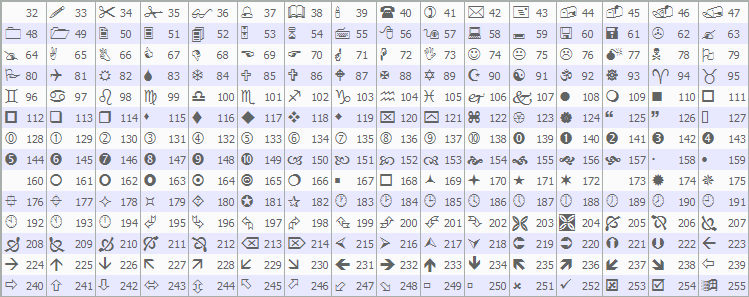
Next, the "DrawTPHit" function renders visuals for take profit hits, taking the level number, hit time, price, and points; it creates a dotted dark gray trendline from entry to hit with "createTrendline" in back without ray, a solid horizontal connect at hit price, and a centered Wingdings tick (code 254) in blue size 12. So now you know how the tick comes about. Similarly, "DrawSLHit" draws for stop loss hits with a dotted line to hit, a horizontal connect, and a centered Wingdings icon (code 253) in magenta size 12.
For "DrawEarlyClose", handling premature closures, we draw a dotted line to close price, determine color blue if positive points or magenta if negative, place a bubble (code 214) at entry time on close price in that color size 12 left anchor, add signed points text ("+" or empty) in same color size 10 right anchor, and a horizontal connect. We can use these functions in the logic to open and close the positions, most importantly, the virtual positions. Here is the logic we used to achieve that.
//+------------------------------------------------------------------+
//| Get close price from history for auto-closed position            |
//+------------------------------------------------------------------+
double GetPositionClosePrice(long ticket) {
   HistorySelectByPosition(ticket);                               //--- Select history
   int deals = HistoryDealsTotal();                               //--- Get deals count
   if (deals > 0) {                                               //--- Check deals
      ulong deal_ticket = HistoryDealGetTicket(deals - 1);        //--- Get last deal
      return HistoryDealGetDouble(deal_ticket, DEAL_PRICE);       //--- Return price
   }
   return 0.0;                                                    //--- Return fallback
}

//+------------------------------------------------------------------+
//| Open virtual position                                            |
//+------------------------------------------------------------------+
void OpenVirtualPosition(int type, datetime ent_time, double ent_price) {
   current_signal.active = true;                                  //--- Set active
   current_signal.pos_type = type;                                //--- Set type
   current_signal.entry_time = ent_time;                          //--- Set time
   current_signal.entry_price = ent_price;                        //--- Set price
   current_signal.tp1 = ent_price + (tp1_points * _Point) * type; //--- Set TP1
   current_signal.tp2 = ent_price + (tp2_points * _Point) * type; //--- Set TP2
   current_signal.tp3 = ent_price + (tp3_points * _Point) * type; //--- Set TP3
   current_signal.sl = ent_price - (sl_points * _Point) * type;   //--- Set SL
   current_signal.hit_tp1 = false;                                //--- Reset TP1 hit
   current_signal.hit_tp2 = false;                                //--- Reset TP2 hit
   current_signal.hit_tp3 = false;                                //--- Reset TP3 hit
   current_signal.hit_sl = false;                                 //--- Reset SL hit
   current_signal.close_time = 0;                                 //--- Reset close time
   position_ticket = -1;                                          //--- Reset ticket
   DrawInitialLevels();                                           //--- Draw levels
}

//+------------------------------------------------------------------+
//| Close virtual position                                           |
//+------------------------------------------------------------------+
void CloseVirtualPosition(double close_price, bool is_early) {
   if (!current_signal.active) return;                            //--- Return if not active
   double profit_pts = (close_price - current_signal.entry_price) / _Point * current_signal.pos_type; //--- Calc profit
   current_signal.close_time = TimeCurrent();                     //--- Set close time
   if (is_early) {                                                //--- Check early
      DrawEarlyClose(TimeCurrent(), close_price, profit_pts);     //--- Draw early close
      if (trade_mode == Open_Trades && position_ticket != -1) {   //--- Check open trades
         MqlTradeRequest close_request = {};                      //--- Close request
         MqlTradeResult close_result = {};                        //--- Close result
         close_request.action = TRADE_ACTION_DEAL;                //--- Set action
         close_request.symbol = _Symbol;                          //--- Set symbol
         close_request.volume = 0.1;                              //--- Set volume
         close_request.type = (current_signal.pos_type == 1) ? ORDER_TYPE_SELL : ORDER_TYPE_BUY; //--- Set type
         close_request.price = close_price;                       //--- Set price
         close_request.deviation = 3;                             //--- Set deviation
         close_request.position = position_ticket;                //--- Set position
         if (!OrderSend(close_request, close_result)) {           //--- Send close
            Print("Failed to close trade: ", GetLastError());     //--- Log error
         }
         position_ticket = -1;                                    //--- Reset ticket
      }
   }
   if (trade_mode == Open_Trades) {                               //--- Check open trades
      bool hit_selected_tp = false;                               //--- Init selected TP
      switch(tp_level) {                                          //--- Select TP
         case Level_1: hit_selected_tp = current_signal.hit_tp1; break; //--- TP1
         case Level_2: hit_selected_tp = current_signal.hit_tp2; break; //--- TP2
         case Level_3: hit_selected_tp = current_signal.hit_tp3; break; //--- TP3
      }
      bool count_it = current_signal.hit_sl || hit_selected_tp || !is_early; //--- Check count
      if (count_it) {                                              //--- Count
         total_profit_points += profit_pts;                        //--- Add profit
         total_signals++;                                          //--- Increment signals
         if (profit_pts > 0) wins++;                               //--- Increment wins
         else losses++;                                            //--- Increment losses
      }
   } else {                                                        //--- Visual only
      bool hit_selected = false;                                   //--- Init selected hit
      int selected_points = 0;                                     //--- Init points
      switch(tp_level) {                                           //--- Select TP
         case Level_1: hit_selected = current_signal.hit_tp1; selected_points = tp1_points; break; //--- TP1
         case Level_2: hit_selected = current_signal.hit_tp2; selected_points = tp2_points; break; //--- TP2
         case Level_3: hit_selected = current_signal.hit_tp3; selected_points = tp3_points; break; //--- TP3
      }
      double effective_profit = 0.0;                               //--- Init effective profit
      if (hit_selected) {                                          //--- Check hit selected
         effective_profit = (double)selected_points;               //--- Set to selected points
      } else if (current_signal.hit_sl) {                          //--- Check SL hit
         effective_profit = - (double)sl_points;                   //--- Set to -SL
      } else {                                                     //--- Else
         effective_profit = profit_pts;                            //--- Set to profit pts
      }
      total_profit_points += effective_profit;                     //--- Add effective profit
      total_signals++;                                             //--- Increment signals
      if (hit_selected || effective_profit > 0) wins++;            //--- Increment wins
      else losses++;                                               //--- Increment losses
   }
   current_signal.active = false;                                  //--- Deactivate
}
Here, we define the "GetPositionClosePrice" function to fetch the closing price of a position from the deal history when auto-closed. We use HistorySelectByPosition on the ticket and check the deal count with the HistoryDealsTotal function. If deals are available, we get the last deal's ticket via "HistoryDealGetTicket" and its price from HistoryDealGetDouble with DEAL_PRICE. If no deals exist, we default to 0.0.
Next, the "OpenVirtualPosition" function sets up a simulated trade by activating the signal, assigning type (1 for buy, -1 for sell), entry time and price, computing take profit levels as entry adjusted by their points times _Point and type direction, stop loss similarly but subtracted, clearing hit flags and close time, resetting ticket, and invoking "DrawInitialLevels" for visuals. The "CloseVirtualPosition" function concludes a simulation with a given close price and an early closure flag, exiting if inactive, calculating profit points as the signed difference over "_Point", and updating the close time to the current. If early, it draws indicators with "DrawEarlyClose" and, in live mode with a valid ticket, builds an opposite market close request at the price with deviation, sends using OrderSend, logs failures, and clears the ticket.
In live mode, it evaluates if the chosen take profit was reached via switch on "tp_level", and if stop loss hit, selected take profit, or not early, accumulates profit, counts the signal, and adds to wins if positive or losses. For visual mode, it checks selected take profit hit and points through switch, derives effective profit as points if hit, negative sl if stop loss, or actual if neither, adds to total, increments signals, tallies win if hit or positive effective. We then deactivate the signal by setting "active" to false. We are now fully equipped with the utility functions that we need and can now move on to organizing our logic in the OnTick event handler for execution.
//+------------------------------------------------------------------+
//| Expert tick function                                             |
//+------------------------------------------------------------------+
void OnTick() {
   MqlTick tick;                                                  //--- Tick structure
   if (!SymbolInfoTick(_Symbol, tick)) return;                    //--- Get tick or return
   double bid = tick.bid;                                         //--- Get bid
   double ask = tick.ask;                                         //--- Get ask
   MqlRates rates[2];                                             //--- Rates array
   if (CopyRates(_Symbol, PERIOD_CURRENT, 0, 2, rates) < 2) return; //--- Copy rates or return
   bool new_bar = (rates[0].time > last_bar_time);                //--- Check new bar
   if (new_bar) last_bar_time = rates[0].time;                    //--- Update last time
   double fast_buf[], slow_buf[], filter_buf[];                   //--- Buffers
   ArraySetAsSeries(fast_buf, true);
   ArraySetAsSeries(slow_buf, true);
   ArraySetAsSeries(filter_buf, true);
   if (CopyBuffer(h_fast_ma, 0, 0, 3, fast_buf) < 3) return;      //--- Copy fast or return
   if (CopyBuffer(h_slow_ma, 0, 0, 3, slow_buf) < 3) return;      //--- Copy slow or return
   if (CopyBuffer(h_filter_ma, 0, 0, 2, filter_buf) < 2) return;  //--- Copy filter or return
   double fast_1 = fast_buf[1];                                   //--- Fast MA 1
   double fast_2 = fast_buf[2];                                   //--- Fast MA 2
   double slow_1 = slow_buf[1];                                   //--- Slow MA 1
   double slow_2 = slow_buf[2];                                   //--- Slow MA 2
   double filter_1 = filter_buf[1];                               //--- Filter MA 1
   double close_1 = rates[1].close;                               //--- Close 1
   int signal_type = 0;                                           //--- Init signal type
   if (new_bar) {                                                 //--- Check new bar
      if (fast_2 <= slow_2 && fast_1 > slow_1 && close_1 > filter_1) signal_type = 1; //--- Buy signal
      else if (fast_2 >= slow_2 && fast_1 < slow_1 && close_1 < filter_1) signal_type = -1; //--- Sell signal
   }
   if (signal_type != 0) {                                        //--- Check signal
      if (current_signal.active && current_signal.pos_type != signal_type) { //--- Check active opposite
         double close_price = (current_signal.pos_type == 1) ? bid : ask; //--- Get close price
         CloseVirtualPosition(close_price, true);                  //--- Close early
      }
      if (!current_signal.active) {                                //--- Check not active
         double entry_price = (signal_type == 1) ? ask : bid;      //--- Get entry price
         OpenVirtualPosition(signal_type, rates[1].time, entry_price); //--- Open virtual
         string name = "Signal_Entry_" + TimeToString(rates[1].time); //--- Entry name
         ObjectCreate(0, name, OBJ_ARROW, 0, rates[1].time, signal_type == 1 ? rates[1].low : rates[1].high); //--- Create arrow
         ObjectSetInteger(0, name, OBJPROP_ARROWCODE, (signal_type == 1 ? 236 : 238)); //--- Set code
         ObjectSetString(0, name, OBJPROP_FONT, "Wingdings");      //--- Set font
         ObjectSetInteger(0, name, OBJPROP_COLOR, signal_type == 1 ? clrGreen : clrRed); //--- Set color
         ObjectSetInteger(0, name, OBJPROP_FONTSIZE, 12);          //--- Set size
         ObjectSetInteger(0, name, OBJPROP_ANCHOR, signal_type == 1 ? ANCHOR_LEFT_LOWER : ANCHOR_LEFT_UPPER); //--- Set anchor
         if (trade_mode == Open_Trades) {                          //--- Check open trades
            MqlTradeRequest request = {};                          //--- Request
            MqlTradeResult result = {};                            //--- Result
            request.action = TRADE_ACTION_DEAL;                    //--- Set action
            request.symbol = _Symbol;                              //--- Set symbol
            request.volume = 0.1;                                  //--- Set volume
            request.type = signal_type == 1 ? ORDER_TYPE_BUY : ORDER_TYPE_SELL; //--- Set type
            request.price = signal_type == 1 ? ask : bid;          //--- Set price
            request.deviation = 3;                                 //--- Set deviation
            double selected_tp = 0;                                //--- Init TP
            switch(tp_level) {                                     //--- Select TP
               case Level_1: selected_tp = current_signal.tp1; break; //--- TP1
               case Level_2: selected_tp = current_signal.tp2; break; //--- TP2
               case Level_3: selected_tp = current_signal.tp3; break; //--- TP3
            }
            request.tp = selected_tp;                              //--- Set TP
            request.sl = current_signal.sl;                        //--- Set SL
            if(!OrderSend(request, result)) {                      //--- Send order
               Print("Failed to open trade: ", GetLastError());    //--- Log error
            } else {                                               //--- Success
               position_ticket = result.deal;                      //--- Set ticket
            }
         }
      }
   }
}
In the OnTick event handler, we fetch the current tick with SymbolInfoTick into a MqlTick structure, extracting "bid" and "ask", and return early if failed. We copy the last two rates via CopyRates into a MqlRates array, checking for a new bar by comparing the latest time to "last_bar_time", updating it if so. We declare buffers for moving averages: "fast_buf[]", "slow_buf[]", "filter_buf[]", setting them as time series, copying from handles with CopyBuffer at main buffer 0, returning on insufficient data. We assign values like "fast_1" from buffer[1], "fast_2" from [2], similar for slow and filter at [1], close from rates[1].close. If new bar, we detect signals: buy (1) if prior fast below or at slow but current above and close above filter; sell (-1) if prior fast above or at slow but current below and close below filter.
On signal, if active and opposite to current type, compute close price as bid for buys or ask for sells, call "CloseVirtualPosition" with early true. If not active, derive entry as ask for buys or bid for sells, invoke "OpenVirtualPosition" with type, rates[1].time, entry. We create an entry arrow object named "Signal_Entry_" plus time string as OBJ_ARROW, positioned at rates[1].time and low for buys or high for sells, set arrow code 236 for buy or 238 for sell in Wingdings font green/red size 12, anchor lower for buys or upper for sells. In live mode ("trade_mode" as "Open_Trades"), we build a MqlTradeRequest for a market deal on a symbol with volume 0.1, type buy/sell, price ask/bid, deviation 3; select take profit via switch on "tp_level" from signal's tp1/tp2/tp3, set stop loss from signal.sl, send with OrderSend, log errors, or store deal ticket in "position_ticket" on success. Upon compilation, we get the following outcome.

We can see that upon signal detection, we close the positions and open the new signal schematics. We just need to update the signals upon levels being hit now. We can also see that the dashboard is not updating, but that is the last thing we want to do after getting all the needed stats. Let us do that now.
if (current_signal.active) {                                   //--- Check active
   // Detect if real position closed automatically (TP/SL)
   if (trade_mode == Open_Trades && position_ticket != -1 && !PositionSelectByTicket(position_ticket)) { //--- Check closed
      double close_price = GetPositionClosePrice(position_ticket); //--- Get close price
      bool hit_sl = MathAbs(close_price - current_signal.sl) < _Point * 5; //--- Check SL hit
      current_signal.hit_sl = hit_sl;                          //--- Set SL hit
      if (hit_sl) DrawSLHit(TimeCurrent(), current_signal.sl); //--- Draw SL
      CloseVirtualPosition(close_price, false);                //--- Close virtual
   } else {                                                    //--- Not auto closed
      // Check for visual hits (TP levels)
      if (!current_signal.hit_tp1) {                           //--- Check TP1
         bool tp1_hit = false;                                 //--- Init hit
         if (current_signal.pos_type == 1 && bid >= current_signal.tp1) tp1_hit = true; //--- Buy hit
         if (current_signal.pos_type == -1 && ask <= current_signal.tp1) tp1_hit = true; //--- Sell hit
         if (tp1_hit) {                                        //--- Hit
            current_signal.hit_tp1 = true;                     //--- Set hit
            DrawTPHit(1, TimeCurrent(), current_signal.tp1, tp1_points); //--- Draw hit
         }
      }
      if (!current_signal.hit_tp2) {                           //--- Check TP2
         bool tp2_hit = false;                                 //--- Init hit
         if (current_signal.pos_type == 1 && bid >= current_signal.tp2) tp2_hit = true; //--- Buy hit
         if (current_signal.pos_type == -1 && ask <= current_signal.tp2) tp2_hit = true; //--- Sell hit
         if (tp2_hit) {                                        //--- Hit
            current_signal.hit_tp2 = true;                     //--- Set hit
            DrawTPHit(2, TimeCurrent(), current_signal.tp2, tp2_points); //--- Draw hit
         }
      }
      if (!current_signal.hit_tp3) {                           //--- Check TP3
         bool tp3_hit = false;                                 //--- Init hit
         if (current_signal.pos_type == 1 && bid >= current_signal.tp3) tp3_hit = true; //--- Buy hit
         if (current_signal.pos_type == -1 && ask <= current_signal.tp3) tp3_hit = true; //--- Sell hit
         if (tp3_hit) {                                        //--- Hit
            current_signal.hit_tp3 = true;                     //--- Set hit
            DrawTPHit(3, TimeCurrent(), current_signal.tp3, tp3_points); //--- Draw hit
            if (trade_mode == Visual_Only) {                   //--- Check visual only
               double close_price = (current_signal.pos_type == 1) ? bid : ask; //--- Get close
               CloseVirtualPosition(close_price, false);       //--- Close virtual
            }
         }
      }
      // SL hit check for Visual_Only or manual if needed
      bool sl_hit = false;                                     //--- Init SL hit
      if (current_signal.pos_type == 1 && bid <= current_signal.sl) sl_hit = true; //--- Buy SL
      if (current_signal.pos_type == -1 && ask >= current_signal.sl) sl_hit = true; //--- Sell SL
      if (sl_hit && !current_signal.hit_sl) {                  //--- Check hit and not set
         bool already_won = false;                             //--- Init won flag
         switch(tp_level) {                                    //--- Check level
            case Level_1: already_won = current_signal.hit_tp1; break; //--- TP1 won
            case Level_2: already_won = current_signal.hit_tp2; break; //--- TP2 won
            case Level_3: already_won = current_signal.hit_tp3; break; //--- TP3 won
         }
         if (!already_won) {                                   //--- Check not won
            current_signal.hit_sl = true;                      //--- Set SL hit
            DrawSLHit(TimeCurrent(), current_signal.sl);       //--- Draw SL
         }
         if (trade_mode == Visual_Only) {                      //--- Check visual
            double close_price = (current_signal.pos_type == 1) ? bid : ask; //--- Get close
            CloseVirtualPosition(close_price, false);          //--- Close virtual
         }
      }
   }
}
If a signal is active in "current_signal", we first detect if a real position was auto-closed by take profit or stop loss in live mode ("trade_mode" as "Open_Trades") by verifying the ticket is valid but PositionSelectByTicket fails; if so, fetch close price with "GetPositionClosePrice", check if it matches stop loss within 5 points tolerance via MathAbs, set "hit_sl" flag and draw with "DrawSLHit" at current time and stop loss price if true, then call "CloseVirtualPosition" non-early. Otherwise, for ongoing positions, we check each take profit if not hit: for TP1, set flag true if bid reaches or exceeds for buys or ask falls to or below for sells, then mark "hit_tp1" and invoke "DrawTPHit" with level 1, current time, TP1 price, and "tp1_points". Repeat similarly for TP2 and TP3; for TP3 in visual mode ("trade_mode" as "Visual_Only"), also close the simulation with close price as bid/ask non-early.
We separately monitor stop loss hits in visual or manual cases: flag true if bid at or below for buys or ask at or above for sells, and if not already set, check via switch on "tp_level" if the selected take profit was reached (setting "already_won" true), only proceeding if not to avoid counting losses after wins—then set "hit_sl", draw with "DrawSLHit" at current time and stop loss price. In visual mode, close the simulation with bid/ask non-early. We get the following outcome.

We are now able to mark the hit levels, completing the chart visualization. Since we have all the stats needed, we can update the dashboard. We will define a function to house the logic for that.
//+------------------------------------------------------------------+
//| Update dashboard                                                 |
//+------------------------------------------------------------------+
void UpdateDashboard() {
   string space = " ";                                            //--- Space string
   bool display_signal = current_signal.active || current_signal.hit_tp1 || current_signal.hit_tp2 || current_signal.hit_tp3 || current_signal.hit_sl; //--- Check display
   if (display_signal) {                                          //--- Display signal
      string arrow = (current_signal.pos_type == 1) ? CharToString((char)233) : CharToString((char)234); //--- Arrow char
      color dir_color = (current_signal.pos_type == 1) ? clrLime : clrRed; //--- Direction color
      ObjectSetString(0, dash_prefix + "DirectionValue", OBJPROP_TEXT, arrow); //--- Set direction text
      ObjectSetInteger(0, dash_prefix + "DirectionValue", OBJPROP_COLOR, dir_color); //--- Set color
      color level_color = (current_signal.pos_type == 1) ? clrLime : clrRed; //--- Level color
      string direction = (current_signal.pos_type == 1) ? "BUY " : "SELL "; //--- Direction string
      ObjectSetString(0, dash_prefix + "EntryPrice", OBJPROP_TEXT, direction + DoubleToString(current_signal.entry_price, _Digits)); //--- Set entry text
      ObjectSetInteger(0, dash_prefix + "EntryPrice", OBJPROP_COLOR, level_color); //--- Set color
      ObjectSetString(0, dash_prefix + "TP1Value", OBJPROP_TEXT, DoubleToString(current_signal.tp1, _Digits)); //--- Set TP1 text
      ObjectSetInteger(0, dash_prefix + "TP1Value", OBJPROP_COLOR, clrWhite); //--- Set color
      ObjectSetString(0, dash_prefix + "TP2Value", OBJPROP_TEXT, DoubleToString(current_signal.tp2, _Digits)); //--- Set TP2 text
      ObjectSetInteger(0, dash_prefix + "TP2Value", OBJPROP_COLOR, clrWhite); //--- Set color
      ObjectSetString(0, dash_prefix + "TP3Value", OBJPROP_TEXT, DoubleToString(current_signal.tp3, _Digits)); //--- Set TP3 text
      ObjectSetInteger(0, dash_prefix + "TP3Value", OBJPROP_COLOR, clrWhite); //--- Set color
      ObjectSetString(0, dash_prefix + "SLValue", OBJPROP_TEXT, DoubleToString(current_signal.sl, _Digits)); //--- Set SL text
      ObjectSetInteger(0, dash_prefix + "SLValue", OBJPROP_COLOR, clrWhite); //--- Set color
      int tp1_icon = current_signal.hit_tp1 ? 252 : 183;             //--- TP1 icon
      color tp1_icon_color = current_signal.hit_tp1 ? clrLime : clrWhite; //--- TP1 color
      ObjectSetString(0, dash_prefix + "TP1Icon", OBJPROP_TEXT, CharToString((char)tp1_icon)); //--- Set TP1 icon
      ObjectSetInteger(0, dash_prefix + "TP1Icon", OBJPROP_COLOR, tp1_icon_color); //--- Set color
      int tp2_icon = current_signal.hit_tp2 ? 252 : 183;             //--- TP2 icon
      color tp2_icon_color = current_signal.hit_tp2 ? clrLime : clrWhite; //--- TP2 color
      ObjectSetString(0, dash_prefix + "TP2Icon", OBJPROP_TEXT, CharToString((char)tp2_icon)); //--- Set TP2 icon
      ObjectSetInteger(0, dash_prefix + "TP2Icon", OBJPROP_COLOR, tp2_icon_color); //--- Set color
      int tp3_icon = current_signal.hit_tp3 ? 252 : 183;             //--- TP3 icon
      color tp3_icon_color = current_signal.hit_tp3 ? clrLime : clrWhite; //--- TP3 color
      ObjectSetString(0, dash_prefix + "TP3Icon", OBJPROP_TEXT, CharToString((char)tp3_icon)); //--- Set TP3 icon
      ObjectSetInteger(0, dash_prefix + "TP3Icon", OBJPROP_COLOR, tp3_icon_color); //--- Set color
      int sl_icon = current_signal.hit_sl ? 251 : 183;               //--- SL icon
      color sl_icon_color = current_signal.hit_sl ? clrRed : clrWhite; //--- SL color
      ObjectSetString(0, dash_prefix + "SLIcon", OBJPROP_TEXT, CharToString((char)sl_icon)); //--- Set SL icon
      ObjectSetInteger(0, dash_prefix + "SLIcon", OBJPROP_COLOR, sl_icon_color); //--- Set color
      int entry_shift = iBarShift(_Symbol, PERIOD_CURRENT, current_signal.entry_time, false); //--- Entry shift
      int calc_shift = 0;                                    //--- Init calc shift
      if (!current_signal.active && current_signal.close_time != 0) { //--- Check closed
         calc_shift = iBarShift(_Symbol, PERIOD_CURRENT, current_signal.close_time, false); //--- Close shift
      }
      int age = entry_shift - calc_shift;                    //--- Calc age
      ObjectSetString(0, dash_prefix + "AgeValue", OBJPROP_TEXT, IntegerToString(age) + " bars"); //--- Set age text
   } else {                                                       //--- No signal
      ObjectSetString(0, dash_prefix + "DirectionValue", OBJPROP_TEXT, space); //--- Clear direction
      ObjectSetString(0, dash_prefix + "EntryPrice", OBJPROP_TEXT, space); //--- Clear entry
      ObjectSetString(0, dash_prefix + "TP1Value", OBJPROP_TEXT, space);   //--- Clear TP1
      ObjectSetString(0, dash_prefix + "TP2Value", OBJPROP_TEXT, space);   //--- Clear TP2
      ObjectSetString(0, dash_prefix + "TP3Value", OBJPROP_TEXT, space);   //--- Clear TP3
      ObjectSetString(0, dash_prefix + "SLValue", OBJPROP_TEXT, space);    //--- Clear SL
      ObjectSetString(0, dash_prefix + "AgeValue", OBJPROP_TEXT, space);   //--- Clear age
      ObjectSetString(0, dash_prefix + "TP1Icon", OBJPROP_TEXT, space);    //--- Clear TP1 icon
      ObjectSetString(0, dash_prefix + "TP2Icon", OBJPROP_TEXT, space);    //--- Clear TP2 icon
      ObjectSetString(0, dash_prefix + "TP3Icon", OBJPROP_TEXT, space);    //--- Clear TP3 icon
      ObjectSetString(0, dash_prefix + "SLIcon", OBJPROP_TEXT, space);     //--- Clear SL icon
   }
   ObjectSetString(0, dash_prefix + "TotalValue", OBJPROP_TEXT, (string)total_signals); //--- Set total
   ObjectSetString(0, dash_prefix + "WinLossValue", OBJPROP_TEXT, (string)wins + " / " + (string)losses); //--- Set win/loss
   string profit_str = (total_profit_points > 0 ? "+" : "") + DoubleToString(total_profit_points, 0); //--- Profit string
   color profit_color = total_profit_points > 0 ? clrLime : (total_profit_points < 0 ? clrRed : clrWhite); //--- Profit color
   ObjectSetString(0, dash_prefix + "ProfitValue", OBJPROP_TEXT, profit_str); //--- Set profit text
   ObjectSetInteger(0, dash_prefix + "ProfitValue", OBJPROP_COLOR, profit_color); //--- Set color
   double success = (total_signals > 0) ? (double)wins / total_signals * 100.0 : 0.0; //--- Calc success
   ObjectSetString(0, dash_prefix + "SuccessValue", OBJPROP_TEXT, DoubleToString(success, 2) + "%"); //--- Set success
   ChartRedraw(0);                                                //--- Redraw chart
}
We proceed to define the "UpdateDashboard" function to refresh the panel with current signal and stats data, starting with a space string for clearing labels. We determine if a signal should display based on "current_signal" being active or any take profit/stop loss hit flags set. If yes, we set the direction icon as Wingdings char 233 for buys or 234 for sells, color lime for buys or red for sells, updating the label text and color with the ObjectSetString and ObjectSetInteger functions. We format the entry label as "BUY " or "SELL " plus entry price normalized to _Digits via DoubleToString, in lime/red, and set take profit 1-3 and stop loss values similarly in white.
For icons, take profit 1 uses Wingdings 252 (check) if hit in lime, else 183 (dot) in white, repeated for 2 and 3; stop loss 251 (x) if hit in red, else 183 in white. We compute signal age in bars using iBarShift from entry time minus close time shift if closed, setting the age label as a string plus " bars". If no signal, clear all signal-related labels to space. Regardless, update total signals label with string of "total_signals", win/loss as wins slash losses, profit as signed string rounded to 0 decimals with color lime if positive/red if negative/white if zero, success as percentage to 2 decimals if signals exist else 0.0. We redraw the chart with the ChartRedraw function to apply changes. We call this function in the tick handler to apply the updates. We now need to delete the objects that we have created on system termination.
//+------------------------------------------------------------------+
//| Expert deinitialization function                                 |
//+------------------------------------------------------------------+
void OnDeinit(const int reason) {
   ObjectsDeleteAll(0, dash_prefix);                              //--- Delete dashboard objects
   ObjectsDeleteAll(0, "Signal_");                                //--- Delete signal objects
   ObjectsDeleteAll(0, "Initial_");                               //--- Delete initial objects
   IndicatorRelease(h_fast_ma);                                   //--- Release fast MA
   IndicatorRelease(h_slow_ma);                                   //--- Release slow MA
   IndicatorRelease(h_filter_ma);                                 //--- Release filter MA
   if (trade_mode == Open_Trades && position_ticket != -1) {      //--- Check open trades mode
      MqlTick tick;                                               //--- Tick structure
      if (SymbolInfoTick(_Symbol, tick)) {                        //--- Get tick
         double close_price = (current_signal.pos_type == 1) ? tick.bid : tick.ask; //--- Get close price
         MqlTradeRequest close_request = {};                      //--- Close request
         MqlTradeResult close_result = {};                        //--- Close result
         close_request.action = TRADE_ACTION_DEAL;                //--- Set action
         close_request.symbol = _Symbol;                          //--- Set symbol
         close_request.volume = 0.1;                              //--- Set volume
         close_request.type = (current_signal.pos_type == 1) ? ORDER_TYPE_SELL : ORDER_TYPE_BUY; //--- Set type
         close_request.price = close_price;                       //--- Set price
         close_request.deviation = 3;                             //--- Set deviation
         close_request.position = position_ticket;                //--- Set position
         if (!OrderSend(close_request, close_result)) {           //--- Send close
            Print("Failed to close trade on deinit: ", GetLastError()); //--- Log error
         }
         position_ticket = -1;                                    //--- Reset ticket
      }
   }
}
In the OnDeinit event handler, which handles cleanup when the Expert Advisor is removed with a reason code, we first remove all dashboard objects using ObjectsDeleteAll with the "dash_prefix", then clear signal-related visuals prefixed "Signal_" and initial levels with "Initial_" across all subwindows. We release the moving average indicator resources via IndicatorRelease for "h_fast_ma", "h_slow_ma", and "h_filter_ma" to free memory.
If in live trading mode ("trade_mode" as "Open_Trades") with a valid "position_ticket", we fetch the current tick using SymbolInfoTick, and if successful, compute the close price as bid for buys or ask for sells based on "current_signal.pos_type". We construct an opposite market close request with action TRADE_ACTION_DEAL, symbol, volume 0.1, type sell for buys or buy for sells, price, deviation 3, and position ticket, send it with OrderSend, log any failure from GetLastError, and reset the ticket to -1. Upon compilation, we get the following outcome.

From the image, we can see that we have correctly set up the strategy tester system with all the objectives achieved. What now remains is testing the workability of the system, and that is handled in the preceding section.
Testing the Strategy Tracker
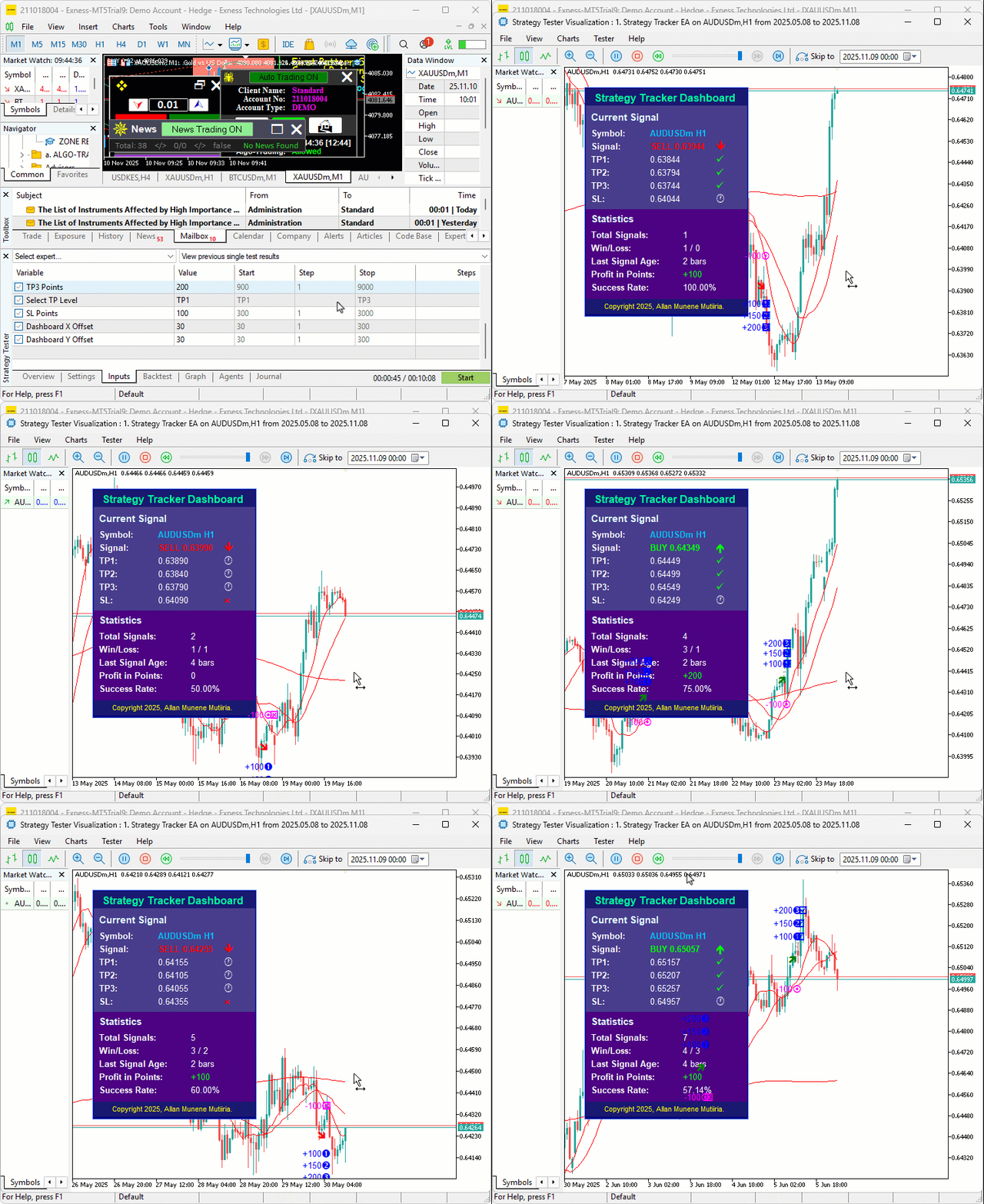
We did the testing, and below is the compiled visualization in a single Graphics Interchange Format (GIF) bitmap image format.
Conclusion
In conclusion, we’ve developed a strategy tracker system in MQL5 that detects moving average crossover signals with a long-term filter, which can be switched with a favourable one, tracks outcomes through virtual or live positions with multiple take profit levels and stop loss, visualizes entries, hits, and closures on the chart using arrows, lines, and icons, and provides a real-time dashboard for monitoring stats like total signals, wins/losses, profit points, and success rates. It equips you to gain deeper insights into your trading approaches through on-chart tracking and metrics, ready for further customization in your trading toolkit. Happy trading!
Warning: All rights to these materials are reserved by MetaQuotes Ltd. Copying or reprinting of these materials in whole or in part is prohibited.
This article was written by a user of the site and reflects their personal views. MetaQuotes Ltd is not responsible for the accuracy of the information presented, nor for any consequences resulting from the use of the solutions, strategies or recommendations described.

 Analyzing all price movement options on the IBM quantum computer
 Risk-Based Trade Placement EA with On-Chart UI (Part 2): Adding Interactivity and Logic
 Neural Networks in Trading: Memory Augmented Context-Aware Learning for Cryptocurrency Markets (Final Part)
 Developing a Trading Strategy: The Triple Sine Mean Reversion Method

- Free trading apps
- Over 8,000 signals for copying
- Economic news for exploring financial markets
You agree to website policy and terms of use