

MQL5 Trading Tools (Part 12): Enhancing the Correlation Matrix Dashboard with Interactivity
 3 229
3 229
 4
4

Introduction
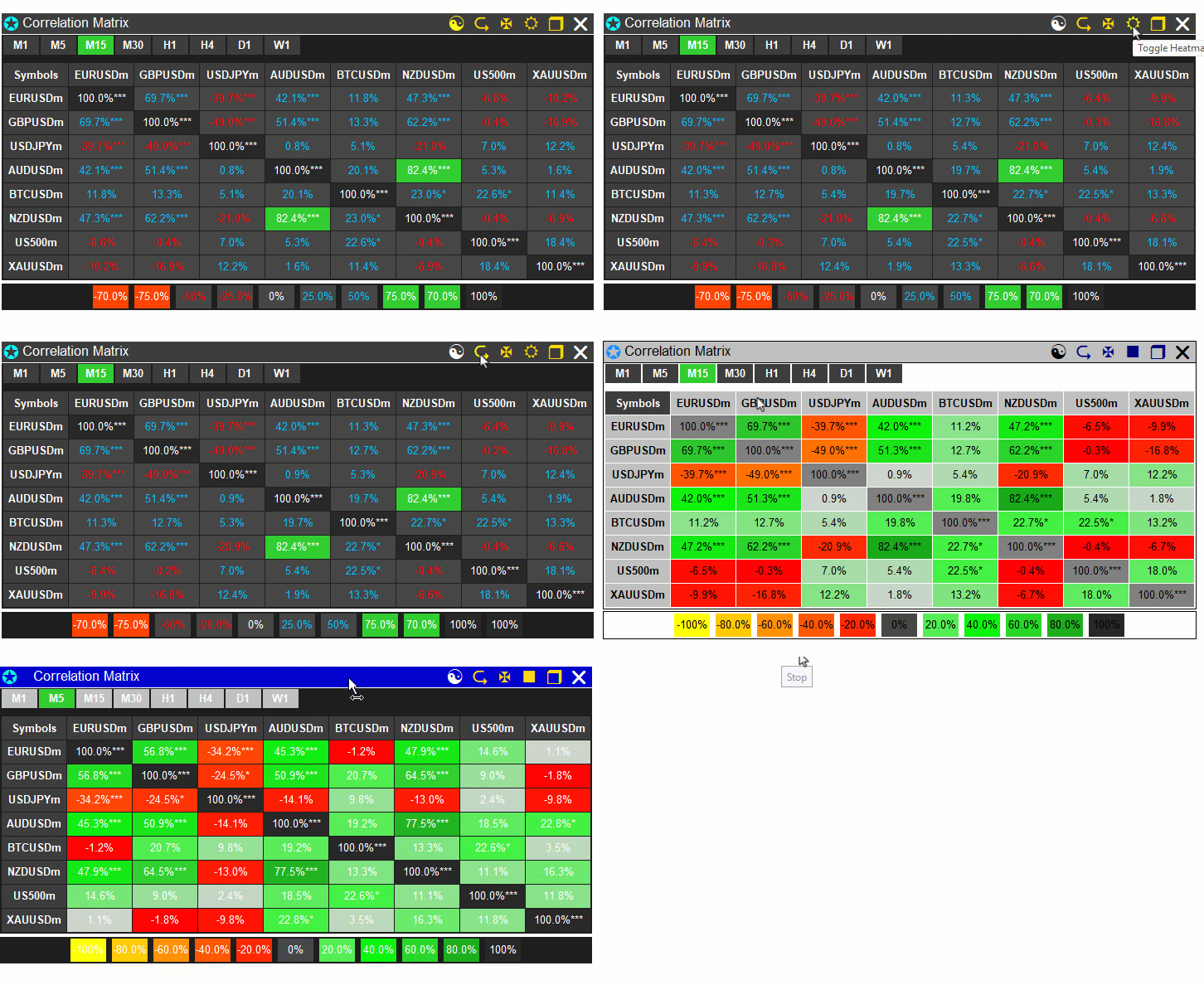
In our previous article (Part 11), we developed a correlation matrix dashboard in MetaQuotes Language 5 (MQL5) that computed asset relationships using the Pearson, Spearman, and Kendall methods over a configurable timeframe and number of bars. In Part 12, we enhance the correlation matrix dashboard with interactivity. This enhancement introduces features such as panel dragging and minimizing via mouse events, button hover effects for visual feedback, symbol sorting by correlation strength in ascending/descending modes, toggling between correlation and p-value views, light/dark theme switching with dynamic color updates, and cell tooltips for detailed information. We will cover the following topics:
- Understanding the Interactive Correlation Matrix Enhancements
- Implementation in MQL5
- Backtesting
- Conclusion
By the end, you’ll use an interactive MQL5 correlation matrix dashboard with enhanced usability, ready to customize—let’s dive in!
Understanding the Interactive Correlation Matrix Enhancements
The interactive correlation matrix enhancements build on the base dashboard by introducing user-friendly features that allow for dynamic manipulation and customization, making it more practical for us to analyze asset relationships in real time without disrupting workflow. Key additions include mouse event handling for panel dragging to reposition the dashboard on the chart, minimizing/maximizing to toggle between a compact header view and full display, hover effects on buttons and timeframe cells for visual feedback, such as color changes, and click responses to switch modes or views.
We also incorporate sorting symbols by average absolute correlation strength in original, descending, or ascending orders to group highly correlated assets, toggling between correlation and p-value displays for deeper statistical insights, light/dark theme switching to adapt to user preferences with adjusted colors, and tooltips on cells providing details like symbols, timeframe, method, correlation, p-value, and bars used.
We plan to extend the inputs and enumerations for new modes like view toggling, add globals for interaction states, modify parsing to store original symbols, implement sorting logic based on average strengths with index reordering, update creation and position functions to support minimization and dragging, adjust colors dynamically in theme toggles, enhance dashboard updates for p-value views and tooltips, and handle all interactions in an event handler for seamless usability. In brief, here is a visual representation of our objectives.
Implementation in MQL5
To enhance the program in MQL5, we will need to define some new input parameters to control the multi-dashboard control mechanism and some extra globals.
input color ColorLightThemeBg           = clrWhite;                                                         // Light theme background
input color ColorLightThemeText         = clrBlack;                                                         // Light theme text

enum ViewMode
{
   VIEW_CORR, // Show correlations
   VIEW_PVAL  // Show p-values
};

#define SORT_BUTTON             "BUTTON_SORT"                    // Define sort button identifier
#define THEME_BUTTON            "BUTTON_THEME"                   // Define theme toggle button identifier
#define COLOR_LIGHT_GRAY        C'230,230,230'                   // Define light gray for neutral cells
#define COLOR_DARK_GRAY         C'105,105,105'                   // Define dark gray for headers
#define BUTTON_HOVER_SIZE       24                               // Define hover size for buttons (centered around anchor)
#define NUM_LEGEND_ITEMS        15                               // Define increased to cover max possible (e.g., 11 in heatmap)

bool panel_is_visible = true;                                    //--- Set panel visibility flag
bool panel_minimized = false;                                    //--- Set minimized state flag
bool panel_dragging = false;                                     //--- Set dragging flag
int panel_drag_x = 0, panel_drag_y = 0;                          //--- Initialize drag start mouse coordinates
int panel_start_x = 0, panel_start_y = 0;                        //--- Initialize drag start panel coordinates
int prev_mouse_state = 0;                                        //--- Initialize previous mouse state
bool prev_header_hovered = false;                                //--- Set previous header hover state
bool prev_toggle_hovered = false;                                //--- Set previous toggle hover state
bool prev_close_hovered = false;                                 //--- Set previous close hover state
bool prev_heatmap_hovered = false;                               //--- Set previous heatmap hover state
bool prev_pval_hovered = false;                                  //--- Set previous pval hover state
bool prev_sort_hovered = false;                                  //--- Set previous sort hover state
bool prev_theme_hovered = false;                                 //--- Set previous theme hover state
bool prev_tf_hovered[NUM_TF];                                    //--- Declare previous TF hover states array
int last_mouse_x = 0, last_mouse_y = 0;                          //--- Initialize last mouse position
bool is_light_theme = false;                                     //--- Set theme flag (dark by default)
int sort_mode = 0;                                               //--- Initialize sort mode (0=original)

string original_symbols[MAX_SYMBOLS];                            //--- Declare array to store original order

ViewMode global_view_mode = VIEW_CORR;
We begin the implementation by adding input parameters for light theme customization, including "ColorLightThemeBg" set to white for backgrounds and "ColorLightThemeText" set to black for text. We then define the "ViewMode" enumeration with options "VIEW_CORR" for displaying correlations and "VIEW_PVAL" for showing p-values, allowing toggling between views. Next, we introduce defines for new user interface elements like "SORT_BUTTON" and "THEME_BUTTON" identifiers, along with colors such as "COLOR_LIGHT_GRAY" as a light gray for neutral cells in light mode, "COLOR_DARK_GRAY" as dark gray for headers, "BUTTON_HOVER_SIZE" at twenty-four pixels for button hover detection areas, and "NUM_LEGEND_ITEMS" expanded to fifteen to accommodate finer legends in modes like heatmap.
We declare global variables to manage interactivity states: "panel_is_visible" initialized to true for dashboard visibility, "panel_minimized" to false for full display, "panel_dragging" to false with coordinates like "panel_drag_x" and "panel_start_x" at zero for handling drags, "prev_mouse_state" at zero to track mouse button states, boolean flags such as "prev_header_hovered" set to false for monitoring hover over elements like header, toggle, close, heatmap, pval, sort, and theme buttons, an array "prev_tf_hovered" for timeframe cell hovers, "last_mouse_x" and "last_mouse_y" at zero for last cursor position, "is_light_theme" to false starting in dark mode, and "sort_mode" at zero for original symbol order. Additionally, we add the "original_symbols" string array of maximum symbol size to preserve the initial symbol sequence for sorting resets, and set "global_view_mode" to "VIEW_CORR" as the default view.
Now, when parsing the symbols, we need to store the original symbols' classification so we can recall them when toggling to the the original state. We simply add them to the defined array as shown below. We have highlighted the addition for clarity.
//+------------------------------------------------------------------+
//| Parse symbols list into array                                    |
//+------------------------------------------------------------------+
void parse_symbols() {
   string temp = SymbolsList;                                   //--- Copy input symbols list
   num_symbols = 0;                                             //--- Reset symbol count
   while (StringFind(temp, ",") >= 0 && num_symbols < MAX_SYMBOLS) { //--- Loop through comma-separated symbols
      int pos = StringFind(temp, ",");                          //--- Find comma position
      string sym = StringSubstr(temp, 0, pos);                  //--- Extract symbol
      if (SymbolSelect(sym, true)) {                            //--- Select symbol if available
         symbols_array[num_symbols] = sym;                      //--- Store valid symbol
         original_symbols[num_symbols] = sym;                   //--- Store in original order
         num_symbols++;                                         //--- Increment count
      } else {                                                  //--- Handle unavailable symbol
         Print("Warning: Symbol ", sym, " not available.");     //--- Print warning
      }
      temp = StringSubstr(temp, pos + 1);                       //--- Update remaining string
   }
   if (StringLen(temp) > 0 && num_symbols < MAX_SYMBOLS) {      //--- Handle last symbol
      if (SymbolSelect(temp, true)) {                           //--- Select last symbol if available
         symbols_array[num_symbols] = temp;                     //--- Store last valid symbol
         original_symbols[num_symbols] = temp;                  //--- Store in original order
         num_symbols++;                                         //--- Increment count
      } else {                                                  //--- Handle unavailable last symbol
         Print("Warning: Symbol ", temp, " not available.");    //--- Print warning
      }
   }
   if (num_symbols < 2) {                                       //--- Check minimum symbols
      Print("Error: At least 2 valid symbols required. Found: ", num_symbols); //--- Print error
      ExpertRemove();                                           //--- Remove expert
   }
}
To introduce sorting by strength from original to descending to ascending, for analytical values clustering, we will need to introduce the respective functions. Here is the logic we used for that.
//+------------------------------------------------------------------+
//| Sort symbols by average correlation strength                     |
//+------------------------------------------------------------------+
void sort_symbols_by_strength() {
   if (sort_mode == 0) {                                        //--- Check original mode
      ArrayCopy(symbols_array, original_symbols);               //--- Restore original symbols
      update_correlations();                                    //--- Recompute correlations
      return;                                                   //--- Exit function
   }

   double avg_corr[MAX_SYMBOLS];                                //--- Declare average correlation array
   ArrayInitialize(avg_corr, 0.0);                              //--- Initialize averages
   for (int i = 0; i < num_symbols; i++) {                      //--- Loop symbols
      for (int j = 0; j < num_symbols; j++) {                   //--- Loop pairs
         if (i != j) avg_corr[i] += MathAbs(correlation_matrix[i][j]); //--- Accumulate absolute correlations
      }
      avg_corr[i] /= (num_symbols - 1);                         //--- Compute average
   }

   int indices[MAX_SYMBOLS];                                    //--- Declare indices array
   for (int i = 0; i < num_symbols; i++) indices[i] = i;        //--- Initialize indices
   for (int i = 0; i < num_symbols - 1; i++) {                  //--- Loop outer for sorting
      for (int j = i + 1; j < num_symbols; j++) {               //--- Loop inner for comparison
         bool swap = (sort_mode == 1) ? (avg_corr[indices[i]] < avg_corr[indices[j]]) : (avg_corr[indices[i]] > avg_corr[indices[j]]); //--- Determine swap
         if (swap) {                                            //--- Check if swap needed
            int temp = indices[i];                              //--- Store temporary
            indices[i] = indices[j];                            //--- Swap indices
            indices[j] = temp;                                  //--- Complete swap
         }
      }
   }

   string new_symbols[MAX_SYMBOLS];                             //--- Declare new symbols array
   double new_corr[MAX_SYMBOLS][MAX_SYMBOLS];                   //--- Declare new correlation matrix
   double new_pval[MAX_SYMBOLS][MAX_SYMBOLS];                   //--- Declare new p-value matrix
   for (int i = 0; i < num_symbols; i++) {                      //--- Loop to reorder
      int old_i = indices[i];                                   //--- Get old index
      new_symbols[i] = symbols_array[old_i];                    //--- Set new symbol
      for (int j = 0; j < num_symbols; j++) {                   //--- Loop columns
         int old_j = indices[j];                                //--- Get old column index
         new_corr[i][j] = correlation_matrix[old_i][old_j];     //--- Copy correlation
         new_pval[i][j] = pvalue_matrix[old_i][old_j];          //--- Copy p-value
      }
   }
   ArrayCopy(symbols_array, new_symbols);                       //--- Update symbols
   ArrayCopy(correlation_matrix, new_corr);                     //--- Update correlations
   ArrayCopy(pvalue_matrix, new_pval);                          //--- Update p-values
}

//+------------------------------------------------------------------+
//| Cycle sort mode                                                  |
//+------------------------------------------------------------------+
void cycle_sort_mode() {
   sort_mode = (sort_mode + 1) % 3;                             //--- Cycle mode
   string direction;                                            //--- Declare direction string
   if (sort_mode == 0) direction = "original";                  //--- Set original
   else if (sort_mode == 1) direction = "descending";           //--- Set descending
   else direction = "ascending";                                //--- Set ascending
   Print("Sort mode cycled to ", direction);                    //--- Print new mode
   sort_symbols_by_strength();                                  //--- Sort symbols
}
First, we implement the "sort_symbols_by_strength" function to reorder the symbols based on their average absolute correlation strength according to the current sort mode. If "sort_mode" is zero for original order, we copy the "original_symbols" array back to "symbols_array" using ArrayCopy and recompute the matrices with "update_correlations" before exiting. Otherwise, we declare and initialize an "avg_corr" double array of maximum symbol size to zero with ArrayInitialize, then loop over symbols and pairs, accumulating the absolute values from "correlation_matrix" excluding self-pairs, and divide by "num_symbols" minus one to get averages. We set up an "indices" array initialized sequentially and perform a bubble sort on it: in the nested loops, we determine if a swap is needed based on "sort_mode" being one for ascending (lower average first) or two for descending (higher first), swapping indices if true.
We then declare new arrays for symbols, correlations, and p-values, and loop to reorder: for each new position, we get the old index, set the symbol, and copy matrix rows and columns accordingly from old to new positions. Finally, we update the global arrays with "ArrayCopy" for symbols, "correlation_matrix", and "pvalue_matrix". Next, we create the "cycle_sort_mode" function to increment the "sort_mode" modulo three to cycle through original, descending, and ascending. We set a direction string based on the new mode and print it, then call "sort_symbols_by_strength" to apply the sorting. Next, we need to ensure consistency with light/dark themes, improving visual coherence when themes are toggled for the timeframes. To achieve that, we will need to update the highlights so that the inactive background depends on the applied theme as follows.
//+------------------------------------------------------------------+
//| Update TF highlights                                             |
//+------------------------------------------------------------------+
void update_tf_highlights() {
   color inactive_bg = is_light_theme ? clrSilver : C'60,60,60'; //--- Set inactive background
   for (int i = 0; i < num_tf_visible; i++) {                   //--- Loop visible TFs
      string rect_name = TF_CELL_RECT + IntegerToString(i);     //--- Get rectangle name
      color bg = (i == current_tf_index) ? ColorStrongPositiveBg : inactive_bg; //--- Set background
      ObjectSetInteger(0, rect_name, OBJPROP_BGCOLOR, bg);      //--- Update background
   }
   ChartRedraw(0);                                              //--- Redraw chart
}
Here, we used a ternary operator to assign the inactive background color to silver when the theme is light mode, else, the original. We will do the same thing to legend components so that their background and text labels now adapt to the selected theme for consistent visibility.
//+------------------------------------------------------------------+
//| Recreate legend objects based on current mode                    |
//+------------------------------------------------------------------+
void recreate_legend() {

   //--- Existing logic

   color neutral_bg = is_light_theme ? COLOR_LIGHT_GRAY : ColorNeutralBg; //--- Set neutral background
   color text_color = is_light_theme ? ColorLightThemeText : COLOR_WHITE; //--- Set text color

   for (int i = 0; i < num_legend_visible; i++) {                         //--- Loop to create
      int x_offset = x_start + i * (WIDTH_LEGEND_CELL + LEGEND_SPACING);  //--- Compute offset
      string rect_name = LEGEND_CELL_RECTANGLE + IntegerToString(i);      //--- Get rectangle name
      string text_name = LEGEND_CELL_TEXT + IntegerToString(i);           //--- Get text name
      create_rectangle(rect_name, x_offset, legend_y + 2, WIDTH_LEGEND_CELL, HEIGHT_LEGEND, neutral_bg); //--- Create rectangle
      create_label(text_name, "0%", x_offset + WIDTH_LEGEND_CELL / 2, legend_y + 2 + HEIGHT_LEGEND / 2 - 1, 10, text_color, "Arial"); //--- Create label
   }
}

//+------------------------------------------------------------------+
//| Update legend colors and texts based on mode                     |
//+------------------------------------------------------------------+
void update_legend() {
   color default_txt = is_light_theme ? ColorLightThemeText : ColorTextStrong; //--- Set default text color

   //--- Rest of the logic

}

//+------------------------------------------------------------------+
//| Update borders for main panel and legend                         |
//+------------------------------------------------------------------+
void update_borders() {
   color border_col = is_light_theme ? COLOR_BLACK : COLOR_WHITE; //--- Set border color

   //--- Rest of the logic

}
We modify the "recreate_legend" function to support theme changes by setting the neutral background color conditionally: if "is_light_theme" is true, we use "COLOR_LIGHT_GRAY"; otherwise, "ColorNeutralBg". Similarly, we adjust the text color to "ColorLightThemeText" in light mode or white in dark mode. In the creation loop, we apply these colors when calling "create_rectangle" for each legend item with the computed neutral background and "create_label" with the updated text color, ensuring the legend visuals align with the current theme.
Next, we update the "update_legend" function to set the default text color based on the theme: "ColorLightThemeText" for light or "ColorTextStrong" for dark, which is then used in the loop for handling text colors in various correlation cases. We then implement the "update_borders" function to refresh border colors for key panels. We determine the border color as black in light theme or white in dark using "is_light_theme", and apply it to the header, main, and legend panels by setting OBJPROP_COLOR with the ObjectSetInteger function. We now need new functions to handle theming, minimization, dragging, and hovering the dashboard components. We start by handling toggle clicks.
//+------------------------------------------------------------------+
//| Toggle theme (dark/light)                                        |
//+------------------------------------------------------------------+
void toggle_theme() {
   is_light_theme = !is_light_theme;                                      //--- Switch theme
   color main_bg = is_light_theme ? ColorLightThemeBg : C'30,30,30';      //--- Set main background
   color header_bg = is_light_theme ? clrSilver : C'60,60,60';            //--- Set header background
   color text_color = is_light_theme ? ColorLightThemeText : COLOR_WHITE; //--- Set text color
   color neutral_bg = is_light_theme ? COLOR_LIGHT_GRAY : ColorNeutralBg; //--- Set neutral background
   color diagonal_bg = is_light_theme ? clrGray : ColorDiagonalBg;        //--- Set diagonal background
   color theme_icon_color = is_light_theme ? clrBlack : clrWhite;         //--- Set theme icon color
   color button_text = is_light_theme ? clrNavy : clrGold;                //--- Set button text color
   color close_text = is_light_theme ? clrBlack : clrWhite;               //--- Set close text color
   color header_icon_color = is_light_theme ? clrDodgerBlue : clrAqua;    //--- Set header icon color

   ObjectSetInteger(0, MAIN_PANEL, OBJPROP_BGCOLOR, main_bg);             //--- Update main background
   ObjectSetInteger(0, HEADER_PANEL, OBJPROP_BGCOLOR, header_bg);         //--- Update header background
   ObjectSetInteger(0, LEGEND_PANEL, OBJPROP_BGCOLOR, main_bg);           //--- Update legend background
   ObjectSetInteger(0, HEADER_PANEL_TEXT, OBJPROP_COLOR, text_color);     //--- Update header text color
   ObjectSetInteger(0, HEADER_PANEL_ICON, OBJPROP_COLOR, header_icon_color); //--- Update header icon color
   ObjectSetInteger(0, CLOSE_BUTTON, OBJPROP_COLOR, close_text);          //--- Update close color
   ObjectSetInteger(0, TOGGLE_BUTTON, OBJPROP_COLOR, button_text);        //--- Update toggle color
   ObjectSetInteger(0, HEATMAP_BUTTON, OBJPROP_COLOR, button_text);       //--- Update heatmap color
   ObjectSetInteger(0, PVAL_BUTTON, OBJPROP_COLOR, button_text);          //--- Update pval color
   ObjectSetInteger(0, SORT_BUTTON, OBJPROP_COLOR, button_text);          //--- Update sort color
   ObjectSetInteger(0, THEME_BUTTON, OBJPROP_COLOR, theme_icon_color);    //--- Update theme color

   for (int i = 0; i < num_symbols; i++) {                                //--- Loop symbols
      ObjectSetInteger(0, SYMBOL_ROW_RECTANGLE + IntegerToString(i), OBJPROP_BGCOLOR, header_bg); //--- Update row background
      ObjectSetInteger(0, SYMBOL_ROW_TEXT + IntegerToString(i), OBJPROP_COLOR, text_color);       //--- Update row text color
      ObjectSetInteger(0, SYMBOL_COL_RECTANGLE + IntegerToString(i), OBJPROP_BGCOLOR, header_bg); //--- Update column background
      ObjectSetInteger(0, SYMBOL_COL_TEXT + IntegerToString(i), OBJPROP_COLOR, text_color);       //--- Update column text color
      for (int j = 0; j < num_symbols; j++) {                             //--- Loop cells
         string cell_name = CELL_RECTANGLE + IntegerToString(i) + "_" + IntegerToString(j); //--- Get cell name
         color bg = (i == j) ? diagonal_bg : neutral_bg;                  //--- Set base background
         ObjectSetInteger(0, cell_name, OBJPROP_BGCOLOR, bg);             //--- Update cell background
      }
   }
   update_dashboard();                                                    //--- Reapply colors
   update_borders();                                                      //--- Update borders
   ChartRedraw(0);                                                        //--- Redraw chart
}
We implement the "toggle_theme" function to switch between light and dark dashboard themes. The function flips the "is_light_theme" boolean and sets local colors accordingly. The main background is either "ColorLightThemeBg" or dark gray. The header changes to silver or medium gray. Text becomes "ColorLightThemeText" or white. The neutral color is light gray or "ColorNeutralBg". The diagonal color is gray or "ColorDiagonalBg". The theme icon becomes black or white.
Button text is navy or gold. Close text is black or white. The header icon switches to Dodger Blue or aqua. We use ObjectSetInteger to update object properties. The main panel, header, and legend backgrounds receive the new main or header colors. Header text and icon change to their updated text and icon colors. The close, toggle, heatmap, pval, sort, and theme buttons receive their respective new colors.
In a loop over symbols, we update row and column rectangles to the new header background and set their texts to the new text color. Nested within the loop, for each cell, we form the name, determine the base background—diagonal if on the diagonal, neutral otherwise—and set it. We finally call "update_dashboard" to reapply cell colors, "update_borders" for panel borders, and ChartRedraw to refresh the display. For minimized mode, we just create the header components as described below.
//+------------------------------------------------------------------+
//| Create minimized dashboard UI                                    |
//+------------------------------------------------------------------+
void create_minimized_dashboard() {
   color header_bg = is_light_theme ? clrSilver : C'60,60,60';            //--- Set header background
   color text_color = is_light_theme ? ColorLightThemeText : COLOR_WHITE; //--- Set text color
   color button_text = is_light_theme ? clrNavy : clrGold;                //--- Set button text color
   color close_text = is_light_theme ? clrBlack : clrWhite;               //--- Set close text color
   color header_icon_color = is_light_theme ? clrDodgerBlue : clrAqua;    //--- Set header icon color
   int panel_width = WIDTH_SYMBOL + num_symbols * (WIDTH_CELL - 1) + 4;   //--- Compute panel width
   create_rectangle(HEADER_PANEL, panel_x, panel_y, panel_width, HEIGHT_HEADER, header_bg);                                  //--- Create header panel
   create_label(HEADER_PANEL_ICON, CharToString(181), panel_x + 12, panel_y + 14, 18, header_icon_color, "Wingdings");       //--- Create header icon
   create_label(HEADER_PANEL_TEXT, "Correlation Matrix", panel_x + 90, panel_y + 12, 13, text_color);                        //--- Create header text
   create_label(CLOSE_BUTTON, CharToString('r'), panel_x + (panel_width - 17), panel_y + 14, 18, close_text, "Webdings");    //--- Create close button
   create_label(TOGGLE_BUTTON, CharToString('o'), panel_x + (panel_width - 47), panel_y + 14, 18, button_text, "Wingdings"); //--- Create toggle button
   update_borders();                                                      //--- Update borders
   ChartRedraw(0);                                                        //--- Redraw chart
}
Here, we implement the "create_minimized_dashboard" function to generate a compact version of the user interface when the panel is minimized, displaying only the header for space efficiency. It sets local colors based on the theme: header background to silver in light mode or medium gray in dark, text color to "ColorLightThemeText" or white, button text to navy or gold, close text to black or white, and header icon to dodger blue or aqua.
We compute the panel width from constants adjusted for symbol count, then call "create_rectangle" for the "HEADER_PANEL" with the current position and header height using the themed background. We add labels for the header icon with character 181 from Wingdings, title as Correlation Matrix, close button with 'r' from Webdings, and toggle button with 'o' from Wingdings, all positioned relative to the panel and using themed colors.
Finally, we call "update_borders" to refresh borders and ChartRedraw to update the display. To handle the close and timeframe switching clicks, we implement the following functions.
//+------------------------------------------------------------------+
//| Delete all dashboard objects                                     |
//+------------------------------------------------------------------+
void delete_all_objects() {
   ObjectDelete(0, MAIN_PANEL);                                 //--- Delete main panel
   ObjectDelete(0, HEADER_PANEL);                               //--- Delete header panel
   ObjectDelete(0, HEADER_PANEL_ICON);                          //--- Delete header icon
   ObjectDelete(0, HEADER_PANEL_TEXT);                          //--- Delete header text
   ObjectDelete(0, CLOSE_BUTTON);                               //--- Delete close button
   ObjectDelete(0, TOGGLE_BUTTON);                              //--- Delete toggle button
   ObjectDelete(0, HEATMAP_BUTTON);                             //--- Delete heatmap button
   ObjectDelete(0, PVAL_BUTTON);                                //--- Delete pval button
   ObjectDelete(0, SORT_BUTTON);                                //--- Delete sort button
   ObjectDelete(0, THEME_BUTTON);                               //--- Delete theme button
   for (int i = 0; i < NUM_TF; i++) {                           //--- Loop TFs
      ObjectDelete(0, TF_CELL_RECT + IntegerToString(i));       //--- Delete TF rectangle
      ObjectDelete(0, TF_CELL_TEXT + IntegerToString(i));       //--- Delete TF text
   }
   ObjectDelete(0, "SYMBOL_ROW_HEADER");                        //--- Delete row header rectangle
   ObjectDelete(0, "SYMBOL_ROW_HEADER_TEXT");                   //--- Delete row header text
   for (int i = 0; i < num_symbols; i++) {                      //--- Loop symbols
      ObjectDelete(0, SYMBOL_ROW_RECTANGLE + IntegerToString(i)); //--- Delete row rectangle
      ObjectDelete(0, SYMBOL_ROW_TEXT + IntegerToString(i));    //--- Delete row text
      ObjectDelete(0, SYMBOL_COL_RECTANGLE + IntegerToString(i)); //--- Delete column rectangle
      ObjectDelete(0, SYMBOL_COL_TEXT + IntegerToString(i));    //--- Delete column text
      for (int j = 0; j < num_symbols; j++) {                   //--- Loop cells
         ObjectDelete(0, CELL_RECTANGLE + IntegerToString(i) + "_" + IntegerToString(j)); //--- Delete cell rectangle
         ObjectDelete(0, CELL_TEXT + IntegerToString(i) + "_" + IntegerToString(j)); //--- Delete cell text
      }
   }
   ObjectDelete(0, LEGEND_PANEL);                               //--- Delete legend panel
   for (int i = 0; i < NUM_LEGEND_ITEMS; i++) {                 //--- Loop legend items
      ObjectDelete(0, LEGEND_CELL_RECTANGLE + IntegerToString(i)); //--- Delete legend rectangle
      ObjectDelete(0, LEGEND_CELL_TEXT + IntegerToString(i));   //--- Delete legend text
   }
}

//+------------------------------------------------------------------+
//| Switch to specific timeframe                                     |
//+------------------------------------------------------------------+
void switch_timeframe(int index) {
   if (index < 0 || index >= num_tf_visible) return;            //--- Check valid index
   global_correlation_tf = tf_list[index];                      //--- Set new timeframe
   current_tf_index = index;                                    //--- Update index
   Print("Switched timeframe to ", tf_strings[index]);          //--- Print switch
   update_tf_highlights();                                      //--- Update highlights
   update_dashboard();                                          //--- Update dashboard
}
For close clicks, we implement the "delete_all_objects" function to clean up all graphical objects associated with the dashboard when closing or resetting. It uses ObjectDelete with subwindow zero to remove the main panel, header panel, header icon and text, close, toggle, heatmap, pval, sort, and theme buttons. We loop over the number of timeframes to delete each timeframe cell rectangle and text using prefixes and index strings. We then delete the symbol row header rectangle and text, and in a loop over symbols, remove row and column rectangles and texts. Nested within, we loop over cells to delete each correlation cell rectangle and text with concatenated names. Finally, we delete the legend panel and loop over legend items to remove their rectangles and texts.
Next, we create the "switch_timeframe" function to change the analysis timeframe based on a given index. It checks if the index is valid within zero to "num_tf_visible" minus one, exiting early if not. We set "global_correlation_tf" to the value at that index in "tf_list", update "current_tf_index", print the switch message with the corresponding string from "tf_strings", call "update_tf_highlights" to refresh visuals, and "update_dashboard" to recompute and display new data. Next, we will need to update the full dashboard so that it is theme sensitive and add the new buttons that we need for theming and sorting.
//+------------------------------------------------------------------+
//| Create full dashboard UI                                         |
//+------------------------------------------------------------------+
void create_full_dashboard() {
   color main_bg = is_light_theme ? ColorLightThemeBg : C'30,30,30';      //--- Set main background
   color header_bg = is_light_theme ? clrSilver : C'60,60,60';            //--- Set header background
   color text_color = is_light_theme ? ColorLightThemeText : COLOR_WHITE; //--- Set text color
   color neutral_bg = is_light_theme ? COLOR_LIGHT_GRAY : ColorNeutralBg; //--- Set neutral background
   color button_text = is_light_theme ? clrNavy : clrGold;                //--- Set button text color
   color theme_icon_color = is_light_theme ? clrBlack : clrWhite;         //--- Set theme icon color
   color close_text = is_light_theme ? clrBlack : clrWhite;               //--- Set close text color
   color header_icon_color = is_light_theme ? clrDodgerBlue : clrAqua;    //--- Set header icon color
   int panel_width = WIDTH_SYMBOL + num_symbols * (WIDTH_CELL - 1) + 4;   //--- Compute panel width
   int panel_height = HEIGHT_HEADER + HEIGHT_TF_CELL + GAP_HEIGHT + HEIGHT_RECTANGLE * (num_symbols + 1) - num_symbols + 2; //--- Compute panel height
   create_rectangle(MAIN_PANEL, panel_x, panel_y, panel_width, panel_height, main_bg);                //--- Create main panel
   create_rectangle(HEADER_PANEL, panel_x, panel_y, panel_width, HEIGHT_HEADER, header_bg);           //--- Create header panel
   create_label(HEADER_PANEL_ICON, CharToString(181), panel_x + 12, panel_y + 14, 18, header_icon_color, "Wingdings"); //--- Create header icon
   create_label(HEADER_PANEL_TEXT, "Correlation Matrix", panel_x + 90, panel_y + 12, 13, text_color); //--- Create header text
   create_label(CLOSE_BUTTON, CharToString('r'), panel_x + (panel_width - 17), panel_y + 14, 18, close_text, "Webdings"); //--- Create close button
   ObjectSetString(0, CLOSE_BUTTON, OBJPROP_TOOLTIP, "Close Panel");       //--- Set close tooltip
   create_label(TOGGLE_BUTTON, CharToString('r'), panel_x + (panel_width - 47), panel_y + 14, 18, button_text, "Wingdings"); //--- Create toggle button
   ObjectSetString(0, TOGGLE_BUTTON, OBJPROP_TOOLTIP, "Toggle Minimize/Maximize");                    //--- Set toggle tooltip
   string heatmap_icon = CharToString(global_display_mode == MODE_STANDARD ? (uchar)82 : (uchar)110); //--- Set heatmap icon
   create_label(HEATMAP_BUTTON, heatmap_icon, panel_x + (panel_width - 77), panel_y + 14, 18, button_text, "Wingdings"); //--- Create heatmap button
   ObjectSetString(0, HEATMAP_BUTTON, OBJPROP_TOOLTIP, "Toggle Heatmap/Standard Mode");               //--- Set heatmap tooltip
   create_label(PVAL_BUTTON, CharToString('X'), panel_x + (panel_width - 107), panel_y + 14, 18, button_text, "Wingdings"); //--- Create pval button
   ObjectSetString(0, PVAL_BUTTON, OBJPROP_TOOLTIP, "Toggle Correlation/P-Value View");               //--- Set pval tooltip
   string sort_icon;                                                      //--- Declare sort icon
   if (sort_mode == 0) sort_icon = CharToString('N');                     //--- Set neutral for original
   else if (sort_mode == 1) sort_icon = CharToString('K');                //--- Set descending
   else sort_icon = CharToString('J');                                    //--- Set ascending
   create_label(SORT_BUTTON, sort_icon, panel_x + (panel_width - 137), panel_y + 14, 18, button_text, "Wingdings 3");             //--- Create sort button
   ObjectSetString(0, SORT_BUTTON, OBJPROP_TOOLTIP, "Sort Symbols by Strength (Cycle Original/Desc/Asc)");                        //--- Set sort tooltip
   create_label(THEME_BUTTON, CharToString('['), panel_x + (panel_width - 167), panel_y + 14, 18, theme_icon_color, "Wingdings"); //--- Create theme button
   ObjectSetString(0, THEME_BUTTON, OBJPROP_TOOLTIP, "Toggle Dark/Light Theme");                                                  //--- Set theme tooltip

   int tf_y = panel_y + HEIGHT_HEADER;                                    //--- Compute TF y position
   int tf_x_start = panel_x + 2;                                          //--- Set TF start x
   for (int i = 0; i < num_tf_visible; i++) {                             //--- Loop visible TFs
      int x_offset = tf_x_start + i * WIDTH_TF_CELL;                      //--- Compute offset
      string rect_name = TF_CELL_RECT + IntegerToString(i);               //--- Get rectangle name
      string text_name = TF_CELL_TEXT + IntegerToString(i);               //--- Get text name
      color bg = (i == current_tf_index) ? ColorStrongPositiveBg : header_bg; //--- Set background
      create_rectangle(rect_name, x_offset, tf_y, WIDTH_TF_CELL, HEIGHT_TF_CELL, bg); //--- Create TF rectangle
      create_label(text_name, tf_strings[i], x_offset + (WIDTH_TF_CELL / 2), tf_y + (HEIGHT_TF_CELL / 2), 10, text_color, "Arial Bold"); //--- Create TF text
   }

   int matrix_y = tf_y + HEIGHT_TF_CELL + GAP_HEIGHT;                     //--- Compute matrix y
   create_rectangle("SYMBOL_ROW_HEADER", panel_x + 2, matrix_y, WIDTH_SYMBOL, HEIGHT_RECTANGLE, header_bg); //--- Create row header rectangle
   create_label("SYMBOL_ROW_HEADER_TEXT", "Symbols", panel_x + (WIDTH_SYMBOL / 2 + 2), matrix_y + (HEIGHT_RECTANGLE / 2), 10, text_color, "Arial Bold"); //--- Create row header text
   for (int i = 0; i < num_symbols; i++) {                                //--- Loop row symbols
      int y_offset = matrix_y + HEIGHT_RECTANGLE * (i + 1) - (1 + i);     //--- Compute y offset
      create_rectangle(SYMBOL_ROW_RECTANGLE + IntegerToString(i), panel_x + 2, y_offset, WIDTH_SYMBOL, HEIGHT_RECTANGLE, header_bg); //--- Create row rectangle
      create_label(SYMBOL_ROW_TEXT + IntegerToString(i), symbols_array[i], panel_x + (WIDTH_SYMBOL / 2 + 2), y_offset + (HEIGHT_RECTANGLE / 2 - 1), 10, text_color, "Arial Bold"); //--- Create row text
   }

   for (int j = 0; j < num_symbols; j++) {                               //--- Loop column symbols
      int x_offset = panel_x + WIDTH_SYMBOL + j * WIDTH_CELL - j + 1;    //--- Compute x offset
      create_rectangle(SYMBOL_COL_RECTANGLE + IntegerToString(j), x_offset, matrix_y, WIDTH_CELL, HEIGHT_RECTANGLE, header_bg); //--- Create column rectangle
      create_label(SYMBOL_COL_TEXT + IntegerToString(j), symbols_array[j], x_offset + (WIDTH_CELL / 2), matrix_y + (HEIGHT_RECTANGLE / 2), 10, text_color, "Arial Bold"); //--- Create column text
   }

   for (int i = 0; i < num_symbols; i++) {                               //--- Loop rows for cells
      int y_offset = matrix_y + HEIGHT_RECTANGLE * (i + 1) - (1 + i);    //--- Compute y offset
      for (int j = 0; j < num_symbols; j++) {                            //--- Loop columns for cells
         string cell_name = CELL_RECTANGLE + IntegerToString(i) + "_" + IntegerToString(j); //--- Get cell name
         string text_name = CELL_TEXT + IntegerToString(i) + "_" + IntegerToString(j); //--- Get text name
         int x_offset = panel_x + WIDTH_SYMBOL + j * WIDTH_CELL - j + 1; //--- Compute x offset
         create_rectangle(cell_name, x_offset, y_offset, WIDTH_CELL, HEIGHT_RECTANGLE, neutral_bg); //--- Create cell rectangle
         create_label(text_name, "0.00", x_offset + (WIDTH_CELL / 2), y_offset + (HEIGHT_RECTANGLE / 2 - 1), 10, text_color, "Arial"); //--- Create cell text
      }
   }

   int legend_y = panel_y + panel_height + GAP_MAIN_LEGEND;              //--- Compute legend y
   create_rectangle(LEGEND_PANEL, panel_x, legend_y, panel_width, HEIGHT_LEGEND_PANEL, main_bg); //--- Create legend panel
   recreate_legend();                                                    //--- Recreate legend
   ChartRedraw(0);                                                       //--- Redraw chart
}

//+------------------------------------------------------------------+
//| Update dashboard cells with correlation values and colors        |
//+------------------------------------------------------------------+
void update_dashboard() {
   update_correlations();                                                //--- Update correlations
   double strong_pos = StrongPositiveThresholdPct / 100.0;               //--- Set positive threshold
   double strong_neg = StrongNegativeThresholdPct / 100.0;               //--- Set negative threshold
   color text_base = is_light_theme ? ColorLightThemeText : ColorTextStrong; //--- Set base text color
   for (int i = 0; i < num_symbols; i++) {                               //--- Loop rows
      for (int j = 0; j < num_symbols; j++) {                            //--- Loop columns
         double corr = correlation_matrix[i][j];                         //--- Get correlation
         double pval = pvalue_matrix[i][j];                              //--- Get p-value
         string text = "";                                               //--- Initialize text
         if (global_view_mode == VIEW_CORR) {                            //--- Handle correlation view
            double corr_pct = corr * 100.0;                              //--- Compute percentage
            text = DoubleToString(corr_pct, 1) + "%" + get_significance_stars(pval); //--- Format correlation text
         } else {                                                        //--- Handle p-value view
            text = DoubleToString(pval, 4) + get_significance_stars(pval); //--- Format p-value text
         }
         color bg_color = is_light_theme ? clrLightGray : ColorNeutralBg; //--- Initialize background
         color txt_color = is_light_theme ? clrBlack : ColorTextZero;    //--- Initialize text color

         if (i == j) {                                                   //--- Handle diagonal
            bg_color = is_light_theme ? clrGray : ColorDiagonalBg;       //--- Set diagonal background
            txt_color = text_base;                                       //--- Set text color
         } else {                                                        //--- Handle off-diagonal
            if (global_display_mode == MODE_STANDARD) {                  //--- Handle standard mode
               if (corr >= strong_pos) {                                 //--- Check strong positive
                  bg_color = ColorStrongPositiveBg;                      //--- Set positive background
                  txt_color = text_base;                                 //--- Set text color
               } else if (corr <= strong_neg) {                          //--- Check strong negative
                  bg_color = ColorStrongNegativeBg;                      //--- Set negative background
                  txt_color = text_base;                                 //--- Set text color
               } else {                                                  //--- Handle mild
                  bg_color = is_light_theme ? clrLightGray : ColorNeutralBg; //--- Set neutral background
                  if (corr > 0.0) {                                      //--- Check positive mild
                     txt_color = is_light_theme ? clrBlue : ColorTextPositive; //--- Set positive text
                  } else if (corr < 0.0) {                               //--- Check negative mild
                     txt_color = is_light_theme ? clrRed : ColorTextNegative; //--- Set negative text
                  } else {                                               //--- Handle zero
                     txt_color = text_base;                              //--- Set base text
                  }
               }
            } else {                                                     //--- Handle heatmap mode
               txt_color = text_base;                                    //--- Set text color
               bg_color = interpolate_heatmap_color(corr);               //--- Set interpolated background
            }
         }
         string cell_name = CELL_RECTANGLE + IntegerToString(i) + "_" + IntegerToString(j); //--- Get cell name
         string text_name = CELL_TEXT + IntegerToString(i) + "_" + IntegerToString(j);      //--- Get text name
         ObjectSetInteger(0, cell_name, OBJPROP_BGCOLOR, bg_color);      //--- Update background
         ObjectSetString(0, text_name, OBJPROP_TEXT, text);              //--- Update text
         ObjectSetInteger(0, text_name, OBJPROP_COLOR, txt_color);       //--- Update text color

         string sym1 = symbols_array[i];                                 //--- Get first symbol
         string sym2 = symbols_array[j];                                 //--- Get second symbol
         string tf_str = EnumToString(global_correlation_tf);            //--- Get timeframe string
         string method_str = EnumToString(CorrMethod);                   //--- Get method string
         string tooltip = StringFormat("Symbols: %s vs %s\nTimeframe: %s\nMethod: %s\nCorrelation: %.4f\nP-value: %.4f\nBars: %d", sym1, sym2, tf_str, method_str, corr, pval, CorrelationBars); //--- Format tooltip
         ObjectSetString(0, text_name, OBJPROP_TOOLTIP, tooltip);        //--- Set text tooltip
         ObjectSetString(0, cell_name, OBJPROP_TOOLTIP, tooltip);        //--- Set cell tooltip
      }
   }
   update_legend();                                                      //--- Update legend
   ChartRedraw(0);                                                       //--- Redraw chart
}
First, we modify the "create_full_dashboard" function to incorporate theme-aware color settings and additional interactivity elements. We set local colors conditionally on "is_light_theme": main background to "ColorLightThemeBg" or dark gray, header to silver or medium gray, text to "ColorLightThemeText" or white, neutral to "COLOR_LIGHT_GRAY" or "ColorNeutralBg", button text to navy or gold, theme icon to black or white, close text to black or white, and header icon to dodger blue or aqua.
We compute panel dimensions as before and create the main and header panels with these themed backgrounds. We add labels for the header icon with character 181 from Wingdings, title as Correlation Matrix, close button with 'r' from Webdings setting tooltip to Close Panel via ObjectSetString with OBJPROP_TOOLTIP, toggle button with 'r' from Wingdings and tooltip for toggle minimize/maximize, heatmap button with dynamic icon based on display mode and tooltip for toggle heatmap/standard, pval button with 'X' from Wingdings and tooltip for toggle correlation/p-value view, sort button with icon conditional on "sort_mode" ('N' for original, 'K' for descending, 'J' for ascending) from Wingdings 3 and tooltip for sorting by strength cycling modes, and theme button with '[' from Wingdings and tooltip for toggle dark/light theme—all using themed colors.
For the timeframe row, we compute positions and loop to create rectangles with background conditional on the current index and header color, and labels with timeframe strings in Arial Bold. We create the symbol row header rectangle and text as Symbols with themed colors. For row symbols, we loop to create rectangles with a header background and labels with symbol names. Similarly, for column symbols, create rectangles and labels. For cells, we nest loops to create rectangles with a neutral background and initial text labels as 0.00 in Arial. We then create the legend panel with the main background, call "recreate_legend", and redraw. Then, we update the "update_dashboard" function to support view modes and themes. Similar logic is used as well. When we call these functions for testing, we get the following outcome for the dark and light themes.

Now that we have the theme modes handles in the dashboard creation functions, we need to handle button hover states and clicks. We will need helper functions to achieve that as follows.
//+------------------------------------------------------------------+
//| Check if cursor is inside header or buttons                      |
//+------------------------------------------------------------------+
bool is_cursor_in_header_or_buttons(int mouse_x, int mouse_y) {
   int chart_width = (int)ChartGetInteger(0, CHART_WIDTH_IN_PIXELS);         //--- Get chart width
   int header_x = (int)ObjectGetInteger(0, HEADER_PANEL, OBJPROP_XDISTANCE); //--- Get header x
   int header_y = (int)ObjectGetInteger(0, HEADER_PANEL, OBJPROP_YDISTANCE); //--- Get header y
   int header_width = (int)ObjectGetInteger(0, HEADER_PANEL, OBJPROP_XSIZE); //--- Get header width
   int header_height = (int)ObjectGetInteger(0, HEADER_PANEL, OBJPROP_YSIZE);//--- Get header height
   int header_left = header_x;                                               //--- Set left edge
   int header_right = header_left + header_width;                            //--- Set right edge
   bool in_header = (mouse_x >= header_left && mouse_x <= header_right && mouse_y >= header_y && mouse_y <= header_y + header_height); //--- Check in header

   int half_size = BUTTON_HOVER_SIZE / 2;                                    //--- Compute half hover size
   int close_x = (int)ObjectGetInteger(0, CLOSE_BUTTON, OBJPROP_XDISTANCE);  //--- Get close x
   int close_y = (int)ObjectGetInteger(0, CLOSE_BUTTON, OBJPROP_YDISTANCE);  //--- Get close y
   bool in_close = (mouse_x >= close_x - half_size && mouse_x <= close_x + half_size && mouse_y >= close_y - half_size && mouse_y <= close_y + half_size); //--- Check in close

   int toggle_x = (int)ObjectGetInteger(0, TOGGLE_BUTTON, OBJPROP_XDISTANCE); //--- Get toggle x
   int toggle_y = (int)ObjectGetInteger(0, TOGGLE_BUTTON, OBJPROP_YDISTANCE); //--- Get toggle y
   bool in_toggle = (mouse_x >= toggle_x - half_size && mouse_x <= toggle_x + half_size && mouse_y >= toggle_y - half_size && mouse_y <= toggle_y + half_size); //--- Check in toggle

   int heatmap_x = (int)ObjectGetInteger(0, HEATMAP_BUTTON, OBJPROP_XDISTANCE); //--- Get heatmap x
   int heatmap_y = (int)ObjectGetInteger(0, HEATMAP_BUTTON, OBJPROP_YDISTANCE); //--- Get heatmap y
   bool in_heatmap = (mouse_x >= heatmap_x - half_size && mouse_x <= heatmap_x + half_size && mouse_y >= heatmap_y - half_size && mouse_y <= heatmap_y + half_size); //--- Check in heatmap

   int pval_x = (int)ObjectGetInteger(0, PVAL_BUTTON, OBJPROP_XDISTANCE);     //--- Get pval x
   int pval_y = (int)ObjectGetInteger(0, PVAL_BUTTON, OBJPROP_YDISTANCE);     //--- Get pval y
   bool in_pval = (mouse_x >= pval_x - half_size && mouse_x <= pval_x + half_size && mouse_y >= pval_y - half_size && mouse_y <= pval_y + half_size); //--- Check in pval

   int sort_x = (int)ObjectGetInteger(0, SORT_BUTTON, OBJPROP_XDISTANCE);     //--- Get sort x
   int sort_y = (int)ObjectGetInteger(0, SORT_BUTTON, OBJPROP_YDISTANCE);     //--- Get sort y
   bool in_sort = (mouse_x >= sort_x - half_size && mouse_x <= sort_x + half_size && mouse_y >= sort_y - half_size && mouse_y <= sort_y + half_size); //--- Check in sort

   int theme_x = (int)ObjectGetInteger(0, THEME_BUTTON, OBJPROP_XDISTANCE);   //--- Get theme x
   int theme_y = (int)ObjectGetInteger(0, THEME_BUTTON, OBJPROP_YDISTANCE);   //--- Get theme y
   bool in_theme = (mouse_x >= theme_x - half_size && mouse_x <= theme_x + half_size && mouse_y >= theme_y - half_size && mouse_y <= theme_y + half_size); //--- Check in theme

   bool in_tf = false;                                                        //--- Initialize TF check
   for (int i = 0; i < num_tf_visible; i++) {                                 //--- Loop TFs
      string rect_name = TF_CELL_RECT + IntegerToString(i);                   //--- Get TF name
      int tf_x = (int)ObjectGetInteger(0, rect_name, OBJPROP_XDISTANCE);      //--- Get TF x
      int tf_y = (int)ObjectGetInteger(0, rect_name, OBJPROP_YDISTANCE);      //--- Get TF y
      if (mouse_x >= tf_x && mouse_x <= tf_x + WIDTH_TF_CELL && mouse_y >= tf_y && mouse_y <= tf_y + HEIGHT_TF_CELL) { //--- Check in TF
         in_tf = true;                                                        //--- Set in TF
         break;                                                               //--- Exit loop
      }
   }

   return in_header || in_close || in_toggle || in_heatmap || in_pval || in_sort || in_theme || in_tf; //--- Return if in any area
}

//+------------------------------------------------------------------+
//| Update button hover states                                       |
//+------------------------------------------------------------------+
void update_button_hover_states(int mouse_x, int mouse_y) {
   int half_size = BUTTON_HOVER_SIZE / 2;                       //--- Compute half hover size
   color hover_bg = clrDodgerBlue;                              //--- Set hover background
   color button_normal = is_light_theme ? clrNavy : clrGold;    //--- Set normal button color
   color theme_normal = is_light_theme ? clrBlack : clrWhite;   //--- Set normal theme color
   color close_normal = is_light_theme ? clrBlack : clrWhite;   //--- Set normal close color
   color hover_text = is_light_theme ? clrWhite : clrYellow;    //--- Set hover text color
   color theme_hover = is_light_theme ? clrWhite : clrYellow;   //--- Set hover theme color
   color close_hover = clrRed;                                  //--- Set hover close color

   int close_x = (int)ObjectGetInteger(0, CLOSE_BUTTON, OBJPROP_XDISTANCE); //--- Get close x
   int close_y = (int)ObjectGetInteger(0, CLOSE_BUTTON, OBJPROP_YDISTANCE); //--- Get close y
   bool is_close_hovered = (mouse_x >= close_x - half_size && mouse_x <= close_x + half_size && mouse_y >= close_y - half_size && mouse_y <= close_y + half_size); //--- Check close hover
   if (is_close_hovered != prev_close_hovered) {                //--- Check state change
      ObjectSetInteger(0, CLOSE_BUTTON, OBJPROP_COLOR, is_close_hovered ? close_hover : close_normal); //--- Update close color
      ObjectSetInteger(0, CLOSE_BUTTON, OBJPROP_BGCOLOR, is_close_hovered ? hover_bg : clrNONE); //--- Update close background
      prev_close_hovered = is_close_hovered;                    //--- Update previous state
      ChartRedraw(0);                                           //--- Redraw chart
   }

   int toggle_x = (int)ObjectGetInteger(0, TOGGLE_BUTTON, OBJPROP_XDISTANCE); //--- Get toggle x
   int toggle_y = (int)ObjectGetInteger(0, TOGGLE_BUTTON, OBJPROP_YDISTANCE); //--- Get toggle y
   bool is_toggle_hovered = (mouse_x >= toggle_x - half_size && mouse_x <= toggle_x + half_size && mouse_y >= toggle_y - half_size && mouse_y <= toggle_y + half_size); //--- Check toggle hover
   if (is_toggle_hovered != prev_toggle_hovered) {              //--- Check state change
      ObjectSetInteger(0, TOGGLE_BUTTON, OBJPROP_COLOR, is_toggle_hovered ? hover_text : button_normal); //--- Update toggle color
      ObjectSetInteger(0, TOGGLE_BUTTON, OBJPROP_BGCOLOR, is_toggle_hovered ? hover_bg : clrNONE); //--- Update toggle background
      prev_toggle_hovered = is_toggle_hovered;                  //--- Update previous state
      ChartRedraw(0);                                           //--- Redraw chart
   }

   int heatmap_x = (int)ObjectGetInteger(0, HEATMAP_BUTTON, OBJPROP_XDISTANCE); //--- Get heatmap x
   int heatmap_y = (int)ObjectGetInteger(0, HEATMAP_BUTTON, OBJPROP_YDISTANCE); //--- Get heatmap y
   bool is_heatmap_hovered = (mouse_x >= heatmap_x - half_size && mouse_x <= heatmap_x + half_size && mouse_y >= heatmap_y - half_size && mouse_y <= heatmap_y + half_size); //--- Check heatmap hover
   if (is_heatmap_hovered != prev_heatmap_hovered) {            //--- Check state change
      ObjectSetInteger(0, HEATMAP_BUTTON, OBJPROP_COLOR, is_heatmap_hovered ? hover_text : button_normal); //--- Update heatmap color
      ObjectSetInteger(0, HEATMAP_BUTTON, OBJPROP_BGCOLOR, is_heatmap_hovered ? hover_bg : clrNONE); //--- Update heatmap background
      prev_heatmap_hovered = is_heatmap_hovered;                //--- Update previous state
      ChartRedraw(0);                                           //--- Redraw chart
   }

   int pval_x = (int)ObjectGetInteger(0, PVAL_BUTTON, OBJPROP_XDISTANCE); //--- Get pval x
   int pval_y = (int)ObjectGetInteger(0, PVAL_BUTTON, OBJPROP_YDISTANCE); //--- Get pval y
   bool is_pval_hovered = (mouse_x >= pval_x - half_size && mouse_x <= pval_x + half_size && mouse_y >= pval_y - half_size && mouse_y <= pval_y + half_size); //--- Check pval hover
   if (is_pval_hovered != prev_pval_hovered) {                  //--- Check state change
      ObjectSetInteger(0, PVAL_BUTTON, OBJPROP_COLOR, is_pval_hovered ? hover_text : button_normal); //--- Update pval color
      ObjectSetInteger(0, PVAL_BUTTON, OBJPROP_BGCOLOR, is_pval_hovered ? hover_bg : clrNONE); //--- Update pval background
      prev_pval_hovered = is_pval_hovered;                     //--- Update previous state
      ChartRedraw(0);                                          //--- Redraw chart
   }

   int sort_x = (int)ObjectGetInteger(0, SORT_BUTTON, OBJPROP_XDISTANCE); //--- Get sort x
   int sort_y = (int)ObjectGetInteger(0, SORT_BUTTON, OBJPROP_YDISTANCE); //--- Get sort y
   bool is_sort_hovered = (mouse_x >= sort_x - half_size && mouse_x <= sort_x + half_size && mouse_y >= sort_y - half_size && mouse_y <= sort_y + half_size); //--- Check sort hover
   if (is_sort_hovered != prev_sort_hovered) {                            //--- Check state change
      ObjectSetInteger(0, SORT_BUTTON, OBJPROP_COLOR, is_sort_hovered ? hover_text : button_normal); //--- Update sort color
      ObjectSetInteger(0, SORT_BUTTON, OBJPROP_BGCOLOR, is_sort_hovered ? hover_bg : clrNONE); //--- Update sort background
      prev_sort_hovered = is_sort_hovered;                                //--- Update previous state
      ChartRedraw(0);                                                     //--- Redraw chart
   }

   int theme_x = (int)ObjectGetInteger(0, THEME_BUTTON, OBJPROP_XDISTANCE); //--- Get theme x
   int theme_y = (int)ObjectGetInteger(0, THEME_BUTTON, OBJPROP_YDISTANCE); //--- Get theme y
   bool is_theme_hovered = (mouse_x >= theme_x - half_size && mouse_x <= theme_x + half_size && mouse_y >= theme_y - half_size && mouse_y <= theme_y + half_size); //--- Check theme hover
   if (is_theme_hovered != prev_theme_hovered) {                          //--- Check state change
      ObjectSetInteger(0, THEME_BUTTON, OBJPROP_COLOR, is_theme_hovered ? theme_hover : theme_normal); //--- Update theme color
      ObjectSetInteger(0, THEME_BUTTON, OBJPROP_BGCOLOR, is_theme_hovered ? hover_bg : clrNONE); //--- Update theme background
      prev_theme_hovered = is_theme_hovered;                              //--- Update previous state
      ChartRedraw(0);                                                     //--- Redraw chart
   }

   for (int i = 0; i < num_tf_visible; i++) {                             //--- Loop TFs
      string rect_name = TF_CELL_RECT + IntegerToString(i);               //--- Get TF name
      int tf_x = (int)ObjectGetInteger(0, rect_name, OBJPROP_XDISTANCE);  //--- Get TF x
      int tf_y = (int)ObjectGetInteger(0, rect_name, OBJPROP_YDISTANCE);  //--- Get TF y
      bool is_hovered = (mouse_x >= tf_x && mouse_x <= tf_x + WIDTH_TF_CELL && mouse_y >= tf_y && mouse_y <= tf_y + HEIGHT_TF_CELL); //--- Check hover
      if (is_hovered != prev_tf_hovered[i]) {                             //--- Check state change
         color bg = is_hovered ? clrDodgerBlue : (i == current_tf_index ? ColorStrongPositiveBg : (is_light_theme ? clrSilver : C'60,60,60')); //--- Set background
         ObjectSetInteger(0, rect_name, OBJPROP_BGCOLOR, bg);             //--- Update background
         prev_tf_hovered[i] = is_hovered;                                 //--- Update previous state
         ChartRedraw(0);                                                  //--- Redraw chart
      }
   }
}

//+------------------------------------------------------------------+
//| Update header hover state                                        |
//+------------------------------------------------------------------+
void update_header_hover_state(int mouse_x, int mouse_y) {
   int header_x = (int)ObjectGetInteger(0, HEADER_PANEL, OBJPROP_XDISTANCE);  //--- Get header x
   int header_y = (int)ObjectGetInteger(0, HEADER_PANEL, OBJPROP_YDISTANCE);  //--- Get header y
   int header_width = (int)ObjectGetInteger(0, HEADER_PANEL, OBJPROP_XSIZE);  //--- Get header width
   int header_height = (int)ObjectGetInteger(0, HEADER_PANEL, OBJPROP_YSIZE); //--- Get header height
   int header_left = header_x;                                                //--- Set left edge
   int header_right = header_left + header_width;                             //--- Set right edge

   int half_size = BUTTON_HOVER_SIZE / 2;                                   //--- Compute half hover size
   int close_x = (int)ObjectGetInteger(0, CLOSE_BUTTON, OBJPROP_XDISTANCE); //--- Get close x
   int close_y = (int)ObjectGetInteger(0, CLOSE_BUTTON, OBJPROP_YDISTANCE); //--- Get close y
   bool in_close_area = (mouse_x >= close_x - half_size && mouse_x <= close_x + half_size && mouse_y >= close_y - half_size && mouse_y <= close_y + half_size); //--- Check close area

   int toggle_x = (int)ObjectGetInteger(0, TOGGLE_BUTTON, OBJPROP_XDISTANCE); //--- Get toggle x
   int toggle_y = (int)ObjectGetInteger(0, TOGGLE_BUTTON, OBJPROP_YDISTANCE); //--- Get toggle y
   bool in_toggle_area = (mouse_x >= toggle_x - half_size && mouse_x <= toggle_x + half_size && mouse_y >= toggle_y - half_size && mouse_y <= toggle_y + half_size); //--- Check toggle area

   int heatmap_x = (int)ObjectGetInteger(0, HEATMAP_BUTTON, OBJPROP_XDISTANCE); //--- Get heatmap x
   int heatmap_y = (int)ObjectGetInteger(0, HEATMAP_BUTTON, OBJPROP_YDISTANCE); //--- Get heatmap y
   bool in_heatmap_area = (mouse_x >= heatmap_x - half_size && mouse_x <= heatmap_x + half_size && mouse_y >= heatmap_y - half_size && mouse_y <= heatmap_y + half_size); //--- Check heatmap area

   int pval_x = (int)ObjectGetInteger(0, PVAL_BUTTON, OBJPROP_XDISTANCE);     //--- Get pval x
   int pval_y = (int)ObjectGetInteger(0, PVAL_BUTTON, OBJPROP_YDISTANCE);     //--- Get pval y
   bool in_pval_area = (mouse_x >= pval_x - half_size && mouse_x <= pval_x + half_size && mouse_y >= pval_y - half_size && mouse_y <= pval_y + half_size); //--- Check pval area

   int sort_x = (int)ObjectGetInteger(0, SORT_BUTTON, OBJPROP_XDISTANCE);     //--- Get sort x
   int sort_y = (int)ObjectGetInteger(0, SORT_BUTTON, OBJPROP_YDISTANCE);     //--- Get sort y
   bool in_sort_area = (mouse_x >= sort_x - half_size && mouse_x <= sort_x + half_size && mouse_y >= sort_y - half_size && mouse_y <= sort_y + half_size); //--- Check sort area

   int theme_x = (int)ObjectGetInteger(0, THEME_BUTTON, OBJPROP_XDISTANCE);   //--- Get theme x
   int theme_y = (int)ObjectGetInteger(0, THEME_BUTTON, OBJPROP_YDISTANCE);   //--- Get theme y
   bool in_theme_area = (mouse_x >= theme_x - half_size && mouse_x <= theme_x + half_size && mouse_y >= theme_y - half_size && mouse_y <= theme_y + half_size); //--- Check theme area

   bool is_header_hovered = (mouse_x >= header_left && mouse_x <= header_right && mouse_y >= header_y && mouse_y <= header_y + header_height &&
                             !in_close_area && !in_toggle_area && !in_heatmap_area && !in_pval_area && !in_sort_area && !in_theme_area); //--- Check header hover

   color header_bg = is_light_theme ? clrSilver : C'60,60,60';                //--- Set header background
   if (is_header_hovered != prev_header_hovered && !panel_dragging) {         //--- Check state change
      ObjectSetInteger(0, HEADER_PANEL, OBJPROP_BGCOLOR, is_header_hovered ? clrRed : header_bg); //--- Update header color
      prev_header_hovered = is_header_hovered;                                //--- Update previous state
      ChartRedraw(0);                                                         //--- Redraw chart
   }

   update_button_hover_states(mouse_x, mouse_y);                              //--- Update button hovers
}
Here, we implement the "is_cursor_in_header_or_buttons" function to determine if the mouse cursor is over the header panel or any interactive elements like buttons or timeframe cells, returning a boolean. It retrieves the chart width with ChartGetInteger using CHART_WIDTH_IN_PIXELS, and header properties like x, y, width, and height via ObjectGetInteger with "OBJPROP_XDISTANCE", "OBJPROP_YDISTANCE", "OBJPROP_XSIZE", and "OBJPROP_YSIZE". We calculate the header's left and right edges and check if the mouse coordinates are within the header bounds.
For buttons, we compute half the "BUTTON_HOVER_SIZE", fetch each button's x and y positions similarly, and verify if the mouse is inside their hover areas for close, toggle, heatmap, pval, sort, and theme. For timeframe cells, we initialize a flag to false and loop over "num_tf_visible", getting each rectangle's position with name from "TF_CELL_RECT" prefix and index, checking if the mouse is within its width and height, setting the flag true, and breaking if so. We return true if it is located in the header, on a button, or in a timeframe area.
Next, we create the "update_button_hover_states" function to refresh visual feedback for the button and timeframe hovers based on the mouse position. We calculate half the hover size, set the hover background to dodger blue, and normal colors for buttons, theme, and close themed appropriately. For each button, we get positions, check hover as above, and if the state differs from "prev_close_hovered" or similar, update the object's color to hover or normal and background to hover or none with ObjectSetInteger using "OBJPROP_COLOR" and OBJPROP_BGCOLOR, set the previous state, and redraw. For timeframes, we loop over visible cells, form names, get positions, check hover within bounds, and if changed from "prev_tf_hovered" array, set background to dodger blue on hover or to strong positive if selected, else themed normal, update with "ObjectSetInteger", set previous state, and redraw.
We then define the "update_header_hover_state" function to manage header hover visuals, excluding button areas. We retrieve header positions and sizes as before, compute half hover size, and check individual button areas for close, toggle, heatmap, pval, sort, and theme. We determine if hovered in the header but not in any button area, and if the state differs from "prev_header_hovered" and not dragging, update the header background to red on hover or themed normal with "ObjectSetInteger" and "OBJPROP_BGCOLOR", set the previous state, and redraw. Finally, we call "update_button_hover_states" to handle button hovers concurrently. We will now use these functions in the chart interaction event handler. However, to handle dragging when the mouse moves, we will need another helper function to dynamically update the dashboard elements' positions along with the mouse.
//+------------------------------------------------------------------+
//| Update panel object positions                                    |
//+------------------------------------------------------------------+
void update_panel_positions() {
   ObjectSetInteger(0, HEADER_PANEL, OBJPROP_XDISTANCE, panel_x);           //--- Update header x
   ObjectSetInteger(0, HEADER_PANEL, OBJPROP_YDISTANCE, panel_y);           //--- Update header y
   int panel_width = WIDTH_SYMBOL + num_symbols * (WIDTH_CELL - 1) + 4;     //--- Compute width
   ObjectSetInteger(0, HEADER_PANEL, OBJPROP_XSIZE, panel_width); //--- Update header size
   ObjectSetInteger(0, HEADER_PANEL_ICON, OBJPROP_XDISTANCE, panel_x + 12); //--- Update icon x
   ObjectSetInteger(0, HEADER_PANEL_ICON, OBJPROP_YDISTANCE, panel_y + 14); //--- Update icon y
   ObjectSetInteger(0, HEADER_PANEL_TEXT, OBJPROP_XDISTANCE, panel_x + 105); //--- Update text x
   ObjectSetInteger(0, HEADER_PANEL_TEXT, OBJPROP_YDISTANCE, panel_y + 12); //--- Update text y
   ObjectSetInteger(0, CLOSE_BUTTON, OBJPROP_XDISTANCE, panel_x + (panel_width - 17)); //--- Update close x
   ObjectSetInteger(0, CLOSE_BUTTON, OBJPROP_YDISTANCE, panel_y + 14);      //--- Update close y
   ObjectSetInteger(0, TOGGLE_BUTTON, OBJPROP_XDISTANCE, panel_x + (panel_width - 47)); //--- Update toggle x
   ObjectSetInteger(0, TOGGLE_BUTTON, OBJPROP_YDISTANCE, panel_y + 14);     //--- Update toggle y
   ObjectSetInteger(0, HEATMAP_BUTTON, OBJPROP_XDISTANCE, panel_x + (panel_width - 77)); //--- Update heatmap x
   ObjectSetInteger(0, HEATMAP_BUTTON, OBJPROP_YDISTANCE, panel_y + 14);    //--- Update heatmap y
   ObjectSetInteger(0, PVAL_BUTTON, OBJPROP_XDISTANCE, panel_x + (panel_width - 107)); //--- Update pval x
   ObjectSetInteger(0, PVAL_BUTTON, OBJPROP_YDISTANCE, panel_y + 14);       //--- Update pval y
   ObjectSetInteger(0, SORT_BUTTON, OBJPROP_XDISTANCE, panel_x + (panel_width - 137)); //--- Update sort x
   ObjectSetInteger(0, SORT_BUTTON, OBJPROP_YDISTANCE, panel_y + 14);       //--- Update sort y
   ObjectSetInteger(0, THEME_BUTTON, OBJPROP_XDISTANCE, panel_x + (panel_width - 167)); //--- Update theme x
   ObjectSetInteger(0, THEME_BUTTON, OBJPROP_YDISTANCE, panel_y + 14);      //--- Update theme y

   if (!panel_minimized) {                                                  //--- Check if maximized
      int panel_height = HEIGHT_HEADER + HEIGHT_TF_CELL + GAP_HEIGHT + HEIGHT_RECTANGLE * (num_symbols + 1) - num_symbols + 2; //--- Compute height

      ObjectSetInteger(0, MAIN_PANEL, OBJPROP_XDISTANCE, panel_x);          //--- Update main x
      ObjectSetInteger(0, MAIN_PANEL, OBJPROP_YDISTANCE, panel_y);          //--- Update main y
      ObjectSetInteger(0, MAIN_PANEL, OBJPROP_XSIZE, panel_width);          //--- Update main width
      ObjectSetInteger(0, MAIN_PANEL, OBJPROP_YSIZE, panel_height);         //--- Update main height

      int tf_y = panel_y + HEIGHT_HEADER;                                  //--- Compute TF y
      int tf_x_start = panel_x + 2;                                        //--- Set TF start x
      for (int i = 0; i < num_tf_visible; i++) {                           //--- Loop TFs
         int x_offset = tf_x_start + i * WIDTH_TF_CELL;                    //--- Compute offset
         string rect_name = TF_CELL_RECT + IntegerToString(i);             //--- Get rectangle name
         string text_name = TF_CELL_TEXT + IntegerToString(i);             //--- Get text name
         ObjectSetInteger(0, rect_name, OBJPROP_XDISTANCE, x_offset);      //--- Update TF rect x
         ObjectSetInteger(0, rect_name, OBJPROP_YDISTANCE, tf_y);          //--- Update TF rect y
         ObjectSetInteger(0, text_name, OBJPROP_XDISTANCE, x_offset + (WIDTH_TF_CELL / 2)); //--- Update TF text x
         ObjectSetInteger(0, text_name, OBJPROP_YDISTANCE, tf_y + (HEIGHT_TF_CELL / 2));    //--- Update TF text y
      }

      int matrix_y = tf_y + HEIGHT_TF_CELL + GAP_HEIGHT;                   //--- Compute matrix y
      ObjectSetInteger(0, "SYMBOL_ROW_HEADER", OBJPROP_XDISTANCE, panel_x + 2); //--- Update row header x
      ObjectSetInteger(0, "SYMBOL_ROW_HEADER", OBJPROP_YDISTANCE, matrix_y); //--- Update row header y
      ObjectSetInteger(0, "SYMBOL_ROW_HEADER_TEXT", OBJPROP_XDISTANCE, panel_x + (WIDTH_SYMBOL / 2 + 2)); //--- Update row header text x
      ObjectSetInteger(0, "SYMBOL_ROW_HEADER_TEXT", OBJPROP_YDISTANCE, matrix_y + (HEIGHT_RECTANGLE / 2)); //--- Update row header text y

      for (int i = 0; i < num_symbols; i++) {                              //--- Loop rows
         int y_offset = matrix_y + HEIGHT_RECTANGLE * (i + 1) - (1 + i);   //--- Compute y offset
         ObjectSetInteger(0, SYMBOL_ROW_RECTANGLE + IntegerToString(i), OBJPROP_XDISTANCE, panel_x + 2); //--- Update row rect x
         ObjectSetInteger(0, SYMBOL_ROW_RECTANGLE + IntegerToString(i), OBJPROP_YDISTANCE, y_offset); //--- Update row rect y
         ObjectSetInteger(0, SYMBOL_ROW_TEXT + IntegerToString(i), OBJPROP_XDISTANCE, panel_x + (WIDTH_SYMBOL / 2 + 2)); //--- Update row text x
         ObjectSetInteger(0, SYMBOL_ROW_TEXT + IntegerToString(i), OBJPROP_YDISTANCE, y_offset + (HEIGHT_RECTANGLE / 2 - 1)); //--- Update row text y

         int x_offset_col = panel_x + WIDTH_SYMBOL + i * WIDTH_CELL - i + 1; //--- Compute column x
         ObjectSetInteger(0, SYMBOL_COL_RECTANGLE + IntegerToString(i), OBJPROP_XDISTANCE, x_offset_col); //--- Update column rect x
         ObjectSetInteger(0, SYMBOL_COL_RECTANGLE + IntegerToString(i), OBJPROP_YDISTANCE, matrix_y); //--- Update column rect y
         ObjectSetInteger(0, SYMBOL_COL_TEXT + IntegerToString(i), OBJPROP_XDISTANCE, x_offset_col + (WIDTH_CELL / 2)); //--- Update column text x
         ObjectSetInteger(0, SYMBOL_COL_TEXT + IntegerToString(i), OBJPROP_YDISTANCE, matrix_y + (HEIGHT_RECTANGLE / 2)); //--- Update column text y

         for (int j = 0; j < num_symbols; j++) {                            //--- Loop columns
            string cell_name = CELL_RECTANGLE + IntegerToString(i) + "_" + IntegerToString(j); //--- Get cell name
            string text_name = CELL_TEXT + IntegerToString(i) + "_" + IntegerToString(j);      //--- Get text name
            int x_offset = panel_x + WIDTH_SYMBOL + j * WIDTH_CELL - j + 1; //--- Compute cell x
            ObjectSetInteger(0, cell_name, OBJPROP_XDISTANCE, x_offset);    //--- Update cell rect x
            ObjectSetInteger(0, cell_name, OBJPROP_YDISTANCE, y_offset);    //--- Update cell rect y
            ObjectSetInteger(0, text_name, OBJPROP_XDISTANCE, x_offset + (WIDTH_CELL / 2)); //--- Update cell text x
            ObjectSetInteger(0, text_name, OBJPROP_YDISTANCE, y_offset + (HEIGHT_RECTANGLE / 2 - 1)); //--- Update cell text y
         }
      }

      int legend_y = panel_y + panel_height + GAP_MAIN_LEGEND;               //--- Compute legend y
      ObjectSetInteger(0, LEGEND_PANEL, OBJPROP_XDISTANCE, panel_x);         //--- Update legend x
      ObjectSetInteger(0, LEGEND_PANEL, OBJPROP_YDISTANCE, legend_y);        //--- Update legend y
      ObjectSetInteger(0, LEGEND_PANEL, OBJPROP_XSIZE, panel_width);         //--- Update legend width
      ObjectSetInteger(0, LEGEND_PANEL, OBJPROP_YSIZE, HEIGHT_LEGEND_PANEL); //--- Update legend height

      int total_legend_width = num_legend_visible * WIDTH_LEGEND_CELL + (num_legend_visible - 1) * LEGEND_SPACING; //--- Compute legend width
      int x_start = panel_x + (panel_width - total_legend_width) / 2;        //--- Compute start x
      for (int i = 0; i < num_legend_visible; i++) {                         //--- Loop legends
         int x_offset = x_start + i * (WIDTH_LEGEND_CELL + LEGEND_SPACING);  //--- Compute offset
         string rect_name = LEGEND_CELL_RECTANGLE + IntegerToString(i);      //--- Get rectangle name
         string text_name = LEGEND_CELL_TEXT + IntegerToString(i);           //--- Get text name
         ObjectSetInteger(0, rect_name, OBJPROP_XDISTANCE, x_offset);        //--- Update legend rect x
         ObjectSetInteger(0, rect_name, OBJPROP_YDISTANCE, legend_y + 2);    //--- Update legend rect y
         ObjectSetInteger(0, text_name, OBJPROP_XDISTANCE, x_offset + WIDTH_LEGEND_CELL / 2); //--- Update legend text x
         ObjectSetInteger(0, text_name, OBJPROP_YDISTANCE, legend_y + 2 + HEIGHT_LEGEND / 2 - 1); //--- Update legend text y
      }
   }
   ChartRedraw(0);                                                           //--- Redraw chart
}
Here, we implement the "update_panel_positions" function to adjust the positions of all dashboard objects when the panel is dragged or resized, ensuring everything aligns with the current "panel_x" and "panel_y". We update the header panel's x and y distances and recompute its width to match the symbol and cell layout, setting "OBJPROP_XSIZE" accordingly. We then reposition the header icon, text, and buttons like close, toggle, heatmap, pval, sort, and theme by calculating their relative x offsets from the panel edge and setting OBJPROP_XDISTANCE and "OBJPROP_YDISTANCE" with "ObjectSetInteger".
If not minimized, we compute the full panel height from constants and rows, update the main panel's position, size, and dimensions similarly. For the timeframe row, we calculate y and starting x, then loop over visible timeframes to update each rectangle and text label's x and y. We set the matrix y, update the symbol row header rectangle, and text positions. For row symbols, we loop to compute y offsets and update the rectangles and texts' x and y. For column symbols, we do the same for x offsets and fixed y.
Nested for cells, we form names, compute offsets, and update rectangles and texts' positions. For the legend, we compute its y below the panel with a gap, update the legend panel's x, y, width, and height. We calculate total legend width and starting x for centering, then loop over visible items to update each rectangle and text's x and y offsets. Finally, we redraw with ChartRedraw. Now, we need to enable recognition of mouse events so we can use them. We enable that in the OnInit event handler by adding the following code snippet.
//--- Add this as the last line in ontick

ChartSetInteger(0, CHART_EVENT_MOUSE_MOVE, true);            //--- Enable mouse events
We just use the ChartSetInteger to enable the mouse events registration using the CHART_EVENT_MOUSE_MOVE directive. We can now craft our chart event logic in the OnChartEvent event handler. We used the following logic to achieve that.
//+------------------------------------------------------------------+
//| Handle chart event                                               |
//+------------------------------------------------------------------+
void OnChartEvent(const int event_id, const long& long_param, const double& double_param, const string& string_param) {
   if (event_id == CHARTEVENT_OBJECT_CLICK) {                   //--- Handle click event
      if (string_param == CLOSE_BUTTON) {                       //--- Check close click
         Print("Closing the panel now");                        //--- Print closing
         PlaySound("alert.wav");                                //--- Play sound
         panel_is_visible = false;                              //--- Hide panel
         delete_all_objects();                                  //--- Delete objects
         ChartRedraw(0);                                        //--- Redraw chart
      } else if (string_param == TOGGLE_BUTTON) {               //--- Check toggle click
         delete_all_objects();                                  //--- Delete objects
         panel_minimized = !panel_minimized;                    //--- Toggle minimized
         if (panel_minimized) {                                 //--- Handle minimize
            Print("Minimizing the panel");                      //--- Print minimizing
            create_minimized_dashboard();                       //--- Create minimized
            update_borders();                                   //--- Update borders
         } else {                                               //--- Handle maximize
            Print("Maximizing the panel");                      //--- Print maximizing
            create_full_dashboard();                            //--- Create full
            update_borders();                                   //--- Update borders
            update_tf_highlights();                             //--- Update highlights
            update_dashboard();                                 //--- Update dashboard
         }
         prev_header_hovered = false;                           //--- Reset header hover
         prev_close_hovered = false;                            //--- Reset close hover
         prev_toggle_hovered = false;                           //--- Reset toggle hover
         prev_heatmap_hovered = false;                          //--- Reset heatmap hover
         prev_pval_hovered = false;                             //--- Reset pval hover
         prev_sort_hovered = false;                             //--- Reset sort hover
         prev_theme_hovered = false;                            //--- Reset theme hover
         ArrayInitialize(prev_tf_hovered, false);               //--- Reset TF hovers
         color header_bg = is_light_theme ? clrSilver : C'60,60,60';               //--- Set header background
         ObjectSetInteger(0, HEADER_PANEL, OBJPROP_BGCOLOR, header_bg);            //--- Update header color
         color button_text = is_light_theme ? clrNavy : clrGold;                   //--- Set button color
         color theme_icon_color = is_light_theme ? clrBlack : clrWhite;            //--- Set theme color
         color close_text = is_light_theme ? clrBlack : clrWhite;                  //--- Set close color
         color header_icon_color = is_light_theme ? clrDodgerBlue : clrAqua;       //--- Set icon color
         ObjectSetInteger(0, HEADER_PANEL_ICON, OBJPROP_COLOR, header_icon_color); //--- Update icon color
         ObjectSetInteger(0, CLOSE_BUTTON, OBJPROP_COLOR, close_text);             //--- Update close color
         ObjectSetInteger(0, CLOSE_BUTTON, OBJPROP_BGCOLOR, clrNONE);              //--- Reset close background
         ObjectSetInteger(0, TOGGLE_BUTTON, OBJPROP_COLOR, button_text);           //--- Update toggle color
         ObjectSetInteger(0, TOGGLE_BUTTON, OBJPROP_BGCOLOR, clrNONE);             //--- Reset toggle background
         if (!panel_minimized) {                                                   //--- Check if maximized
            ObjectSetInteger(0, HEATMAP_BUTTON, OBJPROP_COLOR, button_text);       //--- Update heatmap color
            ObjectSetInteger(0, HEATMAP_BUTTON, OBJPROP_BGCOLOR, clrNONE);         //--- Reset heatmap background
            ObjectSetInteger(0, PVAL_BUTTON, OBJPROP_COLOR, button_text);          //--- Update pval color
            ObjectSetInteger(0, PVAL_BUTTON, OBJPROP_BGCOLOR, clrNONE);            //--- Reset pval background
            ObjectSetInteger(0, SORT_BUTTON, OBJPROP_COLOR, button_text);          //--- Update sort color
            ObjectSetInteger(0, SORT_BUTTON, OBJPROP_BGCOLOR, clrNONE);            //--- Reset sort background
            ObjectSetInteger(0, THEME_BUTTON, OBJPROP_COLOR, theme_icon_color);    //--- Update theme color
            ObjectSetInteger(0, THEME_BUTTON, OBJPROP_BGCOLOR, clrNONE);           //--- Reset theme background
         }
         ChartRedraw(0);                                        //--- Redraw chart
      } else if (string_param == HEATMAP_BUTTON) {              //--- Check heatmap click
         global_display_mode = (global_display_mode == MODE_STANDARD ? MODE_HEATMAP : MODE_STANDARD); //--- Toggle mode
         string new_icon = CharToString(global_display_mode == MODE_STANDARD ? (uchar)82 : (uchar)110); //--- Set new icon
         ObjectSetString(0, HEATMAP_BUTTON, OBJPROP_TEXT, new_icon); //--- Update icon
         Print("Switching to ", (global_display_mode == MODE_HEATMAP ? "Heatmap" : "Standard"), " mode"); //--- Print switch
         recreate_legend();                                     //--- Recreate legend
         update_dashboard();                                    //--- Update dashboard
         ChartRedraw(0);                                        //--- Redraw chart
      } else if (string_param == PVAL_BUTTON) {                 //--- Check pval click
         global_view_mode = (global_view_mode == VIEW_CORR ? VIEW_PVAL : VIEW_CORR); //--- Toggle view
         Print("Switching to ", (global_view_mode == VIEW_PVAL ? "P-Value" : "Correlation"), " view"); //--- Print switch
         update_dashboard();                                    //--- Update dashboard
         ChartRedraw(0);                                        //--- Redraw chart
      } else if (string_param == SORT_BUTTON) {                 //--- Check sort click
         cycle_sort_mode();                                     //--- Cycle mode
         string new_sort_icon;                                  //--- Declare new icon
         if (sort_mode == 0) new_sort_icon = CharToString('N'); //--- Set neutral
         else if (sort_mode == 1) new_sort_icon = CharToString('K'); //--- Set descending
         else new_sort_icon = CharToString('J');                //--- Set ascending
         ObjectSetString(0, SORT_BUTTON, OBJPROP_TEXT, new_sort_icon); //--- Update icon
         delete_all_objects();                                  //--- Delete objects
         create_full_dashboard();                               //--- Create full
         update_borders();                                      //--- Update borders
         update_dashboard();                                    //--- Update dashboard
         ChartRedraw(0);                                        //--- Redraw chart
      } else if (string_param == THEME_BUTTON) {                //--- Check theme click
         toggle_theme();                                        //--- Toggle theme
         ChartRedraw(0);                                        //--- Redraw chart
      } else {                                                  //--- Handle other clicks
         for (int i = 0; i < num_tf_visible; i++) {             //--- Loop TFs
            if (string_param == TF_CELL_TEXT + IntegerToString(i)) { //--- Check TF click
               switch_timeframe(i);                             //--- Switch timeframe
               ChartRedraw(0);                                  //--- Redraw chart
               break;                                           //--- Exit loop
            }
         }
      }
   } else if (event_id == CHARTEVENT_MOUSE_MOVE && panel_is_visible) { //--- Handle mouse move
      int mouse_x = (int)long_param;                            //--- Get mouse x
      int mouse_y = (int)double_param;                          //--- Get mouse y
      int mouse_state = (int)string_param;                      //--- Get mouse state

      if (mouse_x == last_mouse_x && mouse_y == last_mouse_y && !panel_dragging) return; //--- Skip if unchanged
      last_mouse_x = mouse_x;                                   //--- Update last x
      last_mouse_y = mouse_y;                                   //--- Update last y

      update_header_hover_state(mouse_x, mouse_y);              //--- Update header hover

      int header_x = (int)ObjectGetInteger(0, HEADER_PANEL, OBJPROP_XDISTANCE);  //--- Get header x
      int header_y = (int)ObjectGetInteger(0, HEADER_PANEL, OBJPROP_YDISTANCE);  //--- Get header y
      int header_width = (int)ObjectGetInteger(0, HEADER_PANEL, OBJPROP_XSIZE);  //--- Get header width
      int header_height = (int)ObjectGetInteger(0, HEADER_PANEL, OBJPROP_YSIZE); //--- Get header height
      int header_left = header_x;                               //--- Set left edge
      int header_right = header_left + header_width;            //--- Set right edge

      int half_size = BUTTON_HOVER_SIZE / 2;                    //--- Compute half size
      int close_x = (int)ObjectGetInteger(0, CLOSE_BUTTON, OBJPROP_XDISTANCE); //--- Get close x
      int close_y = (int)ObjectGetInteger(0, CLOSE_BUTTON, OBJPROP_YDISTANCE); //--- Get close y
      bool in_close_area = (mouse_x >= close_x - half_size && mouse_x <= close_x + half_size && mouse_y >= close_y - half_size && mouse_y <= close_y + half_size); //--- Check close area

      int toggle_x = (int)ObjectGetInteger(0, TOGGLE_BUTTON, OBJPROP_XDISTANCE); //--- Get toggle x
      int toggle_y = (int)ObjectGetInteger(0, TOGGLE_BUTTON, OBJPROP_YDISTANCE); //--- Get toggle y
      bool in_toggle_area = (mouse_x >= toggle_x - half_size && mouse_x <= toggle_x + half_size && mouse_y >= toggle_y - half_size && mouse_y <= toggle_y + half_size); //--- Check toggle area

      int heatmap_x = (int)ObjectGetInteger(0, HEATMAP_BUTTON, OBJPROP_XDISTANCE); //--- Get heatmap x
      int heatmap_y = (int)ObjectGetInteger(0, HEATMAP_BUTTON, OBJPROP_YDISTANCE); //--- Get heatmap y
      bool in_heatmap_area = (mouse_x >= heatmap_x - half_size && mouse_x <= heatmap_x + half_size && mouse_y >= heatmap_y - half_size && mouse_y <= heatmap_y + half_size); //--- Check heatmap area

      int pval_x = (int)ObjectGetInteger(0, PVAL_BUTTON, OBJPROP_XDISTANCE); //--- Get pval x
      int pval_y = (int)ObjectGetInteger(0, PVAL_BUTTON, OBJPROP_YDISTANCE); //--- Get pval y
      bool in_pval_area = (mouse_x >= pval_x - half_size && mouse_x <= pval_x + half_size && mouse_y >= pval_y - half_size && mouse_y <= pval_y + half_size); //--- Check pval area

      int sort_x = (int)ObjectGetInteger(0, SORT_BUTTON, OBJPROP_XDISTANCE); //--- Get sort x
      int sort_y = (int)ObjectGetInteger(0, SORT_BUTTON, OBJPROP_YDISTANCE); //--- Get sort y
      bool in_sort_area = (mouse_x >= sort_x - half_size && mouse_x <= sort_x + half_size && mouse_y >= sort_y - half_size && mouse_y <= sort_y + half_size); //--- Check sort area

      int theme_x = (int)ObjectGetInteger(0, THEME_BUTTON, OBJPROP_XDISTANCE); //--- Get theme x
      int theme_y = (int)ObjectGetInteger(0, THEME_BUTTON, OBJPROP_YDISTANCE); //--- Get theme y
      bool in_theme_area = (mouse_x >= theme_x - half_size && mouse_x <= theme_x + half_size && mouse_y >= theme_y - half_size && mouse_y <= theme_y + half_size); //--- Check theme area

      if (prev_mouse_state == 0 && mouse_state == 1) {          //--- Check drag start
         if (mouse_x >= header_left && mouse_x <= header_right && mouse_y >= header_y && mouse_y <= header_y + header_height &&
             !in_close_area && !in_toggle_area && !in_heatmap_area && !in_pval_area && !in_sort_area && !in_theme_area) { //--- Check draggable area
            panel_dragging = true;                              //--- Start dragging
            panel_drag_x = mouse_x;                             //--- Set drag x
            panel_drag_y = mouse_y;                             //--- Set drag y
            panel_start_x = header_x;                           //--- Set start x
            panel_start_y = header_y;                           //--- Set start y
            ObjectSetInteger(0, HEADER_PANEL, OBJPROP_BGCOLOR, clrMediumBlue); //--- Set drag color
            ChartSetInteger(0, CHART_MOUSE_SCROLL, false);      //--- Disable scroll
         }
      }

      if (panel_dragging && mouse_state == 1) {                 //--- Handle dragging
         int dx = mouse_x - panel_drag_x;                       //--- Compute x delta
         int dy = mouse_y - panel_drag_y;                       //--- Compute y delta
         panel_x = panel_start_x + dx;                          //--- Update panel x
         panel_y = panel_start_y + dy;                          //--- Update panel y

         int chart_width = (int)ChartGetInteger(0, CHART_WIDTH_IN_PIXELS);    //--- Get chart width
         int chart_height = (int)ChartGetInteger(0, CHART_HEIGHT_IN_PIXELS);  //--- Get chart height
         int panel_width = WIDTH_SYMBOL + num_symbols * (WIDTH_CELL - 1) + 4; //--- Compute panel width
         int panel_height = HEIGHT_HEADER + HEIGHT_TF_CELL + GAP_HEIGHT + HEIGHT_RECTANGLE * (num_symbols + 1) - num_symbols + 2; //--- Compute height
         int total_height = panel_height + GAP_MAIN_LEGEND + HEIGHT_LEGEND_PANEL; //--- Compute total height

         panel_x = MathMax(0, MathMin(chart_width - panel_width, panel_x)); //--- Clamp x
         panel_y = MathMax(0, MathMin(chart_height - (panel_minimized ? HEIGHT_HEADER : total_height), panel_y)); //--- Clamp y

         update_panel_positions();                              //--- Update positions
         ChartRedraw(0);                                        //--- Redraw chart
      }

      if (mouse_state == 0 && prev_mouse_state == 1) {          //--- Check drag end
         if (panel_dragging) {                                  //--- Check was dragging
            panel_dragging = false;                             //--- Stop dragging
            update_header_hover_state(mouse_x, mouse_y);        //--- Update hover
            ChartSetInteger(0, CHART_MOUSE_SCROLL, true);       //--- Enable scroll
            ChartRedraw(0);                                     //--- Redraw chart
         }
      }

      prev_mouse_state = mouse_state;                           //--- Update previous state
   }
}
In the OnChartEvent event handler, for CHARTEVENT_OBJECT_CLICK, we check "string_param" against button names: if "CLOSE_BUTTON", we print a message, play an alert sound with PlaySound, set "panel_is_visible" to false, call "delete_all_objects", and redraw with "ChartRedraw"; if "TOGGLE_BUTTON", we delete objects, toggle "panel_minimized", and if minimizing, print, create minimized dashboard, update borders; else if maximizing, print, create full dashboard, update borders, highlights, and dashboard. We reset all previous hover states to false, including the array with ArrayInitialize for timeframes, set the themed header background and apply it to the header panel, update colors for icon, close, toggle, and, if not minimized, for heatmap, pval, sort, theme buttons, resetting their backgrounds to none, then redraw.
For CHARTEVENT_MOUSE_MOVE, if "panel_is_visible" is true, we cast "long_param" to mouse x, "double_param" to y, and "string_param" to state. If coordinates match "last_mouse_x" and "last_mouse_y" and not dragging, we exit early; otherwise, update last positions, call "update_header_hover_state" with x and y. We retrieve header properties for bounds and button positions, compute half hover size, check areas for close, toggle, heatmap, pval, sort, and theme. If the previous state was zero and the current is one, and the mouse is in the header but not the button areas, start dragging by setting "panel_dragging" true, store the drag and start coordinates, set the header background to medium blue, and disable the chart mouse scroll.
If dragging and state is one, compute deltas, update "panel_x" and "panel_y" from start plus deltas, get chart dimensions with ChartGetInteger for width and height in pixels, compute panel dimensions, total height including legend, and clamp "panel_x" and "panel_y" using MathMax and MathMin to stay within chart minus panel size or header if minimized, then call "update_panel_positions" and redraw. If the state is zero and the previous was one, and was dragging, stop "panel_dragging", call "update_header_hover_state", enable scroll, and redraw. Finally, update "prev_mouse_state" to the current state. With that done, we need to consistently update the dashboard since we don't need to call updates if the dashboard is closed or minimized. It is of no use. So in the tick event handler, we use the following logic.
//+------------------------------------------------------------------+
//| Handle tick event                                                |
//+------------------------------------------------------------------+
void OnTick() {
   if (panel_is_visible && !panel_minimized) {                  //--- Check if update needed
      update_dashboard();                                       //--- Update on tick
   }
}
We modify the OnTick event handler to conditionally refresh the dashboard only when necessary for efficiency. It now checks if "panel_is_visible" is true and not "panel_minimized", and if so, calls "update_dashboard" to recompute and update correlations, visuals, and other elements on each new tick. Finally, when we close the program, we want to delete our dashboard components to clean the chart and disable the chart events.
//+------------------------------------------------------------------+
//| Deinitialize expert                                              |
//+------------------------------------------------------------------+
void OnDeinit(const int reason) {
   delete_all_objects();                                        //--- Delete objects
   ChartSetInteger(0, CHART_EVENT_MOUSE_MOVE, false);           //--- Disable mouse events
   ChartRedraw(0);                                              //--- Redraw chart
}
In the OnDeinit event handler, we add logic to clean up resources when the program is removed or deinitialized. It calls "delete_all_objects" to remove all graphical elements from the chart, disables mouse move events on the chart with ChartSetInteger using CHART_EVENT_MOUSE_MOVE set to false, and redraws the chart via ChartRedraw to reflect the changes. Upon compilation, we get the following outcome.
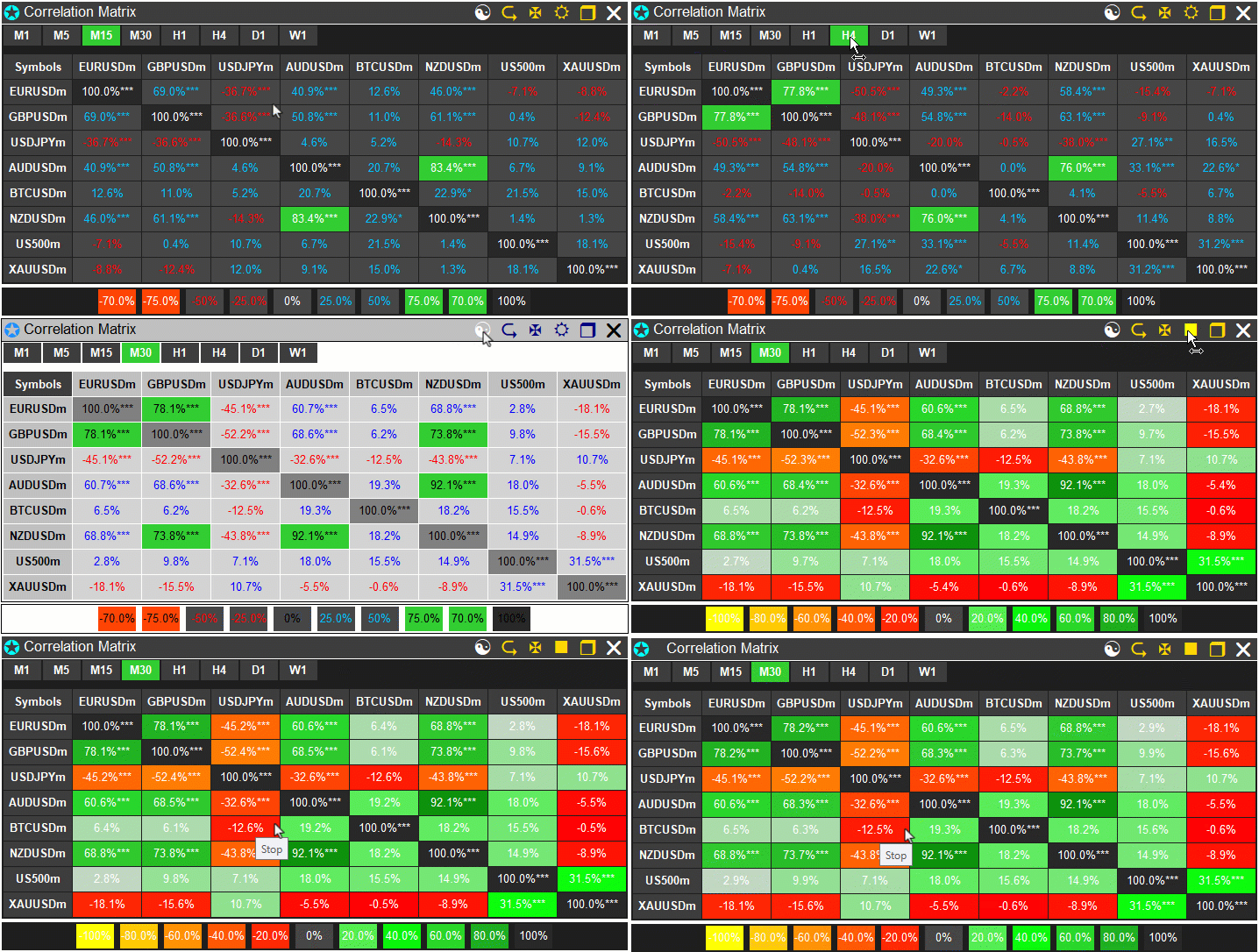
From the visualization, we can see that we have enhanced the correlation matrix dashboard with all the interactions done, hence achieving our objectives. What now remains is testing the workability of the system, and that is handled in the preceding section.
Backtesting
We did the testing, and below is the compiled visualization in a single Graphics Interchange Format (GIF) bitmap image format.
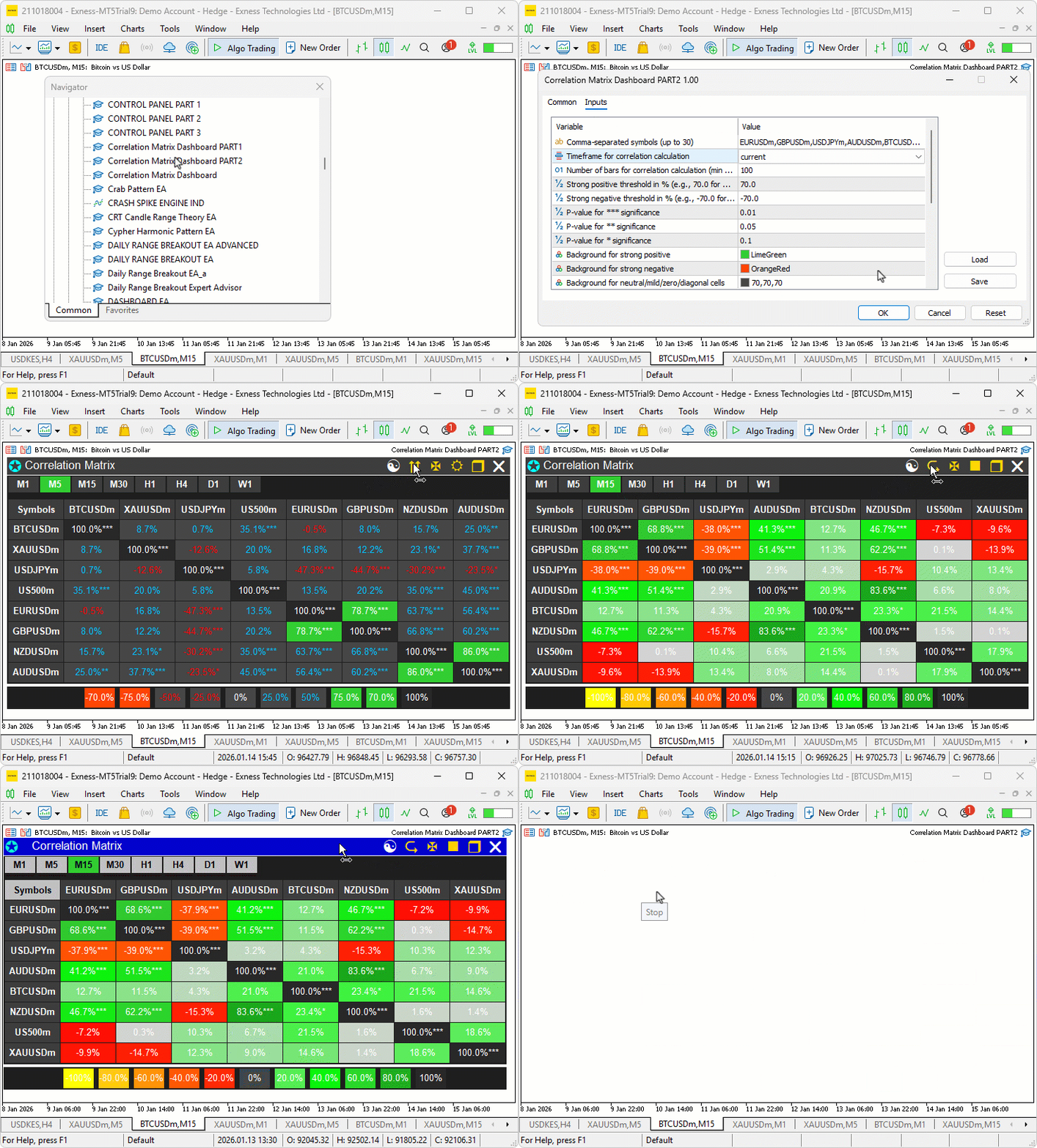
Conclusion
In conclusion, we’ve enhanced the correlation matrix dashboard in MQL5 with interactive features including panel dragging and minimizing via mouse events, button hover effects for visual feedback, symbol sorting by correlation strength in ascending/descending modes, toggling between correlation and p-value views, light/dark theme switching with dynamic color updates, and cell tooltips for detailed insights. The system now supports event-driven responses for usability, with hover detections, clamping during drags to stay within chart bounds, and efficient updates to maintain performance. With this interactive correlation matrix dashboard, you’re equipped to analyze asset interdependencies more dynamically, ready for further optimization in your trading journey. Happy trading!
Warning: All rights to these materials are reserved by MetaQuotes Ltd. Copying or reprinting of these materials in whole or in part is prohibited.
This article was written by a user of the site and reflects their personal views. MetaQuotes Ltd is not responsible for the accuracy of the information presented, nor for any consequences resulting from the use of the solutions, strategies or recommendations described.

 Introduction to MQL5 (Part 36): Mastering API and WebRequest Function in MQL5 (X)
 Larry Williams Market Secrets (Part 6): Measuring Volatility Breakouts Using Market Swings
 Central Force Optimization (CFO) algorithm
 Build a Remote Forex Risk Management System in Python

- Free trading apps
- Over 8,000 signals for copying
- Economic news for exploring financial markets
You agree to website policy and terms of use
do you have any idea why the symbols of the buttons didn't show up , it only shows little rectangles
Do you know why the button symbols are not displayed, only small rectangles?