

MQL5 Trading Tools (Part 14): Pixel-Perfect Scrollable Text Canvas with Antialiasing and Rounded Scrollbar
 2 552
2 552
 0
0

Introduction
In our previous article (Part 13), we developed a canvas-based price dashboard in MetaQuotes Language 5 (MQL5) using the CCanvas class for interactive panels visualizing price graphs with line plots and fog effects, alongside stats for account metrics and bar details, supporting background images, gradients, theme toggling, dragging, and resizing with event handling. In Part 14, we enhance it with a pixel-perfect scrollable text canvas with antialiasing and a rounded scrollbar to bypass MQL5 limits. This enhancement introduces a text panel for usage guides, featuring smooth scrolling via custom, antialiased elements. It includes a hover-expand scrollbar with buttons/slider, wheel support, themed backgrounds/opacity, and dynamic line wrapping/coloring, all integrated seamlessly for comprehensive user instructions. We will cover the following topics:
- Understanding the Pixel-Perfect Scrollable Text Canvas Framework
- Implementation in MQL5
- Backtesting
- Conclusion
By the end, you’ll have an MQL5 canvas dashboard that now includes a detailed and interactive text guide panel, which is ready for further customization. Let’s dive in!
Understanding the Pixel-Perfect Scrollable Text Canvas Framework
The pixel-perfect scrollable text canvas framework addresses MQL5's limitations in native text scrolling by utilizing custom pixel-level rendering with antialiasing for smooth edges, a rounded scrollbar that expands on hover for improved usability, and interactive elements such as up/down buttons and a draggable slider to navigate long content, including usage guides. It supports themed backgrounds with adjustable opacity, dynamic line wrapping to fit panel width while preserving colors for headings/links, and mouse wheel scrolling within the text body to bypass chart zoom interference, ensuring precise control without relying on built-in objects. Integration with the dashboard enables seamless updates on events, maintaining consistency across graph/stats/, and text panels for a cohesive monitoring tool.
We chose not to use the static MQL5 objects for the lines and want to fully explore the capabilities of the canvas. The good thing is that with the canvas, we don't really need to worry about text overflow over the borders, like we were experiencing with the past articles where we used the native objects; the canvas clips the texts automatically, helping us achieve a website scroll effect. Also, the rounded dynamic scrollbar was inspired by the appealing MetaQuotes terminals overlay that they have in the recent updates. Have a look at what we want to achieve at the end from the inspiration.

We plan to extend inputs/enumerations for text panel options like height/opacity, add a text canvas object with creation/destruction logic, define globals for scrolling states/positions/dimensions/colors, implement text wrapping with color detection/heading bolding, draw rounded scrollbar with hover effects/buttons/slider using arcs/circles/rectangles, handle mouse events for hovers/clicks/drags/wheel in the text area to update scroll/tooltip/scroll disable, and ensure theme toggles/minimize/resizing adjust the text panel dynamically. In brief, here is a visual representation of our objectives.

Implementation in MQL5
To enhance the program in MQL5, we will need to declare the new text canvas panel and add some extra inputs and global variables to dynamically control its rendering.
//+------------------------------------------------------------------+
//|                                       Canvas Dashboard PART2.mq5 |
//|                           Copyright 2026, Allan Munene Mutiiria. |
//|                                   https://t.me/Forex_Algo_Trader |
//+------------------------------------------------------------------+
#property copyright "Copyright 2026, Allan Munene Mutiiria."
#property link "https://t.me/Forex_Algo_Trader"
#property version "1.00"
#property strict

//+------------------------------------------------------------------+
//| Canvas objects                                                   |
//+------------------------------------------------------------------+

//---

CCanvas canvasText;                  // Declare text canvas

//+------------------------------------------------------------------+
//| Canvas names                                                     |
//+------------------------------------------------------------------+

//---

string canvasTextName = "TextCanvas";   // Set text canvas name

//--- Added Extra inputs

input bool EnableTextPanel            = true; // Enable Text Panel
input int TextPanelHeight             = 200; // Text Panel Height
input double TextBackgroundOpacityPercent = 85.0; // Text Background Opacity Percent

input double StatsHeaderBgOpacityPercent = 20.0; // Stats Header Bg Opacity Percent
input int StatsHeaderBgRadius         = 8; // Stats Header Bg Radius

//--- Extended the globals

uint bg_pixels_text[];               //--- Store text background pixels

int prev_mouse_state = 0;            //--- Initialize previous mouse state
int last_mouse_x = 0, last_mouse_y = 0; //--- Initialize last mouse positions
int header_height = 27;              //--- Set header height
int gap_y = 7;                       //--- Set Y gap
int button_size = 25;                //--- Set button size
int theme_x_offset = -75;            //--- Set theme X offset
int minimize_x_offset = -50;         //--- Set minimize X offset
int close_x_offset = -25;            //--- Set close X offset
bool panels_minimized = false;       //--- Initialize panels minimized flag
color HeaderColor = C'60,60,60';     //--- Set header color
color HeaderHoverColor = clrRed;     //--- Set header hover color
color HeaderDragColor = clrMediumBlue; //--- Set header drag color
The first thing we do to implement the enhancements is declare an additional CCanvas object named "canvasText" for the new text panel, which will handle the scrollable usage guide content. We add a string constant "canvasTextName" set to 'TextCanvas' to identify this canvas uniquely, similar to the others. Next, we extend the input parameters to support the text panel: "EnableTextPanel" as a boolean defaulting to true to toggle it on/off, "TextPanelHeight" at two hundred pixels for its height, "TextBackgroundOpacityPercent" at 85.0 for background transparency control, "StatsHeaderBgOpacityPercent" at 20.0 for stats header background opacity, and "StatsHeaderBgRadius" at eight for rounded corners on stats headers. We include a new uint array "bg_pixels_text" to store scaled background pixels for the text panel, ensuring consistency with graph and stats if backgrounds are used.
Next, we retain and initialize globals for mouse interaction. These include "prev_mouse_state" at zero, and "last_mouse_x" and "last_mouse_y" at zero for tracking positions. We set "header_height" at twenty-seven and "gap_y" at seven for vertical spacing. The "button_size" is twenty-five. For button placements relative to the header right edge, we use offsets: "theme_x_offset" at negative seventy-five, "minimize_x_offset" at negative fifty, and "close_x_offset" at negative twenty-five. We also keep "panels_minimized" as false to start expanded. Colors are defined: "HeaderColor" as medium gray, "HeaderHoverColor" as red, and "HeaderDragColor" as medium blue for header states. The next step is to add the text to render on the text panel and define its control globals as follows.
string text_usage_text =
"\nCanvas Dashboard Usage Guide\n\n"
"Welcome to the Canvas Dashboard – Your Interactive Tool for Real-Time Market Monitoring in MetaTrader 5!\n\n"
"Enhance your trading experience with this dynamic dashboard that visualizes price data, account stats, and interactive controls. Designed for ease of use, it allows customization through dragging, resizing, theme switching, and more, while providing essential market insights at a glance.\n\n"
"Key Features:\n"
"- Price Graph Panel: Displays recent bar closes with a fog gradient fill, background image support, and resize indicators.\n"
"- Stats Panel: Shows account balance, equity, and current bar OHLC values with customizable backgrounds (single color or gradient).\n"
"- Header Controls: Drag to move the dashboard; buttons for theme toggle (dark/light), minimize/maximize panels, and close.\n"
"- Text Panel: Scrollable guide (this panel) with hover-expand scrollbar, up/down buttons, and slider for navigation.\n"
"- Interactivity: Hover for highlights/tooltips; resize via borders (bottom, right, corner); wheel scroll in text area.\n"
"- Theme Support: Switch between dark and light modes for better visibility on different chart backgrounds.\n"
"- Background Options: Enable images with fog overlay; blend modes for transparency.\n\n"
"Usage Instructions:\n"
"1. Move the Dashboard: Click and drag the header (excluding buttons) to reposition on the chart.\n"
"2. Resize Panels: Hover near the graph's bottom/right edges; click and drag when the icon appears (arrows for direction).\n"
"3. Toggle Theme: Click the '[' icon in the header to switch between dark and light modes.\n"
"4. Minimize/Maximize: Click the 'r' or 'o' icon to hide/show panels (header remains visible).\n"
"5. Navigate Text: Use the scrollbar (hovers to expand with buttons/slider); click up/down or drag slider; wheel scroll in body.\n"
"6. Close Dashboard: Click the 'X' icon in the header to remove it from the chart.\n\n"
"Important Notes:\n"
"- Risk Disclaimer: This dashboard is for informational purposes only. Always verify data and trade responsibly.\n"
"- Compatibility Check: Ensure chart settings allow mouse events; test on demo for interactions.\n"
"- Optimization Tips: Adjust input parameters like graph bars, fonts, colors, and opacity for your setup.\n"
"- Security Measures: No account modifications; use on trusted platforms.\n"
"- Legal Notice: No guarantees of accuracy. Consult professionals as needed.\n\n"
"Contact Methods:\n"
"NB:\n"
"********************************************\n"
" >*** FOR SUPPORT, QUERIES, OR CUSTOMIZATIONS, REACH OUT IMMEDIATELY: ***<\n"
" __________________________________________\n\n"
"1. Email: mutiiriallan.forex@gmail.com (Primary Support Channel)\n"
"2. Telegram Channel: @ForexAlgo-Trader (Updates & Community)\n"
"3. Telegram Group: https://t.me/Forex_Algo_Trader (Direct Assistance & Discussions)\n\n"
"********************************************\n\n"
"Thank you for choosing our Canvas Dashboard solutions. Use wisely, monitor confidently, and elevate your trading journey! 🚀\n"; //--- Set text usage content

int text_scroll_pos = 0;                   //--- Initialize text scroll position
int text_max_scroll = 0;                   //--- Initialize text max scroll
int text_slider_height = 20;               //--- Set text slider height
bool text_movingStateSlider = false;       //--- Initialize text slider moving flag
int text_mlbDownY_Slider = 0;              //--- Initialize text slider down Y
int text_mlbDown_YD_Slider = 0;            //--- Initialize text slider down YD
int text_total_height = 0;                 //--- Initialize text total height
int text_visible_height = 0;               //--- Initialize text visible height
bool text_scroll_visible = false;          //--- Initialize text scroll visible flag
bool text_mouse_in_body = false;           //--- Initialize text mouse in body flag
bool prev_text_mouse_in_body = false;      //--- Initialize previous text mouse in body flag
bool text_scroll_up_hovered = false;       //--- Initialize text scroll up hovered flag
bool text_scroll_down_hovered = false;     //--- Initialize text scroll down hovered flag
bool text_scroll_slider_hovered = false;   //--- Initialize text scroll slider hovered flag
bool text_scroll_area_hovered = false;     //--- Initialize text scroll area hovered flag
const int TEXT_MAX_LINES = 100;            //--- Set text max lines
int text_adjustedLineHeight = 0;           //--- Initialize text adjusted line height

int text_scrollbar_full_width = 16;        //--- Set text scrollbar full width
int text_scrollbar_thin_width = 2;         //--- Set text scrollbar thin width
int text_track_width = 16;                 //--- Set text track width
int text_scrollbar_margin = 5;             //--- Set text scrollbar margin
int text_button_size = 16;                 //--- Set text button size
color text_leader_color_dark = C'45,45,45'; //--- Set dark text leader color
color text_leader_color_light = C'200,200,200'; //--- Set light text leader color
color text_button_bg_dark = C'60,60,60';        //--- Set dark text button bg
color text_button_bg_light = C'220,220,220';    //--- Set light text button bg
color text_button_bg_hover_dark = C'70,70,70';  //--- Set dark text button bg hover
color text_button_bg_hover_light = C'180,180,180'; //--- Set light text button bg hover
color text_arrow_color_dark = C'150,150,150';   //--- Set dark text arrow color
color text_arrow_color_light = C'50,50,50';     //--- Set light text arrow color
color text_arrow_color_disabled_dark = C'80,80,80'; //--- Set dark disabled arrow color
color text_arrow_color_disabled_light = C'150,150,150'; //--- Set light disabled arrow color
color text_arrow_color_hover_dark = C'100,100,100'; //--- Set dark hover arrow color
color text_arrow_color_hover_light = C'0,0,0';  //--- Set light hover arrow color
color text_slider_bg_dark = C'80,80,80';        //--- Set dark slider bg
color text_slider_bg_light = C'150,150,150';    //--- Set light slider bg
color text_slider_bg_hover_dark = C'100,100,100';  //--- Set dark slider bg hover
color text_slider_bg_hover_light = C'100,100,100'; //--- Set light slider bg hover

color text_bg_light = clrWhite;                 //--- Set light text bg
color text_bg_dark = clrBlack;                  //--- Set dark text bg
color text_base_light = clrBlack;               //--- Set light text base
color text_base_dark = clrWhite;                //--- Set dark text base
Here, we define the "text_usage_text" string containing the full content for the usage guide to be displayed in the text panel, structured with newlines for paragraphs, sections like welcome message, key features with bullet points for panels/controls/interactivity/themes/backgrounds, usage instructions as numbered steps for moving/resizing/toggling/navigating/closing, important notes on risks/compatibility/optimization/security/legal, contact methods with email/Telegram, and a thank-you note, all formatted to provide comprehensive user guidance. This is just an arbitrary text formatting that we thought of to use as a demonstration. Feel free to go ahead and alter it to suit your specific needs.
We then initialize variables for text scrolling management: "text_scroll_pos" at zero for current offset, "text_max_scroll" at zero for maximum scrollable amount, "text_slider_height" at twenty for slider size, "text_movingStateSlider" false to track if dragging the slider, "text_mlbDownY_Slider" and "text_mlbDown_YD_Slider" at zero for mouse down y positions during slider interaction, "text_total_height" and "text_visible_height" at zero for full content and viewable heights, "text_scroll_visible" false to control scrollbar display, "text_mouse_in_body" and "prev_text_mouse_in_body" false for current/previous mouse in text body states, hover flags like "text_scroll_up_hovered" false for up/down/slider/area, constant "TEXT_MAX_LINES" at one hundred as a buffer limit, and "text_adjustedLineHeight" at zero for line spacing. We set dimensions for the scrollbar: "text_scrollbar_full_width" at sixteen for expanded, "text_scrollbar_thin_width" at two for collapsed, "text_track_width" at sixteen for track, "text_scrollbar_margin" at five for padding, "text_button_size" at sixteen for up/down buttons. We define themed colors: leader/button bg/normal/hover, arrow normal/disabled/hover for dark/light modes using C'...' notations, and base bg/text as white/black for light or black/white for dark to ensure visibility across themes.
The next thing we will do is update the statistics canvas by adding the rounded rectangles. We will define a function to achieve that first.
//+------------------------------------------------------------------+
//| Fill rounded rectangle                                           |
//+------------------------------------------------------------------+
void FillRoundedRectangle(CCanvas &cvs, int x, int y, int w, int h, int radius, uint argb_color)
  {
   if (radius <= 0) {
      cvs.FillRectangle(x, y, x + w - 1, y + h - 1, argb_color);                //--- Fill rectangle if no radius
      return;                          //--- Exit
     }
   radius = MathMin(radius, MathMin(w / 2, h / 2));                             //--- Adjust radius

   cvs.Arc(x + radius, y + radius, radius, radius, DegreesToRadians(180), DegreesToRadians(90), argb_color); //--- Draw top-left arc
   cvs.Arc(x + w - radius - 1, y + radius, radius, radius, DegreesToRadians(270), DegreesToRadians(90), argb_color); //--- Draw top-right arc
   cvs.Arc(x + w - radius - 1, y + h - radius - 1, radius, radius, DegreesToRadians(0), DegreesToRadians(90), argb_color); //--- Draw bottom-right arc
   cvs.Arc(x + radius, y + h - radius - 1, radius, radius, DegreesToRadians(90), DegreesToRadians(90), argb_color); //--- Draw bottom-left arc

   cvs.FillCircle(x + radius, y + radius, radius, argb_color);                  //--- Fill top-left circle
   cvs.FillCircle(x + w - radius - 1, y + radius, radius, argb_color);          //--- Fill top-right circle
   cvs.FillCircle(x + w - radius - 1, y + h - radius - 1, radius, argb_color);  //--- Fill bottom-right circle
   cvs.FillCircle(x + radius, y + h - radius - 1, radius, argb_color);          //--- Fill bottom-left circle

   cvs.FillRectangle(x + radius, y, x + w - radius - 1, y + h - 1, argb_color); //--- Fill horizontal areas

   cvs.FillRectangle(x, y + radius, x + w - 1, y + h - radius - 1, argb_color); //--- Fill vertical areas
  }
We implement the "FillRoundedRectangle" function to draw a rectangle with rounded corners on a given CCanvas reference object, taking parameters for position x/y, width w/height h, corner radius, and ARGB color. If radius is zero or less, we simply fill a standard rectangle from (x,y) to (x+w-1, y+h-1) with the FillRectangle method and exit early. Otherwise, we clamp the radius to the minimum of half the width or height using MathMin to avoid overflow. We draw quarter arcs with Arc for each corner: top-left from 180 to 270 degrees, top-right from 270 to 360, bottom-right from 0 to 90, bottom-left from 90 to 180, all converted to radians with a helper like "DegreesToRadians". We will define this function later.
Then, we fill full circles at each corner center with FillCircle to solidify the rounded areas. Then, we fill the horizontal middle strip from left radius to right minus radius across full height, and vertical sides from top radius to bottom minus radius across full width, both with "FillRectangle" to complete the shape without gaps. The helper conversion function is as follows.
//+------------------------------------------------------------------+
//| Convert degrees to radians                                       |
//+------------------------------------------------------------------+
double DegreesToRadians(double degrees) {
   return((M_PI * degrees) / 180.0); //--- Perform conversion
}
We just divide the multiplication of 'pi' or M_PI by the target degrees by 180. Then, we can use the rounded rectangle function to draw our headings in the stats panel by updating the function.
//+------------------------------------------------------------------+
//| Update stats on canvas                                           |
//+------------------------------------------------------------------+
void UpdateStatsOnCanvas()
  {

//---

string headerText = "Account Stats";                               //--- Set header text
canvasStats.FontSet("Arial Bold", StatsHeaderFontSize);            //--- Set font
int textW = canvasStats.TextWidth(headerText);                     //--- Get text width
int textH = canvasStats.TextHeight(headerText);                    //--- Get text height
int pad = 5;                                                       //--- Set padding
int rectX = (statsWidth - textW) / 2 - pad;                        //--- Calculate rect X
int rectY = yPos - pad / 2;                                        //--- Calculate rect Y
int rectW = textW + 2 * pad;                                       //--- Calculate rect width
int rectH = textH + pad;                                           //--- Calculate rect height
uchar alpha = (uchar)(255 * (StatsHeaderBgOpacityPercent / 100.0)); //--- Calculate alpha
uint argbHeaderBg = ColorToARGB(GetStatsHeaderBgColor(), alpha);   //--- Convert bg to ARGB

color header_border = is_dark_theme ? clrWhite : clrBlack;         //--- Get border color
uint argbHeaderBorder = ColorToARGB(header_border, 255);           //--- Convert to ARGB
FillRoundedRectangle(canvasStats, rectX - 1, rectY - 1, rectW + 2, rectH + 2, StatsHeaderBgRadius + 1, argbHeaderBorder); //--- Fill outer rectangle

FillRoundedRectangle(canvasStats, rectX, rectY, rectW, rectH, StatsHeaderBgRadius, argbHeaderBg); //--- Fill inner rectangle

uint argbHeader = ColorToARGB(headerColor, 255);                   //--- Convert header to ARGB
canvasStats.TextOut(statsWidth / 2, yPos, headerText, argbHeader, TA_CENTER); //--- Draw header

//---

   }
To implement the changes, we modify the "UpdateStatsOnCanvas" function to enhance header rendering with rounded backgrounds for a more polished look. For each header like 'Account Stats' or 'Current Bar Stats', we set the font to Arial Bold at "StatsHeaderFontSize" with FontSet, measure text width and height using TextWidth and TextHeight, define padding at five pixels, and calculate rectangle position/dimensions centered with padding: x as (width minus text width)/2 minus pad, y as current "yPos" minus half pad, width as text plus double pad, height as text plus pad.
We compute alpha from "StatsHeaderBgOpacityPercent" over 100.0 times 255 cast to uchar, convert background color from "GetStatsHeaderBgColor" to ARGB with that alpha. For borders, we select white in dark theme or black in light, convert to full opacity ARGB, and call "FillRoundedRectangle" twice: once for the outer border at position minus one, size plus two, radius plus one using border ARGB; then the inner at base position/size/radius with background ARGB. We convert the header color to ARGB at 255, draw the text centered at stats width /2 and "yPos" with TextOut and center alignment, then increment "yPos" by thirty for spacing before the next section. The rest of the function remains as we defined it previously. Upon compilation, we now get the following outcome.

We can see that the statistics panel headings are now in rounded rectangles. The next thing we want to do is render the text panel. We will create a function for it as well, like the other panels, but first, we will need to wrap the text so it is dynamic, alongside other helper functions that we will need later. Here is the approach we used to achieve that.
//+------------------------------------------------------------------+
//| Lighten color                                                    |
//+------------------------------------------------------------------+
color LightenColor(color colorValue, double factor)
  {
   int blue = (int)MathMin(255, (colorValue & 0xFF) * factor);         //--- Lighten blue
   int green = (int)MathMin(255, ((colorValue >> 8) & 0xFF) * factor); //--- Lighten green
   int red = (int)MathMin(255, ((colorValue >> 16) & 0xFF) * factor);  //--- Lighten red
   return (color)(blue | (green << 8) | (red << 16));                  //--- Return lightened color
  }

//+------------------------------------------------------------------+
//| Calculate slider height                                          |
//+------------------------------------------------------------------+
int TextCalculateSliderHeight()
  {
   int scroll_area_height = TextPanelHeight - 2 - 2 * text_button_size; //--- Calculate area height
   int slider_min_height = 20;         //--- Set min height
   if (text_total_height <= text_visible_height) return scroll_area_height; //--- Return full if no scroll
   double visible_ratio = (double)text_visible_height / text_total_height;  //--- Calculate ratio
   int height = (int)MathFloor(scroll_area_height * visible_ratio);         //--- Calculate height
   return MathMax(slider_min_height, height);                           //--- Return max of min and calculated
  }

//+------------------------------------------------------------------+
//| Scroll text up                                                   |
//+------------------------------------------------------------------+
void TextScrollUp()
  {
   if (text_adjustedLineHeight > 0 && text_scroll_pos > 0)
     {
      text_scroll_pos = MathMax(0, text_scroll_pos - text_adjustedLineHeight); //--- Scroll up
      UpdateTextOnCanvas();                                            //--- Update canvas
     }
  }

//+------------------------------------------------------------------+
//| Scroll text down                                                 |
//+------------------------------------------------------------------+
void TextScrollDown()
  {
   if (text_adjustedLineHeight > 0 && text_scroll_pos < text_max_scroll)
     {
      text_scroll_pos = MathMin(text_max_scroll, text_scroll_pos + text_adjustedLineHeight); //--- Scroll down
      UpdateTextOnCanvas();                                            //--- Update canvas
     }
  }

//+------------------------------------------------------------------+
//| Update text hover effects                                        |
//+------------------------------------------------------------------+
void TextUpdateHoverEffects(int local_x, int local_y)
  {
   if (!text_scroll_visible) return;                                    //--- Exit if no scroll
   int scrollbar_x = canvasText.Width() - text_track_width - 1;         //--- Get scrollbar X
   int scrollbar_y = 1;                                                 //--- Set scrollbar Y
   int scrollbar_height = TextPanelHeight - 2;                          //--- Get height
   text_scroll_up_hovered = text_scroll_area_hovered && (local_x >= scrollbar_x && local_x <= scrollbar_x + text_track_width - 1 &&
                             local_y >= scrollbar_y && local_y <= scrollbar_y + text_button_size - 1); //--- Check up hover
   int down_y = scrollbar_y + scrollbar_height - text_button_size;      //--- Calculate down Y
   text_scroll_down_hovered = text_scroll_area_hovered && (local_x >= scrollbar_x && local_x <= scrollbar_x + text_track_width - 1 &&
                               local_y >= down_y && local_y <= down_y + text_button_size - 1); //--- Check down hover
   int scroll_area_height = scrollbar_height - 2 * text_button_size;    //--- Calculate area height
   int slider_y = scrollbar_y + text_button_size + (int)(((double)text_scroll_pos / text_max_scroll) * (scroll_area_height - text_slider_height)); //--- Calculate slider Y
   text_scroll_slider_hovered = text_scroll_area_hovered && (local_x >= scrollbar_x && local_x <= scrollbar_x + text_track_width - 1 &&
                                 local_y >= slider_y && local_y <= slider_y + text_slider_height - 1); //--- Check slider hover
  }

//+------------------------------------------------------------------+
//| Get line color                                                   |
//+------------------------------------------------------------------+
color GetLineColor(string lineText)
  {
   if (StringLen(lineText) == 0 || lineText == " ") return C'25,25,25'; //--- Return gray for empty
   if (StringFind(lineText, "mutiiriallan.forex@gmail.com") >= 0) return C'255,100,100';   //--- Return red for email
   if (StringFind(lineText, "https://t.me/Forex_Algo_Trader") >= 0) return C'150,100,200'; //--- Return purple for link
   if (StringFind(lineText, "@ForexAlgo-Trader") >= 0) return C'100,150,255';              //--- Return blue for channel
   if (StringFind(lineText, "http") >= 0 || StringFind(lineText, "t.me") >= 0) return C'100,150,255'; //--- Return blue for links
   string start3 = StringSubstr(lineText, 0, 3);                        //--- Get start substring
   if ((start3 == "1. " || start3 == "2. " || start3 == "3. " || start3 == "4. " || start3 == "5. ") &&
       StringFind(lineText, "Initial Setup Instructions") < 0) return C'255,200,100';      //--- Return orange for numbered
   return clrWhite;                                                     //--- Return white default
  }

//+------------------------------------------------------------------+
//| Check if heading                                                 |
//+------------------------------------------------------------------+
bool IsHeading(string lineText)
  {
   if (StringLen(lineText) == 0) return false;                          //--- False for empty
   if (StringGetCharacter(lineText, StringLen(lineText) - 1) == ':') return true; //--- True for colon end
   if (StringFind(lineText, "Canvas Dashboard Usage Guide") >= 0) return true;    //--- True for guide
   if (StringFind(lineText, "Key Features") >= 0) return true;          //--- True for features
   if (StringFind(lineText, "Usage Instructions") >= 0) return true;    //--- True for instructions
   if (StringFind(lineText, "Important Notes") >= 0) return true;       //--- True for notes
   if (StringFind(lineText, "Contact Methods") >= 0) return true;       //--- True for contacts
   if (StringFind(lineText, "NB:") >= 0) return true;                   //--- True for NB
   return false;                                                        //--- Return false
  }

//+------------------------------------------------------------------+
//| Wrap text                                                        |
//+------------------------------------------------------------------+
void WrapText(const string inputText, const string font, const int fontSize, const int maxWidth, string &wrappedLines[], color &wrappedColors[])
  {
   ArrayResize(wrappedLines, 0);                                        //--- Reset lines
   ArrayResize(wrappedColors, 0);                                       //--- Reset colors
   string paragraphs[];                                                 //--- Declare paragraphs
   int numParagraphs = StringSplit(inputText, '\n', paragraphs);        //--- Split by newline
   for (int p = 0; p < numParagraphs; p++)
     {
      string para = paragraphs[p];                                      //--- Get paragraph
      color paraColor = GetLineColor(para);                             //--- Get color
      if (StringLen(para) == 0)
        {
         int size = ArraySize(wrappedLines);                            //--- Get size
         ArrayResize(wrappedLines, size + 1);                           //--- Resize
         wrappedLines[size] = " ";                                      //--- Add space
         ArrayResize(wrappedColors, size + 1);                          //--- Resize colors
         wrappedColors[size] = C'25,25,25';                             //--- Set gray
         continue;                                                      //--- Continue
        }
      string words[];                                                   //--- Declare words
      int numWords = StringSplit(para, ' ', words);                     //--- Split by space
      string currentLine = "";                                          //--- Initialize line
      for (int w = 0; w < numWords; w++)
        {
         string testLine = currentLine + (StringLen(currentLine) > 0 ? " " : "") + words[w]; //--- Build test line
         canvasText.FontSet(font, fontSize);                            //--- Set font
         int textW = canvasText.TextWidth(testLine);                    //--- Get width
         if (textW <= maxWidth)
           {
            currentLine = testLine;                                     //--- Update line
           }
         else
           {
            if (StringLen(currentLine) > 0)
              {
               int size = ArraySize(wrappedLines);                     //--- Get size
               ArrayResize(wrappedLines, size + 1);                    //--- Resize
               wrappedLines[size] = currentLine;                       //--- Add line
               ArrayResize(wrappedColors, size + 1);                   //--- Resize colors
               wrappedColors[size] = paraColor;                        //--- Set color
              }
            currentLine = words[w];                                    //--- Start new line
           }
        }
      if (StringLen(currentLine) > 0)
        {
         int size = ArraySize(wrappedLines);                           //--- Get size
         ArrayResize(wrappedLines, size + 1);                          //--- Resize
         wrappedLines[size] = currentLine;                             //--- Add last line
         ArrayResize(wrappedColors, size + 1);                         //--- Resize colors
         wrappedColors[size] = paraColor;                              //--- Set color
        }
     }
  }
We define a couple of helper functions. First, we implement the "LightenColor" function to brighten a color by multiplying its RGB components with a factor greater than one, clamping to 255 to avoid overflow, for use in theme adjustments like text colors in dark mode. It takes color "colorValue" and a double factor, extracts blue/green/red with mask/shifts, multiplies each by the factor cast to int with MathMin 255, and combines with bit shifts/OR cast to color.
Next, we create the "TextCalculateSliderHeight" function to compute the scrollbar slider size proportional to visible content over the total, ensuring a minimum for usability. It calculates area height as "TextPanelHeight" minus borders minus double "text_button_size", sets min twenty, returns full area if no scroll, else floors area times visible ratio, returns max of min and value. We then define "TextScrollUp" to scroll text upward by decrementing "text_scroll_pos" one "text_adjustedLineHeight" if positive and greater than zero, clamped to zero, calls "UpdateTextOnCanvas" to redraw. Similarly, "TextScrollDown" scrolls downward by incrementing "text_scroll_pos" one line height if less than "text_max_scroll", clamped to max, updates canvas.
The "TextUpdateHoverEffects" function detects hovers over scrollbar parts based on local coordinates, for visual feedback. If not visible, exits. Computes scrollbar positions/dimensions, checks "text_scroll_up_hovered" if area hovered and in top button bounds, "text_scroll_down_hovered" for bottom, "text_scroll_slider_hovered" for current slider position range, all conditional on "text_scroll_area_hovered". We implement "GetLineColor" to categorize line colors by content for styling: gray for empty/space, red for email, purple/blue for specific links/channel/http/t.me, orange for numbered lists, not certain phrases, default white. "IsHeading" identifies headings: false for empty, true if ends with colon or matches phrases like guide/features/instructions/notes/contacts/NB. Actually, for the identifications here, we could choose to have HTML characters like format, but for simplicity, we added the ones we want to recognize in the function. There are many ideas, so follow the one that suits you.
Finally, "WrapText" breaks input into width-constrained lines with associated colors. Resets output arrays, splits by newline to paragraphs, for each gets color, adds space/gray if empty. Splits paragraphs to words, builds/tests lines: if test fits measured width (temp font set), append; else add current with color, start new. Adds final line if present. With these helper functions, we can now render the main canvas using the following logic.
//+------------------------------------------------------------------+
//| Update text on canvas                                            |
//+------------------------------------------------------------------+
void UpdateTextOnCanvas()
  {
   canvasText.Erase(0);                //--- Clear text canvas

   int textWidth = canvasText.Width(); //--- Get text width
   int textHeight = TextPanelHeight;   //--- Get text height

   color text_bg = is_dark_theme ? text_bg_dark : text_bg_light;                  //--- Get bg color
   uint argb_bg = ColorToARGB(text_bg, (uchar)(255 * (TextBackgroundOpacityPercent / 100.0))); //--- Convert to ARGB
   canvasText.FillRectangle(0, 0, textWidth - 1, textHeight - 1, argb_bg);        //--- Fill background

   uint argbBorder = ColorToARGB(GetBorderColor(), 255);                          //--- Convert border
   canvasText.Line(0, 0, textWidth - 1, 0, argbBorder);                           //--- Draw top
   canvasText.Line(textWidth - 1, 0, textWidth - 1, textHeight - 1, argbBorder);  //--- Draw right
   canvasText.Line(textWidth - 1, textHeight - 1, 0, textHeight - 1, argbBorder); //--- Draw bottom
   canvasText.Line(0, textHeight - 1, 0, 0, argbBorder); //--- Draw left

   int padding = 10;                   //--- Set padding
   int textAreaX = 1 + padding;        //--- Calculate area X
   int textAreaY = 1;                  //--- Set area Y
   int textAreaWidth = textWidth - 2 - padding * 2; //--- Calculate area width
   int textAreaHeight = textHeight - 2; //--- Calculate area height
   string font = "Arial";              //--- Set font
   int fontSize = 16;                  //--- Set font size
   canvasText.FontSet(font, fontSize); //--- Set font
   int lineHeight = canvasText.TextHeight("A"); //--- Get line height
   text_adjustedLineHeight = lineHeight + 3; //--- Adjust line height

   text_visible_height = textAreaHeight; //--- Set visible height
   static string wrappedLines[];       //--- Declare wrapped lines
   static color wrappedColors[];       //--- Declare wrapped colors
   static bool wrapped = false;        //--- Initialize wrapped flag
   bool need_scroll = false;           //--- Initialize scroll need
   int reserved_width = 0;             //--- Initialize reserved width
   if (!wrapped)
     {
      WrapText(text_usage_text, font, fontSize, textAreaWidth, wrappedLines, wrappedColors); //--- Wrap text
      wrapped = true;                  //--- Set wrapped flag
     }
   int numLines = ArraySize(wrappedLines);                 //--- Get number of lines
   text_total_height = numLines * text_adjustedLineHeight; //--- Calculate total height
   need_scroll = text_total_height > text_visible_height;  //--- Check if scroll needed
   if (need_scroll)
     {
      reserved_width = text_track_width; //--- Set reserved width
      textAreaWidth -= reserved_width;   //--- Adjust area width
      WrapText(text_usage_text, font, fontSize, textAreaWidth, wrappedLines, wrappedColors); //--- Rewrap text
      numLines = ArraySize(wrappedLines); //--- Update num lines
      text_total_height = numLines * text_adjustedLineHeight;               //--- Update total height
     }
   text_max_scroll = MathMax(0, text_total_height - text_visible_height);   //--- Calculate max scroll
   text_scroll_visible = need_scroll;                                       //--- Set scroll visible
   text_scroll_pos = MathMax(0, MathMin(text_scroll_pos, text_max_scroll)); //--- Adjust scroll pos
   if (text_scroll_visible)
     {
      int scrollbar_y = 1;                //--- Set scrollbar Y
      int scrollbar_height = textHeight - 2; //--- Calculate scrollbar height
      int scroll_area_height = scrollbar_height - 2 * text_button_size;      //--- Calculate area height
      text_slider_height = TextCalculateSliderHeight();                      //--- Calculate slider height
      int scrollbar_x = textWidth - text_track_width - 1;                    //--- Calculate scrollbar X
      color leader_color = is_dark_theme ? text_leader_color_dark : text_leader_color_light; //--- Get leader color
      uint argb_leader = ColorToARGB(leader_color, 255);                     //--- Convert to ARGB
      canvasText.FillRectangle(scrollbar_x, scrollbar_y, scrollbar_x + text_track_width - 1, scrollbar_y + scrollbar_height - 1, argb_leader); //--- Fill leader

      int slider_y = scrollbar_y + text_button_size + (int)(((double)text_scroll_pos / text_max_scroll) * (scroll_area_height - text_slider_height)); //--- Calculate slider Y

      if (text_scroll_area_hovered)
        {
         color button_bg = is_dark_theme ? text_button_bg_dark : text_button_bg_light;                   //--- Get button bg
         color button_bg_hover = is_dark_theme ? text_button_bg_hover_dark : text_button_bg_hover_light; //--- Get hover bg
         color up_bg = text_scroll_up_hovered ? button_bg_hover : button_bg;                             //--- Determine up bg
         uint argb_up_bg = ColorToARGB(up_bg, 255);                                                      //--- Convert to ARGB
         canvasText.FillRectangle(scrollbar_x, scrollbar_y, scrollbar_x + text_track_width - 1, scrollbar_y + text_button_size - 1, argb_up_bg); //--- Fill up button
         color arrow_color = is_dark_theme ? text_arrow_color_dark : text_arrow_color_light;             //--- Get arrow color
         color arrow_color_disabled = is_dark_theme ? text_arrow_color_disabled_dark : text_arrow_color_disabled_light; //--- Get disabled arrow
         color arrow_color_hover = is_dark_theme ? text_arrow_color_hover_dark : text_arrow_color_hover_light; //--- Get hover arrow
         color up_arrow = (text_scroll_pos == 0) ? arrow_color_disabled : (text_scroll_up_hovered ? arrow_color_hover : arrow_color); //--- Determine up arrow color
         uint argb_up_arrow = ColorToARGB(up_arrow, 255);                                                //--- Convert to ARGB
         canvasText.FontSet("Webdings", 22);                                                             //--- Set font
         int arrow_x = scrollbar_x + text_track_width / 2;                                               //--- Calculate arrow X
         int arrow_y = scrollbar_y + (text_button_size / 2) - (canvasText.TextHeight(CharToString(0x35)) / 2); //--- Calculate arrow Y
         canvasText.TextOut(arrow_x, arrow_y, CharToString(0x35), argb_up_arrow, TA_CENTER);             //--- Draw up arrow

         int down_y = scrollbar_y + scrollbar_height - text_button_size;                                 //--- Calculate down Y
         color down_bg = text_scroll_down_hovered ? button_bg_hover : button_bg;                         //--- Determine down bg
         uint argb_down_bg = ColorToARGB(down_bg, 255);                                                  //--- Convert to ARGB
         canvasText.FillRectangle(scrollbar_x, down_y, scrollbar_x + text_track_width - 1, down_y + text_button_size - 1, argb_down_bg); //--- Fill down button
         color down_arrow = (text_scroll_pos >= text_max_scroll) ? arrow_color_disabled : (text_scroll_down_hovered ? arrow_color_hover : arrow_color); //--- Determine down arrow
         uint argb_down_arrow = ColorToARGB(down_arrow, 255);                                            //--- Convert to ARGB
         int down_arrow_x = scrollbar_x + text_track_width / 2;                                          //--- Calculate down arrow X
         int down_arrow_y = down_y + (text_button_size / 2) - (canvasText.TextHeight(CharToString(0x36)) / 2); //--- Calculate down arrow Y
         canvasText.TextOut(down_arrow_x, down_arrow_y, CharToString(0x36), argb_down_arrow, TA_CENTER); //--- Draw down arrow

         int slider_x = scrollbar_x + text_scrollbar_margin;                                             //--- Calculate slider X
         int slider_w = text_track_width - 2 * text_scrollbar_margin;                                    //--- Calculate slider width
         int cap_radius = slider_w / 2;                                                                  //--- Calculate cap radius
         color slider_bg_color = is_dark_theme ? text_slider_bg_dark : text_slider_bg_light;             //--- Get slider bg
         color slider_bg_hover_color = is_dark_theme ? text_slider_bg_hover_dark : text_slider_bg_hover_light; //--- Get hover bg
         color slider_bg = text_scroll_slider_hovered || text_movingStateSlider ? slider_bg_hover_color : slider_bg_color; //--- Determine bg
         uint argb_slider = ColorToARGB(slider_bg, 255);                                                 //--- Convert to ARGB

         canvasText.Arc(slider_x + cap_radius, slider_y + cap_radius, cap_radius, cap_radius, DegreesToRadians(180), DegreesToRadians(360), argb_slider); //--- Draw top arc
         canvasText.FillCircle(slider_x + cap_radius, slider_y + cap_radius, cap_radius, argb_slider);   //--- Fill top circle

         canvasText.Arc(slider_x + cap_radius, slider_y + text_slider_height - cap_radius, cap_radius, cap_radius, DegreesToRadians(0), DegreesToRadians(180), argb_slider); //--- Draw bottom arc
         canvasText.FillCircle(slider_x + cap_radius, slider_y + text_slider_height - cap_radius, cap_radius, argb_slider); //--- Fill bottom circle

         canvasText.FillRectangle(slider_x, slider_y + cap_radius, slider_x + slider_w, slider_y + text_slider_height - cap_radius, argb_slider); //--- Fill middle
        }
      else
        {
         int thin_w = text_scrollbar_thin_width;                                                         //--- Set thin width
         int thin_x = scrollbar_x + (text_track_width - thin_w) / 2;                                     //--- Calculate thin X
         int cap_radius = thin_w / 2;                                                                    //--- Calculate cap radius
         color slider_bg_color = is_dark_theme ? text_slider_bg_dark : text_slider_bg_light;             //--- Get bg
         uint argb_slider = ColorToARGB(slider_bg_color, 255);                                           //--- Convert to ARGB

         canvasText.Arc(thin_x + cap_radius, slider_y + cap_radius, cap_radius, cap_radius, DegreesToRadians(180), DegreesToRadians(360), argb_slider); //--- Draw top
         canvasText.FillCircle(thin_x + cap_radius, slider_y + cap_radius, cap_radius, argb_slider);     //--- Fill top

         canvasText.Arc(thin_x + cap_radius, slider_y + text_slider_height - cap_radius, cap_radius, cap_radius, DegreesToRadians(0), DegreesToRadians(180), argb_slider); //--- Draw bottom
         canvasText.FillCircle(thin_x + cap_radius, slider_y + text_slider_height - cap_radius, cap_radius, argb_slider); //--- Fill bottom

         canvasText.FillRectangle(thin_x, slider_y + cap_radius, thin_x + thin_w, slider_y + text_slider_height - cap_radius, argb_slider); //--- Fill middle
        }
     }

   color text_base = is_dark_theme ? text_base_dark : text_base_light;                                   //--- Get base color
   for (int line = 0; line < numLines; line++)
     {
      string lineText = wrappedLines[line];   //--- Get line text
      if (StringLen(lineText) == 0) continue; //--- Skip empty
      color lineColor = wrappedColors[line];  //--- Get line color
      if (is_dark_theme) lineColor = (lineColor == clrWhite) ? clrWhite : LightenColor(lineColor, 1.5);  //--- Adjust for dark
      else lineColor = (lineColor == clrWhite) ? clrBlack : DarkenColor(lineColor, 0.7);                 //--- Adjust for light
      int line_y = textAreaY + line * text_adjustedLineHeight - text_scroll_pos;                         //--- Calculate line Y
      if (line_y + text_adjustedLineHeight < 0 || line_y > textAreaHeight) continue;                     //--- Skip out of view
      if (IsHeading(lineText))
        {
         canvasText.FontSet("Arial Bold", fontSize); //--- Set bold font
         lineColor = clrDodgerBlue;                  //--- Set heading color
        }
      else canvasText.FontSet(font, fontSize);       //--- Set regular font
      uint argbText = ColorToARGB(lineColor, 255);   //--- Convert to ARGB
      canvasText.TextOut(textAreaX, line_y, lineText, argbText, TA_LEFT); //--- Draw line
     }

   canvasText.Update();                       //--- Update text canvas
  }
Here, we implement the "UpdateTextOnCanvas" function to render the scrollable text content on the "canvasText" object, handling backgrounds, borders, dynamic wrapping, themed text with color adjustments, and a custom scrollbar with hover effects for navigation. We clear the canvas with Erase set to zero, get current width/height, determine themed background color (dark or light), convert to ARGB with opacity from "TextBackgroundOpacityPercent" over 100.0 times 255 cast to uchar, and fill the rectangle from (0,0) to width/height minus one using the FillRectangle method. We convert border color from "GetBorderColor" to ARGB at 255 and draw top/right/bottom/left lines with Line.
We set padding at ten, compute text area as x one plus padding, y one, width as total minus borders minus double padding, height minus borders. Set font to Arial at sixteen with FontSet, get line height from A character with TextHeight, adjust "text_adjustedLineHeight" by adding three for spacing. We set "text_visible_height" to the area height. If not wrapped (static "wrapped" false), call "WrapText" with usage text, font/size/area width to populate static "wrappedLines" and "wrappedColors", and set "wrapped" true. Get number of lines from array size, compute "text_total_height" as lines times adjusted height. Check if scroll needed if total exceeds visible, if so set "reserved_width" to "text_track_width", reduce area width, rewrap text, update number of lines/total height.
We calculate "text_max_scroll" as max zero or total minus visible, set "text_scroll_visible" to need_scroll, clamp "text_scroll_pos" between zero and max. If visible, compute scrollbar positions: y at one, height as text minus borders, area height minus double "text_button_size", "text_slider_height" from "TextCalculateSliderHeight", x as width minus track minus one. Get themed leader color, convert to ARGB, fill leaderboard rectangle. Compute slider y based on position ratio times (area minus slider). If "text_scroll_area_hovered", get themed button bg/hover, determine up bg if "text_scroll_up_hovered", convert to ARGB, fill up button rectangle. Get arrow colors normal/disabled/hover, determine up arrow color disabled if position is zero else hover/normal, convert, set Webdings font at twenty-two, compute arrow x/y centered, draw up arrow '0x35' with TextOut center aligned. Similarly, for the down button at the bottom y, bg/hover, fill, down arrow color disabled if position is at max, else hover/normal, draw down '0x36' centered.
For the slider, compute x as x plus margin, w as track minus double margin, cap radius half w, get themed slider bg/hover, determine bg if hovered or moving, convert to ARGB. Draw/fill top/bottom arcs/circles with "Arc"/FillCircle using radians from "DegreesToRadians", fill the middle rectangle. Else if not hovered, draw a thin slider at the center x with a thin width, a cap radius of half, themed bg ARGB, draw/fill top/bottom arcs/circles, fill thin middle.
We get themed base color, loop over "wrappedLines": skip empty, get/adjust color (if white/black keep, else lighten 1.5 in dark or darken 0.7 in light), compute line y as area y plus line times adjusted minus "text_scroll_pos", skip if out of view (negative or beyond area). If "IsHeading", set bold font and dodger blue color; else regular font. Convert to ARGB, draw left-aligned at area x and line y. Finally, update the canvas with Update to display the text. We call the function in the initialization after defining its canvas area as follows.
//+------------------------------------------------------------------+
//| Expert initialization function                                   |
//+------------------------------------------------------------------+
int OnInit()
  {
   //--- Other panels logic

   if (EnableTextPanel)
     {
      int textY = currentCanvasY + header_height + gap_y + currentHeight + PanelGap; //--- Calculate text Y
      if (!canvasText.CreateBitmapLabel(0, 0, canvasTextName, currentCanvasX, textY, header_width, TextPanelHeight, COLOR_FORMAT_ARGB_NORMALIZE))
        {
         Print("Failed to create Text Canvas");       //--- Log text creation failure
        }
      textCreated = true;                             //--- Set text created flag
     }

   if (EnableTextPanel) UpdateTextOnCanvas();         //--- Update text if enabled

   ChartSetInteger(0, CHART_EVENT_MOUSE_WHEEL, true); //--- Enable mouse wheel events
   ChartRedraw();                                     //--- Redraw chart
   return(INIT_SUCCEEDED);                            //--- Return success
  }

//+------------------------------------------------------------------+
//| Expert deinitialization function                                 |
//+------------------------------------------------------------------+
void OnDeinit(const int reason)
  {
   if (textCreated) canvasText.Destroy();             //--- Destroy text if created
   ChartRedraw();                                     //--- Redraw chart
  }


//+------------------------------------------------------------------+
//| Expert tick function                                             |
//+------------------------------------------------------------------+
void OnTick()
  {
   static datetime lastBarTime = 0;                   //--- Initialize last time
   datetime currentBarTime = iTime(_Symbol, _Period, 0); //--- Get current time
   if (currentBarTime > lastBarTime)
     {
      UpdateGraphOnCanvas();                         //--- Update graph
      if (EnableStatsPanel) UpdateStatsOnCanvas();   //--- Update stats
      if (EnableTextPanel) UpdateTextOnCanvas();     //--- Update text
      ChartRedraw();                                 //--- Redraw chart
      lastBarTime = currentBarTime;                  //--- Update last time
     }
  }
First, we modify the OnInit event handler to incorporate creation of the text panel if "EnableTextPanel" is true. After other panels' logic, we calculate its y position as "currentCanvasY" plus "header_height", "gap_y", "currentHeight", and "PanelGap", then create the bitmap label with CreateBitmapLabel at subwindow zero, name "canvasTextName", position, header width, "TextPanelHeight", and COLOR_FORMAT_ARGB_NORMALIZE, printing an error if failed, setting "textCreated" true on success. We call "UpdateTextOnCanvas" if enabled to initially render the text. We enable mouse wheel events with ChartSetInteger using CHART_EVENT_MOUSE_WHEEL true, which we will need to identify the chart wheel move for dynamic scrolling, redraw with ChartRedraw, and return INIT_SUCCEEDED.
Then, we update the "OnDeinit" event handler to conditionally destroy the text canvas if "textCreated" is true using "canvasText.Destroy", then redraw. We adjust the OnTick event handler to include text panel updates on new bars. Using static "lastBarTime" at zero, get current bar time with iTime, if greater, call "UpdateGraphOnCanvas", optional "UpdateStatsOnCanvas" if "EnableStatsPanel", "UpdateTextOnCanvas" if "EnableTextPanel", redraw, update last bar time. Upon compilation, we get the following outcome.

From the image, we can see that the text panel is now rendered. What we need to do now is update the chart event handler to handle chart events for scrolling the text that we have rendered. Here is the logic we used to achieve that. We have added only the changes that we took to achieve the final outcome and eliminated the other logic that we implemented in the previous versions.
//+------------------------------------------------------------------+
//| Chart event handler                                              |
//+------------------------------------------------------------------+
void OnChartEvent(const int id, const long &lparam, const double &dparam, const string &sparam)
  {
   if (id == CHARTEVENT_CHART_CHANGE)
     {
      //--- Existing logic

      if (EnableTextPanel) UpdateTextOnCanvas(); //--- Update text
      ChartRedraw();                             //--- Redraw chart
     }
   else if (id == CHARTEVENT_MOUSE_MOVE)
     {
      //--- Existing logic

      if (EnableTextPanel && !panels_minimized)
        {
         int text_canvas_x = (int)ObjectGetInteger(0, canvasTextName, OBJPROP_XDISTANCE); //--- Get text X
         int text_canvas_y = (int)ObjectGetInteger(0, canvasTextName, OBJPROP_YDISTANCE); //--- Get text Y
         int text_canvas_w = (int)ObjectGetInteger(0, canvasTextName, OBJPROP_XSIZE);     //--- Get width
         int text_canvas_h = (int)ObjectGetInteger(0, canvasTextName, OBJPROP_YSIZE);     //--- Get height
         bool is_over_text = (mouse_x >= text_canvas_x && mouse_x <= text_canvas_x + text_canvas_w &&
                              mouse_y >= text_canvas_y && mouse_y <= text_canvas_y + text_canvas_h); //--- Check over text
         bool prev_scroll_hovered = text_scroll_area_hovered;                             //--- Store prev scroll hover
         text_scroll_area_hovered = false;         //--- Reset area hover
         if (is_over_text)
           {
            int local_x = mouse_x - text_canvas_x; //--- Get local X
            int local_y = mouse_y - text_canvas_y; //--- Get local Y
            if (local_x >= text_canvas_w - text_track_width - 1)
              {
               text_scroll_area_hovered = true;    //--- Set area hover
              }
            bool prev_up = text_scroll_up_hovered; //--- Store prev up
            bool prev_down = text_scroll_down_hovered;     //--- Store prev down
            bool prev_slider = text_scroll_slider_hovered; //--- Store prev slider
            TextUpdateHoverEffects(local_x, local_y);      //--- Update hovers
            if (prev_scroll_hovered != text_scroll_area_hovered || prev_up != text_scroll_up_hovered || prev_down != text_scroll_down_hovered || prev_slider != text_scroll_slider_hovered)
              {
               UpdateTextOnCanvas();               //--- Update text
               ChartRedraw();                      //--- Redraw chart
              }
            text_mouse_in_body = (local_x < text_canvas_w - text_track_width - 1); //--- Set body flag
           }
         else
           {
            bool need_redraw = prev_scroll_hovered || text_scroll_up_hovered || text_scroll_down_hovered || text_scroll_slider_hovered; //--- Check redraw need
            if (need_redraw)
              {
               text_scroll_area_hovered = false;   //--- Reset area
               text_scroll_up_hovered = false;     //--- Reset up
               text_scroll_down_hovered = false;   //--- Reset down
               text_scroll_slider_hovered = false; //--- Reset slider
               UpdateTextOnCanvas();               //--- Update text
               ChartRedraw();                      //--- Redraw chart
              }
            text_mouse_in_body = false;            //--- Reset body flag
           }
         // New: Toggle CHART_MOUSE_SCROLL on enter/leave text body
         if (text_mouse_in_body != prev_text_mouse_in_body)
           {
            ChartSetInteger(0, CHART_MOUSE_SCROLL, !text_mouse_in_body); //--- Toggle scroll
            prev_text_mouse_in_body = text_mouse_in_body;                //--- Update prev
           }
        }

      if (mouse_state == 1 && prev_mouse_state == 0)
        {

         //--- Existing logic

         if (EnableTextPanel && !panels_minimized && text_scroll_visible && text_scroll_area_hovered)
           {
            int text_canvas_x = (int)ObjectGetInteger(0, canvasTextName, OBJPROP_XDISTANCE); //--- Get text X
            int text_canvas_y = (int)ObjectGetInteger(0, canvasTextName, OBJPROP_YDISTANCE); //--- Get text Y
            int local_x = mouse_x - text_canvas_x;  //--- Get local X
            int local_y = mouse_y - text_canvas_y;  //--- Get local Y
            int scrollbar_x = canvasText.Width() - text_track_width - 1;                     //--- Get scrollbar X
            int scrollbar_y = 1;                    //--- Set scrollbar Y
            int scrollbar_height = TextPanelHeight - 2;                                      //--- Get height
            int scroll_area_y = scrollbar_y + text_button_size;                              //--- Calculate area Y
            int scroll_area_height = scrollbar_height - 2 * text_button_size;                //--- Calculate area height
            int slider_y = scroll_area_y + (int)(((double)text_scroll_pos / text_max_scroll) * (scroll_area_height - text_slider_height)); //--- Calculate slider Y
            if (local_x >= scrollbar_x && local_x <= scrollbar_x + text_track_width - 1)
              {
               if (local_y >= scrollbar_y && local_y <= scrollbar_y + text_button_size - 1)
                 {
                  TextScrollUp();                   //--- Scroll up
                 }
               else if (local_y >= scrollbar_y + scrollbar_height - text_button_size && local_y <= scrollbar_y + scrollbar_height - 1)
                 {
                  TextScrollDown();                 //--- Scroll down
                 }
               else if (local_y >= scroll_area_y && local_y <= scroll_area_y + scroll_area_height - 1)
                 {
                  if (local_y >= slider_y && local_y <= slider_y + text_slider_height - 1)
                    {
                     text_movingStateSlider = true;  //--- Set moving slider
                     text_mlbDownY_Slider = local_y; //--- Set down Y
                     text_mlbDown_YD_Slider = slider_y;                                      //--- Set down YD
                     ChartSetInteger(0, CHART_MOUSE_SCROLL, false);                          //--- Disable scroll
                    }
                  else
                    {
                     int new_slider_y = local_y - text_slider_height / 2;                    //--- Calculate new Y
                     new_slider_y = MathMax(scroll_area_y, MathMin(new_slider_y, scroll_area_y + scroll_area_height - text_slider_height)); //--- Clamp Y
                     double ratio = (double)(new_slider_y - scroll_area_y) / (scroll_area_height - text_slider_height); //--- Calculate ratio
                     text_scroll_pos = (int)MathRound(ratio * text_max_scroll);              //--- Update pos
                    }
                  UpdateTextOnCanvas();             //--- Update text
                  ChartRedraw();                    //--- Redraw chart
                 }
              }
           }
        }

      else if (text_movingStateSlider && mouse_state == 1)
        {
         int text_canvas_y = (int)ObjectGetInteger(0, canvasTextName, OBJPROP_YDISTANCE);    //--- Get text Y
         int local_y = mouse_y - text_canvas_y;                                              //--- Get local Y
         int delta_y = local_y - text_mlbDownY_Slider;                                       //--- Calculate delta Y
         int new_slider_y = text_mlbDown_YD_Slider + delta_y;                                //--- Calculate new slider Y
         int scrollbar_y = 1;                                                                //--- Set scrollbar Y
         int scrollbar_height = TextPanelHeight - 2;                                         //--- Get height
         int slider_min_y = scrollbar_y + text_button_size;                                  //--- Calculate min Y
         int slider_max_y = scrollbar_y + scrollbar_height - text_button_size - text_slider_height;  //--- Calculate max Y
         new_slider_y = MathMax(slider_min_y, MathMin(new_slider_y, slider_max_y));                   //--- Clamp Y
         double scroll_ratio = (double)(new_slider_y - slider_min_y) / (slider_max_y - slider_min_y); //--- Calculate ratio
         int new_scroll_pos = (int)MathRound(scroll_ratio * text_max_scroll);                //--- Calculate new pos
         if (new_scroll_pos != text_scroll_pos)
           {
            text_scroll_pos = new_scroll_pos; //--- Update pos
            UpdateTextOnCanvas();             //--- Update text
            ChartRedraw();                    //--- Redraw chart
           }
        }
      else if (mouse_state == 0 && prev_mouse_state == 1)
        {
         //--- Existing logic

         if (text_movingStateSlider)
           {
            text_movingStateSlider = false;  //--- Reset slider moving
            ChartSetInteger(0, CHART_MOUSE_SCROLL, true); //--- Enable scroll
            UpdateTextOnCanvas();            //--- Update text
            ChartRedraw();                   //--- Redraw chart
           }
        }

      last_mouse_x = mouse_x;               //--- Update last X
      last_mouse_y = mouse_y;               //--- Update last Y
      prev_mouse_state = mouse_state;       //--- Update prev state
     }
   else if (id == CHARTEVENT_MOUSE_WHEEL)
     {
      int flg_keys = (int)(lparam >> 32);   //--- Get keys
      int mx = (int)(short)lparam;          //--- Get X
      int my = (int)(short)(lparam >> 16);  //--- Get Y
      int delta = (int)dparam;              //--- Get delta

      if (EnableTextPanel && !panels_minimized && text_scroll_visible)
        {
         int text_canvas_x = (int)ObjectGetInteger(0, canvasTextName, OBJPROP_XDISTANCE);       //--- Get text X
         int text_canvas_y = (int)ObjectGetInteger(0, canvasTextName, OBJPROP_YDISTANCE);       //--- Get text Y
         int text_canvas_w = (int)ObjectGetInteger(0, canvasTextName, OBJPROP_XSIZE);           //--- Get width
         int text_canvas_h = (int)ObjectGetInteger(0, canvasTextName, OBJPROP_YSIZE);           //--- Get height
         bool is_over_text_body = (mx >= text_canvas_x && mx <= text_canvas_x + text_canvas_w - text_track_width &&
                                   my >= text_canvas_y && my <= text_canvas_y + text_canvas_h); //--- Check over body
         if (is_over_text_body)
           {
            int scroll_step = 20;            //--- Set step
            text_scroll_pos += (delta > 0 ? -scroll_step : scroll_step);                        //--- Adjust pos
            text_scroll_pos = MathMax(0, MathMin(text_scroll_pos, text_max_scroll));            //--- Clamp pos
            UpdateTextOnCanvas();            //--- Update text

            int current_scale = (int)ChartGetInteger(0, CHART_SCALE);                           //--- Get scale
            int adjust = (delta > 0 ? 1 : -1); // Swap to (delta > 0 ? -1 : 1) if wheel direction is opposite
            int revert_scale = current_scale + adjust;                                          //--- Calculate revert
            revert_scale = MathMax(0, MathMin(5, revert_scale));                                //--- Clamp scale
            ChartSetInteger(0, CHART_SCALE, revert_scale);                                      //--- Set scale

            ChartRedraw();                    //--- Redraw chart
           }
        }
     }
  }
Here, we modify the OnChartEvent event handler to incorporate text panel interactivity, extending mouse move handling if "EnableTextPanel" is true and not "panels_minimized". We retrieve text canvas position/width/height with ObjectGetInteger for OBJPROP_XDISTANCE/"OBJPROP_YDISTANCE"/"OBJPROP_XSIZE"/"OBJPROP_YSIZE", check if the mouse is over the entire text area, store the previous "text_scroll_area_hovered", and reset it to false. If over, compute local x/y from mouse minus canvas position, if local x in scrollbar range (width minus "text_track_width" minus one to end), set area hovered true.
Store previous up/down/slider hovers, call "TextUpdateHoverEffects" with local coords to refresh them, if any hover or area changed from previous, call "UpdateTextOnCanvas" and redraw. Set "text_mouse_in_body" true if local x is left of the scrollbar. Else if not over text, but previous hovers indicate need redraw, reset area/up/down/slider hovers to false, update text/redraw. If "text_mouse_in_body" changed from "prev_text_mouse_in_body", toggle chart mouse scroll with ChartSetInteger "CHART_MOUSE_SCROLL" to false in body (true out) to allow wheel scrolling without chart zoom, update previous.
For mouse down (state one, previous zero), if text/scroll/area hovered, get local x/y/scrollbar x/y/height/area y/height/slider y as before, if local x in scrollbar: if local y in up button call "TextScrollUp", in down "TextScrollDown", else if in area: if in slider set "text_movingStateSlider" true, store "text_mlbDownY_Slider" as local y, "text_mlbDown_YD_Slider" as slider y, disable scroll; else compute new slider y as local y minus half "text_slider_height" clamped to area y to area y plus height minus "text_slider_height", ratio as (new minus area y) over (height minus "text_slider_height"), set "text_scroll_pos" to rounded ratio times "text_max_scroll"; then update text/redraw.
If "text_movingStateSlider" true and state one (held), get local y from mouse minus text y, delta as local minus "text_mlbDownY_Slider", new slider y as "text_mlbDown_YD_Slider" plus delta, clamp to slider min y (y plus "text_button_size") to max y (y plus height minus "text_button_size" minus "text_slider_height"), ratio as (new minus min) over (max minus min), new position as rounded ratio times "text_max_scroll", if differs from current update "text_scroll_pos", text, redraw.
For mouse up (state zero, previous one), if "text_movingStateSlider" is set to false, enable scroll true, update text, and redraw. We add to the chart change event an optional call to "UpdateTextOnCanvas" if "EnableTextPanel" is true before redraw. For mouse wheel event, cast "flg_keys" from "lparam" shift 32, mx from short "lparam", my from short "lparam" shift 16, delta from "dparam" as integers. If text/scroll visible, get text props, check if over body (mx/my in x to x plus width minus "text_track_width", y to y plus height), if so step "text_scroll_pos" by twenty negative/positive on delta >0/<0, clamp zero to "text_max_scroll", update text, get current chart scale with ChartGetInteger "CHART_SCALE", adjust +1/-1 on delta >0/<0 clamped 0-5, set back with "ChartSetInteger" to revert zoom, redraw. Upon compilation, we get the following outcome.
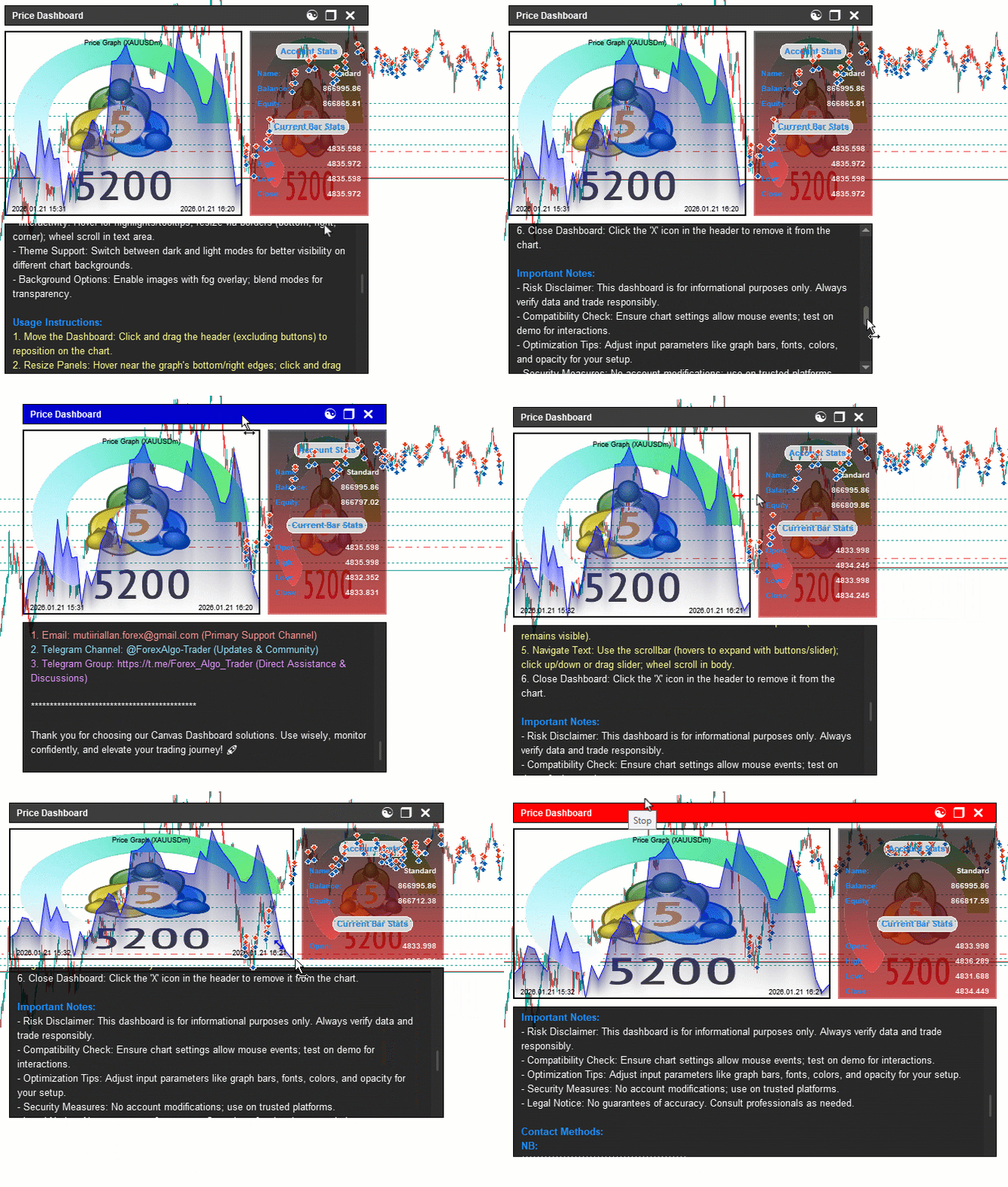
From the visualization, we can see that we have enhanced the canvas-based dashboard by adding the text panel with all the interactions done, hence achieving our objectives. What now remains is testing the workability of the system, and that is handled in the preceding section.
Backtesting
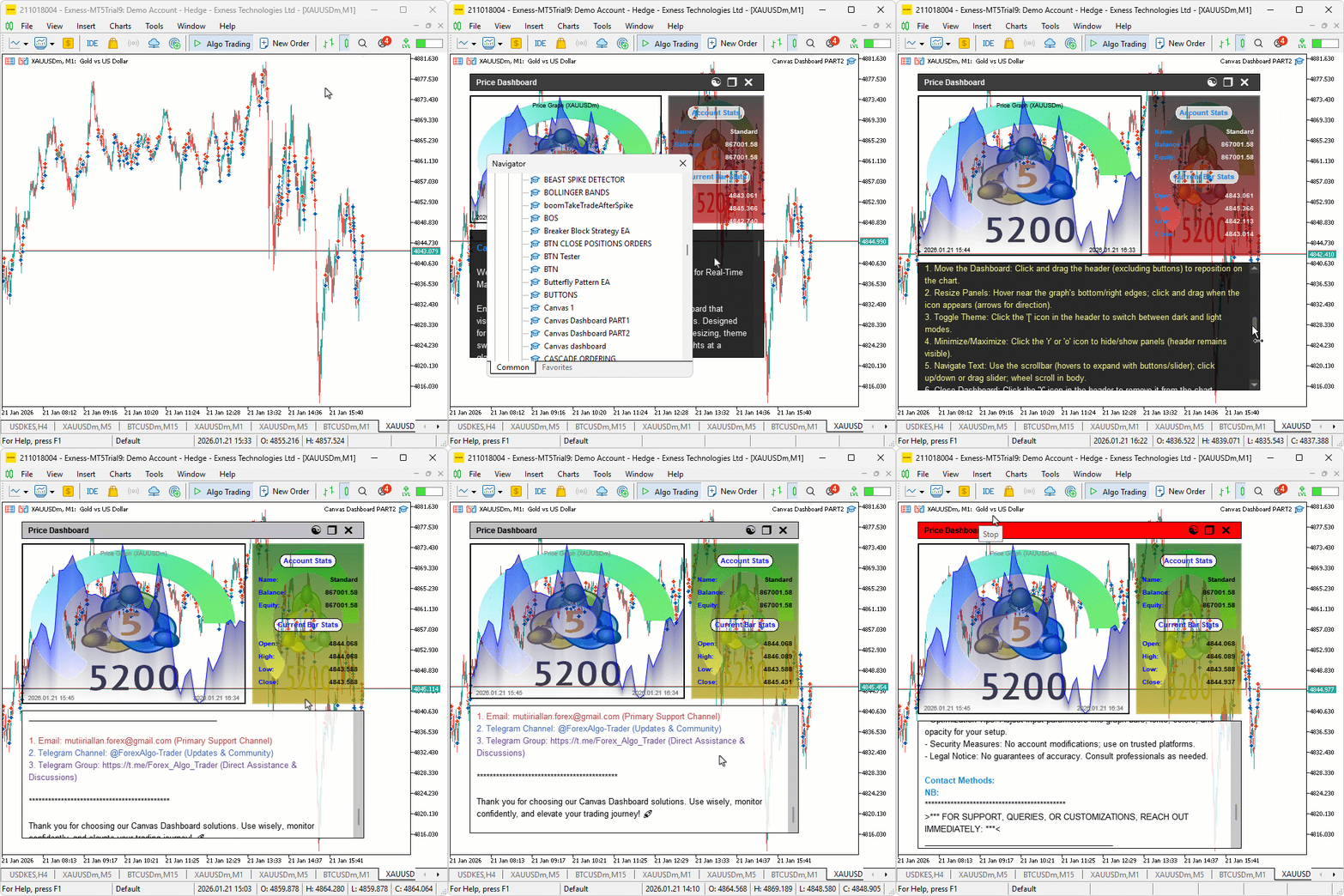
We did the testing, and below is the compiled visualization in a single Graphics Interchange Format (GIF) bitmap image format.
Conclusion
In conclusion, we’ve enhanced the canvas-based price dashboard in MQL5 by implementing a pixel-perfect scrollable text canvas for usage guides, bypassing native limitations with antialiasing for smooth rendering, a rounded custom scrollbar that expands on hover with buttons and a slider for navigation, themed elements, dynamic wrapping with color adjustments, and wheel/click/drag support for seamless interaction. The system integrates the text panel with existing graph/stats, maintaining drag/resize/theme/minimize functionalities, and ensures efficient event-driven updates for a comprehensive monitoring tool. With this pixel-perfect scrollable text canvas enhancement, you’re equipped to provide detailed user guidance within the dashboard, ready for further optimization in your trading journey. Happy trading!
Warning: All rights to these materials are reserved by MetaQuotes Ltd. Copying or reprinting of these materials in whole or in part is prohibited.
This article was written by a user of the site and reflects their personal views. MetaQuotes Ltd is not responsible for the accuracy of the information presented, nor for any consequences resulting from the use of the solutions, strategies or recommendations described.

 Price Action Analysis Toolkit Development (Part 57): Developing a Market State Classification Module in MQL5
 Larry Williams Market Secrets (Part 8): Combining Volatility, Structure and Time Filters
 Automating Trading Strategies in MQL5 (Part 47): Nick Rypock Trailing Reverse (NRTR) with Hedging Features
 Creating Custom Indicators in MQL5 (Part 6): Evolving RSI Calculations with Smoothing, Hue Shifts, and Multi-Timeframe Support

- Free trading apps
- Over 8,000 signals for copying
- Economic news for exploring financial markets
You agree to website policy and terms of use