

The MQL5 Standard Library Explorer (Part 8) : The Hybrid Trades Journal Logging with CFile
 2 365
2 365
 1
1

Contents:
- Introduction
- Concept and Benefits
- Standard Library Spotlight
- Implementation
- Testing and Results
- Conclusion
- Attachments
Introduction
Welcome to Part 8 of our series dedicated to mastering the MQL5 Standard Library through practical, real-world projects. Building on the interactive visual position management system we developed in the previous part—complete with on-chart bubbles drawn using CCanvas and clickable close buttons—we now add a professional-grade persistence layer: a custom CSV trade journal.
MetaTrader 5 provides excellent native trade history that accurately records execution details and outcomes. For hybrid systems that blend automated strategy logic with human discretionary intervention routed through the EA itself, we often need an additional layer of context tailored to our specific analytical needs. This custom journal explicitly logs the decision source for every recorded event—whether the action originated from the algorithm ("ALGO") or from a manual click on our interactive interface ("HUMAN").
By capturing this intent alongside standard details (time, ticket, symbol, action, and realized profit), we create a portable, structured dataset that enables precise performance attribution. The project serves as an in-depth exploration of the Files/FileTxt.mqh component, demonstrating reliable file operations, data integrity practices, and clean integration patterns that complement the platform’s built-in capabilities.
The complete Expert Advisor combines moving average crossover logic, dynamic canvas visuals, hitbox-based interaction, and intent-aware journaling—resulting in a mature hybrid tool that not only executes trades but also documents its decision-making process for evidence-based refinement.
Concept and Benefits
The native Account History tab and Strategy Tester reports in MetaTrader 5 are robust and sufficient for accounting, regulatory purposes, and general performance summaries. They correctly distinguish execution channels and provide a full chronological record of deals and positions.
In active development and live monitoring of hybrid systems, however, we frequently require supplementary records that focus on the questions most relevant to iterative improvement. The core metadata we target is the decision source: algorithmic signals versus discretionary human overrides executed through the EA’s event handler and trade classes. This explicit tagging allows us to separate and compare the true contribution of each component without ambiguity.
A custom CSV journal delivers several concrete advantages,
- Clear intent attribution—manual closures via chart clicks are logged as "HUMAN," while strategy-driven entries are "ALGO." This separation is impossible to achieve reliably with native history alone in interactive hybrid designs.
- Universal portability—CSV files open instantly in Excel, Google Sheets, LibreOffice, or any text editor. No export procedures or platform-specific formats are needed.
- Built-in structure for analysis—Pre-defined columns mean immediate filtering, pivot tables, and calculations are possible without cleaning or transformation steps.
- Extensibility—Adding new columns (e.g., indicator values at entry, current drawdown, volatility reading, or custom notes) requires only minor changes to the logging call.
- Reliable diagnostics—The journal acts as a precise timeline of system decisions, making it far easier to reconstruct events during debugging or post-mortem analysis than relying solely on Experts tab output.
- Crash-resistant persistence—Strategic use of Flush() ensures each entry is physically written to disk, protecting data integrity in case of terminal crashes or power loss.
- Bridge to external tools—The CSV becomes direct input for Python (Pandas, Matplotlib), R, or database imports—enabling advanced statistical analysis, equity curve separation, or machine learning on decision patterns.
These benefits combine to support a professional development workflow where decisions are grounded in clean, source-aware evidence rather than blended aggregates.
Standard Library Spotlight
Understanding the CFileTxt
The CFileTxt class is a lightweight yet powerful tool for text file operations within the Standard Library. It provides a high-level interface that abstracts file handles while offering CSV-specific conveniences.
Key methods and patterns we employ:
- Open()—Combines multiple flags to specify write access, CSV mode, ANSI encoding, common folder location, and read capability for size checks.
- Size()—Quickly determines if the file is new (zero bytes) so we write the header only once.
- WriteString()—Efficiently appends text; respects CSV quoting rules when the flag is set.
- Flush()—The cornerstone of reliability—forces immediate disk commit after critical writes.
- Seek()—Positions the pointer to the end for clean appending.
- Close()—Releases resources (invoked automatically in the destructor).
These methods enable production-quality file handling with minimal code. The same class is equally valuable for saving EA configuration files, exporting custom reports, persisting optimization parameters, or implementing simple file-based signalling between scripts.
Implementation
In this section, we continue building upon the interactive trading system we created in Part 7. Our goal is to extend its functionality by integrating a new module: a persistent trade journal. This is not a standalone script but a logical evolution of our existing work. We will now dive into the practical development process, showing how to weave the file logging capability from the Files/FileTxt.mqh library into the fabric of our running Expert Advisor. The focus is on the active integration—how we take our existing visual and strategy logic and connect it to a new data layer to create a complete, self-documenting application.
Step 1: Expanding Our Toolkit with a New Library
The first step in adding new functionality is to include the necessary standard library module. We are adding file operations to a project that already uses canvas and trade libraries, so we simply extend the include list at the top of our existing code.
Сode:
//--- 1. INCLUDES (Extending the list from Part 7)
#include <Canvas\Canvas.mqh>       // For drawing custom graphics (from Part 7)
#include <Trade\PositionInfo.mqh>  // For reading trade details (from Part 7)
#include <Trade\Trade.mqh>         // For executing trades (from Part 7)
#include <Indicators\Trend.mqh>    // For Moving Averages (from Part 7)
#include <Files\FileTxt.mqh>       // NEW: This adds the CFileTxt class for file operations.
With this single line, we equip our program with all the methods needed to create, write to, and manage text files. The CFileTxt class becomes a new tool in our workshop, ready to be used alongside our CCanvas and CTrade tools.
Step 2: Designing the CTradeJournal Class as a New Component
Next, we architect a new class to manage all logging concerns. We are designing this as a self-contained component that can be easily integrated into our main program. Its purpose is to hide the complexity of file operations behind a simple interface.
Code:
//--- 3. THE JOURNAL CLASS (A new component we are adding)
class CTradeJournal
  {
private:
   CFileTxt          m_file;       // This is our handle to the physical file on disk.
   string            m_filename;
   string            m_sep;        // Field separator for CSV format.

public:
   // Constructor: Initializes the object's default state.
   CTradeJournal() : m_sep(",") {}

   // The initialization function we will call from OnInit().
   bool Init(string filename)
     {
      m_filename = filename;
      // We define flags to control how the file is opened.
      int flags = FILE_WRITE|FILE_CSV|FILE_SHARE_READ;
      ResetLastError();

      // Here, we attempt to open the file. If it fails, we report the error.
      if(m_file.Open(filename, flags) == INVALID_HANDLE)
        {
         Print("Journal Init Failed. Error: ", GetLastError());
         return false;
        }

      // If the file is new, we write the column headers to define our data structure.
      if(m_file.Size() == 0)
        {
         string header = "Time,Ticket,Symbol,Action,Source,Profit\n";
         m_file.WriteString(header);
         m_file.Flush(); // Immediately save the headers to disk.
        }

      // Move to the end of the file so all new logs are appended.
      m_file.Seek(0, SEEK_END);
      return true;
     }
In this Init method, we are implementing several best practices. Using FILE_SHARE_READ allows other programs to view the log file while we write to it. The call to GetLastError() gives us specific diagnostic information if the file cannot be opened, which is crucial for debugging. The Flush() method is our guarantee that the header is physically written to storage, not just held in memory.
Step 3: Writing the Core Logging Method
Now we build the heart of the class: the method that will be called from anywhere in our trading system to record an event. Its design is focused on simplicity for the caller and reliability in execution.
Code:
   // This is the public method our main code will call to save an entry.
   void Log(ulong ticket, string action, string source, double profit)
     {
      // We construct a single, formatted CSV line from the input parameters.
      string line = StringFormat("%s,%d,%s,%s,%s,%.2f\n",
                                 TimeToString(TimeCurrent(), TIME_DATE|TIME_SECONDS),
                                 ticket,
                                 _Symbol,
                                 action,
                                 source, // The key differentiator: "ALGO" or "HUMAN"
                                 profit);
      // We write the line and then force it to disk.
      m_file.WriteString(line);
      m_file.Flush(); // This ensures the data survives a terminal crash.

      // We also print to the Experts tab for immediate developer feedback.
      Print("Journal: ", action, " | Ticket: ", ticket, " | Source: ", source);
     }
The log method is where our design intent becomes code. The source parameter is the critical piece of data we are adding to our system; it's how we fulfill the requirement to differentiate between automated and manual actions. The use of Flush() after every write is a deliberate trade-off, sacrificing a minuscule amount of performance for absolute data integrity—a non-negotiable trait for a trading journal.
Step 4: Integrating the New Component into the Existing System
With the journal class built, we now integrate it into our existing Expert Advisor. This involves adding a global instance and initializing it alongside our other objects.
Code:
//--- 4. GLOBAL OBJECTS (Adding to the existing list from Part 7)
CCanvas           ExtCanvas;       // Existing object for visuals
CPositionInfo     ExtPosition;     // Existing object for position data
CTrade            ExtTrade;        // Existing object for trade execution
CTradeJournal     ExtJournal;      // NEW: Our journaling object

// Inside our existing OnInit() function:
int OnInit()
  {
   // ... (Existing code to create indicators and canvas remains unchanged) ...

   // NEW INITIALIZATION: We start the journaling system.
   if(!ExtJournal.Init("HybridJournal.csv"))
     {
      return INIT_FAILED; // If logging fails, we fail the whole EA load.
     }
   return INIT_SUCCEEDED;
  }
This is a clean, modular integration. The journal becomes a peer to our other subsystems. By treating its initialization as critical (failing OnInit() if it doesn't start), we ensure the system either works completely or not at all, avoiding a scenario where trades occur without being logged.
Step 5: Connecting Logging to Trade Events
The final and most important step is to instrument our existing trade logic. We are inserting logging calls at the precise moments where meaningful actions occur.
First, we modify our existing algorithmic entry logic from Part 7.
Code:
// This is inside our existing CheckStrategy() function.
// After a successful trade execution, we now add a logging call.
if(ExtTrade.Buy(0.10, _Symbol, ask, sl, tp, "MA_Cross_Buy"))
  {
   // NEW LINE: We log this as an algorithmic entry.
   ExtJournal.Log(ExtTrade.ResultOrder(), "ENTRY_BUY", "ALGO", 0.0);
Second, we enhance the existing OnChartEvent handler from Part 7 to log manual closures:
// Inside our existing OnChartEvent() function, where we handle bubble clicks.
if(ExtPosition.SelectByTicket(ExtHitboxes[i].ticket))
  {
   double final_profit = ExtPosition.Profit(); // Get profit before closing
   ExtTrade.PositionClose(ExtHitboxes[i].ticket); // Existing close command

   // NEW LINE: We log this as a human-triggered closure with the final profit.
   ExtJournal.Log(ExtHitboxes[i].ticket, "CLOSE_MANUAL", "HUMAN", final_profit);
  }
These insertions are the culmination of our work. They are minimal, targeted changes that create maximum value. By passing the appropriate source string in each context, we ensure every entry in the log file is tagged with its origin. The CTradeJournal class, and by extension the CFileTxt library, now serves as the unifying recorder for the two distinct operational modes of our hybrid trading system.
What we have done is a classic example of iterative software development. We started with a visual trading interface (Part 7) and have now augmented it with a data persistence layer (Part 8). The logging module does not exist in a vacuum; it is a dependent subsystem that receives its input from the successful operation of the canvas, trade execution, and position information modules. By following this process of including a library, designing a class, instantiating it globally, and calling its methods at strategic points, we have successfully given our trading system a persistent memory, achieving the core objective of differentiating algorithmic from manual actions in a durable, analyzable format.
Testing and Results
With the code compiled and the Expert Advisor ready, testing proceeds in several complementary phases. Together, they validate both sides of the system: the algorithmic trading and logging logic, and the interactive, human-driven components. Separating these concerns is intentional and mirrors how the system itself distinguishes between automated and manual actions.
Phase 1: Rapid Validation via Strategy Tester (Algorithmic Path)
The fastest way to verify the core logging mechanism is through the MetaTrader 5 Strategy Tester. In this environment, the Expert Advisor processes historical price data, and the moving average crossover strategy executes trades automatically. You may enable Visual Mode if you want to observe price action, but it is not required for validating logging behavior.
It is important to understand the limitation of this phase. Manual position closure via chart bubbles cannot be tested in standard backtesting, because the visual interface and the OnChartEvent() handler are not active. This phase is therefore focused exclusively on validating algorithmic execution and journaling.
To perform the test, run the EA in the Strategy Tester over a period that contains multiple moving average crossover signals. While the test is running, monitor the Experts tab inside the Strategy Tester window. For each trade executed by the strategy, you should see messages such as,
“Journal Entry Saved: ENTRY_BUY by ALGO.”
These messages confirm that the algorithmic trade events are being captured and passed to the journal correctly.
After the test completes, locate the generated CSV file in the standard terminal directory:
<Terminal Data Path>\MQL5\Files\HybridJournal.csv
Opening this file confirms that all algorithmic trades were logged and consistently tagged with the ALGO source. This approach allows you to stress-test the logging logic across many trades in a controlled and repeatable environment, without waiting for live market conditions. It also cleanly isolates algorithmic validation from any manual interaction logic.
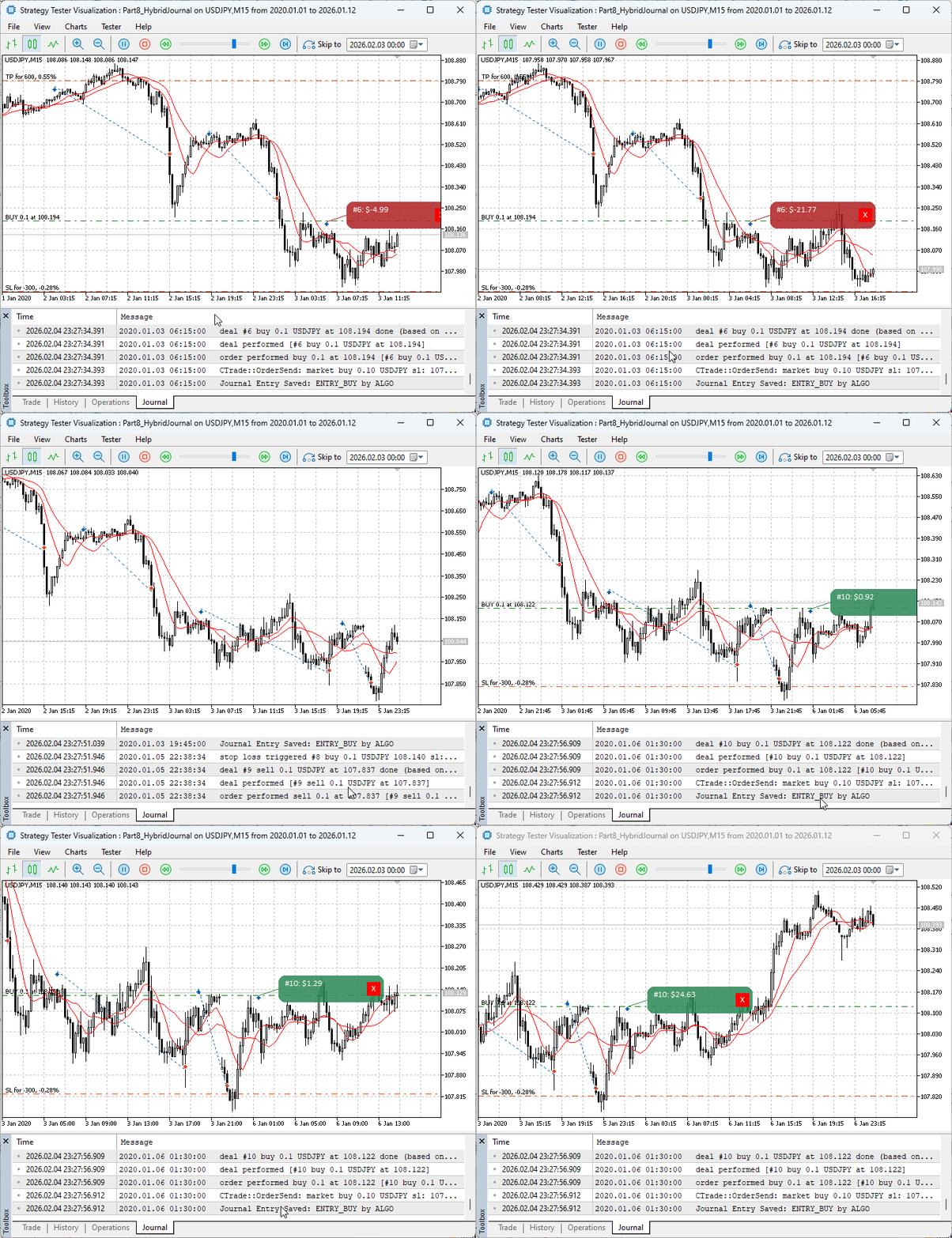
Fig. 1. Quick test in Strategy Tester
Phase 2: Live or Visual Testing (Integrated System)
Once the algorithmic path has been validated, move on to testing the fully integrated system in a live chart or visual testing environment.
Begin by compiling the Part8_HybridJournal.mq5 file in MetaEditor and attaching the Expert Advisor to a chart such as EURUSD on a practical timeframe like M5 or H1. Ensure the chart is running in a normal live environment or visual test, not in optimization-only backtesting mode.
Immediately after attachment, check the Experts tab. You should see confirmation messages indicating that the canvas was created and that the journal file was initialized or opened. If file permission errors occur, verify that the terminal has write access to the MQL5\Files directory. A clean initialization confirms that the CTradeJournal object has successfully executed its Init() routine and prepared the CSV file for writing.
Next, allow the strategy to run until a moving average crossover occurs. When the fast moving average crosses above the slow one, the EA executes a Buy order automatically. Successful execution is confirmed by three aligned signals: a new position appears in the Trade tab, a visual bubble is drawn on the chart at the entry point displaying the ticket and profit information, and the Experts tab prints a message confirming an "ENTRY_BUY action by ALGO."
This confirms that the algorithmic execution path and the logging system are fully integrated in live conditions.
To validate the manual interaction path, locate the red “X” button on the trade bubble and click it once. The position should close immediately, the bubble should disappear from the chart, and the Experts tab should display a message confirming a "CLOSE_MANUAL action by HUMAN."
This sequence confirms that the event originated from user interaction, passed through the OnChartEvent() handler, flowed through the position and trade interfaces, and was correctly recorded in the journal with the "HUMAN" source tag. The final profit or loss is captured before closure, ensuring accurate historical records.
Phase 3: Inspecting the Journal and Extracting Insight
The definitive proof of correct operation is found in the CSV file located at:
<Terminal Data Path>\MQL5\Files\HybridJournal.csv

Fig. 2. Navigating the terminal folders
Opening this file in a spreadsheet reveals a structured record containing time, ticket, symbol, action, source, and profit. You should see algorithmic entries tagged as "ALGO" and manual closures tagged as "HUMAN". Each row is written immediately to disk, ensuring persistence even in the event of unexpected shutdowns.
From this point, the journal becomes more than a validation tool. Simple filtering allows you to analyze algorithmic and manual performance separately, calculating metrics such as trade count, total profit, or average return. More advanced analysis can be performed by importing the CSV into external tools, enabling separate equity curves, risk metrics, or behavioral analysis of manual interventions.
Taken together, this testing process demonstrates a complete and disciplined workflow. The Strategy Tester provides fast, repeatable validation of algorithmic logging, while live or visual testing validates interaction and integration. The result is a transparent, auditable system that replaces black-box behavior with evidence-based insight, fulfilling the core objective of clearly distinguishing and evaluating algorithmic and human trading decisions.
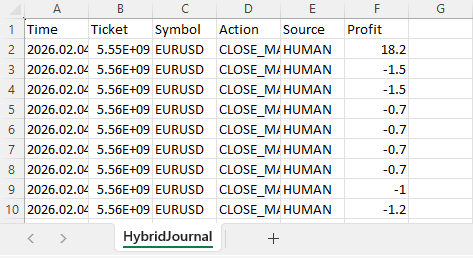
Fig. 3. The contents of the HybridJournal.csv on live testing.
Fig. 3 above shows a snippet of the CSV file generated after live testing. As can be seen, most trades were closed manually for testing purposes, since it took longer for the automated exit conditions to form under live market conditions.
Conclusion
In this discussion of the series, we have successfully bridged the critical gap between execution and analysis. By upgrading our prior work with a forensic journaling system, we transformed a simple trading tool into an accountability machine, ensuring that every decision is explicitly attributed to its source. This distinction is vital; it helps us capture important data for selective system performance analysis.
From a technical perspective, this project demonstrates how the CFileTxt library header component enables professional-grade persistence with minimal effort. By leveraging the standard library, we avoid the complexity and fragility of managing low-level file handles and instead focus on application logic. The resulting hybrid expert advisor is robust, interactive, and self-documenting, producing structured data that supports disciplined analysis and long-term development. It also proves an important point: features such as centralized logging and Excel-ready CSV output are not reserved for institutional platforms but are readily achievable for any retail developer who uses the library correctly.
The value of this work extends well beyond this single Expert Advisor. The design patterns introduced here are intentionally reusable. The CTradeJournal class is a self-contained module that can be integrated into future projects to immediately add forensic visibility. From here, you can extend the journal with additional fields, experiment with alternative output formats, or explore deeper integrations such as database-backed storage using other Standard Library components. Each step builds on the same foundation of clarity and accountability established in this part.
Attachments
| Source Filename | Type | Version | Description: |
|---|---|---|---|
| Part8_HybridJournal | Expert Advisor | 1.00 | Complete hybrid Expert Advisor integrating canvas interaction and intent-aware CSV journaling. |
Warning: All rights to these materials are reserved by MetaQuotes Ltd. Copying or reprinting of these materials in whole or in part is prohibited.
This article was written by a user of the site and reflects their personal views. MetaQuotes Ltd is not responsible for the accuracy of the information presented, nor for any consequences resulting from the use of the solutions, strategies or recommendations described.


 Introduction to MQL5 (Part 39): Beginner Guide to File Handling in MQL5 (I)
 From Basic to Intermediate: Indicator (III)
 From Basic to Intermediate: Indicator (IV)
 Algorithmic Trading Strategies: AI and Its Road to Golden Pinnacles

- Free trading apps
- Over 8,000 signals for copying
- Economic news for exploring financial markets
You agree to website policy and terms of use