

MQL5 Trading Tools (Part 16): Improved Super-Sampling Anti-Aliasing (SSAA) and High-Resolution Rendering
 2 385
2 385
 0
0

Introduction
In our previous article (Part 15), we developed a canvas dashboard in MetaQuotes Language 5 (MQL5) that incorporates blur effects, shadow rendering, and smooth mouse wheel scrolling for interactive market monitoring, featuring visual panels and customizable themes. In Part 16, we enhance the dashboard with anti-aliasing techniques and high-resolution rendering, utilizing supersampling to achieve smoother graphics, borders, and elements. This enhancement includes high-resolution canvases for statistics and text panels, precise drawing functions for rounded shapes, and refined interactivity for better visual quality. We will cover the following topics:
- Understanding Anti-Aliasing and High-Resolution Rendering Techniques
- Implementation in MQL5
- Backtesting
- Conclusion
By the end, you’ll have an upgraded MQL5 dashboard with enhanced rendering for clearer and more professional market visualizations—let’s dive in!
Understanding Anti-Aliasing and High-Resolution Rendering Techniques
The anti-aliasing and high-resolution rendering framework addresses visual artifacts in digital graphics, such as jagged edges or "aliasing" that occur when continuous shapes are represented on a discrete pixel grid. Aliasing manifests as stair-step patterns on lines, curves, or borders, reducing clarity and professionalism in displays like our trading dashboards. To mitigate this, techniques like supersampling render scenes at a higher resolution—typically multiples of the target size—then downsample by averaging pixel values, smoothing edges through color blending, and creating a more natural appearance. See an example of the super-sampling process below.

On the other hand, high-resolution rendering complements anti-aliasing by utilizing larger canvases to capture finer details before reduction, enhancing overall image quality without increasing final output size. This is particularly significant in MQL5 applications, where precise visualizations of market data, such as graphs and stats, improve user comprehension and decision-making by minimizing distortions. For instance, bicubic interpolation, a sophisticated resampling method, calculates new pixel values using a weighted average of surrounding pixels, preserving smoothness during scaling operations and contributing to superior anti-aliased results.
Our plan is to integrate supersampling with a factor of 4 for stats and text panels, drawing elements on high-resolution canvases using mathematical functions for arcs, quadrilaterals, and rounded triangles to ensure precision. We will then downsample via pixel averaging to achieve anti-aliased borders, arrows, and shapes, while maintaining efficient performance, specifically to the scrollbar elements and statistics header boxes. In brief, here is a visual representation of our objectives.

Implementation in MQL5
To enhance the program in MQL5, we will need to add new defines, global variables, and inputs to control the new enhancements as follows for the high-resolution rendering and super-sampling capabilities.
//+------------------------------------------------------------------+
//|                                       Canvas Dashboard PART4.mq5 |
//|                           Copyright 2026, Allan Munene Mutiiria. |
//|                                   https://t.me/Forex_Algo_Trader |
//+------------------------------------------------------------------+
#property copyright "Copyright 2026, Allan Munene Mutiiria."
#property link "https://t.me/Forex_Algo_Trader"
#property version "1.00"
#property strict

// Added two new canvas objects for high-resolution rendering
//+------------------------------------------------------------------+
//| Canvas objects                                                   |
//+------------------------------------------------------------------+
CCanvas canvasGraph;                    //--- Declare graph canvas object
CCanvas canvasStats;                    //--- Declare stats canvas object
CCanvas canvasStatsHighRes;             //--- Declare stats high-res canvas object
CCanvas canvasHeader;                   //--- Declare header canvas object
CCanvas canvasText;                     //--- Declare text canvas object
CCanvas canvasTextHighRes;              //--- Declare text high-res canvas object

// Added names for the new high-resolution canvases
//+------------------------------------------------------------------+
//| Canvas names                                                     |
//+------------------------------------------------------------------+
string canvasGraphName = "GraphCanvas"; //--- Set graph canvas name
string canvasStatsName = "StatsCanvas"; //--- Set stats canvas name
string canvasStatsHighResName = "StatsCanvasHighRes"; //--- Set stats high-res name
string canvasHeaderName = "HeaderCanvas"; //--- Set header canvas name
string canvasTextName = "TextCanvas";   //--- Set text canvas name
string canvasTextHighResName = "TextCanvasHighRes"; //--- Set text high-res name

// New group
sinput group "=== TEXT PANEL SETTINGS ==="
input int TriangleRoundRadius         = 1;                              // Triangle Round Radius
input double TriangleBaseWidthPercent = 65.0;                           // Triangle Base Width Percent (of button size)
input double TriangleHeightPercent    = 70.0;                           // Triangle Height Percent (of base width)
input bool ShowUpDownButtons          = false;                          // Show Up/Down Buttons
input int TextFontSize = 17;                                            // Text Font Size

// Added a new global variable for supersampling factor
const int smoothness_factor = 10;  // Higher = smoother drag (e.g., 20 for more)
const int supersamplingFactor = 4;      // Supersampling for smooth rounds
We first extend the canvas objects by declaring additional high-resolution versions for the stats and text panels, specifically "canvasStatsHighRes" and "canvasTextHighRes", alongside the existing "canvasGraph", "canvasStats", "canvasHeader", and "canvasText" to support supersampled rendering. Then, we also define corresponding names for these new high-resolution canvases, adding "canvasStatsHighResName" set to "StatsCanvasHighRes" and "canvasTextHighResName" set to "TextCanvasHighRes", which will be used for identification and creation in the program. We have highlighted the specific changes for clarity.
Under a new input group labeled "=== TEXT PANEL SETTINGS ===", we introduce user-configurable parameters including "TriangleRoundRadius" for controlling arrow corner rounding, "TriangleBaseWidthPercent" and "TriangleHeightPercent" to adjust arrow proportions relative to button size, "ShowUpDownButtons" to toggle visibility of scroll buttons, and "TextFontSize" for setting the text display size. We specifically want to update the scrollbar to align with the new version of Windows 11, the latest release as of 2026. Finally, we define two constants: "smoothness_factor" initialized to 10 for smoother scrolling interactions, and "supersamplingFactor" set to 4 to enable high-resolution rendering by multiplying pixel dimensions for anti-aliasing before downsampling.
Think of it as drawing everything 4 times bigger and then squishing it down to make it super smooth. This is key for anti-aliasing. By drawing at 4x resolution (bigger), we can average pixels when shrinking, removing jagged edges on curves, borders, and text. It improves overall graphics quality but uses more computer power. So, you might want to use it carefully. Now, in the OnInit event handler, we will create these high-resolution canvases as follows, besides the normal ones.
if (EnableStatsPanel) {                                   //--- Check stats panel enabled
   int statsX = currentCanvasX + currentWidth + PanelGap; //--- Compute stats X
   if (!canvasStats.CreateBitmapLabel(0, 0, canvasStatsName, statsX, currentCanvasY + header_height + gap_y, currentWidth / 2, currentHeight, COLOR_FORMAT_ARGB_NORMALIZE)) { //--- Create stats canvas
      Print("Failed to create Stats Canvas");             //--- Log creation failure
   }
   if (!canvasStatsHighRes.Create(canvasStatsHighResName, (currentWidth / 2) * supersamplingFactor, currentHeight * supersamplingFactor, COLOR_FORMAT_ARGB_NORMALIZE)) { //--- Create stats high-res
      Print("Failed to create Stats High-Res Canvas");    //--- Log creation failure
   }
   statsCreated = true;                                   //--- Set stats created flag
}

if (EnableTextPanel) {                                    //--- Check text panel enabled
   int textY = currentCanvasY + header_height + gap_y + currentHeight + PanelGap; //--- Compute text Y
   int text_width = inner_header_width;                   //--- Set text width
   int text_height = TextPanelHeight;                     //--- Set text height
   if (!canvasText.CreateBitmapLabel(0, 0, canvasTextName, currentCanvasX, textY, text_width, text_height, COLOR_FORMAT_ARGB_NORMALIZE)) { //--- Create text canvas
      Print("Failed to create Text Canvas");              //--- Log creation failure
   }
   if (!canvasTextHighRes.Create(canvasTextHighResName, text_width * supersamplingFactor, text_height * supersamplingFactor, COLOR_FORMAT_ARGB_NORMALIZE)) { //--- Create text high-res
      Print("Failed to create Text High-Res Canvas");     //--- Log creation failure
   }
   textCreated = true;                                    //--- Set text created flag
}
In the OnInit event handler, we check if the stats panel is enabled through the "EnableStatsPanel" input, and if so, we calculate the X position for the stats canvas by adding the current canvas X, width, and panel gap. We then create the standard stats canvas using the "CreateBitmapLabel" method on the "canvasStats" object, specifying the chart ID, subwindow, name, position, dimensions, and color format COLOR_FORMAT_ARGB_NORMALIZE, while logging a failure message if creation fails, just like we did with the prior version. Next, we create the high-resolution stats canvas with the Create method on the "canvasStatsHighRes" object, using the high-res name, scaled width by multiplying half the current width by "supersamplingFactor", scaled height similarly, and the same color format, again logging if it fails, before setting the "statsCreated" flag to true.
Similarly, if the text panel is enabled via "EnableTextPanel", we compute the Y position for the text canvas by adding the current canvas Y, header height, gaps, current height, and panel gap, then set the text width to match the inner header width and height to "TextPanelHeight". We create the standard text canvas with "CreateBitmapLabel" on "canvasText", providing the necessary parameters and logging failures. We follow this by creating the high-resolution text canvas using "Create" on "canvasTextHighRes" with scaled dimensions based on "supersamplingFactor" and logging any issues, then set the "textCreated" flag to true. Since we have created new canvases, we need to consider their destruction when not needed in respective areas, just like the normal ones. For example, in deinitialization, we use the following logic.
//+------------------------------------------------------------------+
//| Deinitialize expert                                              |
//+------------------------------------------------------------------+
void OnDeinit(const int reason) {           // Deinitialize expert advisor
   canvasHeader.Destroy();                  //--- Destroy header canvas
   if (graphCreated) canvasGraph.Destroy(); //--- Destroy graph if created
   if (statsCreated) {
      canvasStats.Destroy();                //--- Destroy stats if created
      canvasStatsHighRes.Destroy();         //--- Destroy stats high-res
   }
   if (textCreated) {
      canvasText.Destroy();                 //--- Destroy text if created
      canvasTextHighRes.Destroy();          //--- Destroy text high-res
   }
   ChartRedraw();                           //--- Redraw chart
}
We just destroy the high-resolution canvases when not needed. We use the same format in the "ToggleMinimize" and "CloseDashboard" functions. Next, we will need to define logic for drawing the new fancy rounded rectangles for the stats headers and the rounded triangles for the scrollbar buttons, since we want to drop the static ones and draw our own custom ones. We use the following logic.
//+------------------------------------------------------------------+
//| Draw rectangle corner arc with exact boundaries                  |
//+------------------------------------------------------------------+
void DrawRectCornerArcPrecise(CCanvas &cvs, int centerX, int centerY, int radius, int thickness, uint borderARGB,
                              double startAngle, double endAngle) {
   int halfThickness = thickness / 2;
   double outerRadius = (double)radius + halfThickness;
   double innerRadius = (double)radius - halfThickness;
   if(innerRadius < 0) innerRadius = 0;

   int pixelRange = (int)(outerRadius + 2);

   for(int deltaY = -pixelRange; deltaY <= pixelRange; deltaY++) {
      for(int deltaX = -pixelRange; deltaX <= pixelRange; deltaX++) {
         double distance = MathSqrt(deltaX * deltaX + deltaY * deltaY);
         if(distance < innerRadius || distance > outerRadius) continue;

         double angle = MathArctan2((double)deltaY, (double)deltaX);

         if(IsAngleBetween(angle, startAngle, endAngle))
            cvs.PixelSet(centerX + deltaX, centerY + deltaY, borderARGB);
      }
   }
}

//+------------------------------------------------------------------+
//| Fill quadrilateral                                               |
//+------------------------------------------------------------------+
void FillQuadrilateral(CCanvas &cvs, double &verticesX[], double &verticesY[], uint fillColor) {
   double minY = verticesY[0], maxY = verticesY[0];
   for(int i = 1; i < 4; i++) {
      if(verticesY[i] < minY) minY = verticesY[i];
      if(verticesY[i] > maxY) maxY = verticesY[i];
   }

   int yStart = (int)MathCeil(minY);
   int yEnd = (int)MathFloor(maxY);

   for(int y = yStart; y <= yEnd; y++) {
      double scanlineY = (double)y + 0.5;
      double xIntersections[8];
      int intersectionCount = 0;

      for(int i = 0; i < 4; i++) {
         int nextIndex = (i + 1) % 4;
         double x0 = verticesX[i], y0 = verticesY[i];
         double x1 = verticesX[nextIndex], y1 = verticesY[nextIndex];

         double edgeMinY = (y0 < y1) ? y0 : y1;
         double edgeMaxY = (y0 > y1) ? y0 : y1;

         if(scanlineY < edgeMinY || scanlineY > edgeMaxY) continue;
         if(MathAbs(y1 - y0) < 1e-12) continue;

         double interpolationFactor = (scanlineY - y0) / (y1 - y0);
         if(interpolationFactor < 0.0 || interpolationFactor > 1.0) continue;

         xIntersections[intersectionCount++] = x0 + interpolationFactor * (x1 - x0);
      }

      for(int a = 0; a < intersectionCount - 1; a++)
         for(int b = a + 1; b < intersectionCount; b++)
            if(xIntersections[a] > xIntersections[b]) {
               double temp = xIntersections[a];
               xIntersections[a] = xIntersections[b];
               xIntersections[b] = temp;
            }

      for(int pairIndex = 0; pairIndex + 1 < intersectionCount; pairIndex += 2) {
         int xLeft = (int)MathCeil(xIntersections[pairIndex]);
         int xRight = (int)MathFloor(xIntersections[pairIndex + 1]);
         for(int x = xLeft; x <= xRight; x++)
            cvs.PixelSet(x, y, fillColor);
      }
   }
}

//+------------------------------------------------------------------+
//| Normalize angle                                                  |
//+------------------------------------------------------------------+
double NormalizeAngle(double angle) {
   double twoPi = 2.0 * M_PI;
   angle = MathMod(angle, twoPi);
   if(angle < 0) angle += twoPi;
   return angle;
}

//+------------------------------------------------------------------+
//| Is angle between                                                 |
//+------------------------------------------------------------------+
bool IsAngleBetween(double angle, double startAngle, double endAngle) {
   angle = NormalizeAngle(angle);
   startAngle = NormalizeAngle(startAngle);
   endAngle = NormalizeAngle(endAngle);

   double span = NormalizeAngle(endAngle - startAngle);
   double relativeAngle = NormalizeAngle(angle - startAngle);

   return relativeAngle <= span;
}
Here, we create the "DrawRectCornerArcPrecise" function to render precise corner arcs for rounded rectangle borders on a high-resolution canvas, calculating half-thickness to define inner and outer radii, then iterating over a pixel range around the center to check distances and angles, setting pixels only if they fall within the arc segment defined by start and end angles. We implement the "FillQuadrilateral" function to fill arbitrary quadrilateral shapes using a scanline algorithm, first determining the min and max Y bounds from the vertices, then for each scanline Y, computing edge intersections, sorting them, and filling horizontal spans between pairs of intersections to ensure complete coverage without gaps.
We define the "NormalizeAngle" function to standardize angles within 0 to 2 * pi by using modulo and adjusting negative values. This standardization ensures consistent angle comparisons in circular geometries like arcs. We add the "IsAngleBetween" function to determine if a given angle lies between start and end angles. We normalize all inputs, calculate the span, and check the relative position, supporting clockwise or counterclockwise sweeps for flexible arc rendering. We can now use these functions to draw a rounded rectangle as below.
//+------------------------------------------------------------------+
//| Fill rounded rectangle                                           |
//+------------------------------------------------------------------+
void FillRoundedRectangle(CCanvas &cvs, int x, int y, int w, int h, int radius, uint argb_color) { // Render rounded fill
   if (radius <= 0) {                                                           //--- Check zero radius
      cvs.FillRectangle(x, y, x + w - 1, y + h - 1, argb_color);                //--- Fill rectangle
      return;                                                                   //--- Exit function
   }
   radius = MathMin(radius, MathMin(w / 2, h / 2));                             //--- Adjust radius

   cvs.Arc(x + radius, y + radius, radius, radius, DegreesToRadians(180), DegreesToRadians(90), argb_color); //--- Draw top-left arc
   cvs.Arc(x + w - radius - 1, y + radius, radius, radius, DegreesToRadians(270), DegreesToRadians(90), argb_color); //--- Draw top-right arc
   cvs.Arc(x + w - radius - 1, y + h - radius - 1, radius, radius, DegreesToRadians(0), DegreesToRadians(90), argb_color); //--- Draw bottom-right arc
   cvs.Arc(x + radius, y + h - radius - 1, radius, radius, DegreesToRadians(90), DegreesToRadians(90), argb_color); //--- Draw bottom-left arc

   cvs.FillCircle(x + radius, y + radius, radius, argb_color);                  //--- Fill top-left circle
   cvs.FillCircle(x + w - radius - 1, y + radius, radius, argb_color);          //--- Fill top-right circle
   cvs.FillCircle(x + w - radius - 1, y + h - radius - 1, radius, argb_color);  //--- Fill bottom-right circle
   cvs.FillCircle(x + radius, y + h - radius - 1, radius, argb_color); //--- Fill bottom-left circle

   cvs.FillRectangle(x + radius, y, x + w - radius - 1, y + h - 1, argb_color); //--- Fill horizontal body

   cvs.FillRectangle(x, y + radius, x + w - 1, y + h - radius - 1, argb_color); //--- Fill vertical body
}

//+------------------------------------------------------------------+
//| Draw rounded rectangle border                                    |
//+------------------------------------------------------------------+
void DrawRoundedRectangleBorderHiRes(CCanvas &cvs, int positionX, int positionY, int width, int height, int radius, uint borderColorARGB, int thickness) {
   int scaledThickness = thickness;

   DrawRectStraightEdge(cvs, positionX + radius, positionY, positionX + width - radius, positionY, scaledThickness, borderColorARGB);
   DrawRectStraightEdge(cvs, positionX + width - radius, positionY + height - 1, positionX + radius, positionY + height - 1, scaledThickness, borderColorARGB);
   DrawRectStraightEdge(cvs, positionX, positionY + height - radius, positionX, positionY + radius, scaledThickness, borderColorARGB);
   DrawRectStraightEdge(cvs, positionX + width - 1, positionY + radius, positionX + width - 1, positionY + height - radius, scaledThickness, borderColorARGB);

   DrawRectCornerArcPrecise(cvs, positionX + radius, positionY + radius, radius, scaledThickness, borderColorARGB,
                            M_PI, M_PI * 1.5);
   DrawRectCornerArcPrecise(cvs, positionX + width - radius, positionY + radius, radius, scaledThickness, borderColorARGB,
                            M_PI * 1.5, M_PI * 2.0);
   DrawRectCornerArcPrecise(cvs, positionX + radius, positionY + height - radius, radius, scaledThickness, borderColorARGB,
                            M_PI * 0.5, M_PI);
   DrawRectCornerArcPrecise(cvs, positionX + width - radius, positionY + height - radius, radius, scaledThickness, borderColorARGB,
                            0.0, M_PI * 0.5);
}

//+------------------------------------------------------------------+
//| Draw straight edge for rectangle border                          |
//+------------------------------------------------------------------+
void DrawRectStraightEdge(CCanvas &cvs, double startX, double startY, double endX, double endY, int thickness, uint borderARGB) {
   double deltaX = endX - startX;
   double deltaY = endY - startY;
   double edgeLength = MathSqrt(deltaX*deltaX + deltaY*deltaY);
   if(edgeLength < 1e-6) return;

   double perpendicularX = -deltaY / edgeLength;
   double perpendicularY = deltaX / edgeLength;

   double edgeDirectionX = deltaX / edgeLength;
   double edgeDirectionY = deltaY / edgeLength;

   double halfThickness = (double)thickness / 2.0;

   double extensionLength = 1.5;
   double extendedStartX = startX - edgeDirectionX * extensionLength;
   double extendedStartY = startY - edgeDirectionY * extensionLength;
   double extendedEndX = endX + edgeDirectionX * extensionLength;
   double extendedEndY = endY + edgeDirectionY * extensionLength;

   double verticesX[4], verticesY[4];
   verticesX[0] = extendedStartX - perpendicularX * halfThickness;  verticesY[0] = extendedStartY - perpendicularY * halfThickness;
   verticesX[1] = extendedStartX + perpendicularX * halfThickness;  verticesY[1] = extendedStartY + perpendicularY * halfThickness;
   verticesX[2] = extendedEndX + perpendicularX * halfThickness;  verticesY[2] = extendedEndY + perpendicularY * halfThickness;
   verticesX[3] = extendedEndX - perpendicularX * halfThickness;  verticesY[3] = extendedEndY - perpendicularY * halfThickness;

   FillQuadrilateral(cvs, verticesX, verticesY, borderARGB);
}
To create a rounded rectangle, we first implement the "FillRoundedRectangle" function to render filled rounded rectangles on the canvas, first handling zero radius cases by filling a standard rectangle, then adjusting the radius to fit within half the width or height, drawing quarter-arcs at each corner using the Arc method with converted degrees to radians, filling full circles at corners for complete coverage, and finally filling the horizontal and vertical body sections to connect the rounded parts seamlessly.
Then, we create the "DrawRoundedRectangleBorderHiRes" function for high-resolution border drawing around rounded rectangles, scaling thickness, calling "DrawRectStraightEdge" to render the four straight sides, and using "DrawRectCornerArcPrecise" for each corner arc with specific start and end angles in radians (like M_PI to M_PI * 1.5 for top-left), ensuring precise, anti-aliased outlines without overlaps.
Finally, in the "DrawRectStraightEdge" function, we calculate deltas and normalize vectors for the edge direction and perpendicular, compute half-thickness for border width, extend the line slightly beyond endpoints to ensure smooth corner joins, define four vertices for a quadrilateral strip along the edge, and pass them to "FillQuadrilateral" to fill the border segment, creating a continuous, high-quality straight line appearance through vector-based geometry. These are the functions that we will call to create the desired rounded rectangle we want. We can now define a rounded triangle logic. First, we will need helper functions.
//+------------------------------------------------------------------+
//| Precompute triangle geometry                                     |
//+------------------------------------------------------------------+
void PrecomputeTriangleGeometry(double &sharpX[], double &sharpY[], int radius, double &arcCentersX[], double &arcCentersY[], double &tangentX[][2], double &tangentY[][2], double &startAngles[], double &endAngles[]) {
   for(int cornerIndex = 0; cornerIndex < 3; cornerIndex++) {
      int previousIndex = (cornerIndex + 2) % 3;
      int nextIndex = (cornerIndex + 1) % 3;

      double edgeA_X = sharpX[cornerIndex] - sharpX[previousIndex], edgeA_Y = sharpY[cornerIndex] - sharpY[previousIndex];
      double edgeA_Length = MathSqrt(edgeA_X*edgeA_X + edgeA_Y*edgeA_Y);
      edgeA_X /= edgeA_Length; edgeA_Y /= edgeA_Length;

      double edgeB_X = sharpX[nextIndex] - sharpX[cornerIndex], edgeB_Y = sharpY[nextIndex] - sharpY[cornerIndex];
      double edgeB_Length = MathSqrt(edgeB_X*edgeB_X + edgeB_Y*edgeB_Y);
      edgeB_X /= edgeB_Length; edgeB_Y /= edgeB_Length;

      double normalA_X = edgeA_Y, normalA_Y = -edgeA_X;
      double normalB_X = edgeB_Y, normalB_Y = -edgeB_X;

      double bisectorX = normalA_X + normalB_X, bisectorY = normalA_Y + normalB_Y;
      double bisectorLength = MathSqrt(bisectorX*bisectorX + bisectorY*bisectorY);
      if(bisectorLength < 1e-12) { bisectorX = normalA_X; bisectorY = normalA_Y; bisectorLength = MathSqrt(bisectorX*bisectorX + bisectorY*bisectorY); }
      bisectorX /= bisectorLength; bisectorY /= bisectorLength;

      double cosInteriorAngle = (-edgeA_X)*edgeB_X + (-edgeA_Y)*edgeB_Y;
      if(cosInteriorAngle > 1.0) cosInteriorAngle = 1.0;
      if(cosInteriorAngle < -1.0) cosInteriorAngle = -1.0;
      double halfAngle = MathArccos(cosInteriorAngle) / 2.0;
      double sinHalfAngle = MathSin(halfAngle);
      if(sinHalfAngle < 1e-12) sinHalfAngle = 1e-12;

      double distanceToCenter = radius / sinHalfAngle;
      arcCentersX[cornerIndex] = sharpX[cornerIndex] + bisectorX * distanceToCenter;
      arcCentersY[cornerIndex] = sharpY[cornerIndex] + bisectorY * distanceToCenter;

      double deltaX_A = sharpX[cornerIndex] - sharpX[previousIndex], deltaY_A = sharpY[cornerIndex] - sharpY[previousIndex];
      double lengthSquared_A = deltaX_A*deltaX_A + deltaY_A*deltaY_A;
      double interpolationFactor_A = ((arcCentersX[cornerIndex] - sharpX[previousIndex])*deltaX_A + (arcCentersY[cornerIndex] - sharpY[previousIndex])*deltaY_A) / lengthSquared_A;
      tangentX[cornerIndex][1] = sharpX[previousIndex] + interpolationFactor_A * deltaX_A;
      tangentY[cornerIndex][1] = sharpY[previousIndex] + interpolationFactor_A * deltaY_A;

      double deltaX_B = sharpX[nextIndex] - sharpX[cornerIndex], deltaY_B = sharpY[nextIndex] - sharpY[cornerIndex];
      double lengthSquared_B = deltaX_B*deltaX_B + deltaY_B*deltaY_B;
      double interpolationFactor_B = ((arcCentersX[cornerIndex] - sharpX[cornerIndex])*deltaX_B + (arcCentersY[cornerIndex] - sharpY[cornerIndex])*deltaY_B) / lengthSquared_B;
      tangentX[cornerIndex][0] = sharpX[cornerIndex] + interpolationFactor_B * deltaX_B;
      tangentY[cornerIndex][0] = sharpY[cornerIndex] + interpolationFactor_B * deltaY_B;

      startAngles[cornerIndex] = MathArctan2(tangentY[cornerIndex][1] - arcCentersY[cornerIndex], tangentX[cornerIndex][1] - arcCentersX[cornerIndex]);
      endAngles[cornerIndex] = MathArctan2(tangentY[cornerIndex][0] - arcCentersY[cornerIndex], tangentX[cornerIndex][0] - arcCentersX[cornerIndex]);
   }
}

//+------------------------------------------------------------------+
//| Angle in arc sweep for triangle                                  |
//+------------------------------------------------------------------+
bool TriangleAngleInArcSweep(double startAngle, double endAngle, double angle) {
   double twoPi = 2.0 * M_PI;
   double startAngleMod = MathMod(startAngle + twoPi, twoPi);
   double endAngleMod = MathMod(endAngle + twoPi, twoPi);
   angle = MathMod(angle + twoPi, twoPi);

   double ccwSpan = MathMod(endAngleMod - startAngleMod + twoPi, twoPi);

   if(ccwSpan <= M_PI) {
      double relativeAngle = MathMod(angle - startAngleMod + twoPi, twoPi);
      return(relativeAngle <= ccwSpan + 1e-6);
   } else {
      double cwSpan = twoPi - ccwSpan;
      double relativeAngle = MathMod(angle - endAngleMod + twoPi, twoPi);
      return(relativeAngle <= cwSpan + 1e-6);
   }
}
We define the "PrecomputeTriangleGeometry" function to calculate necessary geometric elements for rendering rounded triangles, such as those we will use in our custom arrow icons, by iterating over each of the three corners using a loop with "cornerIndex" from 0 to 2. For each corner, we determine previous and next indices modulo 3 for cyclical access, compute normalized edge vectors from the sharp vertices "sharpX" and "sharpY" to adjacent points, and derive outward normals by rotating these vectors 90 degrees. We then form the angle bisector by summing the normals, normalizing it after handling near-zero length cases, and calculate the cosine of the interior angle via dot product of negated edge vectors, clamping it between -1 and 1 before finding the half-angle and its sine to avoid division by zero.
Using the radius divided by this sine, we position the arc center along the bisector from the corner, ensuring even rounding; next, we project the arc center onto the edges to find tangent points stored in "tangentX" and "tangentY", and compute start and end angles with MathArctan2 for the arc sweep at that corner.
This precomputation is crucial for precise, anti-aliased rendering of rounded shapes, as it transforms sharp triangle vertices into smooth curves by defining arc centers "arcCentersX" and "arcCentersY", tangents, and angles "startAngles" and "endAngles", which allow vector-based filling without pixel artifacts, significantly improving visual quality in UI elements like scroll arrows by enabling accurate boundary checks during pixel iteration.
Then ,we implement the "TriangleAngleInArcSweep" function to verify if a given angle falls within an arc defined by start and end angles, first normalizing all angles to 0 to 2 * pi using MathMod and adding 2 * pi for positive values. We compute the counterclockwise span, and if it is pi or less, check the relative angle from start; otherwise, we use the clockwise span and check from end, adding a small epsilon for floating-point precision, which supports both arc directions and ensures correct inclusion during scanline filling or pixel testing in rounded triangle rendering. In fact, if you are wondering what all this scanline algorithm thing is, let us explain a bit what it is, so you have some clue.
This algorithm processes the image from left to right, scanning one horizontal line at a time rather than operating on individual pixels. It records all edge intersection points along each scan line and fills the polygon by coloring the regions between pairs of intersections. You can think of it like drawing a straight line across a shape on paper with a single pen: starting from the left boundary and moving to the right, you draw continuously, but whenever you encounter an intersection with the polygon boundary, you stop or resume drawing accordingly. The algorithm follows this same principle. In the figure below, this behavior is illustrated: the red dots represent the polygon’s vertices, while the blue dots indicate the intersection points along the scan line.

Hoping that is understood, we can now proceed to defining the functions to help us draw the rounded triangles, which we will use for the arrows.
//+------------------------------------------------------------------+
//| Fill rounded triangle                                            |
//+------------------------------------------------------------------+
void FillRoundedTriangle(CCanvas &cvs, double &sharpX[], double &sharpY[], int radius, uint fillColor, double &arcCentersX[], double &arcCentersY[], double &tangentX[][2], double &tangentY[][2], double &startAngles[], double &endAngles[]) {
   double minY = sharpY[0], maxY = sharpY[0];
   for(int i = 1; i < 3; i++) {
      if(sharpY[i] < minY) minY = sharpY[i];
      if(sharpY[i] > maxY) maxY = sharpY[i];
   }

   int yStart = (int)MathCeil(minY);
   int yEnd = (int)MathFloor(maxY);

   for(int y = yStart; y <= yEnd; y++) {
      double scanlineY = (double)y + 0.5;

      double xIntersections[12];
      int intersectionCount = 0;

      for(int edgeIndex = 0; edgeIndex < 3; edgeIndex++) {
         int nextIndex = (edgeIndex + 1) % 3;
         double startX = tangentX[edgeIndex][0], startY = tangentY[edgeIndex][0];
         double endX = tangentX[nextIndex][1], endY = tangentY[nextIndex][1];

         double edgeMinY = (startY < endY) ? startY : endY;
         double edgeMaxY = (startY > endY) ? startY : endY;

         if(scanlineY < edgeMinY || scanlineY > edgeMaxY) continue;
         if(MathAbs(endY - startY) < 1e-12) continue;

         double interpolationFactor = (scanlineY - startY) / (endY - startY);
         if(interpolationFactor < 0.0 || interpolationFactor > 1.0) continue;

         xIntersections[intersectionCount++] = startX + interpolationFactor * (endX - startX);
      }

      for(int cornerIndex = 0; cornerIndex < 3; cornerIndex++) {
         double centerX = arcCentersX[cornerIndex], centerY = arcCentersY[cornerIndex];
         double deltaY = scanlineY - centerY;

         if(MathAbs(deltaY) > radius) continue;

         double deltaX = MathSqrt(radius*radius - deltaY*deltaY);

         double candidates[2];
         candidates[0] = centerX - deltaX;
         candidates[1] = centerX + deltaX;

         for(int candidateIndex = 0; candidateIndex < 2; candidateIndex++) {
            double angle = MathArctan2(scanlineY - centerY, candidates[candidateIndex] - centerX);
            if(TriangleAngleInArcSweep(startAngles[cornerIndex], endAngles[cornerIndex], angle))
               xIntersections[intersectionCount++] = candidates[candidateIndex];
         }
      }

      for(int a = 0; a < intersectionCount - 1; a++)
         for(int b = a + 1; b < intersectionCount; b++)
            if(xIntersections[a] > xIntersections[b]) {
               double temp = xIntersections[a];
               xIntersections[a] = xIntersections[b];
               xIntersections[b] = temp;
            }

      for(int pairIndex = 0; pairIndex + 1 < intersectionCount; pairIndex += 2) {
         int xLeft = (int)MathCeil(xIntersections[pairIndex]);
         int xRight = (int)MathFloor(xIntersections[pairIndex + 1]);
         for(int x = xLeft; x <= xRight; x++)
            cvs.PixelSet(x, y, fillColor);
      }
   }
}

//+------------------------------------------------------------------+
//| Draw rounded triangle arrow                                      |
//+------------------------------------------------------------------+
void DrawRoundedTriangleArrow(CCanvas &cvs, int baseX, int baseY, int tri_base_width, int tri_height, bool isUp, uint fillColor) {
   int radius = TriangleRoundRadius * supersamplingFactor;

   double sharpX[3], sharpY[3];

   if (isUp) {
      sharpX[0] = baseX;
      sharpY[0] = baseY;
      sharpX[1] = baseX - tri_base_width / 2.0;
      sharpY[1] = baseY + tri_height;
      sharpX[2] = baseX + tri_base_width / 2.0;
      sharpY[2] = baseY + tri_height;
   } else {
      sharpX[0] = baseX;
      sharpY[0] = baseY + tri_height;
      sharpX[1] = baseX + tri_base_width / 2.0;  // Swapped for consistent winding
      sharpY[1] = baseY;
      sharpX[2] = baseX - tri_base_width / 2.0;
      sharpY[2] = baseY;
   }

   double arcCentersX[3], arcCentersY[3];
   double tangentX[3][2], tangentY[3][2];
   double startAngles[3], endAngles[3];

   PrecomputeTriangleGeometry(sharpX, sharpY, radius, arcCentersX, arcCentersY, tangentX, tangentY, startAngles, endAngles);

   FillRoundedTriangle(cvs, sharpX, sharpY, radius, fillColor, arcCentersX, arcCentersY, tangentX, tangentY, startAngles, endAngles);
}
We implement the "FillRoundedTriangle" function to render filled rounded triangles using a scanline-based approach for precise, vector-quality filling, first identifying the minimum and maximum Y coordinates from the sharp vertices "sharpY" to define the vertical bounds, then iterating over each integer y from the ceiling of minY to the floor of maxY with a half-pixel offset "scanlineY" for better anti-aliasing through subpixel accuracy. For each scanline, we compute up to 12 x-intersections: first with the three straight tangent edges by linearly interpolating between tangent points "tangentX" and "tangentY" if the scanline falls within the edge's Y range, and then for each of the three corners, checking if the scanline intersects the arc by solving for deltaX from the circle equation at the arc center "arcCentersX" and "arcCentersY" with the given radius, adding candidate x-values only if their angles pass the "TriangleAngleInArcSweep" check to ensure they lie within the arc sweep defined by "startAngles" and "endAngles".
We sort the accumulated x-intersections in ascending order using a simple bubble sort for efficiency on small arrays, then fill horizontal spans between every pair of intersections by setting pixels from the ceiling of the left x to the floor of the right x with the provided "fillColor", resulting in a smooth, artifact-free rounded triangle that leverages precomputed geometry for high-quality rendering in UI elements like arrows. This scanline method is significant as it allows pixel-perfect filling of complex curved shapes without relying on approximation, ensuring anti-aliased edges by precisely determining boundary intersections, which is crucial for maintaining visual clarity in scaled or high-resolution contexts where traditional polygon filling might introduce jags or gaps.
We create the "DrawRoundedTriangleArrow" function to draw upward or downward rounded triangle arrows for our scroll buttons, scaling the "TriangleRoundRadius" by "supersamplingFactor" to match high-res rendering, defining the three sharp vertices "sharpX" and "sharpY" based on the base position, triangle base width "tri_base_width", height "tri_height", and direction "isUp" — for up arrows, placing the point at the top and base at the bottom, while for down, inverting with swapped base points for consistent winding order to avoid filling artifacts. We then invoke "PrecomputeTriangleGeometry" to calculate arc centers, tangents, and angles from these vertices and radius, storing them in arrays "arcCentersX", "arcCentersY", "tangentX", "tangentY", "startAngles", and "endAngles", before calling "FillRoundedTriangle" with these parameters and the "fillColor" to perform the actual rendering, enabling smooth, rounded arrows that integrate seamlessly into the scrollbar for enhanced UI aesthetics and usability. We did up-sampling; it is time to do down-sampling for the target, final canvas render.
//+------------------------------------------------------------------+
//| Downsample canvas (average for AA)                               |
//+------------------------------------------------------------------+
void DownsampleCanvas(CCanvas &targetCanvas, CCanvas &highResCanvas) {
   int targetWidth  = targetCanvas.Width();
   int targetHeight = targetCanvas.Height();

   for(int pixelY = 0; pixelY < targetHeight; pixelY++) {
      for(int pixelX = 0; pixelX < targetWidth; pixelX++) {
         double sourceX = pixelX * supersamplingFactor;
         double sourceY = pixelY * supersamplingFactor;

         double sumAlpha = 0, sumRed = 0, sumGreen = 0, sumBlue = 0;
         double weightSum = 0;

         for(int deltaY = 0; deltaY < supersamplingFactor; deltaY++) {
            for(int deltaX = 0; deltaX < supersamplingFactor; deltaX++) {
               int sourcePixelX = (int)(sourceX + deltaX);
               int sourcePixelY = (int)(sourceY + deltaY);

               if(sourcePixelX >= 0 && sourcePixelX < highResCanvas.Width() && sourcePixelY >= 0 && sourcePixelY < highResCanvas.Height()) {
                  uint pixelValue = highResCanvas.PixelGet(sourcePixelX, sourcePixelY);

                  uchar alpha = (uchar)((pixelValue >> 24) & 0xFF);
                  uchar red = (uchar)((pixelValue >> 16) & 0xFF);
                  uchar green = (uchar)((pixelValue >> 8)  & 0xFF);
                  uchar blue = (uchar)(pixelValue         & 0xFF);

                  double weight = 1.0;
                  sumAlpha += alpha * weight;
                  sumRed += red * weight;
                  sumGreen += green * weight;
                  sumBlue += blue * weight;
                  weightSum += weight;
               }
            }
         }

         if(weightSum > 0) {
            uchar finalAlpha = (uchar)(sumAlpha / weightSum);
            uchar finalRed = (uchar)(sumRed / weightSum);
            uchar finalGreen = (uchar)(sumGreen / weightSum);
            uchar finalBlue = (uchar)(sumBlue / weightSum);

            uint finalColor = ((uint)finalAlpha << 24) | ((uint)finalRed << 16) |
                              ((uint)finalGreen << 8)  | (uint)finalBlue;
            targetCanvas.PixelSet(pixelX, pixelY, finalColor);
         }
      }
   }
}
We define the "DownsampleCanvas" function to perform anti-aliasing by reducing a high-resolution canvas to the target size through pixel averaging, retrieving the target dimensions from "targetCanvas.Width()" and "targetCanvas.Height()", then iterating over each target pixel with nested loops for "pixelY" and "pixelX". For each target pixel, we map it to the source area by multiplying coordinates with "supersamplingFactor" to get "sourceX" and "sourceY", initializing sums for alpha, red, green, blue, and a "weightSum" counter, before nested loops over "deltaY" and "deltaX" from 0 to "supersamplingFactor" - 1, and sample the corresponding high-res pixels.
We calculate the source pixel positions, check bounds within "highResCanvas.Width()" and "highResCanvas.Height()", extract ARGB components using PixelGet and bit shifts, add weighted contributions (with uniform weight 1.0) to the sums, and if weightSum is positive, average each component to compute final uchar values, combining them into finalColor with shifts and setting it on the target via the PixelSet method. This downsampling process is essential for achieving smooth, anti-aliased visuals by blending multiple high-res samples per target pixel, reducing jagged edges in rendered elements like borders and shapes, thus enhancing overall graphical quality in the dashboard without high computational cost. We now have all the helper functions we need, so we can get started. We will begin by updating the statistics canvas, which now involves drawing on a large, high-resolution canvas, then reducing it to the normal size.
//+------------------------------------------------------------------+
//| Update stats on canvas                                           |
//+------------------------------------------------------------------+
void UpdateStatsOnCanvas() {            // Render stats elements
   canvasStatsHighRes.Erase(0);         //--- Clear high-res stats canvas

   int statsWidthHighRes = (currentWidth / 2) * supersamplingFactor; //--- Scaled width
   int heightHighRes = currentHeight * supersamplingFactor;          //--- Scaled height

   if (UseBackground && ArraySize(bg_pixels_stats) == (currentWidth / 2) * currentHeight) { //--- Check background valid
      uint bg_pixels_stats_high[];                                   //--- High-res bg
      ArrayResize(bg_pixels_stats_high, statsWidthHighRes * heightHighRes); //--- Resize
      ScaleImage(bg_pixels_stats_high, currentWidth / 2, currentHeight, statsWidthHighRes, heightHighRes); //--- Scale bg
      for (int y = 0; y < heightHighRes; y++) {                      //--- Loop Y
         for (int x = 0; x < statsWidthHighRes; x++) {               //--- Loop X
            canvasStatsHighRes.PixelSet(x, y, bg_pixels_stats_high[y * statsWidthHighRes + x]); //--- Set pixel
         }
      }
   }

   if (StatsBackgroundMode != NoColor) {                             //--- Check background mode
      for (int y = 0; y < heightHighRes; y++) {                      //--- Loop rows
         double factor = (double)y / (heightHighRes - 1);            //--- Compute factor
         color currentColor = (StatsBackgroundMode == SingleColor) ? GetTopColor() : InterpolateColor(GetTopColor(), GetBottomColor(), factor); //--- Get color
         uchar alpha = (uchar)(255 * BackgroundOpacity);             //--- Compute alpha
         uint argbFill = ColorToARGB(currentColor, alpha);           //--- Convert to ARGB

         for (int x = 0; x < statsWidthHighRes; x++) {               //--- Loop columns
            uint currentPixel = canvasStatsHighRes.PixelGet(x, y);   //--- Get pixel
            uint blendedPixel = BlendPixels(currentPixel, argbFill); //--- Blend pixels
            canvasStatsHighRes.PixelSet(x, y, blendedPixel);         //--- Set blended pixel
         }
      }
   }

   if (StatsBackgroundMode != NoColor) {                              //--- Check background mode for borders
      double reduction = BorderOpacityPercentReduction / 100.0;       //--- Compute reduction
      double opacity = MathMax(0.0, MathMin(1.0, BackgroundOpacity * (1.0 - reduction))); //--- Compute opacity
      uchar alpha = (uchar)(255 * opacity);                           //--- Set alpha
      double darkenReduction = BorderDarkenPercent / 100.0;           //--- Compute darken reduction
      double darkenFactor = MathMax(0.0, MathMin(1.0, 1.0 - darkenReduction)); //--- Compute darken factor

      for (int y = 0; y < heightHighRes; y++) {                       //--- Loop vertical borders
         double factor = (StatsBackgroundMode == SingleColor) ? 0.0 : (double)y / (heightHighRes - 1); //--- Get factor
         color baseColor = (StatsBackgroundMode == SingleColor) ? GetTopColor() : InterpolateColor(GetTopColor(), GetBottomColor(), factor); //--- Get base color
         color darkColor = DarkenColor(baseColor, darkenFactor);      //--- Darken color
         uint argb = ColorToARGB(darkColor, alpha);                   //--- Convert to ARGB

         canvasStatsHighRes.PixelSet(0, y, argb);                     //--- Set left border pixel
         canvasStatsHighRes.PixelSet(1, y, argb);                     //--- Set inner left pixel

         canvasStatsHighRes.PixelSet(statsWidthHighRes - 1, y, argb); //--- Set right border pixel
         canvasStatsHighRes.PixelSet(statsWidthHighRes - 2, y, argb); //--- Set inner right pixel
      }

      double factorTop = 0.0;                                         //--- Set top factor
      color baseTop = GetTopColor();                                  //--- Get top base
      color darkTop = DarkenColor(baseTop, darkenFactor);             //--- Darken top
      uint argbTop = ColorToARGB(darkTop, alpha);                     //--- Convert top to ARGB
      for (int x = 0; x < statsWidthHighRes; x++) {                   //--- Loop top borders
         canvasStatsHighRes.PixelSet(x, 0, argbTop);                  //--- Set top pixel
         canvasStatsHighRes.PixelSet(x, 1, argbTop);                  //--- Set inner top pixel
      }

      double factorBot = (StatsBackgroundMode == SingleColor) ? 0.0 : 1.0; //--- Set bottom factor
      color baseBot = (StatsBackgroundMode == SingleColor) ? GetTopColor() : GetBottomColor(); //--- Get bottom base
      color darkBot = DarkenColor(baseBot, darkenFactor);                  //--- Darken bottom
      uint argbBot = ColorToARGB(darkBot, alpha);                          //--- Convert bottom to ARGB
      for (int x = 0; x < statsWidthHighRes; x++) {                        //--- Loop bottom borders
         canvasStatsHighRes.PixelSet(x, heightHighRes - 1, argbBot);       //--- Set bottom pixel
         canvasStatsHighRes.PixelSet(x, heightHighRes - 2, argbBot);       //--- Set inner bottom pixel
      }
   } else {                                                                //--- Handle no background
      uint argbBorder = ColorToARGB(GetBorderColor(), 255);                //--- Convert border to ARGB
      canvasStatsHighRes.Line(0, 0, statsWidthHighRes - 1, 0, argbBorder); //--- Draw top border
      canvasStatsHighRes.Line(statsWidthHighRes - 1, 0, statsWidthHighRes - 1, heightHighRes - 1, argbBorder); //--- Draw right border
      canvasStatsHighRes.Line(statsWidthHighRes - 1, heightHighRes - 1, 0, heightHighRes - 1, argbBorder); //--- Draw bottom border
      canvasStatsHighRes.Line(0, heightHighRes - 1, 0, 0, argbBorder);     //--- Draw left border
      canvasStatsHighRes.Line(1, 1, statsWidthHighRes - 2, 1, argbBorder); //--- Draw inner top
      canvasStatsHighRes.Line(statsWidthHighRes - 2, 1, statsWidthHighRes - 2, heightHighRes - 2, argbBorder); //--- Draw inner right
      canvasStatsHighRes.Line(statsWidthHighRes - 2, heightHighRes - 2, 1, heightHighRes - 2, argbBorder); //--- Draw inner bottom
      canvasStatsHighRes.Line(1, heightHighRes - 2, 1, 1, argbBorder);     //--- Draw inner left
   }

   color labelColor = GetStatsLabelColor();   //--- Get label color
   color valueColor = GetStatsValueColor();   //--- Get value color
   color headerColor = GetStatsHeaderColor(); //--- Get header color

   int yPos = 20 * supersamplingFactor;       //--- Scaled Y position for first header
   string headerText = "Account Stats";       //--- Set header text
   int fontSizeHigh = StatsHeaderFontSize * supersamplingFactor; //--- Scaled font
   canvasStatsHighRes.FontSet("Arial Bold", fontSizeHigh);       //--- Set header font
   int textW = canvasStatsHighRes.TextWidth(headerText);         //--- Get text width
   int textH = canvasStatsHighRes.TextHeight(headerText);        //--- Get text height
   int pad = 5 * supersamplingFactor;                            //--- Scaled padding
   int rectX = (statsWidthHighRes - textW) / 2 - pad;            //--- Compute rect X
   int rectY = yPos - pad / 2;              //--- Compute rect Y
   int rectW = textW + 2 * pad;             //--- Compute rect width
   int rectH = textH + pad;                 //--- Compute rect height
   uchar alpha = (uchar)(255 * (StatsHeaderBgOpacityPercent / 100.0)); //--- Compute alpha
   uint argbHeaderBg = ColorToARGB(GetStatsHeaderColor(), alpha);      //--- Convert bg to ARGB

   color header_border_color = GetStatsHeaderColor();                  //--- Significant color
   uint argbHeaderBorder = ColorToARGB(header_border_color, 255);      //--- Convert border to ARGB
   FillRoundedRectangle(canvasStatsHighRes, rectX, rectY, rectW, rectH, StatsHeaderBgRadius * supersamplingFactor, argbHeaderBg); //--- Fill inner rect
   DrawRoundedRectangleBorderHiRes(canvasStatsHighRes, rectX, rectY, rectW, rectH, StatsHeaderBgRadius * supersamplingFactor, argbHeaderBorder, 1 * supersamplingFactor); //--- Draw border

   int yPosSecond = 120 * supersamplingFactor;        //--- Scaled Y for second header
   headerText = "Current Bar Stats";                  //--- Set bar header
   textW = canvasStatsHighRes.TextWidth(headerText);  //--- Get width
   textH = canvasStatsHighRes.TextHeight(headerText); //--- Get height
   rectX = (statsWidthHighRes - textW) / 2 - pad;     //--- Compute rect X
   rectY = yPosSecond - pad / 2;                      //--- Compute rect Y
   rectW = textW + 2 * pad;                           //--- Compute rect width
   rectH = textH + pad;                               //--- Compute rect height

   FillRoundedRectangle(canvasStatsHighRes, rectX, rectY, rectW, rectH, StatsHeaderBgRadius * supersamplingFactor, argbHeaderBg); //--- Fill inner rect
   DrawRoundedRectangleBorderHiRes(canvasStatsHighRes, rectX, rectY, rectW, rectH, StatsHeaderBgRadius * supersamplingFactor, argbHeaderBorder, 2 * supersamplingFactor); //--- Draw border

   DownsampleCanvas(canvasStats, canvasStatsHighRes); //--- Downsample

   canvasStats.FontSet("Arial Bold", StatsHeaderFontSize); //--- Set header font
   uint argbHeader = ColorToARGB(headerColor, 255); //--- Convert header to ARGB
   canvasStats.TextOut((currentWidth / 2) / 2, 20, "Account Stats", argbHeader, TA_CENTER); //--- Draw first header text

   canvasStats.TextOut((currentWidth / 2) / 2, 120, "Current Bar Stats", argbHeader, TA_CENTER); //--- Draw second header text

   canvasStats.FontSet("Arial Bold", StatsFontSize); //--- Set stats font
   uint argbLabel = ColorToARGB(labelColor, 255); //--- Convert label to ARGB
   uint argbValue = ColorToARGB(valueColor, 255); //--- Convert value to ARGB

   int yPosDisplay = 50;                // Name at 50
   canvasStats.TextOut(10, yPosDisplay, "Name:", argbLabel, TA_LEFT); //--- Draw name label
   canvasStats.TextOut((currentWidth / 2) - 10, yPosDisplay, AccountInfoString(ACCOUNT_NAME), argbValue, TA_RIGHT); //--- Draw name value
   yPosDisplay += 20;                   // Balance at 70

   canvasStats.TextOut(10, yPosDisplay, "Balance:", argbLabel, TA_LEFT); //--- Draw balance label
   canvasStats.TextOut((currentWidth / 2) - 10, yPosDisplay, DoubleToString(AccountInfoDouble(ACCOUNT_BALANCE), 2), argbValue, TA_RIGHT); //--- Draw balance value
   yPosDisplay += 20;                   // Equity at 90

   canvasStats.TextOut(10, yPosDisplay, "Equity:", argbLabel, TA_LEFT); //--- Draw equity label
   canvasStats.TextOut((currentWidth / 2) - 10, yPosDisplay, DoubleToString(AccountInfoDouble(ACCOUNT_EQUITY), 2), argbValue, TA_RIGHT); //--- Draw equity value
   yPosDisplay += 30;                   // Second header at 120, then labels

   yPosDisplay = 150;                   // Open at 150 (120 +30)
   canvasStats.TextOut(10, yPosDisplay, "Open:", argbLabel, TA_LEFT); //--- Draw open label
   canvasStats.TextOut((currentWidth / 2) - 10, yPosDisplay, DoubleToString(iOpen(_Symbol, _Period, 0), _Digits), argbValue, TA_RIGHT); //--- Draw open value
   yPosDisplay += 20;                   // High at 170

   canvasStats.TextOut(10, yPosDisplay, "High:", argbLabel, TA_LEFT); //--- Draw high label
   canvasStats.TextOut((currentWidth / 2) - 10, yPosDisplay, DoubleToString(iHigh(_Symbol, _Period, 0), _Digits), argbValue, TA_RIGHT); //--- Draw high value
   yPosDisplay += 20;                   // Low at 190

   canvasStats.TextOut(10, yPosDisplay, "Low:", argbLabel, TA_LEFT); //--- Draw low label
   canvasStats.TextOut((currentWidth / 2) - 10, yPosDisplay, DoubleToString(iLow(_Symbol, _Period, 0), _Digits), argbValue, TA_RIGHT); //--- Draw low value
   yPosDisplay += 20;                   // Close at 210

   canvasStats.TextOut(10, yPosDisplay, "Close:", argbLabel, TA_LEFT); //--- Draw close label
   canvasStats.TextOut((currentWidth / 2) - 10, yPosDisplay, DoubleToString(iClose(_Symbol, _Period, 0), _Digits), argbValue, TA_RIGHT); //--- Draw close value

   canvasStats.Update();                //--- Update stats canvas
}
In the statistics panel, we begin by clearing the high-resolution stats canvas with the Erase method set to 0, preparing it for fresh rendering, and computing the scaled dimensions "statsWidthHighRes" and "heightHighRes" by multiplying the original stats width (half of "currentWidth") and height by "supersamplingFactor" for enhanced detail. If a background is enabled via "UseBackground" and the "bg_pixels_stats" array matches the original size, we declare a high-res background array "bg_pixels_stats_high", resize it to fit the scaled dimensions, scale the original pixels using the "ScaleImage" function which employs bicubic interpolation to preserve smoothness during enlargement, and then loop over each pixel to set them on the high-res canvas with the PixelSet method.
When "StatsBackgroundMode" is not "NoColor", we apply a vertical gradient or single color background by iterating over high-res rows, calculating a blend factor based on y-position, determining the current color with "InterpolateColor" if gradient mode, converting to ARGB with opacity from "BackgroundOpacity", and blending each pixel across the row using "BlendPixels" after getting the existing value with PixelGet to achieve transparent overlays.
For borders in background modes, we compute reduced opacity and darken factor from inputs like "BorderOpacityPercentReduction" and "BorderDarkenPercent", then for vertical borders, per-row darken the base color and set ARGB pixels on left and right edges including inners; similarly, for top and bottom horizontals, we use fixed factors to darken and fill entire rows, creating subtle, gradient-aware borders without harsh lines. In no-background cases, we convert the border color to ARGB and draw outer and inner lines using the Line method for top, right, bottom, and left sides on the high-res canvas to maintain consistency.
We retrieve theme-based colors with functions like "GetStatsLabelColor", then for the "Account Stats" header, scale y-position "yPos" and font size to high-res, set bold font, compute centered rectangle dimensions with scaled padding, fill the background with "FillRoundedRectangle" using low opacity ARGB, and draw its border via "DrawRoundedRectangleBorderHiRes" with thickness 1 times supersampling; we repeat for the "Current Bar Stats" header at scaled "yPosSecond" with border thickness 2 for variation.
After rendering on high-resolution, we call "DownsampleCanvas" to average pixels down to the standard "canvasStats", achieving anti-aliased results, then on the standard canvas, set bold font at original sizes to draw centered header texts with ARGB colors. We switch to stats font, convert label and value colors to ARGB, and draw account info labels and values (name, balance, equity) at incremental display positions "yPosDisplay" using TextOut with left and right alignments, fetching data via the AccountInfoString and AccountInfoDouble functions. Continuing with bar stats, we draw OHLC labels and values (open, high, low, close) at further incremented "yPosDisplay" positions, obtaining prices with iOpen, "iHigh", iLow, "iClose" for the current symbol and period, formatted to digits with the DoubleToString function. Finally, we invoke "Update" on "canvasStats" to refresh the display, ensuring all high-res enhancements translate to smooth, professional visuals in the stats panel. Upon compilation, we get the following outcome.

With that done, we will now update the text panel using the same approach as well, to give it a modern feel.
//+------------------------------------------------------------------+
//| Update text on canvas                                            |
//+------------------------------------------------------------------+
void UpdateTextOnCanvas() {             // Render text elements
   canvasTextHighRes.Erase(0);          //--- Clear high-res text canvas

   int textWidthHighRes = canvasText.Width() * supersamplingFactor; //--- Scaled width
   int textHeightHighRes = canvasText.Height() * supersamplingFactor; //--- Scaled height

   color text_bg = is_dark_theme ? text_bg_dark : text_bg_light; //--- Get bg color
   uint argb_bg = ColorToARGB(text_bg, (uchar)(255 * (TextBackgroundOpacityPercent / 100.0))); //--- Convert bg to ARGB
   canvasTextHighRes.FillRectangle(0, 0, textWidthHighRes - 1, textHeightHighRes - 1, argb_bg); //--- Fill background

   uint argbBorder = ColorToARGB(GetBorderColor(), 255); //--- Convert border to ARGB
   canvasTextHighRes.Line(0, 0, textWidthHighRes - 1, 0, argbBorder); //--- Draw top border
   canvasTextHighRes.Line(textWidthHighRes - 1, 0, textWidthHighRes - 1, textHeightHighRes - 1, argbBorder); //--- Draw right border
   canvasTextHighRes.Line(textWidthHighRes - 1, textHeightHighRes - 1, 0, textHeightHighRes - 1, argbBorder); //--- Draw bottom border
   canvasTextHighRes.Line(0, textHeightHighRes - 1, 0, 0, argbBorder); //--- Draw left border

   int padding = 10 * supersamplingFactor; //--- Scaled padding
   int textAreaX = padding;             //--- Set area X
   int textAreaY = 0;                   //--- Set area Y
   int textAreaWidth = textWidthHighRes - padding * 2; //--- Compute area width
   int textAreaHeight = textHeightHighRes; //--- Set area height
   string font = "Calibri";               //--- Set font
   int fontSize = TextFontSize * supersamplingFactor;  // Scaled font size
   canvasTextHighRes.FontSet(font, fontSize); //--- Apply font
   int lineHeight = canvasTextHighRes.TextHeight("A"); //--- Get line height
   text_adjustedLineHeight = (lineHeight + 3) / supersamplingFactor; //--- Adjust line height (display scale)

   text_visible_height = textAreaHeight / supersamplingFactor; //--- Visible height (display scale)
   static string wrappedLines[];        //--- Declare wrapped lines
   static color wrappedColors[];        //--- Declare wrapped colors
   static bool wrapped = false;         //--- Track wrapped state
   bool need_scroll = false;            //--- Set scroll need
   int reserved_width = 0;              //--- Set reserved width
   if (!wrapped) {                      //--- Check not wrapped
      WrapText(text_usage_text, font, fontSize / supersamplingFactor, textAreaWidth / supersamplingFactor, wrappedLines, wrappedColors); //--- Wrap at display scale
      wrapped = true;                   //--- Set wrapped flag
   }
   int numLines = ArraySize(wrappedLines); //--- Get line count
   text_total_height = numLines * text_adjustedLineHeight; //--- Compute total height
   need_scroll = text_total_height > text_visible_height; //--- Check need scroll
   if (need_scroll) {                   //--- Handle scroll needed
      reserved_width = text_track_width * supersamplingFactor; //--- Reserve scaled width
      textAreaWidth -= reserved_width;  //--- Adjust area width
      WrapText(text_usage_text, font, fontSize / supersamplingFactor, textAreaWidth / supersamplingFactor, wrappedLines, wrappedColors); //--- Rewrap text
      numLines = ArraySize(wrappedLines); //--- Update line count
      text_total_height = numLines * text_adjustedLineHeight; //--- Update total height
   }
   text_max_scroll = MathMax(0, text_total_height - text_visible_height) * smoothness_factor; //--- Compute max scroll
   text_scroll_visible = need_scroll;   //--- Set scroll visible
   text_scroll_pos = MathMax(0, MathMin(text_scroll_pos, text_max_scroll)); //--- Clamp scroll pos
   if (text_scroll_visible) {           //--- Check scroll visible
      int scrollbar_y = 0;              //--- Set scrollbar Y
      int scrollbar_height = textAreaHeight; //--- Set scrollbar height
      int scroll_area_height = scrollbar_height - 2 * (text_button_size * supersamplingFactor); //--- Scaled area height
      text_slider_height = TextCalculateSliderHeight(); //--- Compute slider height
      int scrollbar_x = textWidthHighRes - (text_track_width * supersamplingFactor); //--- Scaled scrollbar X
      color leader_color = is_dark_theme ? text_leader_color_dark : text_leader_color_light; //--- Get leader color
      uint argb_leader = ColorToARGB(leader_color, 255); //--- Convert to ARGB
      canvasTextHighRes.FillRectangle(scrollbar_x, scrollbar_y, scrollbar_x + (text_track_width * supersamplingFactor) - 1, scrollbar_y + scrollbar_height - 1, argb_leader); //--- Fill leader

      int slider_y = scrollbar_y + (text_button_size * supersamplingFactor) + (int)(((double)text_scroll_pos / text_max_scroll) * (scroll_area_height - (text_slider_height * supersamplingFactor))); //--- Scaled slider Y

      if (text_scroll_area_hovered) {   //--- Check area hovered
         color button_bg = is_dark_theme ? text_button_bg_dark : text_button_bg_light; //--- Get button bg
         color button_bg_hover = is_dark_theme ? text_button_bg_hover_dark : text_button_bg_hover_light; //--- Get hover bg
         color up_bg;
         if (ShowUpDownButtons) {
            up_bg = text_scroll_up_hovered ? button_bg_hover : button_bg;
         } else {
            up_bg = leader_color; // Blend with track, no hover
         }
         uint argb_up_bg = ColorToARGB(up_bg, (uchar)255); //--- Convert up bg
         canvasTextHighRes.FillRectangle(scrollbar_x, scrollbar_y, scrollbar_x + (text_track_width * supersamplingFactor) - 1, scrollbar_y + (text_button_size * supersamplingFactor) - 1, argb_up_bg); //--- Fill up button
         color arrow_color = is_dark_theme ? text_arrow_color_dark : text_arrow_color_light; //--- Get arrow color
         color arrow_color_disabled = is_dark_theme ? text_arrow_color_disabled_dark : text_arrow_color_disabled_light; //--- Get disabled arrow
         color arrow_color_hover = is_dark_theme ? text_arrow_color_hover_dark : text_arrow_color_hover_light; //--- Get hover arrow
         color up_arrow = (text_scroll_pos == 0) ? arrow_color_disabled : (text_scroll_up_hovered ? arrow_color_hover : arrow_color); //--- Get up arrow color
         uint argb_up_arrow = ColorToARGB(up_arrow, (uchar)255); //--- Convert up arrow

         // Draw up rounded triangle
         int arrow_x = scrollbar_x + (text_track_width * supersamplingFactor) / 2; //--- Center X
         double base_width = text_button_size * (TriangleBaseWidthPercent / 100.0) * supersamplingFactor; //--- Compute base width
         int tri_height = (int)(base_width * (TriangleHeightPercent / 100.0)); //--- Compute height
         int arrow_y = scrollbar_y + ((text_button_size * supersamplingFactor) - tri_height) / 2; //--- Centered Y
         DrawRoundedTriangleArrow(canvasTextHighRes, arrow_x, arrow_y, (int)base_width, tri_height, true, argb_up_arrow); //--- Up arrow

         int down_y = scrollbar_y + scrollbar_height - (text_button_size * supersamplingFactor); //--- Compute down Y
         color down_bg;
         if (ShowUpDownButtons) {
            down_bg = text_scroll_down_hovered ? button_bg_hover : button_bg;
         } else {
            down_bg = leader_color; // Blend with track, no hover
         }
         uint argb_down_bg = ColorToARGB(down_bg, (uchar)255); //--- Convert down bg
         canvasTextHighRes.FillRectangle(scrollbar_x, down_y, scrollbar_x + (text_track_width * supersamplingFactor) - 1, down_y + (text_button_size * supersamplingFactor) - 1, argb_down_bg); //--- Fill down button
         color down_arrow = (text_scroll_pos >= text_max_scroll) ? arrow_color_disabled : (text_scroll_down_hovered ? arrow_color_hover : arrow_color); //--- Get down arrow color
         uint argb_down_arrow = ColorToARGB(down_arrow, (uchar)255); //--- Convert down arrow

         // Draw down rounded triangle
         int down_arrow_x = scrollbar_x + (text_track_width * supersamplingFactor) / 2; //--- Center X
         int down_arrow_y = down_y + ((text_button_size * supersamplingFactor) - tri_height) / 2; //--- Centered Y
         DrawRoundedTriangleArrow(canvasTextHighRes, down_arrow_x, down_arrow_y, (int)base_width, tri_height, false, argb_down_arrow); //--- Down arrow

         int slider_x = scrollbar_x + (text_scrollbar_margin * supersamplingFactor); //--- Scaled slider X
         int slider_w = (text_track_width * supersamplingFactor) - 2 * (text_scrollbar_margin * supersamplingFactor); //--- Scaled slider width
         int cap_radius = slider_w / 2; //--- Compute cap radius
         color slider_bg_color = is_dark_theme ? text_slider_bg_dark : text_slider_bg_light; //--- Get slider bg
         color slider_bg_hover_color = is_dark_theme ? text_slider_bg_hover_dark : text_slider_bg_hover_light; //--- Get hover bg
         color slider_bg = text_scroll_slider_hovered || text_movingStateSlider ? slider_bg_hover_color : slider_bg_color; //--- Determine slider bg
         uint argb_slider = ColorToARGB(slider_bg, (uchar)255); //--- Convert slider to ARGB

         canvasTextHighRes.Arc(slider_x + cap_radius, slider_y + cap_radius, cap_radius, cap_radius, DegreesToRadians(180), DegreesToRadians(360), argb_slider); //--- Draw top arc
         canvasTextHighRes.FillCircle(slider_x + cap_radius, slider_y + cap_radius, cap_radius, argb_slider); //--- Fill top cap

         canvasTextHighRes.Arc(slider_x + cap_radius, slider_y + (text_slider_height * supersamplingFactor) - cap_radius, cap_radius, cap_radius, DegreesToRadians(0), DegreesToRadians(180), argb_slider); //--- Draw bottom arc
         canvasTextHighRes.FillCircle(slider_x + cap_radius, slider_y + (text_slider_height * supersamplingFactor) - cap_radius, cap_radius, argb_slider); //--- Fill bottom cap

         canvasTextHighRes.FillRectangle(slider_x, slider_y + cap_radius, slider_x + slider_w, slider_y + (text_slider_height * supersamplingFactor) - cap_radius, argb_slider); //--- Fill slider body
      } else {                          //--- Handle thin scrollbar
         int thin_w = text_scrollbar_thin_width * supersamplingFactor; //--- Scaled thin width
         int thin_x = scrollbar_x + ((text_track_width * supersamplingFactor) - thin_w) / 2; //--- Compute thin X
         int cap_radius = thin_w / 2;   //--- Compute cap radius
         color slider_bg_color = is_dark_theme ? text_slider_bg_dark : text_slider_bg_light; //--- Get slider bg
         uint argb_slider = ColorToARGB(slider_bg_color, (uchar)255); //--- Convert to ARGB

         canvasTextHighRes.Arc(thin_x + cap_radius, slider_y + cap_radius, cap_radius, cap_radius, DegreesToRadians(180), DegreesToRadians(360), argb_slider); //--- Draw top arc
         canvasTextHighRes.FillCircle(thin_x + cap_radius, slider_y + cap_radius, cap_radius, argb_slider); //--- Fill top cap

         canvasTextHighRes.Arc(thin_x + cap_radius, slider_y + (text_slider_height * supersamplingFactor) - cap_radius, cap_radius, cap_radius, DegreesToRadians(0), DegreesToRadians(180), argb_slider); //--- Draw bottom arc
         canvasTextHighRes.FillCircle(thin_x + cap_radius, slider_y + (text_slider_height * supersamplingFactor) - cap_radius, cap_radius, argb_slider); //--- Fill bottom cap

         canvasTextHighRes.FillRectangle(thin_x, slider_y + cap_radius, thin_x + thin_w, slider_y + (text_slider_height * supersamplingFactor) - cap_radius, argb_slider); //--- Fill thin body
      }
   }

   DownsampleCanvas(canvasText, canvasTextHighRes); //--- Downsample

   color text_base = is_dark_theme ? text_base_dark : text_base_light; //--- Get base color
   canvasText.FontSet("Calibri", TextFontSize);     //--- Normal font
   for (int line = 0; line < numLines; line++) { //--- Loop lines
      string lineText = wrappedLines[line]; //--- Get line text
      if (StringLen(lineText) == 0) continue; //--- Skip empty
      color lineColor = wrappedColors[line]; //--- Get line color
      if (is_dark_theme) lineColor = (lineColor == clrWhite) ? clrWhite : LightenColor(lineColor, 1.5); //--- Adjust dark color
      else lineColor = (lineColor == clrWhite) ? clrBlack : DarkenColor(lineColor, 0.7); //--- Adjust light color
      int line_y = (textAreaY / supersamplingFactor) + line * text_adjustedLineHeight - (text_scroll_pos/smoothness_factor); //--- Compute line Y (display scale)
      if (line_y + text_adjustedLineHeight < 0 || line_y > text_visible_height) continue; //--- Skip out of view
      if (IsHeading(lineText) ) {        //--- Check heading
         canvasText.FontSet("Calibri Bold", TextFontSize); //--- Set bold font
         lineColor = clrDodgerBlue;     //--- Set heading color
      } else canvasText.FontSet("Calibri", TextFontSize); //--- Set normal font
      uint argbText = ColorToARGB(lineColor, 255); //--- Convert to ARGB
      canvasText.TextOut(textAreaX / supersamplingFactor, line_y, lineText, argbText, TA_LEFT); //--- Draw line text
   }

   canvasText.Update();                 //--- Update text canvas
}
In the text canvas function, we start by clearing the high-resolution text canvas with the Erase method set to 0, and compute scaled dimensions "textWidthHighRes" and "textHeightHighRes" by multiplying the standard canvas width and height with "supersamplingFactor" for detailed rendering. We select the background color "text_bg" based on the theme "is_dark_theme", convert it to ARGB with opacity from "TextBackgroundOpacityPercent", and fill the entire high-res rectangle using "FillRectangle"; then, we draw the borders with "Line" methods using ARGB from "GetBorderColor" for top, right, bottom, and left edges.
We scale padding to high-res with "supersamplingFactor", set the text area bounds "textAreaX", "textAreaY", "textAreaWidth", and "textAreaHeight", change the font to "Calibri" with scaled "fontSize" from "TextFontSize", measure line height for "A", and adjust "text_adjustedLineHeight" back to display scale by dividing by "supersamplingFactor". We compute "text_visible_height" as the scaled area height divided by "supersamplingFactor", use static arrays "wrappedLines" and "wrappedColors" with a "wrapped" flag to cache text wrapping, calling "WrapText" if not wrapped yet with display-scale parameters (font size and width divided by factor) to split "text_usage_text" into lines with colors.
We determine the number of lines "numLines" and total height "text_total_height" as lines times adjusted height, check if scrolling is needed "need_scroll" by comparing to visible height, and if so, reserve scaled width "reserved_width" for the scrollbar, adjust area width, rewrap text, and update counts and heights. We calculate "text_max_scroll" as the excess height multiplied by "smoothness_factor" for finer scrolling control, set "text_scroll_visible" to the need flag, clamp "text_scroll_pos" within 0 to max, and if visible, position the scrollbar at right with scaled track width, fill the leader rectangle with theme-based "argb_leader" from "leader_color".
For the slider position "slider_y", we scale button size and area height, compute height with "TextCalculateSliderHeight" (original scale), and if area hovered "text_scroll_area_hovered", conditionally set up and down button backgrounds based on "ShowUpDownButtons" — using hover colors if shown, else blending with leader — fill their rectangles, determine arrow colors considering disabled or hovered states, and draw rounded up and down triangle arrows with "DrawRoundedTriangleArrow" using computed base width from "TriangleBaseWidthPercent", height from "TriangleHeightPercent", centered positions, and direction "isUp" or false.
We then draw the slider with scaled margin "slider_x", width "slider_w", and cap radius, selecting background based on hover or moving state "text_scroll_slider_hovered" or "text_movingStateSlider", drawing top and bottom arcs with "Arc", filling caps with FillCircle, and the body with FillRectangle; for non-hovered thin mode, we similarly draw a narrower slider centered in the track. After high-res rendering, we downsample to the standard "canvasText" using "DownsampleCanvas" for anti-aliased output. We select theme-based text color "text_base", set "Calibri" font at original "TextFontSize", loop over wrapped lines skipping empties, adjust colors for theme with "LightenColor" or "DarkenColor", compute display-scale y-position "line_y" subtracting smoothed scroll "text_scroll_pos / smoothness_factor", skip out-of-view lines, bold headings with "Calibri Bold" and set to "clrDodgerBlue", convert to ARGB, and draw each with TextOut at scaled x and y. Finally, we call Update on "canvasText" to display the refined, smooth text panel with enhanced scrolling and visuals. Upon compilation, we get the following outcome.

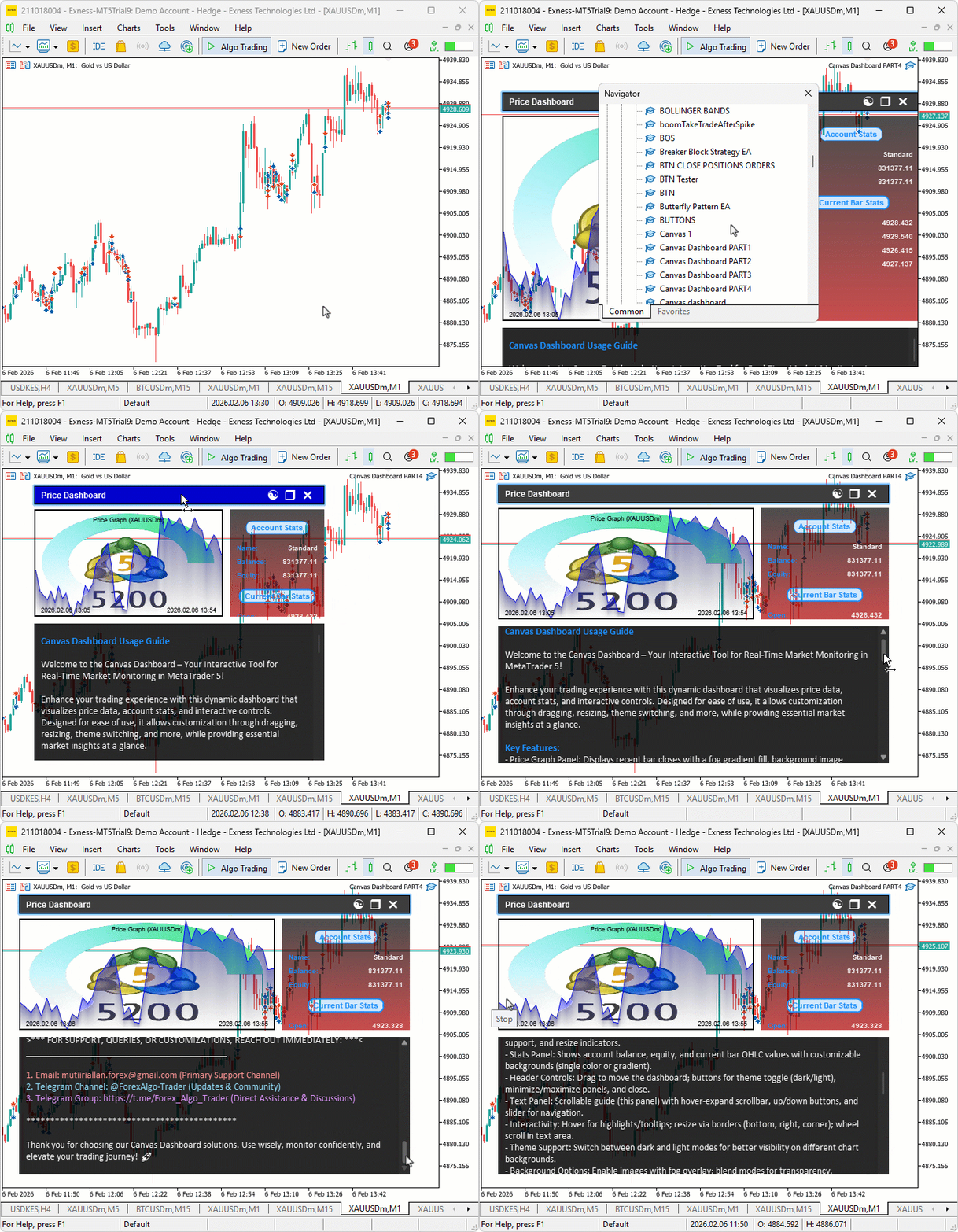
We can see the scrollbar has been super-sampled with a modern look render, hence achieving our objectives. What now remains is testing the workability of the system, and that is handled in the preceding section.
Backtesting
We did the testing, and below is the compiled visualization in a single Graphics Interchange Format (GIF) bitmap image format.
Conclusion
In conclusion, we’ve enhanced the canvas dashboard in MQL5 with anti-aliasing techniques and high-resolution rendering through supersampling to achieve smoother graphics and elements. We added high-resolution canvases for stats and text panels, along with precise drawing functions for rounded borders, rectangles, and arrows, improving overall visual quality. With this improved anti-aliasing and high-resolution rendering, you’re equipped to create clearer and more professional trading dashboards, ready for further customization in your development journey. Happy trading!
Warning: All rights to these materials are reserved by MetaQuotes Ltd. Copying or reprinting of these materials in whole or in part is prohibited.
This article was written by a user of the site and reflects their personal views. MetaQuotes Ltd is not responsible for the accuracy of the information presented, nor for any consequences resulting from the use of the solutions, strategies or recommendations described.

 Price Action Analysis Toolkit Development (Part 60): Objective Swing-Based Trendlines for Structural Analysis
 Integrating MQL5 with Data Processing Packages (Part 7): Building Multi-Agent Environments for Cross-Symbol Collaboration
 Bivariate Copulae in MQL5 (Part 3): Implementation and Tuning of Mixed Copula Models in MQL5
 From Basic to Intermediate: Indicator (IV)

- Free trading apps
- Over 8,000 signals for copying
- Economic news for exploring financial markets
You agree to website policy and terms of use