

MQL5 Trading Tools (Part 13): Creating a Canvas-Based Price Dashboard with Graph and Stats Panels
 4 963
4 963
 0
0

Introduction
In our previous article (Part 12), we enhanced the correlation matrix dashboard in MetaQuotes Language 5 (MQL5) with interactive features for greater usability. In Part 13, we present a canvas-based price dashboard featuring graph and stats panels, designed to provide traders with clear, actionable insights into price movements and account metrics. Utilizing the CCanvas class, this dashboard offers draggable and resizable panels, visually tracks recent price graphs, and displays vital statistics, including balance, equity, and the current bar’s open/high/low/close values. It further enriches our trading decisions by using customizable backgrounds, theme toggling, and real-time updates. These tools enable you to monitor and respond to market changes more efficiently. We will cover the following topics:
By the end, you’ll have a functional MQL5 canvas-based dashboard for monitoring prices and metrics, ready for customization—let’s dive in!
Understanding the Canvas-Based Price Dashboard Framework
The canvas-based price dashboard framework leverages the CCanvas class in MQL5 to create custom graphical panels for displaying real-time price data and account metrics, offering a compact, interactive alternative to standard chart indicators for users needing quick visual overviews without cluttering the main chart. It consists of a main graph panel plotting recent bar closes as a line with filled areas and fog effects for depth, an optional stats panel showing account details like balance/equity and current bar OHLC, both supported by background images with opacity blending, gradient or solid fills, and double borders for aesthetics.
Enhancements include mouse-driven dragging for repositioning, resizing via border hovers and grips with icons for feedback, minimize/maximize toggles to collapse panels, theme switching between dark/light modes for color adjustments, and real-time updates on new bars to reflect the latest prices and stats.
These features use event handling for mouse interactions, bicubic scaling for smooth image resizing, alpha blending for overlays like fog, and ARGB color management for transparency, ensuring the dashboard is responsive and customizable without native MQL5 objects, which was our main goal since we have used the native objects a couple of times now; we change the approach this time round and fully explore the canvas features instead.
Our plan is to include the canvas library, define inputs for positions/sizes/colors/opacities/modes, load and scale a background image resource, create separate canvases for header/graph/stats with creation checks, implement drawing functions for headers with icons/tooltips/borders, graphs with price plotting/filling/time labels/resize icons, and stats with themed text/gradients/darkened borders, add helper functions for color interpolation/darkening/blending/ARGB extraction, and handle chart events for hovers/drags/resizes/toggles with clamping/minimum sizes, updating on ticks for new data. In brief, here is a visual representation of our objectives.

Implementation in MQL5
To create the program in MQL5, open the MetaEditor, go to the Navigator, locate the Experts folder, click on the "New" tab, and follow the prompts to create the file. Once it is made, in the coding environment, we will need to declare some input parameters and global variables that we will use throughout the program.
//+------------------------------------------------------------------+
//|                                       Canvas Dashboard PART1.mq5 |
//|                           Copyright 2026, Allan Munene Mutiiria. |
//|                                   https://t.me/Forex_Algo_Trader |
//+------------------------------------------------------------------+
#property copyright "Copyright 2026, Allan Munene Mutiiria."
#property link "https://t.me/Forex_Algo_Trader"
#property version "1.00"
#property strict

#include <Canvas/Canvas.mqh>

//+------------------------------------------------------------------+
//| Global Variables                                                 |
//+------------------------------------------------------------------+
CCanvas canvasGraph;                                             //--- Declare canvas for graph
CCanvas canvasStats;                                             //--- Declare canvas for stats
CCanvas canvasHeader;                                            //--- Declare canvas for header

string canvasGraphName = "GraphCanvas";                          //--- Set graph canvas name
string canvasStatsName = "StatsCanvas";                          //--- Set stats canvas name
string canvasHeaderName = "HeaderCanvas";                        //--- Set header canvas name

//+------------------------------------------------------------------+
//| Inputs                                                           |
//+------------------------------------------------------------------+
input int graphBars                   = 50;                      // Number of recent bars to plot in the graph
input color borderColor               = clrBlack;                // Border color (change for white chart background)
input color borderHoverColor          = clrRed;                  // Border color on hover for resize indication

input int CanvasX                     = 30;                      // Main canvas X position
input int CanvasY                     = 50;                      // Main canvas Y position
input int CanvasWidth                 = 400;                     // Main canvas width
input int CanvasHeight                = 300;                     // Main canvas height

input bool EnableStatsPanel           = true;                    // Enable second stats panel
input int PanelGap                    = 10;                      // Gap between panels in pixels

input bool UseBackground              = true;                    // Enable background image
input double FogOpacity               = 0.5;                     // Fog opacity (0.0 = no fog/fully transparent, 1.0 = fully opaque)
input bool BlendFog                   = true;                    // Blend fog with image (true: image visible under fog; false: original fog hides image)

input int StatsFontSize               = 12;                      // Font size for stats panel text
input color StatsLabelColor           = clrDodgerBlue;           // Color for stats labels
input color StatsValueColor           = clrWhite;                // Color for stats values
input color StatsHeaderColor          = clrDodgerBlue;           // Color for stats headers
input int StatsHeaderFontSize         = 14;                      // Font size for stats headers

input double BorderOpacityPercentReduction = 20.0;               // Percent reduction for border opacity (0-100)
input double BorderDarkenPercent      = 30.0;                    // Percent to darken borders (0-100)

//+------------------------------------------------------------------+
//| Enumerations                                                     |
//+------------------------------------------------------------------+
enum ENUM_BACKGROUND_MODE
{
   NoColor          = 0,         // No color fill
   SingleColor      = 1,         // Single color fill
   GradientTwoColors = 2         // Gradient with two colors
};

input ENUM_BACKGROUND_MODE StatsBackgroundMode = GradientTwoColors; // Stats background mode
input color TopColor                   = clrBlack;                  // Top color for gradient or single fill
input color BottomColor                = clrRed;                    // Bottom color for gradient
input double BackgroundOpacity         = 0.7;                       // Opacity for stats background fill (0.0 to 1.0)

enum ENUM_RESIZE_MODE
{
   NONE,
   BOTTOM,
   RIGHT,
   BOTTOM_RIGHT
};

//+------------------------------------------------------------------+
//| Resources                                                        |
//+------------------------------------------------------------------+
#resource "1. Transparent MT5 bmp image.bmp"                     // Hardcoded background image resource

//+------------------------------------------------------------------+
//| Global Variables Continued                                       |
//+------------------------------------------------------------------+
uint original_bg_pixels[];                                       //--- Declare original unscaled background
uint orig_w = 0, orig_h = 0;                                     //--- Initialize original dimensions
uint bg_pixels_graph[];                                          //--- Declare scaled background for graph
uint bg_pixels_stats[];                                          //--- Declare scaled background for stats

int currentCanvasX = CanvasX;                                    //--- Set current X position
int currentCanvasY = CanvasY;                                    //--- Set current Y position
int currentWidth = CanvasWidth;                                  //--- Set current width
int currentHeight = CanvasHeight;                                //--- Set current height
bool panel_dragging = false;                                     //--- Set dragging flag
int panel_drag_x = 0, panel_drag_y = 0;                          //--- Initialize drag start mouse coordinates
int panel_start_x = 0, panel_start_y = 0;                        //--- Initialize drag start panel coordinates
bool resizing = false;                                           //--- Set resizing flag
ENUM_RESIZE_MODE resize_mode = NONE;                             //--- Set resize mode
ENUM_RESIZE_MODE hover_mode = NONE;                              //--- Set hover mode for resize
int resize_start_x = 0, resize_start_y = 0;                      //--- Initialize resize start coordinates
int start_width = 0, start_height = 0;                           //--- Initialize start dimensions
const int resize_thickness = 5;                                  //--- Set resize border thickness
const int min_width = 200;                                       //--- Set minimum width
const int min_height = 150;                                      //--- Set minimum height
int hover_mouse_local_x = 0;                                     //--- Set local mouse x for icon
int hover_mouse_local_y = 0;                                     //--- Set local mouse y for icon
bool header_hovered = false;                                     //--- Set header hover flag
bool minimize_hovered = false;                                   //--- Set minimize hover flag
bool close_hovered = false;                                      //--- Set close hover flag
bool theme_hovered = false;                                      //--- Set theme hover flag
bool resize_hovered = false;                                     //--- Set resize hover flag
int prev_mouse_state = 0;                                        //--- Initialize previous mouse state
int last_mouse_x = 0, last_mouse_y = 0;                          //--- Initialize last mouse position
int header_height = 27;                                          //--- Set header height
int gap_y = 7;                                                   //--- Set y gap
int button_size = 25;                                            //--- Set button size
int theme_x_offset = -75;                                        //--- Set theme offset relative to header right
int minimize_x_offset = -50;                                     //--- Set minimize offset relative to header right
int close_x_offset = -25;                                        //--- Set close offset relative to header right
bool panels_minimized = false;                                   //--- Set minimized flag
color HeaderColor = C'60,60,60';                                 //--- Set header color
color HeaderHoverColor = clrRed;                                 //--- Set header hover color
color HeaderDragColor = clrMediumBlue;                           //--- Set header drag color

bool is_dark_theme = true;                                       //--- Set dark theme flag

color LightHeaderColor = clrSilver;                              //--- Set light header color
color LightHeaderTextColor = clrBlack;                           //--- Set light header text color
color LightStatsLabelColor = clrBlue;                            //--- Set light stats label color
color LightStatsValueColor = clrBlack;                           //--- Set light stats value color
color LightStatsHeaderColor = clrBlue;                           //--- Set light stats header color
color LightBorderColor = clrBlack;                               //--- Set light border color
color LightTopColor = clrGreen;                                  //--- Set light top color
color LightBottomColor = clrGold;                                //--- Set light bottom color
color LightHeaderHoverColor = clrRed;                            //--- Set light header hover color
color LightHeaderDragColor = clrMediumBlue;                      //--- Set light header drag color

bool graphCreated = false;                                       //--- Set graph created flag
bool statsCreated = false;                                       //--- Set stats created flag
We begin the implementation by including the canvas library with "#include <Canvas/Canvas.mqh>", which provides the CCanvas class for creating and managing bitmap-based graphical panels on the chart. We then declare three "CCanvas" objects: "canvasGraph" for the price graph panel, "canvasStats" for the statistics panel, and "canvasHeader" for the header section. We set string constants for their names as "GraphCanvas", "StatsCanvas", and "HeaderCanvas" to identify them uniquely.
Next, we define input parameters to customize the dashboard: "graphBars" as fifty for the number of bars to plot, "borderColor" to black and "borderHoverColor" to red for borders and hover indications, positions and dimensions like "CanvasX" at thirty, "CanvasY" at fifty, "CanvasWidth" at four hundred, "CanvasHeight" at three hundred, a boolean "EnableStatsPanel" true to show the stats panel with "PanelGap" at ten pixels, "UseBackground" true for image backgrounds with "FogOpacity" at 0.5 and "BlendFog" true for blending, font sizes and colors for stats like "StatsFontSize" at twelve, "StatsLabelColor" to dodger blue, and percentages for border adjustments such as "BorderOpacityPercentReduction" at 20.0 and "BorderDarkenPercent" at 30.0.
We create the "ENUM_BACKGROUND_MODE" enumeration with options "NoColor" for no fill, "SingleColor" for uniform color, and "GradientTwoColors" for two-color gradients, with input "StatsBackgroundMode" defaulting to gradient, and colors "TopColor" to black, "BottomColor" to red, plus "BackgroundOpacity" at 0.7. Then, we add the "ENUM_RESIZE_MODE" enumeration for resizing states: "NONE", "BOTTOM", "RIGHT", and "BOTTOM_RIGHT".
We include a resource with the #resource directive; "1. Transparent MetaTrader 5 bmp image.bmp" for a hardcoded background image. The image you attach needs to be a bitmap file only. You can easily do that, and our image file now looks like this. We imported it to where the program file is for simplicity. Have a look at what we got below.

With the image file ready, we continue with global variables: arrays "original_bg_pixels", "bg_pixels_graph", and "bg_pixels_stats" for image pixels, dimensions "orig_w" and "orig_h" at zero, current positions and sizes initialized from inputs, booleans like "panel_dragging" false, "resizing" false, enumerations "resize_mode" and "hover_mode" to "NONE", integers for resize starts and mins like "resize_thickness" at five, "min_width" at two hundred, hovers like "header_hovered" false, "prev_mouse_state" at zero, layout constants such as "header_height" at twenty-seven, "gap_y" at seven, "button_size" at twenty-five, offsets for buttons, "panels_minimized" false, colors like "HeaderColor" to medium gray, "HeaderHoverColor" to red, theme flag "is_dark_theme" true, light mode colors such as "LightHeaderColor" to silver, and flags "graphCreated" and "statsCreated" false.
With that done, the next thing we will need to do is create a function to dynamically scale the image so it fits the new dimensions. This will come in handy when we want to resize the background image in the panels when allowed. Here is the logic we used to achieve that.
//+------------------------------------------------------------------+
//| Scale image                                                      |
//+------------------------------------------------------------------+
void ScaleImage(uint &pixels[], int original_width, int original_height, int new_width, int new_height) {
   uint scaled_pixels[];                                         //--- Declare scaled array
   ArrayResize(scaled_pixels, new_width * new_height);           //--- Resize scaled
   for (int y = 0; y < new_height; y++)                          //--- Loop new rows
   {
      for (int x = 0; x < new_width; x++)                        //--- Loop new columns
      {
         double original_x = (double)x * original_width / new_width; //--- Compute original x
         double original_y = (double)y * original_height / new_height; //--- Compute original y
         uint pixel = BicubicInterpolate(pixels, original_width, original_height, original_x, original_y); //--- Interpolate pixel
         scaled_pixels[y * new_width + x] = pixel;               //--- Set scaled pixel
      }
   }
   ArrayResize(pixels, new_width * new_height);                  //--- Resize original
   ArrayCopy(pixels, scaled_pixels);                             //--- Copy scaled
}

//+------------------------------------------------------------------+
//| Bicubic interpolate pixel                                        |
//+------------------------------------------------------------------+
uint BicubicInterpolate(uint &pixels[], int width, int height, double x, double y) {
   int x0 = (int)x;                                              //--- Get integer x
   int y0 = (int)y;                                              //--- Get integer y
   double fractional_x = x - x0;                                 //--- Get fractional x
   double fractional_y = y - y0;                                 //--- Get fractional y
   int x_indices[4], y_indices[4];                               //--- Declare indices
   for (int i = -1; i <= 2; i++)                                 //--- Loop offsets
   {
      x_indices[i + 1] = MathMin(MathMax(x0 + i, 0), width - 1); //--- Clamp x index
      y_indices[i + 1] = MathMin(MathMax(y0 + i, 0), height - 1); //--- Clamp y index
   }
   uint neighborhood_pixels[16];                                 //--- Declare neighborhood
   for (int j = 0; j < 4; j++)                                   //--- Loop y indices
   {
      for (int i = 0; i < 4; i++)                                //--- Loop x indices
      {
         neighborhood_pixels[j * 4 + i] = pixels[y_indices[j] * width + x_indices[i]]; //--- Get pixel
      }
   }
   uchar alpha_components[16], red_components[16], green_components[16], blue_components[16]; //--- Declare components
   for (int i = 0; i < 16; i++)                                  //--- Loop pixels
   {
      GetArgb(neighborhood_pixels[i], alpha_components[i], red_components[i], green_components[i], blue_components[i]); //--- Get ARGB
   }
   uchar alpha_out = (uchar)BicubicInterpolateComponent(alpha_components, fractional_x, fractional_y); //--- Interpolate alpha
   uchar red_out = (uchar)BicubicInterpolateComponent(red_components, fractional_x, fractional_y); //--- Interpolate red
   uchar green_out = (uchar)BicubicInterpolateComponent(green_components, fractional_x, fractional_y); //--- Interpolate green
   uchar blue_out = (uchar)BicubicInterpolateComponent(blue_components, fractional_x, fractional_y); //--- Interpolate blue
   return (((uint)alpha_out) << 24) | (((uint)red_out) << 16) | (((uint)green_out) << 8) | ((uint)blue_out); //--- Return interpolated
}

//+------------------------------------------------------------------+
//| Bicubic interpolate component                                    |
//+------------------------------------------------------------------+
double BicubicInterpolateComponent(uchar &components[], double fractional_x, double fractional_y) {
   double weights_x[4];                                          //--- Declare x weights
   double t = fractional_x;                                      //--- Set t x
   weights_x[0] = (-0.5 * t * t * t + t * t - 0.5 * t);          //--- Compute weight 0
   weights_x[1] = (1.5 * t * t * t - 2.5 * t * t + 1);           //--- Compute weight 1
   weights_x[2] = (-1.5 * t * t * t + 2 * t * t + 0.5 * t);      //--- Compute weight 2
   weights_x[3] = (0.5 * t * t * t - 0.5 * t * t);               //--- Compute weight 3
   double y_values[4];                                           //--- Declare y values
   for (int j = 0; j < 4; j++)                                   //--- Loop y
   {
      y_values[j] = weights_x[0] * components[j * 4 + 0] + weights_x[1] * components[j * 4 + 1] + weights_x[2] * components[j * 4 + 2] + weights_x[3] * components[j * 4 + 3]; //--- Compute y value
   }
   double weights_y[4];                                          //--- Declare y weights
   t = fractional_y;                                             //--- Set t y
   weights_y[0] = (-0.5 * t * t * t + t * t - 0.5 * t);          //--- Compute weight 0
   weights_y[1] = (1.5 * t * t * t - 2.5 * t * t + 1);           //--- Compute weight 1
   weights_y[2] = (-1.5 * t * t * t + 2 * t * t + 0.5 * t);      //--- Compute weight 2
   weights_y[3] = (0.5 * t * t * t - 0.5 * t * t);               //--- Compute weight 3
   double result = weights_y[0] * y_values[0] + weights_y[1] * y_values[1] + weights_y[2] * y_values[2] + weights_y[3] * y_values[3]; //--- Compute result
   return MathMax(0, MathMin(255, result));                      //--- Clamp result
}

//+------------------------------------------------------------------+
//| Get ARGB components                                              |
//+------------------------------------------------------------------+
void GetArgb(uint pixel, uchar &alpha, uchar &red, uchar &green, uchar &blue) {
   alpha = (uchar)((pixel >> 24) & 0xFF);                        //--- Get alpha
   red = (uchar)((pixel >> 16) & 0xFF);                          //--- Get red
   green = (uchar)((pixel >> 8) & 0xFF);                         //--- Get green
   blue = (uchar)(pixel & 0xFF);                                 //--- Get blue
}
First, we implement the "ScaleImage" function to resize an image array of pixels from original dimensions to new width and height, using bicubic interpolation for smooth scaling. It takes a reference to the pixels array, original width and height, and new dimensions. We declare and resize a temporary "scaled_pixels" array to the new size, then nest loops over new height and width to compute corresponding original coordinates by proportional mapping. For each new pixel, we call "BicubicInterpolate" with the original array and fractional coordinates to get the interpolated value and store it in "scaled_pixels". Finally, we resize the input pixels array to the new size and copy "scaled_pixels" into it with the ArrayCopy function.
Next is the "BicubicInterpolate" function to compute a single pixel value using bicubic interpolation at given fractional x and y in the image. It takes the pixels array, width, height, and doubles x and y. We get integer parts x0 and y0, fractional parts, and create index arrays for a 4x4 neighborhood by clamping offsets from -1 to 2 to image bounds with the MathMin and MathMax functions. We extract sixteen neighborhood pixels into an array, then declare component arrays for alpha, red, green, and blue, looping to populate them using "GetArgb". We interpolate each component with "BicubicInterpolateComponent" and the fractions, casting to uchar, and combine into a uint ARGB value with bit shifts.
We then create the "BicubicInterpolateComponent" function to perform bicubic interpolation on a single color channel's 4x4 component array using fractional x and y. It computes four x weights with the bicubic kernel formula based on t as fractional x, then calculates four intermediate y values by weighted sums of rows in the components array. Similarly, it computes y weights with fractional y as t, and derives the final result as a weighted sum of those y values, clamping between zero and 255 with "MathMax" and "MathMin". Finally, we implement the "GetArgb" function to extract ARGB components from a uint pixel value into uchar references for alpha, red, green, and blue, using bit shifts right by 24/16/8/0 and masking with 0xFF.
It is important to understand that it is not a must that you use a bicubic approach. You can use a linear or bilinear approach, but that will give a more jagged image than what we actually want. So we go with the best approach for an antialiased image pixelation. In fact, have a look below at the different approaches you could have.

We can see that the bicubic interpolation approach gives the smoothest image view compared to the other approaches. The next thing that we will do is use the functions to resize our resource image so it fits dynamically. Our image file is quite larger than our canvas area where we want to render it, so we need to resize it. Let's do that in the initialization event handler.
//+------------------------------------------------------------------+
//| Initialize expert                                                |
//+------------------------------------------------------------------+
int OnInit()
{
   currentWidth = CanvasWidth;                                   //--- Set initial width
   currentHeight = CanvasHeight;                                 //--- Set initial height
   currentCanvasX = CanvasX;                                     //--- Set initial X
   currentCanvasY = CanvasY;                                     //--- Set initial Y

   if (UseBackground)                                            //--- Check if background enabled
   {
      if (ResourceReadImage("::1. Transparent MT5 bmp image.bmp", original_bg_pixels, orig_w, orig_h) && orig_w > 0 && orig_h > 0) //--- Load image if valid
      {
         ArrayCopy(bg_pixels_graph, original_bg_pixels);         //--- Copy to graph background
         ScaleImage(bg_pixels_graph, (int)orig_w, (int)orig_h, currentWidth, currentHeight); //--- Scale graph background
         if (EnableStatsPanel)                                   //--- Check stats panel
         {
            ArrayCopy(bg_pixels_stats, original_bg_pixels);      //--- Copy to stats background
            ScaleImage(bg_pixels_stats, (int)orig_w, (int)orig_h, currentWidth / 2, currentHeight); //--- Scale stats background
         }
      }
      else                                                       //--- Handle load failure
      {
         Print("Failed to load background image from ::1. Transparent MT5 bmp image.bmp"); //--- Print error
      }
   }

   int header_width = currentWidth + (EnableStatsPanel ? PanelGap + currentWidth / 2 : 0); //--- Compute header width
   if (!canvasHeader.CreateBitmapLabel(0, 0, canvasHeaderName, currentCanvasX, currentCanvasY, header_width, header_height, COLOR_FORMAT_ARGB_NORMALIZE)) //--- Create header canvas
   {
      Print("Failed to create Header Canvas");                   //--- Print error
      return(INIT_FAILED);                                       //--- Return failure
   }

   if (!canvasGraph.CreateBitmapLabel(0, 0, canvasGraphName, currentCanvasX, currentCanvasY + header_height + gap_y, currentWidth, currentHeight, COLOR_FORMAT_ARGB_NORMALIZE)) //--- Create graph canvas
   {
      Print("Failed to create Graph Canvas");                    //--- Print error
      return(INIT_FAILED);                                       //--- Return failure
   }
   graphCreated = true;                                          //--- Set graph created

   if (EnableStatsPanel)                                         //--- Check stats panel
   {
      int statsX = currentCanvasX + currentWidth + PanelGap;     //--- Compute stats X
      if (!canvasStats.CreateBitmapLabel(0, 0, canvasStatsName, statsX, currentCanvasY + header_height + gap_y, currentWidth / 2, currentHeight, COLOR_FORMAT_ARGB_NORMALIZE)) //--- Create stats canvas
      {
         Print("Failed to create Stats Canvas");                 //--- Print error
      }
      statsCreated = true;                                       //--- Set stats created
   }

   ChartRedraw();                                                //--- Redraw chart
   return(INIT_SUCCEEDED);                                       //--- Return success
}
In the OnInit event handler, we set up the initial state and create the canvas panels for the dashboard. We initialize current dimensions and positions from inputs like "currentWidth" to "CanvasWidth", "currentHeight" to "CanvasHeight", "currentCanvasX" to "CanvasX", and "currentCanvasY" to "CanvasY". If "UseBackground" is true, we load the resource image with ResourceReadImage into "original_bg_pixels" and get its original width and height. If successful, we copy to "bg_pixels_graph" and scale it to the current dimensions using "ScaleImage". For the stats panel, if "EnableStatsPanel" is true, we copy to "bg_pixels_stats" and scale to half the width with full height. On failure, we print an error message.
We compute header width as graph width plus optional stats width and gap, then create the header canvas with "CreateBitmapLabel" at subwindow zero, name "canvasHeaderName", position, width, and "header_height" using COLOR_FORMAT_ARGB_NORMALIZE, printing an error and returning "INIT_FAILED" if unsuccessful. Similarly, we create the graph canvas below the header plus "gap_y", setting "graphCreated" to true on success or returning INIT_FAILED on failure. If stats enabled, we compute its x position after the graph plus "PanelGap", create the stats canvas, and set "statsCreated" to true. Finally, we redraw the chart with "ChartRedraw" and return INIT_SUCCEEDED. This creates the paper areas, and no actual drawing yet. To demonstrate this, here is a sample of what we can see on the tooltips upon compilation.

We can see that the canvas area papers are now drawn. What we need to do is do the actual drawing to render the canvas objects. We will start with the header, but since we need to be theme sensitive, we will first define some theme helper functions to enable us create either a dark or light theme render where applicable.
//+------------------------------------------------------------------+
//| Get theme-aware colors                                           |
//+------------------------------------------------------------------+
color GetHeaderColor() { return is_dark_theme ? HeaderColor : LightHeaderColor; }                //--- Return header color
color GetHeaderHoverColor() { return is_dark_theme ? HeaderHoverColor : LightHeaderHoverColor; } //--- Return hover color
color GetHeaderDragColor() { return is_dark_theme ? HeaderDragColor : LightHeaderDragColor; }    //--- Return drag color
color GetStatsLabelColor() { return is_dark_theme ? StatsLabelColor : LightStatsLabelColor; }    //--- Return label color
color GetStatsValueColor() { return is_dark_theme ? StatsValueColor : LightStatsValueColor; }    //--- Return value color
color GetStatsHeaderColor() { return is_dark_theme ? StatsHeaderColor : LightStatsHeaderColor; } //--- Return header color
color GetBorderColor() { return is_dark_theme ? borderColor : LightBorderColor; }                //--- Return border color
color GetTopColor() { return is_dark_theme ? TopColor : LightTopColor; }                         //--- Return top color
color GetBottomColor() { return is_dark_theme ? BottomColor : LightBottomColor; }                //--- Return bottom color
color GetHeaderTextColor() { return is_dark_theme ? clrWhite : LightHeaderTextColor; }           //--- Return text color
color GetIconColor(bool is_drag) { return is_drag ? GetHeaderDragColor() : GetHeaderHoverColor(); } //--- Return icon color
Here, we implement several getter functions to retrieve theme-aware colors based on the current "is_dark_theme" flag, ensuring consistent visuals across dark and light modes without redundant checks elsewhere. The "GetHeaderColor" function returns "HeaderColor" in dark mode or "LightHeaderColor" in light mode for the header background. We use the same logic for all the other functions. We can now use these helper functions to create the header canvas objects.
//+------------------------------------------------------------------+
//| Draw header on header canvas                                     |
//+------------------------------------------------------------------+
void DrawHeaderOnCanvas()
{
   canvasHeader.Erase(0);                                        //--- Clear canvas

   color header_bg = panel_dragging ? GetHeaderDragColor() : (header_hovered ? GetHeaderHoverColor() : GetHeaderColor()); //--- Set background
   uint argb_bg = ColorToARGB(header_bg, 255);                   //--- Convert to ARGB
   canvasHeader.FillRectangle(0, 0, canvasHeader.Width() - 1, header_height - 1, argb_bg); //--- Fill background

   uint argbBorder = ColorToARGB(GetBorderColor(), 255);         //--- Convert border to ARGB
   canvasHeader.Line(0, 0, canvasHeader.Width() - 1, 0, argbBorder); //--- Draw top border
   canvasHeader.Line(canvasHeader.Width() - 1, 0, canvasHeader.Width() - 1, header_height - 1, argbBorder); //--- Draw right border
   canvasHeader.Line(canvasHeader.Width() - 1, header_height - 1, 0, header_height - 1, argbBorder); //--- Draw bottom border
   canvasHeader.Line(0, header_height - 1, 0, 0, argbBorder);    //--- Draw left border

   canvasHeader.FontSet("Arial Bold", 15);                       //--- Set font
   uint argbText = ColorToARGB(GetHeaderTextColor(), 255);       //--- Convert text to ARGB
   canvasHeader.TextOut(10, (header_height - 15) / 2, "Price Dashboard", argbText, TA_LEFT); //--- Draw title

   int theme_x = canvasHeader.Width() + theme_x_offset;          //--- Compute theme x
   string theme_symbol = CharToString((uchar)91);                //--- Set theme symbol
   color theme_color = theme_hovered ? clrYellow : GetHeaderTextColor(); //--- Set theme color
   canvasHeader.FontSet("Wingdings", 22);                        //--- Set font
   uint argb_theme = ColorToARGB(theme_color, 255);              //--- Convert to ARGB
   canvasHeader.TextOut(theme_x, (header_height - 22) / 2, theme_symbol, argb_theme, TA_CENTER); //--- Draw theme icon

   int min_x = canvasHeader.Width() + minimize_x_offset;         //--- Compute minimize x
   string min_symbol = panels_minimized ? CharToString((uchar)111) : CharToString((uchar)114); //--- Set minimize symbol
   color min_color = minimize_hovered ? clrYellow : GetHeaderTextColor(); //--- Set minimize color
   canvasHeader.FontSet("Wingdings", 22);                        //--- Set font
   uint argb_min = ColorToARGB(min_color, 255);                  //--- Convert to ARGB
   canvasHeader.TextOut(min_x, (header_height - 22) / 2, min_symbol, argb_min, TA_CENTER); //--- Draw minimize icon

   int close_x = canvasHeader.Width() + close_x_offset;          //--- Compute close x
   string close_symbol = CharToString((uchar)114);               //--- Set close symbol
   color close_color = close_hovered ? clrRed : GetHeaderTextColor(); //--- Set close color
   canvasHeader.FontSet("Webdings", 22);                         //--- Set font
   uint argb_close = ColorToARGB(close_color, 255);              //--- Convert to ARGB
   canvasHeader.TextOut(close_x, (header_height - 22) / 2, close_symbol, argb_close, TA_CENTER); //--- Draw close icon

   canvasHeader.Update();                                        //--- Update canvas
}
Here, we implement the "DrawHeaderOnCanvas" function to render the header section on the "canvasHeader" object, providing a title and interactive icons with dynamic colors based on states like dragging or hovering. We start by clearing the canvas with the "Erase" method, set to zero. We determine the background color conditionally: if "panel_dragging" is true, use "GetHeaderDragColor"; else if "header_hovered", use "GetHeaderHoverColor"; otherwise, "GetHeaderColor". We convert it to ARGB with ColorToARGB at full opacity 255 and fill a rectangle from (0,0) to width minus one and "header_height" minus one using the FillRectangle method.
For borders, we convert the border color from "GetBorderColor" to ARGB at 255 and draw lines with Line for the top, right, bottom, and left edges of the header. We set the font to Arial Bold at size fifteen with FontSet, convert header text color from "GetHeaderTextColor" to ARGB, and draw the title 'Price Dashboard' at x ten centered vertically using TextOut with left alignment.
For the theme icon, we compute its x as canvas width plus "theme_x_offset", set symbol to character 91 from uchar cast, color to yellow if "theme_hovered" else header text color, change font to Wingdings at twenty-two, convert to ARGB, and draw centered horizontally and vertically with "TextOut" and center alignment. Similarly, for the minimize icon, compute x with "minimize_x_offset", set symbol conditionally to character 111 if "panels_minimized" or 114 otherwise, color to yellow on hover, else text color, use Wingdings font, convert, and draw centered. For the close icon, compute x with "close_x_offset", set symbol to 114, color to red on "close_hovered" else text color, switch font to Webdings at twenty-two, convert, and draw centered. Finally, we update the canvas with "Update" to display the changes. When we call this function in initialization, we get the following outcome.

From the image, we can see that the canvas header is correctly labelled. What we need to do next is draw on the graph canvas area, where we are supposed to do the analysis of the prices and draw their line graph. So essentially, we are drawing our own simple price graph. However, note that this is just our approach; it is the easiest we thought for this demonstration. You can use your own complex calculations as you deem fit. Here is the approach we use to get that done.
//+------------------------------------------------------------------+
//| Update the price graph on the main Canvas                        |
//+------------------------------------------------------------------+
void UpdateGraphOnCanvas()
{
   canvasGraph.Erase(0);                                         //--- Clear canvas

   if (UseBackground && ArraySize(bg_pixels_graph) == currentWidth * currentHeight) //--- Check background
   {
      for (int y = 0; y < currentHeight; y++)                    //--- Loop rows
      {
         for (int x = 0; x < currentWidth; x++)                  //--- Loop columns
         {
            canvasGraph.PixelSet(x, y, bg_pixels_graph[y * currentWidth + x]); //--- Set pixel
         }
      }
   }

   uint argbBorder = ColorToARGB(GetBorderColor(), 255);         //--- Convert border to ARGB
   canvasGraph.Line(0, 0, currentWidth - 1, 0, argbBorder);      //--- Draw top outer
   canvasGraph.Line(currentWidth - 1, 0, currentWidth - 1, currentHeight - 1, argbBorder); //--- Draw right outer
   canvasGraph.Line(currentWidth - 1, currentHeight - 1, 0, currentHeight - 1, argbBorder); //--- Draw bottom outer
   canvasGraph.Line(0, currentHeight - 1, 0, 0, argbBorder);     //--- Draw left outer
   canvasGraph.Line(1, 1, currentWidth - 2, 1, argbBorder);      //--- Draw top inner
   canvasGraph.Line(currentWidth - 2, 1, currentWidth - 2, currentHeight - 2, argbBorder); //--- Draw right inner
   canvasGraph.Line(currentWidth - 2, currentHeight - 2, 1, currentHeight - 2, argbBorder); //--- Draw bottom inner
   canvasGraph.Line(1, currentHeight - 2, 1, 1, argbBorder);     //--- Draw left inner

   double closePrices[];                                         //--- Declare close array
   ArrayResize(closePrices, graphBars);                          //--- Resize close
   if (CopyClose(_Symbol, _Period, 0, graphBars, closePrices) != graphBars) //--- Copy closes
   {
      Print("Failed to copy close prices");                      //--- Print error
      return;                                                    //--- Exit
   }

   datetime timeArr[];                                           //--- Declare time array
   ArrayResize(timeArr, graphBars);                              //--- Resize time
   if (CopyTime(_Symbol, _Period, 0, graphBars, timeArr) != graphBars) //--- Copy times
   {
      Print("Failed to copy times");                             //--- Print error
      return;                                                    //--- Exit
   }

   double minPrice = closePrices[0];                             //--- Set initial min
   double maxPrice = closePrices[0];                             //--- Set initial max
   for (int i = 1; i < graphBars; i++)                           //--- Loop prices
   {
      if (closePrices[i] < minPrice) minPrice = closePrices[i];  //--- Update min
      if (closePrices[i] > maxPrice) maxPrice = closePrices[i];  //--- Update max
   }
   double priceRange = maxPrice - minPrice;                      //--- Compute range
   if (priceRange == 0) priceRange = _Point;                     //--- Avoid zero

   int graphLeft = 2;                                            //--- Set left margin
   int graphRight = currentWidth - 3;                            //--- Set right margin
   double graphWidth_d = graphRight - graphLeft;                 //--- Compute width
   int graphHeight = currentHeight - 4;                          //--- Compute height
   int bottomY = 2 + graphHeight;                                //--- Set bottom y

   int x_pos[];                                                  //--- Declare x positions
   int y_pos[];                                                  //--- Declare y positions
   ArrayResize(x_pos, graphBars);                                //--- Resize x
   ArrayResize(y_pos, graphBars);                                //--- Resize y
   for (int i = 0; i < graphBars; i++)                           //--- Loop bars
   {
      double norm = (graphBars > 1) ? (double)i / (graphBars - 1) : 0.0; //--- Normalize
      x_pos[i] = graphLeft + (int)(norm * graphWidth_d + 0.5);   //--- Set x
      double price = closePrices[graphBars - 1 - i];             //--- Get price (flipped)
      y_pos[i] = 2 + (int)(graphHeight * (maxPrice - price) / priceRange + 0.5); //--- Set y
   }

   color lineColor = clrBlue;                                    //--- Set line color
   uint argbLine = ColorToARGB(lineColor, 255);                  //--- Convert to ARGB
   for (int i = 0; i < graphBars - 1; i++)                       //--- Loop segments
   {
      int x1 = (currentWidth - 1) - x_pos[i];                    //--- Set x1 (flipped)
      int y1 = y_pos[i];                                         //--- Set y1
      int x2 = (currentWidth - 1) - x_pos[i + 1];                //--- Set x2 (flipped)
      int y2 = y_pos[i + 1];                                     //--- Set y2
      canvasGraph.LineAA(x1, y1, x2, y2, argbLine);              //--- Draw line
   }

   int min_flipped_x = (currentWidth - 1) - graphRight;          //--- Set min flipped x
   int max_flipped_x = (currentWidth - 1) - graphLeft;           //--- Set max flipped x
   for (int colX = min_flipped_x; colX <= max_flipped_x; colX++) //--- Loop columns
   {
      int logical_colX = (currentWidth - 1) - colX;              //--- Get logical x
      int seg = -1;                                              //--- Initialize segment
      for (int j = 0; j < graphBars - 1; j++)                    //--- Loop segments
      {
         if (x_pos[j] <= logical_colX && logical_colX <= x_pos[j + 1]) //--- Check segment
         {
            seg = j;                                             //--- Set segment
            break;                                               //--- Exit
         }
      }
      if (seg == -1) continue;                                   //--- Skip if no segment

      double dx = x_pos[seg + 1] - x_pos[seg];                   //--- Compute dx
      double t = (dx > 0) ? (logical_colX - x_pos[seg]) / dx : 0.0; //--- Compute t
      double interpY = y_pos[seg] + t * (y_pos[seg + 1] - y_pos[seg]); //--- Interpolate y
      int topY = (int)(interpY + 0.5);                           //--- Round top y

      for (int fillY = topY; fillY < bottomY; fillY++)           //--- Loop fill
      {
         double fadeFactor = (double)(bottomY - fillY) / (bottomY - topY); //--- Compute fade
         uchar alpha = (uchar)(255 * fadeFactor * FogOpacity);   //--- Compute alpha
         uint argbFill = ColorToARGB(lineColor, alpha);          //--- Convert fill
         if (BlendFog)                                           //--- Check blend
         {
            uint currentPixel = canvasGraph.PixelGet(colX, fillY); //--- Get pixel
            uint blendedPixel = BlendPixels(currentPixel, argbFill); //--- Blend pixels
            canvasGraph.PixelSet(colX, fillY, blendedPixel);     //--- Set blended
         }
         else                                                    //--- Handle no blend
         {
            canvasGraph.PixelSet(colX, fillY, argbFill);         //--- Set fill
         }
      }
   }

   canvasGraph.FontSet("Arial", 12);                             //--- Set font
   uint argbText = ColorToARGB(is_dark_theme ? clrBlack : clrGray, 255); //--- Convert text
   canvasGraph.TextOut(currentWidth / 2, 10, "Price Graph (" + _Symbol + ")", argbText, TA_CENTER); //--- Draw title

   canvasGraph.FontSet("Arial", 12);                             //--- Set font

   string newTime = TimeToString(timeArr[0], TIME_DATE | TIME_MINUTES); //--- Get new time
   string oldTime = TimeToString(timeArr[graphBars - 1], TIME_DATE | TIME_MINUTES); //--- Get old time
   canvasGraph.TextOut(10, currentHeight - 15, newTime, argbText, TA_LEFT); //--- Draw new time
   canvasGraph.TextOut(currentWidth - 10, currentHeight - 15, oldTime, argbText, TA_RIGHT); //--- Draw old time

   if (resize_hovered || resizing)                               //--- Check resize state
   {
      ENUM_RESIZE_MODE active_mode = resizing ? resize_mode : hover_mode; //--- Get active mode
      if (active_mode == NONE)                                       //--- Check none
      {
         canvasGraph.Update();                                   //--- Update canvas
         return;                                                 //--- Exit
      }

      string icon_font = "Wingdings 3";                          //--- Set icon font
      int icon_size = 25;                                        //--- Set icon size
      uchar icon_code;                                           //--- Declare code
      int angle = 0;                                             //--- Set angle
      switch (active_mode)                                       //--- Switch mode
      {
         case BOTTOM:
            icon_code = (uchar)'2';                              //--- Set bottom code
            angle = 0;                                           //--- Set angle
            break;
         case RIGHT:
            icon_code = (uchar)'1';                              //--- Set right code
            angle = 0;                                           //--- Set angle
            break;
         case BOTTOM_RIGHT:
            icon_code = (uchar)'2';                              //--- Set corner code
            angle = 450;                                         //--- Set angle
            break;
         default: canvasGraph.Update(); return;
      }
      string icon_symbol = CharToString(icon_code);              //--- Set symbol

      color icon_color = GetIconColor(resizing);                 //--- Get icon color
      uint argb_icon = ColorToARGB(icon_color, 255);             //--- Convert to ARGB

      canvasGraph.FontSet(icon_font, icon_size);                 //--- Set font
      canvasGraph.FontAngleSet(angle);                           //--- Set angle

      int icon_x = 0;                                            //--- Initialize x
      int icon_y = 0;                                            //--- Initialize y

      switch (active_mode)                                       //--- Switch for position
      {
         case BOTTOM:
            icon_x = MathMax(0, MathMin(hover_mouse_local_x - (icon_size / 2), currentWidth - icon_size)); //--- Set x
            icon_y = currentHeight - icon_size - 2;              //--- Set y
            break;
         case RIGHT:
            icon_y = MathMax(0, MathMin(hover_mouse_local_y - (icon_size / 2), currentHeight - icon_size)); //--- Set y
            icon_x = currentWidth - icon_size - 2;               //--- Set x
            break;
         case BOTTOM_RIGHT:
            icon_x = currentWidth - icon_size - 10;              //--- Set x
            icon_y = currentHeight - icon_size;                  //--- Set y
            break;
         default: break;
      }

      canvasGraph.TextOut(icon_x, icon_y, icon_symbol, argb_icon, TA_LEFT | TA_TOP); //--- Draw icon
      canvasGraph.FontAngleSet(0);                               //--- Reset angle
   }

   canvasGraph.Update();                                         //--- Update canvas
}
Here, we implement the "UpdateGraphOnCanvas" function to render the price graph on the "canvasGraph" object, displaying recent bar closes as a line plot with filled areas, labels, and optional resize indicators. We begin by clearing the canvas with Erase set to zero. If "UseBackground" is true and "bg_pixels_graph" matches the current dimensions, we loop over height and width to set each pixel from the scaled background array using the PixelSet method. We convert the border color from "GetBorderColor" to ARGB at full opacity with ColorToARGB and draw outer and inner borders using "Line" for top, right, bottom, and left edges, creating a double border effect.
We declare and resize a "closePrices" double array to "graphBars", copy closing prices with CopyClose for the current symbol and period starting from bar zero, printing an error and exiting if incomplete. Similarly, we fetch times into a "timeArr" datetime array with CopyTime, handling failure. We find the minimum and maximum prices by initializing to the first close and looping to update, compute the range, defaulting to _Point if zero to avoid division issues.
We set margins like "graphLeft" at two, "graphRight" at width minus three, compute effective width and height, and bottom y at two plus height. We resize integer arrays "x_pos" and "y_pos" to "graphBars", then loop to normalize positions: x as left plus normalized fraction of width rounded, y as two plus scaled (max minus price) over range rounded, flipping the price array index for recent on left. We set line color to blue, convert to ARGB, and loop over segments to draw anti-aliased lines with LineAA, flipping x positions for right-to-left orientation.
For filling, we compute min and max flipped x, loop over columns from min to max flipped (right to left), derive logical x, find the segment containing it by checking positions, and skip if none. We calculate the interpolation factor t, interpolate y, and round to the top y. Then, loop from top y to bottom y, compute fade factor from bottom, alpha as 255 times fade times "FogOpacity", convert fill to ARGB with that alpha. If "BlendFog" is true, get the current pixel with PixelGet, blend with "BlendPixels", and set; else, set directly with "PixelSet". For blending the pixels, we use a custom helper function whose code snippet is as follows.
//+------------------------------------------------------------------+
//| Alpha blending function for two ARGB colors                      |
//+------------------------------------------------------------------+
uint BlendPixels(uint bg, uint fg)
{
   uchar bgA = (uchar)((bg >> 24) & 0xFF);                       //--- Get bg alpha
   uchar bgR = (uchar)((bg >> 16) & 0xFF);                       //--- Get bg red
   uchar bgG = (uchar)((bg >> 8) & 0xFF);                        //--- Get bg green
   uchar bgB = (uchar)(bg & 0xFF);                               //--- Get bg blue

   uchar fgA = (uchar)((fg >> 24) & 0xFF);                       //--- Get fg alpha
   uchar fgR = (uchar)((fg >> 16) & 0xFF);                       //--- Get fg red
   uchar fgG = (uchar)((fg >> 8) & 0xFF);                        //--- Get fg green
   uchar fgB = (uchar)(fg & 0xFF);                               //--- Get fg blue

   if (fgA == 0) return bg;                                      //--- Return bg if transparent
   if (fgA == 255) return fg;                                    //--- Return fg if opaque

   double alphaFg = fgA / 255.0;                                 //--- Compute fg alpha
   double alphaBg = 1.0 - alphaFg;                               //--- Compute bg alpha

   uchar outR = (uchar)(fgR * alphaFg + bgR * alphaBg);          //--- Blend red
   uchar outG = (uchar)(fgG * alphaFg + bgG * alphaBg);          //--- Blend green
   uchar outB = (uchar)(fgB * alphaFg + bgB * alphaBg);          //--- Blend blue
   uchar outA = (uchar)(fgA + bgA * alphaBg);                    //--- Blend alpha

   return (((uint)outA) << 24) | (((uint)outR) << 16) | (((uint)outG) << 8) | ((uint)outB); //--- Return blended
}
For the function, we use a similar approach as we did with the ARGB function, using bitwise operations. We have added comments for clarity. Continuing, we set the font to Arial at twelve, convert text color themed (black in dark, gray in light) to ARGB, and draw a centered title 'Price Graph' with a symbol at the top. We format the newest and oldest times with TimeToString using date and minutes, draw left-aligned at the bottom left and right-aligned at the bottom right.
If "resize_hovered" or "resizing" is true, we get active mode from "resize_mode" or "hover_mode", and exit early if none. We set the icon font to Wingdings 3 at twenty-five, determine code and angle based on mode (bottom/right as '2'/'1' at zero, corner '2' at 450), and convert the symbol with the CharToString function. As for the icons, you can choose the best that fit your style. We chose those since MQL5 does not yet have in-built cursor changes, so we had to be creative. Here is a visualization of the font symbols you can use.
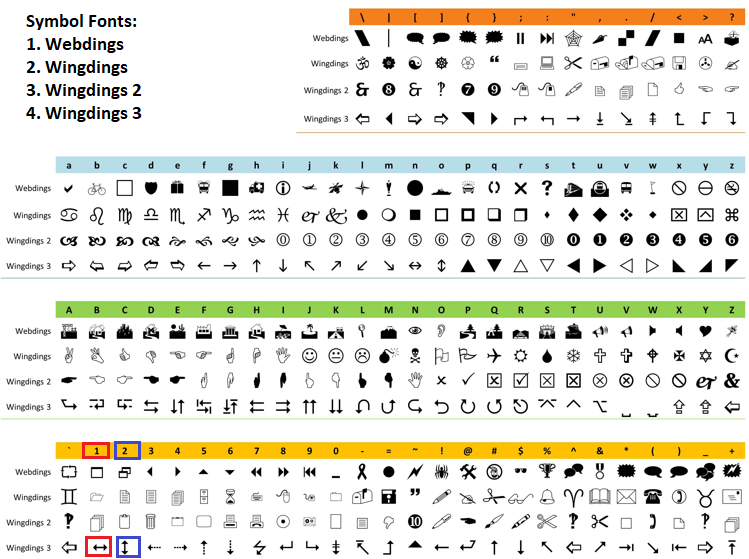
Next, we get icon color from "GetIconColor" with resizing flag, convert to ARGB, set font and angle with FontSet and FontAngleSet, compute position based on mode using "MathMax"/"MathMin" for clamping and hover local coordinates or fixed offsets, draw with TextOut left top aligned, and reset angle to zero. Finally, we update the canvas with Update to show the graph. When we call the function in the initialization event handler, we get the following outcome.

With the graph canvas rendered, we now need to create the other statistics panel on the right of the graph canvas. For this one, we want to advance a bit and mix two colors for the background where they meet using linear interpolation, since it is just a simple thing we want to have, and also darken the border colors based on the background selected colors, instead of the static border colors that we have been having for the header and the graph canvas so far. To achieve that with ease, we will need some helper functions.
//+------------------------------------------------------------------+
//| Linear interpolation between two colors                          |
//+------------------------------------------------------------------+
color InterpolateColor(color start, color end, double factor)
{
   uchar r1 = (uchar)((start >> 16) & 0xFF);                     //--- Get start red
   uchar g1 = (uchar)((start >> 8) & 0xFF);                      //--- Get start green
   uchar b1 = (uchar)(start & 0xFF);                             //--- Get start blue

   uchar r2 = (uchar)((end >> 16) & 0xFF);                       //--- Get end red
   uchar g2 = (uchar)((end >> 8) & 0xFF);                        //--- Get end green
   uchar b2 = (uchar)(end & 0xFF);                               //--- Get end blue

   uchar r = (uchar)(r1 + factor * (r2 - r1));                   //--- Interpolate red
   uchar g = (uchar)(g1 + factor * (g2 - g1));                   //--- Interpolate green
   uchar b = (uchar)(b1 + factor * (b2 - b1));                   //--- Interpolate blue

   return (r << 16) | (g << 8) | b;                              //--- Return color
}

//+------------------------------------------------------------------+
//| Darken a color by a factor (0.0 to 1.0)                         |
//+------------------------------------------------------------------+
color DarkenColor(color colorValue, double factor)
{
   int blue = int((colorValue & 0xFF) * factor);                 //--- Darken blue
   int green = int(((colorValue >> 8) & 0xFF) * factor);         //--- Darken green
   int red = int(((colorValue >> 16) & 0xFF) * factor);          //--- Darken red
   return (color)(blue | (green << 8) | (red << 16));            //--- Return darkened
}
First, we implement the "InterpolateColor" function to linearly blend between two colors based on a factor from zero to one, returning the interpolated color for effects like gradients. It takes color parameters start and end, and a double factor. We extract red, green, and blue components from the start using bit shifts right by sixteen/eight/zero and masking with 0xFF cast to uchar, similarly for the end, just like we did with the other color-based functions. We interpolate each channel as a uchar of start value plus factor times the difference, then combine with red shifted left sixteen, green eight, and blue zero using bit shifts and OR.
Next, we create the "DarkenColor" function to reduce a color's brightness by a factor from zero to one, where one keeps it unchanged, and lower values darken it, returning the adjusted color. It takes color "colorValue" and a double factor, darkens blue as int of blue times factor from mask 0xFF, green from shift eight mask, red from shift sixteen mask, and returns combined with blue OR green shifted eight OR red shifted sixteen cast to color. We can now use these functions in the creation of the statistics panel.
//+------------------------------------------------------------------+
//| Update the stats on the second Canvas                            |
//+------------------------------------------------------------------+
void UpdateStatsOnCanvas()
{
   canvasStats.Erase(0);                                         //--- Clear canvas

   int statsWidth = currentWidth / 2;                            //--- Compute width
   if (UseBackground && ArraySize(bg_pixels_stats) == statsWidth * currentHeight) //--- Check background
   {
      for (int y = 0; y < currentHeight; y++)                    //--- Loop rows
      {
         for (int x = 0; x < statsWidth; x++)                    //--- Loop columns
         {
            canvasStats.PixelSet(x, y, bg_pixels_stats[y * statsWidth + x]); //--- Set pixel
         }
      }
   }

   if (StatsBackgroundMode != NoColor)                           //--- Check mode
   {
      for (int y = 0; y < currentHeight; y++)                    //--- Loop rows
      {
         double factor = (double)y / (currentHeight - 1);        //--- Compute factor
         color currentColor = (StatsBackgroundMode == SingleColor) ? GetTopColor() : InterpolateColor(GetTopColor(), GetBottomColor(), factor); //--- Get color
         uchar alpha = (uchar)(255 * BackgroundOpacity);         //--- Compute alpha
         uint argbFill = ColorToARGB(currentColor, alpha);       //--- Convert fill

         for (int x = 0; x < statsWidth; x++)                    //--- Loop columns
         {
            uint currentPixel = canvasStats.PixelGet(x, y);      //--- Get pixel
            uint blendedPixel = BlendPixels(currentPixel, argbFill); //--- Blend
            canvasStats.PixelSet(x, y, blendedPixel);            //--- Set blended
         }
      }
   }

   if (StatsBackgroundMode != NoColor)                           //--- Check mode for borders
   {
      double reduction = BorderOpacityPercentReduction / 100.0;  //--- Compute reduction
      double opacity = MathMax(0.0, MathMin(1.0, BackgroundOpacity * (1.0 - reduction))); //--- Compute opacity
      uchar alpha = (uchar)(255 * opacity);                      //--- Set alpha
      double darkenReduction = BorderDarkenPercent / 100.0;      //--- Compute darken
      double darkenFactor = MathMax(0.0, MathMin(1.0, 1.0 - darkenReduction)); //--- Set factor

      for (int y = 0; y < currentHeight; y++)                    //--- Loop vertical
      {
         double factor = (StatsBackgroundMode == SingleColor) ? 0.0 : (double)y / (currentHeight - 1); //--- Get factor
         color baseColor = (StatsBackgroundMode == SingleColor) ? GetTopColor() : InterpolateColor(GetTopColor(), GetBottomColor(), factor); //--- Get base
         color darkColor = DarkenColor(baseColor, darkenFactor); //--- Darken color
         uint argb = ColorToARGB(darkColor, alpha);              //--- Convert to ARGB

         canvasStats.PixelSet(0, y, argb);                       //--- Set left outer
         canvasStats.PixelSet(1, y, argb);                       //--- Set left inner

         canvasStats.PixelSet(statsWidth - 1, y, argb);          //--- Set right outer
         canvasStats.PixelSet(statsWidth - 2, y, argb);          //--- Set right inner
      }

      double factorTop = 0.0;                                    //--- Set top factor
      color baseTop = GetTopColor();                             //--- Get top base
      color darkTop = DarkenColor(baseTop, darkenFactor);        //--- Darken top
      uint argbTop = ColorToARGB(darkTop, alpha);                //--- Convert top
      for (int x = 0; x < statsWidth; x++)                       //--- Loop top
      {
         canvasStats.PixelSet(x, 0, argbTop);                    //--- Set top outer
         canvasStats.PixelSet(x, 1, argbTop);                    //--- Set top inner
      }

      double factorBot = (StatsBackgroundMode == SingleColor) ? 0.0 : 1.0; //--- Set bottom factor
      color baseBot = (StatsBackgroundMode == SingleColor) ? GetTopColor() : GetBottomColor(); //--- Get bottom base
      color darkBot = DarkenColor(baseBot, darkenFactor);        //--- Darken bottom
      uint argbBot = ColorToARGB(darkBot, alpha);                //--- Convert bottom
      for (int x = 0; x < statsWidth; x++)                       //--- Loop bottom
      {
         canvasStats.PixelSet(x, currentHeight - 1, argbBot);    //--- Set bottom outer
         canvasStats.PixelSet(x, currentHeight - 2, argbBot);    //--- Set bottom inner
      }
   }
   else                                                          //--- Handle no color
   {
      uint argbBorder = ColorToARGB(GetBorderColor(), 255);      //--- Convert border
      canvasStats.Line(0, 0, statsWidth - 1, 0, argbBorder);     //--- Draw top outer
      canvasStats.Line(statsWidth - 1, 0, statsWidth - 1, currentHeight - 1, argbBorder); //--- Draw right outer
      canvasStats.Line(statsWidth - 1, currentHeight - 1, 0, currentHeight - 1, argbBorder); //--- Draw bottom outer
      canvasStats.Line(0, currentHeight - 1, 0, 0, argbBorder);  //--- Draw left outer
      canvasStats.Line(1, 1, statsWidth - 2, 1, argbBorder);     //--- Draw top inner
      canvasStats.Line(statsWidth - 2, 1, statsWidth - 2, currentHeight - 2, argbBorder); //--- Draw right inner
      canvasStats.Line(statsWidth - 2, currentHeight - 2, 1, currentHeight - 2, argbBorder); //--- Draw bottom inner
      canvasStats.Line(1, currentHeight - 2, 1, 1, argbBorder);  //--- Draw left inner
   }

   color labelColor = GetStatsLabelColor();                      //--- Get label color
   color valueColor = GetStatsValueColor();                      //--- Get value color
   color headerColor = GetStatsHeaderColor();                    //--- Get header color

   int yPos = 20;                                                //--- Set initial y
   canvasStats.FontSet("Arial Bold", StatsHeaderFontSize);       //--- Set header font
   uint argbHeader = ColorToARGB(headerColor, 255);              //--- Convert header
   canvasStats.TextOut(statsWidth / 2, yPos, "Account Stats", argbHeader, TA_CENTER); //--- Draw account header
   yPos += 30;                                                   //--- Increment y

   canvasStats.FontSet("Arial Bold", StatsFontSize);             //--- Set font
   uint argbLabel = ColorToARGB(labelColor, 255);                //--- Convert label
   uint argbValue = ColorToARGB(valueColor, 255);                //--- Convert value

   canvasStats.TextOut(10, yPos, "Name:", argbLabel, TA_LEFT);   //--- Draw name label
   canvasStats.TextOut(statsWidth - 10, yPos, AccountInfoString(ACCOUNT_NAME), argbValue, TA_RIGHT); //--- Draw name value
   yPos += 20;                                                   //--- Increment y

   canvasStats.TextOut(10, yPos, "Balance:", argbLabel, TA_LEFT); //--- Draw balance label
   canvasStats.TextOut(statsWidth - 10, yPos, DoubleToString(AccountInfoDouble(ACCOUNT_BALANCE), 2), argbValue, TA_RIGHT); //--- Draw balance value
   yPos += 20;                                                   //--- Increment y

   canvasStats.TextOut(10, yPos, "Equity:", argbLabel, TA_LEFT); //--- Draw equity label
   canvasStats.TextOut(statsWidth - 10, yPos, DoubleToString(AccountInfoDouble(ACCOUNT_EQUITY), 2), argbValue, TA_RIGHT); //--- Draw equity value
   yPos += 30;                                                   //--- Increment y

   canvasStats.FontSet("Arial Bold", StatsHeaderFontSize);       //--- Set header font
   canvasStats.TextOut(statsWidth / 2, yPos, "Current Bar Stats", argbHeader, TA_CENTER); //--- Draw bar header
   yPos += 30;                                                   //--- Increment y

   canvasStats.FontSet("Arial Bold", StatsFontSize);             //--- Set font

   double barOpen = iOpen(_Symbol, _Period, 0);                  //--- Get open
   double barHigh = iHigh(_Symbol, _Period, 0);                  //--- Get high
   double barLow = iLow(_Symbol, _Period, 0);                    //--- Get low
   double barClose = iClose(_Symbol, _Period, 0);                //--- Get close

   canvasStats.TextOut(10, yPos, "Open:", argbLabel, TA_LEFT);   //--- Draw open label
   canvasStats.TextOut(statsWidth - 10, yPos, DoubleToString(barOpen, _Digits), argbValue, TA_RIGHT); //--- Draw open value
   yPos += 20;                                                   //--- Increment y

   canvasStats.TextOut(10, yPos, "High:", argbLabel, TA_LEFT);   //--- Draw high label
   canvasStats.TextOut(statsWidth - 10, yPos, DoubleToString(barHigh, _Digits), argbValue, TA_RIGHT); //--- Draw high value
   yPos += 20;                                                   //--- Increment y

   canvasStats.TextOut(10, yPos, "Low:", argbLabel, TA_LEFT);    //--- Draw low label
   canvasStats.TextOut(statsWidth - 10, yPos, DoubleToString(barLow, _Digits), argbValue, TA_RIGHT); //--- Draw low value
   yPos += 20;                                                   //--- Increment y

   canvasStats.TextOut(10, yPos, "Close:", argbLabel, TA_LEFT);  //--- Draw close label
   canvasStats.TextOut(statsWidth - 10, yPos, DoubleToString(barClose, _Digits), argbValue, TA_RIGHT); //--- Draw close value

   canvasStats.Update();                                         //--- Update canvas
}
Here, we implement the "UpdateStatsOnCanvas" function to render the statistics panel on the "canvasStats" object, displaying account and current bar details with themed backgrounds, fills, borders, and text. We clear the canvas with Erase set to zero. If "UseBackground" is true and "bg_pixels_stats" matches the dimensions (half graph width times height), we loop over rows and columns to set each pixel from the scaled background array using the PixelSet method.
If "StatsBackgroundMode" is not "NoColor", we loop over height to compute a vertical factor, determine the row color as "GetTopColor" if single mode or interpolated between top and bottom with "InterpolateColor" if gradient, calculate alpha from "BackgroundOpacity" times 255, convert to ARGB. For each x in the row, get the current pixel with PixelGet, blend it with the fill using "BlendPixels", and set the blended pixel.
For borders in fill modes, we compute reduced opacity from "BorderOpacityPercentReduction" divided by 100.0, clamped to 0.0 to 1.0 times "BackgroundOpacity", alpha as 255 times that, and darken factor as 1.0 minus "BorderDarkenPercent" over 100.0, clamped. Loop over y to get row factor (0.0 if single else normalized), base color as top or interpolated, darken with "DarkenColor", convert to ARGB with alpha, set left outer/inner and right outer/inner pixels. For the top row, use factor 0.0, base top color, darken, ARGB, loop x to set top outer/inner. For bottom, factor 1.0 or 0.0 if single, base bottom or top, darken, ARGB, set bottom outer/inner. If no fill, convert border from "GetBorderColor" to ARGB at 255, draw outer and inner horizontal/vertical lines with "Line" for top/right/bottom/left.
We retrieve themed colors for labels, values, and headers using getters. Set initial y at twenty, font to Arial Bold at "StatsHeaderFontSize", convert header to ARGB, draw centered Account Stats with TextOut, increment y by thirty.
Set font to Arial Bold at "StatsFontSize", convert label and value to ARGB. Draw left-aligned Name: at x ten, right-aligned account name from AccountInfoString with ACCOUNT_NAME at width minus ten, increment y twenty. Similarly, for Balance: with AccountInfoDouble "ACCOUNT_BALANCE" to two decimals, Equity: with ACCOUNT_EQUITY. Increment y thirty, set header font, draw centered Current Bar Stats, increment y thirty. Set font back, fetch current bar open/high/low/close with iOpen/"iHigh"/"iLow"/iClose for symbol/period/bar zero. Draw Open: label and value to _Digits decimals right-aligned, increment y twenty; repeat for High:, Low:, Close:. Finally, update the canvas with Update to display the stats. Upon compilation, we get the following outcome.

From the image, we can see that we have created the stats panel with the color interpolation. If you don't want the interpolation, you can do hard boundary mixing as follows: just dump the math.
//+------------------------------------------------------------------+
//| Color selection WITHOUT interpolation (hard switch only)         |
//+------------------------------------------------------------------+
color InterpolateColor(color start, color end, double factor)
{
   // Clamp factor just to be safe
   if(factor <= 0.0)
      return start;

   if(factor >= 1.0)
      return end;

   // HARD boundary — no mixing at all
   return (factor < 0.5 ? start : end);
}
When you use this approach, you get the following outcome.

From the image, we can see that the boundaries do not mix linearly. So it is upon you to choose the approach that fits your style again. With that done, our dashboard rendering is done for the dark theme mode that we selected to be the default. To enable the chart interactions, we will need to switch on the mouse movements during initialization. Now the initialization event handler looks as follows at the end.
//+------------------------------------------------------------------+
//| Initialize expert                                                |
//+------------------------------------------------------------------+
int OnInit()

   //--- Existing init logic

   DrawHeaderOnCanvas();                                         //--- Draw header
   UpdateGraphOnCanvas();                                        //--- Update graph
   if (EnableStatsPanel) UpdateStatsOnCanvas();                  //--- Update stats

   ChartSetInteger(0, CHART_EVENT_MOUSE_MOVE, true);             //--- Enable mouse events
   ChartRedraw();                                                //--- Redraw chart
   return(INIT_SUCCEEDED);                                       //--- Return success
}
We just use the ChartSetInteger function to set the mouse move recognition to true. With that done, we can create some helper functions to track the mouse states and make changes when interacting with our dashboard objects.
//+------------------------------------------------------------------+
//| Check if mouse is over header (excluding buttons)                |
//+------------------------------------------------------------------+
bool IsMouseOverHeader(int mouse_x, int mouse_y)
{
   int header_x = currentCanvasX;                                //--- Get header x
   int header_y = currentCanvasY;                                //--- Get header y
   int header_w = currentWidth + (EnableStatsPanel && !panels_minimized ? PanelGap + currentWidth / 2 : 0); //--- Compute width
   int header_h = header_height;                                 //--- Get height

   if (mouse_x < header_x || mouse_x > header_x + header_w || mouse_y < header_y || mouse_y > header_y + header_h) return false; //--- Check outside

   int theme_left = header_x + header_w + theme_x_offset - button_size / 2; //--- Compute theme left
   int theme_right = theme_left + button_size;                   //--- Compute theme right
   int theme_top = header_y;                                     //--- Set theme top
   int theme_bottom = theme_top + header_h;                      //--- Compute theme bottom
   if (mouse_x >= theme_left && mouse_x <= theme_right && mouse_y >= theme_top && mouse_y <= theme_bottom) return false; //--- Check in theme

   int min_left = header_x + header_w + minimize_x_offset - button_size / 2; //--- Compute minimize left
   int min_right = min_left + button_size;                       //--- Compute minimize right
   int min_top = header_y;                                       //--- Set minimize top
   int min_bottom = min_top + header_h;                          //--- Compute minimize bottom
   if (mouse_x >= min_left && mouse_x <= min_right && mouse_y >= min_top && mouse_y <= min_bottom) return false; //--- Check in minimize

   int close_left = header_x + header_w + close_x_offset - button_size / 2; //--- Compute close left
   int close_right = close_left + button_size;                   //--- Compute close right
   int close_top = header_y;                                     //--- Set close top
   int close_bottom = close_top + header_h;                      //--- Compute close bottom
   if (mouse_x >= close_left && mouse_x <= close_right && mouse_y >= close_top && mouse_y <= close_bottom) return false; //--- Check in close

   return true;                                                  //--- Return in header
}

//+------------------------------------------------------------------+
//| Check if mouse over theme button                                 |
//+------------------------------------------------------------------+
bool IsMouseOverTheme(int mouse_x, int mouse_y)
{
   int header_w = currentWidth + (EnableStatsPanel && !panels_minimized ? PanelGap + currentWidth / 2 : 0); //--- Compute width
   int theme_left = currentCanvasX + header_w + theme_x_offset - button_size / 2; //--- Compute left
   int theme_right = theme_left + button_size;                   //--- Compute right
   int theme_top = currentCanvasY;                               //--- Set top
   int theme_bottom = theme_top + header_height;                 //--- Compute bottom
   return (mouse_x >= theme_left && mouse_x <= theme_right && mouse_y >= theme_top && mouse_y <= theme_bottom); //--- Check in theme
}

//+------------------------------------------------------------------+
//| Check if mouse over minimize button                              |
//+------------------------------------------------------------------+
bool IsMouseOverMinimize(int mouse_x, int mouse_y)
{
   int header_w = currentWidth + (EnableStatsPanel && !panels_minimized ? PanelGap + currentWidth / 2 : 0); //--- Compute width
   int min_left = currentCanvasX + header_w + minimize_x_offset - button_size / 2; //--- Compute left
   int min_right = min_left + button_size;                       //--- Compute right
   int min_top = currentCanvasY;                                 //--- Set top
   int min_bottom = min_top + header_height;                     //--- Compute bottom
   return (mouse_x >= min_left && mouse_x <= min_right && mouse_y >= min_top && mouse_y <= min_bottom); //--- Check in minimize
}

//+------------------------------------------------------------------+
//| Check if mouse over close button                                 |
//+------------------------------------------------------------------+
bool IsMouseOverClose(int mouse_x, int mouse_y)
{
   int header_w = currentWidth + (EnableStatsPanel && !panels_minimized ? PanelGap + currentWidth / 2 : 0); //--- Compute width
   int close_left = currentCanvasX + header_w + close_x_offset - button_size / 2; //--- Compute left
   int close_right = close_left + button_size;                   //--- Compute right
   int close_top = currentCanvasY;                               //--- Set top
   int close_bottom = close_top + header_height;                 //--- Compute bottom
   return (mouse_x >= close_left && mouse_x <= close_right && mouse_y >= close_top && mouse_y <= close_bottom); //--- Check in close
}

//+------------------------------------------------------------------+
//| Check if mouse over resize borders                               |
//+------------------------------------------------------------------+
bool IsMouseOverResize(int mx, int my, ENUM_RESIZE_MODE &rmode)
{
   if (panels_minimized) return false;                           //--- Check if minimized
   int graph_x = currentCanvasX;                                 //--- Get graph x
   int graph_y = currentCanvasY + header_height + gap_y;         //--- Get graph y
   int graph_right = graph_x + currentWidth;                     //--- Compute right
   int graph_bottom = graph_y + currentHeight;                   //--- Compute bottom
   bool over_right = (mx >= graph_right - resize_thickness && mx <= graph_right + resize_thickness) && (my >= graph_y && my <= graph_bottom); //--- Check right
   bool over_bottom = (my >= graph_bottom - resize_thickness && my <= graph_bottom + resize_thickness) && (mx >= graph_x && mx <= graph_right); //--- Check bottom
   if (over_bottom && over_right)                                //--- Check corner
   {
      rmode = BOTTOM_RIGHT;                                      //--- Set bottom-right
      return true;                                               //--- Return true
   }
   else if (over_bottom)                                         //--- Check bottom only
   {
      rmode = BOTTOM;                                            //--- Set bottom
      return true;                                               //--- Return true
   }
   else if (over_right)                                          //--- Check right only
   {
      rmode = RIGHT;                                             //--- Set right
      return true;                                               //--- Return true
   }
   return false;                                                 //--- Return false
}

//+------------------------------------------------------------------+
//| Toggle theme                                                     |
//+------------------------------------------------------------------+
void ToggleTheme()
{
   is_dark_theme = !is_dark_theme;                               //--- Switch theme
   Print("Switched to ", (is_dark_theme ? "Dark" : "Light"), " theme"); //--- Print switch
   DrawHeaderOnCanvas();                                         //--- Redraw header
   UpdateGraphOnCanvas();                                        //--- Update graph
   if (EnableStatsPanel) UpdateStatsOnCanvas();                  //--- Update stats
   ChartRedraw();                                                //--- Redraw chart
}

//+------------------------------------------------------------------+
//| Toggle minimize state                                            |
//+------------------------------------------------------------------+
void ToggleMinimize()
{
   panels_minimized = !panels_minimized;                         //--- Toggle minimized
   if (panels_minimized)                                         //--- Handle minimize
   {
      canvasGraph.Destroy();                                     //--- Destroy graph
      graphCreated = false;                                      //--- Reset graph flag
      if (EnableStatsPanel)                                      //--- Check stats
      {
         canvasStats.Destroy();                                  //--- Destroy stats
         statsCreated = false;                                   //--- Reset stats flag
      }
   }
   else                                                          //--- Handle maximize
   {
      if (!canvasGraph.CreateBitmapLabel(0, 0, canvasGraphName, currentCanvasX, currentCanvasY + header_height + gap_y, currentWidth, currentHeight, COLOR_FORMAT_ARGB_NORMALIZE)) //--- Recreate graph
      {
         Print("Failed to recreate Graph Canvas");               //--- Print error
      }
      graphCreated = true;                                       //--- Set graph flag
      UpdateGraphOnCanvas();                                     //--- Update graph
      if (EnableStatsPanel)                                      //--- Check stats
      {
         int statsX = currentCanvasX + currentWidth + PanelGap;  //--- Compute stats X
         if (!canvasStats.CreateBitmapLabel(0, 0, canvasStatsName, statsX, currentCanvasY + header_height + gap_y, currentWidth / 2, currentHeight, COLOR_FORMAT_ARGB_NORMALIZE)) //--- Recreate stats
         {
            Print("Failed to recreate Stats Canvas");            //--- Print error
         }
         statsCreated = true;                                    //--- Set stats flag
         UpdateStatsOnCanvas();                                  //--- Update stats
      }
   }

   int new_header_width = currentWidth + (EnableStatsPanel && !panels_minimized ? PanelGap + currentWidth / 2 : 0); //--- Compute new width
   canvasHeader.Resize(new_header_width, header_height);         //--- Resize header
   ObjectSetInteger(0, canvasHeaderName, OBJPROP_XSIZE, new_header_width); //--- Update header width
   ObjectSetInteger(0, canvasHeaderName, OBJPROP_YSIZE, header_height); //--- Update header height
   DrawHeaderOnCanvas();                                         //--- Redraw header
   canvasHeader.Update();                                        //--- Update header
   ChartRedraw();                                                //--- Redraw chart
}

//+------------------------------------------------------------------+
//| Close the dashboard                                              |
//+------------------------------------------------------------------+
void CloseDashboard()
{
   canvasHeader.Destroy();                                       //--- Destroy header
   canvasGraph.Destroy();                                        //--- Destroy graph
   if (EnableStatsPanel) canvasStats.Destroy();                  //--- Destroy stats
   ChartRedraw();                                                //--- Redraw chart
}
Here, we implement several hover detection functions to identify mouse positions over specific areas like the header (excluding buttons) and individual buttons for theme, minimize, and close, using current positions and sizes to return booleans for state updates. We also add checks for resize borders on the graph panel, determining the mode (bottom, right, or corner) based on thickness and reference to update hover or resize enumerations.
Additionally, we create toggle functions for theme switching by flipping the flag, printing the new mode, and redrawing all canvases, and for minimizing by toggling the state, destroying/recreating graph and stats canvases as needed, resizing the header, redrawing it, and updating. Finally, we define a close function to destroy all canvases and redraw the chart. We define the "IsMouseOverHeader" function to check if the mouse is over the header area without overlapping buttons, returning a boolean. It gets header position from "currentCanvasX" and "currentCanvasY", computes width including optional stats and gap if not minimized, height from "header_height", and returns false if outside bounds.
We then calculate button areas for theme, minimize, and close using offsets and "button_size", returning false if any, else true for header hover. As for the next of the functions, we don't really have to explain it since we already used a similar approach in the prior article parts in this series. We added comments for clarity. The next thing that we will do is use these functions in the chart event handler as follows.
//+------------------------------------------------------------------+
//| Handle chart event                                               |
//+------------------------------------------------------------------+
void OnChartEvent(const int id, const long &lparam, const double &dparam, const string &sparam)
{
   if (id == CHARTEVENT_CHART_CHANGE)                            //--- Check change event
   {
      DrawHeaderOnCanvas();                                      //--- Redraw header
      UpdateGraphOnCanvas();                                     //--- Update graph
      if (EnableStatsPanel) UpdateStatsOnCanvas();               //--- Update stats
      ChartRedraw();                                             //--- Redraw chart
   }
   else if (id == CHARTEVENT_MOUSE_MOVE)                         //--- Handle mouse move
   {
      int mouse_x = (int)lparam;                                 //--- Get mouse x
      int mouse_y = (int)dparam;                                 //--- Get mouse y
      int mouse_state = (int)sparam;                             //--- Get mouse state

      bool prev_header_hovered = header_hovered;                 //--- Store previous header
      bool prev_min_hovered = minimize_hovered;                  //--- Store previous minimize
      bool prev_close_hovered = close_hovered;                   //--- Store previous close
      bool prev_theme_hovered = theme_hovered;                   //--- Store previous theme
      bool prev_resize_hovered = resize_hovered;                 //--- Store previous resize

      header_hovered = IsMouseOverHeader(mouse_x, mouse_y);      //--- Check header hover
      theme_hovered = IsMouseOverTheme(mouse_x, mouse_y);        //--- Check theme hover
      minimize_hovered = IsMouseOverMinimize(mouse_x, mouse_y); //--- Check minimize hover
      close_hovered = IsMouseOverClose(mouse_x, mouse_y);        //--- Check close hover
      resize_hovered = IsMouseOverResize(mouse_x, mouse_y, hover_mode); //--- Check resize hover

      if (resize_hovered || resizing)                            //--- Check resize state
      {
         hover_mouse_local_x = mouse_x - currentCanvasX;         //--- Set local x
         hover_mouse_local_y = mouse_y - (currentCanvasY + header_height + gap_y); //--- Set local y
      }

      bool hover_changed = (prev_header_hovered != header_hovered || prev_min_hovered != minimize_hovered ||
                            prev_close_hovered != close_hovered || prev_theme_hovered != theme_hovered ||
                            prev_resize_hovered != resize_hovered); //--- Check change

      if (hover_changed)                                         //--- If changed
      {
         DrawHeaderOnCanvas();                                   //--- Redraw header
         UpdateGraphOnCanvas();                                  //--- Update graph
         ChartRedraw();                                          //--- Redraw chart
      }
      else if ((resize_hovered || resizing) && (mouse_x != last_mouse_x || mouse_y != last_mouse_y)) //--- Check position change
      {
         UpdateGraphOnCanvas();                                  //--- Update graph
         ChartRedraw();                                          //--- Redraw chart
      }

      string header_tooltip = "";                                //--- Initialize tooltip
      if (theme_hovered) header_tooltip = "Toggle Theme (Dark/Light)"; //--- Set theme tooltip
      else if (minimize_hovered) header_tooltip = panels_minimized ? "Maximize Panels" : "Minimize Panels"; //--- Set minimize tooltip
      else if (close_hovered) header_tooltip = "Close Dashboard"; //--- Set close tooltip
      ObjectSetString(0, canvasHeaderName, OBJPROP_TOOLTIP, header_tooltip); //--- Set header tooltip

      string resize_tooltip = "";                                //--- Initialize resize tooltip
      if (resize_hovered || resizing)                            //--- Check resize
      {
         ENUM_RESIZE_MODE active_mode = resizing ? resize_mode : hover_mode; //--- Get mode
         switch (active_mode)                                    //--- Switch mode
         {
            case BOTTOM: resize_tooltip = "Resize Bottom"; break; //--- Set bottom
            case RIGHT: resize_tooltip = "Resize Right"; break;  //--- Set right
            case BOTTOM_RIGHT: resize_tooltip = "Resize Bottom-Right"; break; //--- Set corner
            default: break;
         }
      }
      ObjectSetString(0, canvasGraphName, OBJPROP_TOOLTIP, resize_tooltip); //--- Set graph tooltip

      if (mouse_state == 1 && prev_mouse_state == 0)             //--- Check mouse down
      {
         if (header_hovered)                                     //--- Check header
         {
            panel_dragging = true;                               //--- Start drag
            panel_drag_x = mouse_x;                              //--- Set drag x
            panel_drag_y = mouse_y;                              //--- Set drag y
            panel_start_x = currentCanvasX;                      //--- Set start x
            panel_start_y = currentCanvasY;                      //--- Set start y
            ChartSetInteger(0, CHART_MOUSE_SCROLL, false);       //--- Disable scroll
            DrawHeaderOnCanvas();                                //--- Show drag color
            ChartRedraw();                                       //--- Redraw chart
         }
         else if (theme_hovered)                                 //--- Check theme
         {
            ToggleTheme();                                       //--- Toggle theme
         }
         else if (minimize_hovered)                              //--- Check minimize
         {
            ToggleMinimize();                                    //--- Toggle minimize
         }
         else if (close_hovered)                                 //--- Check close
         {
            CloseDashboard();                                    //--- Close dashboard
         }
         else                                                    //--- Handle resize
         {
            ENUM_RESIZE_MODE temp_mode = NONE;                   //--- Initialize temp
            if (!panel_dragging && !resizing && IsMouseOverResize(mouse_x, mouse_y, temp_mode)) //--- Check resize
            {
               resizing = true;                                  //--- Start resizing
               resize_mode = temp_mode;                          //--- Set mode
               resize_start_x = mouse_x;                         //--- Set start x
               resize_start_y = mouse_y;                         //--- Set start y
               start_width = currentWidth;                       //--- Set start width
               start_height = currentHeight;                     //--- Set start height
               ChartSetInteger(0, CHART_MOUSE_SCROLL, false);    //--- Disable scroll
               UpdateGraphOnCanvas();                            //--- Show icon
               ChartRedraw();                                    //--- Redraw chart
            }
         }
      }
      else if (panel_dragging && mouse_state == 1)               //--- Handle dragging
      {
         int dx = mouse_x - panel_drag_x;                        //--- Compute dx
         int dy = mouse_y - panel_drag_y;                        //--- Compute dy
         int new_x = panel_start_x + dx;                         //--- Compute new x
         int new_y = panel_start_y + dy;                         //--- Compute new y

         int chart_w = (int)ChartGetInteger(0, CHART_WIDTH_IN_PIXELS); //--- Get chart width
         int chart_h = (int)ChartGetInteger(0, CHART_HEIGHT_IN_PIXELS); //--- Get chart height
         int full_w = currentWidth + (EnableStatsPanel && !panels_minimized ? PanelGap + currentWidth / 2 : 0); //--- Compute full width
         int full_h = header_height + gap_y + (panels_minimized ? 0 : currentHeight); //--- Compute full height
         new_x = MathMax(0, MathMin(chart_w - full_w, new_x));   //--- Clamp x
         new_y = MathMax(0, MathMin(chart_h - full_h, new_y));   //--- Clamp y

         currentCanvasX = new_x;                                 //--- Update x
         currentCanvasY = new_y;                                 //--- Update y

         ObjectSetInteger(0, canvasHeaderName, OBJPROP_XDISTANCE, new_x); //--- Update header x
         ObjectSetInteger(0, canvasHeaderName, OBJPROP_YDISTANCE, new_y); //--- Update header y
         if (!panels_minimized)                                  //--- Check if shown
         {
            ObjectSetInteger(0, canvasGraphName, OBJPROP_XDISTANCE, new_x); //--- Update graph x
            ObjectSetInteger(0, canvasGraphName, OBJPROP_YDISTANCE, new_y + header_height + gap_y); //--- Update graph y
            if (EnableStatsPanel)                                //--- Check stats
            {
               int statsX = new_x + currentWidth + PanelGap;     //--- Compute stats x
               ObjectSetInteger(0, canvasStatsName, OBJPROP_XDISTANCE, statsX); //--- Update stats x
               ObjectSetInteger(0, canvasStatsName, OBJPROP_YDISTANCE, new_y + header_height + gap_y); //--- Update stats y
            }
         }
         ChartRedraw();                                          //--- Redraw chart
      }
      else if (resizing && mouse_state == 1)                     //--- Handle resizing
      {
         int dx = mouse_x - resize_start_x;                      //--- Compute dx
         int dy = mouse_y - resize_start_y;                      //--- Compute dy
         int new_width = currentWidth;                           //--- Initialize new width
         int new_height = currentHeight;                         //--- Initialize new height
         if (resize_mode == RIGHT || resize_mode == BOTTOM_RIGHT) //--- Check right
         {
            new_width = MathMax(min_width, start_width + dx);    //--- Update width
         }
         if (resize_mode == BOTTOM || resize_mode == BOTTOM_RIGHT) //--- Check bottom
         {
            new_height = MathMax(min_height, start_height + dy); //--- Update height
         }

         if (new_width != currentWidth || new_height != currentHeight) //--- Check change
         {
            int chart_w = (int)ChartGetInteger(0, CHART_WIDTH_IN_PIXELS); //--- Get chart width
            int chart_h = (int)ChartGetInteger(0, CHART_HEIGHT_IN_PIXELS); //--- Get chart height
            int avail_w = chart_w - currentCanvasX;              //--- Compute available width
            int avail_h = chart_h - (currentCanvasY + header_height + gap_y); //--- Compute available height
            new_height = MathMin(new_height, avail_h);           //--- Clamp height
            if (EnableStatsPanel)                                //--- Check stats
            {
               double max_w_d = (avail_w - PanelGap) / 1.5;      //--- Compute max width
               int max_w = (int)MathFloor(max_w_d);              //--- Floor max
               new_width = MathMin(new_width, max_w);            //--- Clamp width
            }
            else                                                 //--- No stats
            {
               new_width = MathMin(new_width, avail_w);          //--- Clamp width
            }

            currentWidth = new_width;                            //--- Update width
            currentHeight = new_height;                          //--- Update height

            if (UseBackground && ArraySize(original_bg_pixels) > 0) //--- Check background
            {
               ArrayCopy(bg_pixels_graph, original_bg_pixels);   //--- Copy graph
               ScaleImage(bg_pixels_graph, (int)orig_w, (int)orig_h, currentWidth, currentHeight); //--- Scale graph
               if (EnableStatsPanel)                             //--- Check stats
               {
                  ArrayCopy(bg_pixels_stats, original_bg_pixels); //--- Copy stats
                  ScaleImage(bg_pixels_stats, (int)orig_w, (int)orig_h, currentWidth / 2, currentHeight); //--- Scale stats
               }
            }

            canvasGraph.Resize(currentWidth, currentHeight);     //--- Resize graph
            ObjectSetInteger(0, canvasGraphName, OBJPROP_XSIZE, currentWidth); //--- Update graph width
            ObjectSetInteger(0, canvasGraphName, OBJPROP_YSIZE, currentHeight); //--- Update graph height

            if (EnableStatsPanel)                                //--- Check stats
            {
               int stats_width = currentWidth / 2;               //--- Compute stats width
               canvasStats.Resize(stats_width, currentHeight);   //--- Resize stats
               ObjectSetInteger(0, canvasStatsName, OBJPROP_XSIZE, stats_width); //--- Update stats width
               ObjectSetInteger(0, canvasStatsName, OBJPROP_YSIZE, currentHeight); //--- Update stats height
               int stats_x = currentCanvasX + currentWidth + PanelGap; //--- Compute stats x
               ObjectSetInteger(0, canvasStatsName, OBJPROP_XDISTANCE, stats_x); //--- Update stats x
            }

            canvasHeader.Resize(currentWidth + (EnableStatsPanel ? PanelGap + currentWidth / 2 : 0), header_height); //--- Resize header
            ObjectSetInteger(0, canvasHeaderName, OBJPROP_XSIZE, currentWidth + (EnableStatsPanel ? PanelGap + currentWidth / 2 : 0)); //--- Update header width
            ObjectSetInteger(0, canvasHeaderName, OBJPROP_YSIZE, header_height); //--- Update header height

            DrawHeaderOnCanvas();                                //--- Redraw header
            UpdateGraphOnCanvas();                               //--- Update graph
            if (EnableStatsPanel) UpdateStatsOnCanvas();         //--- Update stats
            ChartRedraw();                                       //--- Redraw chart
         }
      }
      else if (mouse_state == 0 && prev_mouse_state == 1)        //--- Check mouse up
      {
         if (panel_dragging)                                     //--- Check dragging
         {
            panel_dragging = false;                              //--- Stop drag
            ChartSetInteger(0, CHART_MOUSE_SCROLL, true);        //--- Enable scroll
            DrawHeaderOnCanvas();                                //--- Reset color
            ChartRedraw();                                       //--- Redraw chart
         }
         if (resizing)                                           //--- Check resizing
         {
            resizing = false;                                    //--- Stop resize
            ChartSetInteger(0, CHART_MOUSE_SCROLL, true);        //--- Enable scroll
            UpdateGraphOnCanvas();                               //--- Remove icon
            ChartRedraw();                                       //--- Redraw chart
         }
      }

      last_mouse_x = mouse_x;                                    //--- Update last x
      last_mouse_y = mouse_y;                                    //--- Update last y
      prev_mouse_state = mouse_state;                            //--- Update state
   }
}
In the OnChartEvent event handler, if id is CHARTEVENT_CHART_CHANGE, we call "DrawHeaderOnCanvas" to redraw the header, "UpdateGraphOnCanvas" for the graph, "UpdateStatsOnCanvas" if "EnableStatsPanel" is true, and ChartRedraw to refresh the display. For CHARTEVENT_MOUSE_MOVE, we cast lparam to mouse x, dparam to y, and sparam to state as integers. We store previous hover states in locals, then update "header_hovered" with "IsMouseOverHeader", "theme_hovered" with "IsMouseOverTheme", "minimize_hovered" with "IsMouseOverMinimize", "close_hovered" with "IsMouseOverClose", and "resize_hovered" with "IsMouseOverResize", passing a reference to "hover_mode". If resize hovered or "resizing" true, set "hover_mouse_local_x" and "hover_mouse_local_y" relative to graph position. We check if any hover state changed by comparing the previous to the current, and if so, redraw the header and graph, then redraw. Else if the resize state and the mouse position differ from "last_mouse_x"/"last_mouse_y", update the graph and redraw.
We initialize a header tooltip string, set to Toggle Theme (Dark/Light) if "theme_hovered", maximize/minimize message conditional on "panels_minimized" if "minimize_hovered", Close Dashboard if "close_hovered", and apply to "canvasHeaderName" with ObjectSetString using OBJPROP_TOOLTIP. Similarly, for the resize tooltip, determine active mode from "resize_mode" or "hover_mode", set the string based on bottom/right/bottom-right, and apply to "canvasGraphName".
If mouse state is one and "prev_mouse_state" zero for down press: if "header_hovered", set "panel_dragging" true, store drag/start coordinates, disable chart mouse scroll with ChartSetInteger "CHART_MOUSE_SCROLL" false, redraw header, redraw chart; else if "theme_hovered", call "ToggleTheme"; if "minimize_hovered", call "ToggleMinimize"; if "close_hovered", call "CloseDashboard"; else if not dragging/resizing and "IsMouseOverResize" true into temp mode, set "resizing" true, "resize_mode" to temp, store start coords/dims, disable scroll, update graph, redraw.
If "panel_dragging" true and state one for held, compute deltas, new x/y from start plus deltas, get chart width/height with ChartGetInteger "CHART_WIDTH_IN_PIXELS"/CHART_HEIGHT_IN_PIXELS, full panel width/height including optional stats/gap/header if not minimized, clamp new x/y to zero up to chart minus full dims with "MathMax"/"MathMin", update "currentCanvasX"/"currentCanvasY", set object x/y distances for header, and if not minimized for graph and optional stats (computing stats x), then redraw.
If "resizing" is true and state one, compute deltas, initialize new width/height to current, add dx if right or corner mode clamped to "min_width", dy for bottom or corner to "min_height". If changed, get chart dims, available width/height from current position, clamp new height to available, for width if stats clamp to floored (available minus gap)/1.5 else to available, update currents. If background used, copy original pixels to graph/stats, scale with "ScaleImage" to new dims (stats half width). Resize "canvasGraph" with Resize and set "OBJPROP_XSIZE"/"YSIZE", similarly for stats if enabled, updating x position, and header to full width. Redraw header/graph/stats if enabled, redraw chart.
If state zero and "prev_mouse_state" one for up: if "panel_dragging", set false, enable scroll true, redraw header, redraw chart; if "resizing", set false, enable scroll, update graph, redraw chart. We update "last_mouse_x"/"last_mouse_y" to current, "prev_mouse_state" to state. We also need to update the dashboard per tick to reflect the new prices.
//+------------------------------------------------------------------+
//| Handle tick event                                                |
//+------------------------------------------------------------------+
void OnTick()
{
   static datetime lastBarTime = 0;                              //--- Initialize last time
   datetime currentBarTime = iTime(_Symbol, _Period, 0);         //--- Get current time
   if (currentBarTime > lastBarTime)                             //--- Check new bar
   {
      UpdateGraphOnCanvas();                                     //--- Update graph
      if (EnableStatsPanel) UpdateStatsOnCanvas();               //--- Update stats
      ChartRedraw();                                             //--- Redraw chart
      lastBarTime = currentBarTime;                              //--- Update last time
   }
}
In the OnTick event handler, we use a static "lastBarTime" datetime initialized to zero to track the previous bar's open time, and get the current bar time with iTime for the symbol, period, and bar zero. If the current time is greater than "lastBarTime", indicating a new bar, we call "UpdateGraphOnCanvas" to refresh the price graph, "UpdateStatsOnCanvas" if "EnableStatsPanel" is true for stats, redraw the chart, and update "lastBarTime" to the current value. Finally, we need to delete rendered objects to avoid clutter when not needed.
//+------------------------------------------------------------------+
//| Deinitialize expert                                              |
//+------------------------------------------------------------------+
void OnDeinit(const int reason)
{
   canvasHeader.Destroy();                                       //--- Destroy header
   if (graphCreated) canvasGraph.Destroy();                      //--- Destroy graph if created
   if (statsCreated) canvasStats.Destroy();                      //--- Destroy stats if created
   ChartRedraw();                                                //--- Redraw chart
}
In the OnDeinit event handler, we destroy the header canvas with "canvasHeader.Destroy", then conditionally destroy the graph canvas if "graphCreated" is true using "canvasGraph.Destroy", and the stats canvas if "statsCreated" is true with "canvasStats.Destroy". Finally, we redraw the chart to ensure any remnants are cleared from the display. Upon compilation, we get the following outcome.
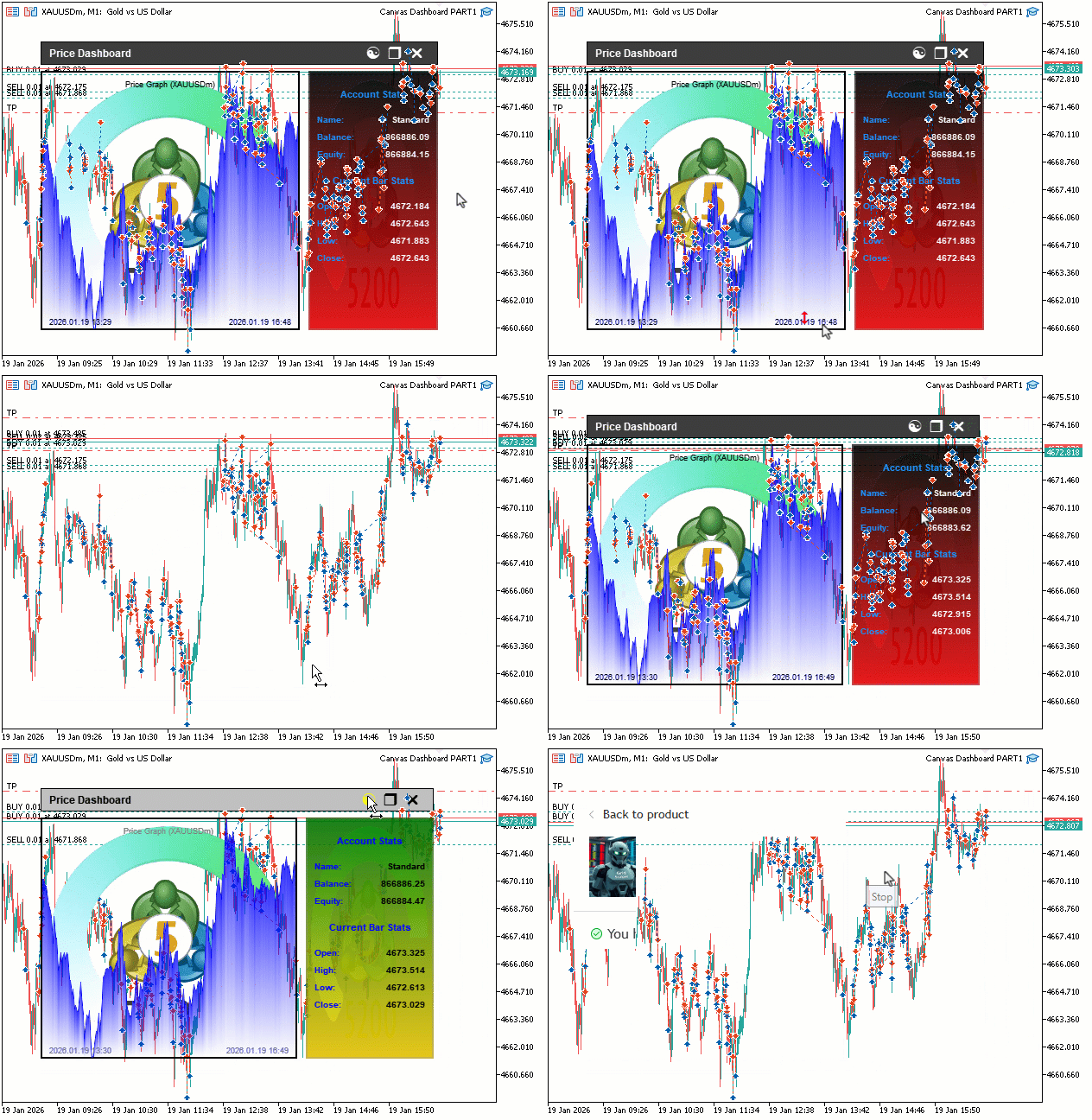
From the visualization, we can see that we have correctly set up the canvas dashboard with all the canvas components rendered correctly and interactable, hence achieving our objectives. What now remains is testing the workability of the system, and that is handled in the preceding section.
Backtesting
We did the testing, and below is the compiled visualization in a single Graphics Interchange Format (GIF) bitmap image format.
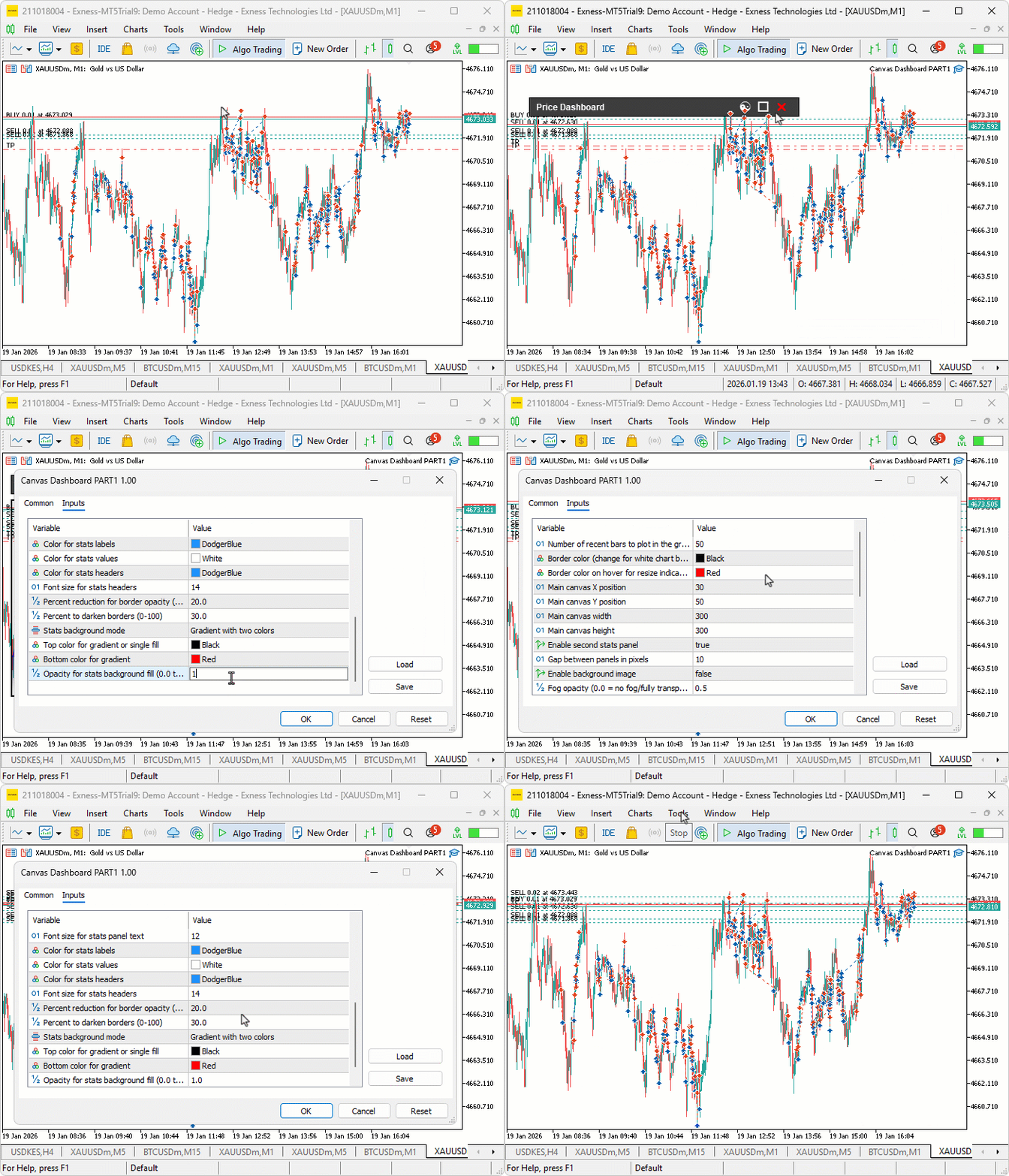
Conclusion
In conclusion, we’ve developed a canvas-based price dashboard in MQL5 using the CCanvas class to create draggable and resizable panels for real-time price graphs with line plots, filled areas, and fog effects, alongside an optional stats panel for account metrics like balance/equity and current bar OHLC, supporting background images, gradients, theme toggling, and efficient event handling for interactivity. The system incorporates bicubic scaling for smooth resizing, alpha blending for overlays, and updates on new bars, providing a customizable tool for visual monitoring without native objects. In the next part, we will extend the dashboard by adding canvas based text screen for reading and scrolling that can integrate several text themes, with a dynamic scrollbar like the ones featured in the new upgraded MetaQuotes terminals. Keep tuned.
Warning: All rights to these materials are reserved by MetaQuotes Ltd. Copying or reprinting of these materials in whole or in part is prohibited.
This article was written by a user of the site and reflects their personal views. MetaQuotes Ltd is not responsible for the accuracy of the information presented, nor for any consequences resulting from the use of the solutions, strategies or recommendations described.

 Data Science and ML (Part 48): Are Transformers a Big Deal for Trading?
 Risk Management (Part 3): Building the Main Class for Risk Management
 The MQL5 Standard Library Explorer (Part 6): Optimizing a generated Expert Advisor
 Price Action Analysis Toolkit Development (Part 56): Reading Session Acceptance and Rejection with CPI

- Free trading apps
- Over 8,000 signals for copying
- Economic news for exploring financial markets
You agree to website policy and terms of use