

Creating Custom Indicators in MQL5 (Part 6): Evolving RSI Calculations with Smoothing, Hue Shifts, and Multi-Timeframe Support
 7 103
7 103
 0
0

Introduction
In our previous article (Part 5), we developed a WaveTrend Crossover indicator in MetaQuotes Language 5 (MQL5) that utilized a canvas for fog gradients, displayed signal bubbles to highlight key crossover events, and integrated risk management features, including stop-loss and take-profit calculations, to enhance trading decisions. In Part 6, we create an advanced Relative Strength Index (RSI) indicator featuring support for multiple RSI calculation methods—including classic, smoothed, and adaptive variants—various data smoothing techniques, dynamic color hue shifts for instant visual feedback, and multi-timeframe data processing with interpolation to align RSI readings across different periods. We will cover the following topics:
- Exploring RSI Variants, Smoothing Methods, and Dynamic Features
- Implementation in MQL5
- Backtesting
- Conclusion
By the end, you’ll have a fully functional and customizable MQL5 indicator for versatile RSI analysis, supporting multiple calculation, smoothing, visualization, and timeframe options—let’s dive in!
Exploring RSI Variants, Smoothing Methods, and Dynamic Features
The normal Relative Strength Index (RSI) measures the speed and change of price movements to identify overbought or oversold conditions, typically oscillating between 0 and 100 with boundaries at 70 and 30. We will advance the RSI by adding variations, such as Cuttler's, Ehlers', Harris', quick, basic, RSX, and gradual styles, to adjust its calculations and emphasize different aspects, including smoothing and responsiveness to market momentum. Data smoothing will apply averaging techniques—basic, growth-based, evened-out, or weighted linear—to preprocess price inputs, such as close, open, high, low, or derived averages, thereby reducing noise and providing clearer signals.
Hue shifts will change the indicator's color based on conditions like direction changes, center crossings, or boundary crossings, providing visual cues for trend reversals or strength. Dynamic boundaries will adapt overbought and oversold levels based on recent RSI extremes over a specified length, while static ones will use fixed percentages, and multi-timeframe support will allow analysis across different periods with optional interpolation for smoother visuals.
Our plan is to configure user inputs for selecting RSI variants, data sources, smoothing approaches, hue conditions, and boundary settings, then compute the RSI curve with these options, draw boundaries and fillings, handle multi-timeframe data, and trigger notifications on hue changes. In brief, this creates a customizable RSI tool that adapts to various market conditions and user preferences for technical analysis, producing an advanced RSI indicator compared to the traditional indicator, as illustrated below.

We can see that at the end, we’ll get an adaptive RSI engine that can calculate momentum from any price representation, not just the close. It will dynamically smooth both the input data and the RSI itself, letting us switch between fast, slow, or cycle-aware behavior without changing the core logic. On top of that, it will self-adjust its boundaries and visual states, so overbought/oversold signals adapt to market conditions instead of staying fixed. Let's get to implementing this!
Implementation in MQL5
To create the indicator in MQL5, just open the MetaEditor, go to the Navigator, locate the Indicators folder, click on the "New" tab, and follow the prompts to create the file. Once it is created, in the coding environment, we will define the indicator properties and settings, such as the number of buffers, plots, and individual line properties, such as the color, width, and label.
//+------------------------------------------------------------------+
//|                              Multi-Method RSI with Smoothing.mq5 |
//|                           Copyright 2026, Allan Munene Mutiiria. |
//|                                   https://t.me/Forex_Algo_Trader |
//+------------------------------------------------------------------+
#property copyright "Copyright 2026, Allan Munene Mutiiria."
#property link "https://t.me/Forex_Algo_Trader"
#property version "1.00"
#property indicator_separate_window
#property indicator_buffers 8
#property indicator_plots   5

#property indicator_label1  "RSI High/Low Area"
#property indicator_type1   DRAW_FILLING
#property indicator_color1  C'209,243,209',C'255,230,183'
#property indicator_label2  "RSI Top Boundary"
#property indicator_type2   DRAW_LINE
#property indicator_color2  clrLimeGreen
#property indicator_style2  STYLE_DOT
#property indicator_label3  "RSI Center Line"
#property indicator_type3   DRAW_LINE
#property indicator_color3  clrSilver
#property indicator_style3  STYLE_DOT
#property indicator_label4  "RSI Bottom Boundary"
#property indicator_type4   DRAW_LINE
#property indicator_color4  clrOrange
#property indicator_style4  STYLE_DOT
#property indicator_label5  "RSI Curve"
#property indicator_type5   DRAW_COLOR_LINE
#property indicator_color5  clrSilver,clrLimeGreen,clrOrange
#property indicator_width5  2
We start the implementation by setting the indicator to display in a separate subwindow with "#property indicator_separate_window", keeping it distinct from the main chart for better clarity. Next, we allocate eight buffers for internal calculations using "#property indicator_buffers 8" and define five plots for visual elements with "#property indicator_plots 5". For the plots, we create a filled area for the RSI high/low regions colored in light green and orange tones, a dotted lime green line for the top boundary, a dotted silver center line, a dotted orange bottom boundary, and a colored RSI curve line that shifts between silver, lime green, and orange with a width of 2 for prominence. Next, we will define some input parameters to control the indicator.
//+------------------------------------------------------------------+
//| Enumerations                                                     |
//+------------------------------------------------------------------+
enum DataSourceType {
   Data_ClosePrice,      // Use closing price
   Data_OpenPrice,       // Use opening price
   Data_HighPrice,       // Use highest price
   Data_LowPrice,        // Use lowest price
   Data_MidPoint,        // Use midpoint price
   Data_StandardPrice,   // Use standard price
   Data_BalancedPrice,   // Use balanced price
   Data_OverallAverage,  // Use overall average price
   Data_MidBodyAverage,  // Use mid-body average
   Data_DirectionAdjusted, // Use direction-adjusted price
   Data_ExtremeAdjusted, // Use extreme-adjusted price
   Data_SmoothedClose,   // Use smoothed close
   Data_SmoothedOpen,    // Use smoothed open
   Data_SmoothedHigh,    // Use smoothed high
   Data_SmoothedLow,     // Use smoothed low
   Data_SmoothedMid,     // Use smoothed midpoint
   Data_SmoothedStandard,// Use smoothed standard
   Data_SmoothedBalanced,// Use smoothed balanced
   Data_SmoothedOverall, // Use smoothed overall
   Data_SmoothedMidBody, // Use smoothed mid-body
   Data_SmoothedAdjusted,// Use smoothed adjusted
   Data_SmoothedExtreme  // Use smoothed extreme
};

enum RsiVariant {
   Variant_CuttlerStyle,  // Cuttler-style RSI
   Variant_EhlersStyle,   // Ehlers-style smoothed RSI
   Variant_HarrisStyle,   // Harris-style RSI
   Variant_QuickStyle,    // Quick RSI
   Variant_BasicStyle,    // Basic RSI
   Variant_RsxStyle,      // RSX-style
   Variant_GradualStyle   // Gradual RSI
};

enum HueShiftCondition {
   Hue_OnDirectionShift,   // Shift hue on direction change
   Hue_OnCenterCrossing,   // Shift hue on center crossing
   Hue_OnBoundaryCrossing  // Shift hue on boundary crossing
};

enum AveragingApproach {
   Avg_Basic,          // Basic averaging
   Avg_GrowthBased,    // Growth-based averaging
   Avg_EvenedOut,      // Evened-out averaging
   Avg_WeightedLinear  // Weighted linear averaging
};

//+------------------------------------------------------------------+
//| Inputs                                                           |
//+------------------------------------------------------------------+
input group "Chart and Calculation Settings";
input ENUM_TIMEFRAMES AnalysisTimeframe    = PERIOD_CURRENT;     // Choose timeframe for data analysis
input int             RsiLength            = 14;                 // Length for RSI computation

input group "Data Source and Variant Options";
input DataSourceType  SourceData           = Data_ClosePrice;    // Select data source for calculations
input RsiVariant      ChosenRsiVariant     = Variant_BasicStyle; // Select RSI computation variant
input int             DataSmoothingLength  = 0;                  // Smoothing length for data (0 or 1 disables)
input AveragingApproach DataSmoothingApproach = Avg_GrowthBased; // Approach for data smoothing

input group "Hue Adjustment Settings";
input HueShiftCondition HueAdjustmentOn    = Hue_OnBoundaryCrossing; // Condition for hue adjustment

input group "Boundary Configuration";
input int             DynamicBoundaryLength = 50;                // Length for dynamic boundaries (1 or less for static)
input double          TopBoundaryPercent   = 80.0;               // Top boundary percentage
input double          BottomBoundaryPercent = 20.0;              // Bottom boundary percentage

input group "Notification Preferences";
input bool            ActivateNotifications = false;             // Activate notifications?
input bool            NotifyOnActiveBar     = true;              // Notify on active bar?
input bool            InterpolateMultiFrame = true;              // Smooth multi-frame data?
We continue by defining enumerations to categorize user options and enhance configurability. The "DataSourceType" enum lists various price data sources, from basic ones like closing or opening prices to derived averages such as midpoint or balanced price, and includes smoothed versions for noise reduction. Next, the "RsiVariant" enum offers different RSI calculation styles, including basic, RSX, Cuttler, Ehlers, Harris, quick, and gradual, allowing selection of the desired computation method.
We also create the "HueShiftCondition" enum to determine when the RSI curve changes color, with options for direction shifts, center crossings, or boundary crossings. Additionally, the "AveragingApproach" enum specifies smoothing techniques like basic, growth-based, evened-out, or weighted linear for preprocessing data. For user inputs, we group them into sections starting with chart and calculation settings, where "AnalysisTimeframe" selects the timeframe and "RsiLength" sets the RSI period. We have added comments to make them easy to understand. This will give us the following window.

Next thing we will do is initialize the indicator, but let's first define some global variables we will use throughout the program.
//+------------------------------------------------------------------+
//| Global Variables                                                 |
//+------------------------------------------------------------------+
double rsiCurveValues[], rsiHueValues[], areaFillTop[], areaFillBottom[], topBoundaryValues[], centerLineValues[], bottomBoundaryValues[], processedBarCounts[]; //--- Declare buffers
int    multiFrameDataHandle = INVALID_HANDLE;                    //--- Initialize multi-frame handle
ENUM_TIMEFRAMES chosenTimeframe;                                 //--- Declare chosen timeframe

#define MULTI_FRAME_ACCESS iCustom(_Symbol, chosenTimeframe, __FILE__, PERIOD_CURRENT, RsiLength, SourceData, ChosenRsiVariant, DataSmoothingLength, DataSmoothingApproach, HueAdjustmentOn, DynamicBoundaryLength, TopBoundaryPercent, BottomBoundaryPercent, ActivateNotifications, NotifyOnActiveBar, InterpolateMultiFrame) //--- Define multi-frame access


int timeframeCodes[] = {PERIOD_M1, PERIOD_M2, PERIOD_M3, PERIOD_M4, PERIOD_M5, PERIOD_M6, PERIOD_M10, PERIOD_M12, PERIOD_M15, PERIOD_M20, PERIOD_M30, PERIOD_H1, PERIOD_H2, PERIOD_H3, PERIOD_H4, PERIOD_H6, PERIOD_H8, PERIOD_H12, PERIOD_D1, PERIOD_W1, PERIOD_MN1}; //--- Define timeframe codes
string timeframeLabels[] = {"1 minute", "2 minutes", "3 minutes", "4 minutes", "5 minutes", "6 minutes", "10 minutes", "12 minutes", "15 minutes", "20 minutes", "30 minutes", "1 hour", "2 hours", "3 hours", "4 hours", "6 hours", "8 hours", "12 hours", "daily", "weekly", "monthly"}; //--- Define timeframe labels

//+------------------------------------------------------------------+
//| Convert timeframe to text                                        |
//+------------------------------------------------------------------+
string convertTimeframeToText(int code) {
   if (code == PERIOD_CURRENT)                                   //--- Check current
      code = _Period;                                            //--- Set period
   int pos;                                                      //--- Declare pos
   for (pos = 0; pos < ArraySize(timeframeCodes); pos++)         //--- Loop codes
      if (code == timeframeCodes[pos]) break;                    //--- Break on match
   return(timeframeLabels[pos]);                                 //--- Return label
}

//+------------------------------------------------------------------+
//| Describe RSI variant                                             |
//+------------------------------------------------------------------+
string describeRsiVariant(int variant) {
   switch (variant) {                                            //--- Switch variant
   case Variant_BasicStyle:                                      //--- Handle basic
      return("RSI");                                             //--- Return RSI
   case Variant_RsxStyle:                                        //--- Handle RSX
      return("RSX");                                             //--- Return RSX
   case Variant_CuttlerStyle:                                    //--- Handle Cuttler
      return("Cuttler-style RSI");                               //--- Return Cuttler
   case Variant_HarrisStyle:                                     //--- Handle Harris
      return("Harris-style RSI");                                //--- Return Harris
   case Variant_QuickStyle:                                      //--- Handle Quick
      return("Quick RSI");                                       //--- Return Quick
   case Variant_GradualStyle:                                    //--- Handle Gradual
      return("Gradual RSI");                                     //--- Return Gradual
   case Variant_EhlersStyle:                                     //--- Handle Ehlers
      return("Ehlers-style smoothed RSI");                       //--- Return Ehlers
   default:                                                      //--- Handle default
      return("");                                                //--- Return empty
   }
}
Here, we declare global arrays for the indicator buffers, including "rsiCurveValues" for the main RSI line, "rsiHueValues" for color indices, "areaFillTop" and "areaFillBottom" for the filled areas, "topBoundaryValues", "centerLineValues", and "bottomBoundaryValues" for the boundary lines, plus "processedBarCounts" for tracking calculated bars. We also initialize "multiFrameDataHandle" to INVALID_HANDLE for managing multi-timeframe data and declare "chosenTimeframe" to store the selected timeframe. Using a preprocessor directive, we define "MULTI_FRAME_ACCESS" as a call to iCustom with the symbol, chosen timeframe, file name, and all input parameters to facilitate accessing data from different timeframes.
Next, we set up arrays "timeframeCodes" with predefined period constants like PERIOD_M1 to "PERIOD_MN1" and "timeframeLabels" with corresponding string descriptions for human-readable timeframe names. The "convertTimeframeToText" function translates a timeframe code to its label by first resolving "PERIOD_CURRENT" to the actual period, then looping through "timeframeCodes" to find a match and return the appropriate label from "timeframeLabels". Finally, the "describeRsiVariant" function uses a switch statement on the variant input to return a descriptive string for each RSI style, such as "RSI" for basic or "Ehlers-style smoothed RSI" for the Ehlers variant, defaulting to an empty string if unmatched. We can now use these helpers to initialize the indicator.
//+------------------------------------------------------------------+
//| Initialize indicator                                             |
//+------------------------------------------------------------------+
int OnInit() {
   SetIndexBuffer(0, areaFillTop, INDICATOR_DATA);               //--- Set top fill buffer
   SetIndexBuffer(1, areaFillBottom, INDICATOR_DATA);            //--- Set bottom fill buffer
   SetIndexBuffer(2, topBoundaryValues, INDICATOR_DATA);         //--- Set top boundary buffer
   SetIndexBuffer(3, centerLineValues, INDICATOR_DATA);          //--- Set center line buffer
   SetIndexBuffer(4, bottomBoundaryValues, INDICATOR_DATA);      //--- Set bottom boundary buffer
   SetIndexBuffer(5, rsiCurveValues, INDICATOR_DATA);            //--- Set RSI curve buffer
   SetIndexBuffer(6, rsiHueValues, INDICATOR_COLOR_INDEX);       //--- Set hue buffer
   SetIndexBuffer(7, processedBarCounts, INDICATOR_CALCULATIONS); //--- Set processed counts buffer

   PlotIndexSetInteger(0, PLOT_SHOW_DATA, false);                //--- Hide filling data
   PlotIndexSetInteger(1, PLOT_SHOW_DATA, false);                //--- Hide bottom data
   PlotIndexSetInteger(2, PLOT_SHOW_DATA, true);                 //--- Show top boundary
   PlotIndexSetInteger(3, PLOT_SHOW_DATA, true);                 //--- Show center line
   PlotIndexSetInteger(4, PLOT_SHOW_DATA, true);                 //--- Show bottom boundary

   chosenTimeframe = MathMax(_Period, AnalysisTimeframe);        //--- Set chosen timeframe
   IndicatorSetString(INDICATOR_SHORTNAME, convertTimeframeToText(chosenTimeframe) + " " + describeRsiVariant(ChosenRsiVariant) + " with Adjustment (" + (string)RsiLength + "," + (string)DataSmoothingLength + "," + (string)DynamicBoundaryLength + ")"); //--- Set short name

   return(INIT_SUCCEEDED);                                       //--- Return success
}
In the OnInit event handler, we associate the allocated buffers with specific plot indices and data types. We link buffer 0 to "areaFillTop" as "INDICATOR_DATA" for the upper fill level, buffer 1 to "areaFillBottom" similarly for the lower fill, buffer 2 to "topBoundaryValues" for the upper boundary data, buffer 3 to "centerLineValues" for the midline, buffer 4 to "bottomBoundaryValues" for the lower boundary, buffer 5 to "rsiCurveValues" for the main RSI values, buffer 6 to "rsiHueValues" as INDICATOR_COLOR_INDEX for color indexing, and buffer 7 to "processedBarCounts" as "INDICATOR_CALCULATIONS" for tracking processed bars. We then configure plot visibility using PlotIndexSetInteger, hiding the data for plots 0 and 1 to avoid displaying raw fill values, while showing plots 2, 3, and 4 for the boundaries and center line.
Next, we determine the "chosenTimeframe" by taking the maximum between the current chart period and the user-input "AnalysisTimeframe" to support multi-timeframe operations. We set the indicator's short name with IndicatorSetString by combining the timeframe text from "convertTimeframeToText", the RSI variant description from "describeRsiVariant", and a string of key parameters like "RsiLength", "DataSmoothingLength", and "DynamicBoundaryLength" for easy identification in the chart. Finally, we return INIT_SUCCEEDED to indicate successful initialization. We can proceed to do our indicator calculations. We will start by determining the timeframe for the calculations as follows.
//+------------------------------------------------------------------+
//| Check timeframe validity                                         |
//+------------------------------------------------------------------+
bool checkTimeframeValidity(ENUM_TIMEFRAMES frame, const datetime& timeStamps[]) {
   static bool alerted = false;                                    //--- Set alerted flag
   if (timeStamps[0] < SeriesInfoInteger(_Symbol, frame, SERIES_FIRSTDATE)) { //--- Check first date
      datetime startDate, checkDate[];                             //--- Declare dates
      if (SeriesInfoInteger(_Symbol, PERIOD_M1, SERIES_TERMINAL_FIRSTDATE, startDate)) //--- Get terminal date
         if (startDate > 0) {                                      //--- Check date
            CopyTime(_Symbol, frame, timeStamps[0], 1, checkDate); //--- Copy time
            SeriesInfoInteger(_Symbol, frame, SERIES_FIRSTDATE, startDate); //--- Get series date
         }
      if (startDate <= 0 || startDate > timeStamps[0]) {           //--- Check invalid
         alerted = true;                                           //--- Set alerted
         return(false);                                            //--- Return false
      }
   }
   if (alerted) {                                                  //--- Check alerted
      alerted = false;                                             //--- Reset alerted
   }
   return(true);                                                   //--- Return true
}

//+------------------------------------------------------------------+
//| Calculate indicator                                              |
//+------------------------------------------------------------------+
int OnCalculate(const int barTotal,
                const int prevProcessed,
                const datetime& timeStamps[],
                const double& opens[],
                const double& highs[],
                const double& lows[],
                const double& closes[],
                const long& volumeTicks[],
                const long& actualVolumes[],
                const int& spreadValues[]) {
   if (Bars(_Symbol, _Period) < barTotal) return(-1);             //--- Check insufficient bars

   if (chosenTimeframe != _Period) {                              //--- Check multi-frame
      double interimData[];                                       //--- Declare interim data
      datetime activeTimeStamp[], followingTimeStamp[];           //--- Declare timestamps
      if (!checkTimeframeValidity(chosenTimeframe, timeStamps)) return(0); //--- Check validity
      if (multiFrameDataHandle == INVALID_HANDLE) multiFrameDataHandle = MULTI_FRAME_ACCESS; //--- Get handle
      if (multiFrameDataHandle == INVALID_HANDLE) return(0);      //--- Check handle
      if (CopyBuffer(multiFrameDataHandle, 7, 0, 1, interimData) == -1) return(0); //--- Copy processed

#define FRAME_RATIO PeriodSeconds(chosenTimeframe) / PeriodSeconds(_Period) //--- Define frame ratio
      int currentPos = MathMin(MathMax(prevProcessed - 1, 0), MathMax(barTotal - (int)interimData[0] * FRAME_RATIO - 1, 0)); //--- Compute pos
      for (; currentPos < barTotal && !_StopFlag; currentPos++) { //--- Loop positions
#define TRANSFER_MULTI_FRAME(_array, _pos) if (CopyBuffer(multiFrameDataHandle, _pos, timeStamps[currentPos], 1, interimData) == -1) break; _array[currentPos] = interimData[0] //--- Define transfer
         TRANSFER_MULTI_FRAME(areaFillTop, 0);                    //--- Transfer top fill
         TRANSFER_MULTI_FRAME(areaFillBottom, 1);                 //--- Transfer bottom fill
         TRANSFER_MULTI_FRAME(topBoundaryValues, 2);              //--- Transfer top boundary
         TRANSFER_MULTI_FRAME(centerLineValues, 3);               //--- Transfer center line
         TRANSFER_MULTI_FRAME(bottomBoundaryValues, 4);           //--- Transfer bottom boundary
         TRANSFER_MULTI_FRAME(rsiCurveValues, 5);                 //--- Transfer RSI curve
         TRANSFER_MULTI_FRAME(rsiHueValues, 6);                   //--- Transfer hue

         if (!InterpolateMultiFrame) continue;                    //--- Skip if no interpolate
         CopyTime(_Symbol, chosenTimeframe, timeStamps[currentPos], 1, activeTimeStamp); //--- Copy active time
         if (currentPos < (barTotal - 1)) {                       //--- Check not last
            CopyTime(_Symbol, chosenTimeframe, timeStamps[currentPos + 1], 1, followingTimeStamp); //--- Copy following time
            if (activeTimeStamp[0] == followingTimeStamp[0]) continue; //--- Skip same time
         }

         int stepsBack = 1;                                       //--- Initialize steps back
         while ((currentPos - stepsBack) > 0 && timeStamps[currentPos - stepsBack] >= activeTimeStamp[0]) stepsBack++; //--- Count back

         for (int stepsForward = 1; (currentPos - stepsForward) >= 0 && stepsForward < stepsBack; stepsForward++) { //--- Loop forward
#define SMOOTH_MULTI_FRAME(_array) _array[currentPos - stepsForward] = _array[currentPos] + (_array[currentPos - stepsBack] - _array[currentPos]) * stepsForward / stepsBack //--- Define smooth
            SMOOTH_MULTI_FRAME(areaFillTop);                      //--- Smooth top fill
            SMOOTH_MULTI_FRAME(areaFillBottom);                   //--- Smooth bottom fill
            SMOOTH_MULTI_FRAME(topBoundaryValues);                //--- Smooth top boundary
            SMOOTH_MULTI_FRAME(bottomBoundaryValues);             //--- Smooth bottom boundary
            SMOOTH_MULTI_FRAME(centerLineValues);                 //--- Smooth center line
            SMOOTH_MULTI_FRAME(rsiCurveValues);                   //--- Smooth RSI curve
         }
      }
      return(currentPos);                                        //--- Return pos
   }
}
First, we create the "checkTimeframeValidity" function to verify if the selected timeframe has sufficient historical data available for the current timestamp. We use a static "alerted" flag to track if an invalid state has been noted. If the first timestamp is before the series start date obtained via SeriesInfoInteger with SERIES_FIRSTDATE, we fetch the terminal's first date using "SERIES_TERMINAL_FIRSTDATE" and copy the timeframe's time with CopyTime to compare dates. If the start date is invalid or later than the timestamp, we set the alerted flag and return false; otherwise, we reset the flag if previously set and return true.
In the OnCalculate event handler, which processes indicator values on each new bar or data update, we first check if the available bars are less than the total requested using Bars, returning -1 if insufficient to signal recalculation needed. If the chosen timeframe differs from the current period, indicating multi-timeframe mode, we declare temporary arrays for data and timestamps, then call "checkTimeframeValidity" to ensure data availability, returning 0 if invalid.
We obtain the multi-frame handle if invalid using the predefined "MULTI_FRAME_ACCESS" macro, and return 0 if it fails. We copy the processed bar count from buffer 7 into "interimData" with CopyBuffer, also returning 0 on failure. We define "FRAME_RATIO" as the ratio of seconds between the chosen and current periods to scale bar positions. We calculate the starting "currentPos" using the minimum and maximum functions based on previously processed bars and the adjusted total.
We loop from "currentPos" to "barTotal", checking the stop flag, and define a "TRANSFER_MULTI_FRAME" macro to copy each buffer's value from the multi-frame handle into the respective arrays like "areaFillTop", "areaFillBottom", boundaries, center line, "rsiCurveValues", and "rsiHueValues" at the current position via time-based "CopyBuffer", breaking on failure.
If multi-frame interpolation is enabled, we copy the active and following timestamps. We skip if it's the last bar or timestamps match, then count "stepsBack" to find the prior bar with an earlier timestamp. We loop forward from 1 to less than "stepsBack", defining a "SMOOTH_MULTI_FRAME" macro to linearly interpolate values in the arrays between the current and back positions, applying it to smooth the fill areas, boundaries, center line, and RSI curve for seamless multi-timeframe display.
Finally, we return the updated "currentPos" to indicate processed bars. With the timeframe set, we can proceed to do the indicator computations. We will define helper functions to make the code organized and modular. Let's start with the function to compute the adjusted data averages for smoothing methods.
#define AVG_VARIANTS 1                                           //--- Define avg variants
#define AVG_ARRAY_X1 1 * AVG_VARIANTS                            //--- Define array x1
#define AVG_ARRAY_X2 2 * AVG_VARIANTS                            //--- Define array x2

//+------------------------------------------------------------------+
//| Compute custom average                                           |
//+------------------------------------------------------------------+
double computeCustomAverage(int avgApproach, double inputVal, double avgLen, int pos, int barCnt, int varIndex = 0) {
   switch (avgApproach) {                                        //--- Switch approach
   case Avg_Basic:                                               //--- Handle basic
      return(computeBasicAvg(inputVal, (int)avgLen, pos, barCnt, varIndex)); //--- Return basic avg
   case Avg_GrowthBased:                                         //--- Handle growth
      return(computeGrowthAvg(inputVal, avgLen, pos, barCnt, varIndex)); //--- Return growth avg
   case Avg_EvenedOut:                                           //--- Handle evened
      return(computeEvenedAvg(inputVal, avgLen, pos, barCnt, varIndex)); //--- Return evened avg
   case Avg_WeightedLinear:                                      //--- Handle weighted
      return(computeLinearAvg(inputVal, avgLen, pos, barCnt, varIndex)); //--- Return linear avg
   default:                                                      //--- Handle default
      return(inputVal);                                          //--- Return input
   }
}

double basicAvgArray[][AVG_ARRAY_X2];                            //--- Declare basic avg array

//+------------------------------------------------------------------+
//| Compute basic average                                            |
//+------------------------------------------------------------------+
double computeBasicAvg(double inputVal, int avgLen, int pos, int barCnt, int varIndex = 0) {
   if (ArrayRange(basicAvgArray, 0) != barCnt) ArrayResize(basicAvgArray, barCnt); //--- Resize array
   varIndex *= 2;                                                //--- Adjust index
   int offset;                                                   //--- Declare offset

   basicAvgArray[pos][varIndex + 0] = inputVal;                  //--- Set value
   basicAvgArray[pos][varIndex + 1] = inputVal;                  //--- Set avg
   for (offset = 1; offset < avgLen && (pos - offset) >= 0; offset++) //--- Loop offsets
      basicAvgArray[pos][varIndex + 1] += basicAvgArray[pos - offset][varIndex + 0]; //--- Accumulate avg
   basicAvgArray[pos][varIndex + 1] /= 1.0 * offset;            //--- Average
   return(basicAvgArray[pos][varIndex + 1]);                     //--- Return avg
}

double growthAvgArray[][AVG_ARRAY_X1];                           //--- Declare growth avg array

//+------------------------------------------------------------------+
//| Compute growth average                                           |
//+------------------------------------------------------------------+
double computeGrowthAvg(double inputVal, double avgLen, int pos, int barCnt, int varIndex = 0) {
   if (ArrayRange(growthAvgArray, 0) != barCnt) ArrayResize(growthAvgArray, barCnt); //--- Resize array

   growthAvgArray[pos][varIndex] = inputVal;                     //--- Set value
   if (pos > 0 && avgLen > 1)                                    //--- Check pos and len
      growthAvgArray[pos][varIndex] = growthAvgArray[pos - 1][varIndex] + (2.0 / (1.0 + avgLen)) * (inputVal - growthAvgArray[pos - 1][varIndex]); //--- Compute growth
   return(growthAvgArray[pos][varIndex]);                        //--- Return avg
}

double evenedAvgArray[][AVG_ARRAY_X1];                           //--- Declare evened avg array

//+------------------------------------------------------------------+
//| Compute evened average                                           |
//+------------------------------------------------------------------+
double computeEvenedAvg(double inputVal, double avgLen, int pos, int barCnt, int varIndex = 0) {
   if (ArrayRange(evenedAvgArray, 0) != barCnt) ArrayResize(evenedAvgArray, barCnt); //--- Resize array

   evenedAvgArray[pos][varIndex] = inputVal;                     //--- Set value
   if (pos > 1 && avgLen > 1)                                    //--- Check pos and len
      evenedAvgArray[pos][varIndex] = evenedAvgArray[pos - 1][varIndex] + (inputVal - evenedAvgArray[pos - 1][varIndex]) / avgLen; //--- Compute evened
   return(evenedAvgArray[pos][varIndex]);                        //--- Return avg
}

double linearAvgArray[][AVG_ARRAY_X1];                           //--- Declare linear avg array

//+------------------------------------------------------------------+
//| Compute linear average                                           |
//+------------------------------------------------------------------+
double computeLinearAvg(double inputVal, double avgLen, int pos, int barCnt, int varIndex = 0) {
   if (ArrayRange(linearAvgArray, 0) != barCnt) ArrayResize(linearAvgArray, barCnt); //--- Resize array

   linearAvgArray[pos][varIndex] = inputVal;                     //--- Set value
   if (avgLen <= 1) return(inputVal);                            //--- Return if no avg

   double totalWeights = avgLen;                                 //--- Set total weights
   double totalValues = avgLen * inputVal;                       //--- Set total values

   for (int offset = 1; offset < avgLen && (pos - offset) >= 0; offset++) { //--- Loop offsets
      double currWeight = avgLen - offset;                       //--- Compute weight
      totalWeights += currWeight;                                //--- Accumulate weights
      totalValues += currWeight * linearAvgArray[pos - offset][varIndex]; //--- Accumulate values
   }
   return(totalValues / totalWeights);                           //--- Return avg
}
We define constants with preprocessor directives: "AVG_VARIANTS" set to 1 for the number of averaging variants, "AVG_ARRAY_X1" as 1 times variants for single-column arrays, and "AVG_ARRAY_X2" as 2 times variants for dual-column arrays to support different smoothing needs. In the "computeCustomAverage" function, we use a switch statement on the "avgApproach" parameter to route to the appropriate averaging method—basic, growth-based, evened-out, or weighted linear—returning the computed average from the respective function, or simply the "inputVal" in the default case if no match.
We declare "basicAvgArray" as a multidimensional array sized with "AVG_ARRAY_X2". The "computeBasicAvg" function first checks and resizes the array to match "barCnt" if necessary, multiplies "varIndex" by 2 for column offsetting, stores the "inputVal" in the first column, initializes the average in the second column, then loops over prior positions up to "avgLen" to sum previous values, divides by the actual offset count, and returns the result.
Similarly, for growth-based averaging, we declare "growthAvgArray" with "AVG_ARRAY_X1", resize if needed in "computeGrowthAvg", set the value directly, and if beyond the first bar and "avgLen" exceeds 1, update it using a formula that adds a weighted difference from the prior value, mimicking an exponential smooth, before returning. For evened-out averaging, "evenedAvgArray" uses "AVG_ARRAY_X1", and "computeEvenedAvg" resizes, sets the value, then, if past the second bar and "avgLen" over 1, adjusts by adding the difference from prior divided by length for a simple incremental average, and returns it.
Finally, "linearAvgArray" also uses "AVG_ARRAY_X1", and "computeLinearAvg" resizes, sets the value, returns early if "avgLen" is 1 or less, otherwise initializes totals for weights and weighted values with the current, loops over priors to accumulate decreasing weights and corresponding values, and returns the total values divided by total weights for a linear weighted average. Next, we will need to feed the averaging function with a dataset. Here is how we define the dataset production.
#define DATA_VARIANTS 1                                          //--- Define data variants
#define DATA_VARIANT_SIZE 4                                      //--- Define variant size

double smoothedDataArray[][DATA_VARIANTS * DATA_VARIANT_SIZE];   //--- Declare smoothed data array

//+------------------------------------------------------------------+
//| Fetch chosen data                                                |
//+------------------------------------------------------------------+
double fetchChosenData(int dataType, const double& opens[], const double& closes[], const double& highs[], const double& lows[], int pos, int barCnt, int varIndex = 0) {
   if (dataType >= Data_SmoothedClose) {                         //--- Check smoothed
      if (ArrayRange(smoothedDataArray, 0) != barCnt) ArrayResize(smoothedDataArray, barCnt); //--- Resize array
      varIndex *= DATA_VARIANT_SIZE;                             //--- Adjust index

      double smoothedOpen;                                       //--- Declare smoothed open
      if (pos > 0)                                               //--- Check pos
         smoothedOpen = (smoothedDataArray[pos - 1][varIndex + 2] + smoothedDataArray[pos - 1][varIndex + 3]) / 2.0; //--- Compute smoothed open
      else                                                       //--- Handle initial
         smoothedOpen = (opens[pos] + closes[pos]) / 2;          //--- Set initial open

      double smoothedClose = (opens[pos] + highs[pos] + lows[pos] + closes[pos]) / 4.0; //--- Compute smoothed close
      double smoothedHigh = MathMax(highs[pos], MathMax(smoothedOpen, smoothedClose)); //--- Compute smoothed high
      double smoothedLow = MathMin(lows[pos], MathMin(smoothedOpen, smoothedClose)); //--- Compute smoothed low

      smoothedDataArray[pos][varIndex + 2] = smoothedOpen;       //--- Set smoothed open
      smoothedDataArray[pos][varIndex + 3] = smoothedClose;      //--- Set smoothed close

      switch (dataType) {                                        //--- Switch data type
      case Data_SmoothedClose:                                   //--- Handle smoothed close
         return(smoothedClose);                                  //--- Return close
      case Data_SmoothedOpen:                                    //--- Handle smoothed open
         return(smoothedOpen);                                   //--- Return open
      case Data_SmoothedHigh:                                    //--- Handle smoothed high
         return(smoothedHigh);                                   //--- Return high
      case Data_SmoothedLow:                                     //--- Handle smoothed low
         return(smoothedLow);                                    //--- Return low
      case Data_SmoothedMid:                                     //--- Handle smoothed mid
         return((smoothedHigh + smoothedLow) / 2.0);             //--- Return mid
      case Data_SmoothedMidBody:                                 //--- Handle smoothed mid body
         return((smoothedOpen + smoothedClose) / 2.0);           //--- Return mid body
      case Data_SmoothedStandard:                                //--- Handle smoothed standard
         return((smoothedHigh + smoothedLow + smoothedClose) / 3.0); //--- Return standard
      case Data_SmoothedBalanced:                                //--- Handle smoothed balanced
         return((smoothedHigh + smoothedLow + smoothedClose + smoothedClose) / 4.0); //--- Return balanced
      case Data_SmoothedOverall:                                 //--- Handle smoothed overall
         return((smoothedHigh + smoothedLow + smoothedClose + smoothedOpen) / 4.0); //--- Return overall
      case Data_SmoothedAdjusted:                                //--- Handle smoothed adjusted
         if (smoothedClose > smoothedOpen) return((smoothedHigh + smoothedClose) / 2.0); //--- Return high close
         else return((smoothedLow + smoothedClose) / 2.0);       //--- Return low close
      case Data_SmoothedExtreme:                                 //--- Handle smoothed extreme
         if (smoothedClose > smoothedOpen) return(smoothedHigh); //--- Return high
         if (smoothedClose < smoothedOpen) return(smoothedLow);  //--- Return low
         return(smoothedClose);                                  //--- Return close
      }
   }

   switch (dataType) {                                           //--- Switch data type
   case Data_ClosePrice:                                         //--- Handle close
      return(closes[pos]);                                       //--- Return close
   case Data_OpenPrice:                                          //--- Handle open
      return(opens[pos]);                                        //--- Return open
   case Data_HighPrice:                                          //--- Handle high
      return(highs[pos]);                                        //--- Return high
   case Data_LowPrice:                                           //--- Handle low
      return(lows[pos]);                                         //--- Return low
   case Data_MidPoint:                                           //--- Handle mid point
      return((highs[pos] + lows[pos]) / 2.0);                    //--- Return mid
   case Data_MidBodyAverage:                                     //--- Handle mid body
      return((opens[pos] + closes[pos]) / 2.0);                  //--- Return mid body
   case Data_StandardPrice:                                      //--- Handle standard
      return((highs[pos] + lows[pos] + closes[pos]) / 3.0);      //--- Return standard
   case Data_BalancedPrice:                                      //--- Handle balanced
      return((highs[pos] + lows[pos] + closes[pos] + closes[pos]) / 4.0); //--- Return balanced
   case Data_OverallAverage:                                     //--- Handle overall
      return((highs[pos] + lows[pos] + closes[pos] + opens[pos]) / 4.0); //--- Return overall
   case Data_DirectionAdjusted:                                  //--- Handle direction adjusted
      if (closes[pos] > opens[pos]) return((highs[pos] + closes[pos]) / 2.0); //--- Return high close
      else return((lows[pos] + closes[pos]) / 2.0);              //--- Return low close
   case Data_ExtremeAdjusted:                                    //--- Handle extreme adjusted
      if (closes[pos] > opens[pos]) return(highs[pos]);          //--- Return high
      if (closes[pos] < opens[pos]) return(lows[pos]);           //--- Return low
      return(closes[pos]);                                       //--- Return close
   }
   return(0);                                                    //--- Return zero
}
For the dataset production logic, we first define constants "DATA_VARIANTS" as 1 to indicate the number of data processing variants and "DATA_VARIANT_SIZE" as 4 to set the column width per variant in the array. We declare "smoothedDataArray" as a multidimensional array sized to store smoothed price data across bars. In the "fetchChosenData" function, we select and return the appropriate price value based on the "dataType" for the given bar position.
If it's a smoothed type starting from "Data_SmoothedClose", we resize the array to match "barCnt" if necessary, scale "varIndex" by the variant size, and compute "smoothedOpen" as the average of the prior bar's stored open and close if beyond the first bar, or the current open-close midpoint otherwise. We calculate "smoothedClose" as the four-point average of open, high, low, and close, then derive "smoothedHigh" as the maximum among high, smoothedOpen, and smoothedClose, and "smoothedLow" as the minimum among low, smoothedOpen, and smoothedClose. We store these smoothedOpen and smoothedClose in the array at offsets +2 and +3.
A switch statement then returns the specific smoothed value based on "dataType", such as the midpoint for "Data_SmoothedMid", the three-point average for "Data_SmoothedStandard", or direction-based adjustments like high-close average if close exceeds open for "Data_SmoothedAdjusted", or the extreme high/low/close for "Data_SmoothedExtreme". For non-smoothed types, another switch returns direct values like close for "Data_ClosePrice", or computed averages such as the high-low midpoint for "Data_MidPoint", the typical price for "Data_StandardPrice", or direction-adjusted prices similar to the smoothed cases but using raw data. If no type matches, we return 0 as a fallback. In the OnCalculate event handler, we can now call the functions to do the initial data computations.
int beginPos = (int)MathMax(prevProcessed - 1, 0);            //--- Set begin pos
for (; beginPos < barTotal && !_StopFlag; beginPos++) {       //--- Loop bars
   double adjustedData = computeCustomAverage(DataSmoothingApproach, fetchChosenData(SourceData, opens, closes, highs, lows, beginPos, barTotal), DataSmoothingLength, beginPos, barTotal); //--- Compute adjusted data
}

return(beginPos);                                             //--- Return begin pos
Here, we continue the OnCalculate event handler for single-timeframe mode by setting "beginPos" to the maximum of "prevProcessed" minus 1 or 0, ensuring we start from the last processed bar or the beginning if none were processed. We loop over bars from "beginPos" to less than "barTotal", checking the _StopFlag to allow interruption, and for each bar, compute "adjustedData" by first fetching the selected price via "fetchChosenData" using the "SourceData" type and the current bar's OHLC arrays, then applying the chosen smoothing with "computeCustomAverage" based on "DataSmoothingApproach" and "DataSmoothingLength". After the loop, we return "beginPos" to report the number of processed bars. Upon compilation, we get the following outcome.

From the image, we can see that the heavy lifting of the indicator has been done. What we need to do next is compute the RSI values using the respective variants to give the final indicator heavy lifting for the curves.
#define RSI_VARIANTS 1                                           //--- Define RSI variants

double rsiComputeArray[][RSI_VARIANTS * 13];                     //--- Declare RSI compute array

#define DATA_SHIFT_POS 0                                         //--- Define data shift pos
#define DATA_SHIFTS_POS 3                                        //--- Define data shifts pos
#define SHIFT_POS 1                                              //--- Define shift pos
#define ABS_SHIFT_POS 2                                          //--- Define abs shift pos
#define RSI_COMPUTE_POS 1                                        //--- Define RSI compute pos
#define RS_COMPUTE_POS 1                                         //--- Define RS compute pos

//+------------------------------------------------------------------+
//| Compute RSI value                                                |
//+------------------------------------------------------------------+
double computeRsiValue(int rsiVariant, double currData, double rsiLen, int pos, int barCnt, int varIndex = 0) {
   if (ArrayRange(rsiComputeArray, 0) != barCnt) ArrayResize(rsiComputeArray, barCnt); //--- Resize array
   int arrayOffset = varIndex * 13;                              //--- Compute offset

   rsiComputeArray[pos][arrayOffset + DATA_SHIFT_POS] = currData; //--- Set data shift

   switch (rsiVariant) {                                         //--- Switch variant
   case Variant_BasicStyle: {                                    //--- Handle basic
      double factorAlpha = 1.0 / MathMax(rsiLen, 1);             //--- Compute alpha
      if (pos < rsiLen) {                                        //--- Check initial
         int cnt;                                                //--- Initialize count
         double totalAbsShifts = 0;                              //--- Initialize total abs
         for (cnt = 0; cnt < rsiLen && (pos - cnt - 1) >= 0; cnt++) //--- Loop shifts
            totalAbsShifts += MathAbs(rsiComputeArray[pos - cnt][arrayOffset + DATA_SHIFT_POS] - rsiComputeArray[pos - cnt - 1][arrayOffset + DATA_SHIFT_POS]); //--- Accumulate abs shifts
         rsiComputeArray[pos][arrayOffset + SHIFT_POS] = (rsiComputeArray[pos][arrayOffset + DATA_SHIFT_POS] - rsiComputeArray[0][arrayOffset + DATA_SHIFT_POS]) / MathMax(cnt, 1); //--- Set shift
         rsiComputeArray[pos][arrayOffset + ABS_SHIFT_POS] = totalAbsShifts / MathMax(cnt, 1); //--- Set abs shift
      } else {                                                   //--- Handle non-initial
         double dataShift = rsiComputeArray[pos][arrayOffset + DATA_SHIFT_POS] - rsiComputeArray[pos - 1][arrayOffset + DATA_SHIFT_POS]; //--- Compute shift
         rsiComputeArray[pos][arrayOffset + SHIFT_POS] = rsiComputeArray[pos - 1][arrayOffset + SHIFT_POS] + factorAlpha * (dataShift - rsiComputeArray[pos - 1][arrayOffset + SHIFT_POS]); //--- Update shift
         rsiComputeArray[pos][arrayOffset + ABS_SHIFT_POS] = rsiComputeArray[pos - 1][arrayOffset + ABS_SHIFT_POS] + factorAlpha * (MathAbs(dataShift) - rsiComputeArray[pos - 1][arrayOffset + ABS_SHIFT_POS]); //--- Update abs shift
      }
      return(50.0 * (rsiComputeArray[pos][arrayOffset + SHIFT_POS] / MathMax(rsiComputeArray[pos][arrayOffset + ABS_SHIFT_POS], DBL_MIN) + 1)); //--- Return RSI
   }

   case Variant_GradualStyle: {                                  //--- Handle gradual
      double posSum = 0, negSum = 0;                             //--- Initialize sums
      for (int offset = 0; offset < (int)rsiLen && (pos - offset - 1) >= 0; offset++) { //--- Loop offsets
         double dataDiff = rsiComputeArray[pos - offset][arrayOffset + DATA_SHIFT_POS] - rsiComputeArray[pos - offset - 1][arrayOffset + DATA_SHIFT_POS]; //--- Compute diff
         if (dataDiff > 0) posSum += dataDiff;                   //--- Accumulate positive
         else negSum -= dataDiff;                                //--- Accumulate negative
      }
      if (pos < 1) rsiComputeArray[pos][arrayOffset + RSI_COMPUTE_POS] = 50; //--- Set initial
      else rsiComputeArray[pos][arrayOffset + RSI_COMPUTE_POS] = rsiComputeArray[pos - 1][arrayOffset + RSI_COMPUTE_POS] + (1 / MathMax(rsiLen, 1)) * (100 * posSum / MathMax(posSum + negSum, DBL_MIN) - rsiComputeArray[pos - 1][arrayOffset + RSI_COMPUTE_POS]); //--- Compute gradual
      return(rsiComputeArray[pos][arrayOffset + RSI_COMPUTE_POS]); //--- Return value
   }

   case Variant_QuickStyle: {                                    //--- Handle quick
      double posSum = 0, negSum = 0;                             //--- Initialize sums
      for (int offset = 0; offset < (int)rsiLen && (pos - offset - 1) >= 0; offset++) { //--- Loop offsets
         double dataDiff = rsiComputeArray[pos - offset][arrayOffset + DATA_SHIFT_POS] - rsiComputeArray[pos - offset - 1][arrayOffset + DATA_SHIFT_POS]; //--- Compute diff
         if (dataDiff > 0) posSum += dataDiff;                   //--- Accumulate positive
         else negSum -= dataDiff;                                //--- Accumulate negative
      }
      return(100 * posSum / MathMax(posSum + negSum, DBL_MIN));  //--- Return quick RSI
   }

   case Variant_EhlersStyle: {                                   //--- Handle Ehlers
      double posSum = 0, negSum = 0;                             //--- Initialize sums
      rsiComputeArray[pos][arrayOffset + DATA_SHIFTS_POS] = (pos > 2) ? (rsiComputeArray[pos][arrayOffset + DATA_SHIFT_POS] + 2.0 * rsiComputeArray[pos - 1][arrayOffset + DATA_SHIFT_POS] + rsiComputeArray[pos - 2][arrayOffset + DATA_SHIFT_POS]) / 4.0 : currData; //--- Compute shifts
      for (int offset = 0; offset < (int)rsiLen && (pos - offset - 1) >= 0; offset++) { //--- Loop offsets
         double dataDiff = rsiComputeArray[pos - offset][arrayOffset + DATA_SHIFTS_POS] - rsiComputeArray[pos - offset - 1][arrayOffset + DATA_SHIFTS_POS]; //--- Compute diff
         if (dataDiff > 0) posSum += dataDiff;                   //--- Accumulate positive
         else negSum -= dataDiff;                                //--- Accumulate negative
      }
      return(50 * (posSum - negSum) / MathMax(posSum + negSum, DBL_MIN) + 50); //--- Return Ehlers RSI
   }

   case Variant_CuttlerStyle: {                                  //--- Handle Cuttler
      double posSum = 0;                                         //--- Initialize positive sum
      double negSum = 0;                                         //--- Initialize negative sum
      for (int offset = 0; offset < (int)rsiLen && (pos - offset - 1) >= 0; offset++) { //--- Loop offsets
         double dataDiff = rsiComputeArray[pos - offset][arrayOffset + DATA_SHIFT_POS] - rsiComputeArray[pos - offset - 1][arrayOffset + DATA_SHIFT_POS]; //--- Compute diff
         if (dataDiff > 0) posSum += dataDiff;                   //--- Accumulate positive
         else negSum -= dataDiff;                                //--- Accumulate negative
      }
      rsiComputeArray[pos][varIndex + RSI_COMPUTE_POS] = 100.0 - 100.0 / (1.0 + posSum / MathMax(negSum, DBL_MIN)); //--- Compute Cuttler
      return(rsiComputeArray[pos][varIndex + RSI_COMPUTE_POS]);  //--- Return value
   }

   case Variant_HarrisStyle: {                                   //--- Handle Harris
      double avgPos = 0, avgNeg = 0, posCnt = 0, negCnt = 0;     //--- Initialize averages and counts
      for (int offset = 0; offset < (int)rsiLen && (pos - offset - 1) >= 0; offset++) { //--- Loop offsets
         double dataDiff = rsiComputeArray[pos - offset][varIndex + DATA_SHIFT_POS] - rsiComputeArray[pos - offset - 1][varIndex + DATA_SHIFT_POS]; //--- Compute diff
         if (dataDiff > 0) {                                     //--- Handle positive
            avgPos += dataDiff;                                  //--- Accumulate positive
            posCnt++;                                            //--- Increment positive count
         } else {                                                //--- Handle negative
            avgNeg -= dataDiff;                                  //--- Accumulate negative
            negCnt++;                                            //--- Increment negative count
         }
      }
      if (posCnt != 0) avgPos /= posCnt;                         //--- Average positive
      if (negCnt != 0) avgNeg /= negCnt;                         //--- Average negative
      rsiComputeArray[pos][varIndex + RSI_COMPUTE_POS] = 100 - 100 / (1.0 + (avgPos / MathMax(avgNeg, DBL_MIN))); //--- Compute Harris
      return(rsiComputeArray[pos][varIndex + RSI_COMPUTE_POS]);  //--- Return value
   }

   case Variant_RsxStyle: {                                      //--- Handle RSX
      double kgVal = 3.0 / (2.0 + rsiLen), hgVal = 1.0 - kgVal;  //--- Compute kg and hg
      if (pos < rsiLen) {                                        //--- Check initial
         for (int offset = 1; offset < 13; offset++) rsiComputeArray[pos][offset + arrayOffset] = 0; //--- Zero offsets
         return(50);                                             //--- Return initial
      }

      double motion = rsiComputeArray[pos][DATA_SHIFT_POS + arrayOffset] - rsiComputeArray[pos - 1][DATA_SHIFT_POS + arrayOffset]; //--- Compute motion
      double absMotion = MathAbs(motion);                        //--- Compute abs motion
      for (int offset = 0; offset < 3; offset++) {               //--- Loop offsets
         int subOffset = offset * 2;                             //--- Compute sub offset
         rsiComputeArray[pos][arrayOffset + subOffset + 1] = kgVal * motion + hgVal * rsiComputeArray[pos - 1][arrayOffset + subOffset + 1]; //--- Update 1
         rsiComputeArray[pos][arrayOffset + subOffset + 2] = kgVal * rsiComputeArray[pos][arrayOffset + subOffset + 1] + hgVal * rsiComputeArray[pos - 1][arrayOffset + subOffset + 2]; //--- Update 2
         motion = 1.5 * rsiComputeArray[pos][arrayOffset + subOffset + 1] - 0.5 * rsiComputeArray[pos][arrayOffset + subOffset + 2]; //--- Update motion

         rsiComputeArray[pos][arrayOffset + subOffset + 7] = kgVal * absMotion + hgVal * rsiComputeArray[pos - 1][arrayOffset + subOffset + 7]; //--- Update 7
         rsiComputeArray[pos][arrayOffset + subOffset + 8] = kgVal * rsiComputeArray[pos][arrayOffset + subOffset + 7] + hgVal * rsiComputeArray[pos - 1][arrayOffset + subOffset + 8]; //--- Update 8
         absMotion = 1.5 * rsiComputeArray[pos][arrayOffset + subOffset + 7] - 0.5 * rsiComputeArray[pos][arrayOffset + subOffset + 8]; //--- Update abs motion
      }
      return(MathMax(MathMin((motion / MathMax(absMotion, DBL_MIN) + 1.0) * 50.0, 100.00), 0.00)); //--- Return RSX
   }
   }
   return(0);                                                    //--- Return zero
}
Here, we define "RSI_VARIANTS" as 1 to specify the number of RSI computation variants and declare "rsiComputeArray" as a multidimensional array with 13 columns per variant to store intermediate calculations across bars. We set position constants like "DATA_SHIFT_POS" at 0 for current data, "SHIFT_POS" at 1 for net change, "ABS_SHIFT_POS" at 2 for absolute change, "DATA_SHIFTS_POS" at 3 for smoothed shifts in some variants, and "RSI_COMPUTE_POS" (aliased to 1) for stored RSI values.
In the "computeRsiValue" function, we resize "rsiComputeArray" to match "barCnt" if needed, calculate an "arrayOffset" by multiplying "varIndex" by 13, and store "currData" at the data shift position for the current bar. We use a switch on "rsiVariant" to compute the RSI differently. For basic style, we calculate an alpha factor as 1 over "rsiLen", and for initial bars less than the length, sum absolute shifts and set average net and abs shifts; otherwise, update them exponentially with the current data shift, returning 50 times (net over abs plus 1).
For the gradual style, we sum positive and negative differences over the period, set the initial to 50, then incrementally update the prior RSI with a weighted adjustment based on the relative strength, and return it. For quick style, we similarly sum positive and negative differences, returning 100 times positives over total. For Ehlers' style, we smooth the data with a four-point average if beyond bar 2, sum diffs on the smoothed values, and return 50 plus 50 times net over total.
For Cuttler style, we sum positives and negative differences, compute 100 minus 100 over (1 plus positives/negatives), store, and return it. For the Harris style, we accumulate and count positives and negatives separately, average them if counts exist, then compute a similar formula to Cuttler but with averages, store, and return. For RSX style, we compute gain factors kg and hg, zero array offsets for initial bars under length and return 50; otherwise, calculate motion and absolute motion, apply double EMA-like updates in a loop for three passes on both, and return clamped 50 times (motion over abs plus 1) between 0 and 100. If no variant matches, we return 0. We can now call this function in our loop to calculate the RSI data.
for (; beginPos < barTotal && !_StopFlag; beginPos++) {       //--- Loop bars
   double adjustedData = computeCustomAverage(DataSmoothingApproach, fetchChosenData(SourceData, opens, closes, highs, lows, beginPos, barTotal), DataSmoothingLength, beginPos, barTotal); //--- Compute adjusted data
   rsiCurveValues[beginPos] = computeRsiValue(ChosenRsiVariant, adjustedData, RsiLength, beginPos, barTotal); //--- Compute RSI value

   if (DynamicBoundaryLength <= 1) {                          //--- Check static boundary
      topBoundaryValues[beginPos] = TopBoundaryPercent;       //--- Set top boundary
      bottomBoundaryValues[beginPos] = BottomBoundaryPercent; //--- Set bottom boundary
      centerLineValues[beginPos] = (topBoundaryValues[beginPos] + bottomBoundaryValues[beginPos]) / 2; //--- Set center line
   } else {                                                   //--- Handle dynamic
      double lowestVal = rsiCurveValues[beginPos];            //--- Set initial low
      double highestVal = rsiCurveValues[beginPos];           //--- Set initial high
      for (int offset = 1; offset < DynamicBoundaryLength && beginPos - offset >= 0; offset++) { //--- Loop offsets
         lowestVal = MathMin(rsiCurveValues[beginPos - offset], lowestVal); //--- Update low
         highestVal = MathMax(rsiCurveValues[beginPos - offset], highestVal); //--- Update high
      }
      double valRange = highestVal - lowestVal;               //--- Compute range
      topBoundaryValues[beginPos] = lowestVal + TopBoundaryPercent * valRange / 100.0; //--- Set top boundary
      bottomBoundaryValues[beginPos] = lowestVal + BottomBoundaryPercent * valRange / 100.0; //--- Set bottom boundary
      centerLineValues[beginPos] = lowestVal + 0.5 * valRange; //--- Set center line
   }

   switch (HueAdjustmentOn) {                                 //--- Switch hue condition
   case Hue_OnBoundaryCrossing:                               //--- Handle boundary crossing
      rsiHueValues[beginPos] = (rsiCurveValues[beginPos] > topBoundaryValues[beginPos]) ? 1 : (rsiCurveValues[beginPos] < bottomBoundaryValues[beginPos]) ? 2 : 0; //--- Set hue
      break;
   case Hue_OnCenterCrossing:                                 //--- Handle center crossing
      rsiHueValues[beginPos] = (rsiCurveValues[beginPos] > centerLineValues[beginPos]) ? 1 : (rsiCurveValues[beginPos] < centerLineValues[beginPos]) ? 2 : 0; //--- Set hue
      break;
   default:                                                   //--- Handle default
      rsiHueValues[beginPos] = (beginPos > 0) ? (rsiCurveValues[beginPos] > rsiCurveValues[beginPos - 1]) ? 1 : (rsiCurveValues[beginPos] < rsiCurveValues[beginPos - 1]) ? 2 : 0 : 0; //--- Set hue
   }

   areaFillTop[beginPos] = rsiCurveValues[beginPos];          //--- Set top fill
   areaFillBottom[beginPos] = (rsiCurveValues[beginPos] > topBoundaryValues[beginPos]) ? topBoundaryValues[beginPos] : (rsiCurveValues[beginPos] < bottomBoundaryValues[beginPos]) ? bottomBoundaryValues[beginPos] : rsiCurveValues[beginPos]; //--- Set bottom fill
}

processedBarCounts[barTotal - 1] = MathMax(barTotal - prevProcessed + 1, 1); //--- Set processed counts
We continue within the loop over bars in the single-timeframe mode of the "OnCalculate" event handler by computing the RSI value for each bar. After obtaining the "adjustedData" from smoothing, we pass it to "computeRsiValue" along with the selected "ChosenRsiVariant", "RsiLength", and bar details, storing the result in "rsiCurveValues" at the current position. Next, we determine the boundary levels: if "DynamicBoundaryLength" is 1 or less, indicating static boundaries, we set "topBoundaryValues" to "TopBoundaryPercent", "bottomBoundaryValues" to "BottomBoundaryPercent", and "centerLineValues" to their midpoint average.
For dynamic boundaries when the length exceeds 1, we initialize the lowest and highest values with the current RSI, then loop over prior bars up to the length to update the min and max using the MathMin and MathMax functions. We calculate the range as highest minus lowest, then set the top boundary as lowest plus the top percentage of the range, the bottom as lowest plus the bottom percentage, and the center as lowest plus half the range. We then set the color index in "rsiHueValues" based on "HueAdjustmentOn": for boundary crossing, assign 1 if RSI exceeds top, 2 if below bottom, else 0; for center crossing, similar but relative to the center line; by default, compare to the prior RSI for direction—1 for rising, 2 for falling, 0 otherwise, with 0 for the first bar. Finally, we configure the fill areas by setting "areaFillTop" to the current RSI value, and "areaFillBottom" to the top boundary if RSI is overbought, bottom boundary if oversold, or the RSI itself otherwise.
After the loop, we update "processedBarCounts" at the last bar index to the maximum of bars processed this call, plus 1 or just 1, tracking the computation extent. Upon compilation, we get the following outcome.

From the image, we can see that the indicator is initialized, calculated, and plotted successfully. What remains is processing the alerts. We will simply house the logic in a function and call it in the event handler for processing.
//+------------------------------------------------------------------+
//| Process alert triggers                                           |
//+------------------------------------------------------------------+
void processAlertTriggers(const datetime& timeStamps[], double& hueTrends[], int barTotal) {
   if (!ActivateNotifications) return;                           //--- Check notifications
   int notifyIndex = barTotal - 1;                               //--- Set notify index
   if (!NotifyOnActiveBar) notifyIndex = barTotal - 2;           //--- Adjust if not active
   datetime notifyStamp = timeStamps[notifyIndex];               //--- Get stamp

   if (hueTrends[notifyIndex] != hueTrends[notifyIndex - 1]) {   //--- Check hue change
      if (hueTrends[notifyIndex] == 1) triggerNotification(notifyStamp, "rising"); //--- Trigger rising
      if (hueTrends[notifyIndex] == 2) triggerNotification(notifyStamp, "falling"); //--- Trigger falling
   }
}

//+------------------------------------------------------------------+
//| Trigger notification                                             |
//+------------------------------------------------------------------+
void triggerNotification(datetime stamp, string trend) {
   static string prevTrend = "none";                             //--- Initialize previous trend
   static datetime prevStamp;                                    //--- Initialize previous stamp

   if (prevTrend != trend || prevStamp != stamp) {               //--- Check change
      prevTrend = trend;                                         //--- Update trend
      prevStamp = stamp;                                         //--- Update stamp

      string notifyText = convertTimeframeToText(_Period) + " " + _Symbol + " at " + TimeToString(TimeLocal(), TIME_SECONDS) + describeRsiVariant(ChosenRsiVariant) + " trend shifted to " + trend; //--- Format text
      Alert(notifyText);                                         //--- Send alert
   }
}
Here, we add the "processAlertTriggers" function to handle notifications based on hue changes in the RSI curve. If "ActivateNotifications" is false, we exit early. We set the "notifyIndex" to the last bar or the one before if "NotifyOnActiveBar" is false to avoid alerting on incomplete bars, then retrieve the timestamp at that index. We check if the hue value at "notifyIndex" differs from the prior one, and if so, call "triggerNotification" with the timestamp and "rising" for hue 1 or "falling" for hue 2.
In the "triggerNotification" function, we use static variables to track the previous trend and timestamp. If the current trend or stamp differs from the stored ones, we update them, format a notification text using "convertTimeframeToText" for the period, the symbol, local time via TimeToString, the RSI variant description, and the trend shift message, then send it with the Alert function. When we call it in the event handler, we get the following outcome.

From the image, we can see that we calculate the indicator, map the plots, and activate the alert system when enabled, hence achieving our objectives. The thing that remains is backtesting the program, and that is handled in the next section.
Backtesting
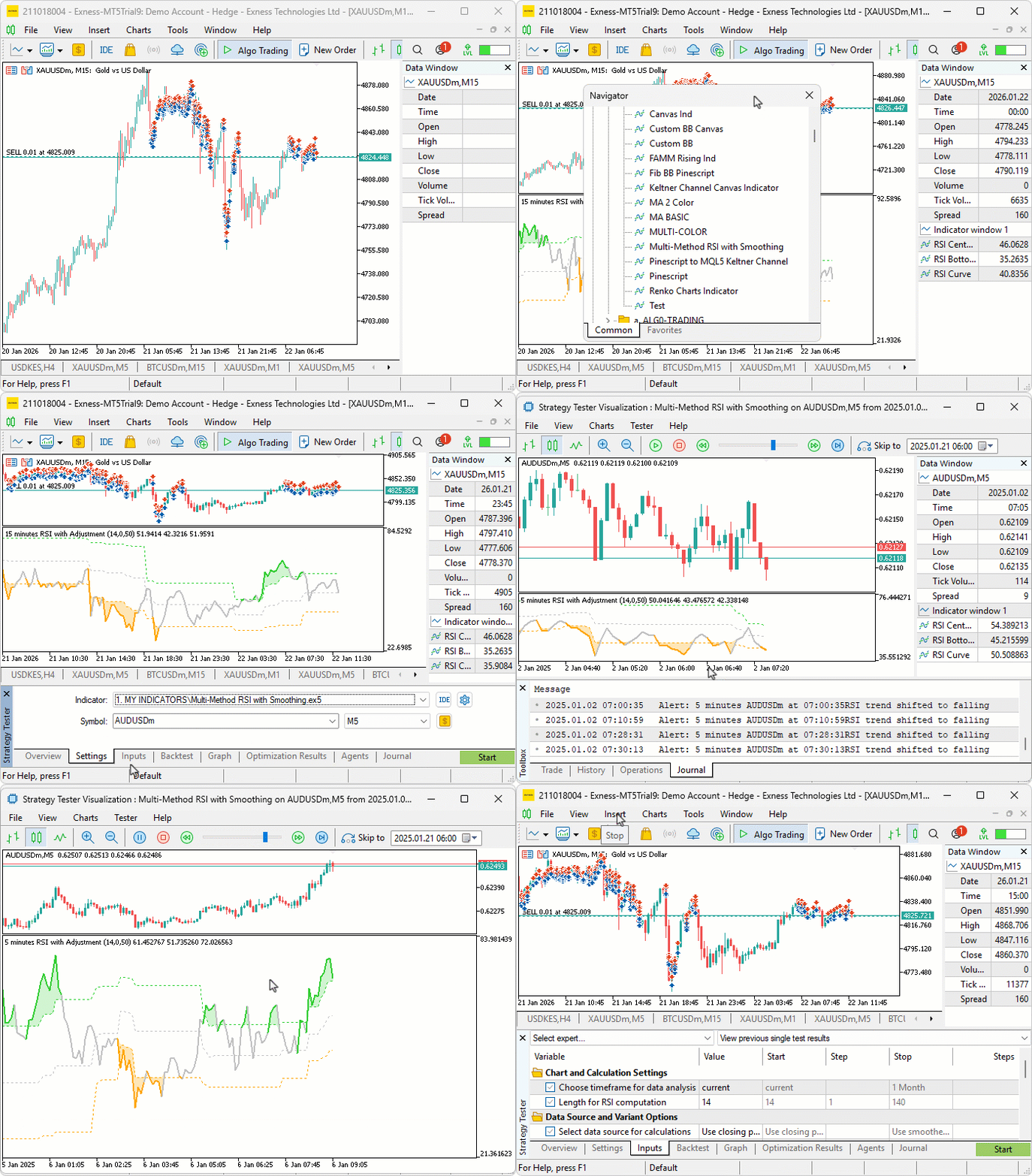
We did the testing, and below is the compiled visualization in a single Graphics Interchange Format (GIF) bitmap image format.
Conclusion
In conclusion, we’ve developed an improved version of the Relative Strength Index (RSI) indicator in MQL5 that supports multiple calculation variants, customizable data sources with smoothing approaches, and dynamic boundaries for overbought and oversold levels. We incorporated hue shifts for color-coded visuals, optional notifications for trend changes, and multi-timeframe data handling with interpolation for broader analysis. With this dynamic RSI indicator, you’re equipped to enhance your technical analysis, ready for further customization in your trading journey. Happy trading!
Warning: All rights to these materials are reserved by MetaQuotes Ltd. Copying or reprinting of these materials in whole or in part is prohibited.
This article was written by a user of the site and reflects their personal views. MetaQuotes Ltd is not responsible for the accuracy of the information presented, nor for any consequences resulting from the use of the solutions, strategies or recommendations described.

 Larry Williams Market Secrets (Part 8): Combining Volatility, Structure and Time Filters
 Introduction to MQL5 (Part 37): Mastering API and WebRequest Function in MQL5 (XI)
 MQL5 Trading Tools (Part 14): Pixel-Perfect Scrollable Text Canvas with Antialiasing and Rounded Scrollbar
 The MQL5 Standard Library Explorer (Part 6): Optimizing a generated Expert Advisor

- Free trading apps
- Over 8,000 signals for copying
- Economic news for exploring financial markets
You agree to website policy and terms of use