

MQL5 Trading Tools (Part 15): Canvas Blur Effects, Shadow Rendering, and Smooth Mouse Wheel Scrolling
 3 895
3 895
 0
0

Introduction
In our previous article (Part 14), we developed a pixel-perfect, scrollable text canvas in MetaQuotes Language 5 (MQL5) that features antialiasing for smooth rendering, a rounded scrollbar with interactive controls, and customizable backgrounds for enhanced dashboard usability. In Part 15, we advance the canvas dashboard by incorporating blur effects for fog gradients, shadow rendering for depth in headers, and smooth mouse wheel scrolling for seamless text navigation. We will cover the following topics:
By the end, you’ll have a fully functional MQL5 dashboard with visually enhanced and more interactive elements, allowing for easier customization and improved user experience—let’s dive in!
Understanding Canvas Blur and Shadows Rendering
The canvas blur effects create smooth gradients, such as fog overlays on backgrounds, by interpolating pixel colors with varying opacity to simulate depth and soften visuals without harsh edges. Shadow rendering adds realism to elements like headers through layered drawing with offset rectangles and decreasing opacity, using Gaussian-like blur via multiple passes to produce soft, diffused edges that enhance the UI's three-dimensional feel. Mouse wheel scrolling enables seamless navigation in text panels by adjusting scroll positions incrementally, with clamping to prevent overflow and integration with hover-expandable scrollbars for intuitive content exploration.
We will apply bicubic interpolation for high-quality image scaling and antialiasing in lines, implement shadow functions with parametric control for distance and blur radius, and handle wheel events to update text offsets while preserving chart interactions. In brief, these enhancements deliver a polished, responsive dashboard that combines aesthetic appeal with user-friendly controls for better trading visualization as seen below.

Implementation in MQL5
To enhance the program in MQL5, we will need to add new inputs to control the show and blur effects in the header, and also reorganize to group the inputs, since now there are many, just for clarity.
//+------------------------------------------------------------------+
//|                                       Canvas Dashboard PART3.mq5 |
//|                           Copyright 2026, Allan Munene Mutiiria. |
//|                                   https://t.me/Forex_Algo_Trader |
//+------------------------------------------------------------------+
#property copyright "Copyright 2026, Allan Munene Mutiiria."
#property link "https://t.me/Forex_Algo_Trader"
#property version "1.00"
#property strict

#include <Canvas/Canvas.mqh>

//+------------------------------------------------------------------+
//| Resources                                                        |
//+------------------------------------------------------------------+
#resource "1. Transparent MT5 bmp image.bmp" // Define background image resource

//+------------------------------------------------------------------+
//| Enumerations                                                     |
//+------------------------------------------------------------------+
enum ENUM_BACKGROUND_MODE {             // Define background mode enumeration
   NoColor          = 0,                // No color mode
   SingleColor      = 1,                // Single color mode
   GradientTwoColors = 2                // Gradient with two colors mode
};

enum ENUM_RESIZE_MODE {                 // Define resize mode enumeration
   NONE,                                // No resize mode
   BOTTOM,                              // Bottom resize mode
   RIGHT,                               // Right resize mode
   BOTTOM_RIGHT                         // Bottom-right resize mode
};

//+------------------------------------------------------------------+
//| Canvas objects                                                   |
//+------------------------------------------------------------------+
CCanvas canvasGraph;                    //--- Declare graph canvas object
CCanvas canvasStats;                    //--- Declare stats canvas object
CCanvas canvasHeader;                   //--- Declare header canvas object
CCanvas canvasText;                     //--- Declare text canvas object

//+------------------------------------------------------------------+
//| Canvas names                                                     |
//+------------------------------------------------------------------+
string canvasGraphName = "GraphCanvas"; //--- Set graph canvas name
string canvasStatsName = "StatsCanvas"; //--- Set stats canvas name
string canvasHeaderName = "HeaderCanvas"; //--- Set header canvas name
string canvasTextName = "TextCanvas";   //--- Set text canvas name

//+------------------------------------------------------------------+
//| Inputs                                                           |
//+------------------------------------------------------------------+
sinput group "=== GENERAL CANVAS SETTINGS ==="
input int CanvasX                     = 30;                             // Canvas X Position
input int CanvasY                     = 50;                             // Canvas Y Position
input int CanvasWidth                 = 400;                            // Canvas Width
input int CanvasHeight                = 300;                            // Canvas Height
input bool EnableStatsPanel           = true;                           // Enable Stats Panel
input int PanelGap                    = 10;                             // Panel Gap
input bool EnableTextPanel            = true;                           // Enable Text Panel
input int TextPanelHeight             = 200;                            // Text Panel Height
input double TextBackgroundOpacityPercent = 85.0;                       // Text Background Opacity Percent

sinput group "=== HEADER CANVAS SETTINGS ==="
input color HeaderShadowColor         = clrDodgerBlue;                  // Header Shadow Color
input double HeaderShadowOpacityPercent = 70.0;                         // Header Shadow Opacity Percent
input int HeaderShadowDistance        = 4;                              // Header Shadow Distance
input int HeaderShadowBlurRadius      = 3;                              // Header Shadow Blur Radius

sinput group "=== GRAPH PANEL SETTINGS ==="
input int graphBars                   = 50;                             // Graph Bars
input color borderColor               = clrBlack;                       // Border Color
input color borderHoverColor          = clrRed;                         // Border Hover Color
input bool UseBackground              = true;                           // Use Background
input double FogOpacity               = 0.5;                            // Fog Opacity
input bool BlendFog                   = true;                           // Blend Fog

sinput group "=== STATS PANEL SETTINGS ==="
input int StatsFontSize               = 12;                             // Stats Font Size
input color StatsLabelColor           = clrDodgerBlue;                  // Stats Label Color
input color StatsValueColor           = clrWhite;                       // Stats Value Color
input color StatsHeaderColor          = clrDodgerBlue;                  // Stats Header Color
input int StatsHeaderFontSize         = 14;                             // Stats Header Font Size
input double BorderOpacityPercentReduction = 20.0;                      // Border Opacity Percent Reduction
input double BorderDarkenPercent      = 30.0;                           // Border Darken Percent
input double StatsHeaderBgOpacityPercent = 20.0;                        // Stats Header Bg Opacity Percent
input int StatsHeaderBgRadius         = 8;                              // Stats Header Bg Radius
input ENUM_BACKGROUND_MODE StatsBackgroundMode = GradientTwoColors;     // Stats Background Mode
input color TopColor                   = clrBlack;                      // Top Color
input color BottomColor                = clrRed;                        // Bottom Color
input double BackgroundOpacity         = 0.7;                           // Background Opacity
The new organization now looks as above, where in the header canvas settings input group, we provide parameters for shadow effects: "HeaderShadowColor" to set the shadow tint, "HeaderShadowOpacityPercent" to control transparency as a percentage, "HeaderShadowDistance" for the offset from the header, and "HeaderShadowBlurRadius" to determine the softness of the blur. We have highlighted the most important changes for clarity. This now gives us the following window with organized input parameters.

With that done, the next thing we will need to do is adjust the header drawing logic since that is where we want to base our enhancements, to add multi-layer blurred shadow rendering using loops and alpha fading for a soft drop shadow effect. We will need to offset all drawings to center the header within an enlarged canvas, which will help us create a 3D-like elevation, improving aesthetics and focus on the header. Borders and elements will now be drawn relative to extra, preventing misalignment. Here is the logic we used to achieve that.
//+------------------------------------------------------------------+
//| Draw header on canvas                                            |
//+------------------------------------------------------------------+
void DrawHeaderOnCanvas() {             // Render header elements
   canvasHeader.Erase(0);               //--- Clear header canvas

   int extra = HeaderShadowBlurRadius + HeaderShadowDistance; //--- Compute extra space
   int inner_header_width = canvasHeader.Width() - 2 * extra; //--- Compute inner width

   int header_left = extra;             //--- Set header left
   int header_top = extra;              //--- Set header top
   int header_right = header_left + inner_header_width - 1; //--- Set header right
   int header_bottom = header_top + header_height - 1; //--- Set header bottom

   if (HeaderShadowBlurRadius > 0 || HeaderShadowDistance > 0) { //--- Check shadow settings
      int offset_x = HeaderShadowDistance; //--- Set X offset
      int offset_y = HeaderShadowDistance; //--- Set Y offset
      int blur = HeaderShadowBlurRadius;   //--- Set blur radius

      for(int layer = blur; layer >= 0; layer--) {     //--- Loop through layers
         double factor = (double)layer / (blur + 1.0); //--- Compute factor
         uchar alpha = (uchar)(255 * (HeaderShadowOpacityPercent / 100.0) * (1.0 - factor)); //--- Compute alpha
         uint argb_shadow = ColorToARGB(HeaderShadowColor, alpha); //--- Convert to ARGB

         int s_left = header_left + offset_x - layer;     //--- Set shadow left
         int s_top = header_top + offset_y - layer;       //--- Set shadow top
         int s_right = header_right + offset_x + layer;   //--- Set shadow right
         int s_bottom = header_bottom + offset_y + layer; //--- Set shadow bottom

         int s_width = s_right - s_left + 1;  //--- Compute shadow width
         int s_height = s_bottom - s_top + 1; //--- Compute shadow height
         int s_radius = layer;                //--- Set shadow radius

         if (s_width > 0 && s_height > 0) {   //--- Check valid dimensions
            FillRoundedRectangle(canvasHeader, s_left, s_top, s_width, s_height, s_radius, argb_shadow); //--- Fill shadow rectangle
         }
      }
   }

   color header_bg = panel_dragging ? GetHeaderDragColor() : (header_hovered ? GetHeaderHoverColor() : GetHeaderColor()); //--- Determine bg color
   uint argb_bg = ColorToARGB(header_bg, 255); //--- Convert to ARGB
   canvasHeader.FillRectangle(header_left, header_top, header_right, header_bottom, argb_bg); //--- Fill header rectangle

   uint argbBorder = ColorToARGB(GetBorderColor(), 255); //--- Convert border to ARGB
   canvasHeader.Line(header_left, header_top, header_right, header_top, argbBorder);       //--- Draw top border
   canvasHeader.Line(header_right, header_top, header_right, header_bottom, argbBorder);   //--- Draw right border
   canvasHeader.Line(header_right, header_bottom, header_left, header_bottom, argbBorder); //--- Draw bottom border
   canvasHeader.Line(header_left, header_bottom, header_left, header_top, argbBorder);     //--- Draw left border

   canvasHeader.FontSet("Arial Bold", 15);                 //--- Set font for title
   uint argbText = ColorToARGB(GetHeaderTextColor(), 255); //--- Convert text to ARGB
   canvasHeader.TextOut(header_left + 10, header_top + (header_height - 15) / 2, "Price Dashboard", argbText, TA_LEFT); //--- Draw title text

   int theme_x = header_left + inner_header_width + theme_x_offset;      //--- Compute theme X
   string theme_symbol = CharToString((uchar)91);                        //--- Set theme symbol
   color theme_color = theme_hovered ? clrYellow : GetHeaderTextColor(); //--- Determine theme color
   canvasHeader.FontSet("Wingdings", 22);                                //--- Set font for theme
   uint argb_theme = ColorToARGB(theme_color, 255);                      //--- Convert to ARGB
   canvasHeader.TextOut(theme_x, header_top + (header_height - 22) / 2, theme_symbol, argb_theme, TA_CENTER); //--- Draw theme symbol

   int min_x = header_left + inner_header_width + minimize_x_offset;      //--- Compute minimize X
   string min_symbol = panels_minimized ? CharToString((uchar)111) : CharToString((uchar)114); //--- Set minimize symbol
   color min_color = minimize_hovered ? clrYellow : GetHeaderTextColor(); //--- Determine minimize color
   canvasHeader.FontSet("Wingdings", 22);                                 //--- Set font for minimize
   uint argb_min = ColorToARGB(min_color, 255);                           //--- Convert to ARGB
   canvasHeader.TextOut(min_x, header_top + (header_height - 22) / 2, min_symbol, argb_min, TA_CENTER); //--- Draw minimize symbol

   int close_x = header_left + inner_header_width + close_x_offset;       //--- Compute close X
   string close_symbol = CharToString((uchar)114);                        //--- Set close symbol
   color close_color = close_hovered ? clrRed : GetHeaderTextColor();     //--- Determine close color
   canvasHeader.FontSet("Webdings", 22);                                  //--- Set font for close
   uint argb_close = ColorToARGB(close_color, 255);                       //--- Convert to ARGB
   canvasHeader.TextOut(close_x, header_top + (header_height - 22) / 2, close_symbol, argb_close, TA_CENTER); //--- Draw close symbol

   canvasHeader.Update();                                                 //--- Update header canvas
}
We improve the "DrawHeaderOnCanvas" function to render the dashboard header with visual enhancements. First, we clear the canvas using "canvasHeader.Erase" to start with a blank slate. We calculate extra space as the sum of "HeaderShadowBlurRadius" and "HeaderShadowDistance", then determine the inner header width by subtracting twice the extra space from the canvas width. Positions for the header rectangle are set: left and top at extra, right as left plus inner width minus 1, and bottom as top plus "header_height" minus 1.
If either blur radius or shadow distance is positive, we create a shadow effect by looping from the blur radius down to 0. For each layer, we compute a factor as layer over blur plus 1, then an alpha value as 255 times shadow opacity percentage times 1 minus factor. We convert "HeaderShadowColor" to ARGB with this alpha for the shadow color. Shadow rectangle positions are adjusted by offset and layer for spread: left as header left plus offset minus layer, and similarly for top, right, and bottom. We compute the shadow width and height, set the radius to the layer, and if the dimensions are positive, fill a rounded rectangle with "FillRoundedRectangle" using the shadow color.
The header background color is determined conditionally: dragging uses drag color, hovering uses hover color, otherwise the standard header color. We convert it to ARGB at full opacity and fill the header rectangle. Borders are drawn as lines around the header using the border color converted to ARGB. For text, we set the font to "Arial Bold" at size 15, convert header text color to ARGB, and output "Price Dashboard" left-aligned with padding.
Icons follow: for theme at computed X, we use Wingdings font at 22, set symbol to character 91, color yellow if hovered else header text color, and draw centered. Minimize icon at its X uses Wingdings, symbol 111 if minimized else 114, colored yellow on hover, drawn centered. Close icon at its X uses Webdings, symbol 114, red on hover, drawn centered. Finally, we call "canvasHeader.Update" to refresh the display, just like we did in the previous parts. The next thing we will do is change the mouse hover over the header logic to account for the shadow, by expanding hit detection to include the shadow area around the header, ensuring accurate hover/clicks on the enlarged canvas, and also preventing false negatives near edges due to shadow padding, improving usability.
//+------------------------------------------------------------------+
//| Check mouse over header                                          |
//+------------------------------------------------------------------+
bool IsMouseOverHeader(int mouse_x, int mouse_y) {            // Detect header hover
   int extra = HeaderShadowBlurRadius + HeaderShadowDistance; //--- Compute extra space
   int inner_header_width = currentWidth + (EnableStatsPanel && !panels_minimized ? PanelGap + currentWidth / 2 : 0); //--- Compute inner width
   int header_canvas_x = currentCanvasX - extra;              //--- Set canvas X
   int header_canvas_y = currentCanvasY - extra;              //--- Set canvas Y
   int header_canvas_w = inner_header_width + 2 * extra;      //--- Set canvas width
   int header_canvas_h = header_height + 2 * extra;           //--- Set canvas height

   if (mouse_x < header_canvas_x || mouse_x > header_canvas_x + header_canvas_w || mouse_y < header_canvas_y || mouse_y > header_canvas_y + header_canvas_h) return false; //--- Return false if outside

   int theme_left = header_canvas_x + extra + inner_header_width + theme_x_offset - button_size / 2; //--- Set theme left
   int theme_right = theme_left + button_size;                //--- Set theme right
   int theme_top = header_canvas_y + extra;                   //--- Set theme top
   int theme_bottom = theme_top + header_height;              //--- Set theme bottom
   if (mouse_x >= theme_left && mouse_x <= theme_right && mouse_y >= theme_top && mouse_y <= theme_bottom) return false; //--- Return false if over theme

   int min_left = header_canvas_x + extra + inner_header_width + minimize_x_offset - button_size / 2; //--- Set minimize left
   int min_right = min_left + button_size;                    //--- Set minimize right
   int min_top = header_canvas_y + extra;                     //--- Set minimize top
   int min_bottom = min_top + header_height;                  //--- Set minimize bottom
   if (mouse_x >= min_left && mouse_x <= min_right && mouse_y >= min_top && mouse_y <= min_bottom) return false; //--- Return false if over minimize

   int close_left = header_canvas_x + extra + inner_header_width + close_x_offset - button_size / 2; //--- Set close left
   int close_right = close_left + button_size;                //--- Set close right
   int close_top = header_canvas_y + extra;                   //--- Set close top
   int close_bottom = close_top + header_height;              //--- Set close bottom
   if (mouse_x >= close_left && mouse_x <= close_right && mouse_y >= close_top && mouse_y <= close_bottom) return false; //--- Return false if over close

   return true;                                               //--- Return true if over header
}
Here, we update the "IsMouseOverHeader" function to accurately detect mouse hover over the header area, now accounting for the extra padding introduced by shadow effects. To achieve this, we compute "extra" as the sum of "HeaderShadowBlurRadius" and "HeaderShadowDistance", then adjust the header canvas coordinates: "header_canvas_x" as "currentCanvasX" minus "extra", "header_canvas_y" as "currentCanvasY" minus "extra", "header_canvas_w" as "inner_header_width" plus twice "extra", and "header_canvas_h" as "header_height" plus twice "extra".
We check if the mouse position falls outside these expanded canvas bounds and return false if so. For button areas, we calculate positions like "theme_left" using "header_canvas_x" plus "extra" plus "inner_header_width" plus "theme_x_offset" minus half "button_size", and similarly for right, top, and bottom, returning false if the mouse is over the theme, minimize, or close buttons to exclude them from general header hover. We will now need to adjust the header resize to include the shadow extra on the minimize toggle to ensure the shadow renders correctly when panels are shown/hidden, maintaining visual consistency.
//+------------------------------------------------------------------+
//| Toggle minimize                                                  |
//+------------------------------------------------------------------+
void ToggleMinimize() {                 // Switch minimize state
   panels_minimized = !panels_minimized; //--- Invert minimized state
   if (panels_minimized) {              //--- Check minimized
      canvasGraph.Destroy();            //--- Destroy graph canvas
      graphCreated = false;             //--- Reset graph flag
      if (EnableStatsPanel) {           //--- Check stats enabled
         canvasStats.Destroy();         //--- Destroy stats canvas
         statsCreated = false;          //--- Reset stats flag
      }
      if (EnableTextPanel) {            //--- Check text enabled
         canvasText.Destroy();          //--- Destroy text canvas
         textCreated = false;           //--- Reset text flag
      }
   } else {                             //--- Handle maximized
      if (!canvasGraph.CreateBitmapLabel(0, 0, canvasGraphName, currentCanvasX, currentCanvasY + header_height + gap_y, currentWidth, currentHeight, COLOR_FORMAT_ARGB_NORMALIZE)) { //--- Recreate graph
         Print("Failed to recreate Graph Canvas"); //--- Log failure
      }
      graphCreated = true;              //--- Set graph flag
      UpdateGraphOnCanvas();            //--- Update graph
      if (EnableStatsPanel) {           //--- Check stats enabled
         int statsX = currentCanvasX + currentWidth + PanelGap; //--- Compute stats X
         if (!canvasStats.CreateBitmapLabel(0, 0, canvasStatsName, statsX, currentCanvasY + header_height + gap_y, currentWidth / 2, currentHeight, COLOR_FORMAT_ARGB_NORMALIZE)) { //--- Recreate stats
            Print("Failed to recreate Stats Canvas"); //--- Log failure
         }
         statsCreated = true;           //--- Set stats flag
         UpdateStatsOnCanvas();         //--- Update stats
      }
      if (EnableTextPanel) {            //--- Check text enabled
         int textY = currentCanvasY + header_height + gap_y + currentHeight + PanelGap; //--- Compute text Y
         int inner_header_width = currentWidth + (EnableStatsPanel ? PanelGap + currentWidth / 2 : 0); //--- Compute width
         int text_width = inner_header_width; //--- Set text width
         int text_height = TextPanelHeight;   //--- Set text height
         if (!canvasText.CreateBitmapLabel(0, 0, canvasTextName, currentCanvasX, textY, text_width, text_height, COLOR_FORMAT_ARGB_NORMALIZE)) { //--- Recreate text
            Print("Failed to recreate Text Canvas"); //--- Log failure
         }
         textCreated = true;            //--- Set text flag
         UpdateTextOnCanvas();          //--- Update text
      }
   }

   int extra = HeaderShadowBlurRadius + HeaderShadowDistance; //--- Compute extra space
   int inner_header_width = currentWidth + (EnableStatsPanel && !panels_minimized ? PanelGap + currentWidth / 2 : 0); //--- Compute inner width
   int header_canvas_width = inner_header_width + 2 * extra; //--- Compute header width
   canvasHeader.Resize(header_canvas_width, header_height + 2 * extra); //--- Resize header
   ObjectSetInteger(0, canvasHeaderName, OBJPROP_XSIZE, header_canvas_width); //--- Set X size
   ObjectSetInteger(0, canvasHeaderName, OBJPROP_YSIZE, header_height + 2 * extra); //--- Set Y size
   DrawHeaderOnCanvas();                //--- Redraw header
   canvasHeader.Update();               //--- Update header
   ChartRedraw();                       //--- Redraw chart
}
We update the "ToggleMinimize" function to handle switching between minimized and maximized states for the dashboard panels. In this function, we invert "panels_minimized" to toggle the state. If minimizing, we destroy the graph canvas with "canvasGraph.Destroy" and reset "graphCreated" to false; if stats are enabled, we destroy "canvasStats" and reset "statsCreated"; if text is enabled, we destroy "canvasText" and reset "textCreated".
When maximizing, we recreate the graph canvas using "canvasGraph.CreateBitmapLabel" at the current position and size, set "graphCreated" to true, and update it with "UpdateGraphOnCanvas". For stats if enabled, we calculate the X position, recreate "canvasStats", set "statsCreated" to true, and update with "UpdateStatsOnCanvas". For text if enabled, we compute the Y position, determine width as "inner_header_width" including stats if present, recreate "canvasText" with that width and "TextPanelHeight", set "textCreated" to true, and update with "UpdateTextOnCanvas".
We then adjust the header size: compute "extra" as blur radius plus shadow distance, "inner_header_width" based on current width and stats if not minimized, then "header_canvas_width" as inner plus twice extra. We resize "canvasHeader" to this width and "header_height" plus twice extra, set object properties for X and Y sizes, redraw the header with "DrawHeaderOnCanvas", update it, and redraw the chart.
Compared to the previous version, which resized the header directly to a new width without shadow extra and height padding, this revision incorporates "extra" for shadows in width and height calculations, ensuring the header canvas accommodates blurred offsets without clipping, while maintaining the same recreation logic for panels. Next, during initialization, we will need to expand the header canvas to include the space for shadow (extra on all sides), offsetting its position by it. This will help prevent shadow clipping and ensure it renders outside the header bounds.
//+------------------------------------------------------------------+
//| Initialize expert                                                |
//+------------------------------------------------------------------+
int OnInit() {                          // Initialize expert advisor

   //--- existing logic

   int extra = HeaderShadowBlurRadius + HeaderShadowDistance; //--- Compute extra space
   int inner_header_width = currentWidth + (EnableStatsPanel ? PanelGap + currentWidth / 2 : 0); //--- Compute inner width
   int header_canvas_width = inner_header_width + 2 * extra; //--- Compute header width
   int header_canvas_height = header_height + 2 * extra; //--- Compute header height

   if (!canvasHeader.CreateBitmapLabel(0, 0, canvasHeaderName, currentCanvasX - extra, currentCanvasY - extra, header_canvas_width, header_canvas_height, COLOR_FORMAT_ARGB_NORMALIZE)) { //--- Create header canvas
      Print("Failed to create Header Canvas"); //--- Log creation failure
      return(INIT_FAILED);              //--- Return initialization failure
   }

   //--- existing logic

   return(INIT_SUCCEEDED);              //--- Return initialization success
}
Here, we enhance the OnInit event handler to accommodate shadow effects in the header canvas during initialization. After setting current dimensions and positions, we compute "extra" as the sum of "HeaderShadowBlurRadius" and "HeaderShadowDistance" to provide padding for shadows. We calculate "inner_header_width" as "currentWidth" plus stats panel additions if enabled, then set "header_canvas_width" to inner width plus twice extra, and "header_canvas_height" to "header_height" plus twice extra for full shadow containment. We create the header canvas with "canvasHeader.CreateBitmapLabel" at offset positions (current X and Y minus extra), using the expanded width and height, and normalized ARGB color format. If creation fails, we print an error and return INIT_FAILED; otherwise, we proceed with existing logic and return INIT_SUCCEEDED on success. Upon compilation, we get the following outcome.

With the shadow done, the next thing we will need to do is update the chart event so that when we are scrolling using the mouse wheel in the text canvas, it does not interfere with the chart scale. To achieve that, we will delete the logic that changed the chart scale initially.
//+------------------------------------------------------------------+
//| Handle chart events                                              |
//+------------------------------------------------------------------+
void OnChartEvent(const int id, const long &lparam, const double &dparam, const string &sparam) { // Process chart events

   //--- existing logic

   } else if (id == CHARTEVENT_MOUSE_WHEEL) { //--- Check mouse wheel
      int flg_keys = (int)(lparam >> 32);     //--- Get keys
      int mx = (int)(short)lparam;            //--- Get X
      int my = (int)(short)(lparam >> 16);    //--- Get Y
      int delta = (int)dparam;                //--- Get delta

      if (EnableTextPanel && !panels_minimized && text_scroll_visible) {                  //--- Check text wheel
         int text_canvas_x = (int)ObjectGetInteger(0, canvasTextName, OBJPROP_XDISTANCE); //--- Get text X
         int text_canvas_y = (int)ObjectGetInteger(0, canvasTextName, OBJPROP_YDISTANCE); //--- Get text Y
         int text_canvas_w = (int)ObjectGetInteger(0, canvasTextName, OBJPROP_XSIZE);     //--- Get width
         int text_canvas_h = (int)ObjectGetInteger(0, canvasTextName, OBJPROP_YSIZE);     //--- Get height
         bool is_over_text_body = (mx >= text_canvas_x && mx <= text_canvas_x + text_canvas_w - text_track_width &&
                                   my >= text_canvas_y && my <= text_canvas_y + text_canvas_h); //--- Check over body
         if (is_over_text_body) {            //--- Handle over body
            int scroll_step = 20;            //--- Set step
            text_scroll_pos += (delta > 0 ? -scroll_step : scroll_step);                  //--- Adjust pos
            text_scroll_pos = MathMax(0, MathMin(text_scroll_pos, text_max_scroll));      //--- Clamp pos
            UpdateTextOnCanvas();            //--- Update text

            // REMOVED: Scale revert code (this was causing the chart scale interference)
            // No need to change CHART_SCALE; wheel now only scrolls text content.

            int current_scale = (int)ChartGetInteger(0, CHART_SCALE); //--- Get scale
            int adjust = (delta > 0 ? 1 : -1);  // Swap to (delta > 0 ? -1 : 1) if wheel direction is opposite
            int revert_scale = current_scale + adjust; //--- Calculate revert
            revert_scale = MathMax(0, MathMin(5, revert_scale)); //--- Clamp scale
            ChartSetInteger(0, CHART_SCALE, revert_scale); //--- Set scale

            ChartRedraw();                  //--- Redraw chart
         }
      }
   }
}
We just removed the logic causing the chart scale interference, and that was all. We have highlighted the specific logic. The final OnChartEvent event handler logic is as follows.
//+------------------------------------------------------------------+ //| Handle chart events | //+------------------------------------------------------------------+ void OnChartEvent(const int id, const long &lparam, const double &dparam, const string &sparam) { // Process chart events if (id == CHARTEVENT_CHART_CHANGE) { //--- Check chart change DrawHeaderOnCanvas(); //--- Redraw header UpdateGraphOnCanvas(); //--- Update graph if (EnableStatsPanel) UpdateStatsOnCanvas(); //--- Update stats if (EnableTextPanel) UpdateTextOnCanvas(); //--- Update text ChartRedraw(); //--- Redraw chart } else if (id == CHARTEVENT_MOUSE_MOVE) { //--- Check mouse move int mouse_x = (int)lparam; //--- Get mouse X int mouse_y = (int)dparam; //--- Get mouse Y int mouse_state = (int)sparam; //--- Get mouse state bool prev_header_hovered = header_hovered; //--- Store prev header hover bool prev_min_hovered = minimize_hovered; //--- Store prev minimize hover bool prev_close_hovered = close_hovered; //--- Store prev close hover bool prev_theme_hovered = theme_hovered; //--- Store prev theme hover bool prev_resize_hovered = resize_hovered; //--- Store prev resize hover header_hovered = IsMouseOverHeader(mouse_x, mouse_y); //--- Check header hover theme_hovered = IsMouseOverTheme(mouse_x, mouse_y); //--- Check theme hover minimize_hovered = IsMouseOverMinimize(mouse_x, mouse_y); //--- Check minimize hover close_hovered = IsMouseOverClose(mouse_x, mouse_y); //--- Check close hover resize_hovered = IsMouseOverResize(mouse_x, mouse_y, hover_mode); //--- Check resize hover if (resize_hovered || resizing) { //--- Check resize state hover_mouse_local_x = mouse_x - currentCanvasX; //--- Set local X hover_mouse_local_y = mouse_y - (currentCanvasY + header_height + gap_y); //--- Set local Y } bool hover_changed = (prev_header_hovered != header_hovered || prev_min_hovered != minimize_hovered || prev_close_hovered != close_hovered || prev_theme_hovered != theme_hovered || prev_resize_hovered != resize_hovered); //--- Check hover change if (hover_changed) { //--- Handle change DrawHeaderOnCanvas(); //--- Redraw header UpdateGraphOnCanvas(); //--- Update graph ChartRedraw(); //--- Redraw chart } else if ((resize_hovered || resizing) && (mouse_x != last_mouse_x || mouse_y != last_mouse_y)) { //--- Check position change UpdateGraphOnCanvas(); //--- Update graph ChartRedraw(); //--- Redraw chart } string header_tooltip = ""; //--- Initialize tooltip if (theme_hovered) header_tooltip = "Toggle Theme (Dark/Light)"; //--- Set theme tooltip else if (minimize_hovered) header_tooltip = panels_minimized ? "Maximize Panels" : "Minimize Panels"; //--- Set minimize tooltip else if (close_hovered) header_tooltip = "Close Dashboard"; //--- Set close tooltip ObjectSetString(0, canvasHeaderName, OBJPROP_TOOLTIP, header_tooltip); //--- Apply header tooltip string resize_tooltip = ""; //--- Initialize resize tooltip if (resize_hovered || resizing) { //--- Check resize state ENUM_RESIZE_MODE active_mode = resizing ? resize_mode : hover_mode; //--- Get mode switch (active_mode) { //--- Switch mode case BOTTOM: //--- Handle bottom resize_tooltip = "Resize Bottom"; //--- Set tooltip break; //--- Exit case case RIGHT: //--- Handle right resize_tooltip = "Resize Right"; //--- Set tooltip break; //--- Exit case case BOTTOM_RIGHT: //--- Handle bottom-right resize_tooltip = "Resize Bottom-Right"; //--- Set tooltip break; //--- Exit case default: //--- Handle default break; //--- Exit case } } ObjectSetString(0, canvasGraphName, OBJPROP_TOOLTIP, resize_tooltip); //--- Apply graph tooltip if (EnableTextPanel && !panels_minimized) { //--- Check text enabled int text_canvas_x = (int)ObjectGetInteger(0, canvasTextName, OBJPROP_XDISTANCE); //--- Get text X int text_canvas_y = (int)ObjectGetInteger(0, canvasTextName, OBJPROP_YDISTANCE); //--- Get text Y int text_canvas_w = (int)ObjectGetInteger(0, canvasTextName, OBJPROP_XSIZE); //--- Get text width int text_canvas_h = (int)ObjectGetInteger(0, canvasTextName, OBJPROP_YSIZE); //--- Get text height bool is_over_text = (mouse_x >= text_canvas_x && mouse_x <= text_canvas_x + text_canvas_w && mouse_y >= text_canvas_y && mouse_y <= text_canvas_y + text_canvas_h); //--- Check over text bool prev_scroll_hovered = text_scroll_area_hovered; //--- Store prev scroll hover text_scroll_area_hovered = false; //--- Reset area hover if (is_over_text) { //--- Handle over text int local_x = mouse_x - text_canvas_x; //--- Compute local X int local_y = mouse_y - text_canvas_y; //--- Compute local Y if (local_x >= text_canvas_w - text_track_width) { //--- Check in scroll area text_scroll_area_hovered = true; //--- Set area hover } bool prev_up = text_scroll_up_hovered; //--- Store prev up bool prev_down = text_scroll_down_hovered; //--- Store prev down bool prev_slider = text_scroll_slider_hovered; //--- Store prev slider TextUpdateHoverEffects(local_x, local_y); //--- Update hovers if (prev_scroll_hovered != text_scroll_area_hovered || prev_up != text_scroll_up_hovered || prev_down != text_scroll_down_hovered || prev_slider != text_scroll_slider_hovered) { //--- Check change UpdateTextOnCanvas(); //--- Update text ChartRedraw(); //--- Redraw chart } text_mouse_in_body = (local_x < text_canvas_w - text_track_width); //--- Set body mouse } else { //--- Handle not over text bool need_redraw = prev_scroll_hovered || text_scroll_up_hovered || text_scroll_down_hovered || text_scroll_slider_hovered; //--- Check need redraw if (need_redraw) { //--- Handle redraw text_scroll_area_hovered = false; //--- Reset area text_scroll_up_hovered = false; //--- Reset up text_scroll_down_hovered = false; //--- Reset down text_scroll_slider_hovered = false; //--- Reset slider UpdateTextOnCanvas(); //--- Update text ChartRedraw(); //--- Redraw chart } text_mouse_in_body = false; //--- Reset body mouse } if (text_mouse_in_body != prev_text_mouse_in_body) { //--- Check body change ChartSetInteger(0, CHART_MOUSE_SCROLL, !text_mouse_in_body); //--- Set mouse scroll prev_text_mouse_in_body = text_mouse_in_body; //--- Update prev } } if (mouse_state == 1 && prev_mouse_state == 0) { //--- Check mouse down if (header_hovered) { //--- Handle header click panel_dragging = true; //--- Set dragging panel_drag_x = mouse_x; //--- Set drag X panel_drag_y = mouse_y; //--- Set drag Y panel_start_x = currentCanvasX; //--- Set start X panel_start_y = currentCanvasY; //--- Set start Y ChartSetInteger(0, CHART_MOUSE_SCROLL, false); //--- Disable scroll DrawHeaderOnCanvas(); //--- Redraw header ChartRedraw(); //--- Redraw chart } else if (theme_hovered) { //--- Handle theme click ToggleTheme(); //--- Toggle theme } else if (minimize_hovered) { //--- Handle minimize click ToggleMinimize(); //--- Toggle minimize } else if (close_hovered) { //--- Handle close click CloseDashboard(); //--- Close dashboard } else { //--- Handle other clicks ENUM_RESIZE_MODE temp_mode = NONE; //--- Set temp mode if (!panel_dragging && !resizing && IsMouseOverResize(mouse_x, mouse_y, temp_mode)) { //--- Check resize start resizing = true; //--- Set resizing resize_mode = temp_mode; //--- Set mode resize_start_x = mouse_x; //--- Set start X resize_start_y = mouse_y; //--- Set start Y start_width = currentWidth; //--- Set start width start_height = currentHeight; //--- Set start height ChartSetInteger(0, CHART_MOUSE_SCROLL, false); //--- Disable scroll UpdateGraphOnCanvas(); //--- Update graph ChartRedraw(); //--- Redraw chart } } if (EnableTextPanel && !panels_minimized && text_scroll_visible && text_scroll_area_hovered) { //--- Check text click int text_canvas_x = (int)ObjectGetInteger(0, canvasTextName, OBJPROP_XDISTANCE); //--- Get text X int text_canvas_y = (int)ObjectGetInteger(0, canvasTextName, OBJPROP_YDISTANCE); //--- Get text Y int local_x = mouse_x - text_canvas_x; //--- Compute local X int local_y = mouse_y - text_canvas_y; //--- Compute local Y int scrollbar_x = canvasText.Width() - text_track_width; //--- Set scrollbar X int scrollbar_y = 0; //--- Set scrollbar Y int scrollbar_height = canvasText.Height(); //--- Set height int scroll_area_y = scrollbar_y + text_button_size; //--- Set area Y int scroll_area_height = scrollbar_height - 2 * text_button_size; //--- Compute area height int slider_y = scroll_area_y + (int)(((double)text_scroll_pos / text_max_scroll) * (scroll_area_height - text_slider_height)); //--- Compute slider Y if (local_x >= scrollbar_x && local_x <= scrollbar_x + text_track_width - 1) { //--- Check in scrollbar if (local_y >= scrollbar_y && local_y <= scrollbar_y + text_button_size - 1) { //--- Check up button TextScrollUp(); //--- Scroll up } else if (local_y >= scrollbar_y + scrollbar_height - text_button_size && local_y <= scrollbar_y + scrollbar_height - 1) { //--- Check down button TextScrollDown(); //--- Scroll down } else if (local_y >= scroll_area_y && local_y <= scroll_area_y + scroll_area_height - 1) { //--- Check slider area if (local_y >= slider_y && local_y <= slider_y + text_slider_height - 1) { //--- Check on slider text_movingStateSlider = true; //--- Set moving state text_mlbDownY_Slider = local_y; //--- Set down Y text_mlbDown_YD_Slider = slider_y; //--- Set down YD ChartSetInteger(0, CHART_MOUSE_SCROLL, false); //--- Disable scroll } else { //--- Handle track click int new_slider_y = local_y - text_slider_height / 2; //--- Compute new Y new_slider_y = MathMax(scroll_area_y, MathMin(new_slider_y, scroll_area_y + scroll_area_height - text_slider_height)); //--- Clamp Y double ratio = (double)(new_slider_y - scroll_area_y) / (scroll_area_height - text_slider_height); //--- Compute ratio text_scroll_pos = (int)MathRound(ratio * text_max_scroll); //--- Set scroll pos } UpdateTextOnCanvas(); //--- Update text ChartRedraw(); //--- Redraw chart } } } } else if (panel_dragging && mouse_state == 1) { //--- Check dragging int dx = mouse_x - panel_drag_x; //--- Compute delta X int dy = mouse_y - panel_drag_y; //--- Compute delta Y int new_x = panel_start_x + dx; //--- Compute new X int new_y = panel_start_y + dy; //--- Compute new Y int chart_w = (int)ChartGetInteger(0, CHART_WIDTH_IN_PIXELS); //--- Get chart width int chart_h = (int)ChartGetInteger(0, CHART_HEIGHT_IN_PIXELS); //--- Get chart height int full_w = currentWidth + (EnableStatsPanel && !panels_minimized ? PanelGap + currentWidth / 2 : 0); //--- Compute full width int full_h = header_height + gap_y + (panels_minimized ? 0 : currentHeight) + (EnableTextPanel && !panels_minimized ? PanelGap + TextPanelHeight : 0); //--- Compute full height new_x = MathMax(0, MathMin(chart_w - full_w, new_x)); //--- Clamp new X new_y = MathMax(0, MathMin(chart_h - full_h, new_y)); //--- Clamp new Y currentCanvasX = new_x; //--- Update canvas X currentCanvasY = new_y; //--- Update canvas Y int extra = HeaderShadowBlurRadius + HeaderShadowDistance; //--- Compute extra ObjectSetInteger(0, canvasHeaderName, OBJPROP_XDISTANCE, new_x - extra); //--- Set header X ObjectSetInteger(0, canvasHeaderName, OBJPROP_YDISTANCE, new_y - extra); //--- Set header Y if (!panels_minimized) { //--- Check not minimized ObjectSetInteger(0, canvasGraphName, OBJPROP_XDISTANCE, new_x); //--- Set graph X ObjectSetInteger(0, canvasGraphName, OBJPROP_YDISTANCE, new_y + header_height + gap_y); //--- Set graph Y if (EnableStatsPanel) { //--- Check stats enabled int stats_x = new_x + currentWidth + PanelGap; //--- Compute stats X ObjectSetInteger(0, canvasStatsName, OBJPROP_XDISTANCE, stats_x); //--- Set stats X ObjectSetInteger(0, canvasStatsName, OBJPROP_YDISTANCE, new_y + header_height + gap_y); //--- Set stats Y } if (EnableTextPanel) { //--- Check text enabled int textY = new_y + header_height + gap_y + currentHeight + PanelGap; //--- Compute text Y ObjectSetInteger(0, canvasTextName, OBJPROP_XDISTANCE, new_x); //--- Set text X ObjectSetInteger(0, canvasTextName, OBJPROP_YDISTANCE, textY); //--- Set text Y } } ChartRedraw(); //--- Redraw chart } else if (resizing && mouse_state == 1) { //--- Check resizing int dx = mouse_x - resize_start_x; //--- Compute delta X int dy = mouse_y - resize_start_y; //--- Compute delta Y int new_width = currentWidth; //--- Set new width int new_height = currentHeight; //--- Set new height if (resize_mode == RIGHT || resize_mode == BOTTOM_RIGHT) { //--- Check right modes new_width = MathMax(min_width, start_width + dx); //--- Adjust width } if (resize_mode == BOTTOM || resize_mode == BOTTOM_RIGHT) { //--- Check bottom modes new_height = MathMax(min_height, start_height + dy); //--- Adjust height } if (new_width != currentWidth || new_height != currentHeight) { //--- Check dimension change int chart_w = (int)ChartGetInteger(0, CHART_WIDTH_IN_PIXELS); //--- Get chart width int chart_h = (int)ChartGetInteger(0, CHART_HEIGHT_IN_PIXELS); //--- Get chart height int avail_w = chart_w - currentCanvasX; //--- Compute available width int avail_h = chart_h - (currentCanvasY + header_height + gap_y); //--- Compute available height new_height = MathMin(new_height, avail_h - (EnableTextPanel ? PanelGap + TextPanelHeight : 0)); //--- Clamp height if (EnableStatsPanel) { //--- Check stats enabled double max_w_d = (avail_w - PanelGap) / 1.5; //--- Compute max width double int max_w = (int)MathFloor(max_w_d); //--- Floor max width new_width = MathMin(new_width, max_w); //--- Clamp width } else { //--- Handle no stats new_width = MathMin(new_width, avail_w); //--- Clamp width } currentWidth = new_width; //--- Update width currentHeight = new_height; //--- Update height if (UseBackground && ArraySize(original_bg_pixels) > 0) { //--- Check background ArrayCopy(bg_pixels_graph, original_bg_pixels); //--- Copy graph pixels ScaleImage(bg_pixels_graph, (int)orig_w, (int)orig_h, currentWidth, currentHeight); //--- Scale graph if (EnableStatsPanel) { //--- Check stats ArrayCopy(bg_pixels_stats, original_bg_pixels); //--- Copy stats pixels ScaleImage(bg_pixels_stats, (int)orig_w, (int)orig_h, currentWidth / 2, currentHeight); //--- Scale stats } } canvasGraph.Resize(currentWidth, currentHeight); //--- Resize graph ObjectSetInteger(0, canvasGraphName, OBJPROP_XSIZE, currentWidth); //--- Set graph X size ObjectSetInteger(0, canvasGraphName, OBJPROP_YSIZE, currentHeight); //--- Set graph Y size if (EnableStatsPanel) { //--- Check stats int stats_width = currentWidth / 2; //--- Compute stats width canvasStats.Resize(stats_width, currentHeight); //--- Resize stats ObjectSetInteger(0, canvasStatsName, OBJPROP_XSIZE, stats_width); //--- Set stats X size ObjectSetInteger(0, canvasStatsName, OBJPROP_YSIZE, currentHeight); //--- Set stats Y size int stats_x = currentCanvasX + currentWidth + PanelGap; //--- Compute stats X ObjectSetInteger(0, canvasStatsName, OBJPROP_XDISTANCE, stats_x); //--- Set stats X distance } int extra = HeaderShadowBlurRadius + HeaderShadowDistance; //--- Compute extra int inner_header_width = currentWidth + (EnableStatsPanel ? PanelGap + currentWidth / 2 : 0); //--- Compute inner width int header_canvas_width = inner_header_width + 2 * extra; //--- Compute header width canvasHeader.Resize(header_canvas_width, header_height + 2 * extra); //--- Resize header ObjectSetInteger(0, canvasHeaderName, OBJPROP_XSIZE, header_canvas_width); //--- Set header X size ObjectSetInteger(0, canvasHeaderName, OBJPROP_YSIZE, header_height + 2 * extra); //--- Set header Y size if (EnableTextPanel) { //--- Check text int text_width = inner_header_width; //--- Set text width canvasText.Resize(text_width, TextPanelHeight); //--- Resize text ObjectSetInteger(0, canvasTextName, OBJPROP_XSIZE, text_width); //--- Set text X size ObjectSetInteger(0, canvasTextName, OBJPROP_YSIZE, TextPanelHeight); //--- Set text Y size int textY = currentCanvasY + header_height + gap_y + currentHeight + PanelGap; //--- Compute text Y ObjectSetInteger(0, canvasTextName, OBJPROP_YDISTANCE, textY); //--- Set text Y distance } DrawHeaderOnCanvas(); //--- Redraw header UpdateGraphOnCanvas(); //--- Update graph if (EnableStatsPanel) UpdateStatsOnCanvas(); //--- Update stats if (EnableTextPanel) UpdateTextOnCanvas(); //--- Update text ChartRedraw(); //--- Redraw chart } } else if (text_movingStateSlider && mouse_state == 1) { //--- Check slider moving int text_canvas_y = (int)ObjectGetInteger(0, canvasTextName, OBJPROP_YDISTANCE); //--- Get text Y int local_y = mouse_y - text_canvas_y; //--- Compute local Y int delta_y = local_y - text_mlbDownY_Slider; //--- Compute delta Y int new_slider_y = text_mlbDown_YD_Slider + delta_y; //--- Compute new Y int scrollbar_y = 0; //--- Set scrollbar Y int scrollbar_height = canvasText.Height(); //--- Set height int slider_min_y = scrollbar_y + text_button_size; //--- Set min Y int slider_max_y = scrollbar_y + scrollbar_height - text_button_size - text_slider_height; //--- Set max Y new_slider_y = MathMax(slider_min_y, MathMin(new_slider_y, slider_max_y)); //--- Clamp Y double scroll_ratio = (double)(new_slider_y - slider_min_y) / (slider_max_y - slider_min_y); //--- Compute ratio int new_scroll_pos = (int)MathRound(scroll_ratio * text_max_scroll); //--- Compute new pos if (new_scroll_pos != text_scroll_pos) { //--- Check change text_scroll_pos = new_scroll_pos; //--- Update pos UpdateTextOnCanvas(); //--- Update text ChartRedraw(); //--- Redraw chart } } else if (mouse_state == 0 && prev_mouse_state == 1) { //--- Check mouse up if (panel_dragging) { //--- Handle drag end panel_dragging = false; //--- Reset dragging ChartSetInteger(0, CHART_MOUSE_SCROLL, true); //--- Enable scroll DrawHeaderOnCanvas(); //--- Redraw header ChartRedraw(); //--- Redraw chart } if (resizing) { //--- Handle resize end resizing = false; //--- Reset resizing ChartSetInteger(0, CHART_MOUSE_SCROLL, true); //--- Enable scroll UpdateGraphOnCanvas(); //--- Update graph ChartRedraw(); //--- Redraw chart } if (text_movingStateSlider) { //--- Handle slider end text_movingStateSlider = false; //--- Reset moving ChartSetInteger(0, CHART_MOUSE_SCROLL, true); //--- Enable scroll UpdateTextOnCanvas(); //--- Update text ChartRedraw(); //--- Redraw chart } } last_mouse_x = mouse_x; //--- Update last X last_mouse_y = mouse_y; //--- Update last Y prev_mouse_state = mouse_state; //--- Update prev state } else if (id == CHARTEVENT_MOUSE_WHEEL) { //--- Check mouse wheel int flg_keys = (int)(lparam >> 32); //--- Get keys int mx = (int)(short)lparam; //--- Get X int my = (int)(short)(lparam >> 16); //--- Get Y int delta = (int)dparam; //--- Get delta if (EnableTextPanel && !panels_minimized && text_scroll_visible) { //--- Check text wheel int text_canvas_x = (int)ObjectGetInteger(0, canvasTextName, OBJPROP_XDISTANCE); //--- Get text X int text_canvas_y = (int)ObjectGetInteger(0, canvasTextName, OBJPROP_YDISTANCE); //--- Get text Y int text_canvas_w = (int)ObjectGetInteger(0, canvasTextName, OBJPROP_XSIZE); //--- Get width int text_canvas_h = (int)ObjectGetInteger(0, canvasTextName, OBJPROP_YSIZE); //--- Get height bool is_over_text_body = (mx >= text_canvas_x && mx <= text_canvas_x + text_canvas_w - text_track_width && my >= text_canvas_y && my <= text_canvas_y + text_canvas_h); //--- Check over body if (is_over_text_body) { //--- Handle over body int scroll_step = 20; //--- Set step text_scroll_pos += (delta > 0 ? -scroll_step : scroll_step); //--- Adjust pos text_scroll_pos = MathMax(0, MathMin(text_scroll_pos, text_max_scroll)); //--- Clamp pos UpdateTextOnCanvas(); //--- Update text // REMOVED: Scale revert code (this was causing the chart scale interference) // No need to change CHART_SCALE; wheel now only scrolls text content. ChartRedraw(); //--- Redraw chart } } } }
Initially, this is how the wheel scroll behaviour was.
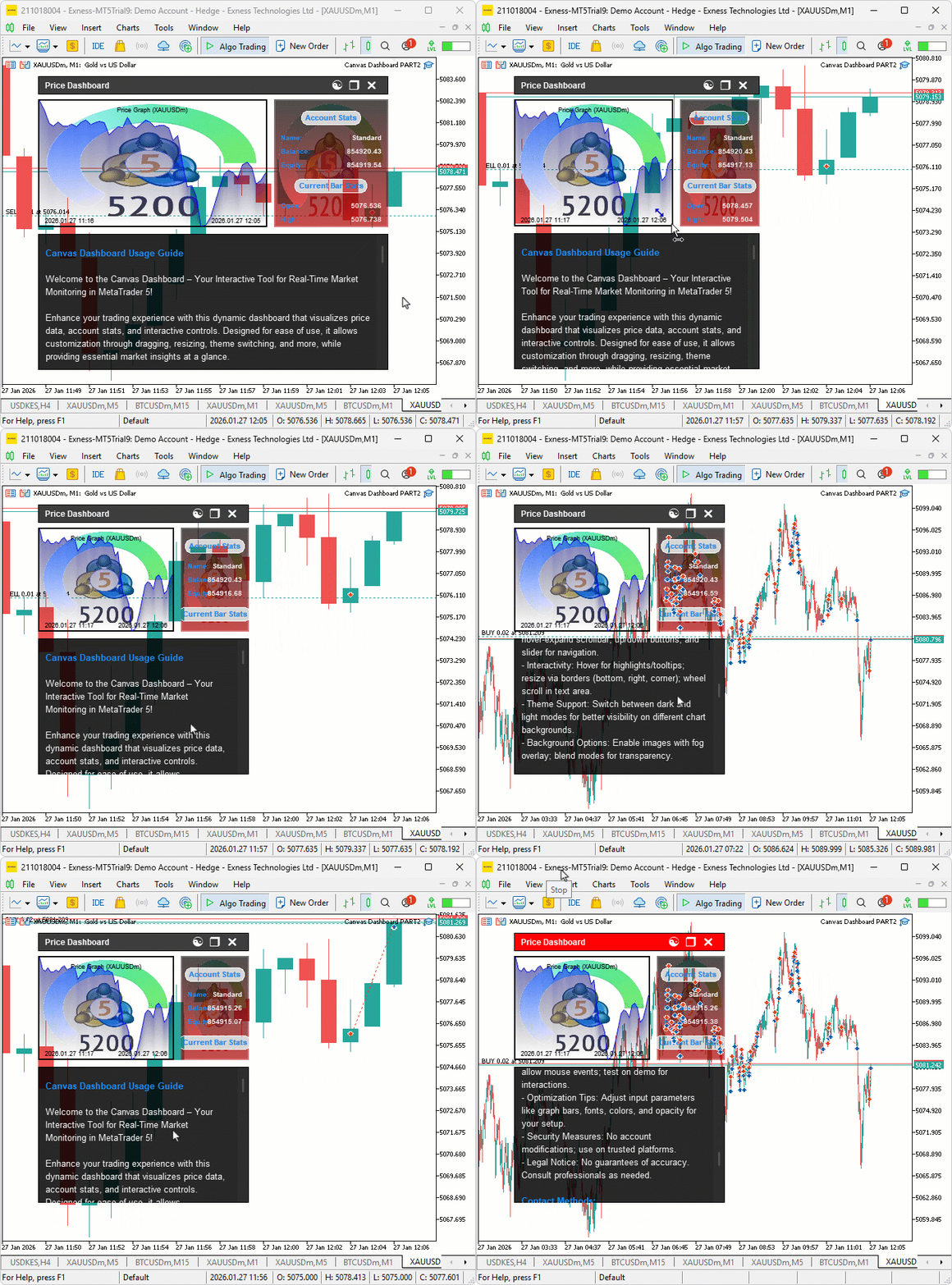
After the change, we get this.
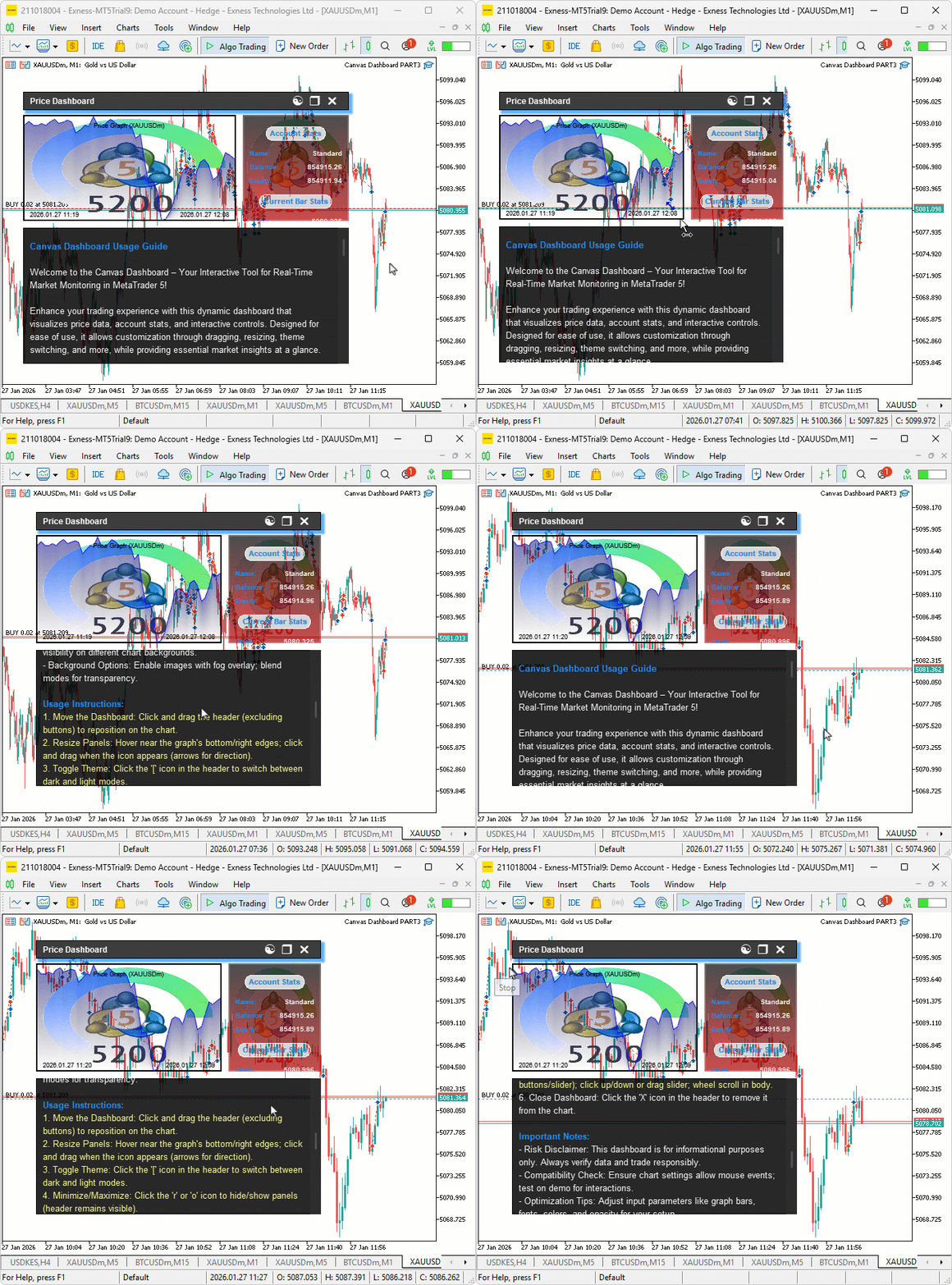
From the visualization, we can see that we have enhanced the canvas-based dashboard by adding the blur and shadow effects on the header canvas and maximized mouse wheel scroll, hence achieving our objectives. What now remains is testing the workability of the system, and that is handled in the preceding section.
Backtesting
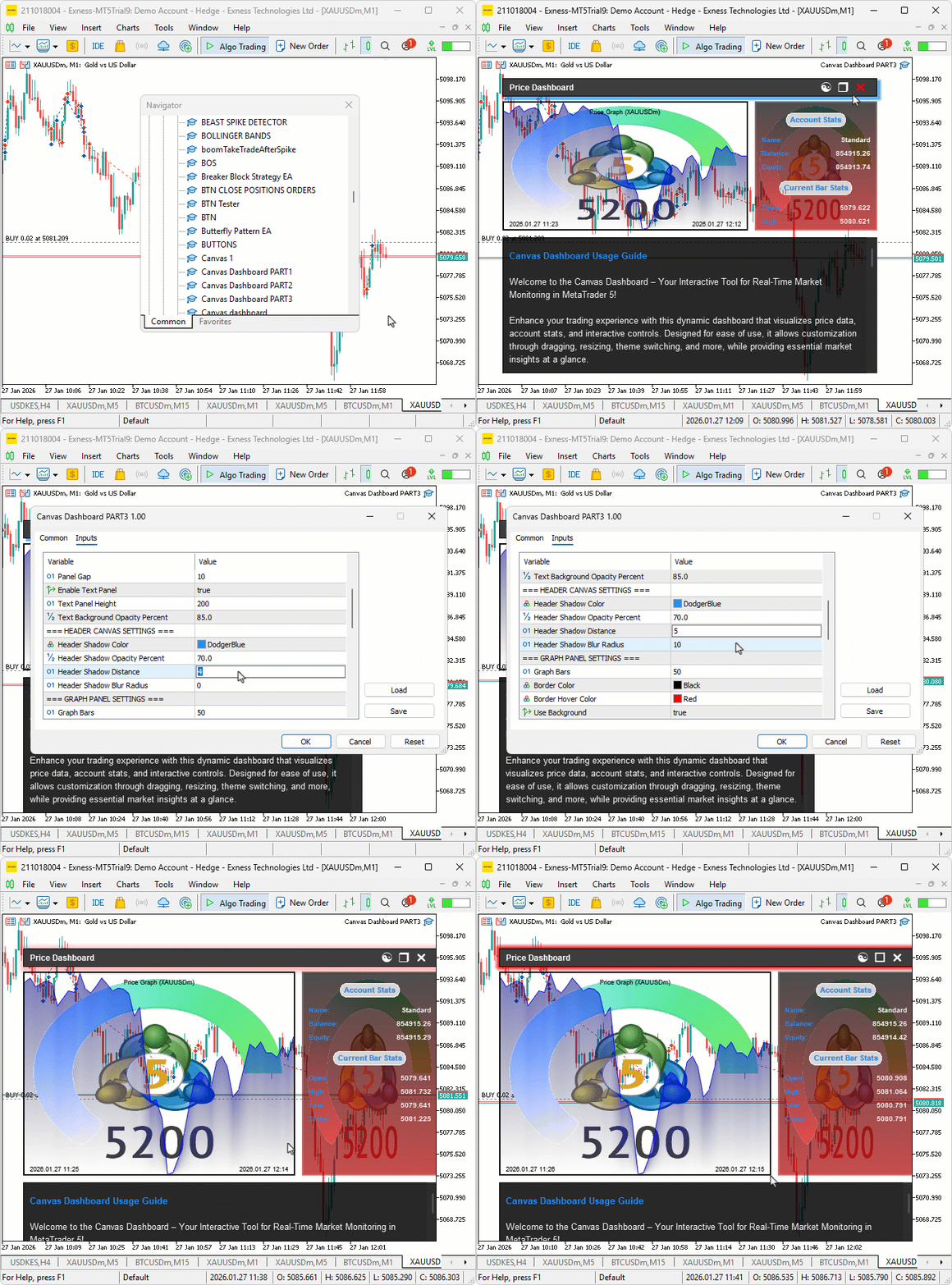
We did the testing, and below is the compiled visualization in a single Graphics Interchange Format (GIF) bitmap image format.
Conclusion
In conclusion, we’ve advanced the MQL5 canvas dashboard with blur effects for smooth fog gradients, shadow rendering to add depth to headers, and seamless mouse wheel scrolling for interactive text navigation, creating a more polished and user-friendly interface. With this upgraded canvas dashboard, you’re equipped to visualize market data more effectively, ready for further optimization in your trading journey. Happy trading!
Warning: All rights to these materials are reserved by MetaQuotes Ltd. Copying or reprinting of these materials in whole or in part is prohibited.
This article was written by a user of the site and reflects their personal views. MetaQuotes Ltd is not responsible for the accuracy of the information presented, nor for any consequences resulting from the use of the solutions, strategies or recommendations described.

 From Novice to Expert: Creating a Liquidity Zone Indicator
 Larry Williams Market Secrets (Part 9): Patterns to Profit
 Swap Arbitrage in Forex: Building a Synthetic Portfolio and Generating a Consistent Swap Flow
 Visualizing Strategies in MQL5: Laying Out Optimization Results Across Criterion Charts

- Free trading apps
- Over 8,000 signals for copying
- Economic news for exploring financial markets
You agree to website policy and terms of use