

Automatização de estratégias de negociação em MQL5 (Parte 17): dominando a estratégia de scalping Grid-Mart com painel informativo dinâmico
 144
144
 5
5

Introdução
No artigo anterior (Parte 16), automatizamos o Rompimento do Intervalo da Meia-Noite com a estratégia Rompimento de Estrutura para coletar dados de rompimentos de preço. Agora, na Parte 17, vamos nos concentrar na automatização da estratégia de scalping Grid-Mart em MetaQuotes Language 5 (MQL5), desenvolvendo um EA que executa operações de martingale baseadas em grade e conta com um painel informativo dinâmico para monitoramento em tempo real. No artigo, abordaremos os seguintes tópicos:
- Estudo da estratégia de scalping Grid-Mart
- Implementação com MQL5
- Teste em dados históricos
- Conclusão
Ao final deste artigo, você terá um programa em MQL5 plenamente funcional, capaz de aplicar scalping com precisão e visualizar métricas de negociação. Vamos começar!
Estudo da estratégia de scalping Grid-Mart
A estratégia de scalping Grid-Mart usa uma abordagem de martingale baseada em grade, posicionando ordens de compra ou venda em intervalos fixos de preço (por exemplo, 2,0 pips) para obter pequenos lucros com as oscilações do mercado e aumentar o tamanho do lote após perdas, visando recuperar rapidamente o capital. Ela se baseia em negociação de alta frequência, com foco em lucros modestos (por exemplo, 4 pips) por operação. No entanto, exige uma gestão de risco criteriosa devido ao crescimento exponencial do tamanho do lote, que é limitado por parâmetros configuráveis, como níveis máximos da grade e limites de drawdown diário. Essa estratégia é eficaz em mercados voláteis, mas requer configuração precisa para evitar drawdowns significativos durante tendências prolongadas.
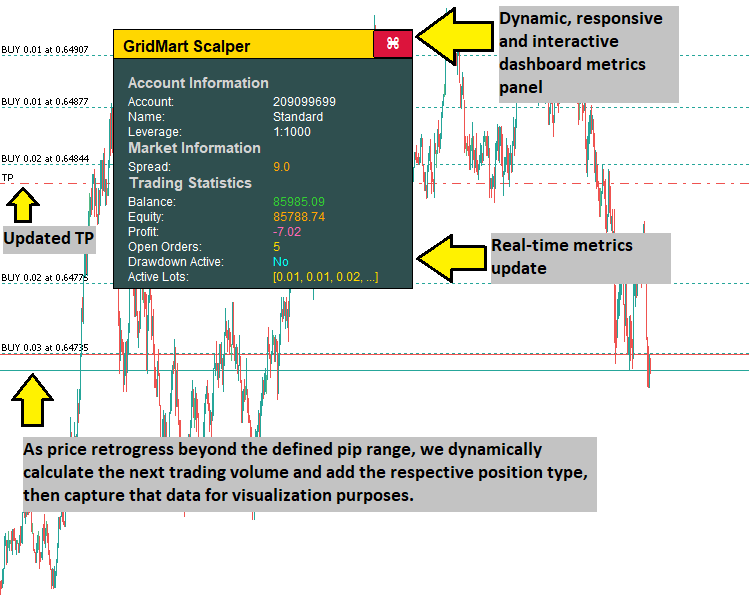
Nosso plano de implementação inclui a criação de um EA em MQL5 para automatizar a estratégia Grid-Mart por meio do cálculo dos intervalos da grade, do ajuste do tamanho dos lotes e da execução de operações com níveis predefinidos de stop loss e take profit. O programa contará com um painel informativo dinâmico para exibir métricas em tempo real, como spread, tamanhos dos lotes ativos e status da conta, com codificação por cores para auxiliar na tomada de decisão. Mecanismos robustos de gestão de risco, incluindo limites de drawdown e restrições de tamanho da grade, ajudarão a manter uma operação estável em diferentes condições de mercado. Em resumo, é isso que vamos criar.
Implementação com MQL5
Para criar o programa em MQL5, abra o MetaEditor, acesse o Navegador, abra a pasta "Indicadores" (Indicators), vá até a aba "Criar" (New) e siga as instruções para criar o arquivo. Feito isso, no ambiente de desenvolvimento, precisaremos declarar algumas variáveis globais que serão usadas em todo o programa.
//+------------------------------------------------------------------+
//|                                      GridMart Scalper MT5 EA.mq5 |
//|                           Copyright 2025, Allan Munene Mutiiria. |
//|                                   https://t.me/Forex_Algo_Trader |
//+------------------------------------------------------------------+

#property copyright "Copyright 2025, Allan Munene Mutiiria."
#property link      "https://t.me/Forex_Algo_Trader"
#property version   "1.00"

#include <Trade/Trade.mqh>

//--- Declare trade object to execute trading operations
CTrade obj_Trade;

//--- Trading state variables
double dailyBalance = 0;           //--- Store the daily starting balance for drawdown monitoring
datetime dailyResetTime = 0;       //--- Track the last daily reset time
bool tradingEnabled = true;        //--- Indicate if trading is allowed based on drawdown limits
datetime lastBarTime = 0;          //--- Store the timestamp of the last processed bar
bool hasBuyPosition = false;       //--- Flag if there is an active buy position
bool hasSellPosition = false;      //--- Flag if there is an active sell position
bool openNewTrade = false;         //--- Signal when a new trade should be opened
int activeOrders = 0;              //--- Count the number of active orders
double latestBuyPrice = 0;         //--- Store the price of the latest buy order
double latestSellPrice = 0;        //--- Store the price of the latest sell order
double calculatedLot = 0;          //--- Hold the calculated lot size for new orders
bool modifyPositions = false;      //--- Indicate if position SL/TP need modification
double weightedPrice = 0;          //--- Track the weighted average price of open positions
double targetTP = 0;               //--- Store the target take-profit price
double targetSL = 0;               //--- Store the target stop-loss price
bool updateSLTP = false;           //--- Signal when SL/TP updates are needed
int cycleCount = 0;                //--- Count the number of trading cycles
double totalVolume = 0;            //--- Accumulate the total volume of open positions
bool dashboardVisible = true;      //--- Control visibility of the dashboard

//--- Dashboard dragging and hover state variables
bool panelDragging = false;        //--- Indicate if the dashboard is being dragged
int panelDragX = 0;                //--- Store the X-coordinate of the mouse during dragging
int panelDragY = 0;                //--- Store the Y-coordinate of the mouse during dragging
int panelStartX = 0;               //--- Store the initial X-position of the dashboard
int panelStartY = 0;               //--- Store the initial Y-position of the dashboard
bool closeButtonHovered = false;   //--- Track if the close button is hovered
bool headerHovered = false;        //--- Track if the header is hovered

input group "Main EA Settings"
input string EA_NAME = "GridMart Scalper";    // EA Name
input bool CONTINUE_TRADING = true;           // Continue Trading After Cycle
input int MAX_CYCLES = 1000;                  // Max Trading Cycles
input int START_HOUR = 0;                     // Start Trading Hour
input int END_HOUR = 23;                      // End Trading Hour
input int LOT_MODE = 1;                       // Lot Mode (1=Multiplier, 2=Fixed)
input double BASE_LOT = 0.01;                 // Base Lot Size
input int STOP_LOSS_PIPS = 100;               // Stop Loss (Pips)
input int TAKE_PROFIT_PIPS =
3 ;               // Take Profit (Pips)
input double GRID_DISTANCE = 3.0;             // Grid Distance (Pips)
input double LOT_MULTIPLIER = 1.3;            // Lot Multiplier
input int MAX_GRID_LEVELS = 30;               // Max Grid Levels
input int LOT_PRECISION = 2;                  // Lot Decimal Precision
input int MAGIC = 1234567890;                 // Magic Number
input color TEXT_COLOR = clrWhite;            // Dashboard Text Color

input group "EA Risk Management Settings"
input bool ENABLE_DAILY_DRAWDOWN = false;     // Enable Daily Drawdown Limiter
input double DRAWDOWN_LIMIT = -1.0;           // Daily Drawdown Threshold (-%)
input bool CLOSE_ON_DRAWDOWN = false;         // Close Positions When Threshold Hit

input group "Dashboard Settings"
input int PANEL_X = 30;                       // Initial X Distance (pixels)
input int PANEL_Y = 50;                       // Initial Y Distance (pixels)

//--- Pip value for price calculations
double pipValue;

//--- Dashboard constants
const int DASHBOARD_WIDTH = 300;                   //--- Width of the dashboard in pixels
const int DASHBOARD_HEIGHT = 260;                  //--- Height of the dashboard in pixels
const int HEADER_HEIGHT = 30;                      //--- Height of the header section
const int CLOSE_BUTTON_WIDTH = 40;                 //--- Width of the close button
const int CLOSE_BUTTON_HEIGHT = 28;                //--- Height of the close button
const color HEADER_NORMAL_COLOR = clrGold;         //--- Normal color of the header
const color HEADER_HOVER_COLOR = C'200,150,0';     //--- Header color when hovered
const color BACKGROUND_COLOR = clrDarkSlateGray;   //--- Background color of the dashboard
const color BORDER_COLOR = clrBlack;               //--- Border color of dashboard elements
const color SECTION_TITLE_COLOR = clrLightGray;    //--- Color for section titles
const color CLOSE_BUTTON_NORMAL_BG = clrCrimson;   //--- Normal background color of the close button
const color CLOSE_BUTTON_HOVER_BG = clrDodgerBlue; //--- Hover background color of the close button
const color CLOSE_BUTTON_NORMAL_BORDER = clrBlack; //--- Normal border color of the close button
const color CLOSE_BUTTON_HOVER_BORDER = clrBlue;   //--- Hover border color of the close button
const color VALUE_POSITIVE_COLOR = clrLimeGreen;   //--- Color for positive values (e.g., profit, low spread)
const color VALUE_NEGATIVE_COLOR = clrOrange;      //--- Color for negative or warning values (e.g., loss, high spread)
const color VALUE_LOSS_COLOR = clrHotPink;         //--- Color for negative profit
const color VALUE_ACTIVE_COLOR = clrGold;          //--- Color for active states (e.g., open orders, medium spread)
const color VALUE_DRAWDOWN_INACTIVE = clrAqua;     //--- Color for inactive drawdown state
const color VALUE_DRAWDOWN_ACTIVE = clrRed;        //--- Color for active drawdown state
const int FONT_SIZE_HEADER = 12;                   //--- Header text font size (pt)
const int FONT_SIZE_SECTION_TITLE = 11;            //--- Section title font size (pt)
const int FONT_SIZE_METRIC = 9;                    //--- Metric label/value font size (pt)
const int FONT_SIZE_BUTTON = 12;                   //--- Button font size (pt)
Aqui, implementamos a estratégia em MQL5, inicializando os principais componentes do programa para automatizar operações de martingale baseadas em grade e oferecer suporte a um painel informativo dinâmico. Declaramos o objeto "CTrade" como "obj_Trade", usando "#include <Trade/Trade.mqh>" para gerenciar a execução de operações. Definimos variáveis como "dailyBalance" para acompanhar o saldo da conta, "lastBarTime" para armazenar as marcas de tempo das barras com a função iTime, "hasBuyPosition" e "hasSellPosition" para indicar operações ativas e "activeOrders" para contar posições abertas.
Definimos parâmetros de entrada como "GRID_DISTANCE = 3.0" para os intervalos da grade, "LOT_MULTIPLIER = 1.3" para o escalonamento dos lotes e "TAKE_PROFIT_PIPS = 3" para as metas de lucro, usando "MAGIC = 1234567890" para identificar as operações. Incluímos "ENABLE_DAILY_DRAWDOWN" e "DRAWDOWN_LIMIT" para a gestão de risco, enquanto "cycleCount" e "MAX_CYCLES" limitam os ciclos de negociação. Configuramos o painel informativo com parâmetros como "DASHBOARD_WIDTH = 300", "FONT_SIZE_METRIC = 9", "panelDragging" para funções de arrastar, "closeButtonHovered" para efeitos de passagem do cursor do mouse e "VALUE_POSITIVE_COLOR = clrLimeGreen" para elementos visuais, usando "pipValue" para cálculos precisos de preço. Com isso, obtemos a seguinte interface de usuário.
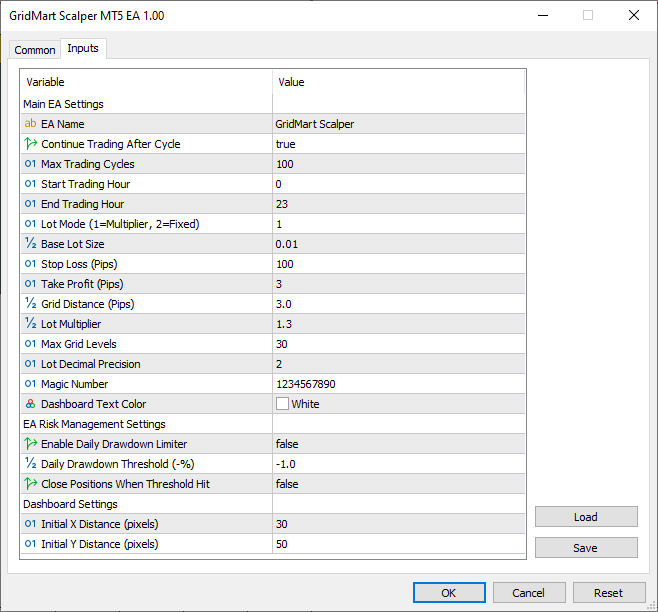
Na imagem, vemos que podemos gerenciar o programa por meio da interface de usuário definida. Agora precisamos continuar definindo algumas funções auxiliares para ações básicas e recorrentes, como a seleção do par de moedas ou do tipo de posição. Para isso, aplicamos a seguinte lógica.
//+------------------------------------------------------------------+
//| Retrieve the current account balance                             |
//+------------------------------------------------------------------+
double GetAccountBalance() {
   //--- Return the current account balance
   return AccountInfoDouble(ACCOUNT_BALANCE);
}

//+------------------------------------------------------------------+
//| Retrieve the magic number of the selected position               |
//+------------------------------------------------------------------+
long GetPositionMagic() {
   //--- Return the magic number of the selected position
   return PositionGetInteger(POSITION_MAGIC);
}

//+------------------------------------------------------------------+
//| Retrieve the open price of the selected position                 |
//+------------------------------------------------------------------+
double GetPositionOpenPrice() {
   //--- Return the open price of the selected position
   return PositionGetDouble(POSITION_PRICE_OPEN);
}

//+------------------------------------------------------------------+
//| Retrieve the stop-loss price of the selected position            |
//+------------------------------------------------------------------+
double GetPositionSL() {
   //--- Return the stop-loss price of the selected position
   return PositionGetDouble(POSITION_SL);
}

//+------------------------------------------------------------------+
//| Retrieve the take-profit price of the selected position          |
//+------------------------------------------------------------------+
double GetPositionTP() {
   //--- Return the take-profit price of the selected position
   return PositionGetDouble(POSITION_TP);
}

//+------------------------------------------------------------------+
//| Retrieve the symbol of the selected position                     |
//+------------------------------------------------------------------+
string GetPositionSymbol() {
   //--- Return the symbol of the selected position
   return PositionGetString(POSITION_SYMBOL);
}

//+------------------------------------------------------------------+
//| Retrieve the ticket number of the selected position              |
//+------------------------------------------------------------------+
ulong GetPositionTicket() {
   //--- Return the ticket number of the selected position
   return PositionGetInteger(POSITION_TICKET);
}

//+------------------------------------------------------------------+
//| Retrieve the open time of the selected position                  |
//+------------------------------------------------------------------+
datetime GetPositionOpenTime() {
   //--- Return the open time of the selected position as a datetime
   return (datetime)PositionGetInteger(POSITION_TIME);
}

//+------------------------------------------------------------------+
//| Retrieve the type of the selected position                       |
//+------------------------------------------------------------------+
int GetPositionType() {
   //--- Return the type of the selected position (buy/sell)
   return (int)PositionGetInteger(POSITION_TYPE);
}
Usamos a função "GetAccountBalance" junto com AccountInfoDouble para obter o saldo atual da conta, o que permite acompanhar o saldo para a gestão de risco.
Implementamos a função "GetPositionMagic" usando PositionGetInteger para obter o número mágico da posição, a função "GetPositionOpenPrice" com PositionGetDouble para obter o preço de abertura, bem como as funções "GetPositionSL" e "GetPositionTP" com "PositionGetDouble" para acessar os níveis de stop loss e take profit, respectivamente, permitindo cálculos de negociação precisos.
Além disso, definimos a função "GetPositionSymbol" com PositionGetString para verificar o símbolo da posição, as funções "GetPositionTicket" e "GetPositionOpenTime" com "PositionGetInteger" para rastrear os identificadores das posições e o horário de abertura, além da função "GetPositionType" para determinar o tipo da posição, compra ou venda, o que facilita o monitoramento preciso da posição e a lógica de negociação. Agora podemos avançar para a criação do painel informativo, mas precisaremos de funções auxiliares para facilitar esse processo.
//+------------------------------------------------------------------+
//| Create a rectangular object for the dashboard                    |
//+------------------------------------------------------------------+
void CreateRectangle(string name, int x, int y, int width, int height, color bgColor, color borderColor) {
   //--- Check if object does not exist
   if (ObjectFind(0, name) < 0) {
      //--- Create a rectangle label object
      ObjectCreate(0, name, OBJ_RECTANGLE_LABEL, 0, 0, 0);
   }
   //--- Set X-coordinate
   ObjectSetInteger(0, name, OBJPROP_XDISTANCE, x);
   //--- Set Y-coordinate
   ObjectSetInteger(0, name, OBJPROP_YDISTANCE, y);
   //--- Set width
   ObjectSetInteger(0, name, OBJPROP_XSIZE, width);
   //--- Set height
   ObjectSetInteger(0, name, OBJPROP_YSIZE, height);
   //--- Set background color
   ObjectSetInteger(0, name, OBJPROP_BGCOLOR, bgColor);
   //--- Set border type to flat
   ObjectSetInteger(0, name, OBJPROP_BORDER_TYPE, BORDER_FLAT);
   //--- Set border color
   ObjectSetInteger(0, name, OBJPROP_COLOR, borderColor);
   //--- Set border width
   ObjectSetInteger(0, name, OBJPROP_WIDTH, 1);
   //--- Set object to foreground
   ObjectSetInteger(0, name, OBJPROP_BACK, false);
   //--- Disable object selection
   ObjectSetInteger(0, name, OBJPROP_SELECTABLE, false);
   //--- Hide object from object list
   ObjectSetInteger(0, name, OBJPROP_HIDDEN, true);
}

//+------------------------------------------------------------------+
//| Create a text label for the dashboard                            |
//+------------------------------------------------------------------+
void CreateTextLabel(string name, int x, int y, string text, color clr, int fontSize, string font = "Arial") {
   //--- Check if object does not exist
   if (ObjectFind(0, name) < 0) {
      //--- Create a text label object
      ObjectCreate(0, name, OBJ_LABEL, 0, 0, 0);
   }
   //--- Set X-coordinate
   ObjectSetInteger(0, name, OBJPROP_XDISTANCE, x);
   //--- Set Y-coordinate
   ObjectSetInteger(0, name, OBJPROP_YDISTANCE, y);
   //--- Set label text
   ObjectSetString(0, name, OBJPROP_TEXT, text);
   //--- Set font
   ObjectSetString(0, name, OBJPROP_FONT, font);
   //--- Set font size
   ObjectSetInteger(0, name, OBJPROP_FONTSIZE, fontSize);
   //--- Set text color
   ObjectSetInteger(0, name, OBJPROP_COLOR, clr);
   //--- Set object to foreground
   ObjectSetInteger(0, name, OBJPROP_BACK, false);
   //--- Disable object selection
   ObjectSetInteger(0, name, OBJPROP_SELECTABLE, false);
   //--- Hide object from object list
   ObjectSetInteger(0, name, OBJPROP_HIDDEN, true);
}

//+------------------------------------------------------------------+
//| Create a button for the dashboard |
//+------------------------------------------------------------------+
void CreateButton(string name, string text, int x, int y, int width, int height, color textColor, color bgColor, int fontSize, color borderColor, bool isBack, string font = "Arial") {
   //--- Check if object does not exist
   if (ObjectFind(0, name) < 0) {
      //--- Create a button object
      ObjectCreate(0, name, OBJ_BUTTON, 0, 0, 0);
   }
   //--- Set X-coordinate
   ObjectSetInteger(0, name, OBJPROP_XDISTANCE, x);
   //--- Set Y-coordinate
   ObjectSetInteger(0, name, OBJPROP_YDISTANCE, y);
   //--- Set width
   ObjectSetInteger(0, name, OBJPROP_XSIZE, width);
   //--- Set height
   ObjectSetInteger(0, name, OBJPROP_YSIZE, height);
   //--- Set button text
   ObjectSetString(0, name, OBJPROP_TEXT, text);
   //--- Set font
   ObjectSetString(0, name, OBJPROP_FONT, font);
   //--- Set font size
   ObjectSetInteger(0, name, OBJPROP_FONTSIZE, fontSize);
   //--- Set text color
   ObjectSetInteger(0, name, OBJPROP_COLOR, textColor);
   //--- Set background color
   ObjectSetInteger(0, name, OBJPROP_BGCOLOR, bgColor);
   //--- Set border color
   ObjectSetInteger(0, name, OBJPROP_BORDER_COLOR, borderColor);
   //--- Set background rendering
   ObjectSetInteger(0, name, OBJPROP_BACK, isBack);
   //--- Reset button state
   ObjectSetInteger(0, name, OBJPROP_STATE, false);
   //--- Disable button selection
   ObjectSetInteger(0, name, OBJPROP_SELECTABLE, false);
   //--- Hide button from object list
   ObjectSetInteger(0, name, OBJPROP_HIDDEN, true);
}
Aqui, definimos a função "CreateRectangle" usando as funções ObjectCreate e ObjectSetInteger para desenhar elementos retangulares, como o fundo e o cabeçalho do painel informativo, configurando propriedades como posição, tamanho e cores para um layout mais claro. Implementamos a função "CreateTextLabel" usando "ObjectCreate" e ObjectSetString para exibir métricas como spread e tamanhos dos lotes, com configurações personalizadas de fonte e cor para facilitar a leitura.
Além disso, definimos a função "CreateButton" para adicionar botões interativos, como o botão de fechamento, permitindo que o usuário execute ações por meio de um design personalizado e efeito de passagem do cursor do mouse, tornando o uso do painel informativo mais fluido e intuitivo. Agora podemos usar essas funções para criar os elementos do painel informativo em uma nova função, mas, como precisaremos calcular o lucro total, vamos definir uma função para isso.
//+------------------------------------------------------------------+
//| Calculate the total unrealized profit of open positions |
//+------------------------------------------------------------------+
double CalculateTotalProfit() {
   //--- Initialize profit accumulator
   double profit = 0;
   //--- Iterate through open positions
   for (int i = PositionsTotal() - 1; i >= 0; i--) {
      //--- Get position ticket
      ulong ticket = PositionGetTicket(i);
      //--- Select position by ticket
      if (PositionSelectByTicket(ticket) && GetPositionSymbol() == _Symbol && GetPositionMagic() == MAGIC) {
         //--- Accumulate unrealized profit
         profit += PositionGetDouble(POSITION_PROFIT);
      }
   }
   //--- Return total profit
   return profit;
}
Aqui, implementamos a função "CalculateTotalProfit" usando PositionsTotal e PositionGetTicket para percorrer as posições abertas, selecionando cada uma por meio de PositionSelectByTicket e verificando seu símbolo e número mágico com "GetPositionSymbol" e "GetPositionMagic" para obter o lucro total. Acumulamos o lucro não realizado usando a função PositionGetDouble para obter o lucro de cada posição e armazenamos a soma na variável "profit", o que permite acompanhar com precisão os resultados da negociação. Depois disso, podemos continuar criando a função responsável pelo painel informativo da seguinte forma.
//+------------------------------------------------------------------+
//| Update the dashboard with real-time trading metrics |
//+------------------------------------------------------------------+
void UpdateDashboard() {
   //--- Exit if dashboard is not visible
   if (!dashboardVisible) return;

   //--- Create dashboard background rectangle
   CreateRectangle("Dashboard", panelStartX, panelStartY, DASHBOARD_WIDTH, DASHBOARD_HEIGHT, BACKGROUND_COLOR, BORDER_COLOR);

   //--- Create header rectangle
   CreateRectangle("Header", panelStartX, panelStartY, DASHBOARD_WIDTH, HEADER_HEIGHT, headerHovered ? HEADER_HOVER_COLOR : HEADER_NORMAL_COLOR, BORDER_COLOR);
   //--- Create header text label
   CreateTextLabel("HeaderText", panelStartX + 10, panelStartY + 8, EA_NAME, clrBlack, FONT_SIZE_HEADER, "Arial Bold");

   //--- Create close button
   CreateButton("CloseButton", CharToString(122), panelStartX + DASHBOARD_WIDTH - CLOSE_BUTTON_WIDTH, panelStartY + 1, CLOSE_BUTTON_WIDTH, CLOSE_BUTTON_HEIGHT, clrWhite, closeButtonHovered ? CLOSE_BUTTON_HOVER_BG : CLOSE_BUTTON_NORMAL_BG, FONT_SIZE_BUTTON, closeButtonHovered ? CLOSE_BUTTON_HOVER_BORDER : CLOSE_BUTTON_NORMAL_BORDER, false, "Wingdings");

   //--- Initialize dashboard content layout
   //--- Set initial Y-position below header
   int sectionY = panelStartY + HEADER_HEIGHT + 15;
   //--- Set left column X-position for labels
   int labelXLeft = panelStartX + 15;
   //--- Set right column X-position for values
   int valueXRight = panelStartX + 160;
   //--- Set row height for metrics
   int rowHeight = 15;

   //--- Pre-calculate values for conditional coloring
   //--- Calculate total unrealized profit
   double profit = CalculateTotalProfit();
   //--- Set profit color based on value
   color profitColor = (profit > 0) ? VALUE_POSITIVE_COLOR : (profit < 0) ? VALUE_LOSS_COLOR : TEXT_COLOR;

   //--- Get current equity
   double equity = AccountInfoDouble(ACCOUNT_EQUITY);
   //--- Get current balance
   double balance = AccountInfoDouble(ACCOUNT_BALANCE);
   //--- Set equity color based on comparison with balance
   color equityColor = (equity > balance) ? VALUE_POSITIVE_COLOR : (equity < balance) ? VALUE_NEGATIVE_COLOR : TEXT_COLOR;

   //--- Set balance color based on comparison with daily balance
   color balanceColor = (balance > dailyBalance) ? VALUE_POSITIVE_COLOR : (balance < dailyBalance) ? VALUE_NEGATIVE_COLOR : TEXT_COLOR;

   //--- Set open orders color based on active orders
   color ordersColor = (activeOrders > 0) ? VALUE_ACTIVE_COLOR : TEXT_COLOR;

   //--- Set drawdown active color based on trading state
   color drawdownColor = tradingEnabled ? VALUE_DRAWDOWN_INACTIVE : VALUE_DRAWDOWN_ACTIVE;

   //--- Set lot sizes color based on active orders
   color lotsColor = (activeOrders > 0) ? VALUE_ACTIVE_COLOR : TEXT_COLOR;

   //--- Calculate dynamic spread and color
   //--- Get current ask price
   double ask = SymbolInfoDouble(_Symbol, SYMBOL_ASK);
   //--- Get current bid price
   double bid = SymbolInfoDouble(_Symbol, SYMBOL_BID);
   //--- Calculate spread in points
   double spread = (ask - bid) / Point();
   //--- Format spread with 1 decimal place for display
   string spreadDisplay = DoubleToString(spread, 1);
   //--- Initialize spread color
   color spreadColor;
   //--- Check if spread is low (favorable)
   if (spread <= 2.0) {
      //--- Set color to lime green for low spread
      spreadColor = VALUE_POSITIVE_COLOR;
   }
   //--- Check if spread is medium (moderate)
   else if (spread <= 5.0) {
      //--- Set color to gold for medium spread
      spreadColor = VALUE_ACTIVE_COLOR;
   }
   //--- Spread is high (costly)
   else {
      //--- Set color to orange for high spread
      spreadColor = VALUE_NEGATIVE_COLOR;
   }

   //--- Account Information Section
   //--- Create section title
   CreateTextLabel("SectionAccount", labelXLeft, sectionY, "Account Information", SECTION_TITLE_COLOR, FONT_SIZE_SECTION_TITLE, "Arial Bold");
   //--- Move to next row
   sectionY += rowHeight + 5;
   //--- Create account number label
   CreateTextLabel("AccountNumberLabel", labelXLeft, sectionY, "Account:", TEXT_COLOR, FONT_SIZE_METRIC);
   //--- Create account number value
   CreateTextLabel("AccountNumberValue", valueXRight, sectionY, DoubleToString(AccountInfoInteger(ACCOUNT_LOGIN), 0), TEXT_COLOR, FONT_SIZE_METRIC);
   //--- Move to next row
   sectionY += rowHeight;
   //--- Create account name label
   CreateTextLabel("AccountNameLabel", labelXLeft, sectionY, "Name:", TEXT_COLOR, FONT_SIZE_METRIC);
   //--- Create account name value
   CreateTextLabel("AccountNameValue", valueXRight, sectionY, AccountInfoString(ACCOUNT_NAME), TEXT_COLOR, FONT_SIZE_METRIC);
   //--- Move to next row
   sectionY += rowHeight;
   //--- Create leverage label
   CreateTextLabel("LeverageLabel", labelXLeft, sectionY, "Leverage:", TEXT_COLOR, FONT_SIZE_METRIC);
   //--- Create leverage value
   CreateTextLabel("LeverageValue", valueXRight, sectionY, "1:" + DoubleToString(AccountInfoInteger(ACCOUNT_LEVERAGE), 0), TEXT_COLOR, FONT_SIZE_METRIC);
   //--- Move to next row
   sectionY += rowHeight;

   //--- Market Information Section
   //--- Create section title
   CreateTextLabel("SectionMarket", labelXLeft, sectionY, "Market Information", SECTION_TITLE_COLOR, FONT_SIZE_SECTION_TITLE, "Arial Bold");
   //--- Move to next row
   sectionY += rowHeight + 5;
   //--- Create spread label
   CreateTextLabel("SpreadLabel", labelXLeft, sectionY, "Spread:", TEXT_COLOR, FONT_SIZE_METRIC);
   //--- Create spread value with dynamic color
   CreateTextLabel("SpreadValue", valueXRight, sectionY, spreadDisplay, spreadColor, FONT_SIZE_METRIC);
   //--- Move to next row
   sectionY += rowHeight;

   //--- Trading Statistics Section
   //--- Create section title
   CreateTextLabel("SectionTrading", labelXLeft, sectionY, "Trading Statistics", SECTION_TITLE_COLOR, FONT_SIZE_SECTION_TITLE, "Arial Bold");
   //--- Move to next row
   sectionY += rowHeight + 5;
   //--- Create balance label
   CreateTextLabel("BalanceLabel", labelXLeft, sectionY, "Balance:", TEXT_COLOR, FONT_SIZE_METRIC);
   //--- Create balance value with dynamic color
   CreateTextLabel("BalanceValue", valueXRight, sectionY, DoubleToString(balance, 2), balanceColor, FONT_SIZE_METRIC);
   //--- Move to next row
   sectionY += rowHeight;
   //--- Create equity label
   CreateTextLabel("EquityLabel", labelXLeft, sectionY, "Equity:", TEXT_COLOR, FONT_SIZE_METRIC);
   //--- Create equity value with dynamic color
   CreateTextLabel("EquityValue", valueXRight, sectionY, DoubleToString(equity, 2), equityColor, FONT_SIZE_METRIC);
   //--- Move to next row
   sectionY += rowHeight;
   //--- Create profit label
   CreateTextLabel("ProfitLabel", labelXLeft, sectionY, "Profit:", TEXT_COLOR, FONT_SIZE_METRIC);
   //--- Create profit value with dynamic color
   CreateTextLabel("ProfitValue", valueXRight, sectionY, DoubleToString(profit, 2), profitColor, FONT_SIZE_METRIC);
   //--- Move to next row
   sectionY += rowHeight;
   //--- Create open orders label
   CreateTextLabel("OrdersLabel", labelXLeft, sectionY, "Open Orders:", TEXT_COLOR, FONT_SIZE_METRIC);
   //--- Create open orders value with dynamic color
   CreateTextLabel("OrdersValue", valueXRight, sectionY, IntegerToString(activeOrders), ordersColor, FONT_SIZE_METRIC);
   //--- Move to next row
   sectionY += rowHeight;
   //--- Create drawdown active label
   CreateTextLabel("DrawdownLabel", labelXLeft, sectionY, "Drawdown Active:", TEXT_COLOR, FONT_SIZE_METRIC);
   //--- Create drawdown active value with dynamic color
   CreateTextLabel("DrawdownValue", valueXRight, sectionY, tradingEnabled ? "No" : "Yes", drawdownColor, FONT_SIZE_METRIC);
   //--- Move to next row
   sectionY += rowHeight;

   //--- Active Lot Sizes
   //--- Create active lots label
   CreateTextLabel("ActiveLotsLabel", labelXLeft, sectionY, "Active Lots:", TEXT_COLOR, FONT_SIZE_METRIC);
   //--- Create active lots value with dynamic color
   CreateTextLabel("ActiveLotsValue", valueXRight, sectionY, GetActiveLotSizes(), lotsColor, FONT_SIZE_METRIC);

   //--- Redraw the chart to update display
   ChartRedraw(0);
}
Aqui, definimos a função "UpdateDashboard" para exibir um painel informativo dinâmico com métricas de negociação em tempo real, fornecendo uma interface abrangente para monitorar o funcionamento. Começamos verificando a variável "dashboardVisible" para garantir que as atualizações ocorram apenas quando o painel informativo estiver ativo, evitando processamento desnecessário. Usamos a função "CreateRectangle" para desenhar o painel informativo principal e o cabeçalho, definindo as dimensões com "DASHBOARD_WIDTH" e "HEADER_HEIGHT" e aplicando cores como "BACKGROUND_COLOR" e "HEADER_NORMAL_COLOR" ou "HEADER_HOVER_COLOR", dependendo do estado de "headerHovered", para fornecer feedback visual.
Usamos a função "CreateTextLabel" para exibir métricas essenciais, incluindo saldo da conta, equity, lucro, spread, ordens abertas, status do drawdown e tamanhos dos lotes ativos, separando-as em seções como informações da conta, informações de mercado e estatísticas de negociação. Calculamos o spread usando a função SymbolInfoDouble para obter os preços ask e bid, aplicando codificação por cores condicional: "VALUE_POSITIVE_COLOR" para spreads baixos (≤ 2,0 pips), "VALUE_ACTIVE_COLOR" para spreads médios (2,1-5,0 pips) e "VALUE_NEGATIVE_COLOR" para spreads altos (> 5,0 pips). Você pode alterar esse valor de acordo com suas preferências. Em seguida, usamos AccountInfoDouble para determinar o saldo e o equity, e usamos "CalculateTotalProfit" para determinar o lucro não realizado, atribuindo cores, como "profitColor", com base no valor do lucro para facilitar a interpretação visual durante o monitoramento.
Integramos a função "CreateButton" para adicionar um botão de fechamento interativo, configurado com "CLOSE_BUTTON_WIDTH", "FONT_SIZE_BUTTON" e cores dinâmicas ("CLOSE_BUTTON_NORMAL_BG" ou "CLOSE_BUTTON_HOVER_BG") com base em "closeButtonHovered", melhorando assim a interação com o usuário. Chamamos a função "GetActiveLotSizes" para exibir até três tamanhos de lote em ordem crescente, usando "lotsColor" para diferenciação visual, e gerenciamos o layout com variáveis como "sectionY", "labelXLeft" e "valueXRight" para posicionamento preciso. Finalizamos as atualizações com ChartRedraw para manter a renderização fluida. Agora podemos chamar essa função no manipulador de eventos OnInit para gerar a exibição inicial.
//+------------------------------------------------------------------+
//| Expert initialization function |
//+------------------------------------------------------------------+
int OnInit() {
   //--- Calculate pip value based on symbol digits (3 or 5 digits: multiply by 10)
   pipValue = (_Digits == 3 || _Digits == 5) ? 10.0 * Point() : Point();
   //--- Set the magic number for trade operations
   obj_Trade.SetExpertMagicNumber(MAGIC);
   //--- Initialize dashboard visibility
   dashboardVisible = true;
   //--- Set initial X-coordinate of the dashboard
   panelStartX = PANEL_X;
   //--- Set initial Y-coordinate of the dashboard
   panelStartY = PANEL_Y;
   //--- Initialize the dashboard display
   UpdateDashboard();
   //--- Enable mouse move events for dragging and hovering
   ChartSetInteger(0, CHART_EVENT_MOUSE_MOVE, true);
   //--- Return successful initialization
   return INIT_SUCCEEDED;
}
No manipulador de eventos OnInit, calculamos "pipValue" com a função Point, definimos "MAGIC" em "obj_Trade" usando "SetExpertMagicNumber" e ativamos "dashboardVisible". Posicionamos o painel informativo usando "panelStartX" e "panelStartY" com "PANEL_X" e "PANEL_Y", chamamos a função "UpdateDashboard" para exibi-lo e usamos ChartSetInteger para habilitar a interação com o mouse, retornando INIT_SUCCEEDED. No manipulador de eventos OnDeinit, precisamos remover os objetos criados da seguinte forma.
//+------------------------------------------------------------------+
//| Expert deinitialization function                                 |
//+------------------------------------------------------------------+
void OnDeinit(const int reason) {
   //--- Remove all graphical objects from the chart
   ObjectsDeleteAll(0);
   //--- Disable mouse move events
   ChartSetInteger(0, CHART_EVENT_MOUSE_MOVE, false);
}
Simplesmente usamos a função ObjectsDeleteAll para remover todos os objetos do gráfico, pois eles já não são necessários. Após a compilação, obtemos o seguinte resultado.
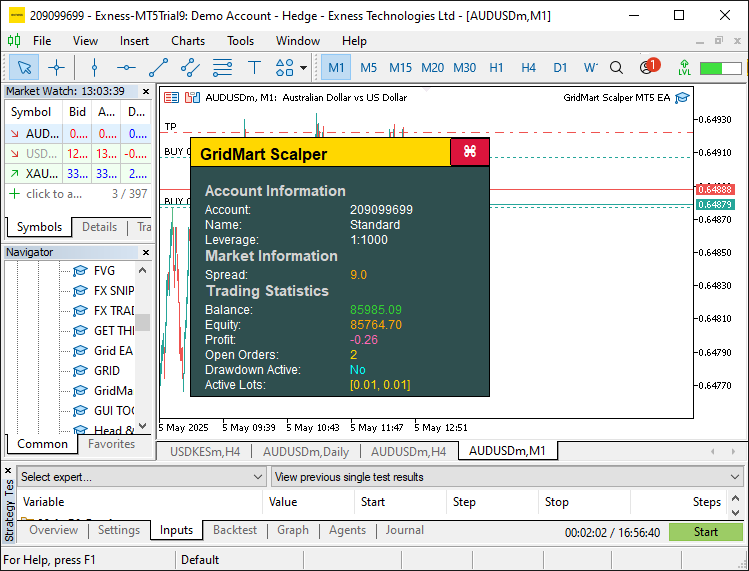
Para tornar possível ocultar o painel, chamamos o manipulador de eventos OnChartEvent para tratar os efeitos de passagem do cursor do mouse e o arrasto. Esta é a lógica que implementamos para que tudo funcione.
//+------------------------------------------------------------------+
//| Expert chart event handler                                       |
//+------------------------------------------------------------------+
void OnChartEvent(const int id, const long &lparam, const double &dparam, const string &sparam) {
   //--- Exit if dashboard is not visible
   if (!dashboardVisible) return;

   //--- Handle mouse click events
   if (id == CHARTEVENT_CLICK) {
      //--- Get X-coordinate of the click
      int x = (int)lparam;
      //--- Get Y-coordinate of the click
      int y = (int)dparam;
      //--- Calculate close button X-position
      int buttonX = panelStartX + DASHBOARD_WIDTH - CLOSE_BUTTON_WIDTH - 5;
      //--- Calculate close button Y-position
      int buttonY = panelStartY + 1;
      //--- Check if click is within close button bounds
      if (x >= buttonX && x <= buttonX + CLOSE_BUTTON_WIDTH && y >= buttonY && y <= buttonY + CLOSE_BUTTON_HEIGHT) {
         //--- Hide the dashboard
         dashboardVisible = false;
         //--- Remove all graphical objects
         ObjectsDeleteAll(0);
         //--- Redraw the chart
         ChartRedraw(0);
      }
   }

   //--- Handle mouse move events
   if (id == CHARTEVENT_MOUSE_MOVE) {
      //--- Get X-coordinate of the mouse
      int mouseX = (int)lparam;
      //--- Get Y-coordinate of the mouse
      int mouseY = (int)dparam;
      //--- Get mouse state (e.g., button pressed)
      int mouseState = (int)sparam;

      //--- Update close button hover state
      //--- Calculate close button X-position
      int buttonX = panelStartX + DASHBOARD_WIDTH - CLOSE_BUTTON_WIDTH - 5;
      //--- Calculate close button Y-position
      int buttonY = panelStartY + 1;
      //--- Check if mouse is over the close button
      bool isCloseHovered = (mouseX >= buttonX && mouseX <= buttonX + CLOSE_BUTTON_WIDTH && mouseY >= buttonY && mouseY <= buttonY + CLOSE_BUTTON_HEIGHT);
      //--- Update close button hover state if changed
      if (isCloseHovered != closeButtonHovered) {
         //--- Set new hover state
         closeButtonHovered = isCloseHovered;
         //--- Update close button background color
         ObjectSetInteger(0, "CloseButton", OBJPROP_BGCOLOR, isCloseHovered ? CLOSE_BUTTON_HOVER_BG : CLOSE_BUTTON_NORMAL_BG);
         //--- Update close button border color
         ObjectSetInteger(0, "CloseButton", OBJPROP_BORDER_COLOR, isCloseHovered ? CLOSE_BUTTON_HOVER_BORDER : CLOSE_BUTTON_NORMAL_BORDER);
         //--- Redraw the chart
         ChartRedraw(0);
      }

      //--- Update header hover state
      //--- Set header X-position
      int headerX = panelStartX;
      //--- Set header Y-position
      int headerY = panelStartY;
      //--- Check if mouse is over the header
      bool isHeaderHovered = (mouseX >= headerX && mouseX <= headerX + DASHBOARD_WIDTH && mouseY >= headerY && mouseY <= headerY + HEADER_HEIGHT);
      //--- Update header hover state if changed
      if (isHeaderHovered != headerHovered) {
         //--- Set new hover state
         headerHovered = isHeaderHovered;
         //--- Update header background color
         ObjectSetInteger(0, "Header", OBJPROP_BGCOLOR, isHeaderHovered ? HEADER_HOVER_COLOR : HEADER_NORMAL_COLOR);
         //--- Redraw the chart
         ChartRedraw(0);
      }

      //--- Handle panel dragging
      //--- Store previous mouse state for click detection
      static int prevMouseState = 0;
      //--- Check for mouse button press (start dragging)
      if (prevMouseState == 0 && mouseState == 1) {
         //--- Check if header is hovered to initiate dragging
         if (isHeaderHovered) {
            //--- Enable dragging mode
            panelDragging = true;
            //--- Store initial mouse X-coordinate
            panelDragX = mouseX;
            //--- Store initial mouse Y-coordinate
            panelDragY = mouseY;
            //--- Get current dashboard X-position
            panelStartX = (int)ObjectGetInteger(0, "Dashboard", OBJPROP_XDISTANCE);
            //--- Get current dashboard Y-position
            panelStartY = (int)ObjectGetInteger(0, "Dashboard", OBJPROP_YDISTANCE);
            //--- Disable chart scrolling during dragging
            ChartSetInteger(0, CHART_MOUSE_SCROLL, false);
         }
      }

      //--- Update dashboard position during dragging
      if (panelDragging && mouseState == 1) {
         //--- Calculate X movement delta
         int dx = mouseX - panelDragX;
         //--- Calculate Y movement delta
         int dy = mouseY - panelDragY;
         //--- Update dashboard X-position
         panelStartX += dx;
         //--- Update dashboard Y-position
         panelStartY += dy;
         //--- Refresh the dashboard with new position
         UpdateDashboard();
         //--- Update stored mouse X-coordinate
         panelDragX = mouseX;
         //--- Update stored mouse Y-coordinate
         panelDragY = mouseY;
         //--- Redraw the chart
         ChartRedraw(0);
      }

      //--- Stop dragging when mouse button is released
      if (mouseState == 0) {
         //--- Check if dragging is active
         if (panelDragging) {
            //--- Disable dragging mode
            panelDragging = false;
            //--- Re-enable chart scrolling
            ChartSetInteger(0, CHART_MOUSE_SCROLL, true);
         }
      }

      //--- Update previous mouse state
      prevMouseState = mouseState;
   }
}
No manipulador de eventos OnChartEvent, começamos verificando a variável "dashboardVisible" para garantir que o tratamento de eventos ocorra apenas quando o painel informativo estiver ativo, otimizando o funcionamento ao ignorar atualizações desnecessárias. Para eventos de clique do mouse, calculamos a posição do botão de fechamento usando "panelStartX", "DASHBOARD_WIDTH", "CLOSE_BUTTON_WIDTH" e "panelStartY". Se o clique estiver dentro dos seus limites, definimos "dashboardVisible" como false, chamamos a função ObjectsDeleteAll para remover todos os objetos gráficos e usamos a função ChartRedraw para atualizar o gráfico, ocultando efetivamente o painel informativo.
Para eventos de movimentação do mouse, acompanhamos a posição do cursor com "mouseX" e "mouseY", além de monitorar "mouseState" para detectar ações como cliques ou solturas do botão do mouse. Atualizamos o estado de hover do botão de fechamento comparando "mouseX" e "mouseY" com suas coordenadas, definindo "closeButtonHovered" e usando a função ObjectSetInteger para ajustar OBJPROP_BGCOLOR e "OBJPROP_BORDER_COLOR" para "CLOSE_BUTTON_HOVER_BG" ou "CLOSE_BUTTON_NORMAL_BG", fornecendo feedback visual. De forma semelhante, gerenciamos o estado de hover do cabeçalho com "headerHovered", aplicando "HEADER_HOVER_COLOR" ou "HEADER_NORMAL_COLOR" por meio de "ObjectSetInteger" para tornar a interação mais clara.
Para habilitar o arrasto do painel informativo, usamos a variável estática "prevMouseState" para detectar pressionamento do botão do mouse, iniciando o modo de arrasto com "panelDragging" quando o cursor do mouse estiver sobre o cabeçalho, e armazenamos as coordenadas iniciais em "panelDragX" e "panelDragY". Obtemos a posição atual do painel informativo com a função ObjectGetInteger para "OBJPROP_XDISTANCE" e OBJPROP_YDISTANCE, desativamos a rolagem do gráfico usando a função ChartSetInteger e atualizamos "panelStartX" e "panelStartY" com base nas variações do movimento do mouse, chamando a função "UpdateDashboard" para mover o painel informativo em tempo real. Quando o botão do mouse é solto, redefinimos "panelDragging" e reativamos a rolagem com "ChartSetInteger", concluindo cada atualização com ChartRedraw para melhorar a experiência de uso. Após a compilação, obtemos o seguinte resultado.
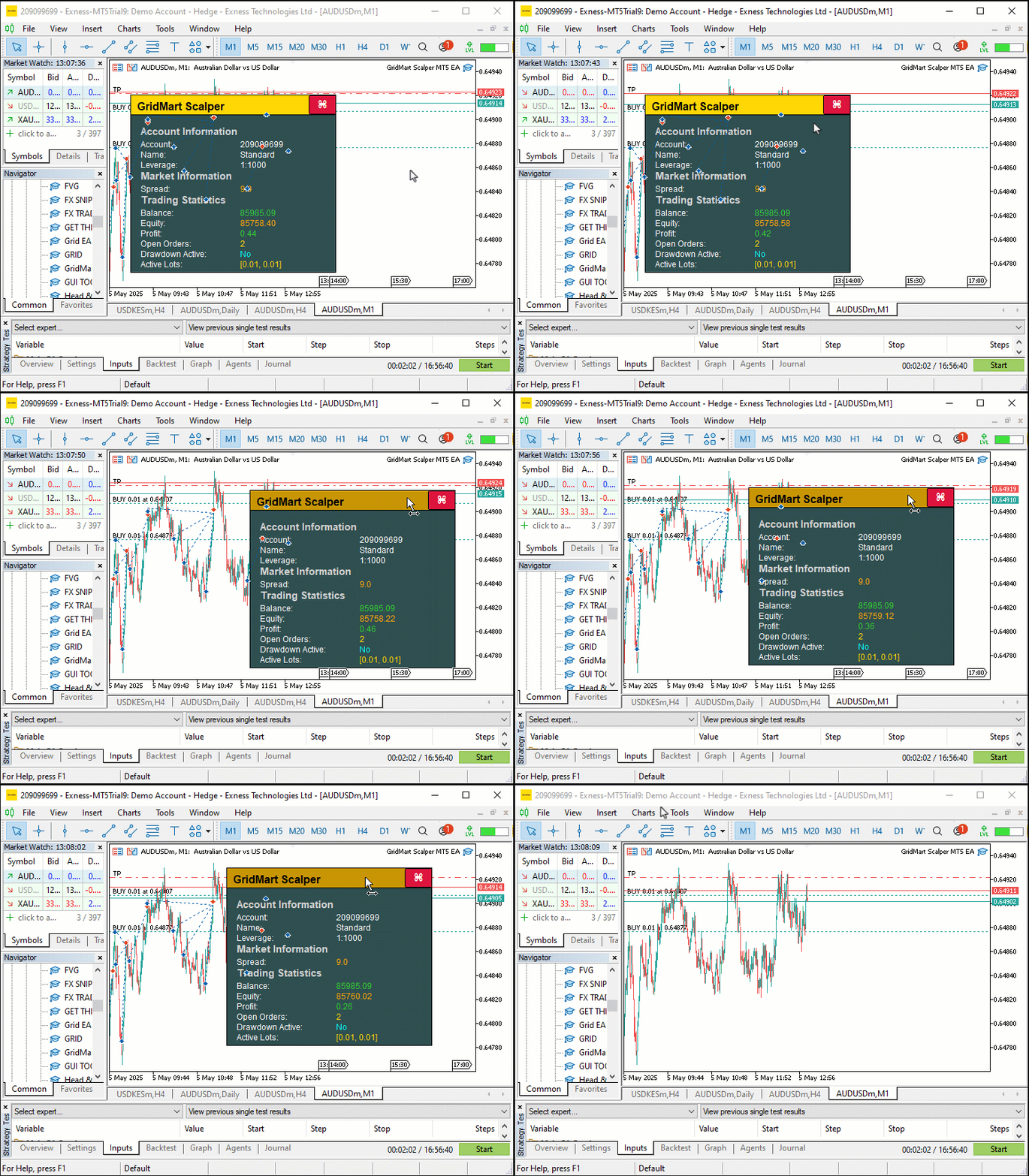
Na imagem, vemos que podemos arrastar os botões e passar o cursor do mouse sobre eles, atualizar as métricas e fechar todo o painel informativo. Agora podemos passar para a parte mais importante: abrir posições e gerenciá-las, enquanto o painel informativo facilitará o acompanhamento do funcionamento ao exibir os dados de forma dinâmica. Para atingir esse objetivo, precisaremos de algumas funções auxiliares para calcular os tamanhos dos lotes e muito mais, como mostrado abaixo.
//+------------------------------------------------------------------+
//| Calculate the lot size for a new trade                           |
//+------------------------------------------------------------------+
double CalculateLotSize(ENUM_POSITION_TYPE tradeType) {
   //--- Initialize lot size
   double lotSize = 0;
   //--- Select lot size calculation mode
   switch (LOT_MODE) {
      //--- Fixed lot size mode
      case 0:
         //--- Use base lot size
         lotSize = BASE_LOT;
         break;
      //--- Multiplier-based lot size mode
      case 1:
         //--- Calculate lot size with multiplier based on active orders
         lotSize = NormalizeDouble(BASE_LOT * MathPow(LOT_MULTIPLIER, activeOrders), LOT_PRECISION);
         break;
      //--- Fixed lot size with multiplier on loss mode
      case 2: {
         //--- Initialize last close time
         datetime lastClose = 0;
         //--- Set default lot size
         lotSize = BASE_LOT;
         //--- Select trade history for the last 24 hours
         HistorySelect(TimeCurrent() - 24 * 60 * 60, TimeCurrent());
         //--- Iterate through trade history
         for (int i = HistoryDealsTotal() - 1; i >= 0; i--) {
            //--- Get deal ticket
            ulong ticket = HistoryDealGetTicket(i);
            //--- Select deal by ticket
            if (HistoryDealSelect(ticket) && HistoryDealGetInteger(ticket, DEAL_ENTRY) == DEAL_ENTRY_OUT &&
                HistoryDealGetString(ticket, DEAL_SYMBOL) == _Symbol && HistoryDealGetInteger(ticket, DEAL_MAGIC) == MAGIC) {
               //--- Check if deal is more recent
               if (lastClose < HistoryDealGetInteger(ticket, DEAL_TIME)) {
                  //--- Update last close time
                  lastClose = (int)HistoryDealGetInteger(ticket, DEAL_TIME);
                  //--- Check if deal resulted in a loss
                  if (HistoryDealGetDouble(ticket, DEAL_PROFIT) < 0) {
                     //--- Increase lot size by multiplier
                     lotSize = NormalizeDouble(HistoryDealGetDouble(ticket, DEAL_VOLUME) * LOT_MULTIPLIER, LOT_PRECISION);
                  } else {
                     //--- Reset to base lot size
                     lotSize = BASE_LOT;
                  }
               }
            }
         }
         break;
      }
   }
   //--- Return calculated lot size
   return lotSize;
}

//+------------------------------------------------------------------+
//| Count the number of active orders                                |
//+------------------------------------------------------------------+
int CountActiveOrders() {
   //--- Initialize order counter
   int count = 0;
   //--- Iterate through open positions
   for (int i = PositionsTotal() - 1; i >= 0; i--) {
      //--- Get position ticket
      ulong ticket = PositionGetTicket(i);
      //--- Select position by ticket
      if (PositionSelectByTicket(ticket) && GetPositionSymbol() == _Symbol && GetPositionMagic() == MAGIC) {
         //--- Check if position is buy or sell
         if (GetPositionType() == POSITION_TYPE_BUY || GetPositionType() == POSITION_TYPE_SELL) {
            //--- Increment order counter
            count++;
         }
      }
   }
   //--- Return total active orders
   return count;
}

//+------------------------------------------------------------------+
//| Return a formatted string of active lot sizes in ascending order |
//+------------------------------------------------------------------+
string GetActiveLotSizes() {
   //--- Check if no active orders
   if (activeOrders == 0) {
      //--- Return waiting message
      return "[Waiting]";
   }
   //--- Initialize array for lot sizes
   double lotSizes[];
   //--- Resize array to match active orders
   ArrayResize(lotSizes, activeOrders);
   //--- Initialize counter
   int count = 0;
   //--- Iterate through open positions
   for (int i = PositionsTotal() - 1; i >= 0 && count < activeOrders; i--) {
      //--- Get position ticket
      ulong ticket = PositionGetTicket(i);
      //--- Select position by ticket
      if (PositionSelectByTicket(ticket) && GetPositionSymbol() == _Symbol && GetPositionMagic() == MAGIC) {
         //--- Store position volume (lot size)
         lotSizes[count] = PositionGetDouble(POSITION_VOLUME);
         //--- Increment counter
         count++;
      }
   }
   //--- Sort lot sizes in ascending order
   ArraySort(lotSizes);
   //--- Initialize result string
   string result = "";
   //--- Determine maximum number of lots to display (up to 3)
   int maxDisplay = (activeOrders > 3) ? 3 : activeOrders;
   //--- Format lot sizes
   for (int i = 0; i < maxDisplay; i++) {
      //--- Add comma and space for subsequent entries
      if (i > 0) result += ", ";
      //--- Convert lot size to string with specified precision
      result += DoubleToString(lotSizes[i], LOT_PRECISION);
   }
   //--- Append ellipsis if more than 3 orders
   if (activeOrders > 3) result += ", ...";
   //--- Return formatted lot sizes in brackets
   return "[" + result + "]";
}
Aqui, definimos as funções "CalculateLotSize", "CountActiveOrders" e "GetActiveLotSizes", que ajudam a determinar o tamanho da operação, acompanhar posições e atualizar o painel informativo, mantendo uma execução precisa e um monitoramento abrangente em tempo real.
Implementamos a função "CalculateLotSize" para determinar os volumes das operações com base na entrada "LOT_MODE", com suporte a três modos: tamanho fixo de lote, retornando diretamente "BASE_LOT", escalonamento por martingale aplicando a função MathPow com "LOT_MULTIPLIER" e "activeOrders" para aumentar os lotes exponencialmente, ou ajuste baseado em perdas, no qual usamos a função HistorySelect para consultar as operações das últimas 24 horas.
No modo loss-based, iteramos com HistoryDealsTotal, obtemos os dados da operação por meio de HistoryDealGetTicket e HistoryDealGetDouble e ajustamos o parâmetro "lotSize" com NormalizeDouble se a operação mais recente tiver fechado com prejuízo; caso contrário, redefinimos "lotSize" para "BASE_LOT", garantindo um cálculo preciso dos lotes com base nos resultados de negociação.
Usamos a função "CountActiveOrders" para manter uma contagem precisa das posições abertas, o que é essencial para o escalonamento por martingale e para a precisão do painel informativo. Iteramos por todas as posições usando a função PositionsTotal, selecionamos cada uma com PositionGetTicket e verificamos se o símbolo e o número mágico correspondem aos valores esperados usando "GetPositionSymbol" e "GetPositionMagic", incrementando a variável "count" para posições de compra ou venda identificadas por "GetPositionType", atualizando assim "activeOrders" de forma confiável.
Além disso, desenvolvemos a função "GetActiveLotSizes" para formatar e exibir os tamanhos dos lotes no painel informativo, melhorando a visualização das operações ativas pelo usuário. Verificamos se "activeOrders" é igual a zero para retornar "Waiting]" quando não houver ordens ativas; caso contrário, inicializamos um array com ArrayResize para armazenar os tamanhos dos lotes. Percorremos as posições com PositionsTotal, selecionamos cada uma com "PositionGetTicket" e usamos PositionGetDouble para coletar os volumes em "lotSizes", ordenando-os em ordem crescente com a função ArraySort. Formatamos até três lotes usando DoubleToString com "LOT_PRECISION", adicionando vírgulas e reticências quando houver mais de três ordens, e retornamos o resultado entre colchetes, oferecendo uma exibição clara e profissional dos volumes das operações para monitoramento em tempo real. Ainda assim, precisamos definir funções que ajudem na colocação de ordens, como mostrado abaixo.
//+------------------------------------------------------------------+
//| Place a new trade order                                          |
//+------------------------------------------------------------------+
int PlaceOrder(ENUM_ORDER_TYPE orderType, double lot, double price, double slPrice, int gridLevel) {
   //--- Calculate stop-loss price
   double sl = CalculateSL(slPrice, STOP_LOSS_PIPS);
   //--- Calculate take-profit price
   double tp = CalculateTP(price, TAKE_PROFIT_PIPS, orderType);
   //--- Initialize ticket number
   int ticket = 0;
   //--- Set maximum retry attempts
   int retries = 100;
   //--- Create trade comment with grid level
   string comment = "GridMart Scalper-" + IntegerToString(gridLevel);

   //--- Attempt to place order with retries
   for (int i = 0; i < retries; i++) {
      //--- Open position with specified parameters
      ticket = obj_Trade.PositionOpen(_Symbol, orderType, lot, price, sl, tp, comment);
      //--- Get last error code
      int error = GetLastError();
      //--- Exit loop if order is successful
      if (error == 0) break;
      //--- Check for retryable errors (server busy, trade context busy, etc.)
      if (!(error == 4 || error == 137 || error == 146 || error == 136)) break;
      //--- Wait before retrying
      Sleep(5000);
   }
   //--- Return order ticket (or error code if negative)
   return ticket;
}

//+------------------------------------------------------------------+
//| Calculate the stop-loss price for a trade                        |
//+------------------------------------------------------------------+
double CalculateSL(double price, int points) {
   //--- Check if stop-loss is disabled
   if (points == 0) return 0;
   //--- Calculate stop-loss price (subtract points from price)
   return price - points * pipValue;
}

//+------------------------------------------------------------------+
//| Calculate the take-profit price for a trade                      |
//+------------------------------------------------------------------+
double CalculateTP(double price, int points, ENUM_ORDER_TYPE orderType) {
   //--- Check if take-profit is disabled
   if (points == 0) return 0;
   //--- Calculate take-profit for buy order (add points)
   if (orderType == ORDER_TYPE_BUY) return price + points * pipValue;
   //--- Calculate take-profit for sell order (subtract points)
   return price - points * pipValue;
}

//+------------------------------------------------------------------+
//| Retrieve the latest buy order price                              |
//+------------------------------------------------------------------+
double GetLatestBuyPrice() {
   //--- Initialize price
   double price = 0;
   //--- Initialize latest ticket
   int latestTicket = 0;
   //--- Iterate through open positions
   for (int i = PositionsTotal() - 1; i >= 0; i--) {
      //--- Get position ticket
      ulong ticket = PositionGetTicket(i);
      //--- Select position by ticket
      if (PositionSelectByTicket(ticket) && GetPositionSymbol() == _Symbol && GetPositionMagic() == MAGIC && GetPositionType() == POSITION_TYPE_BUY) {
         //--- Check if ticket is more recent
         if ((int)ticket > latestTicket) {
            //--- Update price
            price = GetPositionOpenPrice();
            //--- Update latest ticket
            latestTicket = (int)ticket;
         }
      }
   }
   //--- Return latest buy price
   return price;
}

//+------------------------------------------------------------------+
//| Retrieve the latest sell order price                             |
//+------------------------------------------------------------------+
double GetLatestSellPrice() {
   //--- Initialize price
   double price = 0;
   //--- Initialize latest ticket
   int latestTicket = 0;
   //--- Iterate through open positions
   for (int i = PositionsTotal() - 1; i >= 0; i--) {
      //--- Get position ticket
      ulong ticket = PositionGetTicket(i);
      //--- Select position by ticket
      if (PositionSelectByTicket(ticket) && GetPositionSymbol() == _Symbol && GetPositionMagic() == MAGIC && GetPositionType() == POSITION_TYPE_SELL) {
         //--- Check if ticket is more recent
         if ((int)ticket > latestTicket) {
            //--- Update price
            price = GetPositionOpenPrice();
            //--- Update latest ticket
            latestTicket = (int)ticket;
         }
      }
   }
   //--- Return latest sell price
   return price;
}

//+------------------------------------------------------------------+
//| Check if trading is allowed                                      |
//+------------------------------------------------------------------+
int IsTradingAllowed() {
   //--- Always allow trading
   return 1;
}
Aqui, implementamos a função "PlaceOrder" para iniciar operações, usando a função "PositionOpen" de "obj_Trade" para abrir posições com parâmetros como "lot", "price" e um comentário formatado com IntegerToString a partir de "gridLevel", incluindo lógica de novas tentativas com GetLastError e Sleep para uma execução confiável. Usamos a função "CalculateSL" para calcular os preços de stop loss subtraindo "STOP_LOSS_PIPS", multiplicado por "pipValue", de "slPrice", e a função "CalculateTP" para definir os níveis de take profit, somando ou subtraindo "TAKE_PROFIT_PIPS" com base em "orderType" para operações de compra ou venda, respectivamente.
Criamos a função "GetLatestBuyPrice" para determinar o preço da posição de compra mais recente, iteramos com PositionsTotal, selecionamos as posições com PositionGetTicket e verificamos com "GetPositionSymbol", "GetPositionMagic" e "GetPositionType"; em seguida, atualizamos "price" com "GetPositionOpenPrice" para obter o maior "ticket".
De forma semelhante, implementamos a função "GetLatestSellPrice" para obter o preço da última posição de venda, seguindo a mesma lógica para garantir o posicionamento preciso da grade. Definimos a função "IsTradingAllowed", que retorna um valor constante 1, permitindo negociação contínua sem restrições, o que sustenta a abordagem de alta frequência da estratégia. Agora podemos usar essas funções para definir a lógica de negociação propriamente dita no manipulador de eventos OnTick.
//+------------------------------------------------------------------+
//| Expert tick function                                             |
//+------------------------------------------------------------------+
void OnTick() {
   //--- Get current ask price
   double ask = NormalizeDouble(SymbolInfoDouble(_Symbol, SYMBOL_ASK), _Digits);
   //--- Get current bid price
   double bid = NormalizeDouble(SymbolInfoDouble(_Symbol, SYMBOL_BID), _Digits);

   //--- Update dashboard if visible
   if (dashboardVisible) UpdateDashboard();

   //--- Check if trading is allowed
   if (IsTradingAllowed()) {
      //--- Get current bar time
      datetime currentBarTime = iTime(_Symbol, _Period, 0);
      //--- Exit if the bar hasn’t changed
      if (lastBarTime == currentBarTime) return;
      //--- Update last bar time
      lastBarTime = currentBarTime;
      //--- Count active orders
      activeOrders = CountActiveOrders();
      //--- Reset SL/TP update flag if no active orders
      if (activeOrders == 0) updateSLTP = false;

      //--- Reset position flags
      hasBuyPosition = false;
      hasSellPosition = false;
      //--- Iterate through open positions
      for (int i = PositionsTotal() - 1; i >= 0; i--) {
         //--- Get position ticket
         ulong ticket = PositionGetTicket(i);
         //--- Select position by ticket
         if (PositionSelectByTicket(ticket) && GetPositionSymbol() == _Symbol && GetPositionMagic() == MAGIC) {
            //--- Check for buy position
            if (GetPositionType() == POSITION_TYPE_BUY) {
               //--- Set buy position flag
               hasBuyPosition = true;
               //--- Clear sell position flag
               hasSellPosition = false;
               //--- Exit loop after finding a position
               break;
            }
            //--- Check for sell position
            else if (GetPositionType() == POSITION_TYPE_SELL) {
               //--- Set sell position flag
               hasSellPosition = true;
               //--- Clear buy position flag
               hasBuyPosition = false;
               //--- Exit loop after finding a position
               break;
            }
         }
      }

      //--- Check conditions to open new trades
      if (activeOrders > 0 && activeOrders <= MAX_GRID_LEVELS) {
         //--- Get latest buy price
         latestBuyPrice = GetLatestBuyPrice();
         //--- Get latest sell price
         latestSellPrice = GetLatestSellPrice();
         //--- Check if a new buy trade is needed
         if (hasBuyPosition && latestBuyPrice - ask >= GRID_DISTANCE * pipValue) openNewTrade = true;
         //--- Check if a new sell trade is needed
         if (hasSellPosition && bid - latestSellPrice >= GRID_DISTANCE * pipValue) openNewTrade = true;
      }
      //--- Allow new trades if no active orders
      if (activeOrders < 1) {
         //--- Clear position flags
         hasBuyPosition = false;
         hasSellPosition = false;
         //--- Signal to open a new trade
         openNewTrade = true;
      }

      //--- Execute new trade if signaled
      if (openNewTrade) {
         //--- Update latest buy price
         latestBuyPrice = GetLatestBuyPrice();
         //--- Update latest sell price
         latestSellPrice = GetLatestSellPrice();
         //--- Handle sell position
         if (hasSellPosition) {
            //--- Calculate lot size for sell order
            calculatedLot = CalculateLotSize(POSITION_TYPE_SELL);
            //--- Check if lot size is valid and trading is enabled
            if (calculatedLot > 0 && tradingEnabled) {
               //--- Place sell order
               int ticket = PlaceOrder(ORDER_TYPE_SELL, calculatedLot, bid, ask, activeOrders);
               //--- Check for order placement errors
               if (ticket < 0) {
                  //--- Log error message
                  Print("Sell Order Error: ", GetLastError());
                  return;
               }
               //--- Update latest sell price
               latestSellPrice = GetLatestSellPrice();
               //--- Clear new trade signal
               openNewTrade = false;
               //--- Signal to modify positions
               modifyPositions = true;
            }
         }
         //--- Handle buy position
         else if (hasBuyPosition) {
            //--- Calculate lot size for buy order
            calculatedLot = CalculateLotSize(POSITION_TYPE_BUY);
            //--- Check if lot size is valid and trading is enabled
            if (calculatedLot > 0 && tradingEnabled) {
               //--- Place buy order
               int ticket = PlaceOrder(ORDER_TYPE_BUY, calculatedLot, ask, bid, activeOrders);
               //--- Check for order placement errors
               if (ticket < 0) {
                  //--- Log error message
                  Print("Buy Order Error: ", GetLastError());
                  return;
               }
               //--- Update latest buy price
               latestBuyPrice = GetLatestBuyPrice();
               //--- Clear new trade signal
               openNewTrade = false;
               //--- Signal to modify positions
               modifyPositions = true;
            }
         }

         //---

      }
   }
}
Definimos o manipulador de eventos OnTick, que gerencia a lógica principal de negociação do programa, executando em tempo real a lógica de operações e a gestão de posições. Começamos obtendo os preços atuais de mercado com SymbolInfoDouble, incluindo os valores de "ask" e "bid", e os normalizamos com NormalizeDouble, e atualizamos o painel informativo com a função "UpdateDashboard" se "dashboardVisible" for igual a true. Verificamos as permissões de negociação com a função "IsTradingAllowed", garantindo que as operações sejam executadas apenas quando as condições permitirem, e usamos a função iTime para obter a marca de tempo da barra atual, armazenando-a em "currentBarTime" para evitar processamento excessivo ao compará-la com "lastBarTime".
Acompanhamos as posições chamando a função "CountActiveOrders" para atualizar "activeOrders", redefinimos "updateSLTP" se não houver ordens e percorremos as posições com PositionsTotal e PositionGetTicket para definir "hasBuyPosition" ou "hasSellPosition" com base em "GetPositionType".
Avaliamos as condições da grade usando "GetLatestBuyPrice" e "GetLatestSellPrice", ativando "openNewTrade" quando as variações de preço excedem "GRID_DISTANCE" multiplicado por "pipValue", ou quando "activeOrders" ainda estiver abaixo de "MAX_GRID_LEVELS". Quando "openNewTrade" estiver true, calculamos os tamanhos dos lotes com a função "CalculateLotSize", executamos operações com a função "PlaceOrder" para ordens de compra ou venda, registramos erros com "Print" e GetLastError se o envio da ordem falhar, e atualizamos "latestBuyPrice", "latestSellPrice" e "modifyPositions" para gerenciar as operações atuais, mantendo operações de scalping mais precisas e eficientes. Para abrir novas posições, usamos a lógica a seguir para gerar o sinal.
//--- Check conditions to open a new trade without existing positions
MqlDateTime timeStruct;
//--- Get current time
TimeCurrent(timeStruct);
//--- Verify trading hours, cycle limit, and new trade conditions
if (timeStruct.hour >= START_HOUR && timeStruct.hour < END_HOUR && cycleCount < MAX_CYCLES && CONTINUE_TRADING && openNewTrade && activeOrders < 1) {
   //--- Get previous bar close price
   double closePrev = iClose(_Symbol, PERIOD_CURRENT, 2);
   //--- Get current bar close price
   double closeCurrent = iClose(_Symbol, PERIOD_CURRENT, 1);
   //--- Check if no existing positions
   if (!hasSellPosition && !hasBuyPosition) {
      //--- Check for bearish signal (previous close > current close)
      if (closePrev > closeCurrent) {
         //--- Calculate lot size for sell order
         calculatedLot = CalculateLotSize(POSITION_TYPE_SELL);
         //--- Check if lot size is valid and trading is enabled
         if (calculatedLot > 0 && tradingEnabled) {
            //--- Place sell order
            int ticket = PlaceOrder(ORDER_TYPE_SELL, calculatedLot, bid, bid, activeOrders);
            //--- Check for order placement errors
            if (ticket < 0) {
               //--- Log error message
               Print("Sell Order Error: ", GetLastError());
               return;
            }
            //--- Increment cycle count
            cycleCount++;
            //--- Update latest buy price
            latestBuyPrice = GetLatestBuyPrice();
            //--- Signal to modify positions
            modifyPositions = true;
         }
      }
      //--- Check for bullish signal (previous close <= current close)
      else {
         //--- Calculate lot size for buy order
         calculatedLot = CalculateLotSize(POSITION_TYPE_BUY);
         //--- Check if lot size is valid and trading is enabled
         if (calculatedLot > 0 && tradingEnabled) {
            //--- Place buy order
            int ticket = PlaceOrder(ORDER_TYPE_BUY, calculatedLot, ask, ask, activeOrders);
            //--- Check for order placement errors
            if (ticket < 0) {
               //--- Log error message
               Print("Buy Order Error: ", GetLastError());
               return;
            }
            //--- Increment cycle count
            cycleCount++;
            //--- Update latest sell price
            latestSellPrice = GetLatestSellPrice();
            //--- Signal to modify positions
            modifyPositions = true;
         }
      }
   }
}
Para iniciar novas operações, começamos usando a função TimeCurrent para obter o horário atual na variável "timeStruct", verificando se "timeStruct.hour" está entre "START_HOUR" e "END_HOUR", se "cycleCount" está abaixo de "MAX_CYCLES" se "activeOrders" for menor que 1 e se "CONTINUE_TRADING" e "openNewTrade" forem true. Extraímos os preços de fechamento da barra anterior e da barra atual com a função iClose, armazenando-os em "closePrev" e "closeCurrent", e também confirmamos a ausência de posições com "hasSellPosition" e "hasBuyPosition".
Para o sinal de baixa, quando "closePrev" é maior que "closeCurrent", calculamos o tamanho do lote usando a função "CalculateLotSize" para uma ordem de venda, verificamos "calculatedLot" e "tradingEnabled" e executamos a operação com a função "PlaceOrder", registrando erros com "Print" e GetLastError quando necessário. Para o sinal de alta, quando "closePrev" é menor ou igual a "closeCurrent", repetimos a mesma sequência para uma ordem de compra, atualizando "cycleCount" e "latestBuyPrice" ou "latestSellPrice" com "GetLatestBuyPrice" ou "GetLatestSellPrice" e definindo "modifyPositions" como true, permitindo a abertura precisa de operações e a gestão de posições.
Você pode substituir esta estratégia por qualquer uma das suas estratégias de negociação. Usamos apenas uma estratégia simples de geração de sinais, pois o objetivo principal aqui é a gestão de posições. Depois de abrir posições, precisamos verificá-las e modificá-las quando o preço avançar, como mostrado abaixo.
//--- Update active orders count
activeOrders = CountActiveOrders();
//--- Reset weighted price and total volume
weightedPrice = 0;
totalVolume = 0;
//--- Calculate weighted price and total volume
for (int i = PositionsTotal() - 1; i >= 0; i--) {
   //--- Get position ticket
   ulong ticket = PositionGetTicket(i);
   //--- Select position by ticket
   if (PositionSelectByTicket(ticket) && GetPositionSymbol() == _Symbol && GetPositionMagic() == MAGIC) {
      //--- Accumulate weighted price (price * volume)
      weightedPrice += GetPositionOpenPrice() * PositionGetDouble(POSITION_VOLUME);
      //--- Accumulate total volume
      totalVolume += PositionGetDouble(POSITION_VOLUME);
   }
}

//--- Normalize weighted price if there are active orders
if (activeOrders > 0) weightedPrice = NormalizeDouble(weightedPrice / totalVolume, _Digits);
//--- Check if positions need SL/TP modification
if (modifyPositions) {
   //--- Iterate through open positions
   for (int i = PositionsTotal() - 1; i >= 0; i--) {
      //--- Get position ticket
      ulong ticket = PositionGetTicket(i);
      //--- Select position by ticket
      if (PositionSelectByTicket(ticket) && GetPositionSymbol() == _Symbol && GetPositionMagic() == MAGIC) {
         //--- Handle buy positions
         if (GetPositionType() == POSITION_TYPE_BUY) {
            //--- Set take-profit for buy position
            targetTP = weightedPrice + TAKE_PROFIT_PIPS * pipValue;
            //--- Set stop-loss for buy position
            targetSL = weightedPrice - STOP_LOSS_PIPS * pipValue;
            //--- Signal SL/TP update
            updateSLTP = true;
         }
         //--- Handle sell positions
         else if (GetPositionType() == POSITION_TYPE_SELL) {
            //--- Set take-profit for sell position
            targetTP = weightedPrice - TAKE_PROFIT_PIPS * pipValue;
            //--- Set stop-loss for sell position
            targetSL = weightedPrice + STOP_LOSS_PIPS * pipValue;
            //--- Signal SL/TP update
            updateSLTP = true;
         }
      }
   }
}

//--- Apply SL/TP modifications if needed
if (modifyPositions && updateSLTP) {
   //--- Iterate through open positions
   for (int i = PositionsTotal() - 1; i >= 0; i--) {
      //--- Get position ticket
      ulong ticket = PositionGetTicket(i);
      //--- Select position by ticket
      if (PositionSelectByTicket(ticket) && GetPositionSymbol() == _Symbol && GetPositionMagic() == MAGIC) {
         //--- Modify position with new SL/TP
         if (obj_Trade.PositionModify(ticket, targetSL, targetTP)) {
            //--- Clear modification signal on success
            modifyPositions = false;
         }
      }
   }
}
Aqui, atualizamos "activeOrders" com "CountActiveOrders", redefinimos "weightedPrice" e "totalVolume" e percorremos as posições usando PositionsTotal e PositionGetTicket, acumulando "weightedPrice" e "totalVolume" por meio das funções "GetPositionOpenPrice" e PositionGetDouble. Normalizamos "weightedPrice" com NormalizeDouble se "activeOrders" for maior que zero, definimos "targetTP" e "targetSL" usando "GetPositionType" e "pipValue" quando "modifyPositions" for true, e aplicamos as atualizações com "PositionModify" de "obj_Trade" se "updateSLTP" estiver ativo, redefinindo "modifyPositions" em caso de modificação bem-sucedida. Após a compilação, obtemos o seguinte resultado.
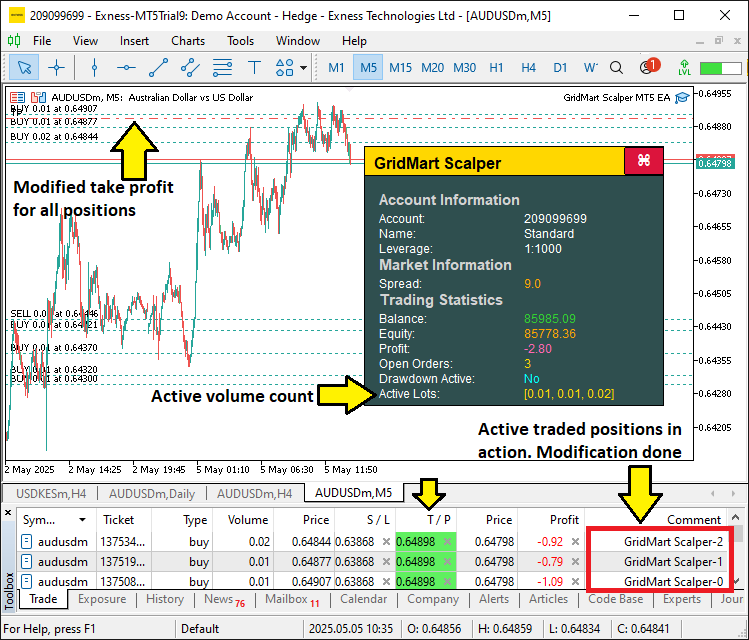
Na imagem, vemos que há ordens abertas que já estão sendo gerenciadas. Agora precisamos apenas aplicar a lógica de gestão de risco para monitorar o drawdown diário e limitá-lo. Para isso, usaremos uma função responsável por monitorar o drawdown e interromper o programa quando necessário, da seguinte forma.
//+------------------------------------------------------------------+
//| Monitor daily drawdown and control trading state                 |
//+------------------------------------------------------------------+
void MonitorDailyDrawdown() {
   //--- Initialize daily profit accumulator
   double totalDayProfit = 0.0;
   //--- Get current time
   datetime end = TimeCurrent();
   //--- Get current date as string
   string sdate = TimeToString(TimeCurrent(), TIME_DATE);
   //--- Convert date to datetime (start of day)
   datetime start = StringToTime(sdate);
   //--- Set end of day (24 hours later)
   datetime to = start + (1 * 24 * 60 * 60);

   //--- Check if daily reset is needed
   if (dailyResetTime < to) {
      //--- Update reset time
      dailyResetTime = to;
      //--- Store current balance as daily starting balance
      dailyBalance = GetAccountBalance();
   }
   //--- Select trade history for the day
   HistorySelect(start, end);
   //--- Get total number of deals
   int totalDeals = HistoryDealsTotal();

   //--- Iterate through trade history
   for (int i = 0; i < totalDeals; i++) {
      //--- Get deal ticket
      ulong ticket = HistoryDealGetTicket(i);
      //--- Check if deal is a position close
      if (HistoryDealGetInteger(ticket, DEAL_ENTRY) == DEAL_ENTRY_OUT) {
         //--- Calculate deal profit (including commission and swap)
         double latestDayProfit = (HistoryDealGetDouble(ticket, DEAL_PROFIT) +
                                  HistoryDealGetDouble(ticket, DEAL_COMMISSION) +
                                  HistoryDealGetDouble(ticket, DEAL_SWAP));
         //--- Accumulate daily profit
         totalDayProfit += latestDayProfit;
      }
   }

   //--- Calculate starting balance for the day
   double startingBalance = GetAccountBalance() - totalDayProfit;
   //--- Calculate daily profit/drawdown percentage
   double dailyProfitOrDrawdown = NormalizeDouble((totalDayProfit * 100 / startingBalance), 2);

   //--- Check if drawdown limit is exceeded
   if (dailyProfitOrDrawdown <= DRAWDOWN_LIMIT) {
      //--- Close all positions if configured
      if (CLOSE_ON_DRAWDOWN) CloseAllPositions();
      //--- Disable trading
      tradingEnabled = false;
   } else {
      //--- Enable trading
      tradingEnabled = true;
   }
}

//+------------------------------------------------------------------+
//| Close all open positions managed by the EA                       |
//+------------------------------------------------------------------+
void CloseAllPositions() {
   //--- Iterate through open positions
   for (int i = PositionsTotal() - 1; i >= 0; i--) {
      //--- Get position ticket
      ulong ticket = PositionGetTicket(i);
      //--- Select position by ticket
      if (ticket > 0 && PositionSelectByTicket(ticket)) {
         //--- Check if position belongs to this EA
         if (GetPositionSymbol() == _Symbol && GetPositionMagic() == MAGIC) {
            //--- Close the position
            obj_Trade.PositionClose(ticket);
         }
      }
   }
}
Para viabilizar a gestão de risco, implementamos a função "MonitorDailyDrawdown" para acompanhar as métricas diárias, usando as funções TimeCurrent e TimeToString para definir o intervalo do dia e HistorySelect para acessar o histórico de operações. Calculamos o lucro total com as funções HistoryDealGetTicket e HistoryDealGetDouble, normalizamos o drawdown percentual com NormalizeDouble e ajustamos "tradingEnabled" com base em "DRAWDOWN_LIMIT", chamando a função "CloseAllPositions" se "CLOSE_ON_DRAWDOWN" for true.
Definimos "CloseAllPositions" para percorrer as posições com "PositionsTotal" e PositionGetTicket, fechando as operações correspondentes com "PositionClose" de "obj_Trade" após verificar o símbolo e o número mágico com "GetPositionSymbol" e "GetPositionMagic", mantendo um controle confiável do drawdown. Em seguida, podemos chamar essa função a cada tick para aplicar a gestão de risco quando necessário.
//--- Monitor daily drawdown if enabled
if (ENABLE_DAILY_DRAWDOWN) MonitorDailyDrawdown();
Verificamos a condição "ENABLE_DAILY_DRAWDOWN" para determinar se o controle de drawdown está ativo e, se estiver, chamamos a função "MonitorDailyDrawdown" para avaliar os lucros e perdas diários, ajustar "tradingEnabled" e fechar posições se necessário, protegendo a conta contra perdas excessivas. Após a compilação, obtemos o seguinte resultado.
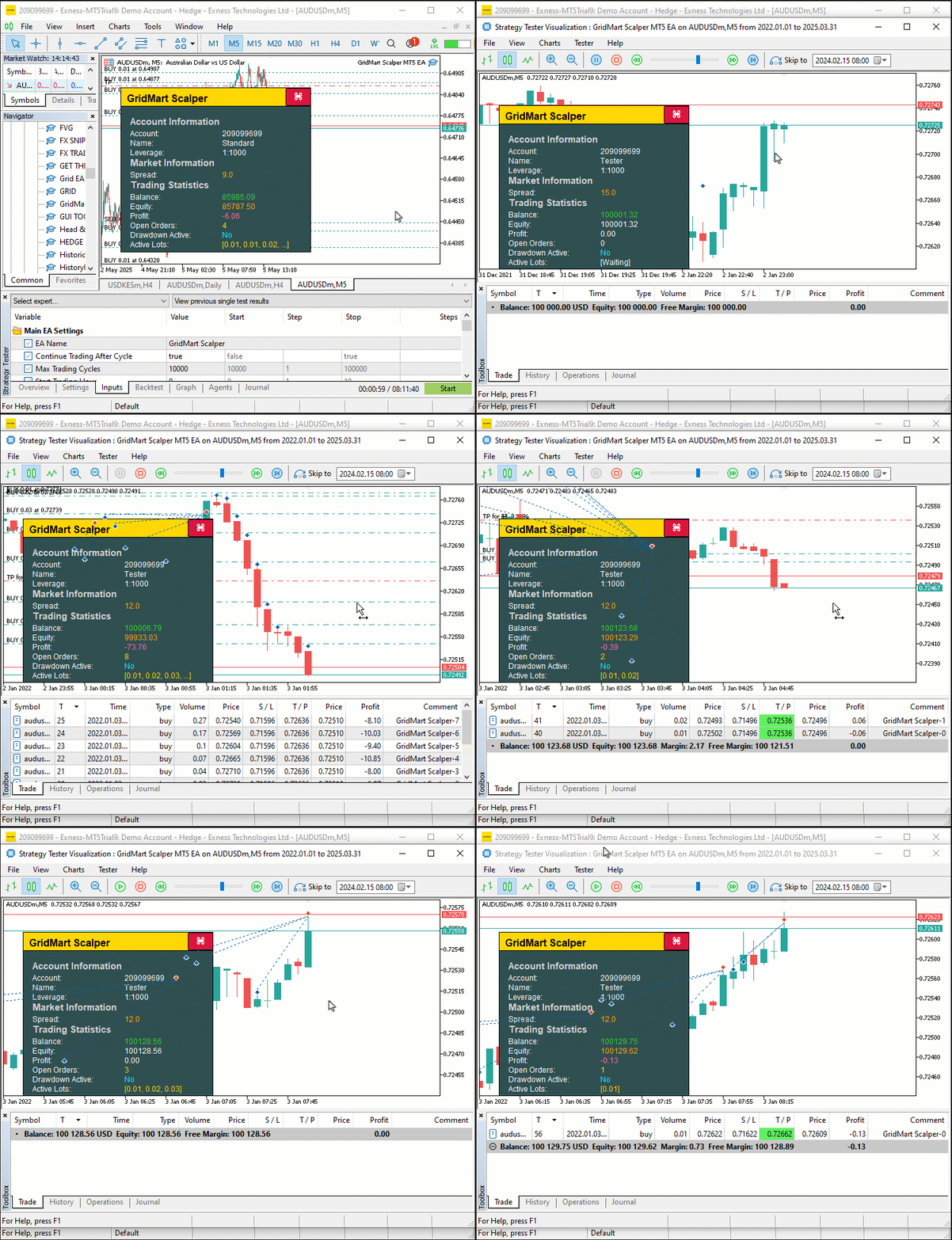
Na imagem, vemos que podemos abrir posições, gerenciá-las dinamicamente e fechá-las após atingir as metas definidas, alcançando assim nosso objetivo de implementar a estratégia Grid-Mart. Resta testar o programa em dados históricos. Isso será feito na próxima seção.
Teste em dados históricos
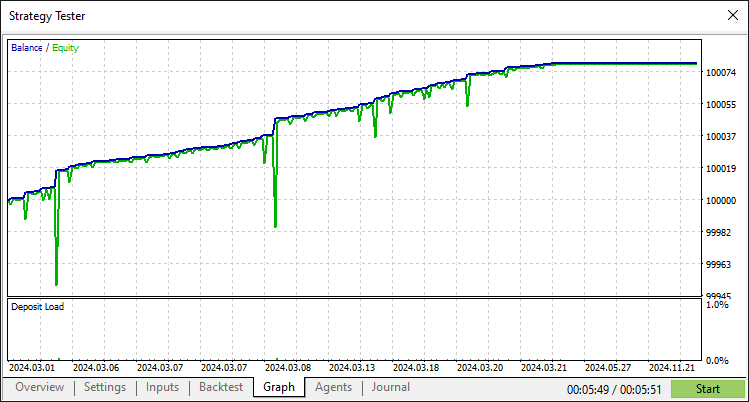
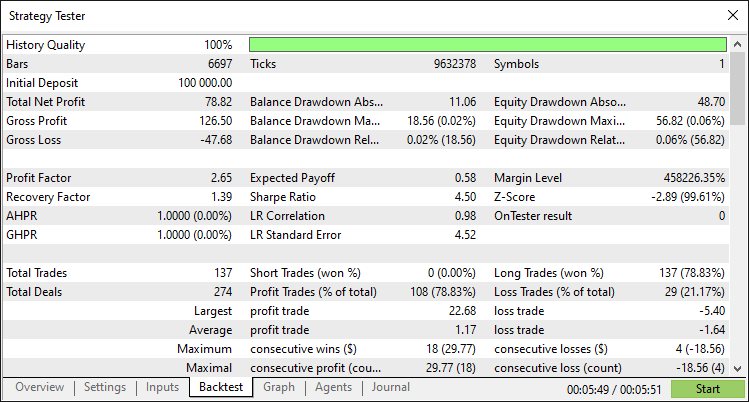
Após um teste cuidadoso em dados históricos, obtivemos os seguintes resultados.
Gráfico do teste em dados históricos:
Relatório do teste em dados históricos:
Conclusão
Concluindo, desenvolvemos um programa em MQL5 que automatiza a estratégia de scalping Grid-Mart, executando operações de martingale baseadas em grade e usando um painel informativo dinâmico para monitorar principais métricas em tempo real, como spread, lucro e tamanhos dos lotes. Com execução precisa das operações, gestão de risco robusta baseada no controle de drawdown e uma interface interativa, você pode aprimorar ainda mais este programa ajustando seus parâmetros ou integrando estratégias adicionais de acordo com suas preferências de negociação.
Aviso legal: O conteúdo deste artigo destina-se apenas a fins educacionais. A negociação envolve riscos financeiros significativos, e a volatilidade do mercado pode causar perdas. Testes cuidadosos em dados históricos e gestão de risco são fundamentais antes de implantar este programa no mercado real.
Ao dominar essas técnicas, você poderá aprimorar ainda mais este programa e torná-lo mais robusto, ou usá-lo como base para desenvolver outras estratégias de negociação, ampliando suas possibilidades na negociação algorítmica.
Traduzido do Inglês pela MetaQuotes Ltd.
Artigo original: https://www.mql5.com/en/articles/18038
Aviso: Todos os direitos sobre esses materiais pertencem à MetaQuotes Ltd. É proibida a reimpressão total ou parcial.
Esse artigo foi escrito por um usuário do site e reflete seu ponto de vista pessoal. A MetaQuotes Ltd. não se responsabiliza pela precisão das informações apresentadas nem pelas possíveis consequências decorrentes do uso das soluções, estratégias ou recomendações descritas.

 Desenvolvimento de ferramentas para análise de Price Action (Parte 22): Painel de correlação
 Criação de um painel administrativo de trading em MQL5 (Parte XI): Interface moderna de mensagens na plataforma (I)
 Trading com o Calendário Econômico MQL5 (Parte 8): Otimizando o teste de estratégias baseadas em notícias com filtros e logs
 Machine Learning e Data Science (Parte 38): Aplicação de Transfer Learning nos mercados de câmbio

- Aplicativos de negociação gratuitos
- 8 000+ sinais para cópia
- Notícias econômicas para análise dos mercados financeiros
Você concorda com a política do site e com os termos de uso
Ótimo artigo, mas há um bug significativo no CalculateSL.
Claro. Obrigado. O que há de errado com ele?
Claro. Obrigado. O que tá rolando com isso?
Você esqueceu de tratar da parte de vendas. Em anexo está a versão corrigida.
Você esqueceu de abordar o lado da venda. Em anexo está a versão corrigida.
Ah, sim. Claro. Vai ser de grande ajuda para os outros. Obrigado.