

Trading com o Calendário Econômico MQL5 (Parte 8): Otimizando o teste de estratégias baseadas em notícias com filtros e logs
 117
117
 0
0

Introdução
Neste artigo, damos continuidade à série dedicada ao Calendário Econômico MQL5. Vamos otimizar nosso sistema, desta vez para permitir testes históricos rápidos e com visualização intuitiva. Integraremos a visualização dos dados tanto no modo de trading em tempo real quanto no modo offline. Isso deve nos ajudar a aprimorar o desenvolvimento de estratégias baseadas em notícias. Como base, usaremos a Parte 7, na qual abordamos o uso de recursos para análise de eventos, o que nos permitiu testar essas estratégias no testador. Agora, adicionaremos uma filtragem inteligente de eventos e um registro seletivo em log para otimizar o funcionamento do sistema. Nosso objetivo é visualizar e testar estratégias tanto em tempo real quanto com dados históricos, reduzindo ao mínimo as informações irrelevantes. A estrutura do artigo inclui os seguintes tópicos:
- Cronógrafo visual para trading baseado em notícias em tempo real e offline
- Implementação em MQL5
- Testes e validação
- Conclusão
Agora, vamos analisar todas essas melhorias.
Cronógrafo visual para trading com notícias em tempo real e offline
Neste momento, estamos buscando garantir que os eventos econômicos possam ser visualizados e analisados com a mesma eficiência tanto em tempo real quanto offline. Nesta parte da série, apresento um cronógrafo visual, uma metáfora para um sistema otimizado de processamento de eventos e registro em log. O cronógrafo permitirá orientar-se com precisão e eficiência no tempo ao operar com base em notícias.
A filtragem inteligente de eventos permitirá reduzir significativamente a carga computacional no testador de estratégias. Faremos uma seleção prévia apenas das notícias mais relevantes dentro do intervalo de datas definido pelo usuário. Isso permitirá obter, nos testes históricos, uma velocidade comparável à do trading em tempo real. Esse mecanismo de filtragem permitirá concentrar a análise nos eventos importantes, sem a necessidade de processar dados irrelevantes. Assim, poderemos obter uma transição fluida entre a simulação histórica e a análise do mercado em tempo real.
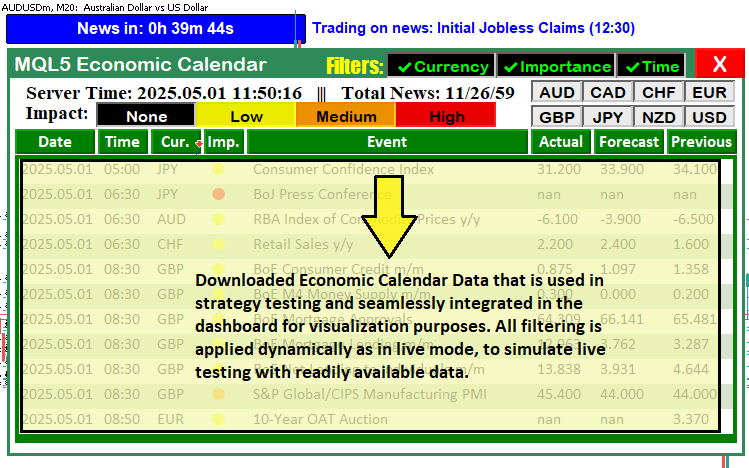
Além disso, o sistema de registro seletivo em log exibirá apenas informações essenciais, como a execução de operações e as atualizações do painel de monitoramento, evitando sobrecarregar o log com detalhes desnecessários. Dessa forma, teremos uma interface limpa e sem excesso de informações tanto durante a operação em tempo real quanto nos testes históricos. A possibilidade de visualizar a estratégia nos dois modos permitirá testá-la com dados históricos no testador de estratégias usando o mesmo painel intuitivo empregado no trading em tempo real. Com isso, teremos um fluxo de trabalho unificado em quaisquer condições de mercado. A seguir, mostramos o resultado que pretendemos alcançar.
Implementação com MQL5
Para implementar essas melhorias em MQL5, primeiro precisamos declarar uma série de variáveis que serão usadas para acompanhar os eventos carregados. Esses eventos serão posteriormente exibidos no painel de notícias em um formato semelhante ao utilizado nos artigos anteriores durante o trading em tempo real. Para começar, vamos incluir o recurso no qual os dados estão armazenados:
//---- Include trading library
#include <Trade\Trade.mqh>
CTrade trade;

//---- Define resource for CSV
#resource "\\Files\\Database\\EconomicCalendar.csv" as string EconomicCalendarData
Começaremos integrando a biblioteca de trading. É ela que permite executar operações tanto no trading em tempo real quanto nos testes offline. Com a diretiva #include <Trade\Trade.mqh>, incluímos a biblioteca de trading do MQL5, que contém a classe CTrade para gerenciar as operações de trading. Em seguida, declaramos um objeto CTrade chamado trade. A partir daí, a aplicação poderá executar programaticamente operações de compra e venda.
Depois, usamos a diretiva #resource para definir "\Files\Database\EconomicCalendar.csv" como um recurso de string denominado EconomicCalendarData. Esse arquivo CSV, carregado pela função LoadEventsFromResource, fornecerá os dados dos eventos, incluindo data, hora, moeda e previsão. Dessa forma, teremos uma representação uniforme dos dados tanto ao usar recursos quanto ao trabalhar com feeds em tempo real. Agora, vamos definir as demais variáveis de controle.
//---- Event name tracking
string current_eventNames_data[];
string previous_eventNames_data[];
string last_dashboard_eventNames[]; // Added: Cache for last dashboard event names in tester mode
datetime last_dashboard_update = 0; // Added: Track last dashboard update time in tester mode

//---- Filter flags
bool enableCurrencyFilter = true;
bool enableImportanceFilter = true;
bool enableTimeFilter = true;
bool isDashboardUpdate = true;
bool filters_changed = true;        // Added: Flag to detect filter changes in tester mode

//---- Event counters
int totalEvents_Considered = 0;
int totalEvents_Filtered = 0;
int totalEvents_Displayable = 0;

//---- Input parameters (PART 6)
sinput group "General Calendar Settings"
input ENUM_TIMEFRAMES start_time = PERIOD_H12;
input ENUM_TIMEFRAMES end_time = PERIOD_H12;
input ENUM_TIMEFRAMES range_time = PERIOD_H8;
input bool updateServerTime = true; // Enable/Disable Server Time Update in Panel
input bool debugLogging = false;    // Added: Enable debug logging in tester mode

//---- Input parameters for tester mode (from PART 7, minimal)
sinput group "Strategy Tester CSV Settings"
input datetime StartDate = D'2025.03.01'; // Download Start Date
input datetime EndDate = D'2025.03.21';   // Download End Date

//---- Structure for CSV events (from PART 7)
struct EconomicEvent {
   string eventDate;       // Date of the event
   string eventTime;       // Time of the event
   string currency;        // Currency affected
   string event;           // Event description
   string importance;      // Importance level
   double actual;          // Actual value
   double forecast;        // Forecast value
   double previous;        // Previous value
   datetime eventDateTime; // Added: Store precomputed datetime for efficiency
};

//---- Global array for tester mode events
EconomicEvent allEvents[];
EconomicEvent filteredEvents[]; // Added: Filtered events for tester mode optimization

//---- Trade settings
enum ETradeMode {
   TRADE_BEFORE,
   TRADE_AFTER,
   NO_TRADE,
   PAUSE_TRADING
};
input ETradeMode tradeMode = TRADE_BEFORE;
input int tradeOffsetHours = 12;
input int tradeOffsetMinutes = 5;
input int tradeOffsetSeconds = 0;
input double tradeLotSize = 0.01;

//---- Trade control
bool tradeExecuted = false;
datetime tradedNewsTime = 0;
int triggeredNewsEvents[];
Aqui, armazenamos os nomes dos eventos em current_eventNames_data, previous_eventNames_data e last_dashboard_eventNames. A variável last_dashboard_eventNames é usada para armazenar em cache as atualizações do painel no modo do testador, enquanto last_dashboard_update permite atualizar o painel apenas quando necessário, reduzindo o processamento redundante.
A filtragem dos eventos é controlada por enableCurrencyFilter, enableImportanceFilter, enableTimeFilter e filters_changed. Quando filters_changed é true, os filtros são redefinidos para que apenas os eventos relevantes sejam processados. O parâmetro debugLogging, no grupo sinput group "General Calendar Settings", é usado para registrar no log apenas as operações e atualizações relevantes.
O período de teste é definido pelas variáveis StartDate e EndDate no grupo sinput group "Strategy Tester CSV Settings". A estrutura EconomicEvent inclui o campo eventDateTime, que permite acessar rapidamente o horário do evento. Os eventos de allEvents são filtrados e armazenados em filteredEvents para agilizar o processamento, enquanto tradeMode e as variáveis relacionadas são usados na execução das operações. Isso permite selecionar o período de teste cujos dados serão carregados e usar o mesmo intervalo temporal durante a simulação. A seguir, é apresentada a interface do usuário.
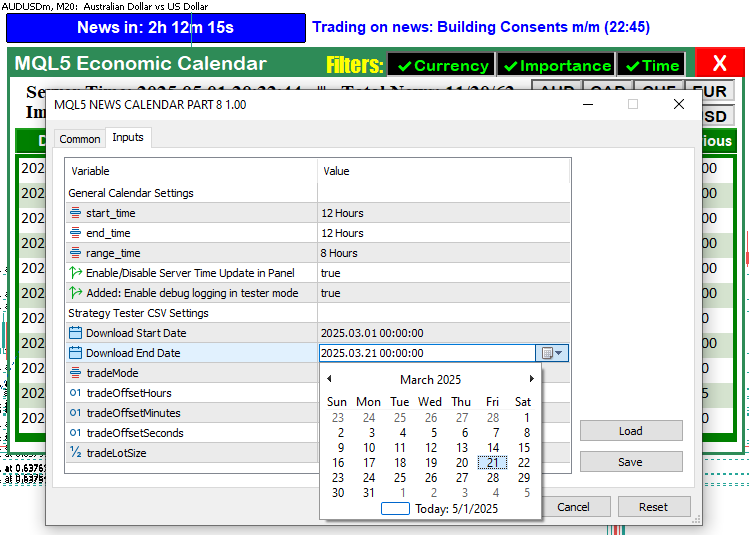
Na imagem, podemos ver que foram adicionados parâmetros extras para controlar a exibição dos eventos no modo do testador, bem como o controle das atualizações do painel e o registro em log. Tudo isso ajudará a otimizar o uso de recursos durante os testes históricos. Em seguida, precisamos definir uma função responsável pela filtragem dos eventos no modo de teste.
//+------------------------------------------------------------------+
//| Filter events for tester mode                                    | // Added: Function to pre-filter events by date range
//+------------------------------------------------------------------+
void FilterEventsForTester() {
   ArrayResize(filteredEvents, 0);
   int eventIndex = 0;
   for (int i = 0; i < ArraySize(allEvents); i++) {
      datetime eventDateTime = allEvents[i].eventDateTime;
      if (eventDateTime < StartDate || eventDateTime > EndDate) {
         if (debugLogging) Print("Event ", allEvents[i].event, " skipped in filter due to date range: ", TimeToString(eventDateTime)); // Modified: Conditional logging
         continue;
      }
      ArrayResize(filteredEvents, eventIndex + 1);
      filteredEvents[eventIndex] = allEvents[i];
      eventIndex++;
   }
   if (debugLogging) Print("Tester mode: Filtered ", eventIndex, " events."); // Modified: Conditional logging
   filters_changed = false;
}
Aqui implementamos a filtragem inteligente de eventos para acelerar os testes históricos, reduzindo a quantidade de notícias processadas no testador. A função FilterEventsForTester limpa o array filteredEvents com ArrayResize e o preenche novamente apenas com os eventos relevantes do array allEvents. Para cada evento, verificamos eventDateTime em relação às datas StartDate e EndDate e ignoramos os eventos que estiverem fora do intervalo definido. Esses casos só serão registrados no log quando debugLogging == true, usando a função Print, evitando assim o excesso de informações no log.
Os eventos que atendem aos critérios são copiados para filteredEvents no índice eventIndex, incrementado a cada nova inclusão. Para a alocação dinâmica de memória, usamos ArrayResize. O valor final de eventIndex, que corresponde ao número de eventos adicionados, também é exibido com Print apenas quando debugLogging está habilitado. Em seguida, definimos filters_changed como false para indicar que a filtragem foi concluída. Como já mencionado, reduzimos deliberadamente o conjunto de eventos para acelerar o processamento posterior e tornar mais eficiente a visualização das notícias no modo offline. Essa função é chamada no manipulador de eventos OnInit, permitindo filtrar previamente os dados dos eventos econômicos.
//+------------------------------------------------------------------+
//| Expert initialization function                                   |
//+------------------------------------------------------------------+
int OnInit() {
   //---- Create dashboard UI
   createRecLabel(MAIN_REC,50,50,740,410,clrSeaGreen,1);
   createRecLabel(SUB_REC1,50+3,50+30,740-3-3,410-30-3,clrWhite,1);
   createRecLabel(SUB_REC2,50+3+5,50+30+50+27,740-3-3-5-5,410-30-3-50-27-10,clrGreen,1);
   createLabel(HEADER_LABEL,50+3+5,50+5,"MQL5 Economic Calendar",clrWhite,15);

   //---- Create calendar buttons
   int startX = 59;
   for (int i = 0; i < ArraySize(array_calendar); i++) {
      createButton(ARRAY_CALENDAR+IntegerToString(i),startX,132,buttons[i],25,
                   array_calendar[i],clrWhite,13,clrGreen,clrNONE,"Calibri Bold");
      startX += buttons[i]+3;
   }

   //---- Initialize for live mode (unchanged)
   int totalNews = 0;
   bool isNews = false;
   MqlCalendarValue values[];
   datetime startTime = TimeTradeServer() - PeriodSeconds(start_time);
   datetime endTime = TimeTradeServer() + PeriodSeconds(end_time);
   string country_code = "US";
   string currency_base = SymbolInfoString(_Symbol,SYMBOL_CURRENCY_BASE);
   int allValues = CalendarValueHistory(values,startTime,endTime,NULL,NULL);

   //---- Load CSV events for tester mode
   if (MQLInfoInteger(MQL_TESTER)) {
      if (!LoadEventsFromResource()) {
         Print("Failed to load events from CSV resource.");
         return(INIT_FAILED);
      }
      Print("Tester mode: Loaded ", ArraySize(allEvents), " events from CSV.");
      FilterEventsForTester(); // Added: Pre-filter events for tester mode
   }

   //---- Create UI elements
   createLabel(TIME_LABEL,70,85,"Server Time: "+TimeToString(TimeCurrent(),TIME_DATE|TIME_SECONDS)+
               "   |||   Total News: "+IntegerToString(allValues),clrBlack,14,"Times new roman bold");
   createLabel(IMPACT_LABEL,70,105,"Impact: ",clrBlack,14,"Times new roman bold");
   createLabel(FILTER_LABEL,370,55,"Filters:",clrYellow,16,"Impact");

   //---- Create filter buttons
   string filter_curr_text = enableCurrencyFilter ? ShortToString(0x2714)+"Currency" : ShortToString(0x274C)+"Currency";
   color filter_curr_txt_color = enableCurrencyFilter ? clrLime : clrRed;
   bool filter_curr_state = enableCurrencyFilter;
   createButton(FILTER_CURR_BTN,430,55,110,26,filter_curr_text,filter_curr_txt_color,12,clrBlack);
   ObjectSetInteger(0,FILTER_CURR_BTN,OBJPROP_STATE,filter_curr_state);

   string filter_imp_text = enableImportanceFilter ? ShortToString(0x2714)+"Importance" : ShortToString(0x274C)+"Importance";
   color filter_imp_txt_color = enableImportanceFilter ? clrLime : clrRed;
   bool filter_imp_state = enableImportanceFilter;
   createButton(FILTER_IMP_BTN,430+110,55,120,26,filter_imp_text,filter_imp_txt_color,12,clrBlack);
   ObjectSetInteger(0,FILTER_IMP_BTN,OBJPROP_STATE,filter_imp_state);

   string filter_time_text = enableTimeFilter ? ShortToString(0x2714)+"Time" : ShortToString(0x274C)+"Time";
   color filter_time_txt_color = enableTimeFilter ? clrLime : clrRed;
   bool filter_time_state = enableTimeFilter;
   createButton(FILTER_TIME_BTN,430+110+120,55,70,26,filter_time_text,filter_time_txt_color,12,clrBlack);
   ObjectSetInteger(0,FILTER_TIME_BTN,OBJPROP_STATE,filter_time_state);

   createButton(CANCEL_BTN,430+110+120+79,51,50,30,"X",clrWhite,17,clrRed,clrNONE);

   //---- Create impact buttons
   int impact_size = 100;
   for (int i = 0; i < ArraySize(impact_labels); i++) {
      color impact_color = clrBlack, label_color = clrBlack;
      if (impact_labels[i] == "None") label_color = clrWhite;
      else if (impact_labels[i] == "Low") impact_color = clrYellow;
      else if (impact_labels[i] == "Medium") impact_color = clrOrange;
      else if (impact_labels[i] == "High") impact_color = clrRed;
      createButton(IMPACT_LABEL+string(i),140+impact_size*i,105,impact_size,25,
                   impact_labels[i],label_color,12,impact_color,clrBlack);
   }

   //---- Create currency buttons
   int curr_size = 51, button_height = 22, spacing_x = 0, spacing_y = 3, max_columns = 4;
   for (int i = 0; i < ArraySize(curr_filter); i++) {
      int row = i / max_columns;
      int col = i % max_columns;
      int x_pos = 575 + col * (curr_size + spacing_x);
      int y_pos = 83 + row * (button_height + spacing_y);
      createButton(CURRENCY_BTNS+IntegerToString(i),x_pos,y_pos,curr_size,button_height,curr_filter[i],clrBlack);
   }

   //---- Initialize filters
   if (enableCurrencyFilter) {
      ArrayFree(curr_filter_selected);
      ArrayCopy(curr_filter_selected, curr_filter);
      Print("CURRENCY FILTER ENABLED");
      ArrayPrint(curr_filter_selected);
      for (int i = 0; i < ArraySize(curr_filter_selected); i++) {
         ObjectSetInteger(0, CURRENCY_BTNS+IntegerToString(i), OBJPROP_STATE, true);
      }
   }

   if (enableImportanceFilter) {
      ArrayFree(imp_filter_selected);
      ArrayCopy(imp_filter_selected, allowed_importance_levels);
      ArrayFree(impact_filter_selected);
      ArrayCopy(impact_filter_selected, impact_labels);
      Print("IMPORTANCE FILTER ENABLED");
      ArrayPrint(imp_filter_selected);
      ArrayPrint(impact_filter_selected);
      for (int i = 0; i < ArraySize(imp_filter_selected); i++) {
         string btn_name = IMPACT_LABEL+string(i);
         ObjectSetInteger(0, btn_name, OBJPROP_STATE, true);
         ObjectSetInteger(0, btn_name, OBJPROP_BORDER_COLOR, clrNONE);
      }
   }

   //---- Update dashboard
   update_dashboard_values(curr_filter_selected, imp_filter_selected);
   ChartRedraw(0);
   return(INIT_SUCCEEDED);
}
Usamos a função createRecLabel para criar os painéis MAIN_REC, SUB_REC1 e SUB_REC2 com diferentes cores e dimensões. Também usamos createLabel para adicionar HEADER_LABEL com o texto "MQL5 Economic Calendar", como antes. Os botões do calendário são criados dinamicamente a partir de array_calendar usando as funções createButton e ArraySize. Para posicioná-los no gráfico, usamos startX e buttons.
No modo de trading em tempo real, obtemos os eventos por meio da função CalendarValueHistory e os armazenamos no array values, usando startTime e endTime, calculados com TimeTradeServer e PeriodSeconds. No modo do testador, usamos MQLInfoInteger para verificar se o programa está realmente sendo executado no modo MQL_TESTER e carregamos os dados do calendário econômico EconomicCalendarData no array allEvents por meio da função LoadEventsFromResource. Em seguida, chegamos a uma das funções mais importantes, FilterEventsForTester, responsável por filtrar os eventos e preencher o array filteredEvents.
Também adicionamos os elementos da interface. Com createLabel, criamos os rótulos TIME_LABEL (hora), IMPACT_LABEL (importância) e FILTER_LABEL (filtro). Em seguida, criamos os botões de filtragem FILTER_CURR_BTN, FILTER_IMP_BTN, FILTER_TIME_BTN e CANCEL_BTN usando createButton e ObjectSetInteger. O estado de filtragem filter_curr_state é definido de acordo com o valor de enableCurrencyFilter. Os botões de importância e de moedas são criados a partir de impact_labels e curr_filter usando createButton. Também inicializamos os filtros curr_filter_selected e imp_filter_selected por meio de ArrayFree e ArrayCopy. Por fim, atualizamos o painel com update_dashboard_values e redesenhamos o gráfico com ChartRedraw. Se a inicialização for concluída com sucesso, a função retorna INIT_SUCCEEDED. Após a inicialização do programa, obtemos o seguinte resultado.

Agora podemos carregar apenas os dados relevantes após a filtragem. Portanto, em OnTick, precisamos garantir que somente os dados correspondentes ao intervalo de tempo definido sejam obtidos e exibidos no painel, em vez de mostrar todos os dados, como ocorre no modo de trading em tempo real. Também adicionaremos mensagens de log apenas para as atualizações mais importantes.
//+------------------------------------------------------------------+
//| Expert tick function                                             |
//+------------------------------------------------------------------+
void OnTick() {
   UpdateFilterInfo();
   CheckForNewsTrade();
   if (isDashboardUpdate) {
      if (MQLInfoInteger(MQL_TESTER)) {
         datetime currentTime = TimeTradeServer();
         datetime timeRange = PeriodSeconds(range_time);
         datetime timeAfter = currentTime + timeRange;
         if (filters_changed || last_dashboard_update < timeAfter) { // Modified: Update on filter change or time range shift
            update_dashboard_values(curr_filter_selected, imp_filter_selected);
            ArrayFree(last_dashboard_eventNames);
            ArrayCopy(last_dashboard_eventNames, current_eventNames_data);
            last_dashboard_update = currentTime;
         }
      } else {
         update_dashboard_values(curr_filter_selected, imp_filter_selected);
      }
   }
}
Em OnTick, usamos a função UpdateFilterInfo para atualizar as configurações dos filtros e CheckForNewsTrade para avaliar os eventos e executar operações com base neles. Se isDashboardUpdate estiver definido como true, verificamos o valor de MQL_TESTER por meio de MQLInfoInteger para executar a lógica adicionada especificamente para o modo do testador. Também calculamos currentTime com TimeTradeServer, timeRange com PeriodSeconds com base em range_time e timeAfter como a soma de currentTime e timeRange.
No modo do testador, verificamos se filters_changed está definido como true ou se last_dashboard_update é menor que timeAfter. Quando essa condição é atendida, chamamos update_dashboard_values com os parâmetros curr_filter_selected e imp_filter_selected. Em seguida, limpamos o array last_dashboard_eventNames com ArrayFree, copiamos para ele os dados de current_eventNames_data usando ArrayCopy e atualizamos last_dashboard_update com o valor de currentTime. Dessa forma, reduzimos a frequência de atualizações ao mínimo necessário. No modo de trading em tempo real, update_dashboard_values é chamada diretamente para manter o painel continuamente atualizado. Agora, vamos modificar as funções utilizadas levando em conta essas alterações, principalmente no que diz respeito à separação dos intervalos de tempo.
//+------------------------------------------------------------------+
//| Load events from CSV resource                                    |
//+------------------------------------------------------------------+
bool LoadEventsFromResource() {
   string fileData = EconomicCalendarData;
   Print("Raw resource content (size: ", StringLen(fileData), " bytes):\n", fileData);
   string lines[];
   int lineCount = StringSplit(fileData, '\n', lines);
   if (lineCount <= 1) {
      Print("Error: No data lines found in resource! Raw data: ", fileData);
      return false;
   }
   ArrayResize(allEvents, 0);
   int eventIndex = 0;
   for (int i = 1; i < lineCount; i++) {
      if (StringLen(lines[i]) == 0) {
         if (debugLogging) Print("Skipping empty line ", i); // Modified: Conditional logging
         continue;
      }
      string fields[];
      int fieldCount = StringSplit(lines[i], ',', fields);
      if (debugLogging) Print("Line ", i, ": ", lines[i], " (field count: ", fieldCount, ")"); // Modified: Conditional logging
      if (fieldCount < 8) {
         Print("Malformed line ", i, ": ", lines[i], " (field count: ", fieldCount, ")");
         continue;
      }
      string dateStr = fields[0];
      string timeStr = fields[1];
      string currency = fields[2];
      string event = fields[3];
      for (int j = 4; j < fieldCount - 4; j++) {
         event += "," + fields[j];
      }
      string importance = fields[fieldCount - 4];
      string actualStr = fields[fieldCount - 3];
      string forecastStr = fields[fieldCount - 2];
      string previousStr = fields[fieldCount - 1];
      datetime eventDateTime = StringToTime(dateStr + " " + timeStr);
      if (eventDateTime == 0) {
         Print("Error: Invalid datetime conversion for line ", i, ": ", dateStr, " ", timeStr);
         continue;
      }
      ArrayResize(allEvents, eventIndex + 1);
      allEvents[eventIndex].eventDate = dateStr;
      allEvents[eventIndex].eventTime = timeStr;
      allEvents[eventIndex].currency = currency;
      allEvents[eventIndex].event = event;
      allEvents[eventIndex].importance = importance;
      allEvents[eventIndex].actual = StringToDouble(actualStr);
      allEvents[eventIndex].forecast = StringToDouble(forecastStr);
      allEvents[eventIndex].previous = StringToDouble(previousStr);
      allEvents[eventIndex].eventDateTime = eventDateTime; // Added: Store precomputed datetime
      if (debugLogging) Print("Loaded event ", eventIndex, ": ", dateStr, " ", timeStr, ", ", currency, ", ", event); // Modified: Conditional logging
      eventIndex++;
   }
   Print("Loaded ", eventIndex, " events from resource into array.");
   return eventIndex > 0;
}
Aqui carregamos o histórico de eventos do calendário econômico a partir do arquivo CSV para utilizá-lo nos testes históricos, com processamento otimizado dos eventos e registro seletivo em log. Usamos a função LoadEventsFromResource para ler os dados de EconomicCalendarData e armazená-los na variável fileData. O tamanho desses dados é exibido no log por meio das funções Print e StringLen. Em seguida, usamos StringSplit para dividir fileData no array lines, verificamos lineCount para confirmar que há dados disponíveis e limpamos allEvents com ArrayResize.
Percorremos então o array lines em um laço, ignorando as linhas vazias após verificá-las com StringLen. Como já mencionado, essas ocorrências só são registradas no log quando debugLogging está definido como true. A função StringSplit divide cada linha em campos armazenados em fields. Depois de verificar fieldCount, extraímos dateStr, timeStr, currency, event, importance, actualStr, forecastStr e previousStr, concatenando dinamicamente os campos correspondentes ao nome do evento quando necessário.
As strings de data e hora dateStr e timeStr são convertidas em eventDateTime com StringToTime, e o resultado é armazenado em allEvents[eventIndex].eventDateTime. O array allEvents é preenchido dinamicamente com ArrayResize, enquanto os valores numéricos são convertidos com StringToDouble. Os carregamentos concluídos com sucesso só são registrados no log quando necessário, e a função retorna true se eventIndex for maior que zero. Em seguida, atualizamos a função responsável pelos valores exibidos no painel, pois ela afeta a forma como os dados dos eventos armazenados são visualizados.
//+------------------------------------------------------------------+
//| Update dashboard values                                          |
//+------------------------------------------------------------------+
void update_dashboard_values(string &curr_filter_array[], ENUM_CALENDAR_EVENT_IMPORTANCE &imp_filter_array[]) {
   totalEvents_Considered = 0;
   totalEvents_Filtered = 0;
   totalEvents_Displayable = 0;
   ArrayFree(current_eventNames_data);

   datetime timeRange = PeriodSeconds(range_time);
   datetime timeBefore = TimeTradeServer() - timeRange;
   datetime timeAfter = TimeTradeServer() + timeRange;

   int startY = 162;

   if (MQLInfoInteger(MQL_TESTER)) {
      if (filters_changed) FilterEventsForTester(); // Added: Re-filter events if filters changed
      //---- Tester mode: Process filtered events
      for (int i = 0; i < ArraySize(filteredEvents); i++) {
         totalEvents_Considered++;
         datetime eventDateTime = filteredEvents[i].eventDateTime;
         if (eventDateTime < StartDate || eventDateTime > EndDate) {
            if (debugLogging) Print("Event ", filteredEvents[i].event, " skipped due to date range."); // Modified: Conditional logging
            continue;
         }

         bool timeMatch = !enableTimeFilter;
         if (enableTimeFilter) {
            if (eventDateTime <= TimeTradeServer() && eventDateTime >= timeBefore) timeMatch = true;
            else if (eventDateTime >= TimeTradeServer() && eventDateTime <= timeAfter) timeMatch = true;
         }
         if (!timeMatch) {
            if (debugLogging) Print("Event ", filteredEvents[i].event, " skipped due to time filter."); // Modified: Conditional logging
            continue;
         }

         bool currencyMatch = !enableCurrencyFilter;
         if (enableCurrencyFilter) {
            for (int j = 0; j < ArraySize(curr_filter_array); j++) {
               if (filteredEvents[i].currency == curr_filter_array[j]) {
                  currencyMatch = true;
                  break;
               }
            }
         }
         if (!currencyMatch) {
            if (debugLogging) Print("Event ", filteredEvents[i].event, " skipped due to currency filter."); // Modified: Conditional logging
            continue;
         }

         bool importanceMatch = !enableImportanceFilter;
         if (enableImportanceFilter) {
            string imp_str = filteredEvents[i].importance;
            ENUM_CALENDAR_EVENT_IMPORTANCE event_imp = (imp_str == "None") ? CALENDAR_IMPORTANCE_NONE :
                                                      (imp_str == "Low") ? CALENDAR_IMPORTANCE_LOW :
                                                      (imp_str == "Medium") ? CALENDAR_IMPORTANCE_MODERATE :
                                                      CALENDAR_IMPORTANCE_HIGH;
            for (int k = 0; k < ArraySize(imp_filter_array); k++) {
               if (event_imp == imp_filter_array[k]) {
                  importanceMatch = true;
                  break;
               }
            }
         }
         if (!importanceMatch) {
            if (debugLogging) Print("Event ", filteredEvents[i].event, " skipped due to importance filter."); // Modified: Conditional logging
            continue;
         }

         totalEvents_Filtered++;
         if (totalEvents_Displayable >= 11) continue;
         totalEvents_Displayable++;

         color holder_color = (totalEvents_Displayable % 2 == 0) ? C'213,227,207' : clrWhite;
         createRecLabel(DATA_HOLDERS+string(totalEvents_Displayable),62,startY-1,716,26+1,holder_color,1,clrNONE);

         int startX = 65;
         string news_data[ArraySize(array_calendar)];
         news_data[0] = filteredEvents[i].eventDate;
         news_data[1] = filteredEvents[i].eventTime;
         news_data[2] = filteredEvents[i].currency;
         color importance_color = clrBlack;
         if (filteredEvents[i].importance == "Low") importance_color = clrYellow;
         else if (filteredEvents[i].importance == "Medium") importance_color = clrOrange;
         else if (filteredEvents[i].importance == "High") importance_color = clrRed;
         news_data[3] = ShortToString(0x25CF);
         news_data[4] = filteredEvents[i].event;
         news_data[5] = DoubleToString(filteredEvents[i].actual, 3);
         news_data[6] = DoubleToString(filteredEvents[i].forecast, 3);
         news_data[7] = DoubleToString(filteredEvents[i].previous, 3);

         for (int k = 0; k < ArraySize(array_calendar); k++) {
            if (k == 3) {
               createLabel(ARRAY_NEWS+IntegerToString(i)+" "+array_calendar[k],startX,startY-(22-12),news_data[k],importance_color,22,"Calibri");
            } else {
               createLabel(ARRAY_NEWS+IntegerToString(i)+" "+array_calendar[k],startX,startY,news_data[k],clrBlack,12,"Calibri");
            }
            startX += buttons[k]+3;
         }

         ArrayResize(current_eventNames_data, ArraySize(current_eventNames_data)+1);
         current_eventNames_data[ArraySize(current_eventNames_data)-1] = filteredEvents[i].event;
         startY += 25;
      }
   } else {

      //---- Live mode: Unchanged

   }
}
Para exibir as notícias filtradas, usamos a função update_dashboard_values, redefinindo os valores de totalEvents_Considered, totalEvents_Filtered e totalEvents_Displayable e limpando current_eventNames_data com ArrayFree. O parâmetro timeRange é definido com PeriodSeconds a partir de range_time, enquanto timeBefore e timeAfter são calculados com TimeTradeServer. Verificamos o modo do testador por meio de MQLInfoInteger. Se filters_changed estiver definido como true, chamamos a função FilterEventsForTester, declarada anteriormente, para atualizar filteredEvents.
Percorremos os elementos de filteredEvents usando ArraySize, incrementamos totalEvents_Considered e ignoramos os eventos que estiverem fora do intervalo entre StartDate e EndDate. Também ignoramos aqueles que não atendem aos critérios de enableTimeFilter, enableCurrencyFilter ou enableImportanceFilter. Como já mencionado, esses casos só são registrados no log quando debugLogging está habilitado.
Para os primeiros 11 eventos que atendem aos critérios, incrementamos totalEvents_Displayable, criamos as linhas DATA_HOLDERS com createRecLabel e usamos createLabel para preencher news_data com os dados dos campos de filteredEvents. Aqui nos interessam os valores de eventDate e event, cuja apresentação é definida de acordo com importance_color e array_calendar. O próprio array current_eventNames_data é expandido dinamicamente com ArrayResize. e armazena os nomes dos eventos. Para o funcionamento no modo do testador, modificamos da seguinte forma a função responsável por verificar as condições e abrir operações:
//+------------------------------------------------------------------+
//| Check for news trade (adapted for tester mode trading)           |
//+------------------------------------------------------------------+
void CheckForNewsTrade() {
   if (!MQLInfoInteger(MQL_TESTER) || debugLogging) Print("CheckForNewsTrade called at: ", TimeToString(TimeTradeServer(), TIME_SECONDS)); // Modified: Conditional logging
   if (tradeMode == NO_TRADE || tradeMode == PAUSE_TRADING) {
      if (ObjectFind(0, "NewsCountdown") >= 0) {
         ObjectDelete(0, "NewsCountdown");
         Print("Trading disabled. Countdown removed.");
      }
      return;
   }

   datetime currentTime = TimeTradeServer();
   int offsetSeconds = tradeOffsetHours * 3600 + tradeOffsetMinutes * 60 + tradeOffsetSeconds;

   if (tradeExecuted) {
      if (currentTime < tradedNewsTime) {
         int remainingSeconds = (int)(tradedNewsTime - currentTime);
         int hrs = remainingSeconds / 3600;
         int mins = (remainingSeconds % 3600) / 60;
         int secs = remainingSeconds % 60;
         string countdownText = "News in: " + IntegerToString(hrs) + "h " +
                               IntegerToString(mins) + "m " + IntegerToString(secs) + "s";
         if (ObjectFind(0, "NewsCountdown") < 0) {
            createButton1("NewsCountdown", 50, 17, 300, 30, countdownText, clrWhite, 12, clrBlue, clrBlack);
            Print("Post-trade countdown created: ", countdownText);
         } else {
            updateLabel1("NewsCountdown", countdownText);
            Print("Post-trade countdown updated: ", countdownText);
         }
      } else {
         int elapsed = (int)(currentTime - tradedNewsTime);
         if (elapsed < 15) {
            int remainingDelay = 15 - elapsed;
            string countdownText = "News Released, resetting in: " + IntegerToString(remainingDelay) + "s";
            if (ObjectFind(0, "NewsCountdown") < 0) {
               createButton1("NewsCountdown", 50, 17, 300, 30, countdownText, clrWhite, 12, clrRed, clrBlack);
               ObjectSetInteger(0,"NewsCountdown",OBJPROP_BGCOLOR,clrRed);
               Print("Post-trade reset countdown created: ", countdownText);
            } else {
               updateLabel1("NewsCountdown", countdownText);
               ObjectSetInteger(0,"NewsCountdown",OBJPROP_BGCOLOR,clrRed);
               Print("Post-trade reset countdown updated: ", countdownText);
            }
         } else {
            Print("News Released. Resetting trade status after 15 seconds.");
            if (ObjectFind(0, "NewsCountdown") >= 0) ObjectDelete(0, "NewsCountdown");
            tradeExecuted = false;
         }
      }
      return;
   }

   datetime lowerBound = currentTime - PeriodSeconds(start_time);
   datetime upperBound = currentTime + PeriodSeconds(end_time);
   if (debugLogging) Print("Event time range: ", TimeToString(lowerBound, TIME_SECONDS), " to ", TimeToString(upperBound, TIME_SECONDS)); // Modified: Conditional logging

   datetime candidateEventTime = 0;
   string candidateEventName = "";
   string candidateTradeSide = "";
   int candidateEventID = -1;

   if (MQLInfoInteger(MQL_TESTER)) {
      //---- Tester mode: Process filtered events
      int totalValues = ArraySize(filteredEvents);
      if (debugLogging) Print("Total events found: ", totalValues); // Modified: Conditional logging
      if (totalValues <= 0) {
         if (ObjectFind(0, "NewsCountdown") >= 0) ObjectDelete(0, "NewsCountdown");
         return;
      }

      for (int i = 0; i < totalValues; i++) {
         datetime eventTime = filteredEvents[i].eventDateTime;
         if (eventTime < lowerBound || eventTime > upperBound || eventTime < StartDate || eventTime > EndDate) {
            if (debugLogging) Print("Event ", filteredEvents[i].event, " skipped due to date range."); // Modified: Conditional logging
            continue;
         }

         bool currencyMatch = !enableCurrencyFilter;
         if (enableCurrencyFilter) {
            for (int k = 0; k < ArraySize(curr_filter_selected); k++) {
               if (filteredEvents[i].currency == curr_filter_selected[k]) {
                  currencyMatch = true;
                  break;
               }
            }
            if (!currencyMatch) {
               if (debugLogging) Print("Event ", filteredEvents[i].event, " skipped due to currency filter."); // Modified: Conditional logging
               continue;
            }
         }

         bool impactMatch = !enableImportanceFilter;
         if (enableImportanceFilter) {
            string imp_str = filteredEvents[i].importance;
            ENUM_CALENDAR_EVENT_IMPORTANCE event_imp = (imp_str == "None") ? CALENDAR_IMPORTANCE_NONE :
                                                      (imp_str == "Low") ? CALENDAR_IMPORTANCE_LOW :
                                                      (imp_str == "Medium") ? CALENDAR_IMPORTANCE_MODERATE :
                                                      CALENDAR_IMPORTANCE_HIGH;
            for (int k = 0; k < ArraySize(imp_filter_selected); k++) {
               if (event_imp == imp_filter_selected[k]) {
                  impactMatch = true;
                  break;
               }
            }
            if (!impactMatch) {
               if (debugLogging) Print("Event ", filteredEvents[i].event, " skipped due to impact filter."); // Modified: Conditional logging
               continue;
            }
         }

         bool alreadyTriggered = false;
         for (int j = 0; j < ArraySize(triggeredNewsEvents); j++) {
            if (triggeredNewsEvents[j] == i) {
               alreadyTriggered = true;
               break;
            }
         }
         if (alreadyTriggered) {
            if (debugLogging) Print("Event ", filteredEvents[i].event, " already triggered a trade. Skipping."); // Modified: Conditional logging
            continue;
         }

         if (tradeMode == TRADE_BEFORE) {
            if (currentTime >= (eventTime - offsetSeconds) && currentTime < eventTime) {
               double forecast = filteredEvents[i].forecast;
               double previous = filteredEvents[i].previous;
               if (forecast == 0.0 || previous == 0.0) {
                  if (debugLogging) Print("Skipping event ", filteredEvents[i].event, " because forecast or previous value is empty."); // Modified: Conditional logging
                  continue;
               }
               if (forecast == previous) {
                  if (debugLogging) Print("Skipping event ", filteredEvents[i].event, " because forecast equals previous."); // Modified: Conditional logging
                  continue;
               }
               if (candidateEventTime == 0 || eventTime < candidateEventTime) {
                  candidateEventTime = eventTime;
                  candidateEventName = filteredEvents[i].event;
                  candidateEventID = i;
                  candidateTradeSide = (forecast > previous) ? "BUY" : "SELL";
                  if (debugLogging) Print("Candidate event: ", filteredEvents[i].event, " with event time: ", TimeToString(eventTime, TIME_SECONDS), " Side: ", candidateTradeSide); // Modified: Conditional logging
               }
            }
         }
      }
   } else {

      //---- Live mode: Unchanged

   }
}
Para avaliar os eventos e executar operações com base nas notícias no modo do testador, utilizando a filtragem de eventos e o registro seletivo em log, usamos a função CheckForNewsTrade. Se debugLogging estiver definido como true, usamos Print para registrar informações no log, com o horário obtido por TimeToString e TimeTradeServer. Saímos da função se tradeMode for igual a NO_TRADE ou PAUSE_TRADING. Para verificar a existência do objeto NewsCountdown, usamos ObjectFind; quando necessário, o removemos com ObjectDelete e registramos essa ação com Print. Também gerenciamos os estados posteriores à execução da operação, calculando currentTime com TimeTradeServer e offsetSeconds a partir de tradeOffsetHours, tradeOffsetMinutes e tradeOffsetSeconds.
Se tradeExecuted estiver definido como true, processamos a contagem regressiva com base em tradedNewsTime e formamos countdownText com IntegerToString para exibir o tempo restante ou o atraso. Dependendo do resultado de ObjectFind, criamos ou atualizamos NewsCountdown usando createButton1 ou updateLabel1. O estilo é configurado com ObjectSetInteger, e as informações correspondentes são registradas no log por meio de Print. Quinze segundos após a execução da operação, tradeExecuted é redefinido como false, e o objeto é removido com ObjectDelete, e a ação é registrada no log.
No modo do testador, determinado com MQLInfoInteger ao consultar MQL_TESTER, processamos filteredEvents e obtemos totalValues usando ArraySize. Quando necessário, registramos essas informações no log e, se não houver dados, saímos da função após limpar NewsCountdown. Definimos lowerBound e upperBound com TimeTradeServer e PeriodSeconds, com base nos valores de start_time e end_time. Se debugLogging estiver habilitado, registramos esse intervalo no log. Em seguida, inicializamos candidateEventTime, candidateEventName, candidateEventID e candidateTradeSide para selecionar a operação.
Percorremos o array filteredEvents em um laço e ignoramos os eventos que estiverem fora do intervalo entre lowerBound e upperBound ou entre StartDate e EndDate, além daqueles que não atenderem aos filtros de moeda, definidos por enableCurrencyFilter e curr_filter_selected, ou de importância, definidos por enableImportanceFilter e imp_filter_selected. Quando debugLogging está habilitado, esses casos são registrados no log com Print. Também usamos ArraySize no array triggeredNewsEvents para excluir os eventos que já foram processados.
No modo TRADE_BEFORE, procuramos eventos que estejam no intervalo de offsetSeconds que antecede eventDateTime, verificamos se forecast e previous contêm valores válidos e selecionamos o evento mais cedo, armazenando seus dados em candidateEventTime, candidateEventName, candidateEventID e candidateTradeSide. A direção da operação será BUY se forecast for maior que previous; caso contrário, será SELL. Se debugLogging estiver habilitado, essas informações também são registradas no log com Print. O restante da lógica do modo de trading em tempo real permanece inalterado. Após a compilação, obtemos a seguinte visualização da confirmação das operações.
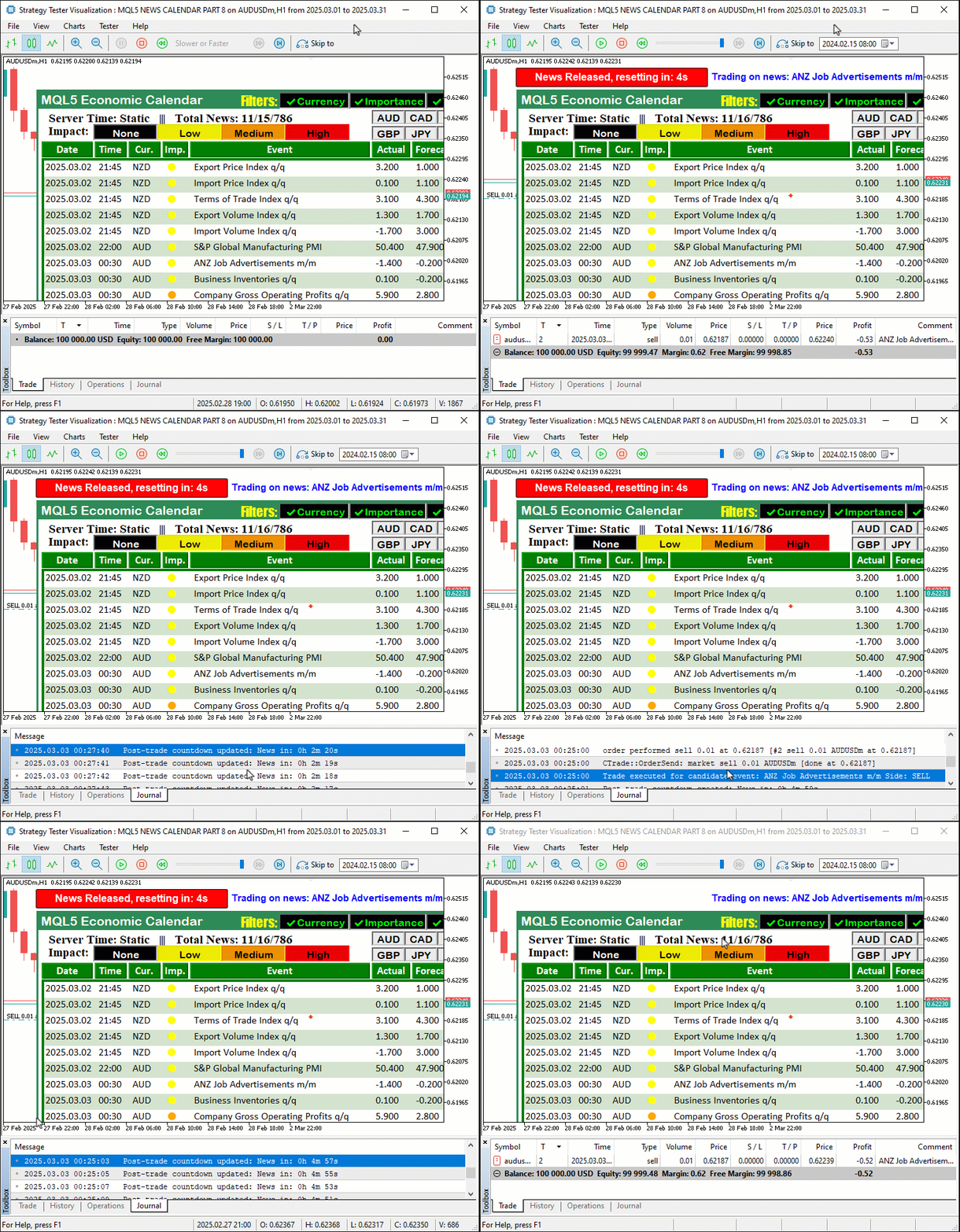
A imagem mostra que conseguimos carregar os dados, filtrá-los, exibi-los no painel, iniciar a contagem regressiva quando o intervalo de tempo correspondente é atingido e abrir operações com base no evento, reproduzindo integralmente o comportamento do modo de trading em tempo real. Agora só falta testar o sistema. Faremos isso na próxima seção.
Testes e validação
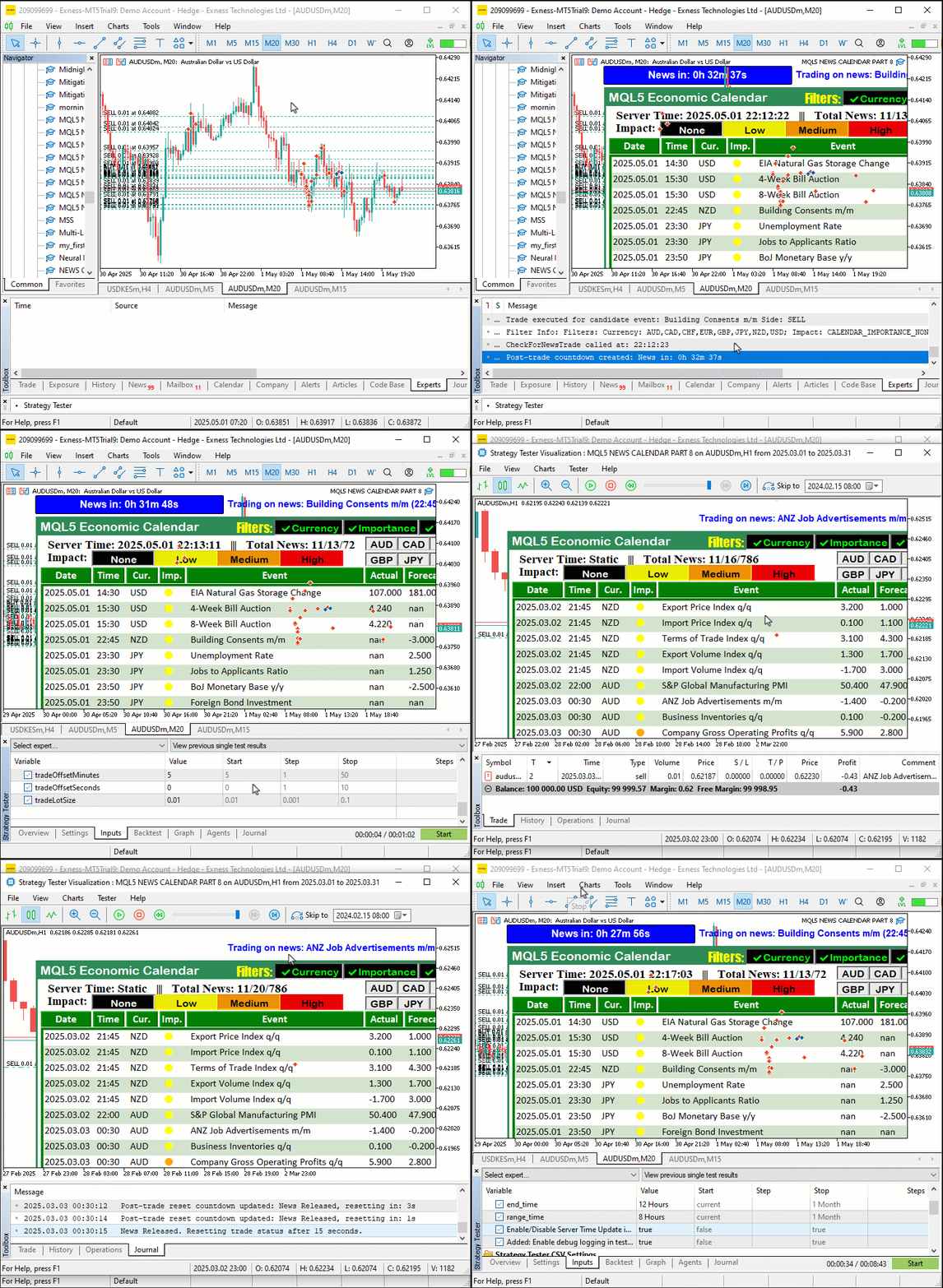
Primeiro, testamos o programa no modo de trading em tempo real, carregando os dados necessários dos eventos econômicos. Em seguida, executamos o programa no Testador de Estratégias do MetaTrader 5 com StartDate = 2025.03.01, EndDate = 2025.03.21 e debugLogging desabilitado. Usamos o arquivo CSV definido em EconomicCalendarData para simular as operações por meio de CheckForNewsTrade, usando os eventos filtrados armazenados em filteredEvents. A animação GIF abaixo mostra nosso painel, atualizado pela função update_dashboard_values apenas quando filters_changed é true ou quando a condição de atualização baseada em last_dashboard_update é atendida. Os eventos filtrados são exibidos por meio de createLabel. Além disso, mantemos logs limpos, contendo apenas as informações relevantes sobre operações e atualizações. Os testes no modo de trading em tempo real com CalendarValueHistory confirmam que a apresentação visual é idêntica. Assim, obtemos um funcionamento rápido e visualmente claro do programa nos dois modos. Veja a animação:
Conclusão
Levamos a série sobre o Calendário Econômico MQL5 a um novo patamar ao otimizar os testes históricos com filtragem inteligente de eventos e registro seletivo em log. Com isso, podemos validar estratégias de forma rápida e transparente sem perder nenhuma funcionalidade do modo de trading em tempo real. Essa melhoria combina testes offline eficientes com a análise de eventos em tempo real. Como resultado, obtivemos uma ferramenta robusta para desenvolver e aperfeiçoar estratégias baseadas em notícias. Você pode usar esta solução como base e ampliá-la de acordo com as necessidades da sua estratégia de trading.
Traduzido do Inglês pela MetaQuotes Ltd.
Artigo original: https://www.mql5.com/en/articles/17999
Aviso: Todos os direitos sobre esses materiais pertencem à MetaQuotes Ltd. É proibida a reimpressão total ou parcial.
Esse artigo foi escrito por um usuário do site e reflete seu ponto de vista pessoal. A MetaQuotes Ltd. não se responsabiliza pela precisão das informações apresentadas nem pelas possíveis consequências decorrentes do uso das soluções, estratégias ou recomendações descritas.

 Machine Learning e Data Science (Parte 39): Testando a combinação de notícias com IA
 Desenvolvimento de ferramentas para análise de Price Action (Parte 22): Painel de correlação
 Machine Learning e Data Science (Parte 40): Uso dos níveis de Fibonacci em dados para machine learning
 Automatização de estratégias de negociação em MQL5 (Parte 17): dominando a estratégia de scalping Grid-Mart com painel informativo dinâmico

- Aplicativos de negociação gratuitos
- 8 000+ sinais para cópia
- Notícias econômicas para análise dos mercados financeiros
Você concorda com a política do site e com os termos de uso