

Trading com o Calendário Econômico MQL5 (Parte 9): Aprimorando a interação com as notícias com uma barra de rolagem dinâmica e uma exibição aprimorada
 114
114
 0
0

Introdução
Neste artigo, damos continuidade à série dedicada ao Calendário Econômico MQL5. Desta vez, adicionaremos uma barra de rolagem vertical dinâmica e aprimoraremos a exibição para facilitar a consulta das notícias, oferecendo uma navegação intuitiva e uma exibição consistente dos eventos. Como base, usaremos a versão desenvolvida na Parte 8, otimizada para testes com dados históricos e filtragem. Nosso foco será uma interface do usuário (UI) adaptativa, com uma barra de rolagem que indicará visualmente se seus controles podem ou não ser acionados. Isso facilitará o acesso às notícias tanto em negociação em tempo real quanto no testador de estratégias. A estrutura do artigo inclui os seguintes tópicos:
- Criação de uma barra de rolagem dinâmica para facilitar a visualização das notícias
- Implementação em MQL5
- Testes e validação
- Conclusão
Vejamos as alterações.
Criação de uma barra de rolagem dinâmica para facilitar a visualização das notícias
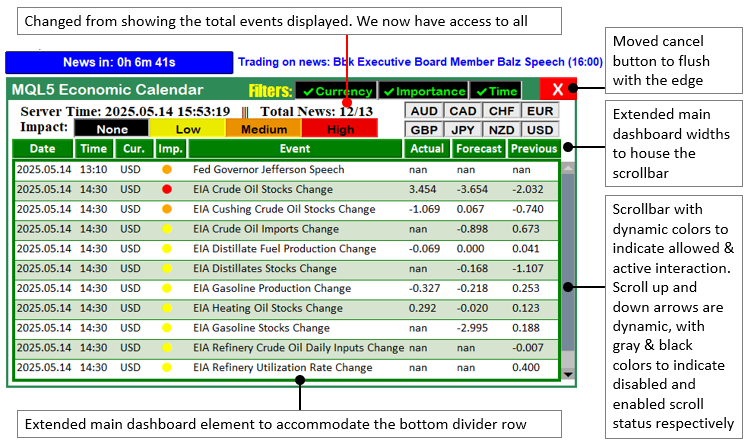
A barra de rolagem dinâmica será a base para uma navegação intuitiva pelas notícias e permitirá melhorar significativamente a interação do usuário com o Calendário Econômico MQL5. Desenvolveremos uma barra de rolagem vertical adaptativa, cujos controles indicarão visualmente se podem ou não ser acionados. Além disso, implementaremos um sistema confiável para armazenar os eventos, facilitando o acesso a todas as notícias que passarem pelos filtros. Com isso, o painel se tornará uma ferramenta mais flexível e prática. Também eliminaremos a limitação referente à quantidade mínima de eventos exibidos e passaremos a mostrar todos os eventos filtrados. Assim, quando necessário, será possível percorrer toda a lista de notícias, em vez de visualizar apenas um conjunto de eventos de alta importância. Faremos isso da seguinte forma:
- Design dinâmico da barra de rolagem - implementaremos uma barra de rolagem com ícones cuja cor mudará de preto, quando o controle puder ser acionado, para cinza-claro, quando não estiver disponível. Dessa forma, teremos um feedback visual imediato ao navegar por listas extensas de eventos.
- Armazenamento confiável dos eventos - desenvolveremos um sistema para armazenar todos os eventos filtrados, permitindo localizar qualquer notícia por meio da rolagem e eliminando o limite de eventos disponíveis para navegação e oferecendo uma visão mais completa.
- Mecanismo eficiente de atualização - também otimizaremos o painel para que ele seja redesenhado apenas quando houver alterações nos filtros, surgirem novos eventos ou ocorrer uma rolagem.
- Aprimoramento da interface do usuário - refinaremos o layout para integrar adequadamente a barra de rolagem e a área de exibição dos eventos, tornando a interface mais prática e organizada.
Assim, este é o nosso plano para criar um painel que facilite a visualização das notícias econômicas. O principal elemento desse aprimoramento é a barra de rolagem dinâmica. Abaixo temos uma representação geral do que será implementado.
Implementação em MQL5
Para implementar esses aprimoramentos em MQL5, primeiro precisamos definir objetos adicionais para a barra de rolagem por meio da diretiva #define, juntamente com as constantes necessárias, variáveis para acompanhar o estado da rolagem e os eventos processados, além de arrays para armazenar os dados dos eventos.
// Scrollbar UI elements
#define SCROLL_UP_REC "SCROLL_UP_REC"
#define SCROLL_UP_LABEL "SCROLL_UP_LABEL"
#define SCROLL_DOWN_REC "SCROLL_DOWN_REC"
#define SCROLL_DOWN_LABEL "SCROLL_DOWN_LABEL"
#define SCROLL_LEADER "SCROLL_LEADER"
#define SCROLL_SLIDER "SCROLL_SLIDER"

//---- Scrollbar layout constants
#define LIST_X 62
#define LIST_Y 162
#define LIST_WIDTH 716
#define LIST_HEIGHT 286
#define VISIBLE_ITEMS 11
#define ITEM_HEIGHT 26
#define SCROLLBAR_X (LIST_X + LIST_WIDTH + 2) // 780
#define SCROLLBAR_Y LIST_Y
#define SCROLLBAR_WIDTH 20
#define SCROLLBAR_HEIGHT LIST_HEIGHT // 286
#define BUTTON_SIZE 15
#define BUTTON_WIDTH (SCROLLBAR_WIDTH - 2)
#define BUTTON_OFFSET_X 1
#define SCROLL_AREA_HEIGHT (SCROLLBAR_HEIGHT - 2 * BUTTON_SIZE)
#define SLIDER_MIN_HEIGHT 20
#define SLIDER_WIDTH 18
#define SLIDER_OFFSET_X 1

//---- Event name tracking
string current_eventNames_data[];
string previous_eventNames_data[];
string last_dashboard_eventNames[];
string previous_displayable_eventNames[];
string current_displayable_eventNames[];
datetime last_dashboard_update = 0;

//---- Filter flags
bool enableCurrencyFilter = true;
bool enableImportanceFilter = true;
bool enableTimeFilter = true;
bool isDashboardUpdate = true;
bool filters_changed = true;

//---- Scrollbar flags and variables
bool scroll_visible = false;
bool moving_state_slider = false;
int scroll_pos = 0;
int prev_scroll_pos = -1; // Track previous scroll position
int mlb_down_x = 0;
int mlb_down_y = 0;
int mlb_down_yd_slider = 0;
int prev_mouse_state = 0;
int slider_height = SLIDER_MIN_HEIGHT;

//---- Event counters
int totalEvents_Considered = 0;
int totalEvents_Filtered = 0;
int totalEvents_Displayable = 0;

//---- Global arrays for events
EconomicEvent allEvents[];
EconomicEvent filteredEvents[];
EconomicEvent displayableEvents[];
Isso estabelece a base para a barra de rolagem dinâmica e para a exibição aprimorada dos eventos. Definimos os componentes da barra de rolagem por meio das constantes SCROLL_UP_LABEL, SCROLL_DOWN_LABEL, SCROLL_UP_REC e SCROLL_DOWN_REC, que identificam os elementos gráficos dos botões para cima e para baixo.
As constantes de posicionamento LIST_X (62), LIST_Y (162), LIST_WIDTH (716) e LIST_HEIGHT (286) definem a área de exibição dos eventos, enquanto SCROLLBAR_X (780), SCROLLBAR_Y (162), SCROLLBAR_WIDTH (20) e SCROLLBAR_HEIGHT (286) determinam a posição da barra de rolagem. Os parâmetros VISIBLE_ITEMS (11) e ITEM_HEIGHT (26) permitem exibir 11 eventos, cada um com 26 pixels de altura, enquanto BUTTON_SIZE (15) e SLIDER_WIDTH (18) definem as dimensões dos botões e do controle deslizante.
Para gerenciar os eventos e as interações, declaramos os arrays current_displayable_eventNames e previous_displayable_eventNames, usados para acompanhar os nomes dos eventos e detectar alterações, o que é necessário para atualizar o painel sem redesenhos desnecessários. Também usamos last_dashboard_update para registrar o momento exato da atualização do painel. Os flags de filtragem enableCurrencyFilter, enableImportanceFilter e enableTimeFilter, todos definidos como true, controlam a seleção dos eventos, enquanto isDashboardUpdate e filters_changed determinam quando o painel deve ser atualizado. As variáveis da barra de rolagem scroll_visible, scroll_pos, prev_scroll_pos e moving_state_slider acompanham a visibilidade, a posição de rolagem e o estado de movimentação do controle deslizanteю
Usamos os contadores totalEvents_Considered, totalEvents_Filtered e totalEvents_Displayable para acompanhar o processamento dos eventos e os arrays allEvents, filteredEvents e displayableEvents para armazenar seus dados. Isso permite navegar por todas as notícias que passaram pelos filtros. Em seguida, criaremos os elementos da barra de rolagem e depois ajustaremos as dimensões e posições do retângulo principal para acomodá-la no lado direito.
//+------------------------------------------------------------------+
//| Expert initialization function                                   |
//+------------------------------------------------------------------+
int OnInit() {
   // Enable mouse move events for scrollbar
   ChartSetInteger(0, CHART_EVENT_MOUSE_MOVE, true);

   // Create dashboard UI
   createRecLabel(MAIN_REC,50,50,740+13,410,clrSeaGreen,1);
   createRecLabel(SUB_REC1,50+3,50+30,740-3-3+13,410-30-3,clrWhite,1);
   createRecLabel(SUB_REC2,50+3+5,50+30+50+27,740-3-3-5-5,410-30-3-50-27-10+5,clrGreen,1);
   createLabel(HEADER_LABEL,50+3+5,50+5,"MQL5 Economic Calendar",clrWhite,15);

   //---

}
No manipulador de eventos OnInit, usamos a função ChartSetInteger para ativar o evento de movimentação do mouse, definindo-o como true, o que nos permite controlar a interação de rolagem entre o gráfico principal e os objetos personalizados. Com isso, será possível interagir com a barra de rolagem vertical e seus elementos, permitindo um deslocamento suave da barra e de seus elementos. Em seguida, aumentamos em 13 pixels a largura do retângulo principal e do sub-retângulo 1 para acomodar a barra de rolagem vertical. Também aumentamos em 5 pixels a altura do sub-retângulo 2 para comportar todos os 11 eventos e eliminar o efeito de transbordamento. Após a compilação, obtemos o seguinte resultado.
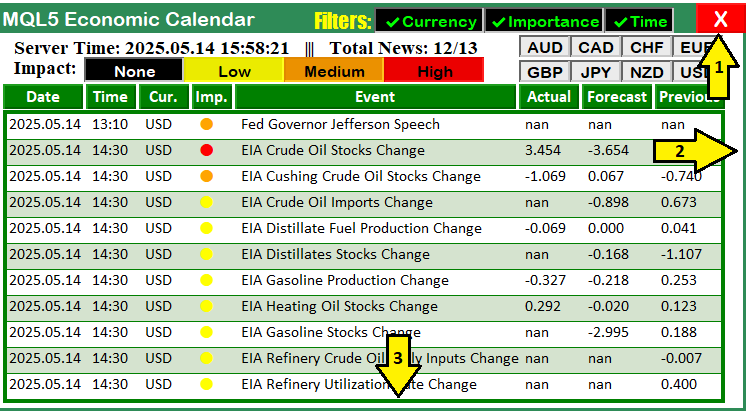
A imagem mostra todas as alterações, numeradas de 1 a 3. A alteração 1 mostra o deslocamento do botão de cancelamento para a borda do painel; a alteração 2 corresponde ao ajuste da largura dos retângulos principais para acomodar o botão de cancelamento e a barra de rolagem; e a alteração 3 modifica a altura do retângulo do painel para evitar que a última linha de elementos ultrapasse seus limites. Agora podemos passar à definição e à criação da barra de rolagem no espaço reservado. No entanto, como precisamos de um controle deslizante dinâmico, exibido apenas quando necessário, também precisaremos definir funções responsáveis por essa lógica.
//+------------------------------------------------------------------+
//| Calculate slider height                                          |
//+------------------------------------------------------------------+
int calculateSliderHeight() {
   if (totalEvents_Filtered <= VISIBLE_ITEMS)
      return SCROLL_AREA_HEIGHT;
   double visible_ratio = (double)VISIBLE_ITEMS / totalEvents_Filtered;
   int height = (int)::floor(SCROLL_AREA_HEIGHT * visible_ratio);
   return MathMax(SLIDER_MIN_HEIGHT, MathMin(height, SCROLL_AREA_HEIGHT));
}

//+------------------------------------------------------------------+
//| Update slider position                                           |
//+------------------------------------------------------------------+
void updateSliderPosition() {
   int max_scroll = MathMax(0, ArraySize(displayableEvents) - VISIBLE_ITEMS);
   if (max_scroll <= 0) return;
   double scroll_ratio = (double)scroll_pos / max_scroll;
   int scroll_area_y_min = SCROLLBAR_Y + BUTTON_SIZE;
   int scroll_area_y_max = scroll_area_y_min + SCROLL_AREA_HEIGHT - slider_height;
   int new_y = scroll_area_y_min + (int)(scroll_ratio * (scroll_area_y_max - scroll_area_y_min));
   ObjectSetInteger(0, SCROLL_SLIDER, OBJPROP_YDISTANCE, new_y);
   if (debugLogging) Print("Slider moved to y=", new_y);
   ChartRedraw(0);
}

//+------------------------------------------------------------------+
//| Update button colors based on scroll position                    |
//+------------------------------------------------------------------+
void updateButtonColors() {
   int max_scroll = MathMax(0, ArraySize(displayableEvents) - VISIBLE_ITEMS);
   if (scroll_pos == 0) {
      ObjectSetInteger(0, SCROLL_UP_LABEL, OBJPROP_COLOR, clrLightGray);
   } else {
      ObjectSetInteger(0, SCROLL_UP_LABEL, OBJPROP_COLOR, clrBlack);
   }
   if (scroll_pos >= max_scroll) {
      ObjectSetInteger(0, SCROLL_DOWN_LABEL, OBJPROP_COLOR, clrLightGray);
   } else {
      ObjectSetInteger(0, SCROLL_DOWN_LABEL, OBJPROP_COLOR, clrBlack);
   }
   ChartRedraw(0);
}
Aqui implementaremos três funções principais: calculateSliderHeight, updateSliderPosition e updateButtonColors. Elas proporcionarão uma navegação intuitiva e um feedback visual claro. Na função calculateSliderHeight, determinamos a altura do controle deslizante da barra de rolagem de modo que ela represente visualmente a proporção entre o número de eventos visíveis e o total de eventos filtrados.
Se totalEvents_Filtered for menor ou igual a VISIBLE_ITEMS (11), a função retornará SCROLL_AREA_HEIGHT (256 pixels), fazendo com que o controle deslizante ocupe toda a área de rolagem quando todos os eventos couberem em uma única tela. Caso contrário, calculamos a proporção visível visible_ratio dividindo VISIBLE_ITEMS por totalEvents_Filtered e multiplicando o resultado por SCROLL_AREA_HEIGHT. Em seguida, usamos a função floor para obter um valor inteiro para height. Por fim, retornamos o maior valor entre SLIDER_MIN_HEIGHT (20 pixels) e o menor valor entre height e SCROLL_AREA_HEIGHT. Dessa forma, o controle deslizante terá um tamanho proporcional à extensão da lista de eventos.
Na função updateSliderPosition, posicionamos o controle deslizante de acordo com a posição atual de rolagem da lista de eventos. Para isso, calculamos max_scroll como a diferença entre ArraySize(displayableEvents) e VISIBLE_ITEMS, usando a função MathMax para evitar valores negativos. Se max_scroll for igual a zero, o que significa que não há necessidade de rolagem, saímos da função. Em seguida, calculamos a proporção de rolagem scroll_ratio como a razão entre scroll_pos e max_scroll. Também definimos o intervalo vertical de movimento do controle deslizante por meio de scroll_area_y_min (SCROLLBAR_Y + BUTTON_SIZE) e scroll_area_y_max (scroll_area_y_min + SCROLL_AREA_HEIGHT - slider_height). Depois disso, calculamos a nova posição new_y interpolando scroll_ratio dentro desse intervalo.
Em seguida, usamos a função ObjectSetInteger para definir a propriedade OBJPROP_YDISTANCE do objeto SCROLL_SLIDER como new_y. Se debugLogging for igual a true, também registramos esse deslocamento no log. Por fim, chamamos ChartRedraw para atualizar a exibição.
Na função updateButtonColors, alteramos dinamicamente as cores dos ícones dos botões para cima e para baixo, indicando visualmente se eles podem ou não ser acionados e melhorando o feedback visual ao usuário. Calculamos o valor máximo de rolagem max_scroll da mesma forma que em updateSliderPosition e verificamos scroll_pos para determinar os estados de SCROLL_UP_LABEL e SCROLL_DOWN_LABEL. Se scroll_pos for igual a 0, definimos a propriedade OBJPROP_COLOR do objeto SCROLL_UP_LABEL como clrLightGray, indicando que o botão não pode ser acionado porque já estamos no início da lista. Caso contrário, usamos clrBlack, indicando que o botão está disponível. Da mesma forma, se scroll_pos for igual ou superior a max_scroll, definimos a cor de SCROLL_DOWN_LABEL como clrLightGray, indicando que não é possível continuar rolando porque já chegamos ao final da lista. Caso contrário, usamos clrBlack, indicando que o botão pode ser acionado.
Por fim, chamamos o método ChartRedraw para redesenhar o gráfico. Agora podemos criar dinamicamente a barra de rolagem sempre que os valores do painel forem atualizados, conforme mostrado abaixo.
// Update TIME_LABEL
string timeText = updateServerTime ? "Server Time: "+TimeToString(TimeCurrent(),TIME_DATE|TIME_SECONDS) : "Server Time: Static";
updateLabel(TIME_LABEL,timeText+"   |||   Total News: "+IntegerToString(totalEvents_Filtered)+"/"+IntegerToString(totalEvents_Considered));

// Update scrollbar visibility
bool new_scroll_visible = totalEvents_Filtered > VISIBLE_ITEMS;
if (new_scroll_visible != scroll_visible || events_changed || filters_changed) {
   scroll_visible = new_scroll_visible;
   if (debugLogging) Print("Scrollbar visibility: ", scroll_visible ? "Visible" : "Hidden");
   if (scroll_visible) {
      if (ObjectFind(0, SCROLL_LEADER) < 0) {
         createRecLabel(SCROLL_LEADER, SCROLLBAR_X, SCROLLBAR_Y, SCROLLBAR_WIDTH, SCROLLBAR_HEIGHT, clrSilver, 1, clrNONE);
         int max_scroll = MathMax(0, ArraySize(displayableEvents) - VISIBLE_ITEMS);
         color up_color = (scroll_pos == 0) ? clrLightGray : clrBlack;
         color down_color = (scroll_pos >= max_scroll) ? clrLightGray : clrBlack;
         createRecLabel(SCROLL_UP_REC, SCROLLBAR_X + BUTTON_OFFSET_X, SCROLLBAR_Y, BUTTON_WIDTH, BUTTON_SIZE, clrDarkGray, 1, clrDarkGray);
         createLabel(SCROLL_UP_LABEL, SCROLLBAR_X + BUTTON_OFFSET_X, SCROLLBAR_Y-5, CharToString(0x35), up_color, 15, "Webdings");
         int down_y = SCROLLBAR_Y + SCROLLBAR_HEIGHT - BUTTON_SIZE;
         createRecLabel(SCROLL_DOWN_REC, SCROLLBAR_X + BUTTON_OFFSET_X, down_y, BUTTON_WIDTH, BUTTON_SIZE, clrDarkGray, 1, clrDarkGray);
         createLabel(SCROLL_DOWN_LABEL, SCROLLBAR_X + BUTTON_OFFSET_X, down_y-5, CharToString(0x36), down_color, 15, "Webdings");
         slider_height = calculateSliderHeight();
         int slider_y = SCROLLBAR_Y + BUTTON_SIZE;
         createButton(SCROLL_SLIDER, SCROLLBAR_X + SLIDER_OFFSET_X, slider_y, SLIDER_WIDTH, slider_height, "", clrWhite, 12, clrLightSlateGray, clrDarkGray, "Arial Bold");
         ObjectSetInteger(0, SCROLL_SLIDER, OBJPROP_WIDTH, 2);
         if (debugLogging) Print("Scrollbar created: totalEvents_Filtered=", totalEvents_Filtered, ", slider_height=", slider_height);
      }
      updateSliderPosition();
      updateButtonColors();
   } else {
      ObjectDelete(0, SCROLL_LEADER);
      ObjectDelete(0, SCROLL_UP_REC);
      ObjectDelete(0, SCROLL_UP_LABEL);
      ObjectDelete(0, SCROLL_DOWN_REC);
      ObjectDelete(0, SCROLL_DOWN_LABEL);
      ObjectDelete(0, SCROLL_SLIDER);
      if (debugLogging) Print("Scrollbar removed: totalEvents_Filtered=", totalEvents_Filtered);
   }
}
Para facilitar o uso da interface, implementamos as principais atualizações relacionadas à exibição do horário no painel e à barra de rolagem dinâmica, tornando a consulta e a navegação pelas notícias mais práticas. O valor de TIME_LABEL é atualizado para mostrar o horário atual do servidor e as estatísticas dos eventos. Também controlamos integralmente a visibilidade da barra de rolagem e inicializamos seus componentes com ícones cujas cores são atualizadas dinamicamente. Com isso, obtemos um sistema de navegação intuitivo.
Primeiro, atualizamos o valor da etiqueta TIME_LABEL para exibir o horário atual e o status do processamento dos eventos. Também criamos a string timeText usando uma condição: se updateServerTime for igual a true, chamamos a função TimeToString com TimeCurrent e os flags TIME_DATE|TIME_SECONDS para formatar o horário do servidor; caso contrário, atribuímos o valor "Server Time: Static". Em seguida, por meio da função updateLabel, definimos o texto de TIME_LABEL como timeText concatenado com o separador (" ||| ") e com os contadores de eventos, convertidos em string pela função IntegerToString, usando totalEvents_Filtered e totalEvents_Considered. Como resultado, obtemos uma exibição como "Server Time: 2025.03.01 12:00:00 ||| Total News: 1711/3000", que mostra claramente a relação entre a quantidade de eventos filtrados e o total de eventos considerados. Diferentemente das versões anteriores, deixamos de exibir a contagem das notícias efetivamente mostradas no painel.
Em seguida, implementamos a lógica de visibilidade da barra de rolagem e a criação de seus componentes, para que ela seja exibida apenas quando necessária e forneça um feedback visual adequado. Determinamos se a barra deve ser exibida por meio de new_scroll_visible, verificando se o número total de eventos filtrados, totalEvents_Filtered, é maior que VISIBLE_ITEMS, que neste caso é igual a 11. Isso indica que há mais eventos do que podem ser exibidos simultaneamente. Se new_scroll_visible for diferente de scroll_visible, ou se events_changed ou filters_changed forem iguais a true, atualizamos o valor de scroll_visible e registramos seu estado no log por meio de Print, caso debugLogging esteja habilitado. Se scroll_visible for igual a true, usamos ObjectFind para verificar se o objeto SCROLL_LEADER já existe e, caso não exista, criamos a barra de rolagem. Para isso, chamamos a função createRecLabel para criar os objetos SCROLL_LEADER, SCROLL_UP_REC e SCROLL_DOWN_REC nas posições definidas por SCROLLBAR_X, SCROLLBAR_Y, BUTTON_OFFSET_X e BUTTON_SIZE, usando as cores clrSilver e clrDarkGray.
Calculamos o valor máximo de rolagem max_scroll usando a função MathMax e a diferença entre ArraySize(displayableEvents) e VISIBLE_ITEMS. Em seguida, definimos as cores up_color e down_color como clrLightGray ou clrBlack, de acordo com os valores de scroll_pos e max_scroll, e usamos createLabel para criar as etiquetas SCROLL_UP_LABEL e SCROLL_DOWN_LABEL. Para as setas, utilizamos CharToString com os códigos 5 e 6 correspondentes aos glifos da fonte Webdings, conforme mostrado abaixo.
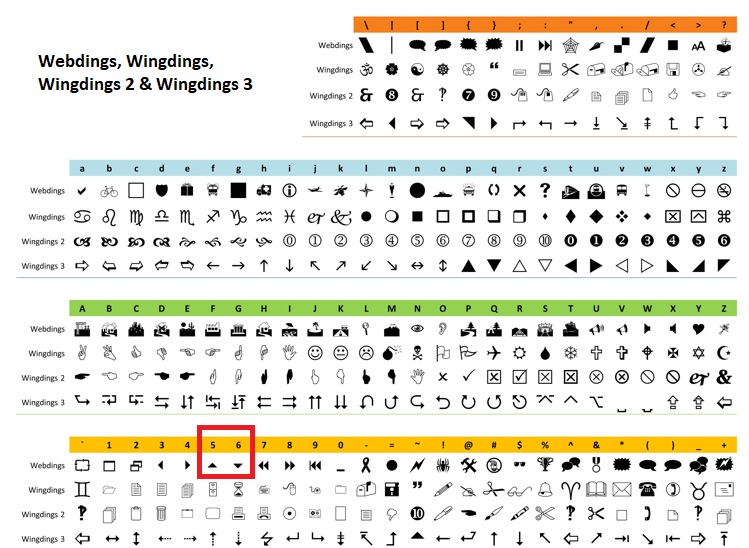
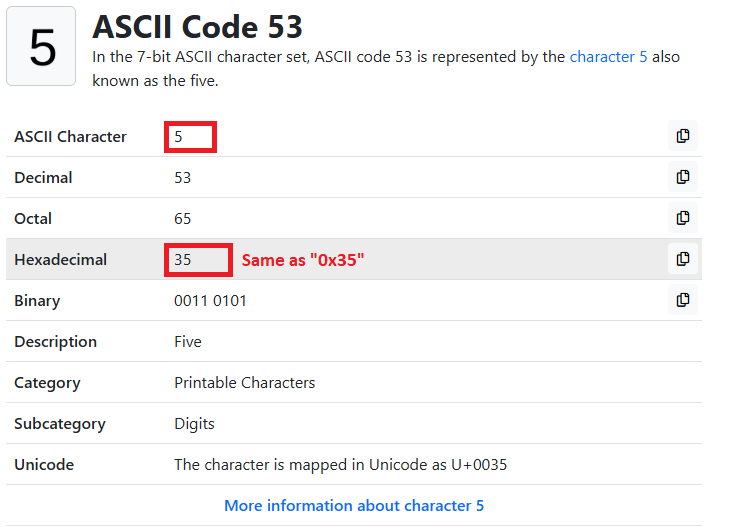
Se você estiver se perguntando por que usamos 0x35 em vez de simplesmente 5, trata-se de uma representação hexadecimal, ou seja, em base 16. O mesmo resultado pode ser obtido usando 5 como valor do caractere. Se quisermos usar diretamente o código ASCII correspondente, podemos converter 53 em uma string com CharToString(53) e obter o mesmo resultado. Há várias maneiras de fazer isso, portanto a escolha fica a seu critério. Abaixo estão mais detalhes sobre o código.
Em seguida, calculamos a altura do controle deslizante slider_height usando calculateSliderHeight e criamos o objeto SCROLL_SLIDER com a função createButton na posição slider_y, definindo sua propriedade OBJPROP_WIDTH como 2. Se debugLogging estiver habilitado, registramos os detalhes no log. Depois, chamamos as funções updateSliderPosition e updateButtonColors para inicializar a posição do controle deslizante e as cores dos ícones. Se scroll_visible for igual a false, removemos os objetos da barra de rolagem com ObjectDelete: SCROLL_LEADER, SCROLL_UP_REC, SCROLL_DOWN_REC, SCROLL_UP_LABEL, SCROLL_DOWN_LABEL e SCROLL_SLIDER. Também registramos a remoção no log, mantendo a interface limpa quando a rolagem não é necessária. O restante da função que contém essa lógica, bem como a função responsável pelo armazenamento dos eventos, é apresentado abaixo.
//+------------------------------------------------------------------+
//| Update dashboard values                                          |
//+------------------------------------------------------------------+
void update_dashboard_values(string &curr_filter_array[], ENUM_CALENDAR_EVENT_IMPORTANCE &imp_filter_array[]) {
   totalEvents_Considered = 0;
   totalEvents_Filtered = 0;
   totalEvents_Displayable = 0;
   ArrayFree(current_eventNames_data);
   ArrayFree(current_displayable_eventNames);

   datetime timeRange = PeriodSeconds(range_time);
   datetime timeBefore = TimeTradeServer() - timeRange;
   datetime timeAfter = TimeTradeServer() + timeRange;

   // Populate displayableEvents
   if (MQLInfoInteger(MQL_TESTER)) {
      if (filters_changed) {
         FilterEventsForTester();
         ArrayFree(displayableEvents); // Clear displayableEvents on filter change
      }
      int eventIndex = 0;
      for (int i = 0; i < ArraySize(filteredEvents); i++) {
         totalEvents_Considered++;
         datetime eventDateTime = filteredEvents[i].eventDateTime;
         if (eventDateTime < StartDate || eventDateTime > EndDate) {
            if (debugLogging) Print("Event ", filteredEvents[i].event, " skipped due to date range.");
            continue;
         }

         bool timeMatch = !enableTimeFilter;
         if (enableTimeFilter) {
            if (eventDateTime <= TimeTradeServer() && eventDateTime >= timeBefore) timeMatch = true;
            else if (eventDateTime >= TimeTradeServer() && eventDateTime <= timeAfter) timeMatch = true;
         }
         if (!timeMatch) {
            if (debugLogging) Print("Event ", filteredEvents[i].event, " skipped due to time filter.");
            continue;
         }

         bool currencyMatch = !enableCurrencyFilter;
         if (enableCurrencyFilter) {
            for (int j = 0; j < ArraySize(curr_filter_array); j++) {
               if (filteredEvents[i].currency == curr_filter_array[j]) {
                  currencyMatch = true;
                  break;
               }
            }
         }
         if (!currencyMatch) {
            if (debugLogging) Print("Event ", filteredEvents[i].event, " skipped due to currency filter.");
            continue;
         }

         bool importanceMatch = !enableImportanceFilter;
         if (enableImportanceFilter) {
            string imp_str = filteredEvents[i].importance;
            ENUM_CALENDAR_EVENT_IMPORTANCE event_imp = (imp_str == "None") ? CALENDAR_IMPORTANCE_NONE :
                                                      (imp_str == "Low") ? CALENDAR_IMPORTANCE_LOW :
                                                      (imp_str == "Medium") ? CALENDAR_IMPORTANCE_MODERATE :
                                                      CALENDAR_IMPORTANCE_HIGH;
            for (int k = 0; k < ArraySize(imp_filter_array); k++) {
               if (event_imp == imp_filter_array[k]) {
                  importanceMatch = true;
                  break;
               }
            }
         }
         if (!importanceMatch) {
            if (debugLogging) Print("Event ", filteredEvents[i].event, " skipped due to importance filter.");
            continue;
         }

         ArrayResize(displayableEvents, eventIndex + 1);
         displayableEvents[eventIndex] = filteredEvents[i];
         ArrayResize(current_displayable_eventNames, eventIndex + 1);
         current_displayable_eventNames[eventIndex] = filteredEvents[i].event;
         eventIndex++;
      }
      totalEvents_Filtered = ArraySize(displayableEvents);
      if (debugLogging) Print("Tester mode: Stored ", totalEvents_Filtered, " displayable events.");
   } else {
      MqlCalendarValue values[];
      datetime startTime = TimeTradeServer() - PeriodSeconds(start_time);
      datetime endTime = TimeTradeServer() + PeriodSeconds(end_time);
      int allValues = CalendarValueHistory(values,startTime,endTime,NULL,NULL);
      int eventIndex = 0;
      if (filters_changed) ArrayFree(displayableEvents); // Clear displayableEvents on filter change
      for (int i = 0; i < allValues; i++) {
         MqlCalendarEvent event;
         CalendarEventById(values[i].event_id, event);
         MqlCalendarCountry country;
         CalendarCountryById(event.country_id, country);
         MqlCalendarValue value;
         CalendarValueById(values[i].id, value);
         totalEvents_Considered++;

         bool currencyMatch = false;
         if (enableCurrencyFilter) {
            for (int j = 0; j < ArraySize(curr_filter_array); j++) {
               if (country.currency == curr_filter_array[j]) {
                  currencyMatch = true;
                  break;
               }
            }
            if (!currencyMatch) continue;
         }

         bool importanceMatch = false;
         if (enableImportanceFilter) {
            for (int k = 0; k < ArraySize(imp_filter_array); k++) {
               if (event.importance == imp_filter_array[k]) {
                  importanceMatch = true;
                  break;
               }
            }
            if (!importanceMatch) continue;
         }

         bool timeMatch = false;
         if (enableTimeFilter) {
            datetime eventTime = values[i].time;
            if (eventTime <= TimeTradeServer() && eventTime >= timeBefore) timeMatch = true;
            else if (eventTime >= TimeTradeServer() && eventTime <= timeAfter) timeMatch = true;
            if (!timeMatch) continue;
         }

         ArrayResize(displayableEvents, eventIndex + 1);
         displayableEvents[eventIndex].eventDate = TimeToString(values[i].time,TIME_DATE);
         displayableEvents[eventIndex].eventTime = TimeToString(values[i].time,TIME_MINUTES);
         displayableEvents[eventIndex].currency = country.currency;
         displayableEvents[eventIndex].event = event.name;
         displayableEvents[eventIndex].importance = (event.importance == CALENDAR_IMPORTANCE_NONE) ? "None" :
                                                   (event.importance == CALENDAR_IMPORTANCE_LOW) ? "Low" :
                                                   (event.importance == CALENDAR_IMPORTANCE_MODERATE) ? "Medium" : "High";
         displayableEvents[eventIndex].actual = value.GetActualValue();
         displayableEvents[eventIndex].forecast = value.GetForecastValue();
         displayableEvents[eventIndex].previous = value.GetPreviousValue();
         displayableEvents[eventIndex].eventDateTime = values[i].time;
         ArrayResize(current_displayable_eventNames, eventIndex + 1);
         current_displayable_eventNames[eventIndex] = event.name;
         eventIndex++;
      }
      totalEvents_Filtered = ArraySize(displayableEvents);
      if (debugLogging) Print("Live mode: Stored ", totalEvents_Filtered, " displayable events.");
   }

   // Check for changes in displayable events
   bool events_changed = isChangeInStringArrays(previous_displayable_eventNames, current_displayable_eventNames);
   bool scroll_changed = (scroll_pos != prev_scroll_pos);
   if (events_changed || filters_changed || scroll_changed) {
      if (debugLogging) {
         if (events_changed) Print("Changes detected in displayable events.");
         if (filters_changed) Print("Filter changes detected.");
         if (scroll_changed) Print("Scroll position changed: ", prev_scroll_pos, " -> ", scroll_pos);
      }
      ArrayFree(previous_displayable_eventNames);
      ArrayCopy(previous_displayable_eventNames, current_displayable_eventNames);
      prev_scroll_pos = scroll_pos;

      // Clear and redraw UI
      ObjectsDeleteAll(0, DATA_HOLDERS);
      ObjectsDeleteAll(0, ARRAY_NEWS);

      int startY = LIST_Y;
      int start_idx = scroll_visible ? scroll_pos : 0;
      int end_idx = MathMin(start_idx + VISIBLE_ITEMS, ArraySize(displayableEvents));
      for (int i = start_idx; i < end_idx; i++) {
         totalEvents_Displayable++;
         color holder_color = (totalEvents_Displayable % 2 == 0) ? C'213,227,207' : clrWhite;
         createRecLabel(DATA_HOLDERS+string(totalEvents_Displayable),LIST_X,startY-1,LIST_WIDTH,ITEM_HEIGHT+1,holder_color,1,clrNONE);

         int startX = LIST_X + 3;
         string news_data[ArraySize(array_calendar)];
         news_data[0] = displayableEvents[i].eventDate;
         news_data[1] = displayableEvents[i].eventTime;
         news_data[2] = displayableEvents[i].currency;
         color importance_color = clrBlack;
         if (displayableEvents[i].importance == "Low") importance_color = clrYellow;
         else if (displayableEvents[i].importance == "Medium") importance_color = clrOrange;
         else if (displayableEvents[i].importance == "High") importance_color = clrRed;
         news_data[3] = ShortToString(0x25CF);
         news_data[4] = displayableEvents[i].event;
         news_data[5] = DoubleToString(displayableEvents[i].actual, 3);
         news_data[6] = DoubleToString(displayableEvents[i].forecast, 3);
         news_data[7] = DoubleToString(displayableEvents[i].previous, 3);

         for (int k = 0; k < ArraySize(array_calendar); k++) {
            if (k == 3) {
               createLabel(ARRAY_NEWS+IntegerToString(i)+" "+array_calendar[k],startX,startY-(22-12),news_data[k],importance_color,22,"Calibri");
            } else {
               createLabel(ARRAY_NEWS+IntegerToString(i)+" "+array_calendar[k],startX,startY,news_data[k],clrBlack,12,"Calibri");
            }
            startX += buttons[k]+3;
         }

         ArrayResize(current_eventNames_data, ArraySize(current_eventNames_data)+1);
         current_eventNames_data[ArraySize(current_eventNames_data)-1] = displayableEvents[i].event;
         startY += ITEM_HEIGHT;
      }

      if (debugLogging) Print("Displayed ", totalEvents_Displayable, " events, start_idx=", start_idx, ", end_idx=", end_idx);
   } else {
      if (debugLogging) Print("No changes detected. Skipping redraw.");
   }

   // Update TIME_LABEL
   string timeText = updateServerTime ? "Server Time: "+TimeToString(TimeCurrent(),TIME_DATE|TIME_SECONDS) : "Server Time: Static";
   updateLabel(TIME_LABEL,timeText+"   |||   Total News: "+IntegerToString(totalEvents_Filtered)+"/"+IntegerToString(totalEvents_Considered));

   // Update scrollbar visibility
   bool new_scroll_visible = totalEvents_Filtered > VISIBLE_ITEMS;
   if (new_scroll_visible != scroll_visible || events_changed || filters_changed) {
      scroll_visible = new_scroll_visible;
      if (debugLogging) Print("Scrollbar visibility: ", scroll_visible ? "Visible" : "Hidden");
      if (scroll_visible) {
         if (ObjectFind(0, SCROLL_LEADER) < 0) {
            createRecLabel(SCROLL_LEADER, SCROLLBAR_X, SCROLLBAR_Y, SCROLLBAR_WIDTH, SCROLLBAR_HEIGHT, clrSilver, 1, clrNONE);
            int max_scroll = MathMax(0, ArraySize(displayableEvents) - VISIBLE_ITEMS);
            color up_color = (scroll_pos == 0) ? clrLightGray : clrBlack;
            color down_color = (scroll_pos >= max_scroll) ? clrLightGray : clrBlack;
            createRecLabel(SCROLL_UP_REC, SCROLLBAR_X + BUTTON_OFFSET_X, SCROLLBAR_Y, BUTTON_WIDTH, BUTTON_SIZE, clrDarkGray, 1, clrDarkGray);
            createLabel(SCROLL_UP_LABEL, SCROLLBAR_X + BUTTON_OFFSET_X, SCROLLBAR_Y-5, CharToString(0x35), up_color, 15, "Webdings");
            int down_y = SCROLLBAR_Y + SCROLLBAR_HEIGHT - BUTTON_SIZE;
            createRecLabel(SCROLL_DOWN_REC, SCROLLBAR_X + BUTTON_OFFSET_X, down_y, BUTTON_WIDTH, BUTTON_SIZE, clrDarkGray, 1, clrDarkGray);
            createLabel(SCROLL_DOWN_LABEL, SCROLLBAR_X + BUTTON_OFFSET_X, down_y-5, CharToString(0x36), down_color, 15, "Webdings");
            slider_height = calculateSliderHeight();
            int slider_y = SCROLLBAR_Y + BUTTON_SIZE;
            createButton(SCROLL_SLIDER, SCROLLBAR_X + SLIDER_OFFSET_X, slider_y, SLIDER_WIDTH, slider_height, "", clrWhite, 12, clrLightSlateGray, clrDarkGray, "Arial Bold");
            ObjectSetInteger(0, SCROLL_SLIDER, OBJPROP_WIDTH, 2);
            if (debugLogging) Print("Scrollbar created: totalEvents_Filtered=", totalEvents_Filtered, ", slider_height=", slider_height);
         }
         updateSliderPosition();
         updateButtonColors();
      } else {
         ObjectDelete(0, SCROLL_LEADER);
         ObjectDelete(0, SCROLL_UP_REC);
         ObjectDelete(0, SCROLL_UP_LABEL);
         ObjectDelete(0, SCROLL_DOWN_REC);
         ObjectDelete(0, SCROLL_DOWN_LABEL);
         ObjectDelete(0, SCROLL_SLIDER);
         if (debugLogging) Print("Scrollbar removed: totalEvents_Filtered=", totalEvents_Filtered);
      }
   }

   if (isChangeInStringArrays(previous_eventNames_data, current_eventNames_data)) {
      if (debugLogging) Print("CHANGES IN EVENT NAMES DETECTED.");
      ArrayFree(previous_eventNames_data);
      ArrayCopy(previous_eventNames_data, current_eventNames_data);
   }
}
Na função update_dashboard_values, aprimoramos o painel. Também priorizamos atualizações sem redesenhos desnecessários para aumentar a eficiência. Usamos o array displayableEvents para armazenar todos os eventos filtrados, implementamos um mecanismo de detecção de alterações para evitar redesenhos desnecessários e integramos a barra de rolagem para tornar a navegação mais intuitiva e prática. Primeiro, redefinimos os contadores totalEvents_Considered, totalEvents_Filtered e totalEvents_Displayable e limpamos os arrays current_eventNames_data e current_displayable_eventNames com a função ArrayFree, preparando-os para os novos dados de notícias.
Mantemos a lógica de filtragem existente para os modos de teste e de negociação em tempo real e introduzimos o array displayableEvents para armazenar todos os eventos filtrados, garantindo acesso a todos os eventos armazenados, por exemplo, aos 1711 eventos, em vez de manter apenas 5 ou 6 disponíveis para navegação, como ocorria anteriormente. No modo de teste, chamamos FilterEventsForTester e, se filters_changed for igual a true, limpamos displayableEvents com ArrayFree e percorremos filteredEvents em um laço. Aplicamos então os filtros enableTimeFilter, enableCurrencyFilter e enableImportanceFilter para preencher displayableEvents e current_displayable_eventNames, definindo totalEvents_Filtered como ArraySize(displayableEvents).
No modo de negociação em tempo real, usamos CalendarValueHistory para obter os eventos. Se filters_changed for igual a true, limpamos displayableEvents e, de forma semelhante, armazenamos os eventos filtrados, registrando sua quantidade no log quando debugLogging estiver habilitado.
Também implementamos atualizações sem redesenhos desnecessários. Para isso, usamos a função isChangeInStringArrays e comparamos previous_displayable_eventNames com current_displayable_eventNames para determinar se houve alterações nos eventos, armazenando o resultado em events_changed. Também verificamos se scroll_pos é diferente de prev_scroll_pos para definir scroll_changed. Se qualquer uma das variáveis events_changed, filters_changed ou scroll_changed for igual a true, registramos as alterações no log por meio de Print, caso debugLogging esteja habilitado, atualizamos previous_displayable_eventNames com ArrayCopy e atribuímos a posição atual a prev_scroll_pos. Em seguida, limpamos os elementos da interface com a função ObjectsDeleteAll para DATA_HOLDERS e ARRAY_NEWS e exibimos até VISIBLE_ITEMS (11) eventos do array displayableEvents, começando no índice start_idx, definido por scroll_pos quando scroll_visible for igual a true, e terminando em end_idx, limitado por ArraySize(displayableEvents).
Para cada evento, chamamos createRecLabel para criar um retângulo de fundo com cores alternadas, C'213,227,207' ou clrWhite, preenchemos news_data com os detalhes do evento e usamos createLabel para exibir os respectivos campos. Também definimos importance_color com a cor correspondente ao nível de importância, por exemplo, clrYellow para Low, e registramos no log a quantidade de eventos exibidos quando debugLogging estiver habilitado. Se nenhuma alteração for detectada, pulamos o redesenho e registramos essa decisão no log.
Também integramos a barra de rolagem. Para isso, definimos new_scroll_visible quando totalEvents_Filtered for maior que VISIBLE_ITEMS, atualizamos scroll_visible quando seu valor mudar ou quando events_changed ou filters_changed for igual a true e criamos os componentes SCROLL_LEADER, SCROLL_UP_REC, SCROLL_UP_LABEL, SCROLL_DOWN_REC, SCROLL_DOWN_LABEL e SCROLL_SLIDER usando createRecLabel, createLabel e createButton. Para os ícones, usamos clrBlack ou clrLightGray de acordo com os valores de scroll_pos e max_scroll. Quando esses componentes não forem necessários, removemos cada um deles com ObjectDelete. Também atualizamos previous_eventNames_data quando a função isChangeInStringArrays detectar alterações em current_eventNames_data. Como criamos novos objetos, eles também precisam ser removidos junto com o painel principal.
//+------------------------------------------------------------------+
//| Destroy dashboard                                                |
//+------------------------------------------------------------------+
void destroy_Dashboard() {
   ObjectDelete(0,"MAIN_REC");
   ObjectDelete(0,"SUB_REC1");
   ObjectDelete(0,"SUB_REC2");
   ObjectDelete(0,"HEADER_LABEL");
   ObjectDelete(0,"TIME_LABEL");
   ObjectDelete(0,"IMPACT_LABEL");
   ObjectsDeleteAll(0,"ARRAY_CALENDAR");
   ObjectsDeleteAll(0,"ARRAY_NEWS");
   ObjectsDeleteAll(0,"DATA_HOLDERS");
   ObjectsDeleteAll(0,"IMPACT_LABEL");
   ObjectDelete(0,"FILTER_LABEL");
   ObjectDelete(0,"FILTER_CURR_BTN");
   ObjectDelete(0,"FILTER_IMP_BTN");
   ObjectDelete(0,"FILTER_TIME_BTN");
   ObjectDelete(0,"CANCEL_BTN");
   ObjectsDeleteAll(0,"CURRENCY_BTNS");
   ObjectDelete(0, SCROLL_LEADER);
   ObjectDelete(0, SCROLL_UP_REC);
   ObjectDelete(0, SCROLL_UP_LABEL);
   ObjectDelete(0, SCROLL_DOWN_REC);
   ObjectDelete(0, SCROLL_DOWN_LABEL);
   ObjectDelete(0, SCROLL_SLIDER);
   ArrayFree(displayableEvents);
   ArrayFree(current_displayable_eventNames);
   ArrayFree(previous_displayable_eventNames);
   ChartRedraw(0);
}
Para excluir os objetos criados, basta chamar a função ObjectDelete passando seus respectivos nomes. Assim, garantimos que todos sejam removidos quando o painel for excluído, já que agora fazem parte dele. Após a compilação, obtemos o seguinte resultado.
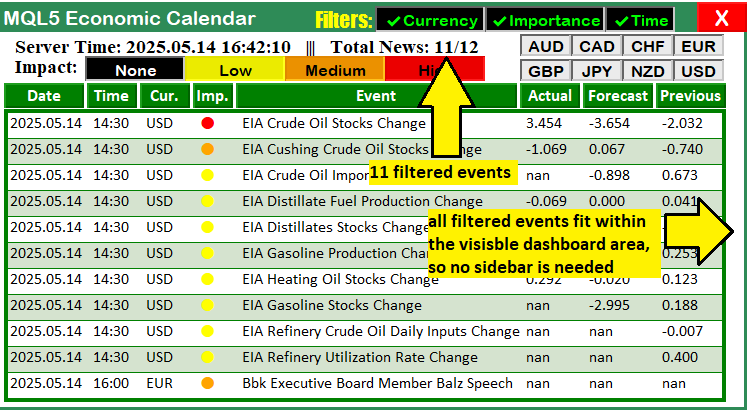
Até 11 eventos filtrados.
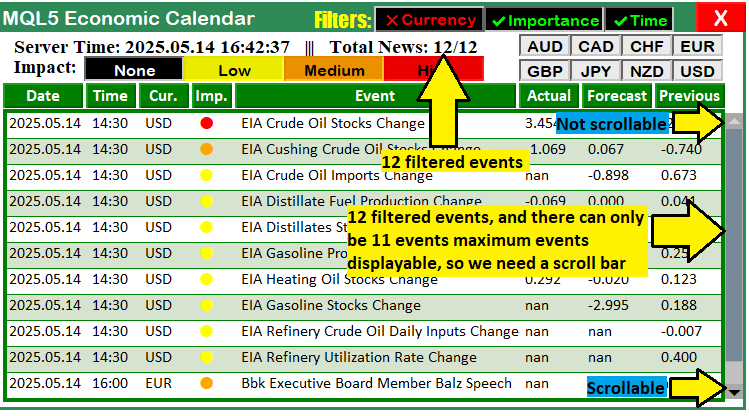
Mais de 11 eventos filtrados.
Amplo intervalo de eventos filtrados.
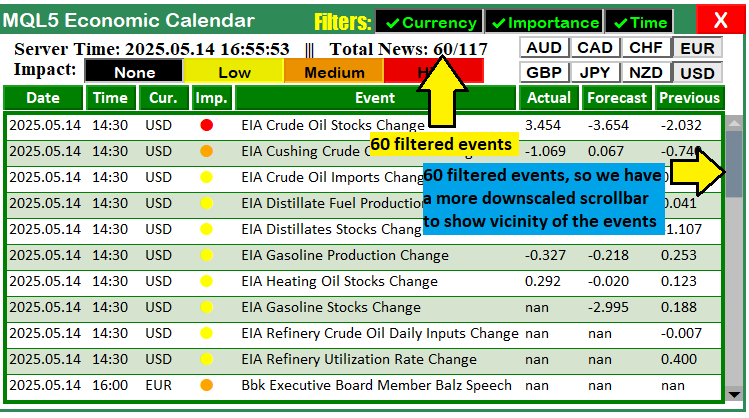
As figuras mostram que a barra de rolagem do calendário é criada dinamicamente de acordo com a quantidade de eventos. Agora precisamos tornar seus elementos interativos. Faremos isso na função OnChartEvent da seguinte forma.
//+------------------------------------------------------------------+
//| Chart event handler                                              |
//+------------------------------------------------------------------+
void OnChartEvent(const int id, const long& lparam, const double& dparam, const string& sparam) {
   int mouse_x = (int)lparam;
   int mouse_y = (int)dparam;
   int mouse_state = (int)sparam;

   if (id == CHARTEVENT_OBJECT_CLICK) {

      // Scrollbar button clicks
      if (scroll_visible && (sparam == SCROLL_UP_REC || sparam == SCROLL_UP_LABEL)) {
         scrollUp();
         updateButtonColors();
         if (debugLogging) Print("Up button clicked (", sparam, "). CurrPos: ", scroll_pos);
         ChartRedraw(0);
      }
      if (scroll_visible && (sparam == SCROLL_DOWN_REC || sparam == SCROLL_DOWN_LABEL)) {
         scrollDown();
         updateButtonColors();
         if (debugLogging) Print("Down button clicked (", sparam, "). CurrPos: ", scroll_pos);
         ChartRedraw(0);
      }
   }
   else if (id == CHARTEVENT_MOUSE_MOVE && scroll_visible) {
      if (prev_mouse_state == 0 && mouse_state == 1) {
         int xd = (int)ObjectGetInteger(0, SCROLL_SLIDER, OBJPROP_XDISTANCE);
         int yd = (int)ObjectGetInteger(0, SCROLL_SLIDER, OBJPROP_YDISTANCE);
         int xs = (int)ObjectGetInteger(0, SCROLL_SLIDER, OBJPROP_XSIZE);
         int ys = (int)ObjectGetInteger(0, SCROLL_SLIDER, OBJPROP_YSIZE);
         if (mouse_x >= xd && mouse_x <= xd + xs && mouse_y >= yd && mouse_y <= yd + ys) {
            moving_state_slider = true;
            mlb_down_x = mouse_x;
            mlb_down_y = mouse_y;
            mlb_down_yd_slider = yd;
            ObjectSetInteger(0, SCROLL_SLIDER, OBJPROP_BGCOLOR, clrDodgerBlue);
            ObjectSetInteger(0, SCROLL_SLIDER, OBJPROP_YSIZE, slider_height + 2);
            ChartSetInteger(0, CHART_MOUSE_SCROLL, false);
            if (debugLogging) Print("Slider drag started at y=", mouse_y);
         }
      }
      if (moving_state_slider && mouse_state == 1) {
         int delta_y = mouse_y - mlb_down_y;
         int new_y = mlb_down_yd_slider + delta_y;
         int scroll_area_y_min = SCROLLBAR_Y + BUTTON_SIZE;
         int scroll_area_y_max = scroll_area_y_min + SCROLL_AREA_HEIGHT - slider_height;
         new_y = MathMax(scroll_area_y_min, MathMin(new_y, scroll_area_y_max));
         ObjectSetInteger(0, SCROLL_SLIDER, OBJPROP_YDISTANCE, new_y);
         int max_scroll = MathMax(0, ArraySize(displayableEvents) - VISIBLE_ITEMS);
         double scroll_ratio = (double)(new_y - scroll_area_y_min) / (scroll_area_y_max - scroll_area_y_min);
         int new_scroll_pos = (int)MathRound(scroll_ratio * max_scroll);
         if (new_scroll_pos != scroll_pos) {
            scroll_pos = new_scroll_pos;
            update_dashboard_values(curr_filter_selected, imp_filter_selected);
            updateButtonColors();
            if (debugLogging) Print("Slider dragged. CurrPos: ", scroll_pos, ", Total steps: ", max_scroll, ", Slider y=", new_y);
         }
         ChartRedraw(0);
      }
      if (mouse_state == 0) {
         if (moving_state_slider) {
            moving_state_slider = false;
            ObjectSetInteger(0, SCROLL_SLIDER, OBJPROP_BGCOLOR, clrLightSlateGray);
            ObjectSetInteger(0, SCROLL_SLIDER, OBJPROP_YSIZE, slider_height);
            ChartSetInteger(0, CHART_MOUSE_SCROLL, true);
            if (debugLogging) Print("Slider drag stopped.");
            ChartRedraw(0);
         }
      }
      prev_mouse_state = mouse_state;
   }
}
Aqui aprimoramos a interatividade implementando uma nova lógica para a barra de rolagem na função OnChartEvent. Isso permitirá navegar pelos eventos com fluidez, tanto por meio de cliques quanto pelo arraste do controle deslizante. Precisamos tratar a interação do usuário com a barra de rolagem, em particular os cliques nos botões para cima e para baixo e os movimentos do mouse usados para arrastar o controle deslizante. Também precisamos garantir uma atualização rápida da exibição do painel. Para isso, tratamos os eventos CHARTEVENT_OBJECT_CLICK relacionados aos cliques nos botões da barra de rolagem quando scroll_visible for igual a true. Se o objeto clicado, identificado por sparam, for SCROLL_UP_REC ou SCROLL_UP_LABEL, chamamos a função scrollUp para reduzir scroll_pos e, em seguida, updateButtonColors para atualizar as cores dos ícones, clrBlack ou clrLightGray, de acordo com a nova posição. Se debugLogging estiver habilitado, registramos a ação no log por meio de Print e chamamos ChartRedraw para atualizar a exibição.
De forma semelhante, ao clicar em SCROLL_DOWN_REC ou SCROLL_DOWN_LABEL, chamamos scrollDown para aumentar scroll_pos e, depois, updateButtonColors para atualizar as cores. Também registramos o evento no log e redesenhamos o gráfico com ChartRedraw, garantindo que a lista de eventos seja exibida corretamente após a rolagem. Essas funções já foram definidas e explicaremos sua lógica mais adiante.
Nos eventos de movimentação do mouse CHARTEVENT_MOUSE_MOVE, quando scroll_visible for igual a true, tratamos o arraste do controle deslizante. Quando prev_mouse_state for igual a 0 e mouse_state passar a 1, usamos ObjectGetInteger para obter a posição do controle deslizante SCROLL_SLIDER, por meio de OBJPROP_XDISTANCE e OBJPROP_YDISTANCE, e suas dimensões, por meio de OBJPROP_XSIZE e OBJPROP_YSIZE, armazenando esses valores nas variáveis xd, yd, xs e ys. Se as coordenadas do mouse, mouse_x e mouse_y, estiverem dentro dos limites do controle deslizante, definimos moving_state_slider como true, armazenamos mlb_down_x, mlb_down_y e mlb_down_yd_slider, alteramos a propriedade OBJPROP_BGCOLOR de SCROLL_SLIDER para clrDodgerBlue e aumentamos OBJPROP_YSIZE em 2. Também desabilitamos a rolagem do gráfico com ChartSetInteger e, se debugLogging estiver habilitado, registramos o início do arraste no log.
Enquanto moving_state_slider e mouse_state forem iguais a true, calculamos delta_y como a diferença entre mouse_y e mlb_down_y. Em seguida, calculamos a nova posição new_y dentro dos limites definidos por scroll_area_y_min, obtido como SCROLLBAR_Y + BUTTON_SIZE, e scroll_area_y_max, calculado como scroll_area_y_min + SCROLL_AREA_HEIGHT - slider_height, usando MathMax e MathMin. Depois, definimos a propriedade OBJPROP_YDISTANCE de SCROLL_SLIDER como new_y. A partir de new_y, calculamos scroll_ratio em relação ao intervalo disponível para rolagem e usamos essa proporção para determinar new_scroll_pos. Se new_scroll_pos for diferente de scroll_pos, atualizamos scroll_pos, chamamos update_dashboard_values com curr_filter_selected e imp_filter_selected e, em seguida, updateButtonColors. Também registramos os detalhes do arraste no log e chamamos ChartRedraw para redesenhar o gráfico.
Quando mouse_state passa a 0, redefinimos moving_state_slider, restauramos a propriedade OBJPROP_BGCOLOR do controle deslizante SCROLL_SLIDER para clrLightSlateGray e OBJPROP_YSIZE para slider_height, reativamos a rolagem do gráfico, registramos o término do arraste no log e chamamos ChartRedraw para redesenhar o gráfico. Dessa forma, obtemos uma interação fluida com o controle deslizante. Abaixo estão as funções responsáveis pela lógica de rolagem.
//+------------------------------------------------------------------+
//| Scroll up                                                        |
//+------------------------------------------------------------------+
void scrollUp() {
   if (scroll_pos > 0) {
      scroll_pos--;
      update_dashboard_values(curr_filter_selected, imp_filter_selected);
      updateSliderPosition();
      if (debugLogging) Print("Scrolled up. CurrPos: ", scroll_pos);
   } else {
      if (debugLogging) Print("Cannot scroll up further. Already at top.");
   }
}

//+------------------------------------------------------------------+
//| Scroll down                                                      |
//+------------------------------------------------------------------+
void scrollDown() {
   int max_scroll = MathMax(0, ArraySize(displayableEvents) - VISIBLE_ITEMS);
   if (scroll_pos < max_scroll) {
      scroll_pos++;
      update_dashboard_values(curr_filter_selected, imp_filter_selected);
      updateSliderPosition();
      if (debugLogging) Print("Scrolled down. CurrPos: ", scroll_pos);
   } else {
      if (debugLogging) Print("Cannot scroll down further. Max scroll reached: ", max_scroll);
   }
}
//+------------------------------------------------------------------+
Na função scrollUp, implementamos a navegação para cima na lista de eventos. Verificamos se scroll_pos é maior que zero, o que indica que ainda é possível rolar a lista para cima. Nesse caso, decrementamos scroll_pos, chamamos update_dashboard_values com os parâmetros curr_filter_selected e imp_filter_selected para atualizar os eventos exibidos e, em seguida, updateSliderPosition para ajustar a posição do controle deslizante SCROLL_SLIDER. Se debugLogging estiver habilitado, também registramos o novo valor de scroll_pos no log por meio de Print. Se scroll_pos for igual a 0, registramos uma mensagem informando que chegamos ao início da lista, evitando atualizações desnecessárias.
Na função scrollDown, implementamos a navegação para baixo na lista de eventos. Calculamos max_scroll com a função MathMax para garantir um valor não negativo, usando a diferença entre ArraySize(displayableEvents) e VISIBLE_ITEMS (11). Esse valor representa a posição máxima possível de rolagem.
Se scroll_pos for menor que max_scroll, incrementamos scroll_pos, chamamos update_dashboard_values com os parâmetros curr_filter_selected e imp_filter_selected para atualizar os eventos exibidos e, em seguida, updateSliderPosition para mover o controle deslizante SCROLL_SLIDER. Se debugLogging estiver habilitado, também registramos o novo valor de scroll_pos no log por meio de Print. Se scroll_pos for igual ou maior que max_scroll, registramos uma mensagem informando que o final da lista foi alcançado, também evitando atualizações desnecessárias da exibição. Para manter a interação fluida, chamamos determinadas funções tanto no manipulador OnInit quanto no manipulador OnTick.
//+------------------------------------------------------------------+
//| Expert tick function                                             |
//+------------------------------------------------------------------+
void OnTick() {
   UpdateFilterInfo();
   CheckForNewsTrade();
   if (isDashboardUpdate) {
      if (MQLInfoInteger(MQL_TESTER)) {
         datetime currentTime = TimeTradeServer();
         datetime timeRange = PeriodSeconds(range_time);
         datetime timeAfter = currentTime + timeRange;
         if (filters_changed || last_dashboard_update < timeAfter) {
            update_dashboard_values(curr_filter_selected, imp_filter_selected);
            ArrayFree(last_dashboard_eventNames);
            ArrayCopy(last_dashboard_eventNames, current_eventNames_data);
            last_dashboard_update = currentTime;
         }
      } else {
         update_dashboard_values(curr_filter_selected, imp_filter_selected);
      }
   }
}

//+------------------------------------------------------------------+
//| Chart event handler                                              |
//+------------------------------------------------------------------+
void OnChartEvent(const int id, const long& lparam, const double& dparam, const string& sparam) {
   int mouse_x = (int)lparam;
   int mouse_y = (int)dparam;
   int mouse_state = (int)sparam;

   if (id == CHARTEVENT_OBJECT_CLICK) {
      UpdateFilterInfo();
      CheckForNewsTrade();
      if (sparam == CANCEL_BTN) {
         isDashboardUpdate = false;
         destroy_Dashboard();
      }
      if (sparam == FILTER_CURR_BTN) {
         bool btn_state = ObjectGetInteger(0,sparam,OBJPROP_STATE);
         enableCurrencyFilter = btn_state;
         if (debugLogging) Print(sparam+" STATE = "+(string)btn_state+", FLAG = "+(string)enableCurrencyFilter);
         string filter_curr_text = enableCurrencyFilter ? ShortToString(0x2714)+"Currency" : ShortToString(0x274C)+"Currency";
         color filter_curr_txt_color = enableCurrencyFilter ? clrLime : clrRed;
         ObjectSetString(0,FILTER_CURR_BTN,OBJPROP_TEXT,filter_curr_text);
         ObjectSetInteger(0,FILTER_CURR_BTN,OBJPROP_COLOR,filter_curr_txt_color);
         if (MQLInfoInteger(MQL_TESTER)) filters_changed = true;
         update_dashboard_values(curr_filter_selected,imp_filter_selected);
         if (debugLogging) Print("Success. Changes updated! State: "+(string)enableCurrencyFilter);
         ChartRedraw(0);
      }
      if (sparam == FILTER_IMP_BTN) {
         bool btn_state = ObjectGetInteger(0,sparam,OBJPROP_STATE);
         enableImportanceFilter = btn_state;
         if (debugLogging) Print(sparam+" STATE = "+(string)btn_state+", FLAG = "+(string)enableImportanceFilter);
         string filter_imp_text = enableImportanceFilter ? ShortToString(0x2714)+"Importance" : ShortToString(0x274C)+"Importance";
         color filter_imp_txt_color = enableImportanceFilter ? clrLime : clrRed;
         ObjectSetString(0,FILTER_IMP_BTN,OBJPROP_TEXT,filter_imp_text);
         ObjectSetInteger(0,FILTER_IMP_BTN,OBJPROP_COLOR,filter_imp_txt_color);
         if (MQLInfoInteger(MQL_TESTER)) filters_changed = true;
         update_dashboard_values(curr_filter_selected,imp_filter_selected);
         if (debugLogging) Print("Success. Changes updated! State: "+(string)enableImportanceFilter);
         ChartRedraw(0);
      }
      if (sparam == FILTER_TIME_BTN) {
         bool btn_state = ObjectGetInteger(0,sparam,OBJPROP_STATE);
         enableTimeFilter = btn_state;
         if (debugLogging) Print(sparam+" STATE = "+(string)btn_state+", FLAG = "+(string)enableTimeFilter);
         string filter_time_text = enableTimeFilter ? ShortToString(0x2714)+"Time" : ShortToString(0x274C)+"Time";
         color filter_time_txt_color = enableTimeFilter ? clrLime : clrRed;
         ObjectSetString(0,FILTER_TIME_BTN,OBJPROP_TEXT,filter_time_text);
         ObjectSetInteger(0,FILTER_TIME_BTN,OBJPROP_COLOR,filter_time_txt_color);
         if (MQLInfoInteger(MQL_TESTER)) filters_changed = true;
         update_dashboard_values(curr_filter_selected,imp_filter_selected);
         if (debugLogging) Print("Success. Changes updated! State: "+(string)enableTimeFilter);
         ChartRedraw(0);
      }
      if (StringFind(sparam,CURRENCY_BTNS) >= 0) {
         string selected_curr = ObjectGetString(0,sparam,OBJPROP_TEXT);
         if (debugLogging) Print("BTN NAME = ",sparam,", CURRENCY = ",selected_curr);
         bool btn_state = ObjectGetInteger(0,sparam,OBJPROP_STATE);
         if (btn_state == false) {
            if (debugLogging) Print("BUTTON IS IN UN-SELECTED MODE.");
            for (int i = 0; i < ArraySize(curr_filter_selected); i++) {
               if (curr_filter_selected[i] == selected_curr) {
                  for (int j = i; j < ArraySize(curr_filter_selected) - 1; j++) {
                     curr_filter_selected[j] = curr_filter_selected[j + 1];
                  }
                  ArrayResize(curr_filter_selected, ArraySize(curr_filter_selected) - 1);
                  if (debugLogging) Print("Removed from selected filters: ", selected_curr);
                  break;
               }
            }
         } else {
            if (debugLogging) Print("BUTTON IS IN SELECTED MODE. TAKE ACTION");
            bool already_selected = false;
            for (int j = 0; j < ArraySize(curr_filter_selected); j++) {
               if (curr_filter_selected[j] == selected_curr) {
                  already_selected = true;
                  break;
               }
            }
            if (!already_selected) {
               ArrayResize(curr_filter_selected, ArraySize(curr_filter_selected) + 1);
               curr_filter_selected[ArraySize(curr_filter_selected) - 1] = selected_curr;
               if (debugLogging) Print("Added to selected filters: ", selected_curr);
            } else {
               if (debugLogging) Print("Currency already selected: ", selected_curr);
            }
         }
         if (debugLogging) Print("SELECTED ARRAY SIZE = ",ArraySize(curr_filter_selected));
         if (debugLogging) ArrayPrint(curr_filter_selected);
         if (MQLInfoInteger(MQL_TESTER)) filters_changed = true;
         update_dashboard_values(curr_filter_selected,imp_filter_selected);
         if (debugLogging) Print("SUCCESS. DASHBOARD UPDATED");
         ChartRedraw(0);
      }
      if (StringFind(sparam, IMPACT_LABEL) >= 0) {
         string selected_imp = ObjectGetString(0, sparam, OBJPROP_TEXT);
         ENUM_CALENDAR_EVENT_IMPORTANCE selected_importance_lvl = get_importance_level(impact_labels,allowed_importance_levels,selected_imp);
         if (debugLogging) Print("BTN NAME = ", sparam, ", IMPORTANCE LEVEL = ", selected_imp,"(",selected_importance_lvl,")");
         bool btn_state = ObjectGetInteger(0, sparam, OBJPROP_STATE);
         color color_border = btn_state ? clrNONE : clrBlack;
         if (btn_state == false) {
            if (debugLogging) Print("BUTTON IS IN UN-SELECTED MODE.");
            for (int i = 0; i < ArraySize(imp_filter_selected); i++) {
               if (impact_filter_selected[i] == selected_imp) {
                  for (int j = i; j < ArraySize(imp_filter_selected) - 1; j++) {
                     imp_filter_selected[j] = imp_filter_selected[j + 1];
                     impact_filter_selected[j] = impact_filter_selected[j + 1];
                  }
                  ArrayResize(imp_filter_selected, ArraySize(imp_filter_selected) - 1);
                  ArrayResize(impact_filter_selected, ArraySize(impact_filter_selected) - 1);
                  if (debugLogging) Print("Removed from selected importance filters: ", selected_imp,"(",selected_importance_lvl,")");
                  break;
               }
            }
         } else {
            if (debugLogging) Print("BUTTON IS IN SELECTED MODE. TAKE ACTION");
            bool already_selected = false;
            for (int j = 0; j < ArraySize(imp_filter_selected); j++) {
               if (impact_filter_selected[j] == selected_imp) {
                  already_selected = true;
                  break;
               }
            }
            if (!already_selected) {
               ArrayResize(imp_filter_selected, ArraySize(imp_filter_selected) + 1);
               imp_filter_selected[ArraySize(imp_filter_selected) - 1] = selected_importance_lvl;
               ArrayResize(impact_filter_selected, ArraySize(impact_filter_selected) + 1);
               impact_filter_selected[ArraySize(impact_filter_selected) - 1] = selected_imp;
               if (debugLogging) Print("Added to selected importance filters: ", selected_imp,"(",selected_importance_lvl,")");
            } else {
               if (debugLogging) Print("Importance level already selected: ", selected_imp,"(",selected_importance_lvl,")");
            }
         }
         if (debugLogging) Print("SELECTED ARRAY SIZE = ", ArraySize(imp_filter_selected)," >< ",ArraySize(impact_filter_selected));
         if (debugLogging) ArrayPrint(imp_filter_selected);
         if (debugLogging) ArrayPrint(impact_filter_selected);
         if (MQLInfoInteger(MQL_TESTER)) filters_changed = true;
         update_dashboard_values(curr_filter_selected,imp_filter_selected);
         ObjectSetInteger(0,sparam,OBJPROP_BORDER_COLOR,color_border);
         if (debugLogging) Print("SUCCESS. DASHBOARD UPDATED");
         ChartRedraw(0);
      }
      // Scrollbar button clicks
      if (scroll_visible && (sparam == SCROLL_UP_REC || sparam == SCROLL_UP_LABEL)) {
         scrollUp();
         updateButtonColors();
         if (debugLogging) Print("Up button clicked (", sparam, "). CurrPos: ", scroll_pos);
         ChartRedraw(0);
      }
      if (scroll_visible && (sparam == SCROLL_DOWN_REC || sparam == SCROLL_DOWN_LABEL)) {
         scrollDown();
         updateButtonColors();
         if (debugLogging) Print("Down button clicked (", sparam, "). CurrPos: ", scroll_pos);
         ChartRedraw(0);
      }
   }
   else if (id == CHARTEVENT_MOUSE_MOVE && scroll_visible) {
      if (prev_mouse_state == 0 && mouse_state == 1) {
         int xd = (int)ObjectGetInteger(0, SCROLL_SLIDER, OBJPROP_XDISTANCE);
         int yd = (int)ObjectGetInteger(0, SCROLL_SLIDER, OBJPROP_YDISTANCE);
         int xs = (int)ObjectGetInteger(0, SCROLL_SLIDER, OBJPROP_XSIZE);
         int ys = (int)ObjectGetInteger(0, SCROLL_SLIDER, OBJPROP_YSIZE);
         if (mouse_x >= xd && mouse_x <= xd + xs && mouse_y >= yd && mouse_y <= yd + ys) {
            moving_state_slider = true;
            mlb_down_x = mouse_x;
            mlb_down_y = mouse_y;
            mlb_down_yd_slider = yd;
            ObjectSetInteger(0, SCROLL_SLIDER, OBJPROP_BGCOLOR, clrDodgerBlue);
            ObjectSetInteger(0, SCROLL_SLIDER, OBJPROP_YSIZE, slider_height + 2);
            ChartSetInteger(0, CHART_MOUSE_SCROLL, false);
            if (debugLogging) Print("Slider drag started at y=", mouse_y);
         }
      }
      if (moving_state_slider && mouse_state == 1) {
         int delta_y = mouse_y - mlb_down_y;
         int new_y = mlb_down_yd_slider + delta_y;
         int scroll_area_y_min = SCROLLBAR_Y + BUTTON_SIZE;
         int scroll_area_y_max = scroll_area_y_min + SCROLL_AREA_HEIGHT - slider_height;
         new_y = MathMax(scroll_area_y_min, MathMin(new_y, scroll_area_y_max));
         ObjectSetInteger(0, SCROLL_SLIDER, OBJPROP_YDISTANCE, new_y);
         int max_scroll = MathMax(0, ArraySize(displayableEvents) - VISIBLE_ITEMS);
         double scroll_ratio = (double)(new_y - scroll_area_y_min) / (scroll_area_y_max - scroll_area_y_min);
         int new_scroll_pos = (int)MathRound(scroll_ratio * max_scroll);
         if (new_scroll_pos != scroll_pos) {
            scroll_pos = new_scroll_pos;
            update_dashboard_values(curr_filter_selected, imp_filter_selected);
            updateButtonColors();
            if (debugLogging) Print("Slider dragged. CurrPos: ", scroll_pos, ", Total steps: ", max_scroll, ", Slider y=", new_y);
         }
         ChartRedraw(0);
      }
      if (mouse_state == 0) {
         if (moving_state_slider) {
            moving_state_slider = false;
            ObjectSetInteger(0, SCROLL_SLIDER, OBJPROP_BGCOLOR, clrLightSlateGray);
            ObjectSetInteger(0, SCROLL_SLIDER, OBJPROP_YSIZE, slider_height);
            ChartSetInteger(0, CHART_MOUSE_SCROLL, true);
            if (debugLogging) Print("Slider drag stopped.");
            ChartRedraw(0);
         }
      }
      prev_mouse_state = mouse_state;
   }
}
Aqui, simplesmente chamamos as funções e a lógica implementada nos respectivos manipuladores de eventos, para que as alterações sejam aplicadas sempre que ocorrer um evento relevante. Após a compilação, obtemos o seguinte resultado.
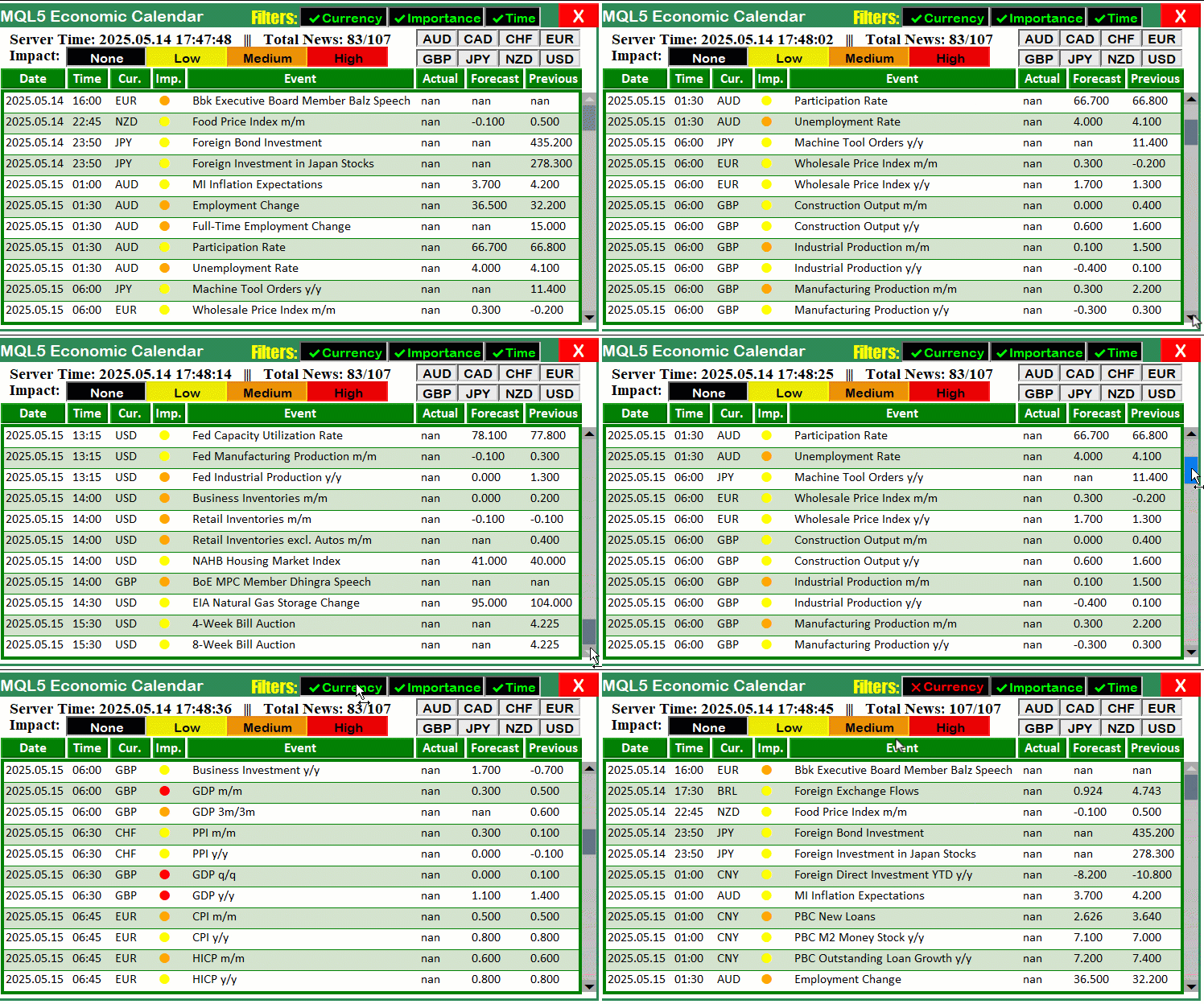
Nesta animação, podemos ver que uma barra de rolagem dinâmica foi adicionada ao painel. Agora falta testar o sistema em detalhes. Faremos isso na próxima seção.
Testes e validação
Testamos as alterações no painel para verificar se a barra de rolagem dinâmica e a exibição dos eventos funcionam corretamente, proporcionando uma navegação fluida pelas notícias. Durante os testes, verificamos o feedback visual da barra de rolagem, a exibição de todos os eventos filtrados e a eficiência das atualizações sem redesenhos desnecessários, tanto no modo de negociação em tempo real quanto no testador de estratégias. Os resultados dos testes são apresentados de forma compacta em GIF (Graphics Interchange Format), permitindo visualizar com clareza o funcionamento do painel.
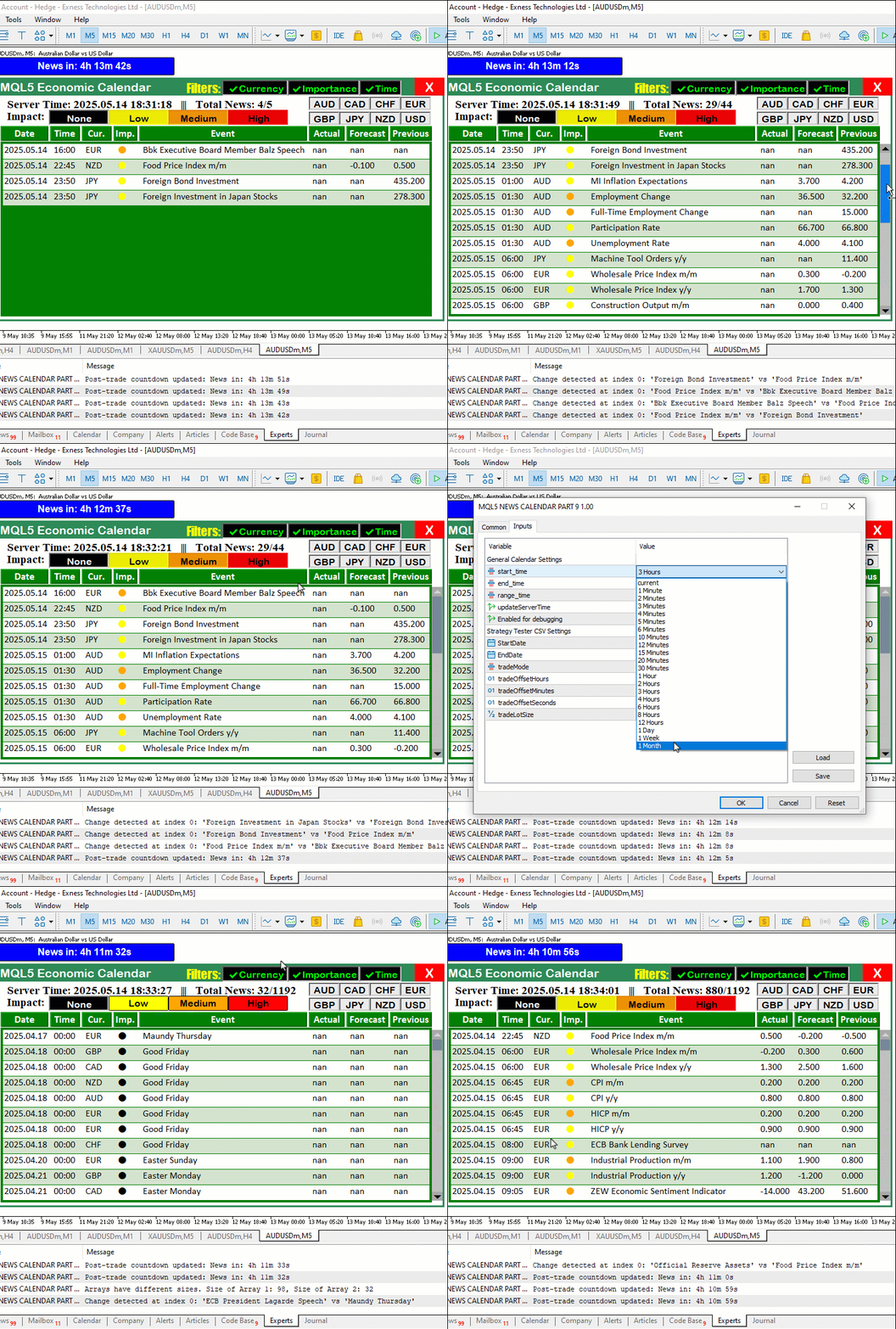
Na animação, podemos ver que a barra de rolagem funciona corretamente, mas surge um problema: ao alterar os filtros clicando neles, a barra de rolagem não é atualizada dinamicamente, embora os eventos sejam atualizados corretamente. Isso acontece porque falta recalcular seus parâmetros, fazendo com que a barra de rolagem ainda não responda dinamicamente às alterações dos filtros. Para corrigir esse problema, precisamos recalibrar a barra de rolagem sempre que um dos botões for acionado. Também poderíamos simplesmente atualizá-la sempre que os dados fossem alterados, mas isso voltaria a gerar processamento desnecessário. Abaixo está a lógica completa usada para resolver o problema.
//+------------------------------------------------------------------+
//| Chart event handler                                              |
//+------------------------------------------------------------------+
void OnChartEvent(const int id, const long& lparam, const double& dparam, const string& sparam) {
   int mouse_x = (int)lparam;
   int mouse_y = (int)dparam;
   int mouse_state = (int)sparam;

   if (id == CHARTEVENT_OBJECT_CLICK) {
      UpdateFilterInfo();
      CheckForNewsTrade();
      if (sparam == CANCEL_BTN) {
         isDashboardUpdate = false;
         destroy_Dashboard();
      }
      if (sparam == FILTER_CURR_BTN) {
         bool btn_state = ObjectGetInteger(0,sparam,OBJPROP_STATE);
         enableCurrencyFilter = btn_state;
         if (debugLogging) Print(sparam+" STATE = "+(string)btn_state+", FLAG = "+(string)enableCurrencyFilter);
         string filter_curr_text = enableCurrencyFilter ? ShortToString(0x2714)+"Currency" : ShortToString(0x274C)+"Currency";
         color filter_curr_txt_color = enableCurrencyFilter ? clrLime : clrRed;
         ObjectSetString(0,FILTER_CURR_BTN,OBJPROP_TEXT,filter_curr_text);
         ObjectSetInteger(0,FILTER_CURR_BTN,OBJPROP_COLOR,filter_curr_txt_color);
         if (MQLInfoInteger(MQL_TESTER)) filters_changed = true;
         update_dashboard_values(curr_filter_selected,imp_filter_selected);
         // Recalculate scrollbar
         ObjectDelete(0, SCROLL_LEADER);
         ObjectDelete(0, SCROLL_UP_REC);
         ObjectDelete(0, SCROLL_UP_LABEL);
         ObjectDelete(0, SCROLL_DOWN_REC);
         ObjectDelete(0, SCROLL_DOWN_LABEL);
         ObjectDelete(0, SCROLL_SLIDER);
         scroll_visible = totalEvents_Filtered > VISIBLE_ITEMS;
         if (debugLogging) Print("Scrollbar visibility: ", scroll_visible ? "Visible" : "Hidden");
         if (scroll_visible) {
            createRecLabel(SCROLL_LEADER, SCROLLBAR_X, SCROLLBAR_Y, SCROLLBAR_WIDTH, SCROLLBAR_HEIGHT, clrSilver, 1, clrNONE);
            int max_scroll = MathMax(0, ArraySize(displayableEvents) - VISIBLE_ITEMS);
            color up_color = (scroll_pos == 0) ? clrLightGray : clrBlack;
            color down_color = (scroll_pos >= max_scroll) ? clrLightGray : clrBlack;
            createRecLabel(SCROLL_UP_REC, SCROLLBAR_X + BUTTON_OFFSET_X, SCROLLBAR_Y, BUTTON_WIDTH, BUTTON_SIZE, clrDarkGray, 1, clrDarkGray);
            createLabel(SCROLL_UP_LABEL, SCROLLBAR_X + BUTTON_OFFSET_X, SCROLLBAR_Y-5, CharToString(0x35), up_color, 15, "Webdings");
            int down_y = SCROLLBAR_Y + SCROLLBAR_HEIGHT - BUTTON_SIZE;
            createRecLabel(SCROLL_DOWN_REC, SCROLLBAR_X + BUTTON_OFFSET_X, down_y, BUTTON_WIDTH, BUTTON_SIZE, clrDarkGray, 1, clrDarkGray);
            createLabel(SCROLL_DOWN_LABEL, SCROLLBAR_X + BUTTON_OFFSET_X, down_y-5, CharToString(0x36), down_color, 15, "Webdings");
            slider_height = calculateSliderHeight();
            int slider_y = SCROLLBAR_Y + BUTTON_SIZE;
            createButton(SCROLL_SLIDER, SCROLLBAR_X + SLIDER_OFFSET_X, slider_y, SLIDER_WIDTH, slider_height, "", clrWhite, 12, clrLightSlateGray, clrDarkGray, "Arial Bold");
            ObjectSetInteger(0, SCROLL_SLIDER, OBJPROP_WIDTH, 2);
            if (debugLogging) Print("Scrollbar created: totalEvents_Filtered=", totalEvents_Filtered, ", slider_height=", slider_height);
            updateSliderPosition();
            updateButtonColors();
         }
         if (debugLogging) Print("Success. Changes updated! State: "+(string)enableCurrencyFilter);
         ChartRedraw(0);
      }
      if (sparam == FILTER_IMP_BTN) {
         bool btn_state = ObjectGetInteger(0,sparam,OBJPROP_STATE);
         enableImportanceFilter = btn_state;
         if (debugLogging) Print(sparam+" STATE = "+(string)btn_state+", FLAG = "+(string)enableImportanceFilter);
         string filter_imp_text = enableImportanceFilter ? ShortToString(0x2714)+"Importance" : ShortToString(0x274C)+"Importance";
         color filter_imp_txt_color = enableImportanceFilter ? clrLime : clrRed;
         ObjectSetString(0,FILTER_IMP_BTN,OBJPROP_TEXT,filter_imp_text);
         ObjectSetInteger(0,FILTER_IMP_BTN,OBJPROP_COLOR,filter_imp_txt_color);
         if (MQLInfoInteger(MQL_TESTER)) filters_changed = true;
         update_dashboard_values(curr_filter_selected,imp_filter_selected);
         // Recalculate scrollbar
         ObjectDelete(0, SCROLL_LEADER);
         ObjectDelete(0, SCROLL_UP_REC);
         ObjectDelete(0, SCROLL_UP_LABEL);
         ObjectDelete(0, SCROLL_DOWN_REC);
         ObjectDelete(0, SCROLL_DOWN_LABEL);
         ObjectDelete(0, SCROLL_SLIDER);
         scroll_visible = totalEvents_Filtered > VISIBLE_ITEMS;
         if (debugLogging) Print("Scrollbar visibility: ", scroll_visible ? "Visible" : "Hidden");
         if (scroll_visible) {
            createRecLabel(SCROLL_LEADER, SCROLLBAR_X, SCROLLBAR_Y, SCROLLBAR_WIDTH, SCROLLBAR_HEIGHT, clrSilver, 1, clrNONE);
            int max_scroll = MathMax(0, ArraySize(displayableEvents) - VISIBLE_ITEMS);
            color up_color = (scroll_pos == 0) ? clrLightGray : clrBlack;
            color down_color = (scroll_pos >= max_scroll) ? clrLightGray : clrBlack;
            createRecLabel(SCROLL_UP_REC, SCROLLBAR_X + BUTTON_OFFSET_X, SCROLLBAR_Y, BUTTON_WIDTH, BUTTON_SIZE, clrDarkGray, 1, clrDarkGray);
            createLabel(SCROLL_UP_LABEL, SCROLLBAR_X + BUTTON_OFFSET_X, SCROLLBAR_Y-5, CharToString(0x35), up_color, 15, "Webdings");
            int down_y = SCROLLBAR_Y + SCROLLBAR_HEIGHT - BUTTON_SIZE;
            createRecLabel(SCROLL_DOWN_REC, SCROLLBAR_X + BUTTON_OFFSET_X, down_y, BUTTON_WIDTH, BUTTON_SIZE, clrDarkGray, 1, clrDarkGray);
            createLabel(SCROLL_DOWN_LABEL, SCROLLBAR_X + BUTTON_OFFSET_X, down_y-5, CharToString(0x36), down_color, 15, "Webdings");
            slider_height = calculateSliderHeight();
            int slider_y = SCROLLBAR_Y + BUTTON_SIZE;
            createButton(SCROLL_SLIDER, SCROLLBAR_X + SLIDER_OFFSET_X, slider_y, SLIDER_WIDTH, slider_height, "", clrWhite, 12, clrLightSlateGray, clrDarkGray, "Arial Bold");
            ObjectSetInteger(0, SCROLL_SLIDER, OBJPROP_WIDTH, 2);
            if (debugLogging) Print("Scrollbar created: totalEvents_Filtered=", totalEvents_Filtered, ", slider_height=", slider_height);
            updateSliderPosition();
            updateButtonColors();
         }
         if (debugLogging) Print("Success. Changes updated! State: "+(string)enableImportanceFilter);
         ChartRedraw(0);
      }
      if (sparam == FILTER_TIME_BTN) {
         bool btn_state = ObjectGetInteger(0,sparam,OBJPROP_STATE);
         enableTimeFilter = btn_state;
         if (debugLogging) Print(sparam+" STATE = "+(string)btn_state+", FLAG = "+(string)enableTimeFilter);
         string filter_time_text = enableTimeFilter ? ShortToString(0x2714)+"Time" : ShortToString(0x274C)+"Time";
         color filter_time_txt_color = enableTimeFilter ? clrLime : clrRed;
         ObjectSetString(0,FILTER_TIME_BTN,OBJPROP_TEXT,filter_time_text);
         ObjectSetInteger(0,FILTER_TIME_BTN,OBJPROP_COLOR,filter_time_txt_color);
         if (MQLInfoInteger(MQL_TESTER)) filters_changed = true;
         update_dashboard_values(curr_filter_selected,imp_filter_selected);
         // Recalculate scrollbar
         ObjectDelete(0, SCROLL_LEADER);
         ObjectDelete(0, SCROLL_UP_REC);
         ObjectDelete(0, SCROLL_UP_LABEL);
         ObjectDelete(0, SCROLL_DOWN_REC);
         ObjectDelete(0, SCROLL_DOWN_LABEL);
         ObjectDelete(0, SCROLL_SLIDER);
         scroll_visible = totalEvents_Filtered > VISIBLE_ITEMS;
         if (debugLogging) Print("Scrollbar visibility: ", scroll_visible ? "Visible" : "Hidden");
         if (scroll_visible) {
            createRecLabel(SCROLL_LEADER, SCROLLBAR_X, SCROLLBAR_Y, SCROLLBAR_WIDTH, SCROLLBAR_HEIGHT, clrSilver, 1, clrNONE);
            int max_scroll = MathMax(0, ArraySize(displayableEvents) - VISIBLE_ITEMS);
            color up_color = (scroll_pos == 0) ? clrLightGray : clrBlack;
            color down_color = (scroll_pos >= max_scroll) ? clrLightGray : clrBlack;
            createRecLabel(SCROLL_UP_REC, SCROLLBAR_X + BUTTON_OFFSET_X, SCROLLBAR_Y, BUTTON_WIDTH, BUTTON_SIZE, clrDarkGray, 1, clrDarkGray);
            createLabel(SCROLL_UP_LABEL, SCROLLBAR_X + BUTTON_OFFSET_X, SCROLLBAR_Y-5, CharToString(0x35), up_color, 15, "Webdings");
            int down_y = SCROLLBAR_Y + SCROLLBAR_HEIGHT - BUTTON_SIZE;
            createRecLabel(SCROLL_DOWN_REC, SCROLLBAR_X + BUTTON_OFFSET_X, down_y, BUTTON_WIDTH, BUTTON_SIZE, clrDarkGray, 1, clrDarkGray);
            createLabel(SCROLL_DOWN_LABEL, SCROLLBAR_X + BUTTON_OFFSET_X, down_y-5, CharToString(0x36), down_color, 15, "Webdings");
            slider_height = calculateSliderHeight();
            int slider_y = SCROLLBAR_Y + BUTTON_SIZE;
            createButton(SCROLL_SLIDER, SCROLLBAR_X + SLIDER_OFFSET_X, slider_y, SLIDER_WIDTH, slider_height, "", clrWhite, 12, clrLightSlateGray, clrDarkGray, "Arial Bold");
            ObjectSetInteger(0, SCROLL_SLIDER, OBJPROP_WIDTH, 2);
            if (debugLogging) Print("Scrollbar created: totalEvents_Filtered=", totalEvents_Filtered, ", slider_height=", slider_height);
            updateSliderPosition();
            updateButtonColors();
         }
         if (debugLogging) Print("Success. Changes updated! State: "+(string)enableTimeFilter);
         ChartRedraw(0);
      }
      if (StringFind(sparam,CURRENCY_BTNS) >= 0) {
         string selected_curr = ObjectGetString(0,sparam,OBJPROP_TEXT);
         if (debugLogging) Print("BTN NAME = ",sparam,", CURRENCY = ",selected_curr);
         bool btn_state = ObjectGetInteger(0,sparam,OBJPROP_STATE);
         if (btn_state == false) {
            if (debugLogging) Print("BUTTON IS IN UN-SELECTED MODE.");
            for (int i = 0; i < ArraySize(curr_filter_selected); i++) {
               if (curr_filter_selected[i] == selected_curr) {
                  for (int j = i; j < ArraySize(curr_filter_selected) - 1; j++) {
                     curr_filter_selected[j] = curr_filter_selected[j + 1];
                  }
                  ArrayResize(curr_filter_selected, ArraySize(curr_filter_selected) - 1);
                  if (debugLogging) Print("Removed from selected filters: ", selected_curr);
                  break;
               }
            }
         } else {
            if (debugLogging) Print("BUTTON IS IN SELECTED MODE. TAKE ACTION");
            bool already_selected = false;
            for (int j = 0; j < ArraySize(curr_filter_selected); j++) {
               if (curr_filter_selected[j] == selected_curr) {
                  already_selected = true;
                  break;
               }
            }
            if (!already_selected) {
               ArrayResize(curr_filter_selected, ArraySize(curr_filter_selected) + 1);
               curr_filter_selected[ArraySize(curr_filter_selected) - 1] = selected_curr;
               if (debugLogging) Print("Added to selected filters: ", selected_curr);
            } else {
               if (debugLogging) Print("Currency already selected: ", selected_curr);
            }
         }
         if (debugLogging) Print("SELECTED ARRAY SIZE = ",ArraySize(curr_filter_selected));
         if (debugLogging) ArrayPrint(curr_filter_selected);
         if (MQLInfoInteger(MQL_TESTER)) filters_changed = true;
         update_dashboard_values(curr_filter_selected,imp_filter_selected);
         // Recalculate scrollbar
         ObjectDelete(0, SCROLL_LEADER);
         ObjectDelete(0, SCROLL_UP_REC);
         ObjectDelete(0, SCROLL_UP_LABEL);
         ObjectDelete(0, SCROLL_DOWN_REC);
         ObjectDelete(0, SCROLL_DOWN_LABEL);
         ObjectDelete(0, SCROLL_SLIDER);
         scroll_visible = totalEvents_Filtered > VISIBLE_ITEMS;
         if (debugLogging) Print("Scrollbar visibility: ", scroll_visible ? "Visible" : "Hidden");
         if (scroll_visible) {
            createRecLabel(SCROLL_LEADER, SCROLLBAR_X, SCROLLBAR_Y, SCROLLBAR_WIDTH, SCROLLBAR_HEIGHT, clrSilver, 1, clrNONE);
            int max_scroll = MathMax(0, ArraySize(displayableEvents) - VISIBLE_ITEMS);
            color up_color = (scroll_pos == 0) ? clrLightGray : clrBlack;
            color down_color = (scroll_pos >= max_scroll) ? clrLightGray : clrBlack;
            createRecLabel(SCROLL_UP_REC, SCROLLBAR_X + BUTTON_OFFSET_X, SCROLLBAR_Y, BUTTON_WIDTH, BUTTON_SIZE, clrDarkGray, 1, clrDarkGray);
            createLabel(SCROLL_UP_LABEL, SCROLLBAR_X + BUTTON_OFFSET_X, SCROLLBAR_Y-5, CharToString(0x35), up_color, 15, "Webdings");
            int down_y = SCROLLBAR_Y + SCROLLBAR_HEIGHT - BUTTON_SIZE;
            createRecLabel(SCROLL_DOWN_REC, SCROLLBAR_X + BUTTON_OFFSET_X, down_y, BUTTON_WIDTH, BUTTON_SIZE, clrDarkGray, 1, clrDarkGray);
            createLabel(SCROLL_DOWN_LABEL, SCROLLBAR_X + BUTTON_OFFSET_X, down_y-5, CharToString(0x36), down_color, 15, "Webdings");
            slider_height = calculateSliderHeight();
            int slider_y = SCROLLBAR_Y + BUTTON_SIZE;
            createButton(SCROLL_SLIDER, SCROLLBAR_X + SLIDER_OFFSET_X, slider_y, SLIDER_WIDTH, slider_height, "", clrWhite, 12, clrLightSlateGray, clrDarkGray, "Arial Bold");
            ObjectSetInteger(0, SCROLL_SLIDER, OBJPROP_WIDTH, 2);
            if (debugLogging) Print("Scrollbar created: totalEvents_Filtered=", totalEvents_Filtered, ", slider_height=", slider_height);
            updateSliderPosition();
            updateButtonColors();
         }
         if (debugLogging) Print("SUCCESS. DASHBOARD UPDATED");
         ChartRedraw(0);
      }
      if (StringFind(sparam, IMPACT_LABEL) >= 0) {
         string selected_imp = ObjectGetString(0, sparam, OBJPROP_TEXT);
         ENUM_CALENDAR_EVENT_IMPORTANCE selected_importance_lvl = get_importance_level(impact_labels,allowed_importance_levels,selected_imp);
         if (debugLogging) Print("BTN NAME = ", sparam, ", IMPORTANCE LEVEL = ", selected_imp,"(",selected_importance_lvl,")");
         bool btn_state = ObjectGetInteger(0, sparam, OBJPROP_STATE);
         color color_border = btn_state ? clrNONE : clrBlack;
         if (btn_state == false) {
            if (debugLogging) Print("BUTTON IS IN UN-SELECTED MODE.");
            for (int i = 0; i < ArraySize(imp_filter_selected); i++) {
               if (impact_filter_selected[i] == selected_imp) {
                  for (int j = i; j < ArraySize(imp_filter_selected) - 1; j++) {
                     imp_filter_selected[j] = imp_filter_selected[j + 1];
                     impact_filter_selected[j] = impact_filter_selected[j + 1];
                  }
                  ArrayResize(imp_filter_selected, ArraySize(imp_filter_selected) - 1);
                  ArrayResize(impact_filter_selected, ArraySize(impact_filter_selected) - 1);
                  if (debugLogging) Print("Removed from selected importance filters: ", selected_imp,"(",selected_importance_lvl,")");
                  break;
               }
            }
         } else {
            if (debugLogging) Print("BUTTON IS IN SELECTED MODE. TAKE ACTION");
            bool already_selected = false;
            for (int j = 0; j < ArraySize(imp_filter_selected); j++) {
               if (impact_filter_selected[j] == selected_imp) {
                  already_selected = true;
                  break;
               }
            }
            if (!already_selected) {
               ArrayResize(imp_filter_selected, ArraySize(imp_filter_selected) + 1);
               imp_filter_selected[ArraySize(imp_filter_selected) - 1] = selected_importance_lvl;
               ArrayResize(impact_filter_selected, ArraySize(impact_filter_selected) + 1);
               impact_filter_selected[ArraySize(impact_filter_selected) - 1] = selected_imp;
               if (debugLogging) Print("Added to selected importance filters: ", selected_imp,"(",selected_importance_lvl,")");
            } else {
               if (debugLogging) Print("Importance level already selected: ", selected_imp,"(",selected_importance_lvl,")");
            }
         }
         if (debugLogging) Print("SELECTED ARRAY SIZE = ", ArraySize(imp_filter_selected)," >< ",ArraySize(impact_filter_selected));
         if (debugLogging) ArrayPrint(imp_filter_selected);
         if (debugLogging) ArrayPrint(impact_filter_selected);
         if (MQLInfoInteger(MQL_TESTER)) filters_changed = true;
         update_dashboard_values(curr_filter_selected,imp_filter_selected);
         ObjectSetInteger(0,sparam,OBJPROP_BORDER_COLOR,color_border);
         // Recalculate scrollbar
         ObjectDelete(0, SCROLL_LEADER);
         ObjectDelete(0, SCROLL_UP_REC);
         ObjectDelete(0, SCROLL_UP_LABEL);
         ObjectDelete(0, SCROLL_DOWN_REC);
         ObjectDelete(0, SCROLL_DOWN_LABEL);
         ObjectDelete(0, SCROLL_SLIDER);
         scroll_visible = totalEvents_Filtered > VISIBLE_ITEMS;
         if (debugLogging) Print("Scrollbar visibility: ", scroll_visible ? "Visible" : "Hidden");
         if (scroll_visible) {
            createRecLabel(SCROLL_LEADER, SCROLLBAR_X, SCROLLBAR_Y, SCROLLBAR_WIDTH, SCROLLBAR_HEIGHT, clrSilver, 1, clrNONE);
            int max_scroll = MathMax(0, ArraySize(displayableEvents) - VISIBLE_ITEMS);
            color up_color = (scroll_pos == 0) ? clrLightGray : clrBlack;
            color down_color = (scroll_pos >= max_scroll) ? clrLightGray : clrBlack;
            createRecLabel(SCROLL_UP_REC, SCROLLBAR_X + BUTTON_OFFSET_X, SCROLLBAR_Y, BUTTON_WIDTH, BUTTON_SIZE, clrDarkGray, 1, clrDarkGray);
            createLabel(SCROLL_UP_LABEL, SCROLLBAR_X + BUTTON_OFFSET_X, SCROLLBAR_Y-5, CharToString(0x35), up_color, 15, "Webdings");
            int down_y = SCROLLBAR_Y + SCROLLBAR_HEIGHT - BUTTON_SIZE;
            createRecLabel(SCROLL_DOWN_REC, SCROLLBAR_X + BUTTON_OFFSET_X, down_y, BUTTON_WIDTH, BUTTON_SIZE, clrDarkGray, 1, clrDarkGray);
            createLabel(SCROLL_DOWN_LABEL, SCROLLBAR_X + BUTTON_OFFSET_X, down_y-5, CharToString(0x36), down_color, 15, "Webdings");
            slider_height = calculateSliderHeight();
            int slider_y = SCROLLBAR_Y + BUTTON_SIZE;
            createButton(SCROLL_SLIDER, SCROLLBAR_X + SLIDER_OFFSET_X, slider_y, SLIDER_WIDTH, slider_height, "", clrWhite, 12, clrLightSlateGray, clrDarkGray, "Arial Bold");
            ObjectSetInteger(0, SCROLL_SLIDER, OBJPROP_WIDTH, 2);
            if (debugLogging) Print("Scrollbar created: totalEvents_Filtered=", totalEvents_Filtered, ", slider_height=", slider_height);
            updateSliderPosition();
            updateButtonColors();
         }
         if (debugLogging) Print("SUCCESS. DASHBOARD UPDATED");
         ChartRedraw(0);
      }
      // Scrollbar button clicks
      if (scroll_visible && (sparam == SCROLL_UP_REC || sparam == SCROLL_UP_LABEL)) {
         scrollUp();
         updateButtonColors();
         if (debugLogging) Print("Up button clicked (", sparam, "). CurrPos: ", scroll_pos);
         ChartRedraw(0);
      }
      if (scroll_visible && (sparam == SCROLL_DOWN_REC || sparam == SCROLL_DOWN_LABEL)) {
         scrollDown();
         updateButtonColors();
         if (debugLogging) Print("Down button clicked (", sparam, "). CurrPos: ", scroll_pos);
         ChartRedraw(0);
      }
   }
   else if (id == CHARTEVENT_MOUSE_MOVE && scroll_visible) {
      if (prev_mouse_state == 0 && mouse_state == 1) {
         int xd = (int)ObjectGetInteger(0, SCROLL_SLIDER, OBJPROP_XDISTANCE);
         int yd = (int)ObjectGetInteger(0, SCROLL_SLIDER, OBJPROP_YDISTANCE);
         int xs = (int)ObjectGetInteger(0, SCROLL_SLIDER, OBJPROP_XSIZE);
         int ys = (int)ObjectGetInteger(0, SCROLL_SLIDER, OBJPROP_YSIZE);
         if (mouse_x >= xd && mouse_x <= xd + xs && mouse_y >= yd && mouse_y <= yd + ys) {
            moving_state_slider = true;
            mlb_down_x = mouse_x;
            mlb_down_y = mouse_y;
            mlb_down_yd_slider = yd;
            ObjectSetInteger(0, SCROLL_SLIDER, OBJPROP_BGCOLOR, clrDodgerBlue);
            ObjectSetInteger(0, SCROLL_SLIDER, OBJPROP_YSIZE, slider_height + 2);
            ChartSetInteger(0, CHART_MOUSE_SCROLL, false);
            if (debugLogging) Print("Slider drag started at y=", mouse_y);
         }
      }
      if (moving_state_slider && mouse_state == 1) {
         int delta_y = mouse_y - mlb_down_y;
         int new_y = mlb_down_yd_slider + delta_y;
         int scroll_area_y_min = SCROLLBAR_Y + BUTTON_SIZE;
         int scroll_area_y_max = scroll_area_y_min + SCROLL_AREA_HEIGHT - slider_height;
         new_y = MathMax(scroll_area_y_min, MathMin(new_y, scroll_area_y_max));
         ObjectSetInteger(0, SCROLL_SLIDER, OBJPROP_YDISTANCE, new_y);
         int max_scroll = MathMax(0, ArraySize(displayableEvents) - VISIBLE_ITEMS);
         double scroll_ratio = (double)(new_y - scroll_area_y_min) / (scroll_area_y_max - scroll_area_y_min);
         int new_scroll_pos = (int)MathRound(scroll_ratio * max_scroll);
         if (new_scroll_pos != scroll_pos) {
            scroll_pos = new_scroll_pos;
            update_dashboard_values(curr_filter_selected, imp_filter_selected);
            updateButtonColors();
            if (debugLogging) Print("Slider dragged. CurrPos: ", scroll_pos, ", Total steps: ", max_scroll, ", Slider y=", new_y);
         }
         ChartRedraw(0);
      }
      if (mouse_state == 0) {
         if (moving_state_slider) {
            moving_state_slider = false;
            ObjectSetInteger(0, SCROLL_SLIDER, OBJPROP_BGCOLOR, clrLightSlateGray);
            ObjectSetInteger(0, SCROLL_SLIDER, OBJPROP_YSIZE, slider_height);
            ChartSetInteger(0, CHART_MOUSE_SCROLL, true);
            if (debugLogging) Print("Slider drag stopped.");
            ChartRedraw(0);
         }
      }
      prev_mouse_state = mouse_state;
   }
}
Aqui, simplesmente aproveitamos a lógica já implementada para os cliques nos elementos da barra de rolagem e a estendemos aos botões individuais dos filtros. Acredito que não seja necessário detalhar novamente esse funcionamento. Após a compilação, obtemos o seguinte resultado.
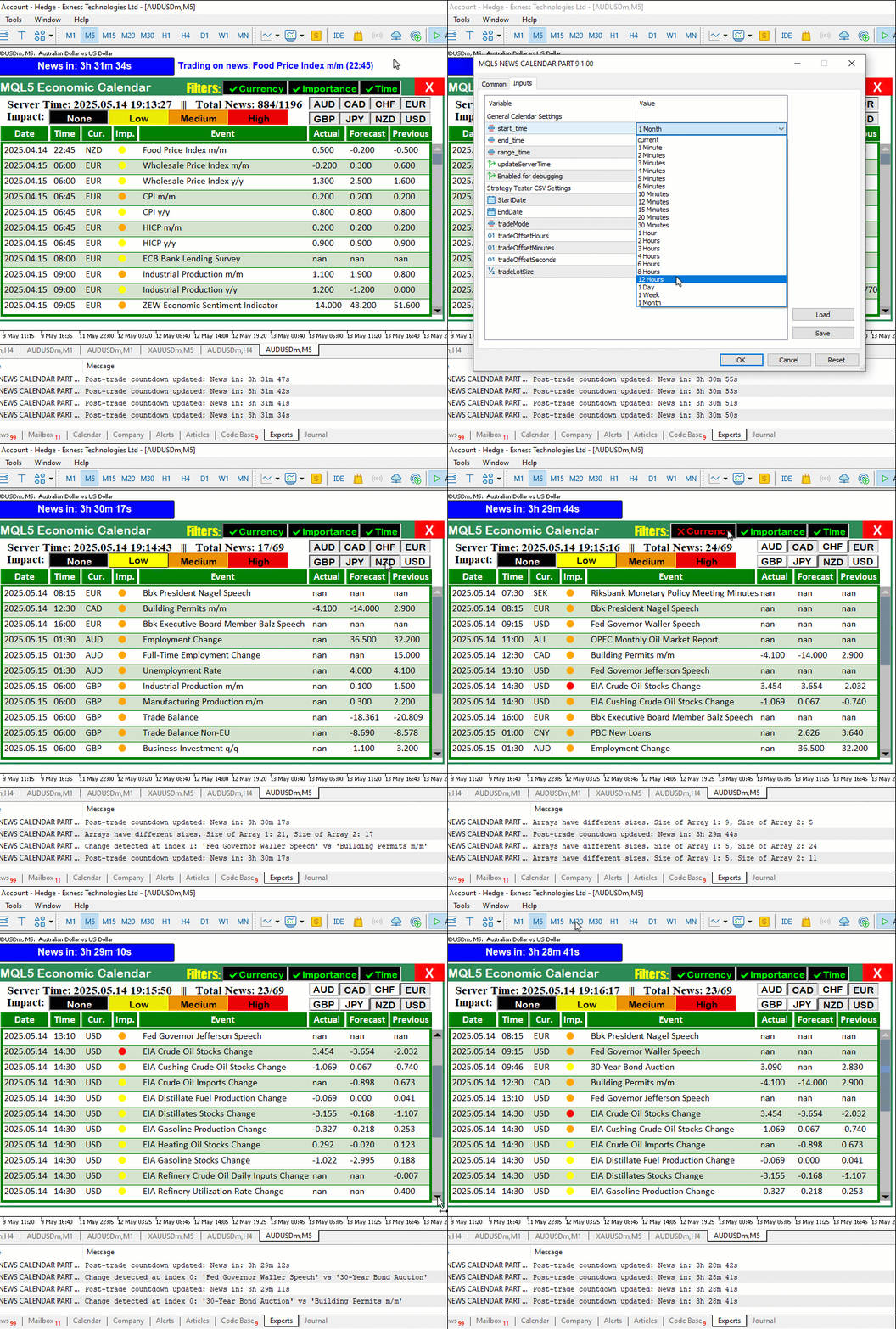
Na animação, podemos ver que agora tudo funciona corretamente, com a barra de rolagem sendo atualizada dinamicamente e os eventos exibidos corretamente.
Conclusão
Para concluir, avançamos mais um pouco em nossa série dedicada ao Calendário Econômico MQL5, implementando uma barra de rolagem dinâmica e aprimorando a exibição dos eventos. Com isso, conseguimos oferecer uma navegação intuitiva e acesso prático às notícias, como demonstrado na animação GIF. Como esses aprimoramentos foram desenvolvidos sobre a base criada na Parte 8, a funcionalidade adicionada funciona tanto no modo de negociação em tempo real quanto no testador, oferecendo uma base confiável para estratégias de negociação baseadas em notícias. Você pode usar este painel aprimorado como ponto de partida e adaptá-lo às suas próprias necessidades de negociação.
Traduzido do Inglês pela MetaQuotes Ltd.
Artigo original: https://www.mql5.com/en/articles/18135
Aviso: Todos os direitos sobre esses materiais pertencem à MetaQuotes Ltd. É proibida a reimpressão total ou parcial.
Esse artigo foi escrito por um usuário do site e reflete seu ponto de vista pessoal. A MetaQuotes Ltd. não se responsabiliza pela precisão das informações apresentadas nem pelas possíveis consequências decorrentes do uso das soluções, estratégias ou recomendações descritas.

 Recursos do Assistente MQL5 que você precisa conhecer (Parte 65): uso de padrões com FrAMA e Índice de Força
 Desenvolvimento de ferramentas para análise de Price Action (Parte 23): Indicador de força das moedas
 Machine Learning e Data Science (Parte 41): YOLOv8v para detectar padrões nos mercados Forex e de ações
 Machine Learning e Data Science (Parte 40): Uso dos níveis de Fibonacci em dados para machine learning

- Aplicativos de negociação gratuitos
- 8 000+ sinais para cópia
- Notícias econômicas para análise dos mercados financeiros
Você concorda com a política do site e com os termos de uso