
Automatizando Estratégias de Trading em MQL5 (Parte 16): Rompimento da Faixa da Meia-Noite com Break of Structure (BoS) e Price Action
 139
139
 7
7

Introdução
Em nosso artigo anterior (Parte 15), automatizamos uma estratégia de trading baseada no padrão harmônico Cypher para identificar possíveis reversões do mercado. Agora, na Parte 16, nosso foco será automatizar a estratégia Midnight Range Breakout com Break of Structure em MetaQuotes Language 5 (MQL5), desenvolvendo um Expert Advisor capaz de identificar a faixa de preços formada entre a meia-noite e as 6h, detectar um Break of Structure (BoS) e executar operações. Abordaremos os seguintes tópicos:
- Entendendo a Estratégia Midnight Range Breakout com Break of Structure
- Implementação em MQL5
- Backtesting
- Conclusão
Ao final deste artigo, você terá um programa MQL5 totalmente funcional, capaz de visualizar os principais níveis de preço, confirmar rompimentos e executar operações com parâmetros de risco previamente definidos. Vamos começar!
Entendendo a Estratégia Midnight Range Breakout com Break of Structure
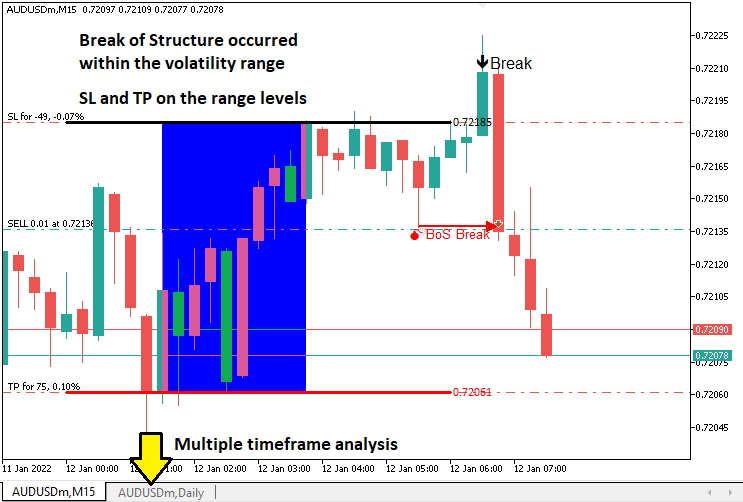
A estratégia Midnight Range Breakout com Break of Structure busca aproveitar a faixa de baixa volatilidade formada entre a meia-noite e as 6h, utilizando os preços máximo e mínimo desse período como níveis de rompimento. Além disso, exige a confirmação de um Break of Structure para validar os sinais de negociação. O Break of Structure permite identificar mudanças na estrutura do mercado ao detectar quando o preço ultrapassa um swing high (máxima de oscilação), indicando um possível movimento de alta, ou rompe abaixo de um swing low (mínima de oscilação), indicando um possível movimento de baixa. Essa confirmação ajuda a filtrar falsos rompimentos e a alinhar as operações ao momentum do mercado. Essa abordagem pode ser utilizada durante períodos de transição entre sessões, como na abertura da sessão de Londres, ou em outros períodos escolhidos pelo trader. Ainda assim, é necessário considerar corretamente o fuso horário e ter cautela durante a divulgação de notícias de alto impacto, a fim de evitar movimentos bruscos e falsos rompimentos.
Nosso plano de implementação consiste em criar um Expert Advisor em MQL5 para automatizar a estratégia. O EA calculará a faixa formada entre a meia-noite e as 6h, monitorará possíveis rompimentos dentro de uma janela de tempo definida e os confirmará por meio do Break of Structure em um timeframe específico, normalmente de 5, 10 ou 15 minutos. Esse timeframe será disponibilizado como um parâmetro de entrada para que o usuário possa escolhê-lo dinamicamente. O sistema executará as operações utilizando níveis de Stop Loss e Take Profit derivados da faixa, exibirá no gráfico os principais níveis de preço para facilitar sua visualização e aplicará uma gestão de risco consistente para lidar com diferentes condições de mercado. Em resumo, é isso que queremos implementar.
Implementação em MQL5
Para criar o programa em MQL5, abra o MetaEditor, acesse o Navigator, localize a pasta Indicators, clique na opção "New" e siga as etapas apresentadas para criar o arquivo. Depois de criado o arquivo, no ambiente de programação precisaremos declarar algumas variáveis globais que serão utilizadas ao longo de todo o programa.
//+------------------------------------------------------------------+
//|                   Midnight Range Break of Structure Breakout.mq5 |
//|                           Copyright 2025, Allan Munene Mutiiria. |
//|                                   https://t.me/Forex_Algo_Trader |
//+------------------------------------------------------------------+
#property copyright "Copyright 2025, Allan Munene Mutiiria."
#property link      "https://t.me/Forex_Algo_Trader"
#property version   "1.00"

#include <Trade/Trade.mqh> //--- Include the Trade library for handling trade operations
CTrade obj_Trade;          //--- Create an instance of the CTrade class for trade execution

double maximum_price = -DBL_MAX;      //--- Initialize the maximum price variable to negative infinity
double minimum_price = DBL_MAX;       //--- Initialize the minimum price variable to positive infinity
datetime maximum_time, minimum_time;  //--- Declare variables to store the times of maximum and minimum prices
bool isHaveDailyRange_Prices = false; //--- Initialize flag to indicate if daily range prices are calculated
bool isHaveRangeBreak = false;        //--- Initialize flag to indicate if a range breakout has occurred
bool isTakenTrade = false;            //--- Initialize flag to indicate if a trade is taken for the current day

#define RECTANGLE_PREFIX "RANGE RECTANGLE " //--- Define a prefix for rectangle object names
#define UPPER_LINE_PREFIX "UPPER LINE "     //--- Define a prefix for upper line object names
#define LOWER_LINE_PREFIX "LOWER LINE "     //--- Define a prefix for lower line object names

// bos
input ENUM_TIMEFRAMES timeframe_bos = PERIOD_M5; // Input the timeframe for Break of Structure (BoS) analysis
Aqui, começamos a implementar a estratégia configurando os componentes fundamentais do programa. Incluímos a biblioteca <Trade/Trade.mqh> para habilitar as operações de negociação e instanciamos a classe "CTrade" no objeto "obj_Trade", que será responsável pela execução das operações, como a abertura de posições de compra ou venda com os parâmetros especificados.
Definimos diversas variáveis globais para armazenar dados essenciais da estratégia. As variáveis "maximum_price" e "minimum_price", inicializadas com -DBL_MAX e DBL_MAX, respectivamente, armazenam os preços máximo e mínimo registrados dentro da faixa entre a meia-noite e as 6h, permitindo identificar seus limites. As variáveis "maximum_time" e "minimum_time", do tipo datetime, registram os horários em que esses extremos de preço ocorreram, informação necessária para representar visualmente a faixa no gráfico. Também utilizamos flags booleanas: "isHaveDailyRange_Prices" indica se a faixa diária já foi calculada; "isHaveRangeBreak" registra se ocorreu um rompimento; e "isTakenTrade" garante que apenas uma operação seja realizada por dia, evitando operações excessivas.
Para facilitar a visualização no gráfico, definimos constantes para padronizar os nomes dos objetos: "RECTANGLE_PREFIX" como "RANGE RECTANGLE ", "UPPER_LINE_PREFIX" como "UPPER LINE " e "LOWER_LINE_PREFIX" como "LOWER LINE ". Esses prefixos garantem nomes exclusivos para objetos gráficos, como retângulos e linhas, que serão utilizados para representar a faixa e os níveis de rompimento, tornando visualmente mais clara a atuação da estratégia. Além disso, adicionamos o parâmetro de entrada "timeframe_bos", definido por padrão como PERIOD_M5. Esse parâmetro permite que o trader escolha o timeframe utilizado na análise do Break of Structure, como o gráfico de 5 minutos, para identificar swing highs e swing lows. Com isso, temos a configuração inicial necessária. Agora, precisamos definir duas funções que nos permitam controlar a execução da lógica de negociação na transição entre novas barras e novos dias.
//+------------------------------------------------------------------+
//| Function to check for a new bar                                  |
//+------------------------------------------------------------------+
bool isNewBar(){ //--- Define a function to detect a new bar on the current timeframe
   static int prevBars = 0;                //--- Store the previous number of bars
   int currBars = iBars(_Symbol,_Period);  //--- Get the current number of bars
   if (prevBars==currBars) return (false); //--- Return false if no new bar has formed
   prevBars = currBars;                    //--- Update the previous bar count
   return (true);                          //--- Return true if a new bar has formed
}

//+------------------------------------------------------------------+
//| Function to check for a new day                                  |
//+------------------------------------------------------------------+
bool isNewDay(){ //--- Define a function to detect a new trading day
   bool newDay = false;  //--- Initialize the new day flag

   MqlDateTime Str_DateTime;                 //--- Declare a structure to hold date and time information
   TimeToStruct(TimeCurrent(),Str_DateTime); //--- Convert the current time to the structure

   static int prevDay = 0;         //--- Store the previous day's date
   int currDay = Str_DateTime.day; //--- Get the current day's date

   if (prevDay == currDay){ //--- Check if the current day is the same as the previous day
      newDay = false;       //--- Set the flag to false (no new day)
   }
   else if (prevDay != currDay){ //--- Check if a new day has started
      Print("WE HAVE A NEW DAY WITH DATE ",currDay); //--- Log the new day
      prevDay = currDay;                             //--- Update the previous day
      newDay = true;                                 //--- Set the flag to true (new day)
   }

   return (newDay); //--- Return the new day status
}
Aqui, implementamos as funções "isNewBar" e "isNewDay" para sincronizar a estratégia Midnight Range Breakout com Break of Structure em MQL5 com o avanço do mercado. Na função "isNewBar", acompanhamos a quantidade de barras por meio da variável estática "prevBars" e da função iBars, utilizando _Symbol e _Period. A função retorna true quando uma nova barra é formada, permitindo iniciar a atualização dos dados de preço. Na função "isNewDay", utilizamos uma estrutura MqlDateTime, a função TimeToStruct com TimeCurrent e a variável estática "prevDay" para detectar o início de um novo dia. Quando "currDay" muda, os cálculos da faixa são reiniciados e a ocorrência é registrada por meio da função Print. Com essas funções definidas, podemos implementar a lógica diretamente no manipulador de eventos OnTick.
//+------------------------------------------------------------------+
//| Expert tick function                                             |
//+------------------------------------------------------------------+
void OnTick(){
   //---
   static datetime midnight = iTime(_Symbol,PERIOD_D1,0);            //--- Store the current day's midnight time
   static datetime sixAM = midnight + 6 * 3600;                      //--- Calculate 6 AM time by adding 6 hours to midnight
   static datetime scanBarTime = sixAM + 1 * PeriodSeconds(_Period); //--- Set the time of the next bar after 6 AM for scanning
   static double midnight_price = iClose(_Symbol,PERIOD_D1,0);       //--- Store the closing price at midnight

   static datetime validBreakTime_start = scanBarTime;               //--- Set the start time for valid breakout detection
   static datetime validBreakTime_end = midnight + (6+5) * 3600;     //--- Set the end time for valid breakouts to 11 AM

   if (isNewDay()){ //--- Check if a new trading day has started
      midnight = iTime(_Symbol,PERIOD_D1,0);                          //--- Update midnight time for the new day
      sixAM = midnight + 6 * 3600;                                    //--- Recalculate 6 AM time for the new day
      scanBarTime = sixAM + 1 * PeriodSeconds(_Period);               //--- Update the scan bar time to the next bar after 6 AM
      midnight_price = iClose(_Symbol,PERIOD_D1,0);                   //--- Update the midnight closing price
      Print("Midnight price = ",midnight_price,", Time = ",midnight); //--- Log the midnight price and time

      validBreakTime_start = scanBarTime;           //--- Reset the start time for valid breakouts
      validBreakTime_end = midnight + (6+5) * 3600; //--- Reset the end time for valid breakouts to 11 AM

      maximum_price = -DBL_MAX; //--- Reset the maximum price to negative infinity
      minimum_price = DBL_MAX;  //--- Reset the minimum price to positive infinity

      isHaveDailyRange_Prices = false; //--- Reset the flag indicating daily range calculation
      isHaveRangeBreak = false;        //--- Reset the flag indicating a range breakout
      isTakenTrade = false;            //--- Reset the flag indicating a trade is taken
   }
}
Aqui, desenvolvemos a lógica principal da estratégia dentro da função OnTick, o principal manipulador de eventos do programa, executado sempre que um novo tick de preço é recebido. Inicializamos variáveis estáticas para controlar os principais horários da estratégia: "midnight" armazena o horário de início do dia atual utilizando a função iTime com _Symbol, PERIOD_D1 e índice 0; "sixAM" é calculado adicionando 6 horas (21.600 segundos) a "midnight"; "scanBarTime" define o horário da próxima barra após as 6h utilizando a função PeriodSeconds com "_Period"; e "midnight_price" armazena o preço de fechamento no início do dia por meio da função iClose. Também definimos "validBreakTime_start" como "scanBarTime" e "validBreakTime_end" como 11h (meia-noite mais 11 horas), estabelecendo assim a janela de tempo na qual os rompimentos serão considerados válidos.
Quando um novo dia de negociação é iniciado, detectado por nossa função "isNewDay", atualizamos essas variáveis de horário para refletir os dados do novo dia, garantindo que os cálculos da faixa permaneçam atualizados. Redefinimos "midnight", "sixAM", "scanBarTime" e "midnight_price" utilizando novamente as funções iTime e iClose, e registramos os dados referentes à meia-noite com a função Print para fins de depuração. Também redefinimos "validBreakTime_start" e "validBreakTime_end" para estabelecer a nova janela de rompimento e reinicializamos "maximum_price" como "-DBL_MAX", "minimum_price" como "DBL_MAX" e as flags "isHaveDailyRange_Prices", "isHaveRangeBreak" e "isTakenTrade" como false. Dessa forma, o EA fica preparado para calcular uma nova faixa entre a meia-noite e as 6h e monitorar novos rompimentos. Agora podemos verificar o cálculo dos intervalos de tempo.
if (isNewBar()){ //--- Check if a new bar has formed on the current timeframe
   datetime currentBarTime = iTime(_Symbol,_Period,0); //--- Get the time of the current bar

   if (currentBarTime == scanBarTime && !isHaveDailyRange_Prices){              //--- Check if it's time to scan for daily range and range is not yet calculated
      Print("WE HAVE ENOUGH BARS DATA FOR DOCUMENTATION. MAKE THE EXTRACTION"); //--- Log that the scan for daily range is starting
      int total_bars = int((sixAM - midnight)/PeriodSeconds(_Period))+1;        //--- Calculate the number of bars from midnight to 6 AM
      Print("Total Bars for scan = ",total_bars);                               //--- Log the total number of bars to scan
      int highest_price_bar_index = -1;                                         //--- Initialize the index of the bar with the highest price
      int lowest_price_bar_index = -1;                                          //--- Initialize the index of the bar with the lowest price

      for (int i=1; i<=total_bars ; i++){ //--- Loop through each bar from midnight to 6 AM
         double open_i = open(i);   //--- Get the open price of the i-th bar
         double close_i = close(i); //--- Get the close price of the i-th bar

         double highest_price_i = (open_i > close_i) ? open_i : close_i; //--- Determine the highest price (open or close) of the bar
         double lowest_price_i = (open_i < close_i) ? open_i : close_i;  //--- Determine the lowest price (open or close) of the bar

         if (highest_price_i > maximum_price){ //--- Check if the bar's highest price exceeds the current maximum
            maximum_price = highest_price_i;   //--- Update the maximum price
            highest_price_bar_index = i;       //--- Store the bar index of the maximum price
            maximum_time = time(i);            //--- Store the time of the maximum price
         }
         if (lowest_price_i < minimum_price){ //--- Check if the bar's lowest price is below the current minimum
            minimum_price = lowest_price_i; //--- Update the minimum price
            lowest_price_bar_index = i;     //--- Store the bar index of the minimum price
            minimum_time = time(i);         //--- Store the time of the minimum price
         }
      }
      Print("Maximum Price = ",maximum_price,", Bar index = ",highest_price_bar_index,", Time = ",maximum_time); //--- Log the maximum price, its bar index, and time
      Print("Minimum Price = ",minimum_price,", Bar index = ",lowest_price_bar_index,", Time = ",minimum_time);  //--- Log the minimum price, its bar index, and time

      isHaveDailyRange_Prices = true; //--- Set the flag to indicate that the daily range is calculated
   }
}
Para calcular a faixa de preços entre a meia-noite e as 6h quando uma nova barra é formada, utilizamos a função "isNewBar" para verificar a ocorrência de uma nova barra. Em seguida, obtemos seu horário por meio da função iTime, utilizando _Symbol, _Period e índice 0, e armazenamos o resultado em "currentBarTime". Se "currentBarTime" for igual a "scanBarTime" e "isHaveDailyRange_Prices" for false, registramos o início da varredura da faixa por meio de Print, calculamos "total_bars" utilizando PeriodSeconds para _Period e percorremos as barras para localizar os preços máximo e mínimo por meio das funções "open" e "close", atualizando "maximum_price", "minimum_price", "maximum_time", "minimum_time" e seus respectivos índices. Por fim, registramos os resultados e definimos "isHaveDailyRange_Prices" como true, permitindo que o sistema passe a monitorar possíveis rompimentos.
Para simplificar, utilizamos funções predefinidas para obter os preços, conforme mostrado a seguir.
//+------------------------------------------------------------------+
//| Helper functions for price and time data                         |
//+------------------------------------------------------------------+
double open(int index){return (iOpen(_Symbol,_Period,index));}   //--- Return the open price of the specified bar index on the current timeframe
double high(int index){return (iHigh(_Symbol,_Period,index));}   //--- Return the high price of the specified bar index on the current timeframe
double low(int index){return (iLow(_Symbol,_Period,index));}     //--- Return the low price of the specified bar index on the current timeframe
double close(int index){return (iClose(_Symbol,_Period,index));} //--- Return the close price of the specified bar index on the current timeframe
datetime time(int index){return (iTime(_Symbol,_Period,index));} //--- Return the time of the specified bar index on the current timeframe

double high(int index,ENUM_TIMEFRAMES tf_bos){return (iHigh(_Symbol,tf_bos,index));}   //--- Return the high price of the specified bar index on the BoS timeframe
double low(int index,ENUM_TIMEFRAMES tf_bos){return (iLow(_Symbol,tf_bos,index));}     //--- Return the low price of the specified bar index on the BoS timeframe
datetime time(int index,ENUM_TIMEFRAMES tf_bos){return (iTime(_Symbol,tf_bos,index));} //--- Return the time of the specified bar index on the BoS timeframe
Implementamos funções auxiliares para recuperar dados de preço e tempo com eficiência, definindo as funções "open", "high", "low", "close" e "time", cada uma usando um parâmetro "index", para buscar dados para o período atual usando iOpen, "iHigh", "iLow", "iClose" e iTime respectivamente, com "_Symbol" e _Period como entradas, retornando o preço de abertura, preço alto, preço baixo, preço de fechamento ou tempo de barra correspondente para o índice de barras especificado.
Além disso, criamos versões sobrecarregadas das funções "high", "low" e "time" que recebem um parâmetro ENUM_TIMEFRAMES denominado "tf_bos". Isso nos permite obter a máxima, a mínima e o horário das barras no timeframe utilizado para a análise do Break of Structure, por meio das funções "iHigh", "iLow" e "iTime", utilizando _Symbol e "tf_bos". Como já definimos a faixa, agora vamos representá-la visualmente no gráfico. Para isso, também precisaremos criar algumas funções auxiliares adicionais.
//+------------------------------------------------------------------+
//| Function to create a rectangle object                            |
//+------------------------------------------------------------------+
void create_Rectangle(string objName,datetime time1,double price1,
               datetime time2,double price2,color clr){ //--- Define a function to draw a rectangle on the chart
   if (ObjectFind(0,objName) < 0){                                       //--- Check if the rectangle object does not already exist
      ObjectCreate(0,objName,OBJ_RECTANGLE,0,time1,price1,time2,price2); //--- Create a rectangle object with specified coordinates

      ObjectSetInteger(0,objName,OBJPROP_TIME,0,time1);  //--- Set the first time coordinate of the rectangle
      ObjectSetDouble(0,objName,OBJPROP_PRICE,0,price1); //--- Set the first price coordinate of the rectangle
      ObjectSetInteger(0,objName,OBJPROP_TIME,1,time2);  //--- Set the second time coordinate of the rectangle
      ObjectSetDouble(0,objName,OBJPROP_PRICE,1,price2); //--- Set the second price coordinate of the rectangle
      ObjectSetInteger(0,objName,OBJPROP_FILL,true);     //--- Enable filling the rectangle with color
      ObjectSetInteger(0,objName,OBJPROP_COLOR,clr);     //--- Set the color of the rectangle
      ObjectSetInteger(0,objName,OBJPROP_BACK,false);    //--- Ensure the rectangle is drawn in the foreground

      ChartRedraw(0); //--- Redraw the chart to display the rectangle
   }
}

//+------------------------------------------------------------------+
//| Function to create a line object with text                       |
//+------------------------------------------------------------------+
void create_Line(string objName,datetime time1,double price1,
               datetime time2,double price2,int width,color clr,string text){ //--- Define a function to draw a trend line with text
   if (ObjectFind(0,objName) < 0){                                   //--- Check if the line object does not already exist
      ObjectCreate(0,objName,OBJ_TREND,0,time1,price1,time2,price2); //--- Create a trend line object with specified coordinates

      ObjectSetInteger(0,objName,OBJPROP_TIME,0,time1);  //--- Set the first time coordinate of the line
      ObjectSetDouble(0,objName,OBJPROP_PRICE,0,price1); //--- Set the first price coordinate of the line
      ObjectSetInteger(0,objName,OBJPROP_TIME,1,time2);  //--- Set the second time coordinate of the line
      ObjectSetDouble(0,objName,OBJPROP_PRICE,1,price2); //--- Set the second price coordinate of the line
      ObjectSetInteger(0,objName,OBJPROP_WIDTH,width);   //--- Set the width of the line
      ObjectSetInteger(0,objName,OBJPROP_COLOR,clr);     //--- Set the color of the line
      ObjectSetInteger(0,objName,OBJPROP_BACK,false);    //--- Ensure the line is drawn in the foreground

      long scale = 0; //--- Initialize a variable to store the chart scale
      if(!ChartGetInteger(0,CHART_SCALE,0,scale)){                                   //--- Attempt to get the chart scale
         Print("UNABLE TO GET THE CHART SCALE. DEFAULT OF ",scale," IS CONSIDERED"); //--- Log if the chart scale cannot be retrieved
      }

      int fontsize = 11; //--- Set the default font size for the text
      if (scale==0){fontsize=5;} //--- Adjust font size for minimized chart scale
      else if (scale==1){fontsize=6;}  //--- Adjust font size for scale 1
      else if (scale==2){fontsize=7;}  //--- Adjust font size for scale 2
      else if (scale==3){fontsize=9;}  //--- Adjust font size for scale 3
      else if (scale==4){fontsize=11;} //--- Adjust font size for scale 4
      else if (scale==5){fontsize=13;} //--- Adjust font size for maximized chart scale

      string txt = " Right Price";         //--- Define the text suffix for the price label
      string objNameDescr = objName + txt; //--- Create a unique name for the text object
      ObjectCreate(0,objNameDescr,OBJ_TEXT,0,time2,price2);        //--- Create a text object at the line's end
      ObjectSetInteger(0,objNameDescr,OBJPROP_COLOR,clr);          //--- Set the color of the text
      ObjectSetInteger(0,objNameDescr,OBJPROP_FONTSIZE,fontsize);  //--- Set the font size of the text
      ObjectSetInteger(0,objNameDescr,OBJPROP_ANCHOR,ANCHOR_LEFT); //--- Set the text anchor to the left
      ObjectSetString(0,objNameDescr,OBJPROP_TEXT," "+text);       //--- Set the text content (price value)
      ObjectSetString(0,objNameDescr,OBJPROP_FONT,"Calibri");      //--- Set the font type to Calibri

      ChartRedraw(0); //--- Redraw the chart to display the line and text
   }
}
Para visualizar a faixa, definimos duas funções. Na função "create_Rectangle", desenhamos um retângulo preenchido para representar a faixa de preços formada entre a meia-noite e as 6h, utilizando os parâmetros "objName", "time1", "price1", "time2", "price2" e "clr" para personalizar o objeto. Primeiro, verificamos se o objeto ainda não existe utilizando a função ObjectFind com o ID de gráfico 0, evitando assim a criação de objetos duplicados.
Se o objeto ainda não existir, criamos o retângulo com ObjectCreate, utilizando OBJ_RECTANGLE, e definimos suas coordenadas com ObjectSetInteger para OBJPROP_TIME e ObjectSetDouble para "OBJPROP_PRICE". Ativamos o preenchimento do retângulo utilizando "ObjectSetInteger" com "OBJPROP_FILL", definimos sua cor e garantimos que ele seja exibido em primeiro plano configurando "OBJPROP_BACK" como false. Em seguida, chamamos ChartRedraw para atualizar a exibição do gráfico.
Na função "create_Line", desenhamos uma linha de tendência acompanhada de um rótulo de texto descritivo para marcar os limites da faixa. A função recebe os parâmetros "objName", "time1", "price1", "time2", "price2", "width", "clr" e "text". Verificamos se a linha ainda não existe utilizando "ObjectFind" e, em seguida, a criamos com "ObjectCreate" e OBJ_TREND, configurando suas coordenadas, espessura e cor por meio de "ObjectSetInteger" e "ObjectSetDouble". Para garantir que o texto permaneça legível, obtemos a escala atual do gráfico com "ChartGetInteger", registramos eventuais falhas com "Print" e ajustamos dinamicamente o tamanho da fonte de acordo com a escala, utilizando valores entre 5 e 13.
Criamos um objeto de texto com "ObjectCreate", utilizando "OBJ_TEXT" e o nome "objNameDescr". Em seguida, configuramos suas propriedades com "ObjectSetInteger" para definir a cor, o tamanho da fonte e a âncora à esquerda, e com ObjectSetString para definir a fonte "Calibri" e o texto referente ao preço. Por fim, atualizamos o gráfico com "ChartRedraw". Com essas funções definidas, podemos chamá-las no momento em que estabelecemos as faixas.
create_Rectangle(RECTANGLE_PREFIX+TimeToString(maximum_time),maximum_time,maximum_price,minimum_time,minimum_price,clrBlue);                       //--- Draw a rectangle to mark the daily range
create_Line(UPPER_LINE_PREFIX+TimeToString(midnight),midnight,maximum_price,sixAM,maximum_price,3,clrBlack,DoubleToString(maximum_price,_Digits)); //--- Draw the upper line for the range
create_Line(LOWER_LINE_PREFIX+TimeToString(midnight),midnight,minimum_price,sixAM,minimum_price,3,clrRed,DoubleToString(minimum_price,_Digits));   //--- Draw the lower line for the range
Concluímos a visualização da faixa de preços entre a meia-noite e as 6h chamando "create_Rectangle" com "RECTANGLE_PREFIX+TimeToString(maximum_time)", "maximum_time", "maximum_price", "minimum_time", "minimum_price" e "clrBlue", criando assim um retângulo que representa a faixa. Em seguida, utilizamos "create_Line" duas vezes: primeiro para a linha superior, com "UPPER_LINE_PREFIX+TimeToString(midnight)", "midnight", "maximum_price", "sixAM", espessura 3, "clrBlack" e "DoubleToString(maximum_price,_Digits)"; e depois para a linha inferior, utilizando "LOWER_LINE_PREFIX", "minimum_price", "clrRed" e os demais parâmetros correspondentes. Este é o resultado até o momento.
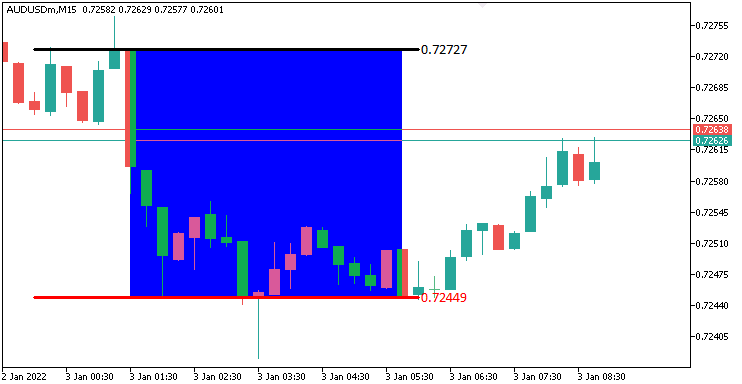
Na imagem, podemos observar que a faixa foi representada corretamente O próximo passo é verificar se ocorre um rompimento dentro de uma janela de tempo previamente definida e também representá-lo no gráfico. Para isso, precisaremos de uma função personalizada que indique visualmente o ponto de rompimento.
//+------------------------------------------------------------------+
//| Function to draw a breakpoint marker                             |
//+------------------------------------------------------------------+
void drawBreakPoint(string objName,datetime time,double price,int arrCode,
   color clr,int direction){ //--- Define a function to draw a breakpoint marker
   if (ObjectFind(0,objName) < 0){ //--- Check if the breakpoint object does not already exist
      ObjectCreate(0,objName,OBJ_ARROW,0,time,price);        //--- Create an arrow object at the specified time and price
      ObjectSetInteger(0,objName,OBJPROP_ARROWCODE,arrCode); //--- Set the arrow code for the marker
      ObjectSetInteger(0,objName,OBJPROP_COLOR,clr);         //--- Set the color of the arrow
      ObjectSetInteger(0,objName,OBJPROP_FONTSIZE,12);       //--- Set the font size for the arrow
      if (direction > 0) ObjectSetInteger(0,objName,OBJPROP_ANCHOR,ANCHOR_TOP);    //--- Set the anchor to top for upward breaks
      if (direction < 0) ObjectSetInteger(0,objName,OBJPROP_ANCHOR,ANCHOR_BOTTOM); //--- Set the anchor to bottom for downward breaks

      string txt = " Break"; //--- Define the text suffix for the breakpoint label
      string objNameDescr = objName + txt; //--- Create a unique name for the text object
      ObjectCreate(0,objNameDescr,OBJ_TEXT,0,time,price);   //--- Create a text object at the breakpoint
      ObjectSetInteger(0,objNameDescr,OBJPROP_COLOR,clr);   //--- Set the color of the text
      ObjectSetInteger(0,objNameDescr,OBJPROP_FONTSIZE,12); //--- Set the font size of the text
      if (direction > 0) { //--- Check if the breakout is upward
         ObjectSetInteger(0,objNameDescr,OBJPROP_ANCHOR,ANCHOR_LEFT_UPPER); //--- Set the text anchor to left upper
         ObjectSetString(0,objNameDescr,OBJPROP_TEXT, " " + txt);           //--- Set the text content
      }
      if (direction < 0) { //--- Check if the breakout is downward
         ObjectSetInteger(0,objNameDescr,OBJPROP_ANCHOR,ANCHOR_LEFT_LOWER); //--- Set the text anchor to left lower
         ObjectSetString(0,objNameDescr,OBJPROP_TEXT, " " + txt);           //--- Set the text content
      }
   }
   ChartRedraw(0); //--- Redraw the chart to display the breakpoint
}
Aqui, definimos a função "drawBreakPoint" para marcar visualmente os pontos de rompimento. Utilizando os parâmetros "objName", "time", "price", "arrCode", "clr" e "direction", criamos uma seta com ObjectCreate e OBJ_ARROW, caso o objeto ainda não exista, conforme verificado por ObjectFind. Em seguida, configuramos seu estilo, cor e tamanho da fonte como 12 utilizando "ObjectSetInteger", além de definir a âncora como "ANCHOR_TOP" ou "ANCHOR_BOTTOM", de acordo com o valor de "direction".
Também adicionamos o rótulo de texto " Break" utilizando "ObjectCreate" e "OBJ_TEXT", com o nome "objNameDescr". Configuramos a cor, o tamanho da fonte e a âncora (ANCHOR_LEFT_UPPER ou ANCHOR_LEFT_LOWER) por meio de "ObjectSetInteger" e ObjectSetString. Por fim, utilizamos "ChartRedraw" para exibir os marcadores no gráfico, permitindo visualizar claramente os rompimentos. Agora podemos utilizar essa função para representar os pontos de rompimento no gráfico.
double barClose = close(1); //--- Get the closing price of the previous bar
datetime barTime = time(1); //--- Get the time of the previous bar

if (barClose > maximum_price && isHaveDailyRange_Prices && !isHaveRangeBreak
    && barTime >= validBreakTime_start && barTime <= validBreakTime_end
){ //--- Check for a breakout above the maximum price within the valid time window
   Print("CLOSE Price broke the HIGH range. ",barClose," > ",maximum_price); //--- Log the breakout above the high range
   isHaveRangeBreak = true;                                                //--- Set the flag to indicate a range breakout has occurred
   drawBreakPoint(TimeToString(barTime),barTime,barClose,234,clrBlack,-1); //--- Draw a breakpoint marker for the high breakout
}
else if (barClose < minimum_price && isHaveDailyRange_Prices && !isHaveRangeBreak
         && barTime >= validBreakTime_start && barTime <= validBreakTime_end
){ //--- Check for a breakout below the minimum price within the valid time window
   Print("CLOSE Price broke the LOW range. ",barClose," < ",minimum_price); //--- Log the breakout below the low range
   isHaveRangeBreak = true;                                              //--- Set the flag to indicate a range breakout has occurred
   drawBreakPoint(TimeToString(barTime),barTime,barClose,233,clrBlue,1); //--- Draw a breakpoint marker for the low breakout
}
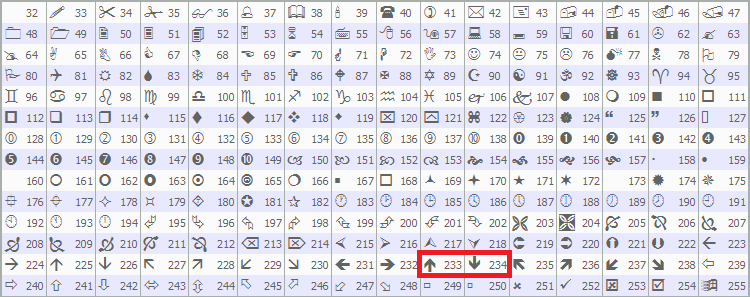
Para detectar e visualizar rompimentos válidos, obtemos o preço de fechamento da barra anterior com "close(1)" e o armazenamos em "barClose". Da mesma forma, obtemos seu horário com "time(1)" e o armazenamos em "barTime". Se "barClose" ultrapassar "maximum_price", "isHaveDailyRange_Prices" for true, "isHaveRangeBreak" for false e "barTime" estiver dentro do intervalo entre "validBreakTime_start" e "validBreakTime_end", registramos o rompimento da máxima com "Print", definimos "isHaveRangeBreak" como true e chamamos "drawBreakPoint" com "TimeToString(barTime)", "barClose", código de seta 234, "clrBlack" e -1.
Se "barClose" estiver abaixo de "minimum_price" sob as mesmas condições, registramos o rompimento da mínima, definimos "isHaveRangeBreak" e chamamos "drawBreakPoint" com o código de seta 233, "clrBlue" e 1. Dessa forma, os rompimentos válidos são marcados no gráfico. Utilizamos as setas predefinidas do MQL5, especificamente os códigos 233 e 234, como mostrado abaixo, mas você pode utilizar outras de sua preferência.
Ao executar o programa, obtemos o seguinte resultado.
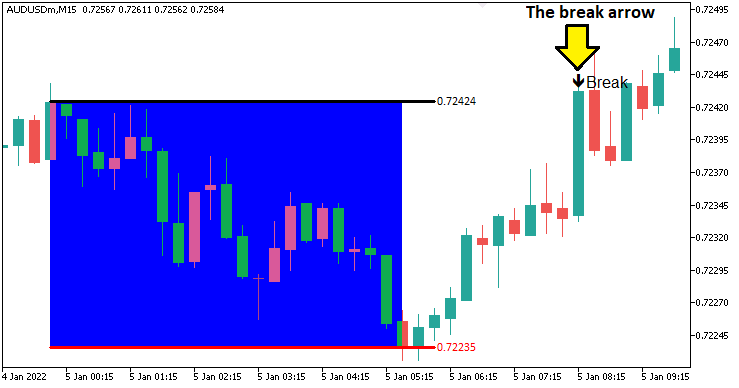
Na imagem, podemos observar que o rompimento foi identificado e representado corretamente. O próximo passo é definir a mudança na estrutura e a lógica responsável por identificar seu rompimento. Para isso, precisaremos de uma função que represente no gráfico o swing point identificado.
//+------------------------------------------------------------------+
//| Function to draw a swing point marker                            |
//+------------------------------------------------------------------+
void drawSwingPoint(string objName,datetime time,double price,int arrCode,
   color clr,int direction){ //--- Define a function to draw a swing point marker
   if (ObjectFind(0,objName) < 0){ //--- Check if the swing point object does not already exist
      ObjectCreate(0,objName,OBJ_ARROW,0,time,price);        //--- Create an arrow object at the specified time and price
      ObjectSetInteger(0,objName,OBJPROP_ARROWCODE,arrCode); //--- Set the arrow code for the marker
      ObjectSetInteger(0,objName,OBJPROP_COLOR,clr);         //--- Set the color of the arrow
      ObjectSetInteger(0,objName,OBJPROP_FONTSIZE,10);       //--- Set the font size for the arrow

      if (direction > 0) {ObjectSetInteger(0,objName,OBJPROP_ANCHOR,ANCHOR_TOP);}    //--- Set the anchor to top for swing lows
      if (direction < 0) {ObjectSetInteger(0,objName,OBJPROP_ANCHOR,ANCHOR_BOTTOM);} //--- Set the anchor to bottom for swing highs

      string text = "BoS";                   //--- Define the text label for Break of Structure
      string objName_Descr = objName + text; //--- Create a unique name for the text object
      ObjectCreate(0,objName_Descr,OBJ_TEXT,0,time,price);   //--- Create a text object at the swing point
      ObjectSetInteger(0,objName_Descr,OBJPROP_COLOR,clr);   //--- Set the color of the text
      ObjectSetInteger(0,objName_Descr,OBJPROP_FONTSIZE,10); //--- Set the font size of the text

      if (direction > 0) { //--- Check if the swing is a low
         ObjectSetString(0,objName_Descr,OBJPROP_TEXT,"  "+text);            //--- Set the text content
         ObjectSetInteger(0,objName_Descr,OBJPROP_ANCHOR,ANCHOR_LEFT_UPPER); //--- Set the text anchor to left upper
      }
      if (direction < 0) { //--- Check if the swing is a high
         ObjectSetString(0,objName_Descr,OBJPROP_TEXT,"  "+text);            //--- Set the text content
         ObjectSetInteger(0,objName_Descr,OBJPROP_ANCHOR,ANCHOR_LEFT_LOWER); //--- Set the text anchor to left lower
      }
   }
   ChartRedraw(0); //--- Redraw the chart to display the swing point
}
Implementamos a função "drawSwingPoint" para marcar os swing highs e swing lows identificados. Utilizando os parâmetros "objName", "time", "price", "arrCode", "clr" e "direction", verificamos com ObjectFind se o objeto ainda não existe, criamos uma seta com ObjectCreate utilizando OBJ_ARROW e configuramos seu estilo, cor e tamanho da fonte como 10 por meio de ObjectSetInteger. A âncora é definida como "ANCHOR_TOP" para as mínimas ou "ANCHOR_BOTTOM" para as máximas. Também adicionamos o rótulo de texto "BoS" com "ObjectCreate", utilizando "OBJ_TEXT", e configuramos sua cor, tamanho da fonte e âncora (ANCHOR_LEFT_UPPER ou ANCHOR_LEFT_LOWER) por meio de "ObjectSetInteger" e "ObjectSetString". Por fim, chamamos ChartRedraw para exibir esses marcadores e destacar os principais swing points no gráfico. Com essa função definida, podemos prosseguir com a lógica de identificação dos swing points.
// bos logic
if (isHaveDailyRange_Prices){ //--- Proceed with BoS logic only if the daily range is calculated
   static bool isNewBar_bos = false;            //--- Initialize flag to indicate a new bar on the BoS timeframe
   int currBars = iBars(_Symbol,timeframe_bos); //--- Get the current number of bars on the BoS timeframe
   static int prevBars = currBars;              //--- Store the previous number of bars for comparison

   if (prevBars == currBars){isNewBar_bos = false;}                          //--- Set flag to false if no new bar has formed
   else if (prevBars != currBars){isNewBar_bos = true; prevBars = currBars;} //--- Set flag to true and update prevBars if a new bar has formed

   const int length = 4;                         //--- Define the number of bars to check for swing high/low (must be > 2)
   int right_index, left_index;                  //--- Declare variables to store indices for bars to the right and left
   int curr_bar = length;                        //--- Set the current bar index for swing analysis
   bool isSwingHigh = true, isSwingLow = true;   //--- Initialize flags to determine if the current bar is a swing high or low
   static double swing_H = -1.0, swing_L = -1.0; //--- Initialize variables to store the latest swing high and low prices

   if (isNewBar_bos){ //--- Check if a new bar has formed on the BoS timeframe
      for (int a=1; a<=length; a++){ //--- Loop through the specified number of bars to check for swings
         right_index = curr_bar - a; //--- Calculate the right-side bar index
         left_index = curr_bar + a;  //--- Calculate the left-side bar index
         if ( (high(curr_bar,timeframe_bos) <= high(right_index,timeframe_bos)) || (high(curr_bar,timeframe_bos) < high(left_index,timeframe_bos)) ){ //--- Check if the current bar's high is not the highest
            isSwingHigh = false; //--- Set flag to false if the bar is not a swing high
         }
         if ( (low(curr_bar,timeframe_bos) >= low(right_index,timeframe_bos)) || (low(curr_bar,timeframe_bos) > low(left_index,timeframe_bos)) ){ //--- Check if the current bar's low is not the lowest
            isSwingLow = false; //--- Set flag to false if the bar is not a swing low
         }
      }

      if (isSwingHigh){ //--- Check if the current bar is a swing high
         swing_H = high(curr_bar,timeframe_bos); //--- Store the swing high price
         Print("WE DO HAVE A SWING HIGH @ BAR INDEX ",curr_bar," H: ",high(curr_bar,timeframe_bos)); //--- Log the swing high details
         drawSwingPoint(TimeToString(time(curr_bar,timeframe_bos)),time(curr_bar,timeframe_bos),high(curr_bar,timeframe_bos),77,clrBlue,-1); //--- Draw a marker for the swing high
      }
      if (isSwingLow){ //--- Check if the current bar is a swing low
         swing_L = low(curr_bar,timeframe_bos); //--- Store the swing low price
         Print("WE DO HAVE A SWING LOW @ BAR INDEX ",curr_bar," L: ",low(curr_bar,timeframe_bos)); //--- Log the swing low details
         drawSwingPoint(TimeToString(time(curr_bar,timeframe_bos)),time(curr_bar,timeframe_bos),low(curr_bar,timeframe_bos),77,clrRed,+1); //--- Draw a marker for the swing low
      }
   }
}
Se os preços diários já estiverem disponíveis, ou seja, se a faixa diária já tiver sido definida, passamos a monitorar a formação de novas barras no timeframe do Break of Structure. Para isso, utilizamos a flag estática "isNewBar_bos", comparando a quantidade atual de barras obtida com iBars, utilizando _Symbol e "timeframe_bos", com a variável estática "prevBars". Quando uma nova barra é formada, "isNewBar_bos" é definida como true e "prevBars" é atualizado.
Quando "isNewBar_bos" é true, analisamos a barra no índice "curr_bar", definido como "length" = 4, para identificar possíveis swing points. Para isso, verificamos "length" barras de cada lado utilizando "right_index" e "left_index". Utilizamos as funções "high" e "low" com "timeframe_bos" para comparar a máxima e a mínima da barra atual com as barras vizinhas. Caso a barra analisada não possua a maior máxima ou a menor mínima em relação às barras ao redor, definimos "isSwingHigh" ou "isSwingLow" como false, respectivamente.
Se "isSwingHigh" for true, armazenamos o preço em "swing_H", registramos a informação com "Print" e chamamos "drawSwingPoint" utilizando "TimeToString", o horário da barra, o preço, o código de seta 77, "clrBlue" e -1. Após a compilação, obtemos o seguinte resultado.
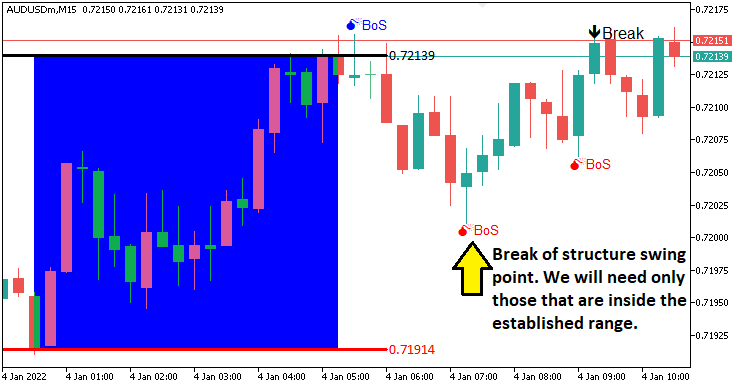
Na imagem, podemos observar os swing points identificados no gráfico. O próximo passo é monitorar o rompimento desses swing points, o que caracteriza uma mudança na estrutura e, consequentemente, um Break of Structure. Para representar visualmente esses rompimentos, precisaremos novamente de uma função personalizada, conforme mostrado a seguir.
//+------------------------------------------------------------------+
//| Function to draw a break level line                              |
//+------------------------------------------------------------------+
void drawBreakLevel(string objName,datetime time1,double price1,
   datetime time2,double price2,color clr,int direction){ //--- Define a function to draw a break level line
   if (ObjectFind(0,objName) < 0){ //--- Check if the break level object does not already exist
      ObjectCreate(0,objName,OBJ_ARROWED_LINE,0,time1,price1,time2,price2); //--- Create an arrowed line object
      ObjectSetInteger(0,objName,OBJPROP_TIME,0,time1);                     //--- Set the first time coordinate of the line
      ObjectSetDouble(0,objName,OBJPROP_PRICE,0,price1);                    //--- Set the first price coordinate of the line
      ObjectSetInteger(0,objName,OBJPROP_TIME,1,time2);                     //--- Set the second time coordinate of the line
      ObjectSetDouble(0,objName,OBJPROP_PRICE,1,price2);                    //--- Set the second price coordinate of the line

      ObjectSetInteger(0,objName,OBJPROP_COLOR,clr); //--- Set the color of the line
      ObjectSetInteger(0,objName,OBJPROP_WIDTH,2);   //--- Set the width of the line

      string text = "Break";                 //--- Define the text label for the break
      string objName_Descr = objName + text; //--- Create a unique name for the text object
      ObjectCreate(0,objName_Descr,OBJ_TEXT,0,time2,price2); //--- Create a text object at the line's end
      ObjectSetInteger(0,objName_Descr,OBJPROP_COLOR,clr);   //--- Set the color of the text
      ObjectSetInteger(0,objName_Descr,OBJPROP_FONTSIZE,10); //--- Set the font size of the text

      if (direction > 0) { //--- Check if the break is upward
         ObjectSetString(0,objName_Descr,OBJPROP_TEXT,text+"  ");             //--- Set the text content
         ObjectSetInteger(0,objName_Descr,OBJPROP_ANCHOR,ANCHOR_RIGHT_UPPER); //--- Set the text anchor to right upper
      }
      if (direction < 0) { //--- Check if the break is downward
         ObjectSetString(0,objName_Descr,OBJPROP_TEXT,text+"  ");             //--- Set the text content
         ObjectSetInteger(0,objName_Descr,OBJPROP_ANCHOR,ANCHOR_RIGHT_LOWER); //--- Set the text anchor to right lower
      }
   }
   ChartRedraw(0); //--- Redraw the chart to display the break level
}
Definimos a função "drawBreakLevel" para representar visualmente o rompimento da estrutura. Utilizamos uma lógica de visualização semelhante à empregada nas funções anteriores. Por isso, não será necessário detalhar novamente cada uma de suas etapas. Utilizaremos essa função para exibir os níveis de rompimento no gráfico.
double Ask = NormalizeDouble(SymbolInfoDouble(_Symbol,SYMBOL_ASK),_Digits); //--- Get and normalize the current Ask price
double Bid = NormalizeDouble(SymbolInfoDouble(_Symbol,SYMBOL_BID),_Digits); //--- Get and normalize the current Bid price

if (swing_H > 0 && Ask > swing_H){ //--- Check if the Ask price breaks above the swing high
   Print("$$$$$$$$$ BUY SIGNAL NOW. BREAK OF SWING HIGH"); //--- Log a buy signal due to swing high breakout
   int swing_H_index = 0;                //--- Initialize the index of the swing high bar
   for (int i=0; i<=length*2+1000; i++){ //--- Loop through bars to find the swing high
      double high_sel = high(i,timeframe_bos); //--- Get the high price of the i-th bar
      if (high_sel == swing_H){ //--- Check if the high matches the swing high
         swing_H_index = i;     //--- Store the bar index
         Print("BREAK HIGH FOUND @ BAR INDEX ",swing_H_index); //--- Log the swing high bar index
         break;                 //--- Exit the loop once found
      }
   }
   drawBreakLevel(TimeToString(time(0,timeframe_bos)),time(swing_H_index,timeframe_bos),high(swing_H_index,timeframe_bos),
   time(0,timeframe_bos),high(swing_H_index,timeframe_bos),clrBlue,-1); //--- Draw a line to mark the swing high breakout

   if (isTakenTrade == false){                                     //--- Check if no trade is taken yet
      obj_Trade.Buy(0.01,_Symbol,Ask,minimum_price,maximum_price); //--- Execute a buy trade with 0.01 lots, using minimum price as SL and maximum as TP
      isTakenTrade = true;                                         //--- Set the flag to indicate a trade is taken
   }

   swing_H = -1.0; //--- Reset the swing high price
   return;         //--- Exit the OnTick function to avoid further processing
}
if (swing_L > 0 && Bid < swing_L){ //--- Check if the Bid price breaks below the swing low
   Print("$$$$$$$$$ SELL SIGNAL NOW. BREAK OF SWING LOW"); //--- Log a sell signal due to swing low breakout
   int swing_L_index = 0; //--- Initialize the index of the swing low bar
   for (int i=0; i<=length*2+1000; i++){ //--- Loop through bars to find the swing low
      double low_sel = low(i,timeframe_bos); //--- Get the low price of the i-th bar
      if (low_sel == swing_L){ //--- Check if the low matches the swing low
         swing_L_index = i;    //--- Store the bar index
         Print("BREAK LOW FOUND @ BAR INDEX ",swing_L_index); //--- Log the swing low bar index
         break;                //--- Exit the loop once found
      }
   }
   drawBreakLevel(TimeToString(time(0,timeframe_bos)),time(swing_L_index,timeframe_bos),low(swing_L_index,timeframe_bos),
   time(0,timeframe_bos),low(swing_L_index,timeframe_bos),clrRed,+1); //--- Draw a line to mark the swing low breakout

   if (isTakenTrade == false){ //--- Check if no trade is taken yet
      obj_Trade.Sell(0.01,_Symbol,Bid,maximum_price,minimum_price); //--- Execute a sell trade with 0.01 lots, using maximum price as SL and minimum as TP
      isTakenTrade = true;                                          //--- Set the flag to indicate a trade is taken
   }

   swing_L = -1.0; //--- Reset the swing low price
   return;         //--- Exit the OnTick function to avoid further processing
}
Aqui, implementamos a lógica de execução das operações quando um rompimento válido é identificado. Obtemos os preços normalizados de "Ask" e "Bid" utilizando SymbolInfoDouble e NormalizeDouble, com _Symbol e _Digits.
Se "swing_H" for positivo e "Ask" ultrapassar "swing_H", registramos o evento com "Print", localizamos o índice do swing high utilizando "high" e "timeframe_bos", marcamos esse nível com "drawBreakLevel", utilizando TimeToString e "time", e chamamos "obj_Trade.Buy" com 0,01 lote, "minimum_price" como stop-loss e "maximum_price" como take-profit, desde que "isTakenTrade" seja false. Em seguida, definimos "isTakenTrade" como true e redefinimos "swing_H".
Se "swing_L" for positivo e "Bid" cair abaixo de "swing_L", registramos o evento, localizamos o índice do swing low utilizando "low", marcamos o nível com "drawBreakLevel" e chamamos "obj_Trade.Sell", redefinindo "swing_L" em seguida. Após cada operação, saímos da função com "return", garantindo uma execução precisa das operações baseadas no Break of Structure. Este é o resultado.
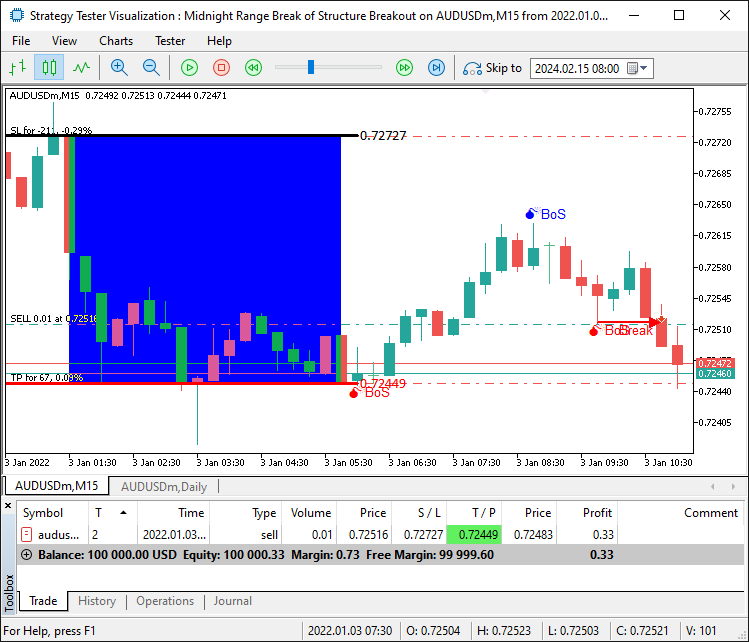
Agora conseguimos abrir operações para os setups confirmados. No entanto, o que acontece quando ocorre um rompimento fora da faixa? Ou seja, quando o preço avança acima ou abaixo dos limites da faixa. Nesse caso, precisamos aguardar até que o preço retorne para dentro da faixa antes de considerar o rompimento válido. Para isso, precisaremos utilizar os preços máximo e mínimo da faixa como restrições adicionais, tornando os critérios mais rigorosos e reduzindo a ocorrência de sinais falsos.
if (swing_H > 0 && Ask > swing_H && swing_H <= maximum_price && swing_H >= minimum_price){ //--- Check if the Ask price breaks above the swing high within the range
   Print("$$$$$$$$$ BUY SIGNAL NOW. BREAK OF SWING HIGH WITHIN RANGE"); //--- Log a buy signal due to swing high breakout
   int swing_H_index = 0;                                               //--- Initialize the index of the swing high bar
   for (int i=0; i<=length*2+1000; i++){                                //--- Loop through bars to find the swing high
      double high_sel = high(i,timeframe_bos); //--- Get the high price of the i-th bar
      if (high_sel == swing_H){                //--- Check if the high matches the swing high
         swing_H_index = i; //--- Store the bar index
         Print("BREAK HIGH FOUND @ BAR INDEX ",swing_H_index); //--- Log the swing high bar index
         break;             //--- Exit the loop once found
      }
   }
   drawBreakLevel(TimeToString(time(0,timeframe_bos)),time(swing_H_index,timeframe_bos),high(swing_H_index,timeframe_bos),
   time(0,timeframe_bos),high(swing_H_index,timeframe_bos),clrBlue,-1); //--- Draw a line to mark the swing high breakout

   if (isTakenTrade == false){ //--- Check if no trade is taken yet
      obj_Trade.Buy(0.01,_Symbol,Ask,minimum_price,maximum_price); //--- Execute a buy trade with 0.01 lots, using minimum price as SL and maximum as TP
      isTakenTrade = true;                                         //--- Set the flag to indicate a trade is taken
   }

   swing_H = -1.0; //--- Reset the swing high price
   return;         //--- Exit the OnTick function to avoid further processing
}
if (swing_L > 0 && Bid < swing_L && swing_L <= maximum_price && swing_L >= minimum_price){ //--- Check if the Bid price breaks below the swing low within the range
   Print("$$$$$$$$$ SELL SIGNAL NOW. BREAK OF SWING LOW WITHIN RANGE"); //--- Log a sell signal due to swing low breakout
   int swing_L_index = 0;                //--- Initialize the index of the swing low bar
   for (int i=0; i<=length*2+1000; i++){ //--- Loop through bars to find the swing low
      double low_sel = low(i,timeframe_bos); //--- Get the low price of the i-th bar
      if (low_sel == swing_L){ //--- Check if the low matches the swing low
         swing_L_index = i;    //--- Store the bar index
         Print("BREAK LOW FOUND @ BAR INDEX ",swing_L_index); //--- Log the swing low bar index
         break;                //--- Exit the loop once found
      }
   }
   drawBreakLevel(TimeToString(time(0,timeframe_bos)),time(swing_L_index,timeframe_bos),low(swing_L_index,timeframe_bos),
   time(0,timeframe_bos),low(swing_L_index,timeframe_bos),clrRed,+1); //--- Draw a line to mark the swing low breakout

   if (isTakenTrade == false){ //--- Check if no trade is taken yet
      obj_Trade.Sell(0.01,_Symbol,Bid,maximum_price,minimum_price); //--- Execute a sell trade with 0.01 lots, using maximum price as SL and maximum as TP
      isTakenTrade = true;                                          //--- Set the flag to indicate a trade is taken
   }

   swing_L = -1.0; //--- Reset the swing low price
   return;         //--- Exit the OnTick function to avoid further processing
}
Podemos descartar os sinais falsos e observar que o sistema consegue abrir operações quando um setup é confirmado, atingindo assim nosso objetivo de identificar, visualizar e negociar os setups dessa estratégia. Resta agora realizar o backtesting do programa, assunto abordado na próxima seção.
Backtesting
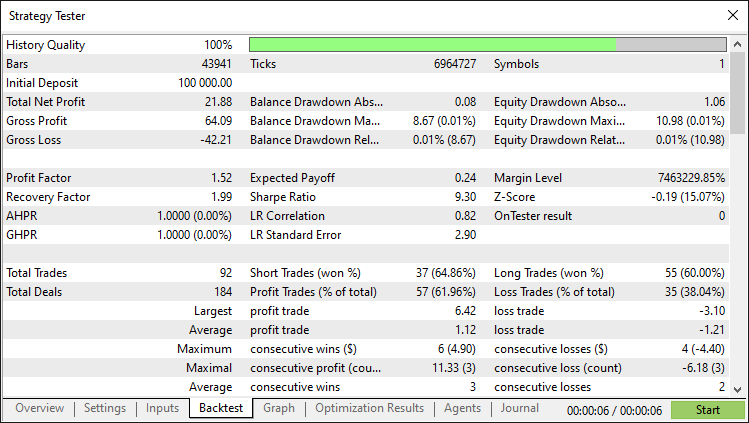
Após um backtest completo, obtivemos os seguintes resultados.
Gráfico do backtest:
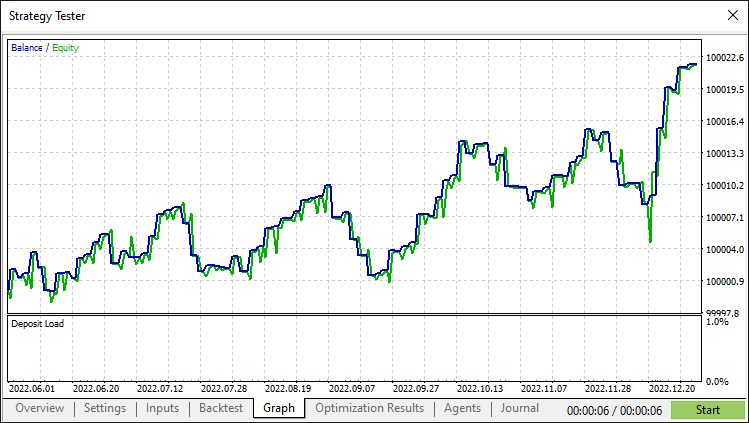
Relatório de backtest:
Conclusão
Em conclusão, desenvolvemos um Expert Advisor em MQL5 que automatiza a estratégia Midnight Range Breakout com Break of Structure, negociando rompimentos da faixa formada a partir da meia-noite e confirmados pelos swing points do dia atual. Com uma detecção e visualização precisas da faixa, o sistema pode ser aprimorado com estratégias e critérios adicionais, tornando-o mais robusto e adequado ao seu estilo de negociação.
Aviso: Este artigo tem finalidade exclusivamente educacional. Operações de trading envolvem riscos financeiros significativos, e a volatilidade do mercado pode resultar em perdas. A realização de backtests abrangentes e a adoção de uma gestão de risco prudente são essenciais antes de utilizar este Expert Advisor em mercados reais.
Ao dominar essas técnicas, você poderá aprimorar suas habilidades em trading algorítmico e abordar os mercados com maior confiança. Boa sorte em sua jornada no trading!
Traduzido do Inglês pela MetaQuotes Ltd.
Artigo original: https://www.mql5.com/en/articles/17876
Aviso: Todos os direitos sobre esses materiais pertencem à MetaQuotes Ltd. É proibida a reimpressão total ou parcial.
Esse artigo foi escrito por um usuário do site e reflete seu ponto de vista pessoal. A MetaQuotes Ltd. não se responsabiliza pela precisão das informações apresentadas nem pelas possíveis consequências decorrentes do uso das soluções, estratégias ou recomendações descritas.

 Desenvolvimento do Kit de Ferramentas de Análise de Price Action (Parte 21): Detector de Inversão da Estrutura de Mercado
 Data Science e ML (Parte 37): Utilizando padrões de Candlestick e IA para superar o mercado
 Técnicas do MQL5 Wizard que você deve conhecer (Parte 61): Uso de padrões do ADX e CCI com aprendizado supervisionado
 Automatizando Estratégias de Trading em MQL5 (Parte 15): Padrão Harmônico Cypher Baseado em Price Action com Visualização

- Aplicativos de negociação gratuitos
- 8 000+ sinais para cópia
- Notícias econômicas para análise dos mercados financeiros
Você concorda com a política do site e com os termos de uso
Oi, Allan.
Vou baixar seu sistema e começar a testá-lo. Curiosamente, o relatório do testador de estratégias não identifica nem o par de moedas nem o período de tempo. Como você mostrou o AUUSD M15, presumo que seja o que você usou e vou começar a testar com ele. Você tem alguma opinião sobre o uso de outros pares ou intervalos de tempo? Suspeito que esse EA possa funcionar melhor com pares de moedas asiáticos, estou certo?
Abraços, CapeCoddah
O teste foi um fracasso. Tentei o AUDUSD, o AUDJPY e o USDJPY, e todos geraram prejuízos com Índices de Sharpe entre -3,00 e -5,00. Todos, exceto o USDJPY, ficaram negativos imediatamente e nunca se recuperaram. O USDJPY teve dois períodos de ganhos positivos, mas acabou ficando negativo e nunca mais se recuperou.
Adios
Excelente trabalho. Obrigado, Allan!
De nada. De nada mesmo. Obrigado pelo comentário gentil.
Obrigado, Allan! Você é o melhor