

MQL5交易策略自动化(第十七部分):借助动态仪表盘精通网格马丁格尔(Grid-Mart)短线交易策略
 997
997
 5
5

概述
在前一篇(第十六部分)中,我们通过运用结构突破策略,实现了对午夜区间突破行情的自动化捕捉。如今,在第十七部分中,我们将聚焦于在MetaQuotes Language 5 (MQL5)中实现网格马丁格尔短线交易策略的自动化,开发一款能够执行基于网格的马丁格尔交易且具备动态仪表盘以供实时监控的智能交易系统(EA)。我们将涵盖以下主题:
到本文结束时,您将拥有一款功能完备的MQL5程序,它能够精准地对市场进行短线交易,并且可视化呈现交易指标——让我们开始深入探索吧!
理解网格马丁格尔短线交易策略
网格马丁格尔短线交易策略采用基于网格的马丁格尔方法,在固定的价格间隔(例如2.0点)处下达买入或卖出订单,以从市场波动中捕捉小额利润,同时在亏损后增加头寸规模,以快速收回资金。该策略依赖于高频交易,每笔交易的目标收益较小(例如4点)。然而,由于头寸规模呈指数级增长,该策略需要实施谨慎的风险管理,可通过设置最大网格层级和每日回撤阈值等可配置限制来控制风险。该策略在波动较大的市场中表现优异,但需要配置精准,以避免在长期趋势中出现大幅回撤。
我们的实现计划是创建一个MQL5 EA,通过计算网格间隔、管理头寸规模递增以及按照预设的止损和止盈水平执行交易,来实现网格马丁格尔策略的自动化。该程序将配备一个动态仪表盘,用于显示实时指标,如点差、活跃头寸规模和账户状态,并采用颜色编码的视觉效果来辅助决策。强大的风险控制措施,包括回撤限制和网格规模限制,将确保在不同市场条件下保持稳定的性能。简言之,这就是我们的目标。
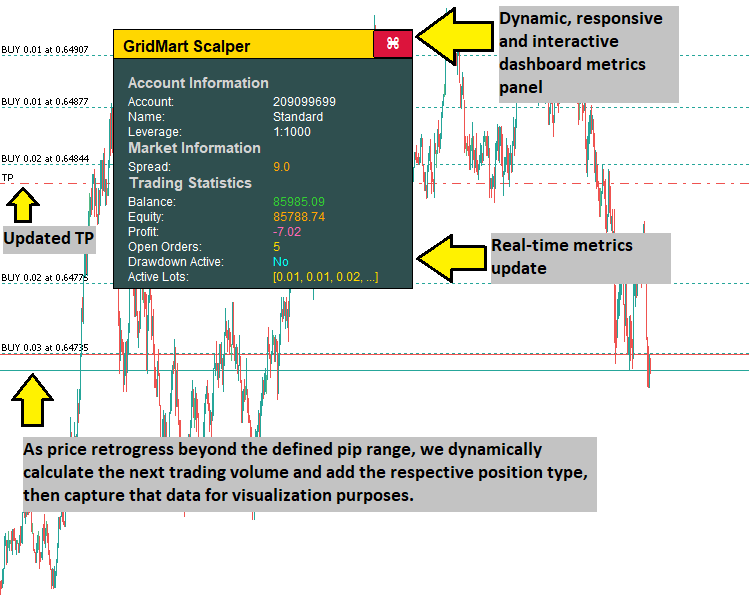
在MQL5中的实现
要在MQL5中创建该程序,请打开MetaEditor,进入导航器,找到“指标”文件夹,点击“新建”选项卡,并按照提示创建文件。文件创建完成后,在编码环境中,我们需要声明一些将在整个程序中使用到的全局变量。
//+------------------------------------------------------------------+
//|                                      GridMart Scalper MT5 EA.mq5 |
//|                           Copyright 2025, Allan Munene Mutiiria. |
//|                                   https://t.me/Forex_Algo_Trader |
//+------------------------------------------------------------------+

#property copyright "Copyright 2025, Allan Munene Mutiiria."
#property link      "https://t.me/Forex_Algo_Trader"
#property version   "1.00"

#include <Trade/Trade.mqh>

//--- Declare trade object to execute trading operations
CTrade obj_Trade;

//--- Trading state variables
double dailyBalance = 0;           //--- Store the daily starting balance for drawdown monitoring
datetime dailyResetTime = 0;       //--- Track the last daily reset time
bool tradingEnabled = true;        //--- Indicate if trading is allowed based on drawdown limits
datetime lastBarTime = 0;          //--- Store the timestamp of the last processed bar
bool hasBuyPosition = false;       //--- Flag if there is an active buy position
bool hasSellPosition = false;      //--- Flag if there is an active sell position
bool openNewTrade = false;         //--- Signal when a new trade should be opened
int activeOrders = 0;              //--- Count the number of active orders
double latestBuyPrice = 0;         //--- Store the price of the latest buy order
double latestSellPrice = 0;        //--- Store the price of the latest sell order
double calculatedLot = 0;          //--- Hold the calculated lot size for new orders
bool modifyPositions = false;      //--- Indicate if position SL/TP need modification
double weightedPrice = 0;          //--- Track the weighted average price of open positions
double targetTP = 0;               //--- Store the target take-profit price
double targetSL = 0;               //--- Store the target stop-loss price
bool updateSLTP = false;           //--- Signal when SL/TP updates are needed
int cycleCount = 0;                //--- Count the number of trading cycles
double totalVolume = 0;            //--- Accumulate the total volume of open positions
bool dashboardVisible = true;      //--- Control visibility of the dashboard

//--- Dashboard dragging and hover state variables
bool panelDragging = false;        //--- Indicate if the dashboard is being dragged
int panelDragX = 0;                //--- Store the X-coordinate of the mouse during dragging
int panelDragY = 0;                //--- Store the Y-coordinate of the mouse during dragging
int panelStartX = 0;               //--- Store the initial X-position of the dashboard
int panelStartY = 0;               //--- Store the initial Y-position of the dashboard
bool closeButtonHovered = false;   //--- Track if the close button is hovered
bool headerHovered = false;        //--- Track if the header is hovered

input group "Main EA Settings"
input string EA_NAME = "GridMart Scalper";    // EA Name
input bool CONTINUE_TRADING = true;           // Continue Trading After Cycle
input int MAX_CYCLES = 1000;                  // Max Trading Cycles
input int START_HOUR = 0;                     // Start Trading Hour
input int END_HOUR = 23;                      // End Trading Hour
input int LOT_MODE = 1;                       // Lot Mode (1=Multiplier, 2=Fixed)
input double BASE_LOT = 0.01;                 // Base Lot Size
input int STOP_LOSS_PIPS = 100;               // Stop Loss (Pips)
input int TAKE_PROFIT_PIPS =
3 ;               // Take Profit (Pips)
input double GRID_DISTANCE = 3.0;             // Grid Distance (Pips)
input double LOT_MULTIPLIER = 1.3;            // Lot Multiplier
input int MAX_GRID_LEVELS = 30;               // Max Grid Levels
input int LOT_PRECISION = 2;                  // Lot Decimal Precision
input int MAGIC = 1234567890;                 // Magic Number
input color TEXT_COLOR = clrWhite;            // Dashboard Text Color

input group "EA Risk Management Settings"
input bool ENABLE_DAILY_DRAWDOWN = false;     // Enable Daily Drawdown Limiter
input double DRAWDOWN_LIMIT = -1.0;           // Daily Drawdown Threshold (-%)
input bool CLOSE_ON_DRAWDOWN = false;         // Close Positions When Threshold Hit

input group "Dashboard Settings"
input int PANEL_X = 30;                       // Initial X Distance (pixels)
input int PANEL_Y = 50;                       // Initial Y Distance (pixels)

//--- Pip value for price calculations
double pipValue;

//--- Dashboard constants
const int DASHBOARD_WIDTH = 300;                   //--- Width of the dashboard in pixels
const int DASHBOARD_HEIGHT = 260;                  //--- Height of the dashboard in pixels
const int HEADER_HEIGHT = 30;                      //--- Height of the header section
const int CLOSE_BUTTON_WIDTH = 40;                 //--- Width of the close button
const int CLOSE_BUTTON_HEIGHT = 28;                //--- Height of the close button
const color HEADER_NORMAL_COLOR = clrGold;         //--- Normal color of the header
const color HEADER_HOVER_COLOR = C'200,150,0';     //--- Header color when hovered
const color BACKGROUND_COLOR = clrDarkSlateGray;   //--- Background color of the dashboard
const color BORDER_COLOR = clrBlack;               //--- Border color of dashboard elements
const color SECTION_TITLE_COLOR = clrLightGray;    //--- Color for section titles
const color CLOSE_BUTTON_NORMAL_BG = clrCrimson;   //--- Normal background color of the close button
const color CLOSE_BUTTON_HOVER_BG = clrDodgerBlue; //--- Hover background color of the close button
const color CLOSE_BUTTON_NORMAL_BORDER = clrBlack; //--- Normal border color of the close button
const color CLOSE_BUTTON_HOVER_BORDER = clrBlue;   //--- Hover border color of the close button
const color VALUE_POSITIVE_COLOR = clrLimeGreen;   //--- Color for positive values (e.g., profit, low spread)
const color VALUE_NEGATIVE_COLOR = clrOrange;      //--- Color for negative or warning values (e.g., loss, high spread)
const color VALUE_LOSS_COLOR = clrHotPink;         //--- Color for negative profit
const color VALUE_ACTIVE_COLOR = clrGold;          //--- Color for active states (e.g., open orders, medium spread)
const color VALUE_DRAWDOWN_INACTIVE = clrAqua;     //--- Color for inactive drawdown state
const color VALUE_DRAWDOWN_ACTIVE = clrRed;        //--- Color for active drawdown state
const int FONT_SIZE_HEADER = 12;                   //--- Header text font size (pt)
const int FONT_SIZE_SECTION_TITLE = 11;            //--- Section title font size (pt)
const int FONT_SIZE_METRIC = 9;                    //--- Metric label/value font size (pt)
const int FONT_SIZE_BUTTON = 12;                   //--- Button font size (pt)
在此阶段,我们在MQL5中实现该策略,对程序的核心组件进行初始化,以实现基于网格的马丁格尔交易自动化,并支持动态仪表盘功能。我们使用“#include <Trade/Trade.mqh>”声明一个名为“obj_Trade”的“CTrade”对象,用于管理交易执行。我们定义了一些变量,例如“dailyBalance”用于跟踪账户余额,“lastBarTime”使用iTime函数存储K线时间戳,“hasBuyPosition”和“hasSellPosition”用于标记是否存在活跃的买入或卖出交易,以及“activeOrders”用于统计未平仓头寸数量。
我们设置了输入,例如网格间隔“GRID_DISTANCE = 3.0”、头寸规模递增比例“LOT_MULTIPLIER = 1.3”以及盈利目标“TAKE_PROFIT_PIPS = 3”,并使用“MAGIC = 1234567890”来标识交易。我们纳入了“ENABLE_DAILY_DRAWDOWN”和“DRAWDOWN_LIMIT”用于风险控制,同时通过“cycleCount”和“MAX_CYCLES”来限制交易周期数。我们配置了仪表盘的相关参数,包括“DASHBOARD_WIDTH = 300”(仪表盘宽度)、“FONT_SIZE_METRIC = 9”(指标字体大小)、“panelDragging”(面板拖动功能)、“closeButtonHovered”(关闭按钮悬停效果)以及“VALUE_POSITIVE_COLOR = clrLimeGreen”(正值显示颜色),并使用“pipValue”来实现精确报价。由此,我们得到了如下用户界面。
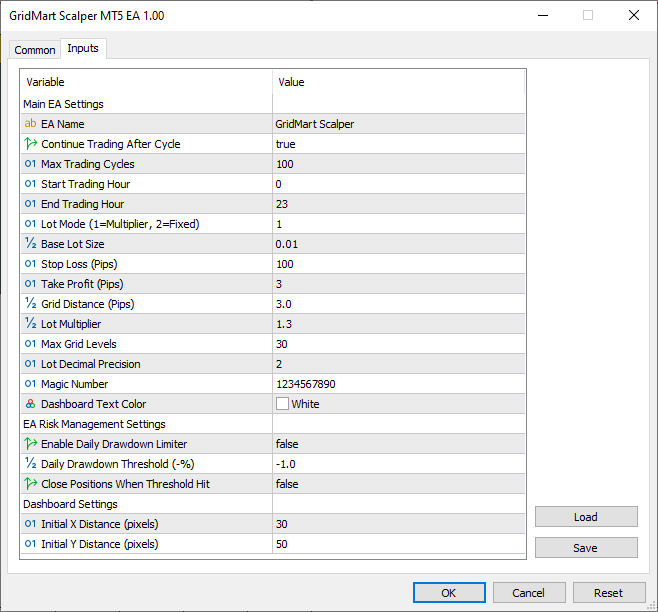
由图可见,我们可以通过定义好的用户界面来控制该程序。现在,我们需要继续定义一些辅助函数,这些函数将在需要执行诸如获取货币对或仓位类型等基本且频繁的操作时使用。以下是我们为此设计的逻辑。
//+------------------------------------------------------------------+
//| Retrieve the current account balance                             |
//+------------------------------------------------------------------+
double GetAccountBalance() {
   //--- Return the current account balance
   return AccountInfoDouble(ACCOUNT_BALANCE);
}

//+------------------------------------------------------------------+
//| Retrieve the magic number of the selected position               |
//+------------------------------------------------------------------+
long GetPositionMagic() {
   //--- Return the magic number of the selected position
   return PositionGetInteger(POSITION_MAGIC);
}

//+------------------------------------------------------------------+
//| Retrieve the open price of the selected position                 |
//+------------------------------------------------------------------+
double GetPositionOpenPrice() {
   //--- Return the open price of the selected position
   return PositionGetDouble(POSITION_PRICE_OPEN);
}

//+------------------------------------------------------------------+
//| Retrieve the stop-loss price of the selected position            |
//+------------------------------------------------------------------+
double GetPositionSL() {
   //--- Return the stop-loss price of the selected position
   return PositionGetDouble(POSITION_SL);
}

//+------------------------------------------------------------------+
//| Retrieve the take-profit price of the selected position          |
//+------------------------------------------------------------------+
double GetPositionTP() {
   //--- Return the take-profit price of the selected position
   return PositionGetDouble(POSITION_TP);
}

//+------------------------------------------------------------------+
//| Retrieve the symbol of the selected position                     |
//+------------------------------------------------------------------+
string GetPositionSymbol() {
   //--- Return the symbol of the selected position
   return PositionGetString(POSITION_SYMBOL);
}

//+------------------------------------------------------------------+
//| Retrieve the ticket number of the selected position              |
//+------------------------------------------------------------------+
ulong GetPositionTicket() {
   //--- Return the ticket number of the selected position
   return PositionGetInteger(POSITION_TICKET);
}

//+------------------------------------------------------------------+
//| Retrieve the open time of the selected position                  |
//+------------------------------------------------------------------+
datetime GetPositionOpenTime() {
   //--- Return the open time of the selected position as a datetime
   return (datetime)PositionGetInteger(POSITION_TIME);
}

//+------------------------------------------------------------------+
//| Retrieve the type of the selected position                       |
//+------------------------------------------------------------------+
int GetPositionType() {
   //--- Return the type of the selected position (buy/sell)
   return (int)PositionGetInteger(POSITION_TYPE);
}
我们使用“GetAccountBalance”函数结合AccountInfoDouble函数来获取当前账户余额,从而实现账户余额跟踪以进行风险管理。
我们使用PositionGetInteger函数实现“GetPositionMagic”函数,以获取仓位的magic数字;结合PositionGetDouble函数实现“GetPositionOpenPrice”函数,以获取开仓价格;并使用“PositionGetDouble”函数分别实现“GetPositionSL”和“GetPositionTP”函数,以分别获取止损和止盈水平,从而支持精确的交易计算。
此外,我们使用PositionGetString函数定义“GetPositionSymbol”函数,以验证仓位的交易品种;使用“PositionGetInteger”函数定义“GetPositionTicket”函数和“GetPositionOpenTime”函数,以跟踪仓位标识符和开仓时间;并定义“GetPositionType”函数以确定买入或卖出状态,从而便于准确监控仓位和执行交易逻辑。现在,我们可以着手创建仪表盘,为此我们需要一些辅助函数来简化工作。
//+------------------------------------------------------------------+
//| Create a rectangular object for the dashboard                    |
//+------------------------------------------------------------------+
void CreateRectangle(string name, int x, int y, int width, int height, color bgColor, color borderColor) {
   //--- Check if object does not exist
   if (ObjectFind(0, name) < 0) {
      //--- Create a rectangle label object
      ObjectCreate(0, name, OBJ_RECTANGLE_LABEL, 0, 0, 0);
   }
   //--- Set X-coordinate
   ObjectSetInteger(0, name, OBJPROP_XDISTANCE, x);
   //--- Set Y-coordinate
   ObjectSetInteger(0, name, OBJPROP_YDISTANCE, y);
   //--- Set width
   ObjectSetInteger(0, name, OBJPROP_XSIZE, width);
   //--- Set height
   ObjectSetInteger(0, name, OBJPROP_YSIZE, height);
   //--- Set background color
   ObjectSetInteger(0, name, OBJPROP_BGCOLOR, bgColor);
   //--- Set border type to flat
   ObjectSetInteger(0, name, OBJPROP_BORDER_TYPE, BORDER_FLAT);
   //--- Set border color
   ObjectSetInteger(0, name, OBJPROP_COLOR, borderColor);
   //--- Set border width
   ObjectSetInteger(0, name, OBJPROP_WIDTH, 1);
   //--- Set object to foreground
   ObjectSetInteger(0, name, OBJPROP_BACK, false);
   //--- Disable object selection
   ObjectSetInteger(0, name, OBJPROP_SELECTABLE, false);
   //--- Hide object from object list
   ObjectSetInteger(0, name, OBJPROP_HIDDEN, true);
}

//+------------------------------------------------------------------+
//| Create a text label for the dashboard                            |
//+------------------------------------------------------------------+
void CreateTextLabel(string name, int x, int y, string text, color clr, int fontSize, string font = "Arial") {
   //--- Check if object does not exist
   if (ObjectFind(0, name) < 0) {
      //--- Create a text label object
      ObjectCreate(0, name, OBJ_LABEL, 0, 0, 0);
   }
   //--- Set X-coordinate
   ObjectSetInteger(0, name, OBJPROP_XDISTANCE, x);
   //--- Set Y-coordinate
   ObjectSetInteger(0, name, OBJPROP_YDISTANCE, y);
   //--- Set label text
   ObjectSetString(0, name, OBJPROP_TEXT, text);
   //--- Set font
   ObjectSetString(0, name, OBJPROP_FONT, font);
   //--- Set font size
   ObjectSetInteger(0, name, OBJPROP_FONTSIZE, fontSize);
   //--- Set text color
   ObjectSetInteger(0, name, OBJPROP_COLOR, clr);
   //--- Set object to foreground
   ObjectSetInteger(0, name, OBJPROP_BACK, false);
   //--- Disable object selection
   ObjectSetInteger(0, name, OBJPROP_SELECTABLE, false);
   //--- Hide object from object list
   ObjectSetInteger(0, name, OBJPROP_HIDDEN, true);
}

//+------------------------------------------------------------------+
//| Create a button for the dashboard                                |
//+------------------------------------------------------------------+
void CreateButton(string name, string text, int x, int y, int width, int height, color textColor, color bgColor, int fontSize, color borderColor, bool isBack, string font = "Arial") {
   //--- Check if object does not exist
   if (ObjectFind(0, name) < 0) {
      //--- Create a button object
      ObjectCreate(0, name, OBJ_BUTTON, 0, 0, 0);
   }
   //--- Set X-coordinate
   ObjectSetInteger(0, name, OBJPROP_XDISTANCE, x);
   //--- Set Y-coordinate
   ObjectSetInteger(0, name, OBJPROP_YDISTANCE, y);
   //--- Set width
   ObjectSetInteger(0, name, OBJPROP_XSIZE, width);
   //--- Set height
   ObjectSetInteger(0, name, OBJPROP_YSIZE, height);
   //--- Set button text
   ObjectSetString(0, name, OBJPROP_TEXT, text);
   //--- Set font
   ObjectSetString(0, name, OBJPROP_FONT, font);
   //--- Set font size
   ObjectSetInteger(0, name, OBJPROP_FONTSIZE, fontSize);
   //--- Set text color
   ObjectSetInteger(0, name, OBJPROP_COLOR, textColor);
   //--- Set background color
   ObjectSetInteger(0, name, OBJPROP_BGCOLOR, bgColor);
   //--- Set border color
   ObjectSetInteger(0, name, OBJPROP_BORDER_COLOR, borderColor);
   //--- Set background rendering
   ObjectSetInteger(0, name, OBJPROP_BACK, isBack);
   //--- Reset button state
   ObjectSetInteger(0, name, OBJPROP_STATE, false);
   //--- Disable button selection
   ObjectSetInteger(0, name, OBJPROP_SELECTABLE, false);
   //--- Hide button from object list
   ObjectSetInteger(0, name, OBJPROP_HIDDEN, true);
}
在此阶段,我们借助ObjectCreate和ObjectSetInteger函数定义“CreateRectangle”函数,用来绘制矩形元素,如仪表盘背景和标题栏,并设置位置、尺寸和颜色等属性,从而打造美观的布局。我们实现“CreateTextLabel”函数,利用“ObjectCreate”和 ObjectSetString函数来显示点差和头寸规模等指标,同时提供可自定义的字体和颜色设置,以确保信息清晰易读。
此外,我们定义“CreateButton”函数,用于添加交互式按钮,如关闭按钮,通过定制样式和悬停效果实现用户操作,确保仪表盘体验流畅且视觉直观。现在,我们可以利用这些函数在一个新函数中创建仪表盘元素,但由于需要计算总盈利,因此,让我们先定义计算总盈利的函数。
//+------------------------------------------------------------------+
//| Calculate the total unrealized profit of open positions          |
//+------------------------------------------------------------------+
double CalculateTotalProfit() {
   //--- Initialize profit accumulator
   double profit = 0;
   //--- Iterate through open positions
   for (int i = PositionsTotal() - 1; i >= 0; i--) {
      //--- Get position ticket
      ulong ticket = PositionGetTicket(i);
      //--- Select position by ticket
      if (PositionSelectByTicket(ticket) && GetPositionSymbol() == _Symbol && GetPositionMagic() == MAGIC) {
         //--- Accumulate unrealized profit
         profit += PositionGetDouble(POSITION_PROFIT);
      }
   }
   //--- Return total profit
   return profit;
}
在此阶段,我们结合PositionsTotal和PositionGetTicket函数实现“CalculateTotalProfit”函数,以遍历所有未平仓头寸。具体做法是,通过PositionSelectByTicket逐个选择头寸,并利用“GetPositionSymbol”和“GetPositionMagic”函数验证其交易品种和magic数字,从而计算出总盈利。我们使用PositionGetDouble函数获取每个头寸的盈利,并将这些盈利累加存储在“profit”变量中,从而实现对交易结果的准确监控。接下来,我们可以继续编写仪表盘创建函数,具体如下:
//+------------------------------------------------------------------+
//| Update the dashboard with real-time trading metrics              |
//+------------------------------------------------------------------+
void UpdateDashboard() {
   //--- Exit if dashboard is not visible
   if (!dashboardVisible) return;

   //--- Create dashboard background rectangle
   CreateRectangle("Dashboard", panelStartX, panelStartY, DASHBOARD_WIDTH, DASHBOARD_HEIGHT, BACKGROUND_COLOR, BORDER_COLOR);

   //--- Create header rectangle
   CreateRectangle("Header", panelStartX, panelStartY, DASHBOARD_WIDTH, HEADER_HEIGHT, headerHovered ? HEADER_HOVER_COLOR : HEADER_NORMAL_COLOR, BORDER_COLOR);
   //--- Create header text label
   CreateTextLabel("HeaderText", panelStartX + 10, panelStartY + 8, EA_NAME, clrBlack, FONT_SIZE_HEADER, "Arial Bold");

   //--- Create close button
   CreateButton("CloseButton", CharToString(122), panelStartX + DASHBOARD_WIDTH - CLOSE_BUTTON_WIDTH, panelStartY + 1, CLOSE_BUTTON_WIDTH, CLOSE_BUTTON_HEIGHT, clrWhite, closeButtonHovered ? CLOSE_BUTTON_HOVER_BG : CLOSE_BUTTON_NORMAL_BG, FONT_SIZE_BUTTON, closeButtonHovered ? CLOSE_BUTTON_HOVER_BORDER : CLOSE_BUTTON_NORMAL_BORDER, false, "Wingdings");

   //--- Initialize dashboard content layout
   //--- Set initial Y-position below header
   int sectionY = panelStartY + HEADER_HEIGHT + 15;
   //--- Set left column X-position for labels
   int labelXLeft = panelStartX + 15;
   //--- Set right column X-position for values
   int valueXRight = panelStartX + 160;
   //--- Set row height for metrics
   int rowHeight = 15;

   //--- Pre-calculate values for conditional coloring
   //--- Calculate total unrealized profit
   double profit = CalculateTotalProfit();
   //--- Set profit color based on value
   color profitColor = (profit > 0) ? VALUE_POSITIVE_COLOR : (profit < 0) ? VALUE_LOSS_COLOR : TEXT_COLOR;

   //--- Get current equity
   double equity = AccountInfoDouble(ACCOUNT_EQUITY);
   //--- Get current balance
   double balance = AccountInfoDouble(ACCOUNT_BALANCE);
   //--- Set equity color based on comparison with balance
   color equityColor = (equity > balance) ? VALUE_POSITIVE_COLOR : (equity < balance) ? VALUE_NEGATIVE_COLOR : TEXT_COLOR;

   //--- Set balance color based on comparison with daily balance
   color balanceColor = (balance > dailyBalance) ? VALUE_POSITIVE_COLOR : (balance < dailyBalance) ? VALUE_NEGATIVE_COLOR : TEXT_COLOR;

   //--- Set open orders color based on active orders
   color ordersColor = (activeOrders > 0) ? VALUE_ACTIVE_COLOR : TEXT_COLOR;

   //--- Set drawdown active color based on trading state
   color drawdownColor = tradingEnabled ? VALUE_DRAWDOWN_INACTIVE : VALUE_DRAWDOWN_ACTIVE;

   //--- Set lot sizes color based on active orders
   color lotsColor = (activeOrders > 0) ? VALUE_ACTIVE_COLOR : TEXT_COLOR;

   //--- Calculate dynamic spread and color
   //--- Get current ask price
   double ask = SymbolInfoDouble(_Symbol, SYMBOL_ASK);
   //--- Get current bid price
   double bid = SymbolInfoDouble(_Symbol, SYMBOL_BID);
   //--- Calculate spread in points
   double spread = (ask - bid) / Point();
   //--- Format spread with 1 decimal place for display
   string spreadDisplay = DoubleToString(spread, 1);
   //--- Initialize spread color
   color spreadColor;
   //--- Check if spread is low (favorable)
   if (spread <= 2.0) {
      //--- Set color to lime green for low spread
      spreadColor = VALUE_POSITIVE_COLOR;
   }
   //--- Check if spread is medium (moderate)
   else if (spread <= 5.0) {
      //--- Set color to gold for medium spread
      spreadColor = VALUE_ACTIVE_COLOR;
   }
   //--- Spread is high (costly)
   else {
      //--- Set color to orange for high spread
      spreadColor = VALUE_NEGATIVE_COLOR;
   }

   //--- Account Information Section
   //--- Create section title
   CreateTextLabel("SectionAccount", labelXLeft, sectionY, "Account Information", SECTION_TITLE_COLOR, FONT_SIZE_SECTION_TITLE, "Arial Bold");
   //--- Move to next row
   sectionY += rowHeight + 5;
   //--- Create account number label
   CreateTextLabel("AccountNumberLabel", labelXLeft, sectionY, "Account:", TEXT_COLOR, FONT_SIZE_METRIC);
   //--- Create account number value
   CreateTextLabel("AccountNumberValue", valueXRight, sectionY, DoubleToString(AccountInfoInteger(ACCOUNT_LOGIN), 0), TEXT_COLOR, FONT_SIZE_METRIC);
   //--- Move to next row
   sectionY += rowHeight;
   //--- Create account name label
   CreateTextLabel("AccountNameLabel", labelXLeft, sectionY, "Name:", TEXT_COLOR, FONT_SIZE_METRIC);
   //--- Create account name value
   CreateTextLabel("AccountNameValue", valueXRight, sectionY, AccountInfoString(ACCOUNT_NAME), TEXT_COLOR, FONT_SIZE_METRIC);
   //--- Move to next row
   sectionY += rowHeight;
   //--- Create leverage label
   CreateTextLabel("LeverageLabel", labelXLeft, sectionY, "Leverage:", TEXT_COLOR, FONT_SIZE_METRIC);
   //--- Create leverage value
   CreateTextLabel("LeverageValue", valueXRight, sectionY, "1:" + DoubleToString(AccountInfoInteger(ACCOUNT_LEVERAGE), 0), TEXT_COLOR, FONT_SIZE_METRIC);
   //--- Move to next row
   sectionY += rowHeight;

   //--- Market Information Section
   //--- Create section title
   CreateTextLabel("SectionMarket", labelXLeft, sectionY, "Market Information", SECTION_TITLE_COLOR, FONT_SIZE_SECTION_TITLE, "Arial Bold");
   //--- Move to next row
   sectionY += rowHeight + 5;
   //--- Create spread label
   CreateTextLabel("SpreadLabel", labelXLeft, sectionY, "Spread:", TEXT_COLOR, FONT_SIZE_METRIC);
   //--- Create spread value with dynamic color
   CreateTextLabel("SpreadValue", valueXRight, sectionY, spreadDisplay, spreadColor, FONT_SIZE_METRIC);
   //--- Move to next row
   sectionY += rowHeight;

   //--- Trading Statistics Section
   //--- Create section title
   CreateTextLabel("SectionTrading", labelXLeft, sectionY, "Trading Statistics", SECTION_TITLE_COLOR, FONT_SIZE_SECTION_TITLE, "Arial Bold");
   //--- Move to next row
   sectionY += rowHeight + 5;
   //--- Create balance label
   CreateTextLabel("BalanceLabel", labelXLeft, sectionY, "Balance:", TEXT_COLOR, FONT_SIZE_METRIC);
   //--- Create balance value with dynamic color
   CreateTextLabel("BalanceValue", valueXRight, sectionY, DoubleToString(balance, 2), balanceColor, FONT_SIZE_METRIC);
   //--- Move to next row
   sectionY += rowHeight;
   //--- Create equity label
   CreateTextLabel("EquityLabel", labelXLeft, sectionY, "Equity:", TEXT_COLOR, FONT_SIZE_METRIC);
   //--- Create equity value with dynamic color
   CreateTextLabel("EquityValue", valueXRight, sectionY, DoubleToString(equity, 2), equityColor, FONT_SIZE_METRIC);
   //--- Move to next row
   sectionY += rowHeight;
   //--- Create profit label
   CreateTextLabel("ProfitLabel", labelXLeft, sectionY, "Profit:", TEXT_COLOR, FONT_SIZE_METRIC);
   //--- Create profit value with dynamic color
   CreateTextLabel("ProfitValue", valueXRight, sectionY, DoubleToString(profit, 2), profitColor, FONT_SIZE_METRIC);
   //--- Move to next row
   sectionY += rowHeight;
   //--- Create open orders label
   CreateTextLabel("OrdersLabel", labelXLeft, sectionY, "Open Orders:", TEXT_COLOR, FONT_SIZE_METRIC);
   //--- Create open orders value with dynamic color
   CreateTextLabel("OrdersValue", valueXRight, sectionY, IntegerToString(activeOrders), ordersColor, FONT_SIZE_METRIC);
   //--- Move to next row
   sectionY += rowHeight;
   //--- Create drawdown active label
   CreateTextLabel("DrawdownLabel", labelXLeft, sectionY, "Drawdown Active:", TEXT_COLOR, FONT_SIZE_METRIC);
   //--- Create drawdown active value with dynamic color
   CreateTextLabel("DrawdownValue", valueXRight, sectionY, tradingEnabled ? "No" : "Yes", drawdownColor, FONT_SIZE_METRIC);
   //--- Move to next row
   sectionY += rowHeight;

   //--- Active Lot Sizes
   //--- Create active lots label
   CreateTextLabel("ActiveLotsLabel", labelXLeft, sectionY, "Active Lots:", TEXT_COLOR, FONT_SIZE_METRIC);
   //--- Create active lots value with dynamic color
   CreateTextLabel("ActiveLotsValue", valueXRight, sectionY, GetActiveLotSizes(), lotsColor, FONT_SIZE_METRIC);

   //--- Redraw the chart to update display
   ChartRedraw(0);
}
在此阶段,我们定义“UpdateDashboard”函数,用于渲染一个动态仪表盘,实时展示交易指标,为监控交易表现提供一个全面的界面。首先,我们检查“dashboardVisible”变量,确保仅在仪表盘处于激活状态时进行更新,避免不必要的处理。接着,我们使用“CreateRectangle”函数绘制仪表盘的主面板和标题栏,利用“DASHBOARD_WIDTH”和“HEADER_HEIGHT”设置尺寸,并根据“headerHovered”状态应用“BACKGROUND_COLOR”、“HEADER_NORMAL_COLOR”或“HEADER_HOVER_COLOR”等颜色,以提供视觉反馈。
我们运用“CreateTextLabel”函数来展示关键指标,包括账户余额、净值、盈利、点差、未平仓订单数、回撤状态以及活跃头寸规模,并将这些信息划分为账户信息、市场信息和交易统计等板块进行有序呈现。我们使用SymbolInfoDouble函数获取卖出价和买入价,进而计算点差,并根据不同条件为颜色编码:点差小于等于2.0点时使用“VALUE_POSITIVE_COLOR”(正值颜色),点差在2.1至5.0点之间时使用“VALUE_ACTIVE_COLOR”(活跃颜色),点差大于5.0点时使用“VALUE_NEGATIVE_COLOR”(负值颜色)。您可根据个人偏好调整条件范围。随后,我们利用AccountInfoDouble函数获取账户余额和净值,并调用“CalculateTotalProfit”函数确定未实现盈利,同时根据盈利值分配如“profitColor”颜色,以便直观地监控。
我们整合“CreateButton”函数,添加一个可交互的关闭按钮,该按钮采用“CLOSE_BUTTON_WIDTH”(关闭按钮宽度)、“FONT_SIZE_BUTTON”(按钮字体大小)进行样式设置,并根据“closeButtonHovered”(关闭按钮悬停状态)动态切换颜色(“CLOSE_BUTTON_NORMAL_BG”或“CLOSE_BUTTON_HOVER_BG”),从而提升用户交互体验我们调用“GetActiveLotSizes”函数,按升序显示最多三个头寸规模,并使用“lotsColor”(头寸规模颜色)实现视觉区分。同时,我们利用“sectionY”(区块Y坐标)、“labelXLeft”(标签左侧X坐标)和“valueXRight”(数值右侧X坐标)等变量进行布局管理,确保各元素精准定位。最后,我们调用ChartRedraw函数完成更新,确保界面流畅渲染。现在,我们可以在OnInit事件处理器中调用此函数,创建首次显示的仪表盘。
//+------------------------------------------------------------------+
//| Expert initialization function                                   |
//+------------------------------------------------------------------+
int OnInit() {
   //--- Calculate pip value based on symbol digits (3 or 5 digits: multiply by 10)
   pipValue = (_Digits == 3 || _Digits == 5) ? 10.0 * Point() : Point();
   //--- Set the magic number for trade operations
   obj_Trade.SetExpertMagicNumber(MAGIC);
   //--- Initialize dashboard visibility
   dashboardVisible = true;
   //--- Set initial X-coordinate of the dashboard
   panelStartX = PANEL_X;
   //--- Set initial Y-coordinate of the dashboard
   panelStartY = PANEL_Y;
   //--- Initialize the dashboard display
   UpdateDashboard();
   //--- Enable mouse move events for dragging and hovering
   ChartSetInteger(0, CHART_EVENT_MOUSE_MOVE, true);
   //--- Return successful initialization
   return INIT_SUCCEEDED;
}
在OnInit事件处理器中,我们使用Point函数计算“pipValue”(点值),通过“SetExpertMagicNumber”为“obj_Trade”设置“MAGIC”,并启用“dashboardVisible”。我们利用“panelStartX”和“panelStartY”(结合“PANEL_X”和“PANEL_Y”预设值)定位仪表盘,调用“UpdateDashboard”函数进行显示,并使用ChartSetInteger函数启用鼠标交互功能,最后返回INIT_SUCCEEDED。在OnDeInit事件处理器中,我们确保按以下方式删除已创建的对象:
//+------------------------------------------------------------------+
//| Expert deinitialization function                                 |
//+------------------------------------------------------------------+
void OnDeinit(const int reason) {
   //--- Remove all graphical objects from the chart
   ObjectsDeleteAll(0);
   //--- Disable mouse move events
   ChartSetInteger(0, CHART_EVENT_MOUSE_MOVE, false);
}
我们只需使用ObjectsDeleteAll函数删除图表上的所有对象,因为这些对象已不再需要。编译后,结果如下:
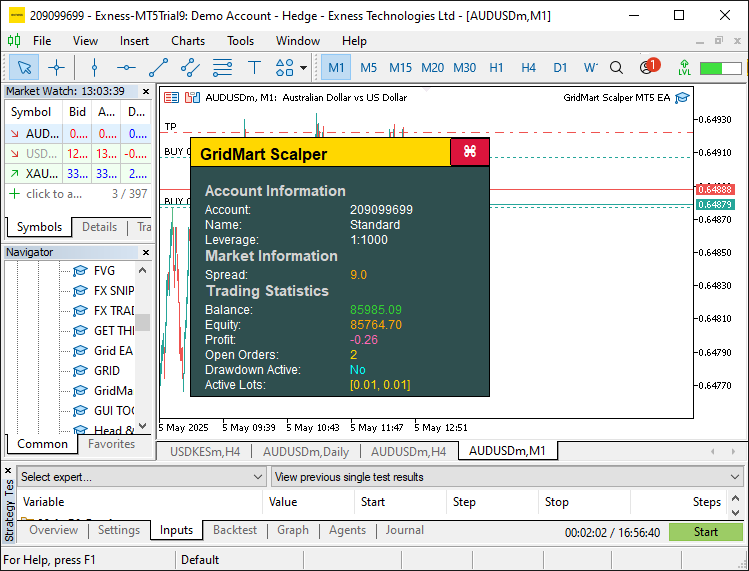
为使面板具备交互功能,我们调用OnChartEvent事件处理器来实现相关逻辑。以下是具体实现逻辑:
//+------------------------------------------------------------------+
//| Expert chart event handler                                       |
//+------------------------------------------------------------------+
void OnChartEvent(const int id, const long &lparam, const double &dparam, const string &sparam) {
   //--- Exit if dashboard is not visible
   if (!dashboardVisible) return;

   //--- Handle mouse click events
   if (id == CHARTEVENT_CLICK) {
      //--- Get X-coordinate of the click
      int x = (int)lparam;
      //--- Get Y-coordinate of the click
      int y = (int)dparam;
      //--- Calculate close button X-position
      int buttonX = panelStartX + DASHBOARD_WIDTH - CLOSE_BUTTON_WIDTH - 5;
      //--- Calculate close button Y-position
      int buttonY = panelStartY + 1;
      //--- Check if click is within close button bounds
      if (x >= buttonX && x <= buttonX + CLOSE_BUTTON_WIDTH && y >= buttonY && y <= buttonY + CLOSE_BUTTON_HEIGHT) {
         //--- Hide the dashboard
         dashboardVisible = false;
         //--- Remove all graphical objects
         ObjectsDeleteAll(0);
         //--- Redraw the chart
         ChartRedraw(0);
      }
   }

   //--- Handle mouse move events
   if (id == CHARTEVENT_MOUSE_MOVE) {
      //--- Get X-coordinate of the mouse
      int mouseX = (int)lparam;
      //--- Get Y-coordinate of the mouse
      int mouseY = (int)dparam;
      //--- Get mouse state (e.g., button pressed)
      int mouseState = (int)sparam;

      //--- Update close button hover state
      //--- Calculate close button X-position
      int buttonX = panelStartX + DASHBOARD_WIDTH - CLOSE_BUTTON_WIDTH - 5;
      //--- Calculate close button Y-position
      int buttonY = panelStartY + 1;
      //--- Check if mouse is over the close button
      bool isCloseHovered = (mouseX >= buttonX && mouseX <= buttonX + CLOSE_BUTTON_WIDTH && mouseY >= buttonY && mouseY <= buttonY + CLOSE_BUTTON_HEIGHT);
      //--- Update close button hover state if changed
      if (isCloseHovered != closeButtonHovered) {
         //--- Set new hover state
         closeButtonHovered = isCloseHovered;
         //--- Update close button background color
         ObjectSetInteger(0, "CloseButton", OBJPROP_BGCOLOR, isCloseHovered ? CLOSE_BUTTON_HOVER_BG : CLOSE_BUTTON_NORMAL_BG);
         //--- Update close button border color
         ObjectSetInteger(0, "CloseButton", OBJPROP_BORDER_COLOR, isCloseHovered ? CLOSE_BUTTON_HOVER_BORDER : CLOSE_BUTTON_NORMAL_BORDER);
         //--- Redraw the chart
         ChartRedraw(0);
      }

      //--- Update header hover state
      //--- Set header X-position
      int headerX = panelStartX;
      //--- Set header Y-position
      int headerY = panelStartY;
      //--- Check if mouse is over the header
      bool isHeaderHovered = (mouseX >= headerX && mouseX <= headerX + DASHBOARD_WIDTH && mouseY >= headerY && mouseY <= headerY + HEADER_HEIGHT);
      //--- Update header hover state if changed
      if (isHeaderHovered != headerHovered) {
         //--- Set new hover state
         headerHovered = isHeaderHovered;
         //--- Update header background color
         ObjectSetInteger(0, "Header", OBJPROP_BGCOLOR, isHeaderHovered ? HEADER_HOVER_COLOR : HEADER_NORMAL_COLOR);
         //--- Redraw the chart
         ChartRedraw(0);
      }

      //--- Handle panel dragging
      //--- Store previous mouse state for click detection
      static int prevMouseState = 0;
      //--- Check for mouse button press (start dragging)
      if (prevMouseState == 0 && mouseState == 1) {
         //--- Check if header is hovered to initiate dragging
         if (isHeaderHovered) {
            //--- Enable dragging mode
            panelDragging = true;
            //--- Store initial mouse X-coordinate
            panelDragX = mouseX;
            //--- Store initial mouse Y-coordinate
            panelDragY = mouseY;
            //--- Get current dashboard X-position
            panelStartX = (int)ObjectGetInteger(0, "Dashboard", OBJPROP_XDISTANCE);
            //--- Get current dashboard Y-position
            panelStartY = (int)ObjectGetInteger(0, "Dashboard", OBJPROP_YDISTANCE);
            //--- Disable chart scrolling during dragging
            ChartSetInteger(0, CHART_MOUSE_SCROLL, false);
         }
      }

      //--- Update dashboard position during dragging
      if (panelDragging && mouseState == 1) {
         //--- Calculate X movement delta
         int dx = mouseX - panelDragX;
         //--- Calculate Y movement delta
         int dy = mouseY - panelDragY;
         //--- Update dashboard X-position
         panelStartX += dx;
         //--- Update dashboard Y-position
         panelStartY += dy;
         //--- Refresh the dashboard with new position
         UpdateDashboard();
         //--- Update stored mouse X-coordinate
         panelDragX = mouseX;
         //--- Update stored mouse Y-coordinate
         panelDragY = mouseY;
         //--- Redraw the chart
         ChartRedraw(0);
      }

      //--- Stop dragging when mouse button is released
      if (mouseState == 0) {
         //--- Check if dragging is active
         if (panelDragging) {
            //--- Disable dragging mode
            panelDragging = false;
            //--- Re-enable chart scrolling
            ChartSetInteger(0, CHART_MOUSE_SCROLL, true);
         }
      }

      //--- Update previous mouse state
      prevMouseState = mouseState;
   }
}
在OnChartEvent事件处理器中,我们首先检查“dashboardVisible”变量,确保仅在仪表盘处于激活状态时处理事件,从而通过跳过不必要的更新来优化性能。对于鼠标点击事件,我们使用“panelStartX”、“DASHBOARD_WIDTH”、“CLOSE_BUTTON_WIDTH”和“panelStartY”计算关闭按钮的位置。如果点击位置落在该按钮范围内,则将“dashboardVisible”设置为false,调用ObjectsDeleteAll函数移除所有图形对象,并使用ChartRedraw函数刷新图表,从而有效隐藏仪表盘。
对于鼠标移动事件,我们通过“mouseX”和“mouseY”跟踪光标位置,并监控“mouseState”以检测点击或释放等操作。我们通过比较“mouseX”和“mouseY”与关闭按钮的坐标来更新其悬停状态,设置“closeButtonHovered”变量,并使用ObjectSetInteger函数调整OBJPROP_BGCOLOR(背景颜色)和“OBJPROP_BORDER_COLOR”(边框颜色)为“CLOSE_BUTTON_HOVER_BG”(悬停背景色)或“CLOSE_BUTTON_NORMAL_BG”(正常背景色),以提供视觉反馈。类似地,我们通过“headerHovered”管理标题栏的悬停状态,并通过“ObjectSetInteger”函数应用“HEADER_HOVER_COLOR”(悬停标题色)或“HEADER_NORMAL_COLOR”(正常标题色),以增强交互性。
为实现仪表盘的拖动功能,我们使用静态变量“prevMouseState”检测鼠标按键按下操作:当光标悬停在标题栏上时,将“panelDragging”设置为true以启动拖动模式,并将初始坐标存储在“panelDragX”和“panelDragY”中。我们通过ObjectGetInteger函数获取仪表盘当前位置的“OBJPROP_XDISTANCE”(X轴距离)和OBJPROP_YDISTANCE(Y轴距离),使用ChartSetInteger函数禁用图表滚动功能,并根据鼠标移动的位移差更新“panelStartX”和“panelStartY”坐标值,随后调用“UpdateDashboard”函数实时重新定位仪表盘。当鼠标按键释放时,我们重置“panelDragging”状态,并通过“ChartSetInteger”重新启用图表滚动功能,最后调用ChartRedraw刷新界面,确保用户获得流畅的操作体验。编译后,结果如下:
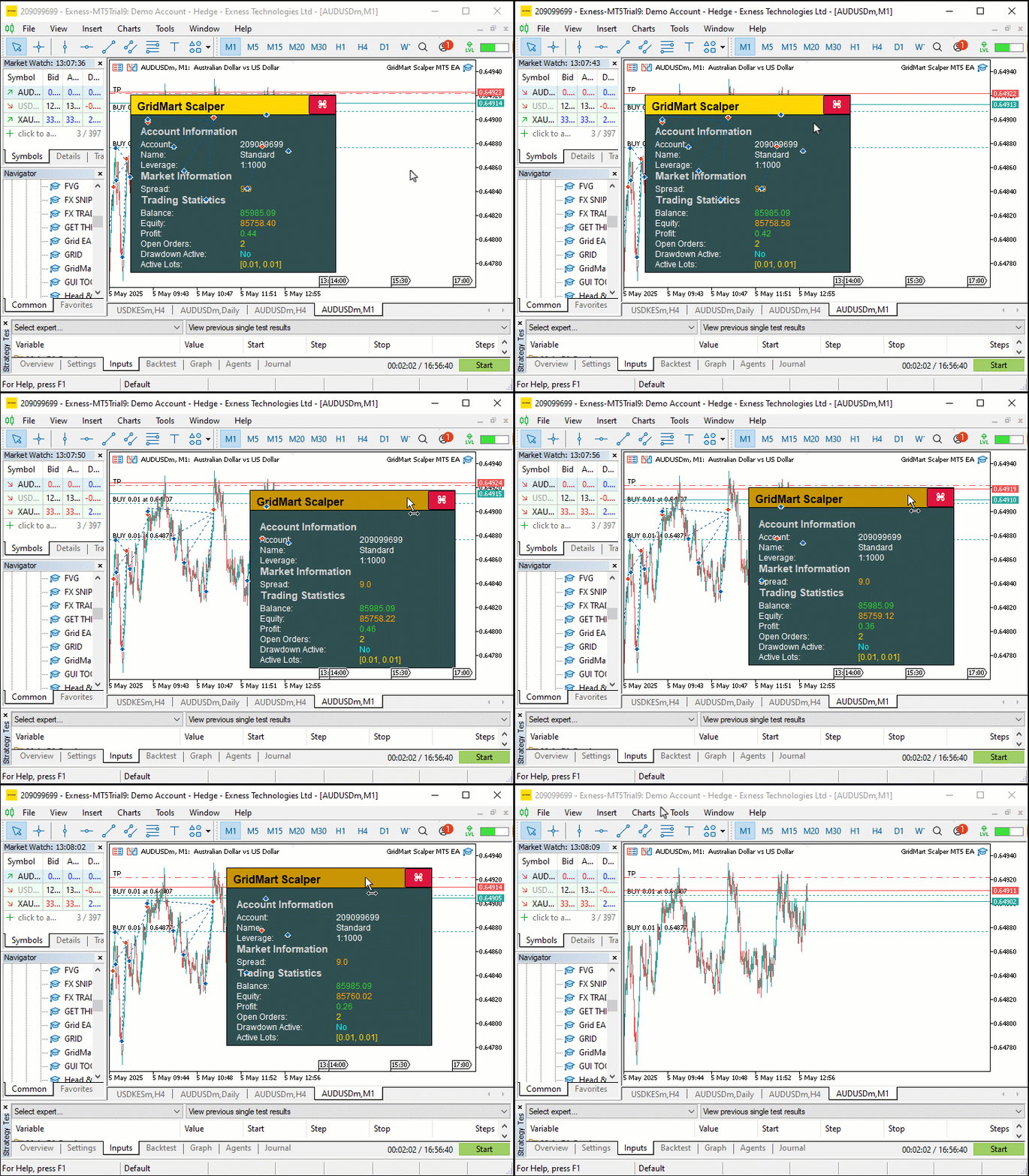
由可视化效果可见,我们已实现仪表盘的拖动、按钮悬停交互、指标实时更新以及整体关闭功能。接下来,我们将进入核心环节——开仓与管理持仓,而动态可视化仪表盘将显著简化这一流程的监控工作。为实现这一目标,我们需要编写一些辅助函数来计算头寸规模等关键参数,具体如下:
//+------------------------------------------------------------------+
//| Calculate the lot size for a new trade                           |
//+------------------------------------------------------------------+
double CalculateLotSize(ENUM_POSITION_TYPE tradeType) {
   //--- Initialize lot size
   double lotSize = 0;
   //--- Select lot size calculation mode
   switch (LOT_MODE) {
      //--- Fixed lot size mode
      case 0:
         //--- Use base lot size
         lotSize = BASE_LOT;
         break;
      //--- Multiplier-based lot size mode
      case 1:
         //--- Calculate lot size with multiplier based on active orders
         lotSize = NormalizeDouble(BASE_LOT * MathPow(LOT_MULTIPLIER, activeOrders), LOT_PRECISION);
         break;
      //--- Fixed lot size with multiplier on loss mode
      case 2: {
         //--- Initialize last close time
         datetime lastClose = 0;
         //--- Set default lot size
         lotSize = BASE_LOT;
         //--- Select trade history for the last 24 hours
         HistorySelect(TimeCurrent() - 24 * 60 * 60, TimeCurrent());
         //--- Iterate through trade history
         for (int i = HistoryDealsTotal() - 1; i >= 0; i--) {
            //--- Get deal ticket
            ulong ticket = HistoryDealGetTicket(i);
            //--- Select deal by ticket
            if (HistoryDealSelect(ticket) && HistoryDealGetInteger(ticket, DEAL_ENTRY) == DEAL_ENTRY_OUT &&
                HistoryDealGetString(ticket, DEAL_SYMBOL) == _Symbol && HistoryDealGetInteger(ticket, DEAL_MAGIC) == MAGIC) {
               //--- Check if deal is more recent
               if (lastClose < HistoryDealGetInteger(ticket, DEAL_TIME)) {
                  //--- Update last close time
                  lastClose = (int)HistoryDealGetInteger(ticket, DEAL_TIME);
                  //--- Check if deal resulted in a loss
                  if (HistoryDealGetDouble(ticket, DEAL_PROFIT) < 0) {
                     //--- Increase lot size by multiplier
                     lotSize = NormalizeDouble(HistoryDealGetDouble(ticket, DEAL_VOLUME) * LOT_MULTIPLIER, LOT_PRECISION);
                  } else {
                     //--- Reset to base lot size
                     lotSize = BASE_LOT;
                  }
               }
            }
         }
         break;
      }
   }
   //--- Return calculated lot size
   return lotSize;
}

//+------------------------------------------------------------------+
//| Count the number of active orders                                |
//+------------------------------------------------------------------+
int CountActiveOrders() {
   //--- Initialize order counter
   int count = 0;
   //--- Iterate through open positions
   for (int i = PositionsTotal() - 1; i >= 0; i--) {
      //--- Get position ticket
      ulong ticket = PositionGetTicket(i);
      //--- Select position by ticket
      if (PositionSelectByTicket(ticket) && GetPositionSymbol() == _Symbol && GetPositionMagic() == MAGIC) {
         //--- Check if position is buy or sell
         if (GetPositionType() == POSITION_TYPE_BUY || GetPositionType() == POSITION_TYPE_SELL) {
            //--- Increment order counter
            count++;
         }
      }
   }
   //--- Return total active orders
   return count;
}

//+------------------------------------------------------------------+
//| Return a formatted string of active lot sizes in ascending order |
//+------------------------------------------------------------------+
string GetActiveLotSizes() {
   //--- Check if no active orders
   if (activeOrders == 0) {
      //--- Return waiting message
      return "[Waiting]";
   }
   //--- Initialize array for lot sizes
   double lotSizes[];
   //--- Resize array to match active orders
   ArrayResize(lotSizes, activeOrders);
   //--- Initialize counter
   int count = 0;
   //--- Iterate through open positions
   for (int i = PositionsTotal() - 1; i >= 0 && count < activeOrders; i--) {
      //--- Get position ticket
      ulong ticket = PositionGetTicket(i);
      //--- Select position by ticket
      if (PositionSelectByTicket(ticket) && GetPositionSymbol() == _Symbol && GetPositionMagic() == MAGIC) {
         //--- Store position volume (lot size)
         lotSizes[count] = PositionGetDouble(POSITION_VOLUME);
         //--- Increment counter
         count++;
      }
   }
   //--- Sort lot sizes in ascending order
   ArraySort(lotSizes);
   //--- Initialize result string
   string result = "";
   //--- Determine maximum number of lots to display (up to 3)
   int maxDisplay = (activeOrders > 3) ? 3 : activeOrders;
   //--- Format lot sizes
   for (int i = 0; i < maxDisplay; i++) {
      //--- Add comma and space for subsequent entries
      if (i > 0) result += ", ";
      //--- Convert lot size to string with specified precision
      result += DoubleToString(lotSizes[i], LOT_PRECISION);
   }
   //--- Append ellipsis if more than 3 orders
   if (activeOrders > 3) result += ", ...";
   //--- Return formatted lot sizes in brackets
   return "[" + result + "]";
}
在此阶段,我们定义了“CalculateLotSize”(计算头寸规模)、“CountActiveOrders”(统计活跃订单数)和“GetActiveLotSizes”(获取活跃头寸规模)三个函数,用于辅助交易头寸计算、持仓跟踪以及仪表盘动态更新,从而确保交易执行的精准性和实时监控的全面性。
我们实现了“CalculateLotSize”函数,用于根据“LOT_MODE”输入参数确定交易手数,支持以下三种模式:固定手数模式直接返回预设的“BASE_LOT”;马丁格尔加仓模式通过MathPow函数结合“LOT_MULTIPLIER”和“activeOrders”,实现手数的指数级递增;基于亏损的动态调整模式调用HistorySelect函数筛选最近24小时的交易记录,根据历史盈亏情况动态调整手数。
在基于亏损的动态调整模式中,我们通过HistoryDealsTotal函数遍历历史交易记录,使用HistoryDealGetTicket和HistoryDealGetDouble函数获取每笔交易的详细信息,如果最近一笔交易为亏损,则根据预设规则调整“lotSize”,并通过NormalizeDouble函数确保计算结果符合交易平台的手数精度要求;反之如果为盈利交易,则将手数重置为“BASE_LOT”,确保根据实际交易结果动态优化头寸规模。
我们通过“CountActiveOrders”函数实时统计未平仓头寸数量,这一数据对马丁格尔加仓策略的精准执行和仪表盘信息的准确性至关重要。具体实现逻辑为:首先调用PositionsTotal函数获取当前所有持仓订单总数,随后通过循环遍历每个订单,使用PositionGetTicket函数获取订单标识符,并结合“GetPositionSymbol”和“GetPositionMagic”函数验证订单是否属于当前交易策略。对于符合条件的订单,再通过“GetPositionType”函数判断其方向(买入或卖出),并相应增加“count”计数器变量。最终,该函数返回更新后的“activeOrders”,确保马丁格尔倍数计算和仪表盘持仓显示的实时性与可靠性。
此外,我们设计了“GetActiveLotSizes”函数,用于格式化并在仪表盘上显示当前持仓的手数信息,提升用户对活跃交易的直观监控能力。我们首先检查“activeOrders”变量,如果不存在任何持仓订单,则直接返回字符串“[Waiting]”;反之,如果存在持仓,则使用ArrayResize初始化数组,以存储持仓的手数。通过调用PositionsTotal循环遍历所有持仓,使用“PositionGetTicket”获取订单标识符,并通过PositionGetDouble函数提取每笔持仓的手数,存储至“lotSizes”数组,随后调用ArraySort函数将手数按升序排列。使用DoubleToString函数将手数转换为字符串,根据“LOT_PRECISION”保留标准精度,并通过条件判断处理持仓数量:如果持仓数小于等于3,则直接显示所有手数;如果持仓数大于3,则显示前三个手数并添加省略号,再将格式化后的字符串包裹在方括号中,确保仪表盘呈现清晰、专业的交易量信息,支持实时监控。接下来,我们仍需定义以下函数以支持订单的精准下单操作:
//+------------------------------------------------------------------+
//| Place a new trade order                                          |
//+------------------------------------------------------------------+
int PlaceOrder(ENUM_ORDER_TYPE orderType, double lot, double price, double slPrice, int gridLevel) {
   //--- Calculate stop-loss price
   double sl = CalculateSL(slPrice, STOP_LOSS_PIPS);
   //--- Calculate take-profit price
   double tp = CalculateTP(price, TAKE_PROFIT_PIPS, orderType);
   //--- Initialize ticket number
   int ticket = 0;
   //--- Set maximum retry attempts
   int retries = 100;
   //--- Create trade comment with grid level
   string comment = "GridMart Scalper-" + IntegerToString(gridLevel);

   //--- Attempt to place order with retries
   for (int i = 0; i < retries; i++) {
      //--- Open position with specified parameters
      ticket = obj_Trade.PositionOpen(_Symbol, orderType, lot, price, sl, tp, comment);
      //--- Get last error code
      int error = GetLastError();
      //--- Exit loop if order is successful
      if (error == 0) break;
      //--- Check for retryable errors (server busy, trade context busy, etc.)
      if (!(error == 4 || error == 137 || error == 146 || error == 136)) break;
      //--- Wait before retrying
      Sleep(5000);
   }
   //--- Return order ticket (or error code if negative)
   return ticket;
}

//+------------------------------------------------------------------+
//| Calculate the stop-loss price for a trade                        |
//+------------------------------------------------------------------+
double CalculateSL(double price, int points) {
   //--- Check if stop-loss is disabled
   if (points == 0) return 0;
   //--- Calculate stop-loss price (subtract points from price)
   return price - points * pipValue;
}

//+------------------------------------------------------------------+
//| Calculate the take-profit price for a trade                      |
//+------------------------------------------------------------------+
double CalculateTP(double price, int points, ENUM_ORDER_TYPE orderType) {
   //--- Check if take-profit is disabled
   if (points == 0) return 0;
   //--- Calculate take-profit for buy order (add points)
   if (orderType == ORDER_TYPE_BUY) return price + points * pipValue;
   //--- Calculate take-profit for sell order (subtract points)
   return price - points * pipValue;
}

//+------------------------------------------------------------------+
//| Retrieve the latest buy order price                              |
//+------------------------------------------------------------------+
double GetLatestBuyPrice() {
   //--- Initialize price
   double price = 0;
   //--- Initialize latest ticket
   int latestTicket = 0;
   //--- Iterate through open positions
   for (int i = PositionsTotal() - 1; i >= 0; i--) {
      //--- Get position ticket
      ulong ticket = PositionGetTicket(i);
      //--- Select position by ticket
      if (PositionSelectByTicket(ticket) && GetPositionSymbol() == _Symbol && GetPositionMagic() == MAGIC && GetPositionType() == POSITION_TYPE_BUY) {
         //--- Check if ticket is more recent
         if ((int)ticket > latestTicket) {
            //--- Update price
            price = GetPositionOpenPrice();
            //--- Update latest ticket
            latestTicket = (int)ticket;
         }
      }
   }
   //--- Return latest buy price
   return price;
}

//+------------------------------------------------------------------+
//| Retrieve the latest sell order price                             |
//+------------------------------------------------------------------+
double GetLatestSellPrice() {
   //--- Initialize price
   double price = 0;
   //--- Initialize latest ticket
   int latestTicket = 0;
   //--- Iterate through open positions
   for (int i = PositionsTotal() - 1; i >= 0; i--) {
      //--- Get position ticket
      ulong ticket = PositionGetTicket(i);
      //--- Select position by ticket
      if (PositionSelectByTicket(ticket) && GetPositionSymbol() == _Symbol && GetPositionMagic() == MAGIC && GetPositionType() == POSITION_TYPE_SELL) {
         //--- Check if ticket is more recent
         if ((int)ticket > latestTicket) {
            //--- Update price
            price = GetPositionOpenPrice();
            //--- Update latest ticket
            latestTicket = (int)ticket;
         }
      }
   }
   //--- Return latest sell price
   return price;
}

//+------------------------------------------------------------------+
//| Check if trading is allowed                                      |
//+------------------------------------------------------------------+
int IsTradingAllowed() {
   //--- Always allow trading
   return 1;
}
在此阶段,我们实现“PlaceOrder”函数以执行开仓操作,通过调用“obj_Trade”模块中的“PositionOpen”函数提交订单。该函数接收关键参数如“lot”和“price”,并使用IntegerToString将“gridLevel”格式化为字符串作为订单备注。为增强执行可靠性,我们集成重试逻辑:如果开仓失败,通过GetLastError获取错误代码,并利用Sleep函数暂停指定时间后重试,确保在市场波动或网络延迟等场景下仍能完成交易。 与此同时,我们设计“CalculateSL”函数计算止损价格:从预设的“slPrice”基准价中减去“STOP_LOSS_PIPS”与“pipValue”的乘积,得出精确的止损价位。对于“CalculateTP”函数,则根据“orderType”动态设置止盈水平:如果为买入订单,则在“slPrice”基础上加上“TAKE_PROFIT_PIPS”与“pipValue”的乘积;反之,如果为卖出订单,则执行减法运算。
我们设计了“GetLatestBuyPrice”函数,用于精准获取最新买入持仓的开仓价格,使用PositionsTotal遍历所有持仓,通过PositionGetTicket逐一选取,再用"GetPositionSymbol"、"GetPositionMagic"和 "GetPositionType"确认品种、Magic数字及方向。对于符合条件的订单,通过"GetPositionOpenPrice"读取其开仓价,并以最大"ticket"作为依据,更新"price",最终返回该值。
类似地,我们实现了“GetLatestSellPrice”函数以获取最新卖出持仓的开仓价格,其逻辑与“GetLatestBuyPrice”保持一致,确保网格策略的精准部署。我们定义了“IsTradingAllowed”函数,直接返回常量值1,从而解除所有的交易限制,支持策略的高频执行需求。至此,我们已构建完整的函数集,在OnTick事件处理器中实现实时交易逻辑。
//+------------------------------------------------------------------+
//| Expert tick function                                             |
//+------------------------------------------------------------------+
void OnTick() {
   //--- Get current ask price
   double ask = NormalizeDouble(SymbolInfoDouble(_Symbol, SYMBOL_ASK), _Digits);
   //--- Get current bid price
   double bid = NormalizeDouble(SymbolInfoDouble(_Symbol, SYMBOL_BID), _Digits);

   //--- Update dashboard if visible
   if (dashboardVisible) UpdateDashboard();

   //--- Check if trading is allowed
   if (IsTradingAllowed()) {
      //--- Get current bar time
      datetime currentBarTime = iTime(_Symbol, _Period, 0);
      //--- Exit if the bar hasn’t changed
      if (lastBarTime == currentBarTime) return;
      //--- Update last bar time
      lastBarTime = currentBarTime;
      //--- Count active orders
      activeOrders = CountActiveOrders();
      //--- Reset SL/TP update flag if no active orders
      if (activeOrders == 0) updateSLTP = false;

      //--- Reset position flags
      hasBuyPosition = false;
      hasSellPosition = false;
      //--- Iterate through open positions
      for (int i = PositionsTotal() - 1; i >= 0; i--) {
         //--- Get position ticket
         ulong ticket = PositionGetTicket(i);
         //--- Select position by ticket
         if (PositionSelectByTicket(ticket) && GetPositionSymbol() == _Symbol && GetPositionMagic() == MAGIC) {
            //--- Check for buy position
            if (GetPositionType() == POSITION_TYPE_BUY) {
               //--- Set buy position flag
               hasBuyPosition = true;
               //--- Clear sell position flag
               hasSellPosition = false;
               //--- Exit loop after finding a position
               break;
            }
            //--- Check for sell position
            else if (GetPositionType() == POSITION_TYPE_SELL) {
               //--- Set sell position flag
               hasSellPosition = true;
               //--- Clear buy position flag
               hasBuyPosition = false;
               //--- Exit loop after finding a position
               break;
            }
         }
      }

      //--- Check conditions to open new trades
      if (activeOrders > 0 && activeOrders <= MAX_GRID_LEVELS) {
         //--- Get latest buy price
         latestBuyPrice = GetLatestBuyPrice();
         //--- Get latest sell price
         latestSellPrice = GetLatestSellPrice();
         //--- Check if a new buy trade is needed
         if (hasBuyPosition && latestBuyPrice - ask >= GRID_DISTANCE * pipValue) openNewTrade = true;
         //--- Check if a new sell trade is needed
         if (hasSellPosition && bid - latestSellPrice >= GRID_DISTANCE * pipValue) openNewTrade = true;
      }
      //--- Allow new trades if no active orders
      if (activeOrders < 1) {
         //--- Clear position flags
         hasBuyPosition = false;
         hasSellPosition = false;
         //--- Signal to open a new trade
         openNewTrade = true;
      }

      //--- Execute new trade if signaled
      if (openNewTrade) {
         //--- Update latest buy price
         latestBuyPrice = GetLatestBuyPrice();
         //--- Update latest sell price
         latestSellPrice = GetLatestSellPrice();
         //--- Handle sell position
         if (hasSellPosition) {
            //--- Calculate lot size for sell order
            calculatedLot = CalculateLotSize(POSITION_TYPE_SELL);
            //--- Check if lot size is valid and trading is enabled
            if (calculatedLot > 0 && tradingEnabled) {
               //--- Place sell order
               int ticket = PlaceOrder(ORDER_TYPE_SELL, calculatedLot, bid, ask, activeOrders);
               //--- Check for order placement errors
               if (ticket < 0) {
                  //--- Log error message
                  Print("Sell Order Error: ", GetLastError());
                  return;
               }
               //--- Update latest sell price
               latestSellPrice = GetLatestSellPrice();
               //--- Clear new trade signal
               openNewTrade = false;
               //--- Signal to modify positions
               modifyPositions = true;
            }
         }
         //--- Handle buy position
         else if (hasBuyPosition) {
            //--- Calculate lot size for buy order
            calculatedLot = CalculateLotSize(POSITION_TYPE_BUY);
            //--- Check if lot size is valid and trading is enabled
            if (calculatedLot > 0 && tradingEnabled) {
               //--- Place buy order
               int ticket = PlaceOrder(ORDER_TYPE_BUY, calculatedLot, ask, bid, activeOrders);
               //--- Check for order placement errors
               if (ticket < 0) {
                  //--- Log error message
                  Print("Buy Order Error: ", GetLastError());
                  return;
               }
               //--- Update latest buy price
               latestBuyPrice = GetLatestBuyPrice();
               //--- Clear new trade signal
               openNewTrade = false;
               //--- Signal to modify positions
               modifyPositions = true;
            }
         }

         //---

      }
   }
}
我们定义了OnTick事件处理器,作为程序的核心交易逻辑引擎,负责协调实时交易执行与持仓管理。通过SymbolInfoDouble函数实时获取当前品种的“卖出价”和“买入价”,并使用NormalizeDouble函数对价格进行标准化处理(如保留指定小数位数),确保数据精度一致;如果“dashboardVisible”为true,则调用“UpdateDashboard”函数更新仪表盘显示。我们调用“IsTradingAllowed”函数检查当前是否满足交易条件,仅当权限允许时才继续执行后续交易逻辑,并使用iTime函数获取当前K线的开盘时间戳,存储至“currentBarTime”中,并通过与“lastBarTime”比较,避免在同一K线内重复执行策略逻辑。
我们通过调用“CountActiveOrders”函数来管理持仓跟踪:首先更新“activeOrders”变量,如果不存在任何订单,则重置“updateSLTP”;随后,使用PositionsTotal函数遍历所有持仓订单,并通过PositionGetTicket获取每个订单的唯一标识符,再结合“GetPositionType”函数判断订单方向(买入或卖出),分别设置“hasBuyPosition”或“hasSellPosition”标识位。
我们通过“GetLatestBuyPrice”和“GetLatestSellPrice”函数评估网格条件:当价格波动幅度超过“GRID_DISTANCE”与“pipValue”的乘积,或当前活跃订单数“activeOrders”低于预设的“MAX_GRID_LEVELS”时,触发“openNewTrade”。当"openNewTrade"为true时,我们执行以下操作:调用“CalculateLotSize”函数精确计算手数;使用“PlaceOrder”函数提交买入或卖出订单;如果订单提交失败,使用“Print”函数输出错误信息,并通过GetLastError获取具体错误代码以便调试;成功开仓后,更新“latestBuyPrice”或“latestSellPrice”,并设置“modifyPositions”标识位为true,以便后续对持仓进行微调。此逻辑可以提升剥头皮操作的精准性与效率。新开仓的信号生成逻辑如下:
//--- Check conditions to open a new trade without existing positions
MqlDateTime timeStruct;
//--- Get current time
TimeCurrent(timeStruct);
//--- Verify trading hours, cycle limit, and new trade conditions
if (timeStruct.hour >= START_HOUR && timeStruct.hour < END_HOUR && cycleCount < MAX_CYCLES && CONTINUE_TRADING && openNewTrade && activeOrders < 1) {
   //--- Get previous bar close price
   double closePrev = iClose(_Symbol, PERIOD_CURRENT, 2);
   //--- Get current bar close price
   double closeCurrent = iClose(_Symbol, PERIOD_CURRENT, 1);
   //--- Check if no existing positions
   if (!hasSellPosition && !hasBuyPosition) {
      //--- Check for bearish signal (previous close > current close)
      if (closePrev > closeCurrent) {
         //--- Calculate lot size for sell order
         calculatedLot = CalculateLotSize(POSITION_TYPE_SELL);
         //--- Check if lot size is valid and trading is enabled
         if (calculatedLot > 0 && tradingEnabled) {
            //--- Place sell order
            int ticket = PlaceOrder(ORDER_TYPE_SELL, calculatedLot, bid, bid, activeOrders);
            //--- Check for order placement errors
            if (ticket < 0) {
               //--- Log error message
               Print("Sell Order Error: ", GetLastError());
               return;
            }
            //--- Increment cycle count
            cycleCount++;
            //--- Update latest buy price
            latestBuyPrice = GetLatestBuyPrice();
            //--- Signal to modify positions
            modifyPositions = true;
         }
      }
      //--- Check for bullish signal (previous close <= current close)
      else {
         //--- Calculate lot size for buy order
         calculatedLot = CalculateLotSize(POSITION_TYPE_BUY);
         //--- Check if lot size is valid and trading is enabled
         if (calculatedLot > 0 && tradingEnabled) {
            //--- Place buy order
            int ticket = PlaceOrder(ORDER_TYPE_BUY, calculatedLot, ask, ask, activeOrders);
            //--- Check for order placement errors
            if (ticket < 0) {
               //--- Log error message
               Print("Buy Order Error: ", GetLastError());
               return;
            }
            //--- Increment cycle count
            cycleCount++;
            //--- Update latest sell price
            latestSellPrice = GetLatestSellPrice();
            //--- Signal to modify positions
            modifyPositions = true;
         }
      }
   }
}
为开启新交易,我们首先通过TimeCurrent函数获取当前时间,并存储至“timeStruct”结构体变量中。随后检查以下条件是否全部满足:当前小时数“timeStruct.hour”位于预设的“START_HOUR”和“END_HOUR”区间内;“cycleCount”小于“MAX_CYCLES”;“CONTINUE_TRADING”和“openNewTrade”均为true;当前活跃订单数“activeOrders”少于1。同时,我们调用iClose函数分别获取上一根K线收盘价“closePrev”和当前K线收盘价“closeCurrent”,并通过“hasSellPosition”和“hasBuyPosition”标识位确认当前不存在任何卖出或买入持仓。
对于熊市信号(当“closePrev”大于“closeCurrent”时),我们调用“CalculateLotSize”函数计算卖出订单的手数,验证“calculatedLot”和“tradingEnabled”是否有效后,通过“PlaceOrder”函数执行卖出交易。如果执行失败,使用“Print”和GetLastError记录错误信息。对于牛市信号(当“closePrev”小于“closeCurrent”时),我们对买入订单执行相同流程,同时更新“cycleCount”,并通过“GetLatestBuyPrice”或“GetLatestSellPrice”刷新“latestBuyPrice”或“latestSellPrice”。最后设置“modifyPositions”为true,以支持后续精准的仓位调整与动态管理。
上述逻辑可替换为任意交易策略。此处仅以简单信号生成示例说明核心仓位管理框架。一旦开仓,我们就需要在价格上涨时检查并修改仓位,具体如下:
//--- Update active orders count
activeOrders = CountActiveOrders();
//--- Reset weighted price and total volume
weightedPrice = 0;
totalVolume = 0;
//--- Calculate weighted price and total volume
for (int i = PositionsTotal() - 1; i >= 0; i--) {
   //--- Get position ticket
   ulong ticket = PositionGetTicket(i);
   //--- Select position by ticket
   if (PositionSelectByTicket(ticket) && GetPositionSymbol() == _Symbol && GetPositionMagic() == MAGIC) {
      //--- Accumulate weighted price (price * volume)
      weightedPrice += GetPositionOpenPrice() * PositionGetDouble(POSITION_VOLUME);
      //--- Accumulate total volume
      totalVolume += PositionGetDouble(POSITION_VOLUME);
   }
}

//--- Normalize weighted price if there are active orders
if (activeOrders > 0) weightedPrice = NormalizeDouble(weightedPrice / totalVolume, _Digits);
//--- Check if positions need SL/TP modification
if (modifyPositions) {
   //--- Iterate through open positions
   for (int i = PositionsTotal() - 1; i >= 0; i--) {
      //--- Get position ticket
      ulong ticket = PositionGetTicket(i);
      //--- Select position by ticket
      if (PositionSelectByTicket(ticket) && GetPositionSymbol() == _Symbol && GetPositionMagic() == MAGIC) {
         //--- Handle buy positions
         if (GetPositionType() == POSITION_TYPE_BUY) {
            //--- Set take-profit for buy position
            targetTP = weightedPrice + TAKE_PROFIT_PIPS * pipValue;
            //--- Set stop-loss for buy position
            targetSL = weightedPrice - STOP_LOSS_PIPS * pipValue;
            //--- Signal SL/TP update
            updateSLTP = true;
         }
         //--- Handle sell positions
         else if (GetPositionType() == POSITION_TYPE_SELL) {
            //--- Set take-profit for sell position
            targetTP = weightedPrice - TAKE_PROFIT_PIPS * pipValue;
            //--- Set stop-loss for sell position
            targetSL = weightedPrice + STOP_LOSS_PIPS * pipValue;
            //--- Signal SL/TP update
            updateSLTP = true;
         }
      }
   }
}

//--- Apply SL/TP modifications if needed
if (modifyPositions && updateSLTP) {
   //--- Iterate through open positions
   for (int i = PositionsTotal() - 1; i >= 0; i--) {
      //--- Get position ticket
      ulong ticket = PositionGetTicket(i);
      //--- Select position by ticket
      if (PositionSelectByTicket(ticket) && GetPositionSymbol() == _Symbol && GetPositionMagic() == MAGIC) {
         //--- Modify position with new SL/TP
         if (obj_Trade.PositionModify(ticket, targetSL, targetTP)) {
            //--- Clear modification signal on success
            modifyPositions = false;
         }
      }
   }
}
在此阶段,调用“CountActiveOrders”函数刷新“activeOrders”;重置“weightedPrice”和“totalVolume”;使用PositionsTotal和PositionGetTicket获取持仓总数;结合“GetPositionOpenPrice”和PositionGetDouble函数,累加计算“weightedPrice”和“totalVolume”。如果存在活跃持仓(“activeOrders”),使用NormalizeDouble对“weightedPrice”进行精度标准化;当“modifyPositions”为true时,根据“GetPositionType”和“pipValue”设置“targetTP”和“targetSL”;如果“updateSLTP”为true,则使用“obj_Trade”中的“PositionModify”方法进行更新,成功执行后重置“modifyPositions”。编译后,呈现如下效果:
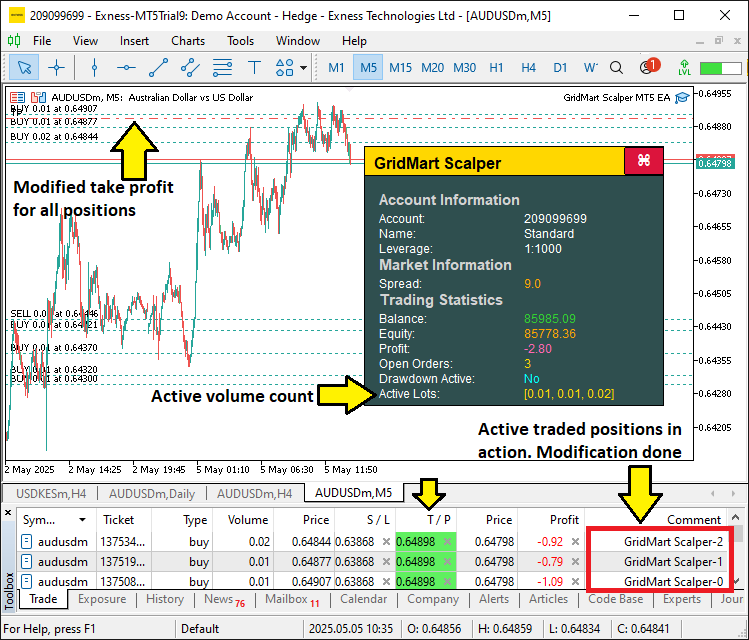
由图可见,当前已开立的订单均已进入持仓管理状态。现在,我们需要应用风险管理逻辑,以便实时监控并加以限制。为此,我们将编写一个函数来执行所有跟踪操作,并在必要时终止程序,具体如下:
//+------------------------------------------------------------------+
//| Monitor daily drawdown and control trading state                 |
//+------------------------------------------------------------------+
void MonitorDailyDrawdown() {
   //--- Initialize daily profit accumulator
   double totalDayProfit = 0.0;
   //--- Get current time
   datetime end = TimeCurrent();
   //--- Get current date as string
   string sdate = TimeToString(TimeCurrent(), TIME_DATE);
   //--- Convert date to datetime (start of day)
   datetime start = StringToTime(sdate);
   //--- Set end of day (24 hours later)
   datetime to = start + (1 * 24 * 60 * 60);

   //--- Check if daily reset is needed
   if (dailyResetTime < to) {
      //--- Update reset time
      dailyResetTime = to;
      //--- Store current balance as daily starting balance
      dailyBalance = GetAccountBalance();
   }
   //--- Select trade history for the day
   HistorySelect(start, end);
   //--- Get total number of deals
   int totalDeals = HistoryDealsTotal();

   //--- Iterate through trade history
   for (int i = 0; i < totalDeals; i++) {
      //--- Get deal ticket
      ulong ticket = HistoryDealGetTicket(i);
      //--- Check if deal is a position close
      if (HistoryDealGetInteger(ticket, DEAL_ENTRY) == DEAL_ENTRY_OUT) {
         //--- Calculate deal profit (including commission and swap)
         double latestDayProfit = (HistoryDealGetDouble(ticket, DEAL_PROFIT) +
                                  HistoryDealGetDouble(ticket, DEAL_COMMISSION) +
                                  HistoryDealGetDouble(ticket, DEAL_SWAP));
         //--- Accumulate daily profit
         totalDayProfit += latestDayProfit;
      }
   }

   //--- Calculate starting balance for the day
   double startingBalance = GetAccountBalance() - totalDayProfit;
   //--- Calculate daily profit/drawdown percentage
   double dailyProfitOrDrawdown = NormalizeDouble((totalDayProfit * 100 / startingBalance), 2);

   //--- Check if drawdown limit is exceeded
   if (dailyProfitOrDrawdown <= DRAWDOWN_LIMIT) {
      //--- Close all positions if configured
      if (CLOSE_ON_DRAWDOWN) CloseAllPositions();
      //--- Disable trading
      tradingEnabled = false;
   } else {
      //--- Enable trading
      tradingEnabled = true;
   }
}

//+------------------------------------------------------------------+
//| Close all open positions managed by the EA                       |
//+------------------------------------------------------------------+
void CloseAllPositions() {
   //--- Iterate through open positions
   for (int i = PositionsTotal() - 1; i >= 0; i--) {
      //--- Get position ticket
      ulong ticket = PositionGetTicket(i);
      //--- Select position by ticket
      if (ticket > 0 && PositionSelectByTicket(ticket)) {
         //--- Check if position belongs to this EA
         if (GetPositionSymbol() == _Symbol && GetPositionMagic() == MAGIC) {
            //--- Close the position
            obj_Trade.PositionClose(ticket);
         }
      }
   }
}
为落实风险管理机制,我们通过“MonitorDailyDrawdown”函数实现每日回撤监控,使用TimeCurrent获取当前服务器时间,并通过TimeToString转换,以此设定当日交易时段,并且结合HistorySelect函数筛选成交记录。我们使用HistoryDealGetTicket和HistoryDealGetDouble函数计算总利润,通过NormalizeDouble函数对回撤百分比进行标准化处理,并根据"DRAWDOWN_LIMIT"调整"tradingEnabled",如果"CLOSE_ON_DRAWDOWN"为true,则调用"CloseAllPositions"函数将所有仓位平仓。
我们定义了“CloseAllPositions”函数,用于遍历“PositionsTotal”中的持仓,并使用PositionGetTicket获取持仓信息。在通过“GetPositionSymbol”和“GetPositionMagic”验证后,使用“obj_Trade”中的“PositionClose”函数关闭相关交易,确保稳健的回撤控制。接下来,我们可以在每次循环时调用此函数,以便在条件满足时进行风险管理。
//--- Monitor daily drawdown if enabled
if (ENABLE_DAILY_DRAWDOWN) MonitorDailyDrawdown();
我们通过检查“ENABLE_DAILY_DRAWDOWN”条件判断是否启用每日回撤控制功能:如果为true,则调用“MonitorDailyDrawdown”函数评估当日盈亏情况,根据回撤幅度动态调整“tradingEnabled”,并在必要时将所有持仓自动平仓,从而有效防止账户因市场波动出现超额亏损。编译后,呈现如下效果:
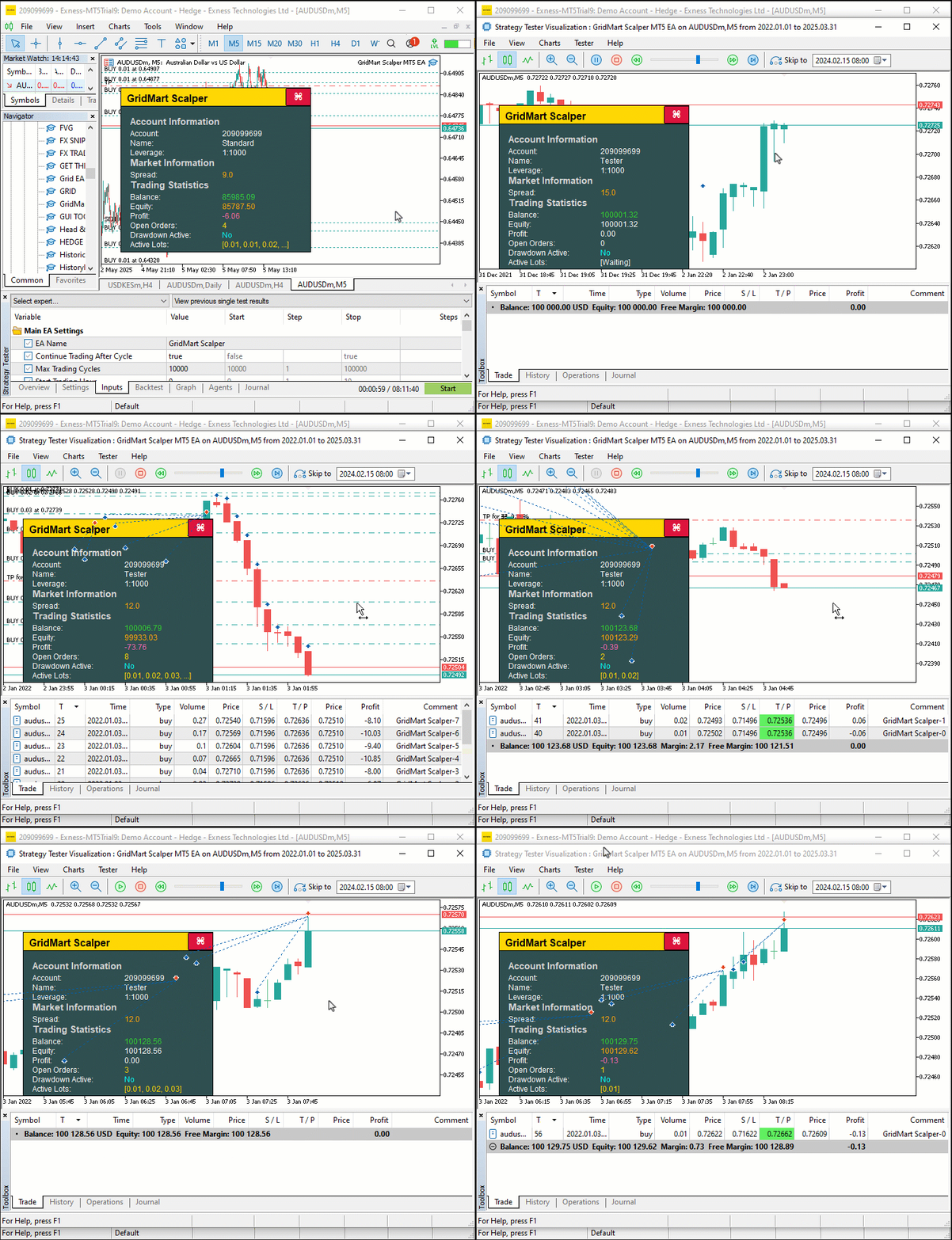
由可视化结果可见,我们可以开立仓位,并进行动态管理,在达到目标后平仓,从而实现创建网格交易策略设置的目标。接下来需完成的工作是程序回测,相关内容将在下一章节详细阐述。
回测
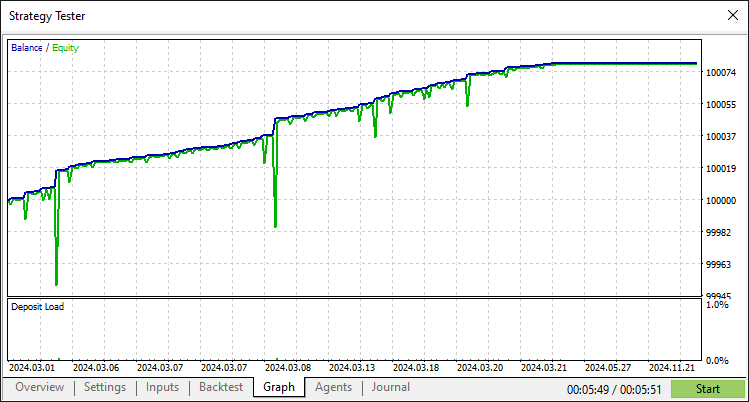
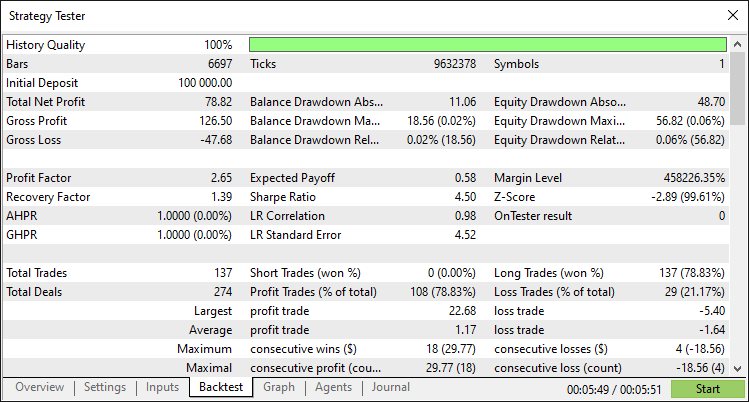
经过全面回测后,我们得到以下结果:
回测图:
回测报告:
结论
总而言之,我们已成功开发了一套MQL5程序,自动执行网格马丁格尔短线交易策略。该程序通过网格布局结合马丁格尔加仓策略执行交易,并配备动态仪表盘,实时监控点差、盈亏、手数等关键指标。凭借精准的交易执行、控制回撤进行风险管理以及交互式界面,您既可以按需调整参数,也可以叠加其他策略,从而进一步扩展该程序,使其完全契合您的交易风格。
免责声明:本文仅用于教学目的。交易存在重大财务风险,市场剧烈波动可能导致资金损失。在实盘操作前,务必进行充分的历史回测,并建立严格的风险控制机制。
精通上述技术后,您可进一步优化本程序以提升其稳健性,或将其作为核心框架开发其他交易策略,为算法交易之路奠定坚实基础。
本文由MetaQuotes Ltd译自英文
原文地址: https://www.mql5.com/en/articles/18038
注意: MetaQuotes Ltd.将保留所有关于这些材料的权利。全部或部分复制或者转载这些材料将被禁止。
本文由网站的一位用户撰写,反映了他们的个人观点。MetaQuotes Ltd 不对所提供信息的准确性负责,也不对因使用所述解决方案、策略或建议而产生的任何后果负责。

 您应当知道的 MQL5 向导技术(第 57 部分):搭配移动平均和随机振荡器的监督训练
 外汇套利交易:分析合成货币的走势及其均值回归
 价格行为分析工具包开发(第 22 部分):相关性仪表盘
 从新手到专家:使用 MQL5 制作动画新闻标题(四) — 本地托管 AI 模型市场洞察

文章不错,但 CalculateSL 存在一个重大错误。
当然,谢谢。怎么了?
当然,谢谢怎么了?
你忘了处理卖方。附上更正后的版本。
你忘了处理卖方。附上更正后的版本。
哦,是的。当然当然,这对其他人会有很大帮助。谢谢。