

Automatizando Estratégias de Trading em MQL5 (Parte 9): Construindo um Expert Advisor para a Estratégia Asian Breakout
 292
292
 0
0

Introdução
No artigo anterior (Parte 8), exploramos uma estratégia de reversão ao construir um Expert Advisor em MetaQuotes Language 5 (MQL5) baseado no padrão harmônico Butterfly utilizando proporções precisas de Fibonacci. Agora, na Parte 9, direcionamos nosso foco para a Asian Breakout Strategy — um método que identifica máximas e mínimas importantes da sessão para formar zonas de rompimento, utiliza uma média móvel para filtragem de tendência e integra gestão dinâmica de risco.
Neste artigo, abordaremos:
Ao final, você terá um Expert Advisor totalmente funcional que automatiza a Asian Breakout Strategy, pronto para ser testado e refinado para negociação. Vamos começar!
Plano Estratégico
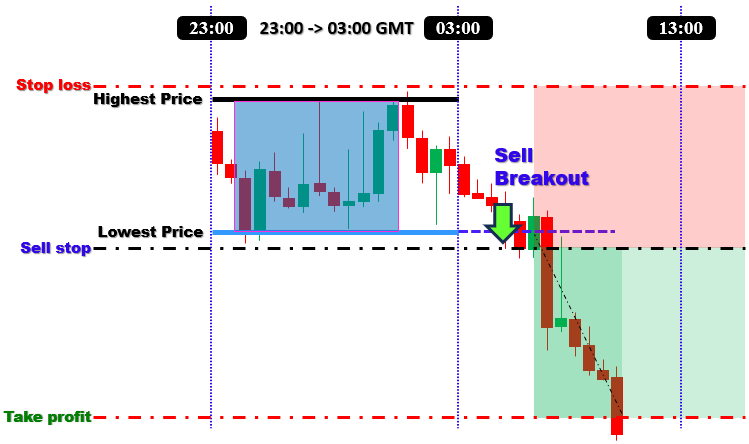
Para criar o programa, projetaremos uma abordagem que aproveita a faixa de preço formada durante a sessão de negociação asiática. O primeiro passo será definir a caixa da sessão capturando a máxima mais alta e a mínima mais baixa dentro de uma janela de tempo específica — normalmente entre 23:00 e 03:00 Greenwich Mean Time (GMT). No entanto, esses horários são totalmente personalizáveis conforme sua necessidade. Essa faixa definida representa a área de consolidação da qual esperamos um rompimento.
Em seguida, definiremos os níveis de rompimento nos limites dessa faixa. Colocaremos uma ordem pendente buy-stop ligeiramente acima do topo da caixa se as condições de mercado confirmarem uma tendência de alta — utilizando uma média móvel (como uma MA de 50 períodos) para confirmação da tendência. Por outro lado, se a tendência for de baixa, posicionaremos uma ordem sell-stop logo abaixo da base da caixa. Essa configuração dupla garante que nosso Expert Advisor esteja preparado para capturar movimentos significativos em qualquer direção assim que o preço romper a faixa.
A gestão de risco é um componente crítico da nossa estratégia. Integraremos ordens de stop-loss logo fora dos limites da caixa para proteger contra falsos rompimentos ou reversões, enquanto os níveis de take-profit serão determinados com base em uma relação risco-retorno predefinida. Além disso, implementaremos uma estratégia de saída baseada em tempo que fechará automaticamente quaisquer negociações abertas se permanecerem ativas após um horário designado, como 13:00 GMT. De modo geral, nossa estratégia combina detecção precisa de faixa baseada em sessão, filtragem de tendência e gestão robusta de risco para construir um Expert Advisor capaz de capturar movimentos significativos de rompimento no mercado. Em resumo, aqui está a visualização da estratégia completa que desejamos implementar.
Implementação em MQL5
Para criar o programa em MQL5, abra o MetaEditor, vá até o Navigator, localize a pasta Indicators, clique na aba "New" e siga as instruções para criar o arquivo. Após criá-lo, no ambiente de codificação, precisaremos declarar algumas variáveis globais que utilizaremos ao longo do programa.
//+------------------------------------------------------------------+
//|                        Copyright 2025, Forex Algo-Trader, Allan. |
//|                                 "https://t.me/Forex_Algo_Trader" |
//+------------------------------------------------------------------+
#property copyright "Forex Algo-Trader, Allan"
#property link      "https://t.me/Forex_Algo_Trader"
#property version   "1.00"
#property description "This EA trades based on ASIAN BREAKOUT Strategy"
#property strict

#include <Trade\Trade.mqh>                              //--- Include trade library
CTrade obj_Trade;                                          //--- Create global trade object

//--- Global indicator handle for the moving average
int maHandle = INVALID_HANDLE;                         //--- Global MA handle

//==== Input parameters
//--- Trade and indicator settings
input double         LotSize              = 0.1;         //--- Trade lot size
input double         BreakoutOffsetPips   = 10;          //--- Offset in pips for pending orders
input ENUM_TIMEFRAMES BoxTimeframe         = PERIOD_M15;  //--- Timeframe for box calculation (15 or 30 minutes)
input int            MA_Period            = 50;          //--- Moving average period for trend filter
input ENUM_MA_METHOD MA_Method            = MODE_SMA;    //--- MA method (Simple Moving Average)
input ENUM_APPLIED_PRICE MA_AppliedPrice   = PRICE_CLOSE; //--- Applied price for MA (Close price)
input double         RiskToReward         = 1.3;         //--- Reward-to-risk multiplier (1:1.3)
input int            MagicNumber          = 12345;       //--- Magic number (used for order identification)

//--- Session timing settings (GMT) with minutes
input int            SessionStartHour     = 23;          //--- Session start hour
input int            SessionStartMinute   = 00;           //--- Session start minute
input int            SessionEndHour       = 03;           //--- Session end hour
input int            SessionEndMinute     = 00;           //--- Session end minute
input int            TradeExitHour        = 13;          //--- Trade exit hour
input int            TradeExitMinute      = 00;           //--- Trade exit minute

//--- Global variables for storing session box data
datetime lastBoxSessionEnd = 0;                        //--- Stores the session end time of the last computed box
bool     boxCalculated     = false;                    //--- Flag: true if session box has been calculated
bool     ordersPlaced      = false;                    //--- Flag: true if orders have been placed for the session
double   BoxHigh           = 0.0;                        //--- Highest price during the session
double   BoxLow            = 0.0;                        //--- Lowest price during the session
//--- Variables to store the exact times when the session's high and low occurred
datetime BoxHighTime       = 0;                          //--- Time when the highest price occurred
datetime BoxLowTime        = 0;                          //--- Time when the lowest price occurred
Aqui, incluímos a biblioteca de trade usando "#include <Trade\Trade.mqh>" para acessar funções internas de negociação e criamos um objeto global de trade chamado "obj_Trade". Definimos um handle global do indicador "maHandle", inicializando-o como INVALID_HANDLE, e configuramos entradas do usuário para parâmetros de negociação e indicador — como "LotSize", "BreakoutOffsetPips" e "BoxTimeframe" (que utiliza o tipo ENUM_TIMEFRAMES) — além dos parâmetros da média móvel ("MA_Period", "MA_Method", "MA_AppliedPrice") e de gestão de risco ("RiskToReward", "MagicNumber").
Além disso, permitimos que os usuários definam os horários da sessão em horas e minutos (utilizando entradas como "SessionStartHour", "SessionStartMinute", "SessionEndHour", "SessionEndMinute", "TradeExitHour" e "TradeExitMinute") e declaramos variáveis globais para armazenar os dados da caixa da sessão ("BoxHigh", "BoxLow") e os horários exatos em que esses extremos ocorreram ("BoxHighTime", "BoxLowTime"), juntamente com flags ("boxCalculated" e "ordersPlaced") para controlar a lógica do programa. Em seguida, avançamos para o manipulador de evento OnInit e inicializamos o handle.
//+------------------------------------------------------------------+
//| Expert initialization function                                   |
//+------------------------------------------------------------------+
int OnInit(){
   //--- Set the magic number for all trade operations
   obj_Trade.SetExpertMagicNumber(MagicNumber);           //--- Set magic number globally for trades
   //--- Create the Moving Average handle with user-defined parameters
   maHandle = iMA(_Symbol, 0, MA_Period, 0, MA_Method, MA_AppliedPrice); //--- Create MA handle
   if(maHandle == INVALID_HANDLE){                     //--- Check if MA handle creation failed
      Print("Failed to create MA handle.");           //--- Print error message
      return(INIT_FAILED);                             //--- Terminate initialization if error occurs
   }
   return(INIT_SUCCEEDED);                            //--- Return successful initialization
}
No manipulador de evento OnInit, configuramos o magic number do objeto de trade chamando o método "obj_Trade.SetExpertMagicNumber(MagicNumber)", garantindo que todas as negociações sejam identificadas de forma única. Em seguida, criamos o handle da Média Móvel utilizando a função iMA com os parâmetros definidos pelo usuário ("MA_Period", "MA_Method" e "MA_AppliedPrice"). Depois verificamos se o handle foi criado com sucesso, checando se "maHandle" é igual a INVALID_HANDLE; se for, imprimimos uma mensagem de erro e retornamos INIT_FAILED, caso contrário retornamos INIT_SUCCEEDED para indicar inicialização bem-sucedida. Em seguida, precisamos liberar o handle criado para economizar recursos quando o programa não estiver em uso.
//+------------------------------------------------------------------+
//| Expert deinitialization function                                 |
//+------------------------------------------------------------------+
void OnDeinit(const int reason){
   //--- Release the MA handle if valid
   if(maHandle != INVALID_HANDLE)                     //--- Check if MA handle exists
      IndicatorRelease(maHandle);                     //--- Release the MA handle
   //--- Drawn objects remain on the chart for historical reference
}
Na função OnDeinit, verificamos se o handle da Média Móvel "maHandle" é válido (ou seja, diferente de INVALID_HANDLE). Se for válido, liberamos o handle chamando a função IndicatorRelease para liberar recursos. Agora podemos avançar para o manipulador principal, OnTick, onde basearemos toda a lógica de controle.
//+------------------------------------------------------------------+
//| Expert tick function                                             |
//+------------------------------------------------------------------+
void OnTick(){
   //--- Get the current server time (assumed GMT)
   datetime currentTime = TimeCurrent();              //--- Retrieve current time
   MqlDateTime dt;                                    //--- Declare a structure for time components
   TimeToStruct(currentTime, dt);                     //--- Convert current time to structure

   //--- Check if the current time is at or past the session end (using hour and minute)
   if(dt.hour > SessionEndHour || (dt.hour == SessionEndHour && dt.min >= SessionEndMinute)){
      //--- Build the session end time using today's date and user-defined session end time
      MqlDateTime sesEnd;                             //--- Declare a structure for session end time
      sesEnd.year = dt.year;                          //--- Set year
      sesEnd.mon  = dt.mon;                           //--- Set month
      sesEnd.day  = dt.day;                           //--- Set day
      sesEnd.hour = SessionEndHour;                   //--- Set session end hour
      sesEnd.min  = SessionEndMinute;                 //--- Set session end minute
      sesEnd.sec  = 0;                                //--- Set seconds to 0
      datetime sessionEnd = StructToTime(sesEnd);       //--- Convert structure to datetime

      //--- Determine the session start time
      datetime sessionStart;                          //--- Declare variable for session start time
      //--- If session start is later than or equal to session end, assume overnight session
      if(SessionStartHour > SessionEndHour || (SessionStartHour == SessionEndHour && SessionStartMinute >= SessionEndMinute)){
         datetime prevDay = sessionEnd - 86400;       //--- Subtract 24 hours to get previous day
         MqlDateTime dtPrev;                          //--- Declare structure for previous day time
         TimeToStruct(prevDay, dtPrev);               //--- Convert previous day time to structure
         dtPrev.hour = SessionStartHour;              //--- Set session start hour for previous day
         dtPrev.min  = SessionStartMinute;            //--- Set session start minute for previous day
         dtPrev.sec  = 0;                             //--- Set seconds to 0
         sessionStart = StructToTime(dtPrev);         //--- Convert structure back to datetime
      }
      else{
         //--- Otherwise, use today's date for session start
         MqlDateTime temp;                           //--- Declare temporary structure
         temp.year = sesEnd.year;                    //--- Set year from session end structure
         temp.mon  = sesEnd.mon;                     //--- Set month from session end structure
         temp.day  = sesEnd.day;                     //--- Set day from session end structure
         temp.hour = SessionStartHour;               //--- Set session start hour
         temp.min  = SessionStartMinute;             //--- Set session start minute
         temp.sec  = 0;                              //--- Set seconds to 0
         sessionStart = StructToTime(temp);          //--- Convert structure to datetime
      }

      //--- Recalculate the session box only if this session hasn't been processed before
      if(sessionEnd != lastBoxSessionEnd){
         ComputeBox(sessionStart, sessionEnd);       //--- Compute session box using start and end times
         lastBoxSessionEnd = sessionEnd;              //--- Update last processed session end time
         boxCalculated   = true;                      //--- Set flag indicating the box has been calculated
         ordersPlaced    = false;                     //--- Reset flag for order placement for the new session
      }
   }
}
Na função OnTick do Expert, primeiro chamamos TimeCurrent para obter o horário atual do servidor e o convertemos para uma estrutura MqlDateTime utilizando a função TimeToStruct para acessar seus componentes. Comparamos a hora e o minuto atuais com "SessionEndHour" e "SessionEndMinute" definidos pelo usuário; se o horário atual for igual ou posterior ao fim da sessão, construímos uma estrutura "sesEnd" e a convertemos para datetime utilizando StructToTime.
Com base em a sessão iniciar antes ou depois do término da sessão, determinamos o horário correto de "sessionStart" (utilizando a data de hoje ou ajustando para sessão noturna) e, se este "sessionEnd" for diferente de "lastBoxSessionEnd", chamamos a função "ComputeBox" para recalcular a caixa da sessão, atualizando "lastBoxSessionEnd" e redefinindo as flags "boxCalculated" e "ordersPlaced". Utilizamos uma função personalizada para calcular as propriedades da caixa, conforme o trecho abaixo.
//+------------------------------------------------------------------+
//| Function: ComputeBox                                             |
//| Purpose: Calculate the session's highest high and lowest low, and|
//|          record the times these extremes occurred, using the     |
//|          specified session start and end times.                  |
//+------------------------------------------------------------------+
void ComputeBox(datetime sessionStart, datetime sessionEnd){
   int totalBars = Bars(_Symbol, BoxTimeframe);       //--- Get total number of bars on the specified timeframe
   if(totalBars <= 0){
      Print("No bars available on timeframe ", EnumToString(BoxTimeframe)); //--- Print error if no bars available
      return;                                        //--- Exit if no bars are found
   }

   MqlRates rates[];                                 //--- Declare an array to hold bar data
   ArraySetAsSeries(rates, false);                   //--- Set array to non-series order (oldest first)
   int copied = CopyRates(_Symbol, BoxTimeframe, 0, totalBars, rates); //--- Copy bar data into array
   if(copied <= 0){
      Print("Failed to copy rates for box calculation."); //--- Print error if copying fails
      return;                                        //--- Exit if error occurs
   }

   double highVal = -DBL_MAX;                        //--- Initialize high value to the lowest possible
   double lowVal  = DBL_MAX;                         //--- Initialize low value to the highest possible
   //--- Reset the times for the session extremes
   BoxHighTime = 0;                                  //--- Reset stored high time
   BoxLowTime  = 0;                                  //--- Reset stored low time

   //--- Loop through each bar within the session period to find the extremes
   for(int i = 0; i < copied; i++){
      if(rates[i].time >= sessionStart && rates[i].time <= sessionEnd){
         if(rates[i].high > highVal){
            highVal = rates[i].high;                //--- Update highest price
            BoxHighTime = rates[i].time;            //--- Record time of highest price
         }
         if(rates[i].low < lowVal){
            lowVal = rates[i].low;                  //--- Update lowest price
            BoxLowTime = rates[i].time;             //--- Record time of lowest price
         }
      }
   }
   if(highVal == -DBL_MAX || lowVal == DBL_MAX){
      Print("No valid bars found within the session time range."); //--- Print error if no valid bars found
      return;                                        //--- Exit if invalid data
   }
   BoxHigh = highVal;                                //--- Store final highest price
   BoxLow  = lowVal;                                 //--- Store final lowest price
   Print("Session box computed: High = ", BoxHigh, " at ", TimeToString(BoxHighTime),
         ", Low = ", BoxLow, " at ", TimeToString(BoxLowTime)); //--- Output computed session box data

   //--- Draw all session objects (rectangle, horizontal lines, and price labels)
   DrawSessionObjects(sessionStart, sessionEnd);    //--- Call function to draw objects using computed values
}
Aqui, definimos uma função void chamada "ComputeBox" para calcular os extremos da sessão. Começamos obtendo o número total de barras no timeframe especificado utilizando a função Bars e copiamos os dados das barras para um array MqlRates utilizando a função CopyRates. Inicializamos a variável "highVal" como -DBL_MAX e "lowVal" como DBL_MAX para garantir que qualquer preço válido atualize esses extremos. À medida que fazemos um loop por cada barra dentro do período da sessão, se a "high" de uma barra exceder "highVal", atualizamos "highVal" e registramos o horário dessa barra em "BoxHighTime"; da mesma forma, se a "low" for inferior a "lowVal", atualizamos "lowVal" e registramos o horário em "BoxLowTime".
Se, após o processamento, "highVal" permanecer "-DBL_MAX" ou "lowVal" permanecer DBL_MAX, imprimimos uma mensagem de erro indicando que nenhuma barra válida foi encontrada; caso contrário, atribuimos "BoxHigh" e "BoxLow" com os valores calculados e utilizamos a função TimeToString para imprimir os horários registrados em formato legível. Por fim, chamamos a função "DrawSessionObjects" com os horários de início e fim da sessão para exibir visualmente a caixa da sessão e objetos relacionados no gráfico. A implementação da função está abaixo.
//+----------------------------------------------------------------------+
//| Function: DrawSessionObjects                                         |
//| Purpose: Draw a filled rectangle spanning from the session's high    |
//|          point to its low point (using exact times), then draw       |
//|          horizontal lines at the high and low (from sessionStart to  |
//|          sessionEnd) with price labels at the right. Dynamic styling |
//|          for font size and line width is based on the current chart  |
//|          scale.                                                      |
//+----------------------------------------------------------------------+
void DrawSessionObjects(datetime sessionStart, datetime sessionEnd){
   int chartScale = (int)ChartGetInteger(0, CHART_SCALE, 0); //--- Retrieve the chart scale (0 to 5)
   int dynamicFontSize = 7 + chartScale * 1;        //--- Base 7, increase by 2 per scale level
   int dynamicLineWidth = (int)MathRound(1 + (chartScale * 2.0 / 5)); //--- Linear interpolation

   //--- Create a unique session identifier using the session end time
   string sessionID = "Sess_" + IntegerToString(lastBoxSessionEnd);

   //--- Draw the filled rectangle (box) using the recorded high/low times and prices
   string rectName = "SessionRect_" + sessionID;       //--- Unique name for the rectangle
   if(!ObjectCreate(0, rectName, OBJ_RECTANGLE, 0, BoxHighTime, BoxHigh, BoxLowTime, BoxLow))
      Print("Failed to create rectangle: ", rectName); //--- Print error if creation fails
   ObjectSetInteger(0, rectName, OBJPROP_COLOR, clrThistle); //--- Set rectangle color to blue
   ObjectSetInteger(0, rectName, OBJPROP_FILL, true);       //--- Enable filling of the rectangle
   ObjectSetInteger(0, rectName, OBJPROP_BACK, true);       //--- Draw rectangle in background

   //--- Draw the top horizontal line spanning from sessionStart to sessionEnd at the session high
   string topLineName = "SessionTopLine_" + sessionID; //--- Unique name for the top line
   if(!ObjectCreate(0, topLineName, OBJ_TREND, 0, sessionStart, BoxHigh, sessionEnd, BoxHigh))
      Print("Failed to create top line: ", topLineName); //--- Print error if creation fails
   ObjectSetInteger(0, topLineName, OBJPROP_COLOR, clrBlue); //--- Set line color to blue
   ObjectSetInteger(0, topLineName, OBJPROP_WIDTH, dynamicLineWidth); //--- Set line width dynamically
   ObjectSetInteger(0, topLineName, OBJPROP_RAY_RIGHT, false); //--- Do not extend line infinitely

   //--- Draw the bottom horizontal line spanning from sessionStart to sessionEnd at the session low
   string bottomLineName = "SessionBottomLine_" + sessionID; //--- Unique name for the bottom line
   if(!ObjectCreate(0, bottomLineName, OBJ_TREND, 0, sessionStart, BoxLow, sessionEnd, BoxLow))
      Print("Failed to create bottom line: ", bottomLineName); //--- Print error if creation fails
   ObjectSetInteger(0, bottomLineName, OBJPROP_COLOR, clrRed); //--- Set line color to blue
   ObjectSetInteger(0, bottomLineName, OBJPROP_WIDTH, dynamicLineWidth); //--- Set line width dynamically
   ObjectSetInteger(0, bottomLineName, OBJPROP_RAY_RIGHT, false); //--- Do not extend line infinitely

   //--- Create the top price label at the right edge of the top horizontal line
   string topLabelName = "SessionTopLabel_" + sessionID; //--- Unique name for the top label
   if(!ObjectCreate(0, topLabelName, OBJ_TEXT, 0, sessionEnd, BoxHigh))
      Print("Failed to create top label: ", topLabelName); //--- Print error if creation fails
   ObjectSetString(0, topLabelName, OBJPROP_TEXT," "+DoubleToString(BoxHigh, _Digits)); //--- Set label text to session high price
   ObjectSetInteger(0, topLabelName, OBJPROP_COLOR, clrBlack); //--- Set label color to blue
   ObjectSetInteger(0, topLabelName, OBJPROP_FONTSIZE, dynamicFontSize); //--- Set dynamic font size for label
   ObjectSetInteger(0, topLabelName, OBJPROP_ANCHOR, ANCHOR_LEFT); //--- Anchor label to the left so text appears to right

   //--- Create the bottom price label at the right edge of the bottom horizontal line
   string bottomLabelName = "SessionBottomLabel_" + sessionID; //--- Unique name for the bottom label
   if(!ObjectCreate(0, bottomLabelName, OBJ_TEXT, 0, sessionEnd, BoxLow))
      Print("Failed to create bottom label: ", bottomLabelName); //--- Print error if creation fails
   ObjectSetString(0, bottomLabelName, OBJPROP_TEXT," "+DoubleToString(BoxLow, _Digits)); //--- Set label text to session low price
   ObjectSetInteger(0, bottomLabelName, OBJPROP_COLOR, clrBlack); //--- Set label color to blue
   ObjectSetInteger(0, bottomLabelName, OBJPROP_FONTSIZE, dynamicFontSize); //--- Set dynamic font size for label
   ObjectSetInteger(0, bottomLabelName, OBJPROP_ANCHOR, ANCHOR_LEFT); //--- Anchor label to the left so text appears to right
}
Na função "DrawSessionObjects", começamos obtendo a escala atual do gráfico utilizando a função ChartGetInteger com CHART_SCALE (que retorna um valor de 0 a 5) e então calculamos parâmetros de estilo dinâmicos: um tamanho de fonte dinâmico calculado como "7 + chartScale * 1" (com base 7 e incremento de 1 por nível de escala) e uma largura de linha dinâmica utilizando MathRound para interpolar linearmente, de modo que quando a escala for 5, a largura seja 3. Em seguida, criamos um identificador exclusivo de sessão convertendo "lastBoxSessionEnd" em string com prefixo "Sess_", garantindo que cada sessão tenha objetos com nomes distintos. Desenhamos então um retângulo preenchido utilizando ObjectCreate, do tipo OBJ_RECTANGLE, com os horários e preços exatos da máxima ("BoxHighTime", "BoxHigh") e mínima ("BoxLowTime", "BoxLow"), definindo sua cor como "clrThistle", habilitando o preenchimento com OBJPROP_FILL e posicionando-o no fundo com OBJPROP_BACK.
Em seguida, desenhamos duas linhas horizontais de tendência — uma na máxima da sessão e outra na mínima — estendendo-se de "sessionStart" a "sessionEnd"; definimos a cor da linha superior como "clrBlue" e da inferior como "clrRed", ambas utilizando a largura dinâmica e sem extensão infinita ("OBJPROP_RAY_RIGHT" definido como false). Por fim, criamos objetos de texto para os rótulos de preço superior e inferior na borda direita (em "sessionEnd"), definindo seu texto como a máxima e mínima da sessão (formatadas com DoubleToString usando a precisão do símbolo, _Digits), com cor "clrBlack" e tamanho de fonte dinâmico aplicado, ancorando-os à esquerda para que o texto apareça à direita da âncora. Após a compilação, obtemos o seguinte resultado.
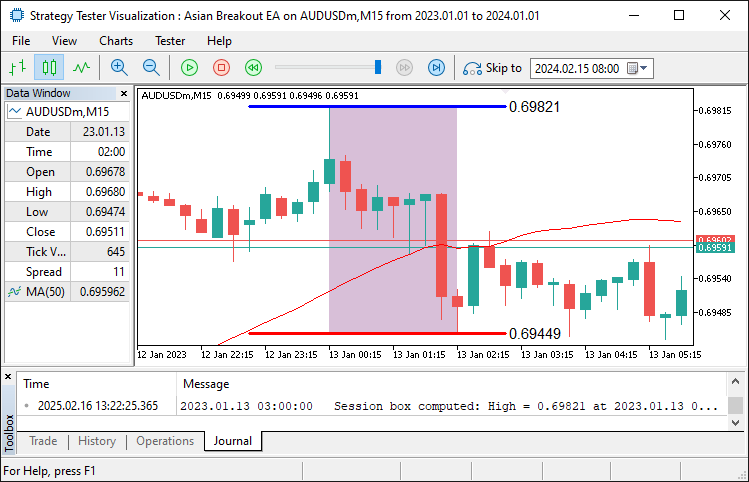
A partir da imagem, podemos ver que conseguimos identificar a caixa e plotá-la no gráfico. Agora podemos prosseguir para a abertura das ordens pendentes próximas aos limites da faixa identificada. Para isso, utilizamos a seguinte lógica.
//--- Build the trade exit time using user-defined hour and minute for today
MqlDateTime exitTimeStruct;                        //--- Declare a structure for exit time
TimeToStruct(currentTime, exitTimeStruct);         //--- Use current time's date components
exitTimeStruct.hour = TradeExitHour;               //--- Set trade exit hour
exitTimeStruct.min  = TradeExitMinute;             //--- Set trade exit minute
exitTimeStruct.sec  = 0;                           //--- Set seconds to 0
datetime tradeExitTime = StructToTime(exitTimeStruct); //--- Convert exit time structure to datetime

//--- If the session box is calculated, orders are not placed yet, and current time is before trade exit time, place orders
if(boxCalculated && !ordersPlaced && currentTime < tradeExitTime){
   double maBuffer[];                           //--- Declare array to hold MA values
   ArraySetAsSeries(maBuffer, true);            //--- Set the array as series (newest first)
   if(CopyBuffer(maHandle, 0, 0, 1, maBuffer) <= 0){  //--- Copy 1 value from the MA buffer
      Print("Failed to copy MA buffer.");       //--- Print error if buffer copy fails
      return;                                   //--- Exit the function if error occurs
   }
   double maValue = maBuffer[0];                 //--- Retrieve the current MA value

   double currentPrice = SymbolInfoDouble(_Symbol, SYMBOL_BID); //--- Get current bid price
   bool bullish = (currentPrice > maValue);      //--- Determine bullish condition
   bool bearish = (currentPrice < maValue);       //--- Determine bearish condition

   double offsetPrice = BreakoutOffsetPips * _Point; //--- Convert pips to price units

   //--- If bullish, place a Buy Stop order
   if(bullish){
      double entryPrice = BoxHigh + offsetPrice; //--- Set entry price just above the session high
      double stopLoss   = BoxLow - offsetPrice;    //--- Set stop loss below the session low
      double risk       = entryPrice - stopLoss;     //--- Calculate risk per unit
      double takeProfit = entryPrice + risk * RiskToReward; //--- Calculate take profit using risk/reward ratio
      if(obj_Trade.BuyStop(LotSize, entryPrice, _Symbol, stopLoss, takeProfit, ORDER_TIME_GTC, 0, "Asian Breakout EA")){
         Print("Placed Buy Stop order at ", entryPrice); //--- Print order confirmation
         ordersPlaced = true;                        //--- Set flag indicating an order has been placed
      }
      else{
         Print("Buy Stop order failed: ", obj_Trade.ResultRetcodeDescription()); //--- Print error if order fails
      }
   }
   //--- If bearish, place a Sell Stop order
   else if(bearish){
      double entryPrice = BoxLow - offsetPrice;  //--- Set entry price just below the session low
      double stopLoss   = BoxHigh + offsetPrice;   //--- Set stop loss above the session high
      double risk       = stopLoss - entryPrice;    //--- Calculate risk per unit
      double takeProfit = entryPrice - risk * RiskToReward; //--- Calculate take profit using risk/reward ratio
      if(obj_Trade.SellStop(LotSize, entryPrice, _Symbol, stopLoss, takeProfit, ORDER_TIME_GTC, 0, "Asian Breakout EA")){
         Print("Placed Sell Stop order at ", entryPrice); //--- Print order confirmation
         ordersPlaced = true;                       //--- Set flag indicating an order has been placed
      }
      else{
         Print("Sell Stop order failed: ", obj_Trade.ResultRetcodeDescription()); //--- Print error if order fails
      }
   }
}
Aqui, construímos o horário de saída da negociação declarando uma estrutura MqlDateTime chamada "exitTimeStruct". Em seguida, utilizamos a função TimeToStruct para decompor o horário atual em seus componentes e atribuímos "TradeExitHour" e "TradeExitMinute" definidos pelo usuário (com segundos definidos como 0) à estrutura "exitTimeStruct". Depois, convertemos essa estrutura novamente para um valor datetime chamando a função StructToTime, resultando em "tradeExitTime". Após isso, se a caixa da sessão tiver sido calculada, nenhuma ordem tiver sido colocada e o horário atual for anterior a "tradeExitTime", prosseguimos para colocar as ordens.
Declaramos um array "maBuffer" para armazenar valores da média móvel e chamamos a função ArraySetAsSeries para garantir que o array seja indexado com os dados mais recentes primeiro. Em seguida, utilizamos a função CopyBuffer para recuperar o valor mais recente da média móvel (usando "maHandle") para "maBuffer". Comparamos esse valor da média móvel com o preço bid atual (obtido via função SymbolInfoDouble) para determinar se o mercado está em tendência de alta ou de baixa. Com base nessa condição, calculamos o preço de entrada apropriado, o stop loss e o take profit utilizando o parâmetro "BreakoutOffsetPips", e então colocamos uma ordem Buy Stop usando o método "obj_Trade.BuyStop" ou uma ordem Sell Stop usando o método "obj_Trade.SellStop".
Por fim, imprimimos uma mensagem de confirmação se a ordem for colocada com sucesso ou uma mensagem de erro caso falhe, e definimos a flag "ordersPlaced" conforme o resultado. Ao executar o programa, obtemos o seguinte resultado.
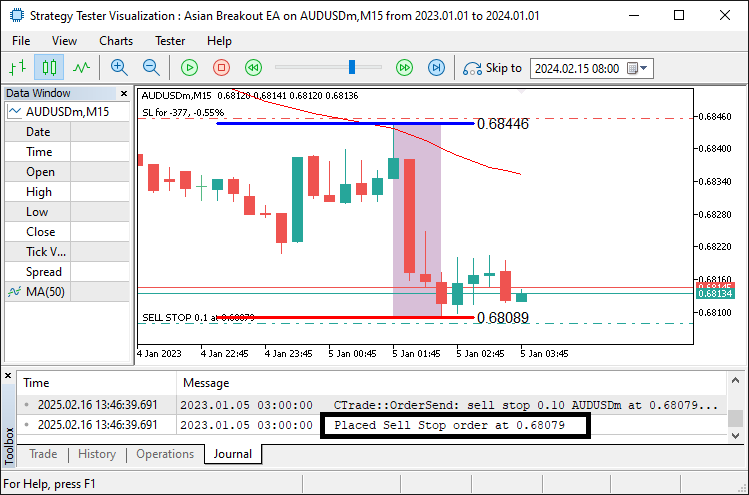
A partir da função, podemos ver que, uma vez que ocorre o rompimento, colocamos a ordem pendente de acordo com a direção do filtro da média móvel, juntamente com as ordens de stop correspondentes. O que resta agora é encerrar as posições ou excluir as ordens pendentes quando o horário não estiver dentro do período de negociação.
//--- If current time is at or past trade exit time, close positions and cancel pending orders
if(currentTime >= tradeExitTime){
   CloseOpenPositions();                          //--- Close all open positions for this EA
   CancelPendingOrders();                         //--- Cancel all pending orders for this EA
   boxCalculated = false;                         //--- Reset session box calculated flag
   ordersPlaced  = false;                         //--- Reset order placed flag
}
Aqui, verificamos se o horário atual atingiu ou ultrapassou o horário de saída da negociação. Se isso ocorreu, chamamos a função "CloseOpenPositions" para fechar todas as posições abertas associadas ao EA e, em seguida, chamamos a função "CancelPendingOrders" para cancelar quaisquer ordens pendentes. Após a execução dessas funções, redefinimos as flags "boxCalculated" e "ordersPlaced" para false, preparando o programa para uma nova sessão. As funções personalizadas utilizadas são as seguintes.
//+------------------------------------------------------------------+
//| Function: CloseOpenPositions                                     |
//| Purpose: Close all open positions with the set magic number      |
//+------------------------------------------------------------------+
void CloseOpenPositions(){
   int totalPositions = PositionsTotal();           //--- Get total number of open positions
   for(int i = totalPositions - 1; i >= 0; i--){      //--- Loop through positions in reverse order
      ulong ticket = PositionGetTicket(i);           //--- Get ticket number for each position
      if(PositionSelectByTicket(ticket)){            //--- Select position by ticket
         if(PositionGetInteger(POSITION_MAGIC) == MagicNumber){ //--- Check if position belongs to this EA
            if(!obj_Trade.PositionClose(ticket))        //--- Attempt to close position
              Print("Failed to close position ", ticket, ": ", obj_Trade.ResultRetcodeDescription()); //--- Print error if closing fails
            else
              Print("Closed position ", ticket);    //--- Confirm position closed
         }
      }
   }
}

//+------------------------------------------------------------------+
//| Function: CancelPendingOrders                                    |
//| Purpose: Cancel all pending orders with the set magic number     |
//+------------------------------------------------------------------+
void CancelPendingOrders(){
   int totalOrders = OrdersTotal();                 //--- Get total number of pending orders
   for(int i = totalOrders - 1; i >= 0; i--){         //--- Loop through orders in reverse order
      ulong ticket = OrderGetTicket(i);              //--- Get ticket number for each order
      if(OrderSelect(ticket)){                       //--- Select order by ticket
         int type = (int)OrderGetInteger(ORDER_TYPE); //--- Retrieve order type
         if(OrderGetInteger(ORDER_MAGIC) == MagicNumber && //--- Check if order belongs to this EA
            (type == ORDER_TYPE_BUY_STOP || type == ORDER_TYPE_SELL_STOP)){
            if(!obj_Trade.OrderDelete(ticket))         //--- Attempt to delete pending order
              Print("Failed to cancel pending order ", ticket); //--- Print error if deletion fails
            else
              Print("Canceled pending order ", ticket); //--- Confirm pending order canceled
         }
      }
   }
}
Aqui, na função "CloseOpenPositions", primeiro recuperamos o número total de posições abertas utilizando a função PositionsTotal e então percorremos cada posição em ordem inversa. Para cada posição, obtemos seu ticket utilizando PositionGetTicket e selecionamos a posição com PositionSelectByTicket. Em seguida, verificamos se o valor POSITION_MAGIC corresponde ao "MagicNumber" definido pelo usuário para garantir que a posição pertença ao nosso EA; se pertencer, tentamos fechá-la utilizando a função "obj_Trade.PositionClose" e imprimimos uma mensagem de confirmação ou erro (utilizando "obj_Trade.ResultRetcodeDescription") conforme o resultado.
Na função "CancelPendingOrders", primeiro recuperamos o número total de ordens pendentes utilizando a função OrdersTotal e percorremos essas ordens em ordem inversa. Para cada ordem, obtemos seu ticket com OrderGetTicket e a selecionamos utilizando OrderSelect. Depois verificamos se o valor ORDER_MAGIC corresponde ao nosso "MagicNumber" e se o tipo da ordem é "ORDER_TYPE_BUY_STOP" ou ORDER_TYPE_SELL_STOP. Se ambas as condições forem atendidas, tentamos cancelar a ordem utilizando a função "obj_Trade.OrderDelete", imprimindo uma mensagem de sucesso ou erro conforme o resultado. Ao executar o programa, obtemos os seguintes resultados.
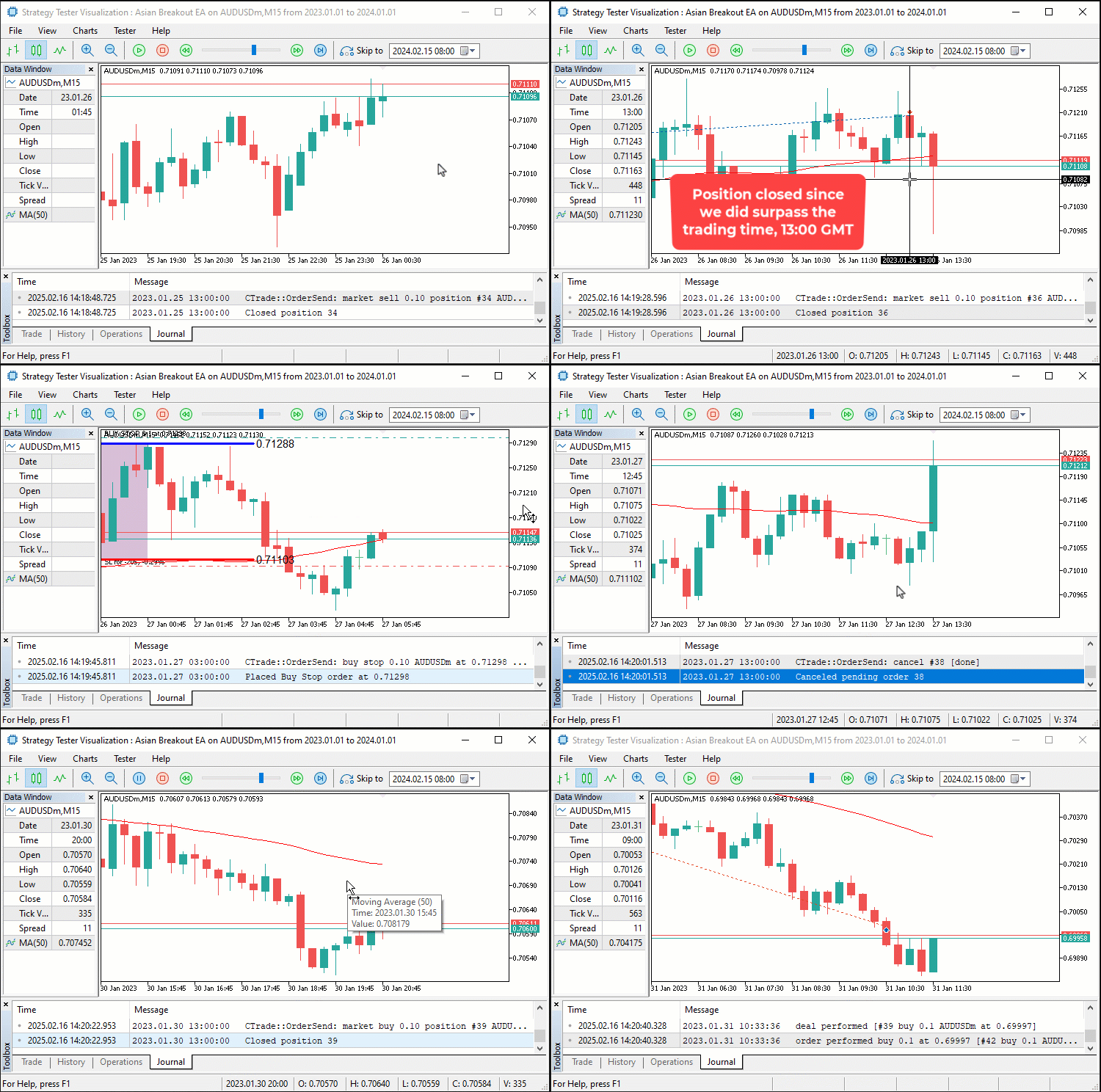
A partir da visualização, podemos ver que identificamos a sessão asiática, plotamos no gráfico, colocamos ordens pendentes conforme a direção da média móvel e cancelamos as ordens ou posições ativadas caso ainda existam ao ultrapassar o horário de negociação definido pelo usuário, alcançando assim nosso objetivo. O que resta é realizar o backtesting do programa, tratado na próxima seção.
Backtesting e Otimização
Após backtesting detalhado por 1 ano, 2023, utilizando as configurações padrão, obtivemos os seguintes resultados.
Gráfico de backtest:
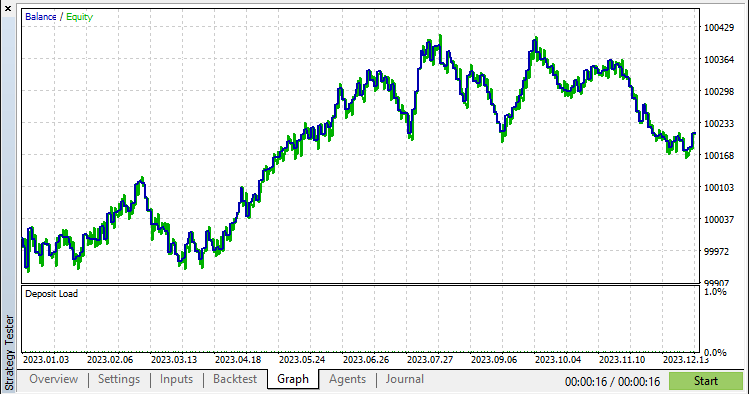
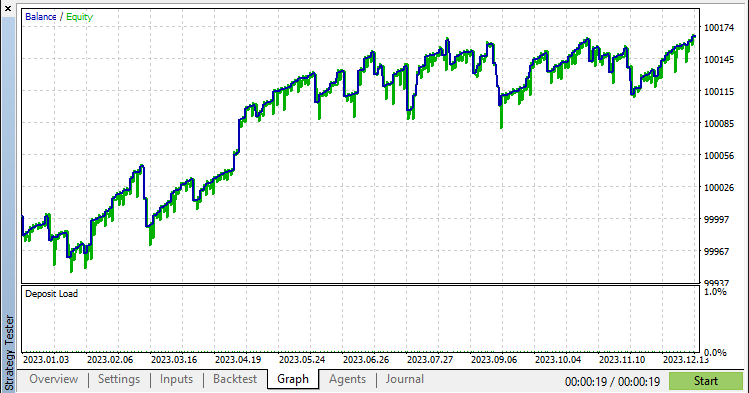
Pela imagem, podemos ver que o gráfico é bastante satisfatório, mas podemos melhorá-lo aplicando um mecanismo de trailing stop, o que foi alcançado com a seguinte lógica.
//+------------------------------------------------------------------+
//|        FUNCTION TO APPLY TRAILING STOP                           |
//+------------------------------------------------------------------+
void applyTrailingSTOP(double slPoints, CTrade &trade_object,int magicNo=0){
   double buySL = NormalizeDouble(SymbolInfoDouble(_Symbol,SYMBOL_BID)-slPoints,_Digits); //--- Calculate SL for buy positions
   double sellSL = NormalizeDouble(SymbolInfoDouble(_Symbol,SYMBOL_ASK)+slPoints,_Digits); //--- Calculate SL for sell positions

   for (int i = PositionsTotal() - 1; i >= 0; i--){ //--- Iterate through all open positions
      ulong ticket = PositionGetTicket(i);          //--- Get position ticket
      if (ticket > 0){                              //--- If ticket is valid
         if (PositionGetString(POSITION_SYMBOL) == _Symbol &&
            (magicNo == 0 || PositionGetInteger(POSITION_MAGIC) == magicNo)){ //--- Check symbol and magic number
            if (PositionGetInteger(POSITION_TYPE) == POSITION_TYPE_BUY &&
               buySL > PositionGetDouble(POSITION_PRICE_OPEN) &&
               (buySL > PositionGetDouble(POSITION_SL) ||
               PositionGetDouble(POSITION_SL) == 0)){ //--- Modify SL for buy position if conditions are met
               trade_object.PositionModify(ticket,buySL,PositionGetDouble(POSITION_TP));
            }
            else if (PositionGetInteger(POSITION_TYPE) == POSITION_TYPE_SELL &&
               sellSL < PositionGetDouble(POSITION_PRICE_OPEN) &&
               (sellSL < PositionGetDouble(POSITION_SL) ||
               PositionGetDouble(POSITION_SL) == 0)){ //--- Modify SL for sell position if conditions are met
               trade_object.PositionModify(ticket,sellSL,PositionGetDouble(POSITION_TP));
            }
         }
      }
   }
}

//---- CALL THE FUNCTION IN THE TICK EVENT HANDLER

if (PositionsTotal() > 0){                       //--- If there are open positions
   applyTrailingSTOP(30*_Point,obj_Trade,0);  //--- Apply a trailing stop
}
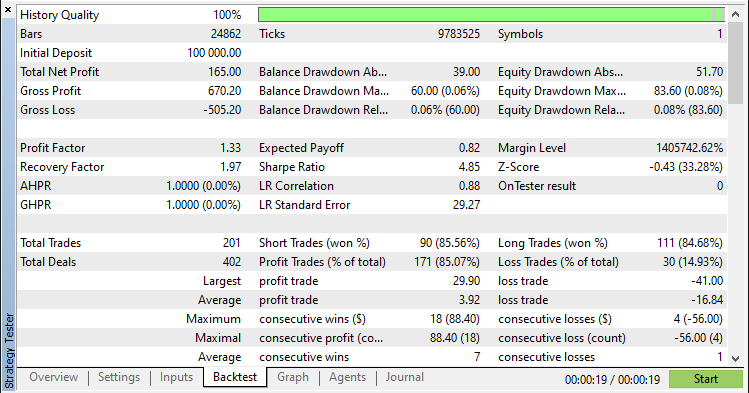
Após aplicar a função e testar, os novos resultados são os seguintes.
Gráfico de backtest:
Relatório de backtest:
Conclusão
Em conclusão, desenvolvemos com sucesso um Expert Advisor em MQL5 que automatiza a Asian Breakout Strategy com precisão. Ao utilizar detecção de faixa baseada em sessão, filtragem de tendência por meio de uma média móvel e gestão dinâmica de risco, construímos um sistema que identifica zonas-chave de consolidação e executa negociações de rompimento de forma eficiente.
Aviso: Este artigo é apenas para fins educacionais. Negociar envolve risco financeiro significativo, e as condições de mercado podem ser imprevisíveis. Embora a estratégia apresentada forneça uma abordagem estruturada para negociação de rompimentos, ela não garante lucratividade. Backtesting abrangente e gestão adequada de risco são essenciais antes de implantar este programa em ambiente real.
Ao implementar essas técnicas, você pode aprimorar suas capacidades de negociação algorítmica, refinar suas habilidades de análise técnica e evoluir ainda mais sua estratégia de trading. Boa sorte em sua jornada no trading!
Traduzido do Inglês pela MetaQuotes Ltd.
Artigo original: https://www.mql5.com/en/articles/17239
Aviso: Todos os direitos sobre esses materiais pertencem à MetaQuotes Ltd. É proibida a reimpressão total ou parcial.
Esse artigo foi escrito por um usuário do site e reflete seu ponto de vista pessoal. A MetaQuotes Ltd. não se responsabiliza pela precisão das informações apresentadas nem pelas possíveis consequências decorrentes do uso das soluções, estratégias ou recomendações descritas.

 Do básico ao intermediário: Sub Janelas (IV)
 Automatizando Estratégias de Trading em MQL5 (Parte 8): Construindo um Expert Advisor com Padrões Harmônicos Butterfly
 Técnicas do MQL5 Wizard que você deve conhecer (Parte 55): SAC com Prioritized Experience Replay
 Construindo Expert Advisors Auto Otimizáveis em MQL5 (Parte 6): Prevenção de Stop Out

- Aplicativos de negociação gratuitos
- 8 000+ sinais para cópia
- Notícias econômicas para análise dos mercados financeiros
Você concorda com a política do site e com os termos de uso