

Automatización de estrategias de trading en MQL5 (Parte 17): Dominar la estrategia de scalping Grid-Mart con un panel de control dinámico
 645
645
 5
5

Introducción
En nuestro artículo anterior (Parte 16), automatizamos la estrategia Midnight Range Breakout con la estrategia Break of Structure (BoS) para capturar las rupturas de precios. Ahora, en la parte 17, nos centramos en automatizar la estrategia de scalping Grid-Mart en MetaQuotes Language 5 (MQL5), desarrollando un asesor experto que ejecuta operaciones Martingale basadas en cuadrículas y cuenta con un panel de control dinámico para la supervisión en tiempo real. Cubriremos los siguientes temas:
- Entendiendo la estrategia de scalping de Grid-Mart
- Implementación en MQL5
- Pruebas retrospectivas
- Conclusión
Al final de este artículo tendrá un programa MQL5 completamente funcional que analiza los mercados con precisión y visualiza las métricas comerciales. ¡Comencemos!
Entendiendo la estrategia de scalping de Grid-Mart
La estrategia de scalping Grid-Mart emplea un enfoque martingala basado en una cuadrícula, colocando órdenes de compra o venta a intervalos de precios fijos (por ejemplo, 2,0 pips) para obtener pequeñas ganancias de las fluctuaciones del mercado, al tiempo que aumenta el tamaño de los lotes después de las pérdidas para recuperar el capital rápidamente. Se basa en el trading de alta frecuencia, con el objetivo de obtener ganancias modestas (por ejemplo, 4 pips) por operación. Sin embargo, requiere una gestión cuidadosa del riesgo debido al crecimiento exponencial del tamaño de los lotes, que está limitado por límites configurables, como los niveles máximos de la red y los umbrales de reducción diaria. Esta estrategia prospera en mercados volátiles, pero exige una configuración precisa para evitar caídas significativas durante tendencias prolongadas.
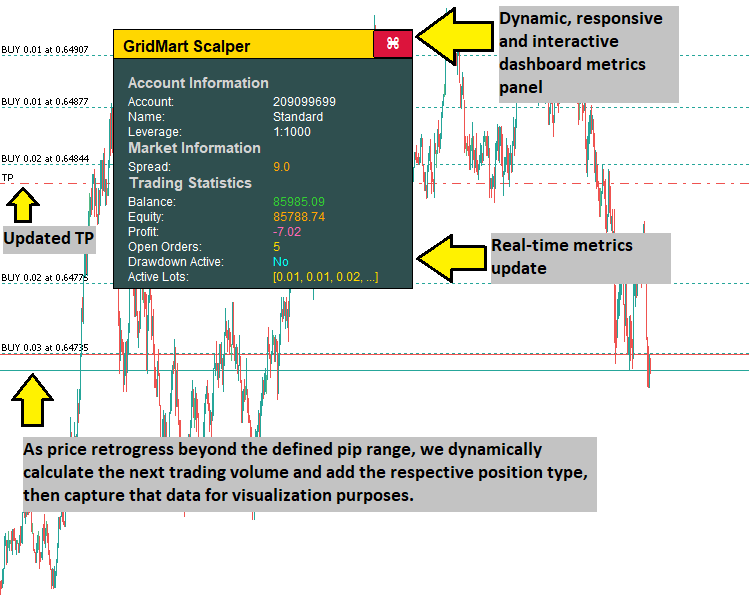
Nuestro plan de implementación consiste en crear un Asesor Experto MQL5 para automatizar la estrategia Grid-Mart mediante el cálculo de los intervalos de la cuadrícula, la gestión de la progresión del tamaño de los lotes y la ejecución de operaciones con niveles predefinidos de stop-loss y take-profit. El programa contará con un panel de control dinámico para mostrar métricas en tiempo real, como el diferencial, los tamaños de los lotes activos y el estado de la cuenta, con imágenes codificadas por colores para facilitar la toma de decisiones. Los sólidos controles de riesgo, incluidos los límites de reducción y las restricciones del tamaño de la cuadrícula, garantizarán un rendimiento constante en todas las condiciones del mercado. En pocas palabras, esto es lo que pretendemos crear.
Implementación en MQL5
Para crear el programa en MQL5, abra el MetaEditor, vaya al Navegador, localice la carpeta Indicators, haga clic en la pestaña «Nuevo» y siga las instrucciones para crear el archivo. Una vez creado, en el entorno de programación, tendremos que declarar algunas variables globales que utilizaremos a lo largo del programa.
//+------------------------------------------------------------------+
//|                                      GridMart Scalper MT5 EA.mq5 |
//|                           Copyright 2025, Allan Munene Mutiiria. |
//|                                   https://t.me/Forex_Algo_Trader |
//+------------------------------------------------------------------+

#property copyright "Copyright 2025, Allan Munene Mutiiria."
#property link      "https://t.me/Forex_Algo_Trader"
#property version   "1.00"

#include <Trade/Trade.mqh>

//--- Declare trade object to execute trading operations
CTrade obj_Trade;

//--- Trading state variables
double dailyBalance = 0;           //--- Store the daily starting balance for drawdown monitoring
datetime dailyResetTime = 0;       //--- Track the last daily reset time
bool tradingEnabled = true;        //--- Indicate if trading is allowed based on drawdown limits
datetime lastBarTime = 0;          //--- Store the timestamp of the last processed bar
bool hasBuyPosition = false;       //--- Flag if there is an active buy position
bool hasSellPosition = false;      //--- Flag if there is an active sell position
bool openNewTrade = false;         //--- Signal when a new trade should be opened
int activeOrders = 0;              //--- Count the number of active orders
double latestBuyPrice = 0;         //--- Store the price of the latest buy order
double latestSellPrice = 0;        //--- Store the price of the latest sell order
double calculatedLot = 0;          //--- Hold the calculated lot size for new orders
bool modifyPositions = false;      //--- Indicate if position SL/TP need modification
double weightedPrice = 0;          //--- Track the weighted average price of open positions
double targetTP = 0;               //--- Store the target take-profit price
double targetSL = 0;               //--- Store the target stop-loss price
bool updateSLTP = false;           //--- Signal when SL/TP updates are needed
int cycleCount = 0;                //--- Count the number of trading cycles
double totalVolume = 0;            //--- Accumulate the total volume of open positions
bool dashboardVisible = true;      //--- Control visibility of the dashboard

//--- Dashboard dragging and hover state variables
bool panelDragging = false;        //--- Indicate if the dashboard is being dragged
int panelDragX = 0;                //--- Store the X-coordinate of the mouse during dragging
int panelDragY = 0;                //--- Store the Y-coordinate of the mouse during dragging
int panelStartX = 0;               //--- Store the initial X-position of the dashboard
int panelStartY = 0;               //--- Store the initial Y-position of the dashboard
bool closeButtonHovered = false;   //--- Track if the close button is hovered
bool headerHovered = false;        //--- Track if the header is hovered

input group "Main EA Settings"
input string EA_NAME = "GridMart Scalper";    // EA Name
input bool CONTINUE_TRADING = true;           // Continue Trading After Cycle
input int MAX_CYCLES = 1000;                  // Max Trading Cycles
input int START_HOUR = 0;                     // Start Trading Hour
input int END_HOUR = 23;                      // End Trading Hour
input int LOT_MODE = 1;                       // Lot Mode (1=Multiplier, 2=Fixed)
input double BASE_LOT = 0.01;                 // Base Lot Size
input int STOP_LOSS_PIPS = 100;               // Stop Loss (Pips)
input int TAKE_PROFIT_PIPS =
3 ;               // Take Profit (Pips)
input double GRID_DISTANCE = 3.0;             // Grid Distance (Pips)
input double LOT_MULTIPLIER = 1.3;            // Lot Multiplier
input int MAX_GRID_LEVELS = 30;               // Max Grid Levels
input int LOT_PRECISION = 2;                  // Lot Decimal Precision
input int MAGIC = 1234567890;                 // Magic Number
input color TEXT_COLOR = clrWhite;            // Dashboard Text Color

input group "EA Risk Management Settings"
input bool ENABLE_DAILY_DRAWDOWN = false;     // Enable Daily Drawdown Limiter
input double DRAWDOWN_LIMIT = -1.0;           // Daily Drawdown Threshold (-%)
input bool CLOSE_ON_DRAWDOWN = false;         // Close Positions When Threshold Hit

input group "Dashboard Settings"
input int PANEL_X = 30;                       // Initial X Distance (pixels)
input int PANEL_Y = 50;                       // Initial Y Distance (pixels)

//--- Pip value for price calculations
double pipValue;

//--- Dashboard constants
const int DASHBOARD_WIDTH = 300;                   //--- Width of the dashboard in pixels
const int DASHBOARD_HEIGHT = 260;                  //--- Height of the dashboard in pixels
const int HEADER_HEIGHT = 30;                      //--- Height of the header section
const int CLOSE_BUTTON_WIDTH = 40;                 //--- Width of the close button
const int CLOSE_BUTTON_HEIGHT = 28;                //--- Height of the close button
const color HEADER_NORMAL_COLOR = clrGold;         //--- Normal color of the header
const color HEADER_HOVER_COLOR = C'200,150,0';     //--- Header color when hovered
const color BACKGROUND_COLOR = clrDarkSlateGray;   //--- Background color of the dashboard
const color BORDER_COLOR = clrBlack;               //--- Border color of dashboard elements
const color SECTION_TITLE_COLOR = clrLightGray;    //--- Color for section titles
const color CLOSE_BUTTON_NORMAL_BG = clrCrimson;   //--- Normal background color of the close button
const color CLOSE_BUTTON_HOVER_BG = clrDodgerBlue; //--- Hover background color of the close button
const color CLOSE_BUTTON_NORMAL_BORDER = clrBlack; //--- Normal border color of the close button
const color CLOSE_BUTTON_HOVER_BORDER = clrBlue;   //--- Hover border color of the close button
const color VALUE_POSITIVE_COLOR = clrLimeGreen;   //--- Color for positive values (e.g., profit, low spread)
const color VALUE_NEGATIVE_COLOR = clrOrange;      //--- Color for negative or warning values (e.g., loss, high spread)
const color VALUE_LOSS_COLOR = clrHotPink;         //--- Color for negative profit
const color VALUE_ACTIVE_COLOR = clrGold;          //--- Color for active states (e.g., open orders, medium spread)
const color VALUE_DRAWDOWN_INACTIVE = clrAqua;     //--- Color for inactive drawdown state
const color VALUE_DRAWDOWN_ACTIVE = clrRed;        //--- Color for active drawdown state
const int FONT_SIZE_HEADER = 12;                   //--- Header text font size (pt)
const int FONT_SIZE_SECTION_TITLE = 11;            //--- Section title font size (pt)
const int FONT_SIZE_METRIC = 9;                    //--- Metric label/value font size (pt)
const int FONT_SIZE_BUTTON = 12;                   //--- Button font size (pt)
Aquí implementamos la estrategia en MQL5, inicializando los componentes principales del programa para automatizar las operaciones martingala basadas en cuadrículas y dar soporte a un panel de control dinámico. Declaramos el objeto «CTrade» como «obj_Trade» utilizando «#include <Trade/Trade.mqh>» para gestionar la ejecución de las operaciones. Definimos variables como «dailyBalance» para realizar un seguimiento del saldo de la cuenta, «lastBarTime» para almacenar marcas de tiempo de barras con la función iTime, «hasBuyPosition» y «hasSellPosition» para marcar operaciones activas, y «activeOrders» para contar posiciones abiertas.
Establecemos inputs como «GRID_DISTANCE = 3.0» para los intervalos de la cuadrícula, «LOT_MULTIPLIER = 1.3» para el escalado de lotes y «TAKE_PROFIT_PIPS = 3» para los objetivos de beneficio, utilizando «MAGIC = 1234567890» para identificar las operaciones. Incluimos «ENABLE_DAILY_DRAWDOWN» y «DRAWDOWN_LIMIT» para el control de riesgos, con «cycleCount» y «MAX_CYCLES» limitando los ciclos comerciales. Configuramos el panel de control con «DASHBOARD_WIDTH = 300», «FONT_SIZE_METRIC = 9», «panelDragging» para la función de arrastre, «closeButtonHovered» para los efectos al pasar el cursor y «VALUE_POSITIVE_COLOR = clrLimeGreen» para los elementos visuales, utilizando «pipValue» para obtener precios precisos. Esto nos da la interfaz de usuario como sigue.
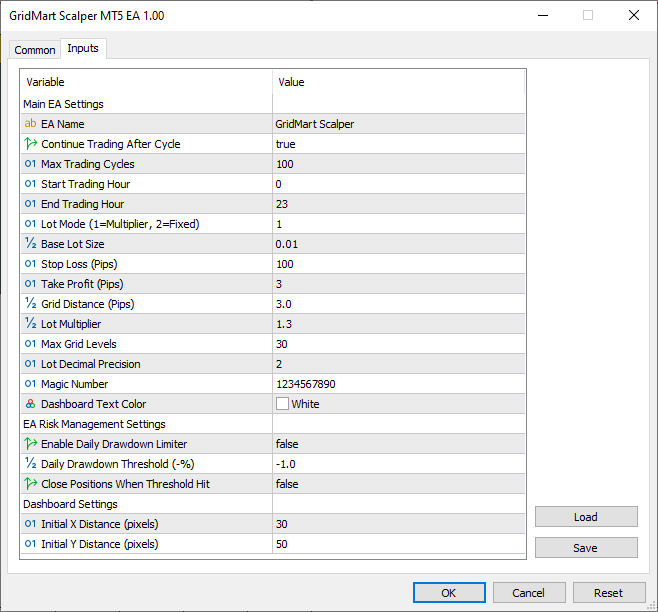
Desde la imagen podemos ver que podemos controlar el programa desde la interfaz de usuario definida. Ahora necesitamos continuar definiendo algunas funciones auxiliares que usaremos cuando necesitemos acciones básicas y frecuentes, como el par de divisas o el tipo de posición. Aquí está la lógica que adaptamos para eso.
//+------------------------------------------------------------------+
//| Retrieve the current account balance                             |
//+------------------------------------------------------------------+
double GetAccountBalance() {
   //--- Return the current account balance
   return AccountInfoDouble(ACCOUNT_BALANCE);
}

//+------------------------------------------------------------------+
//| Retrieve the magic number of the selected position               |
//+------------------------------------------------------------------+
long GetPositionMagic() {
   //--- Return the magic number of the selected position
   return PositionGetInteger(POSITION_MAGIC);
}

//+------------------------------------------------------------------+
//| Retrieve the open price of the selected position                 |
//+------------------------------------------------------------------+
double GetPositionOpenPrice() {
   //--- Return the open price of the selected position
   return PositionGetDouble(POSITION_PRICE_OPEN);
}

//+------------------------------------------------------------------+
//| Retrieve the stop-loss price of the selected position            |
//+------------------------------------------------------------------+
double GetPositionSL() {
   //--- Return the stop-loss price of the selected position
   return PositionGetDouble(POSITION_SL);
}

//+------------------------------------------------------------------+
//| Retrieve the take-profit price of the selected position          |
//+------------------------------------------------------------------+
double GetPositionTP() {
   //--- Return the take-profit price of the selected position
   return PositionGetDouble(POSITION_TP);
}

//+------------------------------------------------------------------+
//| Retrieve the symbol of the selected position                     |
//+------------------------------------------------------------------+
string GetPositionSymbol() {
   //--- Return the symbol of the selected position
   return PositionGetString(POSITION_SYMBOL);
}

//+------------------------------------------------------------------+
//| Retrieve the ticket number of the selected position              |
//+------------------------------------------------------------------+
ulong GetPositionTicket() {
   //--- Return the ticket number of the selected position
   return PositionGetInteger(POSITION_TICKET);
}

//+------------------------------------------------------------------+
//| Retrieve the open time of the selected position                  |
//+------------------------------------------------------------------+
datetime GetPositionOpenTime() {
   //--- Return the open time of the selected position as a datetime
   return (datetime)PositionGetInteger(POSITION_TIME);
}

//+------------------------------------------------------------------+
//| Retrieve the type of the selected position                       |
//+------------------------------------------------------------------+
int GetPositionType() {
   //--- Return the type of the selected position (buy/sell)
   return (int)PositionGetInteger(POSITION_TYPE);
}
Utilizamos la función «GetAccountBalance» con la función AccountInfoDouble para recuperar el saldo actual de la cuenta, lo que permite realizar un seguimiento del saldo para la gestión de riesgos.
Implementamos la función «GetPositionMagic» utilizando la función PositionGetInteger para obtener el número mágico de una posición, la función «GetPositionOpenPrice» con PositionGetDouble para obtener el precio de apertura, y las funciones «GetPositionSL» y «GetPositionTP» con «PositionGetDouble» para acceder a los niveles de stop-loss y take-profit, respectivamente, lo que permite realizar cálculos precisos de las operaciones.
Además, definimos la función «GetPositionSymbol» con PositionGetString para verificar el símbolo de una posición, la función «GetPositionTicket» y la función «GetPositionOpenTime» con «PositionGetInteger» para realizar un seguimiento de los identificadores de posición y los tiempos de apertura, y la función «GetPositionType» para determinar el estado de compra o venta, lo que facilita un seguimiento preciso de la posición y la lógica comercial. Ahora podemos pasar a crear el panel de control, y necesitaremos funciones auxiliares para facilitar el trabajo.
//+------------------------------------------------------------------+
//| Create a rectangular object for the dashboard                    |
//+------------------------------------------------------------------+
void CreateRectangle(string name, int x, int y, int width, int height, color bgColor, color borderColor) {
   //--- Check if object does not exist
   if (ObjectFind(0, name) < 0) {
      //--- Create a rectangle label object
      ObjectCreate(0, name, OBJ_RECTANGLE_LABEL, 0, 0, 0);
   }
   //--- Set X-coordinate
   ObjectSetInteger(0, name, OBJPROP_XDISTANCE, x);
   //--- Set Y-coordinate
   ObjectSetInteger(0, name, OBJPROP_YDISTANCE, y);
   //--- Set width
   ObjectSetInteger(0, name, OBJPROP_XSIZE, width);
   //--- Set height
   ObjectSetInteger(0, name, OBJPROP_YSIZE, height);
   //--- Set background color
   ObjectSetInteger(0, name, OBJPROP_BGCOLOR, bgColor);
   //--- Set border type to flat
   ObjectSetInteger(0, name, OBJPROP_BORDER_TYPE, BORDER_FLAT);
   //--- Set border color
   ObjectSetInteger(0, name, OBJPROP_COLOR, borderColor);
   //--- Set border width
   ObjectSetInteger(0, name, OBJPROP_WIDTH, 1);
   //--- Set object to foreground
   ObjectSetInteger(0, name, OBJPROP_BACK, false);
   //--- Disable object selection
   ObjectSetInteger(0, name, OBJPROP_SELECTABLE, false);
   //--- Hide object from object list
   ObjectSetInteger(0, name, OBJPROP_HIDDEN, true);
}

//+------------------------------------------------------------------+
//| Create a text label for the dashboard                            |
//+------------------------------------------------------------------+
void CreateTextLabel(string name, int x, int y, string text, color clr, int fontSize, string font = "Arial") {
   //--- Check if object does not exist
   if (ObjectFind(0, name) < 0) {
      //--- Create a text label object
      ObjectCreate(0, name, OBJ_LABEL, 0, 0, 0);
   }
   //--- Set X-coordinate
   ObjectSetInteger(0, name, OBJPROP_XDISTANCE, x);
   //--- Set Y-coordinate
   ObjectSetInteger(0, name, OBJPROP_YDISTANCE, y);
   //--- Set label text
   ObjectSetString(0, name, OBJPROP_TEXT, text);
   //--- Set font
   ObjectSetString(0, name, OBJPROP_FONT, font);
   //--- Set font size
   ObjectSetInteger(0, name, OBJPROP_FONTSIZE, fontSize);
   //--- Set text color
   ObjectSetInteger(0, name, OBJPROP_COLOR, clr);
   //--- Set object to foreground
   ObjectSetInteger(0, name, OBJPROP_BACK, false);
   //--- Disable object selection
   ObjectSetInteger(0, name, OBJPROP_SELECTABLE, false);
   //--- Hide object from object list
   ObjectSetInteger(0, name, OBJPROP_HIDDEN, true);
}

//+------------------------------------------------------------------+
//| Create a button for the dashboard                                |
//+------------------------------------------------------------------+
void CreateButton(string name, string text, int x, int y, int width, int height, color textColor, color bgColor, int fontSize, color borderColor, bool isBack, string font = "Arial") {
   //--- Check if object does not exist
   if (ObjectFind(0, name) < 0) {
      //--- Create a button object
      ObjectCreate(0, name, OBJ_BUTTON, 0, 0, 0);
   }
   //--- Set X-coordinate
   ObjectSetInteger(0, name, OBJPROP_XDISTANCE, x);
   //--- Set Y-coordinate
   ObjectSetInteger(0, name, OBJPROP_YDISTANCE, y);
   //--- Set width
   ObjectSetInteger(0, name, OBJPROP_XSIZE, width);
   //--- Set height
   ObjectSetInteger(0, name, OBJPROP_YSIZE, height);
   //--- Set button text
   ObjectSetString(0, name, OBJPROP_TEXT, text);
   //--- Set font
   ObjectSetString(0, name, OBJPROP_FONT, font);
   //--- Set font size
   ObjectSetInteger(0, name, OBJPROP_FONTSIZE, fontSize);
   //--- Set text color
   ObjectSetInteger(0, name, OBJPROP_COLOR, textColor);
   //--- Set background color
   ObjectSetInteger(0, name, OBJPROP_BGCOLOR, bgColor);
   //--- Set border color
   ObjectSetInteger(0, name, OBJPROP_BORDER_COLOR, borderColor);
   //--- Set background rendering
   ObjectSetInteger(0, name, OBJPROP_BACK, isBack);
   //--- Reset button state
   ObjectSetInteger(0, name, OBJPROP_STATE, false);
   //--- Disable button selection
   ObjectSetInteger(0, name, OBJPROP_SELECTABLE, false);
   //--- Hide button from object list
   ObjectSetInteger(0, name, OBJPROP_HIDDEN, true);
}
Aquí definimos la función «CreateRectangle» con las funciones ObjectCreate y ObjectSetInteger para dibujar elementos rectangulares como el fondo y el encabezado del panel de control, estableciendo propiedades como la posición, el tamaño y los colores para obtener un diseño pulido. Implementamos la función «CreateTextLabel», utilizando «ObjectCreate» y ObjectSetString para mostrar métricas como el spread y el tamaño de los lotes, con ajustes de fuente y color personalizables para una lectura clara.
Además, definimos la función «CreateButton» para añadir botones interactivos, como el botón de cierre, que permiten acciones del usuario con estilos personalizados y efectos al pasar el cursor, lo que garantiza una experiencia de panel de control fluida y visualmente intuitiva. Ahora podemos utilizar estas funciones para crear los elementos del panel de control en una nueva función, pero como necesitaremos el recuento total de beneficios, definamos la función para ello.
//+------------------------------------------------------------------+
//| Calculate the total unrealized profit of open positions          |
//+------------------------------------------------------------------+
double CalculateTotalProfit() {
   //--- Initialize profit accumulator
   double profit = 0;
   //--- Iterate through open positions
   for (int i = PositionsTotal() - 1; i >= 0; i--) {
      //--- Get position ticket
      ulong ticket = PositionGetTicket(i);
      //--- Select position by ticket
      if (PositionSelectByTicket(ticket) && GetPositionSymbol() == _Symbol && GetPositionMagic() == MAGIC) {
         //--- Accumulate unrealized profit
         profit += PositionGetDouble(POSITION_PROFIT);
      }
   }
   //--- Return total profit
   return profit;
}
Aquí, implementamos la función «CalculateTotalProfit» con PositionsTotal y PositionGetTicket para iterar a través de las posiciones abiertas, seleccionando cada una mediante PositionSelectByTicket y verificando su símbolo y número mágico con «GetPositionSymbol» y «GetPositionMagic» para obtener el beneficio total. Acumulamos las ganancias no realizadas utilizando la función PositionGetDouble para recuperar las ganancias de cada posición, almacenando la suma en la variable «profit», lo que permite un seguimiento preciso de los resultados de las operaciones. A continuación, podemos continuar componiendo la función de creación del panel de control de la siguiente manera.
//+------------------------------------------------------------------+
//| Update the dashboard with real-time trading metrics              |
//+------------------------------------------------------------------+
void UpdateDashboard() {
   //--- Exit if dashboard is not visible
   if (!dashboardVisible) return;

   //--- Create dashboard background rectangle
   CreateRectangle("Dashboard", panelStartX, panelStartY, DASHBOARD_WIDTH, DASHBOARD_HEIGHT, BACKGROUND_COLOR, BORDER_COLOR);

   //--- Create header rectangle
   CreateRectangle("Header", panelStartX, panelStartY, DASHBOARD_WIDTH, HEADER_HEIGHT, headerHovered ? HEADER_HOVER_COLOR : HEADER_NORMAL_COLOR, BORDER_COLOR);
   //--- Create header text label
   CreateTextLabel("HeaderText", panelStartX + 10, panelStartY + 8, EA_NAME, clrBlack, FONT_SIZE_HEADER, "Arial Bold");

   //--- Create close button
   CreateButton("CloseButton", CharToString(122), panelStartX + DASHBOARD_WIDTH - CLOSE_BUTTON_WIDTH, panelStartY + 1, CLOSE_BUTTON_WIDTH, CLOSE_BUTTON_HEIGHT, clrWhite, closeButtonHovered ? CLOSE_BUTTON_HOVER_BG : CLOSE_BUTTON_NORMAL_BG, FONT_SIZE_BUTTON, closeButtonHovered ? CLOSE_BUTTON_HOVER_BORDER : CLOSE_BUTTON_NORMAL_BORDER, false, "Wingdings");

   //--- Initialize dashboard content layout
   //--- Set initial Y-position below header
   int sectionY = panelStartY + HEADER_HEIGHT + 15;
   //--- Set left column X-position for labels
   int labelXLeft = panelStartX + 15;
   //--- Set right column X-position for values
   int valueXRight = panelStartX + 160;
   //--- Set row height for metrics
   int rowHeight = 15;

   //--- Pre-calculate values for conditional coloring
   //--- Calculate total unrealized profit
   double profit = CalculateTotalProfit();
   //--- Set profit color based on value
   color profitColor = (profit > 0) ? VALUE_POSITIVE_COLOR : (profit < 0) ? VALUE_LOSS_COLOR : TEXT_COLOR;

   //--- Get current equity
   double equity = AccountInfoDouble(ACCOUNT_EQUITY);
   //--- Get current balance
   double balance = AccountInfoDouble(ACCOUNT_BALANCE);
   //--- Set equity color based on comparison with balance
   color equityColor = (equity > balance) ? VALUE_POSITIVE_COLOR : (equity < balance) ? VALUE_NEGATIVE_COLOR : TEXT_COLOR;

   //--- Set balance color based on comparison with daily balance
   color balanceColor = (balance > dailyBalance) ? VALUE_POSITIVE_COLOR : (balance < dailyBalance) ? VALUE_NEGATIVE_COLOR : TEXT_COLOR;

   //--- Set open orders color based on active orders
   color ordersColor = (activeOrders > 0) ? VALUE_ACTIVE_COLOR : TEXT_COLOR;

   //--- Set drawdown active color based on trading state
   color drawdownColor = tradingEnabled ? VALUE_DRAWDOWN_INACTIVE : VALUE_DRAWDOWN_ACTIVE;

   //--- Set lot sizes color based on active orders
   color lotsColor = (activeOrders > 0) ? VALUE_ACTIVE_COLOR : TEXT_COLOR;

   //--- Calculate dynamic spread and color
   //--- Get current ask price
   double ask = SymbolInfoDouble(_Symbol, SYMBOL_ASK);
   //--- Get current bid price
   double bid = SymbolInfoDouble(_Symbol, SYMBOL_BID);
   //--- Calculate spread in points
   double spread = (ask - bid) / Point();
   //--- Format spread with 1 decimal place for display
   string spreadDisplay = DoubleToString(spread, 1);
   //--- Initialize spread color
   color spreadColor;
   //--- Check if spread is low (favorable)
   if (spread <= 2.0) {
      //--- Set color to lime green for low spread
      spreadColor = VALUE_POSITIVE_COLOR;
   }
   //--- Check if spread is medium (moderate)
   else if (spread <= 5.0) {
      //--- Set color to gold for medium spread
      spreadColor = VALUE_ACTIVE_COLOR;
   }
   //--- Spread is high (costly)
   else {
      //--- Set color to orange for high spread
      spreadColor = VALUE_NEGATIVE_COLOR;
   }

   //--- Account Information Section
   //--- Create section title
   CreateTextLabel("SectionAccount", labelXLeft, sectionY, "Account Information", SECTION_TITLE_COLOR, FONT_SIZE_SECTION_TITLE, "Arial Bold");
   //--- Move to next row
   sectionY += rowHeight + 5;
   //--- Create account number label
   CreateTextLabel("AccountNumberLabel", labelXLeft, sectionY, "Account:", TEXT_COLOR, FONT_SIZE_METRIC);
   //--- Create account number value
   CreateTextLabel("AccountNumberValue", valueXRight, sectionY, DoubleToString(AccountInfoInteger(ACCOUNT_LOGIN), 0), TEXT_COLOR, FONT_SIZE_METRIC);
   //--- Move to next row
   sectionY += rowHeight;
   //--- Create account name label
   CreateTextLabel("AccountNameLabel", labelXLeft, sectionY, "Name:", TEXT_COLOR, FONT_SIZE_METRIC);
   //--- Create account name value
   CreateTextLabel("AccountNameValue", valueXRight, sectionY, AccountInfoString(ACCOUNT_NAME), TEXT_COLOR, FONT_SIZE_METRIC);
   //--- Move to next row
   sectionY += rowHeight;
   //--- Create leverage label
   CreateTextLabel("LeverageLabel", labelXLeft, sectionY, "Leverage:", TEXT_COLOR, FONT_SIZE_METRIC);
   //--- Create leverage value
   CreateTextLabel("LeverageValue", valueXRight, sectionY, "1:" + DoubleToString(AccountInfoInteger(ACCOUNT_LEVERAGE), 0), TEXT_COLOR, FONT_SIZE_METRIC);
   //--- Move to next row
   sectionY += rowHeight;

   //--- Market Information Section
   //--- Create section title
   CreateTextLabel("SectionMarket", labelXLeft, sectionY, "Market Information", SECTION_TITLE_COLOR, FONT_SIZE_SECTION_TITLE, "Arial Bold");
   //--- Move to next row
   sectionY += rowHeight + 5;
   //--- Create spread label
   CreateTextLabel("SpreadLabel", labelXLeft, sectionY, "Spread:", TEXT_COLOR, FONT_SIZE_METRIC);
   //--- Create spread value with dynamic color
   CreateTextLabel("SpreadValue", valueXRight, sectionY, spreadDisplay, spreadColor, FONT_SIZE_METRIC);
   //--- Move to next row
   sectionY += rowHeight;

   //--- Trading Statistics Section
   //--- Create section title
   CreateTextLabel("SectionTrading", labelXLeft, sectionY, "Trading Statistics", SECTION_TITLE_COLOR, FONT_SIZE_SECTION_TITLE, "Arial Bold");
   //--- Move to next row
   sectionY += rowHeight + 5;
   //--- Create balance label
   CreateTextLabel("BalanceLabel", labelXLeft, sectionY, "Balance:", TEXT_COLOR, FONT_SIZE_METRIC);
   //--- Create balance value with dynamic color
   CreateTextLabel("BalanceValue", valueXRight, sectionY, DoubleToString(balance, 2), balanceColor, FONT_SIZE_METRIC);
   //--- Move to next row
   sectionY += rowHeight;
   //--- Create equity label
   CreateTextLabel("EquityLabel", labelXLeft, sectionY, "Equity:", TEXT_COLOR, FONT_SIZE_METRIC);
   //--- Create equity value with dynamic color
   CreateTextLabel("EquityValue", valueXRight, sectionY, DoubleToString(equity, 2), equityColor, FONT_SIZE_METRIC);
   //--- Move to next row
   sectionY += rowHeight;
   //--- Create profit label
   CreateTextLabel("ProfitLabel", labelXLeft, sectionY, "Profit:", TEXT_COLOR, FONT_SIZE_METRIC);
   //--- Create profit value with dynamic color
   CreateTextLabel("ProfitValue", valueXRight, sectionY, DoubleToString(profit, 2), profitColor, FONT_SIZE_METRIC);
   //--- Move to next row
   sectionY += rowHeight;
   //--- Create open orders label
   CreateTextLabel("OrdersLabel", labelXLeft, sectionY, "Open Orders:", TEXT_COLOR, FONT_SIZE_METRIC);
   //--- Create open orders value with dynamic color
   CreateTextLabel("OrdersValue", valueXRight, sectionY, IntegerToString(activeOrders), ordersColor, FONT_SIZE_METRIC);
   //--- Move to next row
   sectionY += rowHeight;
   //--- Create drawdown active label
   CreateTextLabel("DrawdownLabel", labelXLeft, sectionY, "Drawdown Active:", TEXT_COLOR, FONT_SIZE_METRIC);
   //--- Create drawdown active value with dynamic color
   CreateTextLabel("DrawdownValue", valueXRight, sectionY, tradingEnabled ? "No" : "Yes", drawdownColor, FONT_SIZE_METRIC);
   //--- Move to next row
   sectionY += rowHeight;

   //--- Active Lot Sizes
   //--- Create active lots label
   CreateTextLabel("ActiveLotsLabel", labelXLeft, sectionY, "Active Lots:", TEXT_COLOR, FONT_SIZE_METRIC);
   //--- Create active lots value with dynamic color
   CreateTextLabel("ActiveLotsValue", valueXRight, sectionY, GetActiveLotSizes(), lotsColor, FONT_SIZE_METRIC);

   //--- Redraw the chart to update display
   ChartRedraw(0);
}
Aquí definimos la función «UpdateDashboard» para generar un panel dinámico con métricas comerciales en tiempo real, lo que proporciona una interfaz completa para supervisar el rendimiento. Comenzamos comprobando la variable «dashboardVisible» para asegurarnos de que las actualizaciones solo se produzcan cuando el panel esté activo, evitando así un procesamiento innecesario. Utilizamos la función «CreateRectangle» para dibujar el panel principal del tablero y el encabezado, estableciendo las dimensiones con «DASHBOARD_WIDTH» y «HEADER_HEIGHT», y aplicando colores como «BACKGROUND_COLOR» y «HEADER_NORMAL_COLOR» o «HEADER_HOVER_COLOR» en función del estado «headerHovered» para obtener información visual.
Utilizamos la función «CreateTextLabel» para mostrar métricas críticas, como el saldo de la cuenta, el capital, los beneficios, el spread, las órdenes abiertas, el estado de la reducción y los tamaños de los lotes activos, organizándolas en secciones como «Información de la cuenta», «Información del mercado» y «Estadísticas de trading». Calculamos el diferencial utilizando la función SymbolInfoDouble para recuperar los precios de compra y venta, aplicando un código de colores condicional con «VALUE_POSITIVE_COLOR» para diferenciales bajos (≤ 2,0 puntos), «VALUE_ACTIVE_COLOR» para diferenciales medios (2,1-5,0 puntos) y «VALUE_NEGATIVE_COLOR» para diferenciales altos (> 5,0 puntos). Puede cambiar esto a sus rangos preferidos. A continuación, utilizamos AccountInfoDouble para obtener el saldo y el capital, y «CalculateTotalProfit» para determinar las ganancias no realizadas, asignando colores como «profitColor» en función del valor de las ganancias para una supervisión intuitiva.
Integramos la función «CreateButton» para añadir un botón de cierre interactivo, con el estilo «CLOSE_BUTTON_WIDTH», «FONT_SIZE_BUTTON» y colores dinámicos («CLOSE_BUTTON_NORMAL_BG» o «CLOSE_BUTTON_HOVER_BG») basados en «closeButtonHovered», lo que mejora la interacción del usuario. Llamamos a la función «GetActiveLotSizes» para mostrar hasta tres tamaños de lote en orden ascendente, utilizando «lotsColor» para distinguirlos visualmente, y gestionamos el diseño con variables como «sectionY», «labelXLeft» y «valueXRight» para un posicionamiento preciso. Finalizamos las actualizaciones con la función ChartRedraw para garantizar una representación fluida. Ahora podemos llamar a esta función en el controlador de eventos OnInit para crear la primera pantalla.
//+------------------------------------------------------------------+
//| Expert initialization function                                   |
//+------------------------------------------------------------------+
int OnInit() {
   //--- Calculate pip value based on symbol digits (3 or 5 digits: multiply by 10)
   pipValue = (_Digits == 3 || _Digits == 5) ? 10.0 * Point() : Point();
   //--- Set the magic number for trade operations
   obj_Trade.SetExpertMagicNumber(MAGIC);
   //--- Initialize dashboard visibility
   dashboardVisible = true;
   //--- Set initial X-coordinate of the dashboard
   panelStartX = PANEL_X;
   //--- Set initial Y-coordinate of the dashboard
   panelStartY = PANEL_Y;
   //--- Initialize the dashboard display
   UpdateDashboard();
   //--- Enable mouse move events for dragging and hovering
   ChartSetInteger(0, CHART_EVENT_MOUSE_MOVE, true);
   //--- Return successful initialization
   return INIT_SUCCEEDED;
}
En el controlador de eventos OnInit, calculamos «pipValue» con la función Point, establecemos «obj_Trade» con «SetExpertMagicNumber» para «MAGIC» y habilitamos «dashboardVisible». Posicionamos el panel de control utilizando «panelStartX» y «panelStartY» con «PANEL_X» y «PANEL_Y», llamamos a la función «UpdateDashboard» para mostrarlo y utilizamos ChartSetInteger para las interacciones del ratón, devolviendo INIT_SUCCEEDED. En el controlador de eventos OnDeInit, nos aseguramos de eliminar los objetos creados de la siguiente manera.
//+------------------------------------------------------------------+
//| Expert deinitialization function                                 |
//+------------------------------------------------------------------+
void OnDeinit(const int reason) {
   //--- Remove all graphical objects from the chart
   ObjectsDeleteAll(0);
   //--- Disable mouse move events
   ChartSetInteger(0, CHART_EVENT_MOUSE_MOVE, false);
}
Simplemente utilizamos la función ObjectsDeleteAll para eliminar todos los objetos del gráfico, ya que ya no los necesitamos. Tras la compilación, este es el resultado.
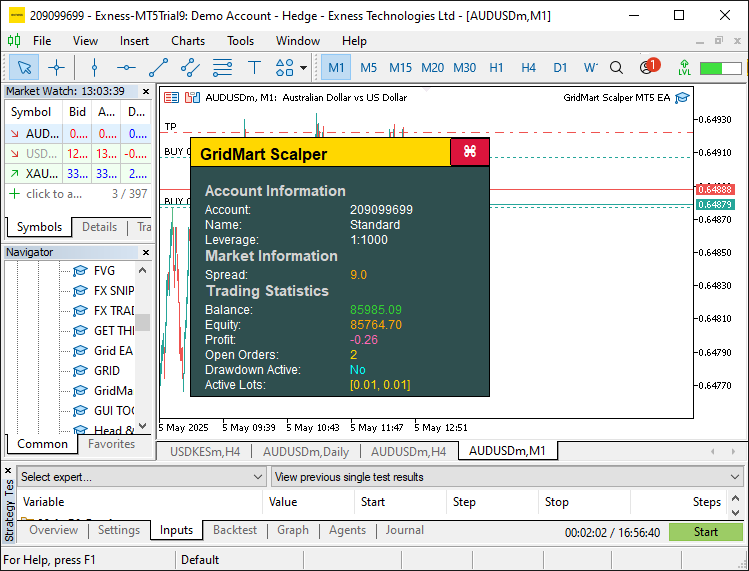
Para que el panel sea inalterable, llamamos al controlador de eventos OnChartEvent para gestionar los efectos de desplazamiento y arrastre. Esta es la lógica que implementamos para que esto funcione.
//+------------------------------------------------------------------+
//| Expert chart event handler                                       |
//+------------------------------------------------------------------+
void OnChartEvent(const int id, const long &lparam, const double &dparam, const string &sparam) {
   //--- Exit if dashboard is not visible
   if (!dashboardVisible) return;

   //--- Handle mouse click events
   if (id == CHARTEVENT_CLICK) {
      //--- Get X-coordinate of the click
      int x = (int)lparam;
      //--- Get Y-coordinate of the click
      int y = (int)dparam;
      //--- Calculate close button X-position
      int buttonX = panelStartX + DASHBOARD_WIDTH - CLOSE_BUTTON_WIDTH - 5;
      //--- Calculate close button Y-position
      int buttonY = panelStartY + 1;
      //--- Check if click is within close button bounds
      if (x >= buttonX && x <= buttonX + CLOSE_BUTTON_WIDTH && y >= buttonY && y <= buttonY + CLOSE_BUTTON_HEIGHT) {
         //--- Hide the dashboard
         dashboardVisible = false;
         //--- Remove all graphical objects
         ObjectsDeleteAll(0);
         //--- Redraw the chart
         ChartRedraw(0);
      }
   }

   //--- Handle mouse move events
   if (id == CHARTEVENT_MOUSE_MOVE) {
      //--- Get X-coordinate of the mouse
      int mouseX = (int)lparam;
      //--- Get Y-coordinate of the mouse
      int mouseY = (int)dparam;
      //--- Get mouse state (e.g., button pressed)
      int mouseState = (int)sparam;

      //--- Update close button hover state
      //--- Calculate close button X-position
      int buttonX = panelStartX + DASHBOARD_WIDTH - CLOSE_BUTTON_WIDTH - 5;
      //--- Calculate close button Y-position
      int buttonY = panelStartY + 1;
      //--- Check if mouse is over the close button
      bool isCloseHovered = (mouseX >= buttonX && mouseX <= buttonX + CLOSE_BUTTON_WIDTH && mouseY >= buttonY && mouseY <= buttonY + CLOSE_BUTTON_HEIGHT);
      //--- Update close button hover state if changed
      if (isCloseHovered != closeButtonHovered) {
         //--- Set new hover state
         closeButtonHovered = isCloseHovered;
         //--- Update close button background color
         ObjectSetInteger(0, "CloseButton", OBJPROP_BGCOLOR, isCloseHovered ? CLOSE_BUTTON_HOVER_BG : CLOSE_BUTTON_NORMAL_BG);
         //--- Update close button border color
         ObjectSetInteger(0, "CloseButton", OBJPROP_BORDER_COLOR, isCloseHovered ? CLOSE_BUTTON_HOVER_BORDER : CLOSE_BUTTON_NORMAL_BORDER);
         //--- Redraw the chart
         ChartRedraw(0);
      }

      //--- Update header hover state
      //--- Set header X-position
      int headerX = panelStartX;
      //--- Set header Y-position
      int headerY = panelStartY;
      //--- Check if mouse is over the header
      bool isHeaderHovered = (mouseX >= headerX && mouseX <= headerX + DASHBOARD_WIDTH && mouseY >= headerY && mouseY <= headerY + HEADER_HEIGHT);
      //--- Update header hover state if changed
      if (isHeaderHovered != headerHovered) {
         //--- Set new hover state
         headerHovered = isHeaderHovered;
         //--- Update header background color
         ObjectSetInteger(0, "Header", OBJPROP_BGCOLOR, isHeaderHovered ? HEADER_HOVER_COLOR : HEADER_NORMAL_COLOR);
         //--- Redraw the chart
         ChartRedraw(0);
      }

      //--- Handle panel dragging
      //--- Store previous mouse state for click detection
      static int prevMouseState = 0;
      //--- Check for mouse button press (start dragging)
      if (prevMouseState == 0 && mouseState == 1) {
         //--- Check if header is hovered to initiate dragging
         if (isHeaderHovered) {
            //--- Enable dragging mode
            panelDragging = true;
            //--- Store initial mouse X-coordinate
            panelDragX = mouseX;
            //--- Store initial mouse Y-coordinate
            panelDragY = mouseY;
            //--- Get current dashboard X-position
            panelStartX = (int)ObjectGetInteger(0, "Dashboard", OBJPROP_XDISTANCE);
            //--- Get current dashboard Y-position
            panelStartY = (int)ObjectGetInteger(0, "Dashboard", OBJPROP_YDISTANCE);
            //--- Disable chart scrolling during dragging
            ChartSetInteger(0, CHART_MOUSE_SCROLL, false);
         }
      }

      //--- Update dashboard position during dragging
      if (panelDragging && mouseState == 1) {
         //--- Calculate X movement delta
         int dx = mouseX - panelDragX;
         //--- Calculate Y movement delta
         int dy = mouseY - panelDragY;
         //--- Update dashboard X-position
         panelStartX += dx;
         //--- Update dashboard Y-position
         panelStartY += dy;
         //--- Refresh the dashboard with new position
         UpdateDashboard();
         //--- Update stored mouse X-coordinate
         panelDragX = mouseX;
         //--- Update stored mouse Y-coordinate
         panelDragY = mouseY;
         //--- Redraw the chart
         ChartRedraw(0);
      }

      //--- Stop dragging when mouse button is released
      if (mouseState == 0) {
         //--- Check if dragging is active
         if (panelDragging) {
            //--- Disable dragging mode
            panelDragging = false;
            //--- Re-enable chart scrolling
            ChartSetInteger(0, CHART_MOUSE_SCROLL, true);
         }
      }

      //--- Update previous mouse state
      prevMouseState = mouseState;
   }
}
En el controlador de eventos OnChartEvent, comenzamos comprobando la variable «dashboardVisible» para asegurarnos de que el procesamiento de eventos solo se produce cuando el panel está activo, lo que optimiza el rendimiento al omitir actualizaciones innecesarias. Para los eventos de clic del ratón, calculamos la posición del botón de cierre utilizando «panelStartX», «DASHBOARD_WIDTH», «CLOSE_BUTTON_WIDTH» y «panelStartY», y si un clic cae dentro de sus límites, establecemos «dashboardVisible» en falso, llamamos a la función ObjectsDeleteAll para eliminar todos los objetos gráficos y utilizamos la función ChartRedraw para actualizar el gráfico, ocultando así el panel de control.
Para los eventos de movimiento del ratón, rastreamos la posición del cursor con «mouseX» y «mouseY», y supervisamos «mouseState» para detectar acciones como clics o soltar. Actualizamos el estado del botón Cerrar al pasar el cursor por encima comparando «mouseX» y «mouseY» con sus coordenadas, estableciendo «closeButtonHovered» y utilizando la función ObjectSetInteger para ajustar OBJPROP_BGCOLOR y «OBJPROP_BORDER_COLOR» a «CLOSE_BUTTON_HOVER_BG» o «CLOSE_BUTTON_NORMAL_BG» para obtener una respuesta visual. Del mismo modo, gestionamos el estado de desplazamiento del encabezado con «headerHovered», aplicando «HEADER_HOVER_COLOR» o «HEADER_NORMAL_COLOR» a través de «ObjectSetInteger» para mejorar la interactividad.
Para habilitar el arrastre del panel de control, utilizamos un «prevMouseState» estático para detectar las pulsaciones del botón del ratón, iniciando el modo de arrastre con «panelDragging» cuando se pasa el cursor por el encabezado y almacenando las coordenadas iniciales en «panelDragX» y «panelDragY». Recuperamos la posición actual del panel de control con la función ObjectGetInteger para «OBJPROP_XDISTANCE» y OBJPROP_YDISTANCE, desactivamos el desplazamiento del gráfico con la función ChartSetInteger y actualizamos «panelStartX» y «panelStartY» en función de los cambios en el movimiento del ratón, llamando a la función «UpdateDashboard» para reposicionar el panel de control en tiempo real. Cuando se suelta el botón del ratón, restablecemos «panelDragging» y volvemos a habilitar el desplazamiento con «ChartSetInteger», finalizando cada actualización con ChartRedraw para garantizar una experiencia de usuario fluida. Tras la compilación, este es el resultado.
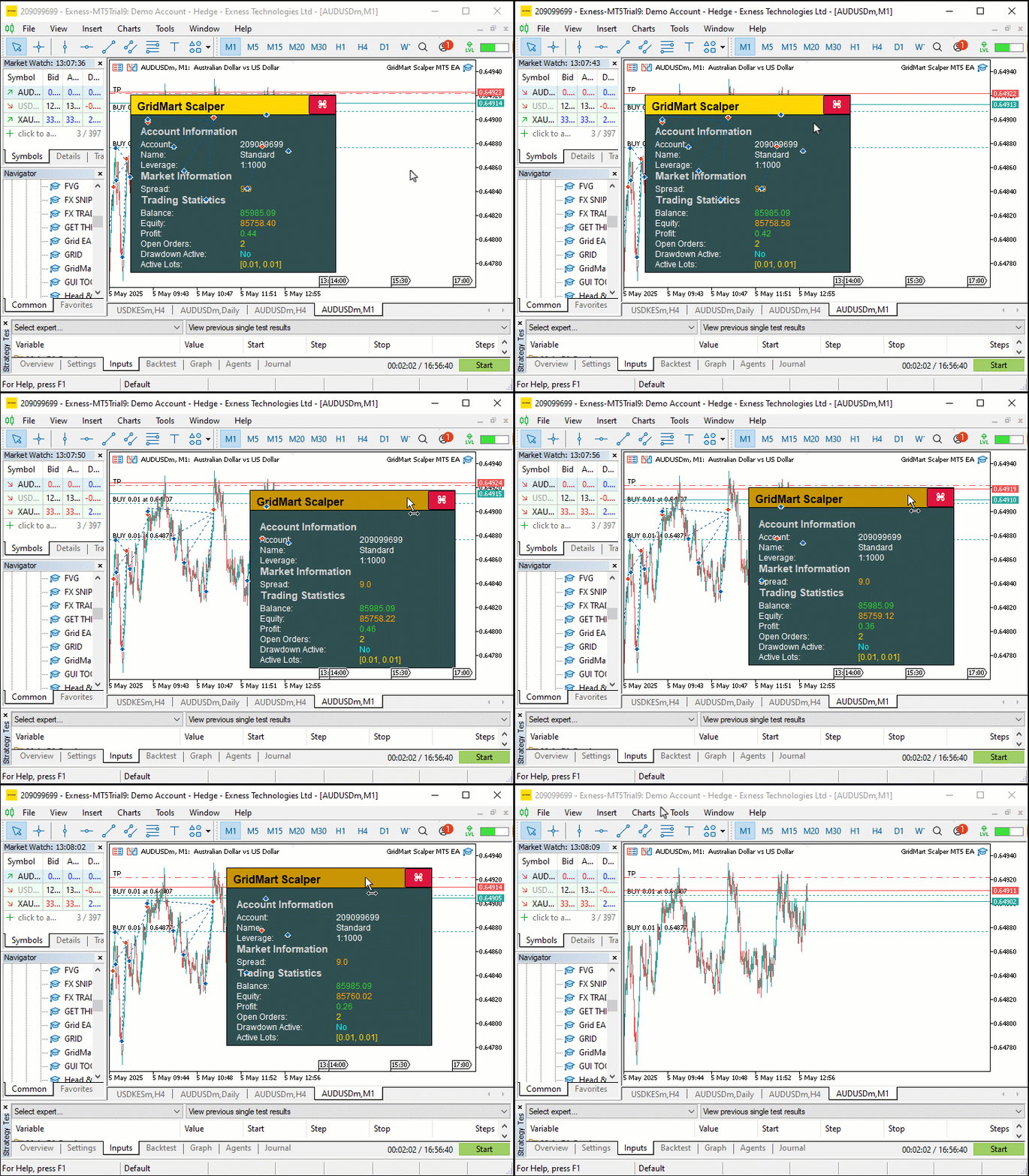
En la visualización, podemos ver que podemos arrastrar y pasar el cursor por encima de los botones, actualizar las métricas y cerrar todo el panel de control. Ahora podemos pasar a la parte crítica, que es abrir y gestionar las posiciones, y el panel de control facilitará el trabajo al visualizar el progreso de forma dinámica. Para lograrlo, necesitaremos algunas funciones auxiliares para calcular los tamaños de los lotes y otros datos, como se indica a continuación.
//+------------------------------------------------------------------+
//| Calculate the lot size for a new trade                           |
//+------------------------------------------------------------------+
double CalculateLotSize(ENUM_POSITION_TYPE tradeType) {
   //--- Initialize lot size
   double lotSize = 0;
   //--- Select lot size calculation mode
   switch (LOT_MODE) {
      //--- Fixed lot size mode
      case 0:
         //--- Use base lot size
         lotSize = BASE_LOT;
         break;
      //--- Multiplier-based lot size mode
      case 1:
         //--- Calculate lot size with multiplier based on active orders
         lotSize = NormalizeDouble(BASE_LOT * MathPow(LOT_MULTIPLIER, activeOrders), LOT_PRECISION);
         break;
      //--- Fixed lot size with multiplier on loss mode
      case 2: {
         //--- Initialize last close time
         datetime lastClose = 0;
         //--- Set default lot size
         lotSize = BASE_LOT;
         //--- Select trade history for the last 24 hours
         HistorySelect(TimeCurrent() - 24 * 60 * 60, TimeCurrent());
         //--- Iterate through trade history
         for (int i = HistoryDealsTotal() - 1; i >= 0; i--) {
            //--- Get deal ticket
            ulong ticket = HistoryDealGetTicket(i);
            //--- Select deal by ticket
            if (HistoryDealSelect(ticket) && HistoryDealGetInteger(ticket, DEAL_ENTRY) == DEAL_ENTRY_OUT &&
                HistoryDealGetString(ticket, DEAL_SYMBOL) == _Symbol && HistoryDealGetInteger(ticket, DEAL_MAGIC) == MAGIC) {
               //--- Check if deal is more recent
               if (lastClose < HistoryDealGetInteger(ticket, DEAL_TIME)) {
                  //--- Update last close time
                  lastClose = (int)HistoryDealGetInteger(ticket, DEAL_TIME);
                  //--- Check if deal resulted in a loss
                  if (HistoryDealGetDouble(ticket, DEAL_PROFIT) < 0) {
                     //--- Increase lot size by multiplier
                     lotSize = NormalizeDouble(HistoryDealGetDouble(ticket, DEAL_VOLUME) * LOT_MULTIPLIER, LOT_PRECISION);
                  } else {
                     //--- Reset to base lot size
                     lotSize = BASE_LOT;
                  }
               }
            }
         }
         break;
      }
   }
   //--- Return calculated lot size
   return lotSize;
}

//+------------------------------------------------------------------+
//| Count the number of active orders                                |
//+------------------------------------------------------------------+
int CountActiveOrders() {
   //--- Initialize order counter
   int count = 0;
   //--- Iterate through open positions
   for (int i = PositionsTotal() - 1; i >= 0; i--) {
      //--- Get position ticket
      ulong ticket = PositionGetTicket(i);
      //--- Select position by ticket
      if (PositionSelectByTicket(ticket) && GetPositionSymbol() == _Symbol && GetPositionMagic() == MAGIC) {
         //--- Check if position is buy or sell
         if (GetPositionType() == POSITION_TYPE_BUY || GetPositionType() == POSITION_TYPE_SELL) {
            //--- Increment order counter
            count++;
         }
      }
   }
   //--- Return total active orders
   return count;
}

//+------------------------------------------------------------------+
//| Return a formatted string of active lot sizes in ascending order |
//+------------------------------------------------------------------+
string GetActiveLotSizes() {
   //--- Check if no active orders
   if (activeOrders == 0) {
      //--- Return waiting message
      return "[Waiting]";
   }
   //--- Initialize array for lot sizes
   double lotSizes[];
   //--- Resize array to match active orders
   ArrayResize(lotSizes, activeOrders);
   //--- Initialize counter
   int count = 0;
   //--- Iterate through open positions
   for (int i = PositionsTotal() - 1; i >= 0 && count < activeOrders; i--) {
      //--- Get position ticket
      ulong ticket = PositionGetTicket(i);
      //--- Select position by ticket
      if (PositionSelectByTicket(ticket) && GetPositionSymbol() == _Symbol && GetPositionMagic() == MAGIC) {
         //--- Store position volume (lot size)
         lotSizes[count] = PositionGetDouble(POSITION_VOLUME);
         //--- Increment counter
         count++;
      }
   }
   //--- Sort lot sizes in ascending order
   ArraySort(lotSizes);
   //--- Initialize result string
   string result = "";
   //--- Determine maximum number of lots to display (up to 3)
   int maxDisplay = (activeOrders > 3) ? 3 : activeOrders;
   //--- Format lot sizes
   for (int i = 0; i < maxDisplay; i++) {
      //--- Add comma and space for subsequent entries
      if (i > 0) result += ", ";
      //--- Convert lot size to string with specified precision
      result += DoubleToString(lotSizes[i], LOT_PRECISION);
   }
   //--- Append ellipsis if more than 3 orders
   if (activeOrders > 3) result += ", ...";
   //--- Return formatted lot sizes in brackets
   return "[" + result + "]";
}
Here, we define the "CalculateLotSize", "CountActiveOrders", and "GetActiveLotSizes" functions to help in trade sizing, position tracking, and dashboard updates, ensuring precise execution and comprehensive real-time monitoring.
Implementamos la función «CalculateLotSize» para determinar los volúmenes de negociación basándonos en la entrada «LOT_MODE», que admite tres modos: tamaño de lote fijo devolviendo directamente «BASE_LOT», escalado de martingala mediante la aplicación de la función MathPow con «LOT_MULTIPLIER» y «activeOrders» para aumentar los lotes de forma exponencial, o ajustes basados en pérdidas, en los que utilizamos la función HistorySelect para revisar las operaciones de las últimas 24 horas.
En el modo basado en pérdidas, iteramos con HistoryDealsTotal, recuperamos los detalles de la operación a través de HistoryDealGetTicket y HistoryDealGetDouble, y ajustamos «lotSize» con NormalizeDouble si la operación más reciente fue una pérdida, restableciendo a «BASE_LOT» en caso contrario, lo que garantiza cálculos precisos de lotes adaptados a los resultados de las operaciones.
Utilizamos la función «CountActiveOrders» para mantener un recuento preciso de las posiciones abiertas, lo cual es fundamental para el escalado martingala y la precisión del panel de control. Iteramos a través de todas las posiciones utilizando la función PositionsTotal, seleccionamos cada una con PositionGetTicket y verificamos la relevancia con las funciones «GetPositionSymbol» y «GetPositionMagic», incrementando la variable «count» para las posiciones de compra o venta identificadas por «GetPositionType», actualizando así «activeOrders» de forma fiable.
Además, creamos la función «GetActiveLotSizes» para dar formato y mostrar los tamaños de los lotes en el panel de control, lo que mejora la visibilidad de las operaciones activas para el usuario. Comprobamos «activeOrders» para devolver «[Waiting]» si no existe ninguno; de lo contrario, inicializamos una matriz con ArrayResize para almacenar los tamaños de los lotes. Repetimos las posiciones con PositionsTotal, las seleccionamos mediante «PositionGetTicket» y utilizamos PositionGetDouble para recopilar los volúmenes en «lotSizes», ordenándolos en orden ascendente con la función ArraySort. Formateamos hasta tres lotes utilizando DoubleToString con «LOT_PRECISION», añadiendo comas y puntos suspensivos para más de tres órdenes, y devolvemos el resultado entre paréntesis, lo que proporciona una visualización clara y profesional de los volúmenes de negociación para su supervisión en tiempo real. Aún así, necesitamos definir funciones que ayuden en la realización de pedidos, tal y como se indica a continuación.
//+------------------------------------------------------------------+
//| Place a new trade order                                          |
//+------------------------------------------------------------------+
int PlaceOrder(ENUM_ORDER_TYPE orderType, double lot, double price, double slPrice, int gridLevel) {
   //--- Calculate stop-loss price
   double sl = CalculateSL(slPrice, STOP_LOSS_PIPS);
   //--- Calculate take-profit price
   double tp = CalculateTP(price, TAKE_PROFIT_PIPS, orderType);
   //--- Initialize ticket number
   int ticket = 0;
   //--- Set maximum retry attempts
   int retries = 100;
   //--- Create trade comment with grid level
   string comment = "GridMart Scalper-" + IntegerToString(gridLevel);

   //--- Attempt to place order with retries
   for (int i = 0; i < retries; i++) {
      //--- Open position with specified parameters
      ticket = obj_Trade.PositionOpen(_Symbol, orderType, lot, price, sl, tp, comment);
      //--- Get last error code
      int error = GetLastError();
      //--- Exit loop if order is successful
      if (error == 0) break;
      //--- Check for retryable errors (server busy, trade context busy, etc.)
      if (!(error == 4 || error == 137 || error == 146 || error == 136)) break;
      //--- Wait before retrying
      Sleep(5000);
   }
   //--- Return order ticket (or error code if negative)
   return ticket;
}

//+------------------------------------------------------------------+
//| Calculate the stop-loss price for a trade                        |
//+------------------------------------------------------------------+
double CalculateSL(double price, int points) {
   //--- Check if stop-loss is disabled
   if (points == 0) return 0;
   //--- Calculate stop-loss price (subtract points from price)
   return price - points * pipValue;
}

//+------------------------------------------------------------------+
//| Calculate the take-profit price for a trade                      |
//+------------------------------------------------------------------+
double CalculateTP(double price, int points, ENUM_ORDER_TYPE orderType) {
   //--- Check if take-profit is disabled
   if (points == 0) return 0;
   //--- Calculate take-profit for buy order (add points)
   if (orderType == ORDER_TYPE_BUY) return price + points * pipValue;
   //--- Calculate take-profit for sell order (subtract points)
   return price - points * pipValue;
}

//+------------------------------------------------------------------+
//| Retrieve the latest buy order price                              |
//+------------------------------------------------------------------+
double GetLatestBuyPrice() {
   //--- Initialize price
   double price = 0;
   //--- Initialize latest ticket
   int latestTicket = 0;
   //--- Iterate through open positions
   for (int i = PositionsTotal() - 1; i >= 0; i--) {
      //--- Get position ticket
      ulong ticket = PositionGetTicket(i);
      //--- Select position by ticket
      if (PositionSelectByTicket(ticket) && GetPositionSymbol() == _Symbol && GetPositionMagic() == MAGIC && GetPositionType() == POSITION_TYPE_BUY) {
         //--- Check if ticket is more recent
         if ((int)ticket > latestTicket) {
            //--- Update price
            price = GetPositionOpenPrice();
            //--- Update latest ticket
            latestTicket = (int)ticket;
         }
      }
   }
   //--- Return latest buy price
   return price;
}

//+------------------------------------------------------------------+
//| Retrieve the latest sell order price                             |
//+------------------------------------------------------------------+
double GetLatestSellPrice() {
   //--- Initialize price
   double price = 0;
   //--- Initialize latest ticket
   int latestTicket = 0;
   //--- Iterate through open positions
   for (int i = PositionsTotal() - 1; i >= 0; i--) {
      //--- Get position ticket
      ulong ticket = PositionGetTicket(i);
      //--- Select position by ticket
      if (PositionSelectByTicket(ticket) && GetPositionSymbol() == _Symbol && GetPositionMagic() == MAGIC && GetPositionType() == POSITION_TYPE_SELL) {
         //--- Check if ticket is more recent
         if ((int)ticket > latestTicket) {
            //--- Update price
            price = GetPositionOpenPrice();
            //--- Update latest ticket
            latestTicket = (int)ticket;
         }
      }
   }
   //--- Return latest sell price
   return price;
}

//+------------------------------------------------------------------+
//| Check if trading is allowed                                      |
//+------------------------------------------------------------------+
int IsTradingAllowed() {
   //--- Always allow trading
   return 1;
}
Aquí implementamos la función «PlaceOrder» para iniciar operaciones, utilizando la función «PositionOpen» de «obj_Trade» para abrir posiciones con parámetros como «lot», «price» y un comentario formateado con IntegerToString para «gridLevel», incorporando lógica de reintento con GetLastError y Sleep para una ejecución robusta. Utilizamos la función «CalculateSL» para calcular los precios de stop-loss restando «STOP_LOSS_PIPS» multiplicado por «pipValue» de «slPrice», y la función «CalculateTP» para establecer los niveles de take-profit, sumando o restando «TAKE_PROFIT_PIPS» en función de «orderType» para las operaciones de compra o venta, respectivamente.
Creamos la función «GetLatestBuyPrice» para identificar el precio de la posición de compra más reciente, iterando con PositionsTotal, seleccionando posiciones mediante PositionGetTicket y verificando con «GetPositionSymbol», «GetPositionMagic» y «GetPositionType», actualizando «price» utilizando «GetPositionOpenPrice» para el «ticket» más alto .
Del mismo modo, implementamos la función «GetLatestSellPrice» para recuperar el precio de la última posición de venta, siguiendo la misma lógica para garantizar una colocación precisa de la cuadrícula. Definimos la función «IsTradingAllowed» para que devuelva un valor constante de 1, lo que permite operar de forma continua sin restricciones, lo que respalda el enfoque de alta frecuencia de la estrategia. Ahora podemos utilizar estas funciones para definir la lógica de negociación real en el controlador de eventos OnTick.
//+------------------------------------------------------------------+
//| Expert tick function                                             |
//+------------------------------------------------------------------+
void OnTick() {
   //--- Get current ask price
   double ask = NormalizeDouble(SymbolInfoDouble(_Symbol, SYMBOL_ASK), _Digits);
   //--- Get current bid price
   double bid = NormalizeDouble(SymbolInfoDouble(_Symbol, SYMBOL_BID), _Digits);

   //--- Update dashboard if visible
   if (dashboardVisible) UpdateDashboard();

   //--- Check if trading is allowed
   if (IsTradingAllowed()) {
      //--- Get current bar time
      datetime currentBarTime = iTime(_Symbol, _Period, 0);
      //--- Exit if the bar hasn’t changed
      if (lastBarTime == currentBarTime) return;
      //--- Update last bar time
      lastBarTime = currentBarTime;
      //--- Count active orders
      activeOrders = CountActiveOrders();
      //--- Reset SL/TP update flag if no active orders
      if (activeOrders == 0) updateSLTP = false;

      //--- Reset position flags
      hasBuyPosition = false;
      hasSellPosition = false;
      //--- Iterate through open positions
      for (int i = PositionsTotal() - 1; i >= 0; i--) {
         //--- Get position ticket
         ulong ticket = PositionGetTicket(i);
         //--- Select position by ticket
         if (PositionSelectByTicket(ticket) && GetPositionSymbol() == _Symbol && GetPositionMagic() == MAGIC) {
            //--- Check for buy position
            if (GetPositionType() == POSITION_TYPE_BUY) {
               //--- Set buy position flag
               hasBuyPosition = true;
               //--- Clear sell position flag
               hasSellPosition = false;
               //--- Exit loop after finding a position
               break;
            }
            //--- Check for sell position
            else if (GetPositionType() == POSITION_TYPE_SELL) {
               //--- Set sell position flag
               hasSellPosition = true;
               //--- Clear buy position flag
               hasBuyPosition = false;
               //--- Exit loop after finding a position
               break;
            }
         }
      }

      //--- Check conditions to open new trades
      if (activeOrders > 0 && activeOrders <= MAX_GRID_LEVELS) {
         //--- Get latest buy price
         latestBuyPrice = GetLatestBuyPrice();
         //--- Get latest sell price
         latestSellPrice = GetLatestSellPrice();
         //--- Check if a new buy trade is needed
         if (hasBuyPosition && latestBuyPrice - ask >= GRID_DISTANCE * pipValue) openNewTrade = true;
         //--- Check if a new sell trade is needed
         if (hasSellPosition && bid - latestSellPrice >= GRID_DISTANCE * pipValue) openNewTrade = true;
      }
      //--- Allow new trades if no active orders
      if (activeOrders < 1) {
         //--- Clear position flags
         hasBuyPosition = false;
         hasSellPosition = false;
         //--- Signal to open a new trade
         openNewTrade = true;
      }

      //--- Execute new trade if signaled
      if (openNewTrade) {
         //--- Update latest buy price
         latestBuyPrice = GetLatestBuyPrice();
         //--- Update latest sell price
         latestSellPrice = GetLatestSellPrice();
         //--- Handle sell position
         if (hasSellPosition) {
            //--- Calculate lot size for sell order
            calculatedLot = CalculateLotSize(POSITION_TYPE_SELL);
            //--- Check if lot size is valid and trading is enabled
            if (calculatedLot > 0 && tradingEnabled) {
               //--- Place sell order
               int ticket = PlaceOrder(ORDER_TYPE_SELL, calculatedLot, bid, ask, activeOrders);
               //--- Check for order placement errors
               if (ticket < 0) {
                  //--- Log error message
                  Print("Sell Order Error: ", GetLastError());
                  return;
               }
               //--- Update latest sell price
               latestSellPrice = GetLatestSellPrice();
               //--- Clear new trade signal
               openNewTrade = false;
               //--- Signal to modify positions
               modifyPositions = true;
            }
         }
         //--- Handle buy position
         else if (hasBuyPosition) {
            //--- Calculate lot size for buy order
            calculatedLot = CalculateLotSize(POSITION_TYPE_BUY);
            //--- Check if lot size is valid and trading is enabled
            if (calculatedLot > 0 && tradingEnabled) {
               //--- Place buy order
               int ticket = PlaceOrder(ORDER_TYPE_BUY, calculatedLot, ask, bid, activeOrders);
               //--- Check for order placement errors
               if (ticket < 0) {
                  //--- Log error message
                  Print("Buy Order Error: ", GetLastError());
                  return;
               }
               //--- Update latest buy price
               latestBuyPrice = GetLatestBuyPrice();
               //--- Clear new trade signal
               openNewTrade = false;
               //--- Signal to modify positions
               modifyPositions = true;
            }
         }

         //---

      }
   }
}
Definimos el controlador de eventos OnTick para impulsar la lógica comercial central del programa, coordinando la ejecución de operaciones en tiempo real y la gestión de posiciones. Comenzamos recuperando los precios actuales del mercado con la función SymbolInfoDouble para capturar los valores de «ask» y «bid», normalizados mediante NormalizeDouble, y actualizamos el panel de control utilizando la función «UpdateDashboard» si «dashboardVisible» es verdadero. Comprobamos los permisos de negociación con la función «IsTradingAllowed», asegurándonos de que las operaciones solo se realicen cuando las condiciones lo permitan, y utilizamos la función iTime para obtener la marca de tiempo de la barra actual, almacenándola en «currentBarTime» para evitar un procesamiento redundante mediante la comparación con «lastBarTime».
Gestionamos el seguimiento de posiciones llamando a la función «CountActiveOrders» para actualizar «activeOrders», restableciendo «updateSLTP» si no hay órdenes y repitiendo posiciones con PositionsTotal y PositionGetTicket para establecer «hasBuyPosition» o «hasSellPosition» en función de «GetPositionType».
Evaluamos las condiciones de la cuadrícula utilizando «GetLatestBuyPrice» y «GetLatestSellPrice», activando «openNewTrade» cuando los movimientos de precios superan «GRID_DISTANCE» veces «pipValue» o si «activeOrders» está por debajo de «MAX_GRID_LEVELS». Cuando «openNewTrade» es verdadero, calculamos los tamaños de los lotes con la función «CalculateLotSize», ejecutamos las operaciones mediante la función «PlaceOrder» para las órdenes de compra o venta, registramos los errores con «Print» y GetLastError si la colocación falla, y actualizamos «latestBuyPrice», «latestSellPrice» y «modifyPositions» para gestionar las operaciones en curso, lo que garantiza operaciones de scalping precisas y eficientes. Para abrir nuevas posiciones, utilizamos la siguiente lógica para la generación de señales.
//--- Check conditions to open a new trade without existing positions
MqlDateTime timeStruct;
//--- Get current time
TimeCurrent(timeStruct);
//--- Verify trading hours, cycle limit, and new trade conditions
if (timeStruct.hour >= START_HOUR && timeStruct.hour < END_HOUR && cycleCount < MAX_CYCLES && CONTINUE_TRADING && openNewTrade && activeOrders < 1) {
   //--- Get previous bar close price
   double closePrev = iClose(_Symbol, PERIOD_CURRENT, 2);
   //--- Get current bar close price
   double closeCurrent = iClose(_Symbol, PERIOD_CURRENT, 1);
   //--- Check if no existing positions
   if (!hasSellPosition && !hasBuyPosition) {
      //--- Check for bearish signal (previous close > current close)
      if (closePrev > closeCurrent) {
         //--- Calculate lot size for sell order
         calculatedLot = CalculateLotSize(POSITION_TYPE_SELL);
         //--- Check if lot size is valid and trading is enabled
         if (calculatedLot > 0 && tradingEnabled) {
            //--- Place sell order
            int ticket = PlaceOrder(ORDER_TYPE_SELL, calculatedLot, bid, bid, activeOrders);
            //--- Check for order placement errors
            if (ticket < 0) {
               //--- Log error message
               Print("Sell Order Error: ", GetLastError());
               return;
            }
            //--- Increment cycle count
            cycleCount++;
            //--- Update latest buy price
            latestBuyPrice = GetLatestBuyPrice();
            //--- Signal to modify positions
            modifyPositions = true;
         }
      }
      //--- Check for bullish signal (previous close <= current close)
      else {
         //--- Calculate lot size for buy order
         calculatedLot = CalculateLotSize(POSITION_TYPE_BUY);
         //--- Check if lot size is valid and trading is enabled
         if (calculatedLot > 0 && tradingEnabled) {
            //--- Place buy order
            int ticket = PlaceOrder(ORDER_TYPE_BUY, calculatedLot, ask, ask, activeOrders);
            //--- Check for order placement errors
            if (ticket < 0) {
               //--- Log error message
               Print("Buy Order Error: ", GetLastError());
               return;
            }
            //--- Increment cycle count
            cycleCount++;
            //--- Update latest sell price
            latestSellPrice = GetLatestSellPrice();
            //--- Signal to modify positions
            modifyPositions = true;
         }
      }
   }
}
Para iniciar nuevas operaciones, comenzamos utilizando la función TimeCurrent para recuperar la hora actual en la variable «timeStruct», comprobando si «timeStruct.hour» se encuentra dentro de «START_HOUR» y «END_HOUR», «cycleCount» es inferior a «MAX_CYCLES», y si «CONTINUE_TRADING» y «openNewTrade» son verdaderas, con «activeOrders» menor que 1. Obtenemos los precios de cierre anteriores y actuales de la barra con la función iClose, los almacenamos en «closePrev» y «closeCurrent», y confirmamos que no existen posiciones con «hasSellPosition» y «hasBuyPosition».
Para una señal bajista (cuando «closePrev» supera a «closeCurrent»), calculamos el tamaño del lote utilizando la función «CalculateLotSize» para una orden de venta, verificamos «calculatedLot» y «tradingEnabled», y ejecutamos la operación con la función «PlaceOrder», registrando los errores mediante «Print» y GetLastError si es necesario. Para una señal alcista (cuando «closePrev» es menor o igual que «closeCurrent»), realizamos el mismo proceso para una orden de compra, actualizando «cycleCount» y «latestBuyPrice» o «latestSellPrice» con «GetLatestBuyPrice» o «GetLatestSellPrice», y estableciendo «modifyPositions» en verdadero, lo que permite iniciar operaciones y gestionar posiciones con precisión.
cPuede sustituirlo por cualquiera de sus estrategias de negociación. Simplemente utilizamos una estrategia sencilla de generación de señales, ya que el objetivo principal es gestionar las posiciones aplicando la estrategia. Una vez que abrimos posiciones, debemos revisarlas y modificarlas cuando el precio avance como se indica a continuación.
//--- Update active orders count
activeOrders = CountActiveOrders();
//--- Reset weighted price and total volume
weightedPrice = 0;
totalVolume = 0;
//--- Calculate weighted price and total volume
for (int i = PositionsTotal() - 1; i >= 0; i--) {
   //--- Get position ticket
   ulong ticket = PositionGetTicket(i);
   //--- Select position by ticket
   if (PositionSelectByTicket(ticket) && GetPositionSymbol() == _Symbol && GetPositionMagic() == MAGIC) {
      //--- Accumulate weighted price (price * volume)
      weightedPrice += GetPositionOpenPrice() * PositionGetDouble(POSITION_VOLUME);
      //--- Accumulate total volume
      totalVolume += PositionGetDouble(POSITION_VOLUME);
   }
}

//--- Normalize weighted price if there are active orders
if (activeOrders > 0) weightedPrice = NormalizeDouble(weightedPrice / totalVolume, _Digits);
//--- Check if positions need SL/TP modification
if (modifyPositions) {
   //--- Iterate through open positions
   for (int i = PositionsTotal() - 1; i >= 0; i--) {
      //--- Get position ticket
      ulong ticket = PositionGetTicket(i);
      //--- Select position by ticket
      if (PositionSelectByTicket(ticket) && GetPositionSymbol() == _Symbol && GetPositionMagic() == MAGIC) {
         //--- Handle buy positions
         if (GetPositionType() == POSITION_TYPE_BUY) {
            //--- Set take-profit for buy position
            targetTP = weightedPrice + TAKE_PROFIT_PIPS * pipValue;
            //--- Set stop-loss for buy position
            targetSL = weightedPrice - STOP_LOSS_PIPS * pipValue;
            //--- Signal SL/TP update
            updateSLTP = true;
         }
         //--- Handle sell positions
         else if (GetPositionType() == POSITION_TYPE_SELL) {
            //--- Set take-profit for sell position
            targetTP = weightedPrice - TAKE_PROFIT_PIPS * pipValue;
            //--- Set stop-loss for sell position
            targetSL = weightedPrice + STOP_LOSS_PIPS * pipValue;
            //--- Signal SL/TP update
            updateSLTP = true;
         }
      }
   }
}

//--- Apply SL/TP modifications if needed
if (modifyPositions && updateSLTP) {
   //--- Iterate through open positions
   for (int i = PositionsTotal() - 1; i >= 0; i--) {
      //--- Get position ticket
      ulong ticket = PositionGetTicket(i);
      //--- Select position by ticket
      if (PositionSelectByTicket(ticket) && GetPositionSymbol() == _Symbol && GetPositionMagic() == MAGIC) {
         //--- Modify position with new SL/TP
         if (obj_Trade.PositionModify(ticket, targetSL, targetTP)) {
            //--- Clear modification signal on success
            modifyPositions = false;
         }
      }
   }
}
Aquí, actualizamos «activeOrders» con «CountActiveOrders», restablecemos «weightedPrice» y «totalVolume», e iteramos las posiciones utilizando PositionsTotal y PositionGetTicket, acumulando «weightedPrice» y «totalVolume» a través de las funciones «GetPositionOpenPrice» y PositionGetDouble. Normalizamos «weightedPrice» con NormalizeDouble si existe «activeOrders», establecemos «targetTP» y «targetSL» utilizando «GetPositionType» y «pipValue» cuando «modifyPositions» es verdadero, y aplicamos actualizaciones con «PositionModify» desde «obj_Trade» si «updateSLTP», restableciendo «modifyPositions» en caso de éxito. Tras la compilación, obtenemos el siguiente resultado.
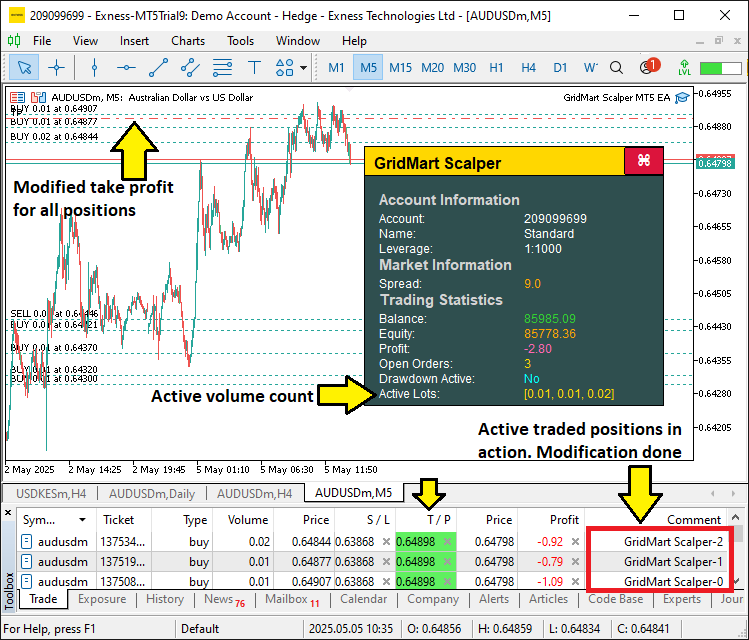
En la imagen podemos ver que hemos abierto órdenes que ya están en modo de gestión. Ahora solo tenemos que aplicar la lógica de gestión de riesgos para supervisar la caída diaria y limitarla. Para ello, crearemos una función que realice todo el seguimiento y detenga el programa cuando sea necesario, tal y como se muestra a continuación.
//+------------------------------------------------------------------+
//| Monitor daily drawdown and control trading state                 |
//+------------------------------------------------------------------+
void MonitorDailyDrawdown() {
   //--- Initialize daily profit accumulator
   double totalDayProfit = 0.0;
   //--- Get current time
   datetime end = TimeCurrent();
   //--- Get current date as string
   string sdate = TimeToString(TimeCurrent(), TIME_DATE);
   //--- Convert date to datetime (start of day)
   datetime start = StringToTime(sdate);
   //--- Set end of day (24 hours later)
   datetime to = start + (1 * 24 * 60 * 60);

   //--- Check if daily reset is needed
   if (dailyResetTime < to) {
      //--- Update reset time
      dailyResetTime = to;
      //--- Store current balance as daily starting balance
      dailyBalance = GetAccountBalance();
   }
   //--- Select trade history for the day
   HistorySelect(start, end);
   //--- Get total number of deals
   int totalDeals = HistoryDealsTotal();

   //--- Iterate through trade history
   for (int i = 0; i < totalDeals; i++) {
      //--- Get deal ticket
      ulong ticket = HistoryDealGetTicket(i);
      //--- Check if deal is a position close
      if (HistoryDealGetInteger(ticket, DEAL_ENTRY) == DEAL_ENTRY_OUT) {
         //--- Calculate deal profit (including commission and swap)
         double latestDayProfit = (HistoryDealGetDouble(ticket, DEAL_PROFIT) +
                                  HistoryDealGetDouble(ticket, DEAL_COMMISSION) +
                                  HistoryDealGetDouble(ticket, DEAL_SWAP));
         //--- Accumulate daily profit
         totalDayProfit += latestDayProfit;
      }
   }

   //--- Calculate starting balance for the day
   double startingBalance = GetAccountBalance() - totalDayProfit;
   //--- Calculate daily profit/drawdown percentage
   double dailyProfitOrDrawdown = NormalizeDouble((totalDayProfit * 100 / startingBalance), 2);

   //--- Check if drawdown limit is exceeded
   if (dailyProfitOrDrawdown <= DRAWDOWN_LIMIT) {
      //--- Close all positions if configured
      if (CLOSE_ON_DRAWDOWN) CloseAllPositions();
      //--- Disable trading
      tradingEnabled = false;
   } else {
      //--- Enable trading
      tradingEnabled = true;
   }
}

//+------------------------------------------------------------------+
//| Close all open positions managed by the EA                       |
//+------------------------------------------------------------------+
void CloseAllPositions() {
   //--- Iterate through open positions
   for (int i = PositionsTotal() - 1; i >= 0; i--) {
      //--- Get position ticket
      ulong ticket = PositionGetTicket(i);
      //--- Select position by ticket
      if (ticket > 0 && PositionSelectByTicket(ticket)) {
         //--- Check if position belongs to this EA
         if (GetPositionSymbol() == _Symbol && GetPositionMagic() == MAGIC) {
            //--- Close the position
            obj_Trade.PositionClose(ticket);
         }
      }
   }
}
Para aplicar la gestión de riesgos, implementamos la función «MonitorDailyDrawdown» para realizar un seguimiento del rendimiento diario, utilizando TimeCurrent y TimeToString para establecer el intervalo de tiempo del día, y HistorySelect para acceder al historial de operaciones. Calculamos el beneficio total con las funciones HistoryDealGetTicket y HistoryDealGetDouble, normalizamos el porcentaje de reducción mediante NormalizeDouble, y ajustamos «tradingEnabled» en función de «DRAWDOWN_LIMIT», llamando a la función «CloseAllPositions» si «CLOSE_ON_DRAWDOWN» es verdadero.
Definimos «CloseAllPositions» para iterar posiciones con «PositionsTotal» y PositionGetTicket, cerrando las operaciones relevantes utilizando «PositionClose» de «obj_Trade» después de verificar con «GetPositionSymbol» y «GetPositionMagic», lo que garantiza un control sólido de la reducción. A continuación, podemos llamar a esta función en cada tick para realizar la gestión de riesgos cuando sea posible.
//--- Monitor daily drawdown if enabled
if (ENABLE_DAILY_DRAWDOWN) MonitorDailyDrawdown();
Comprobamos la condición «ENABLE_DAILY_DRAWDOWN» para determinar si el control de reducción está activo y, si es así, llamamos a la función «MonitorDailyDrawdown» para evaluar las ganancias y pérdidas diarias, ajustar «tradingEnabled» y, potencialmente, cerrar posiciones, protegiendo la cuenta contra pérdidas excesivas. Tras la compilación, obtenemos el siguiente resultado.
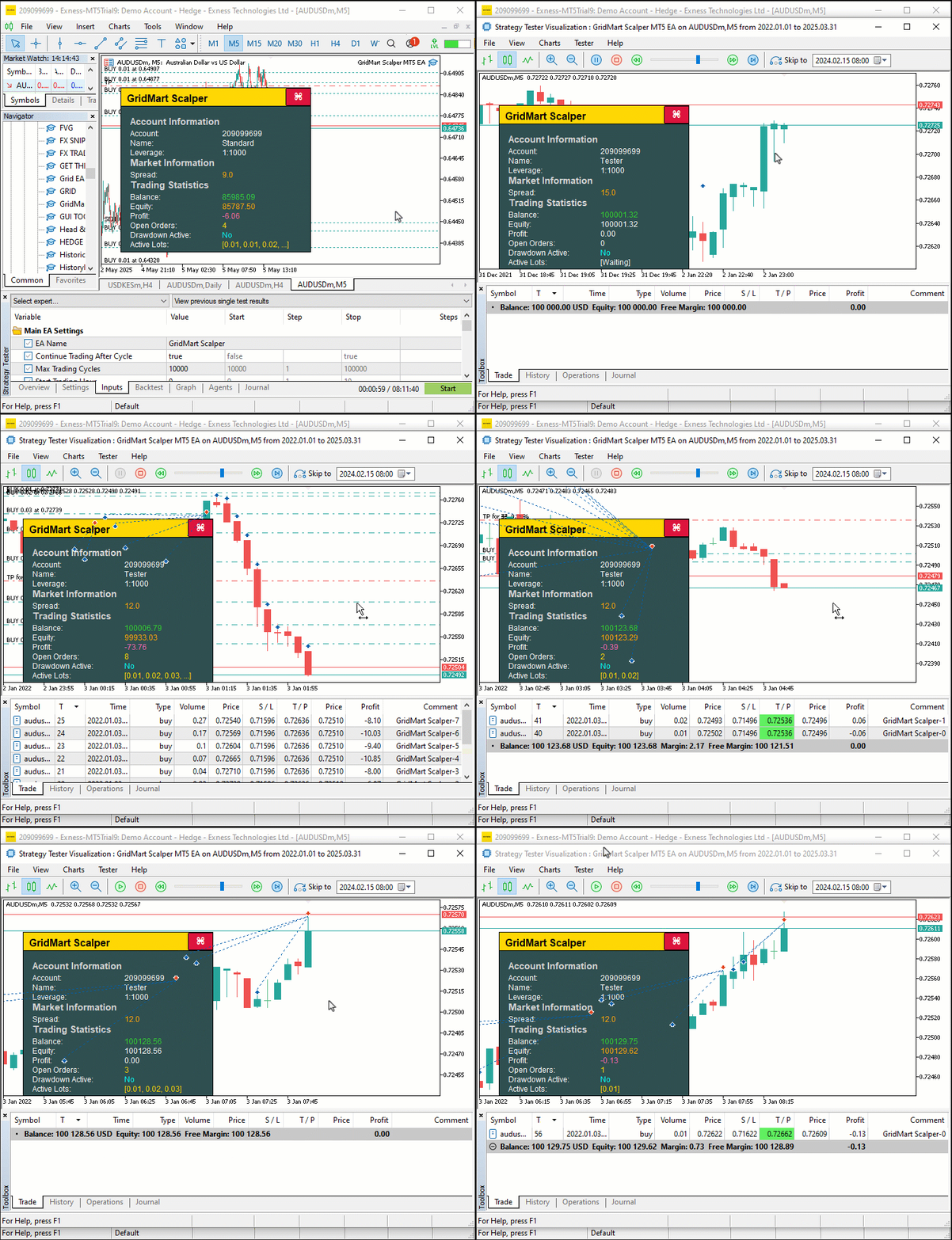
A partir de la visualización, podemos ver que podemos abrir las posiciones, gestionarlas dinámicamente y cerrarlas una vez alcanzados los objetivos, logrando así nuestro objetivo de crear la configuración de la estrategia Grid-Mart. Lo que queda es realizar pruebas retrospectivas del programa, lo cual se trata en la siguiente sección.
Pruebas retrospectivas
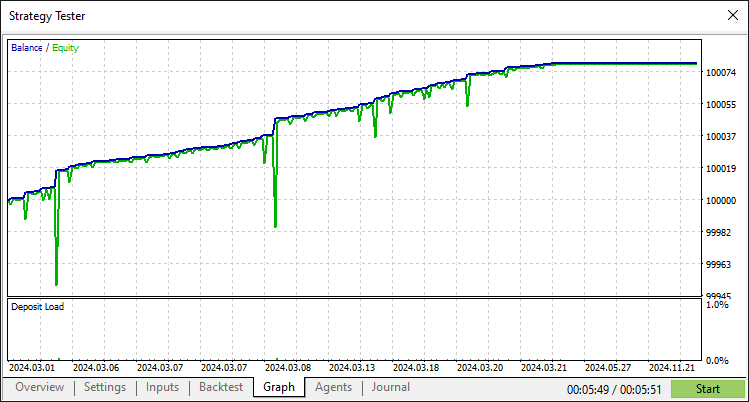
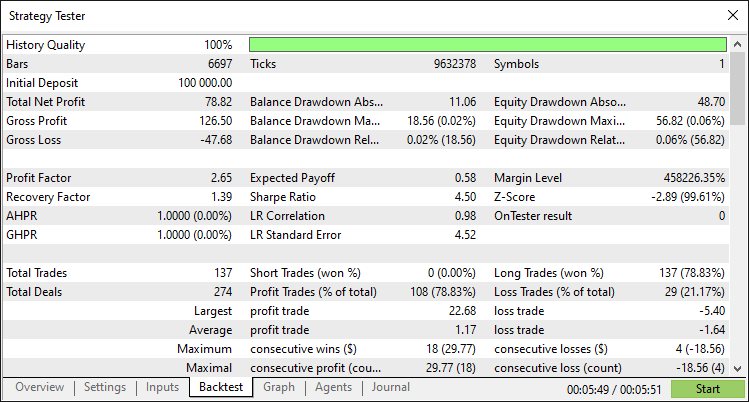
Tras realizar exhaustivas pruebas retrospectivas, hemos obtenido los siguientes resultados.
Gráfico de prueba retrospectiva:
Informe de prueba retrospectiva:
Conclusión
En conclusión, hemos desarrollado un programa MQL5 que automatiza la estrategia de scalping Grid-Mart, ejecutando operaciones martingala basadas en cuadrículas con un panel de control dinámico para supervisar en tiempo real métricas clave como el spread, los beneficios y el tamaño de los lotes. Con una ejecución comercial precisa, una gestión de riesgos sólida a través de controles de reducción y una interfaz interactiva, puede mejorar aún más este programa adaptando sus parámetros o integrando estrategias adicionales para adaptarse a sus preferencias comerciales.
Descargo de responsabilidad: este artículo es sólo para fines educativos. El trading conlleva riesgos financieros importantes y la volatilidad del mercado puede generar pérdidas. Es fundamental realizar pruebas retrospectivas exhaustivas y una gestión cuidadosa de los riesgos antes de implementar este programa en mercados reales.
Al dominar estas técnicas, puede mejorar aún más este programa para hacerlo más sólido o usarlo como columna vertebral para desarrollar otras estrategias comerciales, potenciando su experiencia en el comercio algorítmico.
Traducción del inglés realizada por MetaQuotes Ltd.
Artículo original: https://www.mql5.com/en/articles/18038
Advertencia: todos los derechos de estos materiales pertenecen a MetaQuotes Ltd. Queda totalmente prohibido el copiado total o parcial.
Este artículo ha sido escrito por un usuario del sitio web y refleja su punto de vista personal. MetaQuotes Ltd. no se responsabiliza de la exactitud de la información ofrecida, ni de las posibles consecuencias del uso de las soluciones, estrategias o recomendaciones descritas.

 Modelos ocultos de Márkov en sistemas comerciales de aprendizaje automático
 Algoritmo basado en fractales — Fractal-Based Algorithm (FBA)
 Algoritmos avanzados de ejecución de órdenes en MQL5: TWAP, VWAP y órdenes Iceberg
 Optimización y ajuste de código sin procesar para mejorar los resultados de las pruebas retrospectivas

- Aplicaciones de trading gratuitas
- 8 000+ señales para copiar
- Noticias económicas para analizar los mercados financieros
Usted acepta la política del sitio web y las condiciones de uso
Buen artículo, pero hay un fallo importante en CalculateSL.
Claro. Gracias. ¿Qué le pasa?
Claro. Gracias. ¿Qué pasa?
Olvidaste manejar el lado de venta. Adjunto la versión corregida.
Olvidaste manejar el lado de venta. Adjunto la versión corregida.
Ooh. Si. Claro. Será de gran ayuda para los demás. Gracias.