

Automatización de estrategias de trading en MQL5 (Parte 9): Creación de un asesor experto para la estrategia de ruptura asiática
 575
575
 0
0

Introducción
En el artículo anterior (Parte 8), exploramos una estrategia de trading de reversión mediante la creación de un Asesor Experto en MetaQuotes Language 5 (MQL5) basado en el patrón armónico Butterfly utilizando ratios de Fibonacci precisos. Ahora, en la Parte 9, centramos nuestra atención en la estrategia de ruptura asiática, un método que identifica los máximos y mínimos clave de la sesión para formar zonas de ruptura, emplea una media móvil para filtrar las tendencias e integra una gestión dinámica del riesgo.
En este artículo, trataremos los siguientes temas:
Al final, tendrás un Asesor Experto totalmente funcional que automatiza la estrategia de ruptura asiática, listo para ser probado y perfeccionado para operar. ¡Vamos a ello!
Plan estratégico
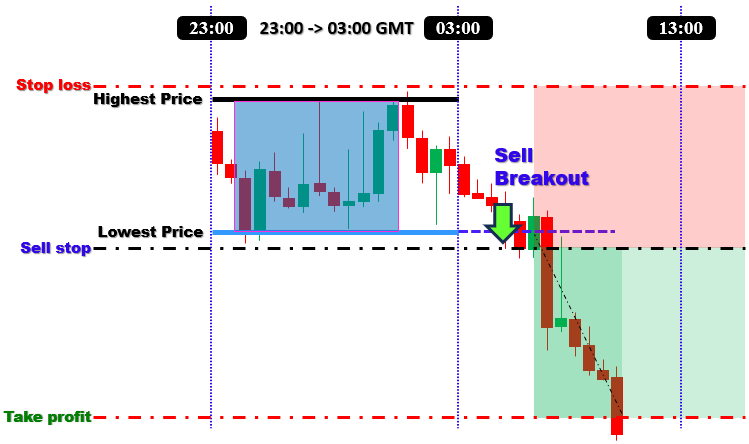
Para crear el programa, diseñaremos un enfoque que aproveche el rango de precios clave formado durante la sesión bursátil asiática. El primer paso será definir el cuadro de sesión capturando el máximo más alto y el mínimo más bajo dentro de una ventana de tiempo específica, normalmente entre las 23:00 y las 03:00 hora media de Greenwich (Greenwich Mean Time, GMT). Sin embargo, estos horarios son totalmente personalizables para adaptarse a sus necesidades. Este rango definido representa el área de consolidación desde la que esperamos una ruptura.
A continuación, estableceremos niveles de ruptura en los límites de este rango. Colocaremos una orden de compra stop pendiente ligeramente por encima de la parte superior del recuadro si las condiciones del mercado confirman una tendencia alcista, utilizando una media móvil (como una media móvil de 50 períodos) para confirmar la tendencia. Por el contrario, si la tendencia es bajista, colocaremos una orden de venta stop justo por debajo del fondo del recuadro. Esta configuración dual garantizará que nuestro Asesor Experto esté listo para capturar movimientos significativos en cualquier dirección tan pronto como el precio se dispare.
La gestión de riesgos es un componente fundamental de nuestra estrategia. Integraremos órdenes stop-loss justo fuera de los límites del rango para protegernos contra falsas rupturas o reversiones, mientras que los niveles de take-profit se determinarán en función de una relación riesgo-recompensa predefinida. Además, implementaremos una estrategia de salida basada en el tiempo que cerrará automáticamente cualquier operación abierta si permanece activa más allá de una hora de salida designada, como las 13:00 GMT. En general, nuestra estrategia combina la detección precisa de rangos basada en sesiones, el filtrado de tendencias y una sólida gestión de riesgos para crear un asesor experto capaz de capturar movimientos significativos en el mercado. En pocas palabras, aquí hay una visualización de toda la estrategia que queremos implementar.
Implementación en MQL5
Para crear el programa en MQL5, abra el MetaEditor, vaya al Navegador, localice la carpeta Indicadores, haga clic en la pestaña «Nuevo» y siga las instrucciones para crear el archivo. Una vez creado, en el entorno de programación, tendremos que declarar algunas variables globales que utilizaremos a lo largo del programa.
//+------------------------------------------------------------------+
//|                        Copyright 2025, Forex Algo-Trader, Allan. |
//|                                 "https://t.me/Forex_Algo_Trader" |
//+------------------------------------------------------------------+
#property copyright "Forex Algo-Trader, Allan"
#property link      "https://t.me/Forex_Algo_Trader"
#property version   "1.00"
#property description "This EA trades based on ASIAN BREAKOUT Strategy"
#property strict

#include <Trade\Trade.mqh>                              //--- Include trade library
CTrade obj_Trade;                                          //--- Create global trade object

//--- Global indicator handle for the moving average
int maHandle = INVALID_HANDLE;                         //--- Global MA handle

//==== Input parameters
//--- Trade and indicator settings
input double         LotSize              = 0.1;         //--- Trade lot size
input double         BreakoutOffsetPips   = 10;          //--- Offset in pips for pending orders
input ENUM_TIMEFRAMES BoxTimeframe         = PERIOD_M15;  //--- Timeframe for box calculation (15 or 30 minutes)
input int            MA_Period            = 50;          //--- Moving average period for trend filter
input ENUM_MA_METHOD MA_Method            = MODE_SMA;    //--- MA method (Simple Moving Average)
input ENUM_APPLIED_PRICE MA_AppliedPrice   = PRICE_CLOSE; //--- Applied price for MA (Close price)
input double         RiskToReward         = 1.3;         //--- Reward-to-risk multiplier (1:1.3)
input int            MagicNumber          = 12345;       //--- Magic number (used for order identification)

//--- Session timing settings (GMT) with minutes
input int            SessionStartHour     = 23;          //--- Session start hour
input int            SessionStartMinute   = 00;           //--- Session start minute
input int            SessionEndHour       = 03;           //--- Session end hour
input int            SessionEndMinute     = 00;           //--- Session end minute
input int            TradeExitHour        = 13;          //--- Trade exit hour
input int            TradeExitMinute      = 00;           //--- Trade exit minute

//--- Global variables for storing session box data
datetime lastBoxSessionEnd = 0;                        //--- Stores the session end time of the last computed box
bool     boxCalculated     = false;                    //--- Flag: true if session box has been calculated
bool     ordersPlaced      = false;                    //--- Flag: true if orders have been placed for the session
double   BoxHigh           = 0.0;                        //--- Highest price during the session
double   BoxLow            = 0.0;                        //--- Lowest price during the session
//--- Variables to store the exact times when the session's high and low occurred
datetime BoxHighTime       = 0;                          //--- Time when the highest price occurred
datetime BoxLowTime        = 0;                          //--- Time when the lowest price occurred
Aquí, incluimos la biblioteca comercial utilizando «#include <Trade\Trade.mqh>» para acceder a las funciones comerciales integradas y crear un objeto comercial global denominado «obj_Trade». Definimos un indicador global «maHandle», lo inicializamos en INVALID_HANDLE y configuramos las entradas del usuario para los ajustes de negociación y del indicador, como «LotSize», «BreakoutOffsetPips» y «BoxTimeframe» (que utiliza el tipo ENUM_TIMEFRAMES), así como los parámetros para la media móvil («MA_Period», «MA_Method», «MA_AppliedPrice») y la gestión de riesgos («RiskToReward», «MagicNumber»).
Además, permitimos a los usuarios especificar la duración de la sesión en horas y minutos (utilizando entradas como «SessionStartHour», «SessionStartMinute», «SessionEndHour», «SessionEndMinute», «TradeExitHour» y «TradeExitMinute») y declarar variables globales para almacenar los datos del cuadro de la sesión («BoxHigh», «BoxLow») y las horas exactas en que se produjeron estos extremos («BoxHighTime», «BoxLowTime»), junto con indicadores («boxCalculated» y «ordersPlaced») para controlar la lógica del programa. A continuación, vamos al controlador de eventos OnInit e inicializamos el controlador.
//+------------------------------------------------------------------+
//| Expert initialization function                                   |
//+------------------------------------------------------------------+
int OnInit(){
   //--- Set the magic number for all trade operations
   obj_Trade.SetExpertMagicNumber(MagicNumber);           //--- Set magic number globally for trades
   //--- Create the Moving Average handle with user-defined parameters
   maHandle = iMA(_Symbol, 0, MA_Period, 0, MA_Method, MA_AppliedPrice); //--- Create MA handle
   if(maHandle == INVALID_HANDLE){                     //--- Check if MA handle creation failed
      Print("Failed to create MA handle.");           //--- Print error message
      return(INIT_FAILED);                             //--- Terminate initialization if error occurs
   }
   return(INIT_SUCCEEDED);                            //--- Return successful initialization
}
En el controlador de eventos OnInit, establecemos el número mágico del objeto de operación llamando al método «obj_Trade.SetExpertMagicNumber(MagicNumber)», lo que garantiza que todas las operaciones se identifiquen de forma única. A continuación, creamos el controlador Media móvil utilizando la función iMA con nuestros parámetros definidos por el usuario («MA_Period», «MA_Method» y «MA_AppliedPrice»). A continuación, verificamos si el identificador se ha creado correctamente comprobando si «maHandle» es igual a INVALID_HANDLE; si es así, mostramos un mensaje de error y devolvemos INIT_FAILED; de lo contrario, devolvemos INIT_SUCCEEDED para indicar que la inicialización se ha realizado correctamente. A continuación, debemos liberar el identificador creado para ahorrar recursos cuando el programa no esté en uso.
//+------------------------------------------------------------------+
//| Expert deinitialization function                                 |
//+------------------------------------------------------------------+
void OnDeinit(const int reason){
   //--- Release the MA handle if valid
   if(maHandle != INVALID_HANDLE)                     //--- Check if MA handle exists
      IndicatorRelease(maHandle);                     //--- Release the MA handle
   //--- Drawn objects remain on the chart for historical reference
}
En la función OnDeinit, comprobamos si el identificador de la media móvil «maHandle» es válido (es decir, si no es igual a INVALID_HANDLE). Si es válido, liberamos el identificador llamando a la función IndicatorRelease para liberar recursos. Ahora podemos pasar al controlador de eventos principal, OnTick, donde basaremos toda nuestra lógica de control.
//+------------------------------------------------------------------+
//| Expert tick function                                             |
//+------------------------------------------------------------------+
void OnTick(){
   //--- Get the current server time (assumed GMT)
   datetime currentTime = TimeCurrent();              //--- Retrieve current time
   MqlDateTime dt;                                    //--- Declare a structure for time components
   TimeToStruct(currentTime, dt);                     //--- Convert current time to structure

   //--- Check if the current time is at or past the session end (using hour and minute)
   if(dt.hour > SessionEndHour || (dt.hour == SessionEndHour && dt.min >= SessionEndMinute)){
      //--- Build the session end time using today's date and user-defined session end time
      MqlDateTime sesEnd;                             //--- Declare a structure for session end time
      sesEnd.year = dt.year;                          //--- Set year
      sesEnd.mon  = dt.mon;                           //--- Set month
      sesEnd.day  = dt.day;                           //--- Set day
      sesEnd.hour = SessionEndHour;                   //--- Set session end hour
      sesEnd.min  = SessionEndMinute;                 //--- Set session end minute
      sesEnd.sec  = 0;                                //--- Set seconds to 0
      datetime sessionEnd = StructToTime(sesEnd);       //--- Convert structure to datetime

      //--- Determine the session start time
      datetime sessionStart;                          //--- Declare variable for session start time
      //--- If session start is later than or equal to session end, assume overnight session
      if(SessionStartHour > SessionEndHour || (SessionStartHour == SessionEndHour && SessionStartMinute >= SessionEndMinute)){
         datetime prevDay = sessionEnd - 86400;       //--- Subtract 24 hours to get previous day
         MqlDateTime dtPrev;                          //--- Declare structure for previous day time
         TimeToStruct(prevDay, dtPrev);               //--- Convert previous day time to structure
         dtPrev.hour = SessionStartHour;              //--- Set session start hour for previous day
         dtPrev.min  = SessionStartMinute;            //--- Set session start minute for previous day
         dtPrev.sec  = 0;                             //--- Set seconds to 0
         sessionStart = StructToTime(dtPrev);         //--- Convert structure back to datetime
      }
      else{
         //--- Otherwise, use today's date for session start
         MqlDateTime temp;                           //--- Declare temporary structure
         temp.year = sesEnd.year;                    //--- Set year from session end structure
         temp.mon  = sesEnd.mon;                     //--- Set month from session end structure
         temp.day  = sesEnd.day;                     //--- Set day from session end structure
         temp.hour = SessionStartHour;               //--- Set session start hour
         temp.min  = SessionStartMinute;             //--- Set session start minute
         temp.sec  = 0;                              //--- Set seconds to 0
         sessionStart = StructToTime(temp);          //--- Convert structure to datetime
      }

      //--- Recalculate the session box only if this session hasn't been processed before
      if(sessionEnd != lastBoxSessionEnd){
         ComputeBox(sessionStart, sessionEnd);       //--- Compute session box using start and end times
         lastBoxSessionEnd = sessionEnd;              //--- Update last processed session end time
         boxCalculated   = true;                      //--- Set flag indicating the box has been calculated
         ordersPlaced    = false;                     //--- Reset flag for order placement for the new session
      }
   }
}
En la función Expert tick OnTick, primero llamamos a TimeCurrent para recuperar la hora actual del servidor y luego la convertimos en una estructura MqlDateTime utilizando la función TimeToStruct para poder acceder a sus componentes. Comparamos la hora y los minutos actuales con los valores definidos por el usuario «SessionEndHour» y «SessionEndMinute»; si la hora actual es igual o posterior al final de la sesión, creamos una estructura «sesEnd» y la convertimos en una fecha y hora utilizando StructToTime.
En función de si la sesión comienza antes o después del final de la sesión, determinamos la hora adecuada de «sessionStart» (utilizando la fecha de hoy o ajustándola para una sesión nocturna) y si este «sessionEnd» es diferente de «lastBoxSessionEnd», llamamos a la función «ComputeBox» para recalcular el cuadro de sesión mientras actualizamos «lastBoxSessionEnd» y restablecemos nuestros indicadores «boxCalculated» y «ordersPlaced». Utilizamos una función personalizada para calcular las propiedades del cuadro, y aquí está su fragmento de código.
//+------------------------------------------------------------------+
//| Function: ComputeBox                                             |
//| Purpose: Calculate the session's highest high and lowest low, and|
//|          record the times these extremes occurred, using the     |
//|          specified session start and end times.                  |
//+------------------------------------------------------------------+
void ComputeBox(datetime sessionStart, datetime sessionEnd){
   int totalBars = Bars(_Symbol, BoxTimeframe);       //--- Get total number of bars on the specified timeframe
   if(totalBars <= 0){
      Print("No bars available on timeframe ", EnumToString(BoxTimeframe)); //--- Print error if no bars available
      return;                                        //--- Exit if no bars are found
   }

   MqlRates rates[];                                 //--- Declare an array to hold bar data
   ArraySetAsSeries(rates, false);                   //--- Set array to non-series order (oldest first)
   int copied = CopyRates(_Symbol, BoxTimeframe, 0, totalBars, rates); //--- Copy bar data into array
   if(copied <= 0){
      Print("Failed to copy rates for box calculation."); //--- Print error if copying fails
      return;                                        //--- Exit if error occurs
   }

   double highVal = -DBL_MAX;                        //--- Initialize high value to the lowest possible
   double lowVal  = DBL_MAX;                         //--- Initialize low value to the highest possible
   //--- Reset the times for the session extremes
   BoxHighTime = 0;                                  //--- Reset stored high time
   BoxLowTime  = 0;                                  //--- Reset stored low time

   //--- Loop through each bar within the session period to find the extremes
   for(int i = 0; i < copied; i++){
      if(rates[i].time >= sessionStart && rates[i].time <= sessionEnd){
         if(rates[i].high > highVal){
            highVal = rates[i].high;                //--- Update highest price
            BoxHighTime = rates[i].time;            //--- Record time of highest price
         }
         if(rates[i].low < lowVal){
            lowVal = rates[i].low;                  //--- Update lowest price
            BoxLowTime = rates[i].time;             //--- Record time of lowest price
         }
      }
   }
   if(highVal == -DBL_MAX || lowVal == DBL_MAX){
      Print("No valid bars found within the session time range."); //--- Print error if no valid bars found
      return;                                        //--- Exit if invalid data
   }
   BoxHigh = highVal;                                //--- Store final highest price
   BoxLow  = lowVal;                                 //--- Store final lowest price
   Print("Session box computed: High = ", BoxHigh, " at ", TimeToString(BoxHighTime),
         ", Low = ", BoxLow, " at ", TimeToString(BoxLowTime)); //--- Output computed session box data

   //--- Draw all session objects (rectangle, horizontal lines, and price labels)
   DrawSessionObjects(sessionStart, sessionEnd);    //--- Call function to draw objects using computed values
}
Aquí definimos una función void «ComputeBox» para calcular los extremos de la sesión. Comenzamos obteniendo el número total de barras en el marco temporal especificado utilizando la función Bars y, a continuación, copiamos los datos de las barras en una matriz MqlRates utilizando la función CopyRates. Inicializamos la variable «highVal» en -DBL_MAX y «lowVal» en DBL_MAX para garantizar que cualquier precio válido actualice estos extremos. A medida que recorremos cada barra que se encuentra dentro del período de la sesión, si el «máximo» de una barra supera «highVal», actualizamos «highVal» y registramos la hora de esa barra en «BoxHighTime»; del mismo modo, si el «mínimo» de una barra es inferior a «lowVal», actualizamos «lowVal» y registramos la hora en «BoxLowTime».
Si después de procesar los datos «highVal» sigue siendo «-DBL_MAX» o «lowVal» sigue siendo DBL_MAX, imprimimos un mensaje de error indicando que no se han encontrado barras válidas; de lo contrario, asignamos «BoxHigh» y «BoxLow» con los valores calculados y utilizamos la función TimeToString para imprimir los tiempos registrados en un formato legible. Por último, llamamos a la función «DrawSessionObjects» con las horas de inicio y finalización de la sesión para mostrar visualmente el cuadro de sesión y los objetos relacionados en el gráfico. La implementación de la función es la siguiente.
//+----------------------------------------------------------------------+
//| Function: DrawSessionObjects                                         |
//| Purpose: Draw a filled rectangle spanning from the session's high    |
//|          point to its low point (using exact times), then draw       |
//|          horizontal lines at the high and low (from sessionStart to  |
//|          sessionEnd) with price labels at the right. Dynamic styling |
//|          for font size and line width is based on the current chart  |
//|          scale.                                                      |
//+----------------------------------------------------------------------+
void DrawSessionObjects(datetime sessionStart, datetime sessionEnd){
   int chartScale = (int)ChartGetInteger(0, CHART_SCALE, 0); //--- Retrieve the chart scale (0 to 5)
   int dynamicFontSize = 7 + chartScale * 1;        //--- Base 7, increase by 2 per scale level
   int dynamicLineWidth = (int)MathRound(1 + (chartScale * 2.0 / 5)); //--- Linear interpolation

   //--- Create a unique session identifier using the session end time
   string sessionID = "Sess_" + IntegerToString(lastBoxSessionEnd);

   //--- Draw the filled rectangle (box) using the recorded high/low times and prices
   string rectName = "SessionRect_" + sessionID;       //--- Unique name for the rectangle
   if(!ObjectCreate(0, rectName, OBJ_RECTANGLE, 0, BoxHighTime, BoxHigh, BoxLowTime, BoxLow))
      Print("Failed to create rectangle: ", rectName); //--- Print error if creation fails
   ObjectSetInteger(0, rectName, OBJPROP_COLOR, clrThistle); //--- Set rectangle color to blue
   ObjectSetInteger(0, rectName, OBJPROP_FILL, true);       //--- Enable filling of the rectangle
   ObjectSetInteger(0, rectName, OBJPROP_BACK, true);       //--- Draw rectangle in background

   //--- Draw the top horizontal line spanning from sessionStart to sessionEnd at the session high
   string topLineName = "SessionTopLine_" + sessionID; //--- Unique name for the top line
   if(!ObjectCreate(0, topLineName, OBJ_TREND, 0, sessionStart, BoxHigh, sessionEnd, BoxHigh))
      Print("Failed to create top line: ", topLineName); //--- Print error if creation fails
   ObjectSetInteger(0, topLineName, OBJPROP_COLOR, clrBlue); //--- Set line color to blue
   ObjectSetInteger(0, topLineName, OBJPROP_WIDTH, dynamicLineWidth); //--- Set line width dynamically
   ObjectSetInteger(0, topLineName, OBJPROP_RAY_RIGHT, false); //--- Do not extend line infinitely

   //--- Draw the bottom horizontal line spanning from sessionStart to sessionEnd at the session low
   string bottomLineName = "SessionBottomLine_" + sessionID; //--- Unique name for the bottom line
   if(!ObjectCreate(0, bottomLineName, OBJ_TREND, 0, sessionStart, BoxLow, sessionEnd, BoxLow))
      Print("Failed to create bottom line: ", bottomLineName); //--- Print error if creation fails
   ObjectSetInteger(0, bottomLineName, OBJPROP_COLOR, clrRed); //--- Set line color to blue
   ObjectSetInteger(0, bottomLineName, OBJPROP_WIDTH, dynamicLineWidth); //--- Set line width dynamically
   ObjectSetInteger(0, bottomLineName, OBJPROP_RAY_RIGHT, false); //--- Do not extend line infinitely

   //--- Create the top price label at the right edge of the top horizontal line
   string topLabelName = "SessionTopLabel_" + sessionID; //--- Unique name for the top label
   if(!ObjectCreate(0, topLabelName, OBJ_TEXT, 0, sessionEnd, BoxHigh))
      Print("Failed to create top label: ", topLabelName); //--- Print error if creation fails
   ObjectSetString(0, topLabelName, OBJPROP_TEXT," "+DoubleToString(BoxHigh, _Digits)); //--- Set label text to session high price
   ObjectSetInteger(0, topLabelName, OBJPROP_COLOR, clrBlack); //--- Set label color to blue
   ObjectSetInteger(0, topLabelName, OBJPROP_FONTSIZE, dynamicFontSize); //--- Set dynamic font size for label
   ObjectSetInteger(0, topLabelName, OBJPROP_ANCHOR, ANCHOR_LEFT); //--- Anchor label to the left so text appears to right

   //--- Create the bottom price label at the right edge of the bottom horizontal line
   string bottomLabelName = "SessionBottomLabel_" + sessionID; //--- Unique name for the bottom label
   if(!ObjectCreate(0, bottomLabelName, OBJ_TEXT, 0, sessionEnd, BoxLow))
      Print("Failed to create bottom label: ", bottomLabelName); //--- Print error if creation fails
   ObjectSetString(0, bottomLabelName, OBJPROP_TEXT," "+DoubleToString(BoxLow, _Digits)); //--- Set label text to session low price
   ObjectSetInteger(0, bottomLabelName, OBJPROP_COLOR, clrBlack); //--- Set label color to blue
   ObjectSetInteger(0, bottomLabelName, OBJPROP_FONTSIZE, dynamicFontSize); //--- Set dynamic font size for label
   ObjectSetInteger(0, bottomLabelName, OBJPROP_ANCHOR, ANCHOR_LEFT); //--- Anchor label to the left so text appears to right
}
En la función «DrawSessionObjects», comenzamos recuperando la escala actual del gráfico utilizando la función ChartGetInteger con CHART_SCALE (que devuelve un valor entre 0 y 5) y, a continuación, calculamos los parámetros de estilo dinámicos: un tamaño de fuente dinámico calculado como «7 + chartScale * 1» (con un tamaño base de 7 que aumenta en 1 por cada nivel de escala) y un ancho de línea dinámico utilizando MathRound para interpolar linealmente, de modo que cuando la escala del gráfico es 5, el ancho se convierte en 3. A continuación, creamos un identificador de sesión único convirtiendo «lastBoxSessionEnd» en una cadena con el prefijo «Sess_», lo que garantiza que los objetos de cada sesión tengan nombres distintos. A continuación, dibujamos un rectángulo relleno utilizando ObjectCreate, pasando el tipo OBJ_RECTANGLE con las horas y los precios exactos del máximo («BoxHighTime», «BoxHigh») y el mínimo («BoxLowTime», «BoxLow»), estableciendo su color en «clrThistle», habilitando su relleno con OBJPROP_FILL y colocándolo en el fondo con OBJPROP_BACK.
A continuación, trazamos dos líneas de tendencia horizontales, una en el máximo de la sesión y otra en el mínimo de la sesión, que se extienden desde «sessionStart» hasta «sessionEnd»; establecemos el color de la línea superior en «clrBlue» y el de la línea inferior en «clrRed», y ambas líneas utilizan el ancho de línea dinámico y no se extienden infinitamente («OBJPROP_RAY_RIGHT» se establece en falso). A continuación, trazamos dos líneas de tendencia horizontales, una en el máximo de la sesión y otra en el mínimo de la sesión, que se extienden desde «sessionStart» hasta «sessionEnd»; establecemos el color de la línea superior en «clrBlue» y el de la línea inferior en «clrRed», y ambas líneas utilizan el ancho de línea dinámico y no se extienden infinitamente («OBJPROP_RAY_RIGHT» se establece en falso). Tras la compilación, obtenemos el siguiente resultado.
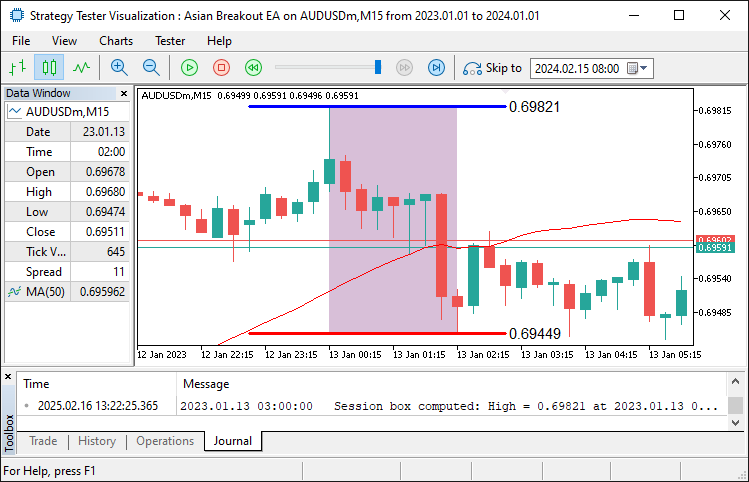
En la imagen, podemos ver que podemos identificar la caja y trazarla en el gráfico. Así que ahora podemos proceder a abrir las órdenes pendientes cerca de los límites del rango identificado. Para lograrlo, utilizamos la siguiente lógica.
//--- Build the trade exit time using user-defined hour and minute for today
MqlDateTime exitTimeStruct;                        //--- Declare a structure for exit time
TimeToStruct(currentTime, exitTimeStruct);         //--- Use current time's date components
exitTimeStruct.hour = TradeExitHour;               //--- Set trade exit hour
exitTimeStruct.min  = TradeExitMinute;             //--- Set trade exit minute
exitTimeStruct.sec  = 0;                           //--- Set seconds to 0
datetime tradeExitTime = StructToTime(exitTimeStruct); //--- Convert exit time structure to datetime

//--- If the session box is calculated, orders are not placed yet, and current time is before trade exit time, place orders
if(boxCalculated && !ordersPlaced && currentTime < tradeExitTime){
   double maBuffer[];                           //--- Declare array to hold MA values
   ArraySetAsSeries(maBuffer, true);            //--- Set the array as series (newest first)
   if(CopyBuffer(maHandle, 0, 0, 1, maBuffer) <= 0){  //--- Copy 1 value from the MA buffer
      Print("Failed to copy MA buffer.");       //--- Print error if buffer copy fails
      return;                                   //--- Exit the function if error occurs
   }
   double maValue = maBuffer[0];                 //--- Retrieve the current MA value

   double currentPrice = SymbolInfoDouble(_Symbol, SYMBOL_BID); //--- Get current bid price
   bool bullish = (currentPrice > maValue);      //--- Determine bullish condition
   bool bearish = (currentPrice < maValue);       //--- Determine bearish condition

   double offsetPrice = BreakoutOffsetPips * _Point; //--- Convert pips to price units

   //--- If bullish, place a Buy Stop order
   if(bullish){
      double entryPrice = BoxHigh + offsetPrice; //--- Set entry price just above the session high
      double stopLoss   = BoxLow - offsetPrice;    //--- Set stop loss below the session low
      double risk       = entryPrice - stopLoss;     //--- Calculate risk per unit
      double takeProfit = entryPrice + risk * RiskToReward; //--- Calculate take profit using risk/reward ratio
      if(obj_Trade.BuyStop(LotSize, entryPrice, _Symbol, stopLoss, takeProfit, ORDER_TIME_GTC, 0, "Asian Breakout EA")){
         Print("Placed Buy Stop order at ", entryPrice); //--- Print order confirmation
         ordersPlaced = true;                        //--- Set flag indicating an order has been placed
      }
      else{
         Print("Buy Stop order failed: ", obj_Trade.ResultRetcodeDescription()); //--- Print error if order fails
      }
   }
   //--- If bearish, place a Sell Stop order
   else if(bearish){
      double entryPrice = BoxLow - offsetPrice;  //--- Set entry price just below the session low
      double stopLoss   = BoxHigh + offsetPrice;   //--- Set stop loss above the session high
      double risk       = stopLoss - entryPrice;    //--- Calculate risk per unit
      double takeProfit = entryPrice - risk * RiskToReward; //--- Calculate take profit using risk/reward ratio
      if(obj_Trade.SellStop(LotSize, entryPrice, _Symbol, stopLoss, takeProfit, ORDER_TIME_GTC, 0, "Asian Breakout EA")){
         Print("Placed Sell Stop order at ", entryPrice); //--- Print order confirmation
         ordersPlaced = true;                       //--- Set flag indicating an order has been placed
      }
      else{
         Print("Sell Stop order failed: ", obj_Trade.ResultRetcodeDescription()); //--- Print error if order fails
      }
   }
}
Aquí, creamos el tiempo de salida de la operación declarando una estructura MqlDateTime denominada «exitTimeStruct». A continuación, utilizamos la función TimeToStruct para descomponer la hora actual en sus partes y asignamos las variables definidas por el usuario «TradeExitHour» y «TradeExitMinute» (con los segundos establecidos en 0) a «exitTimeStruct». A continuación, convertimos esta estructura de nuevo en un valor de fecha y hora llamando a la función StructToTime, lo que da como resultado «tradeExitTime». Después de eso, si se ha calculado el cuadro de sesión, no se han realizado órdenes y la hora actual es anterior a «tradeExitTime», procedemos a realizar órdenes.
Declaramos una matriz «maBuffer» para almacenar los valores de la media móvil y llamamos a la función ArraySetAsSeries para garantizar que la matriz se indexe con los datos más recientes en primer lugar. A continuación, utilizamos la función CopyBuffer para recuperar el último valor del indicador de media móvil (utilizando «maHandle») en «maBuffer». Comparamos este valor medio móvil con el precio de compra actual (obtenido mediante la función SymbolInfoDouble) para determinar si el mercado es alcista o bajista. Basándonos en esta condición, calculamos el precio de entrada adecuado, el stop loss y el take profit utilizando el parámetro «BreakoutOffsetPips» y, a continuación, colocamos una orden Buy Stop utilizando el método «obj_Trade.BuyStop» o una orden Sell Stop utilizando el método «obj_Trade.SellStop».
Por último, imprimimos un mensaje de confirmación si el pedido se ha realizado correctamente o un mensaje de error si falla, y establecemos el indicador «ordersPlaced» en consecuencia. Al ejecutar el programa, obtenemos el siguiente resultado.
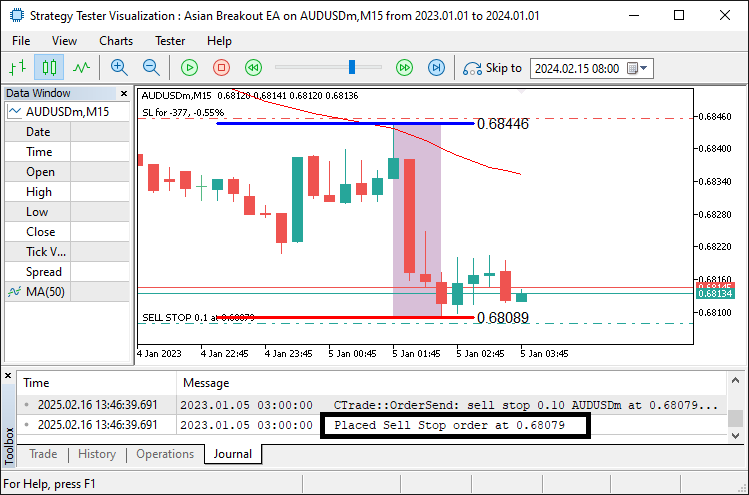
A partir de la función, podemos ver que una vez que se produce una ruptura, colocamos la orden pendiente en función de la dirección del filtro de la media móvil, junto con las órdenes de stop. Lo único que queda es salir de las posiciones o eliminar las órdenes pendientes una vez que el tiempo de negociación no se encuentre dentro del horario de negociación.
//--- If current time is at or past trade exit time, close positions and cancel pending orders
if(currentTime >= tradeExitTime){
   CloseOpenPositions();                          //--- Close all open positions for this EA
   CancelPendingOrders();                         //--- Cancel all pending orders for this EA
   boxCalculated = false;                         //--- Reset session box calculated flag
   ordersPlaced  = false;                         //--- Reset order placed flag
}
Aquí, comprobamos si la hora actual ha alcanzado o superado la hora de salida de la operación. Si es así, llamamos a la función «CloseOpenPositions» para cerrar todas las posiciones abiertas asociadas con el EA y, a continuación, llamamos a la función «CancelPendingOrders» para cancelar cualquier orden pendiente. Después de ejecutar estas funciones, restablecemos los indicadores «boxCalculated» y «ordersPlaced» a falso, preparando el programa para una nueva sesión. Las funciones personalizadas que utilizamos son las siguientes.
//+------------------------------------------------------------------+
//| Function: CloseOpenPositions                                     |
//| Purpose: Close all open positions with the set magic number      |
//+------------------------------------------------------------------+
void CloseOpenPositions(){
   int totalPositions = PositionsTotal();           //--- Get total number of open positions
   for(int i = totalPositions - 1; i >= 0; i--){      //--- Loop through positions in reverse order
      ulong ticket = PositionGetTicket(i);           //--- Get ticket number for each position
      if(PositionSelectByTicket(ticket)){            //--- Select position by ticket
         if(PositionGetInteger(POSITION_MAGIC) == MagicNumber){ //--- Check if position belongs to this EA
            if(!obj_Trade.PositionClose(ticket))        //--- Attempt to close position
              Print("Failed to close position ", ticket, ": ", obj_Trade.ResultRetcodeDescription()); //--- Print error if closing fails
            else
              Print("Closed position ", ticket);    //--- Confirm position closed
         }
      }
   }
}

//+------------------------------------------------------------------+
//| Function: CancelPendingOrders                                    |
//| Purpose: Cancel all pending orders with the set magic number     |
//+------------------------------------------------------------------+
void CancelPendingOrders(){
   int totalOrders = OrdersTotal();                 //--- Get total number of pending orders
   for(int i = totalOrders - 1; i >= 0; i--){         //--- Loop through orders in reverse order
      ulong ticket = OrderGetTicket(i);              //--- Get ticket number for each order
      if(OrderSelect(ticket)){                       //--- Select order by ticket
         int type = (int)OrderGetInteger(ORDER_TYPE); //--- Retrieve order type
         if(OrderGetInteger(ORDER_MAGIC) == MagicNumber && //--- Check if order belongs to this EA
            (type == ORDER_TYPE_BUY_STOP || type == ORDER_TYPE_SELL_STOP)){
            if(!obj_Trade.OrderDelete(ticket))         //--- Attempt to delete pending order
              Print("Failed to cancel pending order ", ticket); //--- Print error if deletion fails
            else
              Print("Canceled pending order ", ticket); //--- Confirm pending order canceled
         }
      }
   }
}
Aquí, en la función «CloseOpenPositions», primero recuperamos el número total de posiciones abiertas utilizando la función PositionsTotal y, a continuación, recorremos cada posición en orden inverso. Para cada posición, obtenemos su número de ticket utilizando PositionGetTicket y seleccionamos la posición con PositionSelectByTicket. A continuación, comprobamos si el valor POSITION_MAGIC de la posición coincide con nuestro «MagicNumber» definido por el usuario para asegurarnos de que pertenece a nuestro EA; si es así, intentamos cerrar la posición utilizando la función «obj_Trade.PositionClose» e imprimimos un mensaje de confirmación o un mensaje de error (utilizando «obj_Trade.ResultRetcodeDescription») en función del resultado.
En la función «CancelPendingOrders», primero recuperamos el número total de pedidos pendientes con la función OrdersTotal y los recorremos en orden inverso. Para cada pedido, obtenemos su ticket utilizando OrderGetTicket y lo seleccionamos utilizando OrderSelect. A continuación, comprobamos si el ORDER_MAGIC de la orden coincide con nuestro «MagicNumber» y si su tipo es «ORDER_TYPE_BUY_STOP» o ORDER_TYPE_SELL_STOP. Si se cumplen ambas condiciones, intentamos cancelar el pedido utilizando la función «obj_Trade.OrderDelete» y mostramos un mensaje de éxito o de error, dependiendo de si la cancelación se ha realizado correctamente. Al ejecutar el programa, obtenemos los siguientes resultados.
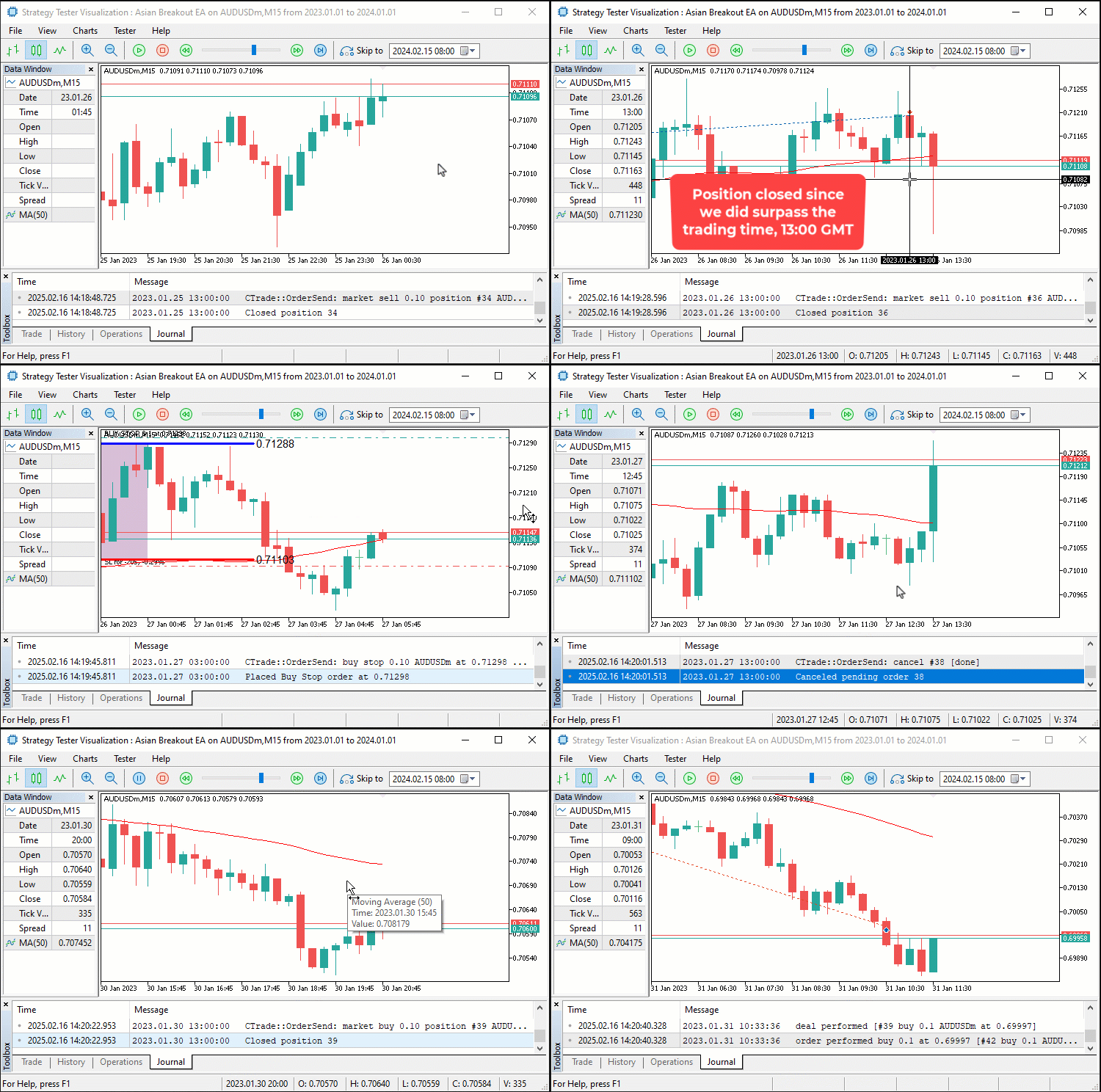
A partir de la visualización, podemos ver que identificamos la sesión asiática, la trazamos en el gráfico, colocamos órdenes pendientes en función de la dirección de la media móvil y cancelamos las órdenes o posiciones activadas si aún existen una vez que superamos el tiempo de negociación definido por el usuario, logrando así nuestro objetivo. Lo que queda por hacer es realizar pruebas retrospectivas del programa, lo cual se aborda en la siguiente sección.
Pruebas retrospectivas y optimización
Tras realizar pruebas retrospectivas exhaustivas durante un año, 2023, utilizando la configuración predeterminada, obtenemos los siguientes resultados.
Gráfico de prueba retrospectiva:
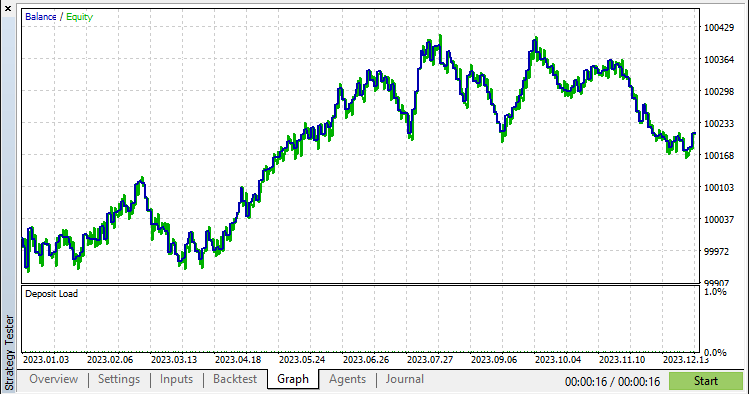
En la imagen podemos ver que el gráfico es bastante bueno, pero podemos ayudarlo a mejorarlo aplicando un mecanismo de stop dinámico, y lo logramos utilizando la siguiente lógica.
//+------------------------------------------------------------------+
//|        FUNCTION TO APPLY TRAILING STOP                           |
//+------------------------------------------------------------------+
void applyTrailingSTOP(double slPoints, CTrade &trade_object,int magicNo=0){
   double buySL = NormalizeDouble(SymbolInfoDouble(_Symbol,SYMBOL_BID)-slPoints,_Digits); //--- Calculate SL for buy positions
   double sellSL = NormalizeDouble(SymbolInfoDouble(_Symbol,SYMBOL_ASK)+slPoints,_Digits); //--- Calculate SL for sell positions

   for (int i = PositionsTotal() - 1; i >= 0; i--){ //--- Iterate through all open positions
      ulong ticket = PositionGetTicket(i);          //--- Get position ticket
      if (ticket > 0){                              //--- If ticket is valid
         if (PositionGetString(POSITION_SYMBOL) == _Symbol &&
            (magicNo == 0 || PositionGetInteger(POSITION_MAGIC) == magicNo)){ //--- Check symbol and magic number
            if (PositionGetInteger(POSITION_TYPE) == POSITION_TYPE_BUY &&
               buySL > PositionGetDouble(POSITION_PRICE_OPEN) &&
               (buySL > PositionGetDouble(POSITION_SL) ||
               PositionGetDouble(POSITION_SL) == 0)){ //--- Modify SL for buy position if conditions are met
               trade_object.PositionModify(ticket,buySL,PositionGetDouble(POSITION_TP));
            }
            else if (PositionGetInteger(POSITION_TYPE) == POSITION_TYPE_SELL &&
               sellSL < PositionGetDouble(POSITION_PRICE_OPEN) &&
               (sellSL < PositionGetDouble(POSITION_SL) ||
               PositionGetDouble(POSITION_SL) == 0)){ //--- Modify SL for sell position if conditions are met
               trade_object.PositionModify(ticket,sellSL,PositionGetDouble(POSITION_TP));
            }
         }
      }
   }
}

//---- CALL THE FUNCTION IN THE TICK EVENT HANDLER

if (PositionsTotal() > 0){                       //--- If there are open positions
   applyTrailingSTOP(30*_Point,obj_Trade,0);  //--- Apply a trailing stop
}
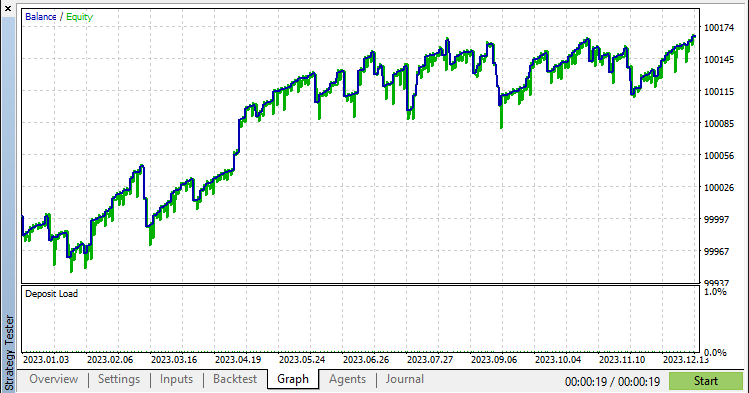
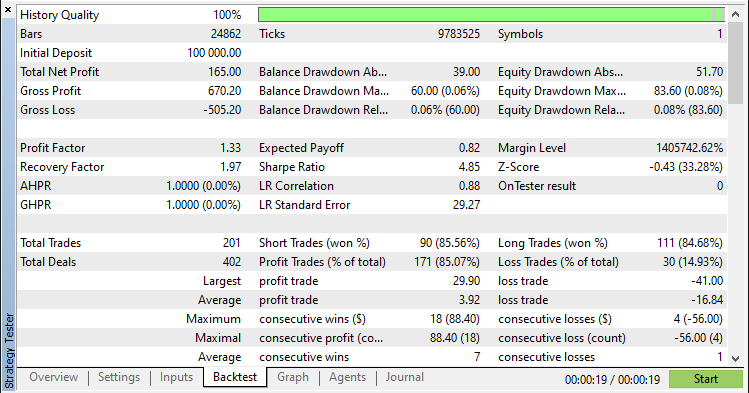
Tras aplicar la función y realizar las pruebas, los nuevos resultados son los siguientes.
Gráfico de prueba retrospectiva:
Informe de prueba retrospectiva:
Conclusión
En conclusión, hemos desarrollado con éxito un Asesor Experto MQL5 que automatiza con precisión la estrategia de ruptura asiática. Aprovechando la detección de rangos basada en sesiones, el filtrado de tendencias mediante una media móvil y la gestión dinámica del riesgo, hemos creado un sistema que identifica las zonas clave de consolidación y ejecuta operaciones de ruptura de manera eficiente.
Descargo de responsabilidad: Este artículo tiene fines exclusivamente educativos.. El trading conlleva un riesgo financiero significativo y las condiciones del mercado pueden ser impredecibles. Aunque la estrategia descrita proporciona un enfoque estructurado para el trading de ruptura, no garantiza la rentabilidad. Es esencial realizar pruebas retrospectivas exhaustivas y una gestión adecuada del riesgo antes de implementar este programa en un entorno real.
Al implementar estas técnicas, podrá mejorar sus capacidades de negociación algorítmica, perfeccionar sus habilidades de análisis técnico y avanzar aún más en su estrategia de negociación. ¡Mucha suerte en tu aventura en el mundo del trading!
Traducción del inglés realizada por MetaQuotes Ltd.
Artículo original: https://www.mql5.com/en/articles/17239
Advertencia: todos los derechos de estos materiales pertenecen a MetaQuotes Ltd. Queda totalmente prohibido el copiado total o parcial.
Este artículo ha sido escrito por un usuario del sitio web y refleja su punto de vista personal. MetaQuotes Ltd. no se responsabiliza de la exactitud de la información ofrecida, ni de las posibles consecuencias del uso de las soluciones, estrategias o recomendaciones descritas.

 Redes neuronales en el trading: Clusterización doble de series temporales (Final)
 Automatización de estrategias de trading en MQL5 (Parte 8): Creación de un Asesor Experto con patrones armónicos Butterfly
 Características del Wizard MQL5 que debe conocer (Parte 55): SAC con Prioritized Experience Replay (PER)
 Desarrollo de asesores expertos autooptimizables en MQL5 (Parte 6): Prevención del cierre de posiciones

- Aplicaciones de trading gratuitas
- 8 000+ señales para copiar
- Noticias económicas para analizar los mercados financieros
Usted acepta la política del sitio web y las condiciones de uso