

Automatizando Estratégias de Trading em MQL5 (Parte 10): Desenvolvendo a Estratégia Trend Flat Momentum
 327
327
 0
0

Introdução
No artigo anterior (Parte 9), desenvolvemos um Expert Advisor para automatizar a Asian Breakout Strategy utilizando níveis-chave de sessão e gerenciamento de risco dinâmico em MetaQuotes Language 5 (MQL5). Agora, na Parte 10, voltamos nossa atenção para a Trend Flat Momentum Strategy — um método que combina o cruzamento de duas moving averages com filtros de momentum como o Relative Strength Index (RSI) e o Commodity Channel Index (CCI) para capturar movimentos de tendência com precisão. Estruturaremos o artigo nos seguintes tópicos:
Ao final, teremos um Expert Advisor totalmente funcional que automatiza a Trend Flat Momentum Strategy. Vamos começar!
Plano Estratégico
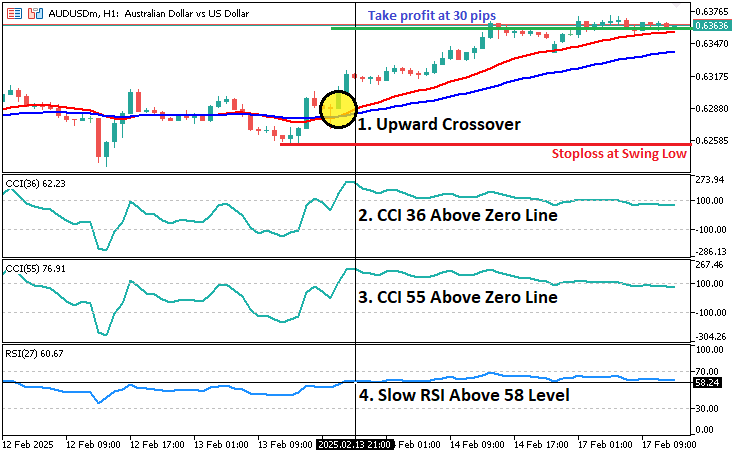
A Trend Flat Momentum Strategy foi projetada para capturar tendências de mercado combinando um sistema simples de cruzamento de médias móveis com filtros robustos de momentum. A ideia central é gerar sinais de compra quando uma média móvel rápida cruza acima de uma média móvel mais lenta — sugerindo uma tendência de alta — enquanto confirma o sinal com indicadores de momentum, que são um RSI e dois valores diferentes de CCI. Por outro lado, uma operação de venda é sinalizada quando a média móvel lenta supera a média móvel rápida e os indicadores de momentum confirmam condições de baixa. As configurações dos indicadores são:
- Commodity Channel Index (CCI) (36 períodos, Close)
- Commodity Channel Index (CCI) (55 períodos, Close)
- Slow Relative Strength Index (RSI) (27 períodos, Close)
- Moving Average Fast (11 períodos, Smoothed, Median Price)
- Moving Slow Fast (25 períodos, Smoothed, Median Price)
Quanto à estratégia de saída, colocaremos o stop loss no swing low anterior para uma operação de compra e no swing high anterior para uma operação de venda. O take profit será definido em um nível predeterminado, 300 pontos a partir do preço de entrada. Essa abordagem multifacetada ajuda a filtrar sinais falsos e busca melhorar a qualidade das entradas ao garantir que a direção da tendência e o momentum estejam alinhados. De forma resumida, a visualização abaixo apresenta o plano estratégico simplificado.
Implementação em MQL5
Para criar o programa em MQL5, abra o MetaEditor, vá até o Navigator, localize a pasta Indicators, clique na aba "New" e siga as instruções para criar o arquivo. Depois de criado, no ambiente de programação precisaremos declarar algumas global variables que utilizaremos ao longo de todo o programa.
//+------------------------------------------------------------------+
//|                        Copyright 2025, Forex Algo-Trader, Allan. |
//|                                 "https://t.me/Forex_Algo_Trader" |
//+------------------------------------------------------------------+
#property copyright "Forex Algo-Trader, Allan"
#property link      "https://t.me/Forex_Algo_Trader"
#property version   "1.00"
#property description "This EA trades based on Trend Flat Momentum Strategy"
#property strict

#include <Trade\Trade.mqh> //--- Include the Trade library for order management.
CTrade obj_Trade; //--- Create an instance of the CTrade class to handle trading operations.

// Input parameters
input int    InpCCI36Period      = 36;              //--- CCI period 1
input int    InpCCI55Period      = 55;              //--- CCI period 2
input int    InpRSIPeriod        = 27;              //--- RSI period
input int    InpMAFastPeriod     = 11;              //--- Fast MA period
input int    InpMASlowPeriod     = 25;              //--- Slow MA period
input double InpRSIThreshold     = 58.0;            //--- RSI threshold for Buy signal (Sell uses 100 - Threshold)
input int    InpTakeProfitPoints = 300;             //--- Take profit in points
input double InpLotSize          = 0.1;             //--- Trade lot size

// Pivot parameters for detecting swing highs/lows
input int    PivotLeft  = 2;  //--- Number of bars to the left for pivot detection
input int    PivotRight = 2;  //--- Number of bars to the right for pivot detection

// Global indicator handles
int handleCCI36;  //--- Handle for the CCI indicator with period InpCCI36Period
int handleCCI55;  //--- Handle for the CCI indicator with period InpCCI55Period
int handleRSI;    //--- Handle for the RSI indicator with period InpRSIPeriod
int handleMA11;   //--- Handle for the fast moving average (MA) with period InpMAFastPeriod
int handleMA25;   //--- Handle for the slow moving average (MA) with period InpMASlowPeriod

// Global dynamic storage buffers
double ma11_buffer[];  //--- Dynamic array to store fast MA values
double ma25_buffer[];  //--- Dynamic array to store slow MA values
double rsi_buffer[];   //--- Dynamic array to store RSI values
double cci36_buffer[]; //--- Dynamic array to store CCI values (period 36)
double cci55_buffer[]; //--- Dynamic array to store CCI values (period 55)

// To detect a new bar
datetime lastBarTime = 0;  //--- Variable to store the time of the last processed bar
Começamos incluindo o arquivo "Trade\Trade.mqh" usando #include para acessar funções de negociação integradas e criar "obj_Trade", uma instância da classe "CTrade", responsável por executar ordens de compra e venda. Definimos parâmetros principais de input para configuração da estratégia, incluindo "InpCCI36Period" e "InpCCI55Period" para os indicadores CCI, "InpRSIPeriod" para o RSI e "InpMAFastPeriod" e "InpMASlowPeriod" para as duas médias móveis. "InpRSIThreshold" define uma condição para filtragem de trades, enquanto "InpTakeProfitPoints" determina o nível fixo de take profit e "InpLotSize" controla o tamanho da posição.
Para melhorar a execução das operações, introduzimos "PivotLeft" e "PivotRight", que definem o número de candles usados para detectar swing highs e swing lows para posicionamento do stop loss. Para melhorar a execução das operações, introduzimos "PivotLeft" e "PivotRight", que definem o número de candles usados para detectar swing highs e swing lows para posicionamento do stop loss. Arrays dinâmicos armazenam esses valores em "ma11_buffer", "ma25_buffer", "rsi_buffer", "cci36_buffer" e "cci55_buffer", garantindo processamento de dados eficiente. Por fim, "lastBarTime" registra o último candle processado para evitar múltiplas operações no mesmo candle, garantindo execução correta das ordens. Em seguida, podemos inicializar os indicadores no manipulador de evento OnInit.
//+------------------------------------------------------------------+
//| Expert initialization function                                   |
//+------------------------------------------------------------------+
int OnInit() {
   //--- Create CCI handle for period InpCCI36Period using the close price.
   handleCCI36 = iCCI(_Symbol, _Period, InpCCI36Period, PRICE_CLOSE); //--- Create the CCI36 indicator handle.
   if (handleCCI36 == INVALID_HANDLE) { //--- Check if the CCI36 handle is valid.
      Print("Error creating CCI36 handle"); //--- Print an error message if invalid.
      return (INIT_FAILED); //--- Return failure if handle creation failed.
   }

   //--- Create CCI handle for period InpCCI55Period using the close price.
   handleCCI55 = iCCI(_Symbol, _Period, InpCCI55Period, PRICE_CLOSE); //--- Create the CCI55 indicator handle.
   if (handleCCI55 == INVALID_HANDLE) { //--- Check if the CCI55 handle is valid.
      Print("Error creating CCI55 handle"); //--- Print an error message if invalid.
      return (INIT_FAILED); //--- Return failure if handle creation failed.
   }

   //--- Create RSI handle for period InpRSIPeriod using the close price.
   handleRSI = iRSI(_Symbol, _Period, InpRSIPeriod, PRICE_CLOSE); //--- Create the RSI indicator handle.
   if (handleRSI == INVALID_HANDLE) { //--- Check if the RSI handle is valid.
      Print("Error creating RSI handle"); //--- Print an error message if invalid.
      return (INIT_FAILED); //--- Return failure if handle creation failed.
   }

   //--- Create fast MA handle using MODE_SMMA on the median price with period InpMAFastPeriod.
   handleMA11 = iMA(_Symbol, _Period, InpMAFastPeriod, 0, MODE_SMMA, PRICE_MEDIAN); //--- Create the fast MA handle.
   if (handleMA11 == INVALID_HANDLE) { //--- Check if the fast MA handle is valid.
      Print("Error creating MA11 handle"); //--- Print an error message if invalid.
      return (INIT_FAILED); //--- Return failure if handle creation failed.
   }

   //--- Create slow MA handle using MODE_SMMA on the median price with period InpMASlowPeriod.
   handleMA25 = iMA(_Symbol, _Period, InpMASlowPeriod, 0, MODE_SMMA, PRICE_MEDIAN); //--- Create the slow MA handle.
   if (handleMA25 == INVALID_HANDLE) { //--- Check if the slow MA handle is valid.
      Print("Error creating MA25 handle"); //--- Print an error message if invalid.
      return (INIT_FAILED); //--- Return failure if handle creation failed.
   }

   //--- Set the dynamic arrays as time series (index 0 = most recent closed bar).
   ArraySetAsSeries(ma11_buffer, true); //--- Set ma11_buffer as a time series.
   ArraySetAsSeries(ma25_buffer, true); //--- Set ma25_buffer as a time series.
   ArraySetAsSeries(rsi_buffer, true);  //--- Set rsi_buffer as a time series.
   ArraySetAsSeries(cci36_buffer, true); //--- Set cci36_buffer as a time series.
   ArraySetAsSeries(cci55_buffer, true); //--- Set cci55_buffer as a time series.

   return (INIT_SUCCEEDED); //--- Return success after initialization.
}
No manipulador de evento OnInit, inicializamos o Expert Advisor criando e validando os handles dos indicadores. Utilizamos a função iCCI para criar handles de CCI com os períodos "InpCCI36Period" e "InpCCI55Period", a função iRSI para criar o handle do RSI e a função iMA para criar handles SMMA rápidos e lentos com os períodos "InpMAFastPeriod" e "InpMASlowPeriod".Se algum handle for inválido (INVALID_HANDLE), exibimos um erro e retornamos falha (INIT_FAILED). Por fim, utilizamos a função ArraySetAsSeries para formatar os buffers como séries temporais e retornamos sucesso caso a inicialização seja concluída corretamente. Para economizar recursos, precisamos liberar os handles criados quando o programa for removido, da seguinte forma.
//+------------------------------------------------------------------+
//| Expert deinitialization function                                 |
//+------------------------------------------------------------------+
void OnDeinit(const int reason) {
   if (handleCCI36 != INVALID_HANDLE) { //--- If the CCI36 handle is valid,
      IndicatorRelease(handleCCI36); //--- release the CCI36 indicator.
   }
   if (handleCCI55 != INVALID_HANDLE) { //--- If the CCI55 handle is valid,
      IndicatorRelease(handleCCI55); //--- release the CCI55 indicator.
   }
   if (handleRSI != INVALID_HANDLE) { //--- If the RSI handle is valid,
      IndicatorRelease(handleRSI); //--- release the RSI indicator.
   }
   if (handleMA11 != INVALID_HANDLE) { //--- If the fast MA handle is valid,
      IndicatorRelease(handleMA11); //--- release the fast MA indicator.
   }
   if (handleMA25 != INVALID_HANDLE) { //--- If the slow MA handle is valid,
      IndicatorRelease(handleMA25); //--- release the slow MA indicator.
   }
}
Aqui tratamos a desinicialização do Expert Advisor liberando os recursos dos indicadores no evento OnDeinit. Verificamos se cada handle de indicador — "CCI36", "CCI55", "RSI", média móvel rápida e média móvel lenta — é válido. Se for, utilizamos a função IndicatorRelease para liberar os recursos alocados, garantindo gerenciamento eficiente de memória. Agora podemos avançar para o manipulador de evento OnTick, onde todo o processamento de dados e tomada de decisão ocorrerá.
//+------------------------------------------------------------------+
//| Expert tick function                                             |
//+------------------------------------------------------------------+
void OnTick() {
   //--- Get the time of the current bar.
   datetime currentBarTime = iTime(_Symbol, _Period, 0); //--- Retrieve the current bar's time.
   if (currentBarTime != lastBarTime) { //--- If a new bar has formed,
      lastBarTime = currentBarTime; //--- update lastBarTime with the current bar's time.
      OnNewBar(); //--- Process the new bar.
   }
}
Aqui utilizamos o manipulador de evento OnTick para monitorar atualizações de preço e detectar novos candles. Recuperamos o horário do candle atual utilizando a função iTime e o comparamos com o valor armazenado em "lastBarTime". Se um novo candle for detectado, atualizamos "lastBarTime", garantindo que negociemos apenas uma vez por candle, e chamamos a função "OnNewBar" para processar os dados do novo candle. Essa é a função onde tratamos toda a geração de sinais e ela é apresentada a seguir.
//+------------------------------------------------------------------+
//| Function called on every new bar (bar close)                     |
//+------------------------------------------------------------------+
void OnNewBar() {

   //--- Resize the dynamic arrays to hold 2 values (last closed bar and the one before).
   ArrayResize(ma11_buffer, 2); //--- Resize ma11_buffer to 2 elements.
   ArrayResize(ma25_buffer, 2); //--- Resize ma25_buffer to 2 elements.
   ArrayResize(rsi_buffer, 2);  //--- Resize rsi_buffer to 2 elements.
   ArrayResize(cci36_buffer, 2); //--- Resize cci36_buffer to 2 elements.
   ArrayResize(cci55_buffer, 2); //--- Resize cci55_buffer to 2 elements.

   //--- Copy indicator values into the dynamic arrays.
   if (CopyBuffer(handleMA11, 0, 1, 2, ma11_buffer) != 2) { //--- Copy 2 values from the fast MA indicator.
      return; //--- Exit the function if copying fails.
   }
   if (CopyBuffer(handleMA25, 0, 1, 2, ma25_buffer) != 2) { //--- Copy 2 values from the slow MA indicator.
      return; //--- Exit the function if copying fails.
   }
   if (CopyBuffer(handleRSI, 0, 1, 2, rsi_buffer) != 2) { //--- Copy 2 values from the RSI indicator.
      return; //--- Exit the function if copying fails.
   }
   if (CopyBuffer(handleCCI36, 0, 1, 2, cci36_buffer) != 2) { //--- Copy 2 values from the CCI36 indicator.
      return; //--- Exit the function if copying fails.
   }
   if (CopyBuffer(handleCCI55, 0, 1, 2, cci55_buffer) != 2) { //--- Copy 2 values from the CCI55 indicator.
      return; //--- Exit the function if copying fails.
   }

   //--- For clarity, assign the values from the arrays.
   //--- Index 0: last closed bar, Index 1: bar before.
   double ma11_current   = ma11_buffer[0]; //--- Fast MA value for the last closed bar.
   double ma11_previous  = ma11_buffer[1]; //--- Fast MA value for the previous bar.
   double ma25_current   = ma25_buffer[0]; //--- Slow MA value for the last closed bar.
   double ma25_previous  = ma25_buffer[1]; //--- Slow MA value for the previous bar.
   double rsi_current    = rsi_buffer[0];  //--- RSI value for the last closed bar.
   double cci36_current  = cci36_buffer[0]; //--- CCI36 value for the last closed bar.
   double cci55_current  = cci55_buffer[0]; //--- CCI55 value for the last closed bar.
}
Na função void "OnNewBar" que criamos, primeiro garantimos que os arrays dinâmicos que armazenam os valores dos indicadores sejam redimensionados utilizando a função ArrayResize para guardar os dois últimos candles fechados. Em seguida, recuperamos os valores dos indicadores utilizando a função CopyBuffer para a média móvel rápida, média móvel lenta, RSI e os dois indicadores CCI. Se qualquer uma dessas operações falhar, a função é encerrada para evitar erros. Após copiar os valores com sucesso, atribuímos esses valores a variáveis para facilitar a referência, distinguindo entre o último candle fechado e o candle anterior a ele. Essa estrutura garante que sempre tenhamos os dados mais recentes do mercado disponíveis para tomar decisões de negociação. Se recuperarmos os dados com sucesso, podemos prosseguir para a tomada de decisões de trading. Começamos com a lógica de compra.
//--- Check for Buy Conditions:
bool maCrossoverBuy    = (ma11_previous < ma25_previous) && (ma11_current > ma25_current); //--- True if fast MA crosses above slow MA.
bool rsiConditionBuy   = (rsi_current > InpRSIThreshold); //--- True if RSI is above the Buy threshold.
bool cci36ConditionBuy = (cci36_current > 0); //--- True if CCI36 is positive.
bool cci55ConditionBuy = (cci55_current > 0); //--- True if CCI55 is positive.

if (maCrossoverBuy) { //--- If crossover for MA Buy is true...
   bool conditionsOk = true; //--- Initialize a flag to track if all conditions are met.

   //--- Check RSI condition for Buy.
   if (!rsiConditionBuy) { //--- If the RSI condition is not met...
      Print("Buy signal rejected: RSI condition not met. RSI=", rsi_current, " Threshold=", InpRSIThreshold); //--- Notify the user.
      conditionsOk = false; //--- Mark the conditions as not met.
   }
   //--- Check CCI36 condition for Buy.
   if (!cci36ConditionBuy) { //--- If the CCI36 condition is not met...
      Print("Buy signal rejected: CCI36 condition not met. CCI36=", cci36_current); //--- Notify the user.
      conditionsOk = false; //--- Mark the conditions as not met.
   }
   //--- Check CCI55 condition for Buy.
   if (!cci55ConditionBuy) { //--- If the CCI55 condition is not met...
      Print("Buy signal rejected: CCI55 condition not met. CCI55=", cci55_current); //--- Notify the user.
      conditionsOk = false; //--- Mark the conditions as not met.
   }
Aqui avaliamos as condições para entrar em uma operação de compra. A variável "maCrossoverBuy" verifica se a média móvel rápida ("ma11") cruzou acima da média móvel lenta ("ma25"), indicando um possível sinal de compra. A variável "rsiConditionBuy" garante que o valor do RSI esteja acima do limite definido em "InpRSIThreshold", confirmando forte momentum de alta. As variáveis "cci36ConditionBuy" e "cci55ConditionBuy" verificam se ambos os indicadores CCI estão positivos, sugerindo que o mercado está em uma tendência favorável. Se a condição "maCrossoverBuy" for verdadeira, prosseguimos para validar as demais condições. Se qualquer condição falhar, imprimimos uma mensagem indicando o motivo pelo qual o sinal de compra foi rejeitado e definimos a flag "conditionsOk" como false para impedir a execução da operação. Essa verificação abrangente garante que apenas operações com forte confirmação de alta sejam executadas. Se detectarmos um sinal válido, podemos então prosseguir para abrir a posição.
if (conditionsOk) { //--- If all Buy conditions are met...
   //--- Get stop loss from previous swing low.
   double stopLoss = GetPivotLow(PivotLeft, PivotRight); //--- Use pivot low as the stop loss.
   if (stopLoss <= 0) { //--- If no valid pivot low is found...
      stopLoss = SymbolInfoDouble(_Symbol, SYMBOL_BID); //--- Fallback to current bid price.
   }

   double entryPrice = SymbolInfoDouble(_Symbol, SYMBOL_ASK); //--- Determine entry price as current ask price.
   double tp         = entryPrice + InpTakeProfitPoints * _Point; //--- Calculate take profit based on fixed points.

   //--- Print the swing point (pivot low) used as stop loss.
   Print("Buy signal: Swing Low used as Stop Loss = ", stopLoss); //--- Notify the user of the pivot low used.

   if (obj_Trade.Buy(InpLotSize, NULL, entryPrice, stopLoss, tp, "Buy Order")) { //--- Attempt to open a Buy order.
      Print("Buy order opened at ", entryPrice); //--- Notify the user if the order is opened successfully.
   }
   else {
      Print("Buy order failed: ", obj_Trade.ResultRetcodeDescription()); //--- Notify the user if the order fails.
   }

   return; //--- Exit after processing a valid Buy signal.
}
else {
   Print("Buy signal not executed due to failed condition(s)."); //--- Notify the user if Buy conditions failed.
}
Depois de confirmar que todas as condições de compra foram atendidas, determinamos o stop loss da operação. Utilizamos a função "GetPivotLow" para encontrar o último swing low, que será definido como stop loss. Se nenhum pivot low válido for encontrado (ou seja, o stop loss for menor ou igual a 0), o preço bid atual é utilizado como alternativa. O preço de entrada é obtido a partir do preço ask atual utilizando a função SymbolInfoDouble com o parâmetro SYMBOL_ASK. Calculamos o take profit ("tp") adicionando os pontos definidos em "InpTakeProfitPoints" ao preço de entrada, ajustado pelo valor de ponto do mercado (_Point).
Uma vez determinados o preço de entrada, stop loss e take profit, tentamos abrir uma ordem de compra utilizando o método "obj_Trade.Buy". Se a ordem de compra for aberta com sucesso, exibimos uma mensagem de confirmação com Print. Se a ordem falhar, exibimos a mensagem de falha e a descrição do erro utilizando "obj_Trade.ResultRetcodeDescription". Se as condições de compra não forem atendidas, uma mensagem indicando que o sinal de compra foi rejeitado é exibida e nenhuma operação é aberta. Utilizamos uma função personalizada "GetPivotLow", cuja implementação está apresentada abaixo.
//+------------------------------------------------------------------+
//| Function to find the most recent swing low (pivot low)           |
//+------------------------------------------------------------------+
double GetPivotLow(int left, int right) {
   MqlRates rates[]; //--- Declare an array to store rate data.
   int copied = CopyRates(_Symbol, _Period, 0, 100, rates); //--- Copy the last 100 bars into the rates array.
   if (copied <= (left + right)) { //--- Check if sufficient data was copied.
      return (0); //--- Return 0 if there are not enough bars.
   }

   //--- Loop through the bars to find a pivot low.
   for (int i = left; i <= copied - right - 1; i++) {
      bool isPivot = true; //--- Assume the current bar is a pivot low.
      double currentLow = rates[i].low; //--- Get the low value of the current bar.
      for (int j = i - left; j <= i + right; j++) { //--- Loop through neighboring bars.
         if (j == i) { //--- Skip the current bar.
            continue;
         }
         if (rates[j].low <= currentLow) { //--- If any neighbor's low is lower or equal,
            isPivot = false; //--- then the current bar is not a pivot low.
            break;
         }
      }
      if (isPivot) { //--- If a pivot low is confirmed,
         return (currentLow); //--- return the low value of the pivot.
      }
   }
   return (0); //--- Return 0 if no pivot low is found.
}
Nessa função, buscamos identificar o swing low mais recente (pivot low) analisando os últimos 100 candles de dados de mercado utilizando a função CopyRates. O array "rates" da estrutura MqlRates armazena os dados de preço, e garantimos que existam candles suficientes para realizar o cálculo verificando se a quantidade de dados copiados é maior ou igual à soma dos parâmetros "left" e "right". A função então percorre os candles, verificando um pivot low ao comparar o valor mínimo do candle atual com os candles vizinhos dentro do intervalo especificado por "left" e "right". Se o valor mínimo de qualquer candle vizinho for menor ou igual ao valor mínimo do candle atual, o candle atual não é considerado um pivot low. Se um pivot low for encontrado, seu valor mínimo é retornado. Se nenhum pivot low for encontrado após verificar todos os candles, a função retorna 0.
Para obter o pivot high utilizamos uma abordagem semelhante, apenas com a lógica invertida.
//+------------------------------------------------------------------+
//| Function to find the most recent swing high (pivot high)         |
//+------------------------------------------------------------------+
double GetPivotHigh(int left, int right) {
   MqlRates rates[]; //--- Declare an array to store rate data.
   int copied = CopyRates(_Symbol, _Period, 0, 100, rates); //--- Copy the last 100 bars into the rates array.
   if (copied <= (left + right)) { //--- Check if sufficient data was copied.
      return (0); //--- Return 0 if there are not enough bars.
   }

   //--- Loop through the bars to find a pivot high.
   for (int i = left; i <= copied - right - 1; i++) {
      bool isPivot = true; //--- Assume the current bar is a pivot high.
      double currentHigh = rates[i].high; //--- Get the high value of the current bar.
      for (int j = i - left; j <= i + right; j++) { //--- Loop through neighboring bars.
         if (j == i) { //--- Skip the current bar.
            continue;
         }
         if (rates[j].high >= currentHigh) { //--- If any neighbor's high is higher or equal,
            isPivot = false; //--- then the current bar is not a pivot high.
            break;
         }
      }
      if (isPivot) { //--- If a pivot high is confirmed,
         return (currentHigh); //--- return the high value of the pivot.
      }
   }
   return (0); //--- Return 0 if no pivot high is found.
}
Com essas funções disponíveis, podemos processar os sinais de venda utilizando uma abordagem semelhante, porém inversa à utilizada para as posições de compra.
//--- Check for Sell Conditions:
bool maCrossoverSell    = (ma11_previous > ma25_previous) && (ma11_current < ma25_current); //--- True if fast MA crosses below slow MA.
bool rsiConditionSell   = (rsi_current < (100.0 - InpRSIThreshold)); //--- True if RSI is below the Sell threshold.
bool cci36ConditionSell = (cci36_current < 0); //--- True if CCI36 is negative.
bool cci55ConditionSell = (cci55_current < 0); //--- True if CCI55 is negative.

if (maCrossoverSell) { //--- If crossover for MA Sell is true...
   bool conditionsOk = true; //--- Initialize a flag to track if all conditions are met.

   //--- Check RSI condition for Sell.
   if (!rsiConditionSell) { //--- If the RSI condition is not met...
      Print("Sell signal rejected: RSI condition not met. RSI=", rsi_current, " Required below=", (100.0 - InpRSIThreshold)); //--- Notify the user.
      conditionsOk = false; //--- Mark the conditions as not met.
   }
   //--- Check CCI36 condition for Sell.
   if (!cci36ConditionSell) { //--- If the CCI36 condition is not met...
      Print("Sell signal rejected: CCI36 condition not met. CCI36=", cci36_current); //--- Notify the user.
      conditionsOk = false; //--- Mark the conditions as not met.
   }
   //--- Check CCI55 condition for Sell.
   if (!cci55ConditionSell) { //--- If the CCI55 condition is not met...
      Print("Sell signal rejected: CCI55 condition not met. CCI55=", cci55_current); //--- Notify the user.
      conditionsOk = false; //--- Mark the conditions as not met.
   }

   if (conditionsOk) { //--- If all Sell conditions are met...
      //--- Get stop loss from previous swing high.
      double stopLoss = GetPivotHigh(PivotLeft, PivotRight); //--- Use pivot high as the stop loss.
      if (stopLoss <= 0) { //--- If no valid pivot high is found...
         stopLoss = SymbolInfoDouble(_Symbol, SYMBOL_ASK); //--- Fallback to current ask price.
      }

      double entryPrice = SymbolInfoDouble(_Symbol, SYMBOL_BID); //--- Determine entry price as current bid price.
      double tp         = entryPrice - InpTakeProfitPoints * _Point; //--- Calculate take profit based on fixed points.

      //--- Print the swing point (pivot high) used as stop loss.
      Print("Sell signal: Swing High used as Stop Loss = ", stopLoss); //--- Notify the user of the pivot high used.

      if (obj_Trade.Sell(InpLotSize, NULL, entryPrice, stopLoss, tp, "Sell Order")) { //--- Attempt to open a Sell order.
         Print("Sell order opened at ", entryPrice); //--- Notify the user if the order is opened successfully.
      }
      else {
         Print("Sell order failed: ", obj_Trade.ResultRetcodeDescription()); //--- Notify the user if the order fails.
      }

      return; //--- Exit after processing a valid Sell signal.
   }
   else {
      Print("Sell signal not executed due to failed condition(s)."); //--- Notify the user if Sell conditions failed.
   }
}
Aqui verificamos as condições para um sinal de venda invertendo a lógica utilizada para os sinais de compra. Começamos verificando se a média móvel rápida cruza abaixo da média móvel lenta, o que é capturado pela condição "maCrossoverSell". Em seguida, verificamos se o RSI está abaixo do limite de venda e confirmamos que os valores de CCI36 e CCI55 são negativos.
Se todas as condições forem atendidas, calculamos o stop loss utilizando a função "GetPivotHigh" para encontrar o swing high mais recente e determinamos o take profit com base em uma distância fixa em pontos. Em seguida, tentamos abrir uma ordem de venda utilizando o método "obj_Trade.Sell". Se a ordem for executada com sucesso, exibimos uma mensagem de confirmação; caso contrário, mostramos uma mensagem de erro. Se qualquer condição falhar, notificamos o usuário de que o sinal de venda foi rejeitado. Após compilar e executar o programa, obtemos o seguinte resultado.
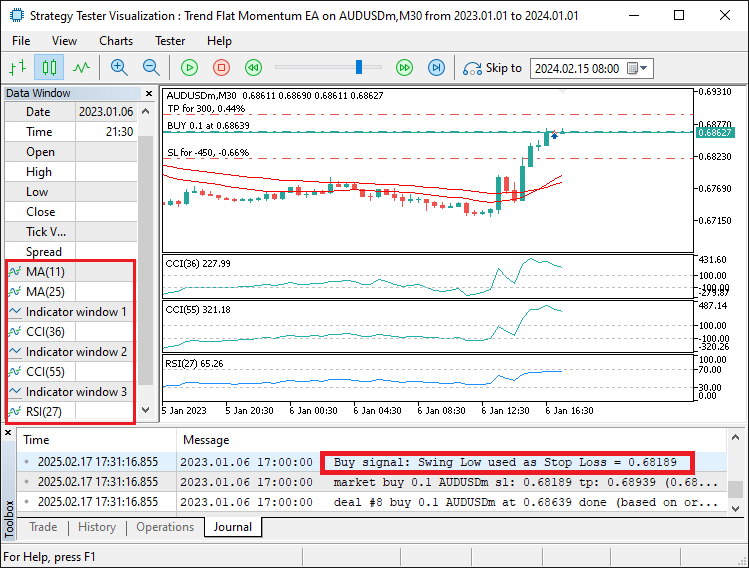
A partir da imagem, podemos observar que o programa identifica e verifica todas as condições de entrada e, quando validadas, abre a posição correspondente com os parâmetros de entrada apropriados, atingindo assim nosso objetivo. O que resta agora é realizar o backtesting do programa, o que é tratado na próxima seção.
Backtesting
Durante o backtesting intensivo do programa, observamos que ao encontrar pontos de swing utilizávamos primeiro os dados mais antigos para comparação.Isso ocasionalmente levava à identificação de pontos de swing inválidos, embora raramente, resultando em níveis de stop loss incorretos.
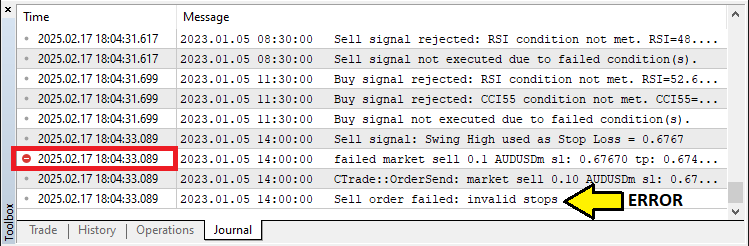
Para mitigar esse problema, adotamos uma abordagem em que definimos os dados de busca como uma série temporal utilizando a função ArraySetAsSeries, garantindo que os dados mais recentes fiquem na primeira posição dos arrays de armazenamento.Assim, utilizamos primeiro os dados mais recentes para análise, conforme mostrado a seguir.
//+------------------------------------------------------------------+
//| Function to find the most recent swing low (pivot low)           |
//+------------------------------------------------------------------+
double GetPivotLow(int left, int right) {
   MqlRates rates[]; //--- Declare an array to store rate data.
   ArraySetAsSeries(rates, true);

//---


}
Após novos testes para confirmação, obtivemos o seguinte resultado.
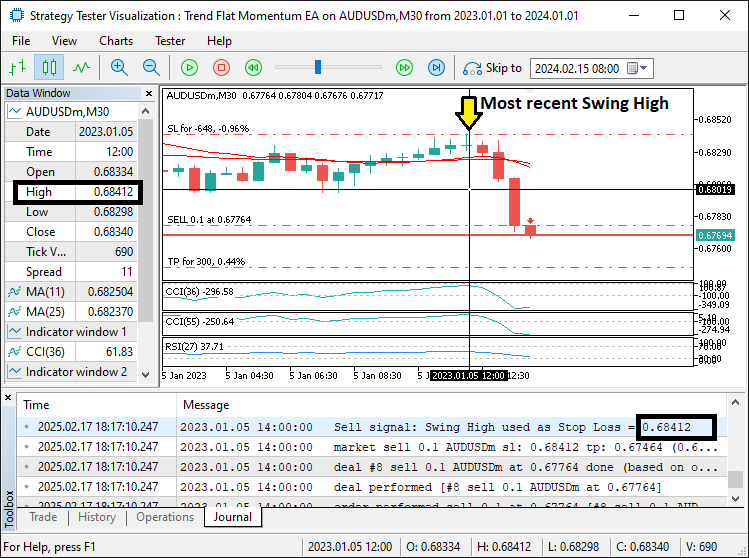
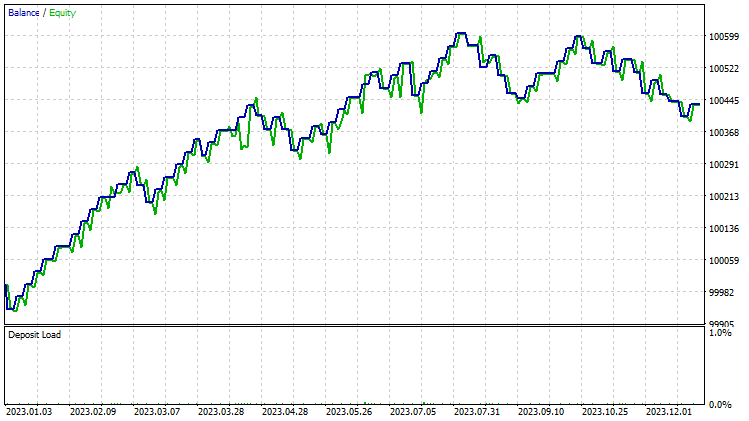
A partir da imagem, podemos ver que agora obtemos corretamente os pontos de swing mais recentes, eliminando o erro de "invalid stops". Dessa forma, evitamos o bloqueio de operações e, após testes aprofundados entre 2023 e 2024, obtivemos os seguintes resultados.
Gráfico de backtest:
Relatório de backtest:
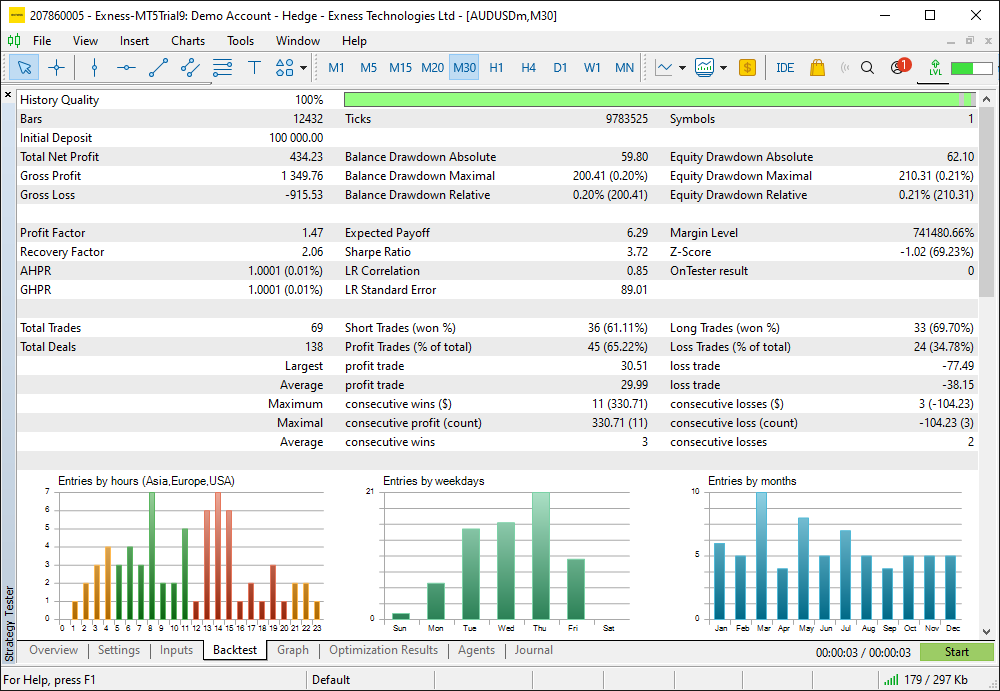
Conclusão
Em conclusão, desenvolvemos com sucesso um Expert Advisor em MQL5 projetado para automatizar uma estratégia completa de negociação Trend Flat Momentum, combinando múltiplos indicadores de tendência e momentum para sinais de compra e venda. Ao incorporar condições essenciais como cruzamentos de indicadores e verificações de limites, criamos um sistema dinâmico que reage às tendências do mercado com pontos de entrada e saída precisos.
Aviso: Este artigo é apenas para fins educacionais. O trading envolve risco financeiro significativo e as condições de mercado podem mudar rapidamente. Embora a estratégia apresentada ofereça uma abordagem estruturada para negociação, ela não garante lucratividade. Backtests completos e uma gestão de risco adequada são essenciais antes de aplicar esse sistema em ambiente real.
Ao implementar esses conceitos, você pode aprimorar suas habilidades em trading algorítmico e refinar sua abordagem de análise técnica. Boa sorte enquanto continua desenvolvendo e aprimorando suas estratégias de trading!
Traduzido do Inglês pela MetaQuotes Ltd.
Artigo original: https://www.mql5.com/en/articles/17247
Aviso: Todos os direitos sobre esses materiais pertencem à MetaQuotes Ltd. É proibida a reimpressão total ou parcial.
Esse artigo foi escrito por um usuário do site e reflete seu ponto de vista pessoal. A MetaQuotes Ltd. não se responsabiliza pela precisão das informações apresentadas nem pelas possíveis consequências decorrentes do uso das soluções, estratégias ou recomendações descritas.

 O Filtro de Kalman para Estratégias de Reversão à Média no Forex
 Redes neurais em trading: Previsão probabilística de série temporal (K2VAE)
 Algoritmo do mercado acionário: Exchange Market Algorithm (EMA)
 Desenvolvendo um EA multimoeda (Parte 28): Adicionando um gerenciador de fechamento de posições

- Aplicativos de negociação gratuitos
- 8 000+ sinais para cópia
- Notícias econômicas para análise dos mercados financeiros
Você concorda com a política do site e com os termos de uso