

Automatizando Estratégias de Trading em MQL5 (Parte 8): Construindo um Expert Advisor com Padrões Harmônicos Butterfly
 287
287
 2
2

Introdução
No artigo anterior (Parte 7), desenvolvemos um Expert Advisor de Grid Trading em MetaQuotes Language 5 (MQL5) com escalonamento dinâmico de lote para otimizar risco e retorno. Agora, na Parte 8, direcionamos nosso foco para o padrão harmônico Butterfly — uma configuração de reversão que utiliza proporções precisas de Fibonacci para identificar possíveis pontos de reversão no mercado. Essa abordagem não apenas ajuda a identificar sinais claros de entrada e saída, mas também aprimora sua estratégia de negociação por meio de visualização e execução automatizadas. Neste artigo, abordaremos:
Ao final, você terá um Expert Advisor totalmente funcional capaz de detectar e negociar padrões harmônicos Butterfly. Vamos começar!
Plano Estratégico
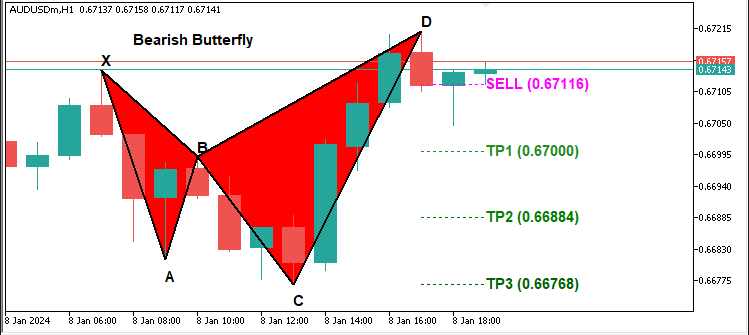
O padrão Butterfly é uma formação geométrica precisa definida por cinco pontos-chave de oscilação ou pivô — X, A, B, C e D — e apresenta dois tipos principais: padrão bearish e padrão bullish. Em um Butterfly bearish, a estrutura forma uma sequência alta-baixa-alta-baixa-alta, onde o pivô X é uma máxima de oscilação, o pivô A uma mínima, o pivô B uma máxima, o pivô C uma mínima e o pivô D uma máxima (com D posicionado acima de X). Por outro lado, um Butterfly bullish é formado em uma sequência baixa-alta-baixa-alta-baixa, com o pivô X sendo uma mínima de oscilação e o pivô D localizado abaixo de X. Abaixo estão os tipos de padrões visualizados.
Padrão Harmônico Butterfly Bearish:

Padrão Harmônico Butterfly Bullish:
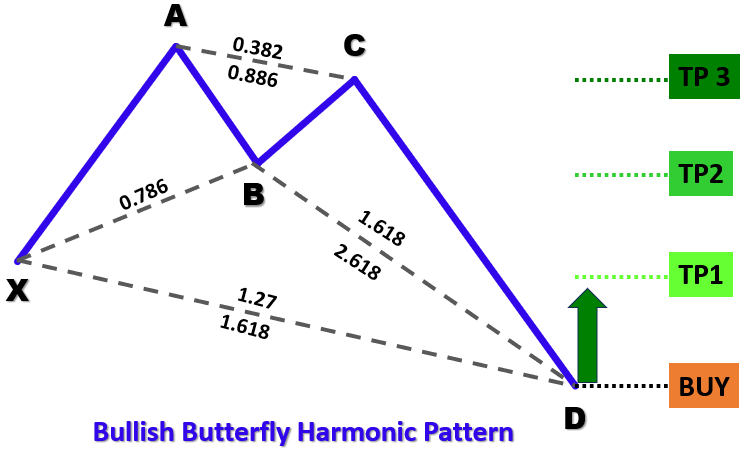
Para identificar os padrões, abaixo está nossa abordagem estruturada:
- Definição da Perna "XA": O movimento inicial do pivô X até A estabelecerá nossa distância de referência para o padrão.
- Estabelecimento da Perna "AB": Para ambos os tipos de padrão, o pivô B deve ocorrer idealmente em aproximadamente 78,6% de retração do movimento XA, confirmando que o preço reverteu uma parcela significativa do movimento inicial.
- Análise da Perna "BC": Essa perna deve retrair entre 38,2% e 88,6% da distância XA, garantindo uma consolidação estável antes do movimento final.
- Definição da Perna "CD": A perna final deve se estender entre 127% e 161,8% do movimento XA, completando o padrão e indicando um ponto de reversão.
Ao aplicar esses critérios geométricos e baseados em Fibonacci, nosso Expert Advisor detectará sistematicamente padrões Butterfly válidos nos dados históricos de preço. Uma vez confirmado o padrão, o programa visualizará a formação no gráfico com triângulos anotados e linhas de tendência, e então executará negociações com base nos níveis calculados de entrada, stop loss e take profit.
Implementação em MQL5
Para criar o programa em MQL5, abra o MetaEditor, vá até o Navigator, localize a pasta Indicators, clique na aba "New" e siga as instruções para criar o arquivo. Após criá-lo, no ambiente de codificação, precisaremos declarar algumas variáveis globais que utilizaremos ao longo do programa.
//+------------------------------------------------------------------+
//|                        Copyright 2025, Forex Algo-Trader, Allan. |
//|                                 "https://t.me/Forex_Algo_Trader" |
//+------------------------------------------------------------------+
#property copyright "Forex Algo-Trader, Allan"
#property link      "https://t.me/Forex_Algo_Trader"
#property version   "1.00"
#property description "This EA trades based on Butterfly Strategy"
#property strict

//--- Include the trading library for order functions
#include <Trade\Trade.mqh>  //--- Include Trade library
CTrade obj_Trade;  //--- Instantiate a obj_Trade object

//--- Input parameters for user configuration
input int    PivotLeft    = 5;      //--- Number of bars to the left for pivot check
input int    PivotRight   = 5;      //--- Number of bars to the right for pivot check
input double Tolerance    = 0.10;   //--- Allowed deviation (10% of XA move)
input double LotSize      = 0.01;   //--- Lot size for new orders
input bool   AllowTrading = true;   //--- Enable or disable trading

//---------------------------------------------------------------------------
//--- Butterfly pattern definition:
//
//--- Bullish Butterfly:
//---   Pivots (X-A-B-C-D): X swing high, A swing low, B swing high, C swing low, D swing high.
//---   Normally XA > 0; Ideal B = A + 0.786*(X-A); Legs within specified ranges.
//
//--- Bearish Butterfly:
//---   Pivots (X-A-B-C-D): X swing low, A swing high, B swing low, C swing high, D swing low.
//---   Normally XA > 0; Ideal B = A - 0.786*(A-X); Legs within specified ranges.
//---------------------------------------------------------------------------

//--- Structure for a pivot point
struct Pivot {
   datetime time;   //--- Bar time of the pivot
   double   price;  //--- Pivot price (High for swing high, low for swing low)
   bool     isHigh; //--- True if swing high; false if swing low
};

//--- Global dynamic array for storing pivots in chronological order
Pivot pivots[];  //--- Declare a dynamic array to hold identified pivot points

//--- Global variables to lock in a pattern (avoid trading on repaint)
int      g_patternFormationBar = -1;  //--- Bar index where the pattern was formed (-1 means none)
datetime g_lockedPatternX      = 0;   //--- The key X pivot time for the locked pattern
Aqui, incluímos a biblioteca "Trade\Trade.mqh" para acessar funções de negociação e instanciamos o objeto "obj_Trade" para execução de ordens. Definimos parâmetros de input como "PivotLeft" e "PivotRight" para identificar pontos de oscilação, "Tolerance" para validação das proporções harmônicas, "LotSize" para volume de negociação e "AllowTrading" para habilitar ou desabilitar negociações.
Para acompanhar a estrutura de mercado, utilizamos uma estrutura "Pivot" definida por struct, armazenando "time", "price" e "isHigh" (true para máximas de oscilação, false para mínimas). Esses pivôs são salvos em um array dinâmico global, "pivots[]", para referência histórica. Por fim, definimos as variáveis globais "g_patternFormationBar" e "g_lockedPatternX" para evitar negociações duplicadas ao bloquear um padrão detectado. Em seguida, podemos definir funções que nos ajudarão a visualizar os padrões no gráfico.
//+------------------------------------------------------------------+
//| Helper: Draw a filled triangle                                   |
//+------------------------------------------------------------------+
void DrawTriangle(string name, datetime t1, double p1, datetime t2, double p2, datetime t3, double p3, color cl, int width, bool fill, bool back) {
   //--- Attempt to create a triangle object with three coordinate points
   if(ObjectCreate(0, name, OBJ_TRIANGLE, 0, t1, p1, t2, p2, t3, p3)) {
      //--- Set the triangle's color
      ObjectSetInteger(0, name, OBJPROP_COLOR, cl);
      //--- Set the triangle's line style to solid
      ObjectSetInteger(0, name, OBJPROP_STYLE, STYLE_SOLID);
      //--- Set the line width of the triangle
      ObjectSetInteger(0, name, OBJPROP_WIDTH, width);
      //--- Determine if the triangle should be filled
      ObjectSetInteger(0, name, OBJPROP_FILL, fill);
      //--- Set whether the object is drawn in the background
      ObjectSetInteger(0, name, OBJPROP_BACK, back);
   }
}

//+------------------------------------------------------------------+
//| Helper: Draw a trend line                                        |
//+------------------------------------------------------------------+
void DrawTrendLine(string name, datetime t1, double p1, datetime t2, double p2, color cl, int width, int style) {
   //--- Create a trend line object connecting two points
   if(ObjectCreate(0, name, OBJ_TREND, 0, t1, p1, t2, p2)) {
      //--- Set the trend line's color
      ObjectSetInteger(0, name, OBJPROP_COLOR, cl);
      //--- Set the trend line's style (solid, dotted, etc.)
      ObjectSetInteger(0, name, OBJPROP_STYLE, style);
      //--- Set the width of the trend line
      ObjectSetInteger(0, name, OBJPROP_WIDTH, width);
   }
}

//+------------------------------------------------------------------+
//| Helper: Draw a dotted trend line                                 |
//+------------------------------------------------------------------+
void DrawDottedLine(string name, datetime t1, double p, datetime t2, color lineColor) {
   //--- Create a horizontal trend line at a fixed price level with dotted style
   if(ObjectCreate(0, name, OBJ_TREND, 0, t1, p, t2, p)) {
      //--- Set the dotted line's color
      ObjectSetInteger(0, name, OBJPROP_COLOR, lineColor);
      //--- Set the line style to dotted
      ObjectSetInteger(0, name, OBJPROP_STYLE, STYLE_DOT);
      //--- Set the line width to 1
      ObjectSetInteger(0, name, OBJPROP_WIDTH, 1);
   }
}

//+------------------------------------------------------------------+
//| Helper: Draw anchored text label (for pivots)                    |
//| If isHigh is true, anchor at the bottom (label appears above);   |
//| if false, anchor at the top (label appears below).               |
//+------------------------------------------------------------------+
void DrawTextEx(string name, string text, datetime t, double p, color cl, int fontsize, bool isHigh) {
   //--- Create a text label object at the specified time and price
   if(ObjectCreate(0, name, OBJ_TEXT, 0, t, p)) {
      //--- Set the text of the label
      ObjectSetString(0, name, OBJPROP_TEXT, text);
      //--- Set the color of the text
      ObjectSetInteger(0, name, OBJPROP_COLOR, cl);
      //--- Set the font size for the text
      ObjectSetInteger(0, name, OBJPROP_FONTSIZE, fontsize);
      //--- Set the font type and style
      ObjectSetString(0, name, OBJPROP_FONT, "Arial Bold");
      //--- Anchor the text depending on whether it's a swing high or low
      if(isHigh)
         ObjectSetInteger(0, name, OBJPROP_ANCHOR, ANCHOR_BOTTOM);
      else
         ObjectSetInteger(0, name, OBJPROP_ANCHOR, ANCHOR_TOP);
      //--- Center-align the text
      ObjectSetInteger(0, name, OBJPROP_ALIGN, ALIGN_CENTER);
   }
}
Definimos um conjunto de funções auxiliares para visualizar estruturas de price action desenhando triângulos, linhas de tendência, linhas pontilhadas e rótulos de texto no gráfico. Essas funções ajudarão a marcar pontos-chave, direções de tendência e níveis potenciais de pivô. A função "DrawTriangle" cria um objeto triângulo conectando três pontos de preço. Primeiro, utiliza a função ObjectCreate para definir o objeto do tipo OBJ_TRIANGLE, e depois atribui cor, largura e propriedades de preenchimento usando a função ObjectSetInteger. Essa função será útil para marcar formações harmônicas e padrões de price action.
A função "DrawTrendLine" plota linhas de tendência entre dois pontos de preço, ajudando a definir a estrutura do padrão. Ela cria uma linha de tendência utilizando a função ObjectCreate, do tipo OBJ_TREND, e depois personaliza sua cor, largura e estilo. A função "DrawDottedLine" desenha uma linha horizontal pontilhada em um nível de preço especificado entre dois pontos no tempo. Isso será útil para marcar níveis de entrada e saída, garantindo que zonas-chave de preço estejam visualmente destacadas. A função define o estilo da linha como STYLE_DOT para diferenciação. A função "DrawTextEx" posiciona rótulos de texto em pontos de pivô específicos. Ela atribui um nome ao rótulo, define sua cor, tamanho de fonte e alinhamento, posicionando-o acima ou abaixo do nível de preço dependendo se é uma máxima ou mínima de oscilação. Isso ajuda a anotar níveis-chave de pivô para melhor reconhecimento do padrão.
Com essas variáveis e funções, podemos avançar para o manipulador de evento OnTick e iniciar o reconhecimento de padrões. No entanto, como não precisamos processar dados a cada tick, devemos definir uma lógica para processar a identificação apenas uma vez por barra.
//+------------------------------------------------------------------+
//| Expert tick function                                             |
//+------------------------------------------------------------------+
void OnTick() {
   //--- Declare a static variable to store the time of the last processed bar
   static datetime lastBarTime = 0;
   //--- Get the time of the current confirmed bar
   datetime currentBarTime = iTime(_Symbol, _Period, 1);
   //--- If the current bar time is the same as the last processed, exit
   if(currentBarTime == lastBarTime)
      return;
   //--- Update the last processed bar time
   lastBarTime = currentBarTime;

}
Para garantir que o programa execute a lógica apenas em novas barras e evitar cálculos redundantes, utilizamos a variável static "lastBarTime" para armazenar o timestamp da última barra processada. A cada tick, recuperamos o horário da barra confirmada mais recente usando a função iTime. Se o horário recuperado corresponder a "lastBarTime", encerramos antecipadamente utilizando a instrução return para evitar reprocessamento. Caso contrário, atualizamos "lastBarTime" para marcar a nova barra como processada e prosseguimos para preparar o array de armazenamento que receberá os dados para processamento.
//--- Clear the pivot array for fresh analysis
ArrayResize(pivots, 0);
//--- Get the total number of bars available on the chart
int barsCount = Bars(_Symbol, _Period);
//--- Define the starting index for pivot detection (ensuring enough left bars)
int start = PivotLeft;
//--- Define the ending index for pivot detection (ensuring enough right bars)
int end = barsCount - PivotRight;

//--- Loop through bars from 'end-1' down to 'start' to find pivot points
for(int i = end - 1; i >= start; i--) {
   //--- Assume current bar is both a potential swing high and swing low
   bool isPivotHigh = true;
   bool isPivotLow = true;
   //--- Get the high and low of the current bar
   double currentHigh = iHigh(_Symbol, _Period, i);
   double currentLow = iLow(_Symbol, _Period, i);
   //--- Loop through the window of bars around the current bar
   for(int j = i - PivotLeft; j <= i + PivotRight; j++) {
      //--- Skip if the index is out of bounds
      if(j < 0 || j >= barsCount)
         continue;
      //--- Skip comparing the bar with itself
      if(j == i)
         continue;
      //--- If any bar in the window has a higher high, it's not a swing high
      if(iHigh(_Symbol, _Period, j) > currentHigh)
         isPivotHigh = false;
      //--- If any bar in the window has a lower low, it's not a swing low
      if(iLow(_Symbol, _Period, j) < currentLow)
         isPivotLow = false;
   }
   //--- If the current bar qualifies as either a swing high or swing low
   if(isPivotHigh || isPivotLow) {
      //--- Create a new pivot structure
      Pivot p;
      //--- Set the pivot's time
      p.time = iTime(_Symbol, _Period, i);
      //--- Set the pivot's price depending on whether it is a high or low
      p.price = isPivotHigh ? currentHigh : currentLow;
      //--- Set the pivot type (true for swing high, false for swing low)
      p.isHigh = isPivotHigh;
      //--- Get the current size of the pivots array
      int size = ArraySize(pivots);
      //--- Increase the size of the pivots array by one
      ArrayResize(pivots, size + 1);
      //--- Add the new pivot to the array
      pivots[size] = p;
   }
}
Aqui, identificamos pontos de pivô de máximas e mínimas no gráfico analisando dados históricos de preço. Primeiro, redefinimos o array "pivots" usando a função ArrayResize para garantir uma nova análise. Em seguida, recuperamos o número total de barras utilizando a função Bars e definimos o intervalo para detecção de pivôs, assegurando que haja barras suficientes à esquerda e à direita para comparação.
Depois, utilizamos um for loop para iterar pelas barras de "end-1" até "start", assumindo que cada barra pode ser um potencial pivô. Extraímos a máxima e a mínima da barra utilizando as funções iHigh e iLow. Em seguida, comparamos a barra atual com as barras ao seu redor dentro do intervalo "PivotLeft" e "PivotRight". Se qualquer barra nesse intervalo tiver uma máxima superior, a barra atual não é uma máxima de oscilação; se qualquer barra tiver uma mínima inferior, ela não é uma mínima de oscilação. Se a barra se qualificar como pivô, criamos uma estrutura "Pivot", armazenamos seu "time" utilizando a função iTime, definimos seu "price" com base em ser máxima ou mínima e determinamos seu tipo (true para máxima de oscilação, false para mínima). Por fim, redimensionamos o array "pivots" usando ArrayResize e adicionamos o pivô identificado. Ao imprimir esses dados utilizando a função ArrayPrint, obtemos o seguinte resultado.
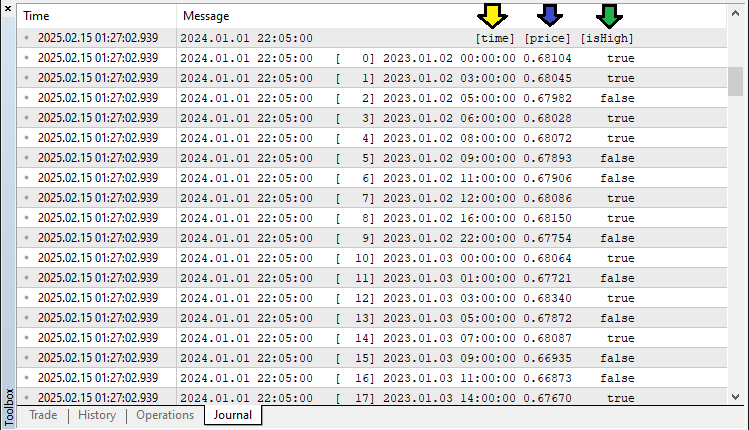
Com os dados, podemos extrair os pontos de pivô e, se tivermos pivôs suficientes, podemos analisar e detectar os padrões. Aqui está a lógica que implementamos para alcançar esse objetivo.
//--- Determine the total number of pivots found
int pivotCount = ArraySize(pivots);
//--- If fewer than five pivots are found, the pattern cannot be formed
if(pivotCount < 5) {
   //--- Reset pattern lock variables
   g_patternFormationBar = -1;
   g_lockedPatternX = 0;
   //--- Exit the OnTick function
   return;
}

//--- Extract the last five pivots as X, A, B, C, and D
Pivot X = pivots[pivotCount - 5];
Pivot A = pivots[pivotCount - 4];
Pivot B = pivots[pivotCount - 3];
Pivot C = pivots[pivotCount - 2];
Pivot D = pivots[pivotCount - 1];

//--- Initialize a flag to indicate if a valid Butterfly pattern is found
bool patternFound = false;
//--- Check for the high-low-high-low-high (Bearish reversal) structure
if(X.isHigh && (!A.isHigh) && B.isHigh && (!C.isHigh) && D.isHigh) {
   //--- Calculate the difference between pivot X and A
   double diff = X.price - A.price;
   //--- Ensure the difference is positive
   if(diff > 0) {
      //--- Calculate the ideal position for pivot B based on Fibonacci ratio
      double idealB = A.price + 0.786 * diff;
      //--- Check if actual B is within tolerance of the ideal position
      if(MathAbs(B.price - idealB) <= Tolerance * diff) {
         //--- Calculate the BC leg length
         double BC = B.price - C.price;
         //--- Verify that BC is within the acceptable Fibonacci range
         if((BC >= 0.382 * diff) && (BC <= 0.886 * diff)) {
            //--- Calculate the CD leg length
            double CD = D.price - C.price;
            //--- Verify that CD is within the acceptable Fibonacci range and that D is above X
            if((CD >= 1.27 * diff) && (CD <= 1.618 * diff) && (D.price > X.price))
               patternFound = true;
         }
      }
   }
}
Aqui, validamos se um padrão harmônico Butterfly está presente analisando os últimos cinco pontos de pivô identificados. Primeiro, determinamos o número total de pivôs utilizando a função ArraySize. Se existirem menos de cinco pivôs, redefinimos as variáveis de bloqueio do padrão ("g_patternFormationBar" e "g_lockedPatternX") e saímos da função OnTick para evitar sinais falsos. Em seguida, extraímos os últimos cinco pivôs e os atribuimos como "X", "A", "B", "C" e "D", seguindo a estrutura geométrica do padrão. Depois, inicializamos a flag "patternFound" como false para acompanhar se as condições de um padrão Butterfly válido foram atendidas.
Para um padrão de reversão bearish, verificamos a sequência de máximas e mínimas: "X" (máxima), "A" (mínima), "B" (máxima), "C" (mínima) e "D" (máxima). Se essa estrutura for válida, calculamos a diferença da perna "XA" e utilizamos proporções de Fibonacci para verificar as posições esperadas de "B", "C" e "D". O pivô "B" deve estar próximo da retração de "0.786" de "XA", "BC" deve estar entre "0.382" e "0.886" de "XA", e "CD" deve se estender entre "1.27" e "1.618" de "XA", garantindo que "D" esteja acima de "X". Se todas essas condições forem atendidas, confirmamos o padrão definindo "patternFound" como true. Da mesma forma, realizamos o mesmo processo para um padrão bullish.
//--- Check for the low-high-low-high-low (Bullish reversal) structure
if((!X.isHigh) && A.isHigh && (!B.isHigh) && C.isHigh && (!D.isHigh)) {
   //--- Calculate the difference between pivot A and X
   double diff = A.price - X.price;
   //--- Ensure the difference is positive
   if(diff > 0) {
      //--- Calculate the ideal position for pivot B based on Fibonacci ratio
      double idealB = A.price - 0.786 * diff;
      //--- Check if actual B is within tolerance of the ideal position
      if(MathAbs(B.price - idealB) <= Tolerance * diff) {
         //--- Calculate the BC leg length
         double BC = C.price - B.price;
         //--- Verify that BC is within the acceptable Fibonacci range
         if((BC >= 0.382 * diff) && (BC <= 0.886 * diff)) {
            //--- Calculate the CD leg length
            double CD = C.price - D.price;
            //--- Verify that CD is within the acceptable Fibonacci range and that D is below X
            if((CD >= 1.27 * diff) && (CD <= 1.618 * diff) && (D.price < X.price))
               patternFound = true;
         }
      }
   }
}
Se o padrão for encontrado, podemos prosseguir para visualizá-lo no gráfico.
//--- Initialize a string to store the type of pattern detected
string patternType = "";
//--- If a valid pattern is found, determine its type based on the relationship between D and X
if(patternFound) {
   if(D.price > X.price)
      patternType = "Bearish";  //--- Bearish Butterfly indicates a SELL signal
   else if(D.price < X.price)
      patternType = "Bullish";  //--- Bullish Butterfly indicates a BUY signal
}

//--- If a valid Butterfly pattern is detected
if(patternFound) {
   //--- Print a message indicating the pattern type and detection time
   Print(patternType, " Butterfly pattern detected at ", TimeToString(D.time, TIME_DATE|TIME_MINUTES|TIME_SECONDS));

   //--- Create a unique prefix for all graphical objects related to this pattern
   string signalPrefix = "BF_" + IntegerToString(X.time);

   //--- Choose triangle color based on the pattern type
   color triangleColor = (patternType=="Bullish") ? clrBlue : clrRed;

   //--- Draw the first triangle connecting pivots X, A, and B
   DrawTriangle(signalPrefix+"_Triangle1", X.time, X.price, A.time, A.price, B.time, B.price,
                triangleColor, 2, true, true);
   //--- Draw the second triangle connecting pivots B, C, and D
   DrawTriangle(signalPrefix+"_Triangle2", B.time, B.price, C.time, C.price, D.time, D.price,
                triangleColor, 2, true, true);

   //--- Draw boundary trend lines connecting the pivots for clarity
   DrawTrendLine(signalPrefix+"_TL_XA", X.time, X.price, A.time, A.price, clrBlack, 2, STYLE_SOLID);
   DrawTrendLine(signalPrefix+"_TL_AB", A.time, A.price, B.time, B.price, clrBlack, 2, STYLE_SOLID);
   DrawTrendLine(signalPrefix+"_TL_BC", B.time, B.price, C.time, C.price, clrBlack, 2, STYLE_SOLID);
   DrawTrendLine(signalPrefix+"_TL_CD", C.time, C.price, D.time, D.price, clrBlack, 2, STYLE_SOLID);
   DrawTrendLine(signalPrefix+"_TL_XB", X.time, X.price, B.time, B.price, clrBlack, 2, STYLE_SOLID);
   DrawTrendLine(signalPrefix+"_TL_BD", B.time, B.price, D.time, D.price, clrBlack, 2, STYLE_SOLID);
}
Aqui, finalizamos a detecção do padrão Butterfly classificando-o como bullish ou bearish e marcando-o visualmente no gráfico. Primeiro, inicializamos a string "patternType" para armazenar se o padrão detectado é "Bullish" ou "Bearish". Se "patternFound" for true, comparamos o pivô "D" com o pivô "X" utilizando a propriedade "price". Se "D" for maior que "X", classificamos como padrão "Bearish", sinalizando uma possível oportunidade de venda. Por outro lado, se "D" for menor que "X", classificamos como padrão "Bullish", sinalizando uma possível oportunidade de compra.
Uma vez detectado o padrão, imprimimos uma mensagem utilizando a função Print para registrar o tipo do padrão e o horário da detecção. Um "signalPrefix" exclusivo é gerado utilizando a função IntegerToString e "X.time" para garantir que cada padrão possua objetos gráficos distintos. Em seguida, utilizamos a função "DrawTriangle" para destacar as duas seções triangulares que formam o padrão Butterfly. Os triângulos são coloridos com clrBlue para padrões bullish e "clrRed" para padrões bearish. O primeiro triângulo conecta os pivôs "X", "A" e "B", enquanto o segundo conecta "B", "C" e "D".
Para aprimorar ainda mais a visualização, utilizamos a função "DrawTrendLine" para criar linhas de tendência sólidas em preto conectando pontos-chave: "XA", "AB", "BC", "CD", "XB" e "BD". Essas linhas fornecem uma estrutura clara para identificar o padrão harmônico e sua simetria. Após compilar e executar, obtemos os seguintes resultados.
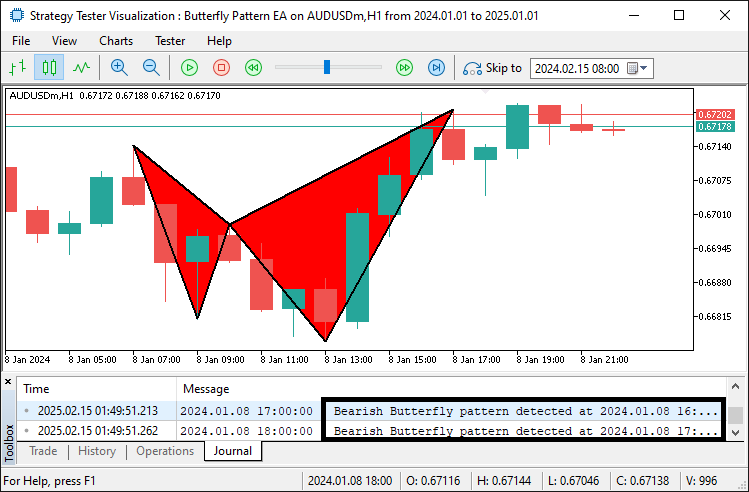
Pela imagem, podemos ver que conseguimos identificar o padrão e visualizá-lo. Podemos então prosseguir com a rotulagem para melhorar sua clareza visual.
//--- Retrieve the symbol's point size to calculate offsets for text positioning
double point = SymbolInfoDouble(_Symbol, SYMBOL_POINT);
//--- Calculate an offset (15 points) for positioning text above or below pivots
double offset = 15 * point;

//--- Determine the Y coordinate for each pivot label based on its type
double textY_X = (X.isHigh ? X.price + offset : X.price - offset);
double textY_A = (A.isHigh ? A.price + offset : A.price - offset);
double textY_B = (B.isHigh ? B.price + offset : B.price - offset);
double textY_C = (C.isHigh ? C.price + offset : C.price - offset);
double textY_D = (D.isHigh ? D.price + offset : D.price - offset);

//--- Draw text labels for each pivot with appropriate anchoring
DrawTextEx(signalPrefix+"_Text_X", "X", X.time, textY_X, clrBlack, 11, X.isHigh);
DrawTextEx(signalPrefix+"_Text_A", "A", A.time, textY_A, clrBlack, 11, A.isHigh);
DrawTextEx(signalPrefix+"_Text_B", "B", B.time, textY_B, clrBlack, 11, B.isHigh);
DrawTextEx(signalPrefix+"_Text_C", "C", C.time, textY_C, clrBlack, 11, C.isHigh);
DrawTextEx(signalPrefix+"_Text_D", "D", D.time, textY_D, clrBlack, 11, D.isHigh);

//--- Calculate the central label's time as the midpoint between pivots X and B
datetime centralTime = (X.time + B.time) / 2;
//--- Set the central label's price at pivot D's price
double centralPrice = D.price;
//--- Create the central text label indicating the pattern type
if(ObjectCreate(0, signalPrefix+"_Text_Center", OBJ_TEXT, 0, centralTime, centralPrice)) {
   ObjectSetString(0, signalPrefix+"_Text_Center", OBJPROP_TEXT,
      (patternType=="Bullish") ? "Bullish Butterfly" : "Bearish Butterfly");
   ObjectSetInteger(0, signalPrefix+"_Text_Center", OBJPROP_COLOR, clrBlack);
   ObjectSetInteger(0, signalPrefix+"_Text_Center", OBJPROP_FONTSIZE, 11);
   ObjectSetString(0, signalPrefix+"_Text_Center", OBJPROP_FONT, "Arial Bold");
   ObjectSetInteger(0, signalPrefix+"_Text_Center", OBJPROP_ALIGN, ALIGN_CENTER);
}
Aqui, adicionamos rótulos de texto para marcar o padrão Butterfly no gráfico. Primeiro, utilizamos a função SymbolInfoDouble para obter o valor SYMBOL_POINT do símbolo e calcular um "offset" para posicionamento do texto. Os rótulos dos pivôs ("X", "A", "B", "C", "D") são posicionados acima ou abaixo conforme sejam máximas ou mínimas. Utilizamos a função "DrawTextEx" para posicionar esses rótulos com cor preta e tamanho de fonte 11. Um rótulo central indicando "Bullish Butterfly" ou "Bearish Butterfly" é criado no ponto médio entre "X" e "B", utilizando ObjectCreate, ObjectSetString e ObjectSetInteger para definir texto, cor, tamanho de fonte e alinhamento para melhor visibilidade. Este é o resultado após executar o programa.
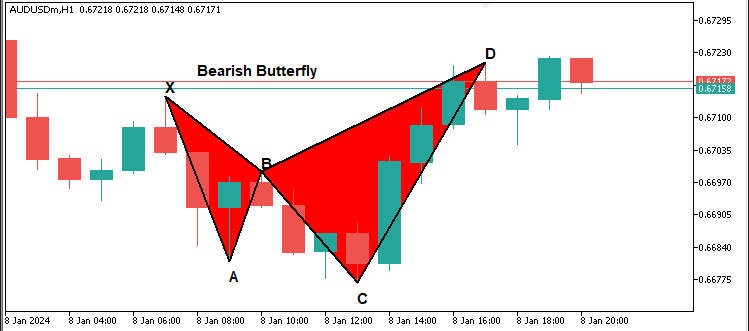
Agora que temos os rótulos, podemos adicionar os níveis de entrada e saída.
//--- Define start and end times for drawing horizontal dotted lines for obj_Trade levels
datetime lineStart = D.time;
datetime lineEnd = D.time + PeriodSeconds(_Period)*2;

//--- Declare variables for entry price and take profit levels
double entryPriceLevel, TP1Level, TP2Level, TP3Level, tradeDiff;
//--- Calculate obj_Trade levels based on whether the pattern is Bullish or Bearish
if(patternType=="Bullish") { //--- Bullish → BUY signal
   //--- Use the current ASK price as the entry
   entryPriceLevel = SymbolInfoDouble(_Symbol, SYMBOL_ASK);
   //--- Set TP3 at pivot C's price
   TP3Level = C.price;
   //--- Calculate the total distance to be covered by the obj_Trade
   tradeDiff = TP3Level - entryPriceLevel;
   //--- Set TP1 at one-third of the total move
   TP1Level = entryPriceLevel + tradeDiff/3;
   //--- Set TP2 at two-thirds of the total move
   TP2Level = entryPriceLevel + 2*tradeDiff/3;
} else { //--- Bearish → SELL signal
   //--- Use the current BID price as the entry
   entryPriceLevel = SymbolInfoDouble(_Symbol, SYMBOL_BID);
   //--- Set TP3 at pivot C's price
   TP3Level = C.price;
   //--- Calculate the total distance to be covered by the obj_Trade
   tradeDiff = entryPriceLevel - TP3Level;
   //--- Set TP1 at one-third of the total move
   TP1Level = entryPriceLevel - tradeDiff/3;
   //--- Set TP2 at two-thirds of the total move
   TP2Level = entryPriceLevel - 2*tradeDiff/3;
}

//--- Draw dotted horizontal lines to represent the entry and TP levels
DrawDottedLine(signalPrefix+"_EntryLine", lineStart, entryPriceLevel, lineEnd, clrMagenta);
DrawDottedLine(signalPrefix+"_TP1Line", lineStart, TP1Level, lineEnd, clrForestGreen);
DrawDottedLine(signalPrefix+"_TP2Line", lineStart, TP2Level, lineEnd, clrGreen);
DrawDottedLine(signalPrefix+"_TP3Line", lineStart, TP3Level, lineEnd, clrDarkGreen);

//--- Define a label time coordinate positioned just to the right of the dotted lines
datetime labelTime = lineEnd + PeriodSeconds(_Period)/2;

//--- Construct the entry label text with the price
string entryLabel = (patternType=="Bullish") ? "BUY (" : "SELL (";
entryLabel += DoubleToString(entryPriceLevel, _Digits) + ")";
//--- Draw the entry label on the chart
DrawTextEx(signalPrefix+"_EntryLabel", entryLabel, labelTime, entryPriceLevel, clrMagenta, 11, true);

//--- Construct and draw the TP1 label
string tp1Label = "TP1 (" + DoubleToString(TP1Level, _Digits) + ")";
DrawTextEx(signalPrefix+"_TP1Label", tp1Label, labelTime, TP1Level, clrForestGreen, 11, true);

//--- Construct and draw the TP2 label
string tp2Label = "TP2 (" + DoubleToString(TP2Level, _Digits) + ")";
DrawTextEx(signalPrefix+"_TP2Label", tp2Label, labelTime, TP2Level, clrGreen, 11, true);

//--- Construct and draw the TP3 label
string tp3Label = "TP3 (" + DoubleToString(TP3Level, _Digits) + ")";
DrawTextEx(signalPrefix+"_TP3Label", tp3Label, labelTime, TP3Level, clrDarkGreen, 11, true);
Aqui, calculamos os níveis de entrada e take profit (TP) com base no padrão detectado. Começamos utilizando a função PeriodSeconds para determinar a duração do desenho dos níveis horizontais. Em seguida, utilizamos a função SymbolInfoDouble para obter o preço de entrada, aplicando SYMBOL_ASK para compra e SYMBOL_BID para venda. Definimos TP3 utilizando a variável "C.price" e calculamos o intervalo total da negociação. Calculamos TP1 e TP2 dividindo esse intervalo em três partes. Utilizamos a função "DrawDottedLine" para desenhar os níveis de entrada e TP com cores distintas. Depois, determinamos um tempo apropriado para os rótulos utilizando PeriodSeconds para melhor posicionamento. Construímos o rótulo de entrada utilizando a função DoubleToString para formatar corretamente o preço. Por fim, aplicamos a função "DrawTextEx" para exibir os rótulos de entrada e TP no gráfico. Após a compilação, temos o seguinte resultado.
Padrão Bearish
Padrão Bullish
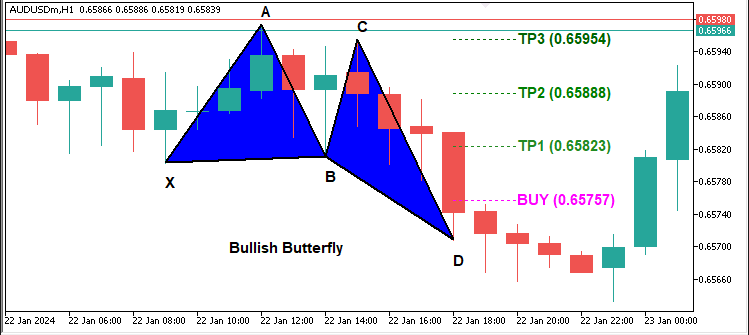
Pelas imagens, podemos ver que conseguimos identificar ambos os padrões e plotá-los corretamente. Agora precisamos aguardar confirmações após um candlestick e, se o padrão ainda existir, isso significa que não houve repaint, então podemos abrir as respectivas posições a partir do nível de entrada. Aqui está a lógica que implementamos para alcançar esse objetivo.
//--- Retrieve the index of the current bar
int currentBarIndex = Bars(_Symbol, _Period) - 1;
//--- If no pattern has been previously locked, lock the current pattern formation
if(g_patternFormationBar == -1) {
   g_patternFormationBar = currentBarIndex;
   g_lockedPatternX = X.time;
   //--- Print a message that the pattern is detected and waiting for confirmation
   Print("Pattern detected on bar ", currentBarIndex, ". Waiting for confirmation on next bar.");
   return;
}
//--- If still on the same formation bar, the pattern is considered to be repainting
if(currentBarIndex == g_patternFormationBar) {
   Print("Pattern is repainting; still on locked formation bar ", currentBarIndex, ". No obj_Trade yet.");
   return;
}
//--- If we are on a new bar compared to the locked formation
if(currentBarIndex > g_patternFormationBar) {
   //--- Check if the locked pattern still corresponds to the same X pivot
   if(g_lockedPatternX == X.time) {
      Print("Confirmed pattern (locked on bar ", g_patternFormationBar, "). Opening obj_Trade on bar ", currentBarIndex, ".");
      //--- Update the pattern formation bar to the current bar
      g_patternFormationBar = currentBarIndex;
      //--- Only proceed with trading if allowed and if there is no existing position
      if(AllowTrading && !PositionSelect(_Symbol)) {
         double entryPriceTrade = 0, stopLoss = 0, takeProfit = 0;
         point = SymbolInfoDouble(_Symbol, SYMBOL_POINT);
         bool tradeResult = false;
         //--- For a Bullish pattern, execute a BUY obj_Trade
         if(patternType=="Bullish") {  //--- BUY signal
            entryPriceTrade = SymbolInfoDouble(_Symbol, SYMBOL_ASK);
            double diffTrade = TP2Level - entryPriceTrade;
            stopLoss = entryPriceTrade - diffTrade * 3;
            takeProfit = TP2Level;
            tradeResult = obj_Trade.Buy(LotSize, _Symbol, entryPriceTrade, stopLoss, takeProfit, "Butterfly Signal");
            if(tradeResult)
               Print("Buy order opened successfully.");
            else
               Print("Buy order failed: ", obj_Trade.ResultRetcodeDescription());
         }
         //--- For a Bearish pattern, execute a SELL obj_Trade
         else if(patternType=="Bearish") {  //--- SELL signal
            entryPriceTrade = SymbolInfoDouble(_Symbol, SYMBOL_BID);
            double diffTrade = entryPriceTrade - TP2Level;
            stopLoss = entryPriceTrade + diffTrade * 3;
            takeProfit = TP2Level;
            tradeResult = obj_Trade.Sell(LotSize, _Symbol, entryPriceTrade, stopLoss, takeProfit, "Butterfly Signal");
            if(tradeResult)
               Print("Sell order opened successfully.");
            else
               Print("Sell order failed: ", obj_Trade.ResultRetcodeDescription());
         }
      }
      else {
         //--- If a position is already open, do not execute a new obj_Trade
         Print("A position is already open for ", _Symbol, ". No new obj_Trade executed.");
      }
   }
   else {
      //--- If the pattern has changed, update the lock with the new formation bar and X pivot
      g_patternFormationBar = currentBarIndex;
      g_lockedPatternX = X.time;
      Print("Pattern has changed; updating lock on bar ", currentBarIndex, ". Waiting for confirmation.");
      return;
   }
}
}
else {
//--- If no valid Butterfly pattern is detected, reset the pattern lock variables
g_patternFormationBar = -1;
g_lockedPatternX = 0;
}
Esta seção gerencia o bloqueio do padrão e a execução das negociações. Primeiro, determinamos o índice da barra atual utilizando a função Bars e o atribuimos a "currentBarIndex". Se nenhum padrão estiver bloqueado, indicado por "g_patternFormationBar" == -1, atribuimos "currentBarIndex" a "g_patternFormationBar" e armazenamos o tempo do pivô X em "g_lockedPatternX", imprimindo uma mensagem com a função "Print" informando que o padrão foi detectado e está aguardando confirmação. Se o padrão detectado ainda estiver se formando na mesma barra, utilizamos a função Print para exibir uma mensagem indicando que o padrão está sofrendo repaint e nenhuma negociação será executada.
Se a barra atual avançar além da barra de formação bloqueada, verificamos se o padrão permanece válido comparando "g_lockedPatternX" com o tempo atual do pivô X. Se corresponder, confirmamos o padrão e preparamos a execução da negociação. Antes de enviar a ordem, utilizamos a função PositionSelect para garantir que não exista posição aberta e verificamos "AllowTrading". Se um padrão "Bullish" for confirmado, recuperamos o preço de compra utilizando a função SymbolInfoDouble com SYMBOL_ASK, calculamos stop loss e take profit com base em "TP2Level" e executamos uma ordem Buy utilizando a função "obj_Trade.Buy". Se a negociação for bem-sucedida, utilizamos "Print" para exibir uma mensagem de confirmação; caso contrário, utilizamos "obj_Trade.ResultRetcodeDescription" para exibir o motivo da falha.
Para um padrão "Bearish", recuperamos o preço bid utilizando a função SymbolInfoDouble com SYMBOL_BID, calculamos os níveis da negociação e executamos uma ordem Sell utilizando "obj_Trade.Sell", imprimindo mensagens correspondentes de sucesso ou falha com a função Print. Se já existir uma posição, nenhuma nova negociação será executada e uma mensagem será exibida utilizando a função "Print". Se o pivô X bloqueado mudar, atualizamos "g_patternFormationBar" e "g_lockedPatternX", indicando que o padrão mudou e está aguardando confirmação. Se nenhum padrão válido for detectado, redefinimos "g_patternFormationBar" e "g_lockedPatternX" para limpar bloqueios anteriores.
Após a compilação, temos o seguinte resultado.
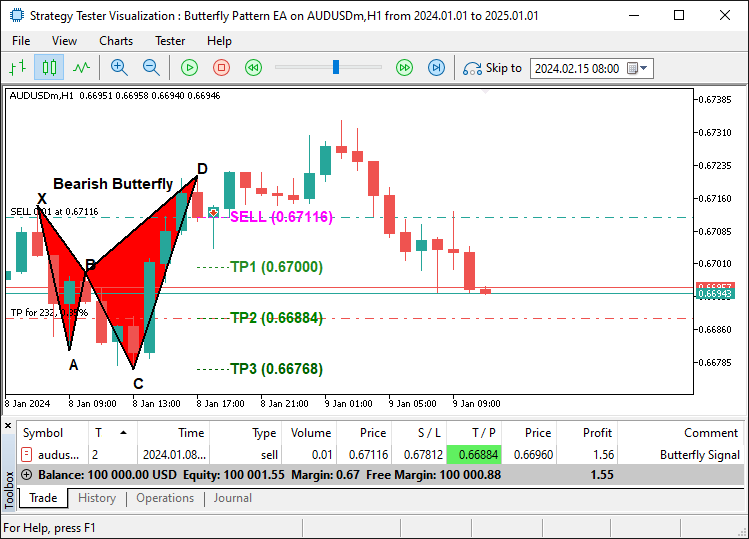
Pela imagem, podemos ver que plotamos o padrão Butterfly e ainda conseguimos negociá-lo adequadamente após confirmação de estabilidade, alcançando assim nosso objetivo de identificar, plotar e negociar o padrão. O que resta é realizar o backtesting do programa, tratado na próxima seção.
Backtesting e Otimização
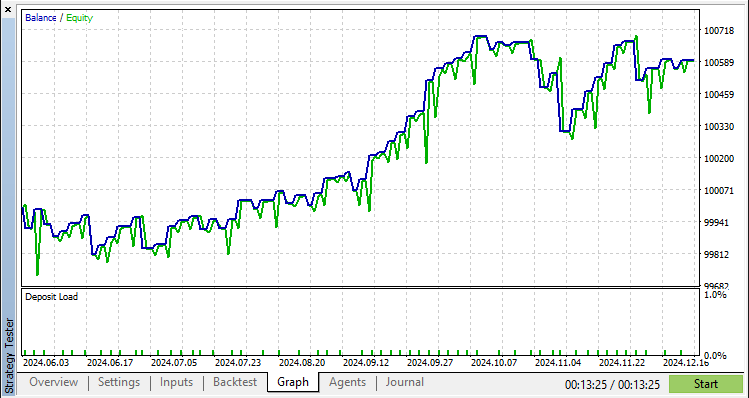
Após backtesting detalhado, obtivemos os seguintes resultados.
Gráfico de backtest:
Relatório de backtest:
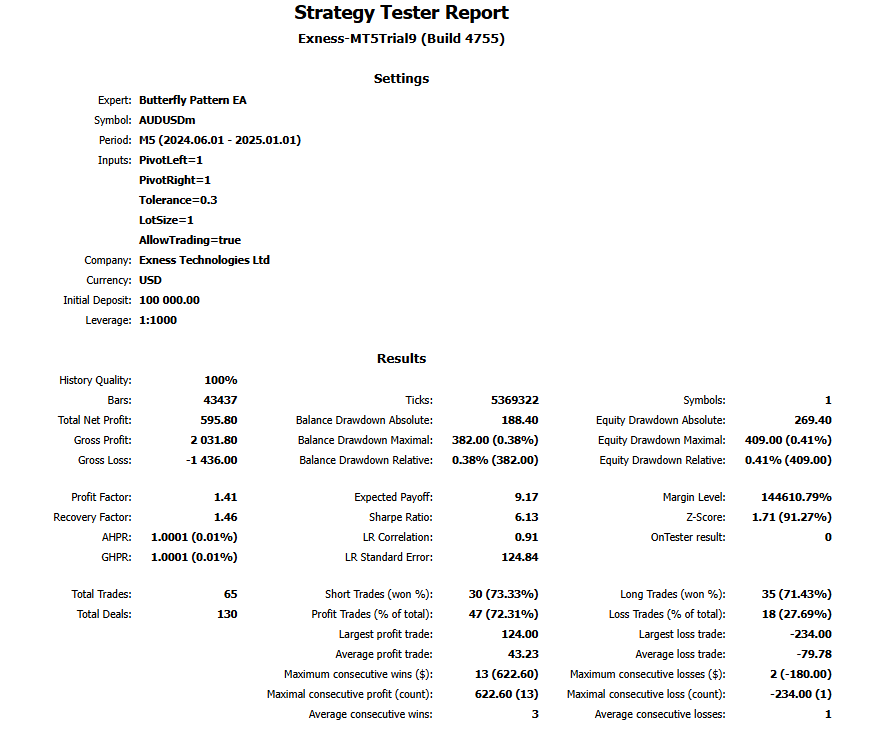
O período de teste de meio ano em gráfico de 5 minutos gerando 65 negociações mostra que o padrão Butterfly é raro, e quanto maior a porcentagem de tolerância, maior o número de sinais.
Conclusão
Em conclusão, desenvolvemos com sucesso um Expert Advisor (EA) em MQL5 que detecta e negocia o Padrão Harmônico Butterfly com precisão. Ao utilizar reconhecimento de padrões, validação de pivôs e execução automatizada de negociações, criamos um sistema que se adapta dinamicamente às condições de mercado.
Aviso: Este artigo é apenas para fins educacionais. Negociar envolve risco financeiro significativo, e as condições de mercado podem ser imprevisíveis. Embora a estratégia apresentada forneça uma abordagem estruturada para negociação harmônica, ela não garante lucratividade. Backtesting abrangente e gestão adequada de risco são essenciais antes de implantar este programa em ambiente real.
Ao implementar essas técnicas, você pode aprimorar suas habilidades de negociação com padrões harmônicos, fortalecer sua análise técnica e evoluir suas estratégias de negociação algorítmica. Boa sorte em sua jornada no trading!
Traduzido do Inglês pela MetaQuotes Ltd.
Artigo original: https://www.mql5.com/en/articles/17223
Aviso: Todos os direitos sobre esses materiais pertencem à MetaQuotes Ltd. É proibida a reimpressão total ou parcial.
Esse artigo foi escrito por um usuário do site e reflete seu ponto de vista pessoal. A MetaQuotes Ltd. não se responsabiliza pela precisão das informações apresentadas nem pelas possíveis consequências decorrentes do uso das soluções, estratégias ou recomendações descritas.

 Automatizando Estratégias de Trading em MQL5 (Parte 9): Construindo um Expert Advisor para a Estratégia Asian Breakout
 Construindo Expert Advisors Auto Otimizáveis em MQL5 (Parte 6): Prevenção de Stop Out
 Do básico ao intermediário: Sub Janelas (IV)
 Desenvolvimento do Kit de Ferramentas de Análise de Ação de Preço (Parte 14): Ferramenta de Stop Parabolic e Reversão

- Aplicativos de negociação gratuitos
- 8 000+ sinais para cópia
- Notícias econômicas para análise dos mercados financeiros
Você concorda com a política do site e com os termos de uso
Confira o novo artigo: Automatizando estratégias de negociação em MQL5 (Parte 8): Criando um Expert Advisor com padrões harmônicos de borboleta.
Autor: Allan Munene Mutiiria
Confira o novo artigo: Automatizando estratégias de negociação em MQL5 (Parte 8): Criando um Expert Advisor com padrões harmônicos de borboleta.
Autor: Allan Munene Mutiiria