

Herramientas de trading de MQL5 (Parte 7): Panel informativo para el seguimiento de posiciones en múltiples símbolos y de la cuenta
 134
134
 0
0

Introducción
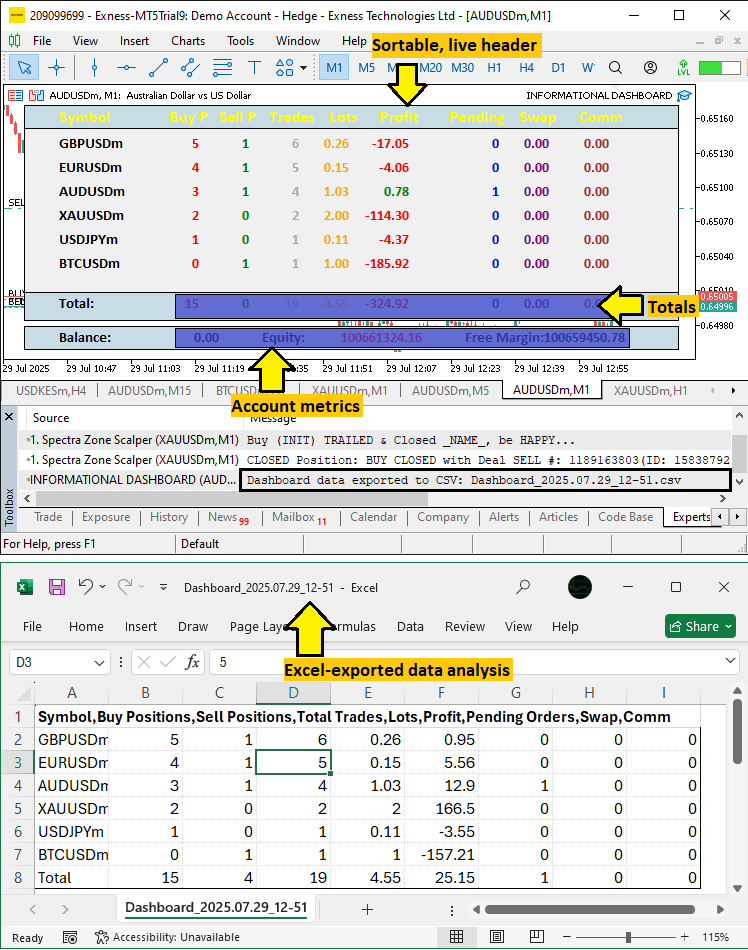
En nuestro artículo anterior (Parte 6), desarrollamos un panel de control holográfico dinámico en MetaQuotes Language 5 (MQL5) para supervisar símbolos y marcos temporales, que incluye el RSI, alertas de volatilidad y controles interactivos con animaciones pulsantes. En la Parte 7, creamos un panel informativo que realiza un seguimiento de las posiciones de varios símbolos, el total de operaciones, los lotes, los beneficios, las órdenes pendientes, los swaps, las comisiones y las métricas de la cuenta, como el saldo y la equidad, con columnas ordenables y la posibilidad de exportar a valores separados por comas (CSV) para obtener una visión general completa. Trataremos los siguientes temas:
- Comprensión de la arquitectura del panel de información
- Implementación en MQL5
- Backtesting
- Conclusión
Al final, tendrás un potente panel de control MQL5 para el seguimiento de posiciones y cuentas, listo para personalizar. ¡Empecemos!
Comprensión de la arquitectura del panel de información
Estamos desarrollando un panel informativo para ofrecer una visión centralizada de nuestras posiciones en múltiples símbolos y métricas esenciales de la cuenta, lo que facilitará el seguimiento del rendimiento sin tener que cambiar de vista continuamente. Esta arquitectura es clave porque organiza los datos de negociación dispersos en una tabla que se puede ordenar, con totales en tiempo real y opciones de exportación, lo que ayuda a detectar rápidamente problemas como una reducción excesiva (drawdown) o posiciones desequilibradas.
Lo lograremos recopilando detalles de las posiciones, como compras, ventas, lotes y ganancias para cada símbolo, al tiempo que mostramos el saldo de la cuenta, la equidad y el margen libre, todo ello con una clasificación interactiva y un sutil efecto visual para mejorar la interacción visual. Tenemos previsto recorrer los símbolos para recopilar y sumar datos, garantizando así que el panel de control sea ligero y responda con rapidez en entornos de negociación en tiempo real. ¡Observa la visualización a continuación y luego pasaremos a la implementación!
Implementación en MQL5
Para crear el programa en MQL5, tendremos que definir los metadatos del programa y, a continuación, definir algunas entradas que nos permitan modificar fácilmente el funcionamiento del programa sin interferir directamente en el código, así como definir los objetos del panel de control.
//+------------------------------------------------------------------+
//|                                     Informational Dashboard.mq5  |
//|                           Copyright 2025, Allan Munene Mutiiria. |
//|                                   https://t.me/Forex_Algo_Trader |
//+------------------------------------------------------------------+
#property copyright "Copyright 2025, Allan Munene Mutiiria."
#property link      "https://t.me/Forex_Algo_Trader"
#property version   "1.00"

// Input parameters
input int UpdateIntervalMs = 100; // Update interval (milliseconds, min 10ms)
input long MagicNumber = -1; // Magic number (-1 for all positions and orders)

// Defines for object names
#define PREFIX "DASH_"                   //--- Prefix for all dashboard objects
#define HEADER "HEADER_"                 //--- Prefix for header labels
#define SYMB "SYMB_"                     //--- Prefix for symbol labels
#define DATA "DATA_"                     //--- Prefix for data labels
#define HEADER_PANEL "HEADER_PANEL"      //--- Name for header panel
#define ACCOUNT_PANEL "ACCOUNT_PANEL"    //--- Name for account panel
#define FOOTER_PANEL "FOOTER_PANEL"      //--- Name for footer panel
#define FOOTER_TEXT "FOOTER_TEXT"        //--- Name for footer text label
#define FOOTER_DATA "FOOTER_DATA_"       //--- Prefix for footer data labels
#define PANEL "PANEL"                    //--- Name for main panel
#define ACC_TEXT "ACC_TEXT_"             //--- Prefix for account text labels
#define ACC_DATA "ACC_DATA_"             //--- Prefix for account data labels
Aquí configuramos los parámetros de entrada y definimos las constantes para los nombres de los objetos en nuestro panel informativo en MQL5, lo que permite personalizar y organizar la nomenclatura de los elementos de la interfaz de usuario (UI). Definimos «UpdateIntervalMs» como 100 milisegundos (con un mínimo de 10 ms) para controlar la frecuencia de actualización del panel de control, lo que garantiza que las actualizaciones se realicen a tiempo sin sobrecargar el sistema. El campo «MagicNumber» se establece en -1 para supervisar todas las posiciones y órdenes, o en un valor específico para filtrar por el número mágico del EA y realizar un seguimiento selectivo.
Utilizamos definiciones para garantizar la coherencia en la denominación de los objetos: «PREFIX» como «DASH_» para todos los objetos del panel de control, «HEADER» para las etiquetas del encabezado, «SYMB_» para las etiquetas de símbolos, «DATA_» para las etiquetas de datos, «HEADER_PANEL» para el panel de encabezado, «ACCOUNT_PANEL» para la sección de cuentas, «FOOTER_PANEL» para el pie de página, «FOOTER_TEXT» para el texto del pie de página, «FOOTER_DATA_» para los prefijos de datos del pie de página, «PANEL» para el panel principal, «ACC_TEXT_» para los prefijos de texto de la cuenta y «ACC_DATA_» para los prefijos de datos de la cuenta. Estas definiciones simplifican la gestión de objetos y hacen que el código sea más legible. Lo siguiente que debemos hacer es crear algunas estructuras que contengan nuestros datos informativos y variables globales que utilizaremos a lo largo de la implementación.
// Dashboard settings
struct DashboardSettings {               //--- Structure for dashboard settings
   int panel_x;                          //--- X-coordinate of panel
   int panel_y;                          //--- Y-coordinate of panel
   int row_height;                       //--- Height of each row
   int font_size;                        //--- Font size for labels
   string font;                          //--- Font type for labels
   color bg_color;                       //--- Background color of main panel
   color border_color;                   //--- Border color of panels
   color header_color;                   //--- Default color for header text
   color text_color;                     //--- Default color for text
   color section_bg_color;               //--- Background color for header/footer panels
   int zorder_panel;                     //--- Z-order for main panel
   int zorder_subpanel;                  //--- Z-order for sub-panels
   int zorder_labels;                    //--- Z-order for labels
   int label_y_offset;                   //--- Y-offset for label positioning
   int label_x_offset;                   //--- X-offset for label positioning
   int header_x_distances[9];            //--- X-distances for header labels (9 columns)
   color header_shades[12];              //--- Array of header color shades for glow effect
} settings = {                           //--- Initialize settings with default values
   20,                                   //--- Set panel_x to 20 pixels
   20,                                   //--- Set panel_y to 20 pixels
   24,                                   //--- Set row_height to 24 pixels
   11,                                   //--- Set font_size to 11
   "Calibri Bold",                       //--- Set font to Calibri Bold
   C'240,240,240',                       //--- Set bg_color to light gray
   clrBlack,                             //--- Set border_color to black
   C'0,50,70',                           //--- Set header_color to dark teal
   clrBlack,                             //--- Set text_color to black
   C'200,220,230',                       //--- Set section_bg_color to light blue-gray
   100,                                  //--- Set zorder_panel to 100
   101,                                  //--- Set zorder_subpanel to 101
   102,                                  //--- Set zorder_labels to 102
   3,                                    //--- Set label_y_offset to 3 pixels
   25,                                   //--- Set label_x_offset to 25 pixels
   {10, 120, 170, 220, 280, 330, 400, 470, 530}, //--- X-distances for 9 columns
   {C'0,0,0', C'255,0,0', C'0,255,0', C'0,0,255', C'255,255,0', C'0,255,255',
    C'255,0,255', C'255,255,255', C'255,0,255', C'0,255,255', C'255,255,0', C'0,0,255'}
};

// Data structure for symbol information
struct SymbolData {                      //--- Structure for symbol data
   string name;                          //--- Symbol name
   int buys;                             //--- Number of buy positions
   int sells;                            //--- Number of sell positions
   int trades;                           //--- Total number of trades
   double lots;                          //--- Total lots
   double profit;                        //--- Total profit
   int pending;                          //--- Number of pending orders
   double swaps;                         //--- Total swap
   double comm;                          //--- Total commission
   string buys_str;                      //--- String representation of buys
   string sells_str;                     //--- String representation of sells
   string trades_str;                    //--- String representation of trades
   string lots_str;                      //--- String representation of lots
   string profit_str;                    //--- String representation of profit
   string pending_str;                   //--- String representation of pending
   string swaps_str;                     //--- String representation of swap
   string comm_str;                      //--- String representation of commission
};

// Global variables
SymbolData symbol_data[];                //--- Array to store symbol data
long totalBuys = 0;                      //--- Total buy positions across symbols
long totalSells = 0;                     //--- Total sell positions across symbols
long totalTrades = 0;                    //--- Total trades across symbols
double totalLots = 0.0;                  //--- Total lots across symbols
double totalProfit = 0.0;                //--- Total profit across symbols
long totalPending = 0;                   //--- Total pending across symbols
double totalSwap = 0.0;                  //--- Total swap across symbols
double totalComm = 0.0;                  //--- Total commission across symbols
string headers[] = {"Symbol", "Buy P", "Sell P", "Trades", "Lots", "Profit", "Pending", "Swap", "Comm"}; //--- Header labels
int column_widths[] = {140, 50, 50, 50, 60, 90, 50, 60, 60}; //--- Widths for each column
color data_default_colors[] = {clrRed, clrGreen, clrDarkGray, clrOrange, clrGray, clrBlue, clrPurple, clrBrown};
int sort_column = 3;                     //--- Initial sort column (trades)
bool sort_ascending = false;             //--- Sort direction (false for descending to show active first)
int glow_index = 0;                      //--- Current index for header glow effect
bool glow_direction = true;              //--- Glow direction (true for forward)
int glow_counter = 0;                    //--- Counter for glow timing
const int GLOW_INTERVAL_MS = 500;        //--- Glow cycle interval (500ms)
string total_buys_str = "";              //--- String for total buys display
string total_sells_str = "";             //--- String for total sells display
string total_trades_str = "";            //--- String for total trades display
string total_lots_str = "";              //--- String for total lots display
string total_profit_str = "";            //--- String for total profit display
string total_pending_str = "";           //--- String for total pending display
string total_swap_str = "";              //--- String for total swap display
string total_comm_str = "";              //--- String for total comm display
string account_items[] = {"Balance", "Equity", "Free Margin"}; //--- Account items
string acc_bal_str = "";                 //--- Strings for account data
string acc_eq_str = "";
string acc_free_str = "";
int prev_num_symbols = 0;                //--- Previous number of active symbols for dynamic resizing
Para configurar la interfaz de usuario y la gestión de datos, definimos la estructura «DashboardSettings» para almacenar los ajustes de diseño, inicializando «panel_x» y «panel_y» en 20 píxeles para el posicionamiento, «row_height» en 24 píxeles para el espaciado entre filas, «font_size» en 11 para el texto, «font» como «Calibri Bold» para el estilo, «bg_color» en gris claro para el panel principal, «border_color» en negro para los contornos de los paneles, «header_color» en verde azulado oscuro para los encabezados, «text_color» en negro para el texto general, «section_bg_color» en gris azulado claro para los paneles de encabezado y pie de página, «zorder_panel» en 100, «zorder_subpanel» en 101 y «zorder_labels» en 102 para la superposición de capas, «label_y_offset» en 3 y «label_x_offset» en 25 para la alineación de las etiquetas, «header_x_distances» para nueve posiciones de columna y «header_shades» con 12 colores para el efecto de resplandor.
Creamos la estructura «SymbolData» para almacenar datos por símbolo, incluyendo «name» (nombre del símbolo), «buys», «sells», «trades» y «pending» (números de operaciones) y «lots», «profit», «swaps» y «comm» (valores), con los campos de cadena correspondientes, como «buys_str», para su visualización. Declaramos variables globales: la matriz «symbol_data» para los datos de los símbolos, «totalBuys», «totalSells», «totalTrades» y «totalPending» como valores de tipo long inicializados a cero, «totalLots», «totalProfit», «totalSwap» y «totalComm» como valores de tipo double inicializados a cero, la matriz «headers» para las etiquetas de las columnas, «column_widths» para los tamaños de las columnas, «data_default_colors» para los colores específicos de cada columna, «sort_column» en 3 para la ordenación predeterminada por operaciones, «sort_ascending» como false para el orden descendente, «glow_index» y «glow_counter» en 0 con «glow_direction» como true y «GLOW_INTERVAL_MS» en 500 ms para el brillo de los encabezados, variables de cadena como «total_buys_str» para la visualización de totales, «account_items» para las etiquetas de saldo, equidad y margen libre, sus representaciones en cadena como «acc_bal_str», y «prev_num_symbols» en 0 para el redimensionamiento dinámico.
Estos componentes definirán el diseño del panel de control y la estructura de datos para el seguimiento de la posición en tiempo real. Ahora podemos definir algunas funciones auxiliares que nos ayudarán a que el programa sea más modular. Empezaremos por la función de etiquetas, ya que es con lo que vamos a trabajar con más frecuencia.
//+------------------------------------------------------------------+
//| Create label function                                            |
//+------------------------------------------------------------------+
bool createLABEL(string objName, string txt, int xD, int yD, color clrTxt, int fontSize, string font, int anchor, bool selectable = false) {
   if(!ObjectCreate(0, objName, OBJ_LABEL, 0, 0, 0)) { //--- Create label object
      Print(__FUNCTION__, ": Failed to create label '", objName, "'. Error code = ", GetLastError()); //--- Log creation failure
      return(false);                     //--- Return failure
   }
   ObjectSetInteger(0, objName, OBJPROP_XDISTANCE, xD); //--- Set x-coordinate
   ObjectSetInteger(0, objName, OBJPROP_YDISTANCE, yD); //--- Set y-coordinate
   ObjectSetInteger(0, objName, OBJPROP_CORNER, CORNER_LEFT_UPPER); //--- Set corner alignment
   ObjectSetString(0, objName, OBJPROP_TEXT, txt); //--- Set text
   ObjectSetInteger(0, objName, OBJPROP_FONTSIZE, fontSize); //--- Set font size
   ObjectSetString(0, objName, OBJPROP_FONT, font); //--- Set font type
   ObjectSetInteger(0, objName, OBJPROP_COLOR, clrTxt); //--- Set text color
   ObjectSetInteger(0, objName, OBJPROP_BACK, false); //--- Set to foreground
   ObjectSetInteger(0, objName, OBJPROP_STATE, selectable); //--- Set selectable state
   ObjectSetInteger(0, objName, OBJPROP_SELECTABLE, selectable); //--- Set selectability
   ObjectSetInteger(0, objName, OBJPROP_SELECTED, false); //--- Set not selected
   ObjectSetInteger(0, objName, OBJPROP_ANCHOR, anchor); //--- Set anchor point
   ObjectSetInteger(0, objName, OBJPROP_ZORDER, settings.zorder_labels); //--- Set z-order
   ObjectSetString(0, objName, OBJPROP_TOOLTIP, selectable ? "Click to sort" : "Position data"); //--- Set tooltip
   ChartRedraw(0);                       //--- Redraw chart
   return(true);                         //--- Return success
}

//+------------------------------------------------------------------+
//| Update label function                                            |
//+------------------------------------------------------------------+
bool updateLABEL(string objName, string txt, color clrTxt) {
   int found = ObjectFind(0, objName);   //--- Find object
   if(found < 0) {                       //--- Check if object not found
      Print(__FUNCTION__, ": Failed to find label '", objName, "'. Error code = ", GetLastError()); //--- Log error
      return(false);                     //--- Return failure
   }
   string current_txt = ObjectGetString(0, objName, OBJPROP_TEXT); //--- Get current text
   if(current_txt != txt) {              //--- Check if text changed
      ObjectSetString(0, objName, OBJPROP_TEXT, txt); //--- Update text
      ObjectSetInteger(0, objName, OBJPROP_COLOR, clrTxt); //--- Update color
      return(true);                      //--- Indicate redraw needed
   }
   return(false);                        //--- No update needed
}
Implementamos la función «createLABEL» para generar etiquetas de texto para el panel de control, utilizando los parámetros «objName», «txt», «xD», «yD», «clrTxt», «fontSize», «font», «anchor» y «selectable». Creamos la etiqueta con la función ObjectCreate como OBJ_LABEL, registrando los errores con Print y devolviendo «false» si no se realiza correctamente; a continuación, establecemos las propiedades con la función ObjectSetInteger para las propiedades OBJPROP_XDISTANCE, «OBJPROP_YDISTANCE», «OBJPROP_CORNER» como «CORNER_LEFT_UPPER», «OBJPROP_FONTSIZE», «OBJPROP_COLOR», «OBJPROP_BACK» como «false», «OBJPROP_STATE» y «OBJPROP_SELECTABLE» según «selectable», «OBJPROP_SELECTED» como «false», « OBJPROP_ANCHOR» y OBJPROP_ZORDER de «settings.zorder_labels», y ObjectSetString para «OBJPROP_TEXT» y OBJPROP_FONT, con una información sobre herramientas mediante «OBJPROP_TOOLTIP» para la clasificación o los datos. Volvemos a dibujar con ChartRedraw y devolvemos «true».
La función «updateLABEL» actualiza las etiquetas existentes, comprueba si existe «objName» en ObjectFind, registra el error y devuelve «false» si no lo encuentra. Si el valor de «current_txt» obtenido mediante «ObjectGetString» difiere de «txt», actualizamos «OBJPROP_TEXT» y «OBJPROP_COLOR» mediante «ObjectSetString» y «ObjectSetInteger», devolviendo «true» para indicar que es necesario volver a dibujar, o «false» en caso contrario. Estas funciones permitirán crear etiquetas de forma flexible y actualizar de manera eficiente la visualización del panel de control. A continuación, podemos crear las demás funciones auxiliares para recopilar toda la información necesaria.
//+------------------------------------------------------------------+
//| Count total positions for a symbol                               |
//+------------------------------------------------------------------+
string countPositionsTotal(string symbol) {
   int totalPositions = 0;               //--- Initialize position counter
   int count_Total_Pos = PositionsTotal(); //--- Get total positions
   for(int i = count_Total_Pos - 1; i >= 0; i--) { //--- Iterate through positions
      ulong ticket = PositionGetTicket(i); //--- Get position ticket
      if(ticket > 0 && PositionSelectByTicket(ticket)) { //--- Check if position selected
         if(PositionGetString(POSITION_SYMBOL) == symbol && (MagicNumber < 0 || PositionGetInteger(POSITION_MAGIC) == MagicNumber)) totalPositions++; //--- Check symbol and magic
      }
   }
   return IntegerToString(totalPositions); //--- Return total as string
}

//+------------------------------------------------------------------+
//| Count buy or sell positions for a symbol                         |
//+------------------------------------------------------------------+
string countPositions(string symbol, ENUM_POSITION_TYPE pos_type) {
   int totalPositions = 0;               //--- Initialize position counter
   int count_Total_Pos = PositionsTotal(); //--- Get total positions
   for(int i = count_Total_Pos - 1; i >= 0; i--) { //--- Iterate through positions
      ulong ticket = PositionGetTicket(i); //--- Get position ticket
      if(ticket > 0 && PositionSelectByTicket(ticket)) { //--- Check if position selected
         if(PositionGetString(POSITION_SYMBOL) == symbol && PositionGetInteger(POSITION_TYPE) == pos_type && (MagicNumber < 0 || PositionGetInteger(POSITION_MAGIC) == MagicNumber)) { //--- Check symbol, type, magic
            totalPositions++;            //--- Increment counter
         }
      }
   }
   return IntegerToString(totalPositions); //--- Return total as string
}

//+------------------------------------------------------------------+
//| Count pending orders for a symbol                                |
//+------------------------------------------------------------------+
string countOrders(string symbol) {
   int total = 0;                        //--- Initialize counter
   int tot = OrdersTotal();              //--- Get total orders
   for(int i = tot - 1; i >= 0; i--) {   //--- Iterate through orders
      ulong ticket = OrderGetTicket(i);  //--- Get order ticket
      if(ticket > 0 && OrderSelect(ticket)) { //--- Check if order selected
         if(OrderGetString(ORDER_SYMBOL) == symbol && (MagicNumber < 0 || OrderGetInteger(ORDER_MAGIC) == MagicNumber)) total++; //--- Check symbol and magic
      }
   }
   return IntegerToString(total);        //--- Return total as string
}

//+------------------------------------------------------------------+
//| Sum double property for positions of a symbol                    |
//+------------------------------------------------------------------+
string sumPositionDouble(string symbol, ENUM_POSITION_PROPERTY_DOUBLE prop) {
   double total = 0.0;                   //--- Initialize total
   int count_Total_Pos = PositionsTotal(); //--- Get total positions
   for(int i = count_Total_Pos - 1; i >= 0; i--) { //--- Iterate through positions
      ulong ticket = PositionGetTicket(i); //--- Get position ticket
      if(ticket > 0 && PositionSelectByTicket(ticket)) { //--- Check if position selected
         if(PositionGetString(POSITION_SYMBOL) == symbol && (MagicNumber < 0 || PositionGetInteger(POSITION_MAGIC) == MagicNumber)) { //--- Check symbol and magic
            total += PositionGetDouble(prop); //--- Add property value
         }
      }
   }
   return DoubleToString(total, 2);      //--- Return total as string
}

//+------------------------------------------------------------------+
//| Sum commission for positions of a symbol from history            |
//+------------------------------------------------------------------+
double sumPositionCommission(string symbol) {
   double total_comm = 0.0;              //--- Initialize total commission
   int pos_total = PositionsTotal();     //--- Get total positions
   for(int p = 0; p < pos_total; p++) {  //--- Iterate through positions
      ulong ticket = PositionGetTicket(p); //--- Get position ticket
      if(ticket > 0 && PositionSelectByTicket(ticket)) { //--- Check if selected
         if(PositionGetString(POSITION_SYMBOL) == symbol && (MagicNumber < 0 || PositionGetInteger(POSITION_MAGIC) == MagicNumber)) { //--- Check symbol and magic
            long pos_id = PositionGetInteger(POSITION_IDENTIFIER); //--- Get position ID
            if(HistorySelectByPosition(pos_id)) { //--- Select history by position
               int deals_total = HistoryDealsTotal(); //--- Get total deals
               for(int d = 0; d < deals_total; d++) { //--- Iterate through deals
                  ulong deal_ticket = HistoryDealGetTicket(d); //--- Get deal ticket
                  if(deal_ticket > 0) {    //--- Check valid
                     total_comm += HistoryDealGetDouble(deal_ticket, DEAL_COMMISSION); //--- Add commission
                  }
               }
            }
         }
      }
   }
   return total_comm;                    //--- Return total commission
}

//+------------------------------------------------------------------+
//| Collect active symbols with positions or orders                  |
//+------------------------------------------------------------------+
void CollectActiveSymbols() {
   string symbols_temp[];
   int added = 0;
   // Collect from positions
   int pos_total = PositionsTotal();
   for(int i = 0; i < pos_total; i++) {
      ulong ticket = PositionGetTicket(i);
      if(ticket == 0) continue;
      PositionSelectByTicket(ticket);
      if(MagicNumber < 0 || PositionGetInteger(POSITION_MAGIC) == MagicNumber) {
         string sym = PositionGetString(POSITION_SYMBOL);
         bool found = false;
         for(int k = 0; k < added; k++) {
            if(symbols_temp[k] == sym) {
               found = true;
               break;
            }
         }
         if(!found) {
            ArrayResize(symbols_temp, added + 1);
            symbols_temp[added] = sym;
            added++;
         }
      }
   }
   // Collect from orders
   int ord_total = OrdersTotal();
   for(int i = 0; i < ord_total; i++) {
      ulong ticket = OrderGetTicket(i);
      if(ticket == 0) continue;
      bool isSelected = OrderSelect(ticket);
      if(MagicNumber < 0 || OrderGetInteger(ORDER_MAGIC) == MagicNumber) {
         string sym = OrderGetString(ORDER_SYMBOL);
         bool found = false;
         for(int k = 0; k < added; k++) {
            if(symbols_temp[k] == sym) {
               found = true;
               break;
            }
         }
         if(!found) {
            ArrayResize(symbols_temp, added + 1);
            symbols_temp[added] = sym;
            added++;
         }
      }
   }
   // Set symbol_data
   ArrayResize(symbol_data, added);
   for(int i = 0; i < added; i++) {
      symbol_data[i].name = symbols_temp[i];
      symbol_data[i].buys = 0;
      symbol_data[i].sells = 0;
      symbol_data[i].trades = 0;
      symbol_data[i].lots = 0.0;
      symbol_data[i].profit = 0.0;
      symbol_data[i].pending = 0;
      symbol_data[i].swaps = 0.0;
      symbol_data[i].comm = 0.0;
      symbol_data[i].buys_str = "0";
      symbol_data[i].sells_str = "0";
      symbol_data[i].trades_str = "0";
      symbol_data[i].lots_str = "0.00";
      symbol_data[i].profit_str = "0.00";
      symbol_data[i].pending_str = "0";
      symbol_data[i].swaps_str = "0.00";
      symbol_data[i].comm_str = "0.00";
   }
}
Aquí implementamos funciones de utilidad para recopilar y resumir los datos de negociación, lo que garantiza un seguimiento preciso de las posiciones y las órdenes en todos los símbolos. La función «countPositionsTotal» cuenta todas las posiciones de un «símbolo» determinado, recorriendo PositionsTotal, seleccionando cada «ticket» con PositionGetTicket y PositionSelectByTicket, e incrementando «totalPositions» si el símbolo coincide y «MagicNumber» es -1 o coincide con POSITION_MAGIC mediante «PositionGetInteger». Devuelve el recuento como una cadena mediante la función IntegerToString.
La función «countPositions» cuenta las posiciones de compra o venta para un «símbolo» y un «pos_type», recorriendo las posiciones de forma similar, comparando POSITION_TYPE con «pos_type» y devolviendo el recuento como una cadena de caracteres. La función «countOrders» cuenta las órdenes pendientes para un «símbolo», recorriendo OrdersTotal, seleccionando «ticket» con «OrderGetTicket» y OrderSelect, incrementando «total» si el símbolo y «MagicNumber» coinciden, y devolviendo el recuento como una cadena de caracteres. La función «sumPositionDouble» suma una propiedad de tipo double, como el volumen, el beneficio o el swap de un «símbolo», recorriendo las posiciones, sumando los valores de PositionGetDouble correspondientes a la «propiedad» especificada si se cumplen las condiciones, y devolviendo el total formateado con DoubleToString con dos decimales.
La función «sumPositionCommission» calcula la comisión total para un «símbolo» a partir del historial de operaciones, recorriendo las posiciones, seleccionando el «pos_id» con «PositionGetInteger» y utilizando HistorySelectByPosition para obtener las operaciones, sumando «DEAL_COMMISSION» con «HistoryDealGetDouble» para cada «deal_ticket» válido obtenido mediante HistoryDealGetTicket, y devolviendo el total.
La función «CollectActiveSymbols» recopila los símbolos con posiciones u órdenes activas en «symbols_temp», recorriendo PositionsTotal y «OrdersTotal», comprobando las condiciones de «MagicNumber» y añadiendo los símbolos únicos mediante la función ArrayResize. Ajusta el tamaño de «symbol_data» para que coincida e inicializa campos como «name», los recuentos y las cadenas a cero o a sus valores por defecto. Estas funciones permitirán que el panel de control recopile y muestre datos de negociación precisos de forma eficiente. Hasta ahora, ya tenemos todas las funciones necesarias para inicializar nuestro panel de control. Pasemos a crear el panel de control en el controlador de eventos OnInit para poder seguir realizando un seguimiento de nuestras actualizaciones.
//+------------------------------------------------------------------+
//| Expert initialization function                                   |
//+------------------------------------------------------------------+
int OnInit() {
   // Collect active symbols first
   CollectActiveSymbols();
   int num_rows = ArraySize(symbol_data);
   // Calculate dimensions
   int num_columns = ArraySize(headers);    //--- Get number of columns
   int column_width_sum = 0;                //--- Initialize sum of column widths
   for(int i = 0; i < num_columns; i++)     //--- Iterate through columns
      column_width_sum += column_widths[i]; //--- Add column width to sum
   int panel_width = MathMax(settings.header_x_distances[num_columns - 1] + column_widths[num_columns - 1], column_width_sum) + 20 + settings.label_x_offset; //--- Calculate panel width

   // Create main panel in foreground
   string panel_name = PREFIX + PANEL;                                                   //--- Define main panel name
   ObjectCreate(0, panel_name, OBJ_RECTANGLE_LABEL, 0, 0, 0);                            //--- Create main panel
   ObjectSetInteger(0, panel_name, OBJPROP_CORNER, CORNER_LEFT_UPPER);                   //--- Set panel corner
   ObjectSetInteger(0, panel_name, OBJPROP_XDISTANCE, settings.panel_x);                 //--- Set panel x-coordinate
   ObjectSetInteger(0, panel_name, OBJPROP_YDISTANCE, settings.panel_y);                 //--- Set panel y-coordinate
   ObjectSetInteger(0, panel_name, OBJPROP_XSIZE, panel_width);                          //--- Set panel width
   ObjectSetInteger(0, panel_name, OBJPROP_YSIZE, (num_rows + 3) * settings.row_height); //--- Set panel height
   ObjectSetInteger(0, panel_name, OBJPROP_BGCOLOR, settings.bg_color);                  //--- Set background color
   ObjectSetInteger(0, panel_name, OBJPROP_BORDER_TYPE, BORDER_FLAT);                    //--- Set border type
   ObjectSetInteger(0, panel_name, OBJPROP_BORDER_COLOR, settings.border_color);         //--- Set border color
   ObjectSetInteger(0, panel_name, OBJPROP_BACK, false);                                 //--- Set panel to foreground
   ObjectSetInteger(0, panel_name, OBJPROP_ZORDER, settings.zorder_panel);               //--- Set z-order

   // Create header panel
   string header_panel = PREFIX + HEADER_PANEL;                                          //--- Define header panel name
   ObjectCreate(0, header_panel, OBJ_RECTANGLE_LABEL, 0, 0, 0);                          //--- Create header panel
   ObjectSetInteger(0, header_panel, OBJPROP_CORNER, CORNER_LEFT_UPPER);                 //--- Set header panel corner
   ObjectSetInteger(0, header_panel, OBJPROP_XDISTANCE, settings.panel_x);               //--- Set header panel x-coordinate
   ObjectSetInteger(0, header_panel, OBJPROP_YDISTANCE, settings.panel_y);               //--- Set header panel y-coordinate
   ObjectSetInteger(0, header_panel, OBJPROP_XSIZE, panel_width);                        //--- Set header panel width
   ObjectSetInteger(0, header_panel, OBJPROP_YSIZE, settings.row_height);                //--- Set header panel height
   ObjectSetInteger(0, header_panel, OBJPROP_BGCOLOR, settings.section_bg_color);        //--- Set header panel background color
   ObjectSetInteger(0, header_panel, OBJPROP_BORDER_TYPE, BORDER_FLAT);                  //--- Set header panel border type
   ObjectSetInteger(0, header_panel, OBJPROP_BORDER_COLOR, settings.border_color);       //--- Set border color
   ObjectSetInteger(0, header_panel, OBJPROP_ZORDER, settings.zorder_subpanel);          //--- Set header panel z-order

   return(INIT_SUCCEEDED);               //--- Return initialization success
}
En el controlador de eventos OnInit, inicializamos la lógica para configurar la estructura básica de la interfaz de usuario destinada al seguimiento de la posición y la cuenta. Empezamos llamando a la función «CollectActiveSymbols» para rellenar la matriz «symbol_data» con los símbolos activos y establecer «num_rows» en su tamaño mediante la función ArraySize. Calculamos «num_columns» a partir del array «headers» y calculamos «column_width_sum» iterando por «column_widths» con un bucle «for», sumando cada ancho. El valor de «panel_width» se calcula con MathMax utilizando el último valor de «header_x_distances», más los valores correspondientes de «column_widths» y «column_width_sum», a lo que se suman 20 y «settings.label_x_offset» para el relleno.
Creamos el panel principal con ObjectCreate como OBJ_RECTANGLE_LABEL con el nombre «PREFIX + PANEL», estableciendo «OBJPROP_CORNER» en «CORNER_LEFT_UPPER», «OBJPROP_XDISTANCE» y «OBJPROP_YDISTANCE» con los valores de «settings.panel_x» y «settings.panel_y», «OBJPROP_XSIZE» con «panel_width», «OBJPROP_YSIZE» con «(num_rows + 3) * settings.row_height», «OBJPROP_BGCOLOR» a «settings.bg_color», «OBJPROP_BORDER_TYPE» a «BORDER_FLAT», «OBJPROP_BORDER_COLOR» a «settings.border_color», «OBJPROP_BACK» a «false», y OBJPROP_ZORDER a «settings.zorder_panel». En el caso del panel de cabecera, seguimos un enfoque similar y devolvemos «INIT_SUCCEEDED» para indicar que la inicialización se ha realizado correctamente. De este modo se definen los paneles principales del cuadro de mando para mostrar los datos y, una vez compilados, obtenemos el siguiente resultado.

Una vez sentadas las bases, ya podemos crear los demás subpaneles y etiquetas. Para lograrlo, utilizamos la siguiente lógica.
// Create headers with manual X-distances
int header_y = settings.panel_y + 8 + settings.label_y_offset; //--- Calculate header y-coordinate
for(int i = 0; i < num_columns; i++) {                         //--- Iterate through headers
   string header_name = PREFIX + HEADER + IntegerToString(i);  //--- Define header label name
   int header_x = settings.panel_x + settings.header_x_distances[i] + settings.label_x_offset; //--- Calculate header x-coordinate
   createLABEL(header_name, headers[i], header_x, header_y, settings.header_color, 12, settings.font, ANCHOR_LEFT, true); //--- Create header label
}

// Create symbol labels and data labels
int first_row_y = header_y + settings.row_height;                                       //--- Calculate y-coordinate for first row
int symbol_x = settings.panel_x + 10 + settings.label_x_offset;                         //--- Set x-coordinate for symbol labels
for(int i = 0; i < num_rows; i++) {                                                     //--- Iterate through symbols
   string symbol_name = PREFIX + SYMB + IntegerToString(i);                             //--- Define symbol label name
   createLABEL(symbol_name, symbol_data[i].name, symbol_x, first_row_y + i * settings.row_height + settings.label_y_offset, settings.text_color, settings.font_size, settings.font, ANCHOR_LEFT); //--- Create symbol label
   int x_offset = settings.panel_x + 10 + column_widths[0] + settings.label_x_offset;   //--- Set initial x-offset for data labels
   for(int j = 0; j < num_columns - 1; j++) {                                           //--- Iterate through data columns
      string data_name = PREFIX + DATA + IntegerToString(i) + "_" + IntegerToString(j); //--- Define data label name
      color initial_color = data_default_colors[j];                                     //--- Set initial color
      string initial_txt = (j <= 2 || j == 5) ? "0" : "0.00";                           //--- Set initial text
      createLABEL(data_name, initial_txt, x_offset, first_row_y + i * settings.row_height + settings.label_y_offset, initial_color, settings.font_size, settings.font, ANCHOR_RIGHT); //--- Create data label
      x_offset += column_widths[j + 1];                                                 //--- Update x-offset
   }
}

// Create footer panel at the bottom
int footer_y = settings.panel_y + (num_rows + 3) * settings.row_height - settings.row_height - 5; //--- Calculate footer y-coordinate
string footer_panel = PREFIX + FOOTER_PANEL;                                    //--- Define footer panel name
ObjectCreate(0, footer_panel, OBJ_RECTANGLE_LABEL, 0, 0, 0);                    //--- Create footer panel
ObjectSetInteger(0, footer_panel, OBJPROP_CORNER, CORNER_LEFT_UPPER);           //--- Set footer panel corner
ObjectSetInteger(0, footer_panel, OBJPROP_XDISTANCE, settings.panel_x);         //--- Set footer panel x-coordinate
ObjectSetInteger(0, footer_panel, OBJPROP_YDISTANCE, footer_y);                 //--- Set footer panel y-coordinate
ObjectSetInteger(0, footer_panel, OBJPROP_XSIZE, panel_width);                  //--- Set footer panel width
ObjectSetInteger(0, footer_panel, OBJPROP_YSIZE, settings.row_height + 5);      //--- Set footer panel height
ObjectSetInteger(0, footer_panel, OBJPROP_BGCOLOR, settings.section_bg_color);  //--- Set footer panel background color
ObjectSetInteger(0, footer_panel, OBJPROP_BORDER_TYPE, BORDER_FLAT);            //--- Set footer panel border type
ObjectSetInteger(0, footer_panel, OBJPROP_BORDER_COLOR, settings.border_color); //--- Set border color
ObjectSetInteger(0, footer_panel, OBJPROP_ZORDER, settings.zorder_subpanel);    //--- Set footer panel z-order

// Create footer text and data
int footer_text_x = settings.panel_x + 10 + settings.label_x_offset;               //--- Set x-coordinate for footer text
createLABEL(PREFIX + FOOTER_TEXT, "Total:", footer_text_x, footer_y + 8 + settings.label_y_offset, settings.text_color, settings.font_size, settings.font, ANCHOR_LEFT); //--- Create footer text label
int x_offset = settings.panel_x + 10 + column_widths[0] + settings.label_x_offset; //--- Set initial x-offset for footer data
for(int j = 0; j < num_columns - 1; j++) {                                         //--- Iterate through footer data columns
   string footer_data_name = PREFIX + FOOTER_DATA + IntegerToString(j);            //--- Define footer data label name
   color footer_color = data_default_colors[j];                                    //--- Set footer data color
   string initial_txt = (j <= 2 || j == 5) ? "0" : "0.00";                         //--- Set initial text
   createLABEL(footer_data_name, initial_txt, x_offset, footer_y + 8 + settings.label_y_offset, footer_color, settings.font_size, settings.font, ANCHOR_RIGHT); //--- Create footer data label
   x_offset += column_widths[j + 1];                                               //--- Update x-offset
}
Seguimos desarrollando el panel informativo creando los elementos de interfaz de usuario del encabezado, el símbolo, los datos y el pie de página dentro de la función OnInit, configurando así la estructura visual para mostrar los datos de trading. Para el encabezado, calculamos «header_y» como «settings.panel_y + 8 + settings.label_y_offset» y recorremos «num_columns» con un bucle «for», creando cada etiqueta de encabezado con «createLABEL» utilizando «PREFIX + HEADER + IntegerToString(i)» como nombre del encabezado para garantizar su unicidad, «headers[i]» como texto, «header_x» calculado a partir de «settings.panel_x + settings.header_x_distances[i] + settings.label_x_offset», «settings.header_color», tamaño de fuente 12, «settings.font», «ANCHOR_LEFT» y «selectable» en «true» para permitir la interacción de ordenación, ya que más adelante tendremos que habilitar la función de ordenación.
Para los símbolos y los datos, establecemos «first_row_y» como «header_y + settings.row_height» y «symbol_x» como «settings.panel_x + 10 + settings.label_x_offset». Recorremos «num_rows» con un bucle «for», creando etiquetas de símbolos con «createLABEL» utilizando «PREFIX + SYMB + IntegerToString(i)», «symbol_data[i].name», «symbol_x» y «first_row_y + i * settings.row_height + settings.label_y_offset» en «settings.text_color» . Para cada fila, recorremos «num_columns - 1» columnas de datos, creando etiquetas con «createLABEL» utilizando «PREFIX + DATA + IntegerToString(i) + “_” + IntegerToString(j)», un texto inicial «0» o «0,00» según la columna, «x_offset» que comienza en «settings.panel_x + 10 + column_widths[0] + settings.label_x_offset» y se incrementa en «column_widths[j + 1]», «data_default_colors[j]» y «ANCHOR_RIGHT».
Para el pie de página, calculamos «footer_y» como «settings.panel_y + (num_rows + 3) * settings.row_height - settings.row_height - 5» y creamos el panel de pie de página con «ObjectCreate» como OBJ_RECTANGLE_LABEL denominado «PREFIX + FOOTER_PANEL», estableciendo «OBJPROP_CORNER» en «CORNER_LEFT_UPPER», OBJPROP_XDISTANCE en «settings.panel_x», «OBJPROP_YDISTANCE» en «footer_y», «OBJPROP_XSIZE» en «panel_width», «OBJPROP_YSIZE» en «settings.row_height + 5», «OBJPROP_BGCOLOR» en «settings.section_bg_color», «OBJPROP_BORDER_TYPE» en «BORDER_FLAT», «OBJPROP_BORDER_COLOR» en «settings.border_color» y «OBJPROP_ZORDER» en «settings.zorder_subpanel».
Creamos el texto del pie de página con «createLABEL» utilizando «PREFIX + FOOTER_TEXT», «Total:», «footer_text_x» en «settings.panel_x + 10 + settings.label_x_offset», y recorremos «num_columns - 1» para crear etiquetas de datos del pie de página con «createLABEL» utilizando «PREFIX + FOOTER_DATA + IntegerToString(j)», el texto inicial, «x_offset» actualizado por «column_widths[j + 1]», y «data_default_colors[j]» tal y como aparece en la matriz. Al compilar, obtenemos el siguiente resultado.

Ahora que ya tenemos el panel principal rellenado con datos, pasemos al panel de métricas de la cuenta, que debería aparecer debajo del panel principal para mostrar los datos de la cuenta de forma dinámica.
// Create account panel below footer
int account_panel_y = footer_y + settings.row_height + 10;                            //--- Calculate account panel y-coordinate
string account_panel_name = PREFIX + ACCOUNT_PANEL;                                   //--- Define account panel name
ObjectCreate(0, account_panel_name, OBJ_RECTANGLE_LABEL, 0, 0, 0);                    //--- Create account panel
ObjectSetInteger(0, account_panel_name, OBJPROP_CORNER, CORNER_LEFT_UPPER);           //--- Set corner
ObjectSetInteger(0, account_panel_name, OBJPROP_XDISTANCE, settings.panel_x);         //--- Set x-coordinate
ObjectSetInteger(0, account_panel_name, OBJPROP_YDISTANCE, account_panel_y);          //--- Set y-coordinate
ObjectSetInteger(0, account_panel_name, OBJPROP_XSIZE, panel_width);                  //--- Set width
ObjectSetInteger(0, account_panel_name, OBJPROP_YSIZE, settings.row_height);          //--- Set height
ObjectSetInteger(0, account_panel_name, OBJPROP_BGCOLOR, settings.section_bg_color);  //--- Set background color
ObjectSetInteger(0, account_panel_name, OBJPROP_BORDER_TYPE, BORDER_FLAT);            //--- Set border type
ObjectSetInteger(0, account_panel_name, OBJPROP_BORDER_COLOR, settings.border_color); //--- Set border color
ObjectSetInteger(0, account_panel_name, OBJPROP_ZORDER, settings.zorder_subpanel);    //--- Set z-order

// Create account text and data labels
int acc_x = settings.panel_x + 10 + settings.label_x_offset;                          //--- Set base x for account labels
int acc_data_offset = 160;                                                            //--- Increased offset for data labels to avoid overlap
int acc_spacing = (panel_width - 45) / ArraySize(account_items);                      //--- Adjusted spacing to fit
for(int k = 0; k < ArraySize(account_items); k++) {                                   //--- Iterate through account items
   string acc_text_name = PREFIX + ACC_TEXT + IntegerToString(k);                     //--- Define text label name
   int text_x = acc_x + k * acc_spacing;                                              //--- Calculate text x
   createLABEL(acc_text_name, account_items[k] + ":", text_x, account_panel_y + 8 + settings.label_y_offset, settings.text_color, settings.font_size, settings.font, ANCHOR_LEFT); //--- Create text label
   string acc_data_name = PREFIX + ACC_DATA + IntegerToString(k);                     //--- Define data label name
   int data_x = text_x + acc_data_offset;                                             //--- Calculate data x
   createLABEL(acc_data_name, "0.00", data_x, account_panel_y + 8 + settings.label_y_offset, settings.text_color, settings.font_size, settings.font, ANCHOR_RIGHT); //--- Create data label
}
Aquí creamos el panel de la cuenta y sus etiquetas para mostrar las métricas de la cuenta, completando así la configuración de la interfaz de usuario dentro de la función OnInit. Calculamos «account_panel_y» como «footer_y + settings.row_height + 10» y creamos el panel con ObjectCreate como «OBJ_RECTANGLE_LABEL» con el nombre «PREFIX + ACCOUNT_PANEL», estableciendo «OBJPROP_CORNER» en «CORNER_LEFT_UPPER», «OBJPROP_XDISTANCE» en «settings.panel_x», «OBJPROP_YDISTANCE» en «account_panel_y», «OBJPROP_XSIZE» en «panel_width», «OBJPROP_YSIZE» en «settings.row_height», «OBJPROP_BGCOLOR» en «settings.section_bg_color», «OBJPROP_BORDER_TYPE» en «BORDER_FLAT», OBJPROP_BORDER_COLOR a «settings.border_color», y «OBJPROP_ZORDER» a «settings.zorder_subpanel».
Para las etiquetas de las cuentas, establecemos «acc_x» como «settings.panel_x + 10 + settings.label_x_offset», «acc_data_offset» en 160 y «acc_spacing» como «(panel_width - 45) / ArraySize(account_items)» para conseguir un espaciado uniforme, y seguimos un formato similar al de la lógica de creación del panel principal. Esta configuración mostrará el saldo, equidad y el margen libre en un panel claro y alineado situado debajo del pie de página. Puede verse a continuación.

En la imagen se puede observar que se ha creado la sección de métricas de la cuenta. Ahora solo queda actualizar el panel y hacer que responda dinámicamente. Creemos una función para actualizar el panel de control.
//+------------------------------------------------------------------+
//| Sort dashboard by selected column                                |
//+------------------------------------------------------------------+
void SortDashboard() {
   int n = ArraySize(symbol_data);       //--- Get number of symbols
   for(int i = 0; i < n - 1; i++) {     //--- Iterate through symbols
      for(int j = 0; j < n - i - 1; j++) { //--- Compare adjacent symbols
         bool swap = false;              //--- Initialize swap flag
         switch(sort_column) {           //--- Check sort column
            case 0:                      //--- Sort by symbol name
               swap = sort_ascending ? symbol_data[j].name > symbol_data[j + 1].name : symbol_data[j].name < symbol_data[j + 1].name;
               break;
            case 1:                      //--- Sort by buys
               swap = sort_ascending ? symbol_data[j].buys > symbol_data[j + 1].buys : symbol_data[j].buys < symbol_data[j + 1].buys;
               break;
            case 2:                      //--- Sort by sells
               swap = sort_ascending ? symbol_data[j].sells > symbol_data[j + 1].sells : symbol_data[j].sells < symbol_data[j + 1].sells;
               break;
            case 3:                      //--- Sort by trades
               swap = sort_ascending ? symbol_data[j].trades > symbol_data[j + 1].trades : symbol_data[j].trades < symbol_data[j + 1].trades;
               break;
            case 4:                      //--- Sort by lots
               swap = sort_ascending ? symbol_data[j].lots > symbol_data[j + 1].lots : symbol_data[j].lots < symbol_data[j + 1].lots;
               break;
            case 5:                      //--- Sort by profit
               swap = sort_ascending ? symbol_data[j].profit > symbol_data[j + 1].profit : symbol_data[j].profit < symbol_data[j + 1].profit;
               break;
            case 6:                      //--- Sort by pending
               swap = sort_ascending ? symbol_data[j].pending > symbol_data[j + 1].pending : symbol_data[j].pending < symbol_data[j + 1].pending;
               break;
            case 7:                      //--- Sort by swaps
               swap = sort_ascending ? symbol_data[j].swaps > symbol_data[j + 1].swaps : symbol_data[j].swaps < symbol_data[j + 1].swaps;
               break;
            case 8:                      //--- Sort by comm
               swap = sort_ascending ? symbol_data[j].comm > symbol_data[j + 1].comm : symbol_data[j].comm < symbol_data[j + 1].comm;
               break;
         }
         if(swap) {                      //--- Check if swap needed
            SymbolData temp = symbol_data[j]; //--- Store temporary data
            symbol_data[j] = symbol_data[j + 1]; //--- Swap data
            symbol_data[j + 1] = temp;   //--- Complete swap
         }
      }
   }
}
Implementamos la función «SortDashboard» para habilitar la ordenación dinámica, lo que nos permite organizar los datos de los símbolos según las columnas seleccionadas. Obtenemos el número de símbolos con ArraySize en «symbol_data» y lo almacenamos en «n». Mediante bucles for anidados, recorremos «n - 1» símbolos y comparamos los pares adyacentes hasta «n - i - 1». Inicializamos un indicador «swap» en «false» y utilizamos una instrucción switch en «sort_column» para determinar los criterios de ordenación: 0 para «name», 1 para «buys», 2 para «sells», 3 para «trades», 4 para «lots», 5 para «profit», 6 para «pending», 7 para «swaps» u 8 para «comm», estableciendo «swap» en «true» si la comparación (basada en «sort_ascending») indica que es necesario reordenar.
Si «swap» es verdadero, almacenamos «symbol_data[j]» en una variable temporal «SymbolData», intercambiamos «symbol_data[j]» con «symbol_data[j + 1]» y completamos el intercambio. Esta implementación del algoritmo de ordenación por burbuja garantiza que el panel de control se pueda ordenar por cualquier columna, tanto en orden ascendente como descendente, lo que mejora la visibilidad de los datos. Ahora podemos implementar esta función en una función principal para encargarnos de las actualizaciones.
//+------------------------------------------------------------------+
//| Update dashboard function                                        |
//+------------------------------------------------------------------+
void UpdateDashboard() {
   bool needs_redraw = false;             //--- Initialize redraw flag
   CollectActiveSymbols();
   int current_num = ArraySize(symbol_data);
   if(current_num != prev_num_symbols) {
      // Delete old symbol and data labels
      for(int del_i = 0; del_i < prev_num_symbols; del_i++) {
         ObjectDelete(0, PREFIX + SYMB + IntegerToString(del_i));
         for(int del_j = 0; del_j < 8; del_j++) {
            ObjectDelete(0, PREFIX + DATA + IntegerToString(del_i) + "_" + IntegerToString(del_j));
         }
      }
      // Adjust panel sizes and positions
      int panel_height = (current_num + 3) * settings.row_height;
      ObjectSetInteger(0, PREFIX + PANEL, OBJPROP_YSIZE, panel_height);
      int footer_y = settings.panel_y + panel_height - settings.row_height - 5;
      ObjectSetInteger(0, PREFIX + FOOTER_PANEL, OBJPROP_YDISTANCE, footer_y);
      int account_panel_y = footer_y + settings.row_height + 10;
      ObjectSetInteger(0, PREFIX + ACCOUNT_PANEL, OBJPROP_YDISTANCE, account_panel_y);
      // Create new symbol and data labels
      int header_y = settings.panel_y + 8 + settings.label_y_offset;
      int first_row_y = header_y + settings.row_height;
      int symbol_x = settings.panel_x + 10 + settings.label_x_offset;
      for(int cr_i = 0; cr_i < current_num; cr_i++) {
         string symb_name = PREFIX + SYMB + IntegerToString(cr_i);
         createLABEL(symb_name, symbol_data[cr_i].name, symbol_x, first_row_y + cr_i * settings.row_height + settings.label_y_offset, settings.text_color, settings.font_size, settings.font, ANCHOR_LEFT);
         int x_offset = settings.panel_x + 10 + column_widths[0] + settings.label_x_offset;
         for(int cr_j = 0; cr_j < 8; cr_j++) {
            string data_name = PREFIX + DATA + IntegerToString(cr_i) + "_" + IntegerToString(cr_j);
            color init_color = data_default_colors[cr_j];
            string init_txt = (cr_j <= 2 || cr_j == 5) ? "0" : "0.00";
            createLABEL(data_name, init_txt, x_offset, first_row_y + cr_i * settings.row_height + settings.label_y_offset, init_color, settings.font_size, settings.font, ANCHOR_RIGHT);
            x_offset += column_widths[cr_j + 1];
         }
      }
      prev_num_symbols = current_num;
      needs_redraw = true;
   }
   // Reset totals
   totalBuys = 0;
   totalSells = 0;
   totalTrades = 0;
   totalLots = 0.0;
   totalProfit = 0.0;
   totalPending = 0;
   totalSwap = 0.0;
   totalComm = 0.0;
   // Calculate symbol data and totals (without updating labels yet)
   for(int i = 0; i < current_num; i++) {
      string symbol = symbol_data[i].name;
      for(int j = 0; j < 8; j++) {
         string value = "";
         color data_color = data_default_colors[j];
         double dval = 0.0;
         int ival = 0;
         switch(j) {
            case 0: // Buy positions
               value = countPositions(symbol, POSITION_TYPE_BUY);
               ival = (int)StringToInteger(value);
               if(value != symbol_data[i].buys_str) {
                  symbol_data[i].buys_str = value;
                  symbol_data[i].buys = ival;
               }
               totalBuys += ival;
               break;
            case 1: // Sell positions
               value = countPositions(symbol, POSITION_TYPE_SELL);
               ival = (int)StringToInteger(value);
               if(value != symbol_data[i].sells_str) {
                  symbol_data[i].sells_str = value;
                  symbol_data[i].sells = ival;
               }
               totalSells += ival;
               break;
            case 2: // Total trades
               value = countPositionsTotal(symbol);
               ival = (int)StringToInteger(value);
               if(value != symbol_data[i].trades_str) {
                  symbol_data[i].trades_str = value;
                  symbol_data[i].trades = ival;
               }
               totalTrades += ival;
               break;
            case 3: // Lots
               value = sumPositionDouble(symbol, POSITION_VOLUME);
               dval = StringToDouble(value);
               if(value != symbol_data[i].lots_str) {
                  symbol_data[i].lots_str = value;
                  symbol_data[i].lots = dval;
               }
               totalLots += dval;
               break;
            case 4: // Profit
               value = sumPositionDouble(symbol, POSITION_PROFIT);
               dval = StringToDouble(value);
               data_color = (dval > 0) ? clrGreen : (dval < 0) ? clrRed : clrGray;
               if(value != symbol_data[i].profit_str) {
                  symbol_data[i].profit_str = value;
                  symbol_data[i].profit = dval;
               }
               totalProfit += dval;
               break;
            case 5: // Pending
               value = countOrders(symbol);
               ival = (int)StringToInteger(value);
               if(value != symbol_data[i].pending_str) {
                  symbol_data[i].pending_str = value;
                  symbol_data[i].pending = ival;
               }
               totalPending += ival;
               break;
            case 6: // Swap
               value = sumPositionDouble(symbol, POSITION_SWAP);
               dval = StringToDouble(value);
               data_color = (dval > 0) ? clrGreen : (dval < 0) ? clrRed : data_color;
               if(value != symbol_data[i].swaps_str) {
                  symbol_data[i].swaps_str = value;
                  symbol_data[i].swaps = dval;
               }
               totalSwap += dval;
               break;
            case 7: // Comm
               dval = sumPositionCommission(symbol);
               value = DoubleToString(dval, 2);
               data_color = (dval > 0) ? clrGreen : (dval < 0) ? clrRed : data_color;
               if(value != symbol_data[i].comm_str) {
                  symbol_data[i].comm_str = value;
                  symbol_data[i].comm = dval;
               }
               totalComm += dval;
               break;
         }
      }
   }
   // Sort after calculating values
   SortDashboard();
}
Aquí implementamos la función «UpdateDashboard» para actualizar el panel de control, lo que garantiza que los datos de posiciones y cuentas se actualicen en tiempo real, al tiempo que se ajustan dinámicamente a los cambios de símbolo. Inicializamos «needs_redraw» como false y llamamos a la función «CollectActiveSymbols» para actualizar «symbol_data», comprobando si «current_num», obtenido de «ArraySize(symbol_data)», difiere de «prev_num_symbols». Si son diferentes, eliminamos las etiquetas antiguas con ObjectDelete para las etiquetas «PREFIX + SYMB» y «PREFIX + DATA», y ajustamos el tamaño de los paneles configurando «OBJPROP_YSIZE» de «PREFIX + PANEL» a «(current_num + 3) * settings.row_height», actualizamos «OBJPROP_YDISTANCE» de «PREFIX + FOOTER_PANEL» y «PREFIX + ACCOUNT_PANEL» en función de los nuevos valores de «footer_y» y «account_panel_y», y volvemos a crear las etiquetas de símbolo y datos con «createLABEL» para «symbol_data[cr_i].name» y los valores iniciales, utilizando «symbol_x», «first_row_y + cr_i * settings. row_height + settings.label_y_offset» y «x_offset» incrementado en «column_widths».
Establecemos «prev_num_symbols» en «current_num» y marcamos «needs_redraw» como verdadero. Ponemos a cero los totales como «totalBuys», «totalSells», «totalTrades», «totalLots», «totalProfit», «totalPending», «totalSwap» y «totalComm». Para cada símbolo de «symbol_data», recorremos ocho columnas de datos, calculando valores con «countPositions», «countPositionsTotal», «sumPositionDouble» o «sumPositionCommission», actualizando los campos de «symbol_data[i]» como «buys_str», «sells» y «profit_str», y estableciendo los colores para «profit», «swaps» y «comm» en función de si los valores son positivos (verde), negativos (rojo) o neutros, y sumándolos a los totales. Llamamos a «SortDashboard» para reordenar la visualización según los valores actuales de «sort_column» y «sort_ascending». Para utilizar esta función, tendremos que llamarla en las funciones de inicialización y del temporizador. Solo tienes que añadirlo al final del controlador de eventos OnInit.
// Set millisecond timer for updates
EventSetMillisecondTimer(MathMax(UpdateIntervalMs, 10)); //--- Set timer with minimum 10ms

// Initial update
prev_num_symbols = num_rows;
UpdateDashboard();                                       //--- Update dashboard
Lo primero que hacemos es establecer el número de filas anteriores en el número de filas calculadas para la inicialización, y llamar a la función «UpdateDashboard» para actualizar el panel de control. Dado que tendremos que llamar a la misma función en la función OnTimer, configuramos el tiempo del temporizador mediante la función EventSetMillisecondTimer con el intervalo de actualización, con un mínimo de 10 milisegundos, para no sobrecargar los recursos del sistema. Dado que creamos el temporizador, no te olvides de eliminarlo cuando ya no lo necesites, para liberar recursos.
//+------------------------------------------------------------------+
//| Expert deinitialization function                                 |
//+------------------------------------------------------------------+
void OnDeinit(const int reason) {
   ObjectsDeleteAll(0, PREFIX, -1, -1);  //--- Delete all objects with PREFIX
   EventKillTimer();                     //--- Stop timer
}
En el controlador de eventos OnDeinit, utilizamos la función ObjectsDeleteAll para eliminar todos los objetos con el «PREFIX» y detenemos el temporizador mediante la función EventKillTimer. Ahora podemos llamar a la función de actualizaciones en el controlador de eventos «OnTimer» para realizar las actualizaciones de la siguiente manera.
//+------------------------------------------------------------------+
//| Timer function for millisecond-based updates                     |
//+------------------------------------------------------------------+
void OnTimer() {
   UpdateDashboard();                    //--- Update dashboard on timer event
}
Para habilitar los efectos de ordenación por burbujas, tendremos que implementar el controlador de eventos OnChartEvent. Esta es la lógica que seguimos para ello.
//+------------------------------------------------------------------+
//| Chart event handler for sorting and export                       |
//+------------------------------------------------------------------+
void OnChartEvent(const int id, const long &lparam, const double &dparam, const string &sparam) {
   if(id == CHARTEVENT_OBJECT_CLICK) {              //--- Handle object click event
      for(int i = 0; i < ArraySize(headers); i++) { //--- Iterate through headers
         if(sparam == PREFIX + HEADER + IntegerToString(i)) { //--- Check if header clicked
            if(sort_column == i)                    //--- Check if same column clicked
               sort_ascending = !sort_ascending;    //--- Toggle sort direction
            else {
               sort_column = i;                     //--- Set new sort column
               sort_ascending = true;               //--- Set to ascending
            }
            UpdateDashboard();                      //--- Update dashboard display
            break;                                  //--- Exit loop
         }
      }
   }
}
Implementamos el controlador de eventos OnChartEvent para gestionar las interacciones del usuario a la hora de ordenar el cuadro de mando, mejorando así su interactividad. Para CHARTEVENT_OBJECT_CLICK, recorremos «headers» con ArraySize y comprobamos si «sparam» coincide con «PREFIX + HEADER + IntegerToString(i)». Si el índice del encabezado en el que se ha hecho clic es igual a «sort_column», cambiamos el valor de «sort_ascending»; en caso contrario, asignamos a «sort_column» el índice en el que se ha hecho clic y a «sort_ascending» el valor «true». Llamamos a «UpdateDashboard» para actualizar la visualización con la nueva ordenación y salir del bucle. Esto permite ordenar dinámicamente los datos al hacer clic en los encabezados de las columnas, lo que hará que el análisis de datos sea más flexible. Tras la compilación, obtenemos el siguiente resultado.
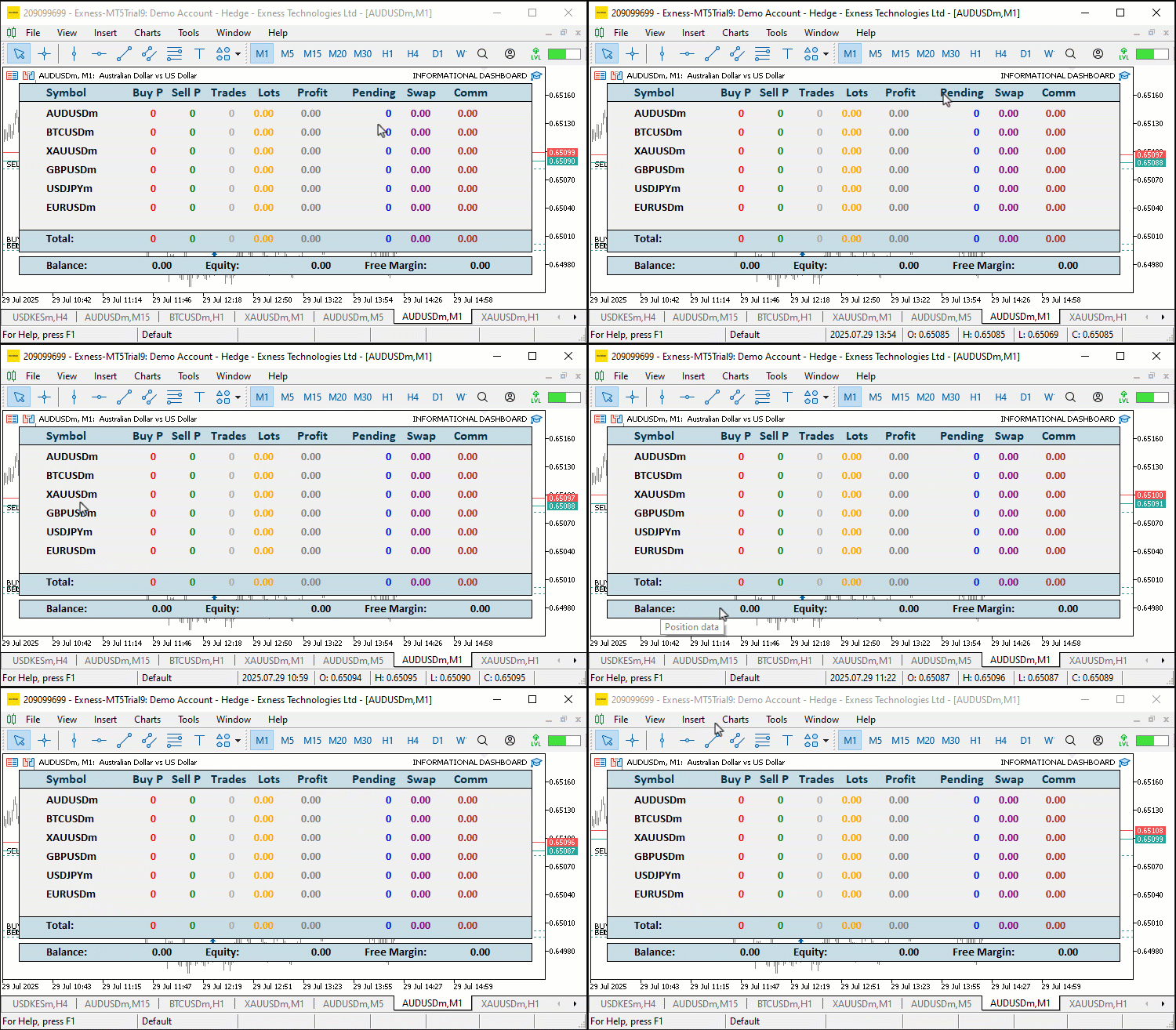
En la visualización vemos tooltips al pasar el cursor, como «Click to sort», pero cuando hacemos clic, no ocurre nada. La información ni siquiera aparece. El motivo es que, cuando se recopila la información, no se actualiza visualmente en el panel de control, pero, internamente, sí está disponible. Así pues, actualicemos nuestra función «UpdateDashboard» para que refleje ese cambio. Empecemos por definir la lógica para crear un encabezado dinámico, ya que es la opción más sencilla que nos permitirá dar vida al panel y saber que vamos por buen camino.
// Update header breathing effect every 500ms
glow_counter += MathMax(UpdateIntervalMs, 10); //--- Increment glow counter
if(glow_counter >= GLOW_INTERVAL_MS) { //--- Check if glow interval reached
   if(glow_direction) {                //--- Check if glowing forward
      glow_index++;                    //--- Increment glow index
      if(glow_index >= ArraySize(settings.header_shades) - 1) //--- Check if at end
         glow_direction = false;       //--- Reverse glow direction
   } else {                            //--- Glow backward
      glow_index--;                    //--- Decrement glow index
      if(glow_index <= 0)              //--- Check if at start
         glow_direction = true;        //--- Reverse glow direction
   }
   glow_counter = 0;                   //--- Reset glow counter
}
color header_shade = settings.header_shades[glow_index];          //--- Get current header shade
for(int i = 0; i < ArraySize(headers); i++) {                     //--- Iterate through headers
   string header_name = PREFIX + HEADER + IntegerToString(i);     //--- Define header name
   ObjectSetInteger(0, header_name, OBJPROP_COLOR, header_shade); //--- Update header color
   needs_redraw = true;                //--- Set redraw flag
}


// Batch redraw if needed
if(needs_redraw) {                     //--- Check if redraw needed
   ChartRedraw(0);                     //--- Redraw chart
}
Aquí implementamos el efecto de resplandor del encabezado y el redibujado final en la función «UpdateDashboard» para mejorar la retroalimentación visual. Incrementamos «glow_counter» en la mayor de las siguientes cantidades: «UpdateIntervalMs» y 10, comprobando si alcanza «GLOW_INTERVAL_MS» (500 ms). Si es cierto, ajustamos «glow_index»: lo incrementamos si «glow_direction» es cierto, lo cambiamos a falso al llegar al final de «settings.header_shades», o lo decrementamos si es falso, lo cambiamos a cierto cuando llega a cero y, a continuación, restablecemos «glow_counter» a 0. Configuramos «header_shade» desde «settings. header_shades[glow_index]» y recorremos «headers» con ArraySize, actualizando el «OBJPROP_COLOR» de cada etiqueta «PREFIX + HEADER + IntegerToString(i)» a «header_shade» mediante ObjectSetInteger, y estableciendo «needs_redraw» en true.
Si «needs_redraw» es verdadero, llamamos a ChartRedraw para actualizar el gráfico. Esto crea un efecto de brillo cíclico en los encabezados y garantiza que las actualizaciones de la interfaz de usuario se realicen de forma eficiente. Puedes cambiar los colores para que cambien como quieras, así como la frecuencia y la opacidad. Obtenemos los siguientes resultados.
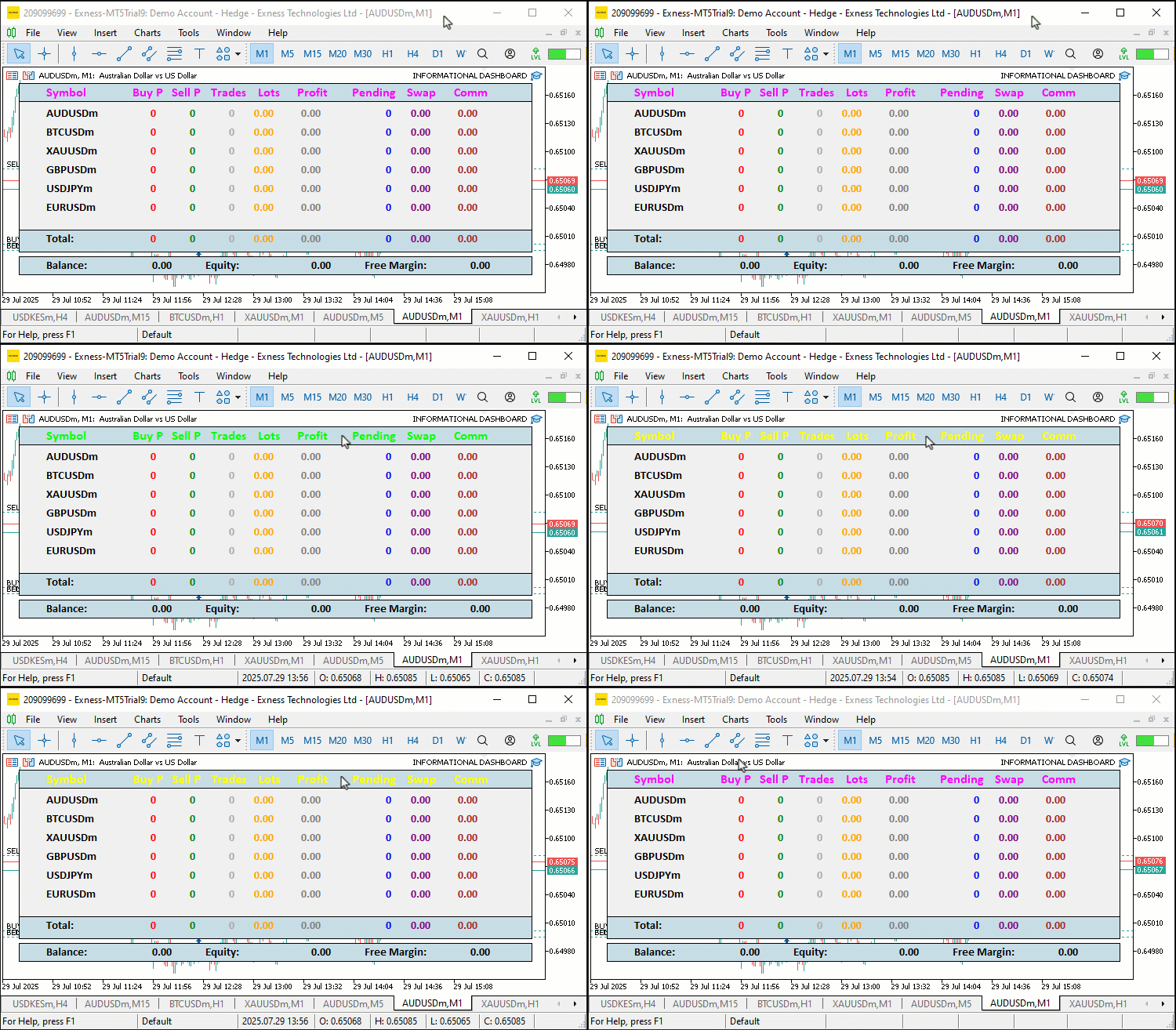
Ahora que ya tenemos un encabezado dinámico, podemos pasar a una lógica más compleja, que consiste en actualizar nuestro panel de control para que gestione también los clics.
// Update symbol and data labels after sorting
bool labels_updated = false;
for(int i = 0; i < current_num; i++) {
   string symbol = symbol_data[i].name;
   string symb_name = PREFIX + SYMB + IntegerToString(i);
   string current_symb_txt = ObjectGetString(0, symb_name, OBJPROP_TEXT);
   if(current_symb_txt != symbol) {
      ObjectSetString(0, symb_name, OBJPROP_TEXT, symbol);
      labels_updated = true;
   }
   for(int j = 0; j < 8; j++) {
      string data_name = PREFIX + DATA + IntegerToString(i) + "_" + IntegerToString(j);
      string value;
      color data_color = data_default_colors[j];
      switch(j) {
         case 0:
            value = symbol_data[i].buys_str;
            data_color = clrRed;
            break;
         case 1:
            value = symbol_data[i].sells_str;
            data_color = clrGreen;
            break;
         case 2:
            value = symbol_data[i].trades_str;
            data_color = clrDarkGray;
            break;
         case 3:
            value = symbol_data[i].lots_str;
            data_color = clrOrange;
            break;
         case 4:
            value = symbol_data[i].profit_str;
            data_color = (symbol_data[i].profit > 0) ? clrGreen : (symbol_data[i].profit < 0) ? clrRed : clrGray;
            break;
         case 5:
            value = symbol_data[i].pending_str;
            data_color = clrBlue;
            break;
         case 6:
            value = symbol_data[i].swaps_str;
            data_color = (symbol_data[i].swaps > 0) ? clrGreen : (symbol_data[i].swaps < 0) ? clrRed : clrPurple;
            break;
         case 7:
            value = symbol_data[i].comm_str;
            data_color = (symbol_data[i].comm > 0) ? clrGreen : (symbol_data[i].comm < 0) ? clrRed : clrBrown;
            break;
      }
      if(updateLABEL(data_name, value, data_color)) labels_updated = true;
   }
}
if(labels_updated) needs_redraw = true;
// Update totals
string new_total_buys = IntegerToString(totalBuys); //--- Format total buys
if(new_total_buys != total_buys_str) { //--- Check if changed
   total_buys_str = new_total_buys;    //--- Update string
   if(updateLABEL(PREFIX + FOOTER_DATA + "0", new_total_buys, clrRed)) needs_redraw = true; //--- Update label
}
string new_total_sells = IntegerToString(totalSells); //--- Format total sells
if(new_total_sells != total_sells_str) { //--- Check if changed
   total_sells_str = new_total_sells;  //--- Update string
   if(updateLABEL(PREFIX + FOOTER_DATA + "1", new_total_sells, clrGreen)) needs_redraw = true; //--- Update label
}
string new_total_trades = IntegerToString(totalTrades); //--- Format total trades
if(new_total_trades != total_trades_str) { //--- Check if changed
   total_trades_str = new_total_trades; //--- Update string
   if(updateLABEL(PREFIX + FOOTER_DATA + "2", new_total_trades, clrDarkGray)) needs_redraw = true; //--- Update label
}
string new_total_lots = DoubleToString(totalLots, 2); //--- Format total lots
if(new_total_lots != total_lots_str) { //--- Check if changed
   total_lots_str = new_total_lots;    //--- Update string
   if(updateLABEL(PREFIX + FOOTER_DATA + "3", new_total_lots, clrOrange)) needs_redraw = true; //--- Update label
}
string new_total_profit = DoubleToString(totalProfit, 2); //--- Format total profit
color total_profit_color = (totalProfit > 0) ? clrGreen : (totalProfit < 0) ? clrRed : clrGray; //--- Set color
if(new_total_profit != total_profit_str) { //--- Check if changed
   total_profit_str = new_total_profit; //--- Update string
   if(updateLABEL(PREFIX + FOOTER_DATA + "4", new_total_profit, total_profit_color)) needs_redraw = true; //--- Update label
}
string new_total_pending = IntegerToString(totalPending); //--- Format total pending
if(new_total_pending != total_pending_str) { //--- Check if changed
   total_pending_str = new_total_pending; //--- Update string
   if(updateLABEL(PREFIX + FOOTER_DATA + "5", new_total_pending, clrBlue)) needs_redraw = true; //--- Update label
}
string new_total_swap = DoubleToString(totalSwap, 2); //--- Format total swap
color total_swap_color = (totalSwap > 0) ? clrGreen : (totalSwap < 0) ? clrRed : clrPurple; //--- Set color
if(new_total_swap != total_swap_str) { //--- Check if changed
   total_swap_str = new_total_swap;    //--- Update string
   if(updateLABEL(PREFIX + FOOTER_DATA + "6", new_total_swap, total_swap_color)) needs_redraw = true; //--- Update label
}
string new_total_comm = DoubleToString(totalComm, 2); //--- Format total comm
color total_comm_color = (totalComm > 0) ? clrGreen : (totalComm < 0) ? clrRed : clrBrown; //--- Set color
if(new_total_comm != total_comm_str) { //--- Check if changed
   total_comm_str = new_total_comm;    //--- Update string
   if(updateLABEL(PREFIX + FOOTER_DATA + "7", new_total_comm, total_comm_color)) needs_redraw = true; //--- Update label
}

// Update account info
double balance = AccountInfoDouble(ACCOUNT_BALANCE); //--- Get balance
double equity = AccountInfoDouble(ACCOUNT_EQUITY); //--- Get equity
double free_margin = AccountInfoDouble(ACCOUNT_MARGIN_FREE); //--- Get free margin
string new_bal = DoubleToString(balance, 2); //--- Format balance
if(new_bal != acc_bal_str) {          //--- Check if changed
   acc_bal_str = new_bal;             //--- Update string
   if(updateLABEL(PREFIX + ACC_DATA + "0", new_bal, clrBlack)) needs_redraw = true; //--- Update label
}
string new_eq = DoubleToString(equity, 2); //--- Format equity
color eq_color = (equity > balance) ? clrGreen : (equity < balance) ? clrRed : clrBlack; //--- Set color
if(new_eq != acc_eq_str) {            //--- Check if changed
   acc_eq_str = new_eq;               //--- Update string
   if(updateLABEL(PREFIX + ACC_DATA + "1", new_eq, eq_color)) needs_redraw = true; //--- Update label
}
string new_free = DoubleToString(free_margin, 2); //--- Format free margin
if(new_free != acc_free_str) {        //--- Check if changed
   acc_free_str = new_free;           //--- Update string
   if(updateLABEL(PREFIX + ACC_DATA + "2", new_free, clrBlack)) needs_redraw = true; //--- Update label
}
Actualizamos las etiquetas de símbolo, datos, total y cuenta en la función «UpdateDashboard» para que reflejen los datos de trading ordenados y actualizados, garantizando así una visualización ágil. Establecemos «labels_updated» en «false» y recorremos los símbolos de «current_num», actualizando «PREFIX + SYMB + IntegerToString(i)» con «symbol_data[i].name» mediante «ObjectSetString» si ObjectGetString es diferente, y estableciendo «labels_updated» en «true». Para cada símbolo, recorremos ocho columnas, seleccionando «value» y «data_color» mediante un switch: «buys_str» con «clrRed», «sells_str» con «clrGreen», «trades_str» con «clrDarkGray», «lots_str» con clrOrange, «profit_str» con un color condicional basado en «symbol_data[i].profit», «pending_str» con «clrBlue», «swaps_str» con un color condicional basado en «symbol_data[i].swaps», y «comm_str» con un color condicional basado en «symbol_data[i].comm», actualizando las etiquetas «PREFIX + DATA» con «updateLABEL» y estableciendo «labels_updated» si se ha producido algún cambio.
Actualizamos los totales como «total_buys_str» con «IntegerToString(totalBuys)», «total_sells_str», «total_trades_str» y «total_lots_str» con «DoubleToString(totalLots, 2)», «total_profit_str» con la condición «total_profit_color», «total_pending_str» y «total_swap_str» con «total_swap_color», y «total_comm_str» con «total_comm_color», utilizando «updateLABEL» en las etiquetas «PREFIX + FOOTER_DATA» y estableciendo «needs_redraw» si se actualizan. Para la información de la cuenta, obtenemos «balance», «equidad» y «free_margin» con AccountInfoDouble, se formatean con «DoubleToString», se actualizan «acc_bal_str», «acc_eq_str» con el valor condicional «eq_color» y «acc_free_str», utilizando «updateLABEL» en las etiquetas «PREFIX + ACC_DATA». Esto garantiza que el panel de control muestre datos actualizados con colores dinámicos para mayor claridad. Tras la compilación, obtenemos el siguiente resultado.
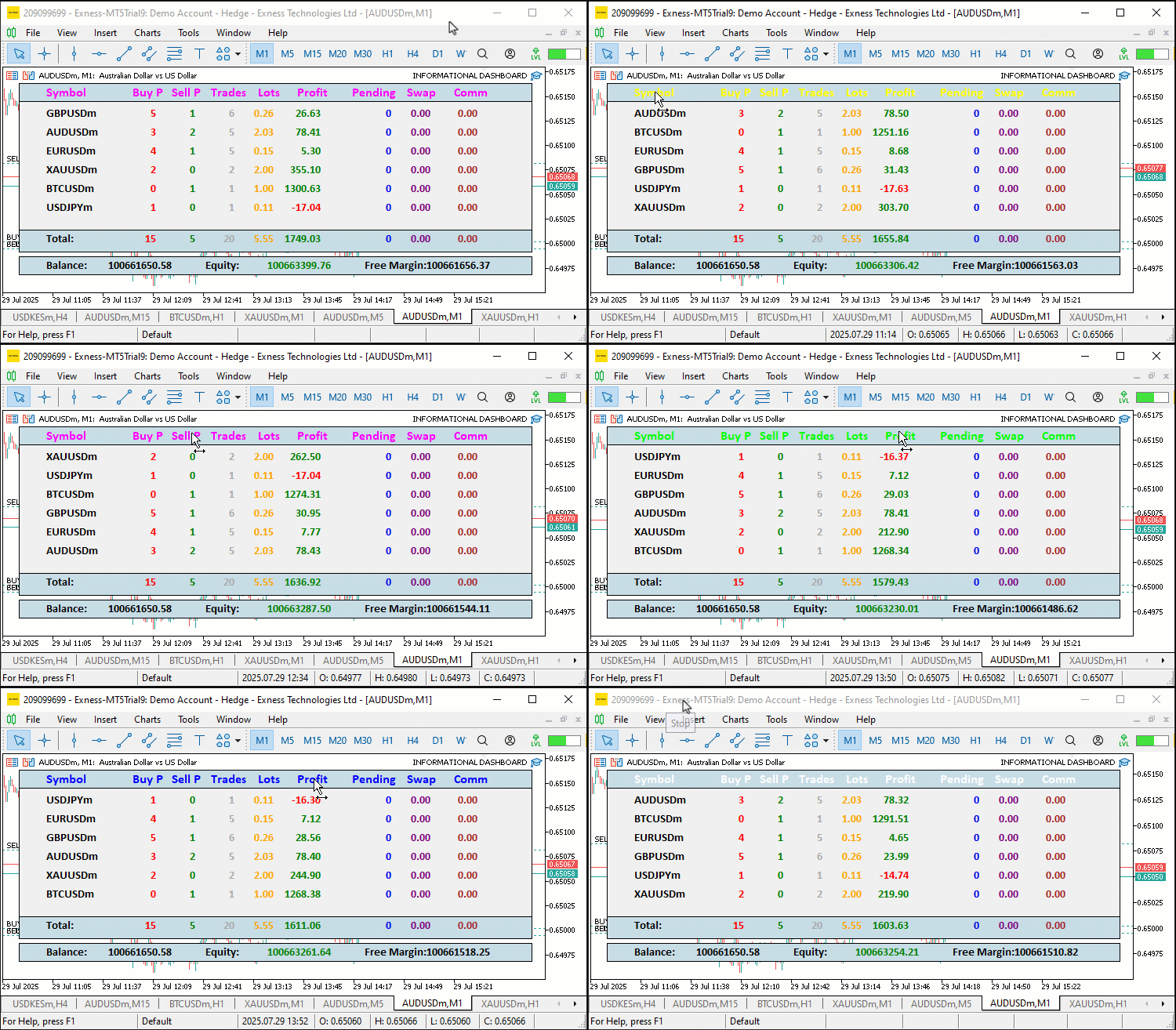
En la visualización podemos observar que ahora conseguimos el efecto dinámico de ordenación por burbuja, que muestra todos los datos de las columnas de la cabecera tanto en orden ascendente como descendente. Ahora solo queda disponer de una función para exportar los datos a Excel para su posterior análisis. Esta es la lógica que implementamos para ello.
//+------------------------------------------------------------------+
//| Export dashboard data to CSV                                     |
//+------------------------------------------------------------------+
void ExportToCSV() {
   string time_str = TimeToString(TimeCurrent(), TIME_DATE|TIME_MINUTES); //--- Get current time string
   StringReplace(time_str, " ", "_"); //--- Replace spaces
   StringReplace(time_str, ":", "-"); //--- Replace colons
   string filename = "Dashboard_" + time_str + ".csv"; //--- Define filename
   int handle = FileOpen(filename, FILE_WRITE|FILE_CSV); //--- Open CSV file in terminal's Files folder
   if(handle == INVALID_HANDLE) {        //--- Check for invalid handle
      Print("Failed to open CSV file '", filename, "'. Error code = ", GetLastError()); //--- Log error
      return;                            //--- Exit function
   }
   FileWrite(handle, "Symbol,Buy Positions,Sell Positions,Total Trades,Lots,Profit,Pending Orders,Swap,Comm"); //--- Write header
   for(int i = 0; i < ArraySize(symbol_data); i++) { //--- Iterate through symbols
      FileWrite(handle, symbol_data[i].name, symbol_data[i].buys, symbol_data[i].sells, symbol_data[i].trades, symbol_data[i].lots, symbol_data[i].profit, symbol_data[i].pending, symbol_data[i].swaps, symbol_data[i].comm); //--- Write symbol data
   }
   FileWrite(handle, "Total", totalBuys, totalSells, totalTrades, totalLots, totalProfit, totalPending, totalSwap, totalComm); //--- Write totals
   FileClose(handle);                    //--- Close file
   Print("Dashboard data exported to CSV: ", filename); //--- Log export success
}
Implementamos la función «ExportToCSV» para permitir la exportación de datos, lo que nos permite guardar los datos de operaciones para su análisis sin conexión. Creamos «time_str» con TimeToString utilizando TimeCurrent y «TIME_DATE|TIME_MINUTES», sustituyendo los espacios por guiones bajos y los dos puntos por guiones mediante StringReplace para obtener un nombre de archivo limpio; a continuación, definimos «filename» como «Dashboard_» más «time_str» más «.csv». Puedes utilizar cualquier otra extensión permitida para ello. Hemos elegido el formato CSV porque es la extensión más habitual. A continuación, abrimos el archivo con FileOpen utilizando «FILE_WRITE|FILE_CSV», registramos los errores con «Print» y salimos si «handle» es «INVALID_HANDLE».
Escribimos la fila de encabezado con FileWrite, indicando los nombres de las columnas, y recorremos «symbol_data» con «ArraySize» para escribir el «nombre», las «compras», las «ventas», las «operaciones», los «lotes», el «beneficio», las «pendientes», «swaps» y «comm», y escribimos una fila de totales con «Total» y los respectivos «totalBuys», «totalSells», «totalTrades», «totalLots», «totalProfit», «totalPending», «totalSwap» y «totalComm». Cerramos el archivo con FileClose y registramos que la operación se ha realizado correctamente con «Print». Esto permite exportar los datos a un archivo CSV, lo que resulta muy práctico para el mantenimiento de registros. A continuación, podemos utilizar esta función en el controlador de eventos del gráfico cuando se pulse la tecla «E». Hemos elegido esta tecla para que resulte fácil recordarla a la hora de «Exportar», pero puedes utilizar cualquier tecla que prefieras. Puede añadirse un botón para la tarea de exportación, algo que no tuvimos en cuenta con la suficiente antelación. Esta es la lógica que seguimos para ello.
//+------------------------------------------------------------------+
//| Chart event handler for sorting and export                       |
//+------------------------------------------------------------------+
void OnChartEvent(const int id, const long &lparam, const double &dparam, const string &sparam) {
   if(id == CHARTEVENT_OBJECT_CLICK) {   //--- Handle object click event
      for(int i = 0; i < ArraySize(headers); i++) { //--- Iterate through headers
         if(sparam == PREFIX + HEADER + IntegerToString(i)) { //--- Check if header clicked
            if(sort_column == i)         //--- Check if same column clicked
               sort_ascending = !sort_ascending; //--- Toggle sort direction
            else {
               sort_column = i;          //--- Set new sort column
               sort_ascending = true;    //--- Set to ascending
            }
            UpdateDashboard();           //--- Update dashboard display
            break;                       //--- Exit loop
         }
      }
   }
   else if(id == CHARTEVENT_KEYDOWN && lparam == 'E') { //--- Handle 'E' key press
      ExportToCSV();                    //--- Export data to CSV
   }
}
Aquí comprobamos si el ID del evento es CHARTEVENT_KEYDOWN y si la tecla pulsada fue la «E», y exportamos el archivo al instante. Es una lógica sencilla, por lo que la hemos resaltado en amarillo para que quede más clara. Este es el resultado que obtenemos.
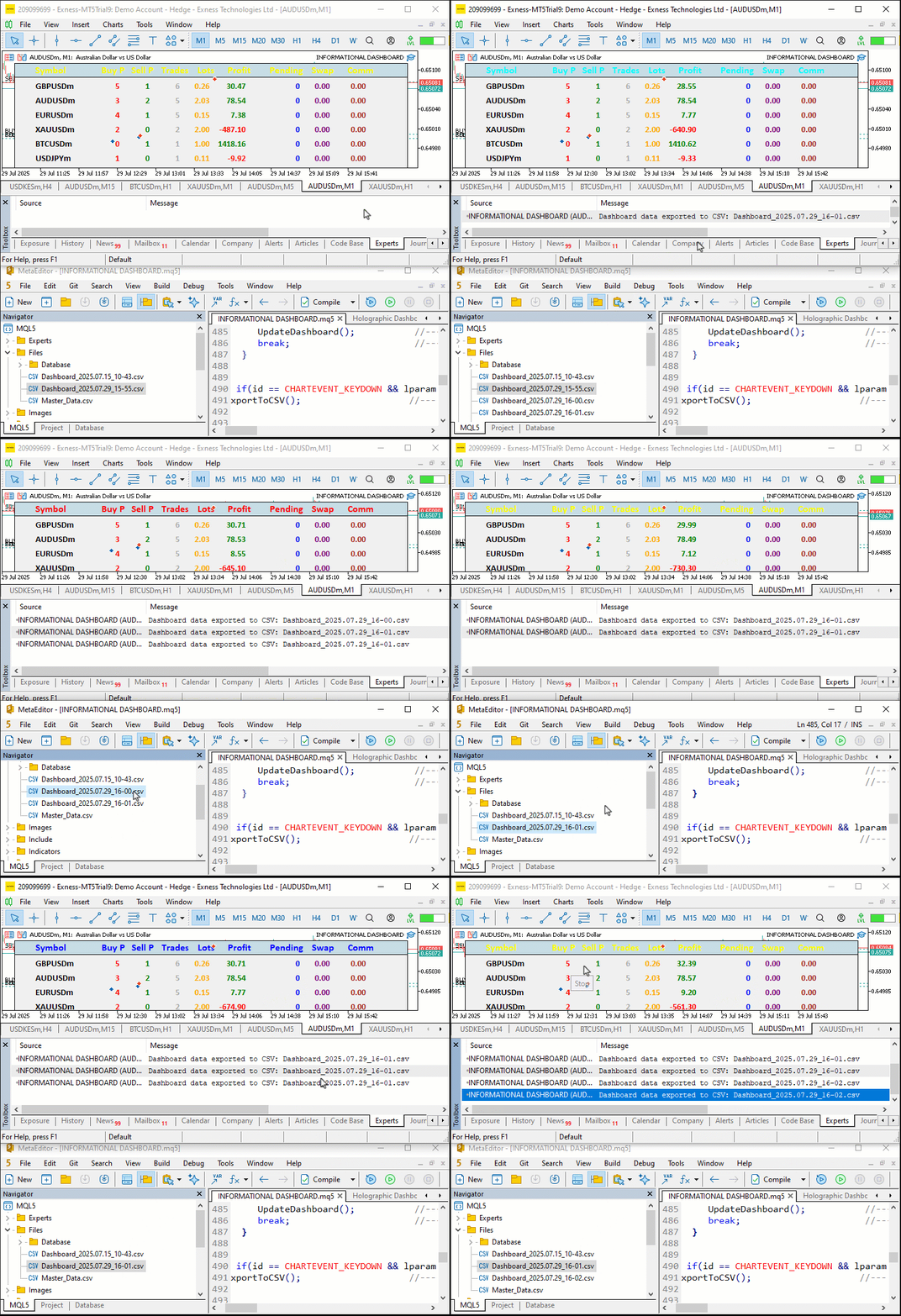
En la visualización podemos ver que exportamos los datos para su análisis en diferentes archivos en función de la hora actual, y que los sobrescribimos si la hora actual coincide en los minutos. Si no quieres esperar a que transcurra un minuto para poder guardar el archivo en otra ubicación, puedes cambiar el formato de la hora actual de minutos a segundos. Podemos constatar que, en general, hemos alcanzado nuestros objetivos. Ahora solo queda comprobar la viabilidad del proyecto, y eso se aborda en la siguiente sección.
Backtesting
Hemos realizado las pruebas y, a continuación, se muestra la visualización recopilada en un único formato de imagen de mapa de bits Graphics Interchange Format (GIF).
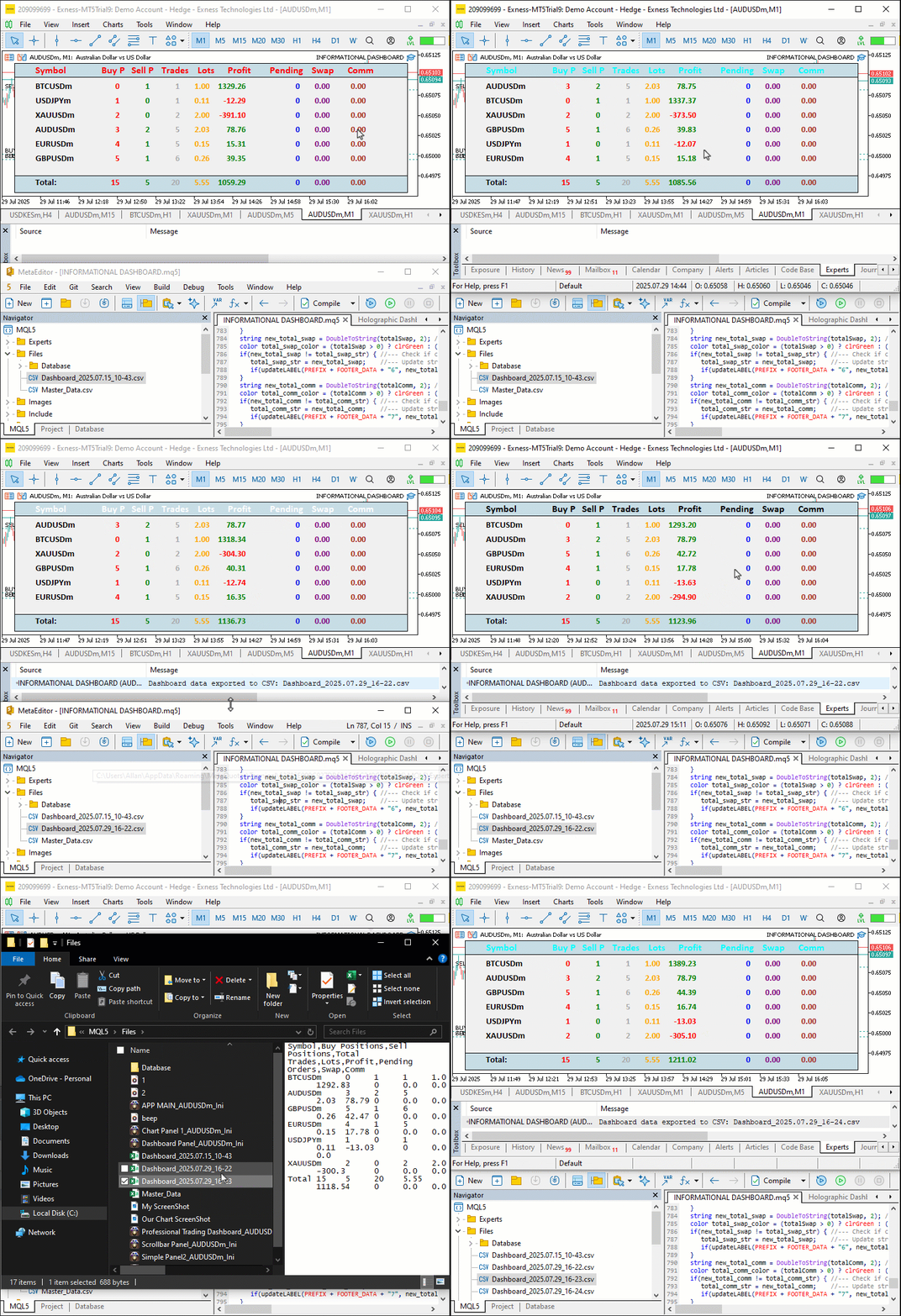
Conclusión
En conclusión, hemos creado un panel informativo en MetaQuotes Language 5 que supervisa las posiciones de varios símbolos y los parámetros de la cuenta, como «Balance», «Equity» y «Free Margin», con columnas ordenables y exportación a CSV de Excel para una supervisión optimizada de las operaciones. Hemos detallado la arquitectura y la implementación, utilizando estructuras como «SymbolData» y funciones como «SortDashboard» para ofrecer información organizada y en tiempo real. Puedes personalizar este panel de control para adaptarlo a tus necesidades de negociación, lo que te permitirá realizar un seguimiento más eficaz de los resultados.
Traducción del inglés realizada por MetaQuotes Ltd.
Artículo original: https://www.mql5.com/en/articles/18986
Advertencia: todos los derechos de estos materiales pertenecen a MetaQuotes Ltd. Queda totalmente prohibido el copiado total o parcial.
Este artículo ha sido escrito por un usuario del sitio web y refleja su punto de vista personal. MetaQuotes Ltd. no se responsabiliza de la exactitud de la información ofrecida, ni de las posibles consecuencias del uso de las soluciones, estrategias o recomendaciones descritas.

 Redes neuronales en el trading: Modelo de difusión adaptativa sobre grafos (módulo de atención)
 Asesor experto de Forex basado en la red neuronal N-BEATS
 Robot de trading basado en un modelo GPT
 Tablas en el paradigma MVC en MQL5: integramos el componente Model en el componente View

- Aplicaciones de trading gratuitas
- 8 000+ señales para copiar
- Noticias económicas para analizar los mercados financieros
Usted acepta la política del sitio web y las condiciones de uso