

MQL5 Trading Tools (Part 7): Informational Dashboard for Multi-Symbol Position and Account Monitoring
 5 093
5 093
 0
0

Introduction
In our previous article (Part 6), we developed a Dynamic Holographic Dashboard in MetaQuotes Language 5 (MQL5) for monitoring symbols and timeframes, featuring RSI, volatility alerts, and interactive controls with pulse animations. In Part 7, we create an informational dashboard that tracks multi-symbol positions, total trades, lots, profits, pending orders, swaps, commissions, and account metrics like balance and equity, with sortable columns and Comma Separated Values (CSV) export for comprehensive oversight. We will cover the following topics:
- Understanding the Informational Dashboard Architecture
- Implementation in MQL5
- Backtesting
- Conclusion
By the end, you’ll have a powerful MQL5 dashboard for position and account monitoring, ready for customization—let’s dive in!
Understanding the Informational Dashboard Architecture
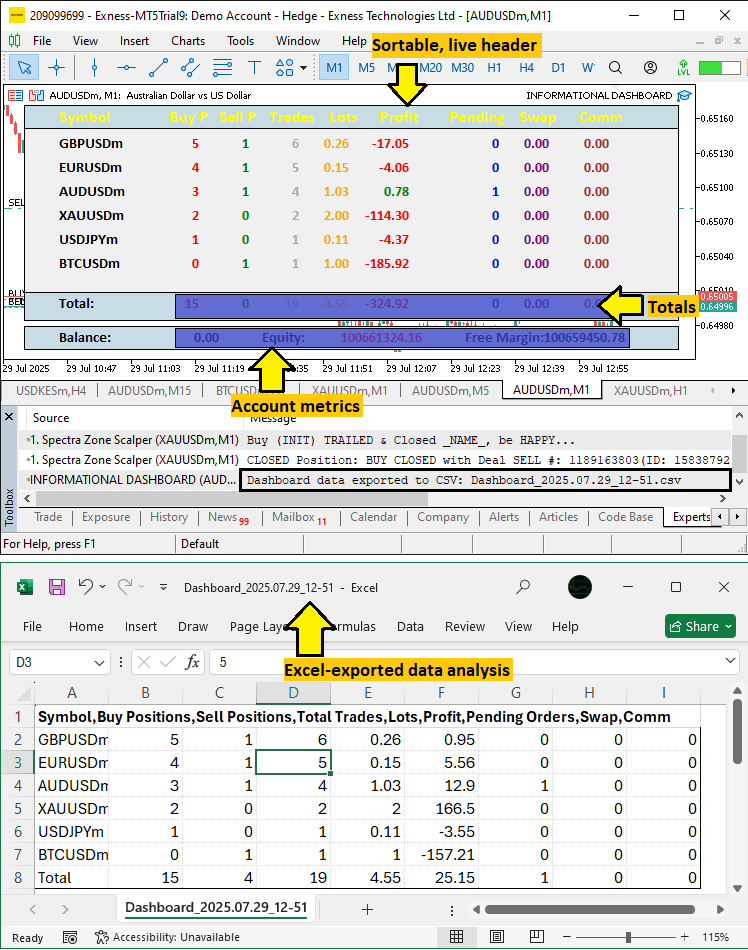
We’re developing an informational dashboard to provide a centralized view of our positions across multiple symbols and essential account metrics, making it easier to track performance without needing to switch screens. This architecture is key because it organizes scattered trading data into a sortable grid, with real-time totals and export options, helping to spot issues like excessive drawdown or unbalanced positions quickly.
We will achieve this by gathering position details like buys, sells, lots, and profit for each symbol, while displaying account balance, equity, and free margin, all with interactive sorting and a subtle visual effect for engagement. We plan to loop through symbols to collect and sum data, ensuring the dashboard is lightweight and responsive for live trading environments. See the visualization below, and we can then head to the implementation!
Implementation in MQL5
To create the program in MQL5, we will need to define the program metadata and then define some inputs that will enable us to easily modify the functioning of the program without interfering with the code directly as well as define the dashboard objects.
//+------------------------------------------------------------------+
//|                                     Informational Dashboard.mq5  |
//|                           Copyright 2025, Allan Munene Mutiiria. |
//|                                   https://t.me/Forex_Algo_Trader |
//+------------------------------------------------------------------+
#property copyright "Copyright 2025, Allan Munene Mutiiria."
#property link      "https://t.me/Forex_Algo_Trader"
#property version   "1.00"

// Input parameters
input int UpdateIntervalMs = 100; // Update interval (milliseconds, min 10ms)
input long MagicNumber = -1; // Magic number (-1 for all positions and orders)

// Defines for object names
#define PREFIX "DASH_"                   //--- Prefix for all dashboard objects
#define HEADER "HEADER_"                 //--- Prefix for header labels
#define SYMB "SYMB_"                     //--- Prefix for symbol labels
#define DATA "DATA_"                     //--- Prefix for data labels
#define HEADER_PANEL "HEADER_PANEL"      //--- Name for header panel
#define ACCOUNT_PANEL "ACCOUNT_PANEL"    //--- Name for account panel
#define FOOTER_PANEL "FOOTER_PANEL"      //--- Name for footer panel
#define FOOTER_TEXT "FOOTER_TEXT"        //--- Name for footer text label
#define FOOTER_DATA "FOOTER_DATA_"       //--- Prefix for footer data labels
#define PANEL "PANEL"                    //--- Name for main panel
#define ACC_TEXT "ACC_TEXT_"             //--- Prefix for account text labels
#define ACC_DATA "ACC_DATA_"             //--- Prefix for account data labels
Here, we set up the input parameters and define constants for object names in our Informational Dashboard in MQL5, enabling customization and organized naming for the User Interface (UI) elements. We define "UpdateIntervalMs" as 100 milliseconds (with a minimum of 10ms) to control the refresh rate of the dashboard, ensuring timely updates without overloading the system. The "MagicNumber" input is set to -1 to monitor all positions and orders, or a specific value to filter by EA magic number for targeted tracking.
We use defines for consistent object naming: "PREFIX" as "DASH_" for all dashboard objects, "HEADER" for header labels, "SYMB_" for symbol labels, "DATA_" for data labels, "HEADER_PANEL" for the header panel, "ACCOUNT_PANEL" for the account section, "FOOTER_PANEL" for the footer, "FOOTER_TEXT" for footer text, "FOOTER_DATA_" for footer data prefixes, "PANEL" for the main panel, "ACC_TEXT_" for account text prefixes, and "ACC_DATA_" for account data prefixes. These definitions simplify object management and make the code more readable. The next thing that we need to do is create some structures that will hold our informational data and global variables that we will use throughout the implementation.
// Dashboard settings
struct DashboardSettings {               //--- Structure for dashboard settings
   int panel_x;                          //--- X-coordinate of panel
   int panel_y;                          //--- Y-coordinate of panel
   int row_height;                       //--- Height of each row
   int font_size;                        //--- Font size for labels
   string font;                          //--- Font type for labels
   color bg_color;                       //--- Background color of main panel
   color border_color;                   //--- Border color of panels
   color header_color;                   //--- Default color for header text
   color text_color;                     //--- Default color for text
   color section_bg_color;               //--- Background color for header/footer panels
   int zorder_panel;                     //--- Z-order for main panel
   int zorder_subpanel;                  //--- Z-order for sub-panels
   int zorder_labels;                    //--- Z-order for labels
   int label_y_offset;                   //--- Y-offset for label positioning
   int label_x_offset;                   //--- X-offset for label positioning
   int header_x_distances[9];            //--- X-distances for header labels (9 columns)
   color header_shades[12];              //--- Array of header color shades for glow effect
} settings = {                           //--- Initialize settings with default values
   20,                                   //--- Set panel_x to 20 pixels
   20,                                   //--- Set panel_y to 20 pixels
   24,                                   //--- Set row_height to 24 pixels
   11,                                   //--- Set font_size to 11
   "Calibri Bold",                       //--- Set font to Calibri Bold
   C'240,240,240',                       //--- Set bg_color to light gray
   clrBlack,                             //--- Set border_color to black
   C'0,50,70',                           //--- Set header_color to dark teal
   clrBlack,                             //--- Set text_color to black
   C'200,220,230',                       //--- Set section_bg_color to light blue-gray
   100,                                  //--- Set zorder_panel to 100
   101,                                  //--- Set zorder_subpanel to 101
   102,                                  //--- Set zorder_labels to 102
   3,                                    //--- Set label_y_offset to 3 pixels
   25,                                   //--- Set label_x_offset to 25 pixels
   {10, 120, 170, 220, 280, 330, 400, 470, 530}, //--- X-distances for 9 columns
   {C'0,0,0', C'255,0,0', C'0,255,0', C'0,0,255', C'255,255,0', C'0,255,255',
    C'255,0,255', C'255,255,255', C'255,0,255', C'0,255,255', C'255,255,0', C'0,0,255'}
};

// Data structure for symbol information
struct SymbolData {                      //--- Structure for symbol data
   string name;                          //--- Symbol name
   int buys;                             //--- Number of buy positions
   int sells;                            //--- Number of sell positions
   int trades;                           //--- Total number of trades
   double lots;                          //--- Total lots
   double profit;                        //--- Total profit
   int pending;                          //--- Number of pending orders
   double swaps;                         //--- Total swap
   double comm;                          //--- Total commission
   string buys_str;                      //--- String representation of buys
   string sells_str;                     //--- String representation of sells
   string trades_str;                    //--- String representation of trades
   string lots_str;                      //--- String representation of lots
   string profit_str;                    //--- String representation of profit
   string pending_str;                   //--- String representation of pending
   string swaps_str;                     //--- String representation of swap
   string comm_str;                      //--- String representation of commission
};

// Global variables
SymbolData symbol_data[];                //--- Array to store symbol data
long totalBuys = 0;                      //--- Total buy positions across symbols
long totalSells = 0;                     //--- Total sell positions across symbols
long totalTrades = 0;                    //--- Total trades across symbols
double totalLots = 0.0;                  //--- Total lots across symbols
double totalProfit = 0.0;                //--- Total profit across symbols
long totalPending = 0;                   //--- Total pending across symbols
double totalSwap = 0.0;                  //--- Total swap across symbols
double totalComm = 0.0;                  //--- Total commission across symbols
string headers[] = {"Symbol", "Buy P", "Sell P", "Trades", "Lots", "Profit", "Pending", "Swap", "Comm"}; //--- Header labels
int column_widths[] = {140, 50, 50, 50, 60, 90, 50, 60, 60}; //--- Widths for each column
color data_default_colors[] = {clrRed, clrGreen, clrDarkGray, clrOrange, clrGray, clrBlue, clrPurple, clrBrown};
int sort_column = 3;                     //--- Initial sort column (trades)
bool sort_ascending = false;             //--- Sort direction (false for descending to show active first)
int glow_index = 0;                      //--- Current index for header glow effect
bool glow_direction = true;              //--- Glow direction (true for forward)
int glow_counter = 0;                    //--- Counter for glow timing
const int GLOW_INTERVAL_MS = 500;        //--- Glow cycle interval (500ms)
string total_buys_str = "";              //--- String for total buys display
string total_sells_str = "";             //--- String for total sells display
string total_trades_str = "";            //--- String for total trades display
string total_lots_str = "";              //--- String for total lots display
string total_profit_str = "";            //--- String for total profit display
string total_pending_str = "";           //--- String for total pending display
string total_swap_str = "";              //--- String for total swap display
string total_comm_str = "";              //--- String for total comm display
string account_items[] = {"Balance", "Equity", "Free Margin"}; //--- Account items
string acc_bal_str = "";                 //--- Strings for account data
string acc_eq_str = "";
string acc_free_str = "";
int prev_num_symbols = 0;                //--- Previous number of active symbols for dynamic resizing
To configure the UI and data management, we define the "DashboardSettings" structure to hold layout settings, initializing "panel_x" and "panel_y" at 20 pixels for positioning, "row_height" at 24 pixels for row spacing, "font_size" at 11 for text, "font" as "Calibri Bold" for style, "bg_color" as light gray for the main panel, "border_color" as black for panel outlines, "header_color" as dark teal for headers, "text_color" as black for general text, "section_bg_color" as light blue-gray for header and footer panels, "zorder_panel" at 100, "zorder_subpanel" at 101, and "zorder_labels" at 102 for layering, "label_y_offset" at 3 and "label_x_offset" at 25 for label alignment, "header_x_distances" for nine column positions, and "header_shades" with 12 colors for the glow effect.
We create the "SymbolData" structure to store per-symbol data, including "name" for the symbol, "buys", "sells", "trades", "pending" for counts, and "lots", "profit", "swaps", "comm" for values, with corresponding string fields like "buys_str" for display. We declare global variables: "symbol_data" array for symbol data, "totalBuys", "totalSells", "totalTrades", "totalPending" as longs initialized to zero, "totalLots", "totalProfit", "totalSwap", "totalComm" as doubles initialized to zero, "headers" array for column labels, "column_widths" for column sizes, "data_default_colors" for column-specific colors, "sort_column" at 3 for default sorting by trades, "sort_ascending" as false for descending order, "glow_index" and "glow_counter" at 0 with "glow_direction" as true and "GLOW_INTERVAL_MS" at 500ms for the header glow, string variables like "total_buys_str" for totals display, "account_items" for balance, equity, and free margin labels, their string representations like "acc_bal_str", and "prev_num_symbols" at 0 for dynamic resizing.
These components will establish the dashboard’s layout and data framework for real-time position tracking. We can now define some helper functions that will help us keep the program more modular. We will start with the one for labels since that is what we will be dealing with frequently.
//+------------------------------------------------------------------+
//| Create label function                                            |
//+------------------------------------------------------------------+
bool createLABEL(string objName, string txt, int xD, int yD, color clrTxt, int fontSize, string font, int anchor, bool selectable = false) {
   if(!ObjectCreate(0, objName, OBJ_LABEL, 0, 0, 0)) { //--- Create label object
      Print(__FUNCTION__, ": Failed to create label '", objName, "'. Error code = ", GetLastError()); //--- Log creation failure
      return(false);                     //--- Return failure
   }
   ObjectSetInteger(0, objName, OBJPROP_XDISTANCE, xD); //--- Set x-coordinate
   ObjectSetInteger(0, objName, OBJPROP_YDISTANCE, yD); //--- Set y-coordinate
   ObjectSetInteger(0, objName, OBJPROP_CORNER, CORNER_LEFT_UPPER); //--- Set corner alignment
   ObjectSetString(0, objName, OBJPROP_TEXT, txt); //--- Set text
   ObjectSetInteger(0, objName, OBJPROP_FONTSIZE, fontSize); //--- Set font size
   ObjectSetString(0, objName, OBJPROP_FONT, font); //--- Set font type
   ObjectSetInteger(0, objName, OBJPROP_COLOR, clrTxt); //--- Set text color
   ObjectSetInteger(0, objName, OBJPROP_BACK, false); //--- Set to foreground
   ObjectSetInteger(0, objName, OBJPROP_STATE, selectable); //--- Set selectable state
   ObjectSetInteger(0, objName, OBJPROP_SELECTABLE, selectable); //--- Set selectability
   ObjectSetInteger(0, objName, OBJPROP_SELECTED, false); //--- Set not selected
   ObjectSetInteger(0, objName, OBJPROP_ANCHOR, anchor); //--- Set anchor point
   ObjectSetInteger(0, objName, OBJPROP_ZORDER, settings.zorder_labels); //--- Set z-order
   ObjectSetString(0, objName, OBJPROP_TOOLTIP, selectable ? "Click to sort" : "Position data"); //--- Set tooltip
   ChartRedraw(0);                       //--- Redraw chart
   return(true);                         //--- Return success
}

//+------------------------------------------------------------------+
//| Update label function                                            |
//+------------------------------------------------------------------+
bool updateLABEL(string objName, string txt, color clrTxt) {
   int found = ObjectFind(0, objName);   //--- Find object
   if(found < 0) {                       //--- Check if object not found
      Print(__FUNCTION__, ": Failed to find label '", objName, "'. Error code = ", GetLastError()); //--- Log error
      return(false);                     //--- Return failure
   }
   string current_txt = ObjectGetString(0, objName, OBJPROP_TEXT); //--- Get current text
   if(current_txt != txt) {              //--- Check if text changed
      ObjectSetString(0, objName, OBJPROP_TEXT, txt); //--- Update text
      ObjectSetInteger(0, objName, OBJPROP_COLOR, clrTxt); //--- Update color
      return(true);                      //--- Indicate redraw needed
   }
   return(false);                        //--- No update needed
}
We implement the "createLABEL" function to generate text labels for the dashboard, taking parameters "objName", "txt", "xD", "yD", "clrTxt", "fontSize", "font", "anchor", and "selectable". We create the label with the ObjectCreate function as OBJ_LABEL, logging failures with Print and returning false if unsuccessful, then set properties with the ObjectSetInteger function for properties OBJPROP_XDISTANCE, "OBJPROP_YDISTANCE", "OBJPROP_CORNER" as "CORNER_LEFT_UPPER", "OBJPROP_FONTSIZE", "OBJPROP_COLOR", "OBJPROP_BACK" as false, "OBJPROP_STATE" and "OBJPROP_SELECTABLE" based on "selectable", "OBJPROP_SELECTED" as false, "OBJPROP_ANCHOR", and OBJPROP_ZORDER from "settings.zorder_labels", and ObjectSetString for "OBJPROP_TEXT" and OBJPROP_FONT, with a tooltip via "OBJPROP_TOOLTIP" for sorting or data. We redraw with ChartRedraw and return true.
The "updateLABEL" function updates existing labels, checking ObjectFind for "objName", logging, and returning false if not found. If the "current_txt" from "ObjectGetString" differs from "txt", we update "OBJPROP_TEXT" and "OBJPROP_COLOR" with "ObjectSetString" and "ObjectSetInteger", returning true to indicate a redraw is needed, or false otherwise. These functions will enable flexible label creation and efficient updates for the dashboard display. We can then create the other helper functions for gathering all the needed information.
//+------------------------------------------------------------------+
//| Count total positions for a symbol                               |
//+------------------------------------------------------------------+
string countPositionsTotal(string symbol) {
   int totalPositions = 0;               //--- Initialize position counter
   int count_Total_Pos = PositionsTotal(); //--- Get total positions
   for(int i = count_Total_Pos - 1; i >= 0; i--) { //--- Iterate through positions
      ulong ticket = PositionGetTicket(i); //--- Get position ticket
      if(ticket > 0 && PositionSelectByTicket(ticket)) { //--- Check if position selected
         if(PositionGetString(POSITION_SYMBOL) == symbol && (MagicNumber < 0 || PositionGetInteger(POSITION_MAGIC) == MagicNumber)) totalPositions++; //--- Check symbol and magic
      }
   }
   return IntegerToString(totalPositions); //--- Return total as string
}

//+------------------------------------------------------------------+
//| Count buy or sell positions for a symbol                         |
//+------------------------------------------------------------------+
string countPositions(string symbol, ENUM_POSITION_TYPE pos_type) {
   int totalPositions = 0;               //--- Initialize position counter
   int count_Total_Pos = PositionsTotal(); //--- Get total positions
   for(int i = count_Total_Pos - 1; i >= 0; i--) { //--- Iterate through positions
      ulong ticket = PositionGetTicket(i); //--- Get position ticket
      if(ticket > 0 && PositionSelectByTicket(ticket)) { //--- Check if position selected
         if(PositionGetString(POSITION_SYMBOL) == symbol && PositionGetInteger(POSITION_TYPE) == pos_type && (MagicNumber < 0 || PositionGetInteger(POSITION_MAGIC) == MagicNumber)) { //--- Check symbol, type, magic
            totalPositions++;            //--- Increment counter
         }
      }
   }
   return IntegerToString(totalPositions); //--- Return total as string
}

//+------------------------------------------------------------------+
//| Count pending orders for a symbol                                |
//+------------------------------------------------------------------+
string countOrders(string symbol) {
   int total = 0;                        //--- Initialize counter
   int tot = OrdersTotal();              //--- Get total orders
   for(int i = tot - 1; i >= 0; i--) {   //--- Iterate through orders
      ulong ticket = OrderGetTicket(i);  //--- Get order ticket
      if(ticket > 0 && OrderSelect(ticket)) { //--- Check if order selected
         if(OrderGetString(ORDER_SYMBOL) == symbol && (MagicNumber < 0 || OrderGetInteger(ORDER_MAGIC) == MagicNumber)) total++; //--- Check symbol and magic
      }
   }
   return IntegerToString(total);        //--- Return total as string
}

//+------------------------------------------------------------------+
//| Sum double property for positions of a symbol                    |
//+------------------------------------------------------------------+
string sumPositionDouble(string symbol, ENUM_POSITION_PROPERTY_DOUBLE prop) {
   double total = 0.0;                   //--- Initialize total
   int count_Total_Pos = PositionsTotal(); //--- Get total positions
   for(int i = count_Total_Pos - 1; i >= 0; i--) { //--- Iterate through positions
      ulong ticket = PositionGetTicket(i); //--- Get position ticket
      if(ticket > 0 && PositionSelectByTicket(ticket)) { //--- Check if position selected
         if(PositionGetString(POSITION_SYMBOL) == symbol && (MagicNumber < 0 || PositionGetInteger(POSITION_MAGIC) == MagicNumber)) { //--- Check symbol and magic
            total += PositionGetDouble(prop); //--- Add property value
         }
      }
   }
   return DoubleToString(total, 2);      //--- Return total as string
}

//+------------------------------------------------------------------+
//| Sum commission for positions of a symbol from history            |
//+------------------------------------------------------------------+
double sumPositionCommission(string symbol) {
   double total_comm = 0.0;              //--- Initialize total commission
   int pos_total = PositionsTotal();     //--- Get total positions
   for(int p = 0; p < pos_total; p++) {  //--- Iterate through positions
      ulong ticket = PositionGetTicket(p); //--- Get position ticket
      if(ticket > 0 && PositionSelectByTicket(ticket)) { //--- Check if selected
         if(PositionGetString(POSITION_SYMBOL) == symbol && (MagicNumber < 0 || PositionGetInteger(POSITION_MAGIC) == MagicNumber)) { //--- Check symbol and magic
            long pos_id = PositionGetInteger(POSITION_IDENTIFIER); //--- Get position ID
            if(HistorySelectByPosition(pos_id)) { //--- Select history by position
               int deals_total = HistoryDealsTotal(); //--- Get total deals
               for(int d = 0; d < deals_total; d++) { //--- Iterate through deals
                  ulong deal_ticket = HistoryDealGetTicket(d); //--- Get deal ticket
                  if(deal_ticket > 0) {    //--- Check valid
                     total_comm += HistoryDealGetDouble(deal_ticket, DEAL_COMMISSION); //--- Add commission
                  }
               }
            }
         }
      }
   }
   return total_comm;                    //--- Return total commission
}

//+------------------------------------------------------------------+
//| Collect active symbols with positions or orders                  |
//+------------------------------------------------------------------+
void CollectActiveSymbols() {
   string symbols_temp[];
   int added = 0;
   // Collect from positions
   int pos_total = PositionsTotal();
   for(int i = 0; i < pos_total; i++) {
      ulong ticket = PositionGetTicket(i);
      if(ticket == 0) continue;
      PositionSelectByTicket(ticket);
      if(MagicNumber < 0 || PositionGetInteger(POSITION_MAGIC) == MagicNumber) {
         string sym = PositionGetString(POSITION_SYMBOL);
         bool found = false;
         for(int k = 0; k < added; k++) {
            if(symbols_temp[k] == sym) {
               found = true;
               break;
            }
         }
         if(!found) {
            ArrayResize(symbols_temp, added + 1);
            symbols_temp[added] = sym;
            added++;
         }
      }
   }
   // Collect from orders
   int ord_total = OrdersTotal();
   for(int i = 0; i < ord_total; i++) {
      ulong ticket = OrderGetTicket(i);
      if(ticket == 0) continue;
      bool isSelected = OrderSelect(ticket);
      if(MagicNumber < 0 || OrderGetInteger(ORDER_MAGIC) == MagicNumber) {
         string sym = OrderGetString(ORDER_SYMBOL);
         bool found = false;
         for(int k = 0; k < added; k++) {
            if(symbols_temp[k] == sym) {
               found = true;
               break;
            }
         }
         if(!found) {
            ArrayResize(symbols_temp, added + 1);
            symbols_temp[added] = sym;
            added++;
         }
      }
   }
   // Set symbol_data
   ArrayResize(symbol_data, added);
   for(int i = 0; i < added; i++) {
      symbol_data[i].name = symbols_temp[i];
      symbol_data[i].buys = 0;
      symbol_data[i].sells = 0;
      symbol_data[i].trades = 0;
      symbol_data[i].lots = 0.0;
      symbol_data[i].profit = 0.0;
      symbol_data[i].pending = 0;
      symbol_data[i].swaps = 0.0;
      symbol_data[i].comm = 0.0;
      symbol_data[i].buys_str = "0";
      symbol_data[i].sells_str = "0";
      symbol_data[i].trades_str = "0";
      symbol_data[i].lots_str = "0.00";
      symbol_data[i].profit_str = "0.00";
      symbol_data[i].pending_str = "0";
      symbol_data[i].swaps_str = "0.00";
      symbol_data[i].comm_str = "0.00";
   }
}
Here, we implement utility functions to collect and summarize trading data, ensuring accurate position and order tracking across symbols. The "countPositionsTotal" function counts all positions for a given "symbol", looping through PositionsTotal, selecting each "ticket" with PositionGetTicket and PositionSelectByTicket, and incrementing "totalPositions" if the symbol matches and "MagicNumber" is -1 or matches POSITION_MAGIC via "PositionGetInteger". It returns the count as a string with the IntegerToString function.
The "countPositions" function counts buy or sell positions for a "symbol" and "pos_type", iterating through positions similarly, checking POSITION_TYPE against "pos_type", and returning the count as a string. The "countOrders" function counts pending orders for a "symbol", looping through OrdersTotal, selecting "ticket" with "OrderGetTicket" and OrderSelect, incrementing "total" if the symbol and "MagicNumber" match, and returning the count as a string. The "sumPositionDouble" function sums a double property like volume, profit, or swap for a "symbol", iterating through positions, adding PositionGetDouble values for the specified "prop" if conditions match, and returning the total formatted with DoubleToString to two decimals.
The "sumPositionCommission" function calculates total commission for a "symbol" from deal history, looping through positions, selecting "pos_id" with "PositionGetInteger", using HistorySelectByPosition to get deals, summing "DEAL_COMMISSION" with "HistoryDealGetDouble" for each valid "deal_ticket" from HistoryDealGetTicket, and returning the total.
The "CollectActiveSymbols" function gathers symbols with active positions or orders into "symbols_temp", iterating through PositionsTotal and "OrdersTotal", checking "MagicNumber" conditions, and adding unique symbols with the ArrayResize function. It resizes "symbol_data" to match and initializes fields like "name", counts, and strings to zero or defaults. These functions will enable the dashboard to collect and display precise trading data efficiently. Up to this point, we have all the necessary functions to initialize our dashboard. Let us proceed to creating the dashboard in the OnInit event handler so we can keep on tracking our upgrades.
//+------------------------------------------------------------------+
//| Expert initialization function                                   |
//+------------------------------------------------------------------+
int OnInit() {
   // Collect active symbols first
   CollectActiveSymbols();
   int num_rows = ArraySize(symbol_data);
   // Calculate dimensions
   int num_columns = ArraySize(headers);    //--- Get number of columns
   int column_width_sum = 0;                //--- Initialize sum of column widths
   for(int i = 0; i < num_columns; i++)     //--- Iterate through columns
      column_width_sum += column_widths[i]; //--- Add column width to sum
   int panel_width = MathMax(settings.header_x_distances[num_columns - 1] + column_widths[num_columns - 1], column_width_sum) + 20 + settings.label_x_offset; //--- Calculate panel width

   // Create main panel in foreground
   string panel_name = PREFIX + PANEL;                                                   //--- Define main panel name
   ObjectCreate(0, panel_name, OBJ_RECTANGLE_LABEL, 0, 0, 0);                            //--- Create main panel
   ObjectSetInteger(0, panel_name, OBJPROP_CORNER, CORNER_LEFT_UPPER);                   //--- Set panel corner
   ObjectSetInteger(0, panel_name, OBJPROP_XDISTANCE, settings.panel_x);                 //--- Set panel x-coordinate
   ObjectSetInteger(0, panel_name, OBJPROP_YDISTANCE, settings.panel_y);                 //--- Set panel y-coordinate
   ObjectSetInteger(0, panel_name, OBJPROP_XSIZE, panel_width);                          //--- Set panel width
   ObjectSetInteger(0, panel_name, OBJPROP_YSIZE, (num_rows + 3) * settings.row_height); //--- Set panel height
   ObjectSetInteger(0, panel_name, OBJPROP_BGCOLOR, settings.bg_color);                  //--- Set background color
   ObjectSetInteger(0, panel_name, OBJPROP_BORDER_TYPE, BORDER_FLAT);                    //--- Set border type
   ObjectSetInteger(0, panel_name, OBJPROP_BORDER_COLOR, settings.border_color);         //--- Set border color
   ObjectSetInteger(0, panel_name, OBJPROP_BACK, false);                                 //--- Set panel to foreground
   ObjectSetInteger(0, panel_name, OBJPROP_ZORDER, settings.zorder_panel);               //--- Set z-order

   // Create header panel
   string header_panel = PREFIX + HEADER_PANEL;                                          //--- Define header panel name
   ObjectCreate(0, header_panel, OBJ_RECTANGLE_LABEL, 0, 0, 0);                          //--- Create header panel
   ObjectSetInteger(0, header_panel, OBJPROP_CORNER, CORNER_LEFT_UPPER);                 //--- Set header panel corner
   ObjectSetInteger(0, header_panel, OBJPROP_XDISTANCE, settings.panel_x);               //--- Set header panel x-coordinate
   ObjectSetInteger(0, header_panel, OBJPROP_YDISTANCE, settings.panel_y);               //--- Set header panel y-coordinate
   ObjectSetInteger(0, header_panel, OBJPROP_XSIZE, panel_width);                        //--- Set header panel width
   ObjectSetInteger(0, header_panel, OBJPROP_YSIZE, settings.row_height);                //--- Set header panel height
   ObjectSetInteger(0, header_panel, OBJPROP_BGCOLOR, settings.section_bg_color);        //--- Set header panel background color
   ObjectSetInteger(0, header_panel, OBJPROP_BORDER_TYPE, BORDER_FLAT);                  //--- Set header panel border type
   ObjectSetInteger(0, header_panel, OBJPROP_BORDER_COLOR, settings.border_color);       //--- Set border color
   ObjectSetInteger(0, header_panel, OBJPROP_ZORDER, settings.zorder_subpanel);          //--- Set header panel z-order

   return(INIT_SUCCEEDED);               //--- Return initialization success
}
In the OnInit event handler, we initialize the logic for setting up the user interface foundation for position and account monitoring. We start by calling the "CollectActiveSymbols" function to populate the "symbol_data" array with active symbols and set "num_rows" to its size with the ArraySize function. We calculate "num_columns" from the "headers" array and compute "column_width_sum" by iterating through "column_widths" with a for loop, summing each width. The "panel_width" is determined with MathMax using the last "header_x_distances" plus its corresponding "column_widths" and "column_width_sum", adding 20 and "settings.label_x_offset" for padding.
We create the main panel with ObjectCreate as OBJ_RECTANGLE_LABEL named "PREFIX + PANEL", setting "OBJPROP_CORNER" to "CORNER_LEFT_UPPER", "OBJPROP_XDISTANCE" and "OBJPROP_YDISTANCE" from "settings.panel_x" and "settings.panel_y", "OBJPROP_XSIZE" to "panel_width", "OBJPROP_YSIZE" to "(num_rows + 3) * settings.row_height", "OBJPROP_BGCOLOR" to "settings.bg_color", "OBJPROP_BORDER_TYPE" to "BORDER_FLAT", "OBJPROP_BORDER_COLOR" to "settings.border_color", "OBJPROP_BACK" to false, and OBJPROP_ZORDER to "settings.zorder_panel". For the header panel, we use a similar approach and return "INIT_SUCCEEDED" to indicate successful initialization. This establishes the dashboard’s core panels for displaying data, and upon compilation, we have the following outcome.

With the foundation established, we can now create the other subpanels and labels. We use the following logic to achieve that.
// Create headers with manual X-distances
int header_y = settings.panel_y + 8 + settings.label_y_offset; //--- Calculate header y-coordinate
for(int i = 0; i < num_columns; i++) {                         //--- Iterate through headers
   string header_name = PREFIX + HEADER + IntegerToString(i);  //--- Define header label name
   int header_x = settings.panel_x + settings.header_x_distances[i] + settings.label_x_offset; //--- Calculate header x-coordinate
   createLABEL(header_name, headers[i], header_x, header_y, settings.header_color, 12, settings.font, ANCHOR_LEFT, true); //--- Create header label
}

// Create symbol labels and data labels
int first_row_y = header_y + settings.row_height;                                       //--- Calculate y-coordinate for first row
int symbol_x = settings.panel_x + 10 + settings.label_x_offset;                         //--- Set x-coordinate for symbol labels
for(int i = 0; i < num_rows; i++) {                                                     //--- Iterate through symbols
   string symbol_name = PREFIX + SYMB + IntegerToString(i);                             //--- Define symbol label name
   createLABEL(symbol_name, symbol_data[i].name, symbol_x, first_row_y + i * settings.row_height + settings.label_y_offset, settings.text_color, settings.font_size, settings.font, ANCHOR_LEFT); //--- Create symbol label
   int x_offset = settings.panel_x + 10 + column_widths[0] + settings.label_x_offset;   //--- Set initial x-offset for data labels
   for(int j = 0; j < num_columns - 1; j++) {                                           //--- Iterate through data columns
      string data_name = PREFIX + DATA + IntegerToString(i) + "_" + IntegerToString(j); //--- Define data label name
      color initial_color = data_default_colors[j];                                     //--- Set initial color
      string initial_txt = (j <= 2 || j == 5) ? "0" : "0.00";                           //--- Set initial text
      createLABEL(data_name, initial_txt, x_offset, first_row_y + i * settings.row_height + settings.label_y_offset, initial_color, settings.font_size, settings.font, ANCHOR_RIGHT); //--- Create data label
      x_offset += column_widths[j + 1];                                                 //--- Update x-offset
   }
}

// Create footer panel at the bottom
int footer_y = settings.panel_y + (num_rows + 3) * settings.row_height - settings.row_height - 5; //--- Calculate footer y-coordinate
string footer_panel = PREFIX + FOOTER_PANEL;                                    //--- Define footer panel name
ObjectCreate(0, footer_panel, OBJ_RECTANGLE_LABEL, 0, 0, 0);                    //--- Create footer panel
ObjectSetInteger(0, footer_panel, OBJPROP_CORNER, CORNER_LEFT_UPPER);           //--- Set footer panel corner
ObjectSetInteger(0, footer_panel, OBJPROP_XDISTANCE, settings.panel_x);         //--- Set footer panel x-coordinate
ObjectSetInteger(0, footer_panel, OBJPROP_YDISTANCE, footer_y);                 //--- Set footer panel y-coordinate
ObjectSetInteger(0, footer_panel, OBJPROP_XSIZE, panel_width);                  //--- Set footer panel width
ObjectSetInteger(0, footer_panel, OBJPROP_YSIZE, settings.row_height + 5);      //--- Set footer panel height
ObjectSetInteger(0, footer_panel, OBJPROP_BGCOLOR, settings.section_bg_color);  //--- Set footer panel background color
ObjectSetInteger(0, footer_panel, OBJPROP_BORDER_TYPE, BORDER_FLAT);            //--- Set footer panel border type
ObjectSetInteger(0, footer_panel, OBJPROP_BORDER_COLOR, settings.border_color); //--- Set border color
ObjectSetInteger(0, footer_panel, OBJPROP_ZORDER, settings.zorder_subpanel);    //--- Set footer panel z-order

// Create footer text and data
int footer_text_x = settings.panel_x + 10 + settings.label_x_offset;               //--- Set x-coordinate for footer text
createLABEL(PREFIX + FOOTER_TEXT, "Total:", footer_text_x, footer_y + 8 + settings.label_y_offset, settings.text_color, settings.font_size, settings.font, ANCHOR_LEFT); //--- Create footer text label
int x_offset = settings.panel_x + 10 + column_widths[0] + settings.label_x_offset; //--- Set initial x-offset for footer data
for(int j = 0; j < num_columns - 1; j++) {                                         //--- Iterate through footer data columns
   string footer_data_name = PREFIX + FOOTER_DATA + IntegerToString(j);            //--- Define footer data label name
   color footer_color = data_default_colors[j];                                    //--- Set footer data color
   string initial_txt = (j <= 2 || j == 5) ? "0" : "0.00";                         //--- Set initial text
   createLABEL(footer_data_name, initial_txt, x_offset, footer_y + 8 + settings.label_y_offset, footer_color, settings.font_size, settings.font, ANCHOR_RIGHT); //--- Create footer data label
   x_offset += column_widths[j + 1];                                               //--- Update x-offset
}
We continue building the informational dashboard by creating the header, symbol, data, and footer UI elements within the OnInit function, setting up the visual structure for displaying trading data. For the header, we calculate "header_y" as "settings.panel_y + 8 + settings.label_y_offset" and loop through "num_columns" with a for loop, creating each header label with "createLABEL" using "PREFIX + HEADER + IntegerToString(i)" as the header name for uniqueness, "headers[i]" as text, "header_x" computed from "settings.panel_x + settings.header_x_distances[i] + settings.label_x_offset", "settings.header_color", font size 12, "settings.font", "ANCHOR_LEFT", and selectable true for sorting interaction as we will need to enable sorting feature later.
For symbols and data, we set "first_row_y" as "header_y + settings.row_height" and "symbol_x" as "settings.panel_x + 10 + settings.label_x_offset". We loop through "num_rows" with a for loop, creating symbol labels with "createLABEL" using "PREFIX + SYMB + IntegerToString(i)", "symbol_data[i].name", "symbol_x", and "first_row_y + i * settings.row_height + settings.label_y_offset" in "settings.text_color". For each row, we loop through "num_columns - 1" data columns, creating labels with "createLABEL" using "PREFIX + DATA + IntegerToString(i) + '_' + IntegerToString(j)", initial text "0" or "0.00" based on column, "x_offset" starting at "settings.panel_x + 10 + column_widths[0] + settings.label_x_offset" and incrementing by "column_widths[j + 1]", "data_default_colors[j]", and "ANCHOR_RIGHT".
For the footer, we calculate "footer_y" as "settings.panel_y + (num_rows + 3) * settings.row_height - settings.row_height - 5" and create the footer panel with "ObjectCreate" as OBJ_RECTANGLE_LABEL named "PREFIX + FOOTER_PANEL", setting "OBJPROP_CORNER" to "CORNER_LEFT_UPPER", OBJPROP_XDISTANCE to "settings.panel_x", "OBJPROP_YDISTANCE" to "footer_y", "OBJPROP_XSIZE" to "panel_width", "OBJPROP_YSIZE" to "settings.row_height + 5", "OBJPROP_BGCOLOR" to "settings.section_bg_color", "OBJPROP_BORDER_TYPE" to "BORDER_FLAT", "OBJPROP_BORDER_COLOR" to "settings.border_color", and "OBJPROP_ZORDER" to "settings.zorder_subpanel".
We create the footer text with "createLABEL" using "PREFIX + FOOTER_TEXT", "Total:", "footer_text_x" at "settings.panel_x + 10 + settings.label_x_offset", and loop through "num_columns - 1" to create footer data labels with "createLABEL" using "PREFIX + FOOTER_DATA + IntegerToString(j)", initial text, "x_offset" updated by "column_widths[j + 1]", and "data_default_colors[j]" as from the array. When we compile, we get the following outcome.

Now that we have the main panel filled with data, let us move on to the account metrics panel, which should be below the main panel to display the account data dynamically.
// Create account panel below footer
int account_panel_y = footer_y + settings.row_height + 10;                            //--- Calculate account panel y-coordinate
string account_panel_name = PREFIX + ACCOUNT_PANEL;                                   //--- Define account panel name
ObjectCreate(0, account_panel_name, OBJ_RECTANGLE_LABEL, 0, 0, 0);                    //--- Create account panel
ObjectSetInteger(0, account_panel_name, OBJPROP_CORNER, CORNER_LEFT_UPPER);           //--- Set corner
ObjectSetInteger(0, account_panel_name, OBJPROP_XDISTANCE, settings.panel_x);         //--- Set x-coordinate
ObjectSetInteger(0, account_panel_name, OBJPROP_YDISTANCE, account_panel_y);          //--- Set y-coordinate
ObjectSetInteger(0, account_panel_name, OBJPROP_XSIZE, panel_width);                  //--- Set width
ObjectSetInteger(0, account_panel_name, OBJPROP_YSIZE, settings.row_height);          //--- Set height
ObjectSetInteger(0, account_panel_name, OBJPROP_BGCOLOR, settings.section_bg_color);  //--- Set background color
ObjectSetInteger(0, account_panel_name, OBJPROP_BORDER_TYPE, BORDER_FLAT);            //--- Set border type
ObjectSetInteger(0, account_panel_name, OBJPROP_BORDER_COLOR, settings.border_color); //--- Set border color
ObjectSetInteger(0, account_panel_name, OBJPROP_ZORDER, settings.zorder_subpanel);    //--- Set z-order

// Create account text and data labels
int acc_x = settings.panel_x + 10 + settings.label_x_offset;                          //--- Set base x for account labels
int acc_data_offset = 160;                                                            //--- Increased offset for data labels to avoid overlap
int acc_spacing = (panel_width - 45) / ArraySize(account_items);                      //--- Adjusted spacing to fit
for(int k = 0; k < ArraySize(account_items); k++) {                                   //--- Iterate through account items
   string acc_text_name = PREFIX + ACC_TEXT + IntegerToString(k);                     //--- Define text label name
   int text_x = acc_x + k * acc_spacing;                                              //--- Calculate text x
   createLABEL(acc_text_name, account_items[k] + ":", text_x, account_panel_y + 8 + settings.label_y_offset, settings.text_color, settings.font_size, settings.font, ANCHOR_LEFT); //--- Create text label
   string acc_data_name = PREFIX + ACC_DATA + IntegerToString(k);                     //--- Define data label name
   int data_x = text_x + acc_data_offset;                                             //--- Calculate data x
   createLABEL(acc_data_name, "0.00", data_x, account_panel_y + 8 + settings.label_y_offset, settings.text_color, settings.font_size, settings.font, ANCHOR_RIGHT); //--- Create data label
}
Here, we create the account panel and its labels to display account metrics, completing the UI setup within the OnInit function. We calculate "account_panel_y" as "footer_y + settings.row_height + 10" and create the panel with ObjectCreate as "OBJ_RECTANGLE_LABEL" named "PREFIX + ACCOUNT_PANEL", setting "OBJPROP_CORNER" to "CORNER_LEFT_UPPER", "OBJPROP_XDISTANCE" to "settings.panel_x", "OBJPROP_YDISTANCE" to "account_panel_y", "OBJPROP_XSIZE" to "panel_width", "OBJPROP_YSIZE" to "settings.row_height", "OBJPROP_BGCOLOR" to "settings.section_bg_color", "OBJPROP_BORDER_TYPE" to "BORDER_FLAT", OBJPROP_BORDER_COLOR to "settings.border_color", and "OBJPROP_ZORDER" to "settings.zorder_subpanel".
For account labels, we set "acc_x" as "settings.panel_x + 10 + settings.label_x_offset", "acc_data_offset" to 160, and "acc_spacing" as "(panel_width - 45) / ArraySize(account_items)" for even spacing, and follow a similar format as the main panel creation logic. This setup will display balance, equity, and free margin in a clean, aligned panel below the footer. Have a look below.

From the image, we can see that the account metrics section has been created. What now remains is doing updates to the panel and making it responsive. Let us create a function to update the dashboard.
//+------------------------------------------------------------------+
//| Sort dashboard by selected column                                |
//+------------------------------------------------------------------+
void SortDashboard() {
   int n = ArraySize(symbol_data);       //--- Get number of symbols
   for(int i = 0; i < n - 1; i++) {     //--- Iterate through symbols
      for(int j = 0; j < n - i - 1; j++) { //--- Compare adjacent symbols
         bool swap = false;              //--- Initialize swap flag
         switch(sort_column) {           //--- Check sort column
            case 0:                      //--- Sort by symbol name
               swap = sort_ascending ? symbol_data[j].name > symbol_data[j + 1].name : symbol_data[j].name < symbol_data[j + 1].name;
               break;
            case 1:                      //--- Sort by buys
               swap = sort_ascending ? symbol_data[j].buys > symbol_data[j + 1].buys : symbol_data[j].buys < symbol_data[j + 1].buys;
               break;
            case 2:                      //--- Sort by sells
               swap = sort_ascending ? symbol_data[j].sells > symbol_data[j + 1].sells : symbol_data[j].sells < symbol_data[j + 1].sells;
               break;
            case 3:                      //--- Sort by trades
               swap = sort_ascending ? symbol_data[j].trades > symbol_data[j + 1].trades : symbol_data[j].trades < symbol_data[j + 1].trades;
               break;
            case 4:                      //--- Sort by lots
               swap = sort_ascending ? symbol_data[j].lots > symbol_data[j + 1].lots : symbol_data[j].lots < symbol_data[j + 1].lots;
               break;
            case 5:                      //--- Sort by profit
               swap = sort_ascending ? symbol_data[j].profit > symbol_data[j + 1].profit : symbol_data[j].profit < symbol_data[j + 1].profit;
               break;
            case 6:                      //--- Sort by pending
               swap = sort_ascending ? symbol_data[j].pending > symbol_data[j + 1].pending : symbol_data[j].pending < symbol_data[j + 1].pending;
               break;
            case 7:                      //--- Sort by swaps
               swap = sort_ascending ? symbol_data[j].swaps > symbol_data[j + 1].swaps : symbol_data[j].swaps < symbol_data[j + 1].swaps;
               break;
            case 8:                      //--- Sort by comm
               swap = sort_ascending ? symbol_data[j].comm > symbol_data[j + 1].comm : symbol_data[j].comm < symbol_data[j + 1].comm;
               break;
         }
         if(swap) {                      //--- Check if swap needed
            SymbolData temp = symbol_data[j]; //--- Store temporary data
            symbol_data[j] = symbol_data[j + 1]; //--- Swap data
            symbol_data[j + 1] = temp;   //--- Complete swap
         }
      }
   }
}
We implement the "SortDashboard" function to enable dynamic sorting, allowing us to organize symbol data by selected columns. We get the number of symbols with ArraySize on "symbol_data" and store it in "n". Using nested for loops, we iterate through "n - 1" symbols and compare adjacent pairs up to "n - i - 1". We initialize a "swap" flag to false and use a switch statement on "sort_column" to determine sorting criteria: 0 for "name", 1 for "buys", 2 for "sells", 3 for "trades", 4 for "lots", 5 for "profit", 6 for "pending", 7 for "swaps", or 8 for "comm", setting "swap" to true if the comparison (based on "sort_ascending") indicates a reorder is needed.
If "swap" is true, we store "symbol_data[j]" in a temporary "SymbolData" variable, swap "symbol_data[j]" with "symbol_data[j + 1]", and complete the swap. This bubble sort implementation ensures the dashboard can be sorted by any column in ascending or descending order, enhancing data visibility. We can now implement this function in a main function to take care of the updates.
//+------------------------------------------------------------------+
//| Update dashboard function                                        |
//+------------------------------------------------------------------+
void UpdateDashboard() {
   bool needs_redraw = false;             //--- Initialize redraw flag
   CollectActiveSymbols();
   int current_num = ArraySize(symbol_data);
   if(current_num != prev_num_symbols) {
      // Delete old symbol and data labels
      for(int del_i = 0; del_i < prev_num_symbols; del_i++) {
         ObjectDelete(0, PREFIX + SYMB + IntegerToString(del_i));
         for(int del_j = 0; del_j < 8; del_j++) {
            ObjectDelete(0, PREFIX + DATA + IntegerToString(del_i) + "_" + IntegerToString(del_j));
         }
      }
      // Adjust panel sizes and positions
      int panel_height = (current_num + 3) * settings.row_height;
      ObjectSetInteger(0, PREFIX + PANEL, OBJPROP_YSIZE, panel_height);
      int footer_y = settings.panel_y + panel_height - settings.row_height - 5;
      ObjectSetInteger(0, PREFIX + FOOTER_PANEL, OBJPROP_YDISTANCE, footer_y);
      int account_panel_y = footer_y + settings.row_height + 10;
      ObjectSetInteger(0, PREFIX + ACCOUNT_PANEL, OBJPROP_YDISTANCE, account_panel_y);
      // Create new symbol and data labels
      int header_y = settings.panel_y + 8 + settings.label_y_offset;
      int first_row_y = header_y + settings.row_height;
      int symbol_x = settings.panel_x + 10 + settings.label_x_offset;
      for(int cr_i = 0; cr_i < current_num; cr_i++) {
         string symb_name = PREFIX + SYMB + IntegerToString(cr_i);
         createLABEL(symb_name, symbol_data[cr_i].name, symbol_x, first_row_y + cr_i * settings.row_height + settings.label_y_offset, settings.text_color, settings.font_size, settings.font, ANCHOR_LEFT);
         int x_offset = settings.panel_x + 10 + column_widths[0] + settings.label_x_offset;
         for(int cr_j = 0; cr_j < 8; cr_j++) {
            string data_name = PREFIX + DATA + IntegerToString(cr_i) + "_" + IntegerToString(cr_j);
            color init_color = data_default_colors[cr_j];
            string init_txt = (cr_j <= 2 || cr_j == 5) ? "0" : "0.00";
            createLABEL(data_name, init_txt, x_offset, first_row_y + cr_i * settings.row_height + settings.label_y_offset, init_color, settings.font_size, settings.font, ANCHOR_RIGHT);
            x_offset += column_widths[cr_j + 1];
         }
      }
      prev_num_symbols = current_num;
      needs_redraw = true;
   }
   // Reset totals
   totalBuys = 0;
   totalSells = 0;
   totalTrades = 0;
   totalLots = 0.0;
   totalProfit = 0.0;
   totalPending = 0;
   totalSwap = 0.0;
   totalComm = 0.0;
   // Calculate symbol data and totals (without updating labels yet)
   for(int i = 0; i < current_num; i++) {
      string symbol = symbol_data[i].name;
      for(int j = 0; j < 8; j++) {
         string value = "";
         color data_color = data_default_colors[j];
         double dval = 0.0;
         int ival = 0;
         switch(j) {
            case 0: // Buy positions
               value = countPositions(symbol, POSITION_TYPE_BUY);
               ival = (int)StringToInteger(value);
               if(value != symbol_data[i].buys_str) {
                  symbol_data[i].buys_str = value;
                  symbol_data[i].buys = ival;
               }
               totalBuys += ival;
               break;
            case 1: // Sell positions
               value = countPositions(symbol, POSITION_TYPE_SELL);
               ival = (int)StringToInteger(value);
               if(value != symbol_data[i].sells_str) {
                  symbol_data[i].sells_str = value;
                  symbol_data[i].sells = ival;
               }
               totalSells += ival;
               break;
            case 2: // Total trades
               value = countPositionsTotal(symbol);
               ival = (int)StringToInteger(value);
               if(value != symbol_data[i].trades_str) {
                  symbol_data[i].trades_str = value;
                  symbol_data[i].trades = ival;
               }
               totalTrades += ival;
               break;
            case 3: // Lots
               value = sumPositionDouble(symbol, POSITION_VOLUME);
               dval = StringToDouble(value);
               if(value != symbol_data[i].lots_str) {
                  symbol_data[i].lots_str = value;
                  symbol_data[i].lots = dval;
               }
               totalLots += dval;
               break;
            case 4: // Profit
               value = sumPositionDouble(symbol, POSITION_PROFIT);
               dval = StringToDouble(value);
               data_color = (dval > 0) ? clrGreen : (dval < 0) ? clrRed : clrGray;
               if(value != symbol_data[i].profit_str) {
                  symbol_data[i].profit_str = value;
                  symbol_data[i].profit = dval;
               }
               totalProfit += dval;
               break;
            case 5: // Pending
               value = countOrders(symbol);
               ival = (int)StringToInteger(value);
               if(value != symbol_data[i].pending_str) {
                  symbol_data[i].pending_str = value;
                  symbol_data[i].pending = ival;
               }
               totalPending += ival;
               break;
            case 6: // Swap
               value = sumPositionDouble(symbol, POSITION_SWAP);
               dval = StringToDouble(value);
               data_color = (dval > 0) ? clrGreen : (dval < 0) ? clrRed : data_color;
               if(value != symbol_data[i].swaps_str) {
                  symbol_data[i].swaps_str = value;
                  symbol_data[i].swaps = dval;
               }
               totalSwap += dval;
               break;
            case 7: // Comm
               dval = sumPositionCommission(symbol);
               value = DoubleToString(dval, 2);
               data_color = (dval > 0) ? clrGreen : (dval < 0) ? clrRed : data_color;
               if(value != symbol_data[i].comm_str) {
                  symbol_data[i].comm_str = value;
                  symbol_data[i].comm = dval;
               }
               totalComm += dval;
               break;
         }
      }
   }
   // Sort after calculating values
   SortDashboard();
}
Here, we implement the "UpdateDashboard" function to refresh the dashboard, ensuring real-time position and account data updates while dynamically adjusting for symbol changes. We initialize "needs_redraw" as false and call the "CollectActiveSymbols" function to update "symbol_data", checking if "current_num" from "ArraySize(symbol_data)" differs from "prev_num_symbols". If different, we delete old labels with ObjectDelete for "PREFIX + SYMB" and "PREFIX + DATA" labels, adjust panel sizes by setting "OBJPROP_YSIZE" of "PREFIX + PANEL" to "(current_num + 3) * settings.row_height", update "OBJPROP_YDISTANCE" of "PREFIX + FOOTER_PANEL" and "PREFIX + ACCOUNT_PANEL" based on new "footer_y" and "account_panel_y", and recreate symbol and data labels with "createLABEL" for "symbol_data[cr_i].name" and initial values, using "symbol_x", "first_row_y + cr_i * settings.row_height + settings.label_y_offset", and "x_offset" incremented by "column_widths".
We set "prev_num_symbols" to "current_num" and flag "needs_redraw" as true. We reset totals like "totalBuys", "totalSells", "totalTrades", "totalLots", "totalProfit", "totalPending", "totalSwap", and "totalComm" to zero. For each symbol in "symbol_data", we iterate through eight data columns, calculating values with "countPositions", "countPositionsTotal", "sumPositionDouble", or "sumPositionCommission", updating "symbol_data[i]" fields like "buys_str", "sells", "profit_str", and setting colors for "profit", "swaps", and "comm" based on positive (green), negative (red), or neutral values, and adding to totals. We call "SortDashboard" to reorder the display based on the current "sort_column" and "sort_ascending". To make use of the function, we will need to call it in the initialization and timer functions. Simply add it at the bottom of the OnInit event handler.
// Set millisecond timer for updates
EventSetMillisecondTimer(MathMax(UpdateIntervalMs, 10)); //--- Set timer with minimum 10ms

// Initial update
prev_num_symbols = num_rows;
UpdateDashboard();                                       //--- Update dashboard
The first thing that we do is set the previous number of rows to the number of computed rows for initialization, and call the "UpdateDashboard" function to update the dashboard. Since we will need to call the same function in the OnTimer function, we set the timer time using the EventSetMillisecondTimer function with the update interval, with a minimum of 10 milliseconds, so we don't overstrain the system resources. Since we create the timer, don't forget to destroy it when it is no longer needed to release resources.
//+------------------------------------------------------------------+
//| Expert deinitialization function                                 |
//+------------------------------------------------------------------+
void OnDeinit(const int reason) {
   ObjectsDeleteAll(0, PREFIX, -1, -1);  //--- Delete all objects with PREFIX
   EventKillTimer();                     //--- Stop timer
}
In the OnDeinit event handler, we use the ObjectsDeleteAll function to delete all objects with the "PREFIX" and stop the timer using the EventKillTimer function. We can now call the updates function in the "OnTimer" event handler to do the updates as follows.
//+------------------------------------------------------------------+
//| Timer function for millisecond-based updates                     |
//+------------------------------------------------------------------+
void OnTimer() {
   UpdateDashboard();                    //--- Update dashboard on timer event
}
To enable bubble sorting effects, we will need to implement the OnChartEvent event handler. Here is the logic we use for that.
//+------------------------------------------------------------------+
//| Chart event handler for sorting and export                       |
//+------------------------------------------------------------------+
void OnChartEvent(const int id, const long &lparam, const double &dparam, const string &sparam) {
   if(id == CHARTEVENT_OBJECT_CLICK) {              //--- Handle object click event
      for(int i = 0; i < ArraySize(headers); i++) { //--- Iterate through headers
         if(sparam == PREFIX + HEADER + IntegerToString(i)) { //--- Check if header clicked
            if(sort_column == i)                    //--- Check if same column clicked
               sort_ascending = !sort_ascending;    //--- Toggle sort direction
            else {
               sort_column = i;                     //--- Set new sort column
               sort_ascending = true;               //--- Set to ascending
            }
            UpdateDashboard();                      //--- Update dashboard display
            break;                                  //--- Exit loop
         }
      }
   }
}
We implement the OnChartEvent event handler to handle user interactions for sorting the dashboard, enhancing its interactivity. For CHARTEVENT_OBJECT_CLICK, we loop through "headers" with ArraySize and check if "sparam" matches "PREFIX + HEADER + IntegerToString(i)". If the clicked header’s index equals "sort_column", we toggle "sort_ascending"; otherwise, we set "sort_column" to the clicked index and "sort_ascending" to true. We call "UpdateDashboard" to refresh the display with the new sorting and break the loop. This will enable dynamic sorting by clicking column headers, making data analysis more flexible. Upon compilation, we have the following outcome.
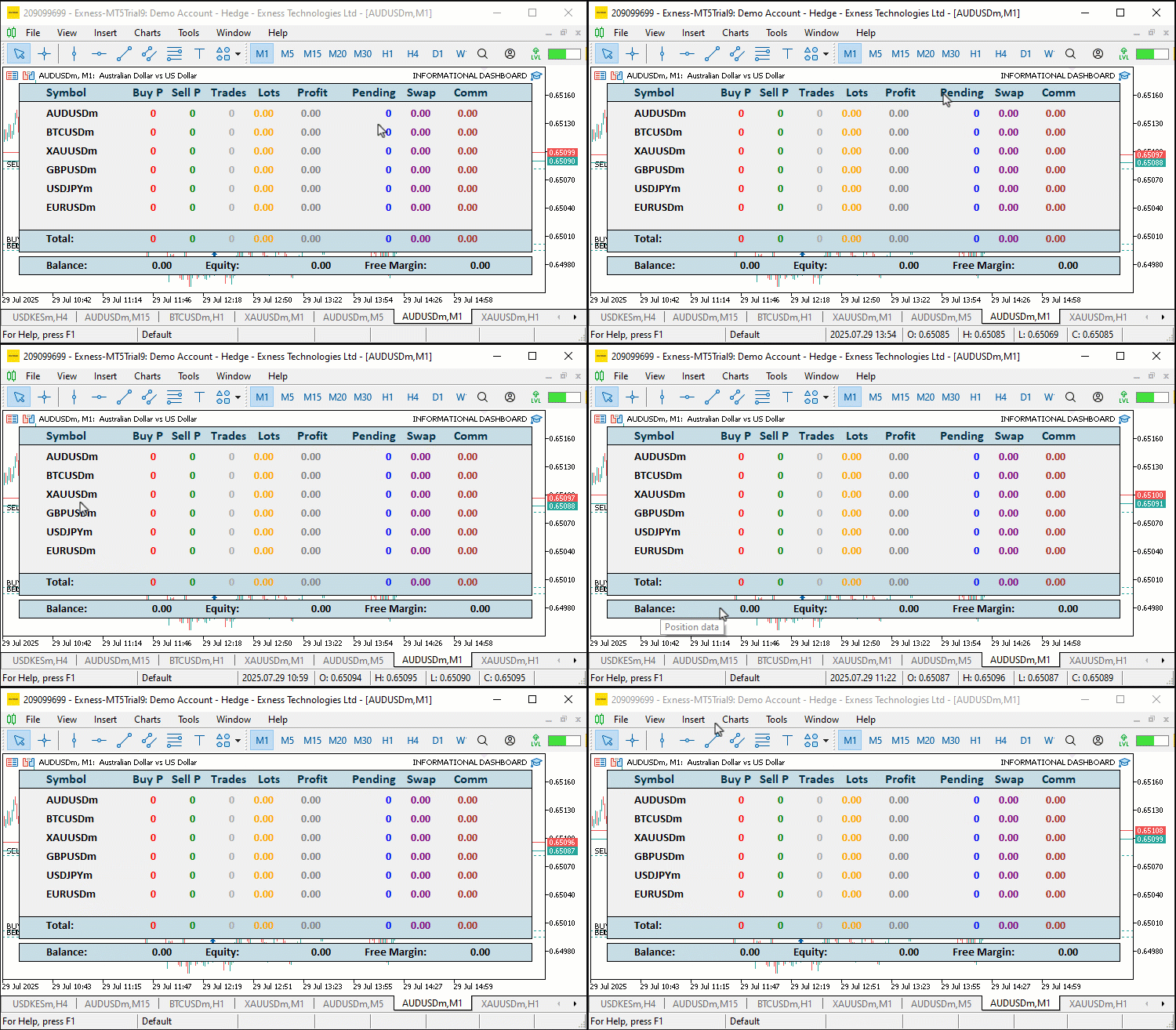
From the visualization, we can see that we have hover tool tips that tell us what to do, like "Click to sort," but when we click, nothing happens. The information is not even displayed. The reason for that is that when the information is gathered, it is not updated in the dashboard visually, but internally, it is available. So let us upgrade our "UpdateDashboard" function to reflect that. Let us first define logic to have a breathing header, since that is the easiest one that will let us breathe life into the panel, and we can know we are on the right path.
// Update header breathing effect every 500ms
glow_counter += MathMax(UpdateIntervalMs, 10); //--- Increment glow counter
if(glow_counter >= GLOW_INTERVAL_MS) { //--- Check if glow interval reached
   if(glow_direction) {                //--- Check if glowing forward
      glow_index++;                    //--- Increment glow index
      if(glow_index >= ArraySize(settings.header_shades) - 1) //--- Check if at end
         glow_direction = false;       //--- Reverse glow direction
   } else {                            //--- Glow backward
      glow_index--;                    //--- Decrement glow index
      if(glow_index <= 0)              //--- Check if at start
         glow_direction = true;        //--- Reverse glow direction
   }
   glow_counter = 0;                   //--- Reset glow counter
}
color header_shade = settings.header_shades[glow_index];          //--- Get current header shade
for(int i = 0; i < ArraySize(headers); i++) {                     //--- Iterate through headers
   string header_name = PREFIX + HEADER + IntegerToString(i);     //--- Define header name
   ObjectSetInteger(0, header_name, OBJPROP_COLOR, header_shade); //--- Update header color
   needs_redraw = true;                //--- Set redraw flag
}


// Batch redraw if needed
if(needs_redraw) {                     //--- Check if redraw needed
   ChartRedraw(0);                     //--- Redraw chart
}
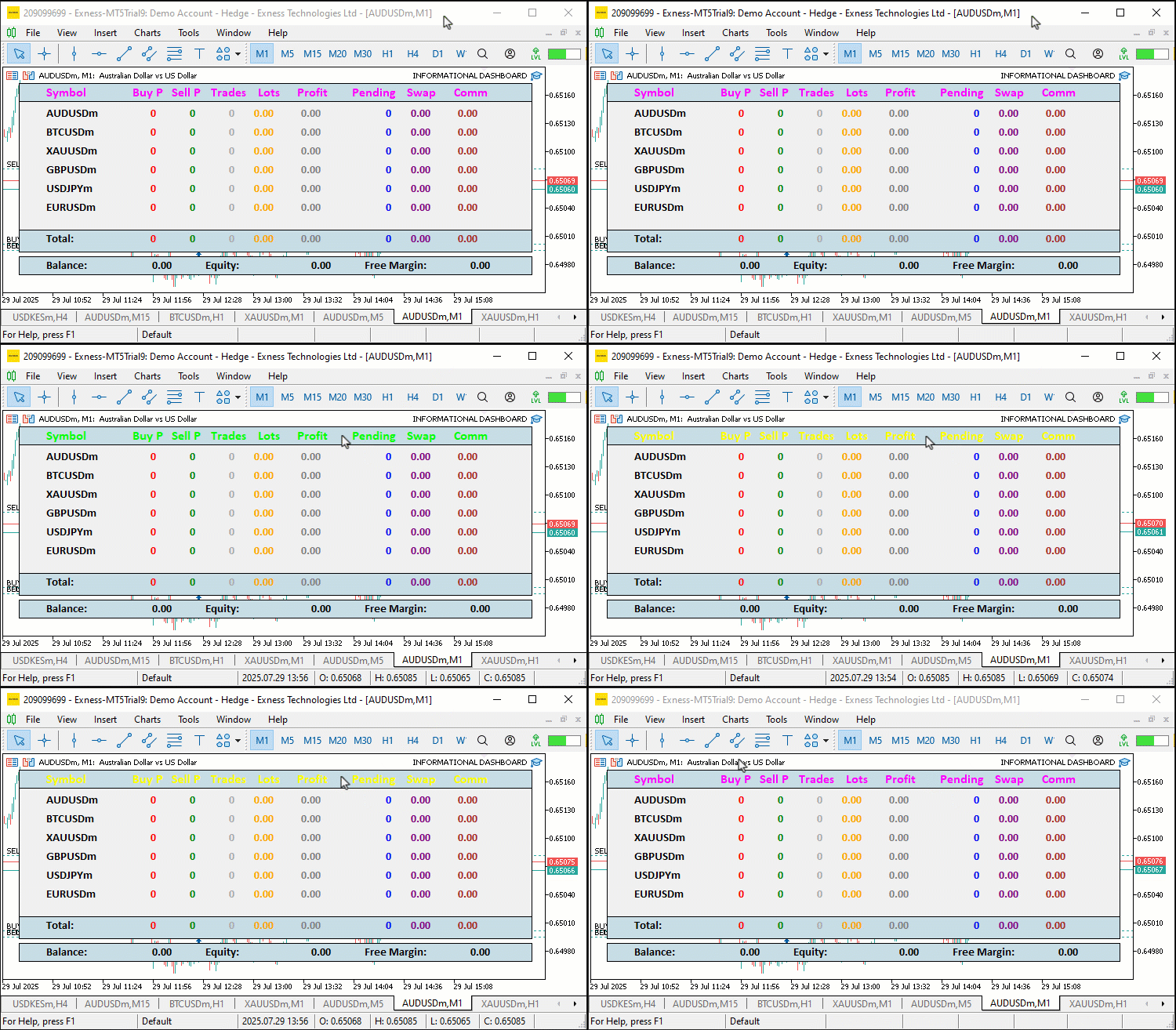
Here, we implement the header glow effect and final redraw in the "UpdateDashboard" function to enhance visual feedback. We increment "glow_counter" by the maximum of "UpdateIntervalMs" and 10, checking if it reaches "GLOW_INTERVAL_MS" (500ms). If true, we adjust "glow_index": incrementing if "glow_direction" is true, reversing to false when reaching the end of "settings.header_shades", or decrementing if false, reversing to true at zero, then resetting "glow_counter" to 0. We set "header_shade" from "settings.header_shades[glow_index]" and loop through "headers" with ArraySize, updating each "PREFIX + HEADER + IntegerToString(i)" label’s "OBJPROP_COLOR" to "header_shade" using ObjectSetInteger, setting "needs_redraw" to true.
If "needs_redraw" is true, we call ChartRedraw to refresh the chart. This creates a cycling glow effect on headers and ensures efficient UI updates. You can feel free to change the colors to how you want them cycling, the frequency, as well as the opacity. We get the following results.
Now that we have a breathing header, we can graduate to the more complex logic, which is updating our dashboard to handle even the clicks.
// Update symbol and data labels after sorting
bool labels_updated = false;
for(int i = 0; i < current_num; i++) {
   string symbol = symbol_data[i].name;
   string symb_name = PREFIX + SYMB + IntegerToString(i);
   string current_symb_txt = ObjectGetString(0, symb_name, OBJPROP_TEXT);
   if(current_symb_txt != symbol) {
      ObjectSetString(0, symb_name, OBJPROP_TEXT, symbol);
      labels_updated = true;
   }
   for(int j = 0; j < 8; j++) {
      string data_name = PREFIX + DATA + IntegerToString(i) + "_" + IntegerToString(j);
      string value;
      color data_color = data_default_colors[j];
      switch(j) {
         case 0:
            value = symbol_data[i].buys_str;
            data_color = clrRed;
            break;
         case 1:
            value = symbol_data[i].sells_str;
            data_color = clrGreen;
            break;
         case 2:
            value = symbol_data[i].trades_str;
            data_color = clrDarkGray;
            break;
         case 3:
            value = symbol_data[i].lots_str;
            data_color = clrOrange;
            break;
         case 4:
            value = symbol_data[i].profit_str;
            data_color = (symbol_data[i].profit > 0) ? clrGreen : (symbol_data[i].profit < 0) ? clrRed : clrGray;
            break;
         case 5:
            value = symbol_data[i].pending_str;
            data_color = clrBlue;
            break;
         case 6:
            value = symbol_data[i].swaps_str;
            data_color = (symbol_data[i].swaps > 0) ? clrGreen : (symbol_data[i].swaps < 0) ? clrRed : clrPurple;
            break;
         case 7:
            value = symbol_data[i].comm_str;
            data_color = (symbol_data[i].comm > 0) ? clrGreen : (symbol_data[i].comm < 0) ? clrRed : clrBrown;
            break;
      }
      if(updateLABEL(data_name, value, data_color)) labels_updated = true;
   }
}
if(labels_updated) needs_redraw = true;
// Update totals
string new_total_buys = IntegerToString(totalBuys); //--- Format total buys
if(new_total_buys != total_buys_str) { //--- Check if changed
   total_buys_str = new_total_buys;    //--- Update string
   if(updateLABEL(PREFIX + FOOTER_DATA + "0", new_total_buys, clrRed)) needs_redraw = true; //--- Update label
}
string new_total_sells = IntegerToString(totalSells); //--- Format total sells
if(new_total_sells != total_sells_str) { //--- Check if changed
   total_sells_str = new_total_sells;  //--- Update string
   if(updateLABEL(PREFIX + FOOTER_DATA + "1", new_total_sells, clrGreen)) needs_redraw = true; //--- Update label
}
string new_total_trades = IntegerToString(totalTrades); //--- Format total trades
if(new_total_trades != total_trades_str) { //--- Check if changed
   total_trades_str = new_total_trades; //--- Update string
   if(updateLABEL(PREFIX + FOOTER_DATA + "2", new_total_trades, clrDarkGray)) needs_redraw = true; //--- Update label
}
string new_total_lots = DoubleToString(totalLots, 2); //--- Format total lots
if(new_total_lots != total_lots_str) { //--- Check if changed
   total_lots_str = new_total_lots;    //--- Update string
   if(updateLABEL(PREFIX + FOOTER_DATA + "3", new_total_lots, clrOrange)) needs_redraw = true; //--- Update label
}
string new_total_profit = DoubleToString(totalProfit, 2); //--- Format total profit
color total_profit_color = (totalProfit > 0) ? clrGreen : (totalProfit < 0) ? clrRed : clrGray; //--- Set color
if(new_total_profit != total_profit_str) { //--- Check if changed
   total_profit_str = new_total_profit; //--- Update string
   if(updateLABEL(PREFIX + FOOTER_DATA + "4", new_total_profit, total_profit_color)) needs_redraw = true; //--- Update label
}
string new_total_pending = IntegerToString(totalPending); //--- Format total pending
if(new_total_pending != total_pending_str) { //--- Check if changed
   total_pending_str = new_total_pending; //--- Update string
   if(updateLABEL(PREFIX + FOOTER_DATA + "5", new_total_pending, clrBlue)) needs_redraw = true; //--- Update label
}
string new_total_swap = DoubleToString(totalSwap, 2); //--- Format total swap
color total_swap_color = (totalSwap > 0) ? clrGreen : (totalSwap < 0) ? clrRed : clrPurple; //--- Set color
if(new_total_swap != total_swap_str) { //--- Check if changed
   total_swap_str = new_total_swap;    //--- Update string
   if(updateLABEL(PREFIX + FOOTER_DATA + "6", new_total_swap, total_swap_color)) needs_redraw = true; //--- Update label
}
string new_total_comm = DoubleToString(totalComm, 2); //--- Format total comm
color total_comm_color = (totalComm > 0) ? clrGreen : (totalComm < 0) ? clrRed : clrBrown; //--- Set color
if(new_total_comm != total_comm_str) { //--- Check if changed
   total_comm_str = new_total_comm;    //--- Update string
   if(updateLABEL(PREFIX + FOOTER_DATA + "7", new_total_comm, total_comm_color)) needs_redraw = true; //--- Update label
}

// Update account info
double balance = AccountInfoDouble(ACCOUNT_BALANCE); //--- Get balance
double equity = AccountInfoDouble(ACCOUNT_EQUITY); //--- Get equity
double free_margin = AccountInfoDouble(ACCOUNT_MARGIN_FREE); //--- Get free margin
string new_bal = DoubleToString(balance, 2); //--- Format balance
if(new_bal != acc_bal_str) {          //--- Check if changed
   acc_bal_str = new_bal;             //--- Update string
   if(updateLABEL(PREFIX + ACC_DATA + "0", new_bal, clrBlack)) needs_redraw = true; //--- Update label
}
string new_eq = DoubleToString(equity, 2); //--- Format equity
color eq_color = (equity > balance) ? clrGreen : (equity < balance) ? clrRed : clrBlack; //--- Set color
if(new_eq != acc_eq_str) {            //--- Check if changed
   acc_eq_str = new_eq;               //--- Update string
   if(updateLABEL(PREFIX + ACC_DATA + "1", new_eq, eq_color)) needs_redraw = true; //--- Update label
}
string new_free = DoubleToString(free_margin, 2); //--- Format free margin
if(new_free != acc_free_str) {        //--- Check if changed
   acc_free_str = new_free;           //--- Update string
   if(updateLABEL(PREFIX + ACC_DATA + "2", new_free, clrBlack)) needs_redraw = true; //--- Update label
}
We update symbol, data, total, and account labels in the "UpdateDashboard" function to reflect sorted and current trading data, ensuring a responsive display. We set "labels_updated" to false and loop through "current_num" symbols, updating "PREFIX + SYMB + IntegerToString(i)" with "symbol_data[i].name" via "ObjectSetString" if ObjectGetString differs, setting "labels_updated" to true. For each symbol, we iterate through eight columns, selecting "value" and "data_color" with a switch: "buys_str" with "clrRed", "sells_str" with "clrGreen", "trades_str" with "clrDarkGray", "lots_str" with clrOrange, "profit_str" with conditional color based on "symbol_data[i].profit", "pending_str" with "clrBlue", "swaps_str" with conditional color based on "symbol_data[i].swaps", and "comm_str" with conditional color based on "symbol_data[i].comm", updating "PREFIX + DATA" labels with "updateLABEL" and setting "labels_updated" if changed.
We update totals like "total_buys_str" with "IntegerToString(totalBuys)", "total_sells_str", "total_trades_str", "total_lots_str" with "DoubleToString(totalLots, 2)", "total_profit_str" with conditional "total_profit_color", "total_pending_str", "total_swap_str" with "total_swap_color", and "total_comm_str" with "total_comm_color", using "updateLABEL" on "PREFIX + FOOTER_DATA" labels and setting "needs_redraw" if updated. For account info, we get "balance", "equity", and "free_margin" with AccountInfoDouble, format with "DoubleToString", update "acc_bal_str", "acc_eq_str" with conditional "eq_color", and "acc_free_str", using "updateLABEL" on "PREFIX + ACC_DATA" labels. This ensures the dashboard displays current data with dynamic colors for clarity. Upon compilation, we get the following outcome.
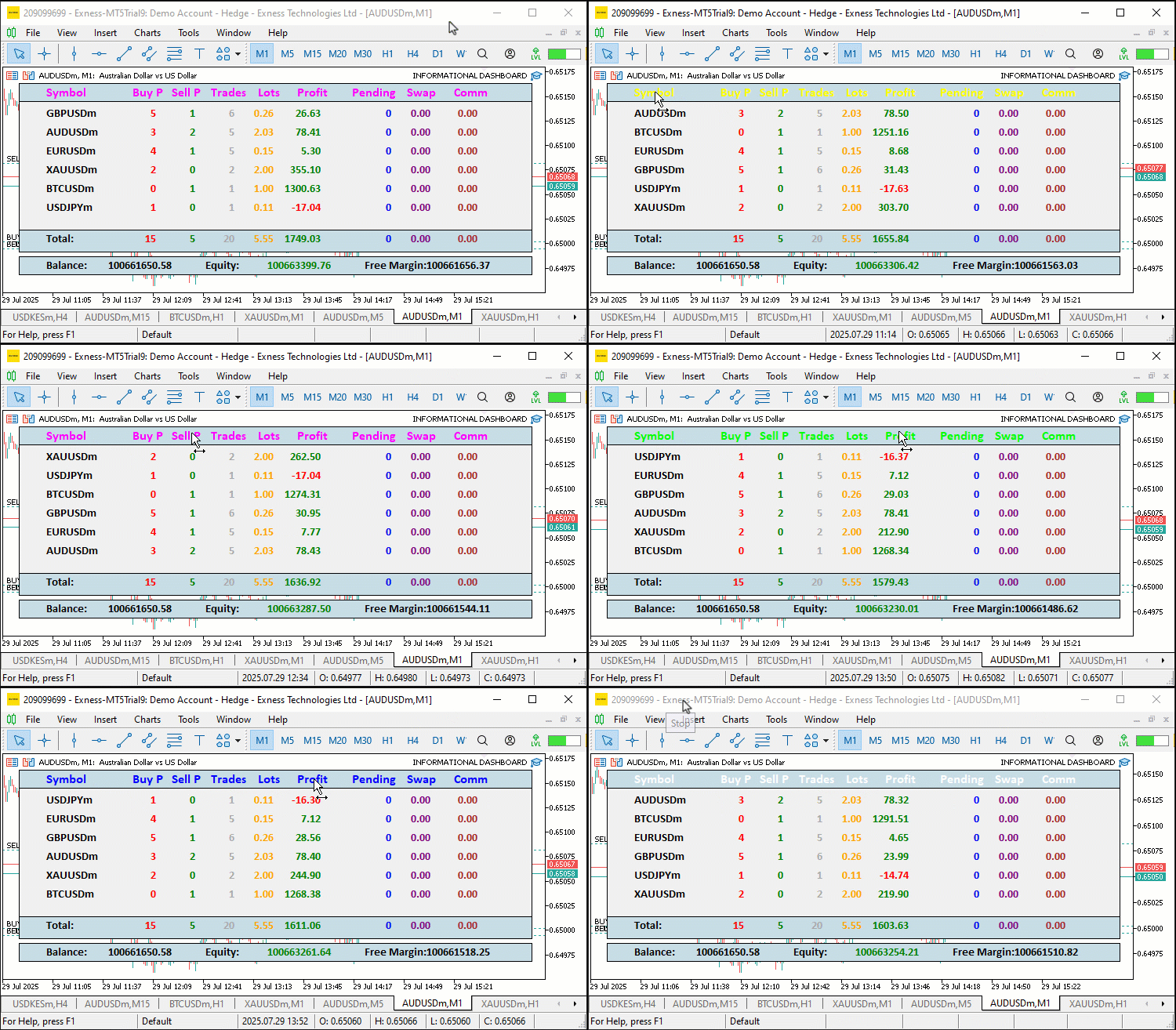
From the visualization, we can see that we now achieve the dynamic bubble sorting effect that reflects everything within our header columns in both ascending and descending order. What now remains is having a function to export the data to Excel for further analysis. Here is the logic we implement for that.
//+------------------------------------------------------------------+
//| Export dashboard data to CSV                                     |
//+------------------------------------------------------------------+
void ExportToCSV() {
   string time_str = TimeToString(TimeCurrent(), TIME_DATE|TIME_MINUTES); //--- Get current time string
   StringReplace(time_str, " ", "_"); //--- Replace spaces
   StringReplace(time_str, ":", "-"); //--- Replace colons
   string filename = "Dashboard_" + time_str + ".csv"; //--- Define filename
   int handle = FileOpen(filename, FILE_WRITE|FILE_CSV); //--- Open CSV file in terminal's Files folder
   if(handle == INVALID_HANDLE) {        //--- Check for invalid handle
      Print("Failed to open CSV file '", filename, "'. Error code = ", GetLastError()); //--- Log error
      return;                            //--- Exit function
   }
   FileWrite(handle, "Symbol,Buy Positions,Sell Positions,Total Trades,Lots,Profit,Pending Orders,Swap,Comm"); //--- Write header
   for(int i = 0; i < ArraySize(symbol_data); i++) { //--- Iterate through symbols
      FileWrite(handle, symbol_data[i].name, symbol_data[i].buys, symbol_data[i].sells, symbol_data[i].trades, symbol_data[i].lots, symbol_data[i].profit, symbol_data[i].pending, symbol_data[i].swaps, symbol_data[i].comm); //--- Write symbol data
   }
   FileWrite(handle, "Total", totalBuys, totalSells, totalTrades, totalLots, totalProfit, totalPending, totalSwap, totalComm); //--- Write totals
   FileClose(handle);                    //--- Close file
   Print("Dashboard data exported to CSV: ", filename); //--- Log export success
}
We implement the "ExportToCSV" function to enable data export, allowing us to save trading data for offline analysis. We create "time_str" with TimeToString using TimeCurrent and "TIME_DATE|TIME_MINUTES", replacing spaces with underscores and colons with hyphens via StringReplace for a clean filename, then define "filename" as "Dashboard_" plus "time_str" plus ".csv". You can use any other allowed extension for this. We chose CSV as it is the most common extension. We then open the file with FileOpen using "FILE_WRITE|FILE_CSV", logging errors with "Print" and exiting if "handle" is "INVALID_HANDLE".
We write the header row with FileWrite listing column names, loop through "symbol_data" with "ArraySize" to write each symbol’s "name", "buys", "sells", "trades", "lots", "profit", "pending", "swaps", and "comm", and write a totals row with "Total" and the respective "totalBuys", "totalSells", "totalTrades", "totalLots", "totalProfit", "totalPending", "totalSwap", and "totalComm". We close the file with FileClose and log success with "Print". This provides a convenient CSV export for record-keeping. We can then use this function in the chart event handler when the key 'E' is pressed. We chose the key so as to be able to recall easily for 'Export', but you can use any key of your choice. You can have a button for the export work, which we did not factor in early enough. Here is the logic we use for that.
//+------------------------------------------------------------------+
//| Chart event handler for sorting and export                       |
//+------------------------------------------------------------------+
void OnChartEvent(const int id, const long &lparam, const double &dparam, const string &sparam) {
   if(id == CHARTEVENT_OBJECT_CLICK) {   //--- Handle object click event
      for(int i = 0; i < ArraySize(headers); i++) { //--- Iterate through headers
         if(sparam == PREFIX + HEADER + IntegerToString(i)) { //--- Check if header clicked
            if(sort_column == i)         //--- Check if same column clicked
               sort_ascending = !sort_ascending; //--- Toggle sort direction
            else {
               sort_column = i;          //--- Set new sort column
               sort_ascending = true;    //--- Set to ascending
            }
            UpdateDashboard();           //--- Update dashboard display
            break;                       //--- Exit loop
         }
      }
   }
   else if(id == CHARTEVENT_KEYDOWN && lparam == 'E') { //--- Handle 'E' key press
      ExportToCSV();                    //--- Export data to CSV
   }
}
Here, we check if the event ID is CHARTEVENT_KEYDOWN and the key was 'E', and export the file instantly. It is a simple logic, so we have it highlighted in yellow for clarity. Here is the outcome we get.
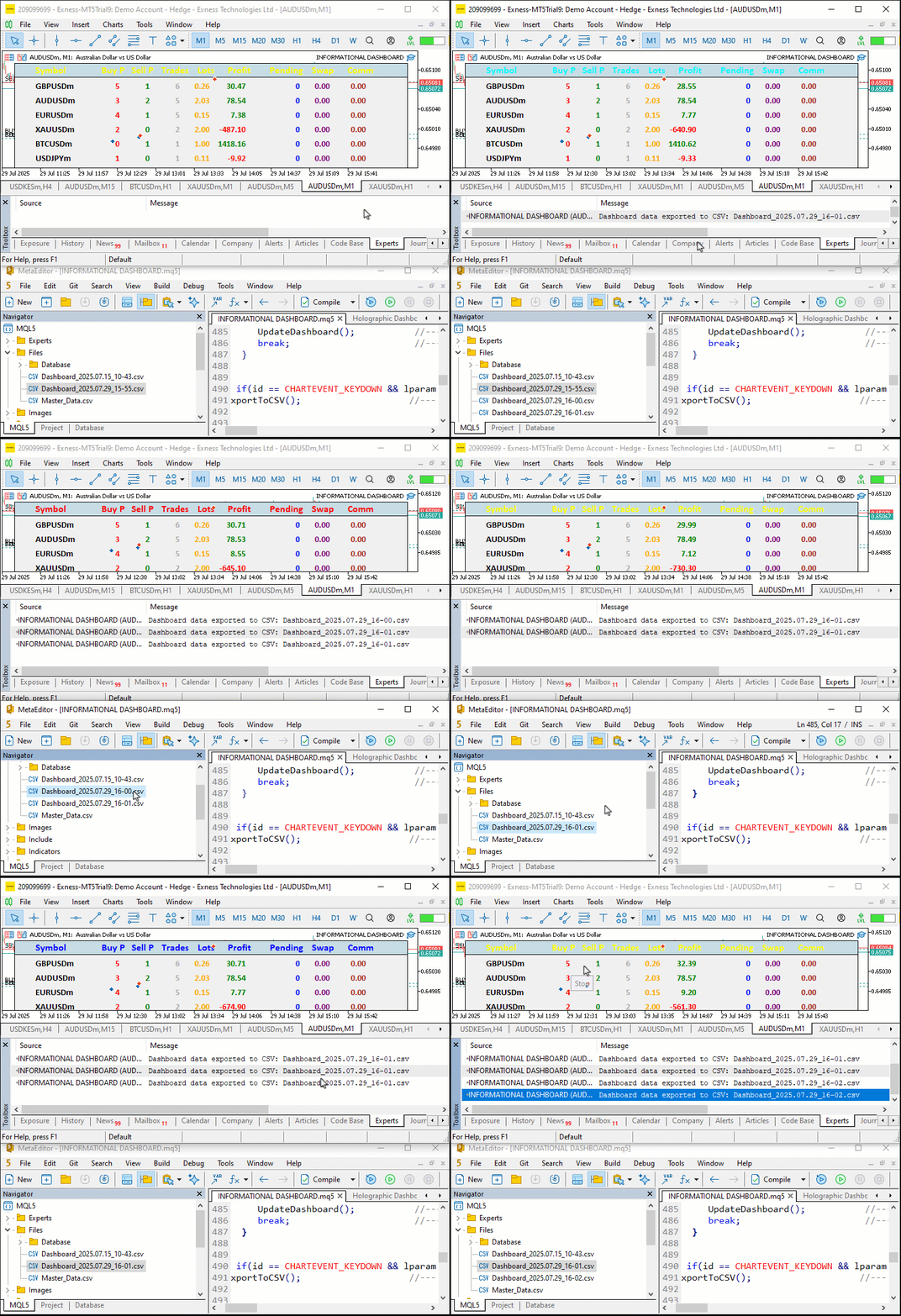
From the visualization, we can see that we export the data for analysis in different files based on the current time, and we overwrite if the current time matches based on minutes. If you don't want to wait for a minute to elapse so you can save in a different file, you can change the current time formatting from minutes to seconds. We can see that generally we have achieved our objectives. What now remains is testing the workability of the project, and that is handled in the preceding section.
Backtesting
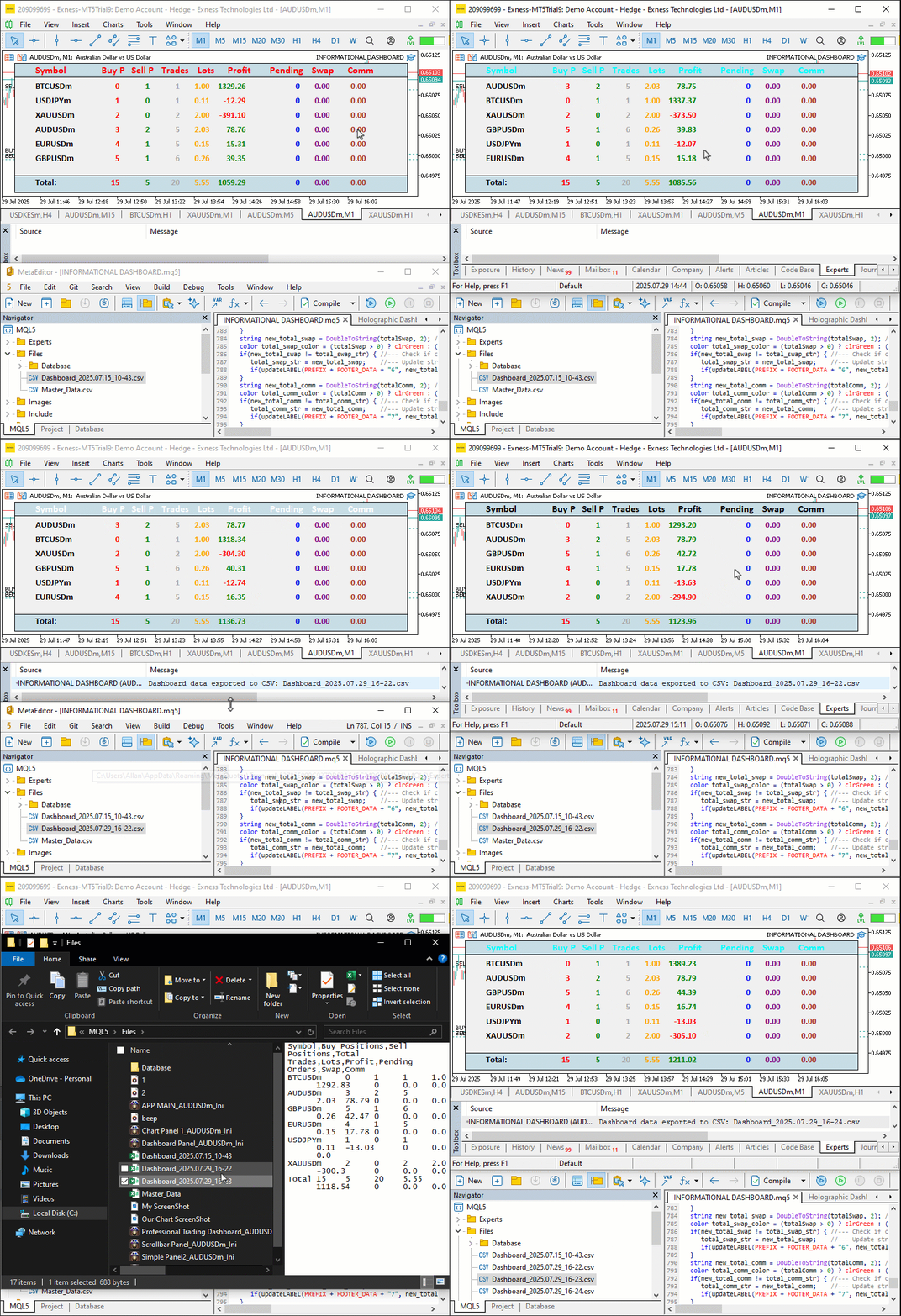
We did the testing, and below is the compiled visualization in a single Graphics Interchange Format (GIF) bitmap image format.
Conclusion
In conclusion, we’ve created an Informational Dashboard in MetaQuotes Language 5 that monitors multi-symbol positions and account metrics like "Balance", "Equity", and "Free Margin", with sortable columns and Excel CSV export for streamlined trading oversight. We’ve detailed the architecture and implementation, using structures like "SymbolData" and functions such as "SortDashboard" to provide real-time, organized insights. You can customize this dashboard to suit your trading needs, enhancing your ability to track performance efficiently.
Warning: All rights to these materials are reserved by MetaQuotes Ltd. Copying or reprinting of these materials in whole or in part is prohibited.
This article was written by a user of the site and reflects their personal views. MetaQuotes Ltd is not responsible for the accuracy of the information presented, nor for any consequences resulting from the use of the solutions, strategies or recommendations described.

 Expert Advisor based on the universal MLP approximator
 Portfolio optimization in Forex: Synthesis of VaR and Markowitz theory
 Price Action Analysis Toolkit Development (Part 35): Training and Deploying Predictive Models
 Algorithmic trading based on 3D reversal patterns

- Free trading apps
- Over 8,000 signals for copying
- Economic news for exploring financial markets
You agree to website policy and terms of use