
Herramientas de trading de MQL5 (Parte 8): Panel informativo mejorado con funciones de arrastre y minimizado
 20
20
 0
0

Introducción
En nuestro artículo anterior (Parte 7), desarrollamos un panel informativo en MetaQuotes Language 5 (MQL5) para supervisar posiciones de varios símbolos y métricas de la cuenta, como «Saldo», «Capital» y «Margen libre», con columnas ordenables y funciones de exportación a valores separados por comas (CSV). En la Parte 8, mejoramos este panel informativo añadiendo funciones de arrastre y minimización, botones interactivos para cerrar, minimizar/maximizar y exportar, así como efectos al pasar el cursor para una experiencia de usuario más dinámica. Esta mejora conserva el seguimiento de posiciones en tiempo real y un efecto de brillo en el encabezado. Abordaremos los siguientes temas:
- Comprensión de la arquitectura mejorada del panel informativo
- Implementación en MQL5
- Pruebas retrospectivas (backtesting)
- Conclusión
Al final, dispondrá de un panel informativo MQL5 versátil y fácil de usar, diseñado para una supervisión eficiente de las operaciones. ¡Empecemos!
Comprensión de la arquitectura mejorada del panel informativo
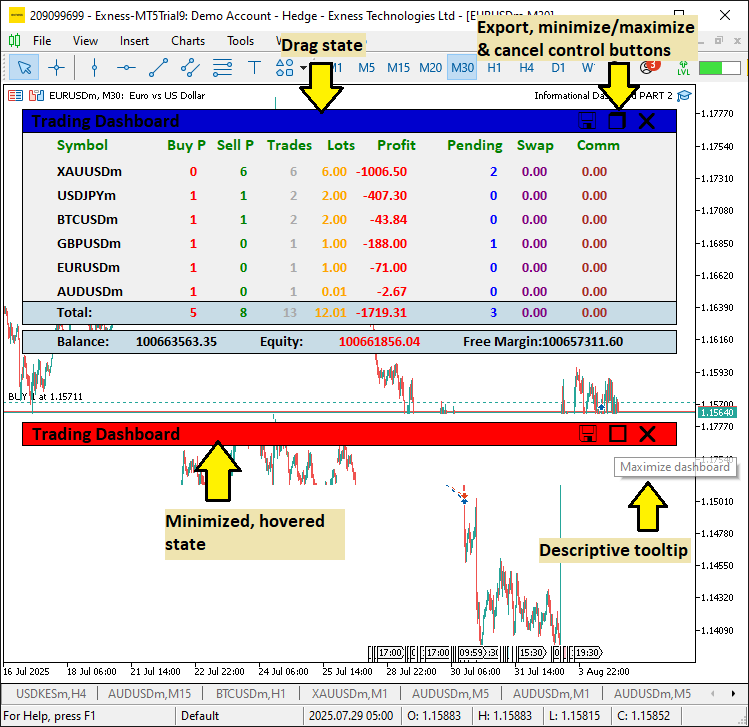
Vamos a mejorar el panel informativo de la parte 7 añadiéndole funciones para arrastrar y minimizar el panel, además de botones interactivos y efectos al pasar el cursor, para que resulte más flexible y fácil de usar a la hora de gestionar múltiples posiciones. Estas mejoras son relevantes porque permitirán mover el panel informativo a cualquier parte del gráfico, minimizando el desorden durante el análisis, mientras que la opción de minimizar ahorrará espacio en la pantalla y los elementos interactivos proporcionarán respuesta visual inmediata, mejorando la experiencia general de trading en entornos dinámicos.
Lo lograremos incorporando el manejo de eventos del ratón para arrastrar y hacer clic en los botones, lo que garantizará que el panel informativo siga siendo dinámico y adaptable sin perder sus capacidades básicas de seguimiento de posiciones. También añadiremos un icono en el encabezado para la función de exportación, de modo que sea fácil de encontrar, pero mantendremos la función de acceso por teclado. Tenemos previsto mantener la cuadrícula ordenable y las actualizaciones en tiempo real al tiempo que añadimos estas mejoras, creando una herramienta que resulte intuitiva y eficiente para el uso diario. A continuación, les mostramos cómo pretendemos lograrlo, ¡y luego podremos proceder a la implementación!
Implementación en MQL5
Para mejorar el programa en MQL5, tendremos que definir los nuevos componentes del panel informativo, en este caso, cuatro componentes principales.
//--- existing components

#define HEADER_PANEL_TEXT   "HEADER_PANEL_TEXT"//--- Header title label
#define CLOSE_BUTTON        "BUTTON_CLOSE"     //--- Close button identifier
#define EXPORT_BUTTON       "BUTTON_EXPORT"    //--- Export button identifier
#define TOGGLE_BUTTON       "BUTTON_TOGGLE"    //--- Toggle (minimize/maximize) button

//--- the rest of the components
Empezamos añadiendo nuevas definiciones para dar soporte a las funciones mejoradas del panel informativo, introduciendo identificadores para los elementos interactivos de la interfaz de usuario (UI). Definimos «HEADER_PANEL_TEXT» como «HEADER_PANEL_TEXT» para la etiqueta del título del panel informativo, lo que proporciona un encabezado visual claro. El «CLOSE_BUTTON» se define como «BUTTON_CLOSE», lo que crea un identificador para un botón que permite cerrar el panel informativo, lo que a su vez nos permite eliminarlo del gráfico. El «EXPORT_BUTTON» se define como «BUTTON_EXPORT» y configura un botón para iniciar la exportación a CSV, lo que mejora el acceso a los datos. El «TOGGLE_BUTTON» se define como «BUTTON_TOGGLE», lo que permite utilizar un botón para minimizar o maximizar el panel informativo, mejorando así la gestión del espacio en pantalla.
Estas definiciones garantizan una nomenclatura organizada para los nuevos componentes interactivos, lo que permite incorporar mejoras como la función de arrastrar y minimizar. El siguiente cambio que hacemos es modificar el color de los tonos del encabezado, reemplazándolos por constantes MQL5 claramente definidas.
// Dashboard settings
struct DashboardSettings {                     //--- Structure for dashboard settings
   int      panel_x;                           //--- X-coordinate of panel
   int      panel_y;                           //--- Y-coordinate of panel
   int      row_height;                        //--- Height of each row
   int      font_size;                         //--- Font size for labels
   string   font;                              //--- Font type for labels
   color    bg_color;                          //--- Background color of main panel
   color    border_color;                      //--- Border color of panels
   color    header_color;                      //--- Default color for header text
   color    text_color;                        //--- Default color for text
   color    section_bg_color;                  //--- Background color for header/footer panels
   int      zorder_panel;                      //--- Z-order for main panel
   int      zorder_subpanel;                   //--- Z-order for sub-panels
   int      zorder_labels;                     //--- Z-order for labels
   int      label_y_offset;                    //--- Y-offset for label positioning
   int      label_x_offset;                    //--- X-offset for label positioning
   int      header_x_distances[9];             //--- X-distances for header labels (9 columns)
   color    header_shades[12];                 //--- Array of header color shades for glow effect
} settings = {                                 //--- Initialize settings with default values
   20,                                         //--- panel_x
   20,                                         //--- panel_y
   24,                                         //--- row_height
   11,                                         //--- font_size
   "Calibri Bold",                             //--- font
   C'240,240,240',                             //--- bg_color (light gray)
   clrBlack,                                   //--- border_color
   C'0,50,70',                                 //--- header_color (dark teal)
   clrBlack,                                   //--- text_color
   C'200,220,230',                             //--- section_bg_color (light blue-gray)
   100,                                        //--- zorder_panel
   101,                                        //--- zorder_subpanel
   102,                                        //--- zorder_labels
   3,                                          //--- label_y_offset
   25,                                         //--- label_x_offset
   {10, 120, 170, 220, 280, 330, 400, 470, 530}, //--- header_x_distances
   {clrBlack, clrRed, clrBlue, clrGreen, clrMagenta, clrDarkOrchid,
    clrDeepPink, clrSkyBlue, clrDodgerBlue, clrDarkViolet, clrOrange, clrCrimson} //--- header_shades
};

//--- the previous one was as below
/*
   //---
   {C'0,0,0', C'255,0,0', C'0,255,0', C'0,0,255', C'255,255,0', C'0,255,255',
    C'255,0,255', C'255,255,255', C'255,0,255', C'0,255,255', C'255,255,0', C'0,0,255'}
*/
Aquí mejoramos la estructura «DashboardSettings» actualizando el array «header_shades» para mejorar el efecto de resplandor del encabezado y lograr una experiencia más atractiva visualmente. Anteriormente, «header_shades» utilizaba una combinación de colores RGB básicos (por ejemplo, negro puro, rojo, verde, azul, amarillo, cian, magenta y blanco) para el ciclo de brillo. Ahora definimos «header_shades» con un conjunto seleccionado de 12 colores: «clrBlack», «clrRed», «clrBlue», «clrGreen», «clrMagenta», «clrDarkOrchid», «clrDeepPink», «clrSkyBlue», «clrDodgerBlue», «clrDarkViolet», «clrOrange» y «clrCrimson».
Esta actualización proporcionará una paleta de colores más rica y variada que alternará entre tonos vibrantes y sutiles, mejorando la estética del panel informativo a la vez que mantiene la funcionalidad del efecto de brillo para resaltar los encabezados. Por último, añadimos más variables globales que nos ayudarán a crear un panel dinámico y a gestionar los estados de paso del cursor y de arrastre.
//--- added global variables


int          prev_num_symbols = 0;             //--- Previous number of active symbols
bool         panel_is_visible = true;          //--- Flag to control panel visibility
bool         panel_minimized = false;          //--- Flag to control minimized state
bool         panel_dragging = false;           //--- Flag to track if panel is being dragged
int          panel_drag_x = 0;                 //--- Mouse x-coordinate when drag starts
int          panel_drag_y = 0;                 //--- Mouse y-coordinate when drag starts
int          panel_start_x = 0;                //--- Panel x-coordinate when drag starts
int          panel_start_y = 0;                //--- Panel y-coordinate when drag starts
int          prev_mouse_state = 0;             //--- Previous mouse state
bool         header_hovered = false;           //--- Header hover state
bool         toggle_hovered = false;           //--- Toggle button hover state
bool         close_hovered = false;            //--- Close button hover state
bool         export_hovered = false;           //--- Export button hover state
int          last_mouse_x = 0;                 //--- Last mouse x position
int          last_mouse_y = 0;                 //--- Last mouse y position
bool         prev_header_hovered = false;      //--- Previous header hover state
bool         prev_toggle_hovered = false;      //--- Previous toggle hover state
bool         prev_close_hovered = false;       //--- Previous close button hover state
bool         prev_export_hovered = false;      //--- Previous export button hover state
Por último, introducimos variables globales adicionales para dar soporte a la interactividad mejorada y a las funciones de arrastre. Definimos «prev_num_symbols» como 0 para llevar la cuenta del número anterior de símbolos activos con vistas al redimensionamiento dinámico, «panel_is_visible» como «true» para controlar la visibilidad del panel informativo y «panel_minimized» como «false» para gestionar el estado minimizado. Para habilitar el arrastre, añadimos «panel_dragging» con el valor «false» para realizar un seguimiento del estado del arrastre, «panel_drag_x» y «panel_drag_y» con el valor 0 para las coordenadas del ratón al inicio del arrastre, y «panel_start_x» y «panel_start_y» con el valor 0 para las coordenadas del panel al inicio del arrastre.
Incluimos «prev_mouse_state» con valor 0 para supervisar los estados de clic del ratón y, para los efectos al pasar el cursor, definimos «header_hovered», «toggle_hovered», «close_hovered», y «export_hovered» como «false» para realizar un seguimiento de los estados al pasar el cursor sobre el encabezado y los botones, con «last_mouse_x» y «last_mouse_y» como 0 para almacenar la última posición del ratón, y «prev_header_hovered», «prev_toggle_hovered», «prev_close_hovered» y «prev_export_hovered» como «false» para detectar cambios en el estado al pasar el cursor.
Estas variables permitirán interacciones dinámicas en la interfaz de usuario, como arrastrar, minimizar y recibir información al pasar el cursor por encima. Ahora que tenemos las variables actualizadas, actualicemos también las funciones para estandarizar la creación de objetos, ya que esto supone un enfoque avanzado para la modularización. Empecemos por la función para crear una etiqueta y añadir una información sobre herramientas.
//+------------------------------------------------------------------+
//| Creating label object                                            |
//+------------------------------------------------------------------+
bool createLABEL(string objName, string txt, int xD, int yD, color clrTxt, int fontSize, string font, int anchor, string tooltip = "", bool selectable = false) {
   if(!ObjectCreate(0, objName, OBJ_LABEL, 0, 0, 0)) { //--- Creating label object
      Print(__FUNCTION__, ": Failed to create label '", objName, "'. Error code = ", GetLastError()); //--- Logging creation failure
      return(false);                                   //--- Returning failure
   }
   ObjectSetInteger(0, objName, OBJPROP_XDISTANCE, xD);                  //--- Setting x-coordinate
   ObjectSetInteger(0, objName, OBJPROP_YDISTANCE, yD);                  //--- Setting y-coordinate
   ObjectSetInteger(0, objName, OBJPROP_CORNER, CORNER_LEFT_UPPER);      //--- Setting corner alignment
   ObjectSetString(0, objName, OBJPROP_TEXT, txt);                       //--- Setting text content
   ObjectSetInteger(0, objName, OBJPROP_FONTSIZE, fontSize);             //--- Setting font size
   ObjectSetString(0, objName, OBJPROP_FONT, font);                      //--- Setting font type
   ObjectSetInteger(0, objName, OBJPROP_COLOR, clrTxt);                  //--- Setting text color
   ObjectSetInteger(0, objName, OBJPROP_BACK, false);                    //--- Setting to foreground
   ObjectSetInteger(0, objName, OBJPROP_STATE, selectable);              //--- Setting selectable state
   ObjectSetInteger(0, objName, OBJPROP_SELECTABLE, selectable);         //--- Setting selectability
   ObjectSetInteger(0, objName, OBJPROP_SELECTED, false);                //--- Setting not selected
   ObjectSetInteger(0, objName, OBJPROP_ANCHOR, anchor);                 //--- Setting anchor point
   ObjectSetInteger(0, objName, OBJPROP_ZORDER, settings.zorder_labels); //--- Setting z-order


   //--- added this tooltip feature
   ObjectSetString(0, objName, OBJPROP_TOOLTIP, tooltip == "" ? (selectable ? "Click to sort" : "Position data") : tooltip); //--- Setting tooltip text
   //---
   //--- the existing was a hardcoded to this
   // ObjectSetString(0, objName, OBJPROP_TOOLTIP, selectable ? "Click to sort" : "Position data"); //--- Set tooltip
   //---


   ChartRedraw(0);                                    //--- Redrawing chart
   return(true);                                      //--- Returning success
}
En cuanto a la función «createLABEL», mejoramos la lógica de la descripción emergente para que resulte más flexible y reutilizable en diversos elementos de la interfaz de usuario. Anteriormente, la información sobre herramientas estaba predefinida mediante la función ObjectSetString, que establecía OBJPROP_TOOLTIP en «Haga clic para ordenar» para las etiquetas seleccionables o en «Datos de posición» para las no seleccionables, lo que limitaba la personalización. Ahora modificamos esto añadiendo un parámetro «tooltip» con una cadena vacía por defecto, y utilizamos una condición ternaria en «ObjectSetString» para «OBJPROP_TOOLTIP»: si «tooltip» está vacío, se establece por defecto en «Haga clic para ordenar» para las etiquetas seleccionables o en «Datos de posición» para las demás; en caso contrario, se utiliza el valor de «tooltip» proporcionado. Este cambio permitirá mostrar información de ayuda específica para elementos como los botones (por ejemplo, «Minimizar el panel» o «Cerrar el panel»), al tiempo que se mantienen los valores predeterminados para los encabezados y las etiquetas de datos, lo que mejora la orientación al usuario y la claridad en la interacción.
A continuación, para estandarizar la creación de paneles, sustituiremos las llamadas a la creación de objetos en línea en el controlador de eventos OnInit por una función que facilite el mantenimiento. Esta es la lógica que seguimos para ello.
//+------------------------------------------------------------------+
//| Creating rectangle object                                        |
//+------------------------------------------------------------------+
bool createRectangle(string object_name, int x_distance, int y_distance, int x_size, int y_size,
                     color background_color, color border_color = clrBlack) {
   if(!ObjectCreate(0, object_name, OBJ_RECTANGLE_LABEL, 0, 0, 0)) { //--- Creating rectangle object
      Print(__FUNCTION__, ": Failed to create Rectangle: '", object_name, "'. Error code = ", GetLastError()); //--- Logging creation failure
      return(false);                                  //--- Returning failure
   }
   ObjectSetInteger(0, object_name, OBJPROP_XDISTANCE, x_distance);            //--- Setting x-coordinate
   ObjectSetInteger(0, object_name, OBJPROP_YDISTANCE, y_distance);            //--- Setting y-coordinate
   ObjectSetInteger(0, object_name, OBJPROP_XSIZE, x_size);                    //--- Setting width
   ObjectSetInteger(0, object_name, OBJPROP_YSIZE, y_size);                    //--- Setting height
   ObjectSetInteger(0, object_name, OBJPROP_CORNER, CORNER_LEFT_UPPER);        //--- Setting corner alignment
   ObjectSetInteger(0, object_name, OBJPROP_BGCOLOR, background_color);        //--- Setting background color
   ObjectSetInteger(0, object_name, OBJPROP_BORDER_COLOR, border_color);       //--- Setting border color
   ObjectSetInteger(0, object_name, OBJPROP_BORDER_TYPE, BORDER_FLAT);         //--- Setting border type
   ObjectSetInteger(0, object_name, OBJPROP_BACK, false);                      //--- Setting to foreground
   ObjectSetInteger(0, object_name, OBJPROP_ZORDER, settings.zorder_subpanel); //--- Setting z-order
   return(true);                                                               //--- Returning success
}
Aquí, simplemente creamos una función booleana «createRectangle» y utilizamos una estructura de definición similar a la que usamos con las etiquetas. Esto no es nuevo para ti, así que ahorraremos tiempo y pasaremos a la siguiente actualización, que consiste en una pequeña corrección en las funciones de conteo para cambiar la dirección del bucle.
//+------------------------------------------------------------------+
//| Counting total positions for a symbol                            |
//+------------------------------------------------------------------+
string countPositionsTotal(string symbol) {
   int totalPositions = 0;                               //--- Initializing position counter
   int count_Total_Pos = PositionsTotal();               //--- Getting total positions
   for(int i = count_Total_Pos - 1; i >= 0; i--) {       //--- Iterating through positions
      ulong ticket = PositionGetTicket(i);               //--- Getting position ticket
      if(ticket > 0 && PositionSelectByTicket(ticket)) { //--- Checking if position selected
         if(PositionGetString(POSITION_SYMBOL) == symbol && (MagicNumber < 0 || PositionGetInteger(POSITION_MAGIC) == MagicNumber)) totalPositions++; //--- Checking symbol and magic
      }
   }
   return IntegerToString(totalPositions);               //--- Returning total as string
}

//+------------------------------------------------------------------+
//| Counting buy or sell positions for a symbol                      |
//+------------------------------------------------------------------+
string countPositions(string symbol, ENUM_POSITION_TYPE pos_type) {
   int totalPositions = 0;                               //--- Initializing position counter
   int count_Total_Pos = PositionsTotal();               //--- Getting total positions
   for(int i = count_Total_Pos - 1; i >= 0; i--) {       //--- Iterating through positions
      ulong ticket = PositionGetTicket(i);               //--- Getting position ticket
      if(ticket > 0 && PositionSelectByTicket(ticket)) { //--- Checking if position selected
         if(PositionGetString(POSITION_SYMBOL) == symbol && PositionGetInteger(POSITION_TYPE) == pos_type && (MagicNumber < 0 || PositionGetInteger(POSITION_MAGIC) == MagicNumber)) { //--- Checking symbol, type, magic
            totalPositions++;                            //--- Incrementing counter
         }
      }
   }
   return IntegerToString(totalPositions);               //--- Returning total as string
}

//+------------------------------------------------------------------+
//| Counting pending orders for a symbol                             |
//+------------------------------------------------------------------+
string countOrders(string symbol) {
   int total = 0;                                        //--- Initializing counter
   int tot = OrdersTotal();                              //--- Getting total orders
   for(int i = tot - 1; i >= 0; i--) {                   //--- Iterating through orders
      ulong ticket = OrderGetTicket(i);                  //--- Getting order ticket
      if(ticket > 0 && OrderSelect(ticket)) {            //--- Checking if order selected
         if(OrderGetString(ORDER_SYMBOL) == symbol && (MagicNumber < 0 || OrderGetInteger(ORDER_MAGIC) == MagicNumber)) total++; //--- Checking symbol and magic
      }
   }
   return IntegerToString(total);                        //--- Returning total as string
}

//+------------------------------------------------------------------+
//| Summing double property for positions of a symbol                |
//+------------------------------------------------------------------+
string sumPositionDouble(string symbol, ENUM_POSITION_PROPERTY_DOUBLE prop) {
   double total = 0.0;                                   //--- Initializing total
   int count_Total_Pos = PositionsTotal();               //--- Getting total positions
   for(int i = count_Total_Pos - 1; i >= 0; i--) {       //--- Iterating through positions
      ulong ticket = PositionGetTicket(i);               //--- Getting position ticket
      if(ticket > 0 && PositionSelectByTicket(ticket)) { //--- Checking if position selected
         if(PositionGetString(POSITION_SYMBOL) == symbol && (MagicNumber < 0 || PositionGetInteger(POSITION_MAGIC) == MagicNumber)) { //--- Checking symbol and magic
            total += PositionGetDouble(prop);            //--- Adding property value
         }
      }
   }
   return DoubleToString(total, 2);                      //--- Returning total as string
}

//+------------------------------------------------------------------+
//| Summing commission for positions of a symbol from history        |
//+------------------------------------------------------------------+
double sumPositionCommission(string symbol) {
   double total_comm = 0.0;                             //--- Initializing total commission
   int pos_total = PositionsTotal();                    //--- Getting total positions
   for(int p = 0; p < pos_total; p++) {                 //--- Iterating through positions
      ulong ticket = PositionGetTicket(p);              //--- Getting position ticket
      if(ticket > 0 && PositionSelectByTicket(ticket)) { //--- Checking if selected
         if(PositionGetString(POSITION_SYMBOL) == symbol && (MagicNumber < 0 || PositionGetInteger(POSITION_MAGIC) == MagicNumber)) { //--- Checking symbol and magic
            long pos_id = PositionGetInteger(POSITION_IDENTIFIER); //--- Getting position ID
            if(HistorySelectByPosition(pos_id)) {       //--- Selecting history by position
               int deals_total = HistoryDealsTotal();   //--- Getting total deals
               for(int d = 0; d < deals_total; d++) {   //--- Iterating through deals
                  ulong deal_ticket = HistoryDealGetTicket(d); //--- Getting deal ticket
                  if(deal_ticket > 0) {                 //--- Checking valid
                     total_comm += HistoryDealGetDouble(deal_ticket, DEAL_COMMISSION); //--- Adding commission
                  }
               }
            }
         }
      }
   }
   return total_comm;                                  //--- Returning total commission
}

//+------------------------------------------------------------------+
//| Collecting active symbols with positions or orders               |
//+------------------------------------------------------------------+
void CollectActiveSymbols() {
   string symbols_temp[];                             //--- Temporary array for symbols
   int added = 0;                                     //--- Counter for added symbols
   // Collecting from positions
   int pos_total = PositionsTotal();                  //--- Getting total positions
   for(int i = pos_total - 1; i >= 0; i--) {          //--- Iterating through positions
      ulong ticket = PositionGetTicket(i);            //--- Getting position ticket
      if(ticket > 0 && PositionSelectByTicket(ticket)) { //--- Checking if position selected
         if(MagicNumber < 0 || PositionGetInteger(POSITION_MAGIC) == MagicNumber) { //--- Checking magic number
            string sym = PositionGetString(POSITION_SYMBOL); //--- Getting symbol
            bool found = false;                       //--- Flag for symbol found
            for(int k = 0; k < added; k++) {          //--- Checking existing symbols
               if(symbols_temp[k] == sym) {           //--- Symbol already added
                  found = true;                       //--- Setting found flag
                  break;                              //--- Exiting loop
               }
            }
            if(!found) {                              //--- If not found
               ArrayResize(symbols_temp, added + 1);  //--- Resizing array
               symbols_temp[added] = sym;             //--- Adding symbol
               added++;                               //--- Incrementing counter
            }
         }
      }
   }
   // Collecting from orders
   int ord_total = OrdersTotal();                     //--- Getting total orders
   for(int i = ord_total - 1; i >= 0; i--) {          //--- Iterating through orders
      ulong ticket = OrderGetTicket(i);               //--- Getting order ticket
      if(ticket > 0 && OrderSelect(ticket)) {         //--- Checking if order selected
         if(MagicNumber < 0 || OrderGetInteger(ORDER_MAGIC) == MagicNumber) { //--- Checking magic number
            string sym = OrderGetString(ORDER_SYMBOL); //--- Getting symbol
            bool found = false;                       //--- Flag for symbol found
            for(int k = 0; k < added; k++) {          //--- Checking existing symbols
               if(symbols_temp[k] == sym) {           //--- Symbol already added
                  found = true;                       //--- Setting found flag
                  break;                              //--- Exiting loop
               }
            }
            if(!found) {                             //--- If not found
               ArrayResize(symbols_temp, added + 1); //--- Resizing array
               symbols_temp[added] = sym;            //--- Adding symbol
               added++;                              //--- Incrementing counter
            }
         }
      }
   }
   // Setting symbol_data
   ArrayResize(symbol_data, added);                   //--- Resizing symbol data array
   for(int i = 0; i < added; i++) {                   //--- Iterating through added symbols
      symbol_data[i].name = symbols_temp[i];          //--- Setting symbol name
      symbol_data[i].buys = 0;                        //--- Initializing buys
      symbol_data[i].sells = 0;                       //--- Initializing sells
      symbol_data[i].trades = 0;                      //--- Initializing trades
      symbol_data[i].lots = 0.0;                      //--- Initializing lots
      symbol_data[i].profit = 0.0;                    //--- Initializing profit
      symbol_data[i].pending = 0;                     //--- Initializing pending
      symbol_data[i].swaps = 0.0;                     //--- Initializing swaps
      symbol_data[i].comm = 0.0;                      //--- Initializing commission
      symbol_data[i].buys_str = "0";                  //--- Initializing buys string
      symbol_data[i].sells_str = "0";                 //--- Initializing sells string
      symbol_data[i].trades_str = "0";                //--- Initializing trades string
      symbol_data[i].lots_str = "0.00";               //--- Initializing lots string
      symbol_data[i].profit_str = "0.00";             //--- Initializing profit string
      symbol_data[i].pending_str = "0";               //--- Initializing pending string
      symbol_data[i].swaps_str = "0.00";              //--- Initializing swaps string
      symbol_data[i].comm_str = "0.00";               //--- Initializing commission string
   }
}
Para reforzar la lógica de las funciones de conteo, cambiamos la dirección del bucle de incremental a decremental, lo cual suele ser más seguro en MQL5, pero puedes optar por mantener la original. Sin embargo, añadimos comprobaciones de tickets antes de seleccionar órdenes y posiciones para evitar posibles errores con tickets no válidos o modificaciones de la lista durante las iteraciones. Dado que buscamos una dinamicidad total, traslademos la creación inicial del panel informativo a una función y subdividámosla en dos: una para la creación maximizada y otra para la minimizada.
//+------------------------------------------------------------------+
//| Creating full dashboard UI                                       |
//+------------------------------------------------------------------+
void createFullDashboard() {
   CollectActiveSymbols();                            //--- Collecting active symbols
   int num_rows = ArraySize(symbol_data);             //--- Getting number of rows
   int num_columns = ArraySize(headers);              //--- Getting number of columns
   int column_width_sum = 0;                          //--- Initializing column width sum
   for(int i = 0; i < num_columns; i++)               //--- Iterating through columns
      column_width_sum += column_widths[i];           //--- Adding column width
   int panel_width = MathMax(settings.header_x_distances[num_columns - 1] + column_widths[num_columns - 1], column_width_sum) + 20 + settings.label_x_offset; //--- Calculating panel width
   // Creating main panel
   string panel_name = PREFIX + PANEL;                //--- Defining main panel name
   createRectangle(panel_name, settings.panel_x, settings.panel_y, panel_width, (num_rows + 3) * settings.row_height, settings.bg_color, settings.border_color); //--- Creating main panel
   // Creating header panel
   string header_panel = PREFIX + HEADER_PANEL;       //--- Defining header panel name
   createRectangle(header_panel, settings.panel_x, settings.panel_y, panel_width, settings.row_height, settings.section_bg_color, settings.border_color); //--- Creating header panel
   // Creating header title
   createLABEL(PREFIX + HEADER_PANEL_TEXT, "Trading Dashboard", settings.panel_x + 10, settings.panel_y + 8 + settings.label_y_offset, clrBlack, 14, settings.font, ANCHOR_LEFT, "Dashboard Title"); //--- Creating header title
   // Creating export button
   createLABEL(PREFIX + EXPORT_BUTTON, CharToString(60), settings.panel_x + panel_width - 90, settings.panel_y + 12, clrBlack, 18, "Wingdings", ANCHOR_CENTER, "Click to export or press 'E' key to export", true); //--- Creating export button
   // Creating toggle button
   createLABEL(PREFIX + TOGGLE_BUTTON, CharToString('r'), settings.panel_x + panel_width - 60, settings.panel_y + 12, clrBlack, 18, "Wingdings", ANCHOR_CENTER, "Minimize dashboard", true); //--- Creating toggle button
   // Creating close button
   createLABEL(PREFIX + CLOSE_BUTTON, CharToString('r'), settings.panel_x + panel_width - 30, settings.panel_y + 12, clrBlack, 18, "Webdings", ANCHOR_CENTER, "Close dashboard", true); //--- Creating close button
   // Creating headers
   int header_y = settings.panel_y + settings.row_height + 8 + settings.label_y_offset; //--- Calculating header y-coordinate
   for(int i = 0; i < num_columns; i++) {             //--- Iterating through headers
      string header_name = PREFIX + HEADER + IntegerToString(i); //--- Defining header label name
      int header_x = settings.panel_x + settings.header_x_distances[i] + settings.label_x_offset; //--- Calculating header x-coordinate
      createLABEL(header_name, headers[i], header_x, header_y, settings.header_color, 12, settings.font, ANCHOR_LEFT, "Click to sort", true); //--- Creating header label
   }
   // Creating symbol and data labels
   int first_row_y = header_y + settings.row_height;  //--- Calculating first row y-coordinate
   int symbol_x = settings.panel_x + 10 + settings.label_x_offset; //--- Setting symbol x-coordinate
   for(int i = 0; i < num_rows; i++) {                //--- Iterating through rows
      string symbol_name = PREFIX + SYMB + IntegerToString(i); //--- Defining symbol label name
      createLABEL(symbol_name, symbol_data[i].name, symbol_x, first_row_y + i * settings.row_height + settings.label_y_offset, settings.text_color, settings.font_size, settings.font, ANCHOR_LEFT, "Symbol name"); //--- Creating symbol label
      int x_offset = settings.panel_x + 10 + column_widths[0] + settings.label_x_offset; //--- Setting data x-offset
      for(int j = 0; j < num_columns - 1; j++) {      //--- Iterating through data columns
         string data_name = PREFIX + DATA + IntegerToString(i) + "_" + IntegerToString(j); //--- Defining data label name
         color initial_color = data_default_colors[j]; //--- Setting initial color
         string initial_txt = (j <= 2 || j == 5) ? "0" : "0.00"; //--- Setting initial text
         createLABEL(data_name, initial_txt, x_offset, first_row_y + i * settings.row_height + settings.label_y_offset, initial_color, settings.font_size, settings.font, ANCHOR_RIGHT, "Data value"); //--- Creating data label
         x_offset += column_widths[j + 1];            //--- Updating x-offset
      }
   }
   // Creating footer panel
   int footer_y = settings.panel_y + (num_rows + 3) * settings.row_height - settings.row_height; //--- Calculating footer y-coordinate
   string footer_panel = PREFIX + FOOTER_PANEL;       //--- Defining footer panel name
   createRectangle(footer_panel, settings.panel_x, footer_y, panel_width, settings.row_height, settings.section_bg_color, settings.border_color); //--- Creating footer panel
   // Creating footer text and data
   int footer_text_x = settings.panel_x + 10 + settings.label_x_offset; //--- Setting footer text x-coordinate
   createLABEL(PREFIX + FOOTER_TEXT, "Total:", footer_text_x, footer_y + 8 + settings.label_y_offset, settings.text_color, settings.font_size, settings.font, ANCHOR_LEFT, "Totals"); //--- Creating footer text label
   int x_offset = settings.panel_x + 10 + column_widths[0] + settings.label_x_offset; //--- Setting footer data x-offset
   for(int j = 0; j < num_columns - 1; j++) {         //--- Iterating through footer data
      string footer_data_name = PREFIX + FOOTER_DATA + IntegerToString(j); //--- Defining footer data label name
      color footer_color = data_default_colors[j];    //--- Setting footer data color
      string initial_txt = (j <= 2 || j == 5) ? "0" : "0.00"; //--- Setting initial text
      createLABEL(footer_data_name, initial_txt, x_offset, footer_y + 8 + settings.label_y_offset, footer_color, settings.font_size, settings.font, ANCHOR_RIGHT, "Total value"); //--- Creating footer data label
      x_offset += column_widths[j + 1];               //--- Updating x-offset
   }
   // Creating account panel
   int account_panel_y = footer_y + settings.row_height + 5; //--- Calculating account panel y-coordinate
   string account_panel_name = PREFIX + ACCOUNT_PANEL; //--- Defining account panel name
   createRectangle(account_panel_name, settings.panel_x, account_panel_y, panel_width, settings.row_height, settings.section_bg_color, settings.border_color); //--- Creating account panel
   // Creating account text and data labels
   int acc_x = settings.panel_x + 10 + settings.label_x_offset; //--- Setting account label x-coordinate
   int acc_data_offset = 160;                         //--- Setting data offset
   int acc_spacing = (panel_width - 45) / ArraySize(account_items); //--- Calculating spacing
   for(int k = 0; k < ArraySize(account_items); k++) { //--- Iterating through account items
      string acc_text_name = PREFIX + ACC_TEXT + IntegerToString(k); //--- Defining account text label name
      int text_x = acc_x + k * acc_spacing;          //--- Calculating text x-coordinate
      createLABEL(acc_text_name, account_items[k] + ":", text_x, account_panel_y + 8 + settings.label_y_offset, settings.text_color, settings.font_size, settings.font, ANCHOR_LEFT, "Account info"); //--- Creating account text label
      string acc_data_name = PREFIX + ACC_DATA + IntegerToString(k); //--- Defining account data label name
      int data_x = text_x + acc_data_offset;         //--- Calculating data x-coordinate
      createLABEL(acc_data_name, "0.00", data_x, account_panel_y + 8 + settings.label_y_offset, settings.text_color, settings.font_size, settings.font, ANCHOR_RIGHT, "Account value"); //--- Creating account data label
   }
   ChartRedraw(0);                                    //--- Redrawing chart
}

//+------------------------------------------------------------------+
//| Creating minimized dashboard UI                                  |
//+------------------------------------------------------------------+
void createMinimizedDashboard() {
   int num_columns = ArraySize(headers);              //--- Getting number of columns
   int column_width_sum = 0;                          //--- Initializing column width sum
   for(int i = 0; i < num_columns; i++)               //--- Iterating through columns
      column_width_sum += column_widths[i];           //--- Adding column width
   int panel_width = MathMax(settings.header_x_distances[num_columns - 1] + column_widths[num_columns - 1], column_width_sum) + 20 + settings.label_x_offset; //--- Calculating panel width
   // Creating header panel
   createRectangle(PREFIX + HEADER_PANEL, settings.panel_x, settings.panel_y, panel_width, settings.row_height, settings.section_bg_color, settings.border_color); //--- Creating header panel
   // Creating header title
   createLABEL(PREFIX + HEADER_PANEL_TEXT, "Trading Dashboard", settings.panel_x + 10, settings.panel_y + 8 + settings.label_y_offset, clrBlack, 14, settings.font, ANCHOR_LEFT, "Dashboard Title"); //--- Creating header title
   // Creating export button
   createLABEL(PREFIX + EXPORT_BUTTON, CharToString(60), settings.panel_x + panel_width - 90, settings.panel_y + 12, clrBlack, 18, "Wingdings", ANCHOR_CENTER, "Click to export or press 'E' key to export", true); //--- Creating export button
   // Creating toggle button (maximize)
   createLABEL(PREFIX + TOGGLE_BUTTON, CharToString('o'), settings.panel_x + panel_width - 60, settings.panel_y + 12, clrBlack, 18, "Wingdings", ANCHOR_CENTER, "Maximize dashboard", true); //--- Creating toggle button
   // Creating close button
   createLABEL(PREFIX + CLOSE_BUTTON, CharToString('r'), settings.panel_x + panel_width - 30, settings.panel_y + 12, clrBlack, 18, "Webdings", ANCHOR_CENTER, "Close dashboard", true); //--- Creating close button
   ChartRedraw(0);                                    //--- Redrawing chart
}

//+------------------------------------------------------------------+
//| Deleting all dashboard objects                                   |
//+------------------------------------------------------------------+
void deleteAllObjects() {
   ObjectsDeleteAll(0, PREFIX, -1, -1);               //--- Deleting all objects with prefix
}
Implementamos las funciones «createFullDashboard», «createMinimizedDashboard» y «deleteAllObjects» para gestionar la interfaz de usuario, que admite vistas completas y minimizadas con elementos interactivos. En «createFullDashboard», llamamos a «CollectActiveSymbols» para rellenar «symbol_data», calculamos «num_rows» y «num_columns» con ArraySize, y calculamos «panel_width» utilizando «column_widths» y «settings.header_x_distances». Creamos el panel principal con «createRectangle» para «PREFIX + PANEL», el panel de cabecera con «PREFIX + HEADER_PANEL» y el título de la cabecera con «createLABEL» para «PREFIX + HEADER_PANEL_TEXT», con el texto «Trading Dashboard».
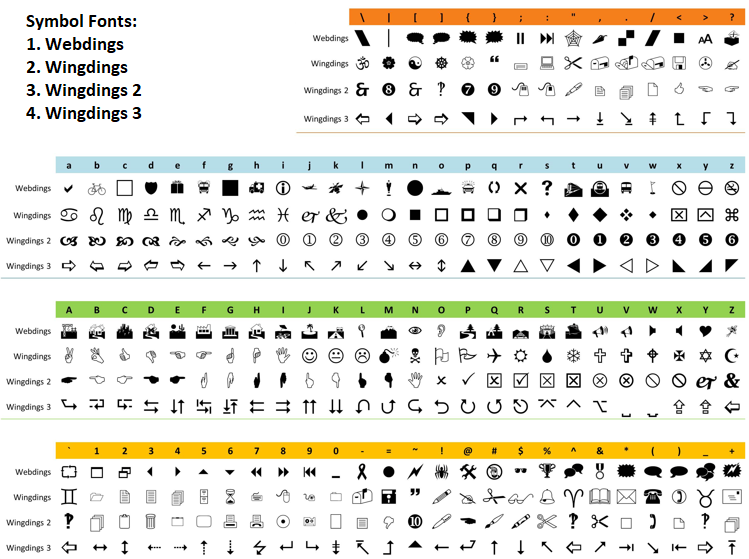
Añadimos botones con «createLABEL» para «PREFIX + EXPORT_BUTTON» (Wingdings 60), «PREFIX + TOGGLE_BUTTON» (Wingdings «r» para minimizar) y «PREFIX + CLOSE_BUTTON» (Webdings «r»), todos ellos con información sobre herramientas específica y la opción «true» seleccionable. La elección de los estilos de los iconos depende de ti. Aquí tienes una vista concisa de las fuentes que podrías usar. Simplemente utilice el símbolo y el tipo de carácter correctos.
A continuación, creamos etiquetas de encabezado para «headers» en posiciones calculadas, etiquetas de símbolo para «symbol_data[i].name», etiquetas de datos con valores iniciales, un panel de pie de página con «PREFIX + FOOTER_PANEL», el texto de pie de página «Total:», etiquetas de datos de pie de página, un panel de cuenta con «PREFIX + ACCOUNT_PANEL» y etiquetas de cuenta para «account_items», todo ello utilizando «createRectangle» y «createLABEL» con las coordenadas y colores adecuados, seguido de la función ChartRedraw.
En «createMinimizedDashboard», creamos una interfaz de usuario compacta que solo incluye el panel de cabecera utilizando «createRectangle» para «PREFIX + HEADER_PANEL», el título del encabezado con «createLABEL» para «PREFIX + HEADER_PANEL_TEXT» y botones para exportar (Wingdings 60), alternar (Wingdings «o» para maximizar) y cerrar (Webdings «r»), asegurándonos de que el uso de la pantalla sea mínimo, y volvemos a dibujar.
La función «deleteAllObjects» elimina todos los objetos del panel informativo con ObjectsDeleteAll utilizando «PREFIX» para todos los gráficos y tipos, lo que garantiza un reinicio completo para las actualizaciones de la interfaz de usuario o el cierre. Estas funciones permitirán crear un panel informativo flexible con modos completo y minimizado, que admita interacciones del usuario como arrastrar y alternar. Ahora vamos a actualizar la función del panel informativo utilizando estas funciones dinámicas.
//+------------------------------------------------------------------+
//| Updating dashboard data and visuals                              |
//+------------------------------------------------------------------+
void UpdateDashboard() {
   bool needs_redraw = false;                //--- Initializing redraw flag
   CollectActiveSymbols();                   //--- Collecting active symbols
   int current_num = ArraySize(symbol_data); //--- Getting current number of symbols
   if(current_num != prev_num_symbols) {     //--- Checking if symbol count changed
      deleteAllObjects();                    //--- Deleting all objects
      if(panel_minimized) {                  //--- Checking if minimized
         createMinimizedDashboard();         //--- Creating minimized dashboard
      } else {
         createFullDashboard();              //--- Creating full dashboard
      }
      prev_num_symbols = current_num;        //--- Updating previous symbol count
      needs_redraw = true;                   //--- Setting redraw flag
   }
   if(!panel_is_visible || panel_minimized) return; //--- Exiting if not visible or minimized
   // Resetting totals
   totalBuys = 0;     //--- Resetting total buys
   totalSells = 0;    //--- Resetting total sells
   totalTrades = 0;   //--- Resetting total trades
   totalLots = 0.0;   //--- Resetting total lots
   totalProfit = 0.0; //--- Resetting total profit
   totalPending = 0;  //--- Resetting total pending
   totalSwap = 0.0;   //--- Resetting total swap
   totalComm = 0.0;   //--- Resetting total commission
   // Calculating symbol data and totals
   for(int i = 0; i < current_num; i++) {           //--- Iterating through symbols
      string symbol = symbol_data[i].name;          //--- Getting symbol name
      for(int j = 0; j < 8; j++) {                  //--- Iterating through data columns
         string value = "";                         //--- Initializing value
         color data_color = data_default_colors[j]; //--- Setting default color
         double dval = 0.0;                         //--- Initializing double value
         int ival = 0;                              //--- Initializing integer value
         switch(j) {                                //--- Handling data type
            case 0:                                 // Buy positions
               value = countPositions(symbol, POSITION_TYPE_BUY); //--- Getting buy positions
               ival = (int)StringToInteger(value);  //--- Converting to integer
               if(value != symbol_data[i].buys_str) { //--- Checking if changed
                  symbol_data[i].buys_str = value;  //--- Updating buys string
                  symbol_data[i].buys = ival;       //--- Updating buys count
               }
               totalBuys += ival;                   //--- Adding to total buys
               break;
            case 1:                                 // Sell positions
               value = countPositions(symbol, POSITION_TYPE_SELL); //--- Getting sell positions
               ival = (int)StringToInteger(value);  //--- Converting to integer
               if(value != symbol_data[i].sells_str) { //--- Checking if changed
                  symbol_data[i].sells_str = value; //--- Updating sells string
                  symbol_data[i].sells = ival;      //--- Updating sells count
               }
               totalSells += ival; //--- Adding to total sells
               break;
            case 2: // Total trades
               value = countPositionsTotal(symbol); //--- Getting total trades
               ival = (int)StringToInteger(value);  //--- Converting to integer
               if(value != symbol_data[i].trades_str) { //--- Checking if changed
                  symbol_data[i].trades_str = value; //--- Updating trades string
                  symbol_data[i].trades = ival;     //--- Updating trades count
               }
               totalTrades += ival;                 //--- Adding to total trades
               break;
            case 3: // Lots
               value = sumPositionDouble(symbol, POSITION_VOLUME); //--- Getting total lots
               dval = StringToDouble(value);        //--- Converting to double
               if(value != symbol_data[i].lots_str) { //--- Checking if changed
                  symbol_data[i].lots_str = value; //--- Updating lots string
                  symbol_data[i].lots = dval;      //--- Updating lots value
               }
               totalLots += dval;                  //--- Adding to total lots
               break;
            case 4: // Profit
               value = sumPositionDouble(symbol, POSITION_PROFIT); //--- Getting total profit
               dval = StringToDouble(value);      //--- Converting to double
               data_color = (dval > 0) ? clrGreen : (dval < 0) ? clrRed : clrGray; //--- Setting color based on value
               if(value != symbol_data[i].profit_str) { //--- Checking if changed
                  symbol_data[i].profit_str = value; //--- Updating profit string
                  symbol_data[i].profit = dval;  //--- Updating profit value
               }
               totalProfit += dval;              //--- Adding to total profit
               break;
            case 5: // Pending
               value = countOrders(symbol);      //--- Getting pending orders
               ival = (int)StringToInteger(value); //--- Converting to integer
               if(value != symbol_data[i].pending_str) { //--- Checking if changed
                  symbol_data[i].pending_str = value; //--- Updating pending string
                  symbol_data[i].pending = ival; //--- Updating pending count
               }
               totalPending += ival;             //--- Adding to total pending
               break;
            case 6: // Swap
               value = sumPositionDouble(symbol, POSITION_SWAP); //--- Getting total swap
               dval = StringToDouble(value);     //--- Converting to double
               data_color = (dval > 0) ? clrGreen : (dval < 0) ? clrRed : clrPurple; //--- Setting color based on value
               if(value != symbol_data[i].swaps_str) { //--- Checking if changed
                  symbol_data[i].swaps_str = value;    //--- Updating swap string
                  symbol_data[i].swaps = dval;  //--- Updating swap value
               }
               totalSwap += dval; //--- Adding to total swap
               break;
            case 7: // Comm
               dval = sumPositionCommission(symbol); //--- Getting total commission
               value = DoubleToString(dval, 2);      //--- Formatting commission
               data_color = (dval > 0) ? clrGreen : (dval < 0) ? clrRed : clrBrown; //--- Setting color based on value
               if(value != symbol_data[i].comm_str) { //--- Checking if changed
                  symbol_data[i].comm_str = value;   //--- Updating commission string
                  symbol_data[i].comm = dval;        //--- Updating commission value
               }
               totalComm += dval;                    //--- Adding to total commission
               break;
         }
      }
   }
   // Sort after calculating values
   SortDashboard(); //--- Sorting dashboard data
   // Update header breathing effect
   glow_counter += MathMax(UpdateIntervalMs, 10); //--- Incrementing glow counter
   if(glow_counter >= GLOW_INTERVAL_MS) { //--- Checking if glow interval reached
      if(glow_direction) { //--- Checking if glowing forward
         glow_index++; //--- Incrementing glow index
         if(glow_index >= ArraySize(settings.header_shades) - 1) //--- Checking if at end
            glow_direction = false; //--- Reversing glow direction
      } else { //--- Glow backward
         glow_index--; //--- Decrementing glow index
         if(glow_index <= 0) //--- Checking if at start
            glow_direction = true; //--- Reversing glow direction
      }
      glow_counter = 0; //--- Resetting glow counter
   }
   color header_shade = settings.header_shades[glow_index]; //--- Getting current header shade
   for(int i = 0; i < ArraySize(headers); i++) { //--- Iterating through headers
      string header_name = PREFIX + HEADER + IntegerToString(i); //--- Defining header name
      ObjectSetInteger(0, header_name, OBJPROP_COLOR, header_shade); //--- Updating header color
      needs_redraw = true; //--- Setting redraw flag
   }
   // Update symbol and data labels
   bool labels_updated = false; //--- Initializing label update flag
   for(int i = 0; i < current_num; i++) { //--- Iterating through symbols
      string symbol = symbol_data[i].name; //--- Getting symbol name
      string symb_name = PREFIX + SYMB + IntegerToString(i); //--- Defining symbol label name
      string current_symb_txt = ObjectGetString(0, symb_name, OBJPROP_TEXT); //--- Getting current symbol text
      if(current_symb_txt != symbol) { //--- Checking if symbol changed
         ObjectSetString(0, symb_name, OBJPROP_TEXT, symbol); //--- Updating symbol text
         labels_updated = true; //--- Setting label updated flag
      }
      for(int j = 0; j < 8; j++) { //--- Iterating through data columns
         string data_name = PREFIX + DATA + IntegerToString(i) + "_" + IntegerToString(j); //--- Defining data label name
         string value; //--- Initializing value
         color data_color = data_default_colors[j]; //--- Setting default color
         switch(j) { //--- Handling data type
            case 0: //--- Buy positions
               value = symbol_data[i].buys_str; //--- Getting buys string
               data_color = clrRed; //--- Setting color to red
               break;
            case 1: //--- Sell positions
               value = symbol_data[i].sells_str; //--- Getting sells string
               data_color = clrGreen; //--- Setting color to green
               break;
            case 2: // Total trades
               value = symbol_data[i].trades_str;
               data_color = clrDarkGray;
               break;
            case 3: //--- Lots
               value = symbol_data[i].lots_str; //--- Getting lots string
               data_color = clrOrange; //--- Setting color to orange
               break;
            case 4: //--- Profit
               value = symbol_data[i].profit_str; //--- Getting profit string
               data_color = (symbol_data[i].profit > 0) ? clrGreen : (symbol_data[i].profit < 0) ? clrRed : clrGray; //--- Setting color based on profit
               break;
            case 5: //--- Pending
               value = symbol_data[i].pending_str; //--- Getting pending string
               data_color = clrBlue; //--- Setting color to blue
               break;
            case 6: //--- Swap
               value = symbol_data[i].swaps_str; //--- Getting swap string
               data_color = (symbol_data[i].swaps > 0) ? clrGreen : (symbol_data[i].swaps < 0) ? clrRed : clrPurple; //--- Setting color based on swap
               break;
            case 7: //--- Comm
               value = symbol_data[i].comm_str; //--- Getting commission string
               data_color = (symbol_data[i].comm > 0) ? clrGreen : (symbol_data[i].comm < 0) ? clrRed : clrBrown; //--- Setting color based on commission
               break;
         }
         if(updateLABEL(data_name, value, data_color)) labels_updated = true; //--- Updating label if changed
      }
   }
   if(labels_updated) needs_redraw = true; //--- Setting redraw flag if labels updated
   // Updating totals
   string new_total_buys = IntegerToString(totalBuys); //--- Formatting total buys
   if(new_total_buys != total_buys_str) { //--- Checking if changed
      total_buys_str = new_total_buys; //--- Updating buys string
      if(updateLABEL(PREFIX + FOOTER_DATA + "0", new_total_buys, clrRed)) needs_redraw = true; //--- Updating label
   }
   string new_total_sells = IntegerToString(totalSells); //--- Formatting total sells
   if(new_total_sells != total_sells_str) { //--- Checking if changed
      total_sells_str = new_total_sells; //--- Updating sells string
      if(updateLABEL(PREFIX + FOOTER_DATA + "1", new_total_sells, clrGreen)) needs_redraw = true; //--- Updating label
   }
   string new_total_trades = IntegerToString(totalTrades); //--- Formatting total trades
   if(new_total_trades != total_trades_str) { //--- Checking if changed
      total_trades_str = new_total_trades; //--- Updating trades string
      if(updateLABEL(PREFIX + FOOTER_DATA + "2", new_total_trades, clrDarkGray)) needs_redraw = true; //--- Updating label
   }
   string new_total_lots = DoubleToString(totalLots, 2); //--- Formatting total lots
   if(new_total_lots != total_lots_str) { //--- Checking if changed
      total_lots_str = new_total_lots; //--- Updating lots string
      if(updateLABEL(PREFIX + FOOTER_DATA + "3", new_total_lots, clrOrange)) needs_redraw = true; //--- Updating label
   }
   string new_total_profit = DoubleToString(totalProfit, 2); //--- Formatting total profit
   color total_profit_color = (totalProfit > 0) ? clrGreen : (totalProfit < 0) ? clrRed : clrGray; //--- Setting color based on profit
   if(new_total_profit != total_profit_str) { //--- Checking if changed
      total_profit_str = new_total_profit; //--- Updating profit string
      if(updateLABEL(PREFIX + FOOTER_DATA + "4", new_total_profit, total_profit_color)) needs_redraw = true; //--- Updating label
   }
   string new_total_pending = IntegerToString(totalPending); //--- Formatting total pending
   if(new_total_pending != total_pending_str) { //--- Checking if changed
      total_pending_str = new_total_pending; //--- Updating pending string
      if(updateLABEL(PREFIX + FOOTER_DATA + "5", new_total_pending, clrBlue)) needs_redraw = true; //--- Updating label
   }
   string new_total_swap = DoubleToString(totalSwap, 2); //--- Formatting total swap
   color total_swap_color = (totalSwap > 0) ? clrGreen : (totalSwap < 0) ? clrRed : clrPurple; //--- Setting color based on swap
   if(new_total_swap != total_swap_str) { //--- Checking if changed
      total_swap_str = new_total_swap; //--- Updating swap string
      if(updateLABEL(PREFIX + FOOTER_DATA + "6", new_total_swap, total_swap_color)) needs_redraw = true; //--- Updating label
   }
   string new_total_comm = DoubleToString(totalComm, 2); //--- Formatting total commission
   color total_comm_color = (totalComm > 0) ? clrGreen : (totalComm < 0) ? clrRed : clrBrown; //--- Setting color based on commission
   if(new_total_comm != total_comm_str) { //--- Checking if changed
      total_comm_str = new_total_comm; //--- Updating commission string
      if(updateLABEL(PREFIX + FOOTER_DATA + "7", new_total_comm, total_comm_color)) needs_redraw = true; //--- Updating label
   }
   // Updating account info
   double balance = AccountInfoDouble(ACCOUNT_BALANCE); //--- Getting account balance
   double equity = AccountInfoDouble(ACCOUNT_EQUITY); //--- Getting account equity
   double free_margin = AccountInfoDouble(ACCOUNT_MARGIN_FREE); //--- Getting free margin
   string new_bal = DoubleToString(balance, 2); //--- Formatting balance
   if(new_bal != acc_bal_str) { //--- Checking if changed
      acc_bal_str = new_bal; //--- Updating balance string
      if(updateLABEL(PREFIX + ACC_DATA + "0", new_bal, clrBlack)) needs_redraw = true; //--- Updating label
   }
   string new_eq = DoubleToString(equity, 2); //--- Formatting equity
   color eq_color = (equity > balance) ? clrGreen : (equity < balance) ? clrRed : clrBlack; //--- Setting color based on equity
   if(new_eq != acc_eq_str) { //--- Checking if changed
      acc_eq_str = new_eq; //--- Updating equity string
      if(updateLABEL(PREFIX + ACC_DATA + "1", new_eq, eq_color)) needs_redraw = true; //--- Updating label
   }
   string new_free = DoubleToString(free_margin, 2); //--- Formatting free margin
   if(new_free != acc_free_str) { //--- Checking if changed
      acc_free_str = new_free; //--- Updating free margin string
      if(updateLABEL(PREFIX + ACC_DATA + "2", new_free, clrBlack)) needs_redraw = true; //--- Updating label
   }
   if(needs_redraw) { //--- Checking if redraw needed
      ChartRedraw(0); //--- Redrawing chart
   }
}
A la función «UpdateDashboard» le añadimos llamadas a «CollectActiveSymbols» al principio, para que siempre se actualicen los campos de totales y saldos. A continuación, cuando cambia el recuento de símbolos, llamamos a la función «deleteAllObjects» para destruir el panel informativo y volver a crearlo mediante la función «createFullDashboard» o «createMinimizedDashboard». En el bucle de cálculo de datos, hemos añadido la lógica de colores para los beneficios, el swap y las comisiones, que antes era incompleta. Hemos resaltado las áreas de cambio para facilitar su identificación y claridad. Finalmente, ahora podemos llamar a nuestra lógica de inicialización para ver el logro del hito.
//+------------------------------------------------------------------+
//| Initializing expert                                              |
//+------------------------------------------------------------------+
int OnInit() {
   createFullDashboard();                             //--- Creating full dashboard
   prev_num_symbols = ArraySize(symbol_data);         //--- Setting initial symbol count
   ChartSetInteger(0, CHART_EVENT_MOUSE_MOVE, true);  //--- Enabling mouse move events
   EventSetMillisecondTimer(MathMax(UpdateIntervalMs, 10)); //--- Setting timer with minimum 10ms
   UpdateDashboard();                                 //--- Updating dashboard
   return(INIT_SUCCEEDED);                            //--- Returning success
}

//+------------------------------------------------------------------+
//| Deinitializing expert                                            |
//+------------------------------------------------------------------+
void OnDeinit(const int reason) {
   deleteAllObjects();                                //--- Deleting all objects
   ChartSetInteger(0, CHART_EVENT_MOUSE_MOVE, false); //--- Disabling mouse move events
   EventKillTimer();                                  //--- Stopping timer
}

//+------------------------------------------------------------------+
//| Handling timer for millisecond-based updates                     |
//+------------------------------------------------------------------+
void OnTimer() {
   if(panel_is_visible && !panel_minimized) {         //--- Checking if visible and not minimized
      UpdateDashboard();                              //--- Updating dashboard
   }
}
Aquí implementamos los controladores de eventos OnInit, «OnDeinit» y «OnTimer» para gestionar el ciclo de vida y las actualizaciones del panel informativo, lo que permite su funcionalidad interactiva y dinámica. En la función «OnInit», llamamos a «createFullDashboard» para crear la interfaz de usuario completa, establecemos «prev_num_symbols» en el tamaño de «symbol_data» utilizando ArraySize para realizar un seguimiento de los símbolos iniciales, habilitamos los eventos de movimiento del ratón con ChartSetInteger estableciendo CHART_EVENT_MOUSE_MOVE en «true» para permitir los efectos de arrastre y de paso del cursor, configuramos un temporizador con EventSetMillisecondTimer utilizando el valor máximo entre «UpdateIntervalMs» y 10 ms para las actualizaciones periódicas, y llamamos a «UpdateDashboard» para rellenar los datos iniciales, devolviendo «INIT_SUCCEEDED» si la inicialización se ha realizado correctamente.
La función OnDeinit realiza una limpieza llamando a «deleteAllObjects» para eliminar todos los objetos del panel informativo con «PREFIX», desactivando los eventos de movimiento del ratón mediante «ChartSetInteger», estableciendo «CHART_EVENT_MOUSE_MOVE» en falso, y deteniendo el temporizador con EventKillTimer para liberar recursos.
En la función OnTimer, comprobamos si «panel_is_visible» es verdadero y «panel_minimized» es falso; a continuación, llamamos a «UpdateDashboard» para actualizar los datos únicamente cuando el panel informativo está totalmente visible, lo que garantiza actualizaciones eficientes sin que se realice ningún procesamiento cuando está minimizado u oculto. Tras la compilación, obtenemos el siguiente resultado.
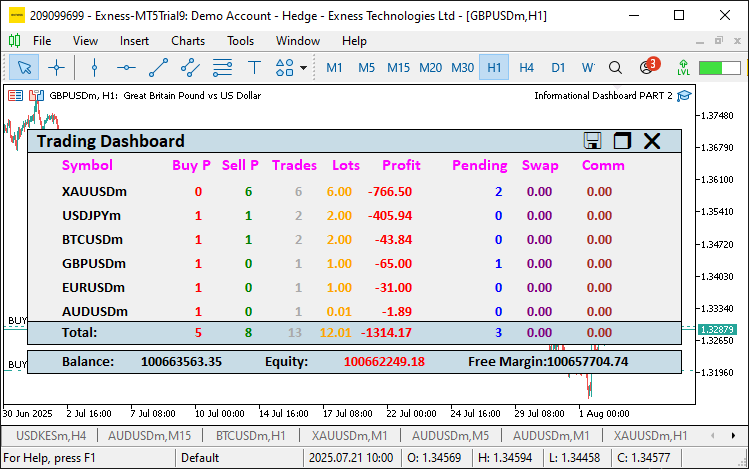
En la imagen podemos ver que las nuevas funciones aparecen correctamente. Ahora pasaremos a crear una función para actualizar las posiciones de los paneles al arrastrarlos, con el fin de evitar recrear los objetos.
//+------------------------------------------------------------------+
//| Updating panel object positions                                  |
//+------------------------------------------------------------------+
void updatePanelPositions() {
   int num_rows = ArraySize(symbol_data);             //--- Getting number of rows
   int num_columns = ArraySize(headers);              //--- Getting number of columns
   int column_width_sum = 0;                          //--- Initializing column width sum
   for(int i = 0; i < num_columns; i++)               //--- Iterating through columns
      column_width_sum += column_widths[i];           //--- Adding column width
   int panel_width = MathMax(settings.header_x_distances[num_columns - 1] + column_widths[num_columns - 1], column_width_sum) + 20 + settings.label_x_offset; //--- Calculating panel width
   // Updating header panel and buttons
   ObjectSetInteger(0, PREFIX + HEADER_PANEL, OBJPROP_XDISTANCE, settings.panel_x); //--- Updating header panel x-coordinate
   ObjectSetInteger(0, PREFIX + HEADER_PANEL, OBJPROP_YDISTANCE, settings.panel_y); //--- Updating header panel y-coordinate
   ObjectSetInteger(0, PREFIX + HEADER_PANEL_TEXT, OBJPROP_XDISTANCE, settings.panel_x + 10); //--- Updating header text x-coordinate
   ObjectSetInteger(0, PREFIX + HEADER_PANEL_TEXT, OBJPROP_YDISTANCE, settings.panel_y + 8 + settings.label_y_offset); //--- Updating header text y-coordinate
   ObjectSetInteger(0, PREFIX + EXPORT_BUTTON, OBJPROP_XDISTANCE, settings.panel_x + panel_width - 90); //--- Updating export button x-coordinate
   ObjectSetInteger(0, PREFIX + EXPORT_BUTTON, OBJPROP_YDISTANCE, settings.panel_y + 12); //--- Updating export button y-coordinate
   ObjectSetInteger(0, PREFIX + TOGGLE_BUTTON, OBJPROP_XDISTANCE, settings.panel_x + panel_width - 60); //--- Updating toggle button x-coordinate
   ObjectSetInteger(0, PREFIX + TOGGLE_BUTTON, OBJPROP_YDISTANCE, settings.panel_y + 12); //--- Updating toggle button y-coordinate
   ObjectSetInteger(0, PREFIX + CLOSE_BUTTON, OBJPROP_XDISTANCE, settings.panel_x + panel_width - 30); //--- Updating close button x-coordinate
   ObjectSetInteger(0, PREFIX + CLOSE_BUTTON, OBJPROP_YDISTANCE, settings.panel_y + 12); //--- Updating close button y-coordinate
   if(!panel_minimized) {                                               //--- Checking if not minimized
      // Updating main panel
      ObjectSetInteger(0, PREFIX + PANEL, OBJPROP_XDISTANCE, settings.panel_x); //--- Updating main panel x-coordinate
      ObjectSetInteger(0, PREFIX + PANEL, OBJPROP_YDISTANCE, settings.panel_y); //--- Updating main panel y-coordinate
      // Updating headers
      int header_y = settings.panel_y + settings.row_height + 8 + settings.label_y_offset; //--- Calculating header y-coordinate
      for(int i = 0; i < num_columns; i++) {                            //--- Iterating through headers
         string header_name = PREFIX + HEADER + IntegerToString(i);     //--- Defining header name
         int header_x = settings.panel_x + settings.header_x_distances[i] + settings.label_x_offset; //--- Calculating header x-coordinate
         ObjectSetInteger(0, header_name, OBJPROP_XDISTANCE, header_x); //--- Updating header x-coordinate
         ObjectSetInteger(0, header_name, OBJPROP_YDISTANCE, header_y); //--- Updating header y-coordinate
      }
      // Updating symbol and data labels
      int first_row_y = header_y + settings.row_height;                 //--- Calculating first row y-coordinate
      int symbol_x = settings.panel_x + 10 + settings.label_x_offset;   //--- Setting symbol x-coordinate
      for(int i = 0; i < num_rows; i++) {                               //--- Iterating through rows
         string symbol_name = PREFIX + SYMB + IntegerToString(i);       //--- Defining symbol label name
         ObjectSetInteger(0, symbol_name, OBJPROP_XDISTANCE, symbol_x); //--- Updating symbol x-coordinate
         ObjectSetInteger(0, symbol_name, OBJPROP_YDISTANCE, first_row_y + i * settings.row_height + settings.label_y_offset); //--- Updating symbol y-coordinate
         int x_offset = settings.panel_x + 10 + column_widths[0] + settings.label_x_offset; //--- Setting data x-offset
         for(int j = 0; j < num_columns - 1; j++) {                      //--- Iterating through data columns
            string data_name = PREFIX + DATA + IntegerToString(i) + "_" + IntegerToString(j); //--- Defining data label name
            ObjectSetInteger(0, data_name, OBJPROP_XDISTANCE, x_offset); //--- Updating data x-coordinate
            ObjectSetInteger(0, data_name, OBJPROP_YDISTANCE, first_row_y + i * settings.row_height + settings.label_y_offset); //--- Updating data y-coordinate
            x_offset += column_widths[j + 1];                            //--- Updating x-offset
         }
      }
      // Updating footer panel and labels
      int footer_y = settings.panel_y + (num_rows + 3) * settings.row_height - settings.row_height; //--- Calculating footer y-coordinate
      ObjectSetInteger(0, PREFIX + FOOTER_PANEL, OBJPROP_XDISTANCE, settings.panel_x); //--- Updating footer panel x-coordinate
      ObjectSetInteger(0, PREFIX + FOOTER_PANEL, OBJPROP_YDISTANCE, footer_y); //--- Updating footer panel y-coordinate
      ObjectSetInteger(0, PREFIX + FOOTER_TEXT, OBJPROP_XDISTANCE, settings.panel_x + 10 + settings.label_x_offset); //--- Updating footer text x-coordinate
      ObjectSetInteger(0, PREFIX + FOOTER_TEXT, OBJPROP_YDISTANCE, footer_y + 8 + settings.label_y_offset); //--- Updating footer text y-coordinate
      int x_offset = settings.panel_x + 10 + column_widths[0] + settings.label_x_offset; //--- Setting footer data x-offset
      for(int j = 0; j < num_columns - 1; j++) {                        //--- Iterating through footer data
         string footer_data_name = PREFIX + FOOTER_DATA + IntegerToString(j); //--- Defining footer data name
         ObjectSetInteger(0, footer_data_name, OBJPROP_XDISTANCE, x_offset);  //--- Updating footer data x-coordinate
         ObjectSetInteger(0, footer_data_name, OBJPROP_YDISTANCE, footer_y + 8 + settings.label_y_offset); //--- Updating footer data y-coordinate
         x_offset += column_widths[j + 1];                              //--- Updating x-offset
      }
      // Updating account panel and labels
      int account_panel_y = footer_y + settings.row_height + 5;         //--- Calculating account panel y-coordinate
      ObjectSetInteger(0, PREFIX + ACCOUNT_PANEL, OBJPROP_XDISTANCE, settings.panel_x); //--- Updating account panel x-coordinate
      ObjectSetInteger(0, PREFIX + ACCOUNT_PANEL, OBJPROP_YDISTANCE, account_panel_y);  //--- Updating account panel y-coordinate
      int acc_x = settings.panel_x + 10 + settings.label_x_offset;      //--- Setting account label x-coordinate
      int acc_data_offset = 160;                                        //--- Setting data offset
      int acc_spacing = (panel_width - 45) / ArraySize(account_items);  //--- Calculating spacing
      for(int k = 0; k < ArraySize(account_items); k++) { //--- Iterating through account items
         string acc_text_name = PREFIX + ACC_TEXT + IntegerToString(k); //--- Defining account text name
         int text_x = acc_x + k * acc_spacing;                          //--- Calculating text x-coordinate
         ObjectSetInteger(0, acc_text_name, OBJPROP_XDISTANCE, text_x); //--- Updating account text x-coordinate
         ObjectSetInteger(0, acc_text_name, OBJPROP_YDISTANCE, account_panel_y + 8 + settings.label_y_offset); //--- Updating account text y-coordinate
         string acc_data_name = PREFIX + ACC_DATA + IntegerToString(k); //--- Defining account data name
         int data_x = text_x + acc_data_offset;                         //--- Calculating data x-coordinate
         ObjectSetInteger(0, acc_data_name, OBJPROP_XDISTANCE, data_x); //--- Updating account data x-coordinate
         ObjectSetInteger(0, acc_data_name, OBJPROP_YDISTANCE, account_panel_y + 8 + settings.label_y_offset); //--- Updating account data y-coordinate
      }
   }
   ChartRedraw(0);                                    //--- Redrawing chart
}
Aquí implementamos la función «updatePanelPositions» para habilitar la función de arrastre del panel informativo mejorado, garantizando que todos los elementos de la interfaz de usuario se muevan de forma coordinada cuando se arrastre el panel informativo. Calculamos «num_rows» y «num_columns» utilizando «ArraySize» sobre «symbol_data» y «headers», y calculamos «panel_width» sumando «column_widths» y aplicando MathMax a «settings.header_x_distances» más el relleno. Actualizamos el panel de encabezado y los botones estableciendo OBJPROP_XDISTANCE y «OBJPROP_YDISTANCE» para «PREFIX + HEADER_PANEL», «PREFIX + HEADER_PANEL_TEXT», «PREFIX + EXPORT_BUTTON», «PREFIX + TOGGLE_BUTTON» y «PREFIX + CLOSE_BUTTON» mediante ObjectSetInteger con las coordenadas «settings.panel_x» y «settings.panel_y».
Si «panel_minimized» es falso, actualizamos la posición del panel principal con «PREFIX + PANEL», las cabeceras en «header_y» calculadas a partir de «settings.panel_y + settings.row_height + 8 + settings.label_y_offset», las etiquetas de símbolos y datos en «first_row_y» con «symbol_x» y «x_offset» ajustadas según «column_widths», el panel de pie de página y las etiquetas en «footer_y», calculado para «num_rows + 3», y el panel de cuenta y las etiquetas en «account_panel_y» con «acc_x» y «acc_spacing» para la alineación, todo ello utilizando la función ObjectSetInteger. Llamamos a ChartRedraw para actualizar la visualización. De este modo, se garantizará que todo el panel informativo se desplace de forma fluida al arrastrarlo, manteniendo la integridad del diseño. Necesitaremos definir una lógica para rastrear la posición del cursor sobre el encabezado o los botones para tener en cuenta los efectos al pasar el ratón por encima. Esta es la lógica que utilizamos para implementarlo.
//+------------------------------------------------------------------+
//| Checking if cursor is inside header or buttons                   |
//+------------------------------------------------------------------+
bool isCursorInHeaderOrButtons(int mouse_x, int mouse_y) {
   int header_x = (int)ObjectGetInteger(0, PREFIX + HEADER_PANEL, OBJPROP_XDISTANCE);  //--- Getting header x-coordinate
   int header_y = (int)ObjectGetInteger(0, PREFIX + HEADER_PANEL, OBJPROP_YDISTANCE);  //--- Getting header y-coordinate
   int header_width = (int)ObjectGetInteger(0, PREFIX + HEADER_PANEL, OBJPROP_XSIZE);  //--- Getting header width
   int header_height = (int)ObjectGetInteger(0, PREFIX + HEADER_PANEL, OBJPROP_YSIZE); //--- Getting header height
   bool in_header = (mouse_x >= header_x && mouse_x <= header_x + header_width &&
                     mouse_y >= header_y && mouse_y <= header_y + header_height);      //--- Checking if in header
   int close_x = (int)ObjectGetInteger(0, PREFIX + CLOSE_BUTTON, OBJPROP_XDISTANCE);   //--- Getting close button x-coordinate
   int close_y = (int)ObjectGetInteger(0, PREFIX + CLOSE_BUTTON, OBJPROP_YDISTANCE);   //--- Getting close button y-coordinate
   int close_width = 20;                              //--- Setting close button width
   int close_height = 20;                             //--- Setting close button height
   bool in_close = (mouse_x >= close_x && mouse_x <= close_x + close_width &&
                    mouse_y >= close_y && mouse_y <= close_y + close_height);          //--- Checking if in close button
   int export_x = (int)ObjectGetInteger(0, PREFIX + EXPORT_BUTTON, OBJPROP_XDISTANCE); //--- Getting export button x-coordinate
   int export_y = (int)ObjectGetInteger(0, PREFIX + EXPORT_BUTTON, OBJPROP_YDISTANCE); //--- Getting export button y-coordinate
   int export_width = 20;                             //--- Setting export button width
   int export_height = 20;                            //--- Setting export button height
   bool in_export = (mouse_x >= export_x && mouse_x <= export_x + export_width &&
                     mouse_y >= export_y && mouse_y <= export_y + export_height);      //--- Checking if in export button
   int toggle_x = (int)ObjectGetInteger(0, PREFIX + TOGGLE_BUTTON, OBJPROP_XDISTANCE); //--- Getting toggle button x-coordinate
   int toggle_y = (int)ObjectGetInteger(0, PREFIX + TOGGLE_BUTTON, OBJPROP_YDISTANCE); //--- Getting toggle button y-coordinate
   int toggle_width = 20;                             //--- Setting toggle button width
   int toggle_height = 20;                            //--- Setting toggle button height
   bool in_toggle = (mouse_x >= toggle_x && mouse_x <= toggle_x + toggle_width &&
                     mouse_y >= toggle_y && mouse_y <= toggle_y + toggle_height);      //--- Checking if in toggle button
   return in_header || in_close || in_export || in_toggle;                             //--- Returning combined check
}
Implementamos la función «isCursorInHeaderOrButtons» para detectar la presencia del cursor del ratón sobre elementos interactivos, lo que permite arrastrar e interactuar con los botones. Recuperamos las coordenadas y las dimensiones del panel de cabecera utilizando ObjectGetInteger para «PREFIX + HEADER_PANEL» con «OBJPROP_XDISTANCE», «OBJPROP_YDISTANCE», «OBJPROP_XSIZE» y «OBJPROP_YSIZE», y las almacenamos en «header_x», «header_y», «header_width» y «header_height»; a continuación, comprobamos si el cursor («mouse_x», «mouse_y») se encuentra dentro de los límites del encabezado mediante «in_header».
Del mismo modo, obtenemos las coordenadas de «PREFIX + CLOSE_BUTTON», «PREFIX + EXPORT_BUTTON» y «PREFIX + TOGGLE_BUTTON» utilizando «OBJPROP_XDISTANCE» y OBJPROP_YDISTANCE, estableciendo «close_width», «close_height», «export_width», «export_height», «toggle_width» y «toggle_height» en 20, y comprobamos si el cursor se encuentra dentro de los límites de cada botón con «in_close», «in_export» y «in_toggle». Devolvemos «true» si el cursor se encuentra en el encabezado o en cualquier botón, combinando las condiciones con el operador OR. Tras detectar el efecto al pasar el cursor, necesitaremos actualizar el encabezado o los botones detectados para proporcionar retroalimentación visual. Esta es la lógica que implementamos para lograrlo.
//+------------------------------------------------------------------+
//| Updating button hover states                                     |
//+------------------------------------------------------------------+
void updateButtonHoverStates(int mouse_x, int mouse_y) {
   int close_x = (int)ObjectGetInteger(0, PREFIX + CLOSE_BUTTON, OBJPROP_XDISTANCE);     //--- Getting close button x-coordinate
   int close_y = (int)ObjectGetInteger(0, PREFIX + CLOSE_BUTTON, OBJPROP_YDISTANCE);     //--- Getting close button y-coordinate
   int close_width = 20;                              //--- Setting close button width
   int close_height = 20;                             //--- Setting close button height
   bool is_close_hovered = (mouse_x >= close_x && mouse_x <= close_x + close_width &&
                            mouse_y >= close_y && mouse_y <= close_y + close_height);     //--- Checking if close button hovered
   if(is_close_hovered != prev_close_hovered) {       //--- Checking hover change
      ObjectSetInteger(0, PREFIX + CLOSE_BUTTON, OBJPROP_COLOR, is_close_hovered ? clrRed : clrBlack); //--- Updating close button color
      ObjectSetInteger(0, PREFIX + CLOSE_BUTTON, OBJPROP_BGCOLOR, is_close_hovered ? clrDodgerBlue : clrNONE); //--- Updating close button background
      prev_close_hovered = is_close_hovered;          //--- Updating previous hover state
      ChartRedraw(0);                                 //--- Redrawing chart
   }
   int export_x = (int)ObjectGetInteger(0, PREFIX + EXPORT_BUTTON, OBJPROP_XDISTANCE);    //--- Getting export button x-coordinate
   int export_y = (int)ObjectGetInteger(0, PREFIX + EXPORT_BUTTON, OBJPROP_YDISTANCE);    //--- Getting export button y-coordinate
   int export_width = 20;                             //--- Setting export button width
   int export_height = 20;                            //--- Setting export button height
   bool is_export_hovered = (mouse_x >= export_x && mouse_x <= export_x + export_width &&
                             mouse_y >= export_y && mouse_y <= export_y + export_height); //--- Checking if export button hovered
   if(is_export_hovered != prev_export_hovered) {     //--- Checking hover change
      ObjectSetInteger(0, PREFIX + EXPORT_BUTTON, OBJPROP_COLOR, is_export_hovered ? clrOrange : clrBlack); //--- Updating export button color
      ObjectSetInteger(0, PREFIX + EXPORT_BUTTON, OBJPROP_BGCOLOR, is_export_hovered ? clrDodgerBlue : clrNONE); //--- Updating export button background
      prev_export_hovered = is_export_hovered;        //--- Updating previous hover state
      ChartRedraw(0);                                 //--- Redrawing chart
   }
   int toggle_x = (int)ObjectGetInteger(0, PREFIX + TOGGLE_BUTTON, OBJPROP_XDISTANCE);    //--- Getting toggle button x-coordinate
   int toggle_y = (int)ObjectGetInteger(0, PREFIX + TOGGLE_BUTTON, OBJPROP_YDISTANCE);    //--- Getting toggle button y-coordinate
   int toggle_width = 20;                             //--- Setting toggle button width
   int toggle_height = 20;                            //--- Setting toggle button height
   bool is_toggle_hovered = (mouse_x >= toggle_x && mouse_x <= toggle_x + toggle_width &&
                             mouse_y >= toggle_y && mouse_y <= toggle_y + toggle_height); //--- Checking if toggle button hovered
   if(is_toggle_hovered != prev_toggle_hovered) {     //--- Checking hover change
      ObjectSetInteger(0, PREFIX + TOGGLE_BUTTON, OBJPROP_COLOR, is_toggle_hovered ? clrBlue : clrBlack); //--- Updating toggle button color
      ObjectSetInteger(0, PREFIX + TOGGLE_BUTTON, OBJPROP_BGCOLOR, is_toggle_hovered ? clrDodgerBlue : clrNONE); //--- Updating toggle button background
      prev_toggle_hovered = is_toggle_hovered;        //--- Updating previous hover state
      ChartRedraw(0);                                 //--- Redrawing chart
   }
}

//+------------------------------------------------------------------+
//| Updating header hover state                                      |
//+------------------------------------------------------------------+
void updateHeaderHoverState(int mouse_x, int mouse_y) {
   int header_x = (int)ObjectGetInteger(0, PREFIX + HEADER_PANEL, OBJPROP_XDISTANCE);  //--- Getting header x-coordinate
   int header_y = (int)ObjectGetInteger(0, PREFIX + HEADER_PANEL, OBJPROP_YDISTANCE);  //--- Getting header y-coordinate
   int header_width = (int)ObjectGetInteger(0, PREFIX + HEADER_PANEL, OBJPROP_XSIZE);  //--- Getting header width
   int header_height = (int)ObjectGetInteger(0, PREFIX + HEADER_PANEL, OBJPROP_YSIZE); //--- Getting header height
   int close_x = (int)ObjectGetInteger(0, PREFIX + CLOSE_BUTTON, OBJPROP_XDISTANCE);   //--- Getting close button x-coordinate
   int close_y = (int)ObjectGetInteger(0, PREFIX + CLOSE_BUTTON, OBJPROP_YDISTANCE);   //--- Getting close button y-coordinate
   int close_width = 20;                              //--- Setting close button width
   int close_height = 20;                             //--- Setting close button height
   int export_x = (int)ObjectGetInteger(0, PREFIX + EXPORT_BUTTON, OBJPROP_XDISTANCE); //--- Getting export button x-coordinate
   int export_y = (int)ObjectGetInteger(0, PREFIX + EXPORT_BUTTON, OBJPROP_YDISTANCE); //--- Getting export button y-coordinate
   int export_width = 20;                             //--- Setting export button width
   int export_height = 20;                            //--- Setting export button height
   int toggle_x = (int)ObjectGetInteger(0, PREFIX + TOGGLE_BUTTON, OBJPROP_XDISTANCE); //--- Getting toggle button x-coordinate
   int toggle_y = (int)ObjectGetInteger(0, PREFIX + TOGGLE_BUTTON, OBJPROP_YDISTANCE); //--- Getting toggle button y-coordinate
   int toggle_width = 20;                             //--- Setting toggle button width
   int toggle_height = 20;                            //--- Setting toggle button height
   bool is_header_hovered = (mouse_x >= header_x && mouse_x <= header_x + header_width &&
                             mouse_y >= header_y && mouse_y <= header_y + header_height &&
                             !(mouse_x >= close_x && mouse_x <= close_x + close_width &&
                               mouse_y >= close_y && mouse_y <= close_y + close_height) &&
                             !(mouse_x >= export_x && mouse_x <= export_x + export_width &&
                               mouse_y >= export_y && mouse_y <= export_y + export_height) &&
                             !(mouse_x >= toggle_x && mouse_x <= toggle_x + toggle_width &&
                               mouse_y >= toggle_y && mouse_y <= toggle_y + toggle_height)); //--- Checking if header hovered
   if(is_header_hovered != prev_header_hovered && !panel_dragging) {                         //--- Checking hover change
      ObjectSetInteger(0, PREFIX + HEADER_PANEL, OBJPROP_BGCOLOR, is_header_hovered ? clrRed : settings.section_bg_color); //--- Updating header background
      prev_header_hovered = is_header_hovered;        //--- Updating previous hover state
      ChartRedraw(0);                                 //--- Redrawing chart
   }
   updateButtonHoverStates(mouse_x, mouse_y);         //--- Updating button hover states
}
Por último, implementamos las funciones «updateButtonHoverStates» y «updateHeaderHoverState» para añadir retroalimentación visual a las interacciones del usuario, mejorando así la capacidad de respuesta de los botones y el encabezado. En «updateButtonHoverStates», comprobamos los estados al pasar el cursor por encima de los botones obteniendo las coordenadas de «PREFIX + CLOSE_BUTTON», «PREFIX + EXPORT_BUTTON» y «PREFIX + TOGGLE_BUTTON» mediante ObjectGetInteger con «OBJPROP_XDISTANCE» y «OBJPROP_YDISTANCE», y estableciendo «close_width», «close_height», «export_width», «export_height», «toggle_width» y «toggle_height» en 20.
Para el botón de cierre, establecemos «is_close_hovered» si «mouse_x» y «mouse_y» se encuentran dentro de sus límites y, si el valor es diferente de «prev_close_hovered», actualizamos «OBJPROP_COLOR» a «clrRed» o «clrBlack» y «OBJPROP_BGCOLOR» a «clrDodgerBlue» o «clrNONE» con «ObjectSetInteger», actualizamos «prev_close_hovered» y llamamos a la función ChartRedraw. Del mismo modo, para el botón de exportación, establecemos «is_export_hovered» en «clrOrange» o «clrBlack» y «clrDodgerBlue» o «clrNONE», actualizamos «prev_export_hovered» y volvemos a dibujar; en el caso del botón de alternancia, utilizamos «clrBlue» o «clrBlack», actualizamos «prev_toggle_hovered» y volvemos a dibujar.
En «updateHeaderHoverState», obtenemos «header_x», «header_y», «header_width» y «header_height» para «PREFIX + HEADER_PANEL», así como las coordenadas del botón, y comprobamos «is_header_hovered» si el cursor se encuentra dentro del encabezado pero fuera de los límites del botón. Si «is_header_hovered» difiere de «prev_header_hovered» y «panel_dragging» es falso, actualizamos «OBJPROP_BGCOLOR» de «PREFIX + HEADER_PANEL» a «clrRed» o «settings.section_bg_color» con ObjectSetInteger, actualizamos «prev_header_hovered», llamamos a «ChartRedraw» e invocamos «updateButtonHoverStates». Estas funciones proporcionarán efectos dinámicos al pasar el cursor por encima, lo que permitirá una interacción intuitiva con el usuario. Para poder utilizar estas funciones, ampliaremos la función OnChartEvent para que incluya la lógica de respuesta visual.
//+------------------------------------------------------------------+
//| Handling chart events for sorting, export, and UI interactions   |
//+------------------------------------------------------------------+
void OnChartEvent(const int id, const long &lparam, const double &dparam, const string &sparam) {
   if(id == CHARTEVENT_OBJECT_CLICK) {                //--- Handling object click
      if(sparam == PREFIX + CLOSE_BUTTON) {           //--- Checking close button click
         Print("Closing the dashboard");              //--- Logging closing
         PlaySound("alert.wav");                      //--- Playing alert sound
         panel_is_visible = false;                    //--- Setting panel invisible
         deleteAllObjects();                          //--- Deleting all objects
         ChartRedraw(0);                              //--- Redrawing chart
      }
      else if(sparam == PREFIX + EXPORT_BUTTON) {     //--- Checking export button click
         Print("Exporting dashboard to CSV");         //--- Logging exporting
         ExportToCSV();                               //--- Exporting to CSV
         ChartRedraw(0);                              //--- Redrawing chart
      }
      else if(sparam == PREFIX + TOGGLE_BUTTON) {     //--- Checking toggle button click
         deleteAllObjects();                          //--- Deleting all objects
         panel_minimized = !panel_minimized;          //--- Toggling minimized state
         if(panel_minimized) {                        //--- Checking if minimized
            Print("Minimizing the dashboard");        //--- Logging minimizing
            createMinimizedDashboard();               //--- Creating minimized dashboard
         } else {
            Print("Maximizing the dashboard");        //--- Logging maximizing
            createFullDashboard();                    //--- Creating full dashboard
            // Resetting string variables to force update
            total_buys_str = "";                      //--- Resetting buys string
            total_sells_str = "";                     //--- Resetting sells string
            total_trades_str = "";                    //--- Resetting trades string
            total_lots_str = "";                      //--- Resetting lots string
            total_profit_str = "";                    //--- Resetting profit string
            total_pending_str = "";                   //--- Resetting pending string
            total_swap_str = "";                      //--- Resetting swap string
            total_comm_str = "";                      //--- Resetting commission string
            acc_bal_str = "";                         //--- Resetting balance string
            acc_eq_str = "";                          //--- Resetting equity string
            acc_free_str = "";                        //--- Resetting free margin string
            UpdateDashboard();                        //--- Updating dashboard
         }
         prev_header_hovered = false;                 //--- Resetting header hover
         prev_close_hovered = false;                  //--- Resetting close hover
         prev_export_hovered = false;                 //--- Resetting export hover
         prev_toggle_hovered = false;                 //--- Resetting toggle hover
         ObjectSetInteger(0, PREFIX + HEADER_PANEL, OBJPROP_BGCOLOR, settings.section_bg_color); //--- Resetting header background
         ObjectSetInteger(0, PREFIX + CLOSE_BUTTON, OBJPROP_COLOR, clrBlack); //--- Resetting close button color
         ObjectSetInteger(0, PREFIX + CLOSE_BUTTON, OBJPROP_BGCOLOR, clrNONE); //--- Resetting close button background
         ObjectSetInteger(0, PREFIX + EXPORT_BUTTON, OBJPROP_COLOR, clrBlack); //--- Resetting export button color
         ObjectSetInteger(0, PREFIX + EXPORT_BUTTON, OBJPROP_BGCOLOR, clrNONE); //--- Resetting export button background
         ObjectSetInteger(0, PREFIX + TOGGLE_BUTTON, OBJPROP_COLOR, clrBlack); //--- Resetting toggle button color
         ObjectSetInteger(0, PREFIX + TOGGLE_BUTTON, OBJPROP_BGCOLOR, clrNONE); //--- Resetting toggle button background
         ChartRedraw(0);                              //--- Redrawing chart
      }
      else {
         for(int i = 0; i < ArraySize(headers); i++) { //--- Iterating through headers
            if(sparam == PREFIX + HEADER + IntegerToString(i)) { //--- Checking header click
               if(sort_column == i)                   //--- Checking if same column
                  sort_ascending = !sort_ascending;   //--- Toggling sort direction
               else {
                  sort_column = i;                    //--- Setting new sort column
                  sort_ascending = true;              //--- Setting to ascending
               }
               UpdateDashboard();                     //--- Updating dashboard
               break;                                 //--- Exiting loop
            }
         }
      }
   }
   else if(id == CHARTEVENT_KEYDOWN && lparam == 'E') { //--- Handling 'E' key press
      ExportToCSV();                                  //--- Exporting to CSV
   }
   else if(id == CHARTEVENT_MOUSE_MOVE && panel_is_visible) { //--- Handling mouse move
      int mouse_x = (int)lparam;                      //--- Getting mouse x-coordinate
      int mouse_y = (int)dparam;                      //--- Getting mouse y-coordinate
      int mouse_state = (int)sparam;                  //--- Getting mouse state
      if(mouse_x == last_mouse_x && mouse_y == last_mouse_y && !panel_dragging) { //--- Checking if mouse moved
         return;                                      //--- Exiting if no movement
      }
      last_mouse_x = mouse_x;                         //--- Updating last mouse x
      last_mouse_y = mouse_y;                         //--- Updating last mouse y
      updateHeaderHoverState(mouse_x, mouse_y);       //--- Updating header hover state
      int header_x = (int)ObjectGetInteger(0, PREFIX + HEADER_PANEL, OBJPROP_XDISTANCE); //--- Getting header x-coordinate
      int header_y = (int)ObjectGetInteger(0, PREFIX + HEADER_PANEL, OBJPROP_YDISTANCE); //--- Getting header y-coordinate
      int header_width = (int)ObjectGetInteger(0, PREFIX + HEADER_PANEL, OBJPROP_XSIZE); //--- Getting header width
      int header_height = (int)ObjectGetInteger(0, PREFIX + HEADER_PANEL, OBJPROP_YSIZE);//--- Getting header height
      int close_x = (int)ObjectGetInteger(0, PREFIX + CLOSE_BUTTON, OBJPROP_XDISTANCE);  //--- Getting close button x-coordinate
      int close_width = 20;                           //--- Setting close button width
      int export_x = (int)ObjectGetInteger(0, PREFIX + EXPORT_BUTTON, OBJPROP_XDISTANCE);//--- Getting export button x-coordinate
      int export_width = 20;                          //--- Setting export button width
      int toggle_x = (int)ObjectGetInteger(0, PREFIX + TOGGLE_BUTTON, OBJPROP_XDISTANCE);//--- Getting toggle button x-coordinate
      int toggle_width = 20;                          //--- Setting toggle button width
      if(prev_mouse_state == 0 && mouse_state == 1) { //--- Checking mouse click start
         if(mouse_x >= header_x && mouse_x <= header_x + header_width &&
            mouse_y >= header_y && mouse_y <= header_y + header_height &&
            !(mouse_x >= close_x && mouse_x <= close_x + close_width) &&
            !(mouse_x >= export_x && mouse_x <= export_x + export_width) &&
            !(mouse_x >= toggle_x && mouse_x <= toggle_x + toggle_width)) { //--- Checking if in draggable area
            panel_dragging = true;                     //--- Starting dragging
            panel_drag_x = mouse_x;                    //--- Setting drag start x
            panel_drag_y = mouse_y;                    //--- Setting drag start y
            panel_start_x = header_x;                  //--- Setting panel start x
            panel_start_y = header_y;                  //--- Setting panel start y
            ObjectSetInteger(0, PREFIX + HEADER_PANEL, OBJPROP_BGCOLOR, clrMediumBlue); //--- Setting dragging color
            ChartSetInteger(0, CHART_MOUSE_SCROLL, false); //--- Disabling chart scroll
         }
      }
      if(panel_dragging && mouse_state == 1) {        //--- Handling dragging
         int dx = mouse_x - panel_drag_x;             //--- Calculating x change
         int dy = mouse_y - panel_drag_y;             //--- Calculating y change
         settings.panel_x = panel_start_x + dx;       //--- Updating panel x
         settings.panel_y = panel_start_y + dy;       //--- Updating panel y
         int chart_width = (int)ChartGetInteger(0, CHART_WIDTH_IN_PIXELS);   //--- Getting chart width
         int chart_height = (int)ChartGetInteger(0, CHART_HEIGHT_IN_PIXELS); //--- Getting chart height
         int num_columns = ArraySize(headers);        //--- Getting number of columns
         int column_width_sum = 0;                    //--- Initializing column width sum
         for(int i = 0; i < num_columns; i++) column_width_sum += column_widths[i]; //--- Adding column width
         int panel_width = MathMax(settings.header_x_distances[num_columns - 1] + column_widths[num_columns - 1], column_width_sum) + 20 + settings.label_x_offset; //--- Calculating panel width
         int panel_height = panel_minimized ? settings.row_height : (ArraySize(symbol_data) + 3) * settings.row_height; //--- Calculating panel height
         settings.panel_x = MathMax(0, MathMin(chart_width - panel_width, settings.panel_x)); //--- Constraining x
         settings.panel_y = MathMax(0, MathMin(chart_height - panel_height, settings.panel_y)); //--- Constraining y
         updatePanelPositions();                      //--- Updating object positions
         ChartRedraw(0);                              //--- Redrawing chart
      }
      if(mouse_state == 0 && prev_mouse_state == 1) { //--- Handling mouse release
         if(panel_dragging) {                         //--- Checking if was dragging
            panel_dragging = false;                   //--- Stopping dragging
            updateHeaderHoverState(mouse_x, mouse_y); //--- Updating hover state
            ChartSetInteger(0, CHART_MOUSE_SCROLL, true); //--- Enabling chart scroll
            ChartRedraw(0);                           //--- Redrawing chart
         }
      }
      prev_mouse_state = mouse_state;                //--- Updating previous mouse state
   }
}
Aquí ampliamos la función OnChartEvent para gestionar eventos interactivos, como los clics para cerrar, exportar, activar/desactivar y ordenar, así como los movimientos del ratón para arrastrar. Para CHARTEVENT_OBJECT_CLICK, comprobamos si «sparam» es «PREFIX + CLOSE_BUTTON», registrándolo con «Print», reproduciendo «alert.wav» con PlaySound, estableciendo «panel_is_visible» en false, llamando a «deleteAllObjects» y volviendo a dibujar con «ChartRedraw». Si «sparam» es «PREFIX + EXPORT_BUTTON», registramos el dato y llamamos a «ExportToCSV».
Para «PREFIX + TOGGLE_BUTTON», eliminamos objetos, activamos o desactivamos «panel_minimized», registramos «Minimizando» o «Maximizando» con «Print», llamamos a «createMinimizedDashboard» o «createFullDashboard», restablecemos variables de cadena como «total_buys_str» y «acc_bal_str», llamamos a «UpdateDashboard», restablecemos los estados al pasar el cursor («prev_header_hovered», «prev_close_hovered», etc.) y restablecemos los colores de «PREFIX + HEADER_PANEL», «PREFIX + CLOSE_BUTTON», «PREFIX + EXPORT_BUTTON» y «PREFIX + TOGGLE_BUTTON» mediante la función ObjectSetInteger. El resultado será algo como esto.
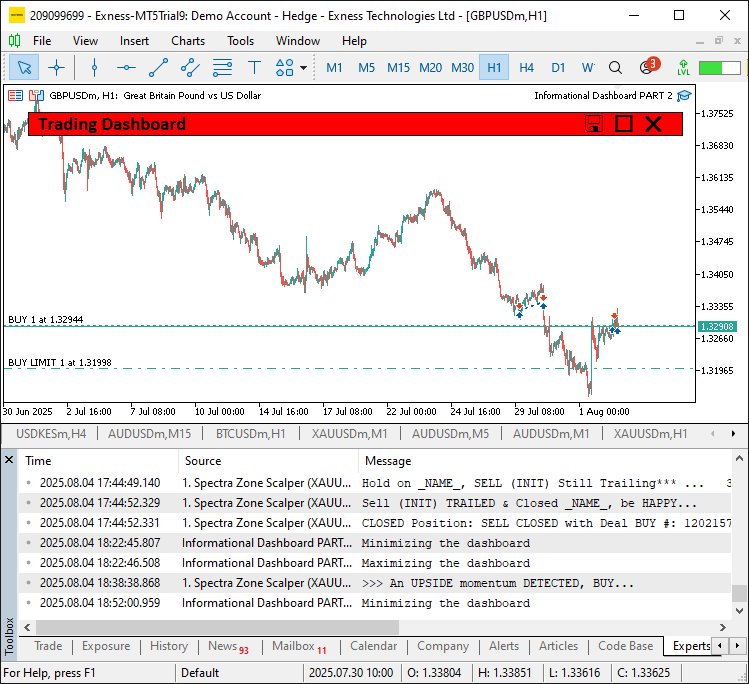
En el caso de los clics en los encabezados, recorremos la lista «headers», cambiamos el valor de «sort_ascending» si «sort_column» coincide, o bien establecemos «sort_column» y «sort_ascending» en «true», y a continuación llamamos a «UpdateDashboard». Cuando se produce un CHARTEVENT_KEYDOWN con la tecla «E», llamamos a «ExportToCSV». Para CHARTEVENT_MOUSE_MOVE, cuando «panel_is_visible», obtenemos «mouse_x», «mouse_y» y «mouse_state»; salimos si no ha habido cambios y no se está arrastrando, actualizamos «last_mouse_x» y «last_mouse_y», y llamamos a «updateHeaderHoverState».
Si «prev_mouse_state» es 0 y «mouse_state» es 1, comprobamos si se ha hecho clic en el área arrastrable (excluyendo los botones), establecemos «panel_dragging» en «true», almacenamos las coordenadas, fijamos el color del encabezado en «clrMediumBlue» y desactivamos el desplazamiento mediante la función ChartSetInteger. Si se está arrastrando y «mouse_state» es 1, calculamos «dx» y «dy», actualizamos «settings.panel_x» y «settings.panel_y» dentro de los límites del gráfico, llamamos a «updatePanelPositions» y volvemos a dibujar. Al soltar el ratón, detenemos el arrastre, actualizamos el efecto al pasar el cursor, volvemos a habilitar el desplazamiento y actualizamos la visualización del gráfico. Esto permite interacciones dinámicas en la interfaz de usuario, lo que da lugar a un panel informativo fácil de usar. Tras la compilación, obtenemos el siguiente resultado del estado al pasar el cursor por el botón.
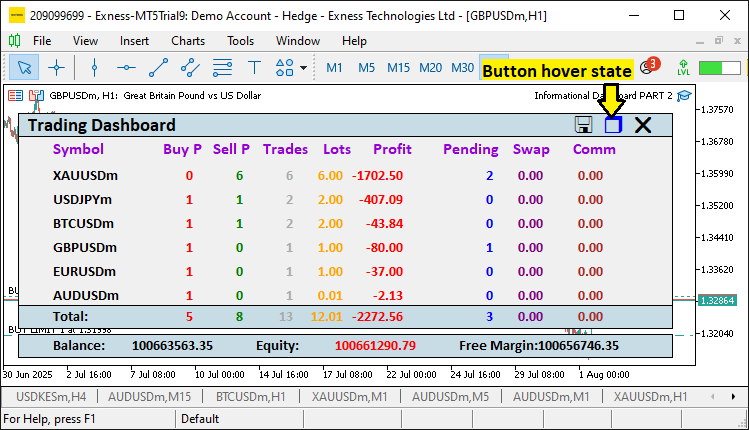
El resultado para el estado maximizado y el estado de arrastre es el siguiente.
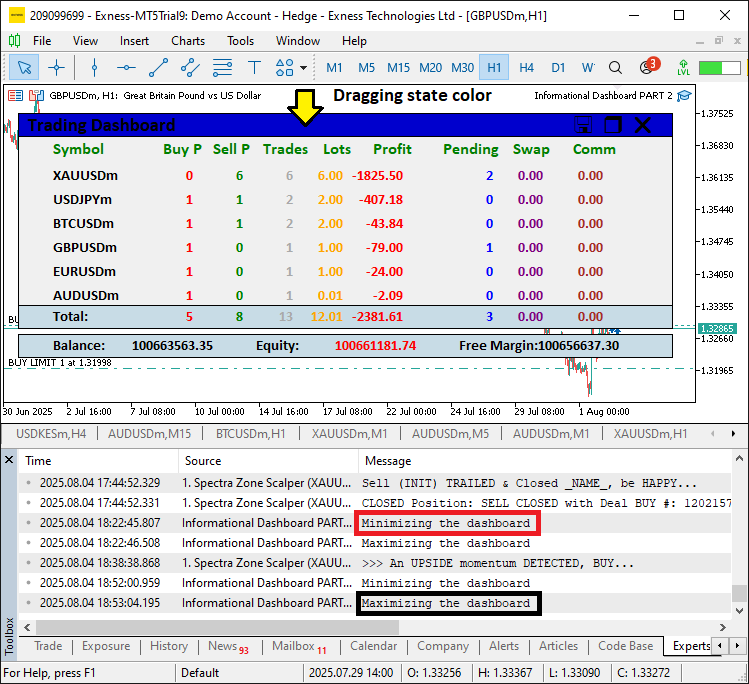
En la imagen podemos ver que hemos añadido los componentes del panel informativo para la lógica de resaltado al pasar el cursor, arrastre y minimización, logrando así nuestros objetivos. Ahora solo queda comprobar el funcionamiento del proyecto, lo cual abordaremos en la siguiente sección.
Pruebas retrospectivas (backtesting)
Hemos realizado las pruebas y, a continuación, se muestra la visualización generada en un único formato de imagen de mapa de bits Graphics Interchange Format (GIF).
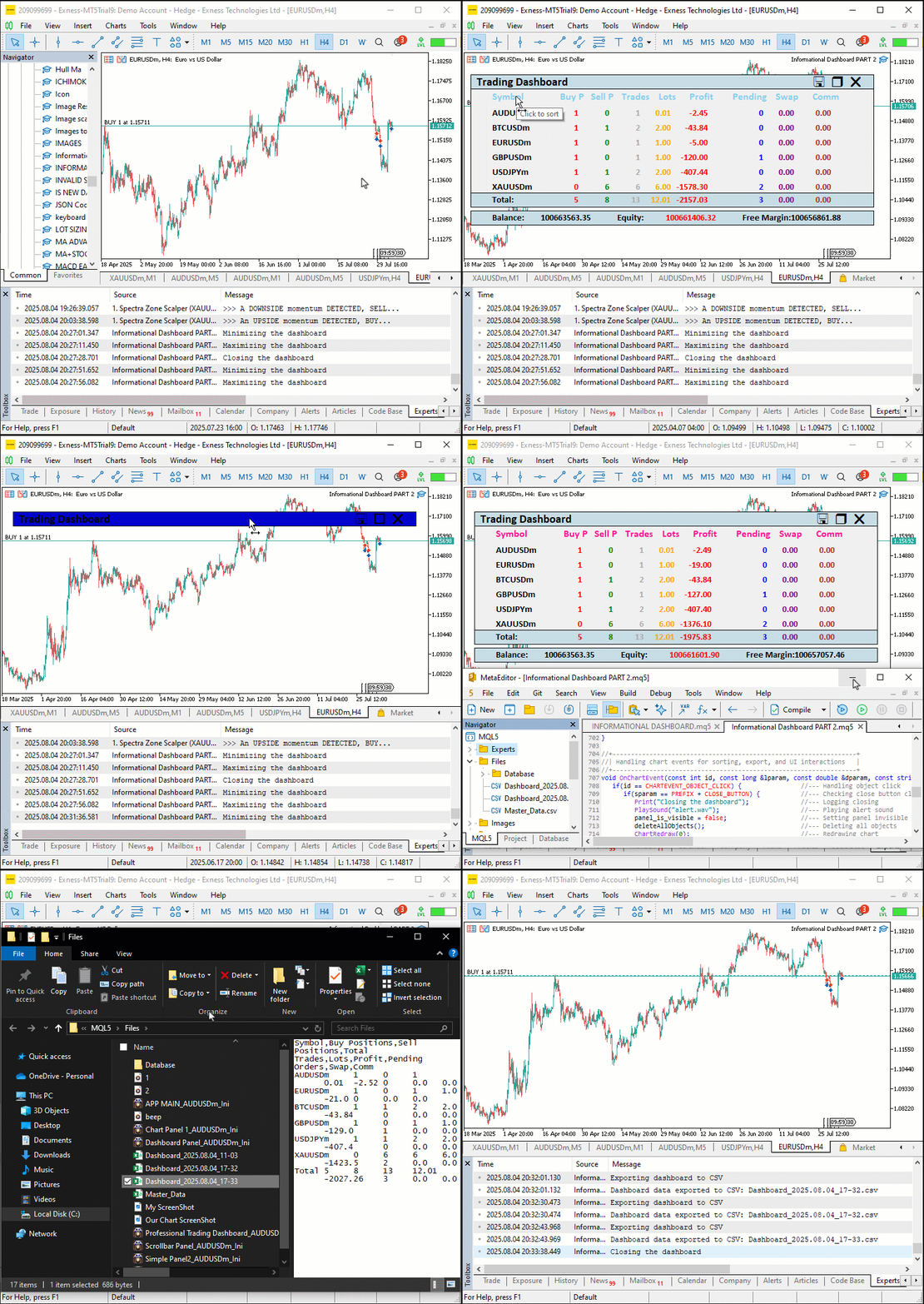
Conclusión
En conclusión, hemos mejorado el panel informativo de MQL5 para la Parte 8, añadiendo funciones para arrastrar y minimizar el panel, botones interactivos como «CLOSE_BUTTON» y «TOGGLE_BUTTON», y efectos al pasar el cursor para mejorar la experiencia del usuario, al tiempo que se mantiene un sólido seguimiento de las posiciones y las cuentas de múltiples símbolos. Hemos detallado la arquitectura y la implementación, utilizando funciones como «createFullDashboard», «updatePanelPositions» y OnChartEvent para ofrecer una herramienta flexible y visualmente reactiva, con actualizaciones en tiempo real y exportación a CSV de Excel. Puedes personalizar este panel informativo para optimizar tu flujo de trabajo de negociación, lo que hará que el análisis de posiciones resulte más intuitivo y eficiente.
Traducción del inglés realizada por MetaQuotes Ltd.
Artículo original: https://www.mql5.com/en/articles/19059
Advertencia: todos los derechos de estos materiales pertenecen a MetaQuotes Ltd. Queda totalmente prohibido el copiado total o parcial.
Este artículo ha sido escrito por un usuario del sitio web y refleja su punto de vista personal. MetaQuotes Ltd. no se responsabiliza de la exactitud de la información ofrecida, ni de las posibles consecuencias del uso de las soluciones, estrategias o recomendaciones descritas.

 Red neuronal en la práctica: Gráfico de la Rectifier
 Arbitraje estadístico mediante acciones cointegradas (Parte 2): Asesor Experto, pruebas retrospectivas y optimización
 Del báscio al intermedio: Subventanas (IV)
 Del básico al intermedio: Subventanas (III)

- Aplicaciones de trading gratuitas
- 8 000+ señales para copiar
- Noticias económicas para analizar los mercados financieros
Usted acepta la política del sitio web y las condiciones de uso