

Automatización de estrategias de trading en MQL5 (Parte 32): Creación de un sistema para el patrón armónico 5 Drives basado en Price Action
 30
30
 0
0

Introducción
En nuestro artículo anterior (Parte 31), desarrollamos un sistema para el patrón 3 Drives en MetaQuotes Language 5 (MQL5) que detectaba patrones armónicos 3 Drives alcistas y bajistas utilizando ratios de Fibonacci, automatizaba las operaciones con niveles personalizables de stop loss y take profit, y los visualizaba mediante objetos gráficos como triángulos y líneas de tendencia. En la Parte 32, creamos un sistema para el patrón 5 Drives que identifica patrones armónicos 5 Drives alcistas y bajistas mediante puntos de pivote y retrocesos y extensiones de Fibonacci específicos, ejecuta operaciones con opciones flexibles de entrada, stop loss y niveles de take profit múltiples, y se complementa con triángulos, líneas de tendencia y etiquetas para visualizar el patrón con claridad. Hoy hablaremos de los siguientes temas:
Al final, usted contará con una estrategia sólida en MQL5 para negociar con el patrón armónico 5 Drives, lista para personalizarla. ¡Empecemos!
Marco del patrón armónico 5 Drives
El patrón 5 Drives (5-0) es una formación armónica de trading definida por seis puntos de oscilación clave —A, B, C, D, E y F— que se presenta en variantes alcistas y bajistas, y está diseñada para identificar zonas de reversión a través de una secuencia de impulsos y retrocesos con ratios específicos de retroceso de Fibonacci. En un patrón 5 Drives alcista, la estructura forma una secuencia de máximo-mínimo-máximo-mínimo-máximo-mínimo, en la que A es un máximo de oscilación, B un mínimo de oscilación, C un máximo de oscilación, D un mínimo de oscilación, E un máximo de oscilación y F un mínimo de oscilación (por encima de B), con los tramos AB y CD extendiéndose entre 1,13 y 1,618 veces el tramo anterior, BC y DE extendiéndose entre 1,618 y 2,24, y CD igualando a AB con un retroceso de 0,5; un patrón bajista invierte esta secuencia con F por debajo de B. A continuación se muestra una representación gráfica de los patrones:
Patrón armónico 5 Drives bajista:

Patrón armónico 5 Drives alcista:
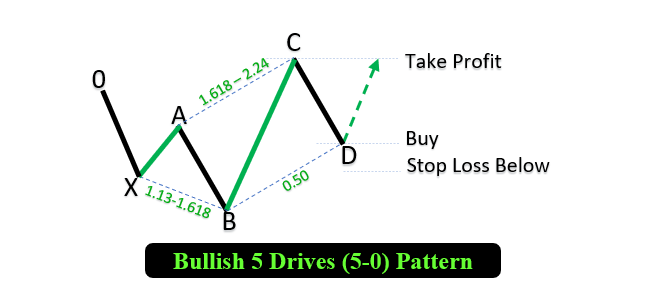
Nuestro enfoque consiste en detectar estos puntos de pivote de oscilación dentro de un rango de barras específico, validar los tramos del patrón según los criterios de Fibonacci, visualizar la estructura A-B-C-D-E-F con objetos gráficos como triángulos y líneas de tendencia, y ejecutar operaciones en el punto F con niveles de stop loss personalizables (basados en Fibonacci o fijos) y niveles de take profit (un tercio, dos tercios o el pivote E) para aprovechar los giros previstos del mercado. ¡Pasemos ahora a la implementación!
Implementación en MQL5
Para crear el programa en MQL5, abra MetaEditor, vaya al Navegador, localice la carpeta «Indicadores», haga clic en la pestaña «Nuevo» y siga las instrucciones para crear el archivo. Una vez creado el archivo, en el entorno de programación, tendremos que declarar algunas variables globales que utilizaremos a lo largo de todo el programa.
//+------------------------------------------------------------------+
//|                                          5 Drives Pattern EA.mq5 |
//|                        Copyright 2025, Forex Algo-Trader, Allan. |
//|                                 "https://t.me/Forex_Algo_Trader" |
//+------------------------------------------------------------------+
#property copyright "Forex Algo-Trader, Allan"
#property link "https://t.me/Forex_Algo_Trader"
#property version "1.00"
#property description "This EA trades based on 5 Drives Strategy"
#property strict

//--- Include the trading library for order functions
#include <Trade\Trade.mqh>   //--- Include Trade library
CTrade obj_Trade;            //--- Instantiate a obj_Trade object
//--- Enumeration for TP levels
enum ENUM_TAKE_PROFIT_LEVEL {
   TP1 = 1, // One-third of the move to E
   TP2 = 2, // Two-thirds of the move to E
   TP3 = 3  // Pivot E Price
};
//--- Enumeration for SL types
enum ENUM_STOP_LOSS_TYPE {
   SL_FIBO = 1, // Fibonacci Extension
   SL_FIXED = 2 // Fixed Points
};
//--- Input parameters for user configuration
input int PivotLeft = 5;                             // Number of bars to the left for pivot check
input int PivotRight = 5;                            // Number of bars to the right for pivot check
input double Tolerance = 0.10;                       // Allowed deviation (10% of move)
input double LotSize = 0.01;                         // Lot size for new orders
input bool AllowTrading = true;                      // Enable or disable trading
input ENUM_TAKE_PROFIT_LEVEL TakeProfitLevel = TP2;  // Take Profit Level
input ENUM_STOP_LOSS_TYPE StopLossType = SL_FIBO;    // Stop Loss Type
input double SL_FiboExtension = 1.618;               // Fibonacci Extension for SL
input double SL_FixedPoints = 50;                    // Fixed Points for SL (in points)

//---------------------------------------------------------------------------
//--- Structure for a pivot point
struct Pivot {
   datetime time; //--- Bar time of the pivot
   double price;  //--- Pivot price (High for swing high, low for swing low)
   bool isHigh;   //--- True if swing high; false if swing low
};
//--- Global dynamic array for storing pivots in chronological order
Pivot pivots[]; //--- Declare a dynamic array to hold identified pivot points
//--- Global variables to lock in a pattern (avoid trading on repaint)
int g_patternFormationBar = -1; //--- Bar index where the pattern was formed (-1 means none)
datetime g_lockedPatternA = 0; //--- The key A pivot time for the locked pattern
//--- Global array to track traded patterns (using A.time as identifier)
datetime tradedPatterns[];
Para sentar las bases del patrón 5 Drives, en primer lugar incluimos la biblioteca «<Trade\Trade.mqh>» e instanciamos «obj_Trade» como objeto CTrade para gestionar operaciones de trading, como la ejecución de órdenes de compra y venta. A continuación, definimos las enumeraciones «ENUM_TAKE_PROFIT_LEVEL» (TP1 para un tercio, TP2 para dos tercios, TP3 para el precio del pivote E) y «ENUM_STOP_LOSS_TYPE» (SL_FIBO para la extensión de Fibonacci, SL_FIXED para puntos fijos) para permitir una configuración flexible de las operaciones, y establecemos los parámetros de entrada: «PivotLeft» y «PivotRight» en 5 barras para la detección de pivotes, «Tolerance» en 0,10 para la desviación de Fibonacci, «LotSize» en 0,01, «AllowTrading» como true, «TakeProfitLevel» como TP2, «StopLossType» como SL_FIBO, «SL_FiboExtension» en 1,618 y «SL_FixedPoints» en 50. Quizá le interese optimizar esto en función del par de divisas con el que esté operando.
Luego definimos la estructura «Pivot» con los campos «time», «price» e «isHigh» para almacenar los puntos de oscilación, declaramos «pivots» como un array dinámico e inicializamos las variables globales «g_patternFormationBar» a -1 para hacer el seguimiento de la formación del patrón, «g_lockedPatternA» en 0 para fijar el tiempo del pivote A, y «tradedPatterns» como un array para hacer el seguimiento de los patrones operados utilizando el tiempo de A. Esta configuración ofrece el marco básico para detectar patrones 5 Drives y operar con ellos. Para la visualización, podemos contar con funciones que permitan dibujar líneas, etiquetas y triángulos.
//+------------------------------------------------------------------+
//| Helper: Draw a filled triangle                                   |
//+------------------------------------------------------------------+
void DrawTriangle(string name, datetime t1, double p1, datetime t2, double p2, datetime t3, double p3, color cl, int width, bool fill, bool back) {
   //--- Attempt to create a triangle object with three coordinate points
   if(ObjectCreate(0, name, OBJ_TRIANGLE, 0, t1, p1, t2, p2, t3, p3)) {
      //--- Set the triangle's color
      ObjectSetInteger(0, name, OBJPROP_COLOR, cl);
      //--- Set the triangle's line style to solid
      ObjectSetInteger(0, name, OBJPROP_STYLE, STYLE_SOLID);
      //--- Set the line width of the triangle
      ObjectSetInteger(0, name, OBJPROP_WIDTH, width);
      //--- Determine if the triangle should be filled
      ObjectSetInteger(0, name, OBJPROP_FILL, fill);
      //--- Set whether the object is drawn in the background
      ObjectSetInteger(0, name, OBJPROP_BACK, back);
   }
}
//+------------------------------------------------------------------+
//| Helper: Draw a trend line                                        |
//+------------------------------------------------------------------+
void DrawTrendLine(string name, datetime t1, double p1, datetime t2, double p2, color cl, int width, int style) {
   //--- Create a trend line object connecting two points
   if(ObjectCreate(0, name, OBJ_TREND, 0, t1, p1, t2, p2)) {
      //--- Set the trend line's color
      ObjectSetInteger(0, name, OBJPROP_COLOR, cl);
      //--- Set the trend line's style (solid, dotted, etc.)
      ObjectSetInteger(0, name, OBJPROP_STYLE, style);
      //--- Set the width of the trend line
      ObjectSetInteger(0, name, OBJPROP_WIDTH, width);
   }
}
//+------------------------------------------------------------------+
//| Helper: Draw a dotted trend line                                 |
//+------------------------------------------------------------------+
void DrawDottedLine(string name, datetime t1, double p, datetime t2, color lineColor) {
   //--- Create a horizontal trend line at a fixed price level with dotted style
   if(ObjectCreate(0, name, OBJ_TREND, 0, t1, p, t2, p)) {
      //--- Set the dotted line's color
      ObjectSetInteger(0, name, OBJPROP_COLOR, lineColor);
      //--- Set the line style to dotted
      ObjectSetInteger(0, name, OBJPROP_STYLE, STYLE_DOT);
      //--- Set the line width to 1
      ObjectSetInteger(0, name, OBJPROP_WIDTH, 1);
   }
}
//+------------------------------------------------------------------+
//| Helper: Draw anchored text label (for pivots)                    |
//| If isHigh is true, anchor at the bottom (label appears above);   |
//| if false, anchor at the top (label appears below).               |
//+------------------------------------------------------------------+
void DrawTextEx(string name, string text, datetime t, double p, color cl, int fontsize, bool isHigh) {
   //--- Create a text label object at the specified time and price
   if(ObjectCreate(0, name, OBJ_TEXT, 0, t, p)) {
      //--- Set the text of the label
      ObjectSetString(0, name, OBJPROP_TEXT, text);
      //--- Set the color of the text
      ObjectSetInteger(0, name, OBJPROP_COLOR, cl);
      //--- Set the font size for the text
      ObjectSetInteger(0, name, OBJPROP_FONTSIZE, fontsize);
      //--- Set the font type and style
      ObjectSetString(0, name, OBJPROP_FONT, "Arial Bold");
      //--- Anchor the text depending on whether it's a swing high or low
      if(isHigh)
         ObjectSetInteger(0, name, OBJPROP_ANCHOR, ANCHOR_BOTTOM);
      else
         ObjectSetInteger(0, name, OBJPROP_ANCHOR, ANCHOR_TOP);
      //--- Center-align the text
      ObjectSetInteger(0, name, OBJPROP_ALIGN, ALIGN_CENTER);
   }
}
Después implementamos funciones de visualización para crear representaciones gráficas claras del patrón armónico 5 Drives y de sus niveles de operación. En primer lugar, desarrollamos la función «DrawTriangle», que utiliza ObjectCreate para dibujar un triángulo rellenado (OBJ_TRIANGLE) definido por tres puntos con tiempos («t1», «t2», «t3») y precios («p1», «p2», «p3»), estableciendo OBJPROP_COLOR en el color especificado, «OBJPROP_STYLE» en «STYLE_SOLID», «OBJPROP_WIDTH» en el ancho indicado, «OBJPROP_FILL» para activar o desactivar el rellenado, y «OBJPROP_BACK» para establecer la posición en segundo plano o en primer plano mediante la función ObjectSetInteger.
A continuación, procedemos a crear la función «DrawTrendLine», que traza una línea de tendencia (OBJ_TREND) entre dos puntos. Luego implementamos la función «DrawDottedLine», que crea una línea horizontal de puntos («OBJ_TREND») a un precio determinado. Por último, desarrollamos la función «DrawTextEx», que crea una etiqueta de texto (OBJ_TEXT) en las coordenadas («t», «p») mediante «ObjectCreate», estableciendo «OBJPROP_TEXT» con el texto especificado, configurando «OBJPROP_COLOR» y «OBJPROP_FONTSIZE», y fijando «OBJPROP_FONT» en «Arial Bold» mediante ObjectSetString y «ObjectSetInteger»; la etiqueta se ancla por encima en los máximos de oscilación o por debajo en los mínimos según «isHigh» con «OBJPROP_ANCHOR», y se centra con «OBJPROP_ALIGN». Ahora podemos pasar al controlador de eventos OnTick e intentar identificar puntos de pivote que podamos usar más adelante para el reconocimiento de patrones. Esta es la lógica que utilizamos para lograrlo.
//+------------------------------------------------------------------+
//| Expert tick function                                             |
//+------------------------------------------------------------------+
void OnTick() {
   //--- Declare a static variable to store the time of the last processed bar
   static datetime lastBarTime = 0;
   //--- Get the time of the current confirmed bar
   datetime currentBarTime = iTime(_Symbol, _Period, 1);
   //--- If the current bar time is the same as the last processed, exit
   if(currentBarTime == lastBarTime)
      return;
   //--- Update the last processed bar time
   lastBarTime = currentBarTime;

   //--- Clear the pivot array for fresh analysis
   ArrayResize(pivots, 0);
   //--- Get the total number of bars available on the chart
   int barsCount = Bars(_Symbol, _Period);
   //--- Define the starting index for pivot detection (ensuring enough left bars)
   int start = PivotLeft;
   //--- Define the ending index for pivot detection (ensuring enough right bars)
   int end = barsCount - PivotRight;

   //--- Loop through bars from 'end-1' down to 'start' to find pivot points
   for(int i = end - 1; i >= start; i--) {
      //--- Assume current bar is both a potential swing high and swing low
      bool isPivotHigh = true;
      bool isPivotLow = true;
      //--- Get the high and low of the current bar
      double currentHigh = iHigh(_Symbol, _Period, i);
      double currentLow = iLow(_Symbol, _Period, i);
      //--- Loop through the window of bars around the current bar
      for(int j = i - PivotLeft; j <= i + PivotRight; j++) {
         //--- Skip if the index is out of bounds
         if(j < 0 || j >= barsCount)
            continue;
         //--- Skip comparing the bar with itself
         if(j == i)
            continue;
         //--- If any bar in the window has a higher high, it's not a swing high
         if(iHigh(_Symbol, _Period, j) > currentHigh)
            isPivotHigh = false;
         //--- If any bar in the window has a lower low, it's not a swing low
         if(iLow(_Symbol, _Period, j) < currentLow)
            isPivotLow = false;
      }
      //--- If the current bar qualifies as either a swing high or swing low
      if(isPivotHigh || isPivotLow) {
         //--- Create a new pivot structure
         Pivot p;
         //--- Set the pivot's time
         p.time = iTime(_Symbol, _Period, i);
         //--- Set the pivot's price depending on whether it is a high or low
         p.price = isPivotHigh ? currentHigh : currentLow;
         //--- Set the pivot type (true for swing high, false for swing low)
         p.isHigh = isPivotHigh;
         //--- Get the current size of the pivots array
         int size = ArraySize(pivots);
         //--- Increase the size of the pivots array by one
         ArrayResize(pivots, size + 1);
         //--- Add the new pivot to the array
         pivots[size] = p;
      }
   }
}
Aquí implementamos la lógica inicial de la función OnTick para detectar los puntos de pivote de oscilación, que son esenciales para identificar el patrón. En primer lugar, declaramos una variable estática «lastBarTime», inicializada en 0, para hacer el seguimiento de la última barra procesada y compararla con «currentBarTime», obtenida de iTime con desplazamiento 1 para el símbolo y el periodo actuales; si no ha cambiado, se sale de la función para evitar un procesamiento redundante, y se actualiza «lastBarTime» cuando se detecta una nueva barra. A continuación, vaciamos el array «pivots» con ArrayResize para garantizar un análisis desde cero. Luego recuperamos el número total de barras con la función Bars, establecemos el rango de detección de pivotes con «start» como «PivotLeft» y «end» como el número total de barras menos «PivotRight», y recorremos las barras seleccionadas.
Para cada barra, suponemos que se trata de un máximo de oscilación («isPivotHigh» verdadero) y un mínimo de oscilación («isPivotLow» verdadero), obtenemos sus precios máximo y mínimo mediante iHigh e iLow, y validamos el pivote comprobando las barras adyacentes dentro de «PivotLeft» y «PivotRight» con «iHigh» e «iLow», invalidando el pivote si alguna barra colindante tiene un máximo más alto o un mínimo más bajo. Por último, si la barra cumple los requisitos para ser considerada un pivote, creamos una estructura «Pivot», establecemos su «time» con «iTime», su «price» en el máximo o el mínimo según «isPivotHigh», y el indicador «isHigh»; a continuación, la añadimos al array «pivots» utilizando ArrayResize y la almacenamos. Al imprimir la estructura de pivote, obtenemos el siguiente array de datos.

Con los datos, podemos extraer los puntos de pivote y, si disponemos de suficientes pivotes, podemos analizar y detectar los patrones. Esta es la lógica que implementamos para lograrlo.
//--- Determine the total number of pivots found
int pivotCount = ArraySize(pivots);
//--- If fewer than six pivots are found, the pattern cannot be formed
if(pivotCount < 6) {
   //--- Reset pattern lock variables
   g_patternFormationBar = -1;
   g_lockedPatternA = 0;
   //--- Exit the OnTick function
   return;
}

//--- Extract the last six pivots as A, B, C, D, E, F
Pivot A = pivots[pivotCount - 6];
Pivot B = pivots[pivotCount - 5];
Pivot C = pivots[pivotCount - 4];
Pivot D = pivots[pivotCount - 3];
Pivot E = pivots[pivotCount - 2];
Pivot F = pivots[pivotCount - 1];

//--- Initialize a flag to indicate if a valid 5 Drives pattern is found
bool patternFound = false;
//--- Initialize pattern type
string patternType = "";
//--- Check for the high-low-high-low-high-low (Bullish reversal) structure
if(A.isHigh && (!B.isHigh) && C.isHigh && (!D.isHigh) && E.isHigh && (!F.isHigh)) {
   //--- Calculate XA length
   double XA_length = C.price - B.price;
   //--- Calculate AB length
   double AB_length = C.price - D.price;
   //--- Check AB extension of XA
   if(AB_length >= 1.13 * XA_length && AB_length <= 1.618 * XA_length) {
      //--- Calculate BC length
      double BC_length = E.price - D.price;
      //--- Check BC extension of AB
      if(BC_length >= 1.618 * AB_length && BC_length <= 2.24 * AB_length) {
         //--- Calculate CD length
         double CD_length = E.price - F.price;
         //--- Check 50% retracement of BC
         double ideal_retrace = 0.5 * BC_length;
         if(MathAbs(CD_length - ideal_retrace) <= Tolerance * BC_length) {
            //--- Check reciprocal AB=CD
            if(MathAbs(CD_length - AB_length) <= Tolerance * AB_length) {
               //--- Additional conditions: higher high at E, D above B
               if(E.price > C.price && F.price > B.price) {
                  patternFound = true;
                  patternType = "Bullish";
               }
            }
         }
      }
   }
}
//--- Check for the low-high-low-high-low-high (Bearish reversal) structure
if((!A.isHigh) && B.isHigh && (!C.isHigh) && D.isHigh && (!E.isHigh) && F.isHigh) {
   //--- Calculate XA length
   double XA_length = B.price - C.price;
   //--- Calculate AB length
   double AB_length = D.price - C.price;
   //--- Check AB extension of XA
   if(AB_length >= 1.13 * XA_length && AB_length <= 1.618 * XA_length) {
      //--- Calculate BC length
      double BC_length = D.price - E.price;
      //--- Check BC extension of AB
      if(BC_length >= 1.618 * AB_length && BC_length <= 2.24 * AB_length) {
         //--- Calculate CD length
         double CD_length = F.price - E.price;
         //--- Check 50% retracement of BC
         double ideal_retrace = 0.5 * BC_length;
         if(MathAbs(CD_length - ideal_retrace) <= Tolerance * BC_length) {
            //--- Check reciprocal AB=CD
            if(MathAbs(CD_length - AB_length) <= Tolerance * AB_length) {
               //--- Additional conditions: lower low at E, D below B
               if(E.price < C.price && F.price < B.price) {
                  patternFound = true;
                  patternType = "Bearish";
               }
            }
         }
      }
   }
}
En primer lugar, determinamos el número total de pivotes con «ArraySize(pivots)», lo almacenamos en «pivotCount» y salimos si se encuentran menos de 6 pivotes, restableciendo «g_patternFormationBar» y «g_lockedPatternA» a -1 y 0, respectivamente, ya que el patrón 5 Drives requiere los puntos A, B, C, D, E y F.
Después extraemos los últimos seis pivotes del array «pivots», asignándoles «A» (el más antiguo), «B», «C», «D», «E» y «F» (el más reciente). A continuación, para un patrón alcista (A: máximo, B: mínimo, C: máximo, D: mínimo, E: máximo, F: mínimo), calculamos la longitud de XA («C.price - B.price»), la longitud de AB («C.price - D.price») para asegurarnos de que se extienda entre 1,13 y 1,618 de XA, la longitud de BC («E.price - D.price») para que se extienda entre 1,618 y 2,24 de AB, y la longitud de CD («E.price - F.price») para que retroceda 0,5 de BC y sea igual a AB dentro de «Tolerance», confirmando que E es un máximo más alto que C y que F está por encima de B, estableciendo «patternFound» en «true» y «patternType» en «Bullish». Por último, para un patrón bajista (A: mínimo; B: máximo; C: mínimo; D: máximo; E: mínimo; F: máximo), aplicamos validaciones similares para XA («B.price - C.price»), AB («D.price - C.price»), BC («D.price - E.price») y CD («F.price - E.price»), asegurándonos de que E sea un mínimo más bajo que C y de que F esté por debajo de B, y estableciendo «patternFound» en «true» y «patternType» en «Bearish». Si se detecta el patrón, podemos visualizarlo en el gráfico.
//--- If a valid 5 Drives pattern is detected
if(patternFound) {
   //--- Print a message indicating the pattern type and detection time
   Print(patternType, " 5 Drives pattern detected at ", TimeToString(F.time, TIME_DATE|TIME_MINUTES|TIME_SECONDS));

   //--- Create a unique prefix for all graphical objects related to this pattern
   string signalPrefix = "5D_" + IntegerToString(A.time);

   //--- Choose triangle color based on the pattern type
   color triangleColor = (patternType=="Bullish") ? clrBlue : clrRed;

   //--- Draw the first triangle connecting pivots B, C, D
   DrawTriangle(signalPrefix+"_Triangle1", B.time, B.price, C.time, C.price, D.time, D.price,
                triangleColor, 2, true, true);
   //--- Draw the second triangle connecting pivots D, E, F
   DrawTriangle(signalPrefix+"_Triangle2", D.time, D.price, E.time, E.price, F.time, F.price,
                triangleColor, 2, true, true);
}
Aquí iniciamos la visualización de los patrones detectados en el gráfico. En primer lugar, si se detecta un patrón válido («patternFound» es verdadero), registramos la detección con Print, mostrando el «patternType» («Bullish» o «Bearish») y la hora del pivote F formateada con TimeToString, incluyendo la fecha, los minutos y los segundos. A continuación, creamos un identificador único, «signalPrefix», concatenando «5D_» con «A.time», convertido a cadena mediante IntegerToString, para garantizar que los objetos del gráfico tengan nombres distintos.
Después establecemos «triangleColor» en azul para los patrones alcistas o en rojo para los bajistas, con el fin de diferenciarlos visualmente. Por último, llamamos a «DrawTriangle» dos veces para visualizar el patrón: primero para dibujar el triángulo BCD que conecta los pivotes B, C y D, y después para trazar el triángulo DEF que conecta los pivotes D, E y F, utilizando «signalPrefix» con los sufijos «_Triangle1» y «_Triangle2», los tiempos y precios respectivos de los pivotes, «triangleColor», un ancho de 2, y activando el rellenado y la visualización en segundo plano mediante indicadores establecidos en true. Obtenemos el siguiente resultado.

En la imagen se puede observar que podemos representar y visualizar correctamente el patrón detectado. Ahora tenemos que seguir trazando las líneas de tendencia para definir mejor su contorno y añadirle una etiqueta que permita identificar más fácilmente los niveles.
//--- Draw boundary trend lines connecting the pivots for clarity
DrawTrendLine(signalPrefix+"_TL_AB", A.time, A.price, B.time, B.price, clrBlack, 2, STYLE_SOLID);
DrawTrendLine(signalPrefix+"_TL_BC", B.time, B.price, C.time, C.price, clrBlack, 2, STYLE_SOLID);
DrawTrendLine(signalPrefix+"_TL_CD", C.time, C.price, D.time, D.price, clrBlack, 2, STYLE_SOLID);
DrawTrendLine(signalPrefix+"_TL_DE", D.time, D.price, E.time, E.price, clrBlack, 2, STYLE_SOLID);
DrawTrendLine(signalPrefix+"_TL_EF", E.time, E.price, F.time, F.price, clrBlack, 2, STYLE_SOLID);

//--- Retrieve the symbol's point size to calculate offsets for text positioning
double point = SymbolInfoDouble(_Symbol, SYMBOL_POINT);
//--- Calculate an offset (15 points) for positioning text above or below pivots
double offset = 15 * point;

//--- Determine the Y coordinate for each pivot label based on its type
double textY_A = (A.isHigh ? A.price + offset : A.price - offset);
double textY_B = (B.isHigh ? B.price + offset : B.price - offset);
double textY_C = (C.isHigh ? C.price + offset : C.price - offset);
double textY_D = (D.isHigh ? D.price + offset : D.price - offset);
double textY_E = (E.isHigh ? E.price + offset : E.price - offset);
double textY_F = (F.isHigh ? F.price + offset : F.price - offset);

//--- Draw text labels for each pivot with appropriate anchoring
DrawTextEx(signalPrefix+"_Text_A", "A", A.time, textY_A, clrBlack, 11, A.isHigh);
DrawTextEx(signalPrefix+"_Text_B", "B", B.time, textY_B, clrBlack, 11, B.isHigh);
DrawTextEx(signalPrefix+"_Text_C", "C", C.time, textY_C, clrBlack, 11, C.isHigh);
DrawTextEx(signalPrefix+"_Text_D", "D", D.time, textY_D, clrBlack, 11, D.isHigh);
DrawTextEx(signalPrefix+"_Text_E", "E", E.time, textY_E, clrBlack, 11, E.isHigh);
DrawTextEx(signalPrefix+"_Text_F", "F", F.time, textY_F, clrBlack, 11, F.isHigh);

//--- Calculate the central label's time as the midpoint between pivots A and D
datetime centralTime = (A.time + D.time) / 2;
//--- Set the central label's price at pivot F's price
double centralPrice = F.price;
//--- Create the central text label indicating the pattern type
if(ObjectCreate(0, signalPrefix+"_Text_Center", OBJ_TEXT, 0, centralTime, centralPrice)) {
   ObjectSetString(0, signalPrefix+"_Text_Center", OBJPROP_TEXT,
      (patternType=="Bullish") ? "Bullish 5 Drives" : "Bearish 5 Drives");
   ObjectSetInteger(0, signalPrefix+"_Text_Center", OBJPROP_COLOR, clrBlack);
   ObjectSetInteger(0, signalPrefix+"_Text_Center", OBJPROP_FONTSIZE, 11);
   ObjectSetString(0, signalPrefix+"_Text_Center", OBJPROP_FONT, "Arial Bold");
   ObjectSetInteger(0, signalPrefix+"_Text_Center", OBJPROP_ALIGN, ALIGN_CENTER);
}
Mejoraremos aún más la visualización de los patrones detectados añadiendo elementos gráficos detallados que representan con claridad la estructura de dichos patrones. En primer lugar, trazamos cinco líneas de tendencia continuas mediante «DrawTrendLine» con un «signalPrefix» único para conectar los puntos de pivote clave: AB, BC, CD, DE y EF, utilizando las horas y los precios de los pivotes (por ejemplo, «A.time», «A.price»), estableciendo OBJPROP_COLOR en «clrBlack», «OBJPROP_WIDTH» en 2 y «OBJPROP_STYLE» en «STYLE_SOLID» con ObjectSetInteger para delinear los tramos del patrón. A continuación, obtenemos el tamaño del punto del símbolo con «SymbolInfoDouble(_Symbol, SYMBOL_POINT)» y calculamos un desplazamiento de 15 puntos para posicionar las etiquetas, determinando las coordenadas Y («textY_A», «textY_B», «textY_C», «textY_D», «textY_E», «textY_F») sumando o restando el desplazamiento en función de si cada pivote es un máximo de oscilación («isHigh» verdadero) o un mínimo, para colocar las etiquetas por encima de los máximos o por debajo de los mínimos.
Acto seguido, utilizamos «DrawTextEx» para crear etiquetas de texto para los pivotes A, B, C, D, E y F con «signalPrefix» y sufijos como «_Text_A», mostrando la letra correspondiente, posicionadas en la hora del pivote y con la coordenada Y ajustada, utilizando «clrBlack», tamaño de fuente 11 y el estado «isHigh» del pivote para el anclaje. Por último, calculamos la posición de la etiqueta central en «centralTime» como el punto medio entre «A.time» y «D.time», y «centralPrice» en «F.price», creando un objeto de texto con «ObjectCreate» denominado «signalPrefix + '_Text_Center'», estableciendo OBJPROP_TEXT en «Bullish 5 Drives» o «Bearish 5 Drives» en función de «patternType», y configurando «OBJPROP_COLOR» en «clrBlack», «OBJPROP_FONTSIZE» en 11, OBJPROP_FONT en «Arial Bold» y «OBJPROP_ALIGN» en «ALIGN_CENTER» mediante las funciones «ObjectSetString» y «ObjectSetInteger». Al ejecutar el programa, obtendremos una visualización del resultado como esta.

En la imagen podemos ver que hemos añadido las líneas y las etiquetas al patrón, lo que facilita su lectura e interpretación. Lo siguiente que debemos hacer es determinar los niveles de operación del patrón.
//--- Define start and end times for drawing horizontal dotted lines for trade levels
datetime lineStart = F.time;
datetime lineEnd = F.time + PeriodSeconds(_Period)*2;

//--- Declare variables for entry price and take profit levels
double entryPriceLevel, TP1Level, TP2Level, TP3Level, tradeDiff;
//--- Calculate trade levels based on whether the pattern is Bullish or Bearish
if(patternType=="Bullish") { //--- Bullish → BUY signal
   //--- Use the current ASK price as the entry
   entryPriceLevel = SymbolInfoDouble(_Symbol, SYMBOL_ASK);
   //--- Set TP3 at pivot E's price
   TP3Level = E.price;
   //--- Calculate the total distance to be covered by the trade
   tradeDiff = TP3Level - entryPriceLevel;
   //--- Set TP1 at one-third of the total move
   TP1Level = entryPriceLevel + tradeDiff/3;
   //--- Set TP2 at two-thirds of the total move
   TP2Level = entryPriceLevel + 2*tradeDiff/3;
} else { //--- Bearish → SELL signal
   //--- Use the current BID price as the entry
   entryPriceLevel = SymbolInfoDouble(_Symbol, SYMBOL_BID);
   //--- Set TP3 at pivot E's price
   TP3Level = E.price;
   //--- Calculate the total distance to be covered by the trade
   tradeDiff = entryPriceLevel - TP3Level;
   //--- Set TP1 at one-third of the total move
   TP1Level = entryPriceLevel - tradeDiff/3;
   //--- Set TP2 at two-thirds of the total move
   TP2Level = entryPriceLevel - 2*tradeDiff/3;
}

//--- Draw dotted horizontal lines to represent the entry and TP levels
DrawDottedLine(signalPrefix+"_EntryLine", lineStart, entryPriceLevel, lineEnd, clrMagenta);
DrawDottedLine(signalPrefix+"_TP1Line", lineStart, TP1Level, lineEnd, clrForestGreen);
DrawDottedLine(signalPrefix+"_TP2Line", lineStart, TP2Level, lineEnd, clrGreen);
DrawDottedLine(signalPrefix+"_TP3Line", lineStart, TP3Level, lineEnd, clrDarkGreen);

//--- Define a label time coordinate positioned just to the right of the dotted lines
datetime labelTime = lineEnd + PeriodSeconds(_Period)/2;

//--- Construct the entry label text with the price
string entryLabel = (patternType=="Bullish") ? "BUY (" : "SELL (";
entryLabel += DoubleToString(entryPriceLevel, _Digits) + ")";
//--- Draw the entry label on the chart
DrawTextEx(signalPrefix+"_EntryLabel", entryLabel, labelTime, entryPriceLevel, clrMagenta, 11, true);

//--- Construct and draw the TP1 label
string tp1Label = "TP1 (" + DoubleToString(TP1Level, _Digits) + ")";
DrawTextEx(signalPrefix+"_TP1Label", tp1Label, labelTime, TP1Level, clrForestGreen, 11, true);

//--- Construct and draw the TP2 label
string tp2Label = "TP2 (" + DoubleToString(TP2Level, _Digits) + ")";
DrawTextEx(signalPrefix+"_TP2Label", tp2Label, labelTime, TP2Level, clrGreen, 11, true);

//--- Construct and draw the TP3 label
string tp3Label = "TP3 (" + DoubleToString(TP3Level, _Digits) + ")";
DrawTextEx(signalPrefix+"_TP3Label", tp3Label, labelTime, TP3Level, clrDarkGreen, 11, true);
Para definir y visualizar los niveles de operación del patrón detectado, establecemos «lineStart» en la hora del pivote F («F.time») y «lineEnd» dos periodos más adelante utilizando «PeriodSeconds(_Period) * 2», y declaramos las variables «entryPriceLevel», «TP1Level», «TP2Level», «TP3Level» y «tradeDiff» para los cálculos de la operación. A continuación, para un patrón alcista («patternType == 'Bullish'»), establecemos «entryPriceLevel» en el precio Ask actual con «SymbolInfoDouble», «TP3Level» en el precio del pivote E, calculamos «tradeDiff» como «TP3Level - entryPriceLevel» y calculamos «TP1Level» y «TP2Level» como un tercio y dos tercios de «tradeDiff» sumados a «entryPriceLevel»; para un patrón bajista, utilizamos el precio Bid, establecemos «TP3Level» en el precio de E, calculamos «tradeDiff» como «entryPriceLevel - TP3Level» y calculamos «TP1Level» y «TP2Level» restando un tercio y dos tercios de la diferencia de la operación.
Después trazamos cuatro líneas horizontales punteadas con la función «DrawDottedLine»: una línea de entrada en «entryPriceLevel» en color magenta, y líneas de take profit en «TP1Level» (verde bosque), «TP2Level» (verde) y «TP3Level» (verde oscuro), que se extienden desde «lineStart» hasta «lineEnd». Por último, establecemos «labelTime» en «lineEnd» más medio periodo, creamos los textos de las etiquetas con los precios formateados mediante la función DoubleToString (por ejemplo, «BUY (precio)» o «SELL (precio)» para la entrada, «TP1 (precio)», etc.) y utilizamos «DrawTextEx» para dibujar estas etiquetas en «labelTime» con los colores correspondientes, tamaño de fuente 11 y ancladas por encima de los niveles de precio. Tras la compilación, obtenemos el siguiente resultado.
Patrón bajista:

Patrón alcista:

En las imágenes se puede observar que hemos representado correctamente los niveles de operación. Lo que debemos hacer ahora es ejecutar operaciones reales, y con ello quedaría completada esta etapa.
//--- Retrieve the index of the current bar
int currentBarIndex = Bars(_Symbol, _Period) - 1;
//--- If no pattern has been previously locked, lock the current pattern formation
if(g_patternFormationBar == -1) {
   g_patternFormationBar = currentBarIndex;
   g_lockedPatternA = A.time;
   //--- Print a message that the pattern is detected and waiting for confirmation
   Print("Pattern detected on bar ", currentBarIndex, ". Waiting for confirmation on next bar.");
   return;
}
//--- If still on the same formation bar, the pattern is considered to be repainting
if(currentBarIndex == g_patternFormationBar) {
   Print("Pattern is repainting; still on locked formation bar ", currentBarIndex, ". No trade yet.");
   return;
}
//--- If we are on a new bar compared to the locked formation
if(currentBarIndex > g_patternFormationBar) {
   //--- Check if the locked pattern still corresponds to the same A pivot
   if(g_lockedPatternA == A.time) {
      Print("Confirmed pattern (locked on bar ", g_patternFormationBar, "). Opening trade on bar ", currentBarIndex, ".");
      //--- Update the pattern formation bar to the current bar
      g_patternFormationBar = currentBarIndex;
      //--- Only proceed with trading if allowed and if there is no existing position
      if(AllowTrading && !PositionSelect(_Symbol)) {
         //--- Check if this pattern has already been traded
         bool alreadyTraded = false;
         for(int k = 0; k < ArraySize(tradedPatterns); k++) {
            if(tradedPatterns[k] == A.time) {
               alreadyTraded = true;
               break;
            }
         }
         if(alreadyTraded) {
            Print("This pattern has already been traded. No new trade executed.");
            return;
         }
         double entryPriceTrade = 0, stopLoss = 0, takeProfit = 0;
         point = SymbolInfoDouble(_Symbol, SYMBOL_POINT);
         bool tradeResult = false;
         //--- Select TP level based on user input
         switch(TakeProfitLevel) {
            case TP1:
               takeProfit = TP1Level;
               break;
            case TP2:
               takeProfit = TP2Level;
               break;
            case TP3:
               takeProfit = TP3Level;
               break;
            default:
               takeProfit = TP2Level; // Fallback to TP2
         }
         //--- Calculate SL based on user-selected method
         if(patternType=="Bullish") { //--- BUY signal
            entryPriceTrade = SymbolInfoDouble(_Symbol, SYMBOL_ASK);
            if(StopLossType == SL_FIBO) {
               double third_drive = E.price - F.price;
               stopLoss = F.price - (SL_FiboExtension - 1.0) * third_drive;
            } else { // SL_FIXED
               stopLoss = entryPriceTrade - SL_FixedPoints * point;
            }
            // Ensure SL is below entry for BUY
            if(stopLoss >= entryPriceTrade) {
               stopLoss = entryPriceTrade - 10 * point;
            }
            tradeResult = obj_Trade.Buy(LotSize, _Symbol, entryPriceTrade, stopLoss, takeProfit, "5 Drives Signal");
            if(tradeResult)
               Print("Buy order opened successfully.");
            else
               Print("Buy order failed: ", obj_Trade.ResultRetcodeDescription());
         }
         //--- For a Bearish pattern, execute a SELL trade
         else if(patternType=="Bearish") { //--- SELL signal
            entryPriceTrade = SymbolInfoDouble(_Symbol, SYMBOL_BID);
            if(StopLossType == SL_FIBO) {
               double third_drive = F.price - E.price;
               stopLoss = F.price + (SL_FiboExtension - 1.0) * third_drive;
            } else { // SL_FIXED
               stopLoss = entryPriceTrade + SL_FixedPoints * point;
            }
            // Ensure SL is above entry for SELL
            if(stopLoss <= entryPriceTrade) {
               stopLoss = entryPriceTrade + 10 * point;
            }
            tradeResult = obj_Trade.Sell(LotSize, _Symbol, entryPriceTrade, stopLoss, takeProfit, "5 Drives Signal");
            if(tradeResult)
               Print("Sell order opened successfully.");
            else
               Print("Sell order failed: ", obj_Trade.ResultRetcodeDescription());
         }
         //--- If trade was successful, mark the pattern as traded
         if(tradeResult) {
            int size = ArraySize(tradedPatterns);
            ArrayResize(tradedPatterns, size + 1);
            tradedPatterns[size] = A.time;
         }
      }
      else {
         //--- If a position is already open, do not execute a new trade
         Print("A position is already open for ", _Symbol, ". No new trade executed.");
      }
   }
   else {
      //--- If the pattern has changed, update the lock with the new formation bar and A pivot
      g_patternFormationBar = currentBarIndex;
      g_lockedPatternA = A.time;
      Print("Pattern has changed; updating lock on bar ", currentBarIndex, ". Waiting for confirmation.");
      return;
   }

}
else {
   //--- If no valid 5 Drives pattern is detected, reset the pattern lock variables
   g_patternFormationBar = -1;
   g_lockedPatternA = 0;
}
Finalizamos la implementación gestionando la ejecución de las operaciones y la confirmación del patrón detectado. En primer lugar, obtenemos el índice de la barra actual con «Bars(_Symbol, _Period) - 1» y lo almacenamos en «currentBarIndex». A continuación, si no hay ningún patrón bloqueado («g_patternFormationBar == -1»), establecemos «g_patternFormationBar» en «currentBarIndex», fijamos la hora del pivote A en «g_lockedPatternA» con «A.time», registramos la detección con Print indicando que se espera la confirmación y salimos.
Después, si aún estamos en la barra de formación («currentBarIndex == g_patternFormationBar»), registramos el repintado y salimos para evitar operar prematuramente. Por último, si se ha formado una nueva barra («currentBarIndex > g_patternFormationBar») y el pivote A coincide con «g_lockedPatternA», confirmamos el patrón, lo registramos, actualizamos «g_patternFormationBar» y comprobamos si se permite operar con «AllowTrading» y si no existen posiciones abiertas mediante PositionSelect; verificamos que el patrón no se haya operado ya comprobando «tradedPatterns», seleccionamos el nivel de take profit («TP1Level», «TP2Level» o «TP3Level») en función de «TakeProfitLevel», calculamos el stop loss utilizando «SL_FIBO» («F.price ± (SL_FiboExtension - 1.0) * third_drive») o «SL_FIXED» («entryPriceTrade ± SL_FixedPoints * point»), nos aseguramos de que el stop loss sea válido (por debajo del precio de entrada para una compra, por encima para una venta, ajustado en 10 puntos si es necesario), ejecutamos una compra o una venta con «obj_Trade.Buy» o «obj_Trade.Sell» utilizando «LotSize» y «5 Drives Signal», registramos el éxito o el fallo y marcamos el patrón como operado en «tradedPatterns»; si no está permitido operar, existe una posición o el patrón ya se ha operado, registramos que no hay operación; si el patrón cambia, actualizamos el bloqueo y esperamos; si no se encuentra ningún patrón, restablecemos las variables globales. Tras la compilación, obtenemos el resultado que sigue.
Señal bajista:

Señal alcista:

En la imagen podemos ver que trazamos el patrón armónico y, una vez confirmado, podemos operar en consecuencia, logrando así nuestro objetivo de identificar, trazar y operar con el patrón. Lo que queda por hacer es realizar el backtesting del programa, y eso se trata en la siguiente sección.
Backtesting
Tras realizar un backtesting exhaustivo, hemos obtenido los siguientes resultados.
Backtest:

Backtest:

Conclusión
En conclusión, hemos desarrollado un sistema basado en el patrón 5 Drives (5-0) en MQL5, que aprovecha la acción del precio para detectar patrones armónicos 5 Drives alcistas y bajistas con ratios de Fibonacci precisos, automatizar operaciones con puntos personalizables de entrada, stop loss y niveles de take profit multinivel, y visualizar los patrones con objetos gráficos como triángulos y líneas de tendencia.
Aviso legal: el presente artículo tiene únicamente fines educativos. Las operaciones de trading conllevan riesgos financieros importantes, y la volatilidad del mercado puede dar lugar a pérdidas. Resulta fundamental realizar un backtesting exhaustivo y aplicar una gestión del riesgo rigurosa antes de implementar este programa en mercados reales.
Aprovechando los conceptos y la implementación presentados, usted puede adaptar este sistema del patrón 5 Drives a su estilo de trading y mejorar sus estrategias algorítmicas. ¡Feliz trading!
Traducción del inglés realizada por MetaQuotes Ltd.
Artículo original: https://www.mql5.com/en/articles/19463
Advertencia: todos los derechos de estos materiales pertenecen a MetaQuotes Ltd. Queda totalmente prohibido el copiado total o parcial.
Este artículo ha sido escrito por un usuario del sitio web y refleja su punto de vista personal. MetaQuotes Ltd. no se responsabiliza de la exactitud de la información ofrecida, ni de las posibles consecuencias del uso de las soluciones, estrategias o recomendaciones descritas.

 Sincronización de gráficos para facilitar el análisis técnico
 Desarrollo de un kit de herramientas para el análisis de la acción del precio (Parte 40): Pasaporte de ADN del mercado
 Pipelines en MQL5
 Automatización de estrategias de trading en MQL5 (parte 31): Creación de un sistema de patrón armónico de 3 Drivesbasado en la acción del precio

- Aplicaciones de trading gratuitas
- 8 000+ señales para copiar
- Noticias económicas para analizar los mercados financieros
Usted acepta la política del sitio web y las condiciones de uso