

Automatización de estrategias de trading en MQL5 (Parte 8): Creación de un Asesor Experto con patrones armónicos Butterfly
 567
567
 2
2

Introducción
En el artículo anterior (Parte 7), desarrollamos un Asesor Experto de trading con cuadrículas (grid) en MetaQuotes Language 5 (MQL5) con escalado dinámico de lotes para optimizar el riesgo y la recompensa. Ahora, en la Parte 8, centramos nuestra atención en el patrón armónico Butterfly, una configuración de reversión que aprovecha las precisas proporciones de Fibonacci para identificar posibles puntos de inflexión del mercado. Este enfoque no solo ayuda a identificar señales claras de entrada y salida, sino que también mejora su estrategia de trading mediante la visualización y ejecución automatizadas. En este artículo, trataremos los siguientes temas:
Al final, tendrás un Asesor Experto completamente funcional capaz de detectar y negociar patrones armónicos Butterfly. ¡Comencemos!
Plan estratégico
El patrón Butterfly es una formación geométrica precisa definida por cinco puntos clave de oscilación o pivote (X, A, B, C y D) y se presenta en dos tipos principales: un patrón bajista y un patrón alcista. En una mariposa bajista, la estructura forma una secuencia alto-bajo-alto-bajo-alto, donde el pivote X es un máximo oscilante, el pivote A un mínimo oscilante, el pivote B un máximo oscilante, el pivote C un mínimo oscilante y el pivote D un máximo oscilante (con D situado por encima de X). Por el contrario, una mariposa alcista se forma en una secuencia baja-alta-baja-alta-baja, con el pivote X como mínimo oscilante y el pivote D cayendo por debajo de X. A continuación se muestran los tipos de patrones visualizados.
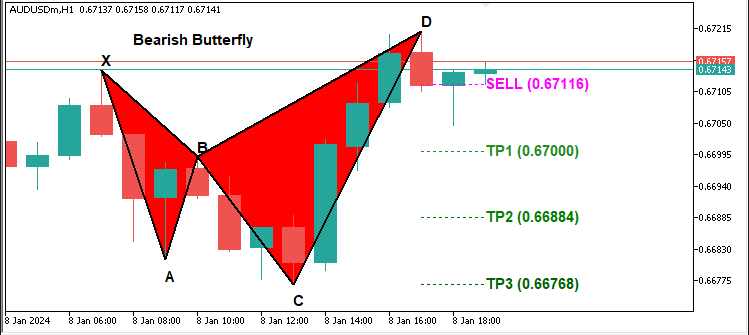
Patrón armónico Butterfly bajista:

Patrón armónico Butterfly alcista:
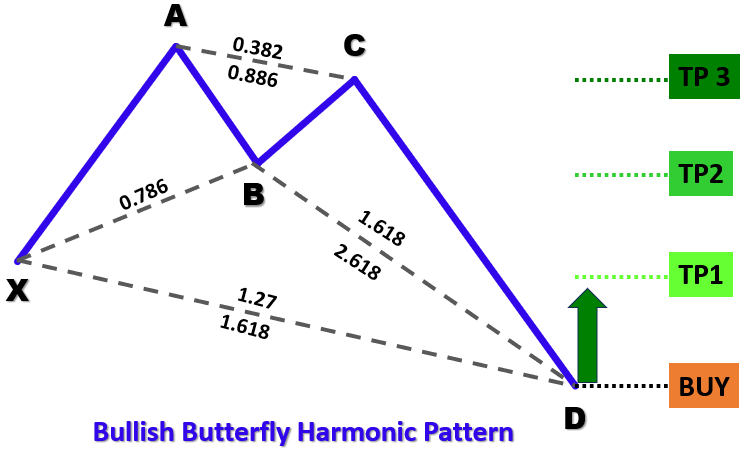
Para identificar los patrones, a continuación se presenta nuestro enfoque estructurado:
- Definición del tramo «XA»: El movimiento inicial desde el pivote X hasta A establecerá nuestra distancia de referencia para el patrón.
- Establecimiento del tramo «AB»: Para ambos tipos de patrones, lo ideal es que el pivote B se produzca aproximadamente en un retroceso del 78,6 % del movimiento XA, lo que confirma que el precio ha revertido una parte significativa del movimiento inicial.
- Análisis del tramo «BC»: Este tramo debería retroceder entre el 38,2 % y el 88,6 % de la distancia XA, lo que garantizaría una consolidación estable antes del movimiento final.
- Establecimiento del tramo «CD»: El tramo final debe extenderse entre el 127 % y el 161,8 % del movimiento XA, completando el patrón e indicando un punto de reversión.
Al aplicar estos criterios geométricos y basados en Fibonacci, nuestro Asesor Experto detectará sistemáticamente patrones Butterfly válidos en los datos históricos de precios. Una vez confirmado un patrón, el programa visualizará la formación en el gráfico con triángulos anotados y líneas de tendencia, y luego ejecutará las operaciones basándose en los niveles calculados de entrada, stop loss y take profit.
Implementación en MQL5
Para crear el programa en MQL5, abra el MetaEditor, vaya al Navegador, localice la carpeta Indicadores, haga clic en la pestaña «Nuevo» y siga las instrucciones para crear el archivo. Una vez creado, en el entorno de programación, tendremos que declarar algunas variables globales que utilizaremos a lo largo del programa.
//+------------------------------------------------------------------+
//|                        Copyright 2025, Forex Algo-Trader, Allan. |
//|                                 "https://t.me/Forex_Algo_Trader" |
//+------------------------------------------------------------------+
#property copyright "Forex Algo-Trader, Allan"
#property link      "https://t.me/Forex_Algo_Trader"
#property version   "1.00"
#property description "This EA trades based on Butterfly Strategy"
#property strict

//--- Include the trading library for order functions
#include <Trade\Trade.mqh>  //--- Include Trade library
CTrade obj_Trade;  //--- Instantiate a obj_Trade object

//--- Input parameters for user configuration
input int    PivotLeft    = 5;      //--- Number of bars to the left for pivot check
input int    PivotRight   = 5;      //--- Number of bars to the right for pivot check
input double Tolerance    = 0.10;   //--- Allowed deviation (10% of XA move)
input double LotSize      = 0.01;   //--- Lot size for new orders
input bool   AllowTrading = true;   //--- Enable or disable trading

//---------------------------------------------------------------------------
//--- Butterfly pattern definition:
//
//--- Bullish Butterfly:
//---   Pivots (X-A-B-C-D): X swing high, A swing low, B swing high, C swing low, D swing high.
//---   Normally XA > 0; Ideal B = A + 0.786*(X-A); Legs within specified ranges.
//
//--- Bearish Butterfly:
//---   Pivots (X-A-B-C-D): X swing low, A swing high, B swing low, C swing high, D swing low.
//---   Normally XA > 0; Ideal B = A - 0.786*(A-X); Legs within specified ranges.
//---------------------------------------------------------------------------

//--- Structure for a pivot point
struct Pivot {
   datetime time;   //--- Bar time of the pivot
   double   price;  //--- Pivot price (High for swing high, low for swing low)
   bool     isHigh; //--- True if swing high; false if swing low
};

//--- Global dynamic array for storing pivots in chronological order
Pivot pivots[];  //--- Declare a dynamic array to hold identified pivot points

//--- Global variables to lock in a pattern (avoid trading on repaint)
int      g_patternFormationBar = -1;  //--- Bar index where the pattern was formed (-1 means none)
datetime g_lockedPatternX      = 0;   //--- The key X pivot time for the locked pattern
Aquí incluimos la biblioteca «Trade\Trade.mqh» para acceder a las funciones de negociación e instanciar el objeto «obj_Trade» para la ejecución de órdenes. Definimos parámetros de entrada como «PivotLeft» y «PivotRight» para identificar puntos de giro, «Tolerance» para la validación de la relación armónica, «LotSize» para el volumen de operaciones y «AllowTrading» para habilitar o deshabilitar las operaciones.
Para realizar un seguimiento de la estructura del mercado, utilizamos una estructura «Pivot» definida por struct que almacena «tiempo», «precio» e «isHigh» (verdadero para máximos oscilantes, falso para mínimos). Estos pivotes se guardan en una matriz dinámica global array, «pivots[]», para referencia histórica. Por último, definimos las variables globales «g_patternFormationBar» y «g_lockedPatternX» para evitar operaciones duplicadas bloqueando un patrón detectado. A continuación, podemos definir funciones que nos ayudarán a visualizar los patrones en el gráfico.
//+------------------------------------------------------------------+
//| Helper: Draw a filled triangle                                   |
//+------------------------------------------------------------------+
void DrawTriangle(string name, datetime t1, double p1, datetime t2, double p2, datetime t3, double p3, color cl, int width, bool fill, bool back) {
   //--- Attempt to create a triangle object with three coordinate points
   if(ObjectCreate(0, name, OBJ_TRIANGLE, 0, t1, p1, t2, p2, t3, p3)) {
      //--- Set the triangle's color
      ObjectSetInteger(0, name, OBJPROP_COLOR, cl);
      //--- Set the triangle's line style to solid
      ObjectSetInteger(0, name, OBJPROP_STYLE, STYLE_SOLID);
      //--- Set the line width of the triangle
      ObjectSetInteger(0, name, OBJPROP_WIDTH, width);
      //--- Determine if the triangle should be filled
      ObjectSetInteger(0, name, OBJPROP_FILL, fill);
      //--- Set whether the object is drawn in the background
      ObjectSetInteger(0, name, OBJPROP_BACK, back);
   }
}

//+------------------------------------------------------------------+
//| Helper: Draw a trend line                                        |
//+------------------------------------------------------------------+
void DrawTrendLine(string name, datetime t1, double p1, datetime t2, double p2, color cl, int width, int style) {
   //--- Create a trend line object connecting two points
   if(ObjectCreate(0, name, OBJ_TREND, 0, t1, p1, t2, p2)) {
      //--- Set the trend line's color
      ObjectSetInteger(0, name, OBJPROP_COLOR, cl);
      //--- Set the trend line's style (solid, dotted, etc.)
      ObjectSetInteger(0, name, OBJPROP_STYLE, style);
      //--- Set the width of the trend line
      ObjectSetInteger(0, name, OBJPROP_WIDTH, width);
   }
}

//+------------------------------------------------------------------+
//| Helper: Draw a dotted trend line                                 |
//+------------------------------------------------------------------+
void DrawDottedLine(string name, datetime t1, double p, datetime t2, color lineColor) {
   //--- Create a horizontal trend line at a fixed price level with dotted style
   if(ObjectCreate(0, name, OBJ_TREND, 0, t1, p, t2, p)) {
      //--- Set the dotted line's color
      ObjectSetInteger(0, name, OBJPROP_COLOR, lineColor);
      //--- Set the line style to dotted
      ObjectSetInteger(0, name, OBJPROP_STYLE, STYLE_DOT);
      //--- Set the line width to 1
      ObjectSetInteger(0, name, OBJPROP_WIDTH, 1);
   }
}

//+------------------------------------------------------------------+
//| Helper: Draw anchored text label (for pivots)                    |
//| If isHigh is true, anchor at the bottom (label appears above);   |
//| if false, anchor at the top (label appears below).               |
//+------------------------------------------------------------------+
void DrawTextEx(string name, string text, datetime t, double p, color cl, int fontsize, bool isHigh) {
   //--- Create a text label object at the specified time and price
   if(ObjectCreate(0, name, OBJ_TEXT, 0, t, p)) {
      //--- Set the text of the label
      ObjectSetString(0, name, OBJPROP_TEXT, text);
      //--- Set the color of the text
      ObjectSetInteger(0, name, OBJPROP_COLOR, cl);
      //--- Set the font size for the text
      ObjectSetInteger(0, name, OBJPROP_FONTSIZE, fontsize);
      //--- Set the font type and style
      ObjectSetString(0, name, OBJPROP_FONT, "Arial Bold");
      //--- Anchor the text depending on whether it's a swing high or low
      if(isHigh)
         ObjectSetInteger(0, name, OBJPROP_ANCHOR, ANCHOR_BOTTOM);
      else
         ObjectSetInteger(0, name, OBJPROP_ANCHOR, ANCHOR_TOP);
      //--- Center-align the text
      ObjectSetInteger(0, name, OBJPROP_ALIGN, ALIGN_CENTER);
   }
}
Definimos un conjunto de funciones auxiliares para visualizar las estructuras de la acción del precio dibujando triángulos, líneas de tendencia, líneas punteadas y etiquetas de texto en el gráfico. Estas funciones ayudarán a marcar puntos clave, direcciones de tendencia y posibles niveles de pivote. La función «DrawTriangle» crea un objeto triangular que conecta tres puntos de precio. Primero utiliza la función ObjectCreate para definir el objeto, de tipo OBJ_TRIANGLE, y luego asigna las propiedades de color, ancho y relleno utilizando la función ObjectSetInteger. Esta función será útil para marcar formaciones armónicas y patrones de acción del precio.
La función «DrawTrendLine» traza líneas de tendencia entre dos puntos de precio, lo que ayuda a definir la estructura del patrón. Crea una línea de tendencia utilizando la función ObjectCreate, de tipo OBJ_TREND, y luego personaliza su color, ancho y estilo. La función «DrawDottedLine» ayudará a dibujar una línea punteada horizontal en un nivel de precio específico entre dos puntos temporales. Esto será útil para marcar los niveles de entrada y salida, asegurando que las zonas clave de precios se destaquen visualmente. La función establece el estilo de línea en STYLE_DOT para diferenciarlo. La función «DrawTextEx» coloca etiquetas de texto en puntos de pivote específicos. Asigna un nombre a la etiqueta, establece su color, tamaño de fuente y alineación, y la coloca por encima o por debajo del nivel de precios, dependiendo de si se trata de un swing alto o un swing bajo. Esto ayuda a anotar los niveles pivote clave para un mejor reconocimiento de patrones.
Armados con estas variables y funciones, podemos pasar al controlador de eventos OnTick y comenzar el reconocimiento de patrones. Sin embargo, dado que no necesitaremos procesar nada en cada tick, debemos definir una lógica que podamos utilizar para procesar la identificación una vez por barra.
//+------------------------------------------------------------------+
//| Expert tick function                                             |
//+------------------------------------------------------------------+
void OnTick() {
   //--- Declare a static variable to store the time of the last processed bar
   static datetime lastBarTime = 0;
   //--- Get the time of the current confirmed bar
   datetime currentBarTime = iTime(_Symbol, _Period, 1);
   //--- If the current bar time is the same as the last processed, exit
   if(currentBarTime == lastBarTime)
      return;
   //--- Update the last processed bar time
   lastBarTime = currentBarTime;

}
Para garantizar que el programa ejecute la lógica solo en barras nuevas y evitar cálculos redundantes, utilizamos la variable estática «lastBarTime» para almacenar la marca de tiempo de la última barra procesada. Para cada tick, recuperamos la hora de la última barra confirmada utilizando la función iTime. Si la hora recuperada coincide con «lastBarTime», salimos antes de tiempo utilizando una instrucción return para evitar volver a procesar. De lo contrario, actualizamos «lastBarTime» para marcar la nueva barra como procesada y podemos proceder a preparar la matriz de almacenamiento para recibir los datos para su procesamiento.
//--- Clear the pivot array for fresh analysis
ArrayResize(pivots, 0);
//--- Get the total number of bars available on the chart
int barsCount = Bars(_Symbol, _Period);
//--- Define the starting index for pivot detection (ensuring enough left bars)
int start = PivotLeft;
//--- Define the ending index for pivot detection (ensuring enough right bars)
int end = barsCount - PivotRight;

//--- Loop through bars from 'end-1' down to 'start' to find pivot points
for(int i = end - 1; i >= start; i--) {
   //--- Assume current bar is both a potential swing high and swing low
   bool isPivotHigh = true;
   bool isPivotLow = true;
   //--- Get the high and low of the current bar
   double currentHigh = iHigh(_Symbol, _Period, i);
   double currentLow = iLow(_Symbol, _Period, i);
   //--- Loop through the window of bars around the current bar
   for(int j = i - PivotLeft; j <= i + PivotRight; j++) {
      //--- Skip if the index is out of bounds
      if(j < 0 || j >= barsCount)
         continue;
      //--- Skip comparing the bar with itself
      if(j == i)
         continue;
      //--- If any bar in the window has a higher high, it's not a swing high
      if(iHigh(_Symbol, _Period, j) > currentHigh)
         isPivotHigh = false;
      //--- If any bar in the window has a lower low, it's not a swing low
      if(iLow(_Symbol, _Period, j) < currentLow)
         isPivotLow = false;
   }
   //--- If the current bar qualifies as either a swing high or swing low
   if(isPivotHigh || isPivotLow) {
      //--- Create a new pivot structure
      Pivot p;
      //--- Set the pivot's time
      p.time = iTime(_Symbol, _Period, i);
      //--- Set the pivot's price depending on whether it is a high or low
      p.price = isPivotHigh ? currentHigh : currentLow;
      //--- Set the pivot type (true for swing high, false for swing low)
      p.isHigh = isPivotHigh;
      //--- Get the current size of the pivots array
      int size = ArraySize(pivots);
      //--- Increase the size of the pivots array by one
      ArrayResize(pivots, size + 1);
      //--- Add the new pivot to the array
      pivots[size] = p;
   }
}
Aquí, identificamos los puntos pivote máximos y mínimos en el gráfico mediante el análisis de datos de precios históricos. En primer lugar, restablecemos la matriz «pivots» utilizando la función ArrayResize para garantizar un análisis actualizado. A continuación, recuperamos el número total de barras utilizando la función Bars y definimos el rango para la detección de pivotes, asegurándonos de que haya suficientes barras a la izquierda y a la derecha para la comparación.
A continuación, utilizamos un bucle for para iterar a través de las barras desde «end-1» hasta «start», suponiendo que cada barra podría ser un pivote potencial. Extraemos el máximo y el mínimo de la barra utilizando las funciones iHigh e iLow. A continuación, comparamos la barra actual con las barras circundantes dentro del rango «PivotLeft» y «PivotRight». Si alguna barra de este rango tiene un máximo más alto, la barra actual no es un máximo oscilante; si alguna tiene un mínimo más bajo, no es un mínimo oscilante. Si una barra cumple los requisitos para ser considerada un pivote, creamos una estructura «Pivot», almacenamos su «tiempo» utilizando la función iTime, establecemos su «precio» en función de si es alto o bajo, y determinamos su tipo (verdadero para swing alto, falso para swing bajo). Por último, cambiamos el tamaño de la matriz «pivots» utilizando ArrayResize y añadimos el pivote identificado. Cuando imprimimos estos datos utilizando la función ArrayPrint, obtenemos el siguiente resultado.
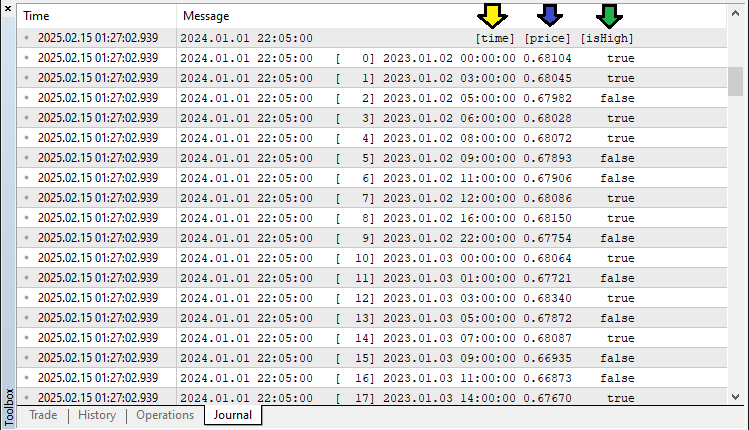
Con los datos, podemos extraer los puntos de pivote y, si tenemos suficientes pivotes, podemos analizar y detectar los patrones. Esta es la lógica que implementamos para lograrlo.
//--- Determine the total number of pivots found
int pivotCount = ArraySize(pivots);
//--- If fewer than five pivots are found, the pattern cannot be formed
if(pivotCount < 5) {
   //--- Reset pattern lock variables
   g_patternFormationBar = -1;
   g_lockedPatternX = 0;
   //--- Exit the OnTick function
   return;
}

//--- Extract the last five pivots as X, A, B, C, and D
Pivot X = pivots[pivotCount - 5];
Pivot A = pivots[pivotCount - 4];
Pivot B = pivots[pivotCount - 3];
Pivot C = pivots[pivotCount - 2];
Pivot D = pivots[pivotCount - 1];

//--- Initialize a flag to indicate if a valid Butterfly pattern is found
bool patternFound = false;
//--- Check for the high-low-high-low-high (Bearish reversal) structure
if(X.isHigh && (!A.isHigh) && B.isHigh && (!C.isHigh) && D.isHigh) {
   //--- Calculate the difference between pivot X and A
   double diff = X.price - A.price;
   //--- Ensure the difference is positive
   if(diff > 0) {
      //--- Calculate the ideal position for pivot B based on Fibonacci ratio
      double idealB = A.price + 0.786 * diff;
      //--- Check if actual B is within tolerance of the ideal position
      if(MathAbs(B.price - idealB) <= Tolerance * diff) {
         //--- Calculate the BC leg length
         double BC = B.price - C.price;
         //--- Verify that BC is within the acceptable Fibonacci range
         if((BC >= 0.382 * diff) && (BC <= 0.886 * diff)) {
            //--- Calculate the CD leg length
            double CD = D.price - C.price;
            //--- Verify that CD is within the acceptable Fibonacci range and that D is above X
            if((CD >= 1.27 * diff) && (CD <= 1.618 * diff) && (D.price > X.price))
               patternFound = true;
         }
      }
   }
}
Aquí, validamos si existe un patrón armónico Butterfly analizando los últimos cinco puntos de pivote identificados. En primer lugar, determinamos el número total de pivotes utilizando la función ArraySize. Si hay menos de cinco pivotes, restablecemos las variables de bloqueo de patrón («g_patternFormationBar» y «g_lockedPatternX») y salimos de la función OnTick para evitar señales falsas. A continuación, extraemos los últimos cinco pivotes y los asignamos como «X», «A», «B», «C» y «D», siguiendo la estructura geométrica del patrón. A continuación, inicializamos el indicador «patternFound» como falso para comprobar si se cumplen las condiciones para un patrón Butterfly válido.
Para un patrón de reversión bajista, verificamos la secuencia de máximos y mínimos pivote: «X» (máximo), «A» (mínimo), «B» (máximo), «C» (mínimo) y «D» (máximo). Si esta estructura se mantiene, calculamos la diferencia del tramo «XA» y utilizamos las proporciones de Fibonacci para comprobar las posiciones esperadas de «B», «C» y «D». El pivote «B» debe estar cerca del retroceso «0,786» de «XA», «BC» debe estar entre «0,382» y «0,886» de «XA», y «CD» debe extenderse entre «1,27» y «1,618» de «XA», asegurando que «D» esté por encima de «X». Si se cumplen todas estas condiciones, confirmamos el patrón estableciendo «patternFound» en verdadero. Del mismo modo, hacemos lo mismo con un patrón alcista.
//--- Check for the low-high-low-high-low (Bullish reversal) structure
if((!X.isHigh) && A.isHigh && (!B.isHigh) && C.isHigh && (!D.isHigh)) {
   //--- Calculate the difference between pivot A and X
   double diff = A.price - X.price;
   //--- Ensure the difference is positive
   if(diff > 0) {
      //--- Calculate the ideal position for pivot B based on Fibonacci ratio
      double idealB = A.price - 0.786 * diff;
      //--- Check if actual B is within tolerance of the ideal position
      if(MathAbs(B.price - idealB) <= Tolerance * diff) {
         //--- Calculate the BC leg length
         double BC = C.price - B.price;
         //--- Verify that BC is within the acceptable Fibonacci range
         if((BC >= 0.382 * diff) && (BC <= 0.886 * diff)) {
            //--- Calculate the CD leg length
            double CD = C.price - D.price;
            //--- Verify that CD is within the acceptable Fibonacci range and that D is below X
            if((CD >= 1.27 * diff) && (CD <= 1.618 * diff) && (D.price < X.price))
               patternFound = true;
         }
      }
   }
}
Si se encuentra el patrón, podemos proceder a visualizarlo en el gráfico.
//--- Initialize a string to store the type of pattern detected
string patternType = "";
//--- If a valid pattern is found, determine its type based on the relationship between D and X
if(patternFound) {
   if(D.price > X.price)
      patternType = "Bearish";  //--- Bearish Butterfly indicates a SELL signal
   else if(D.price < X.price)
      patternType = "Bullish";  //--- Bullish Butterfly indicates a BUY signal
}

//--- If a valid Butterfly pattern is detected
if(patternFound) {
   //--- Print a message indicating the pattern type and detection time
   Print(patternType, " Butterfly pattern detected at ", TimeToString(D.time, TIME_DATE|TIME_MINUTES|TIME_SECONDS));

   //--- Create a unique prefix for all graphical objects related to this pattern
   string signalPrefix = "BF_" + IntegerToString(X.time);

   //--- Choose triangle color based on the pattern type
   color triangleColor = (patternType=="Bullish") ? clrBlue : clrRed;

   //--- Draw the first triangle connecting pivots X, A, and B
   DrawTriangle(signalPrefix+"_Triangle1", X.time, X.price, A.time, A.price, B.time, B.price,
                triangleColor, 2, true, true);
   //--- Draw the second triangle connecting pivots B, C, and D
   DrawTriangle(signalPrefix+"_Triangle2", B.time, B.price, C.time, C.price, D.time, D.price,
                triangleColor, 2, true, true);

   //--- Draw boundary trend lines connecting the pivots for clarity
   DrawTrendLine(signalPrefix+"_TL_XA", X.time, X.price, A.time, A.price, clrBlack, 2, STYLE_SOLID);
   DrawTrendLine(signalPrefix+"_TL_AB", A.time, A.price, B.time, B.price, clrBlack, 2, STYLE_SOLID);
   DrawTrendLine(signalPrefix+"_TL_BC", B.time, B.price, C.time, C.price, clrBlack, 2, STYLE_SOLID);
   DrawTrendLine(signalPrefix+"_TL_CD", C.time, C.price, D.time, D.price, clrBlack, 2, STYLE_SOLID);
   DrawTrendLine(signalPrefix+"_TL_XB", X.time, X.price, B.time, B.price, clrBlack, 2, STYLE_SOLID);
   DrawTrendLine(signalPrefix+"_TL_BD", B.time, B.price, D.time, D.price, clrBlack, 2, STYLE_SOLID);
}
Aquí finalizamos la detección del patrón Butterfly clasificándolo como patrón alcista o bajista y marcándolo visualmente en el gráfico. En primer lugar, inicializamos el «patternType» string para almacenar si el patrón detectado es «alcista» o «bajista». Si «patternFound» es verdadero, comparamos el pivote «D» con el pivote «X» utilizando la propiedad «price». Si «D» es mayor que «X», lo clasificamos como un patrón «bajista», lo que indica una posible oportunidad de venta. Por el contrario, si «D» es inferior a «X», lo clasificamos como un patrón «alcista», lo que indica una posible oportunidad de compra.
Una vez detectado un patrón, imprimimos un mensaje utilizando la función Print para registrar el tipo de patrón y la hora de detección. Se genera un «signalPrefix» único utilizando la función IntegerToString y «X.time» para garantizar que cada patrón tenga objetos gráficos distintos. A continuación, utilizamos la función «DrawTriangle» para resaltar las dos secciones triangulares que forman el patrón Butterfly. Los triángulos se colorean con clrBlue para los patrones alcistas y con «clrRed» para los patrones bajistas. El primer triángulo conecta los pivotes «X», «A» y «B», mientras que el segundo conecta los pivotes «B», «C» y «D».
Para mejorar aún más la visualización, utilizamos la función «DrawTrendLine» para crear líneas de tendencia negras sólidas que conectan los puntos pivote clave: «XA», «AB», «BC», «CD», «XB» y «BD». Estas líneas proporcionan una estructura clara para identificar el patrón armónico y su simetría. Tras la compilación y ejecución, obtenemos los siguientes resultados.
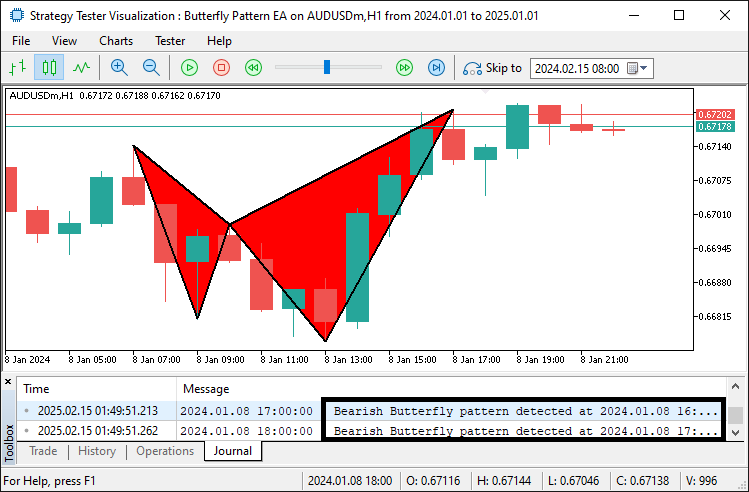
A partir de la imagen, podemos ver que podemos identificar el patrón y visualizarlo. Luego podemos proceder al etiquetado para mejorar su claridad visual.
//--- Retrieve the symbol's point size to calculate offsets for text positioning
double point = SymbolInfoDouble(_Symbol, SYMBOL_POINT);
//--- Calculate an offset (15 points) for positioning text above or below pivots
double offset = 15 * point;

//--- Determine the Y coordinate for each pivot label based on its type
double textY_X = (X.isHigh ? X.price + offset : X.price - offset);
double textY_A = (A.isHigh ? A.price + offset : A.price - offset);
double textY_B = (B.isHigh ? B.price + offset : B.price - offset);
double textY_C = (C.isHigh ? C.price + offset : C.price - offset);
double textY_D = (D.isHigh ? D.price + offset : D.price - offset);

//--- Draw text labels for each pivot with appropriate anchoring
DrawTextEx(signalPrefix+"_Text_X", "X", X.time, textY_X, clrBlack, 11, X.isHigh);
DrawTextEx(signalPrefix+"_Text_A", "A", A.time, textY_A, clrBlack, 11, A.isHigh);
DrawTextEx(signalPrefix+"_Text_B", "B", B.time, textY_B, clrBlack, 11, B.isHigh);
DrawTextEx(signalPrefix+"_Text_C", "C", C.time, textY_C, clrBlack, 11, C.isHigh);
DrawTextEx(signalPrefix+"_Text_D", "D", D.time, textY_D, clrBlack, 11, D.isHigh);

//--- Calculate the central label's time as the midpoint between pivots X and B
datetime centralTime = (X.time + B.time) / 2;
//--- Set the central label's price at pivot D's price
double centralPrice = D.price;
//--- Create the central text label indicating the pattern type
if(ObjectCreate(0, signalPrefix+"_Text_Center", OBJ_TEXT, 0, centralTime, centralPrice)) {
   ObjectSetString(0, signalPrefix+"_Text_Center", OBJPROP_TEXT,
      (patternType=="Bullish") ? "Bullish Butterfly" : "Bearish Butterfly");
   ObjectSetInteger(0, signalPrefix+"_Text_Center", OBJPROP_COLOR, clrBlack);
   ObjectSetInteger(0, signalPrefix+"_Text_Center", OBJPROP_FONTSIZE, 11);
   ObjectSetString(0, signalPrefix+"_Text_Center", OBJPROP_FONT, "Arial Bold");
   ObjectSetInteger(0, signalPrefix+"_Text_Center", OBJPROP_ALIGN, ALIGN_CENTER);
}
Aquí, añadimos etiquetas de texto para marcar el patrón Butterfly en el gráfico. En primer lugar, utilizamos la función SymbolInfoDouble para obtener el valor SYMBOL_POINT del símbolo y calcular un «desplazamiento» para el posicionamiento del texto. Las etiquetas para los pivotes («X», «A», «B», «C», «D») se colocan arriba o abajo según se trate de máximos o mínimos. Utilizamos la función «DrawTextEx» para colocar estas etiquetas con fuente negra y tamaño 11. Se crea una etiqueta central que indica «Bullish Butterfly» (mariposa alcista) o «Bearish Butterfly» (mariposa bajista) en el punto medio entre «X» y «B», utilizando ObjectCreate, ObjectSetString y ObjectSetInteger para establecer el texto, el color, el tamaño de la fuente y la alineación para una visibilidad clara. Esto es lo que obtenemos después de ejecutar el programa.
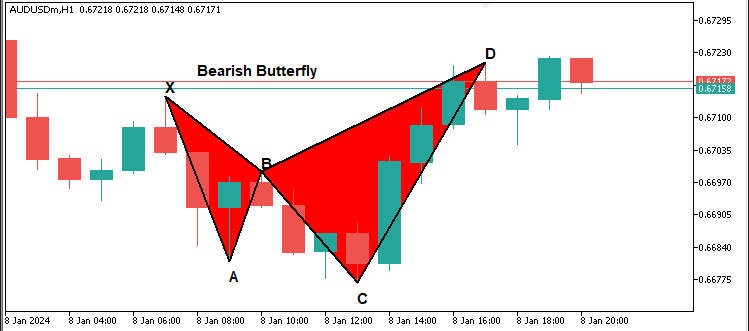
Ahora que tenemos las etiquetas, podemos proceder a agregar los niveles de entrada y salida.
//--- Define start and end times for drawing horizontal dotted lines for obj_Trade levels
datetime lineStart = D.time;
datetime lineEnd = D.time + PeriodSeconds(_Period)*2;

//--- Declare variables for entry price and take profit levels
double entryPriceLevel, TP1Level, TP2Level, TP3Level, tradeDiff;
//--- Calculate obj_Trade levels based on whether the pattern is Bullish or Bearish
if(patternType=="Bullish") { //--- Bullish → BUY signal
   //--- Use the current ASK price as the entry
   entryPriceLevel = SymbolInfoDouble(_Symbol, SYMBOL_ASK);
   //--- Set TP3 at pivot C's price
   TP3Level = C.price;
   //--- Calculate the total distance to be covered by the obj_Trade
   tradeDiff = TP3Level - entryPriceLevel;
   //--- Set TP1 at one-third of the total move
   TP1Level = entryPriceLevel + tradeDiff/3;
   //--- Set TP2 at two-thirds of the total move
   TP2Level = entryPriceLevel + 2*tradeDiff/3;
} else { //--- Bearish → SELL signal
   //--- Use the current BID price as the entry
   entryPriceLevel = SymbolInfoDouble(_Symbol, SYMBOL_BID);
   //--- Set TP3 at pivot C's price
   TP3Level = C.price;
   //--- Calculate the total distance to be covered by the obj_Trade
   tradeDiff = entryPriceLevel - TP3Level;
   //--- Set TP1 at one-third of the total move
   TP1Level = entryPriceLevel - tradeDiff/3;
   //--- Set TP2 at two-thirds of the total move
   TP2Level = entryPriceLevel - 2*tradeDiff/3;
}

//--- Draw dotted horizontal lines to represent the entry and TP levels
DrawDottedLine(signalPrefix+"_EntryLine", lineStart, entryPriceLevel, lineEnd, clrMagenta);
DrawDottedLine(signalPrefix+"_TP1Line", lineStart, TP1Level, lineEnd, clrForestGreen);
DrawDottedLine(signalPrefix+"_TP2Line", lineStart, TP2Level, lineEnd, clrGreen);
DrawDottedLine(signalPrefix+"_TP3Line", lineStart, TP3Level, lineEnd, clrDarkGreen);

//--- Define a label time coordinate positioned just to the right of the dotted lines
datetime labelTime = lineEnd + PeriodSeconds(_Period)/2;

//--- Construct the entry label text with the price
string entryLabel = (patternType=="Bullish") ? "BUY (" : "SELL (";
entryLabel += DoubleToString(entryPriceLevel, _Digits) + ")";
//--- Draw the entry label on the chart
DrawTextEx(signalPrefix+"_EntryLabel", entryLabel, labelTime, entryPriceLevel, clrMagenta, 11, true);

//--- Construct and draw the TP1 label
string tp1Label = "TP1 (" + DoubleToString(TP1Level, _Digits) + ")";
DrawTextEx(signalPrefix+"_TP1Label", tp1Label, labelTime, TP1Level, clrForestGreen, 11, true);

//--- Construct and draw the TP2 label
string tp2Label = "TP2 (" + DoubleToString(TP2Level, _Digits) + ")";
DrawTextEx(signalPrefix+"_TP2Label", tp2Label, labelTime, TP2Level, clrGreen, 11, true);

//--- Construct and draw the TP3 label
string tp3Label = "TP3 (" + DoubleToString(TP3Level, _Digits) + ")";
DrawTextEx(signalPrefix+"_TP3Label", tp3Label, labelTime, TP3Level, clrDarkGreen, 11, true);
Aquí calculamos los niveles de entrada en la operación y de take profit (TP) basándonos en el patrón detectado. Comenzamos utilizando la función PeriodSeconds para determinar la duración del dibujo de los niveles de comercio horizontales. A continuación, utilizamos la función SymbolInfoDouble para recuperar el precio de entrada, aplicando SYMBOL_ASK para una compra y SYMBOL_BID para una venta. Establecemos TP3 utilizando la variable «C.price» y calculamos el rango total de negociación. Calculamos TP1 y TP2 dividiendo este rango en tercios. Utilizamos la función «DrawDottedLine» para dibujar los niveles de entrada y TP con colores distintos. A continuación, determinamos una coordenada temporal de etiqueta adecuada utilizando la función PeriodSeconds para un mejor posicionamiento. Creamos la etiqueta de entrada utilizando la función DoubleToString para dar formato al precio con precisión. Por último, aplicamos la función «DrawTextEx» para mostrar las etiquetas de entrada y TP en el gráfico. Tras la compilación, obtenemos el siguiente resultado.
Patrón bajista:
Patrón alcista:
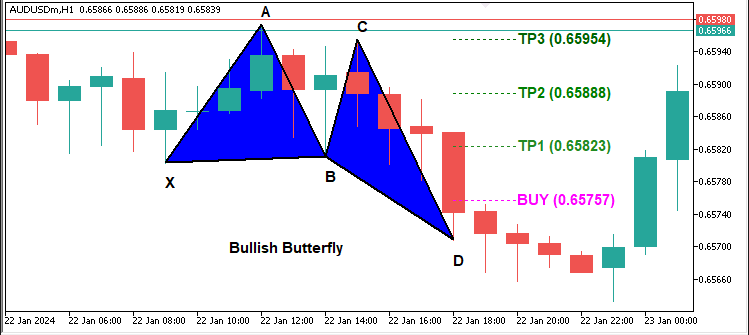
A partir de las imágenes, podemos ver que podemos identificar ambos patrones y trazarlos correctamente. Lo que ahora debemos hacer es esperar confirmaciones después de una vela y si el patrón aún existe, significa que no se repintó, por lo que podemos proceder a abrir las posiciones respectivas desde el nivel de entrada. Esta es la lógica que implementamos para lograrlo.
//--- Retrieve the index of the current bar
int currentBarIndex = Bars(_Symbol, _Period) - 1;
//--- If no pattern has been previously locked, lock the current pattern formation
if(g_patternFormationBar == -1) {
   g_patternFormationBar = currentBarIndex;
   g_lockedPatternX = X.time;
   //--- Print a message that the pattern is detected and waiting for confirmation
   Print("Pattern detected on bar ", currentBarIndex, ". Waiting for confirmation on next bar.");
   return;
}
//--- If still on the same formation bar, the pattern is considered to be repainting
if(currentBarIndex == g_patternFormationBar) {
   Print("Pattern is repainting; still on locked formation bar ", currentBarIndex, ". No obj_Trade yet.");
   return;
}
//--- If we are on a new bar compared to the locked formation
if(currentBarIndex > g_patternFormationBar) {
   //--- Check if the locked pattern still corresponds to the same X pivot
   if(g_lockedPatternX == X.time) {
      Print("Confirmed pattern (locked on bar ", g_patternFormationBar, "). Opening obj_Trade on bar ", currentBarIndex, ".");
      //--- Update the pattern formation bar to the current bar
      g_patternFormationBar = currentBarIndex;
      //--- Only proceed with trading if allowed and if there is no existing position
      if(AllowTrading && !PositionSelect(_Symbol)) {
         double entryPriceTrade = 0, stopLoss = 0, takeProfit = 0;
         point = SymbolInfoDouble(_Symbol, SYMBOL_POINT);
         bool tradeResult = false;
         //--- For a Bullish pattern, execute a BUY obj_Trade
         if(patternType=="Bullish") {  //--- BUY signal
            entryPriceTrade = SymbolInfoDouble(_Symbol, SYMBOL_ASK);
            double diffTrade = TP2Level - entryPriceTrade;
            stopLoss = entryPriceTrade - diffTrade * 3;
            takeProfit = TP2Level;
            tradeResult = obj_Trade.Buy(LotSize, _Symbol, entryPriceTrade, stopLoss, takeProfit, "Butterfly Signal");
            if(tradeResult)
               Print("Buy order opened successfully.");
            else
               Print("Buy order failed: ", obj_Trade.ResultRetcodeDescription());
         }
         //--- For a Bearish pattern, execute a SELL obj_Trade
         else if(patternType=="Bearish") {  //--- SELL signal
            entryPriceTrade = SymbolInfoDouble(_Symbol, SYMBOL_BID);
            double diffTrade = entryPriceTrade - TP2Level;
            stopLoss = entryPriceTrade + diffTrade * 3;
            takeProfit = TP2Level;
            tradeResult = obj_Trade.Sell(LotSize, _Symbol, entryPriceTrade, stopLoss, takeProfit, "Butterfly Signal");
            if(tradeResult)
               Print("Sell order opened successfully.");
            else
               Print("Sell order failed: ", obj_Trade.ResultRetcodeDescription());
         }
      }
      else {
         //--- If a position is already open, do not execute a new obj_Trade
         Print("A position is already open for ", _Symbol, ". No new obj_Trade executed.");
      }
   }
   else {
      //--- If the pattern has changed, update the lock with the new formation bar and X pivot
      g_patternFormationBar = currentBarIndex;
      g_lockedPatternX = X.time;
      Print("Pattern has changed; updating lock on bar ", currentBarIndex, ". Waiting for confirmation.");
      return;
   }
}
}
else {
//--- If no valid Butterfly pattern is detected, reset the pattern lock variables
g_patternFormationBar = -1;
g_lockedPatternX = 0;
}
Esta sección gestiona el bloqueo de patrones y la ejecución de transacciones. En primer lugar, determinamos el índice de barra actual utilizando la función Bars y lo asignamos a «currentBarIndex». Si no se ha bloqueado ningún patrón, lo que se indica mediante «g_patternFormationBar» == -1, asignamos «currentBarIndex» a «g_patternFormationBar» y almacenamos el tiempo pivote X en «g_lockedPatternX», imprimiendo un mensaje mediante la función «Print» que indica que se ha detectado un patrón y que se está esperando confirmación. Si el patrón detectado sigue formándose en la misma barra, utilizamos la función Print para mostrar un mensaje que indica que el patrón se está repintando y no se ejecuta ninguna operación.
Si la barra actual avanza más allá de la barra de formación bloqueada, comprobamos si el patrón sigue siendo válido comparando «g_lockedPatternX» con el tiempo pivote X actual. Si coincide, confirmamos el patrón y nos preparamos para la ejecución de la operación. Antes de realizar una orden, utilizamos la función PositionSelect para asegurarnos de que no existe ninguna posición y marcamos «AllowTrading». Si se confirma un patrón «alcista», recuperamos el precio de venta utilizando la función SymbolInfoDouble con SYMBOL_ASK, calculamos el stop loss y el take profit basándonos en «TP2Level» y ejecutamos una orden de compra utilizando la función «obj_Trade.Buy». Si la operación se realiza correctamente, utilizamos la función «Print» para mostrar un mensaje de confirmación; de lo contrario, utilizamos la función «obj_Trade.ResultRetcodeDescription» para imprimir el motivo del fallo.
Para un patrón «bajista», recuperamos el precio de compra utilizando la función SymbolInfoDouble con SYMBOL_BID, calculamos los niveles de negociación y ejecutamos una orden de venta utilizando la función «obj_Trade.Sell», imprimiendo los mensajes de éxito o fracaso correspondientes con la función Print. Si ya existe una posición, no se ejecuta ninguna nueva operación y se imprime un mensaje utilizando la función «Print». Si cambia el pivote X bloqueado, actualizamos «g_patternFormationBar» y «g_lockedPatternX», indicando que el patrón ha cambiado y está pendiente de confirmación. Si no se detecta ningún patrón válido, restablecemos «g_patternFormationBar» y «g_lockedPatternX» para borrar los bloqueos anteriores.
Tras la compilación, obtenemos el siguiente resultado.
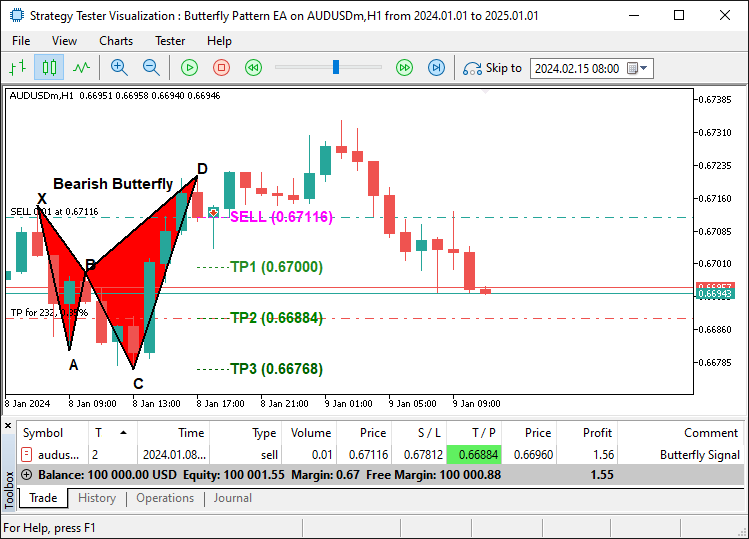
En la imagen, podemos ver que trazamos el patrón de mariposa y seguimos pudiendo operar con él una vez que se confirma que es estable, logrando así nuestro objetivo de identificar, trazar y operar con el patrón. Lo que queda por hacer es realizar pruebas retrospectivas del programa, lo cual se aborda en la siguiente sección.
Pruebas retrospectivas y optimización
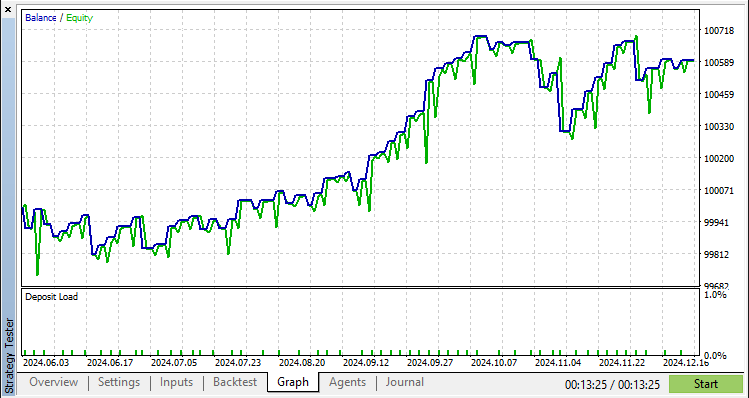
Tras realizar exhaustivas pruebas retrospectivas, hemos obtenido los siguientes resultados.
Gráfico de prueba retrospectiva:
Informe de prueba retrospectiva:
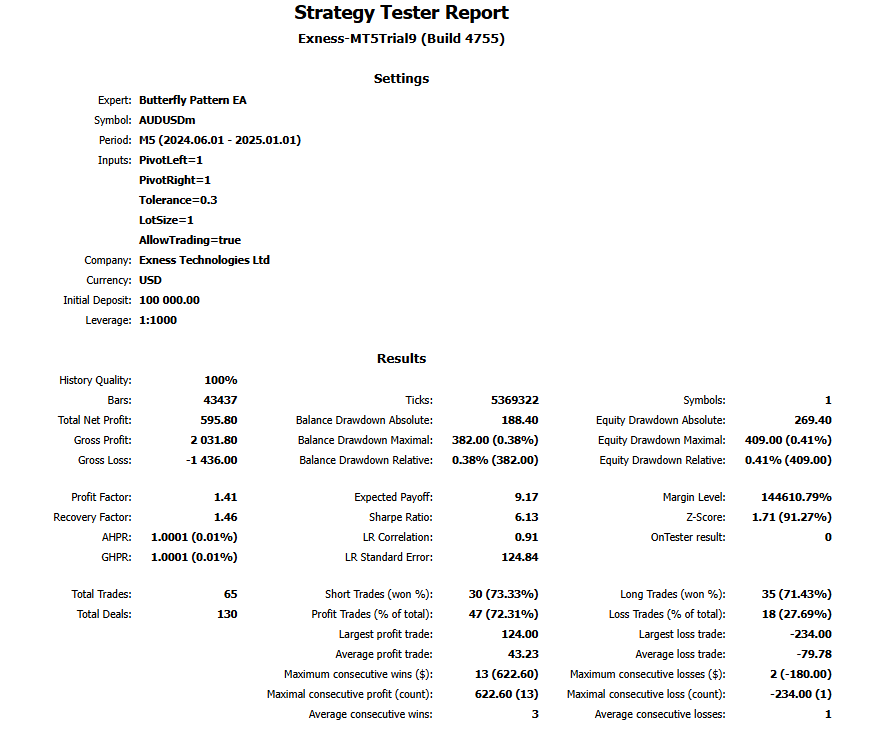
El periodo de prueba de medio año en un gráfico de 5 minutos que generó 65 operaciones muestra que el patrón mariposa es poco frecuente y que, cuanto mayor es el porcentaje de tolerancia, mayor es el número de señales.
Conclusión
En conclusión, hemos desarrollado con éxito un Asesor Experto (EA) MQL5 que detecta y opera con precisión el patrón armónico Butterfly. Aprovechando el reconocimiento de patrones, la validación de pivotes y la ejecución automatizada de operaciones, hemos creado un sistema que se adapta dinámicamente a las condiciones del mercado.
Descargo de responsabilidad: Este artículo tiene fines exclusivamente educativos. El trading conlleva un riesgo financiero significativo y las condiciones del mercado pueden ser impredecibles. Si bien la estrategia descrita proporciona un enfoque estructurado para el trading armónico, no garantiza la rentabilidad. Es esencial realizar pruebas retrospectivas exhaustivas y una gestión adecuada del riesgo antes de implementar este programa en un entorno real.
Al implementar estas técnicas, podrá perfeccionar sus habilidades en el trading con patrones armónicos, mejorar su análisis técnico y avanzar en sus estrategias de trading algorítmico. ¡Mucha suerte en tu aventura en el mundo del trading!
Traducción del inglés realizada por MetaQuotes Ltd.
Artículo original: https://www.mql5.com/en/articles/17223
Advertencia: todos los derechos de estos materiales pertenecen a MetaQuotes Ltd. Queda totalmente prohibido el copiado total o parcial.
Este artículo ha sido escrito por un usuario del sitio web y refleja su punto de vista personal. MetaQuotes Ltd. no se responsabiliza de la exactitud de la información ofrecida, ni de las posibles consecuencias del uso de las soluciones, estrategias o recomendaciones descritas.

 Automatización de estrategias de trading en MQL5 (Parte 9): Creación de un asesor experto para la estrategia de ruptura asiática
 Desarrollo de asesores expertos autooptimizables en MQL5 (Parte 6): Prevención del cierre de posiciones
 Redes neuronales en el trading: Clusterización doble de series temporales (Final)
 Desarrollo de un kit de herramientas para el análisis de la acción del precio (Parte 14): Herramienta Parabolic SAR (Stop and Reverse)

- Aplicaciones de trading gratuitas
- 8 000+ señales para copiar
- Noticias económicas para analizar los mercados financieros
Usted acepta la política del sitio web y las condiciones de uso
Echa un vistazo al nuevo artículo: Automatización de estrategias de trading en MQL5 (Parte 8): Construyendo un Asesor Experto con Patrones Armónicos de Mariposa.
Autor: Allan Munene Mutiiria
Echa un vistazo al nuevo artículo: Automatización de estrategias de trading en MQL5 (Parte 8): Construyendo un Asesor Experto con Patrones Armónicos de Mariposa.
Autor: Allan Munene Mutiiria