

Automatización de estrategias de trading en MQL5 (Parte 15): Patrón armónico Cypher de acción del precio con visualización
 482
482
 4
4

Introducción
En nuestro artículo anterior (Parte 14), desarrollamos una estrategia de capas comerciales utilizando la convergencia/divergencia de la media móvil (MACD) y el indicador de fuerza relativa (RSI) con métodos estadísticos para escalar posiciones en mercados con tendencia de forma dinámica. Ahora, en la Parte 15, nos centramos en automatizar el patrón armónico Cypher, un patrón de reversión basado en Fibonacci, con un Asesor Experto (EA) que detecta, visualiza y opera esta estructura en MetaQuotes Language 5 (MQL5). Cubriremos los siguientes temas:
- Comprensión de la arquitectura del patrón Cypher
- Implementación en MQL5
- Pruebas retrospectivas y optimización
- Conclusión
Al final de este artículo, tendrás un programa totalmente funcional que identifica patrones Cypher, hace anotaciones en gráficos con imágenes claras y ejecuta operaciones con precisión. ¡Empecemos!
Comprensión de la arquitectura del patrón Cypher
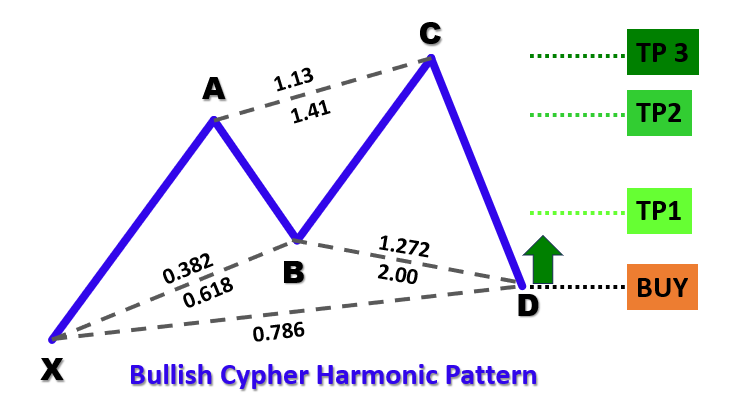
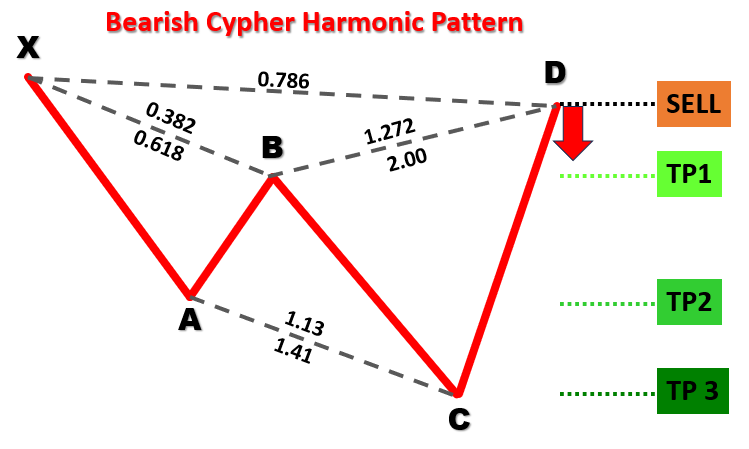
El patrón Cypher es una formación comercial armónica definida por cinco puntos de oscilación clave: X, A, B, C y D, y existe en dos formas: un patrón alcista y un patrón bajista. En un Cypher alcista, la estructura forma una secuencia bajo-alto-bajo-alto-bajo donde el punto X es un mínimo, el punto A un máximo, el punto B un mínimo, el punto C un máximo y el punto D un mínimo (con D ubicado debajo de X). Por el contrario, un Cypher bajista forma una secuencia alto-bajo-alto-bajo-alto, con el punto X como máximo oscilante y el punto D posicionado por encima de X. A continuación se muestran los tipos de patrones visualizados.
Patrón armónico Cypher alcista:
Patrón armónico Cypher bajista:
Para identificar los patrones, a continuación se presenta nuestro enfoque estructurado:
- Definición del tramo XA: El movimiento inicial desde el punto X al punto A establece la distancia de referencia para el patrón, fijando la dirección (al alza para las tendencias bajistas, a la baja para las alcistas).
- Establecimiento de la pata AB: Para ambos tipos de patrones, el punto B debe retroceder entre el 38,2 % y el 61,8 % del movimiento XA, lo que confirma una corrección moderada del movimiento inicial.
- Análisis de la pata BC: Esta pata debe extenderse entre el 127,2 % y el 141,4 % de la pata AB, lo que garantiza un fuerte movimiento contrario antes de la pata final.
- Configuración de la pata CD: La pata final debería retroceder aproximadamente el 78,6 % del movimiento XC (de X a C), marcando la zona de reversión potencial.
Al aplicar estos criterios geométricos y basados en Fibonacci, nuestro sistema de negociación detectará sistemáticamente patrones Cypher válidos en los datos históricos de precios. Una vez que se confirma un patrón, el programa visualizará la formación en el gráfico con triángulos anotados, líneas de tendencia y etiquetas para los puntos X, A, B, C y D, así como niveles comerciales. Esta configuración permite la ejecución automática de operaciones basadas en los niveles de entrada, stop-loss y take-profit calculados, aprovechando el poder predictivo del patrón para las reversiones del mercado.
Implementación en MQL5
Para crear el programa en MQL5, abra el MetaEditor, vaya al Navegador, localice la carpeta Indicadors, haga clic en la pestaña «Nuevo» y siga las instrucciones para crear el archivo. Una vez creado, en el entorno de programación, tendremos que declarar algunas variables globales que utilizaremos a lo largo del programa.
//+------------------------------------------------------------------+
//|                        Copyright 2025, Forex Algo-Trader, Allan. |
//|                                 "https://t.me/Forex_Algo_Trader" |
//+------------------------------------------------------------------+
#property copyright "Forex Algo-Trader, Allan"
#property link      "https://t.me/Forex_Algo_Trader"
#property version   "1.00"
#property description "This EA trades based on Cypher Strategy with visualization"
#property strict //--- Forces strict coding rules to catch errors early

//--- Include the Trade library from MQL5 to handle trading operations like buying and selling
#include <Trade\Trade.mqh>
//--- Create an instance (object) of the CTrade class to use for placing trades
CTrade obj_Trade;

//--- Input parameters let the user customize the EA without editing the code
input int    SwingHighCount    = 5;      // How many bars to check on the left to find a swing point (high or low)
input int    SwingLowCount     = 5;      // How many bars to check on the right to confirm a swing point
input double FibonacciTolerance = 0.10;  // Allowed error margin (10%) for Fibonacci ratios in the pattern
input double TradeVolume       = 0.01;   // Size of the trade (e.g., 0.01 lots is small for testing)
input bool   TradingEnabled    = true;   // True = EA can trade; False = only visualize patterns

//--- Define the Cypher pattern rules as a comment for reference
//--- Bullish Cypher: X (low), A (high), B (low), C (high), D (low)
//---   XA > 0; AB = 0.382-0.618 XA; BC = 1.272-1.414 AB; CD = 0.786 XC; D < X
//--- Bearish Cypher: X (high), A (low), B (high), C (low), D (high)
//---   XA > 0; AB = 0.382-0.618 XA; BC = 1.272-1.414 AB; CD = 0.786 XC; D > X

//--- Define a structure (like a custom data type) to store swing point info
struct SwingPoint {
   datetime TimeOfSwing;    //--- When the swing happened (date and time of the bar)
   double   PriceAtSwing;   //--- Price at the swing (high or low)
   bool     IsSwingHigh;    //--- True = swing high; False = swing low
};

//--- Create a dynamic array to hold all detected swing points
SwingPoint SwingPoints[];
Aquí, iniciamos la implementación en MetaQuotes Language 5 del sistema de trading con patrones Cypher incluyendo la biblioteca «Trade.mqh» para habilitar las operaciones de trading y creando una instancia de la clase «CTrade», denominada «obj_Trade», para la ejecución de las operaciones.
Definimos los parámetros de entrada: «SwingHighCount» y «SwingLowCount» (ambos 5) para la detección de puntos de oscilación, «FibonacciTolerance» (0,10) para la flexibilidad de la relación de Fibonacci, «TradeVolume» (0,01 lotes) para el tamaño de la operación y «TradingEnabled» (true) para activar o desactivar la negociación—permitiendo la personalización por parte del usuario.
La «estructura» SwingPoint se define con «TimeOfSwing» (datetime), «PriceAtSwing» (double) e «IsSwingHigh» (bool) para almacenar los detalles del punto de oscilación, y una matriz dinámica «SwingPoints» contiene todos los puntos de oscilación detectados para el análisis de patrones.
A continuación, podemos definir funciones que nos ayudarán a visualizar los patrones en el gráfico.
//+------------------------------------------------------------------+
//| Helper: Draw a filled triangle                                   |
//+------------------------------------------------------------------+
//--- Function to draw a triangle on the chart to highlight pattern segments
void DrawTriangle(string TriangleName, datetime Time1, double Price1, datetime Time2, double Price2, datetime Time3, double Price3, color LineColor, int LineWidth, bool FillTriangle, bool DrawBehind) {
   //--- Create a triangle object using three points (time, price) on the chart
   if(ObjectCreate(0, TriangleName, OBJ_TRIANGLE, 0, Time1, Price1, Time2, Price2, Time3, Price3)) {
      ObjectSetInteger(0, TriangleName, OBJPROP_COLOR, LineColor);      //--- Set the triangle’s color (e.g., blue or red)
      ObjectSetInteger(0, TriangleName, OBJPROP_STYLE, STYLE_SOLID);    //--- Use a solid line style
      ObjectSetInteger(0, TriangleName, OBJPROP_WIDTH, LineWidth);      //--- Set the line thickness
      ObjectSetInteger(0, TriangleName, OBJPROP_FILL, FillTriangle);    //--- Fill the triangle with color if true
      ObjectSetInteger(0, TriangleName, OBJPROP_BACK, DrawBehind);      //--- Draw behind candles if true
   }
}
Aquí, implementamos la función «DrawTriangle» para mejorar la visualización del patrón Cypher dibujando un triángulo relleno en el gráfico MetaTrader 5, resaltando segmentos específicos del patrón para una mejor comprensión por parte del operador. La función acepta varios parámetros para definir la apariencia y la posición del triángulo: «TriangleName» (string) proporciona un identificador único para el objeto, «Time1», «Time2» y «Time3» (datetime) especifican las coordenadas temporales de los tres vértices del triángulo, mientras que «Price1», «Price2» y «Price3» (double) establecen los niveles de precio correspondientes.
Los parámetros adicionales incluyen «LineColor» (color) para determinar el color del contorno (por ejemplo, azul para patrones alcistas, rojo para bajistas), «LineWidth» (int) para establecer el grosor de los bordes del triángulo, «FillTriangle» (bool) para decidir si el triángulo se rellena con color y «DrawBehind» (bool) para controlar si el triángulo se representa detrás de las velas del gráfico para evitar obstruir los datos de precios.
Dentro de la función, utilizamos la función ObjectCreate para crear un objeto triangular en el gráfico, especificando el tipo de objeto como OBJ_TRIANGLE y pasando las coordenadas de tiempo y precio proporcionadas para los tres puntos. La función comprueba si la creación del objeto se ha realizado correctamente antes de proceder a configurar sus propiedades.
Si la creación se realiza correctamente, llamamos a la función ObjectSetInteger varias veces para establecer los atributos del triángulo: OBJPROP_COLOR asigna el valor «LineColor», «OBJPROP_STYLE» se establece en «STYLE_SOLID» para obtener un contorno sólido, «OBJPROP_WIDTH» aplica el valor «LineWidth», «OBJPROP_FILL» utiliza el booleano «FillTriangle» para habilitar o deshabilitar el relleno, y OBJPROP_BACK utiliza el booleano «DrawBehind» para garantizar que el triángulo aparezca detrás de las velas cuando es verdadero.
Ahora podemos definir el resto de las funciones auxiliares mediante la misma lógica.
//+------------------------------------------------------------------+
//| Helper: Draw a trend line                                        |
//+------------------------------------------------------------------+
//--- Function to draw a straight line between two points on the chart
void DrawTrendLine(string LineName, datetime StartTime, double StartPrice, datetime EndTime, double EndPrice, color LineColor, int LineWidth, int LineStyle) {
   //--- Create a trend line object connecting two points (start time/price to end time/price)
   if(ObjectCreate(0, LineName, OBJ_TREND, 0, StartTime, StartPrice, EndTime, EndPrice)) {
      ObjectSetInteger(0, LineName, OBJPROP_COLOR, LineColor);      //--- Set the line color
      ObjectSetInteger(0, LineName, OBJPROP_STYLE, LineStyle);      //--- Set line style (e.g., solid or dashed)
      ObjectSetInteger(0, LineName, OBJPROP_WIDTH, LineWidth);      //--- Set line thickness
      ObjectSetInteger(0, LineName, OBJPROP_BACK, true);
   }
}

//+------------------------------------------------------------------+
//| Helper: Draw a dotted trend line                                 |
//+------------------------------------------------------------------+
//--- Function to draw a horizontal dotted line (e.g., for entry or take-profit levels)
void DrawDottedLine(string LineName, datetime StartTime, double LinePrice, datetime EndTime, color LineColor) {
   //--- Create a horizontal line from start time to end time at a fixed price
   if(ObjectCreate(0, LineName, OBJ_TREND, 0, StartTime, LinePrice, EndTime, LinePrice)) {
      ObjectSetInteger(0, LineName, OBJPROP_COLOR, LineColor);      //--- Set the line color
      ObjectSetInteger(0, LineName, OBJPROP_STYLE, STYLE_DOT);      //--- Use dotted style
      ObjectSetInteger(0, LineName, OBJPROP_WIDTH, 1);              //--- Thin line
   }
}

//+------------------------------------------------------------------+
//| Helper: Draw anchored text label (for pivots and levels)         |
//+------------------------------------------------------------------+
//--- Function to place text labels (e.g., "X" or "TP1") on the chart
void DrawTextLabel(string LabelName, string LabelText, datetime LabelTime, double LabelPrice, color TextColor, int FontSize, bool IsAbove) {
   //--- Create a text object at a specific time and price
   if(ObjectCreate(0, LabelName, OBJ_TEXT, 0, LabelTime, LabelPrice)) {
      ObjectSetString(0, LabelName, OBJPROP_TEXT, LabelText);          //--- Set the text to display
      ObjectSetInteger(0, LabelName, OBJPROP_COLOR, TextColor);        //--- Set text color
      ObjectSetInteger(0, LabelName, OBJPROP_FONTSIZE, FontSize);      //--- Set text size
      ObjectSetString(0, LabelName, OBJPROP_FONT, "Arial Bold");       //--- Use bold Arial font
      //--- Position text below if it’s a high point, above if it’s a low point
      ObjectSetInteger(0, LabelName, OBJPROP_ANCHOR, IsAbove ? ANCHOR_BOTTOM : ANCHOR_TOP);
      ObjectSetInteger(0, LabelName, OBJPROP_ALIGN, ALIGN_CENTER);     //--- Center the text
   }
}
Aquí implementamos la función «DrawTrendLine» para dibujar una línea recta que conecta los puntos de oscilación del patrón Cypher en el gráfico, utilizando los parámetros «LineName» (string), «StartTime», «EndTime» (datetime), «StartPrice», «EndPrice» (double), «LineColor» (color), «LineWidth» (int) y «LineStyle» (int). Utilizamos la función ObjectCreate para crear una línea «OBJ_TREND» y, si tiene éxito, establecemos «OBJPROP_COLOR», «OBJPROP_STYLE», «OBJPROP_WIDTH» y «OBJPROP_BACK» (true) con «ObjectSetInteger» para la visibilidad detrás de las velas.
La función «DrawDottedLine» dibuja una línea punteada horizontal para los niveles de negociación, utilizando «LineName» (string), «StartTime», «EndTime» (datetime), «LinePrice» (double) y «LineColor» (color). Creamos un objeto OBJ_TREND con «ObjectCreate» a un precio fijo y establecemos «OBJPROP_COLOR», «OBJPROP_STYLE» en «STYLE_DOT» y «OBJPROP_WIDTH» en 1 utilizando ObjectSetInteger para obtener un marcador sutil.
La función «DrawTextLabel» coloca etiquetas de texto para puntos de oscilación o niveles de negociación, tomando «LabelName», «LabelText» (string), «LabelTime» (datetime), «LabelPrice» (double), «TextColor» (color), «FontSize» (int) e «IsAbove» (bool). Creamos un objeto OBJ_TEXT con «ObjectCreate» y utilizamos «ObjectSetString» para «OBJPROP_TEXT» y «OBJPROP_FONT» («Arial Bold»), y «ObjectSetInteger» para «OBJPROP_COLOR», «OBJPROP_FONTSIZE», «OBJPROP_ANCHOR» («ANCHOR_BOTTOM» o «ANCHOR_TOP») y «OBJPROP_ALIGN» (ALIGN_CENTER) para garantizar que las anotaciones sean claras.
Armados con estas variables y funciones, podemos pasar al controlador de eventos OnTick y comenzar el reconocimiento de patrones. Sin embargo, como no necesitaremos procesar nada en cada tick, necesitamos definir una lógica que podamos usar para procesar la identificación una vez por barra.
//+------------------------------------------------------------------+
//| Expert tick function                                             |
//+------------------------------------------------------------------+
//--- Main function that runs every time a new price tick arrives
void OnTick() {
   //--- Use a static variable to track the last bar’s time so we only process new bars
   static datetime LastProcessedBarTime = 0;
   //--- Get the time of the second-to-last bar (latest complete bar)
   datetime CurrentBarTime = iTime(_Symbol, _Period, 1);
   //--- If no new bar has formed, exit to avoid over-processing
   if(CurrentBarTime == LastProcessedBarTime)
      return;
   LastProcessedBarTime = CurrentBarTime;  //--- Update to the current bar
}
En el controlador de eventos OnTick, que actúa como controlador de eventos principal y se ejecuta cada vez que llega un nuevo tick de precios a la plataforma MetaTrader 5, declaramos una variable estática «LastProcessedBarTime» para realizar un seguimiento de la marca de tiempo de la última barra procesada, lo que garantiza que la función solo procese barras nuevas para optimizar el rendimiento.
Utilizando la función iTime, recuperamos la hora de la penúltima barra (la última barra completa) y la almacenamos en «CurrentBarTime». Luego comparamos "CurrentBarTime" con "LastProcessedBarTime" para verificar si se ha formado una nueva barra; si son iguales, salimos de la función con una declaración de retorno para evitar el procesamiento redundante.
Si se detecta una nueva barra, actualizamos "LastProcessedBarTime" a "CurrentBarTime", lo que permite que la función proceda con la lógica posterior para analizar los datos de precios y detectar patrones Cypher. A continuación, necesitamos definir variables que ayudarán a definir los niveles del punto de oscilación.
//--- Clear the SwingPoints array to start fresh each time
ArrayResize(SwingPoints, 0);
//--- Get the total number of bars on the chart
int TotalBars = Bars(_Symbol, _Period);
int StartBarIndex = SwingHighCount;         //--- Start checking swings after SwingHighCount bars
int EndBarIndex = TotalBars - SwingLowCount; //--- Stop before the last SwingLowCount bars
Utilizamos la función ArrayResize para borrar la matriz «SwingPoints» estableciendo su tamaño en 0, lo que garantiza un nuevo comienzo para almacenar nuevos puntos de oscilación en cada nueva barra. A continuación, recuperamos el número total de barras del gráfico utilizando la función Bars y almacenamos el resultado en «TotalBars», que define el alcance de los datos históricos que se van a analizar.
Para centrarnos en las barras relevantes para la detección de oscilaciones, establecemos «StartBarIndex» en el valor de «SwingHighCount», marcando la barra más temprana para comprobar las oscilaciones, y calculamos «EndBarIndex» como «TotalBars» menos «SwingLowCount», asegurándonos de detenernos antes de las últimas barras para disponer de datos suficientes para confirmar los puntos de oscilación.
Con estos, podemos realizar un bucle y recopilar datos del punto de swing.
//--- Loop through bars to find swing highs and lows (swing points)
for(int BarIndex = EndBarIndex - 1; BarIndex >= StartBarIndex; BarIndex--) {
   bool IsSwingHigh = true;   //--- Assume it’s a high until proven otherwise
   bool IsSwingLow = true;    //--- Assume it’s a low until proven otherwise
   double CurrentBarHigh = iHigh(_Symbol, _Period, BarIndex); //--- Get the high of this bar
   double CurrentBarLow = iLow(_Symbol, _Period, BarIndex);   //--- Get the low of this bar
   //--- Check bars to the left and right to confirm it’s a swing point
   for(int NeighborIndex = BarIndex - SwingHighCount; NeighborIndex <= BarIndex + SwingLowCount; NeighborIndex++) {
      if(NeighborIndex < 0 || NeighborIndex >= TotalBars || NeighborIndex == BarIndex) //--- Skip invalid bars or current bar
         continue;
      if(iHigh(_Symbol, _Period, NeighborIndex) > CurrentBarHigh) //--- If any bar is higher, not a high
         IsSwingHigh = false;
      if(iLow(_Symbol, _Period, NeighborIndex) < CurrentBarLow)   //--- If any bar is lower, not a low
         IsSwingLow = false;
   }
   //--- If it’s a high or low, store it in the SwingPoints array
   if(IsSwingHigh || IsSwingLow) {
      SwingPoint NewSwing;
      NewSwing.TimeOfSwing = iTime(_Symbol, _Period, BarIndex); //--- Store the bar’s time
      NewSwing.PriceAtSwing = IsSwingHigh ? CurrentBarHigh : CurrentBarLow; //--- Store high or low price
      NewSwing.IsSwingHigh = IsSwingHigh;              //--- Mark as high or low
      int CurrentArraySize = ArraySize(SwingPoints);   //--- Get current array size
      ArrayResize(SwingPoints, CurrentArraySize + 1);  //--- Add one more slot
      SwingPoints[CurrentArraySize] = NewSwing;        //--- Add the swing to the array
   }
}
Aquí, implementamos la lógica de detección del punto de oscilación para identificar los máximos y mínimos del patrón Cypher. Usamos un bucle for para iterar a través de las barras desde "EndBarIndex - 1" hasta "StartBarIndex" en orden descendente, con "BarIndex" rastreando la barra actual. Para cada barra, inicializamos «IsSwingHigh» e «IsSwingLow» como verdaderas, asumiendo que la barra es un punto de oscilación hasta que se demuestre lo contrario, y recuperamos los precios máximos y mínimos de la barra utilizando las funciones iHigh e iLow, almacenándolos en «CurrentBarHigh» y «CurrentBarLow». Un bucle «for» anidado comprueba las barras vecinas desde «BarIndex - SwingHighCount» hasta «BarIndex + SwingLowCount», utilizando «NeighborIndex» para omitir índices no válidos o la propia barra actual con una instrucción «continue».
Si el máximo de cualquier barra vecina supera «CurrentBarHigh» o el mínimo cae por debajo de «CurrentBarLow» (a través de iHigh e iLow), establecemos «IsSwingHigh» o «IsSwingLow» en falso, respectivamente. Si cualquiera de las dos condiciones sigue siendo cierta, creamos una instancia «SwingPoint» denominada «NewSwing», asignando «TimeOfSwing» con la hora de la barra de iTime, «PriceAtSwing» como «CurrentBarHigh» o «CurrentBarLow» en función de «IsSwingHigh», y «IsSwingHigh» en consecuencia.
A continuación, utilizamos la función «ArraySize» para obtener el tamaño actual de «SwingPoints», lo ampliamos en uno con ArrayResize y almacenamos «NewSwing» en la matriz «SwingPoints» en el nuevo índice, creando la colección de puntos de oscilación para el análisis de patrones. Cuando imprimimos los datos utilizando la función ArrayPrint(SwingPoints), obtenemos el siguiente resultado.
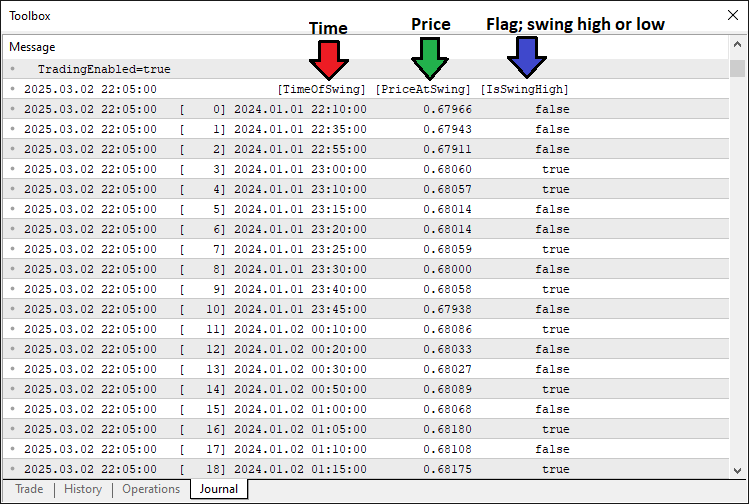
Con los datos, podemos extraer los puntos pivote y si tenemos suficientes pivotes, podemos analizar y detectar los patrones. Aquí está la lógica que implementamos para lograrlo.
//--- Check if we have enough swing points (need 5 for Cypher: X, A, B, C, D)
int TotalSwingPoints = ArraySize(SwingPoints);
if(TotalSwingPoints < 5)
   return;  //--- Exit if not enough swing points

//--- Assign the last 5 swing points to X, A, B, C, D (most recent is D)
SwingPoint PointX = SwingPoints[TotalSwingPoints - 5];
SwingPoint PointA = SwingPoints[TotalSwingPoints - 4];
SwingPoint PointB = SwingPoints[TotalSwingPoints - 3];
SwingPoint PointC = SwingPoints[TotalSwingPoints - 2];
SwingPoint PointD = SwingPoints[TotalSwingPoints - 1];

//--- Variables to track if we found a pattern and its type
bool PatternFound = false;
string PatternDirection = "";

//--- Check for Bearish Cypher pattern
if(PointX.IsSwingHigh && !PointA.IsSwingHigh && PointB.IsSwingHigh && !PointC.IsSwingHigh && PointD.IsSwingHigh) {
   double LegXA = PointX.PriceAtSwing - PointA.PriceAtSwing;  //--- Calculate XA leg (should be positive)
   if(LegXA > 0) {
      double LegAB = PointB.PriceAtSwing - PointA.PriceAtSwing; //--- AB leg
      double LegBC = PointB.PriceAtSwing - PointC.PriceAtSwing; //--- BC leg
      double LegXC = PointX.PriceAtSwing - PointC.PriceAtSwing; //--- XC leg
      double LegCD = PointD.PriceAtSwing - PointC.PriceAtSwing; //--- CD leg
      //--- Check Fibonacci rules and D > X for bearish
      if(LegAB >= 0.382 * LegXA && LegAB <= 0.618 * LegXA &&
         LegBC >= 1.272 * LegAB && LegBC <= 1.414 * LegAB &&
         MathAbs(LegCD - 0.786 * LegXC) <= FibonacciTolerance * LegXC && PointD.PriceAtSwing > PointX.PriceAtSwing) {
         PatternFound = true;
         PatternDirection = "Bearish";
      }
   }
}
//--- Check for Bullish Cypher pattern
else if(!PointX.IsSwingHigh && PointA.IsSwingHigh && !PointB.IsSwingHigh && PointC.IsSwingHigh && !PointD.IsSwingHigh) {
   double LegXA = PointA.PriceAtSwing - PointX.PriceAtSwing;  //--- Calculate XA leg (should be positive)
   if(LegXA > 0) {
      double LegAB = PointA.PriceAtSwing - PointB.PriceAtSwing; //--- AB leg
      double LegBC = PointC.PriceAtSwing - PointB.PriceAtSwing; //--- BC leg
      double LegXC = PointC.PriceAtSwing - PointX.PriceAtSwing; //--- XC leg
      double LegCD = PointC.PriceAtSwing - PointD.PriceAtSwing; //--- CD leg
      //--- Check Fibonacci rules and D < X for bullish
      if(LegAB >= 0.382 * LegXA && LegAB <= 0.618 * LegXA &&
         LegBC >= 1.272 * LegAB && LegBC <= 1.414 * LegAB &&
         MathAbs(LegCD - 0.786 * LegXC) <= FibonacciTolerance * LegXC && PointD.PriceAtSwing < PointX.PriceAtSwing) {
         PatternFound = true;
         PatternDirection = "Bullish";
      }
   }
}
Aquí, continuamos validando el patrón Cypher comprobando que haya suficientes puntos de oscilación y analizando los últimos cinco para la formación del patrón. Utilizamos la función ArraySize para determinar el número de elementos de la matriz «SwingPoints», almacenándolo en «TotalSwingPoints», y salimos con una instrucción return si «TotalSwingPoints» es menor que 5, ya que el patrón Cypher requiere cinco puntos (X, A, B, C, D). Si hay suficientes puntos, asignamos los últimos cinco puntos de oscilación a «PointX», «PointA», «PointB», «PointC» y «PointD» de la matriz «SwingPoints», con índices desde «TotalSwingPoints - 5» hasta «TotalSwingPoints - 1», donde «PointD» es el más reciente.
A continuación, inicializamos «PatternFound» como falso para rastrear si se detecta un patrón válido y «PatternDirection» como una cadena vacía para almacenar el tipo de patrón. Para comprobar si hay un Cypher bajista, verificamos que «PointX.IsSwingHigh» sea verdadero, «PointA.IsSwingHigh» sea falso, «PointB.IsSwingHigh» sea verdadero, «PointC.IsSwingHigh» sea falso y «PointD.IsSwingHigh» sea verdadero, lo que garantiza la secuencia alto-bajo-alto-bajo-alto.
Si es cierto, calculamos las longitudes de las piernas: «LegXA» como «PointX.PriceAtSwing» menos «PointA.PriceAtSwing» (positivo para bajista), «LegAB» como «PointB.PriceAtSwing» menos «PointA.PriceAtSwing», «LegBC» como «PointB. PriceAtSwing» menos «PointC.PriceAtSwing», «LegXC» como «PointX.PriceAtSwing» menos «PointC.PriceAtSwing» y «LegCD» como «PointD.PriceAtSwing» menos «PointC.PriceAtSwing».
Validamos las proporciones de Fibonacci, asegurándonos de que «LegAB» sea entre el 38,2 % y el 61,8 % de «LegXA», «LegBC» sea entre el 127,2 % y el 141,4 % de «LegAB», «LegCD» está dentro de la «FibonacciTolerance» del 78,6 % de «LegXC» utilizando la función «MathAbs», y «PointD.PriceAtSwing» supera «PointX.PriceAtSwing», estableciendo «PatternFound» en verdadero y «PatternDirection» en «Bearish» si se cumplen todas las condiciones.
Para un Cypher alcista, comprobamos la secuencia opuesta: «PointX.IsSwingHigh» falso, «PointA.IsSwingHigh» verdadero, «PointB.IsSwingHigh» falso, «PointC.IsSwingHigh» verdadero y «PointD.IsSwingHigh» falso.
Calculamos «LegXA» como «PointA.PriceAtSwing» menos «PointX.PriceAtSwing» (positivo para alcista), «LegAB» como «PointA.PriceAtSwing» menos «PointB. PriceAtSwing», «LegBC» como «PointC.PriceAtSwing» menos «PointB.PriceAtSwing», «LegXC» como «PointC.PriceAtSwing» menos «PointX.PriceAtSwing» y «LegCD» como «PointC.PriceAtSwing» menos «PointD.PriceAtSwing».
Se aplican las mismas comprobaciones de Fibonacci, con «PointD.PriceAtSwing» menor que «PointX.PriceAtSwing», actualizando «PatternFound» a verdadero y «PatternDirection» a «Bullish» si es válido, lo que permite la visualización posterior y la lógica de negociación. Si se encuentra el patrón, podemos proceder a visualizarlo en el gráfico.
//--- If a pattern is found, visualize it and trade
if(PatternFound) {
   //--- Log the pattern detection in the Experts tab
   Print(PatternDirection, " Cypher pattern detected at ", TimeToString(PointD.TimeOfSwing, TIME_DATE|TIME_MINUTES));

   //--- Create a unique prefix for all chart objects using D’s time
   string ObjectPrefix = "CY_" + IntegerToString(PointD.TimeOfSwing);
   //--- Set triangle color: blue for bullish, red for bearish
   color TriangleColor = (PatternDirection == "Bullish") ? clrBlue : clrRed;

   //--- **Visualization Steps**
   //--- 1. Draw two filled triangles to highlight the pattern
   DrawTriangle(ObjectPrefix + "_Triangle1", PointX.TimeOfSwing, PointX.PriceAtSwing, PointA.TimeOfSwing, PointA.PriceAtSwing, PointB.TimeOfSwing, PointB.PriceAtSwing, TriangleColor, 2, true, true);
   DrawTriangle(ObjectPrefix + "_Triangle2", PointB.TimeOfSwing, PointB.PriceAtSwing, PointC.TimeOfSwing, PointC.PriceAtSwing, PointD.TimeOfSwing, PointD.PriceAtSwing, TriangleColor, 2, true, true);
}
Procedemos a manejar la visualización de un patrón Cypher detectado cuando "PatternFound" es verdadero. Utilizamos la función Print para registrar la detección del patrón en la pestaña Expertos, generando «PatternDirection» seguido de un mensaje que indica que se ha detectado un patrón Cypher, con la hora formateada por la función TimeToString utilizando «PointD.TimeOfSwing» y los indicadores «TIME_DATE|TIME_MINUTES» para facilitar la lectura.
Para organizar los objetos del gráfico, creamos un prefijo único «ObjectPrefix» concatenando «CY_» con la representación de cadena de «PointD.TimeOfSwing» obtenida mediante la función IntegerToString, lo que garantiza que los objetos de cada patrón tengan nombres distintos. A continuación, establecemos «TriangleColor» utilizando un operador ternario, asignando «clrBlue» para un patrón «alcista» o «clrRed» para un patrón «bajista» en función de «PatternDirection».
Para la visualización, llamamos dos veces a la función «DrawTriangle»: primero para dibujar un triángulo llamado «ObjectPrefix + '_Triangle1'» que conecta «PointX», «PointA» y «PointB» utilizando sus valores «TimeOfSwing» y «PriceAtSwing», y segundo para «ObjectPrefix + '_Triangle2'» que conecta «PointB», «PointC» y «PointD», ambos con «TriangleColor», un ancho de línea de 2 y «true» para rellenar y dibujar detrás de las velas, resaltando la estructura del patrón en el gráfico. Esto es lo que hemos logrado hasta ahora.
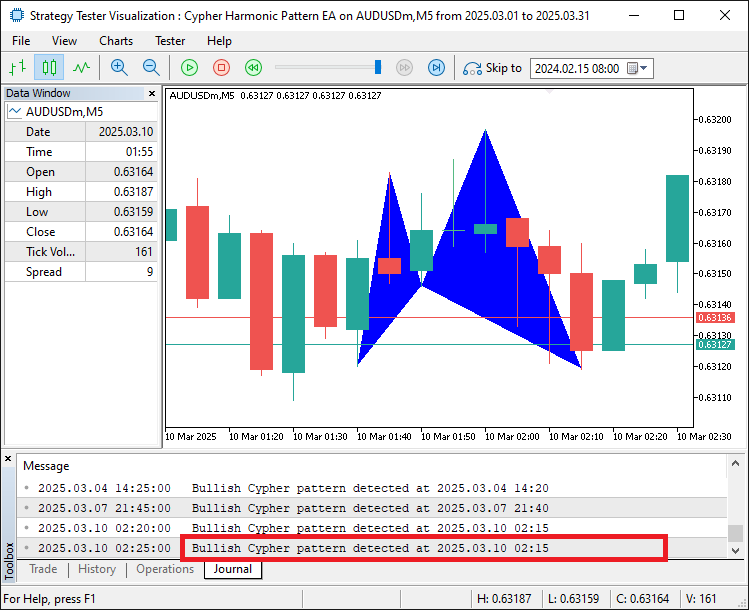
Desde la imagen, podemos ver que podemos mapear y visualizar correctamente el patrón detectado. Ahora necesitamos continuar mapeando las líneas de tendencia para hacerlas completamente visibles dentro de los límites y agregarles etiquetas para una identificación más fácil de los niveles.
//--- 2. Draw six trend lines connecting the swing points
DrawTrendLine(ObjectPrefix + "_Line_XA", PointX.TimeOfSwing, PointX.PriceAtSwing, PointA.TimeOfSwing, PointA.PriceAtSwing, clrBlack, 2, STYLE_SOLID);
DrawTrendLine(ObjectPrefix + "_Line_AB", PointA.TimeOfSwing, PointA.PriceAtSwing, PointB.TimeOfSwing, PointB.PriceAtSwing, clrBlack, 2, STYLE_SOLID);
DrawTrendLine(ObjectPrefix + "_Line_BC", PointB.TimeOfSwing, PointB.PriceAtSwing, PointC.TimeOfSwing, PointC.PriceAtSwing, clrBlack, 2, STYLE_SOLID);
DrawTrendLine(ObjectPrefix + "_Line_CD", PointC.TimeOfSwing, PointC.PriceAtSwing, PointD.TimeOfSwing, PointD.PriceAtSwing, clrBlack, 2, STYLE_SOLID);
DrawTrendLine(ObjectPrefix + "_Line_XB", PointX.TimeOfSwing, PointX.PriceAtSwing, PointB.TimeOfSwing, PointB.PriceAtSwing, clrBlack, 2, STYLE_SOLID);
DrawTrendLine(ObjectPrefix + "_Line_BD", PointB.TimeOfSwing, PointB.PriceAtSwing, PointD.TimeOfSwing, PointD.PriceAtSwing, clrBlack, 2, STYLE_SOLID);

//--- 3. Draw labels for each swing point (X, A, B, C, D)
double LabelOffset = 15 * SymbolInfoDouble(_Symbol, SYMBOL_POINT); //--- Offset in points for label placement
DrawTextLabel(ObjectPrefix + "_Label_X", "X", PointX.TimeOfSwing, PointX.PriceAtSwing + (PointX.IsSwingHigh ? LabelOffset : -LabelOffset), clrBlack, 11, PointX.IsSwingHigh);
DrawTextLabel(ObjectPrefix + "_Label_A", "A", PointA.TimeOfSwing, PointA.PriceAtSwing + (PointA.IsSwingHigh ? LabelOffset : -LabelOffset), clrBlack, 11, PointA.IsSwingHigh);
DrawTextLabel(ObjectPrefix + "_Label_B", "B", PointB.TimeOfSwing, PointB.PriceAtSwing + (PointB.IsSwingHigh ? LabelOffset : -LabelOffset), clrBlack, 11, PointB.IsSwingHigh);
DrawTextLabel(ObjectPrefix + "_Label_C", "C", PointC.TimeOfSwing, PointC.PriceAtSwing + (PointC.IsSwingHigh ? LabelOffset : -LabelOffset), clrBlack, 11, PointC.IsSwingHigh);
DrawTextLabel(ObjectPrefix + "_Label_D", "D", PointD.TimeOfSwing, PointD.PriceAtSwing + (PointD.IsSwingHigh ? LabelOffset : -LabelOffset), clrBlack, 11, PointD.IsSwingHigh);

//--- 4. Draw a central label to identify the pattern
datetime CenterTime = (PointX.TimeOfSwing + PointB.TimeOfSwing) / 2;  //--- Middle time between X and B
double CenterPrice = PointD.PriceAtSwing;                            //--- Place it at D’s price level
if(ObjectCreate(0, ObjectPrefix + "_Label_Center", OBJ_TEXT, 0, CenterTime, CenterPrice)) {
   ObjectSetString(0, ObjectPrefix + "_Label_Center", OBJPROP_TEXT, "Cypher"); //--- Label as "Cypher"
   ObjectSetInteger(0, ObjectPrefix + "_Label_Center", OBJPROP_COLOR, clrBlack);
   ObjectSetInteger(0, ObjectPrefix + "_Label_Center", OBJPROP_FONTSIZE, 11);
   ObjectSetString(0, ObjectPrefix + "_Label_Center", OBJPROP_FONT, "Arial Bold");
   ObjectSetInteger(0, ObjectPrefix + "_Label_Center", OBJPROP_ALIGN, ALIGN_CENTER);
}
Continuamos el proceso de visualización para ilustrar aún más el patrón Cypher en el gráfico. Llamamos a la función "DrawTrendLine" seis veces para dibujar líneas negras sólidas que conectan los puntos de oscilación, cada una nombrada con "ObjectPrefix" más un sufijo único (por ejemplo, "_Line_XA"). Estas líneas conectan «Punto X» con «Punto A», «Punto A» con «Punto B», «Punto B» con «Punto C», «Punto C» con «Punto D», «PuntoX» con «PuntoB» y «PuntoB» con «PuntoD» utilizando sus respectivos valores «TimeOfSwing» y «PriceAtSwing», con un grosor de línea de 2 y STYLE_SOLID para una clara delimitación de la estructura del patrón.
A continuación, añadimos etiquetas de texto para cada punto de oscilación calculando «LabelOffset» como 15 veces el tamaño del punto del símbolo, recuperado mediante la función SymbolInfoDouble con SYMBOL_POINT, para colocar las etiquetas de forma adecuada. Llamamos a la función «DrawTextLabel» cinco veces para etiquetar «PointX», «PointA», «PointB», «PointC» y «PointD» con nombres como «ObjectPrefix + '_Label_X'» y el texto «X», «A», «B», «C» y «D». Cada etiqueta utiliza los valores «TimeOfSwing» y «PriceAtSwing» del punto ajustados por «LabelOffset» (sumado si «IsSwingHigh» es verdadero, restado si es falso), con color «clrBlack», tamaño de fuente 11, e «IsSwingHigh» determinando la ubicación por encima o por debajo del punto.
Por último, creamos una etiqueta central para identificar el patrón calculando «CenterTime» como la media de «PointX.TimeOfSwing» y «PointB.TimeOfSwing» y estableciendo «CenterPrice» en «PointD.PriceAtSwing». Utilizamos la función ObjectCreate para crear un objeto de texto denominado «ObjectPrefix + '_Label_Center'» de tipo «OBJ_TEXT» en estas coordenadas. Si tiene éxito, lo configuramos con «ObjectSetString» para establecer «OBJPROP_TEXT» en «Cypher» y «OBJPROP_FONT» en «Arial Bold», y con ObjectSetInteger para establecer «OBJPROP_COLOR» en «clrBlack», «OBJPROP_FONTSIZE» en 11 y «OBJPROP_ALIGN» en «ALIGN_CENTER», marcando claramente el patrón en el gráfico. Al compilar, tenemos el siguiente resultado.
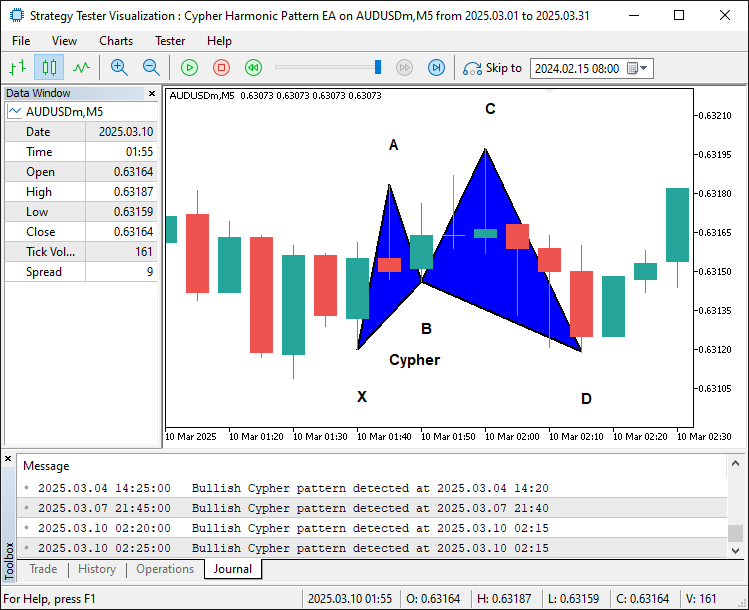
En la imagen podemos ver que hemos añadido los bordes y las etiquetas al patrón, haciéndolo más revelador e ilustrativo. Lo siguiente que debemos hacer es determinar los niveles comerciales para el patrón.
//--- 5. Draw trade levels (entry, take-profits) as dotted lines
datetime LineStartTime = PointD.TimeOfSwing;                    //--- Start at D’s time
datetime LineEndTime = PointD.TimeOfSwing + PeriodSeconds(_Period) * 2; //--- Extend 2 bars to the right
double EntryPrice, StopLossPrice, TakeProfitPrice, TakeProfit1Level, TakeProfit2Level, TakeProfit3Level, TradeDistance;
if(PatternDirection == "Bullish") {
   EntryPrice = SymbolInfoDouble(_Symbol, SYMBOL_ASK); //--- Buy at current ask price
   StopLossPrice = PointX.PriceAtSwing;                //--- Stop-loss at X (below entry for bullish)
   TakeProfitPrice = PointC.PriceAtSwing;              //--- Take-profit at C (target level)
   TakeProfit3Level = PointC.PriceAtSwing;             //--- Highest TP at C
   TradeDistance = TakeProfit3Level - EntryPrice;      //--- Distance to TP3
   TakeProfit1Level = EntryPrice + TradeDistance / 3;  //--- First TP at 1/3 of the distance
   TakeProfit2Level = EntryPrice + 2 * TradeDistance / 3; //--- Second TP at 2/3
} else {
   EntryPrice = SymbolInfoDouble(_Symbol, SYMBOL_BID); //--- Sell at current bid price
   StopLossPrice = PointX.PriceAtSwing;                //--- Stop-loss at X (above entry for bearish)
   TakeProfitPrice = PointC.PriceAtSwing;              //--- Take-profit at C
   TakeProfit3Level = PointC.PriceAtSwing;             //--- Lowest TP at C
   TradeDistance = EntryPrice - TakeProfit3Level;      //--- Distance to TP3
   TakeProfit1Level = EntryPrice - TradeDistance / 3;  //--- First TP at 1/3
   TakeProfit2Level = EntryPrice - 2 * TradeDistance / 3; //--- Second TP at 2/3
}

DrawDottedLine(ObjectPrefix + "_EntryLine", LineStartTime, EntryPrice, LineEndTime, clrMagenta); //--- Entry line
DrawDottedLine(ObjectPrefix + "_TP1Line", LineStartTime, TakeProfit1Level, LineEndTime, clrForestGreen); //--- TP1 line
DrawDottedLine(ObjectPrefix + "_TP2Line", LineStartTime, TakeProfit2Level, LineEndTime, clrGreen);      //--- TP2 line
DrawDottedLine(ObjectPrefix + "_TP3Line", LineStartTime, TakeProfit3Level, LineEndTime, clrDarkGreen);  //--- TP3 line

//--- 6. Draw labels for trade levels
datetime LabelTime = LineEndTime + PeriodSeconds(_Period) / 2; //--- Place labels further right
string EntryLabelText = (PatternDirection == "Bullish") ? "BUY (" : "SELL (";
EntryLabelText += DoubleToString(EntryPrice, _Digits) + ")"; //--- Add price to label
DrawTextLabel(ObjectPrefix + "_EntryLabel", EntryLabelText, LabelTime, EntryPrice, clrMagenta, 11, true);

string TP1LabelText = "TP1 (" + DoubleToString(TakeProfit1Level, _Digits) + ")";
DrawTextLabel(ObjectPrefix + "_TP1Label", TP1LabelText, LabelTime, TakeProfit1Level, clrForestGreen, 11, true);

string TP2LabelText = "TP2 (" + DoubleToString(TakeProfit2Level, _Digits) + ")";
DrawTextLabel(ObjectPrefix + "_TP2Label", TP2LabelText, LabelTime, TakeProfit2Level, clrGreen, 11, true);

string TP3LabelText = "TP3 (" + DoubleToString(TakeProfit3Level, _Digits) + ")";
DrawTextLabel(ObjectPrefix + "_TP3Label", TP3LabelText, LabelTime, TakeProfit3Level, clrDarkGreen, 11, true);
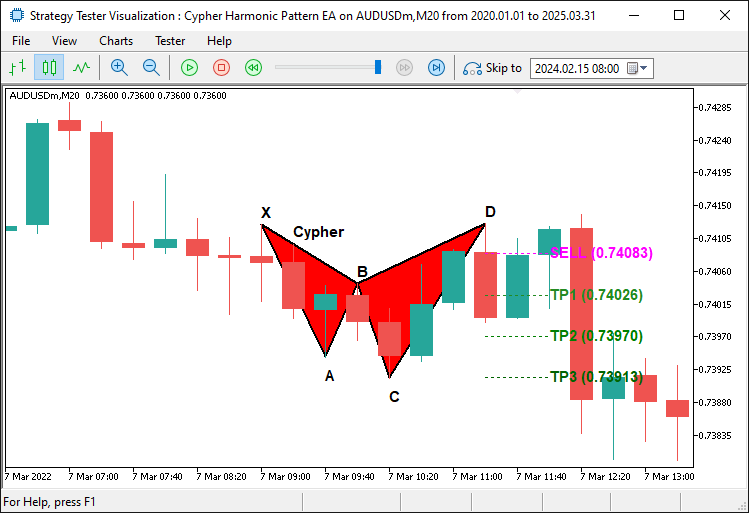
Aquí, continuamos visualizando los niveles comerciales para el patrón Cypher dibujando líneas de puntos y etiquetas. Establecemos «LineStartTime» en «PointD.TimeOfSwing» y «LineEndTime» en dos barras más allá de este utilizando la función PeriodSeconds multiplicada por 2, definiendo así el intervalo de tiempo para las líneas horizontales.
Para un patrón «alcista» (cuando «PatternDirection» es «Bullish»), establecemos «EntryPrice» en el precio de venta actual mediante SymbolInfoDouble con SYMBOL_ASK, «StopLossPrice» en «PointX. PriceAtSwing», «TakeProfitPrice» y «TakeProfit3Level» en «PointC.PriceAtSwing», calculamos «TradeDistance» como «TakeProfit3Level» menos «EntryPrice» y calculamos «TakeProfit1Level» y «TakeProfit2Level» como un tercio y dos tercios de «TradeDistance» añadidos a «EntryPrice» .
Para un patrón bajista, utilizamos SYMBOL_BID para «EntryPrice», establecemos «StopLossPrice» y «TakeProfit3Level» de forma similar, calculamos «TradeDistance» como «EntryPrice» menos «TakeProfit3Level», y restamos un tercio y dos tercios de «TradeDistance» de «EntryPrice» para «TakeProfit1Level» y «TakeProfit2Level».
A continuación, llamamos cuatro veces a la función «DrawDottedLine» para dibujar líneas horizontales: «ObjectPrefix + '_EntryLine'» en «EntryPrice» en «clrMagenta», y «ObjectPrefix + '_TP1Line'», «ObjectPrefix + '_TP2Line'», «ObjectPrefix + '_TP3Line'» en «TakeProfit1Level», «TakeProfit2Level» y «TakeProfit3Level» en «clrForestGreen», «clrGreen» y «clrDarkGreen», respectivamente, desde «LineStartTime» hasta «LineEndTime».
Para el etiquetado, establecemos «LabelTime» en «LineEndTime» más la duración de medio compás utilizando «PeriodSeconds». Creamos «EntryLabelText» como «BUY » o («SELL») basándonos en «PatternDirection», añadiendo «EntryPrice» formateado por «DoubleToString» con «_Digits», y llamamos a «DrawTextLabel» para «ObjectPrefix + '_EntryLabel'» en «EntryPrice» en «clrMagenta».
Del mismo modo, definimos «TP1LabelText», «TP2LabelText» y «TP3LabelText» con «TakeProfit1Level», «TakeProfit2Level» y «TakeProfit3Level», llamando a «DrawTextLabel» para cada uno en sus respectivos niveles en «clrForestGreen», «clrGreen» y «clrDarkGreen», todos con tamaño de fuente 11 y colocados encima del precio, lo que mejora la claridad del nivel de negociación. Aquí está el resultado.
Patrón bajista:
Patrón alcista:
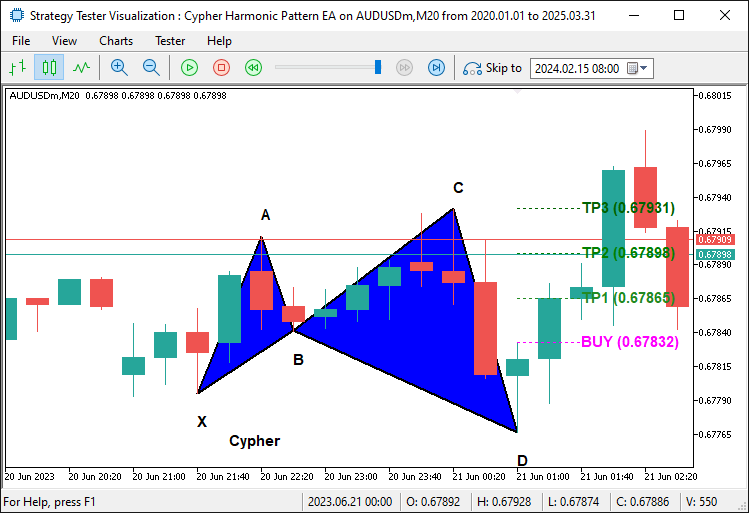
En las imágenes podemos observar que hemos mapeado correctamente los niveles comerciales. Lo que necesitamos hacer ahora es iniciar las posiciones comerciales reales y eso es todo.
//--- **Trading Logic**
//--- Check if trading is allowed and no position is already open
if(TradingEnabled && !PositionSelect(_Symbol)) {
   //--- Place a buy or sell order based on pattern type
   bool TradeSuccessful = (PatternDirection == "Bullish") ?
      obj_Trade.Buy(TradeVolume, _Symbol, EntryPrice, StopLossPrice, TakeProfitPrice, "Cypher Buy") :
      obj_Trade.Sell(TradeVolume, _Symbol, EntryPrice, StopLossPrice, TakeProfitPrice, "Cypher Sell");
   //--- Log the result of the trade attempt
   if(TradeSuccessful)
      Print(PatternDirection, " order opened successfully.");
   else
      Print(PatternDirection, " order failed: ", obj_Trade.ResultRetcodeDescription());
}

//--- Force the chart to update and show all drawn objects
ChartRedraw();
Aquí, implementamos la lógica comercial para ejecutar operaciones para el patrón Cypher cuando se cumplen las condiciones. Comprobamos si «TradingEnabled» es verdadero y si no hay ninguna posición abierta para el símbolo actual utilizando la función PositionSelect con _Symbol, lo que garantiza que las operaciones solo se realicen cuando estén permitidas y no existan posiciones conflictivas. Si se cumplen ambas condiciones, utilizamos un operador ternario para realizar una operación basada en «PatternDirection»: para un patrón «alcista», llamamos a la función «obj_Trade. Buy» con los parámetros «TradeVolume», _Symbol, «EntryPrice», «StopLossPrice», «TakeProfitPrice» y un comentario «Cypher Buy», mientras que para un patrón bajista, llamamos a «obj_Trade. Sell» con los mismos parámetros, pero con un comentario «Cypher Sell», y almacenamos el resultado en «TradeSuccessful».
A continuación, registramos el resultado utilizando la función Print, mostrando «PatternDirection» y «orden abierta correctamente» si «TradeSuccessful» es verdadero, o «orden fallida» con la descripción del error de «obj_Trade.ResultRetcodeDescription» si es falso. Por último, llamamos a la función ChartRedraw para forzar la actualización del gráfico de MetaTrader 5, asegurándonos de que todos los objetos dibujados, como triángulos, líneas y etiquetas, sean visibles inmediatamente para el usuario.
Por último, solo tenemos que eliminar los patrones del gráfico cuando eliminemos el programa.
//+------------------------------------------------------------------+
//| Expert deinitialization function                                 |
//+------------------------------------------------------------------+
//--- Runs when the EA stops (e.g., removed from chart)
void OnDeinit(const int reason) {
   //--- Remove all objects starting with "CY_" (our Cypher pattern objects)
   ObjectsDeleteAll(0, "CY_");
}
Dentro del controlador de eventos OnDeinit, utilizamos la función ObjectsDeleteAll para eliminar todos los objetos del gráfico cuyos nombres comienzan con el prefijo «CY_», lo que garantiza que todas las visualizaciones relacionadas con patrones Cypher, como triángulos, líneas de tendencia y etiquetas, se borren del gráfico, manteniendo un espacio de trabajo limpio cuando el sistema ya no está activo. Tras la compilación, tenemos el siguiente resultado.
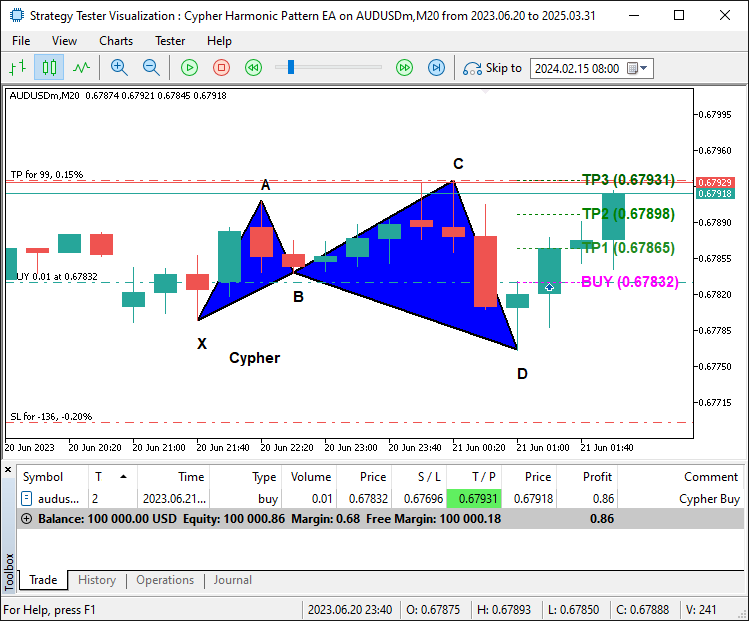
En la imagen, podemos ver que trazamos el patrón Cypher y aún podemos negociarlo en consecuencia una vez que se confirma, logrando así nuestro objetivo de identificar, trazar y negociar el patrón. Lo que queda es realizar pruebas retrospectivas del programa, y eso se aborda en la siguiente sección.
Pruebas retrospectivas y optimización
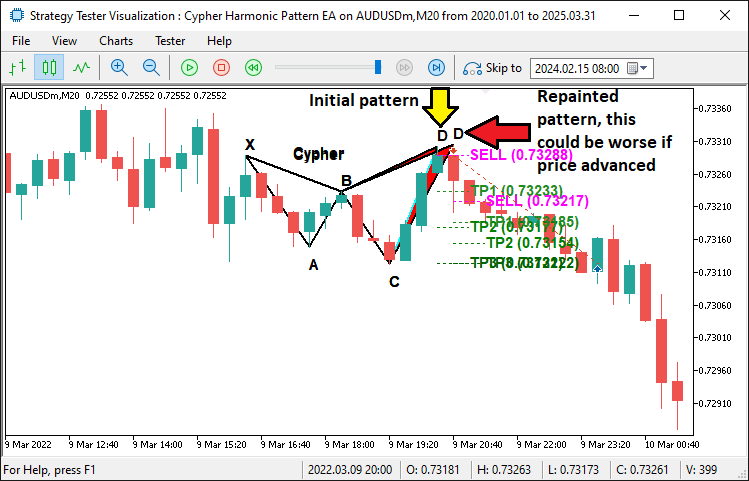
Durante las pruebas retrospectivas iniciales, identificamos un problema crítico: el sistema era propenso a repintar patrones. El repintado se produjo cuando un patrón Cypher parecía válido en una barra, pero cambió o desapareció al llegar nuevos datos de precios, lo que dio lugar a señales de trading poco fiables. Este problema provocó falsos positivos, en los que se ejecutaron operaciones basadas en patrones que posteriormente resultaron ser inválidos, lo que afectó negativamente al rendimiento. He aquí un ejemplo de lo que queremos decir.
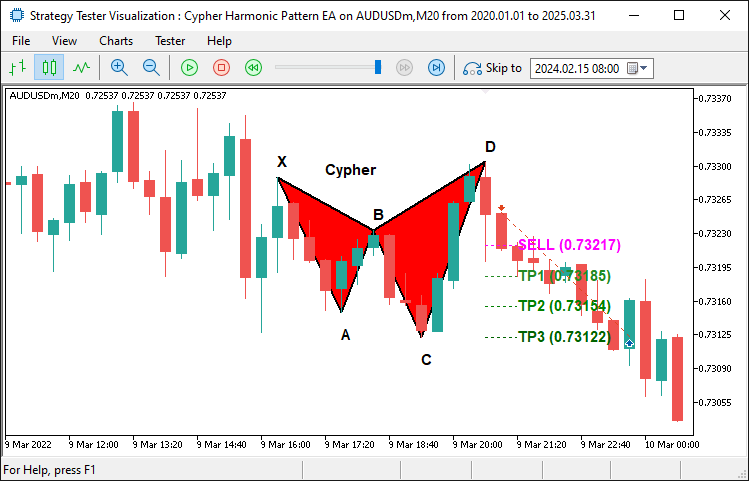
Para solucionar esto, implementamos un mecanismo de bloqueo de patrones, utilizando las variables globales «g_patternFormationBar» y «g_lockedPatternX» para bloquear el patrón en el momento de la detección y confirmarlo en la siguiente barra, asegurando que el punto de oscilación X se mantenga constante. Esta corrección redujo significativamente el repintado, tal y como confirmaron las pruebas posteriores, que mostraron una detección de patrones más estable y menos operaciones no válidas. Aquí hay un fragmento de código de ejemplo para bloquear el patrón y asegurarnos de esperar hasta que sea estable antes de operar con él.
//--- If the pattern has changed, update the lock
g_patternFormationBar = CurrentBarIndex;
g_lockedPatternX = PointX.TimeOfSwing;
Print("Cypher pattern has changed; updating lock on bar ", CurrentBarIndex, ". Waiting for confirmation.");
return;
Añadimos una lógica de confirmación para esperar siempre hasta que el patrón se confirme y se estabilice durante un bar extra, de modo que no entremos en la posición antes de tiempo y nos demos cuenta de que es el inicio de la formación del patrón. Después de añadir el patrón de bloqueo, podemos ver que el problema ya está resuelto.
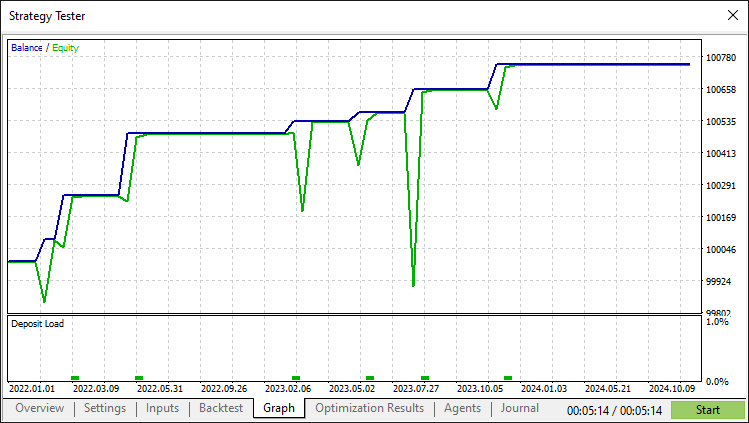
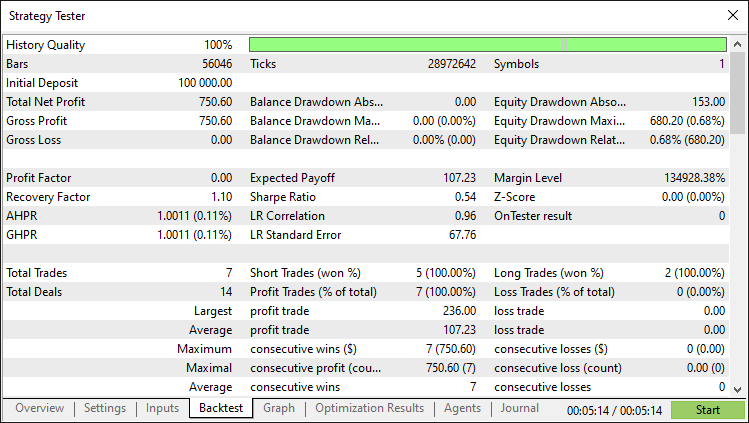
Tras la corrección y las exhaustivas pruebas retrospectivas, obtenemos los siguientes resultados.
Gráfico de prueba retrospectiva:
Informe de prueba retrospectiva:
Conclusión
En conclusión, hemos desarrollado con éxito un asesor experto MetaQuotes Language 5 que detecta y opera con precisión el patrón armónico Cypher. Al integrar la detección de puntos de inflexión, la validación basada en Fibonacci, la visualización integral y un mecanismo de bloqueo de patrones para evitar el repintado, hemos creado un sistema robusto que se adapta dinámicamente a las condiciones del mercado.
Descargo de responsabilidad: Este artículo tiene fines exclusivamente educativos. El trading implica un riesgo financiero significativo y las condiciones del mercado pueden ser impredecibles. Si bien la estrategia descrita proporciona un enfoque estructurado para el comercio armónico, no garantiza la rentabilidad. Es esencial realizar pruebas retrospectivas exhaustivas y una gestión adecuada del riesgo antes de implementar este programa en un entorno real.
Al implementar estas técnicas, podrá perfeccionar sus habilidades en el trading con patrones armónicos, mejorar su análisis técnico y avanzar en sus estrategias de trading algorítmico. ¡Mucha suerte en tu aventura en el mundo del trading!
Traducción del inglés realizada por MetaQuotes Ltd.
Artículo original: https://www.mql5.com/en/articles/17865
Advertencia: todos los derechos de estos materiales pertenecen a MetaQuotes Ltd. Queda totalmente prohibido el copiado total o parcial.
Este artículo ha sido escrito por un usuario del sitio web y refleja su punto de vista personal. MetaQuotes Ltd. no se responsabiliza de la exactitud de la información ofrecida, ni de las posibles consecuencias del uso de las soluciones, estrategias o recomendaciones descritas.

 Algoritmo de optimización caótica — Chaos optimization algorithm (COA)
 Simulación de mercado (Parte 18): Iniciando SQL (I)
 Simulación de mercado (Parte 19): Iniciando SQL (II)
 Del básico al intermedio: Estructuras (VII)

- Aplicaciones de trading gratuitas
- 8 000+ señales para copiar
- Noticias económicas para analizar los mercados financieros
Usted acepta la política del sitio web y las condiciones de uso
Hola, gran artículo. Gracias por su duro trabajo. ¿Podrías compartir el archivo de código completo? ¿Adjuntarlo al final del artículo?
Muchas gracias. ¿Lo has comprobado? Gracias.
Gracias por compartir este artículo. Código útil para implementar otros patrones de armónicos.
Claro. Bienvenido.